GT18410 - Freezer ELECTROLUX - Free user manual and instructions
Find the device manual for free GT18410 ELECTROLUX in PDF.


User questions about GT18410 ELECTROLUX
0 question about this device. Answer the ones you know or ask your own.
Ask a new question about this device
Download the instructions for your Freezer in PDF format for free! Find your manual GT18410 - ELECTROLUX and take your electronic device back in hand. On this page are published all the documents necessary for the use of your device. GT18410 by ELECTROLUX.
USER MANUAL GT18410 ELECTROLUX
We were thinking of you when we made this product
text_image
Technical diagram of a box with numbered components for identificationnatural_image
Two wireframe diagrams showing a basket structure with arrows indicating rotation or movement, labeled X and Y (no text or symbols present)natural_image
Hand inserting a card into a device panel (no text or symbols visible)
Welcome to the world of Electrolux!
Thank you for choosing a first class product from Electrolux, which hopefully will provide you with lots of pleasure in the future. The Electrolux ambition is to offer a wide variety of quality products that make your life more comfortable. You find some examples on the cover in this manual. Please take a few minutes to study this manual so that you can take advantage of the benefits of your new machine. We promise that it will provide a superior User Experience delivering Ease-of-Mind. Good luck!
The following symbols are used in this user manual:

Important information concerning your personal safety and information on how to avoid damaging the appliance

General information and tips

Environmental information

Disposal
By ensuring this product is disposed of correctly, you will help prevent potential damaging consequences for the environment and human health.
The symbol on the product indicates that this product may not be treated as household waste, but must be taken instead to a suitable collection point for the recycling of electrical and electronic equipment. For more detailed information about recycling of this product, please contact your local city office, your household waste disposal service or the shop where you purchased the appliance.
Contents
Safety Information ....19
Product Description 19
Control panel 19
Display 20
Installation 20
Electrical connection....20
First use 20
Switch on-off 21
Switch on the freezer 21
Switch off the freezer 21
Daily use 21
Temperature adjustment .....21
Super Freeze function .....21
Drinks Chill function 22
Eco Mode function .....22
Child Lock function 22
Alarm 22
Storage baskets 23
Security lock 23
Opening and closing the lid . . . . . . . . . . . . . . . . . . . . . . . . . . . . . . . . . . . . . . . . . . . . . . . . . . . . . . . . . . . . 23
Care and Cleaning 23
Defrosting the freezer 23
Cleaning 23
When not in use 24
Changing the light bulb 24
Helpful hints and tips....24
Freezing food 24
Food storage 24
In the case of a power failure or breakdown 25
What to do if....25
Service or repair 26
Technical Data 27

Safety Information
Before installing and using the appliance read this user's instruction book carefully. It contains safety precautions, hints, information and ideas. If the freezer is used in compliance with the instructions written, it will operate properly and provide you with greatest satisfaction.
These warnings are provided in the interest of safety. You must read them carefully before installing or using the appliance.
- Use the freezer only for storing frozen food, freezing fresh food and making ice cubes.
- Do not eat ice cubes or ice lollies immediately after taking them out of the freezer, since they may cause frost burns.
- Do not allow children to play or hide inside the freezer, since they may become trapped inside and suffocate.
- Do not store glass containers with liquids in the freezer, since they may burst.
- Ensure that the freezer is not resting on the power supply cable.
- Before servicing or cleaning, always unplug the appliance or disconnect the power supply.
- Do not use other electrical appliances (such as ice cream makers) inside the appliance.
- Your appliance contains an environmentally friendly natural gas, isobuthane (R600a). Caution is required however, since isobuthane is flammable. Therefore it is essential to ensure that the refrigerant pipelines are not damaged.
It is most important that this instruction book should be retained with the appliance for future reference.
Product Description
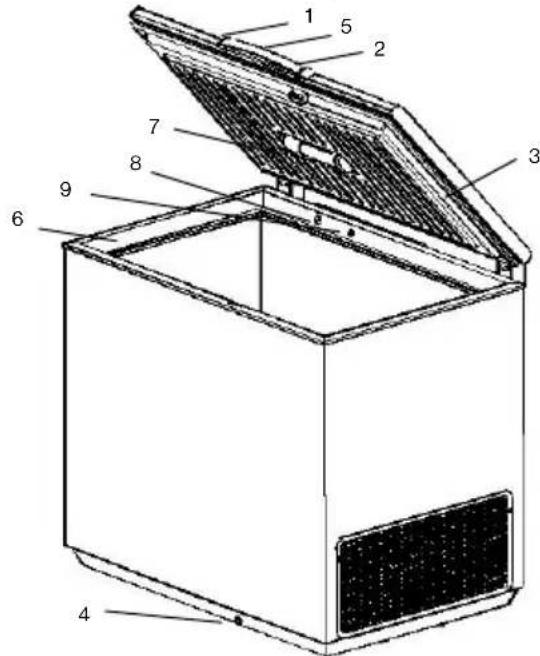
text_image
Technical diagram of a box with numbered components for identification- Lid handle
- Security lock
- Seal
- Defrost water drain
- Control panel
- Upper edge
- Light
- Valve: easy re-opening of lid
- Low-frost system: reduces ice-build-up in the chest freezer by up to 80 percent
Control panel
flowchart
graph TD
    A["A"] --> B["B"]
    B --> C["C"]
    C --> D["D"]
    D --> E["E"]
    E --> F["Processing Box"]
    style A fill:#f9f,stroke:#333
    style B fill:#ccf,stroke:#333
    style C fill:#cfc,stroke:#333
    style D fill:#fcc,stroke:#333
    style E fill:#cff,stroke:#333
    style F fill:#ffc,stroke:#333
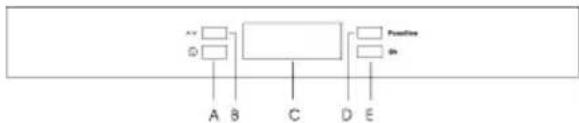
A - Appliance ON/OFF button
B - Temperature regulation button
C - Display
D - Function button
E - Confirmation button
Display
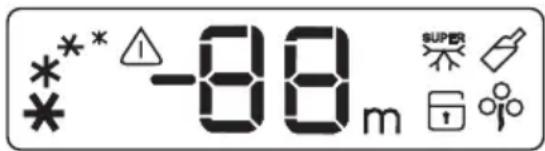
text_image
*** -88m SUPPER * * ** Indicates the appliance is switched on, speeds up when the Super Freeze function is activated.
Indicates that the freezer temperature is not sufficiently low or that the lid has been left open.
Indicates the Super Freeze function is activated for large quantities for fresh food and switches off the beeping alarm.
Indicates the Drinks Chill fuction is activated.
Indicates the Eco Mode function is activated.
Indicates the Child Lock function is activated.
-88 Indicates the temperature inside the freezer.
88. Indicates the number of minutes drinks are to be chilled for, when the Drinks Chill function in active.
Installation
- Wait at least 2 hours before connecting the freezer to the power supply to ensure the refrigerant circuit is fully efficient.
- Install the freezer in a dry, well ventilated room. Avoid locations near a source of heat or in direct sunlight.
- The room temperature should correspond to the climatic classification for which the freezer was designed, see chapter "Technical data".
- Place the freezer horizontally on a firm surface, resting on all four feet.
- For optimum operation and in order to
avoid damage when the lid is opened, leave a space of at least 5 cm from the rear wall and 5 cm at the sides.
- Before connecting the freezer to the power supply, ensure that the voltage corresponds to that indicated in chapter "Technical data" under "Voltage".

Danger!
- Ensure that the freezer is not resting on the power supply cable.
- Do not remove the power supply cable by pulling on its lead, particularly when the freezer is being pulled out of its niche.
- The power supply cable may only be replaced by a qualified service personnel.
- Ensure that the power plug is not squashed or damaged by the back of the freezer.
- There must be adequate ventilation around the appliance.
- Any electrical work required to install this appliance should be carried out by a qualified electrician.
First use
- Before first use, the freezer should be cleaned inside, see chapter "Care and cleaning".
- Plug in the appliance.
- Press button (A) to switch the appliance on.
- The display will illuminate.
- The symbol ( A ) will flash on the display and the alarm will beep, since the temperature inside the freezer is not yet sufficiently low for food storage.
- Press button (E) to switch the alarm off. The symbol ( ) will normally stop flashing after several hours.
- Only place food inside the freezer once the symbol ( ) has gone. The temperature of the freezer is set to reach -18°C, which is the optimal storage temperature as set in the Eco Mode ( )
Switch on-off
Switch on the freezer
- Press button (A) to switch the appliance on.
• The display comes on.
Switch off the freezer
- Press button (A) for more than one second until the countdown "3-2-1" disappears and you hear a sequence of beeps.
• The display goes off.
Warning! Do not place objects on the control panel, as they might accidentally switch off the freezer.
Daily use
Temperature adjustment
The temperature may be adjusted between -15°C and -24°C. We suggest setting the freezer tem+G41perature to -18°C, which guarantees proper freezing and conservation of frozen food.
- Press button (B) several times until the desired temperature is reached.
- The temperature on the display flashes and indicates the temperature set.
- Press button (E) to confirm the desired temperature. You will hear a beep.
- The temperature on the display stops flashing again and indicates the temperature inside the freezer.
- The newly adjusted temperature is reached after several hours. During this time it is normal that the temperature displayed is different from the temperature set.
Attention! Differences between the temperature displayed and the temperature set are normal, especially when:
- The temperature setting has recently been adjusted.
- The lid has been left open for a long time.
- Warm food has been placed in the freezer.
- The Super Freeze function is activated.
Super Freeze function
If more than 3-4 kg of fresh food is to be frozen, the freezer needs to be pre-cooled.
- At least 24 hours before placing fresh food in the freezer, press button (D) several times until the corresponding symbol (flashes on the display.
- Press button (E) within a few seconds to confirm the Super Freeze activation. The symbol (SUPER) stops flashing, you will hear a beep and the animation on the display speeds up.
- Place the food in the freezer. After 52 hours this function will automatically stop and the freezer will return to normal storage temperature. This function can be de-activated at any time by pressing button (D) until the corresponding symbol ( ) flashes on the display again and then by pressing button (E) to confirm the de-activation.
Drinks Chill function
Use this function as a safety warning when placing bottles in the freezer, as they may burst when forgotten in the appliance.
- Press button (D) several times until the corresponding symbol (A) flashes on the display.
- Press button (E) within a few seconds to confirm the Drinks Chill activation. The symbol (✗) stops flashing and you will hear a beep.
- Press button (B) several times or continuously to set the desired number of minutes (from 1 to 90 minutes).
- Place the drinks in the freezer.
- At the end of the set time, the alarm will beep and the symbol ( ) and the time will flash on the display.
- Press button (E) to switch the alarm off.
- Remove the drinks from the freezer. It is possible to de-activate this function at any time by pressing button (D) until the corresponding symbol (A) flashes on the display again and then by pressing button (E) to confirm the de-activation.
Eco Mode function
Use this function to automatically set the freezer temperature to its best level (- 18°C), which guarantees proper conservation of frozen food at the lowest energy consumption.
- Press button (D) several times until the corresponding symbol ( ◦ flashes on the display.
- Press button (E) within a few seconds to confirm the Eco Mode activation. The symbol (✗) stops flashing and you will hear a beep. It is possible to de-activate this function at any time by pressing button (B) to change the selected temperature and then by pressing button (E) to confirm the selection.
Child Lock function
This function prevents children from playing with the buttons on the control panel. Any possible pressing of the buttons will have no effect.
- Press button (D) several times until the corresponding symbol (flashes on the display.
- Press button (E) within a few seconds to confirm the Child Lock activation. The symbol ( ) stops flashing and you will hear a beep.
- The buttons on the control panel are now locked. It is possible to de-activate this function at any time by pressing button (D) until the corresponding symbol (☐) flashes on the display again and then by pressing button (E) to confirm the de-activation.
Alarm
If the freezer temperature is not sufficiently low, the alarm will beep and the symbol ( ⚠ ) and the temperature indication will flash on the display. When normal conditions are restored, only the freezer temperature continues to flash. The highest temperature the freezer reached is memorised.
- Press button (E) to switch the alarm off. The highest temperature the freezer reached then appears on the display for some seconds. Then the display returns to showing the temperature of the freezer.
- The symbol ( remains on as long as the temperature in the freezer is higher than the temperature set.
The alarm can be due to:
- Insertion of a large amount of fresh food.
- Opening the lid too long.
- A defect in the system, see chapter "What to do if...".
Storage baskets
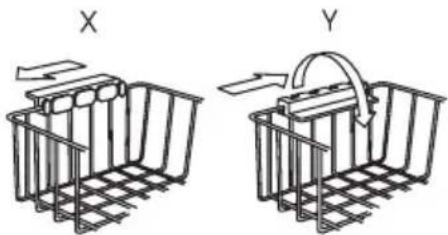
- Hang the baskets on the upper edge (X) or place the stackable baskets inside the freezer (Y).
- Turn and fix the handles for these two positions, as shown in the drawings.
natural_image
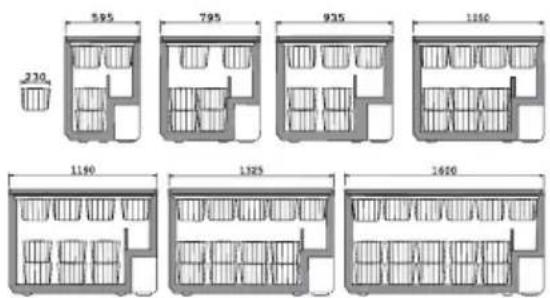
Two hand-drawn diagrams of a basket structure, labeled X and Y, showing different arrangements (no text or symbols present)Spare baskets can be obtained from your local Service Force Centre or from the Electrolux website (depending on country). The illustrations on this page show how many baskets can be placed in the various freezer models.
text_image
230 595 795 935 1160 1160 1325 1600Security lock
- Push the key in the lock while turning. Spare keys can be obtained from your local Service Force Centre.
Important! Keep the keys out of reach of children. Before disposing of an old freezer remove the keys.
Opening and closing the lid
As the lid is fitted with a tightly closing seal, it will not re-open easily immediately after closing.
- Wait a few minutes before re-opening the lid. A valve will allow the lid to be
re-opened easily. Never pull the handle violently.
Care and Cleaning
Defrosting the freezer
- Disconnect the appliance from the power supply.
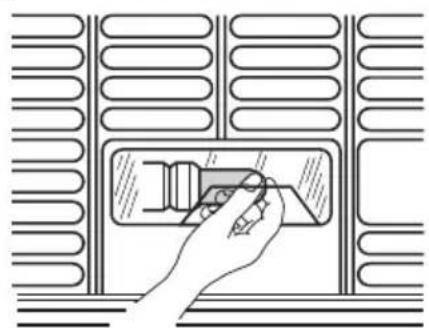
- Remove all loose accessories and the vented floor, as shown on the illustration.
- Use a damp cloth to clean your freezer. Use hot water and a mild, non-aromatic detergent.
- Clean the loose accessories and the vented floor, before replacing them again.
Important! Never use strong detergents, scouring powder or aromatic detergents to clean your freezer.
Cleaning
The best time to clean your freezer is after defrosting.
- Disconnect the appliance from the power supply and remove all loose accessories.
- Use a damp cloth to clean your freezer. Use hot water and a mild, non-aromatic detergent.
- Clean the loose accessories, before replacing them again.
Important! Never use strong detergents, scouring powder or aromatic detergents to clean your freezer.
When not in use
- Disconnect the appliance from the power supply.
- Remove all food from the freezer.
- Clean the freezer as described above.
- Leave the lid slightly open.
Changing the light bulb
- Disconnect the appliance from the power supply.
- Unscrew the bulb, and replace it with a new bulb (max. 15W).
- Plug in the appliance.
natural_image
Illustration of a hand inserting a component into a device panel, with no visible text or symbols.Helpful hints and tips
Freezing food
- Before freezing, fresh food must be packed in airtight and moisture-proof packaging to prevent it from drying out.
- Only use fresh food of the best quality.
- Always leave hot food to cool to room temperature before placing in the freezer.
- Divide food into small portions before freezing; this ensures that freezing is more rapid, and that you only need to defrost the amount needed for immediate consumption.
- Mark the freezer packaging with the date of freezing.
- Place fresh food for freezing close to the cold sides of the freezer, making sure that it is not in contact with the frozen food already in the freezer.
- Frozen food can be stored anywhere inside the freezer, but should be kept at least 5 mm below the upper edge.
If freezing is too slow, the quality of the food being frozen deteriorates. The amount of fresh food (expressed in kg) that can be frozen in 24 hours is indicated in the chapter "Technical data" under "Freezing capacity".
Food storage
- For fresh frozen food, please refer to the storage period table underneath.
- For purchased frozen food, never exceed the expiry date.
- When you buy frozen food, make sure that it has been stored at the correct temperature. Do not buy products which have wet or damaged packaging. Place purchased products in your freezer as quickly as possible. We recommend using an insulated bag to bring such products home with you.
Important! Remember that fully or partially defrosted food must not be re-frozen. However, dishes which have been cooked using defrosted food may be frozen.
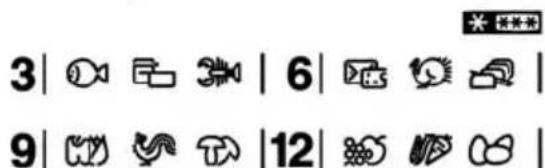
text_image
3 | 🎯 📊 3 | 6 | 🎯 🎯 9 | 🎯 🎯 📊 12 | 🎯 🎯In the case of a power failure or breakdown
- Do not open the lid.
Important! If the power has been off for longer that the value shown in the chapter "Technical data" under "Hold-over time", the defrosted food must be consumed quickly or cooked immediately and then refrozen (after cooling).
What to do if...
Try the solutions suggested here first to avoid the cost of an unnecessary service call.
Your freezer will not operate
• Is the power supply cord unplugged?
- Has a household fuse blown?
• Is there a power failure?
- Is the temperature control set to the Off position?
The alarm remains audible and/or the red light/symbol ( ) is on
- Is the lid not closed completely? See underneath.
- Is the temperature control set correctly for the surrounding conditions?
- Is the freezer too close to a source of heat?
The inside light does not work
• Is the power supply cord unplugged?
- Is the light bulb loose in the socket or burned out?
The motor seems to run too much
- Is the lid not closed completely? See underneath.
- Is the room temperature hotter than normal?
- Has a large amount of fresh food just been added to the freezer?
• Is the lid opened often? - Is the temperature control set correctly for the surrounding conditions?
• Is the lid seal damaged or deformed? - Is there enough air circulation space around the freezer?
- Is the Super Freeze function activated accidentally?
Temperature is too warm
- Has a large amount of food just been added to the freezer?
• Is the lid opened often?
- Is the temperature control set correctly for the surrounding conditions?
The lid will not close completely
- Is there excessive frost or a package preventing the lid from closing?
- Are food packages blocking the lid?
• Is the lid seal dirty or sticky? - Does the freezer wobble or seem unstable?
The lid is difficult to open
• Is the lid seal dirty or sticky?
• Is the valve blocked?
If you still need help, please contact your local Sercive Force Centre.
Service or repair
In cases of breakdown or faults, your freezer must be serviced by an authorized Electrolux Service Centre.
Important! Under no circumstances should you attempt to repair the appliance yourself
Technical Data
| Model BMI190 BMI 265 | BMI 390 | GT18410 GT255 GT 368 | 11 | |
| Volume (gross) Liter 189 | 261 | 378 | ||
| Volume (net) | Liter 184 | 255 | 368 | |
| Height without/with roller | Cm | 87,6 | 87,6 | 87,6 |
| Width | Cm | 93,5 | 119 | 160 |
| Depth | Cm | 66,5 | 66,5 66,5 | |
| Weight | Kg | 45 | 57 | 68 |
| Energy consumption /24h | kWh/24h | 0,559 | 0,649 | 0,792 |
| Freezing capacity | kg/24h | 23 | 27 | 29 |
| Hold-over time | Hours | 46 | 50 55 | |
| Rated power | Watt | 75 | 100 | 82 |
| Voltage | Volts | 230 | 230 | 230 |
| Climatic class | SN/N/ST | SN/N/ST | SN/N/ST | |
| Climatic classification | Ambient temperature limits |
| SN from +10°C to +32°C | |
| N from +16°C to +32°C | |
| ST from +18°C to +38°C | |
| T from +18°C to +43°C | |
CE This appliance complies with the following EC Directives:
73/23/EEC of 19.02. 1973 Low-Voltage Directive
89/336/EEC of 03. 05. 1989 (including Amendment Directive 92/31/EEC - EMC Directive)