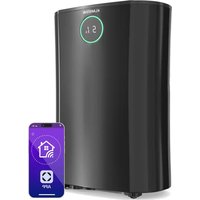
DryFy Pro Smart - Dehumidifier Klarstein - Free user manual and instructions
Find the device manual for free DryFy Pro Smart Klarstein in PDF.


Pick your language and provide your email: we'll send you a specifically translated version.
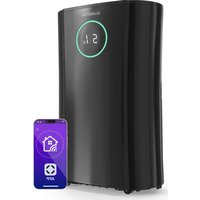
| Product type | Dehumidifier |
| Model | DryFy Pro Smart |
| Brand | Klarstein |
| Dimensions (W x D x H) | 60 x 40 x 30 cm |
| Weight | 15 kg |
| Power supply | 220-240 V ~ 50 Hz |
| Power consumption | 250 W |
| Dehumidification capacity | 20 L/day (30°C, 80% RH) |
| Water tank | 4 L |
| Coverage area | 60 m² |
| Main functions | Dehumidification, ventilation, smart mode, auto shut-off, timer |
| Connectivity | Built-in Wi-Fi, Klarstein Smart app |
| Display | LED with built-in hygrostat |
| Noise level | 45 dB |
| Maintenance and cleaning | Washable filter, removable tank, regular cleaning recommended |
| Safety | Overheat protection, auto shut-off when tank full |
| Spare parts and repairability | Filter, tank, drainage hose available |
| General information | For indoor use, do not use outdoors |
Frequently Asked Questions - DryFy Pro Smart Klarstein
How does the DryFy Pro Smart dehumidifier work?
The unit draws in ambient air, cools it to condense humidity, then expels dry air. The collected water is stored in the tank or drained continuously.
What is the maximum dehumidification capacity?
The capacity is 20 liters per day under standard conditions of 30°C and 80% relative humidity.
What is the water tank capacity?
The tank has a capacity of 4 liters. When full, the unit automatically stops and an indicator lights up.
Can continuous drainage be used?
Yes, you can connect a drainage hose (not included) to the outlet at the back of the unit for continuous drainage.
How to connect the dehumidifier to Wi-Fi?
Download the Klarstein Smart app, create an account, then follow the instructions in the app to pair the unit to your 2.4 GHz Wi-Fi network.
What to do if the app does not find the unit?
Check that the dehumidifier is powered on and Wi-Fi is enabled. Make sure your phone and the unit are on the same network. Restart the app and the unit if necessary.
How to set the timer?
Press the Timer button on the remote control or control panel. Use the arrows to set the delayed shut-off time (from 1 to 24 hours).
How often should the filter be cleaned?
It is recommended to clean the filter every 30 days. Remove it, wash it with lukewarm water, dry it completely before reinstalling.
What is the noise level of the unit?
The noise level is approximately 45 dB, comparable to a quiet refrigerator. It may vary slightly depending on the mode used.
What is the power consumption of the DryFy Pro Smart?
The power consumption is 250 W. In continuous use, this represents about 6 kWh per day, but actual consumption depends on humidity and the chosen mode.
User questions about DryFy Pro Smart Klarstein
0 question about this device. Answer the ones you know or ask your own.
Ask a new question about this device
No questions yet. Be the first to ask one.
Download the instructions for your Dehumidifier in PDF format for free! Find your manual DryFy Pro Smart - Klarstein and take your electronic device back in hand. On this page are published all the documents necessary for the use of your device. DryFy Pro Smart by Klarstein.
USER MANUAL DryFy Pro Smart Klarstein

Manual assistant
Powered by Anthropic
Waiting for your message
Product information
Brand : Klarstein
Model : DryFy Pro Smart
Category : Dehumidifier