
FX 600 - Walkie-talkie LOGICOM - Free user manual and instructions
Find the device manual for free FX 600 LOGICOM in PDF.


| Product type | Walkie-talkie |
| Brand | LOGICOM |
| Model | FX 600 |
| Dimensions (approx.) | 120 x 50 x 30 mm |
| Weight (with batteries) | 150 g |
| Power supply | 3 AAA batteries (not included) |
| Frequency band | PMR446 (446 MHz) |
| Number of channels | 8 channels |
| Maximum range | Up to 10 km in open field |
| Main features | Hands-free (VOX), sound monitoring, energy saving, automatic squelch |
| Hands-free mode | Adjustable voice activation (VOX) |
| Monitor mode | Ambient sound monitoring |
| Energy saving | Built-in standby circuit |
| Display | Backlit LCD screen |
| Buttons | PTT (push-to-talk), volume, channel, VOX, monitor |
| Maintenance and cleaning | Wipe with a soft, dry cloth. Do not use solvents. |
| Safety | Do not use in an explosive atmosphere or near sensitive electronic equipment. |
| Spare parts / repairability | Batteries, removable antenna (standard SMA). Repair only by an authorized technician. |
| Included accessories | Belt clip, quick start guide |
Frequently Asked Questions - FX 600 LOGICOM
User questions about FX 600 LOGICOM
0 question about this device. Answer the ones you know or ask your own.
Ask a new question about this device
Download the instructions for your Walkie-talkie in PDF format for free! Find your manual FX 600 - LOGICOM and take your electronic device back in hand. On this page are published all the documents necessary for the use of your device. FX 600 by LOGICOM.
USER MANUAL FX 600 LOGICOM
Transmitter - Receiver
User manual
Non-contractual photo
Please read this booklet carefully before installing your appliance.
C€0979 ①
CERTIFICATE OF COMPLIANCE
We, Logicom – 74 rue de la Belle Etoile – Z I Paris Nord – B P 58338 – 95941 ROISSY CDG France (Tel: +33 (0)1 48 63 77 64, Fax: +33 (0)1 48 63 82 47) 01.48.63.82.47) Hereby declare that the FX 600Walkie-talkie product (PMR) belonging to the trademark LOGICOM is compliant with the following necessary applicable requirements:
Protection of the user's health and safety.
- EN60950 (2000)
Radio requirements
- EN300296-1 v1.1.1 (2001-03)
EN300296-2 v1.1.1 (2001-03)
EMC Requirement
EN301489-1 v1.4.1 (2002-08)
EN301489-5 v1.3.1 (2002-08)
Compliance with the European Parliament and Council's R&TTE 1999/5/CE directive on users' safety and electromagnetic interference means that the product for which it is intended, is installed and used according to the instructions provided in the user manual.
Any unauthorised alteration to the product shall render this certificate of compliance invalid.
Roissy, 30th January 2006
Bernard Bessis.
(Senior Director)
Contents
1 PRESENTATION OF THE FX 600. 4
2 SAFETY AND GENERAL INFORMATION 4
2.1 Safety and general information 4
2.2 Necessary manual steps 4
3 PRECAUTIONS FOR USE. 5
4 DIAGRAM AND FUNCTIONS. 5
4.1 Icon display key. 6
5 SETTING UP YOUR APPLIANCE. 7
5.1 Installation of the rechargeable Ni-MH battery 7
5.2 Installation of non rechargeable batteries 7
5.3 Battery charge level 7
5.4 Charging the FX 600 battery 7
5.5 Turning the appliance on and off 7
6 USING THE FX 600 8
6.1 SPEAKING AND LISTENING 8
6.2 Setting the volume 8
6.3 Selecting a channel 8
6.4 Channels and Frequencies 8
6.5 Interference eliminator code 9
6.6 Channel search 9
6.7 Group search 9
6.8 Advanced search 10
6.9 Radio broadcast range 10
6.10 Call tone. 10
6.10.1 Setting and transmitting call tones 10
6.10.2 Transmitting an end-of-call tone 11
7 SPECIAL FUNCTIONS: 11
7.1 Energy saving function during calls 11
7.2 Locking the keypad 11
7.3 Removing a channel from the search list 12
7.4 Sound surveillance monitor 12
7.5 Hands Free function 12
7.6 Set the level of sensitivity in hands free mode. 13
7.7 Stopwatch 13
7.8 Energy saving 14
8 TROUBLESHOOTING 14
8.1 The display no longer appears 14
8.2 Problems transmitting or receiving messages 14
8.3 Interference problems 14
8.4 Transmission range problems 14
9 WARRANTY INFORMATION 15
10 CONTACTING THE CUSTOMER CARE SERVICE. 15
1 PRESENTATION OF THE FX 600
FX600 products are intended for family or group use during games and leisure time.
2 SAFETY AND GENERAL INFORMATION
Important safety information and guidelines for optimal use of the FX 600
Please read this information prior to using the FX 600:
2.1 Safety and general information
- Do not open the appliance. All alterations to the appliance are prohibited and shall render the guarantee invalid.
- The transmitted radio frequencies may cause interference to hearing aid devices.
- The appliance should be turned off if near to medical equipment.
- This product should not be used by persons using pacemakers.
- Do not use this appliance whilst driving a vehicle or using industrial appliances.
- Do not use this appliance on board an airplane or near to a Service Station.
- Do not hold the antenna during a transmission.
- Do not use the appliance when the antenna is damaged.
- Turn off the appliance and take out the batteries when you do not intend to use it for a long period of time.
- Do not attempt to charge alkaline batteries
- Only use the battery charger provided The use of an unapproved charger will render the guarantee invalid and could cause damage to the appliance.
- Only use approved accessories to run this appliance.
2.2 Necessary manual steps
- Position the transmitter and the antenna at least 5 centimetres away from your face and speak normally.
Direct the antenna upwards and away from your face.
-
If you are using an accessory to carry your appliance, only use the belt clip specifically intended for this product. During the transmission, take the appliance off the belt to ensure that the antenna is at least 2.5 cm away from your body.
-
Only use the antenna provided. Any accessory, alteration or unauthorised antenna can damage the transmitter and any changes or alterations inexplicitly approved by the party responsible for the compliance could result in removal of the user's right to continue using the equipment.
3 PRECAUTIONS FOR USE
- Never throw the battery or batteries into fire. It is highly probable that this could cause an explosion and/or rejection of highly toxicical products.
- Do not expose the appliance to the sun or cold for extended periods of time.
- Do not immerse the appliance into water nor use it in humid or wet conditions.
- Do not expose the appliance to fire or any other dangerous environments. For example, in service stations or in areas where explosive products are used.
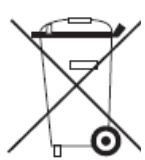
Your product is designed and manufactured with high quality recyclable and reusable materials and components.
This symbol means that all electric and electronic equipment reaching the end of its usable life should be eliminated separately from house waste. We advise you to take this equipment to your local waste recycling/collection centre.
In the European Union, there are special collection systems designed for old electric and electronic goods.
4 Diagram and functions
- Antenna
Allows you to connect to the radio
- Warning light
Stays on during a transmission
Flashes when the radio is turned on.
- The 'Vol-' key
Decreases the volume.
- The PTT key
Starts the transmission.
Validates each function.
- The key
Transfers a tone to other radios connected to the same channel and the same interference code eliminator to indicate that you wish to talk.
- The MENU/ key

To turn the radio on and off
To unlock the keys and select features
from the menu.
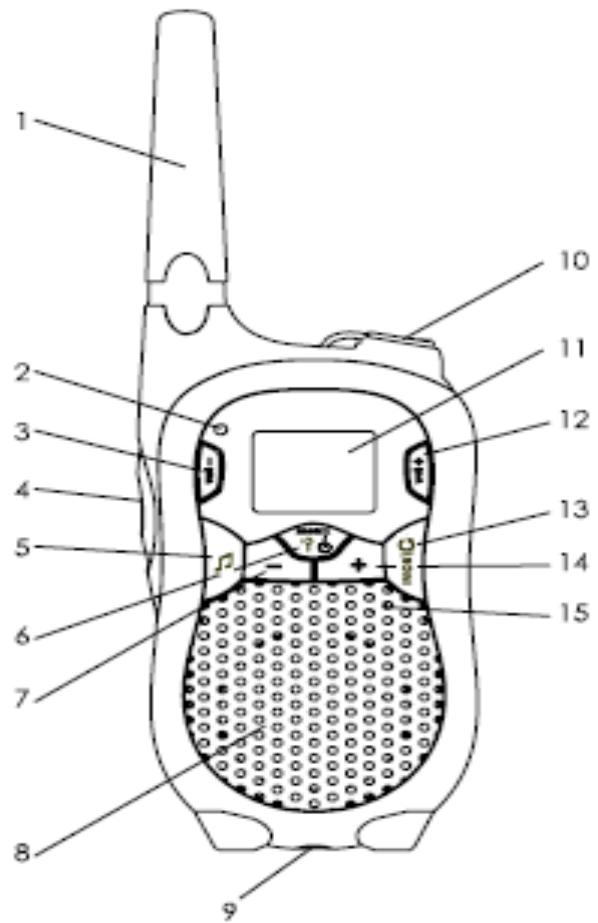
- The

key
To decrease
The channel number
- Interference eliminator code
- Loudspeaker
- Charging desk stand
- Listening Port
- Display screen
- The 'Vol +' key Decreases the volume.
- The MON/ key Checks the activity on channels Searches for a correspondent.
- The + key Increases
The channel number
- Interference eliminator code
- Microphone
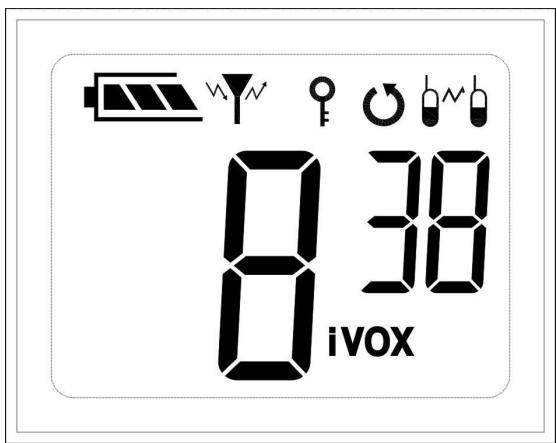
4.1 Icon display key.

Battery charge level
Channel number
Interference eliminator code number
Transmission Power
Keypad locked
Search activated
Confirmation tone activated
Hands Free mode activated.
Sound surveillance monitor mode activated
5 SETTING UP YOUR APPLIANCE
Before using your radio please read this manual carefully to ensure you take full advantage of its functionality and use it safely.
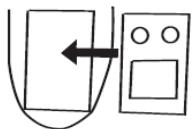
5.1 Installation of the rechargeable Ni-MH battery
- Press the key situated on the back of the appliance and lift the battery latch up to release the battery cover.
- Remove the battery from its protective bag.
Do not disassemble or open the battery.
Insert the Ni-MH battery ensuring that its contacts touch the metal parts of the appliance.
- Reposition the battery cover.

5.2 Installation of non rechargeable batteries
- Press the key situated on the back of the appliance and lift the battery latch up to release the battery cover.
- Insert four alkaline AAA batteries as described inside the battery compartment whilst ensuring to respect the polarities.
- Reposition the battery cover.
Caution: Never charge alkaline AAA batteries
5.3 Battery charge level
The battery icon shows the battery charge level from empty to full. The radio will frequently emit a sound signal to inform you that the battery is empty (Once you have released the PTT key). The radio turns off automatically when the charge level is too low.
5.4 Charging the FX 600 battery
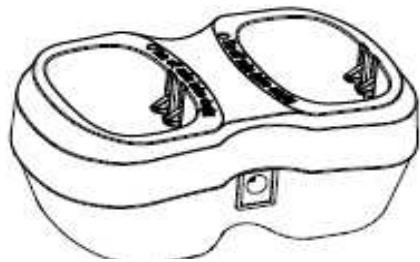
- Insert the jack card into the power supply situated on the charger.
- Connect the mains adaptor to the mains socket (220 V~).
- Insert the radio into the charging desk stand (see opposite)
The red light alert will appear.
Note The light alert on the desk stand will remain on even when the batteries are charged.
5.5 Turning the appliance on and off
- To turn on the radio
Press and hold the MENU/ key

To turn off the radio Press and hold the MENU/ key

6 Using the FX 600
6.1 SPEAKING AND LISTENING
To communicate, all group members must have their radios set on the same channel and the same interference eliminator code.
- To speak, press and hold the PTT key.
- When you have finished speaking, release the PTT key.
For maximum clarity when speaking, hold the radio at least 5 centimetres from your mouth and speak directly into the microphone whilst avoiding to cover it.
6.2 Setting the volume
To increase the volume press the Vol ^+ key.
To decrease the volume press the Vol -' key.
- Press the PTT key to validate.
Caution Do not hold the appliance too close to your ear. If the volume is too high, you could cause damage to your hearing.
6.3 Selecting a channel
The channel is the frequency used by the channel to transmit information. Your radio has 8 available channels.
- To check activity on a channel before speaking, press and hold the key MON/O. If you cannot hear any communication, the channel can be used.
-
To select a channel
-
Press one of the keys + or to select a channel.
- Press the PTT key to validate.
Note: Functions are automatically validated after being selected.
6.4 Channels and Frequencies
| Channel | Frequency | Channel | Frequency |
| 1 | 466.00625 | 5 | 466.05625 |
| 2 | 466.01875 | 6 | 466.06875 |
| 3 | 466.03125 | 7 | 466.08125 |
| 4 | 466.04375 | 8 | 466.09375 |
6.5 Interference eliminator code
The interference eliminator code helps to minimise external communication interferences. For each channel you can use an interference eliminator code between 1 and 38.
To select an interference eliminator code from a channel
- Press the MENU/ key and the cc will start to flash.
- Press the + or - key to select the code.
- Press the PTT key to validate.
Note To communicate with radios that don't use an interference code eliminator, you must set the latter to zero (0) on your FX 600 radio.
6.6 Channel search
To carry out a search
- Press the MON/ key briefly.
- The indicator will appear on the screen and the radio will start displaying the channel combinations.
- When the radio detects activity on a channel, current search will stop to allow you to listen to the call.
- You can also speak by pressing the PTT key.
To stop the current search
- Press the MON/ key briefly.
6.7 Group search
In the group search mode, the radio only carries out searches on channels belonging to your group.
To add a channel to the group
- Your radio is on standby mode.
-
Press the MENU/?, key six times. The current channel number and a sign will appear on-screen.
-
Press the key + or - to change the '-sign into 'y'.
- Press the PTT key to validate.
Activate the group search
- Your radio is on standby mode.
- Press the MENU/? (key seven times. A ‘-’ and ‘GP’ sign (for Group) will appear on the screen.
- Press the + or key to change the sign ‘-’ into ‘y’.
- Press the PTT key to validate.
To launch the search, press the MON/ key.
To return to normal search mode
- Your radio is on standby mode.
- Press the MENU/? key seven times. A ‘-’ and ‘GP’ sign (for Group) will appear on the screen.
- Press the + or - key to change the '-' into 'y'.
- Press the PTT key to validate.
Note If the group doesn't have any channel or only the current channel, the search will run like a normal search.
6.8 Advanced search
If the radio stops the search on a channel that you don't want to listen to, press the + or key briefly to re-launch the search until you reach the next active channel.
6.9 Radio broadcast range
Your radio has been designed to give maximal transmission performance and therefore increase the communication broadcast range.
Do not use the radios for distances less than 1,5M
The radio transmission range varies depending on the surrounding area. In an open and flat area, the conversation range can go as far as 6 Km. The range is reduced if there are obstacles between radios.
6.10 Call tone.
6.10.1 Setting and transmitting call tones
Your radio is capable of transmitting a call tone to other radios that are set on the same channel and the same interference eliminator code, to warn them that you wish to speak to them. You can choose from 10 call tones.
Settings.
FX 600
- When the radio is switched on, press the MENU/ key twice.
The icon will appear on the-screen.
2. Press the + or - key to choose or listen to the tones that are numbered from 1 to 10.
3. Press the PTT key to validate.
Transmission.
To transmit your call tone to other radios, press the key.
Note To deactivate the call tone, you must set it to zero.
6.10.2 Transmitting an end-of-call tone
This function allows your correspondent to be alerted by an audible beep once you have finished speaking.
To activate this function:
- Hold the key when you switch on the radio.
The icon will appear on the-screen.
- When you release the PTT key at the end of your call, a confirmation tone is emitted.
- To deactivate this function, switch off your appliance and switch it back on by holding the key.
7 SPECIAL FUNCTIONS:
7.1 Energy saving function during calls
You can save your battery life, by holding the PTT key for more than 60 seconds. Your appliance will then emit a continuous sound signal and the transmission will be stopped.
7.2 Locking the keypad
To prevent your settings from being accidentally changed, you can lock the keypad.
- Press the MENU/ key several times until the icon and a sign appear on the screen.
- Press the + or - key to select 'y' which will activate the keypad lock.
Note When the lock is activated, you are still able to carry out the following functions: Switch the appliance on and off, receive and make calls, send a call tone and check activity on a channel.
To unlock the appliance, hold the MENU/ key until the icon disappears.
7.3 Removing a channel from the search list
This function allows you to remove a channel when you are in the search mode. so you don't have to listen to the communication on that particular channel and can continue searching on other channels.
Removing a channel from the search list
- You are in channel search mode. The alarm appears.
- You radio detects a call on a channel that you don't want to listen to.
- Hold the + or - key to remove this channel from the search list.
- le canal est alors retire et la recherche se poursuit.
The channel will then be removed and you can continue your search.
Note Once you've started your search, you cannot remove the channel on which your appliance is set.
To re-enter the channel into the search list The channel will be re-entered into the list once you've stopped the search by pressing the MON/O key.
7.4 Sound surveillance monitor
Your radio can be used for sound monitoring
This function allows your radio to transmit sounds that it detects to other radios which are set on the same channel and have the same interference eliminator code.
To activate this function.
- • Turn off your radio.
- Switch on the radio by pressing the PTT key.
- An «IVOX» icon appears on the screen to indicate that the function is activated.
- To transfer a call, speak directly into the microphone without pressing the PTT key.
CAUTION: Pressing the PTT key once will deactivate the function, and the IVOX icon will start to flash.
To re-activate the function, press the PTT key briefly and the IVOX icon will stop flashing.
CAUTION:
This product is by no means a replacement for an adult's protection and surveillance of children.
Note: When you use this function, there is a slight delay in between the time you start speaking and when the appliance starts to emit.
7.5 Hands Free function
Your can use your FX 600 in hands free mode.
- Switch off your appliance
- Take off the protection cover and insert the audio accessory into the cable port.
FX 600
- Switch on the appliance and the VOX icon will appear on the screen.
- Lower the sound volume before listening.
- Adjust the sound volume to your particular preference.
- Speak into the microphone to transmit
- Messages may be received once the user stops speaking
Note The hands free Kit is not provided with this appliance.
7.6 Set the level of sensitivity in hands free mode.
By adjusting the appliance's sensibility level, you can reduce the amount of disturbing sounds and quiet voices can be picked up more effectively.
- Press the MENU/ key several times until the VOX icon appears on the screen.
-
Press the or key to set the sensibility level.
-
For quiet environments
- For the majority of environments
-
For noisy environments
-
Validate with the PTT key.
Note When you connect the hands free kit, the appliance automatically selects the last sensibility level chosen.
7.7 Stopwatch
You can use your FX600 as a stopwatch.
To use this function, follow the instructions below.
- Your radio is on standby mode.
- Press the MENU/ key five times and the icon will appear on the screen.
- Press the + key to start the stopwatch. The minutes and seconds will appear.
-
To stop the stopwatch, press again.
-
Please note that if the stopwatch isn't set back to zero, the timer will continue without being displayed on the screen.
- If you press the + again, the stopwatch will start counting from the beginning.
To set the stopwatch back to zero.
- Press the key to stop it.
- Press the key to set it back to zero.
Note You cannot use the hands free and sound surveillance mode whilst the stopwatch mode is in use.
Your appliance has an energy saving function. You can enable your radio to switch off automatically when it is switched on and hasn't been used for a long period of time, by following the following procedure:
- Press the MENU/ key four times and a 'P' will appear on the screen.
- Use the + or - key to select 30, 60 or 90 minutes.
- Validate by pressing PTT
To deactivate this function
- Press the MENU/ key four times and a 'P' will appear on the screen.
- Use the + or - key to select 0..
- Validate by pressing PTT
8 TROUBLESHOOTING
8.1 The display no longer appears
- Check the battery or disposable batteries
- Recharge the battery or change the disposable batteries
8.2 Problems transmitting or receiving messages
- Check that the radios are set on the same channels
- Change locations.
- Check the volume
8.3 Interference problems
- Appliances must be situated at least 1,5 metres apart.
- Radios are too far apart
- Obstacles are disrupting transmission.
8.4 Transmission range problems
Natural or artificial obstacles can reduce the range.
9 Warranty information
The LOGICOM supplier warranty is applicable for normal use of the device as set out in the user manual.
Damage to this appliance caused by external factors is not covered by the warranty. In particular, the warranty is not applicable if the appliance has been damaged as a result of a fall, a shock, incorrect use or use with a connection which is not compliant with the instructions of the manual or the requirements of your operator, or due to lightning, mains over voltage, or insufficient protection from heat, humidity or frost.
The warranty applies to Metropolitan France only.
10 Contacting the customer care service.
Before returning the appliance to the dealer or retailer, it is imperative to contact us so we may check that the appliance is faulty.
- Ensure you have your appliance to hand
- Please contact one of our customer care service help lines: +33 (0)1 48 63 67 94 or +33 (0)1 48 63 67 95.
One of our telephone operators will provide a solution for your problem(s).
- Transmitter - Receiver
- User manual
- C€0979 ①
- CERTIFICATE OF COMPLIANCE
- Contents
- PRESENTATION OF THE FX 600. 4
- SAFETY AND GENERAL INFORMATION 4
- PRECAUTIONS FOR USE. 5
- DIAGRAM AND FUNCTIONS. 5
- SETTING UP YOUR APPLIANCE. 7
- USING THE FX 600 8
- SPECIAL FUNCTIONS: 11
- TROUBLESHOOTING 14
- WARRANTY INFORMATION 15
- CONTACTING THE CUSTOMER CARE SERVICE. 15
- PRESENTATION OF THE FX 600
- SAFETY AND GENERAL INFORMATION
- Important safety information and guidelines for optimal use of the FX 600
- Safety and general information
- Necessary manual steps
- PRECAUTIONS FOR USE
- Diagram and functions
- Icon display key.
- SETTING UP YOUR APPLIANCE
- Installation of the rechargeable Ni-MH battery
- Installation of non rechargeable batteries
- Battery charge level
- Charging the FX 600 battery
- Turning the appliance on and off
- Using the FX 600
- SPEAKING AND LISTENING
- Setting the volume
- Selecting a channel
- Note: Functions are automatically validated after being selected.
- Channels and Frequencies
- Interference eliminator code
- Channel search
- Group search
- To launch the search, press the MON/ key.
- Advanced search
- Radio broadcast range
- Call tone.
- Setting and transmitting call tones
- FX 600
- Transmitting an end-of-call tone
- SPECIAL FUNCTIONS:
- Energy saving function during calls
- Locking the keypad
- Removing a channel from the search list
- Sound surveillance monitor
- CAUTION:
- Hands Free function
- Set the level of sensitivity in hands free mode.
- Stopwatch
- To deactivate this function
- TROUBLESHOOTING
- The display no longer appears
- Problems transmitting or receiving messages
- Interference problems
- Transmission range problems
- Warranty information
- Contacting the customer care service.
Brand : LOGICOM
Model : FX 600
Category : Walkie-talkie