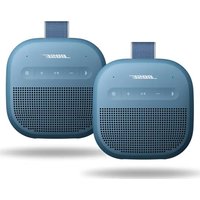
SoundLink Micro Portable Speaker (2nd Gen) - Speaker BOSE - Free user manual and instructions
Find the device manual for free SoundLink Micro Portable Speaker (2nd Gen) BOSE in PDF.


| Product type | Portable Bluetooth speaker |
| Brand | Bose |
| Model | SoundLink Micro (2nd generation) |
| Connectivity | Bluetooth, Snapdragon Sound, Fast Pair (Android) |
| Water and dust resistance | IP64 and IP67 (immersion up to 1 m for 30 min max) |
| Battery life | Up to 12 hours (3 hours at max volume) |
| Charging time | 4 hours for full charge |
| Power supply | 5 V, 1.5 A (USB power adapter) |
| Main functions | Play/Pause, volume control, programmable shortcut, Spotify Tap, linking two speakers (Stereo/Party mode), SimpleSync |
| Voice guide | Multiple pre-installed languages, can be deactivated |
| Package contents | SoundLink Micro speaker, USB-C to USB-A cable |
| Care and cleaning | Soft damp cloth (water only), dry USB-C port before charging |
| Safety precautions | Do not charge if wet, do not expose to heat, do not use solvents |
| Spare parts and accessories | Available through Bose customer service |
| Warranty | Limited warranty (see Bose website) |
Frequently Asked Questions - SoundLink Micro Portable Speaker (2nd Gen) BOSE
User questions about SoundLink Micro Portable Speaker (2nd Gen) BOSE
0 question about this device. Answer the ones you know or ask your own.
Ask a new question about this device
Download the instructions for your Speaker in PDF format for free! Find your manual SoundLink Micro Portable Speaker (2nd Gen) - BOSE and take your electronic device back in hand. On this page are published all the documents necessary for the use of your device. SoundLink Micro Portable Speaker (2nd Gen) by BOSE.
USER MANUAL SoundLink Micro Portable Speaker (2nd Gen) BOSE
Please read and keep all safety and use instructions.
For more information about your Bose SoundLink Micro Portable Speaker (2 ^Gen ), visit: ____support.Bose.com/micro2
Declarations of conformity can be found at: www.Bose.com/compliance

Bose Corporation hereby declares that this product is in compliance with the essential requirements and other relevant provisions of Directive 2014/53/EU and all other applicable EU directive requirements.
Important Safety Instructions
Clean only with a dry cloth or water dampened cloth. Do not use cleaning products.
If the speaker is exposed to salt or chlorinated water, gently rinse with fresh water following the exposure to remove residue. Make sure the connector port is fully dried out before charging.
Do not block any ventilation openings. Install in accordance with the manufacturer's instructions.
Only use attachments/accessories specified by the manufacturer.
Refer all servicing to qualified personnel. Servicing is required when the product does not operate normally or has been physically damaged.
WARNINGS/CAUTIONS

Contains small parts which may be a choking hazard. Not suitable for children under age 3.

This product contains magnetic material. Consult your physician on whether this might affect your implantable medical device.
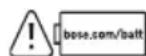
This symbol means use of this product with an incompatible or improperly installed battery could cause a safety hazard. Contact Bose customer service for battery service options or visit ____bose.com/batt for more information.
- This product must only be operated with compatible Bose certified batteries. Contact Bose customer service for battery service options.
- The battery provided with this product may present a risk of fire, explosion or chemical burn if mishandled, incorrectly replaced or replaced with an incorrect type.
- Do not expose products containing batteries to excessive heat (e.g. from storage in direct sunlight, fire or the like).
- If the battery leaks, do not allow the liquid to come in contact with the skin or eyes. If contact is made, seek medical advice.
- Keep the product away from fire and heat sources. Do NOT place naked flame sources, such as lighted candles, on or near the product.
- Do NOT make unauthorized alterations to this product.
- Use this product only with an agency approved LPS power supply which meets local regulatory requirements (e.g., UL, CSA, VDE, CCC).
- The product label is located on the bottom of the product.
• To reduce the risk of fire, do not place any heating or cooking appliance beneath this product.
WARNING: Do not expose product or mounting components to any chemical substances that are not specified by Bose, including but not limited to lubricants, cleaning agents, contact sprays, or hydrocarbon based solvents. Exposure to such substances can lead to degradation of the plastic material, resulting in cracking and creating a falling hazard.
NOTE: This equipment has been tested and found to comply with the limits for a Class B digital device, pursuant to Part 15 of the FCC Rules. These limits are designed to provide reasonable protection against harmful interference in a residential installation. This equipment generates, uses, and can radiate radio frequency energy and, if not installed and used in accordance with the instructions, may cause harmful interference to radio communications. However, there is no guarantee that interference will not occur in a particular installation. If this equipment does cause harmful interference to radio or television reception, which can be determined by turning the equipment off and on, the user is encouraged to try to correct the interference by one or more of the following measures:
- Reorient or relocate the receiving product or antenna.
- Increase the separation between the equipment and receiver.
- Connect the equipment into an outlet on a circuit different from that to which the receiver is connected.
- Consult the dealer or an experienced radio/TV technician for help.
Changes or modifications not expressly approved by Bose Corporation could void the user's authority to operate this equipment.
This device complies with part 15 of the FCC Rules and with ISED Canada's license-exempt RSS standard(s). Operation is subject to the following two conditions: (1) This device may not cause harmful interference, and (2) this device must accept any interference received, including interference that may cause undesired operation.
This device complies with FCC and ISED Canada radiation exposure limits set forth for the general population. This transmitter must not be co-located or operating in conjunction with any other antenna or transmitter.
Receiver Category = [1]
Meets IMDA Requirements
CAN ICES (B)/NMB (B)
FCC ID: A94444771 IC: 3232A-444771
For Europe: Frequency band of operation 2400 to 2483.5 MHz. I Maximum transmit power less than 20 dBm EIRP.
SAR Information
| Frequency Band | Maximum Reported SAR(W/kg) | |
| Body 1g SAR Extremity 10g SAR | ||
| QHS 0.15 <0.10 | ||
| SAR Limited(W/kg) 1.6 | 4.0 | |
Low-power Radio-frequency Devices Technical Regulations: Without permission granted by the NCC, any company, enterprise, or user is not allowed to change frequency, enhance transmitting power or alter original characteristic as well as performance to a approved low power radio-frequency devices. The low power radio-frequency devices shall not influence aircraft security and interfere legal communications; If found, the user shall cease operating immediately until no interference is achieved. The said legal communications means radio communications is operated in compliance with the Telecommunications Management Act. The low power radio-frequency devices must be susceptible with the interference from legal communications or ISM radio wave radiated devices.
DON'T attempt to remove the rechargeable lithium-ion battery from this product. Contact your local Bose retailer or other qualified professional for removal.
Removal of the rechargeable lithium-ion battery in this product should be conducted only by a qualified professional. Please contact your local Bose retailer or see products.bose.com/static/compliance/index.html for further information.
The power delivered by the charger must be between min 2.5 Watts required by the radio equipment, and max 7.5 Watts in order to achieve the maximum charging speed.

Please dispose of used batteries properly, following local regulations. Do not incinerate.
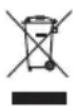
This symbol means the product must not be discarded as household waste, and should be delivered to an appropriate collection facility for recycling. Proper disposal and recycling helps protect natural resources, human health and the environment. For more information on disposal and recycling of this product, contact your local municipality, disposal service, or the shop where you bought this product.

| Names and Contents of Toxic or Hazardous Substances or Elements | ||||||||||
| Toxic or Hazardous Substances and Elements | ||||||||||
| Part Name | Lead (Pb) | Mercury (Hg) | Cadmium (Cd) | Hexavalent (CR(VI)) | Polybro-minated Biphenyl (PBB) | Polybro-minated diphenylether (PBDE) | Dybutyl phthal-ate (DBP) | Di-isobutyl phthal-ate (DIBP) | Butyl benzyl phthal-ate (BBP) | Bis(2-ethylhexyl) phthalate (DEHP) |
| PCBs X O | O O O | O O O O O | ||||||||
| Metal Parts | X O | O O O O O O O O | ||||||||
| Plastic Parts | O O | O O O O O O O O | ||||||||
| Speakers | X O O | O O O O O O O | ||||||||
| Cables X O | O O O | O O O O O O | ||||||||
| This table is prepared in accordance with the provisions of SJ/T 11364.O: Indicates that this toxic or hazardous substance contained in all of the homogeneous materials for this part is below the limit requirement of GB/T 26572. |  | |||||||||
| X: Indicates that this toxic or hazardous substance contained in at least one of the homogeneous materials used for this part is above the limit requirement of GB/T 26572. | ||||||||||
| Equipment name: Bluetooth Speaker Type designation: 444771 | ||||||
| Restricted substances and its chemical symbols | ||||||
| Unit | Lead (Pb) | Mercury (Hg) | Cadmium (Cd) | Hexavalent chromium ( Cr^+6 ) | Polybrominated biphenyls (PBB) | Polybrominated diphenyl ethers (PBDE) |
| PCBs | - | ○ | ○ | ○ | ○ | ○ |
| Metal Parts | - | ○ | ○ | ○ | ○ | ○ |
| Plastic Parts | ○ | ○ | ○ | ○ | ○ | ○ |
| Speakers | - | ○ | ○ | ○ | ○ | ○ |
| Cables | - | ○ | ○ | ○ | ○ | ○ |
| Note 1: “○” indicates that the percentage content of the restricted substance does not exceed the percentage of reference value of presence.Note 2: The “-” indicates that the restricted substance corresponds to the exemption. | ||||||
Date of Manufacture: The eighth digit in the serial number indicates the year of manufacture; "5" is 2015 or 2025.
Importers: Bose Electronics (Shanghai) Company Limited, Level 6, Tower D, No. 2337 Gudai Rd. Minhang District, Shanghai 201100 | Bose Products B.V., Vijzelstraat 68, 1017HL Amsterdam, The Netherlands | Ingram Micro Mexico SA de CV, Joselillo 3 Int. Piso 5 Col. El Parque, Naucalpan de Juarez, Edo Mex 53398 Phone Number: +52 55 5263 6500 | Bose Limited (H.K.), 7F., No. 2, Sec. 3, Minsheng E. Road, Zhongshan Dist., Taipei City 104511, Phone Number: +886-2-2514 7676 | Bose Limited, 16 Dufour's Place, London W1F 7SP
Mexico Service Phone Number: 0800-266-0292
Input Rating: 5V =, 1.5A
Model: 444771. The CMIIT ID is located on the bottom rear side of the speaker.
The Bose Terms of Use apply to this product: worldwide.bose.com/termsofuse
License Disclosures: To view the license disclosures that apply to the third-party software packages included as components of the Bose SoundLink Micro Portable Speaker (2 ^nd Gen), use the Bose app. You can access this information from the Settings menu.
Apple, the Apple logo, iPad, and iPhone are trademarks of Apple Inc., registered in the U.S. and other countries. The trademark "iPhone" is used in Japan with a license from Aiphone K.K. App Store is service mark of Apple Inc.
Use of the Made for Apple badge means that an accessory has been designed to connect specifically to the Apple product(s) identified in the badge, and has been certified by the developer to meet Apple performance standards. Apple is not responsible for the operation of this device or its compliance with safety and regulatory standards.
The Bluetooth ^® word mark and logos are registered trademarks owned by Bluetooth SIG, Inc. and any use of such marks by Bose Corporation is under license.
Google, Android, and Google Play are trademarks of Google LLC.
Snapdragon Sound is a product of Qualcomm Technologies, Inc. and/or its subsidiaries. Qualcomm, Snapdragon and Snapdragon Sound are trademarks or registered trademarks of Qualcomm Incorporated.
Spotify is a registered trademark of Spotify AB.
USB Type-C ^® and USB-C ^® are registered trademarks of USB Implementers Forum.
Bose and SoundLink are trademarks of Bose Corporation. | Bose Corporation Headquarters: 1-877-230-5639 | ©2025 Bose Corporation. No part of this work may be reproduced, modified, distributed, or otherwise used without prior written permission.
Please complete and retain for your records
The serial number and model numbers are located on the bottom of the speaker.
Serial number: ____
Model number: 444771
Please keep your receipt. Now is a good time to register your Bose product. You can easily do this by going to ____ worldwide.Bose.com/ProductRegistration
WHAT'S IN THE BOX
Contents 9
GETTING STARTED
Initial setup.... 10
BLUETOOTH® CONNECTIONS
Connect to a device.... 12
Using your device's Bluetooth settings 12
Using the Bose app 13
Reconnect to a device 14
Reconnect to the most recently-connected device.... 14
Reconnect to a different device.... 14
Connect an additional device.... 15
Identify connected devices 15
Switch between two connected devices.... 15
Disconnect a device 16
Clear the speaker device list.... 16
Android™ devices only.... 17
Connect using Fast Pair 17
Snapdragon Sound™ technology 18
SPEAKER CONTROLS
Power on/off.... 19
Auto-off timer.... 20
Media playback and volume 21
BATTERY
Charge the speaker.... 22
Charging time.... 23
Hear the battery level.... 23
Battery protection mode.... 23
STATUS
Power light 24
Bluetooth light 25
Shortcut light 25
VOICE PROMPTS
Pre-installed languages 26
Change the language 26
Disable voice prompts.... 26
SHORTCUTS
Use your shortcut.... 27
Change or disable your shortcut.... 27
SPOTIFY TAP 28
CONNECT BOSE PRODUCTS
Link two Bose Bluetooth Speakers.... 29
Compatible products.... 29
Link using the product controls.... 30
Switch between Stereo mode and Party mode 31
Unlink the speakers.... 31
Connect to a Bose Smart Speaker or Soundbar using simplesync technology.... 32
Compatible products.... 32
Connect using the Bose app.... 33
Connect using the product controls 34
Reconnect a Bose Smart Speaker or Soundbar 34
PORTABILITY
Strap Configurations 35
Carry the speaker 35
Mount the speaker 35
Water and dust resistance 36
CARE AND MAINTENANCE
Service the speaker battery 37
Update the speaker 37
Clean the speaker 37
Store the speaker 37
Replacement parts and accessories.... 37
Limited warranty 37
TROUBLESHOOTING
Troubleshooting.... 38
Reset the speaker 38
Confirm that the following parts are included:
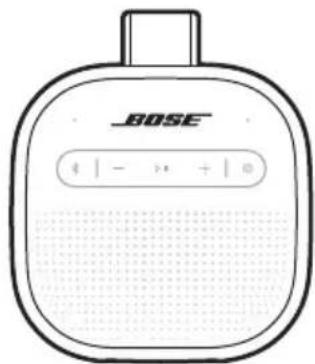
natural_image
Line drawing of a Bose brand electronic device with no visible text or symbols on the bodyBose SoundLink Micro Portable Speaker (2 ^nd Gen)
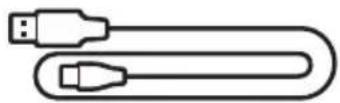
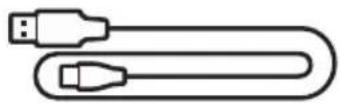
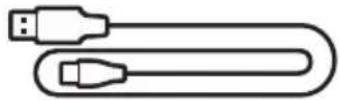
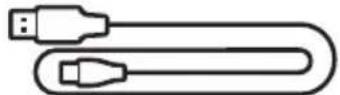
USB Type-C ^® to USB Type-A cable
NOTE: If any part of the product appears to be missing or damaged, do not use it. Visit: support.Bose.com/micro2 for troubleshooting articles, videos, and product repair or replacement.
The speaker ships with a partial charge. Before using the speaker for the first time, connect it to a power supply. The speaker doesn't need to be fully charged, but it does require the initial connection to activate the battery.
INITIAL SETUP
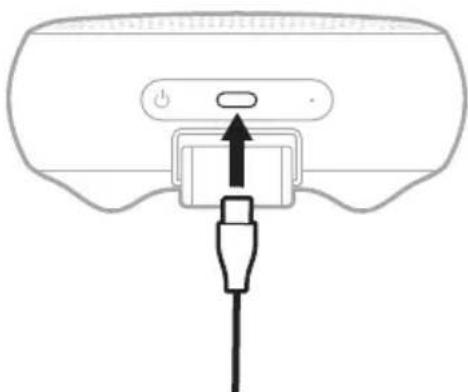
- Connect the USB-C® end of the cable to the USB-C port on the bottom of the speaker.
natural_image
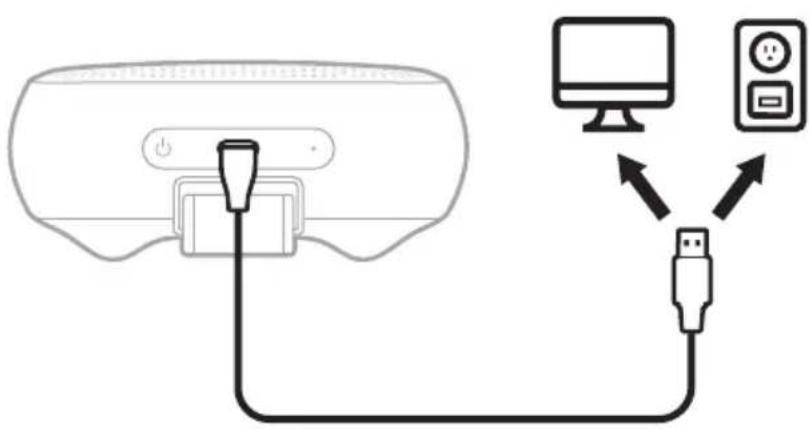
Diagram of a device with a power button and cable connector (no text or symbols)- Connect the USB-A end of the cable to a USB-A power supply.
The Power light slowly pulses white.
3. Press the Power button ⏻.
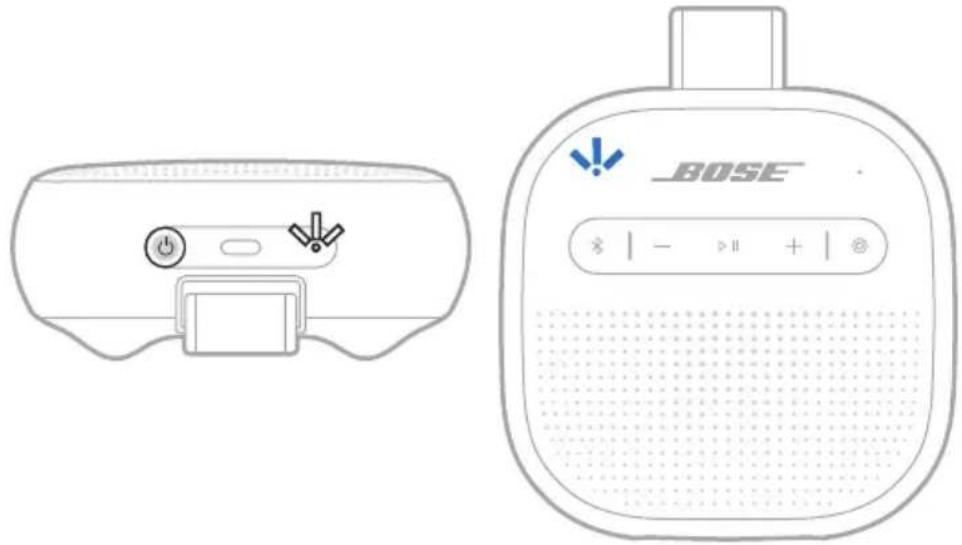
The Power light slowly pulses white. You hear the battery level followed by "Ready to connect." The Bluetooth light slowly blinks blue.
natural_image
Line drawing of a BOSE brand electronic device with control buttons and speaker grille (no text or symbols on main body)- Connect to your device (see page 12).
You can store up to six devices in the speaker device list, and the speaker can be actively connected to up to two devices at a time. You can play audio from only one device at a time.
CONNECT TO A DEVICE
You can connect the speaker to your device using any of the following:
- Your device's Bluetooth settings (see "Using your device's Bluetooth settings")
• The Bose app (see page 13) - Fast Pair (Android devices only) (see page 17)
Using your device's Bluetooth settings
- Press and hold the Bluetooth button ✝ until you hear "Ready to connect" and the Bluetooth light slowly blinks blue.
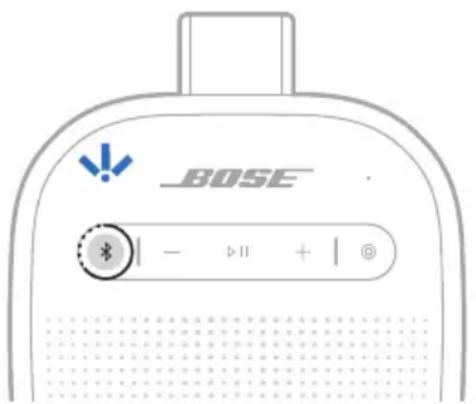
NOTE: If a device is already connected, you hear "Ready to connect another device."
- On your device, access Bluetooth settings.
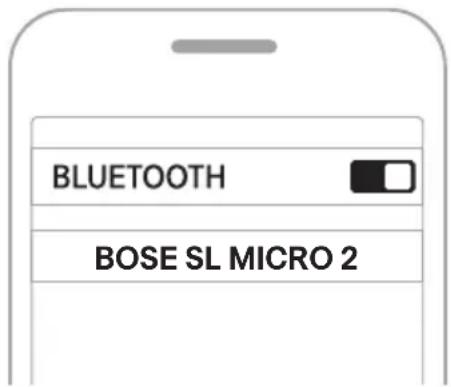
- Select the speaker from the list of available products.
NOTE: Look for the name you entered for the speaker in the Bose app. If you didn't name the speaker, the default name appears.
The speaker appears in the list of connected products. The Bluetooth light glows solid white (see page 25).
Using the Bose app
The Bose app lets you set up and control the speaker from any device, such as a smartphone or tablet.
Using the app, you can manage Bluetooth connections, manage speaker settings, adjust the audio, choose your voice prompt language, and get any future updates and new features made available by Bose.
NOTE: If you've already downloaded the Bose app for another Bose product, you can add the speaker from the product list screen.
- On your device, download the Bose app.

- Follow the app instructions to add the speaker.
RECONNECT TO A DEVICE
Reconnect to the most recently-connected device
When powered on, the speaker connects with the two most recently-connected devices.
NOTES:
- The device must be within range (30 ft or 9 m) and powered on.
- Make sure the Bluetooth feature is enabled on your device.
Reconnect to a different device
NOTE: The device must be within range (30 ft or 9 m) and powered on.
- Press the Bluetooth button ✗ and release to hear which devices are currently connected.
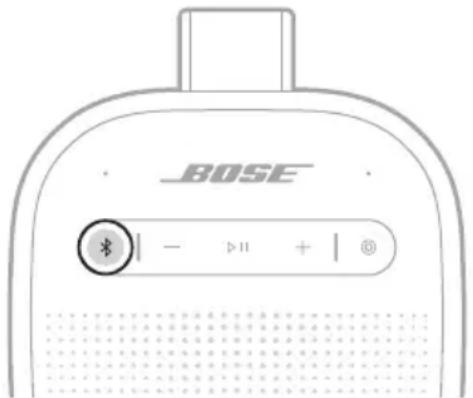
- Within 2 seconds, press the Bluetooth button ✗ again to hear the name of the next device in the speaker device list.
- Repeat until you hear the correct device name.
- Play audio on the connected device.
TIP: You can also reconnect a different device using the device Bluetooth settings or the Bose app (see page 13).
NOTE: If two devices are already connected to the speaker, the newly-connected device replaces the older of the two connections.
CONNECT AN ADDITIONAL DEVICE
The speaker can be actively connected to two devices at a time (multi-point connection).
To connect an additional device, see page 12.
NOTES:
- You can only play audio from one device at a time.
- To manage or disable the multi-point connection feature, use the Bose app. To access this option, tap Source on the product control screen.
- Disabling the multi-point connection feature disconnects the second connected device.
IDENTIFY CONNECTED DEVICES
- Press the Bluetooth button ✝ and release to hear which devices are currently connected.
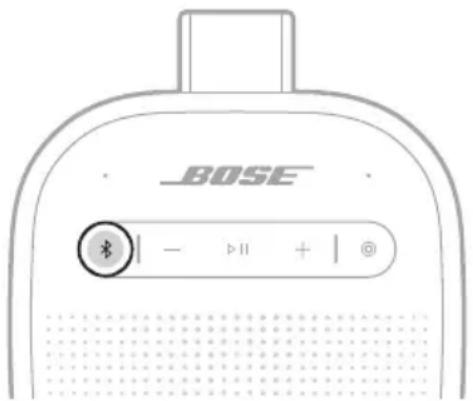
- Within 2 seconds, press the Bluetooth button ✝ again to hear the name of the next device in the speaker device list.
SWITCH BETWEEN TWO CONNECTED DEVICES
- Pause audio on your first device.
- Play audio on your second device.
DISCONNECT A DEVICE
Use the device's Bluetooth settings or the Bose app.
NOTE: Disabling the Bluetooth feature on your device disconnects the speaker and all other Bluetooth-connected products.
CLEAR THE SPEAKER DEVICE LIST
- Press and hold the Bluetooth button ✝ for 15 seconds until you hear "Bluetooth device list cleared. Ready to connect" and the Bluetooth light blinks blue.
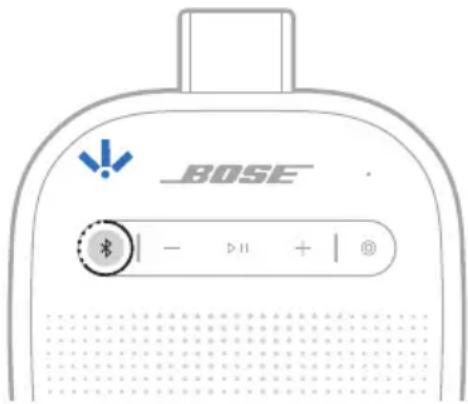
- Delete the speaker from the Bluetooth list on your device.
All devices are cleared, and the speaker is ready to connect (see page 12).
ANDROID DEVICES ONLY
If you have an Android device, you can access the following additional connection features.
Connect using Fast Pair
In one tap, the speaker enables quick, effortless Bluetooth pairing with your Android device.
NOTES:
- To use Fast Pair, you need an Android device running Android 6.0 or higher.
-
Your Android device must have the Bluetooth and Location features enabled.
-
Press and hold the Bluetooth button ✝ until you hear "Ready to connect" and the Bluetooth light slowly blinks blue.
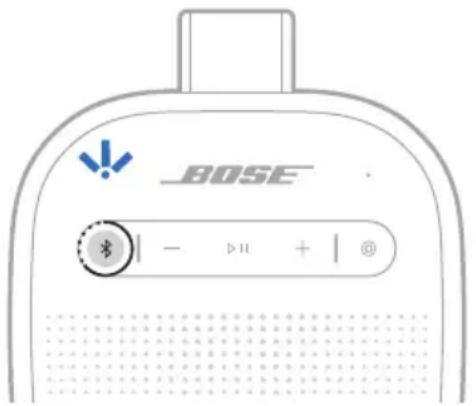
NOTE: If a device is already connected, you hear "Ready to connect another device."
- Place the speaker next to your Android device.
A notification displays on your device prompting you to pair the speaker.
NOTE: If you don't see a notification, check that notifications are enabled for the Google Play Services app on your device.
- Tap the notification.
Once the speaker is connected, a notification appears confirming that the connection is complete.
NOTE: You can also tap the button on the notification to download the Bose app and finish setting up the speaker.
Snapdragon Sound technology
Bose SoundLink Micro Portable Speaker (2 ^nd Gen) features Snapdragon Sound technology. Snapdragon Sound optimizes Qualcomm ^® audio technologies across connected devices to ensure the best sound quality, connection stability, and latency for your streaming audio.
To experience Snapdragon Sound, you need a Snapdragon Sound-certified device, such as a compatible Android device. Once you connect the speaker, your device will automatically stream audio using the aptX Adaptive Bluetooth codec.
NOTE: To see which Snapdragon Sound features the speaker supports and check if your device is compatible, visit: support.Bose.com/micro2
Controls are located on the bottom and the front of the speaker.
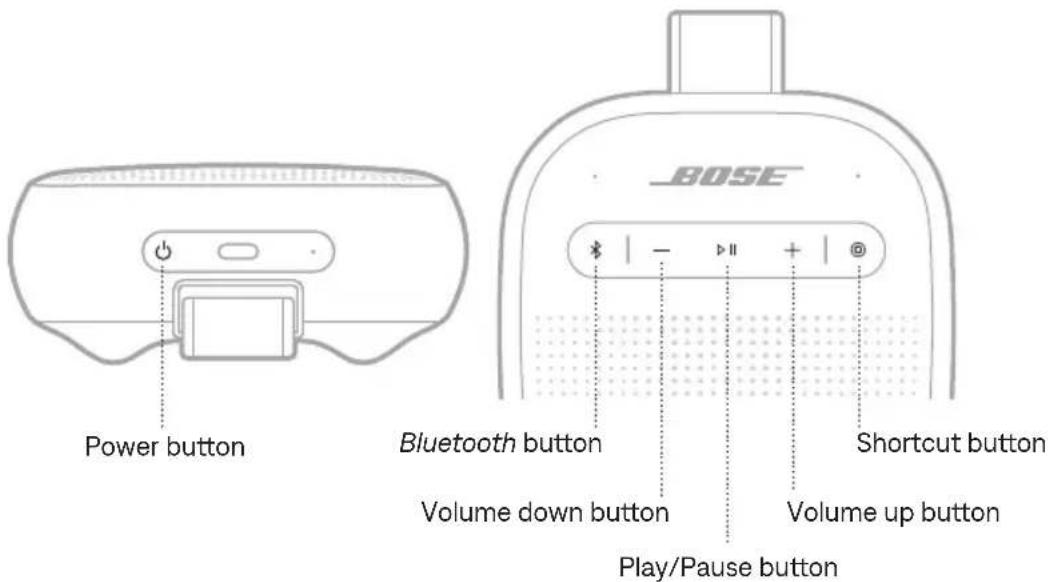
POWER ON/OFF
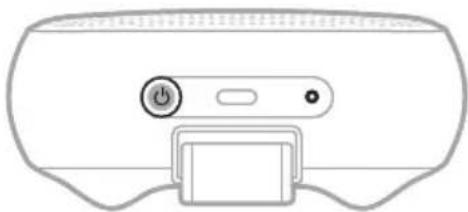
Press the Power button ⏻.
When powered on, a voice prompt announces the battery level. The Power light glows according to the current battery level (see page 24).
natural_image
Front view of a computer mouse head panel with a power button and control buttons (no text or symbols)Auto-off timer
The auto-off timer conserves the battery when the speaker is operating on battery power. The speaker switches off when audio has stopped and buttons have not been pressed for 20 minutes.
To wake the speaker, press the Power button ⏻ or press and hold the Bluetooth button ✝.
NOTE: To change the timer setting, use the Bose app. You can access this option from the Settings menu.
Disable the auto-off timer
Press and hold the Play/Pause button ▷II and the Volume up button + simultaneously. You hear "Auto-off disabled."
Repeat to re-enable the auto-off timer.
TIP: You can also disable the auto-off timer using the Bose app. You can access this option from the Settings menu.
MEDIA PLAYBACK AND VOLUME
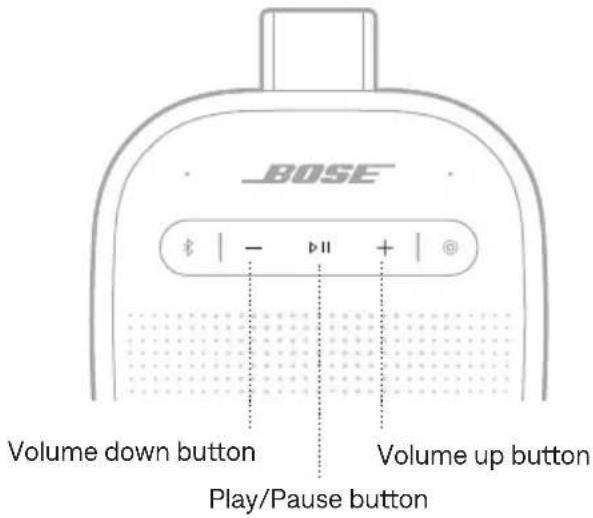
FUNCTION WHAT TO DO
| Play/Pause Press ▷II. | |
| Skip forward Double-press ▷II. | |
| Skip backward Triple-press ▷II. | |
| Volume up | Press + NOTES:To quickly increase the volume, press and hold+.When the maximum volume is reached, theBluetooth light blinks white 2 times. |
| Volume down | Press — NOTES:To quickly decrease the volume, press and hold—.When the minimum volume is reached, theBluetooth light blinks white 2 times. |
TIP: You can also increase or decrease the volume using the volume controls on your device or in the Bose app. You can access this option on the product control screen.
CHARGE THE SPEAKER
CAUTION: Do not attempt to charge the speaker while the speaker is wet. Doing so may cause damage to the speaker. The speaker is waterproof, but the USB-C port must be fully dried out before charging.
NOTE: Make sure you're using the Bose-provided USB cable or a similar USB cable. Bose recommends using a 5V ---, 1.5A capable power source.
- Connect the USB-C® end of the cable to the USB-C port on the bottom of the speaker.
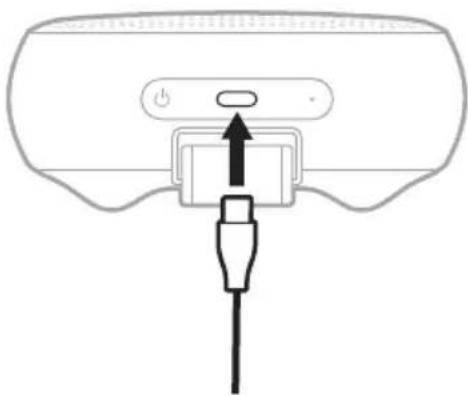
natural_image
Diagram of a device with a power button and cable connector (no text or symbols)- Connect the USB-A end of the cable to a USB-A power supply.
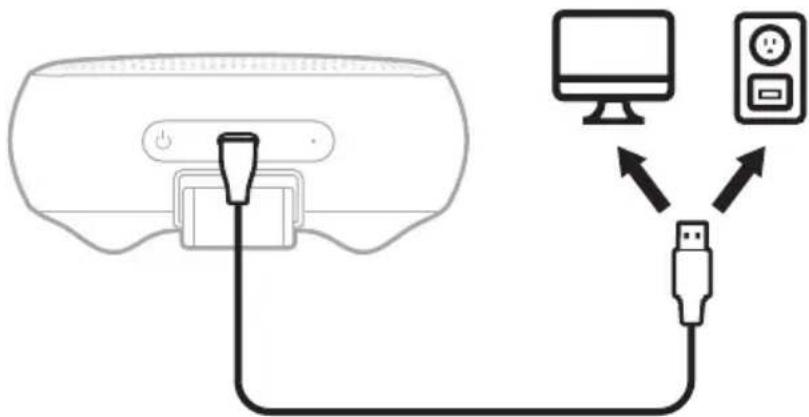
While charging, the battery light pulses white. When the battery is fully charged, the battery light glows solid white.
Charging time
Allow up to 4 hours to fully charge the battery ^1 .
A full charge powers the speaker up to 12 hours. ^2 At maximum volume, the battery lasts up to 3 hours. ^3
Charging time and battery performance vary with the USB power supply capability, music content, and speaker volume.
Hear the battery level
Each time you power on the speaker, a voice prompt announces the battery level. When the speaker is in use, a voice prompt announces if the battery needs to be charged.
Press and hold the Power button ⏻ until you hear a voice prompt.
Battery protection mode
When the speaker battery is depleted (0%) it enters battery protection mode. To reactivate the speaker, connect it to a power supply and press the Power button ⏻.
When not in use, store the speaker in a cool place.
CAUTION: Do NOT store the speaker for extended periods when fully charged or with a remaining charge of less than 10%.
The Power light is located at the bottom of the speaker. The Bluetooth and Shortcut lights are located on the front of the speaker.
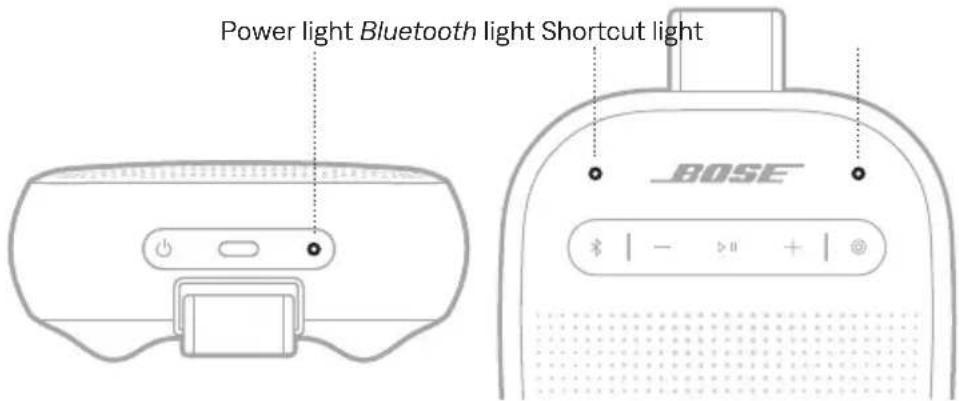
POWER LIGHT
Shows the battery, charging, update, and error status.
LIGHT ACTIVITY SYSTEM STATE
| Solid white Full charge | |
| Solid amber Low charge | |
| Blinks amber Need to charge | |
| Slowly pulses white Charging | |
| Blinks white 3 times (repeated) Updating software | |
| Quickly blinks white (3 seconds) Reset complete | |
| Quickly blinks white and amber (alternating) | Error - contact Bose customer service |
| Blinks amber 3 times (repeated) Failed battery - contact Bose customer service |
BLUETOOTH LIGHT
Shows the Bluetooth connection status.
LIGHT ACTIVITY SYSTEM STATE
| Slowly blinks blue Ready to connect | |
| Quickly blinks blue Connecting | |
| Solid white Connected | |
| Blinks white 2 times Device list cleared |
SHORTCUT LIGHT
Shows the status of speakers when linking is set as the shortcut.
LIGHT ACTIVITY SYSTEM STATE
| Slowly blinks white Speakers are linking | |
| Solid white Speakers are linked |
Voice prompts guide you through the Bluetooth connection process, announce the battery level, and identify connected devices.
TIP: You can easily manage voice prompts using the Bose app. Access this option from the Settings menu.
PRE-INSTALLED LANGUAGES
The following languages are pre-installed on the speaker:
- English • German • Japanese
- Spanish • Italian • Cantonese
- French • Mandarin
CHANGE THE LANGUAGE
Change the voice prompt language using the Bose app. Access this option from the Settings menu.
DISABLE VOICE PROMPTS
Press and hold the Shortcut button Ⓒ and Volume down button — simultaneously until you hear "Voice prompts off."
NOTE: Repeat to re-enable voice prompts.
The programmable Shortcut button Ⓑ enables you to quickly and easily access one of the following functions:
- Link two Bose Bluetooth Speakers (default) (see page 29)
- Access Spotify Tap (see page 28)
USE YOUR SHORTCUT
Press the Shortcut button Ⓑ.
The Shortcut light blinks once.
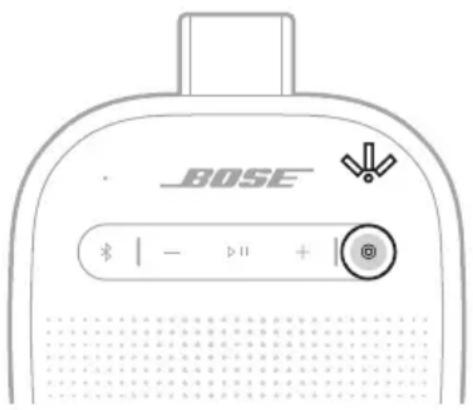
NOTE: The Shortcut button Ⓒ is set by default to link two Bose Bluetooth speakers (see page 29).
CHANGE OR DISABLE YOUR SHORTCUT
To change or disable your shortcut, use the Bose app. To access this option, tap Shortcut on the product control screen.
Spotify Tap is music to your ears, quite literally. Get the tunes playing with a simple gesture.
NOTE: To use Spotify Tap, it must be set as your shortcut in the Bose app and the Spotify app must be up to date.
- Press the Shortcut button Ⓑ to play a recommendation based on your listening taste.
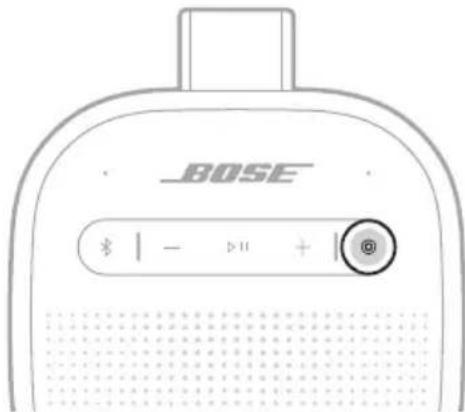
- Press the Shortcut button Ⓑ again for the next recommendation made just for you.
LINK TWO BOSE BLUETOOTH SPEAKERS
For a more immersive music experience, you can sync your Bose SoundLink Micro Portable Speaker ( 2^nd Gen) with another compatible Bose Bluetooth speaker and play the same audio from both speakers in Stereo mode or Party mode.
- Stereo mode (left speaker and right speaker play separately)
- Party mode (both speakers play in unison)
NOTES:
- The Shortcut button Ⓑ is set by default to link two Bose Bluetooth speakers.
- You can link to only one other speaker at a time.
- Make sure that the two speakers are within 30 ft (9 m) of each other.
- Make sure that the two speakers are within 30 ft (9 m) of the streaming device.
- For an optimal experience, position the speakers in the same room or outdoor area with no obstructions between them. Performance may vary based on device, distance, and environmental factors.
Compatible products
You can link the Bose SoundLink Micro Portable Speaker ( 2^nd Gen) to any Bose Bluetooth speaker that has a Shortcut button.
Link using the product controls
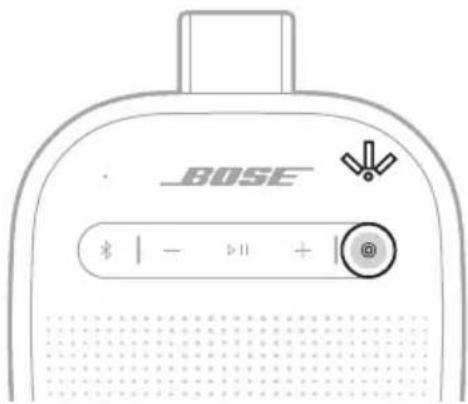
- On the speaker, press the Shortcut button Ⓞ.
The voice prompt directs you to press the Shortcut button on a second speaker. The Shortcut light slowly blinks white.
- On a second compatible Bose Bluetooth speaker, press the Shortcut button Ⓑ. The Shortcut light slowly blinks white.
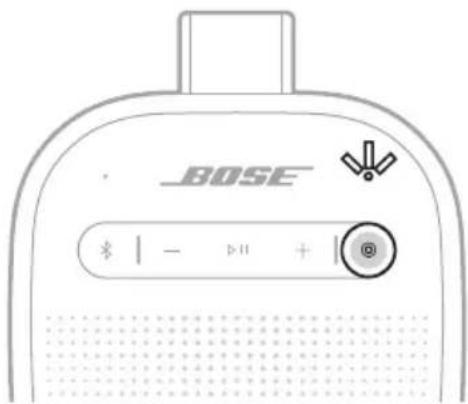
Once the two speakers are linked, a voice prompt announces the mode on both speakers. The Shortcut light on both speakers glows solid white.
NOTE: If the speakers are the same model you hear "Stereo mode," followed by "Left" on the primary speaker and "Right" on the secondary speaker. If they are different models, you hear "Party mode" on both speakers.
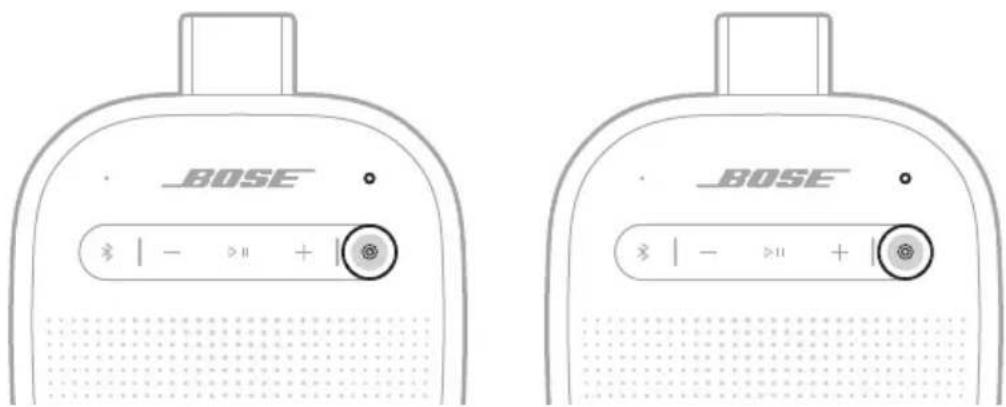
Switch between Stereo mode and Party mode
On either speaker, press the Shortcut button Ⓞ.
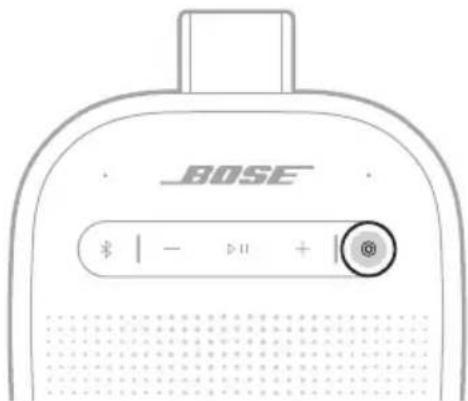
A voice prompt announces the mode on each speaker.
NOTE: If the speakers are different models, you can only play audio in Party mode.
TIP: You can also switch between Stereo mode and Party mode using the Bose app. You can access this option on the product control screen.
Unlink the speakers
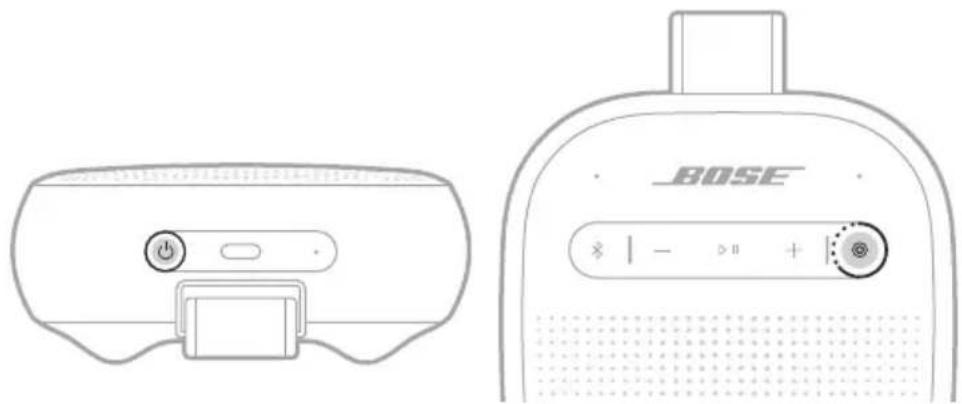
On either speaker, press the Power button ⏻ or press and hold the Shortcut button Ⓞ.
natural_image
Line drawings of a BOSE device front and back, showing control buttons and display screen (no text or symbols)A voice prompt announces the speakers are no longer linked.
TIP: You can also use the Bose app to unlink the speakers. You can access this option on the product control screen.
CONNECT TO A BOSE SMART SPEAKER OR SOUNDBAR USING SIMPLESYNC TECHNOLOGY
With Bose SimpleSync technology, you can connect the speaker to a Bose Smart Speaker or Bose Smart Soundbar to listen to the same audio in two different rooms at the same time.
NOTE: SimpleSync technology has a Bluetooth range of up to 30 ft (9 m). Walls and construction materials can affect reception.
Compatible products
You can connect the speaker to any Bose Smart Speaker or Bose Smart Soundbar.
Popular compatible products include:
- Bose Smart Ultra Soundbar/Bose Ultra Soundbar
- Bose Smart Soundbar 900
- Bose Smart Soundbar 700/Bose Soundbar 700
- Bose Smart Soundbar 600
- Bose Soundbar 500
- Bose Smart Speaker 500/Bose Home Speaker 500
- Bose Home Speaker 300
- Bose Portable Smart Speaker/Bose Portable Home Speaker
New products are added periodically. For a complete list and more information, visit: ____support.Bose.com/Groups
Connect using the Bose app
- Press and hold the Bluetooth button ✝ until you hear "Ready to connect" and the Bluetooth light slowly blinks blue.
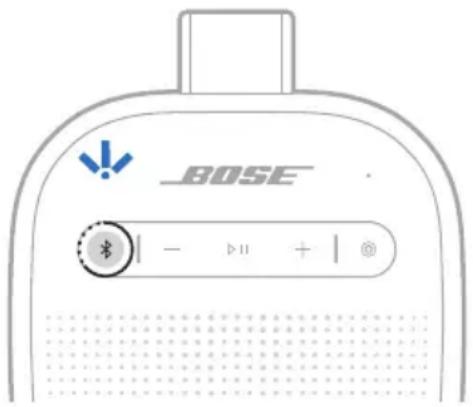
NOTE: If a device is already connected, you hear "Ready to connect another device."
- Use the Bose app to connect the speaker to a compatible Bose product. For more information, visit: support.Bose.com/Groups
NOTES:
- It could take up to 30 seconds to connect.
- Make sure that the speaker is within 30 ft (9 m) of the speaker or soundbar.
- You can connect the speaker to only one product at a time.
Connect using the product controls
- Press and hold the Bluetooth button ✝ until you hear "Ready to connect" and the Bluetooth light slowly blinks blue.
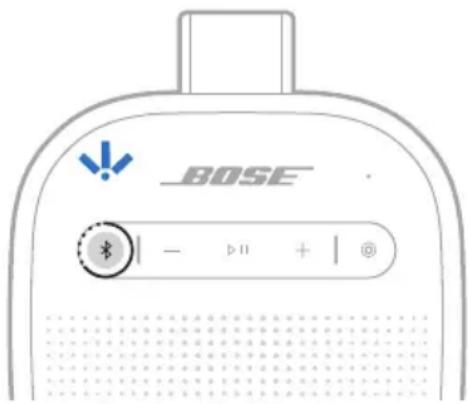
NOTE: If a device is already connected, you hear "Ready to connect another device."
- On the soundbar remote or the top of the speaker, press and hold the Bluetooth button ✝ until the light bar or light ring pulses blue.
The speaker connects to the soundbar or speaker, and you hear the same audio through both devices.
NOTES:
- It could take up to 30 seconds to connect.
- Make sure that the speaker is within 30 ft (9 m) of the speaker or soundbar.
- You can connect the speaker to only one product at a time.
RECONNECT A BOSE SMART SPEAKER OR SOUNDBAR
Use the Bose app to reconnect the speaker to a previously-connected compatible Bose product. For more information, visit: ____ support.Bose.
NOTES:
- The speaker or soundbar must be within range (30 ft or 9 m) and powered on.
- If the speaker doesn't connect, see "Troubleshooting" on page 38.
STRAP CONFIGURATIONS
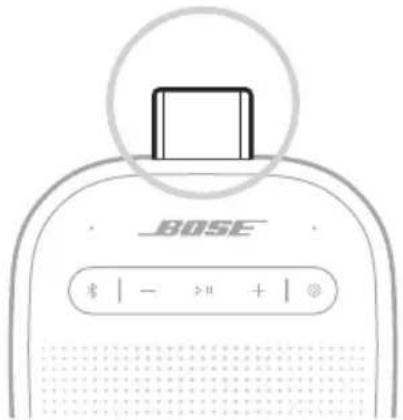
You can adjust the strap in different ways to easily transport the speaker.
Carry the speaker
You can use the top of the strap fastener to easily carry the speaker. You can also attach it to a carabiner or a cord.
Mount the speaker
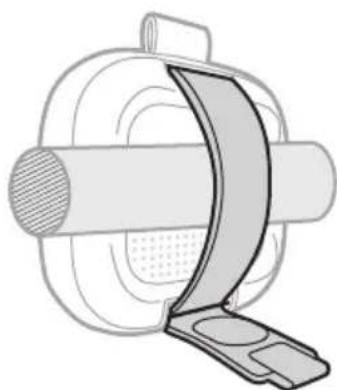
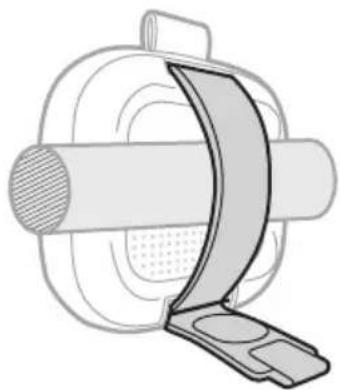
The strap can be used to mount the speaker to a handle or bar.
- Undo the strap fastener, completely pull the strap out of the bottom slot, and wrap it around the handle or bar.

natural_image
Diagram of a car seatbelt device with a curved arrow indicating rotation (no text or symbols)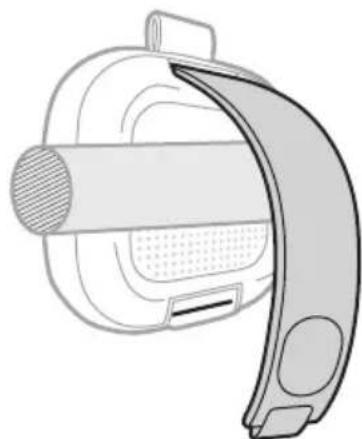
natural_image
Diagram of a device with a curved handle and internal components (no text or symbols)- Thread the strap through the bottom slot, tighten it, and secure it with the fastener.
natural_image
Technical illustration of a mechanical component with a curved internal structure and a flat plate (no text or symbols)
natural_image
Mechanical component diagram showing a rotating shaft and housing with a curved arrow indicating rotation (no text or symbols)WATER AND DUST RESISTANCE
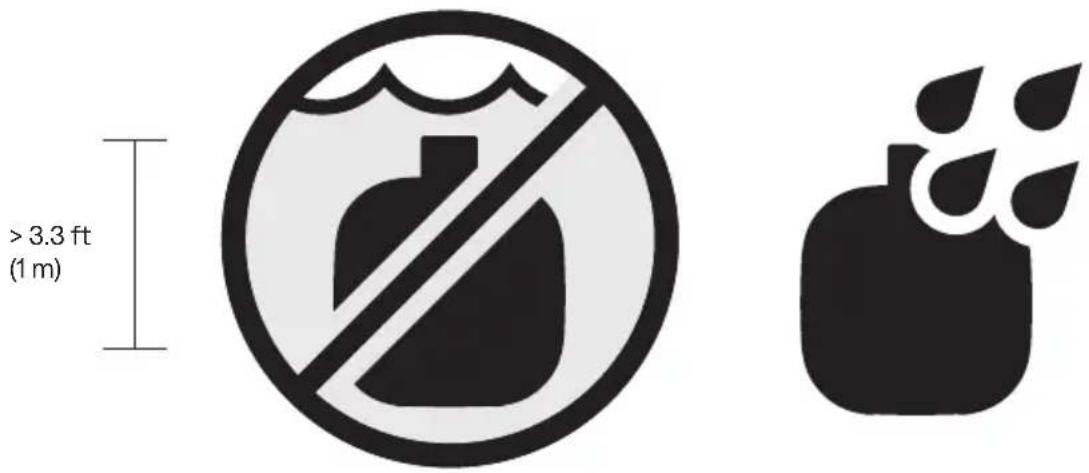
The speaker is waterproof, splash resistant, and dustproof. It is rated IP67 and IP64. You can immerse the speaker in water for up to 30 minutes at a depth of up to 3.3 ft (1 m). It can also be used while showering and in the rain or snow.
CAUTIONS:
- Do NOT submerge this speaker in any pool of water deeper than 3.3 ft (1 m).
- If the speaker is exposed to salt or chlorinated water, gently rinse with fresh water following the exposure to remove residue. Make sure the connector port is fully dried out before charging.
- Never attempt to charge the speaker while it is wet. Doing so may cause damage to the speaker.
SERVICE THE SPEAKER BATTERY
This product must only be operated with compatible Bose certified batteries.
For battery service options, contact Bose customer service or visit
support.Bose.com/micro2
UPDATE THE SPEAKER
The speaker begins updating automatically when connected to the Bose app and an update is available. Follow the app instructions. When the update begins, the Power light blinks white 3 times (repeated) until the update is complete.
You can also update the speaker using the Bose updater website. On your computer, visit: ____ btu.Bose.com and follow the on-screen instructions. When the update beg the Power light blinks white 3 times (repeated) until the update is complete.
CLEAN THE SPEAKER
The speaker may require periodic cleaning.
- Clean the surface of the speaker with a soft, damp cloth (water only). Make sure the USB-C port is fully dried out before charging.
- Do not use any solvents, chemicals or cleaning solutions containing alcohol, ammonia, or abrasives.
- If the speaker is exposed to salt or chlorinated water, gently rinse with fresh water following the exposure to remove residue. Make sure the USB-C port is fully dried out before charging.
STORE THE SPEAKER
When not in use, store the speaker in a cool place.
CAUTION: Do NOT store the speaker for extended periods when the battery is fully charged or has a low charge (see page 23).
REPLACEMENT PARTS AND ACCESSORIES
Replacement parts and accessories can be ordered through Bose customer service.
Visit: ____ support.Bose.com/micro2
LIMITED WARRANTY
The speaker is covered by a limited warranty. Visit our website at worldwide.Bose.com/Warranty for details of the limited warranty.
To register your product, visitworldwide.Bose.com/ProductRegistration for instructions. Failure to register will not affect your limited warranty rights.
TROUBLESHOOTING
You can access troubleshooting articles, videos, and other resources at: ____support.Bose.com/micro2-og
If you're unable to resolve your issue, contact Bose customer service.
Visit: ____ worldwide.Bose.com/contact
RESET THE SPEAKER
If the speaker is unresponsive, you can reset it.
Resetting the speaker resets the product controls and reboots the speaker. It doesn't clear any device settings.
NOTE: Make sure the USB-C cable isn't connected to the speaker.
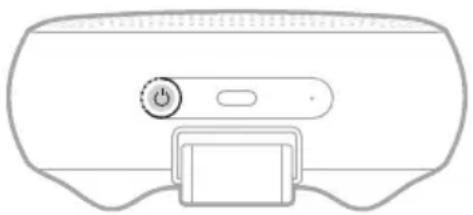
- Press and hold the Power button ⏻ for up to 15 seconds until the speaker powers off.
natural_image
Simple line drawing of a device with a button and handle (no text or symbols)- Press the Power button ⏻.
The Power light glows according to the battery level (see page 24).
NOTE: If you're unable to resolve your issue, additional troubleshooting and support is available at: ____support.Bose.com/micro2
RESTORE THE SPEAKER
Factory reset clears connected devices and language settings from the speaker and returns it to the original factory settings.
- Press and hold the Volume up button + and Volume down button — for 15 seconds until the Power light quickly blinks white for 3 seconds.
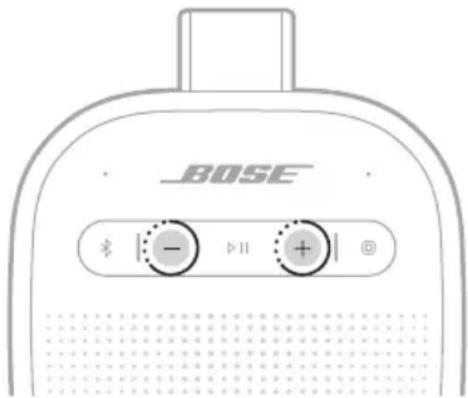
The speaker powers off.
- Press the Power button ⏻.
The Bluetooth light glows blue, and the speaker is ready to connect.
NOTE: If you're unable to resolve your issue, additional troubleshooting and support is available at: ____support.Bose.com/micro2
TILSLUT PRODUKTER FRA BOSE
natural_image
Diagram of a device with a power button and cable inserted, showing no text or symbolsnatural_image
Top-down view of a device rear panel with a power button and control buttons (no text or symbols)Timer for automatisk slukning
natural_image
Diagram of a device with a power button and cable inserted, showing no text or symbolsBEMÆRK: Genvejsknappen © er som standard indstillet til at sammenkoble to Bose Bluetooth-højttalere (se side 29).
SKIFT ELLER DEAKTIVER DIN GENVEJ
natural_image
Line drawings of a BOSE device front and back, showing control buttons and display screen (no text or symbols)natural_image
Diagram showing two views of a device with a scroll and handle, one being folded and the other assembled (no text or symbols)natural_image
Two mechanical diagrams showing a cable or clamp mechanism with a rotating arrow indicating rotation (no text or symbols present)VAND- OG ST∅VAFVISENDE
natural_image
Line drawing of a device head with a power button and control buttons (no text or symbols)natural_image
Diagram of a device with a power button and cable connector (no text or symbols)natural_image
Line drawing of a device rear panel with a power button and switch (no text or symbols)natural_image
Diagram of a device with a power button and cable inserted, showing no text or symbolsnatural_image
Diagram of a car seatbelt device with a curved arrow indicating rotation (no text or symbols)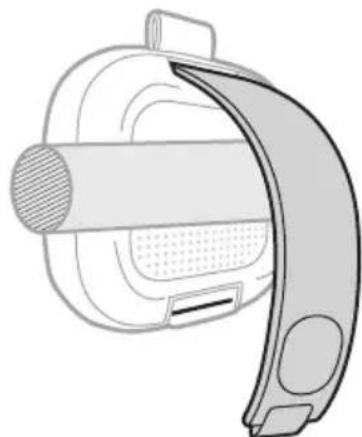
natural_image
Diagram of a device with a curved handle and internal components (no text or symbols)natural_image
Technical illustration of a mechanical component with a curved band and circular base (no text or symbols)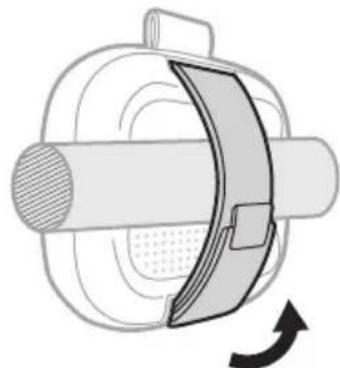
natural_image
Mechanical component diagram showing a rotating shaft and housing with a curved arrow indicating rotation (no text or symbols)natural_image
Line drawing of a device control panel with a power button and scroll (no text or symbols)Bose SoundLink Micro draagbare speaker (2 ^e gen.)
natural_image
Diagram of a device with a power button and cable connector (no text or symbols)natural_image
Diagram showing connections between a computer monitor, USB device, and a power outlet (no text or symbols present)natural_image
Line drawing of a BOSE brand electronic device with control buttons and speaker grille (no text or symbols on main body)natural_image
Diagram of a device rear panel with a power button and control buttons (no text or symbols)natural_image
Diagram of a device with a power button and cable connector (no text or symbols)natural_image
Line drawings of a BOSE device front and back, showing control buttons and display screen (no text or symbols)natural_image
Diagram of a car seatbelt device with a curved arrow indicating rotation (no text or symbols)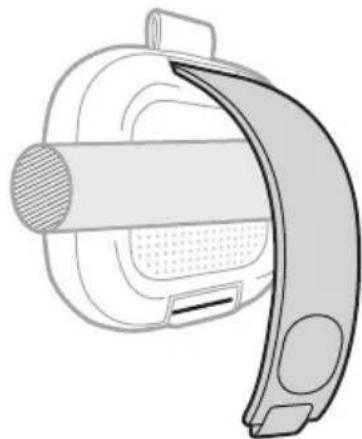
natural_image
Technical line drawing of a mechanical device with a curved handle and internal components (no text or symbols)natural_image
Technical line drawing of a mechanical component with a curved band and textured center (no text or symbols)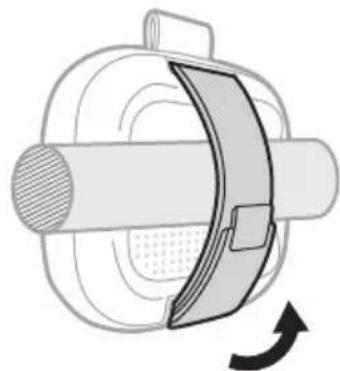
natural_image
Mechanical component diagram showing a rotating shaft and housing with a curved arrow indicating rotation (no text or symbols)WATER- EN STOFBESTENDIGHEID
natural_image
Line drawing of a device rear panel with a power button and control buttons (no text or symbols)Altavoz portátil Bose SoundLink Micro (2° Gen)
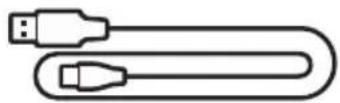
Cables USB Type-C® a USB Type-A
natural_image
Diagram of a device with a power button and cable connector (no text or symbols)natural_image
Line drawings of a BOSE brand electronic device showing front panel and back panel with buttons (no text or symbols on main body)NOTA: Si un dispositivo ya está conectado, oirá "Ready to connect another device" (Listo para conectar otro dispositivo).
natural_image
Top-down view of a device control panel with a power button and indicator lights (no text or symbols)natural_image
Diagram of a device with a power button and cable, no text or symbols presentLUZ DE ENCENDIDO
NOTA: Si un dispositivo ya está conectado, oirá "Ready to connect another device" (Listo para conectar otro dispositivo).
NOTA: Si un dispositivo ya está conectado, oirá "Ready to connect another device" (Listo para conectar otro dispositivo).
Montar el altavoz
natural_image
Diagram of a device with a slide and handle, showing a curved arrow indicating rotation (no text or symbols present)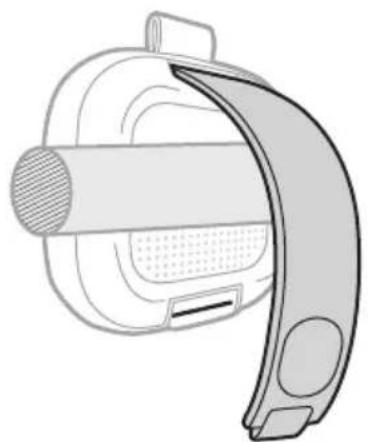
natural_image
Diagram of a mechanical device with a curved handle and internal components (no text or symbols)natural_image
Technical illustration of a mechanical component with a curved blade and circular housing (no text or symbols)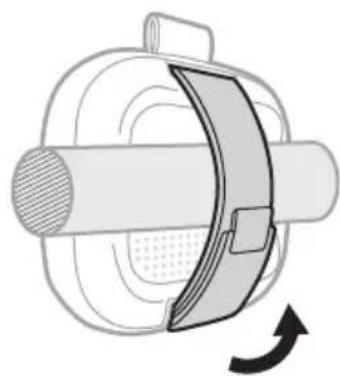
natural_image
Mechanical component diagram showing a rotating shaft and housing with a curved arrow indicating rotation (no text or symbols)Visite: ____ worldwide.Bose.com/contact
natural_image
Line drawing of a device rear panel with a power button and control buttons (no text or symbols)natural_image
Line drawing of a Bose brand electronic device with no visible text or symbols on the bodynatural_image
Diagram of a device with a power button and cable inserted, showing no text or symbols3. Paina virtapainiketta ⏻.
natural_image
Line drawings of a BOSE brand electronic device showing front panel and back panel with buttons and display screen (no text or symbols on main body)natural_image
Front view of a computer mouse head panel with a power button and control buttons (no text or symbols)natural_image
Diagram of a device with a power button and cable inserted, showing no text or symbolsKuulet kummankin kaiuttimen tilan.
natural_image
Line drawings of a BOSE device front and back, showing control buttons and display screen (no text or symbols on main body)natural_image
Diagram of a car seatbelt device with a right-hand rule indicating clockwise rotation (no text or symbols)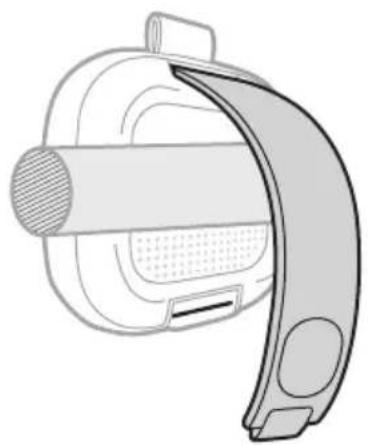
natural_image
Technical line drawing of a mechanical component with curved handle and textured body (no text or symbols)natural_image
Technical illustration of a mechanical component with a curved blade and circular housing (no text or symbols)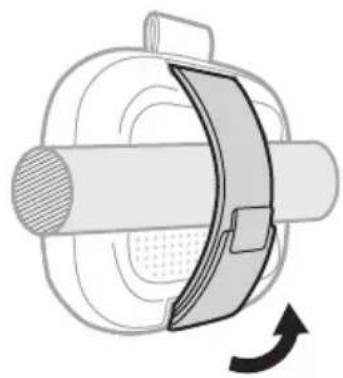
natural_image
Mechanical component diagram showing a rotating shaft and housing with a curved arrow indicating rotation (no text or symbols)VEDEN- JA PÖLYNKESTÄVYYS
natural_image
Line drawing of a device rear panel with a power button and scroll (no text or symbols)- Paina virtapainiketta ⏻.
CONNEXION DES PRODUITS BOSE
natural_image
Line drawing of a Bose brand electronic device with no visible text or symbols on the bodynatural_image
Diagram of a device with a power button and cable connector (no text or symbols)MISE SOUS/HORS TENSION
natural_image
Diagram of a device rear panel with a power button and indicator lights (no text or symbols)natural_image
Diagram of a device with a power button and cable connector (no text or symbols)natural_image
Diagram of a device with a slide and handle, showing a curved arrow indicating rotation (no text or symbols present)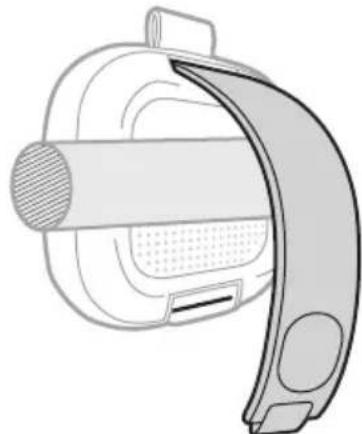
natural_image
Technical line drawing of a mechanical device with a curved handle and textured internal components (no text or symbols)natural_image
Technical line drawing of a mechanical component with a curved bracket and circular housing (no text or symbols)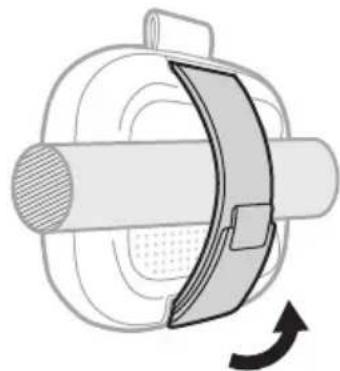
natural_image
Mechanical component diagram showing a rotating shaft and housing with a curved arrow indicating rotation (no text or symbols)natural_image
Line drawing of a device head with a power button and control buttons (no text or symbols)Diffusore portatile Bose SoundLink Micro (2 ^a Gen)
Cavo da USB Type-C® a USB Type-A
natural_image
Diagram of a device with a power button and cable inserted, showing no text or symbolsnatural_image
Line drawings of a BOSE brand electronic device with control buttons and speaker grille (no text or symbols on main body)natural_image
Front view of a computer monitor with a power button and indicator lights (no text or symbols)natural_image
Diagram of a device with a power button and cable connector (no text or symbols)natural_image
Line drawings of a BOSE device front and back, showing control buttons and display screen (no text or symbols)natural_image
Diagram of a device with a slide and scroll, showing a curved arrow indicating rotation (no text or symbols present)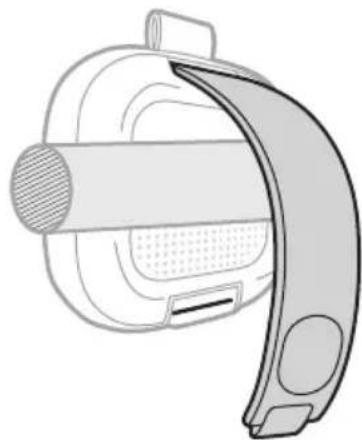
natural_image
Technical line drawing of a mechanical component with curved and flat surfaces (no text or symbols)natural_image
Technical illustration of a mechanical component with a curved band and circular housing (no text or symbols)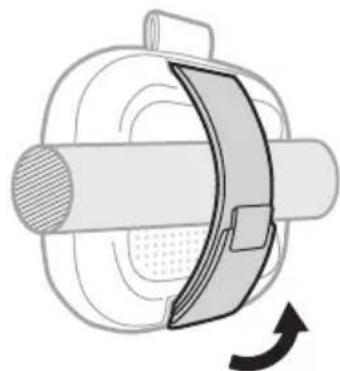
natural_image
Mechanical component diagram showing a rotating shaft and housing with a curved arrow indicating rotation (no text or symbols)RESISTENZA ALL'ACQUA E ALLA POLVERE
Visitare: ____ worldwide.Bose.com/contact
ESEGUIRE UN RESET DEL DIFFUSORE
natural_image
Simple line drawing of a device with a power button and control panel (no text or symbols)natural_image
Line drawing of a Bose brand electronic device with no visible text or symbols on the bodynatural_image
Diagram of a device with a power button and cable connector (no text or symbols)natural_image
Diagram showing connections between a computer monitor, USB device, and a TV wall (no text or symbols present)natural_image
Line drawings of a BOSE sound wave device with control buttons and speaker grille (no text or symbols on main body)natural_image
Top-down view of a computer mouse head panel showing the button and control buttons (no text or symbols)natural_image
Diagram of a device with a power button and cable connector (no text or symbols)natural_image
Line drawings of a BOSE device front and back, showing control buttons and display screen (no text or symbols)natural_image
Diagram of a car seatbelt device with a right-hand rule indicating clockwise rotation (no text or symbols)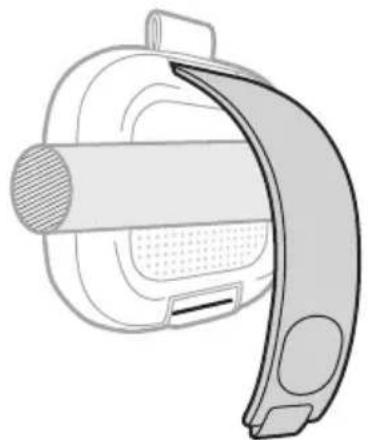
natural_image
Diagram of a mechanical device with a curved handle and internal components (no text or symbols)natural_image
Technical illustration of a mechanical device with a curved component and circular housing (no text or symbols)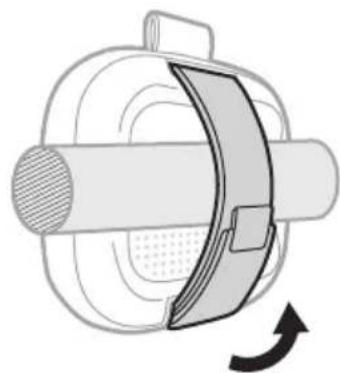
natural_image
Diagram of a mechanical component with a rotating arrow indicating rotation (no text or symbols)VÍZ- ÉS PORÁLLÓSÁG
natural_image
Line drawing of a device with a power button and control panel (no text or symbols)KOBLE TIL BOSE-PRODUKTER
STELL OG VEDLIKEHOLD
natural_image
Line drawing of a Bose brand electronic device with no visible text or symbols on the bodynatural_image
Diagram of a device with a power button and cable inserted, showing no text or symbolsnatural_image
Line drawing of a BOSE brand electronic device with front panel and back panel (no text or symbols on the device itself)KOBLE TIL EN ENHET PÅ NYTT
Koble til den sist tilkoblede enheten på nytt
natural_image
Diagram of a device rear panel with a power button and control buttons (no text or symbols)natural_image
Diagram of a device with a power button and cable inserted, showing no text or symbolsnatural_image
Line drawings of a BOSE device front and back, showing control buttons and display screen (no text or symbols)En talemelding informerer om at høyttalerne ikke lenger er koblet sammen.
natural_image
Diagram of a car seatbelt device with a curved arrow indicating rotation (no text or symbols)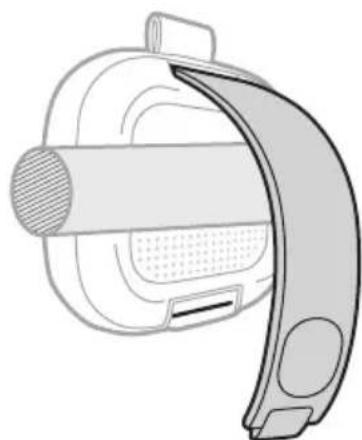
natural_image
Diagram of a device with a curved handle and textured internal structure (no text or symbols)natural_image
Technical illustration of a mechanical component with a curved band and circular housing (no text or symbols)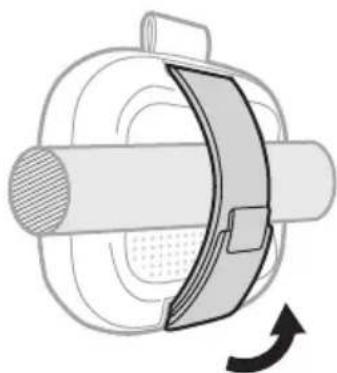
natural_image
Diagram of a mechanical component with a rotating arrow indicating rotation (no text or symbols)TÅLER VANN OG ST∅V
natural_image
Prohibition sign with a diagonal line crossing over a stylized heart silhouette inside a circle (no text or symbols)
natural_image
Silhouette of a fruit with three leaves, resembling a pomegranate or apple (no text or symbols)SERVICE PÅ H∅YTTALERBATTERIET
natural_image
Line drawing of a device control panel with a power button and scroll (no text or symbols)KONFIGURACJA WSTĘPNA
natural_image
Diagram of a device with a power button and cable inserted, showing no text or symbolsnatural_image
Line drawing of a BOSE brand electronic device showing front panel and back panel (no text or symbols on the device itself)natural_image
Front view of a computer mouse head panel with a power button and control buttons (no text or symbols)natural_image
Diagram of a device with a power button and cable inserted, showing no text or symbolsWSKAŹNIK ZASILANIA
WSTĘPNIE ZAINSTALOWANE JĘZYKI
natural_image
Line drawings of a BOSE device front and back, showing control buttons and display screen (no text or symbols)natural_image
Diagram of a vehicle seatbelt device with a curved arrow indicating rotation (no text or symbols)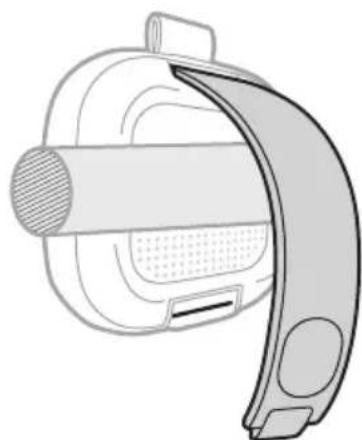
natural_image
Diagram of a medical device with a curved handle and internal components (no text or symbols)natural_image
Technical illustration of a mechanical component with a curved band and circular housing (no text or symbols)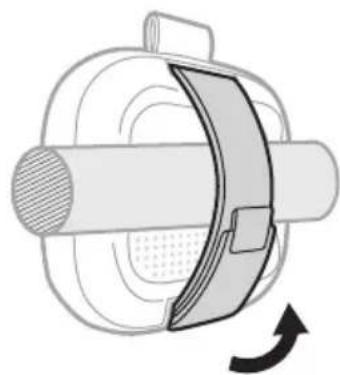
natural_image
Mechanical component diagram showing a rotating shaft and housing with a curved arrow indicating rotation (no text or symbols)ODPORNOŚĆ NA DZIAŁANIE WODY I PYŁU
natural_image
Line drawing of a device with a power button and control panel (no text or symbols)ANSLUTA BOSE-PRODUKTER
natural_image
Line drawing of a Bose brand electronic device with no visible text or symbols on the bodynatural_image
Diagram of a device with a power button and cable inserted, showing no text or symbolsnatural_image
Top-down view of a device rear panel with a power button and indicator lights (no text or symbols)natural_image
Diagram of a device with a power button and cable inserted, showing no text or symbolsnatural_image
Line drawings of a BOSE device front and back, showing control buttons and display screen (no text or symbols)Montera högtalaren
natural_image
Diagram of a car seatbelt device with a right-hand rule indicating clockwise rotation (no text or symbols)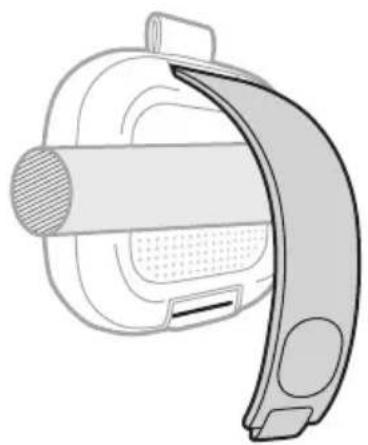
natural_image
Technical line drawing of a mechanical device with curved handle and textured internal components (no text or symbols)natural_image
Technical illustration of a mechanical component with a curved blade and circular housing (no text or symbols)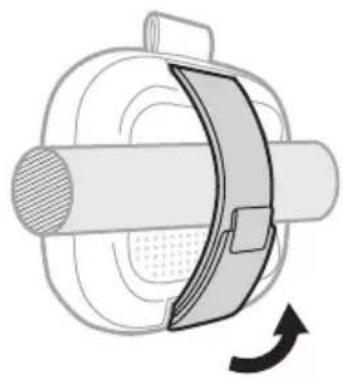
natural_image
Diagram of a mechanical component with a rotating arrow indicating rotation (no text or symbols)DAMM- OCH VATTENTÅLIG
UPPDATERA HÖGTALAREN
natural_image
Line drawing of a device with a power button and control panel (no text or symbols)Högtalaren stängs av.
수입업체: Bose Electronics (Shanghai) Company Limited, Level 6, Tower D, No. 2337 Gudai Rd. Minhang District, Shanghai 201100 | Bose Products B.V., Vijzelstraat 68, 1017HL Amsterdam, The Netherlands | Ingram Micro Mexico SA de CV, Joselillo 3 Int. Piso 5 Col. El Parque, Naucalpan de Juarez, Edo Mex 53398 전화 번호: +52 55 5263 6500 | Bose Limited (H.K.), 7F., No. 2, Sec. 3, Minsheng E. Road, Zhongshan Dist., Taipei City 104511, 전화 번호: +886-2-2514 7676 | Bose Limited, 16 Dufour's Place, London W1F 7SP
natural_image
Diagram of a device with a plug and cable inserted, showing a directional arrow (no text or symbols)- 전원 버튼 ⏻을 누릅니다.
natural_image
Line drawing of a device rear panel with a power button and indicator lights (no text or symbols)자동 끄기 타이머
natural_image
Diagram of a device with a power button and cable connector (no text or symbols)natural_image
Line drawings of a BOSE device front and side, showing control buttons and display screen (no text or symbols)natural_image
Diagram showing two views of a device with a handle and seat, one with an arrow indicating rotation (no text or symbols)natural_image
Two mechanical diagrams showing a cable or clamp mechanism with a rotating arrow indicating rotation (no text or symbols present)방수 및 방진
natural_image
Line drawing of a device rear panel with a power button and control buttons (no text or symbols)- 전원 버튼 ⏻을 누릅니다.
스피커 전원이 꺼집니다.
- 전원 버튼 ⏻을 누릅니다.
natural_image
Line drawing of a Bose brand electronic device with no visible text or symbols on the bodynatural_image
Diagram of a device with a plug and cable inserted, showing a switch and power button (no text or symbols)3. 按下电源按钮 ⏻。
- 连接您的设备(请参见第 12 页)。
natural_image
Front view of a computer monitor with a power button and control buttons (no text or symbols)自动关闭计时器
natural_image
Diagram of a computer interface with a plug and power button, no text or symbols presentnatural_image
Diagram showing connections between a computer monitor, USB device, and a wall-mounted device (no text or symbols present)每个扬声器上都会有语音提示播报模式。
natural_image
Line drawings of a Bose brand air conditioner front panel and back panel (no text or symbols on the device body)语音提示将通知扬声器不再连接。
natural_image
Diagram of a car seatbelt device with a curved arrow indicating rotation (no text or symbols)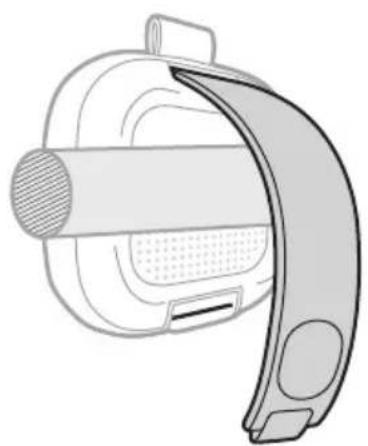
natural_image
Technical line drawing of a mechanical device with a curved handle and textured internal components (no text or symbols)- 将束带穿过底部槽,拉紧并用束带扣固定。
natural_image
Technical illustration of a mechanical component with a curved blade and circular base (no text or symbols)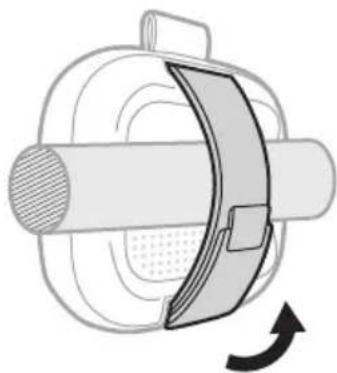
natural_image
Diagram of a mechanical component with a curved arrow indicating rotation or force (no text or symbols)防水防尘
natural_image
Line drawing of a device rear panel with a power button and control buttons (no text or symbols)- 按下电源按钮 ⏻。
关闭扬声器的电源。
- 按下电源按钮 ⏻。
natural_image
Diagram of a device with a plug and power button, no text or symbols present3. 按下電源按鈕 ⏻。
- 連接您的裝置(請參見第12頁)。
natural_image
Top-down schematic of a device control panel with power button and buttons (no text or symbols)自動關閉計時器
natural_image
Diagram of a device with a plug and cable inserted, showing a button and arrow (no text or symbols)natural_image
Diagram showing connections between a computer monitor, USB device, and a control panel (no text or symbols)語音提示會播報每個揚聲器的模式。
natural_image
Line drawings of a BOSE device front and back, showing control buttons and display screen (no text or symbols)語音提示將播報揚聲器不再連接。
natural_image
Diagram of a car seatbelt device with a curved arrow indicating rotation (no text or symbols)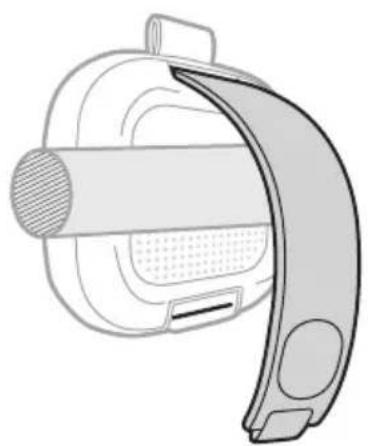
natural_image
Diagram of a device with a curved handle and mesh grip, no text or symbols presentnatural_image
Technical illustration of a mechanical component with a curved blade and circular housing (no text or symbols)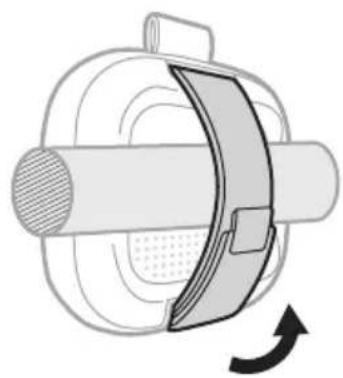
natural_image
Mechanical component diagram showing a rotating shaft and housing with a curved arrow indicating rotation (no text or symbols)防水且防塵
natural_image
Line drawing of a device rear panel with a power button and control buttons (no text or symbols)- 按下電源按鈕 ○。
揚聲器將關閉。
- 按下電源按鈕 ⏻。
Bose SoundLink Micro Portable Speaker (第2世代)
natural_image
Diagram of a device with a plug and cable inserted, showing a directional arrow (no text or symbols)- 電源ボタン ⏻を押します。
- 機器に接続します(12ページを参照)。
natural_image
Diagram of a device rear panel with a power button and indicator lights (no text or symbols)自動オフタイマー
natural_image
Diagram of a device with a power button and cable connector (no text or symbols)natural_image
Line drawings of a BOSE device front and back, showing control buttons and display screen (no text or symbols)スピーカーを取り付ける
natural_image
Illustration of a car seatbelt device with a curved arrow indicating rotation (no text or symbols)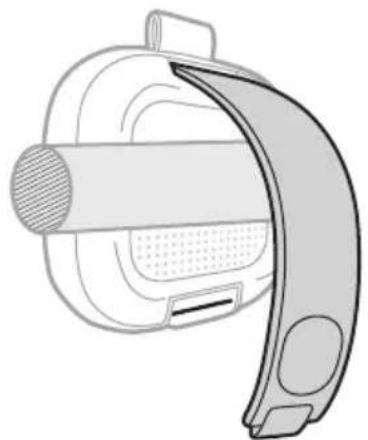
natural_image
Diagram of a device with a curved handle and internal components (no text or symbols)natural_image
Technical illustration of a mechanical component with a curved blade and circular features (no text or symbols)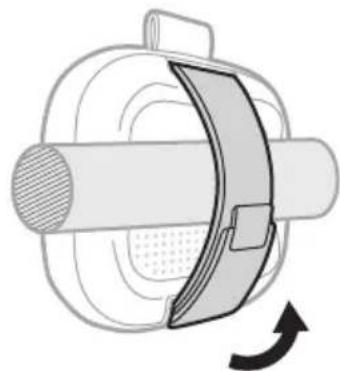
natural_image
Mechanical component diagram showing a rotating shaft and housing with a curved arrow indicating rotation (no text or symbols)防水・防塵仕様
natural_image
Line drawing of a device head with a power button and control buttons (no text or symbols)- 電源ボタン ⏻を押します。
スピーカーの電源がオフになります。
- 電源ボタン ⏻を押します。
natural_image
Line drawing of a Bose brand electronic device with no visible text or symbols on the bodynatural_image
Diagram of a device with a power button and cable inserted, showing no text or symbolsnatural_image
Diagram showing connections between a computer monitor, USB port, and an external device (no text or symbols present)3 ..الطاقة
natural_image
Line drawing of a BOSE brand electronic device with front panel and back panel (no text or symbols on the device itself)natural_image
Front view of a computer monitor with control buttons and a power button (no text or symbols)natural_image
Diagram of a device with a power button and cable connector (no text or symbols)natural_image
Diagram showing connections between a computer monitor, USB device, and power outlet (no text or symbols)ل'Eتغير Child wearing the Chinese character, I am to go to the English character, I am to go to the English character. Bose, we'm known as a person who is doing it.
natural_image
Line drawings of a BOSE device front and side, showing control buttons and display screen (no text or symbols)Bose Smart ELECTRICALS, Bose Smart ELECTRICALS, Bose SimpleSync ELECTRICALS
Bose Portable Home Speaker / Bose Portable Smart Speaker
natural_image
Diagram of a car seatbelt device with a right-hand rule indicating clockwise rotation (no text or symbols)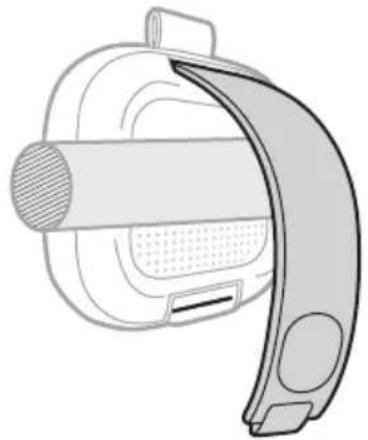
natural_image
Technical line drawing of a mechanical component with curved handle and textured body (no text or symbols)natural_image
Technical illustration of a mechanical component with a curved bracket and circular housing (no text or symbols)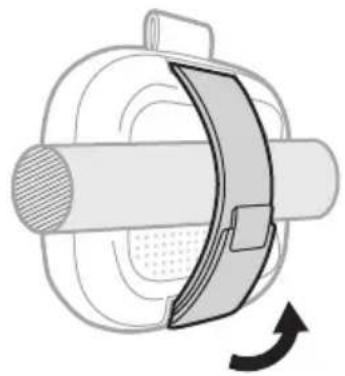
natural_image
Diagram of a mechanical component with a rotating arrow indicating rotation (no text or symbols)natural_image
Prohibition sign with a diagonal line crossing over a stylized heart silhouette (no text or symbols)
natural_image
Silhouette of a fruit with leaf drops, no text or symbols present(متر واحد) 3,3 >
support.Bose.com/micro2-og
natural_image
Line drawing of a device control panel with a power button and scroll (no text or symbols)2 ..① طاقة

- Please read and keep all safety and use instructions.
- Important Safety Instructions
- WARNINGS/CAUTIONS
- Please complete and retain for your records
- WHAT'S IN THE BOX
- GETTING STARTED
- BLUETOOTH® CONNECTIONS
- SPEAKER CONTROLS
- BATTERY
- STATUS
- VOICE PROMPTS
- SHORTCUTS
- CONNECT BOSE PRODUCTS
- PORTABILITY
- CARE AND MAINTENANCE
- TROUBLESHOOTING
- INITIAL SETUP
- Press the Power button ⏻.
- CONNECT TO A DEVICE
- Using your device's Bluetooth settings
- Using the Bose app
- RECONNECT TO A DEVICE
- Reconnect to the most recently-connected device
- NOTES:
- Reconnect to a different device
- CONNECT AN ADDITIONAL DEVICE
- IDENTIFY CONNECTED DEVICES
- SWITCH BETWEEN TWO CONNECTED DEVICES
- DISCONNECT A DEVICE
- CLEAR THE SPEAKER DEVICE LIST
- ANDROID DEVICES ONLY
- Connect using Fast Pair
- Snapdragon Sound technology
- POWER ON/OFF
- Auto-off timer
- Disable the auto-off timer
- MEDIA PLAYBACK AND VOLUME
- CHARGE THE SPEAKER
- Charging time
- Hear the battery level
- Battery protection mode
- POWER LIGHT
- BLUETOOTH LIGHT
- SHORTCUT LIGHT
- PRE-INSTALLED LANGUAGES
- CHANGE THE LANGUAGE
- DISABLE VOICE PROMPTS
- USE YOUR SHORTCUT
- CHANGE OR DISABLE YOUR SHORTCUT
- LINK TWO BOSE BLUETOOTH SPEAKERS
- Compatible products
- Link using the product controls
- Switch between Stereo mode and Party mode
- Unlink the speakers
- CONNECT TO A BOSE SMART SPEAKER OR SOUNDBAR USING SIMPLESYNC TECHNOLOGY
- Connect using the Bose app
- Connect using the product controls
- RECONNECT A BOSE SMART SPEAKER OR SOUNDBAR
- STRAP CONFIGURATIONS
- Carry the speaker
- Mount the speaker
- WATER AND DUST RESISTANCE
- CAUTIONS:
- SERVICE THE SPEAKER BATTERY
- UPDATE THE SPEAKER
- CLEAN THE SPEAKER
- STORE THE SPEAKER
- REPLACEMENT PARTS AND ACCESSORIES
- LIMITED WARRANTY
- RESET THE SPEAKER
- RESTORE THE SPEAKER
- TILSLUT PRODUKTER FRA BOSE
- Timer for automatisk slukning
- SKIFT ELLER DEAKTIVER DIN GENVEJ
- VAND- OG ST∅VAFVISENDE
- WATER- EN STOFBESTENDIGHEID
- LUZ DE ENCENDIDO
- Montar el altavoz
- Paina virtapainiketta ⏻.
- VEDEN- JA PÖLYNKESTÄVYYS
- CONNEXION DES PRODUITS BOSE
- MISE SOUS/HORS TENSION
- RESISTENZA ALL'ACQUA E ALLA POLVERE
- ESEGUIRE UN RESET DEL DIFFUSORE
- VÍZ- ÉS PORÁLLÓSÁG
- KOBLE TIL BOSE-PRODUKTER
- STELL OG VEDLIKEHOLD
- KOBLE TIL EN ENHET PÅ NYTT
- Koble til den sist tilkoblede enheten på nytt
- TÅLER VANN OG ST∅V
- SERVICE PÅ H∅YTTALERBATTERIET
- KONFIGURACJA WSTĘPNA
- WSKAŹNIK ZASILANIA
- WSTĘPNIE ZAINSTALOWANE JĘZYKI
- ODPORNOŚĆ NA DZIAŁANIE WODY I PYŁU
- ANSLUTA BOSE-PRODUKTER
- Montera högtalaren
- DAMM- OCH VATTENTÅLIG
- UPPDATERA HÖGTALAREN
- 자동 끄기 타이머
- 방수 및 방진
- 按下电源按钮 ⏻。
- 自动关闭计时器
- 防水防尘
- 按下電源按鈕 ⏻。
- 自動關閉計時器
- 防水且防塵
- 自動オフタイマー
- スピーカーを取り付ける
- 防水・防塵仕様
Brand : BOSE
Model : SoundLink Micro Portable Speaker (2nd Gen)
Category : Speaker