USER MANUAL HDS-2000-GB HOMEDICS
Distributed by HOMEDICS®
deep(sleep
Sleep Therapy Machine
Instruction Manual and Warranty Information
HDS-2000
1 year limited warranty
Distributed by
HOMEDICS
deep(sleep
Fall asleep. Stay asleep.
Create your perfect sleep environment.
Thank you for purchasing Deep Sleep, the ultimate in lab-created sleep therapy technology. Our system has been specifically designed to mask disruptions all night long so you can get the best night's sleep imaginable. This, like the entire HoMedics product line, is built with high quality craftsmanship to provide you years of dependable service. We hope you will find it to be the finest product of it's kind.
Assembly and Instructions for Use
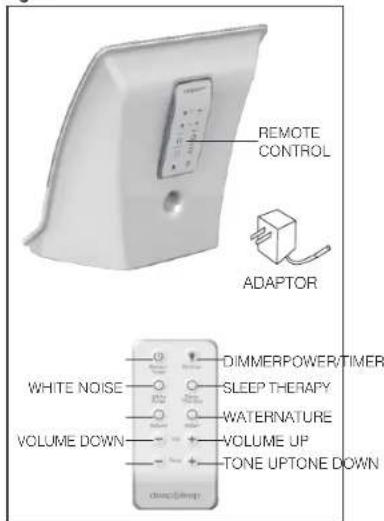
- Unpack the product and check to make sure the adaptor and remote control are included. (Fig. 2)
- This unit is powered by an AC adaptor
- Attach the AC adaptor jack to the base of the unit and insert the cord into a 120V household outlet.
Remote Control Battery Precautions
• Use only the size and type of batteries specified.
- When installing batteries, observe proper +/- polarities. Incorrect installation of battery may cause damage to the unit.
- Clean the battery contacts and also those of the device prior to battery installation.
How to Mask Distractions all Night
Your Deep Sleep unit is powerful enough to be used anywhere in the room and placing the unit away from your beside will fill the room with soothing sound selections- ranging from pure white noise to incredible nature sounds- and will mask all external distractions. If you wish to help drown out sounds located within the bedroom (like a snoring partner), place your Deep Sleep unit directly at your bedside - preferably on a nightstand - and position the speaker toward you.
How to Use Your Deep Sleep
Once you have decided where to place your Deep Sleep for optimal results, follow these steps to create your perfect sleep environment
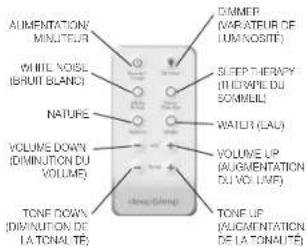
- Press the POWER button (Fig 1)
- Choose your optimal sleep setting. As you scroll through the categories listed below, your sound selection will illuminate on the LCD screen. We have four categories to choose from:
CAUTION: All servicing of this product must be performed by authorized HoMedics Service Personnel only.
White Noise: By gently tapping the "White Noise" touch button on your unit, you can scroll through the different White Noise tones: Soothe, Mask, Relax and Calm. Take a moment to listen to each tone and decide which one best suits your environment.
Water: Tap on the "Water" button to scroll through our 4 Water relaxation selections: Ocean, Brook, Thunderstorm and Rain
Nature: Tap on the "Nature" button to scroll through the Nature sound relaxation selections: Summer Night, Campfire, Wind Chimes and Everglades
Sleep Therapy:
Our Sleep Therapy programs are unlike any other sleep-inducing sound programs. These programs are designed to combine the relaxation benefits of Relaxation sounds with the noise-blocking capabilities of the White Noise tones.
Fig. 1
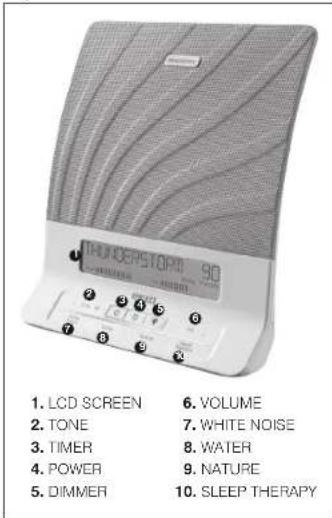
Fig. 2
How to Enjoy Sleep Therapy:
Tap on the Sleep Therapy touch button and scroll through any one of our 8 Water or Nature relaxation tones. Choose the tone you wish to relax to as you fall asleep. Once you are asleep, your Relaxation tone will gently transition to a White Noise tone to keep you in the deepest sleep imaginable- all night long.
NOTE: Sleep Therapy is designed to run all night, until you wake fully refreshed in the morning. Therefore, you cannot use Sleep Therapy with the Timer Mode.
- Once you select the White Noise, Water, Nature or Sleep Therapy tone that is suits your needs, you can adjust the sound by pressing the TONE button (Fig 1) up and down. Press and hold the "+" symbol to remove bass and achieve a higher pitch. Press and hold the "-" symbol to add bass and achieve a lower pitch.
- Finally, to adjust the VOLUME, press and hold the "+" or "-" symbols on the VOL button (Fig 1). Your Deep Sleep unit is now set. When you wake in the morning and power off the unit- don't fret. You will not have to reset your choices. Your Deep Sleep is programmed to remember your settings when you power the unit back on. If you choose to try a different sleep setting, just repeat steps 1-4.
Using the Dimmer
- Press the Dimmer button (Fig. 3) to scroll through the LCD Dimmer settings (Hi, Med, Low, Off).
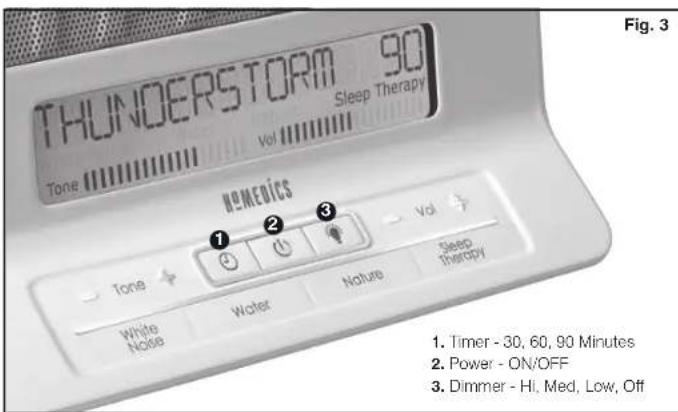
Using the Auto-Timer
- When the power is on and you are listening to a white noise, water or nature tone, you may set a timer so the unit will automatically turn off.
- Toggle through the TIMER button (Fig. 3) until the corresponding LED illuminates next to the time of your choice, 30, 60 or 90 minutes. The unit will automatically shut off after the selected time.
NOTE: Do not select the TIMER button if you wish to listen to the sounds continuously.
Maintenance
To Store
You may leave the unit on display, or you can store it in its box in a cool, dry place.
To Clean
Wipe off dust with a damp cloth. NEVER use liquids or abrasive cleaner to clean. Modifications not authorized by the manufacturer may void users authority to operate this device.
FCC Disclaimer
NOTE: This device complies with Part 15 of the FCC guidelines. Operation is subject to the following two conditions: (1) this device may not cause harmful interference, and (2) this device must accept any interference received, including interference that may cause undesired operation.
NOTE: The manufacturer is not responsible for any radio or TV interference caused by unauthorized modifications to this equipment. Such modifications could void the user authority to operate the equipment.
NOTE: This equipment has been tested and found to comply with the limits for a Class B digital device, pursuant to Part 15 of the FCC Rules. These limits are designed to provide reasonable protection against harmful interference in a residential installation. This equipment generates, uses and can radiate radio frequency energy and, if not installed and used in accordance with the instructions, may cause harmful interference to radio communications. However, there is no guarantee that interference will not occur in a particular installation. If this equipment does cause harmful interference to radio or television reception, which can be determined by turning the equipment off and on, the user in encouraged to try to correct the interference by one or more of the following measure:
• Reorient or relocate the receiving antenna.
- Increase the separation between the equipment and receiver.
- Connect the equipment into an outlet on a circuit different from that to which the receiver is connected.
- Consult the dealer or an experienced radio/TV technician for help.
Distributed by HOMEDICS®
ONE YEAR LIMITED WARRANTY
HoMedics sells its products with the intent that they are free of defects in manufacture and workmanship for a period of one year from the date of original purchase, except as noted below. HoMedics warrants that its products will be free of defects in material and workmanship under normal use and service. This warranty extends only to consumers and does not extend to Retailers.
To obtain warranty service on your HoMedics product, contact a consumer relations representative by telephone at 1-800-466-3342 for assistance. Please make sure to have the model number of the product available.
email:
cservice@homedics.com
8:30am – 7:00pm (EST)
Monday – Friday
1.800.466.3342
HeMedics does not authorize anyone, including, but not limited to. Retailers, the subsequent consumer purchaser of the product from a Retailer or remote purchasers, to obligate HeMedics in any way beyond the terms set forth herein. This warranty does not cover damage caused by misuse or abuse, accident, the attachment of any unauthorized accessory: alteration to the product; improper installation; unauthorized repairs or modifications; improper use of electrical/power supply; loss of power; dropped product; malfunction or damage of an operating part from failure to provide manufacturer's recommended maintenance; transportation damage; theft; neglect; vandalism; or environmental conditions; loss of use during the period the product is at a repair facility or otherwise awaiting parts or repair; or any other conditions whatsoever that are beyond the control of HeMedics.
This warranty is effective only if the product is purchased and operated in the country in which the product is purchased. A product that requires modifications or adoption to enable it to operate in any other country than the country for which it was designed, manufactured, approved and/or authorized, or repair of products damaged by these modifications is not covered under this warranty.
THE WARRANTY PROVIDED HEREIN SHALL BE THE SOLE AND EXCLUSIVE WARRANTY. THERE SHALL BE NO OTHER WARRANTIES EXPRESS OR IMPLIED INCLUDING ANY IMPLIED WARRANTY OF MERCHANTABILITY OR FITNESS OR ANY OTHER OBLIGATION ON THE PART OF THE COMPANY WITH RESPECT TO PRODUCTS COVERED BY THIS WARRANTY. HOMEDICS SHALL HAVE NO LIABILITY FOR ANY INCIDENTAL CONSEQUENTIAL OR SPECIAL DAMAGES. IN NO EVENT SHALL THIS WARRANTY REQUIRE MORE THAN THE REPAIR OR REPLACEMENT OF ANY PART OR PARTS WHICH ARE FOUND TO BE DEFECTIVE WITHIN THE EFFECTIVE PERIOD OF THE WARRANTY. NO REFUNDS WILL BE GIVEN. IF REPLACEMENT PARTS FOR DEFECTIVE MATERIALS ARE NOT AVAILABLE, HOMEDICS RESERVES THE RIGHT TO MAKE PRODUCT SUBSTITUTIONS IN LIEU OF REPAIR OR REPLACEMENT.
This warranty does not extend to the purchase of opened, used, repaired, repackaged and/or resealed products, including but not limited to sale of such products on internal auction sites and/or sales of such products by surplus or bulk resellers. Any and all warranties or guarantees shall immediately cease and terminate as to any products or parts thereof which are repaired, replaced, altered, or modified, without the prior express and written consent of HoMedics.
This warranty provides you with specific legal rights. You may have additional rights which may vary from state to state. Because of individual regulations, some of the above limitations and exclusions may not apply to you.
HoMedics and Deep Sleep are trademarks of HoMedics, LLC.
© 2013 HoMedics, LLC. All rights reserved.
IB-HDS2000A
Fall asleep. Stay asleep.
deep(sleep) Fall asleep. Stay asleep.
natural_image
Front view of a Thunderstorm 50 digital device with leaf pattern and control buttons (no readable text or symbols beyond branding)
- ECRAN LCD
- IONE (IONALITE)
- TIME (MINUTEUR)
- ALIMENTATION (MARCHE)
ARRE
- DIMMER (VARATEUF DE
LUMINOSITE
- VOLUME
- WHITE NOISE (BROU)
PIANO
- WATER (EAL)
- NATURE
- SLEEP THERAPY
(THÉRAPHIE DU SOMMEIL)
Fig. 2