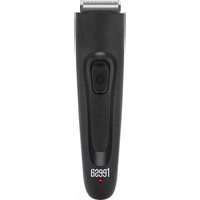
TSA0524 - Beard trimmer Teesa - Free user manual and instructions
Find the device manual for free TSA0524 Teesa in PDF.


| Product type | Beard trimmer |
| Brand | Teesa |
| Model | TSA0524 |
| Dimensions (L x H x D) | 39 x 155.8 x 41.1 mm |
| Weight | 106 g |
| Power supply | Rechargeable battery 1.2 V, 1000 mAh via USB cable (5 V, 1 A) |
| Charging time | Approximately 8 hours |
| Working time | Up to 45 minutes |
| Power | 1.5 W |
| Blade width | 32 mm |
| Cutting guide | Adjustable from 2 to 18 mm (9 positions) |
| Noise level | ≤ 75 dB |
| Main functions | Cordless operation, charge indicator, removable blade, cutting length lock |
| Care and cleaning | Clean the blade with the provided brush; rinse the guide under running water; lubricate the blade with the provided oil; do not immerse the device |
| Safety | Household use only; do not use in the shower or in water; disconnect before cleaning; do not repair yourself |
| Spare parts and repairability | No user-serviceable parts; repair by qualified personnel only |
| Included accessories | USB cable, cutting guide, cleaning brush, maintenance oil, user manual |
| General information | Made in PRC for Lechpol Electronics Leszek Sp. k., ul. Garwolińska 1, 08-400 Miętne |
Frequently Asked Questions - TSA0524 Teesa
User questions about TSA0524 Teesa
0 question about this device. Answer the ones you know or ask your own.
Ask a new question about this device
Download the instructions for your Beard trimmer in PDF format for free! Find your manual TSA0524 - Teesa and take your electronic device back in hand. On this page are published all the documents necessary for the use of your device. TSA0524 by Teesa.
USER MANUAL TSA0524 Teesa
| CSDEENFRGR | ||||
| Nastavitelný hřebenový nástavec | Verstellbarer Kamm | Adjustable comb | Guide de coupe réglable | Руθμιζόμενη χτένα |
| Přepínač napájení | Netztaste Power switch | Interrupteur d'alimentation | Διακόπτης ρεύματος | |
| Indikátor nabíjení | Ladeanzeige Charging indicator | Indicateur de chargement | 'Ενδειξη φόρτισης | |
| Přepínač zám-ku nástavce | Kamm-Verrie-glungstaste | Comb lock switch | Interrupteur de verrouillage du guide | Διακόπτης κλειδαριάς |
| Micro USB port (nabíjení) | Mikro USB Anschluss (aufladen) | microUSB port (charging) | Port microUSB (chargement) | Θύρα microUSB (φόρτιση) |
| HUNLPLROSK | ||||
| Állítható hajvágó fésű | Verstelbare opzetkam | Regulowana nasadka grzebieniowa | Pieptene reglabil | Nastavitelný hrebeňový nástavec |
| Tápellátás kapcsoló | AAN/UIT schakelaar | Przełącznik zasilania | Comutator alimentare | Hlavný vypínač |
| Töltöttség kijelző | Oplaadindicator | Wskaźnik ładowania | Indicator de încărcare | Indikátor nabíjania |
| Hajvágó fésű zároló | Opzetstuk Vergrendelingsschakelaar | Przełącznik blokady nasadki | Comutator blocare pieptene | Tlačidlo uzamknutia nástavca |
| MicroUSB port (töltés) | MicroUSB-poort (opladen) | Port microUSB (ładowanie) | Port microUSB (încărcare) | MicroUSB port (nabíjanie) |
natural_image
Line drawings of a handheld device with a handle and internal components, showing a left-side view and a right-side view (no text or symbols)OBSLUHA
natural_image
Line drawings of a handheld device with a handle and internal components, showing two views (no text or symbols)BEDIENUNG
Thank you for purchasing TEESA appliance. Please read this operation instruction carefully before use, and keep it for future use. Producer does not take responsibility for damages caused by inappropriate handling and use of the product.
SAFETY INSTRUCTIONS
In order to reduce the risk of any injury, follow basic safety precautions applied when using any electrical device, including the following:
- Read this instruction manual carefully, even if you are familiar with the appliance.
-
Before connecting the device to power supply socket, make sure the voltage indicated on the appliance corresponds to the voltage in the power supply socket.
-
ALWAYS turn off the device and disconnect it from the mains supply:
• if it's not operating correctly,
- if there's an uncommon voice when using,
• before disassembling the device,
• before cleaning,
• before servicing.
-
When you disconnect the power cord, grasp and pull the plug, not the cord/cable.
-
This appliance may be used by children and by persons with reduced physical, sensory or mental capabilities, or lack of experience and knowledge, if they are supervised and guided by a person who is responsible for their safety in a cautious manner, and all the safety precautions are understood and followed. Children should not play with this device.
-
Use only the included USB cable to charge the device.
-
Do not use this appliance if it's not operating properly or has been dropped into water. Do not attempt to repair this appliance yourself, only authorized and qualified personnel may repair this device. This product has no user serviceable parts.
-
Keep the device and its cord/cable away from heat, water, moisture, sharp edges and any other factor which may damage the appliance or its cord.
-
Do not use the product for purposes/uses different from what displayed in this operating manual.
-
Producer of this product is not responsible for damages caused by inappropriate handling and using of the device.
-
Use only original/authorized accessories.
-
Do not use the appliance in bath or shower.
-
Do not place or store product where it can fall or be pulled onto a tub or sink.
-
Do not reach for a product that has fallen into water. Unplug it from power supply socket immediately.
-
Do not handle the appliance with wet hands.
-
Do not immerse the appliance in water or any other liquids.
-
Product for household use only. Not for commercial use.
-
Clean and store this appliance in accordance to instructions listed in "Cleaning" and "Storage" section.
CHARGING
Notes:
• Make sure the appliance is turned off before connecting it to power supply.
• Make sure to fully charge the appliance before first use.
- It takes about 8 hours to fully charge the appliance what provides about 45 minutes of run time.
- The appliance may become warm during charging/operation. It is a normal behavior.
-
Connect one plug of USB cable to the USB charger; connect the other plug to the appliance's microUSB port.
-
When the appliance is charging, charging indicator lights red.
-
After 8 hours of charging, disconnect the USB cable from the appliance and USB charger.
ATTACHING AND REMOVING THE ADJUSTABLE COMB
Notes:
• Make sure that the appliance is turned off when attaching or removing the comb.
- The set includes an adjustable comb with 9 length settings: 2, 4, 6, 8, 10, 12, 14, 16 and 18 mm.
- Set the comb lock switch to position in order to attach or remove the comb.
- Attach the comb by sliding it from the top downwards as shown in figure below.
- Remove the comb by sliding it upwards until it detaches from the appliance.

natural_image
Line drawings of a handheld device with a handle and internal components, showing a left-side view and a right-side view (no text or symbols)OPERATION
- Make sure the comb lock switch is set to

position then attach the adjustable comb to the appliance (see "Attaching and removing the adjustable comb" section).
Note: It is also possible to use the appliance without the comb. In that case, all beards will be trimmed.
-
Slide the comb up and down to set the desired cutting length.
-
Set the comb lock switch to position to lock in the setting.
-
Slide the Power switch upwards to turn on the appliance.
-
Start trimming your beard.
-
When trimming is finished, turn off the appliance by sliding the Power switch downwards.
-
If the appliance was used with the comb attached, remove and clean the comb and the whole appliance according to the instructions included in "Cleaning" section.
CLEANING
General:
• Do not immerse the appliance in water.
- Do not clean the blade under running water. Clean it only with the included brush.
- Do not use any abrasives or chemical agents to clean this product.
- Clean main body of the trimmer with a soft and slightly damp cloth.
-
Clean the appliance after each use. Regular cleaning guarantees better trimming performance.
-
Make sure the appliance is turned off and disconnected from power supply.
- Remove the blade by pushing it out of the appliance.
- Use the included brush to clean the blade and the hair chamber.
- To reattach the blade, first place its lug on the lower ridge of the hair chamber and then push it firmly onto the appliance.
- Clean the comb using the brush or rinse it under running water. Make sure to wipe it dry before refitting.
OILING
Blade has to be oiled from time to time to provide optimal performance. To do this, place 2 or 3 drops of the included maintenance oil in between fixed and moving blade.
STORAGE
• Before storing the appliance, make sure it is clean, dry and disconnected from the power supply.
- Store the appliance in a dry, cool place, out of the reach of children.
SPECIFICATION
MAIN FEATURES
Adjustable comb (2, 4, 6, 8, 10, 12, 14, 16, 18 mm)
Cordless use
Charging indicator
Detachable cutter for easy cleaning
Cutting length lock
TECHNICAL DATA
Power: 1,5 W
Cutter width: 32 mm
Run time: up to 45 min
Charging time: up to 8 h
Noise level: ≤75 dB
Battery: 1,2 V; 1000 mAh
Charging 5 V; 1 A
In set: USB cable, comb, cleaning brush, maintenance oil, user manual
PHYSICAL PARAMETERS
Weight: 106 g
Dimensions: 39 x 155,8 x 41,1 mm
English
Correct Disposal of This Product
(Waste Electrical & Electronic Equipment)

(Applicable in the European Union and other European countries with separate collection systems) This marking shown on the product or its literature, indicates that it should not be disposed with other household wastes at the end of its working life. To prevent possible harm to the environment or human health from uncontrolled waste disposal, please separate this from other types of wastes and recycle it responsibly to promote the sustainable reuse of material resources. Household users should contact either the retailer where they purchased this product, or their local government office, for details of where and how they can take this item for environmentally safe recycling. Business users should contact their supplier and check the terms and conditions of the purchase contract. This product should not be mixed with other commercial wastes for disposal.
Made in China for Lechpol Electronics Leszek Sp.k., ul. Garwolińska 1, 08-400 Miętne.
natural_image
Line drawings of a remote control device with a handle and internal components, showing two views (no text or symbols)UTILISATION
natural_image
Line drawings of a remote control device with a handle and internal components, showing two views (no text or symbols)ΛΕΙΤΟΥΡΓΙΑ
natural_image
Line drawings of a remote control device and its internal panel, showing adjustment arrows (no text or symbols)KEZELÉS
natural_image
Line drawings of a handheld device with a scroll and handle, showing a left-side view and a right-side view (no text or symbols)BEDIENING
natural_image
Line drawings of a remote control device with a scroll and handle, showing two views (no text or symbols)OBSŁUGA
Akumulator: 1,2 V; 1000 mAh
Łaodwanie 5 V; 1 A
natural_image
Line drawings of a remote control device with a handle and internal components, showing two views (no text or symbols)FUNCTIONARE
natural_image
Line drawings of a remote control device with a handle and ventilation slots, shown from two different angles (no text or symbols present)POUŽÍVANIE
natural_image
Blank gray image with no visible content, text, or symbolsreesa®
www.teesa.pl