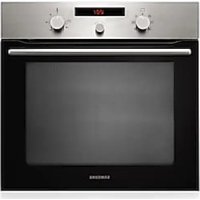
BF3ON3T11G - Oven SAMSUNG - Free user manual and instructions
Find the device manual for free BF3ON3T11G SAMSUNG in PDF.


| Type de produit | Built-in oven |
| Brand | Samsung |
| Model | BF3ON3T11G |
| Color | Stainless steel, white, black, glass (depending on version) |
| Overall dimensions (W x H x D) | 595 x 595 x 566 mm |
| Internal dimensions (W x H x D) | 440 x 365 x 405 mm |
| Internal volume | 66 L |
| Net weight | Approximately 33 kg |
| Weight with packaging | Approximately 37 kg |
| Voltage / Frequency | 230 V ~ 50 Hz |
| Maximum power | 3400 W |
| Installation type | Built-in in high or low unit |
| Cooking functions | Traditional cooking, Convection cooking, Top heat + convection, Bottom heat + convection, Large grill, Rapid preheat, Timer, Child safety |
| Number of cooking modes | 6 modes (including grill) |
| Included accessories | Large grill, Baking tray, Drip tray, Telescopic guides (optional) |
| Interior lighting | Special oven bulb 25 W / 230 V resistant to 300 °C |
| Cleaning | Manual (soft cloth, soapy water); removable door glass panels |
| Door | 3 removable glass panels, removable hinges |
| Power supply | Connection to socket or disconnector switch |
| Energy class | Not specified |
| General information | Recycled paper for manual; registration at www.samsung.com/register |
| Repairability | User-replaceable bulb; parts available via Samsung after-sales service |
Frequently Asked Questions - BF3ON3T11G SAMSUNG
User questions about BF3ON3T11G SAMSUNG
0 question about this device. Answer the ones you know or ask your own.
Ask a new question about this device
Download the instructions for your Oven in PDF format for free! Find your manual BF3ON3T11G - SAMSUNG and take your electronic device back in hand. On this page are published all the documents necessary for the use of your device. BF3ON3T11G by SAMSUNG.
USER MANUAL BF3ON3T11G SAMSUNG
Built-in Oven user manual
Planet First
100% Recycled Paper
This manual is made with 100% recycled paper.
imagine the possibilities
Thank you for purchasing this Samsung product. Please register your product at
www.samsung.com/register
ENGLISH
SAMSUNG
using this manual
Thank you for choosing a SAMSUNG Built-In Oven.
This user Manual contains important information on safety and instructions intended to assist you in the operation and maintenance of your appliance.
Please take the time to read this Owner's Manual before using your oven and keep this book for future reference.
The following symbols are used in the text of this Owner's Manual:

WARNING or CAUTION Important Note


safety instructions
Installation of this oven must be performed only by a licensed electrician. The installer is responsible for connecting the appliance to the mains power supply in observance of the relevant safety recommendations.
ELECTRICAL SAFETY
If the oven has been damaged in transport, do not connect it.
- This appliance must be connected to the mains power supply only by a specially licensed electrician.
- In the event of a fault or damage to the appliance, do not attempt to operate it.
- Repairs should be performed by a licensed technician only. Improper repair may result in considerable danger to you and others. If your oven needs repair, contact a SAMSUNG Service Centre or your dealer.
If the supply cord is defective, it must be replaced by a special cord or assembly available from the manufacturer or an authorised service agent. (Fixed wiring type appliance only)
If the supply cord is damaged, it must be replaced by the manufacturer, its service agent or similarly qualified persons in order to avoid a hazard. (power cord type appliance only)
- Electrical leads and cables should not be allowed to touch the oven.
- The oven should be connected to the mains power supply by means of an approved circuit breaker or fuse. Never use multiple plug adapters or extension leads.
- The rating plate is located on the right side of the door.
- The power supply of the appliance should be turned off when it is being repaired or cleaned.
- Take care when connecting electrical appliances to sockets near the oven.
- This appliance is not intended for use by persons (including children) with reduced physical, sensory or mental capabilities, or lack of experience and knowledge, unless they have been given supervision or instruction concerning use of the appliance by a person responsible for their safety.
It should allow to disconnection of the appliance from the supply after installation. The disconnection may be achieved by having the plug accessible or by incorporating a switch in the fixed wiring in accordance with the wiring rules.

WARNING: Accessible parts may become hot during use. To avoid burns young children should be kept away.

WARNING: The appliance and its accessible parts become hot during use. Care should be taken to avoid touching heating elements inside the oven. Children less than 8 years of age shall be kept away unless continuously supervised.

WARNING: Ensure that the appliance is switched off before replacing the lamp to avoid the possibility of electric shock.
2-using this manual
SAFETY DURING OPERATION
-
This oven has been designed only for the cooking of household foods.
-
During use, the oven interior surfaces become hot enough to cause burns. Do not touch heating elements or interior surfaces of the oven until they have had time to cool.
-
Never store flammable materials in the oven.
The oven surfaces become hot when the appliance is operated at a high temperature for an extended period of time.
-
When cooking, take care when opening the oven door as hot air and steam can escape rapidly.
-
When cooking dishes that contain alcohol, the alcohol may evaporate due to the high temperatures and the vapour can catch fire if it comes into contact with a hot part of the oven.
-
For your safety, do not use high-pressure water cleaners or steam jet cleaners.
Children should be kept at a safe distance when the oven is in use.
-
Frozen foods such as pizzas should be cooked on the Big grid. If the baking tray is used, it may become deformed due to the great variation in temperatures.
-
Do not pour water into the oven bottom when it is hot. This could cause damage to the enamel surface.
The oven door must be closed during cooking.
-
Do not line the oven bottom with aluminium foil and do not place any baking trays or tins on it. The aluminium foil blocks the heat, which may result in damage to the enamel surfaces and cause poor cooking results.
-
Fruit juices will leave stains, which can become indelible on the enamel surfaces of the oven. When cooking very moist cakes, use the deep pan.
-
Do not rest bakeware on the open oven door.
-
Young children should be supervised to ensure that they do not play with the appliance.
-
Keep children away from the door when opening or closing it as they may bump themselves on the door or catch their fingers in the door.
During use the appliance becomes hot. Care should be taken to avoid touching heating elements inside the oven.
If the supply cord is damaged, it must be replaced by the manufacturer, its service agent or similarly qualified persons in order to avoid a hazard.
Children should be supervised to ensure that they do not play with the appliance.
-
Appliances are not intended to be operated by means of an external timer or separate remote-control system.
-
Do not use harsh abrasive cleaners or sharp metal scrapers to clean the oven door glass since they can scratch the surface, which may result in shattering of the glass.
-
This appliance can be used by children aged from 8 years and above and persons with reduced physical, sensory or mental capabilities or lack of experience and knowledge if they have been given supervision or instruction concerning use of the appliance in a safe way and understand the hazards involved. Children shall not play with the appliance. Cleaning and user maintenance shall not be made by children without supervision.
-
For your safety, do not use high-pressure water cleaners or steam jet cleaners.
During cleaning conditions the surfaces may get hotter than usual and children should be kept away.
-
Excess spillage must be removed before cleaning and utensils which state in cleaning manual can be left in the oven during cleaning.
-
If this appliance has steam or self cleaning function, excess spillage must be removed before cleaning and all utensils should not be left in the oven during steam cleaning or self cleaning.
If this appliance has self cleaning function, during self cleaning the surfaces may get hotter than usual and children should be kept away.
-
Do not step, lean, sit or place heavy stuff on the door.
-
Do not open the door with unnecessarily strong power.

WARNING: Do not disconnect the appliance from the main power supply even after the cooking process is completed.

WARNING: Do not leave the door open while oven is cooking.


DISPOSAL INSTRUCTIONS
Disposing of the packaging material
- The material used to package this appliance is recyclable.
- Dispos of the packaging materials in the appropriate container at your local waste disposal facility.
Disposing of old appliances

WARNING: Before disposing of old appliances, make them inoperable so that they cannot be a source of danger.
To do this, disconnect the appliance from the mains supply and remove the mains lead.
To protect the environment, it is important that old appliances are disposed of in the correct manner.
- The appliance must not be disposed of with household rubbish.
You can obtain information about collection dates and public refuse disposal sites from your local refuse department or council.
4_safety instructions



contents
OVEN CONTROLS
6 Oven controls
ACCESSION
6 Accessory
TEST DISHES
7 Test dishes
FUNCTIONS
8 Functions
SETTINGS

9 Time setting
9 Set timer
10 Child safety function
10 Using the fast preheating mode
10 Using the cooking mode
INSTALLATION & MAINTENANCE
11 Installation
12 Troubleshooting
12 Information codes
CLEANING & CARE

13 Hand cleaning
13 Door removal
14 Door glass removal
14 Bulb exchange
contents_5


oven controls
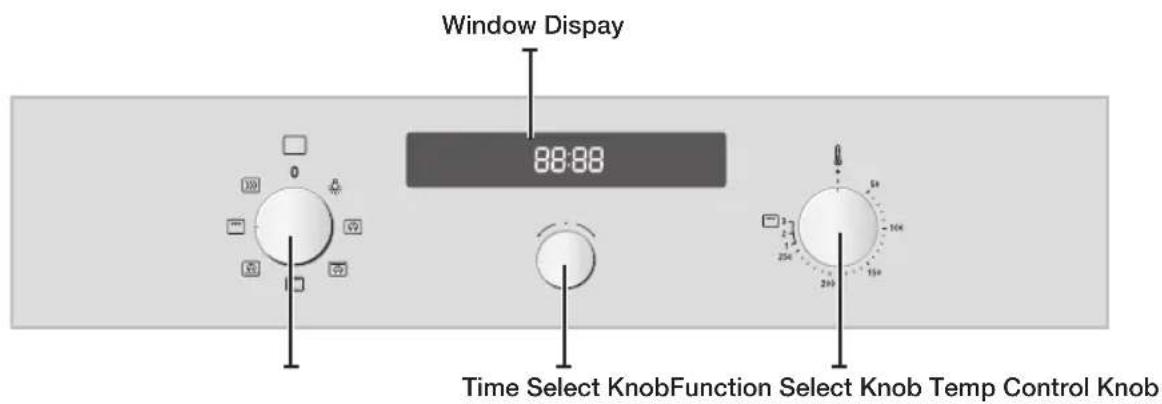

Front design
The front panel is available in various material and color options including stainless steel, white, black and glass. For purposes of quality improvement, the appearance may be subject to change.
accessory
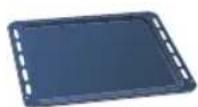
Baking tray
The baking tray could be used for the preparation of cakes, cookies and other pastries.
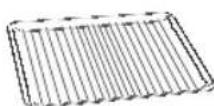
Big grid
The big grid should be used for grilling and roasting meals. You could use it with casseroles and other baking pots.
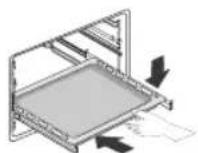
Telescopic slide guide (Optional)
- To insert the grid, baking or roasting pan, first slide out the telescopic guides for one particular level.
- Place the tray or pan on the guides and push them back completely into the oven. Close the oven door only after you have pushed the telescopic guides into the oven

CAUTION : Be sure to attach the accessory correctly to the racks. Trays need to have at least 2 cm space towards the bottom of the oven, otherwise the enamel surface could be damaged.

CAUTION: Be very careful removing meals and/or accessories out of the oven. Hot meals, accessories and surfaces can burn you!

ven controls
test dishes
According to standard EN 60350
Baking
The recommendations for baking refer to preheated oven. Always put trays the slanted side to the door front.
| Type of food | Dish & Notes | Shelf level | Cooking mode | Temp. (℃) | Cooking time (min.) |
| Shortbread Baking tray 3 Conventional 160-170 20-30 | |||||
| Baking tray + Dripping tray | 1+4 Convection 140-160 | 25-35 | |||
| Small Cakes Baking tray 3 Conventional | 160-180 15-25 | ||||
| Baking tray + Dripping tray | 1+4 Convection 150-170 | 25-35 | |||
| Fatless Sponge Cake | Springform cake tin on Big grid (Dark coated,ø 26 cm) | 2 Conventional 160-180 | 20-30 | ||
| Baking tray + Big grid + 2 Springform cake tins ** (Dark coated,ø 26 cm) | 1+4 Convection 140-160 | 35-45 | |||
| Apple Pie Big grid + 2 Springform cake tins * (Dark coated,ø 20 cm) | 1 Placed diagonally | Convectional 1 | 70-190 70-90 | ||
| Baking tray + Big grid + 2 Springform cake tins ** (Dark coated,ø 20 cm) | 1+4 Convection 150-170 | 90-110 | |||
- Two cakes are arranged on the grid at the back left and at the front right.
** Two cakes are arranged in the center on top of each other.
Grilling
Use this function with the maximum temperature setting of High. Preheat the empty oven for 5 minutes.
| Type of food | Dish & Notes | Shelf level | Cooking mode | Temp. (℃) | Cooking time (min.) |
| White Bread Toast | Big grid 5 Large grill | High 1st: | 1-2 | 2nd: 1-1½ | |
| Beef Burgers * (12 ea) | Big grid Baking tray (to catch drippings) | 4 3 | Large grill | High 1st: | 14-16 2nd: 3-5 |
- Beef Burgers: Preheat the empty oven for 15 minutes using Large Grill function.
test dishes_7
functions
| Convection The heat generated by the convection is shared evenly in the oven by fans. This function should be used for frozen dishes and baking. Suggested temperature: 170 °C | |
| Top Heat + Convection The heat generated by the upper heating system and the convection is shared evenly in the oven by fans. This function should be used for roasting crusty dishes like meat. Suggested temperature: 190 °C | |
| Conventional Heat is emitted from the upper and lower heating system. This function should be used for standard baking and roasting of almost any type of dishes. Suggested temperature: 200 °C | |
| Bottom Heat + Convection The heat generated by the lower heating system and the convection is shared evenly in the oven by fans. This function should be used for pizzas, bread and cakes. Suggested temperature: 190 °C | |
| Large grill Heat is emitted from the large area grill. This function should be used for scalloped dishes like lasagne and grilling meat. Suggested temperature: Medium |
8-functions
settings
TIME SETTING
When connecting the power for the first time, please use the product after setting the time.
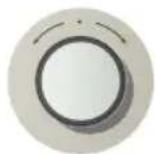
12:00
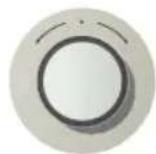
13:00
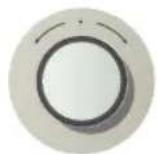
- Press Time Select Knob, hour figures blink.

- Turn Time Select Knob, set desired time in hours.

-
Press Time Select Knob, minute figures blink.
-
Turn Time Select Knob, set desired time in minutes.
-
Press Time Select Knob to confirm.
SET TIMER
12:00
12:00
-
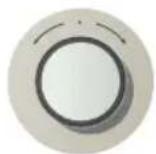
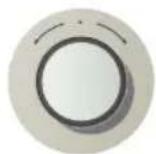
Turn Time Select Knob, set timer time.
-
Press Time Select Knob to confirm.

If you want to stop the timer operation, set the Alarm to 0:00. While it is operating, press the Time Button to display the clock for the current time.

Child SAFETY FUNCTION
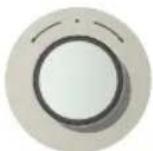
- Press the Time Select Knob, hold for 3 seconds. (L) will appear in the display.
USING ThE FAST PREHEATING MODE (
If you use the FAST PREHEATING option, you can increase the temperature up to the set value in no time.
This will drastically shorten your waiting time until the preheating is done.
Use the FAST PREHEATING option to increase the temperature to the set value until the preheating is completed. Then switch to Cooking mode before proceeding.
However, you do not need to use FAST PREHEATING for grilling food.
USING The Cooking Mode
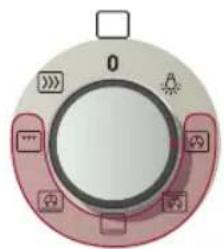
- Turn Function Select Knob, set desired the cooking mode.
Grill temperature
1 Low
2 Medium
3 High
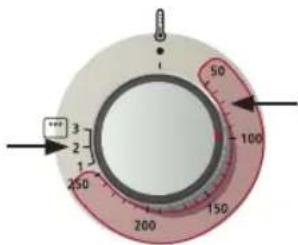
Set the temperature for all cooking other than grilling.
- Select the desired temperature by turning the Temp Control Knob.

If you select the Grill function and set the temperature between 50^ and 250^ , or if you select Normal Cooking mode and set the temperature between Grill 1 and 3, you are asked to reset the temperature with a buzzer and popup message.
10_settings
installation & maintenance
INSTALLATION

Safety instructions for the installation
This oven may be installed only by an approved electrician. The installer is responsible for connecting the appliance to the mains and in so doing for observing the relevant safety regulations.
- Ensure protection from live parts when installing the oven.
- The kitchen cabinet in which the oven is built in must satisfy stability requirements as specified in DIN 68930.
Technical specifications
Input voltage/Frequency
Volume (usable capacity)
Output rating
Net weight
Weight with packaging
Housing (W× H× D)
Oven interior (W× H× D)
230V 50Hz
66
max. 3400 W
approx. 33kg
approx. 37kg
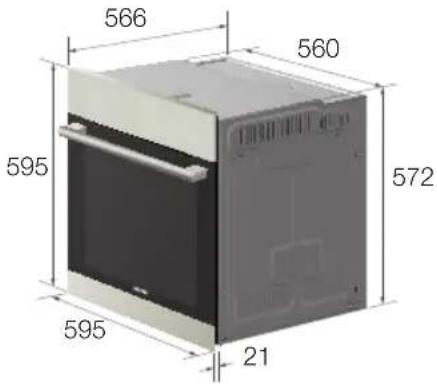
595× 595× 566mm
440 × 365 × 405 mm
Power connection
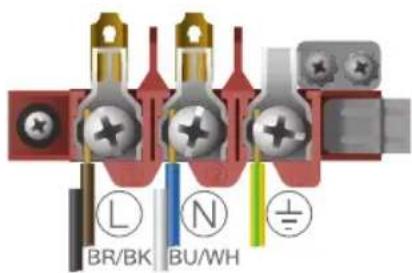
If the appliance is not connected to the mains with a plug, a multi-pole isolator switch (with at least 3mm contact spacing) must be provided in order to satisfy safety regulations. The power cable H05 RR-F or H05 WV-F, min.1.5 m, 1.5 ~ 2.5 mm² must be of sufficient length to be connected to the oven, even if the oven stands on the floor in front of its built-in cabinet. Open the rear connection cover of the oven with a screwdriver and loosen the screws of the cable clamp before you connect the power lines to the relevant connection terminals. The oven is earthed via the terminal. If the oven is connected to the mains with a plug, this plug must remain accessible after the oven is installed. Samsung will take no responsibility for accidents that originate from a missing or faulty earth connection.
Installation in the cabinet
This is a built-in oven, which needs to be installed into an upper or lower cabinet.
- Observe minimum distances.
Fix oven on both sides using screws.
After installation, remove the vinyl protective film from the door to the appliance and the protective film from the interior surfaces of the oven.
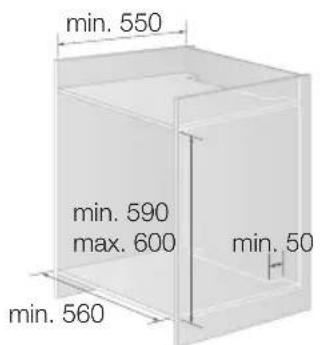
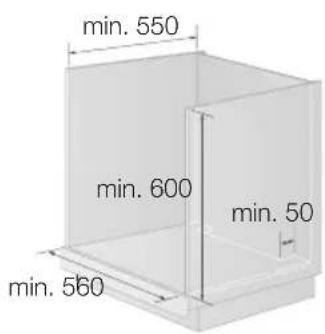
Upper Cabinet Lower Cabinet
installation & maintenance_11


TROUBLESHOOTING
| PROBLEM SOLUTION | |
| What should I do if the oven doesn't heat up? | ·The oven may not be switched on. Switch the oven on. ·The clock may not be set. Set the clock. ·Check to see if the required settings have been applied. ·A household fuse may have blown or a circuit breaker may has tripped. Replace the fuses or reset the circuit. If this happens repeatedly, call an electrician. |
| What should I do if the oven doesn't heat up even after the function and temperature have been set? | ·There may be problems with the internal electrical connections. Call your local service centre. |
| What should I do if an error code appears and the oven does not heat up? | ·There is a fault in the internal electrical circuit connection. Call your local service centre. |
| What should I do if the time display is blinking? | ·There has been a power failure. Set the clock. |
| What should I do if the oven light doesn't illuminate? | ·The oven light is faulty. Call your local service centre. |
| What should I do if the oven's fan is running without having been set? | ·After use, the oven's fan runs until the oven has cooled down. Call your local service centre if the fan continues to run after the oven has cooled down. |
INFORMATION CODES
| CODE PROBLEM SOLUTION | ||
| E-**1)-SE- | An error of the oven may cause low performance and problems in safety. Stop using the oven immediately. | Call local SAMSUNG service centre. |
| S-01 | SAFETY SHUTOFF Oven has continued operating at set temperature for prolonged time. | Turn oven off and remove food. Allow oven to cool before using again. |
| - - - - | If you did not select an appropriate temperature for the mode. | Select the correct temperature for the mode. (see section "Using the Fast Preheating mode") |
1) * refers to all numbers or characters.
12 Installation & maintenance
cleaning & care
HAND CLEANING

CAUTION : Make sure the oven and accessory is cool before cleaning.
Oven Interior
- For cleaning the interior of the oven, use a clean cloth and a mild cleaning agent or warm soapy water.
- Do not hand-clean the door seal.
- Do not use scouring pads or cleaning sponges.
- To remove stubborn soil, use a special oven cleaner.
- The cover casing should be cleaned using hot water, detergent and a soft nylon brush. Do not use abrasive cleaning agents, hard brushes, scouring pads or cloths, steel wool, knives or other abrasive materials.
Oven exterior
- For cleaning the exterior of the oven, use a clean cloth and a mild cleaning agent or warm soapy water.
- Dry with kitchen roll or a dry towel.
- Do not use scourers, caustic cleaners or abrasive products.
Stainless steel oven fronts
- Do not use steel wool, scouring pads or other abrasives. They may damage the finish.
Aluminum oven fronts
- Wipe the surface gently with a soft clean cloth or micro fiber cloth and a mild window cleaning detergent.
Accessory
Wash the accessory after every use and dry it with a kitchen towel. If necessary, lay in warm soapy water for about 30 minutes for easier cleaning.
DOOR REMOVAL
For normal use, the oven door must not be removed but if removal is necessary, for example, for cleaning purposes, follow these instructions.

CAUTION : The oven door is heavy.
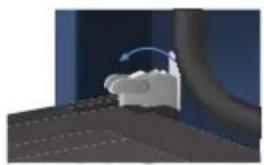
- Open the door and flip open the clips at both hinges completely.
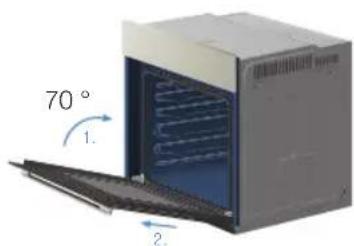
- Close the door by approximately 70^ . With both hands, grasp the sides of the oven door at its middle and pull-lift until the hinges can be taken out.
cleaning & care_13


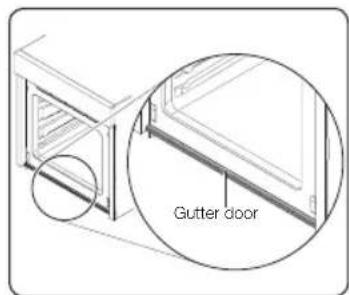
Gutter door
- The gutter door is for collecting the water from the moisture when oven is operating and it protects furniture. Clean the gutter door after cooking.
DOOR GLASS REMOVAL
The oven door is equipped with three sheets of glass placed against each other. These sheets can be removed for cleaning.
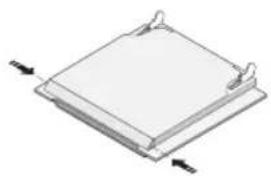
- Remove the two screws on the left and right sides of the door.
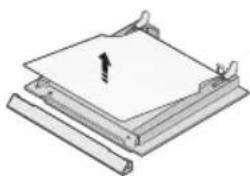
- Detach the covering and remove glass 1 from the door.
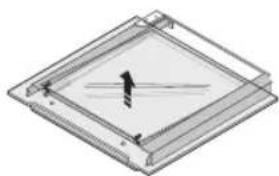
- Lift glass 2 and Clean the sheets with warm water or washing-up liquid and polish dry them with a soft clean cloth.

ATTACHING: The Door-Glass is different from 2 EA to 4 EA model by model. But, the method of the disassembly and assembly is same. When assembly the inner glass 1, put printing to direction below.
BULBXCHANGE

Danger of electric shock! Before replacing any of the oven bulbs, take the following steps:
- Switch oven Off.
- Disconnect the oven from the mains.
- Protect the oven light bulb and the glass cap by laying a cloth on the bottom of the oven compartment.
- Bulbs can be purchased from the SAMSUNG Service Centre.
Rear oven lamp
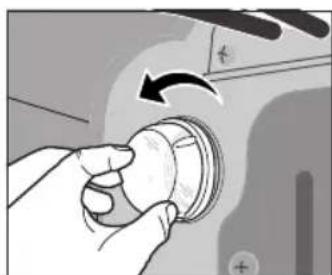
- Remove cap by turning anticlockwise and remove the metal ring, the sheet ring and clean the glass cap. If necessary, replace the bulb with a 25 watt, 230V , 300^ heat-resistant oven light bulb.
- Clean the glass cap, the metal ring and the sheet ring if necessary.
- Fit the metal and the sheet ring to the glass cap.
- Place glass cap where you have removed it in step 1 and turn it clockwise to keep it in place.
14 Cleaning & care

memo


SAMSUNG


QUESTIONS OR COMMENTS
| COUNTRY | CALL | OR VISIT US ONLINE AT |
| U.A.E 800-SAMSUNG | (726-7864) | www.samsung.com |
| OMAN 800-SAMSUNG | (726-7864) | |
| KUWAIT 183-2255 | ||
| BAHRAIN 8000-4726 | ||
| EGYPT 08000-726786 | ||
| JORDAN 800-22273 | ||
| MOROCCCO 080 100 255 | 255 | |
| SAUDI ARABIA 9200-21230 | 21230 | |
| TURKEY 444 77 11 | ||
| IRAN 021-8255 | ||
| NIGERIA 0800-726-7864 | 64 | |
| SOUTH AFRICA 0860-SAMSUNG(726-7864) | SAMSUNG(726-7864) |
Code No.: DG68-00447A
BF30 Série
DES QUESTIONS OU DES COMMENTAIRES?
| PAYS | TéléPHONE | OU SUR INTERNET |
| U.A.E 800-SAMSUNG | (726-7864) | www.samsung.com |
| OMAN 800-SAMSUNG | (726-7864) | |
| KUWAIT 183-2255 | ||
| BAHRAIN 8000-4726 | ||
| EGYPT 08000-726786 | ||
| JORDAN 800-22273 | ||
| MOROCCO 080 100 2255 | ||
| SAUDI ARABIA 9200-21230 | ||
| TURKEY 444 77 11 | ||
| IRAN 021-8255 | ||
| NIGERIA 0800-726-7864 | ||
| SOUTH AFRICA 0860-SAMSUNG(726-7864) |
Code N°: DG68-00447A
SERIE BF3O
Forno de encastrar manual do utiliser
Planet First
100% Recycled Paper
O papel正常使用 na execucao destemanual 100% reciclado.
imagine the possibilities
Obrigado por ter adquirido este produit Samsung. Registe o seu produits em
www.samsung.com/register
PORTUGUES
SAMSUNG