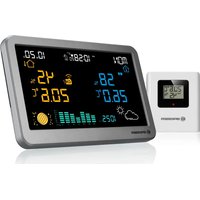
MeteoTemp TBH RC - Weather Station BRESSER - Free user manual and instructions
Find the device manual for free MeteoTemp TBH RC BRESSER in PDF.


| Brand | Bresser |
| Model | MeteoTemp TBH RC |
| Product type | Weather station with outdoor sensor |
| Power supply (main unit) | EU-UK adapter included (DC 5V) and CR2032 battery for memory backup |
| Power supply (outdoor sensor) | 2 AAA batteries (not included) |
| Display | Indoor and outdoor temperature, humidity, weather forecast, moon phase, barometer with 24h history, calendar, DCF time, alarm |
| Indoor temperature measurement range | -9.9 °C to 50 °C |
| Outdoor temperature measurement range | -40 °C to 70 °C |
| Humidity range | 20% to 95% RH |
| Number of supported sensors | Up to 3 outdoor sensors (channels 1-3) |
| Time reception | DCF (radio-controlled) |
| Adjustable time zone | Yes |
| Weather forecast | 12 to 24 h, 75% accuracy within a radius of 30-50 km |
| Barometer | Graphic display of pressure trend over 24 h |
| Moon phase | Automatic display according to date |
| Alarm | One alarm with snooze function |
| Backlight | 4 levels, adjustable night mode |
| Temperature alert | High and low thresholds for indoor and each outdoor sensor |
| Day display languages | German, English, Italian, French, Dutch, Spanish, Danish |
| Units of measurement | °C / °F (adjustable) |
| Compatibility | Bresser 7009985 sensor included |
| Safety | Do not disassemble, use recommended batteries, avoid temperatures >60 °C, keep out of reach of children |
| Maintenance | Clean with a soft dry cloth, avoid chemicals |
| Repairability | Contact the dealer or Bresser after-sales service |
| Warranty | 2 years (extendable upon registration) |
| Article numbers | 7004330, 7004370 |
Frequently Asked Questions - MeteoTemp TBH RC BRESSER
User questions about MeteoTemp TBH RC BRESSER
0 question about this device. Answer the ones you know or ask your own.
Ask a new question about this device
Download the instructions for your Weather Station in PDF format for free! Find your manual MeteoTemp TBH RC - BRESSER and take your electronic device back in hand. On this page are published all the documents necessary for the use of your device. MeteoTemp TBH RC by BRESSER.
USER MANUAL MeteoTemp TBH RC BRESSER
Visit our website via the following QR Code or web link to find further information on this product or the available translations of these instructions.
FR
natural_image
Blank white image with no visible text, symbols, or discernible featureschemical
Chemical structures of Cd¹Hg²Pb³ catalysts with cross-shaped and rectangular configurations- Validity note....17
- General Information....17
- General Warnings....18
- Scope of delivery 18
- Parts Overview....19
- Main Function Sensor....21
- Setting up power supply Base device 22
8.Time Setting....22 - Alarm setting....23
- Max / Min temperature and humidity record......23
- Channel select....24
- Backlight (Always power by adapter) .....24
- Temperature Alert 24
- Weather Forecast....25
- Moon Phase....26
- Barometer....26
- Technical data 26
- EC Declaration of Conformity .....27
- DISPOSAL....27
- Warranty....28
1. Validity note
This documentation is valid for the products with the following article numbers:
7004330, 7004370
Manual version: 0324
Manual designation:
Manual_7004330-7004370_MeteoTemp TBV RC Weather
Station_de-en-fr-es-it-nl_BRESSER_v022024a
Always provide information when requesting service.
2. General Information

About this Instruction Manual These operating instructions are to be considered a component of the device.
Read the safety instructions and the instruction manual carefully before using this device.
Keep these instruction manual in a safe place for future reference. If the device is sold or passed on, the instruction manual must be passed on to any subsequent owner/user of the product.

DANGER!
You will find this symbol before every section of text that deals with the risk of minor to severe injuries resulting from improper use.

ATTENTION!
You will find this symbol in front of every section of text which deals with the risk of damage to property or the environment.
3. General Warnings
! DANGER!
This device contains electronic components which operate via a power source (power supply and/or batteries). Only use the device as described in the manual, or you run the risk of an electric shock.
Keep batteries out of the reach of children! Make sure you insert the batteries correctly. Empty or damaged batteries could cause burns if they come into contact with the skin. If necessary, wear adequate gloves for protection.
! ATTENTION!
Do not disassemble the device. In the event of a defect, please contact your dealer. The dealer will contact the Service Centre and can send the device in to be repaired, if necessary. Do not expose the device to temperatures above 60^ C.
Do not expose the device to high temperatures. Use only the supplied power supply or the recommended batteries. Do not short-circuit the device or batteries or throw them into a fire! Excessive heat or improper handling could trigger a short-circuit, a fire or an explosion.
Use only the recommended batteries. Always replace weak or empty batteries with a new, complete set of batteries at full capacity. Do not use batteries from different brands or with different capacities. The batteries should be removed from the unit if it has not been used for a long time.
4. Scope of delivery
MeteoTemp TBH RC Weather Station
Sensor 7009985
EU-UK-Adapter
CR2032 Batterie
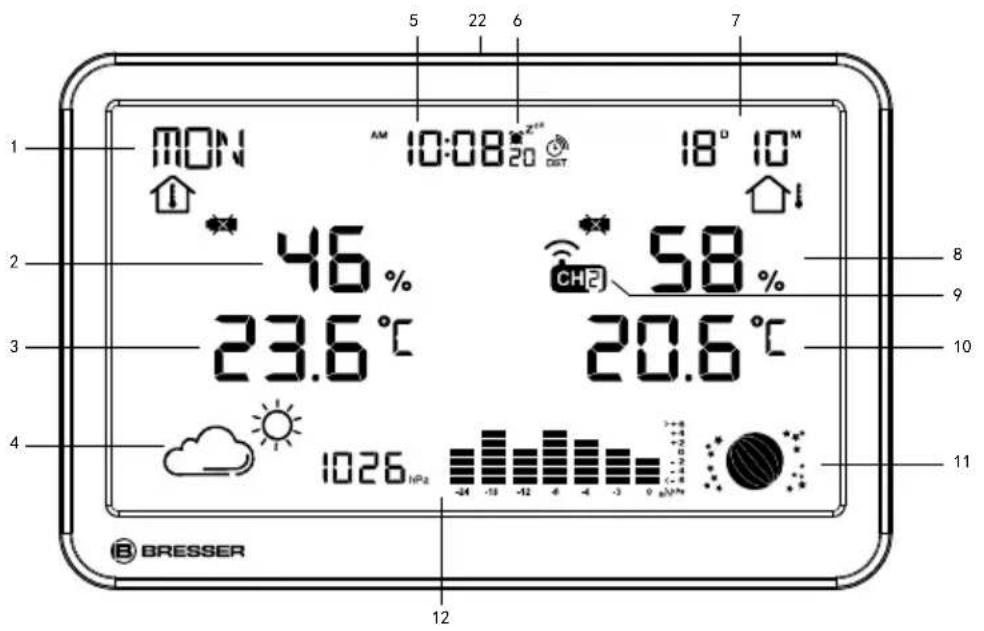
5. Parts Overview
- 7 languages week display
- Indoor humidity
- Indoor temperature
-
weather forecast
-
Time with DCF
- Alarm with snooze
- Calendar
-
Outdoor humidity
-
Channel
- Outdoor temperature
- Moon phase display
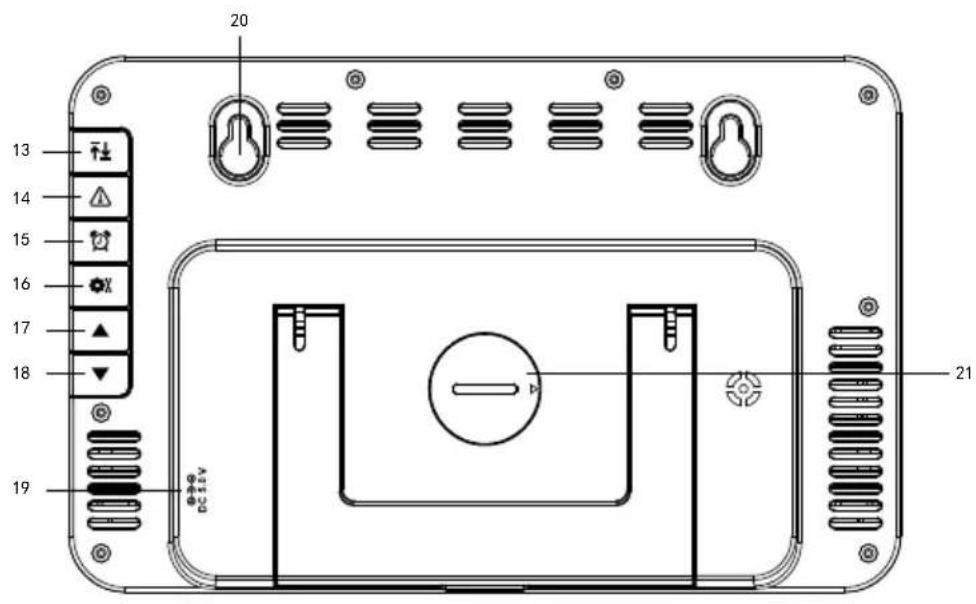
- Barometer pressure history
- Button
-
⚠️ Button
-
Button
- Button
- ▲ Button
-
▼ Button
-
DC hole
- Hanging hole
- Battery cover
- Button
natural_image
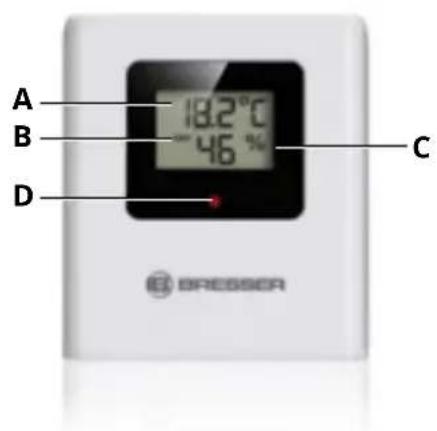
Blank white image with no visible text, symbols, or discernible features6. Main Function Sensor
A. Temperature
B. Current channel
C. Humidity
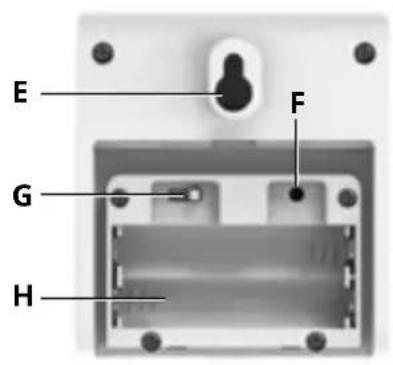
D. LED INDICATOR
E. Wall Mount
F. Reset
G. Transmission channel (1-3)
H. Battery Compartment for 2x AAA
7. Setting up power supply Base device
- Remove the battery compartment cover.
- Insert the batteries into the battery compartment. Ensure that the battery polarity (+/-) is correct.
- Replace the battery compartment cover.
Remote sensor:
- Remove the battery compartment cover.
- Insert the batteries into the battery compartment. Ensure that the battery polarity (+/-) is correct.
- Set the channel selector switch to the desired channel.
NOTICE! This device can be operated with three remote sensors. Each remote sensor being connected must be operated on a different channel.
- Replace the battery compartment cover.
8. Time Setting
Manual time setting
- Press and hold button for approx. 3 seconds to enter to the time setting mode.
- Digits to be set are flashing.
- Press ▲ button to change the value.
- Press button to confirm and continue to the next setting.
- Settings order: Week languages > RCC On/Off > Time zone > Year > DM/MD format > Month > Day > 12/24H format > Hour > Minute > Barometer unit > Barometer value.
- Finally press the ⚙️ button to save the settings and exit the setting mode.
In normal mode, press and hold the ▼ button to enter the RCC receiving mode.
Language:
German (GER) → English (ENG) → Italian (ITA) → French (FRE) → Netherlands (DUT) → Spain (ESP) → Danish (DAN)
German English Italian French Netherlands Spanish
Danish
| Symbol | GER ENG ITA FRE DUT ESP DAN | ||||||
| Monday | MON | MON | LUN | LUN | MAA | LUN | MAN |
| Tuesday | DIE | TUE | MAR | MAR | DIN | MAR | TIR |
| Wednesday | MIT | WED | MER | MER | WOE | MIE | ONS |
| Thursday | DON | THU | GIO | JEU | DON | JUE | TOR |
| Friday | FRE | FRI | VEN | VEN | VRI | VIE | FRE |
| Saturday | SAM | SAT | SAB | SAM | ZAT | SAB | LOR |
| Sunday | SON | SUN | DOM | DIM | ZON | DOM | SON |
9. Alarm setting
- In normal mode, press button to check the alarm time.
-
When check the alarm time, press 📋 button again to turn on or turn off the alarm.
-
When enter the alarm mode, press and hold the 🔊 button for approx. 3 seconds to enter the alarm setting mode. Digits to be set are flashing. Press ▲r ▼button to change the value.
Press 🤨 button to confirm and continue to the next setting.
- Settings order: Hour > Minute > Snooze time. Finally press the 🔊 button to save the settings and exit the Alarm setting mode.
- When the alarm ring, press the ⬤ ^at | ✕ button to enter the snooze mode.
10. Max / Min temperature and humidity record
- In normal mode, press the button to check the Max and Min temperature and humidity record.
- When checking the Max/Min record, press and hold the button to clear the record.
11. Channelselect
- In normal mode, press the button to select Channel 1, Channel 2, Channel 3 or cycle display.
- Hold the button for approx. 3 seconds to reset values and search for an RF signal.
NOTICE! Always make sure the channel chosen on the display unit matches the channel option chosen on the outdoor sensor.
12. Backlight (Always power by adapter)
When power on the adapter, press the
button to choose the backlight level. It has 4 levels backlight.
In normal mode:
- Press and hold button for approx. 3 seconds
to enter the night mode.
- Digits to be set are flashing.
- Press ▲ or ▼ button to change the value.
- Press ⚙️ button to confirm and continue to the next setting.
- Settings order: night mode on/off > Hour for night mode start time > Minute for night mode start time > Hour for night mode end time > Minute for night mode end time
- Finally press the MODE button to save the settings and exit the setting mode.
The backlight level for night mode will be Level
2, When turn on the night mode, the AUTO DIM symbol will display.
13.TemperatureAlert
Temperature alert setting
- In normal mode, Press the ⚠️ button to
check the indoor and outdoor temperature alert.
- Settings order: Indoor high temperature > Indoor low temperature > Outdoor 1 high temperature > Outdoor 1 low temperature > Outdoor 2 high temperature > Outdoor 2 low temperature > Outdoor 3 high temperature > Outdoor 3 low temperature
- When check the temperature alert, Press and hold the ⚠ button for approx. 3 seconds to enter the temperature alert setting.
Press the ▲ button to set the temperature. Press ▼ button to confirm and continue to the next setting.
Settings order: temperature alert ON/OFF> high temperature alert value > low temperature alert value.
-
Only the temperature alert is ON then can set the temperature alert value
-
When alert is triggered, press ALERT button to stop the alert.
14. Weather Forecast
This device forecasts the next 12-24 hours of weather within a 30-50 km (19-31 mile) radius with a 75% accuracy.
| SYMBOL DESCRIPTION | |
 | Sunny |
 | Sunny to cloudy |
 | Cloudy |
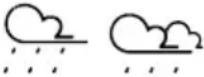 | Cloudy to rain |
| Cloudy to snow | |
15. Moon Phase
The phase of the moon depends on the current date. It is automatically calculated and the following symbols are displayed:
| SYMBOL DESCRIPTION | |
 | Full moon |
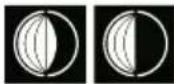 | Waning moon |
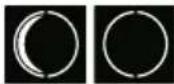 | New moon |
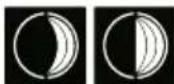 | Waxing moon |
| Full moon |
16. Barometer
Record and display the changing trend in a chart based on the air pressure history in the past 24 hours. The horizontal data is the 7 time periods in the past 24 hours (-24, -18h, -12h, -9h, -6h, -3h, 0h), and the vertical data is the air pressure change value (the value is 0 by default when the power plugged in, each grid above or below represents 2hPa). Taking the air pressure value of the current period as the reference point, through comparison and calculation, we can determine whether the air pressure in the past 6 time periods has increased or decreased. (It is flat when it is just powered on.)
17.Technicaldata
Main unit
DCF
Batteries: 1x CR2032 Battery
EU-UK adapter incl
Temperature measuring unit: °C / °F
Temperature display range: -9.9°C – 50°C
Humidity display range: RH 20% - 95%
Outdoor sensor
Batteries: 2x AAA Battery
Temperature measuring unit: °C / °F
Temperature display range: -40°C – 70°C
Humidity display range: RH 20% - 95%
18. EC Declaration of Conformity

Bresser GmbH hereby declares that the radio equipment type with item number 7004330 is in compliance with Directive
2014/53/EU. The full text of the EC Declaration of
Conformity is available at the following web
address: www.bresser.de/download/7004330/
Dispose of the packaging materials properly, according to their type, such as paper or cardboard. Contact your local waste-disposal service or environmental authority for information on the proper disposal.

Do not dispose of electronic devices in the household garbage! As per Directive 2002/96/EC of the European Parliament on waste electrical and electronic equipment and its adaptation into German law, used electronic devices must be collected separately and recycled in an environmentally friendly manner.
In accordance with the regulations concerning batteries and rechargeable batteries, disposing of
them in the normal household waste is explicitly forbidden. Please make sure to dispose of your used batteries as required by law — at a local collection point or in the retail market. Disposal in domestic waste violates the Battery Directive.
Batteries that contain toxins are marked with a sign and a chemical symbol. "Cd" = cadmium, "Hg" = mercury, "Pb" = lead.
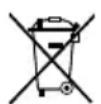
Cd^1Hg^2Pb^3


^1 battery contains cadmium
^2 battery contains mercury
^3 battery contains lead
20. Warranty
The regular warranty period is 2 years and starts on the day of purchase. To benefit from an extended voluntary warranty period as indicated on the gift box, registration on our website is required. You can consult the full guarantee terms as well
as information on extending the guarantee period and details of our
services at www.bresser.de/warranty_terms.
Table of contents
natural_image
Blank white image with no visible text, symbols, or discernible featuresnatural_image
Blank white image with no visible text, symbols, or discernible featuresnatural_image
Blank white image with no visible text, symbols, or discernible featuresnatural_image
Blank white image with no visible text, symbols, or discernible featuresPlease contact the service centre first for any questions regarding the product or claims, preferably by e-mail.
E-Mail: service@bresseruk.com
Telephone*: +44 1342 837 098
BRESSER UK Ltd.
Suite 3G, Eden House
Enterprise Way
Edenbridge, Kent TN8 6HF
Great Britain
*Number charged at local rates in the UK (the amount you will be charged per phone call will depend on the tariff of your phone provider); calls from abroad will involve higher costs.
NL BE
- FR
- Validity note
- General Information
- DANGER!
- ATTENTION!
- General Warnings
- ! DANGER!
- ! ATTENTION!
- Scope of delivery
- Parts Overview
- Main Function Sensor
- Setting up power supply Base device
- Remote sensor:
- Time Setting
- Manual time setting
- Language:
- Alarm setting
- Max / Min temperature and humidity record
- Channelselect
- Backlight (Always power by adapter)
- 13.TemperatureAlert
- Weather Forecast
- Moon Phase
- Barometer
- 17.Technicaldata
- EC Declaration of Conformity
- Warranty
- Table of contents
- BRESSER UK Ltd.
- NL BE
Brand : BRESSER
Model : MeteoTemp TBH RC
Category : Weather Station