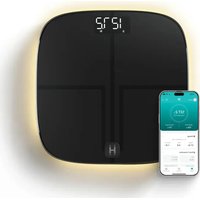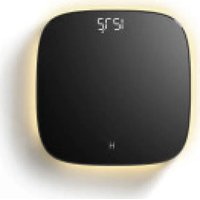
SCL-B150 - Scale HOMEDICS - Free user manual and instructions
Find the device manual for free SCL-B150 HOMEDICS in PDF.


| Product Type | Digital Scale with Ambient Lighting |
| Brand | Homedics |
| Model | SCL-B150 |
| Dimensions | 30 x 30 x 2.9 cm |
| Weight | Approximately 1.4 kg |
| Power | 4 high-capacity AAA alkaline batteries (1100 mAh) |
| Batteries Included | Yes |
| Maximum Capacity | 180 kg (400 lb / 28 st 7 lb) |
| Increments | 0.1 lb / 0.05 kg (under 100 kg) / 0.1 kg (100 kg or more) |
| Measurement Units | lb, kg, st:lb |
| Display | Digital LCD screen |
| Ambient Lighting | LED with motion sensor and brightness adjustment (high, low, off) |
| Weighing Platform | Tempered glass |
| Auto-off | 10 seconds after weight display |
| Main Functions | Weighing, ambient lighting, unit selection, motion sensor |
| Care and Cleaning | Clean with a damp cloth or disinfectant wipe, then wipe with a soft dry cloth. Do not use abrasive products. |
| Safety Precautions | Use on a hard, dry, flat surface. Do not jump on the scale. Do not use if the glass is cracked. Keep batteries out of reach of children. |
| Warranty | 5 years limited |
Frequently Asked Questions - SCL-B150 HOMEDICS
User questions about SCL-B150 HOMEDICS
0 question about this device. Answer the ones you know or ask your own.
Ask a new question about this device
Download the instructions for your Scale in PDF format for free! Find your manual SCL-B150 - HOMEDICS and take your electronic device back in hand. On this page are published all the documents necessary for the use of your device. SCL-B150 by HOMEDICS.
USER MANUAL SCL-B150 HOMEDICS
activate your warranty and meet your product
Scan the QR code within 7 days of receiving your product to activate your warranty and experience all the benefits!

glo digital scale with ambient illumination INSTRUCTION MANUAL AND WARRANTY INFORMATION
SCL-B100, SCL-B150, SCL-X100 | L-05167, Rev. 3
IMPORTANT SAFETY INSTRUCTIONS:
WHEN USING ELECTRICAL PRODUCTS, ESPECIALLY WHEN CHILDREN ARE PRESENT, BASIC SAFETY PRECAUTIONS SHOULD ALWAYS BE FOLLOWED, INCLUDING THE FOLLOWING:
READ AND SAVE THESE INSTRUCTIONS.
- WARNING: Keep batteries away from children.
- DO NOT use on slippery floor.
- This product should not be used for treating or diagnosing any medical conditions.
- Always consult your physician or healthcare professional prior to making any changes to your diet or exercise regimen.
- DO NOT reach for a unit that has fallen into water.
- DO NOT use while bathing or while in a shower.
- DO NOT place or store appliance where it can fall or be pulled into a tub or sink.
- DO NOT place in or drop into water or other liquid.
- DO NOT use outdoors. This product is intended for household use only.
- DO NOT strike or drop the scale.
- DO NOT stand on the edge of the scale.
• DO NOT jump on the scale. - DO NOT step onto a wet scale. Wet glass is slippery. Always ensure the scale surface is dry and feet are dry before use.
- Always place the scale on a hard, dry, flat surface before measurement.
- Check the scale before use. DO NOT use the scale if the glass is cracked or broken. If you see a crack, contact Customer Support.
- DO NOT overload the scale. Maximum weight capacity is 400lbs (180kg or 28st:7lb).
- Close supervision is necessary when this appliance is used by, on, or near children, invalids, or disabled persons.
- The measurement data may not be accurate if using the scale immediately after intense exercise.
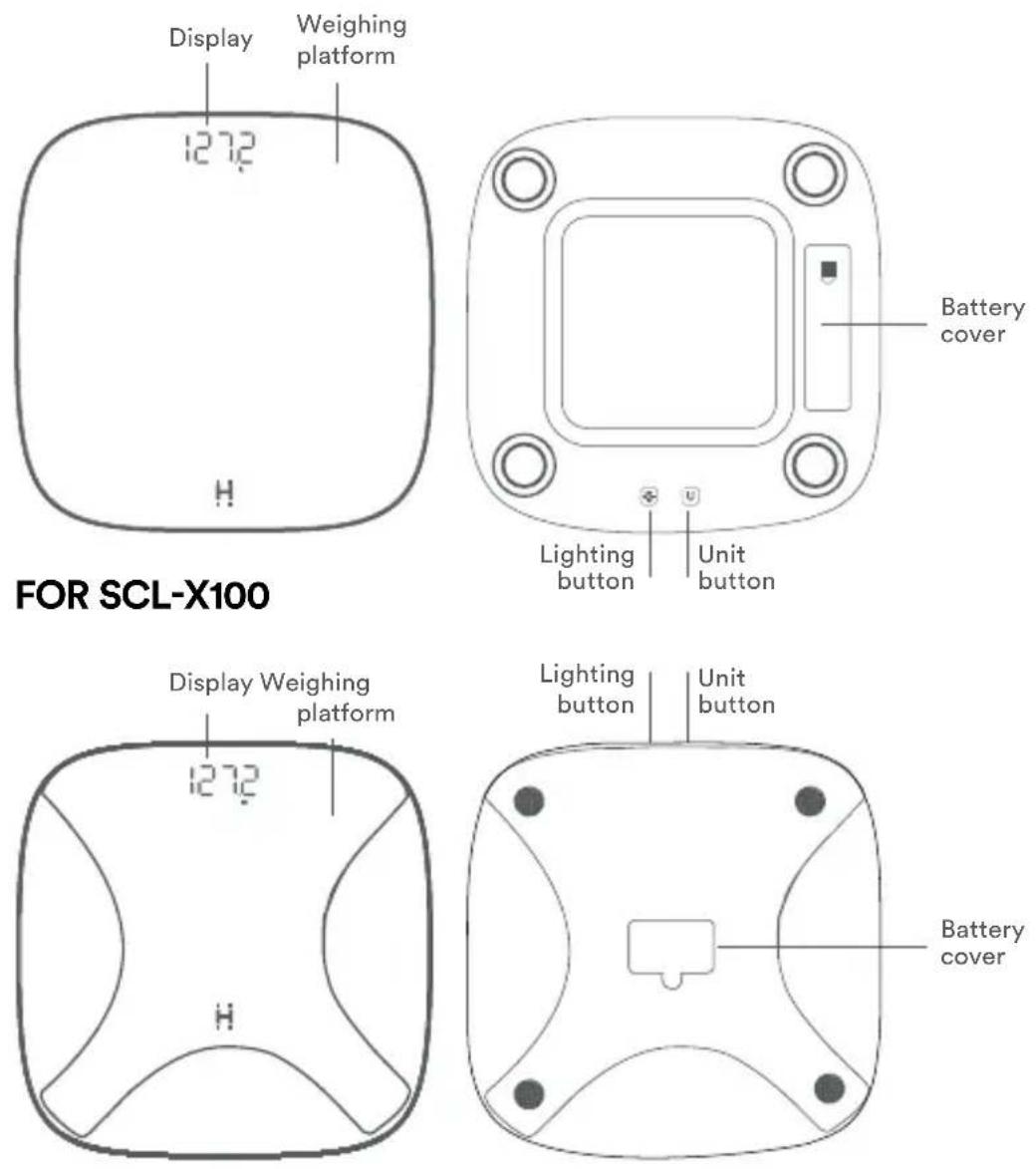
GETTING TO KNOW YOUR GLO DIGITAL SCALE WITH AMBIENT ILLUMINATION
FOR SCL-B100 AND SCL-B150
BEFORE TURNING THE UNIT ON
This scale is shipped with 4 AAA high capacity alkaline (1100 mAh) batteries for the SCL-BBC200, SCL-BBC250 and SCL-BBC350 or 3 AAA high capacityalkaline (1100 mAh) batteries for the SCL-XBC200. Please install the batteries inside the battery compartment to power on your scale before use. After power on, you can take your first measurement.
BACK PANEL BUTTONS

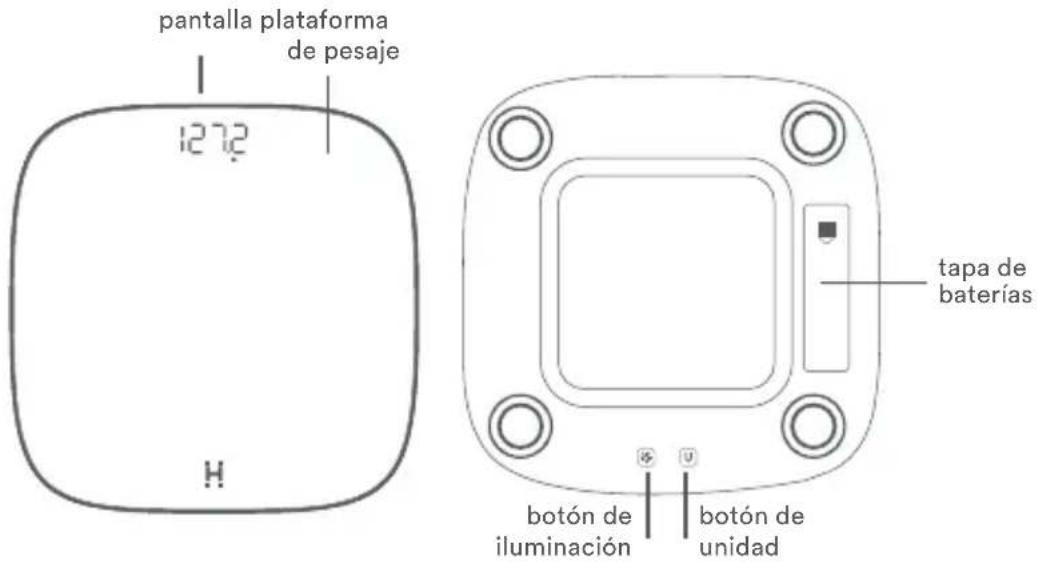
LIGHTING BUTTON
Press the lighting button to choose your lighting brightness: high, low, or off

UNIT BUTTON
Press to choose your desired units of measure: lb, kg, or st:lb
- Install 4 AAA high capacity alkaline (1100 mAh) batteries for the SCL-BBC200, SCL-BBC250 and SCL-BBC350, or 3 AAA high capacity alkaline (1100 mAh) batteries for the SCL-XBC200 and place scale on a hard, flat surface.
- Once you are within the proximity zone, scale's lighting will turn on for 15 seconds. If you stay in the proximity zone, the lights will stay on for an additional 30 seconds (total of 45 seconds) and then turn off for 10 minutes. Lighting will always turn on when taking a measurement.
- If the LEDs don't turn on when you are close to the scale, click the lighting button located on the bottom of the scale to turn the night light on.
- If you want to dim the motion sensing night light, click the lighting button once located on the bottom of the scale.
- If you ever want to turn the motion sensing night light off, click the lighting button located on the bottom of the scale again.
TIP: To improve battery life, use the low level brightness setting and keep the scale in a low traffic area.
HOW TO USE
-
Place scale on a hard, flat, dry surface. Avoid carpet or other soft surfaces.
CAUTION: Placing the scale on soft surfaces, such as shag carpet, may cause tipping or inaccurate results. -
Step on the scale with both feet. Use bare feet for best results.
-
Stand on the scale until the display flashes several times. This is your final measurement.

CLEANING THE DIGITAL SCALE
- Use a slightly damp cloth or disinfecting wipe to clean the surface of the scale, followed by a soft, dry cloth to wipe away any remaining moisture.
- DO NOT use abrasive cleaning agents to clean the scale.
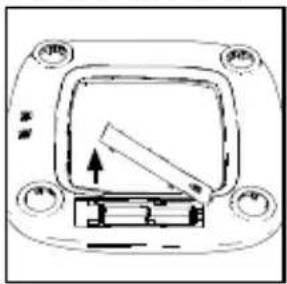
BATTERY REPLACEMENT
FOR SCL-B100 AND SCL-B150
natural_image
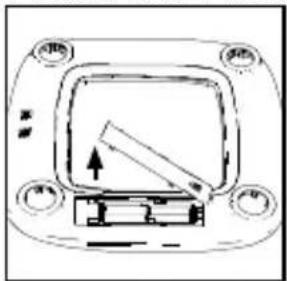
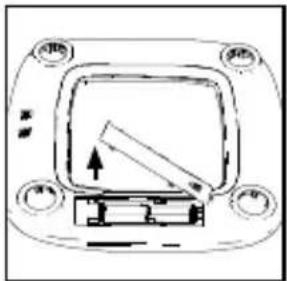
Pure electrical circuit lines without any symbols- Remove the battery cover by sliding the cover in the direction of the open arrow and lifting the top edge.
natural_image
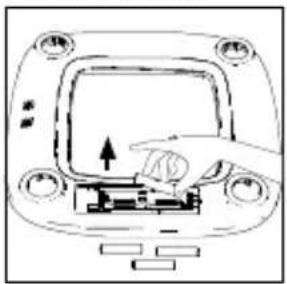
Diagram of a hand pressing a button on a device panel (no text or symbols visible)- Remove the batteries and dispose of per local regulations.
natural_image
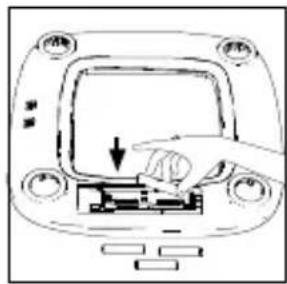
Line drawing of a car's front panel with a hand pressing down on the dashboard (no text or symbols)- Install 4 new AAA high capacity alkaline (1100 mAh) batteries following the polarity as shown.
natural_image
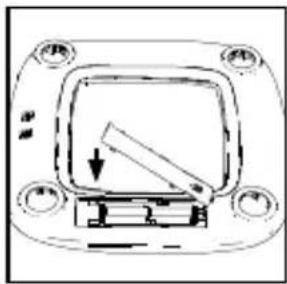
Pure electrical circuit lines without any symbols- Replace the battery cover.
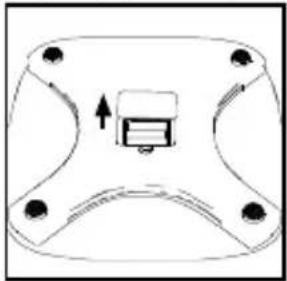
FOR SCL-X100
natural_image
Simple line drawing of a mechanical component with four legs and a central button (no text or symbols)- Remove the battery cover by pinching the tab and lifting the cover.
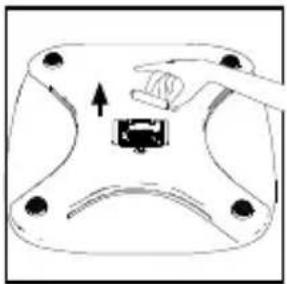
natural_image
Diagram of a hand pressing a button on a device (no text or symbols present)- Remove the batteries and dispose of per local regulations.
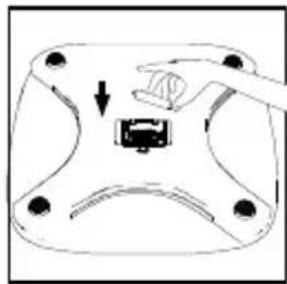
natural_image
Diagram of a mechanical component with a hand pressing a button (no text or symbols)- Install 3 new AAA high capacity alkaline (1100 mAh) batteries following the polarity as shown.
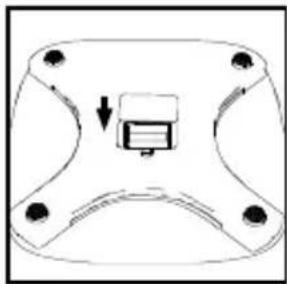
natural_image
Simple line drawing of a mechanical component with a central rectangular block and four mounting holes (no text or symbols)- Replace the battery cover.
BATTERY PRECAUTIONS
⚠ WARNING — KEEP BATTERIES OUT OF REACH OF CHILDREN.
- Replace all batteries at the same time. Do not mix new and used batteries. Do not mix alkaline, standard, or rechargeable batteries. Use only the size and type of batteries specified.
- Clean the battery contacts and the contacts of the device with a dry cloth prior to installing the batteries.
- Ensure the batteries are installed correctly with regard to polarity (+/-).
- Remove batteries from the device when the device is not used for an extended period.
- Remove batteries promptly from the device when the batteries are depleted.
- Keep batteries away from children.
- Batteries are small objects and could be ingested. If swallowed, contact a physician at once.
- Remove depleted batteries from the unit promptly. Dispose of used batteries safely.
- Recycle or dispose of batteries properly in accordance with all local, state, province, and country regulations. Do not open batteries or dispose of in fire.
SPECIFICATIONS
| Model SCL-B100, SCL-B150, SCL-X100 | |
| Weight Units lb / kg / st:lb | |
| Weight Capacity 400lb / 180kg / | 28st 7lb |
| Increments | lb: 0.1lbg: 0.05kg for less than 100kg total weight, 0.1kg for 100kg or greater total weightst:lb: 0.1lb for less than 20st, 1lb for 20st or greater |
| Platform Tempered Glass | |
| Weight Display Auto-Off 10 Seconds | |
| Dimensions | SCL-B100: 11.8×11.8×1.1in / 30×30×2.9cmSCL-B150: 11.8×11.8×1.1in / 30×30×2.9cmSCL-X100: 11.8×11.8×1.1in / 30×30×2.8cm |
TROUBLESHOOTING
| PROBLEM POSSIBLE CAUSE SOLUTION | ||
| Scale won’t turn on or no display | Batteries are deadBatteries aren’t fully installedScale isn’t on a hard, flat surface | Use new batteriesRemove battery cover to check if all batteries are installed in the correct directionPlace your scale on a hard, flat surface |
| Lights won’t turn on | Batteries are deadBatteries aren’t fully installedLights are turned off | Replace batteries with new batteriesRemove battery cover to check if all batteries are installed in the correct directionClick the light button located on the bottom of the scale |
| The scale readings are unstable or inaccurate | Scale isn’t on a hard, flat surface | Place your scale on a hard, flat surface |
Display shows:● Batteries are dead● Replace batteries with new batteries. | [TCHW] | To extend battery life: use high capacity alkaline batteries (1100 mAh), keep the scale in a low traffic area and keep the scales brightness on low |
| Display shows:● Weight applied to the scale is greater than 400 lbs / 181 kg / 28 st:lb |  | Step off the scale. DO NOT apply weight greater than 400lbs / 180kg / 28st 7lb to the scale. |
SUPPLIER'S DECLARATION OF CONFORMITY
Product Description: GLO DIGITAL SCALE WITH AMBIENT ILLUMINATION
Model Number: SCL-B100, SCL-B150, SCL-X100
Trade Name: Homedics
FCC Compliance Statement
This device complies with Part 15 of the FCC Rules. Operation is subject to the following two conditions: (1) This device may not cause harmful interference, and (2) This device must accept any interference received, including interference that may cause undesired operation.
U.S. Contact Information
Company: Homedics, LLC.
Address: 3000 N Pontiac Trail, Commerce Township, MI 48390
8:30am-7:00pm EST Monday-Friday 1-800-466-3342
Homedics is not responsible for any radio or TV interference caused by unauthorized modifications to this equipment. Such modifications could void the user authority to operate the equipment.
This equipment has been tested and found to comply with the limits for a Class B digital device, pursuant to Part 15 of the FCC Rules. These limits are designed to provide reasonable protection against harmful interference in a residential installation. This equipment generates, uses, and can radiate radio frequency energy and, if not installed and used in accordance with the instructions, may cause harmful interference to radio communications. However, there is no guarantee that interference will not occur in a particular installation. If this equipment does cause harmful interference to radio or television reception, which can be determined by turning the equipment off and on, the user is encouraged to try to correct the interference by one or more of the following measures:
- Reorient or relocate the receiving antenna.
- Increase the separation between the equipment and receiver.
- Connect the equipment to an outlet on a circuit different from that to which the receiver is connected.
- Consult the dealer or an experienced radio/TV technician for help.
This product has been tested and complies with the requirements for Federal Communication Commission, Part 15. Although this product is tested and complies with FCC, it may interfere with other devices. If this product is found to interfere with another device, separate the other device and this product. Conduct only the user maintenance found in this instruction manual. Other maintenance and servicing may cause harmful interference and can void the required FCC compliance.
CAN ICES-003(B)/NMB-003(B)
RF Exposure Statement
This equipment complies with FCC and ISED RF radiation exposure limits set forth for an uncontrolled environment. This transmitter must not be co-located or operated in conjunction with any other antenna or transmitter.
Homedics
5-YEAR LIMITED WARRANTY
Homedics sells its products with the intent that they are free of defects in manufacture and workmanship for a period of 5 years from the date of original purchase, except as noted below. Homedics warrants that its products will be free of defects in material and workmanship under normal use and service. This warranty extends only to consumers and does not extend to Retailers.
To obtain warranty service on your Homedics product, contact a Consumer Relations representative for assistance. Please make sure to have the model number of the product available.
Homedics does not authorize anyone, including, but not limited to, Retailers, the subsequent consumer purchaser of the product from a Retailer or remote purchasers, to obligate Homedics in any way beyond the terms set forth herein. This warranty does not cover damage caused by misuse or abuse; accident; the attachment of any unauthorized accessory; alteration to the product; improper installation; unauthorized repairs or modifications; improper use of electrical/power supply; loss of power; dropped product; malfunction or damage of an operating part from failure to provide manufacturer's recommended maintenance; transportation damage; theft; neglect; vandalism; or environmental conditions; loss of use during the period the product is at a repair facility or otherwise awaiting parts or repair; or any other conditions whatsoever that are beyond the control of Homedics.
This warranty is effective only if the product is purchased and operated in the country in which the product is purchased. A product that requires modifications or adoption to enable it to operate in any other country than the country for which it was designed, manufactured, approved and/or authorized, or repair of products damaged by these modifications is not covered under this warranty.
THE WARRANTY PROVIDED HEREIN SHALL BE THE SOLE AND EXCLUSIVE WARRANTY. THERE SHALL BE NO OTHER WARRANTIES EXPRESS OR IMPLIED INCLUDING ANY IMPLIED WARRANTY OF MERCHANTABILITY OR FITNESS OR ANY OTHER OBLIGATION ON THE PART OF THE COMPANY WITH RESPECT TO PRODUCTS COVERED BY THIS WARRANTY. HOMEDICS SHALL HAVE NO LIABILITY FOR ANY INCIDENTAL, CONSEQUENTIAL, OR SPECIAL DAMAGES. IN NO EVENT SHALL THIS WARRANTY REQUIRE MORE THAN THE REPAIR OR REPLACEMENT OF ANY PART OR PARTS WHICH ARE FOUND TO BE DEFECTIVE WITHIN THE EFFECTIVE PERIOD OF THE WARRANTY. NO REFUNDS WILL BE GIVEN. IF REPLACEMENT PARTS FOR DEFECTIVE MATERIALS ARE NOT AVAILABLE, HOMEDICS RESERVES THE RIGHT TO MAKE PRODUCT SUBSTITUTIONS IN LIEU OF REPAIR OR REPLACEMENT.
This warranty does not extend to the purchase of opened, used, repaired, repackaged and/or resealed products, including but not limited to sale of such products on internet auction sites and/or sales of such products by surplus or bulk resellers. Any and all warranties or guarantees shall immediately cease and terminate as to any products or parts thereof which are repaired, replaced, altered, or modified, without the prior express and written consent of Homedics.
This warranty provides you with specific legal rights. You may have additional rights which may vary from state to state and country to country. Because of individual state and country regulations, some of the above limitations and exclusions may not apply to you.
For more information regarding our product line in the USA, please visit www.homedics.com. For Canada, please visit www.homedics.ca.
FOR SERVICE IN THE USA
cservice@homedics.com
8:30am-7:00pm EST
Monday-Friday
1-800-466-3342
FOR SERVICE IN CANADA
cservice@homedics.ca
8:30am-5:00pm EST
Monday-Friday
1-888-225-7378
©2024-2025 Homedics, LLC. All rights reserved. Homedics is a registered trademark of Homedics, LLC. Distributed by Homedics, LLC, 3000 N Pontiac Trail, Commerce Township, MI 48390
IB-SCLB100
Made in China
Homedics
SCL-B100, SCL-B150, SCL-X100 | L-05167, Rev. 3
INSTRUCTIONS DE SÉCURITÉ IMPORTANTES
LORS DE L'UTILISATION DE PRODUITS ÉLECTRIQUES, EN PARTICULIER EN PRÉSENCE D'ENFANTS, DES PRÉCAUTIONS DE SÉCURITÉ DE BASE DOIVENT TOUJOURS ÊTRE SUIVIES, Y COMPRIS LES SUIVANTES :
LISEZ ET CONSERVEZ CES INSTRUCTIONS.
NETTOYAGE DE LA BALANCE NUMÉRIQUE
REPLACEMENT DES PILES
POUR SCL-B100 ET SCL-B150
natural_image
Pure electrical circuit lines without any symbolsnatural_image
Diagram of a hand pressing a button on a device panel (no text or symbols visible)natural_image
Line drawing of a car dashboard with a hand pressing down on the front panel (no text or symbols)natural_image
Simple line drawing of a device with a handle and control buttons (no text or symbols)natural_image
Simple line drawing of a mechanical component with four mounting holes and a central rectangular block (no text or symbols)natural_image
Diagram of a mechanical component with arrows indicating motion or force direction (no text or symbols)natural_image
Diagram of a hand pressing a button into a socket on a device (no text or symbols)natural_image
Simple line drawing of a mechanical component with a central button and four mounting holes (no text or symbols)Adresse : 3000 N Pontiac Trail, Commerce Township, MI 48390
POUR LE SERVICE AU CANADA
cservice@homedics.ca
8:30am-5:00pm EST
lundi au vendredi
1-888-225-7378
©2024-2025 Homedics, LLC. All rights reserved. Homedics is a registered trademark of Homedics, LLC. Distributed by Homedics, LLC, 3000 N Pontiac Trail, Commerce Township, MI 48390
IB-SCLB100
Made in China
Homedics
SCL-B100, SCL-B150, SCL-X100 | L-05167, Rev. 3
PARA SCL-B100 Y SCL-B150
natural_image
Simple line drawing of a foot resting on a surface with a checkmark icon (no text or symbols)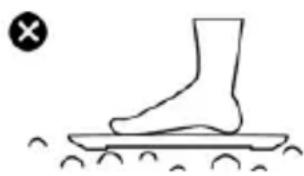
natural_image
Simple line drawing of a foot stepping on a surface with motion lines (no text or symbols)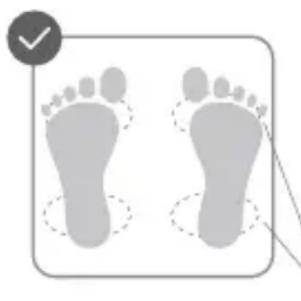
natural_image
Two gray footprints with dotted outlines, one marked by a checkmark (no text or symbols on the footprints)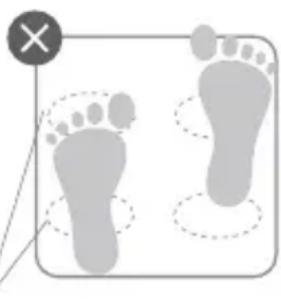
natural_image
Illustration of two footprints with dashed outlines and a 'X' symbol (no text or labels)LIMPIEZA DE LA BALANZA
PARA SCL-B100 Y SCL-B150
natural_image
Pure diagram of a device panel with no text, numbers, or symbolsnatural_image
Line drawing of a car's front panel with a hand pressing the center (no text or symbols)natural_image
Line drawing of a hand pressing down on a control panel with buttons and a downward arrow (no text or symbols)natural_image
Simple line drawing of a device with a handle and arrow, no text or symbols presentnatural_image
Simple line drawing of a mechanical component with four legs and a central internal block (no text or symbols)natural_image
Diagram of a mechanical component with a hand pressing a button (no text or symbols)natural_image
Diagram of a device with a handle and arrow indicating movement or operation (no text or symbols)natural_image
Simple line drawing of a mechanical component with a central arrow and four corner holes (no text or symbols)Empresa: Homedics, LLC.
Dirección: 3000 N Pontiac Trail, Commerce Township, MI 48390
Horas: 8:30 a.m. - 7:00 p.m. EST de lunes a viernes