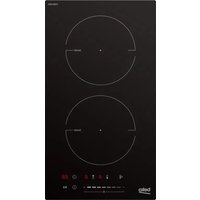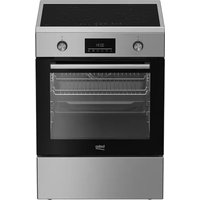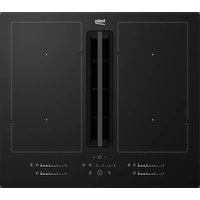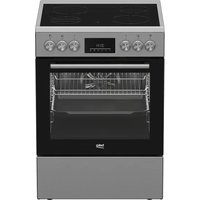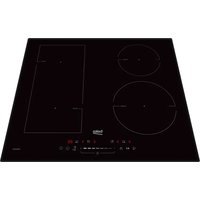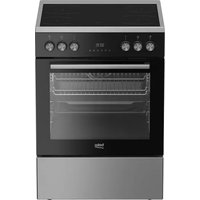
FBE67301XCS - Cooker BEKO - Free user manual and instructions
Find the device manual for free FBE67301XCS BEKO in PDF.


User questions about FBE67301XCS BEKO
0 question about this device. Answer the ones you know or ask your own.
Ask a new question about this device
Download the instructions for your Cooker in PDF format for free! Find your manual FBE67301XCS - BEKO and take your electronic device back in hand. On this page are published all the documents necessary for the use of your device. FBE67301XCS by BEKO.
USER MANUAL FBE67301XCS BEKO
natural_image
Simple line drawing of a steaming cupcake (no text or symbols)FBE67301XCS
285381658/ EN/ FR/ R.AA/ 12.06.25 18:00
7786587914
Welcome!
Dear Customer,
Thank you for choosing the Beko product. We want your product, manufactured with high quality and technology, to offer you the best efficiency. Therefore, carefully read this manual and any other documentation provided before using the product.
Keep in mind all the information and warnings stated in the user's manual. This way, you will protect yourself and your product against the dangers that may occur.
Keep the user's manual. If you give the product to someone else, give the manual with it. The warranty conditions, usage and troubleshooting methods for your product are provided in this manual.
The symbols and their descriptions in the user's manual:
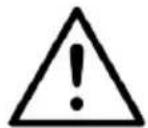
Hazard that may result in death or injury.

Important information or useful usage tips.

Read the user's manual.
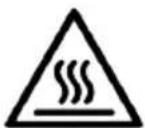
Hot surface warning.
NOTICE Hazard that may result in material damage to the product or its environment.
Arçelik A.Ş.
Karaağaç caddesi No:2-6
34445 Süflüce/Istanbul/TURKEY
Made in TURKEY
Table of Contents
1 Safety Instructions...... 4
1.1 Intended Use...... 4
1.2 Child, Vulnerable Person and Pet Safety 4
1.3 Electrical Safety.... 5
1.4 Transportation Safety ...... 7
1.5 Installation Safety...... 7
1.6 Safety of Use 8
1.7 TemperatureWarnings 9
1.8 Accessory Use.... 9
1.9 Cooking Safety 10
1.10 Maintenance and Cleaning Safety 11
2 Environmental Instructions ...... 12
2.1 Waste Directive.... 12
2.1.1 Compliance with the WEEE Directive and Disposing of the Waste Product .... 12
2.2 Package Information...... 12
2.3 Recommendations for Energy Saving.... 12
3 Your product 12
3.1 Product Introduction 13
3.1.1 Cooking unit 13
3.1.2 Hob section.... 13
3.2 Introduction of the oven control 13 panel....
3.3 Oven operating functions...... 14
3.4 Product Accessories.... 15
3.5 Use of Product Accessories ...... 16
3.6 Technical Specifications...... 18
4 Installation.... 19
4.1 Right place for installation...... 19
4.2 Electrical connection.... 20
4.3 Placing the product 21
5 First Use 22
5.1 First Timer Setting.... 22
5.2 Initial Cleaning 22
6 How to use the hob 23
6.1 General information on hob usage.... 23
6.2 Operation of the hobs 24
7 Using the Oven.... 24
7.1 General Information on Using the 24 Oven....
7.2 Operation of the Oven Control 25 Unit....
7.3 Settings 26
8 General Information About Cooking 28
8.1 General Information About Bak- 28 ing in the Oven ....
8.1.1 Pastries and oven food...... 29
8.1.2 Meat, Fish and Poultry 31
8.1.3 Grill 31
8.1.4 Test foods.... 32
9 Maintenance and Cleaning...... 33
9.1 General Cleaning Information..... 33
9.2 Cleaning Accessories...... 35
9.3 Cleaning the hob.... 35
9.4 Cleaning the Control Panel ...... 35
9.5 Cleaning the inside of the oven 35 (cooking area)....
9.6 Easy Steam Cleaning 35
9.7 Cleaning the Oven Door 36
9.8 Removing the Inner Glass of 37
The Oven Door......
9.9 Cleaning the Oven Lamp...... 37
10 Troubleshooting 38

1 Safety Instructions
EN
• This section includes the safety instructions necessary to prevent the risk of personal injury or material damage.
- If the product is handed over to someone else for personal use or second-hand use purposes, the user's manual, product labels and other relevant documents and parts should also be given.
- Our company shall not be held responsible for damages that may occur if these instructions are not observed.
- Failure to follow these instructions shall void any warranty.
• Always have the installation and repair works made by the manufacturer, the authorised service or a person that the importer company shall designate.
- Use original spare parts and accessories only.
- Do not repair or replace any component of the product unless it is clearly specified in the user's manual.
- Do not make technical modifications on the product.

1.1 Intended Use
• This product is designed to be used at home. It is not suitable for commercial use.
- Do not use the product in gardens, balconies or other outdoors. This product is intended to be used in households and in the staff kitchens of shops, offices and other working environments.
- CAUTION: This product should be used for cooking purposes only. It should not be used for different purposes, such as heating the room.
• The oven can be used to defrost, bake, fry and grill food.
• This product should not be used for plate heating, drying by hanging towels or clothes on the handle.

1.2 Child, Vulnerable Person and Pet Safety
- This product can be used by children 8 years of age and older, and people who are underdeveloped in physical, sensory or mental skills, or who have lack of experience and knowledge, as long as they are supervised or trained about the safe use and hazards of the product.
• Children should not play with the product. Cleaning and user maintenance should not be performed by children unless there is someone overseeing them.
- This product should not be used by people with limited physical, sensory or mental capacity (including children), unless they are kept under supervision or receive the necessary instructions.
• Children should be supervised to ensure that they do not play with the product.
- Electrical products are dangerous for children and pets. Children and pets must not play with, climb on, or enter the product.
- Do not put objects that children may reach on the product.
- Turn the handle of the pots and pans to the side of the counter so that children cannot grab and burn.
- CAUTION: During use, the accessible surfaces of the product are hot. Keep children away from the product.
- Keep the packaging materials out of the reach of children. There is a hazard of injury and suffocation.
- When the door is open, do not put any heavy objects on it or allow children to sit on it. You may cause the oven to tip over or damage the door hinges.
-
Before discarding worn out and useless products:
-
Unplug the power plug and remove it from the socket.
- Cut off the power cable and disconnect it with the plug from the product.
- Take precautions to prevent children from entering the product.
- Do not allow children to play with product when it is in idle mode.
1.3 Electrical Safety
- Plug the product into a grounded outlet protected by a fuse that matches the current ratings indicated on the type label. Have the grounding installation made by a qualified electrician. Do not use the product without grounding in accordance with local / national regulations.
- The plug or the electrical connection of the appliance shall be in an easily accessible place. If this is not possible, there should be a mechanism (fuse, switch, key switch, etc.) on the electrical installation to
which the product is connected, in compliance with the electrical regulations and separating all poles from the network.
- Unplug the product or switch off the fuse before repair, maintenance and cleaning.
- Plug the product into an outlet that meets the voltage and frequency values specified on the type label.
- (If your product does not have a mains cable) only use the connecting cable described in the "Technical specifications" section.
- Do not jam the power cable under and behind the product. Do not put a heavy object on the power cable. The power cable should not be bent, crushed, and come into contact with any heat source.
- Make sure that the power cable is not jammed while putting the product to its place after assembly or cleaning.
- The rear surface of the oven gets hot when it is in use. The power cables must not touch the rear surface of the product. Otherwise it might get damaged.
- Do not jam the electric cables into the oven door and do not pass them over hot surfaces.
Otherwise, cable insulation may melt and cause fire as a result of short circuit.
- Use original cable only. Do not use cut or damaged cables.
- Do not use an extension cord or multi-plug to operate your product.
- Contact the authorized service centre or importer to use the approved adapter in cases where the use of a converter adapter (for plug type) is necessary.
- Contact the importer or the authorized service centre if the length of the power line is inadequate.
- Portable power sources or multiple plugs may overheat and catch fire. Keep multiple plugs and portable power sources away from the product.
- If the power cable is damaged, it must be replaced by the manufacturer, an authorized service or a person to be specified by the importer company in order to prevent possible dangers.
- CAUTION: Before replacing the oven lamp, be sure to disconnect the product from the mains supply to avoid the risk
of electric shock. Unplug the product or turn off the fuse from the fuse box.
If your product has a power cable and plug:
- Never put the product plug into a broken, loose, or out-of-socket plug. Make sure the plug is fully inserted into the socket. Otherwise the connections may overheat and cause a fire.
- Avoid inserting the device into plugs that are greasy, unclean, or potentially exposed to water (such as those near a worktop where water may escape). Otherwise there is a risk of short circuit and electrocution.
- Never touch the plug with wet hands!
- Pull the plug out of the socket using the plug's body rather than the cord itself.

1.4 Transportation Safety
- Disconnect the product from the mains before transporting the product.
- The product is heavy, carry the product with at least two people.
- Do not use the door and / or handle to transport or move the product.
- Do not place items on the appliance. Carry the appliance vertically.
- When you need to transport the product, wrap it with bubble wrap packaging material or thick cardboard and tape it tightly. Secure the moving parts of the product firmly to prevent damage.
- Before the product is installed, check the product for any damage after transport. Contact the importer or the authorized service centre if damaged.

1.5 Installation Safety
- Before beginning the installation, de-energize the power line to which the product will be connected by turning off the fuse.
• Always wear protective gloves during transport and installation. Otherwise there is a risk of injury from sharp edges! - Before the product is installed, check the product for any damage. Do not have it installed if the product is damaged.
-
Never place the product on a carpet-covered floor. Product Otherwise, lack of airflow beneath the product will cause electrical parts to overheat. This will cause problems with your product.
-
The product should be placed directly on a clean, flat and hard surface. It should not be placed on a plinth or bed plate. Products must not be placed on cardboard or plastic plates.
- Direct sunlight and heat sources, such as electric or gas heaters, must not be present in the area where the product is installed.
- Keep the surroundings of all ventilation ducts of the product open.
- Do not install the product near a window. When you open the window, hot cookware may tip over.
- To avoid overheating, product installation should not be carried out behind decorative covers.
- In cases where a gas hose/pipe or plastic water pipe is situated behind the designated installation area for the product, it is imperative to guarantee that there is no contact between the product and these utility lines. Otherwise the hose/pipe may be crushed.
- If there is a socket behind the place where the product will be installed, it must be ensured that the product does not
come into contact with the socket nor with the plug plugged into the socket.
- There should be no gas hose, plastic water pipe and socket on the back or side wall of the place where the product will be installed. Otherwise, they may be deformed by the heat effect when the hob is operated and may create a safety risk.

1.6 Safety of Use
- Ensure that the appliance is switched off after every use.
- If you will not use the product for a long time, unplug it or turn off the power from the fuse box.
- Don't use the product if it breaks down or gets damaged while being used. Disconnect the product from the electricity. Contact the importer or the authorized service centre.
- Do not use the product if the front door glass is removed or cracked. Otherwise there is a risk of injury and environmental damage.
- CAUTION: If the hob surface is cracked, disconnect the product from the mains to avoid the risk of electric shock.
- CAUTION: If the hob glass surface is broken:
Switch off all gas and (if applicable) electric hotplates. Disconnect the product from the electricity.
- Do not touch the appliance surface.
- Do not use the appliance.
- Do not step on the appliance for any reason.
- Never use the product when your judgement or coordination is impaired by the use of alcohol and/or drugs.
- Flammable objects must not be kept in and around the cooking area. Otherwise, these may lead to fire.
- The oven handle is not a towel dryer. When using the product, do not hang towels, gloves or similar textiles on the handle.
- The hinges of the product door move when opening and closing the door and might jam. When opening / closing the door, do not hold the part with the hinges.
- This product is not suitable for use with a remote control or an external clock.

1.7 Temperature Warnings
- CAUTION: When the product is in use, the product and its accessible parts will be hot. Care should be taken to avoid
touching the product and heating elements. Children under 8 years of age should be kept away from the product unless constantly supervised.
- Do not place flammable / explosive materials near the product, as the surfaces will be hot while it is operating.
- Keep your distance when opening the oven door during or at the end of cooking. The steam may burn your hand, face and/or eyes.
- During operation the product is hot. Care should be taken to avoid touching hot parts, inside of the oven and heating elements.
• Always wear heat-resistant oven gloves when handling the product. - CAUTION: Danger of fire: Do not store items on the cooking surfaces.

1.8 Accessory Use
- It is important to use the accessories provided with the product appropriately. For detailed information, refer to the section "Usage of accessories".
- Close the oven door after pushing the accessories completely into the cooking space, otherwise they may hit the door glass and damage it.
- CAUTION: Use only hob guards designed by the manufacturer of the cooking appliance or indicated by the manufacturer of the appliance in the instructions for use as suitable or hob guards incorporated in the appliance. The use of inappropriate guards can cause accidents.

1.9 Cooking Safety
- CAUTION: The cooking process must be observed. Short-term cooking processes must be constantly observed.
- CAUTION: In solid or liquid oil cooking, it is dangerous to leave the hob unattended, which may cause a fire. NEVER try to extinguish the fire with water; disconnect the product from the mains, and then cover the flames with a cover or fire cloth (etc.).
-
Be careful when using alcoholic drinks in your dishes. Alcohol evaporates at high temperatures and may cause fire since it can ignite when it comes into contact with hot surfaces.
-
Food residues in the cooking area., such as oil, can ignite. Clean these residues before cooking.
- Food Poisoning Hazard: Do not let food sit in oven for more than 1 hour before or after cooking. Otherwise it may cause food poisoning or diseases.
- Do not heat closed tins and glass jars in the oven. The pressure that would build-up in the tin/jar may cause it to burst.
- When the oven is in use, NEVER place baking tray, dishes or aluminium foil directly on the bottom of the oven. The heat accumulation might damage the bottom of the oven, and might even cause damage to the oven cabinet or kitchen flooring.
Be mindful of the following precautions when using greasy parchment paper or similar materials:
- Place the greaseproof paper in a cookware or on the oven accessory (tray, wire grill, etc.) with food and place it in the preheated oven.
• To prevent the risk of touching the oven heating elements and obstructing the flow of hot air, remove any excess parts of
greaseproof paper that hang from accessories or containers. Do not use greaseproof paper at oven temperatures higher than the maximum usage temperature specified by the manufacturer. Never place greaseproof paper on the oven base.
- Do not place it on top of accessories during preheating.
• Always press down with a plate or similar object to prevent the material from flying around due to the air circulation inside the oven. - Only cover the necessary surface inside the tray.
• After each use, the tray should be cleaned, and any greaseproof paper or similar materials used in the tray should be replaced. Otherwise, liquids dripping onto the tray can cause smoking or even ignite flames. - An air flow is generated when the product lid is opened. Greaseproof paper can come into contact with heating elements and ignite.
- When using wire grill, a tray should be placed on the lower rack. Otherwise, the food oil and other components that
drip onto the oven bottom can create heavy smoke and lead to flames.
- Close the oven door during grilling. Hot surfaces may cause burns!
- Food not suitable for grilling carries a fire hazard. Grill only food that is suitable for heavy grill fire. Do not place the food too far in the back of the grill. This is the hottest area and fatty foods may catch fire.

1.10 Maintenance and Cleaning Safety
- Wait for the product to cool before cleaning the product. Hot surfaces may cause burns!
- Never wash the product by spraying or pouring water on it! There is the risk of electric shock!
- Do not use steam cleaners to clean the product as this may cause an electric shock.
- Do not use harsh abrasive cleaners, metal scrapers, scouring pads, dish washing wire or bleach to clean the oven front door glass and oven top door glass (if equipped). These materials can cause glass surfaces to be scratched and broken.
2.1 Waste Directive
2.1.1 Compliance with the WEEE Directive and Disposing of the Waste Product
This product complies with EU WEEE Directive (2012/19/EU). This product bears a classification symbol for waste electrical and electronic equipment (WEEE).
natural_image
Symbol of a trash bin crossed with a diagonal line, no text or numbers presentThis product has been manufactured with high quality parts and materials which can be reused and are suitable for recycling. Therefore, do not dispose of the waste product with normal domestic and other wastes at the end of its service life. Take it to a collection point for the recycling of electrical and electronic equipment. You can ask your local administration about these collection points. Disposing of the appliance properly helps prevent negative consequences for the environment and human health.
Compliance with RoHS Directive:
The product you have purchased complies with EU RoHS Directive (2011/65/EU). It does not contain harmful and prohibited materials specified in the Directive.
2.2 Package Information
Packaging materials of the product are manufactured from recyclable materials in accordance with our National Environment Regulations. Do not dispose of the packaging waste with the household or other
3 Your product
In this section, you can find the overview and basic uses of the product's control panel. There may be differences in images and some features depending on the type of product.
wastes, take it to the packaging material collection points designated by the local authorities.
2.3 Recommendations for Energy Saving
According to EU 66/2014, information on energy efficiency can be found on the product receipt supplied with the product. The following suggestions will help you use your product in an ecological and energy-efficient way:
- Defrost frozen food before baking.
- In the oven, use dark or enamelled containers that transmit heat better.
- If specified in the recipe or user's manual, always preheat. Do not open the oven door frequently during baking.
- Turn off the product 5 to 10 minutes before the end time of baking in prolonged bakings. You can save up to 20% electricity by using residual heat.
- Try to cook more than one dish at a time in the oven. You may cook at the same time by placing two cookers on the wire rack. In addition, if you cook your meals one after the other, it will save energy because the oven will not lose its heat.
- Use pots / pans with a size and lid suitable for the hob zone. Always choose the right size pot for your meals. More than necessary energy is needed for containers of the wrong size.
- Keep hob baking areas and pot bases clean. Dirt reduces the heat transfer between the baking area and the pot base.
3.1 Product Introduction
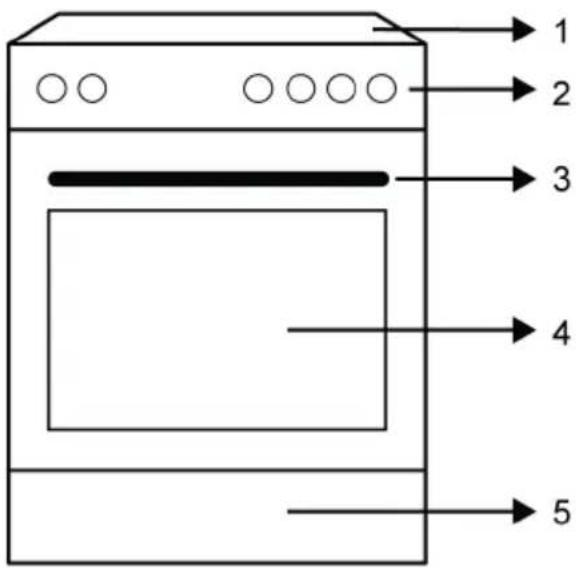
text_image
1 2 3 4 51 Hob section
2 Control panel
3 Handle
4 Door
5 Bottom part
3.1.1 Cooking unit
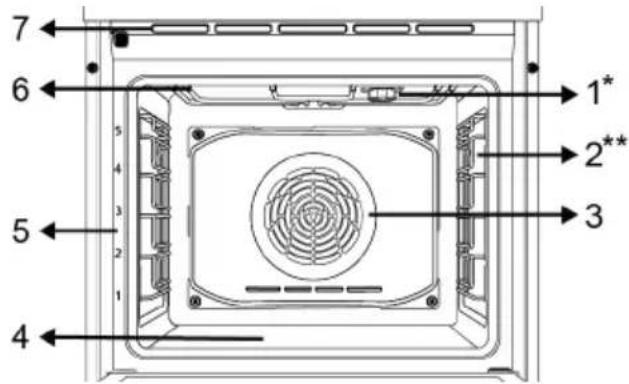
text_image
7 6 5 4 3 2 1 4 1* 2** 31 Lamp
2 Wire shelves
3 Fan motor (behind the steel plate)
4 Lower heater (under the steel plate)
5 Shelf positions
6 Upper heater
7 Ventilation holes
* Varies depending on the model. Your product may not be equipped with a lamp, or the type and location of the lamp may differ from the illustration.
** Varies depending on the model. Your product may not be equipped with a wire rack. In the image, a product with wire rack is shown as an example.
3.1.2 Hob section
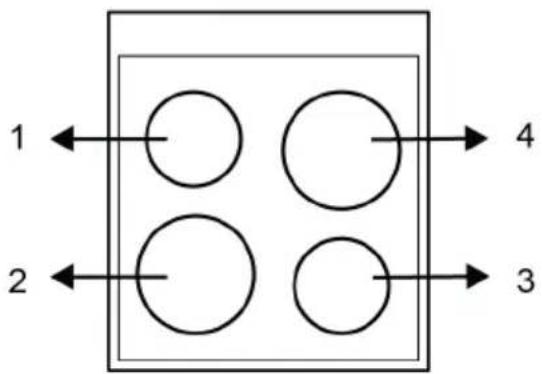
flowchart
graph TD
    A[" "] --> B[" "]
    C[" "] --> D[" "]
    E[" "] --> F[" "]
    G[" "] --> H[" "]
1 Rear left - Single cooking zone
2 Front left - Single cooking zone
3 Front right - Single cooking zone
4 Rear right - Single cooking zone
3.2 Introduction of the oven control panel
flowchart
graph TD
    A["1"] --> B["2"]
    B --> C["3"]
    C --> D["4"]
    D --> E["5"]
    E --> F["6"]
    G["P"] --> H[" "]
    I["+"] --> J["+"]
    K["+"] --> L["−"]
    M["+"] --> N["−"]
    O["+"] --> P["+"]
    Q["+"] --> R["−"]
    S["+"] --> T["−"]
    U["+"] --> V["−"]
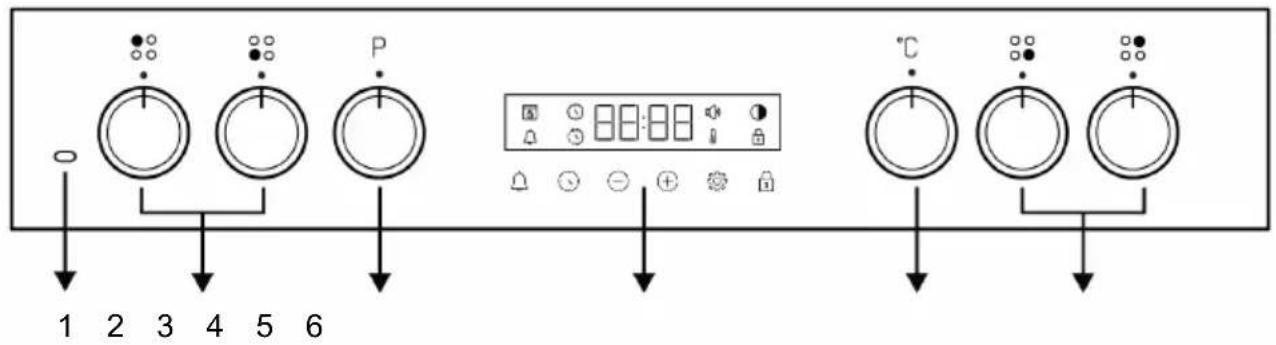
1 Active hob warning lamp 2 Hob control knobs
3 Function selection knob 4 Timer
5 Temperature knob 6 Hob control knobs
If there are knob(s) controlling your product, in some models this/these knob(s) may be so that they come out when pushed (buried knobs). For settings to be made with these knobs, first push the relevant knob in and pull out the knob. After making your adjustment, push it in again and replace the knob.
Function selection knob
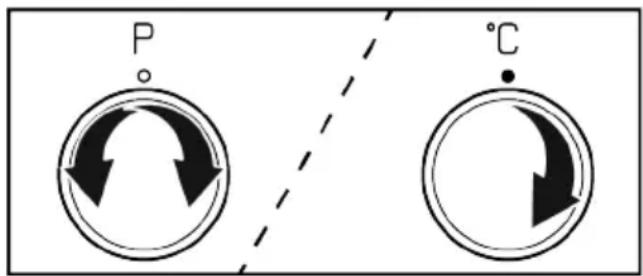
You can select the oven operating functions with the function selection knob. Turn left / right from closed (top) position to select.
Temperature knob
You can select the temperature you want to cook with the temperature knob. Turn clockwise from the closed (top) position to select.
Oven inner temperature indicator
You can understand the oven interior temperature from the temperature symbol 📁 on the timer display. The temperature symbol appears on the display when the cooking starts, and the temperature symbol disappears when the appliance reaches the set temperature. When the temperature inside the oven drops below the set temperature, the temperature symbol reappears.
Hob control knobs
You can operate your hob with the hob control knobs. Each knob operates the respective cooking zone. You may infer which zone it controls from the symbols on the control panel.
Timer
text_image
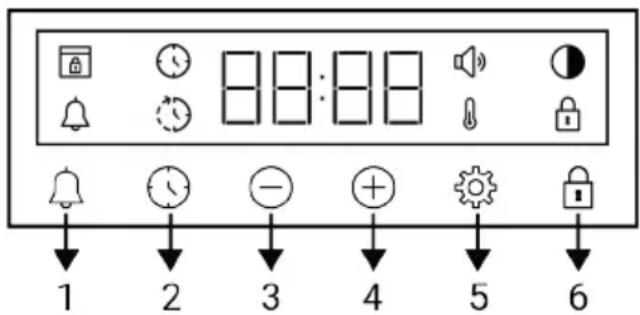
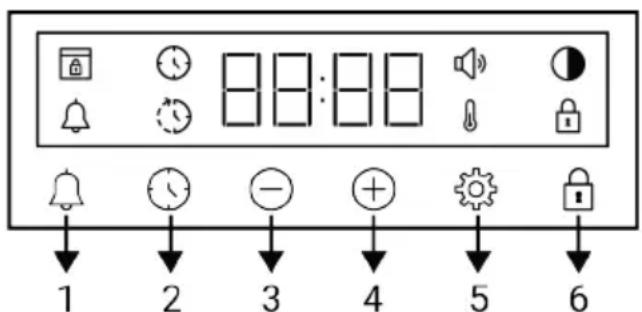
1 2 3 4 5 61 Alarm key
2 Time setting key
3 Decrease key
4 Increase key
5 Settings key
6 Key lock key
Display symbols
: Baking time symbol
: Baking end time symbol *
: Alarm symbol
: Brightness symbol
: Key lock symbol
: Temperature symbol
: Volume level symbol
: Door lock symbol *
*It varies depending on the product model. It may not be available on your product.
3.3 Oven operating functions
On the function table, the operating functions you can use in your oven and the highest and lowest temperatures that can be set for these functions are shown. The order of the operating modes shown here may differ from the arrangement on your product.
| Function symbol | Function description | Temperature range (°C) | Description and use |
 | Top and bottom heating | * | Food is heated from above and below at the same time. Suitable for cakes, pastries or cakes and stews in baking moulds. Cooking is done with a single tray. |
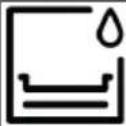 | Bottom heating * | Only lower heating is on. It is suitable for foods that need browning on the bottom. This function should also be used for easy steam cleaning. | |
 | |||
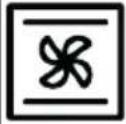 | Fan assisted bottom/top heating | * | The hot air heated by the upper and lower heaters is distributed equally and rapidly throughout the oven with the fan. Cooking is done with a single tray. |
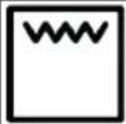 | Full grill * | The large grill on the oven ceiling works. It is suitable for grilling in large amounts. | |
 | Fan assisted low grill * | The hot air heated by the small grill is quickly distributed into the oven with the fan. It is suitable for grilling smaller amounts. | |
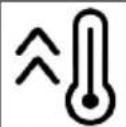 | Booster - | All the heaters of the oven work. This operating function is used to quickly bring the oven to the desired temperature (pre-heating). Do not use it for cooking food. |
* Your product operates in the temperature range specified on the temperature knob.
3.4 Product Accessories
There are various accessories in your product. In this section, the description of the accessories and the descriptions of the correct usage are available. Depending on the product model, the supplied accessory varies. All accessories described in the user's manual may not be available in your product.

The trays inside your appliance may be deformed with the effect of the heat. This has no effect on the functionality. Deformation disappears when the tray is cooled.
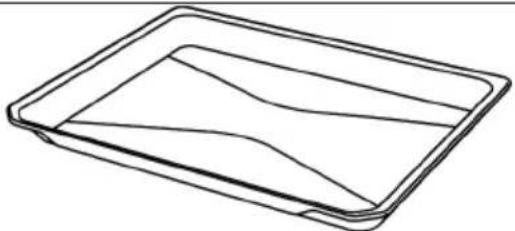
Standard tray
It is used for pastries, frozen foods and frying large pieces.
natural_image
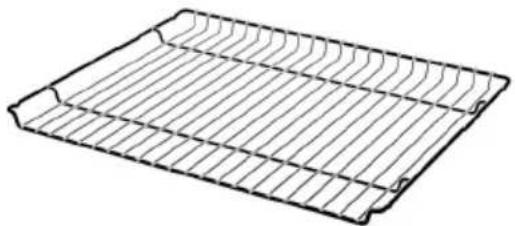
Line drawing of a rectangular tray with internal wavy lines (no text or symbols)Wire grill
It is used for frying or placing the food to be baked, fried and stewed on the desired shelf.
On models with wire shelves :
natural_image
Line drawing of a rectangular metal tray with internal grooves (no text or symbols)On models without wire shelves :
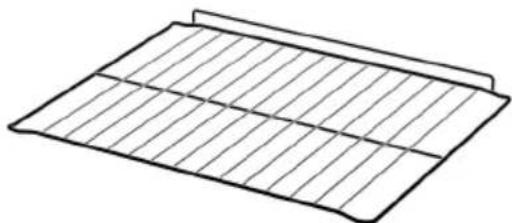
natural_image
Simple line drawing of a rectangular grid pattern with no text or symbols3.5 Use of Product Accessories
Cooking shelves
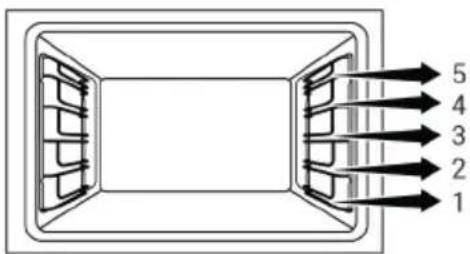
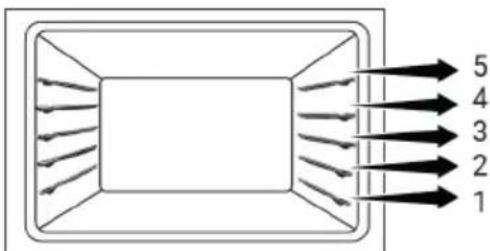
There are 5 levels of shelf position in the cooking area. You can also see the order of the shelves in the numbers on the front frame of the oven.
On models with wire shelves :
text_image
5 4 3 2 1On models without wire shelves :
text_image
5 4 3 2 1Placing the wire grill on the cooking shelves
On models with wire shelves :
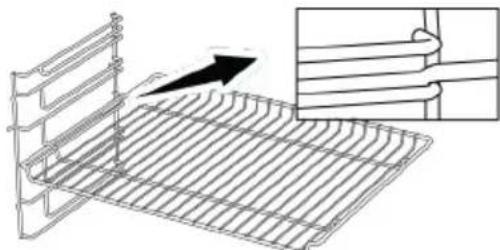
It is crucial to place the wire grill on the wire side shelves properly. While placing the wire grill on the desired shelf, the open section must be on the front. For better cooking, the wire grill must be secured on the wire shelf's stopping point. It must not pass over the stopping point to contact with the rear wall of the oven.
natural_image
Diagram of a metal rack with a vertical panel and an inset showing a magnified view of a grid structure (no text or symbols)On models without wire shelves :
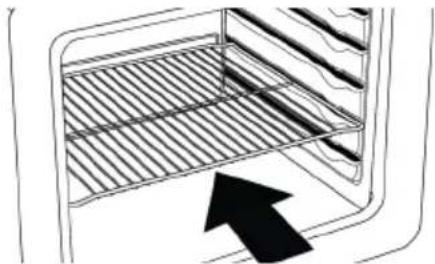
It is crucial to place the wire grill on the side shelves properly. The wire grill has one direction when placing it on the shelf. While placing the wire grill on the desired shelf, the open section must be on the front.
natural_image
Diagram of a kitchen oven with a rack inside and an arrow pointing to the interior (no text or symbols)Placing the tray on the cooking shelves On models with wire shelves :
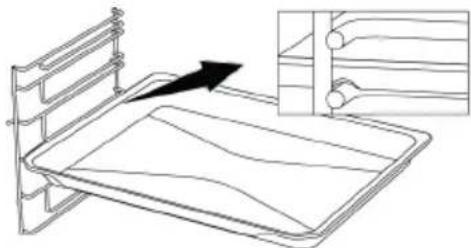
It is also crucial to place the trays on the wire side shelves properly. While placing the tray on the desired shelf, its side designed for holding must be on the front. For better cooking, the tray must be secured on the stopping socket on the wire shelf. It must not pass over the stopping socket to contact with the rear wall of the oven.
natural_image
Line drawing of a bed with an arrow pointing to the front panel, showing internal structure and ventilation ducts (no text or symbols)On models without wire shelves :
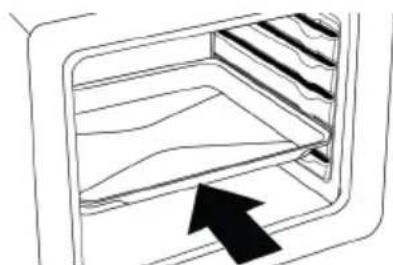
It is also crucial to place the trays on the side shelves properly. The tray has one direction when placing it on the shelf. While placing the tray on the desired shelf, its side designed for holding must be on the front.
natural_image
Line drawing of a 3D oven with an arrow pointing to the interior (no text or symbols)Stopping function of the wire grill
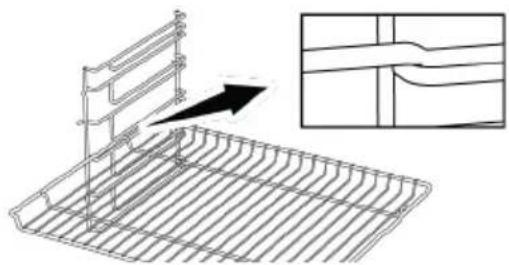
There is a stopping function to prevent the wire grill from tipping out of the wire shelf. With this function, you can easily and safely take out your food. While removing the wire
grill, you can pull it forward until it reaches the stopping point. You must pass over this point to remove it completely.
On models with wire shelves :
natural_image
Technical line drawing of a metal rack with a vertical panel and an inset showing a cross-section of a structural component (no text or symbols)On models without wire shelves :
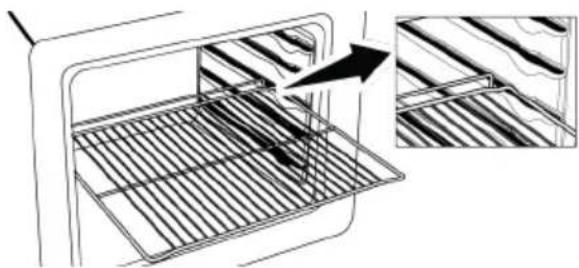
natural_image
Line drawing of a kitchen appliance with a grater inside, showing a close-up of the interior (no text or symbols)Tray stopping function - On models with wire shelves
There is also a stopping function to prevent the tray from tipping out of the wire shelf. While removing the tray, release it from the rear stopping socket and pull it towards yourself until it reaches the front side. You must pass over this stopping socket to remove it completely.
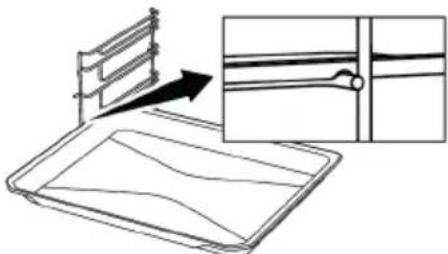
natural_image
Line drawing of a tray with a ladder and an inset showing a close-up of a horizontal seam or seam (no text or symbols)Proper placement of the wire grill and tray on the telescopic rails-On models with wire shelves and telescopic models
Thanks to the telescopic rails, trays or wire shelves can be easily installed and removed. Care should be taken to place the trays and wire shelves on the telescopic rails as shown in the figure below.
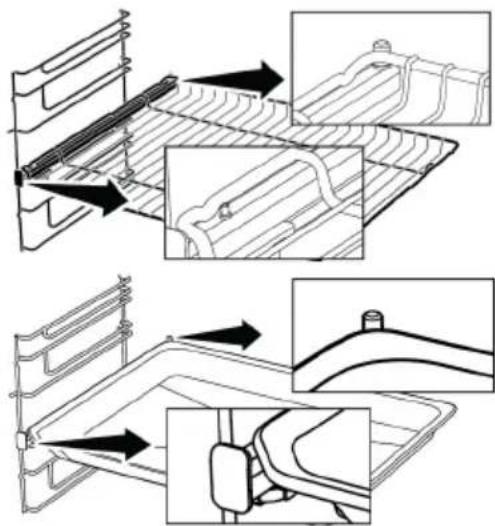
text_image
Technical diagram illustrating mechanical assembly steps with labeled components and directional arrowsEN
3.6 Technical Specifications
| General specifications | |
| Product external dimensions (height/width/depth) (mm) | 850 /600 /600 |
| Voltage/Frequency 1N ~ 220-240 V/3N ~ 380-415 V 50 Hz | |
| Cable type and section used/suitable for use in the product | min. H05VV-FG 3 x 2,5 mm2/ 5 x 1,5 mm2 |
| Total power consumption (kW) 8,2 | |
| Oven type Fan assisted oven | |
| Front left Single cooking zone | |
| Dimension 180 mm | |
| Power 1700 W | |
| Rear left Single cooking zone | |
| Dimension 140 mm | |
| Power 1200 W | |
| Front right Single cooking zone | |
| Dimension 140 mm | |
| Power 1200 W | |
| Rear right Single cooking zone | |
| Dimension 180 mm | |
| Power 1700 W | |
| Basics: Information on the energy label of electrical ovens is given in accordance with the EN 60350-1 / IEC 60350-1 standard. Those values are determined under standard load with bottom-top heater or fan assisted heating (if any) functions.Energy efficiency class is determined in accordance with the following prioritization depending on whether the relevant functions exist on the product or not: 1-Eco fan heating , 2-Fan Heating , 3-Fan assisted low grill , 4-Top and bottom heating. | |

Technical specifications may be changed without prior notice to improve the quality of the product.

Figures in this manual are schematic and may not exactly match your product.

Values stated on the product labels or in the documentation accompanying it are obtained in laboratory conditions in accordance with relevant standards. Depending on operational and environmental conditions of the product, these values may vary.

General warnings
- Refer to the nearest Authorised Service Agent for installation of the product. Make sure that the electric and gas installations are in place before calling the Authorised Service Agent to have the product ready for operation. If not, call a qualified electrician and fitter to have the required arrangements made. The manufacturer shall not be held responsible for damages arising from procedures carried out by unauthorized persons which may also void the warranty.
- It is customer's responsibility to prepare the location the product shall be placed on and also have power and/or gas utility prepared.
- The rules specified in local standards about electrical and/or gas installations (legal rules on installation) shall be followed during product installation.
- Check for any damage on the appliance before the installation.
4.1 Right place for installation
- Place the product on a hard surface because of the air ducts under the product. It must not be placed onto a base or a pedestal. The feet of the product should not dip on soft surfaces, e.g. carpet, etc.
- The kitchen floor must be able to carry the weight of the appliance plus the additional weight of cookware and bakeware and food.
- This product is a class 1 device according to EN 30-1-1 standard. It can be placed adjacent to the kitchen walls, kitchen furniture or any other product in any dimension from behind and one edge. The kitchen furniture or equipment on the other side may only be of the same size or smaller.
- It can be used with cabinets on either side but in order to have a minimum distance of 400mm above hotplate level al-
low a side clearance of 65mm between the appliance and any wall, partition or tall cupboard.
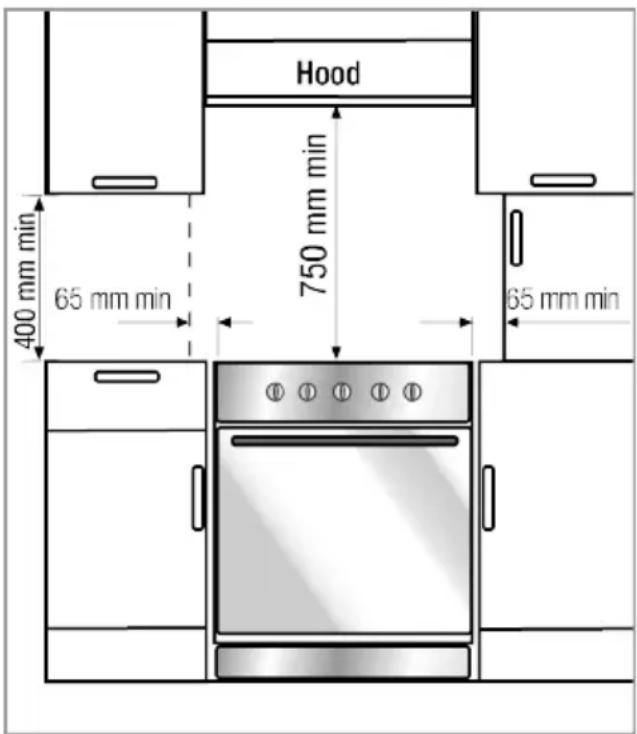
text_image
Hood 400 mm min 65 mm min 750 mm min 65 mm min- It can also be used in a free standing position. Allow a minimum distance of 750 mm above the hob surface.
- If a cooker hood is to be installed above the cooker, refer to the instructions of the manufacturer of the cooker hood regarding installation height (min. 650 mm).
- Any kitchen furniture next to the appliance must be heat-resistant (100 °C min.).
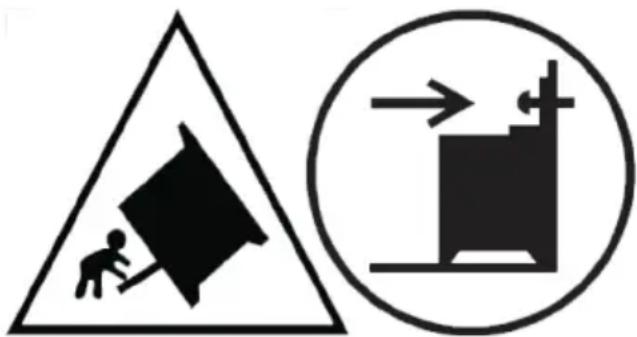
Warning - Risk of tipping!
text_image
Warning sign with pictogram of a person pulling a large block, next to a circular diagram showing a moving device.Warning: In order to prevent tipping of the appliance, this stabilizing means must be installed. Refer to the instructions for installation.
Safety chain
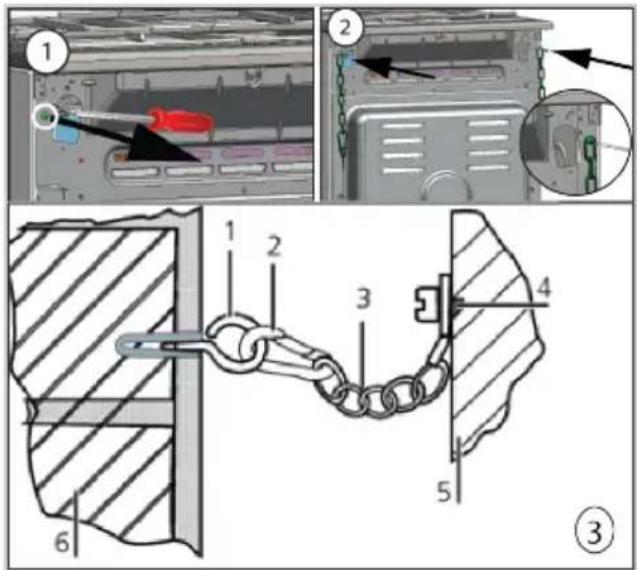
The appliance must be secured against overbalancing by using the supplied one safety chain on your oven.
If your product has 2 safety chains;
Fasten hook (1) by using a proper peg to the kitchen wall (6) and connect safety chain (3) to the hook via the locking mechanism (2).
text_image
Technical diagram showing mechanical assembly steps with numbered components and a close-up of a chain link mechanism.1 Hook
2 Locking mechanism
3 Safety chain
4 Firmly fix chain to product rear
5 Rear of product
6 Kitchen wall
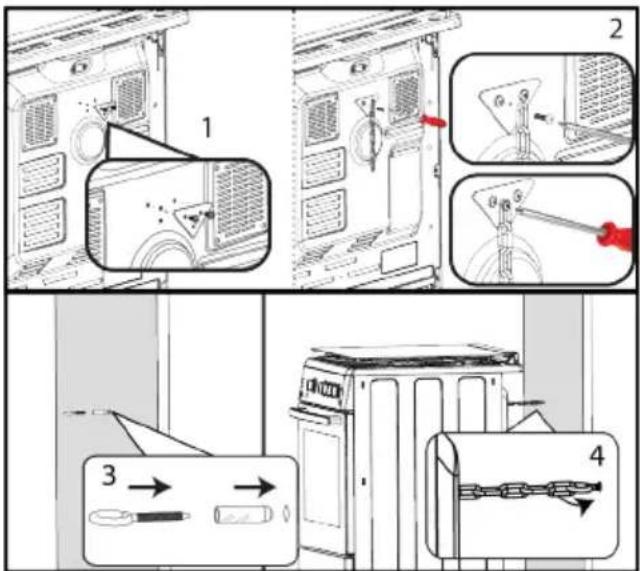
If your product has 1 safety chains;
The appliance must be secured against overbalancing by using the supplied one safety chain on your oven.
Follow below steps in the picture to secure the safety chain to your product.
text_image
Diagram illustrating four steps of a refrigerator interior with labeled components and directional arrows indicating movement.
Stability chain to be as short as practicable to avoid oven tilting forward and diagonal to avoid oven side tilting. Stability chain is designed for cookers without a bracket engagement slot.
4.2 Electrical connection

General warnings
- Disconnect the product from the electric connection before starting any work on the electrical installation. There is an electric shock hazard.
- Connect the product to a grounded outlet/line protected by a miniature circuit breaker of suitable capacity as stated in the "Technical specifications" table. Have the grounding installation made by a qualified electrician while using the product with or without a transformer. Our company shall not be liable for any damages that will arise due to using the product without a grounding installation in accordance with the local regulations.
-
The product can only be connected to the mains electricity connection by an authorized and qualified person, and the warranty of the product starts only after correct installation. The manufacturer cannot be held responsible for any damages that may arise due to operations by unauthorized persons.
-
The electric cable must not be crushed, folded, jammed or touch hot parts of the product. If the electric cable is damaged, it must be replaced by a qualified electrician. Otherwise there is an electric shock, short circuit or fire hazard!
- The mains supply data must correspond to the data specified on the type label of the product. The rating plate is either seen when the door or the lower cover of the appliance is opened or it is located at the rear wall of the appliance depending on the appliance type.
- Power cable plug must be within easy reach after installation (do not route it above the hob). Do not use extension or multi sockets in power connection.
- and must use the appropriate socket outlet/line and plug for oven. In case of the product's power limits are out of current carrying capability of plug and socket outlet/line, the product must be connected through fixed electrical installation directly without using plug and socket outlet/line.
- If the product will be connected directly to the supply power: If it is not possible to disconnect all poles in the supply power, a disconnection unit with at least 3 mm contact clearance (fuses, line safety switches, contactors) must be connected and all the poles of this disconnection unit must be adjacent to (not above) the product in accordance with IEE directives. Failure to obey this instruction may cause operational problems and invalidate the product warranty.
• Additional protection by a residual current circuit breaker is recommended.
If the product is produced with cable and without plug:
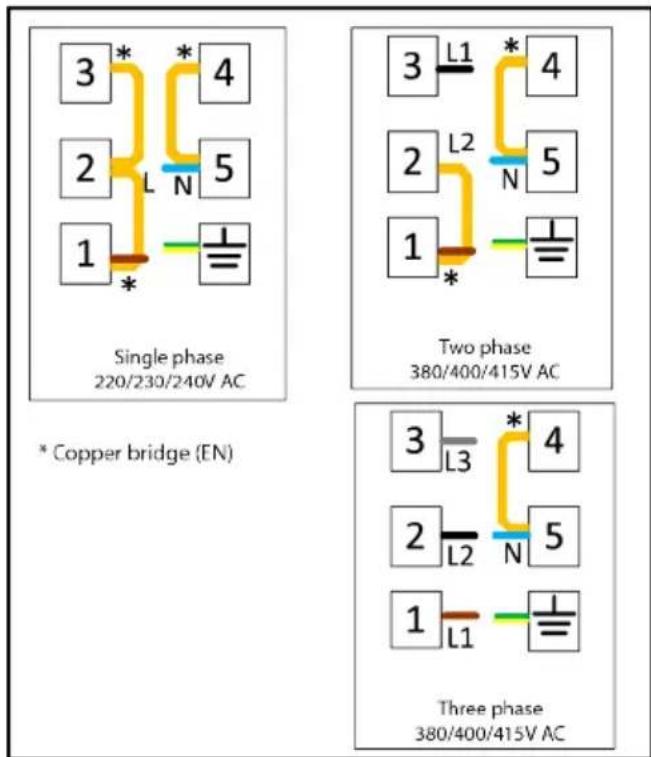
Connect the cord of product to supply power as identified below:
Make the terminal block connection of your product according to the connection/phase information on the product type label.
text_image
3 * 4 2 L N 5 1 * Single phase 220/230/240V AC * Copper bridge (EN) 3 L1 * 4 2 L2 N 5 1 * Two phase 380/400/415V AC 3 L3 * 4 2 L2 N 5 1 L1 Three phase 380/400/415V ACIf your supply cord type is 3-conductor type, for 1-phase connection:
- Brown/Black = L (Phase)
- Blue = N (Neutral)
- Green/Yellow wire = (E) (Earthing)
If your supply cord type is 5-conductor type, for 3-phase connection:
- Brown = L1 (Phase)
- Black = L2 (Phase)
- Grey = L3 (Phase)
- Blue = N (Neutral)
- Green/Yellow wire = (E) ⊕ (Earthing)
4.3 Placing the product
- Push the product towards the kitchen wall.
- Secure the safety chain you have connected to the product to the wall.
- Adjust the feet of oven
Adjusting the feet of oven
Vibrations during use may cause cooking vessels to move. This dangerous situation can be avoided if the product is level and balanced.
For your own safety please ensure the product is level by adjusting the four feet at the bottom by turning left or right and align level with the work top.
Final check
- Reconnect the product to the mains.
5 First Use
Before you start using your product, it is recommended to do the following stated in the following sections respectively.
5.1 First Timer Setting

Always set the time of day before using your oven. If you do not set it, you cannot cook in some oven models.
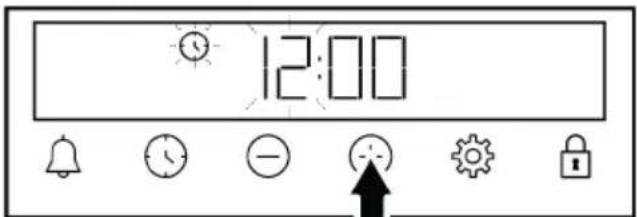
- When the oven is first started, "12:00" and Ⓞ symbol will flash on the display.
- Set the time of day by touching the Ⓕ keys.
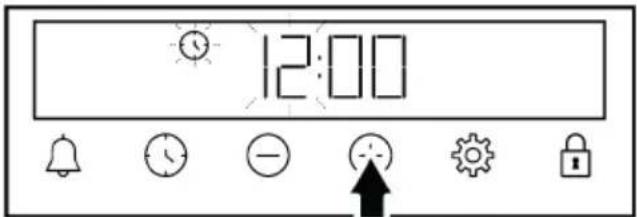
text_image
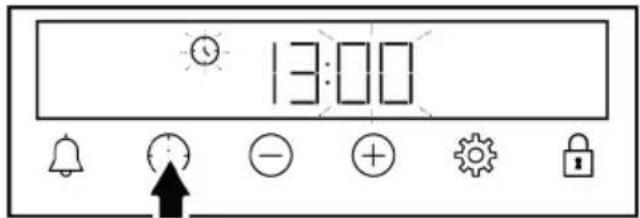
12:00- Touch or key to activate the minutes field.
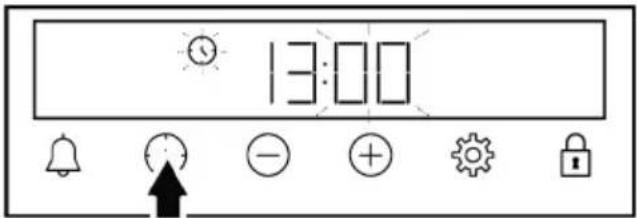
text_image
13:00- Touch the /+keys to set the minute.
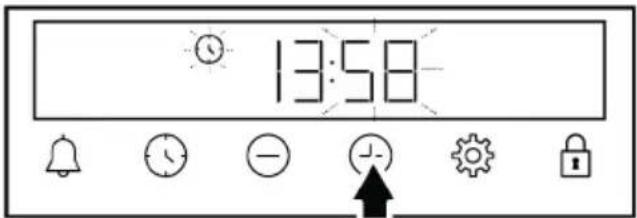
text_image
13:58- Confirm by touching the or key.
→ The time of day is set and the symbol disappears on the display.
- Check electrical functions.

If the first timer is not set, "12:00" and ⓣ symbol continue to flash and your oven will not start. For your oven to function, you must confirm the time of day by setting the time of day or touching the ⏱ key when it is at "12:00". You can change the time of day setting later as described in the "Settings" section.

In the event of a power outage, the time of day settings are cancelled. It should be set again.
5.2 Initial Cleaning
- Remove all packaging materials.
- Remove all accessories from the oven provided with the product.
- Operate the product for 30 minutes and then, turn it off. This way, residues and layers that may have remained in the oven during production are burned and cleaned.
- When operating the product, select the highest temperature and the operating function that all the heaters in your product operate. See "Oven operating functions". You can learn how to operate the oven in the following section.
- Wait for the oven to cool.
- Wipe the surfaces of the product with a wet cloth or sponge and dry with a cloth.
Before using the accessories:
Clean the accessories you remove from the oven with detergent water and a soft cleaning sponge.
NOTICE: Some detergents or cleaning agents may cause damage to the surface. Do not use abrasive detergents, cleaning powders, cleaning creams or sharp objects during cleaning.
NOTICE: During the first use, smoke and odour may come up for several hours. This is normal and you just need good ventilation to remove it. Avoid directly inhaling the smoke and odours that form.
6 How to use the hob
6.1 General information on hob usage

General warnings
- Do not let any objects to fall on the hob. Even small objects such as saltshakers may damage the hob. Do not use cracked hobs. Water may seep through these cracks and cause a short circuit. If the surface is damaged in any way (e.g. visible cracks), turn off the fuse first, then call the authorized service to unplug the product to reduce the risk of electric shock.
- Do not use unbalanced and easily tilting pots/pans on the hob.
- Do not heat the pots/pans and pots empty. The pots and the appliance may be damaged.
- Always turn off the hob's burners after each use.
- You shall damage the appliance if you operate the hobs without any pot or pots/ pans. Always turn off the hobs after each operation.
• After each use the cooking surface will be hot, so do not put the plastic pots/ pans on the cooking surface. Clean such material on the surface immediately. - Sudden temperature changes on the glass cooking surface may cause damage, be careful not to spill cold liquids during cooking.
- Put a sufficient amount of food in pots and pans. Thus, you can prevent food from pouring forth out of the pots/pans and will not need to clean unnecessarily.
- Do not place the covers of pots and pans on burners/zones.
- Place the pots by centering them on the burners/zones. If you wish to place a pot on a different burner/zone, do not slide it towards the desired burner; rather, lift it first and then put it on the other burner.
Tips for hobs with vitro-ceramic surfaces
- Vitro-ceramic surface is heat resistant and it is not affected by high temperature differences.
- Do not use vitro-ceramic surface as a surface where you can place something on it or as a cutting surface.
- Use pots and pans with processed bases only. Sharp edges may cause scratches on the surface.
- Do not use aluminium pots/pans and pots. Aluminium deteriorates the hob surface.
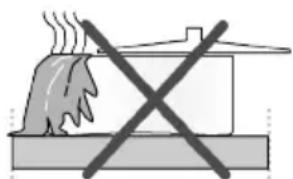
- Splashes may damage the hob surface and may cause fire.
natural_image
Simple line drawing of a steam rising above a building with a crossed-out X symbol (no text or labels)- Do not use pots/pans with convex or concave bases.
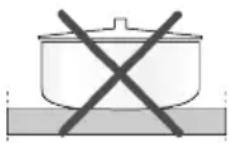
- Use pots and pans with flat bases only. These provide easier heat transfer.
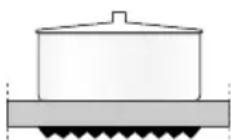
- Energy is wasted if the pot diameter is too small.
| Cooking zone diameter - mm Pot diameter - cm | |
| 120 12 – 14 | |
| 140 14 – 16 | |
| 180 18 - 20 | |
| 210 21 - 23 | |
| 170x265 17 – 19 / 26 - 28 |
6.2 Operation of the hobs
text_image
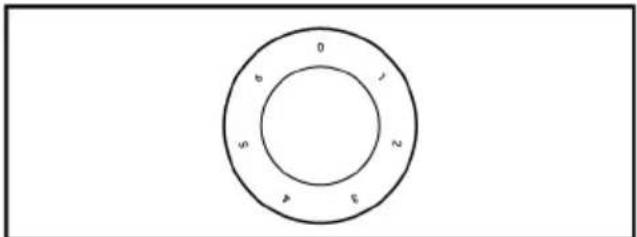
0 6 5 2 4 3To operate the vitro-ceramic hobs, the hob control knobs are used. To obtain your desired cooking level, switch the hob control knob to the desired level.
The hob(s) may have 3, 6 or 9 operating levels as per the model of your appliance. You may select the relevant level for your cooking type by referring to the table below.
6 levels:
1 : Heating
2 - 3 : Boiling, Resting
4 - 6 : Baking, Frying, Boiling
Turning off the vitro-ceramic zones
Bring the hob knob to OFF position (top).
Excess heat indicator
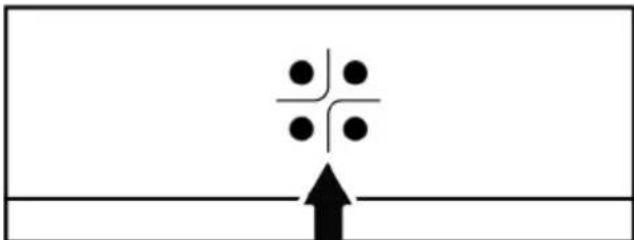
Vitro-ceramic zones are equipped with an operating lamp and a hot zone warning indicator.
natural_image
Simple diagram with a central dot pattern and an upward arrow, no text or symbols presentHot zone warning indicator shows the position of the turned on hob, and it remains lit after it is turned off. A flickering light on the hot zone warning indicator is not a malfunction.
Hob surface may cool down at different periods as per usage. Hob surface may be hot even when the warning indicators are not lit. Ensure that the surface is cooled down prior to coming to contact with it. Otherwise, you may burn your hand!
7 Using the Oven
7.1 General Information on Using the Oven
Cooling fan ( It varies depending on the product model. It may not be available on your product. )
Your product has a cooling fan. The cooling fan is activated automatically when necessary and cools both the front of the product and the furniture. It is automatically deactivated when the cooling process is fin-
ished. Hot air comes out over the oven door. Refrain from covering these ventilation openings. Otherwise, the oven may overheat. The cooling fan continues to operate during oven operation or after the oven is turned off (approximately 20-30 minutes). If you cook by programming the oven timer, at the end of the baking time, the cooling fan turns off with all functions.
The cooling fan running time cannot be determined by the user. It turns on and off automatically. This is not an error.
Oven lighting
The oven lighting is turned on when the oven starts baking. In some models, the lighting is on during baking, while in some models it turns off after a certain time.
7.2 Operation of the Oven Control Unit
General information for the oven control unit
- The maximum time that can be set for the baking process is 5 hours 59 minutes. In case of a power failure, the program is canceled. You will need to re-program.
- While making any adjustments, the relevant symbols flash on the display. A short time should be waited for the settings to be saved.
- If any cooking setting has been made, the time of day cannot be adjusted.
- If cooking time is set when cooking starts, the remaining time is displayed on the display.
- In cases where cooking time or cooking end time is set; you can cancel automatically by touching the ⓚkey for a long time.
Timer
text_image
1 2 3 4 5 61 Alarm key
2 Time setting key
3 Decrease key
4 Increase key
5 Settings key
6 Key lock key
Display symbols
: Baking time symbol
: Baking end time symbol *
: Alarm symbol
● : Brightness symbol
: Key lock symbol
: Temperature symbol
: Volume level symbol
: Door lock symbol *
*It varies depending on the product model. It may not be available on your product.
Turning on the oven
When you select a operating function you want to cook with the function selection knob and set a certain temperature with the temperature knob, the oven starts operating.
Turning off the oven
You can turn the oven off by turning the function selection knob and temperature knob to the off (up) position.
Manual cooking to select temperature and oven operating function
You can cook by making a manual control (at your own control) without setting the cooking time by selecting the temperature and operating function specific to your food.
text_image
P °C-
Select the operating function you want to cook with the function selection knob.
-
Set the temperature you want to cook with the temperature knob.
→ Your oven will start operating immediately at the selected function and temperature, and the symbol will appear on the display. When the temperature inside the oven reaches the set temperature, the symbol disappears. The oven does not switch off automatically
since manual cooking is done without setting the cooking time. You have to control cooking and turn it off yourself. When your cooking is completed, turn off the oven by turning the function selection knob and the temperature knob to the off (up) position.
Cooking by setting the cooking time:
You can have the oven turn off automatically at the end of the time by selecting the temperature and operating function specific to your food and setting the cooking time on the timer.
- Select the operating function for cooking.
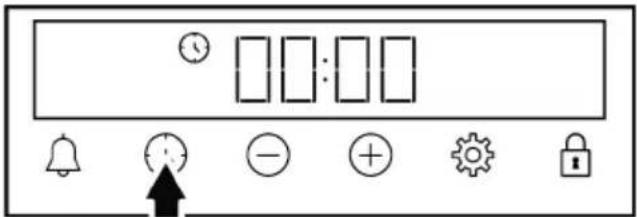
- Touch the key until the symbol appears on the display for the cooking time.
text_image
Control panel interface with display, function buttons, and directional icons
After setting the operation function and temperature, you can set the cooking time for 30 minutes by touching the ⏻key directly for quick setting of the cooking time and change the time with the ≠ ⊖ keys.
- Set the cooking time with the keys.
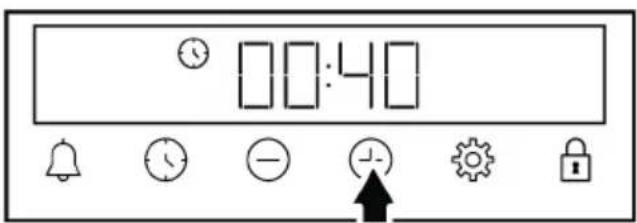
text_image
00:40
The cooking time increases by 1 minute in the first 15 minutes, after 15 minutes it increases by 5 minutes.
- Put your food in the oven and set the temperature with the temperature knob.
Your oven will start operating immediately at the selected function and temperature. The set cooking time starts to count down and the symbol appears on the display. When the temperature inside the oven reaches the set temperature, the symbol disappears.
- After the set cooking time is completed, on the display, "End" appears, the ⏻ symbol flashes and the timer beeps.
- The warning sounds for two minutes. Press any key to stop the warning. The warning stops and the time of day appears on the display.

If any key is pushed at the end of the audible warning, the oven will start operating again. To prevent the oven from operating again at the end of the warning, turn off the oven by turning the temperature knob and function knob to the "0" (off) position.
7.3 Settings
Activating the key lock
By using the key lock feature, you can safeguard the timer from interference.
- Touch the key until the symbol appears on the display.
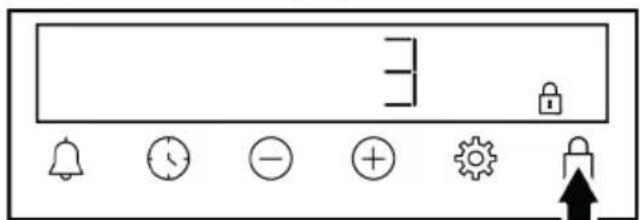
text_image
Control panel interface with icons for bell, clock, minus sign, gear, lock, and directional arrowThe symbol is shown on the display and the 3-2-1 count down starts. The key lock activates when the countdown ends. When any key is touched after the key lock is set, the timer sounds an audible signal and the symbol flashes.

If you release the key before the end of the countdown, the key lock does not activate.

Timer keys cannot be used when the key lock is on. The key lock will not be cancelled in case of power failure.
Deactivating the key lock
- Touch the key until the symbol disappears from the display.
⇒ The symbol disappears from the display and the key lock is disabled.
Setting the alarm
You can also use the timer of the product for any warning or reminder other than baking. The alarm clock has no effect on the oven operating functions. It is used for warning purposes. For example, you can use the alarm clock when you want to turn the food in the oven at a certain time. As soon as the time you set has expired, the timer gives you an audible warning.

The maximum alarm time may be 23 hours 59 minutes.
- Touch the until the key symbol appears on the display.
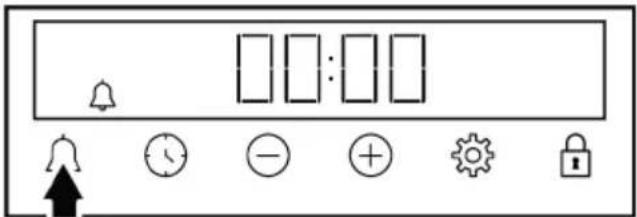
text_image
Control panel interface with icons for alarm, timer, minus sign, gear, lock, and bell symbol- Set the alarm time with the /+keys.
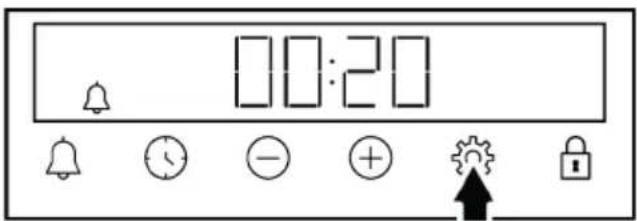
text_image
00:20→ After setting the alarm time, the symbol remains lit and the alarm time starts to countdown on the display. If the alarm time and baking time are set at the same time, the shorter time is shown on the display.
- After the alarm time is completed, the symbol starts flashing and gives you an audible warning.
Turning off the alarm
- At the end of the alarm period, the warning sounds for two minutes. Touch any key to stop the audible warning.
⇒ The warning stops and the time of day appears on the display.
If you want to cancel the alarm;
-
Touch the key until the symbol appears on the display to reset the alarm time. Touch the key until the "00:00" symbol appears on the display.
-
You can also cancel the alarm by touching the 🔊key for a long time.
Adjusting the volume
- Touch key until the symbol appears on the display.
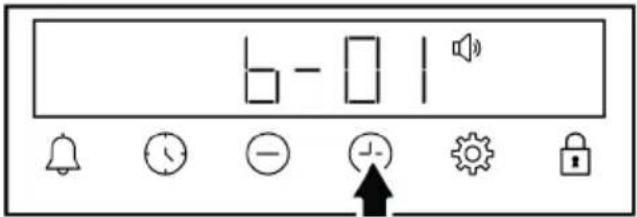
text_image
6 - 1- Set the desired level with the keys. (b-01-b-02-b-03)
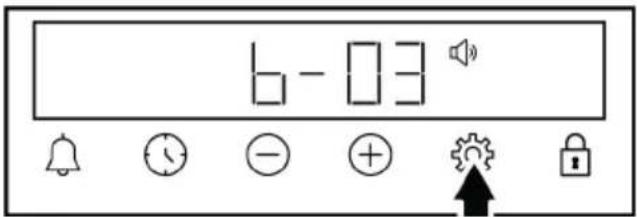
text_image
6 - 03- Touch the key for confirmation or wait without touching any key. The volume set becomes active after a while.
Setting the display brightness
- Touch key until the symbol appears on the display.
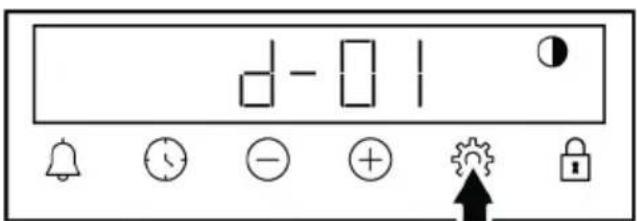
text_image
d - 0 1 bell clock - + ↑ lock- Set the desired brightness with the ④ keys. (d-01-d-02-d-03)
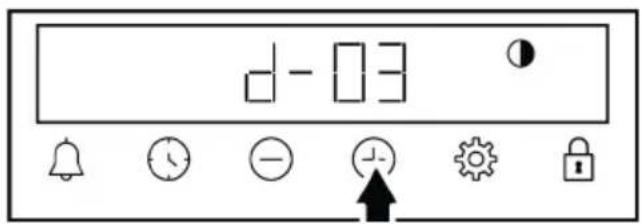
text_image
d-03- Touch the key for confirmation or wait without touching any key. The brightness set becomes active after a while.
Changing the time of day
On your oven to change the time of day that you have previously set:
- Touch the key until the symbol appears on the display.
- Set the time of day by touching the ⏻ keys.
text_image
12:008 General Information About Cooking
You can find tips on preparing and cooking your food in this section.
Plus, this section describes some of the foods tested as producers and the most appropriate settings for these foods. Appropriate oven settings and accessories for these foods are also indicated.
8.1 General Information About Baking in the Oven
- While opening the oven door during or after baking, hot-burning steam may emerge. The steam may burn your hand, face and/or eyes. When opening the oven door, stay away.
- Intense steam generated during baking may form condensed water drops on the interior and exterior of the oven and on the upper parts of the furniture due to the temperature difference. This is a normal and physical occurrence.
-
Condensation or water vapour may appear as sweating or dripping on the oven's inner glass, depending on the
-
Touch or key to activate the minutes field.
text_image
13:00- Touch the +keys to set the minute.
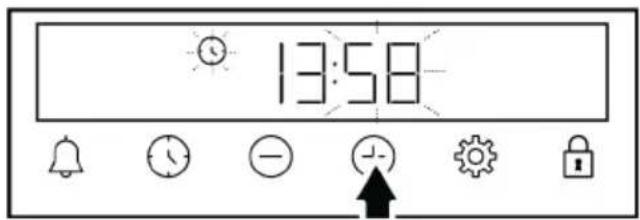
text_image
13:58- Confirm by touching the or key.
⇒ The time of day is set and the symbol disappears on the display.
food. This common occurrence could happen when cooking. It is advised to use a moist cloth to wipe the inner glass clean when the product has cooled down after cooking.
- The cooking temperature and time values given for foods may vary depending on the recipe and amount. For this reason, these values are given as ranges.
• Always remove unused accessories from the oven before you start cooking. Accessories that will remain in the oven may prevent your food from being cooked at the correct values. - For foods that you will cook according to your own recipe, you can reference similar foods given in the cooking tables.
-
Using the supplied accessories ensures you get the best cooking performance. Always observe the information provided by the manufacturer for the external cookware you will use.
-
Cut the greaseproof paper you will use in your cooking in suitable sizes to the container you will cook. Greaseproof papers that are overflowing from the container can create a risk of burns and affect the quality of your baking. Use the greaseproof paper you will use in the temperature range specified.
- For good baking performance, place your food on the recommended correct shelf. Do not change the shelf position during baking.
8.1.1 Pastries and oven food
General Information
- We recommend using the accessories of the product for a good cooking performance. If you will use an external cookware, prefer dark, non-sticking and heat resistant ware.
- If preheating is recommended in the cooking table, be sure to put your food in the oven after preheating.
- If you will cook by using cookware on the wire grill, place it in the middle of the wire grill, not near the back wall.
- All materials used in making pastry should be fresh and at room temperature.
- The cooking status of the foods may vary depending on the amount of food and the size of the cookware.
- Metal, ceramic and glass moulds extend the cooking time and the bottom surfaces of pastry foods do not brown evenly.
- If you are using baking paper, a small browning can be observed on the bottom surface of the food. In this situation, you may have to extend your cooking period by approximately 10 minutes.
-
The values specified in the cooking tables are determined as a result of the tests carried out in our laboratories. Values suitable for you may differ from these values.
-
Place your food on the appropriate shelf recommended in the cooking table. Refer to the bottom shelf of the oven as shelf 1.
- Cook the recommended dishes in the cooking table with a single tray.
Tips for baking cakes
- If the cake is too dry, increase the temperature by 10^ and shorten the baking time.
- If the cake is moist, use a small amount of liquid or reduce the temperature by 10^ .
- If the top of the cake is burnt, put it on the lower shelf, lower the temperature and increase the baking time.
- If the inside of the cake is cooked well, but outside is sticky, use less liquid, decrease the temperature and increase the cooking time.
Hints for pastry
- If the pastry is too dry, increase the temperature by 10^ and shorten the cooking time. Wet the dough sheets with a sauce consisting of milk, oil, egg and yoghurt mixture.
- If the pastry is getting cooked slowly, make sure that the thickness of the pastry you have prepared does not overflow the tray.
- If the pastry is browned on the surface but the bottom is not cooked, make sure that the amount of sauce you will use for the pastry is not too much at the bottom of the pastry. For an even browning, try to spread the sauce evenly between the dough sheets and the pastry.
- Bake your pastry in the position and temperature appropriate to the cooking table. If the bottom is still not browned enough, place it on a bottom shelf for the next cooking.
Cooking table for pastries and oven foods
| Food Accessory to be used | Operating function | Shelf position Temperature (°C) Baking time (min) (approx.) | ||
| Cake on the tray Standard tray * | Top and bottom heating | 3 180 30 ... 45 | ||
| Cake in the mould Cake mould on wire grill ** | Top and bottom heating | 2 180 30 ... 50 | ||
| Small cakes Standard tray * | Top and bottom heating | 3 160 25 ... 35 | ||
| Small cakes Standard tray * | Fan assisted bottom/top heating | 2 150 20 ... 30 | ||
| Sponge cake Round springform pan, 26 cm in diameter on wire grill ** | Top and bottom heating | 2 160 30 ... 45 | ||
| Sponge cake Round springform pan, 26 cm in diameter on wire grill ** | Fan assisted bottom/top heating | 2 160 20 ... 30 | ||
| Cookie Pastry tray * | Top and bottom heating | 3 170 25 ... 40 | ||
| Rich pastry Standard tray * | Fan assisted bottom/top heating | 2 200 30 ... 40 | ||
| Dough pastry Standard tray * | Top and bottom heating | 2 200 20 ... 35 | ||
| Whole bread Standard tray * | Top and bottom heating | 3 200 30 ... 45 | ||
| Lasagne Glass / metal rectangular container on wire grill ** | Top and bottom heating | 2 or 3 200 30 ... 45 | ||
| Apple pie Round black metal mould, 20 cm in diameter on wire grill ** | Top and bottom heating | 2 180 60 ... 75 | ||
| Pizza Standard tray * | Top and bottom heating | 2 220 10 ... 25 |
EN
Preheating is recommended for all food.
*These accessories may not be included with your product.
**These accessories are not included with your product. They are commercially available accessories.
8.1.2 Meat, Fish and Poultry
The key points on grilling
- Seasoning it with lemon juice and pepper before cooking whole chicken, turkey and large pieces of meat will increase cooking performance.
- It takes 15 to 30 minutes more to cook boned meat than fillet by frying.
- You should calculate about 4 to 5 minutes of cooking time per centimetre of the meat thickness.
• After the cooking time is expired, keep the meat in the oven for approximately 10 minutes. The juice of the meat is better distributed to the fried meat and does not come out when the meat is cut.
- Fish should be placed on the medium or low level shelf in a heat resistant plate.
- Cook the recommended dishes in the cooking table with a single tray.
Cooking table for meat, fish and poultry
| Food Accessory to | be used | Operating function | Shelf position Temperature (°C) Baking time (min) (approx.) | ||
| Steak (whole) / Roast (1 kg) | Standard tray * | Fan assisted bottom/top heating | 3 | 15 mins. 250/ max, after 180 ... 190 | 60 ... 80 |
| Lamb's shank (1,5-2 kg) | Standard tray * | Fan assisted bottom/top heating | 3 | 15 mins. 250/ max, after 170 | 110 ... 120 |
| Fried chicken (1,8-2 kg) | Wire grill *Place one tray on a lower shelf | Fan assisted bottom/top heating | 2 | 15 mins. 250/ max, after 190 | 60 ... 80 |
| Turkey (5.5 kg) Standard tray * | Fan assisted bottom/top heating | 1 | 25 mins. 250/ max, after 180 ... 190 | 150 ... 210 | |
| Fish | Wire grill *Place one tray on a lower shelf | Fan assisted bottom/top heating | 3 200 20 ... 30 | ||
Preheating is recommended for all food.
*These accessories may not be included with your product.
**These accessories are not included with your product. They are commercially available accessories.
8.1.3 Grill
Red meat, fish and poultry meat quickly turns brown when grilled, holds a beautiful crust and does not dry out. Fillet meats, skewer meats, sausages as well as juicy vegetables (tomatoes, onions, etc.) are particularly suitable for grilling.
General warnings
- Food not suitable for grilling carries a fire hazard. Grill only food that is suitable for heavy grill fire. Also, do not place the food too far in the back of the grill. This is the hottest area and fatty foods may catch fire.
- When the preheating time is 5 minutes in the grill mode, skip the preheating, do not wait for the entire preheating time to pass.
- Close the oven door during grilling. Never grill with the oven door open. Hot surfaces may cause burns!
The key points of the grill
- Prepare foods of similar thickness and weight as much as possible for the grill.
- Place the pieces to be grilled on the wire grill or wire grill tray by distributing them without exceeding the dimensions of the heater.
- Depending on the thickness of the pieces to be grilled, the cooking times given in the table may vary.
- Slide the wire grill or the wire grill tray to the desired level in the oven. If you are cooking on the wire grill, slide the oven tray to the lower shelf to collect the oils. The oven tray you will slide should be
sized to cover the entire grill area. This tray may not be supplied with the product. Put some water into the oven tray for easy cleaning.
Grill table
| Food Accessory to be | used Shelf position Temperature (°C) Baking time (min) | (approx.) | ||
| Fish Wire grill 4 - 5 250 | 20 ... 25 | |||
| Chicken pieces Wire grill 4 - 5 250 25 ... 35 | ||||
| Meatball (veal) - 12 amount | Wire grill 4 250 20 ... 30 | |||
| Lamb chop Wire grill 4 - 5 250 20 ... 25 | ||||
| Steak - (meat cubes) Wire grill 4 - 5 250 25 ... 30 | ||||
| Veal chop Wire grill 4 - 5 250 25 ... 30 | ||||
| Vegetable gratin Wire grill 4 - 5 220 20 ... 30 | ||||
| Toast bread Wire grill 4 250 1 ... 4 | ||||
| It is recommended to preheat for 5 minutes for all grilled food.Turn pieces of food after 1/2 of the total grilling time. | ||||
Fan assisted low grill
| Food Accessory to | be used | Operating function | Shelf position | Temperature (°C) | Baking time (min) (approx.) |
| Fish | Wire grill | Fan assisted low grill | 4 | 200 | 30 ... 35 |
| Chicken pieces | Wire grill | Fan assisted low grill | 4 | 250 | 25 ... 35 |
| Meatball (veal) - 12 amount | Wire grill | Fan assisted low grill | 4 | 250 | 30 ... 40 |
| Steak (whole) / Roast (1 kg ) | Wire grill - Place one tray on a lower shelf | Fan assisted low grill | 3 | 15 mins. 250, after 180 ... 190 | 90 ... 110 |
| Do not preheat the dishes recommended in this grill chart. | |||||
8.1.4 Test foods
- Foods in this cooking table are prepared according to the EN 60350-1 standard to facilitate testing of the product for control institutes.
- Cook the recommended dishes in the cooking table with a single tray.
Cooking table for test meals
| Food Accessory to | be used | Operating function | Shelf position | Temperature (°C) | Baking time (min) (approx.) |
| Shortbread (sweet cookie) | Standard tray * | Top and bottom heating | 3 | 140 | 20 ... 30 |
| Small cakes | Standard tray * | Top and bottom heating | 3 | 160 | 25 ... 35 |
| Small cakes | Standard tray * | Fan assisted bottom/top heating | 2 | 150 | 20 ... 30 |
| Food Accessory to | be used | Operating function | Shelf position Temperature (°C) Baking time (min) (approx.) | ||
| Sponge cake | Round springform pan, 26 cm in diameter on wire grill ** | Top and bottom heating | 2 160 30 ... 45 | ||
| Sponge cake | Round springform pan, 26 cm in diameter on wire grill ** | Fan assisted bottom/top heating | 2 160 20 ... 30 | ||
| Apple pie | Round black metal mould, 20 cm in diameter on wire grill ** | Top and bottom heating | 2 180 60 ... 75 | ||
Preheating is recommended for all food.
*These accessories may not be included with your product.
**These accessories are not included with your product. They are commercially available accessories.
Grill
| Food Accessory to be | used Shelf position Temperature (°C) Baking time (min) | (approx.) | ||
| Meatball (veal) - 12 amount | Wire grill 4 250 20 ... 30 | |||
| Toast bread Wire grill 4 | 250 1 ... 4 | |||
| It is recommended to preheat for 5 minutes for all grilled food.Turn pieces of food after 1/2 of the total grilling time. | ||||
9 Maintenance and Cleaning
9.1 General Cleaning Information
General warnings
- Wait for the product to cool before cleaning the product. Hot surfaces may cause burns!
- Do not apply the detergents directly on the hot surfaces. This may cause permanent stains.
• The product should be thoroughly cleaned and dried after each operation. Thus, food residues shall be easily cleaned and these residues shall be prevented from burning when the product is used again later. Thus, the service life of the appliance extends and frequently faced problems are decreased.
- Do not use steam cleaning products for cleaning.
• Some detergents or cleaning agents cause damage to the surface. Unsuitable cleaning agents are: bleach, cleaning
products containing ammonia, acid or chloride, steam cleaning products, de-scaling agents, stain and rust removers, abrasive cleaning products (cream cleaners, scouring powder, scouring cream, abrasive and scratching scrubber, wire, sponges, cleaning cloths containing dirt and detergent residues).
- No special cleaning material is needed in the cleaning made after each use. Clean the appliance using dishwashing detergent, warm water and a soft cloth or sponge and dry it with a dry cloth.
- Be sure to completely wipe off any remaining liquid after cleaning and immediately clean any food splashing around during cooking.
- Do not wash any component of your appliance in a dishwasher unless otherwise stated in the user's manual.
For the hobs:
- Acidic dirt such as milk, tomato paste and oil may cause permanent stains on the hobs and components of the hob zones, clean any overflown fluids immediately after cooling down the hob by turning it off.
Inox - stainless surfaces
- Do not use acid or chlorine-containing cleaning agents to clean stainless-inox surfaces and handles.
- Stainless-inox surface may change colour in time. This is normal. After each operation, clean with a detergent suitable for the stainless or inox surface.
- Clean with a soft soapy cloth and liquid (non-scratching) detergent suitable for inox surfaces, taking care to wipe in one direction.
- Remove lime, oil, starch, milk and protein stains on the glass and inox surfaces immediately without waiting. Stains may rust under long periods of time.
- Cleaners sprayed/applied to the surface should be cleaned immediately. Abrasive cleaners left on the surface cause the surface to turn white.
Enamelled surfaces
- The oven must cool down before cleaning the cooking area. Cleaning on hot surfaces shall create both fire hazard and damage the enamel surface.
• After each use, clean the enamel surfaces using dishwashing detergent, warm water and a soft cloth or sponge and dry them with a dry cloth. - If your product has an easy steam cleaning function, you can make easy steam cleaning for light non-permanent dirt. (See "Easy Steam Cleaning".)
- For difficult stains, an oven and grill cleaner recommended on the website of your product brand and a non-scratching scouring pad can be used. Do not use an external oven cleaner.
Catalytic surfaces
- The side walls in the cooking area can only be covered with enamel or catalytic walls. It varies by model.
- The catalytic walls have a light matte and porous surface. The catalytic walls of the oven should not be cleaned.
- Catalytic surfaces absorb oil thanks to its porous structure and start to shine when the surface is saturated with oil, in this case it is recommended to replace the parts.
Glass surfaces
- When cleaning glass surfaces, do not use hard metal scrapers and abrasive cleaning materials. They can damage the glass surface.
- Clean the appliance using dishwashing detergent, warm water and a microfiber cloth specific for glass surfaces and dry it with a dry microfiber cloth.
- If there is residual detergent after cleaning, wipe it with cold water and dry with a clean and dry microfiber cloth. Residual detergent may damage the glass surface next time.
- Under no circumstances should the dried-up residue on the glass surface be cleaned off with serrated knives, wire wool or similar scratching tools.
- You can remove the calcium stains (yellow stains) on the glass surface with the commercially available descaling agent, with a descaling agent such as vinegar or lemon juice.
- If the surface is heavily soiled, apply the cleaning agent on the stain with a sponge and wait a long time for it to work properly. Then clean the glass surface with a wet cloth.
• Discolorations and stains on the glass surface are normal and not defects.
Plastic parts and painted surfaces
- Clean plastic parts and painted surfaces using dishwashing detergent, warm water and a soft cloth or sponge and dry them with a dry cloth.
- Do not use hard metal scrapers and abrasive cleaners. They may damage the surfaces.
- Ensure that the joints of the components of the product are not left damp and with detergent. Otherwise, corrosion may occur on these joints.
9.2 Cleaning Accessories
Do not put the product accessories in a dishwasher unless otherwise stated in the user's manual.
9.3 Cleaning the hob
Glass cooking surface
Follow the cleaning steps described for the glass surfaces in the “General cleaning information” section for the cleaning of glass cooking surface. You may complete your cleaning as per the information below for special cases.
- Sugar-based foods such as dark cream, starch and syrup should be cleaned immediately, without waiting for the surface to cool. Otherwise, the glass cooking surface may be permanently damaged.
- Do not use cleaning agents for cleaning operations you perform while the hob is hot, otherwise permanent stains may occur.
9.4 Cleaning the Control Panel
- When cleaning the panels with knob-control, wipe the panel and knobs with a damp soft cloth and dry with a dry cloth. Do not remove the knobs and gaskets underneath to clean the panel. The control panel and knobs may be damaged.
- While cleaning the inox panels with knob control, do not use inox cleaning agents around the knob. The indicators around the knob can be erased.
- Clean the touch control panels with a damp soft cloth and dry with a dry cloth. If your product has a key lock feature, set the key lock before performing control panel cleaning. Otherwise, incorrect detection may occur on the keys.
9.5 Cleaning the inside of the oven (cooking area)
Follow the cleaning steps described in the "General Cleaning Information" section according to the surface types in your oven.
Cleaning the side walls of the oven
The side walls in the cooking area can only be covered with enamel or catalytic walls. It varies by model. If there is a catalytic wall, refer to the "Catalytic surfaces" section for information.
If your product is a wire shelf model, remove the wire shelves before cleaning the side walls. Then complete the cleaning as described in the "General Cleaning Information" section according to the side wall surface type.
To remove the side wire shelves:
- Remove the front of the wire shelf by pulling it on the side wall in the opposite direction.
- Pull the wire shelf towards you to remove it completely.
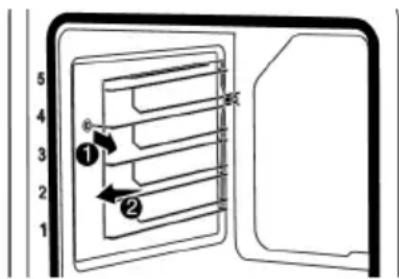
text_image
5 4 3 2 1 ① ② ⑥- To reattach the shelves, the procedures applied when removing them must be repeated from the end to the beginning, respectively.
9.6 Easy Steam Cleaning
This allows cleaning of the dirt (not remaining for a long time) that is softened by the steam inside the oven and by the water droplets condensed in the internal surfaces of the oven easily.
- Remove all accessories inside the oven.
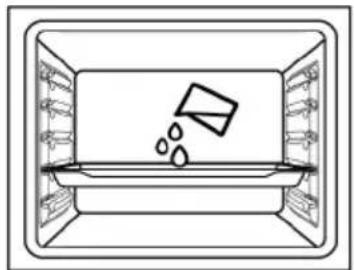
- Add 500 ml water into the tray and place it on the 2nd shelf of the oven.

Do not use distilled or filtered water. Use ready-made waters only. Do not use flammable, alcoholic or solid particulate solutions instead of water.
natural_image
Simple line drawing of a rectangular container with liquid and bubbles inside, no text or symbols present.- Set the oven to the easy steam cleaning operating mode and operate it at 100^ C for 15 minutes.
Immediately open the door and wipe the oven interiors with a wet sponge or cloth. Steam will be released when opening the door. This may pose a risk of burns. Be careful when opening the door.
For stubborn dirt, clean the product using dishwashing detergent, warm water and a soft cloth or sponge and dry it with a dry cloth.

In the easy steam cleaning function, it is expected that the added water evaporates and condenses on the inside of the oven and the oven door in order to soften the light dirt formed in your oven. Condensation formed on the oven door may drip around when the oven door is opened. As soon as you open the oven door, wipe off the condensation.
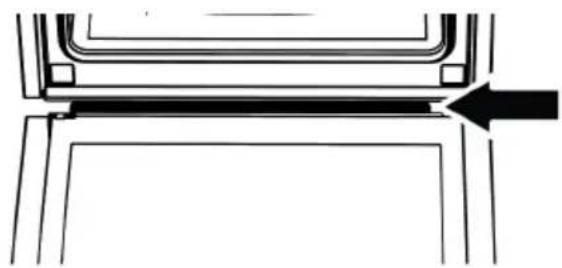
After the condensation inside the oven, puddle or moisture may occur in the pool channel under the oven. Wipe this pool channel with a damp cloth after use and dry it.
natural_image
Pure technical line drawing of a mechanical component with no text or symbols9.7 Cleaning the Oven Door
You can remove your oven door and door glasses to clean them. How to remove the doors and windows is explained in the sections "Removing the oven door" and "Removing the inner glasses of the door".
After removing the door inner glasses, clean them using a dishwashing detergent, warm water and a soft cloth or sponge and dry them with a dry cloth. For lime residue that may form on the oven glass, wipe the glass with vinegar and rinse.

Do not use harsh abrasive cleaners, metal scrapers, wire wool or bleach materials to clean the oven door and glass.
Removing the oven door
- Open the oven door.
- Open the clips in the front door hinge socket on the right and left by pushing them downwards as shown in the figure.
- Hinge types vary as (A), (B), (C) types according to the product model. The following figures show how to open each type of hinge.
- (A) type hinge is available in normal door types.
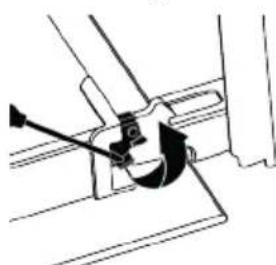
natural_image
Pure mechanical diagram showing a lever mechanism without any text, numbers, or symbolsA
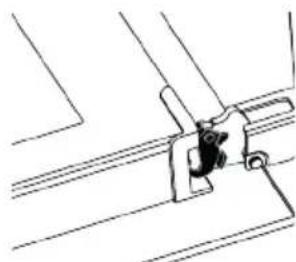
natural_image
Pure technical line drawing of a mechanical assembly without any text, numbers, or symbols- (B) type hinge is available in soft closing door types.
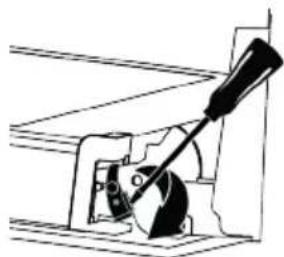
natural_image
Mechanical diagram showing a lever mechanism with a wheel and shaft (no text or symbols)B
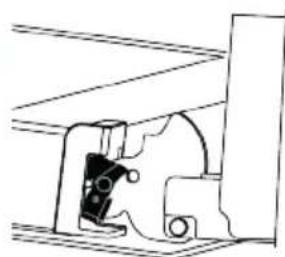
natural_image
Pure mechanical assembly diagram without any text, numbers, or symbols- (C) type hinge is available in soft opening/closing door types.
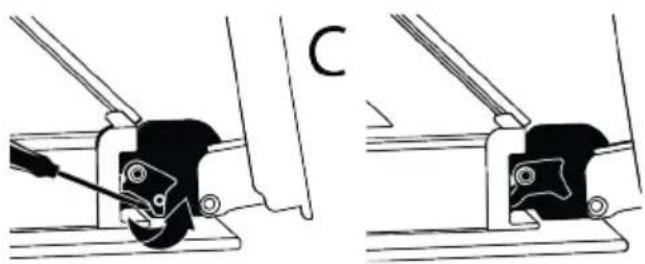
natural_image
Technical line drawing showing two mechanical assembly steps with no visible text or symbols- Get the oven door to a half-open position.
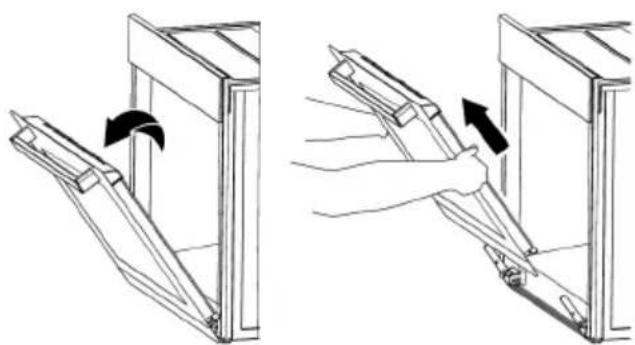
natural_image
Two-step diagram showing a hand holding a tool inside a window frame, with arrows indicating rotation (no text or symbols)- Pull the removed door upwards to release it from the right and left hinges and remove it.

To reattach the door, the procedures applied when removing it must be repeated from the end to the beginning, respectively. When installing the door, be sure to close the clips on the hinge socket.
9.8 Removing the Inner Glass of The Oven Door
Inner glass of the product's front door may be removed for cleaning.
- Open the oven door.
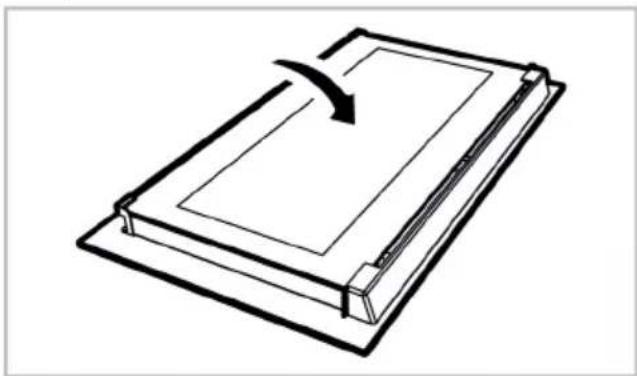
natural_image
Line drawing of a closed book with a curved arrow indicating rotation (no text or symbols)- Remove the plastic component attached on the upper section of the front door by pulling it towards yourself.
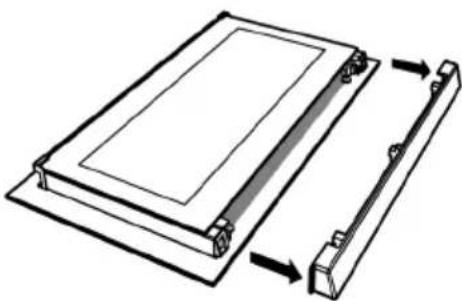
natural_image
Diagram of a rectangular device with a side panel and a vertical rod, showing directional arrows (no text or symbols)- As shown in the figure, gently lift the innermost glass (1) towards "A" and then, remove it by pulling towards "B".
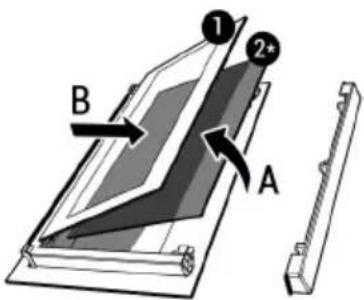
text_image
1 2* B A1 Innermost glass 2* Inner glass (it may not be available for your product)
- If your product has an inner glass (2), repeat the same process to detach it (2).
- The first step of regrouping the door is to reassemble the inner glass (2). Place the bevelled edge of the glass to meet the bevelled edge of the plastic slot. (If your product has an inner glass). Inner glass (2) must be attached to the plastic slot closest to the innermost glass (1).
- While reassembling the innermost glass (1), pay attention to place the printed side of the glass on the inner glass. It is crucial to place the lower corners of the innermost glass (1) to meet the lower plastic slots.
- Push the plastic component towards the frame until a "click" sound is heard.
9.9 Cleaning the Oven Lamp
In the event that the glass door of the oven lamp in the cooking area becomes dirty; clean using dishwashing detergent, warm water and a soft cloth or sponge and dry with a dry cloth. In case of oven lamp failure, you can replace the oven lamp by following the sections that follow.
Replacing the oven lamp
General warnings
• To avoid the risk of electric shock before replacing the oven lamp, disconnect the product and wait for the oven to cool. Hot surfaces may cause burns!
- This oven is powered by an incandescent lamp with less than 40 W, less than 60 mm in height, less than 30 mm in diameter, or a halogen lamp with G9 sockets with less than 60 W power. Lamps are suitable for operation at temperatures above 300 °C. Oven lamps are available from Authorised Services or licensed technicians. This product contains a G energy class lamp.
- The position of the lamp may differ from that is shown in the figure.
- The lamp used in this product is not suitable for use in the lighting of home rooms. The purpose of this lamp is to help the user see food products.
- The lamps used in this product must withstand extreme physical conditions such as temperatures above 50 °C.
If your oven has a round lamp,
- Disconnect the product from the electricity.
- Remove the glass cover by turning it counter clockwise.
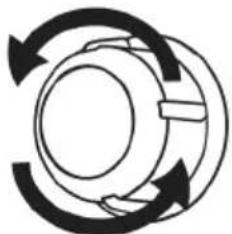
natural_image
Abstract circular diagram with three curved arrows forming a ring (no text or symbols)- If your oven lamp is type (A) shown in the figure below, rotate the oven lamp as shown in the figure and replace it with a new one. If it is type (B) model, pull it out as shown in the figure and replace it with a new one.
10 Troubleshooting
If the problem persists after following the instructions in this section, contact your vendor or an Authorized Service. Never try to repair your product yourself.
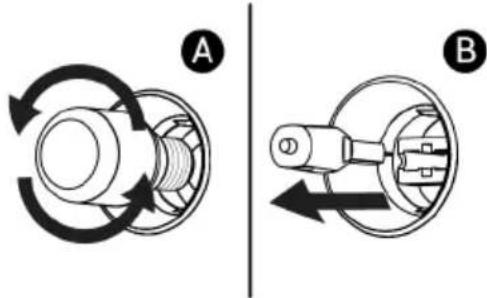
text_image
A B- Refit the glass cover.
If your oven has a square lamp,
- Disconnect the product from the electricity.
- Remove the wire shelves according to the description.
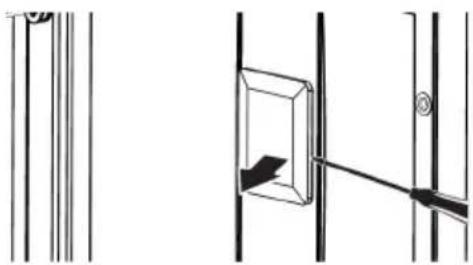
natural_image
Pure technical line drawing of a mechanical assembly with no text or symbols- Lift the lamp's protective glass cover with a screwdriver. Remove the screw first, if there is a screw on the square lamp in your product.
- If your oven lamp is type (A) shown in the figure below, rotate the oven lamp as shown in the figure and replace it with a new one. If it is type (B) model, pull it out as shown in the figure and replace it with a new one.
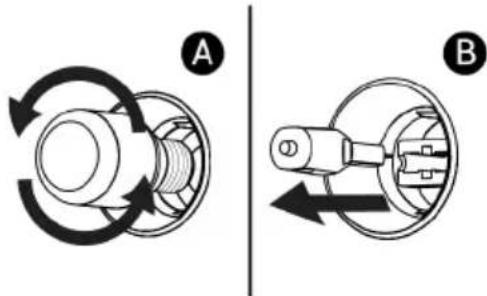
text_image
A B- Refit the glass cover and wire shelves.
Steam is emanated while the oven is working.
- It is normal to see vapour during operation. >>> This is not an error.
Water droplets appear while cooking
- The steam generated during cooking condenses when it comes into contact with cold surfaces outside the product and may form water droplets. >>> This is not an error.
Metal sounds are heard while the product is warming and cooling.
- Metal parts may expand and make sounds when heated. >>> This is not an error.
The product does not work.
- Fuse may be faulty or blown. >>> Check the fuses in the fuse box. Change them if necessary or reactivate them.
- The appliance may not be plugged to the (grounded) outlet. >>> Check if the appliance is plugged in to the outlet.
- (If there is timer on your appliance) Keys on the control panel do not work. >>> If your product has a key lock, the key lock may be enabled, disable the key lock.
Oven light is not on.
- Oven lamp may be faulty. >>> Replace oven's lamp.
- No electricity. >>> Ensure the mains is operational and check the fuses in the fuse box. Change the fuses if necessary or reactivate them.
Oven is not heating.
- The oven may not be set to a specific cooking function and/or temperature. >>> Set the oven to a specific cooking function and/or temperature.
- For the models with timer, the time is not set. >>> Set the time.
- No electricity. >>> Ensure the mains is operational and check the fuses in the fuse box. Change the fuses if necessary or reactivate them.
(For models with timer) The timer display flashes or the timer symbol is left open.
- There has been a power outage before. >>> Set the time / Turn off the product function knobs and again switch it to the desired position.
| Additional Information for User Manual: | Technical information on the operating Low Power Modes pursuant to EU Regulation 2023/826 | |
| Mode POWER CONSUMPTION(WATT) | PERIOD(MINUTES)* | |
| Off -- | ||
| Standby -- | ||
| Standby Mode with information or status display | 0,8 20 | |
| Networked Standby -- | ||
*:The period after which the equipment reaches automatically standby mode, off mode or networked standby in minutes and rounded to the nearest minute.
Bienvenue!
Cher client, chère cliente
natural_image
Simple line drawing of a trash bin with crossed lines and a blank rectangular base (no text or symbols)natural_image
Line drawing of a rectangular tray with internal curved lines (no text or symbols)Grille métallique
natural_image
Line drawing of a rectangular metal tray with internal grid lines (no text or symbols)natural_image
Simple line drawing of a rectangular grid pattern with no text or symbolsnatural_image
Diagram of a wire mesh rack with an arrow indicating direction, showing structural details (no text or symbols)natural_image
Line drawing of a refrigerator interior with a black arrow pointing to the drawer (no text or symbols)natural_image
Line drawing of a bed with an arrow pointing to the front panel, showing internal flow lines (no text or symbols)natural_image
Diagram of a microwave oven with a black arrow pointing to the interior (no text or symbols)natural_image
Technical line drawing of a metal rack with a vertical support structure and an inset showing a cross-section of a structural component (no text or symbols)natural_image
Diagram of a grating machine with an arrow indicating direction, showing internal structure and exterior view (no text or symbols)natural_image
Diagram showing a bed with a ladder and an inset close-up of a horizontal seam or seam (no text or symbols)text_image
Technical diagram illustrating mechanical assembly steps with labeled components and directional arrowstext_image
Warning sign with pictogram of a person pulling a large block, next to a circular diagram showing a moving device with arrows.text_image
Technical diagram showing mechanical assembly steps with numbered components and a close-up of a chain link mechanism.text_image
Diagram illustrating four steps of a washing machine operation: opening, cutting, mounting, and chain attachment.
natural_image
Simple line drawing of a chimney with steam rising and a crossed-out X symbol (no text or labels)natural_image
Pure diagram of a directional arrow pointing upward from a horizontal line, with no text or symbols present.text_image
Control panel interface with clock, timer, and function icons including bell, clock, minus, plus, gear, and lock