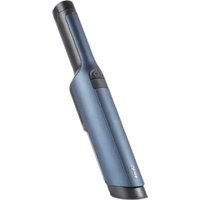
WandVac 2.0 WV270EU - Vacuum Cleaner SHARK - Free user manual and instructions
Find the device manual for free WandVac 2.0 WV270EU SHARK in PDF.


| Product Type | Cordless Handheld Vacuum |
| Brand | Shark |
| Model | WandVac 2.0 WV270EU |
| Power Source | Lithium-Ion Battery 14.4 V |
| Charging Time | Approximately 3.5 hours |
| Runtime | Not specified, varies by use |
| Included Accessories | 2-in-1 tool (brush and crevice tool), multi-surface tool, charging station with accessory storage |
| Dust Cup Capacity | Not specified |
| Filter | Washable filter (rinse with water, dry 24 h) |
| Weight | Not specified |
| Dimensions | Not specified |
| Suction Power | Boost mode available |
| Light Indicators | Solid blue when in use, blinking for low battery or charging |
| Maintenance | Empty dust cup with release button; clean filter by rinsing with water |
| Safety | Automatic shutdown in case of overheating or blockage; do not use on liquids |
| Warranty | 3-year commercial warranty (battery: 2 years) + legal warranties |
| Spare parts and accessories | Available at sharkclean.eu |
| Customer Service (France) | 0800 908874 (toll-free) Monday to Sunday |
Frequently Asked Questions - WandVac 2.0 WV270EU SHARK
User questions about WandVac 2.0 WV270EU SHARK
0 question about this device. Answer the ones you know or ask your own.
Ask a new question about this device
Download the instructions for your Vacuum Cleaner in PDF format for free! Find your manual WandVac 2.0 WV270EU - SHARK and take your electronic device back in hand. On this page are published all the documents necessary for the use of your device. WandVac 2.0 WV270EU by SHARK.
USER MANUAL WandVac 2.0 WV270EU SHARK
natural_image
Exterior view of a Shark brand light bulb device (no signage or text beyond branding)natural_image
Technical line drawing of a mechanical component with two views, one showing a curved cutout and the other a flanged end (no text or symbols)natural_image
Simple line drawing of an arched doorway with circular and spiral symbols on the sides (no text or labels)GENANVENDELSE AF LITIUM-ION-BATTERIET
natural_image
Line drawing of a mechanical device with an arrow indicating motion (no text or symbols)natural_image
Diagram of a door with an arrow pointing to a circular symbol and a spiral pattern inside (no text or labels)natural_image
Line drawing of a handheld electric toothbrush with a small clip emerging from it (no text or symbols)natural_image
Line drawing of a hand using a tool to press or adjust a component on a flat surface (no text or symbols)natural_image
Diagram of a sewing machine with a roller being inserted, showing no text or symbolsnatural_image
Illustration of a hand inserting a small container into a paper holder, with an arrow indicating the process (no text or symbols present)- Hold filterhuset hon over en skraldospand. Løft stoffilteret med metairingen for at fjerne det fra huset. Bank let for at fjerne støv og snavs, og skyl derpå kun med vand. Lad filteret lufttørre i min. 24 timer eller indtil det or helt tørt, før det genmonteres.
TÆND/SLUK-KNAP HVAD BETYDER DET HVAD G∅R JEG
natural_image
Technical line drawing of two mechanical components with a directional arrow indicating motion (no text or symbols)natural_image
Architectural diagram showing a door with circular and spiral symbols, no text or labels presentRECYCLING DES LITHIUM-IONEN-AKKUS
natural_image
Technical line drawing of a mechanical device with a downward arrow indicating motion (no text or symbols)natural_image
Diagram of a door with an arrow pointing to the top panel, showing a circular symbol and a spiral pattern inside (no text or labels)natural_image
Line drawing of a handheld electric toothbrush with a small base attachment (no text or symbols)natural_image
Four technical line drawings of mechanical components labeled A, B, C, and D, showing different assembly or assembly states (no text or symbols present)F
G
E
natural_image
Line drawing of a hand using a tool to press or adjust a component on a flat surface (no text or symbols)natural_image
Diagram of a sewing machine with a roller being inserted, showing no text or symbolsnatural_image
Illustration of a hand inserting a small container into a paper holder, with an arrow indicating the process (no text or symbols present)for purchasing the Shark® Cordless Vacuum


TIP: You can find the model and serial numbers on the QR code label which is located on the bottom of the dust cup.


UK CA
To benefit from your product's extended guarantee, simply register your purchase at:

Sharkclean.cu/register-guarantee/

0800 862 0453

Scan QR code using mobile device
Please note, products purchased directly from Shark ^® are automatically registered.
RECORD THIS INFORMATION
Model Number:
Date of Purchase (Keep receipt):
Store of Purchase;
TECHNICAL SPECIFICATIONS
Voltage: 14.4V =
PLEASE READ CAREFULLY AND KEEP FOR FUTURE REFERENCE.
This instruction manual is designed to help you get a complete understanding of your new Shark® Vacuum.
If you have any questions, please call the Customer Service line on 0800 862 0453.
CONTENTS
Important Safety Instructions....32
What's Inside ....34
Charging Stand Assembly 34
LI-ION Battery 35
Charging 36
Using your vacuum 37
Additional Accessories Available....38
Maintaining Your Vacuum ....39
Emptying the Dust Cup 40
Cleaning the Filter 40
Troubleshooting Guide 41
Guarantee 42

This marking indicates that this product should not be disposed with other household wastes. To prevent possible harm to the environment or human health from uncontrolled waste disposal, recycle it responsibly to promote the sustainable reuse of material sources. To return your used device, please use the return and collection systems or contact the retailer where this product was purchased. They can take this product for environmentally safe recycling.
IMPORTANT SAFETY INSTRUCTIONS
FOR HOUSEHOLD USE ONLY • PLEASE READ ALL INSTRUCTIONS BEFORE USING THIS VACUUM.
To reduce the risk of shock and unintended operation, turn off power and remove the ION Power Pack battery before servicing.
WARNING
REDUCE THE RISK OF FIRE, ELECTRIC SHOCK, INJURY, OR PROPERTY DAMAGE:
1 This handheld vacuum contains components contain electrical connections, electrical wiring, and moving parts that potentially present risk to the user.
2 Before each use, carefully inspect all parts for any damage. If a part is damaged, discontinue use.
3 Use only identical replacement parts.
4 This vacuum contains no serviceable parts.
5 Use only as described in this manual. DO NOT use the vacuum for any purpose other than those described in this manual.
6 With the exception of the filters and dust cup, DO NOT expose any parts of the vacuum to water or other liquids.
7 DO NOT allow the appliance to be used by children. Keep the appliance and its cord out of reach of children. Do not allow to be used as a toy. Close supervision is necessary when used near children.
GENERAL USE
8 This appliance can be used by persons with reduced physical, sensory or mental capabilities or lack of experience and knowledge if they have been given supervision or instruction concerning use of the appliance in a safe way and understand the hazards involved. Cleaning and user maintenance should not be done by children. Always turn off the vacuum before connecting or disconnecting any current carrying hoses, motorised nozzles, chargers, batteries, or other electrical or mechanical parts.
9 DONOT handle plug or vacuum with wet hands.
10 DO NOT use without dust cup and filter in place.
11 Only use Shark' branded filters and accessories. Damage caused by nonShark filters and accessories may not be covered by the warranty.
12 DO NOT put any objects into nozzle or accessory openings. DO NOT use with any opening blocked; keep free of dust, lint, hair, and anything that may reduce airflow.
13 DO NOT use if nozzle or accessory airflow is restricted. If the air paths or the motorised floor nozzle become blocked, turn the vacuum off. Remove all obstructions before you turn on the unit again.
14 Keep nozzle and all vacuum openings away from hair, face, fingers, uncovered feet, or loose clothing.
15 DO NOT use if vacuum is not working as it should, or has been dropped, damaged, left outdoors, or dropped into water.
16 Use extra care when cleaning on stairs.
17 DO NOT leave the vacuum unattended while powered on.
18 When powered on, keep the vacuum moving over the carpet surface at all times to avoid damaging the carpet fibres.
19 DO NOT use to pick up: a) Liquids
b) Large objects
c) Hard or sharp objects (glass, nails, screws, or coins)
d) Large quantities of dust (including drywall, fireplace ash, or embers).
DO NOT use as an attachment to power tools for dust collection.
e) Smoking or burning objects (hot coals, cigarette butts, or matches)
f) Flammable or combustible materials (lighter fluid, petrol, or kerosene)
g) Toxic materials (chlorine bleach, ammonia, or drain cleaner)
20 DO NOT use in the following areas: a) Poorly lit areas
b) Wet or damp surfaces
c) Outdoor areas
d) Spaces that are enclosed and may contain explosive or toxic fumes or vapours (lighter fluid, petrol, kerosene, paint, paint thinners, mothproofing substances, or flammable dust)
21 Turn off the vacuum before placing in the charging base.
22 Turn off the vacuum before any adjustment, cleaning, maintenance or troubleshooting.
23 Allow the filter to air-dry completely before replacing in the vacuum to prevent liquid from being drawn into electric parts.
24 DONOT modify or attempt to repair the vacuum or the battery yourself, except as indicated in this manual. DO NOT use the battery or vacuum if it has been modified or damaged. Damaged or modified batteries may exhibit unpredictable behavior resulting in fire, explosion or risk of injury.
25 Always turn off this appliance before connecting or disconnecting hand tool.
LITHIUM-ION BATTERY PACK
26 The battery is the power source for the vacuum. Carefully read and follow all charging instructions. DO NOT carry the appliance with your finger on the power button. DO NOT charge appliance with the power on.
27 Use only the charger and battery supplied with the unit. Use of an incorrect charger may result in no charging, and/or unsafe conditions. Use of any other battery may create a risk of injury and fire.
28 Keep the battery away from all metal objects such as paper clips, coins, keys, nails, or screws. Shorting the battery terminals increases the risk of fire or burns.
29 If the battery is damaged, liquid may be ejected from the battery. Avoid contact with this liquid, as it may cause irritation or burns. If contact occurs, flush with water. If liquid comes into contact with eyes, seek medical help.
30 Battery should not be stored at temperatures below 3^ C ( 37.4^ F) or above 40^ C ( 104^ F) to maintain long-term battery life.
31 DO NOT charge battery at temperatures below 5°C (40°F) or above 40°C (104°F).
32 DO NOT expose appliance to fire or temperature above 130°C (266°F) as it may cause explosion.
33 There are NO serviceable parts. To ensure safety, DO NOT modify or attempt to repair the appliance.
34 DONOT vacuum up flammable or combustible materials (e.g., lighter fluid, petrol, or kerosene) or use vacuum in areas where they may be present.
35 DO NOT immerse vacuum cleaner in water or other liquids.
36 Use extra care when cleaning on stairs.
SAVE THESE INSTRUCTIONS
A Shark® Wandvac Go
B Duster Crevice Tool
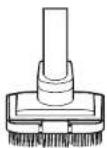
© Multi-Surface Pet Tool
D Charging Stand
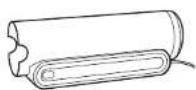
E Onboard Accessory Storage
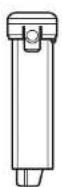
F Lithium-Ion Battery (pre-installed)
A
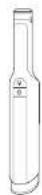
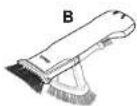

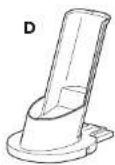

F
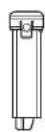
ND ASSEMBLY
natural_image
Technical line drawing of a mechanical component with two views, one showing a curved cutout and the other a flanged end (no text or symbols)-
-
-
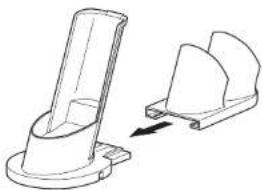
Slide the Onboard Accessory Storage onto the back of the Charging Base until it clicks into place.
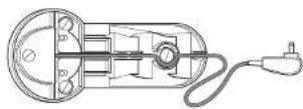
- Route the cord through the grooves in the bottom of the charging base and accessory storage, then through the slot in the back.
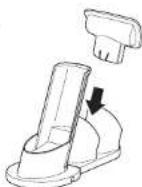
- Slide the accessories into the openings in the posts on the onboard accessory storage attachment.
For proper operation, ensure all components are completely connected and clicked into place.
To purchase additional accessories, go to sharkclean.eu
NOTE: Once the accessory storage is attached, it can't be removed.
LI-ION BATTERY
Prior to first use, charge the battery completely. A full charge takes approximately 3.5 hours.
RUNTIMES PER FULLY CHARGED BATTERY
In Use

Solid blue
Low Battery

Blinking
Charging Charged

and out

DimFades in
natural_image
Simple line drawing of an arched doorway with circular and spiral symbols (no text or labels)RECYCLING THE LI-ION BATTERY
When the Shark ^2 Li-ion battery needs to be replaced, dispose of it or recycle it in accordance with local ordinances or regulations. In some areas, it is illegal to place spent lithium-ion batteries in the bin or in a municipal solid waste stream. Return spent batteries to an authorised recycling centre or to the retailer for recycling. Contact your local recycling centre for information on where to drop off the spent battery.
NOTE: The Shark battery, like all lithium-ion batteries, will naturally decrease in capacity over time from the 100% capacity of a new battery.
CHARGING
CHARGING WHILE IN STORAGE
natural_image
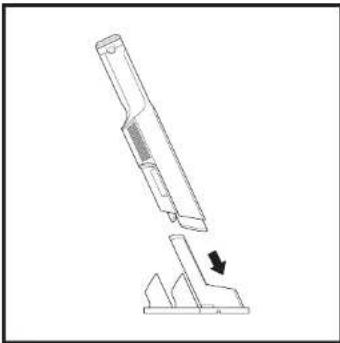
Technical line drawing of a mechanical device with a downward arrow indicating motion (no text or symbols)Charge the unit by sliding it into the charging base nozzle-first.
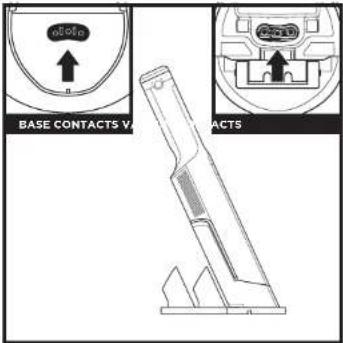
Make sure the contacts on the wand are aligned with the contacts on the charging post. When charging is complete and you need to use the unit again, lift it off the dock plate.
REMOVING THE BATTERY
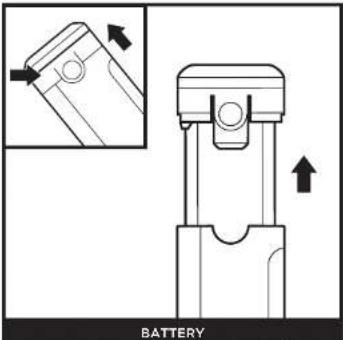
To remove the battery from the hand vacuum, press the release tabs on the battery cap and slide out the battery. To reinstall, slide the battery into the compartment in the handle until it clicks into place.
NOTE: When docked properly, the charging lights on the hand vacuum will fade, indicating that charging has begun. When charging is complete, the power button will dim, then shut off.
NOTE: The main unit comes with a partial charge. For maximum runtime, charge fully before first use (approximately 3 hours). Leaving the unit plugged in will not damage battery life.
USING YOUR VACUUM
CONTROLS
natural_image
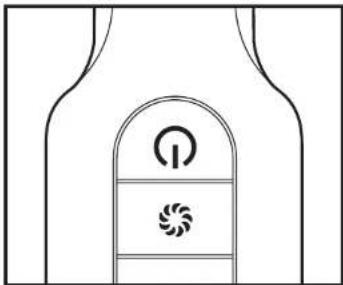
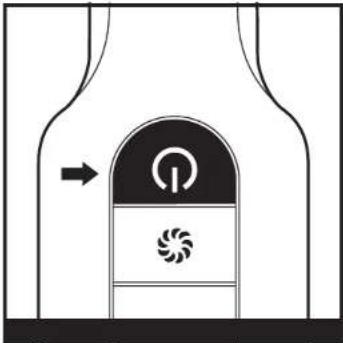
Diagram of a door with an arrow pointing to the top panel, showing a circular symbol and a spiral pattern inside (no text or labels)Press the On/Off button on the handle to turn on power. To turn off power, press the button again.
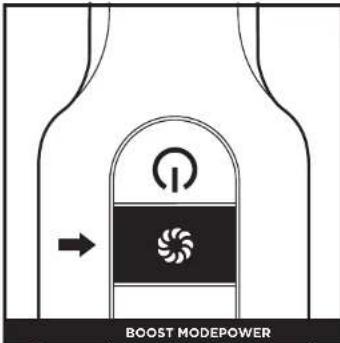
For an added boost of power, press the Boost button. Press again to return to normal power.
USING YOUR VACUUM
USING ACCESSORIES
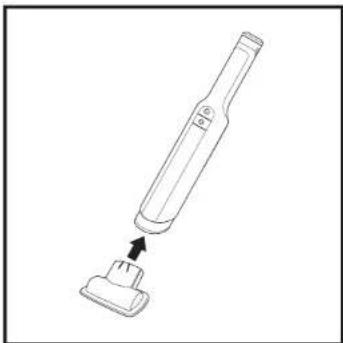
natural_image
Line drawing of a handheld electric toothbrush with a small base attachment (no text or symbols)To attach an accessory to the hand vacuum, slide it into the opening in the nozzle. To remove the accessory, slide it off the nozzle.
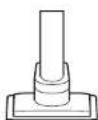
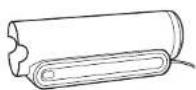
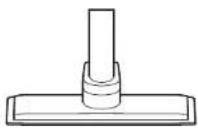
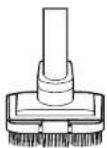
AVAILABLE ACCESSORIES ON SHARKCLEAN.EU
Crevice Tool
⑥ Duster Crevice Tool
© Upholstery Tool
D Wide Upholstery Tool
E Pet Multi-Tool
F Replacement Battery
Battery Charging Sleeve
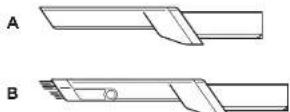
F
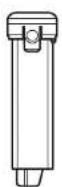
C
G
D
E
NOTE: Not all accessories come with all units. Please see the enclosed Quick Start Guide for your unit's configuration. To order additional accessories, visit sharkaccessories.co.uk
MAINTAINING YOUR VACUUM
- With the power off, slide the Dust Cup release button on the back of the vacuum towards you, and the dust cup will swing open. Tap the filter screen lightly to knock off dust and debris.
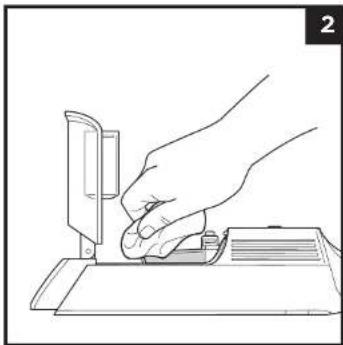
natural_image
Line drawing of a hand using a tool to press or adjust a component on a flat surface (no text or symbols)- Wipe the screen inside the Dust Cup lightly with a dry cloth to remove dust and dirt.
MAINTAINING YOUR VACUUM
CLEANING THE FILTER
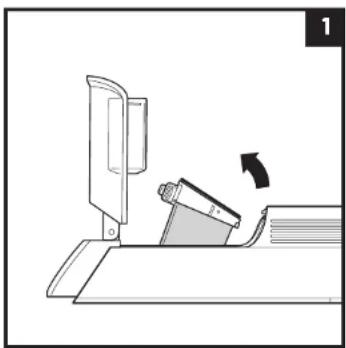
natural_image
Diagram of a sewing machine with a rotating lever and base, showing no text or symbols- With the dust cup removed and the power off, pinch both sides of the filter housing and pivot it upward to access the filter.
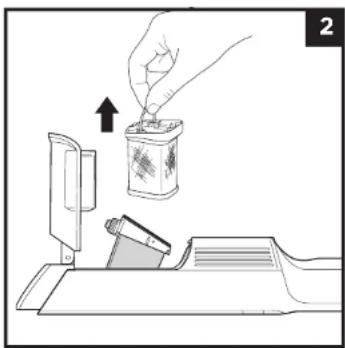
natural_image
Illustration of a hand inserting a small container into a paper holder, with an arrow indicating the process (no text or symbols present)- Hold the filter housing over a bin. Lift the fabric filter by the metal ring to remove it from the housing. Tap lightly to remove any dust and debris, then rinse with water only. Let the filter air-dry for at least 24 hours or until completely dry before reinstalling.
MAINTAINING YOUR VACUUM
TROUBLESHOOTING
WARNING: To reduce the risk of shock and unintended operation, turn off power and remove the battery before servicing.
Vacuum is not picking up debris. No suction or light suction. Power button blinks white six times, in 2-second intervals.
- Check filters to see if they need cleaning. Follow instructions for rinsing and completely air-drying the filters before reinstalling them.
Vacuum turns off on its own.
There are several possible reasons for the vacuum turning off on its own, including blockages, battery issues, and overheating. If vacuum turns off on its own, perform the following steps:
- Turn on the power and check the battery indicator lights on the vacuum. If recharging is needed, make sure vacuum power is off before charging.
- Empty dust cup and clean filters (See the Cleaning the Dust Cup and Filter section).
- Check accessories and inlet openings and remove any blockages.
- Allow unit and battery to cool for at least 45 minutes, until they return to room temperature.
- Press the On/Off button to restart the vacuum.
POWER BUTTON WHAT IT MEANS WHAT TO DO
| Vacuum shuts off. Power button blinks 5 times in 2-second Intervals, then stops. | Low voltage start. | With the power off, check the nozzle opening for blockages. Remove any obstructions. Allow unit and battery to cool for at least 45 minutes, returning to room temperature. The battery may need to be charged. Charge completely (approximately 3.5 hours) by placing the vacuum on the charging stand. If problem persists, contact Customer Service. |
| Boost mode button Is blinking. Motor | Is overheating. | Allow the vacuum cleaner and battery to cool to room temperature for about 45 minutes. While waiting, refer to the cleaning section and remove any blockages. These can impede airflow. The unit can be placed on the charger and will start charging when it has reached normal temperature. |
| Boost mode button blinks 5 times in 2-second intervals, then stops. | Overspeed. | With the power off, check the nozzle opening for jams or clogs. Remove any obstructions. If the problem persists, contact Customer Service |
NOTE: Do not wash any parts or accessories in a dishwasher.
NOTE: If vacuum still does not operate properly, contact Customer Service at 0800 862 0453 or Sharkclean.eu.
41shar
Shark NINJA
TWO (2) YEAR LIMITED GUARANTEE
When you buy a product in Europe as a consumer, you get the benefit of legal rights relating to the quality of the product (your "statutory rights"). You can enforce these statutory rights against your rebalix. However, of Shark we are so confident about the quality of our products (the "Products") that we give you an additional manufacturer's guarantee of up to two years. This guarantee only applies to the Product if it is bought in new and unused condition. These terms and conditions relate to our guarantees only – your statutory rights as a buyer are unaffected.
Shark Guarantees
Our customer service helpline (0800 000 9063) is open from 9.00am to 6.00pm Monday - Friday. It's free to call, and you'll be put straight through to a Shark representative. You'll also find online support at www.sharkclean.eu.
How do I register my guarantee?
You can register your guarantee online within 28 days of purchase. To save time, you'll need the following information about your machine:
- Model no.
- Serial Number (only if available)
- Date of purchase of the Product (receipt or delivery note)
To register online, please visit www.sharkclean.eu.
IMPORTANT
• The guarantee covers your Product for 2 years starting on the date of purchase.
- Please keep the receipt at all times. Should you need to use your guarantee we will need the receipt to verify the information supplied to us is correct. The inability to produce a valid receipt will invalidate your guarantee.
What are the benefits of registering my guarantee?
When you register your guarantee, you can choose to receive our newsletter containing tips, advice and competitions. Hear the latest news about new Shark technology and launches. If you register your guarantee online, you'll get instant confirmation that we've received your details.
For details of our privacy policy please visit www.sharkclean.eu.
How long are our Products guaranteed for?
Our confidence in our design and quality control means that your Product is guaranteed for a total of two years.
What is covered by the guarantee?
Repair or replacement (at Shark's discretion) of your Product, including all parts and labour in case of any defect in design, materials and workmanship (including transport and shipping costs). Our guarantee is in addition to your legal rights as a consumer.
What is not covered by the guarantee?
- Blockages – For details of how to unblock your vacuum cleaner, please refer to the Instructions.
- Normal wear and tear of parts which require regular maintenance and/or replacement to ensure the proper functioning of your unit.
- Accidental damage, faults caused by negligent use or care, misuse, neglect, careless operation or handling of the vacuum cleaner which is not in accordance with the Shark® Instruction Manual supplied with your machine.
- Use of the vacuum cleaner for anything other than normal domestic household purposes.
- Use of parts not assembled or installed in accordance with the operating instructions.
- Use of parts and accessories which are not Shark® Genuine Components.
- Faulty installation (except where installed by Shark®).
What happens when my guarantee runs out?
Shark does not design products to last for a limited time. We do appreciate that there may be a desire for our customers to want to repair their vacuum cleaner after the guarantee has elapsed. In this case please contact our free phone customer service help line and ask about our guarantee program, on 0800 000 9063.
Where can I buy genuine Shark spares and accessories?
Shark spares and accessories are developed by the same engineers who developed your Shark vacuum cleaner. You'll find a full range of Shark spares, replacement parts and accessories for all Shark machines at www.sharkclean.eu.
Please remember that using non-Shark spares may invalidate your manufacturer's guarantee. However, your statutory rights are unaffected.
NOTES
GRACIAS
natural_image
Technical line drawing of a mechanical component with two views, one showing a curved cutout and the other a flanged end (no text or symbols)natural_image
Simple line drawing of an arched doorway with two circular symbols on the sides (no text or labels)RECICLAJE DE LA BATERÍA DE IONES DE LITIO
natural_image
Technical line drawing of a mechanical device with a downward arrow indicating motion (no text or symbols)natural_image
Diagram of a door with an arrow pointing to the top panel, showing a circular symbol and a spiral pattern inside (no text or labels)natural_image
Line drawing of a handheld electric toothbrush with a small base attachment (no text or symbols)natural_image
Line drawing of a hand using a sewing machine to press or adjust a piece of paper (no text or symbols present)natural_image
Diagram of a sewing machine with a roller being inserted, showing no text or symbolsnatural_image
Illustration of a hand inserting a small container into a paper holder, with an arrow indicating the process (no text or symbols present)Sharkclean.co.uk/register-guarantee/

(800) 908874

natural_image
Technical line drawing of a mechanical component with two views (no text or symbols)natural_image
Simple line drawing of an arched doorway with circular and spiral symbols on the sides (no text or labels)RECYCLAGE DE LA BATTERIE LITHIUM-ION
natural_image
Technical line drawing of a mechanical device with a downward arrow indicating motion (no text or symbols)natural_image
Diagram of a door with an arrow pointing to the top panel, showing a circular symbol and a spiral pattern inside (no text or labels)natural_image
Line drawing of a handheld electric toothbrush with a small base attachment (no text or symbols)natural_image
Line drawing of a hand using a tool to press or adjust a component on a flat surface (no text or symbols)natural_image
Diagram of a mechanical device with a lever and rotating component (no text or symbols)natural_image
Illustration of a hand inserting a small container into a device, with an arrow indicating the process (no text or symbols present)Illustrations may differ from actual product. We are constantly striving to improve our products; therefore the specifications contained herein are subject to change without notice.
© 2021 Shark Ninja Operating LLC. SHARK WANDVAC is a registered trademark of SharkNinja Operating LLC. PRINTED IN CHINA
FRANÇAIS
- GENANVENDELSE AF LITIUM-ION-BATTERIET
- RECYCLING DES LITHIUM-IONEN-AKKUS
- RECORD THIS INFORMATION
- TECHNICAL SPECIFICATIONS
- PLEASE READ CAREFULLY AND KEEP FOR FUTURE REFERENCE.
- CONTENTS
- IMPORTANT SAFETY INSTRUCTIONS
- FOR HOUSEHOLD USE ONLY • PLEASE READ ALL INSTRUCTIONS BEFORE USING THIS VACUUM.
- WARNING
- REDUCE THE RISK OF FIRE, ELECTRIC SHOCK, INJURY, OR PROPERTY DAMAGE:
- GENERAL USE
- LITHIUM-ION BATTERY PACK
- SAVE THESE INSTRUCTIONS
- ND ASSEMBLY
- LI-ION BATTERY
- RUNTIMES PER FULLY CHARGED BATTERY
- RECYCLING THE LI-ION BATTERY
- CHARGING
- USING YOUR VACUUM
- AVAILABLE ACCESSORIES ON SHARKCLEAN.EU
- MAINTAINING YOUR VACUUM
- CLEANING THE FILTER
- TROUBLESHOOTING
- WARNING: To reduce the risk of shock and unintended operation, turn off power and remove the battery before servicing.
- Vacuum turns off on its own.
- Shark NINJA
- TWO (2) YEAR LIMITED GUARANTEE
- Shark Guarantees
- How do I register my guarantee?
- IMPORTANT
- What are the benefits of registering my guarantee?
- How long are our Products guaranteed for?
- What is covered by the guarantee?
- What is not covered by the guarantee?
- What happens when my guarantee runs out?
- Where can I buy genuine Shark spares and accessories?
- NOTES
- GRACIAS
- RECICLAJE DE LA BATERÍA DE IONES DE LITIO
- RECYCLAGE DE LA BATTERIE LITHIUM-ION
- FRANÇAIS
Brand : SHARK
Model : WandVac 2.0 WV270EU
Category : Vacuum Cleaner