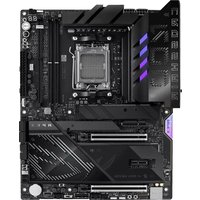
ROG CROSSHAIR X870E APEX - Motherboard ASUS - Free user manual and instructions
Find the device manual for free ROG CROSSHAIR X870E APEX ASUS in PDF.


| Product Type | Motherboard |
| Brand | ASUS |
| Model | ROG CROSSHAIR X870E APEX |
| Form Factor | ATX |
| CPU Socket | AMD AM5 |
| Chipset | AMD X870E |
| Supported Memory Type | DDR5 |
| Number of Memory Slots | 2 (max 96 GB) |
| Expansion Slots | 2x PCIe 5.0 x16, 1x PCIe 4.0 x16 |
| Storage | 4x M.2 PCIe 5.0, 4x SATA 6 Gb/s |
| Audio | ROG SupremeFX 7.1 |
| Wired Networking | Intel 2.5 Gb Ethernet |
| Wireless Networking | WiFi 7 (802.11be), Bluetooth 5.4 |
| Front USB Connectors | USB 20 Gbps Type-C, USB 10 Gbps |
| Rear USB Connectors | 2x USB 40 Gbps Type-C, 8x USB 10 Gbps |
| Required Power Supply | 24-pin ATX, 2x 8-pin EPS |
| Dimensions | 305 x 244 mm |
| Weight | Approximately 1.2 kg |
| Main Features | AI Overclocking, Q-Release, advanced overclocking, RGB |
| Maintenance and Cleaning | Use compressed air, avoid any liquid |
| Security | Integrated TPM 2.0, overvoltage protection |
| Warranty | 3 years |
Frequently Asked Questions - ROG CROSSHAIR X870E APEX ASUS
User questions about ROG CROSSHAIR X870E APEX ASUS
0 question about this device. Answer the ones you know or ask your own.
Ask a new question about this device
Download the instructions for your Motherboard in PDF format for free! Find your manual ROG CROSSHAIR X870E APEX - ASUS and take your electronic device back in hand. On this page are published all the documents necessary for the use of your device. ROG CROSSHAIR X870E APEX by ASUS.
USER MANUAL ROG CROSSHAIR X870E APEX ASUS
ROG CROSSHAIR X870E APEX
ASUS
Motherbodarid
J27103
改訂2版
2025年10月 発行
Copyright © 2025 ASUSTeK COMPUTER INC. All Rights Reserved.
4. ドライバーとユーティリティ
5. RAID設定ガイド
6. BIOS FlashBack™
本書の表記について
natural_image
Technical line drawing of a mechanical component with mounting holes and a central square housing (no text or symbols)注意!
4. ファン/ポンプヘッダー
natural_image
Technical line drawing of a mechanical assembly with two tool tips inserted into a component (no text or symbols)参考:
C_DET_CPU □
C_DET_DRAM □
C_DET_PCIE □
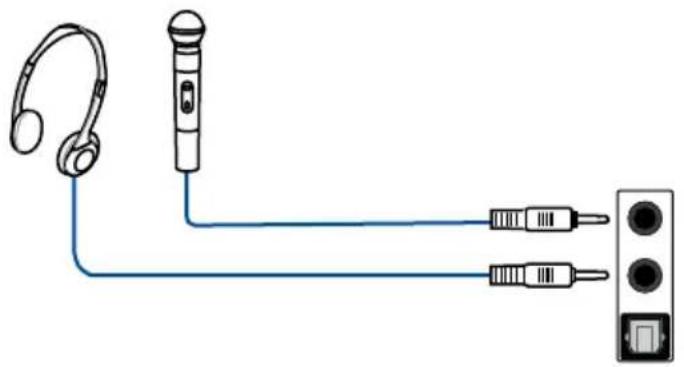
ヘッドホン/マイクの接続
natural_image
Diagram showing connections between headphones, a microphone, and two connected audio equipment (no text or symbols)1
2
3
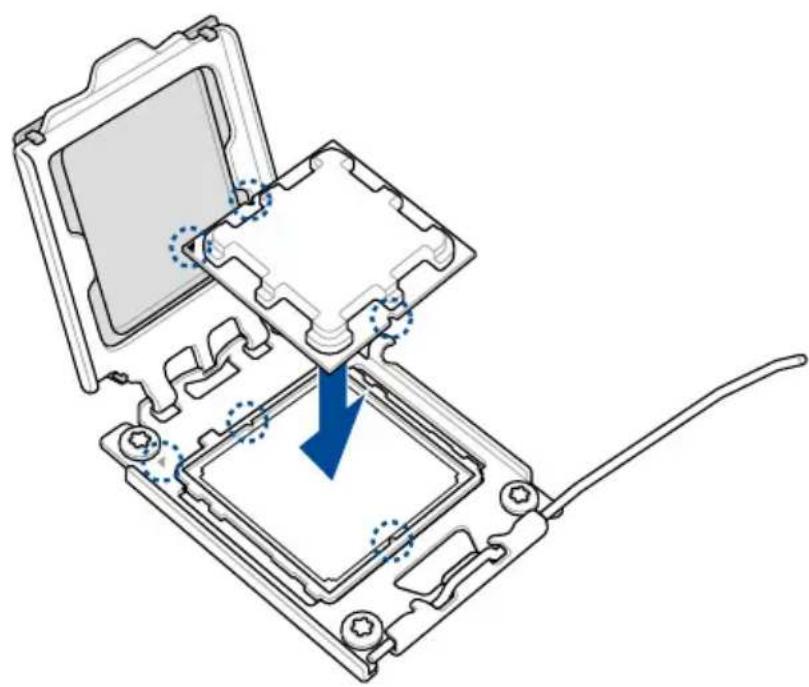
natural_image
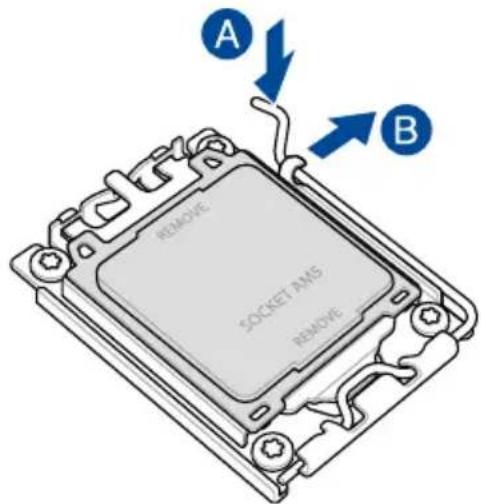
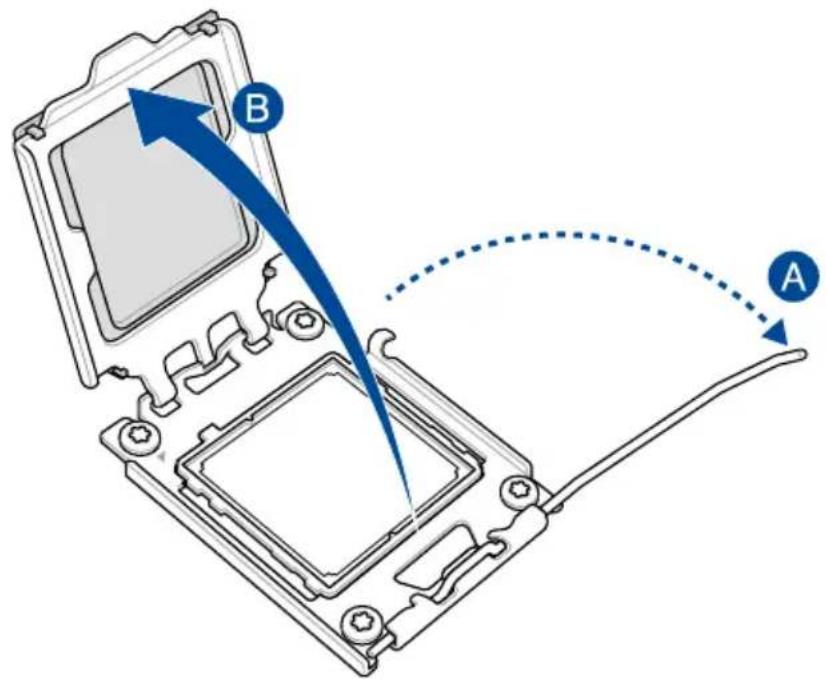
Diagram of a computer processor internal structure showing an open top and internal slot with a blue arrow indicating a component (no text or symbols present)4
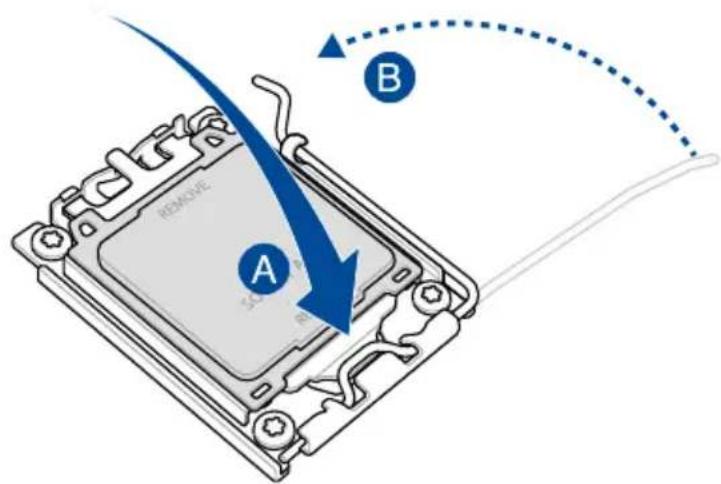
5
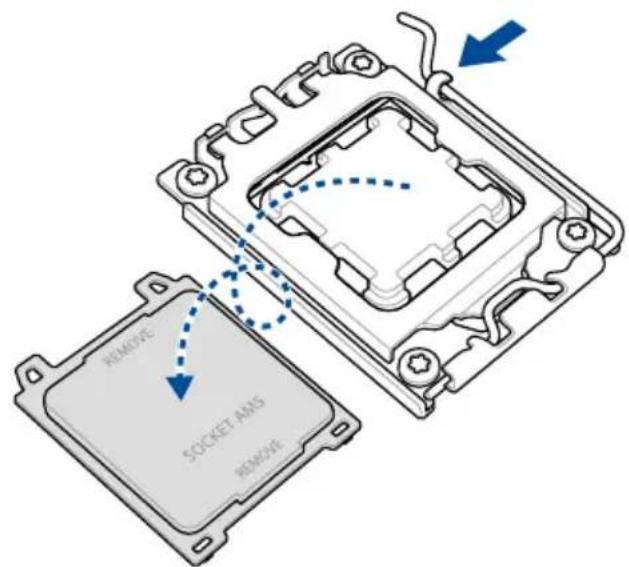
2.2 メモリーを取り付ける
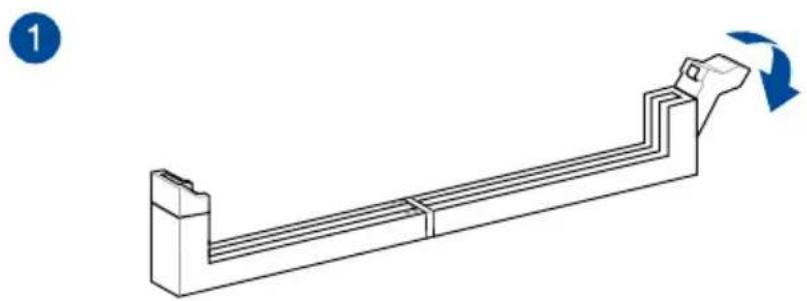
natural_image
Technical line drawing of a mechanical component with a curved base and flange, showing a rotation arrow (no text or symbols)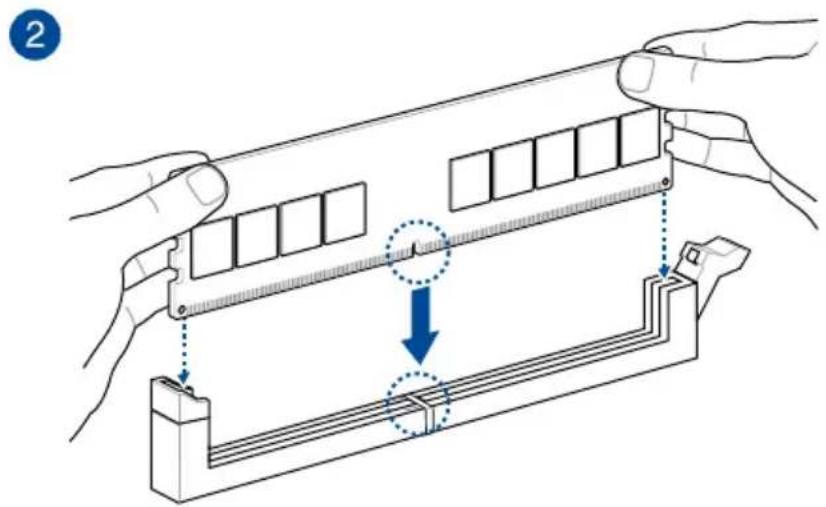
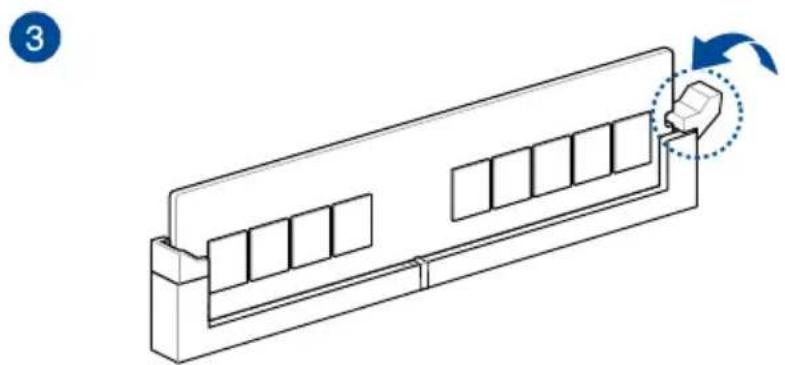
natural_image
Diagram of a mechanical or electrical component with internal compartments and a directional arrow indicating rotation (no text or symbols)メモリーを取り外す
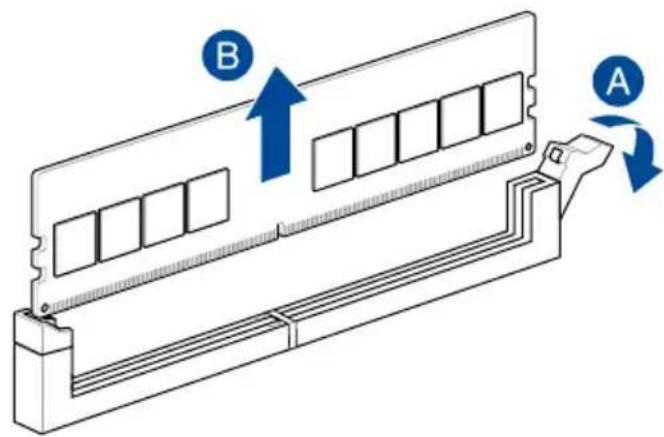
2.3 M.2 SSDを取り付ける
参考:
natural_image
Isometric line drawing of a mechanical component with a blue arrow indicating a force or movement (no text or symbols)natural_image
Isometric line drawing of a mechanical component with a blue checkmark indicating a specific feature (no text or symbols present)2.5 マザーボードを取り付ける
natural_image
Diagram of a computer tower with ventilation fans and an internal component, showing directional arrows indicating movement (no text or symbols present)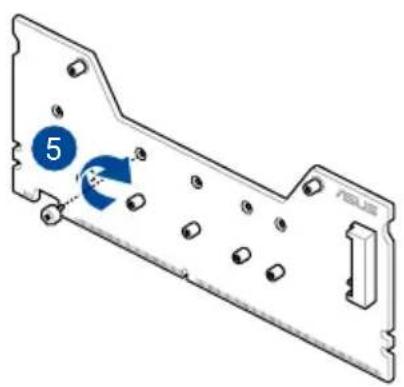
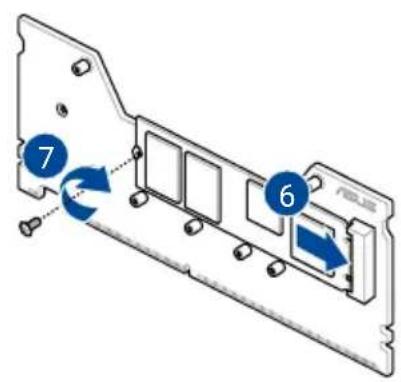
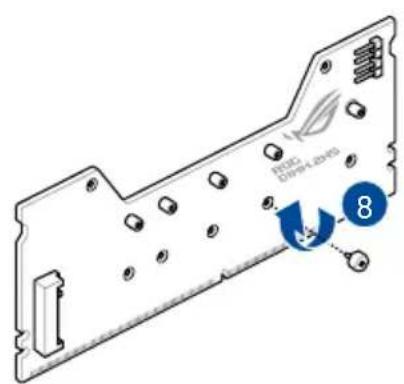
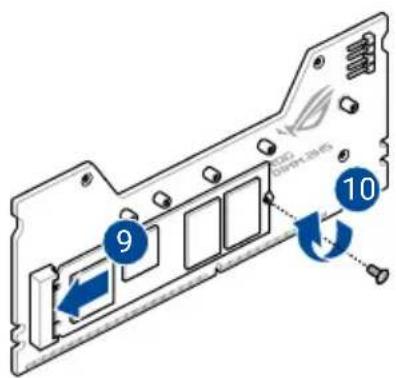
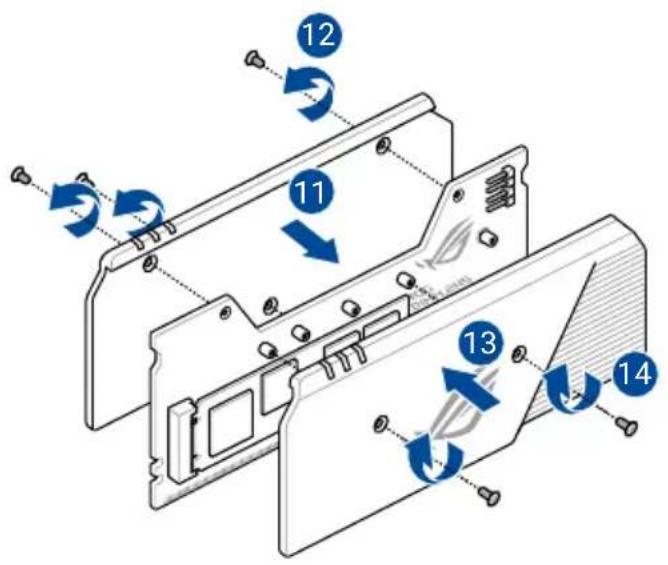
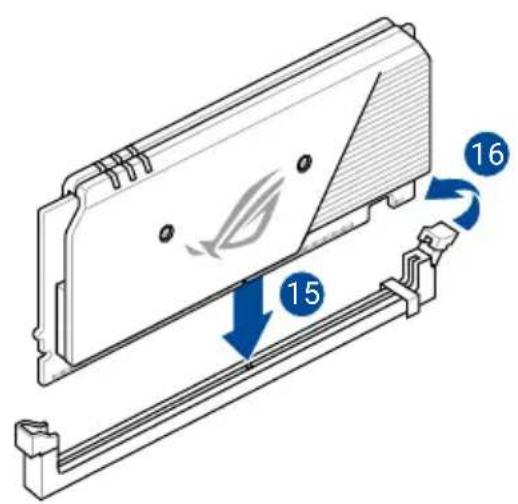
注意!
natural_image
Line drawing of a server rack with multiple ports and connected cables (no text or symbols)注意!
Responsible Party: Asus Computer International
Address: 48720 Kato Rd., Fremont, CA 94538, USA
Phone / Fax No: (510)739-3777 / (510)608-4555
This device complies with part 15 of the FCC Rules. Operation is subject to the following two conditions: (1) This device may not cause harmful interference, and (2) this device must accept any interference received, including interference that may cause undesired operation.
This equipment has been tested and found to comply with the limits for a Class B digital device, pursuant to part 15 of the FCC Rules. These limits are designed to provide reasonable protection against harmful interference in a residential installation. This equipment generates, uses and can radiate radio frequency energy and, if not installed and used in accordance with the instructions, may cause harmful interference to radio communications.
However, there is no guarantee that interference will not occur in a particular installation. If this equipment does cause harmful interference to radio or television reception, which can be determined by turning the equipment off and on, the user is encouraged to try to correct the interference by one or more of the following measures:
- Reorient or relocate the receiving antenna.
- Increase the separation between the equipment and receiver.
- Connect the equipment into an outlet on a circuit different from that to which the receiver is connected.
- Consult the dealer or an experienced radio/TV technician for help.
安全上のご注意
Australia statement notice
From 1 January 2012 updated warranties apply to all ASUS products, consistent with the Australian Consumer Law. For the latest product warranty details please visit https://www.asus.com/support/. Our goods come with guarantees that cannot be excluded under the Australian Consumer Law. You are entitled to a replacement or refund for a major failure and compensation for any other reasonably foreseeable loss or damage. You are also entitled to have the goods repaired or replaced if the goods fail to be of acceptable quality and the failure does not amount to a major failure.
If you require assistance please call ASUS Customer Service 1300 2787 88 or visit us at https://www.asus.com/support/.
Declaration of compliance for product environmental regulation
ASUS follows the green design concept to design and manufacture our products, and makes sure that each stage of the product life cycle of ASUS product is in line with global environmental regulations. In addition, ASUS disclose the relevant information based on regulation requirements.
Please refer to https://esg.asus.com/Compliance.htm for information disclosure based on regulation requirements ASUS is complied with:
EU REACH and Article 33
Complying with the REACH (Registration, Evaluation, Authorisation, and Restriction of Chemicals) regulatory framework, we published the chemical substances in our products at ASUS REACH website at https://esg.asus.com/Compliance.htm.
EU RoHS
This product complies with the EU RoHS Directive. For more details, see https://esg.asus.com/Compliance.htm
India RoHS
This product complies with the "India E-Waste (Management) Rules, 2016" and prohibits use of lead, mercury, hexavalent chromium, polybrominated biphenyls (PBBs) and polybrominated diphenyl ethers (PBDEs) in concentrations exceeding 0.1% by weight in homogenous materials and 0.01% by weight in homogenous materials for cadmium, except for the exemptions listed in Schedule II of the Rule.
Vietnam RoHS
ASUS products sold in Vietnam, on or after September 23, 2011, meet the requirements of the Vietnam Circular 30/2011/TT-BCT.
ASUS recycling and takeback programs come from our commitment to the highest standards for protecting our environment. We believe in providing solutions for you to be able to responsibly recycle our products, batteries, other components as well as the packaging materials. Please go to https://esg.asus.com/en/Takeback.htm for detailed recycling information in different regions.
The Waste Electrical and Electronic Equipment (WEEE) Directive (Directive
2012/19/EU) is a European Union law that aims to reduce the environmental impact of electrical and electronic equipment. It mandates producers to take responsibility for the end-of-life management of their products, promoting collection, treatment, and recycling to minimize waste and encourage resource recovery.
Do not throw your electrical and electronic equipment in municipal waste.
The symbol of the crossed-out wheeled bin on the product or packaging indicates that this product (including any batteries it contains) must not be disposed of with your household waste.
To prevent potential harm to the environment and human health, a collection framework should be used to return, recycle, and recover waste electrical and electronic equipment (WEEE), and this product has been designed to enable the reuse of parts and facilitate the recycling of certain materials.
Improper disposal may involve risks due to the presence of hazardous substances within electrical and electronic equipment, such as lead and BFR and other harmful components.
Check your local recycling services for electronic products.
(https://esg.asus.com/en/circular-economy/resource-regeneration/global-take-back-service)
Not throw the battery in municipal waste. The symbol of the crossed out wheeled bin indicates that the battery should not be placed in municipal waste.
Please see and scan below for multi-language update on the WEEE directive and battery disposal:

France sorting and recycling information


FCC RF Caution Statement
WARNING: Any changes or modifications not expressly approved by the party responsible for compliance could void your authority to operate the equipment.
FCC 5.925-7.125 GHz Caution Statement
Operation of transmitters in the 5.925-7.125 GHz band is prohibited for control of or communications with unmanned aircraft systems.
RF exposure warning
This equipment must be installed and operated in accordance with provided instructions and the antenna(s) used for this transmitter must be installed to provide a separation distance of at least 20 cm from all persons and must not be co-located or operating in conjunction with any other antenna or transmitter. End-users and installers must be provide with antenna installation instructions and transmitter operating conditions for satisfying RF exposure compliance.
Compliance Statement of Innovation, Science and Economic Development Canada (ISED)
This device complies with Innovation, Science and Economic Development Canada licence exempt RSS standard(s).Operation is subject to the following two conditions: (1) this device may not cause interference, and (2) this device must accept any interference, including interference that may cause undesired operation of the device.
Operation in the band 5150–5250 MHz is only for indoor use to reduce the potential for harmful interference to co-channel mobile satellite systems.
CAN ICES(B)/NMB(B)
ISED 5.925-7.125 GHz Caution Statement (RLAN devices)
NCC: Wireless Statement
Japan RF Equipment Statement
屋外での使用について
Simplified UKCA Declaration of Conformity
ASUSTek Computer Inc. hereby declares that this device is in compliance with the essential requirements and other relevant provisions of The Radio Equipment Regulations 2017 (S.I. 2017/1206). Full text of UKCA declaration of conformity is available at https://www.asus.com/support/
The WiFi operating in the band 5150-5350MHz shall be restricted to indoor use for the country listed below:
UK
UKCA RF Output table (The Radio Equipment Regulations 2017)
Model: MT7927
a. Low power indoor (LPI) Wi-Fi 5.945-6.425 GHz devices:
The device is restricted to indoor use only when operating in the 5925 to 6425 MHz frequency ranges in the UK.
b. Very Low Power (VLP) Wi-Fi 5.945-6.425 GHz devices (portable devices):
The device is not permitted to be used on Unmanned Aircraft Systems (UAS) when operating in the 5925 to 6425 MHz frequency range in the UK.
| Function Frequency Maximum Output Power EIPR (mW) | |
| WiFi | 2.4 - 2.4835 GHz <100 |
| 5.15 - 5.35 GHz <200 | |
| 5.47 - 5.725 GHz <200 | |
| 5.725 - 5.875 GHz* <25 | |
| 5.925 - 6.425 GHz <200 | |
| Bluetooth 2.4 - 2.4835 GHz <100 | |
Receiver category 1
* Non-Intel modules: 5.725 - 5.85 GHz
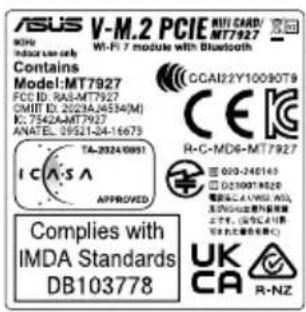
Simplified EU Declaration of Conformity
ASUSTek Computer Inc. hereby declares that this device is in compliance with the essential requirements and other relevant provisions of Directive 2014/53/EU. Full text of EU declaration of conformity is available at https://www.asus.com/support/.
The WiFi operating in the band 5150-5350 MHz shall be restricted to indoor use for countries listed in the table below:
a. Low power indoor (LPI) Wi-Fi 5.945-6.425 GHz devices:
The device is restricted to indoor use only when operating in the 5945 to 6425 MHz frequency range in Austria (AT), Belgium (BE), Bulgaria (BG), Cyprus (CY), Czech Republic (CZ), Estonia (EE), France (FR), Germany (DE), Iceland (IS), Ireland (IE), Latvia (LV), Luxembourg (LU), Netherlands (NL), Norway (NO), Romania (RO), Slovakia (SK), Slovenia (SI), Spain (ES), Switzerland (CH)
b. Very Low Power (VLP) Wi-Fi 5.945-6.425 GHz devices (portable devices):
The device is not permitted to be used on Unmanned Aircraft Systems (UAS) when operating in the 5945 to 6425 MHz frequency range in Austria (AT), Belgium (BE), Bulgaria (BG), Cyprus (CY), Czech Republic (CZ), Estonia (EE), France (FR), Germany (DE), Iceland (IS), Ireland (IE), Latvia (LV), Luxembourg (LU), Netherlands (NL), Norway (NO), Romania (RO), Slovakia (SK), Slovenia (SI), Spain (ES), Switzerland (CH)
„https://www.asus.com/support/.
https://www.asus.com/support/
https://www.asus.com/support/.
https://www.asus.com/support/
• ASUS offers a voluntary manufacturer's Commercial Guarantee.
• ASUS reserves the right to interpret the provisions of the ASUS Commercial Guarantee.
- This ASUS Commercial Guarantee is provided independently and in addition to the statutory Legal Guarantee and in no way affects or limits the rights under the Legal Guarantee.
For all the guarantee information, please visit https://www.asus.com/support.
F: Garantie ASUS
https://www.asus.com/dk/support/.
https://www.asus.com/vn/support
ASUS :HB
.https://www.asus.com/support
ID: Informasi Garansi ASUS
Warranty Card (Online)
お問い合わせ先
https://www.asus.com/jp/support/