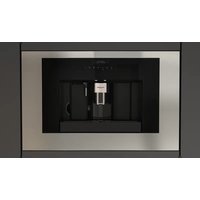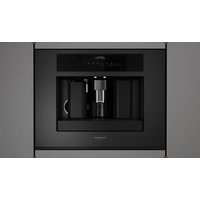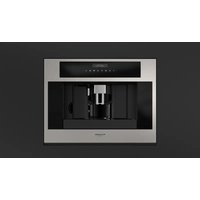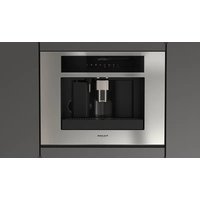
F7MBC24S1 - Coffee machine Fulgor Milano - Free user manual and instructions
Find the device manual for free F7MBC24S1 Fulgor Milano in PDF.


User questions about F7MBC24S1 Fulgor Milano
0 question about this device. Answer the ones you know or ask your own.
Ask a new question about this device
Download the instructions for your Coffee machine in PDF format for free! Find your manual F7MBC24S1 - Fulgor Milano and take your electronic device back in hand. On this page are published all the documents necessary for the use of your device. F7MBC24S1 by Fulgor Milano.
USER MANUAL F7MBC24S1 Fulgor Milano
natural_image
Simple black-and-white icon of a steaming cup with a circular hole, no text or symbols present.F7BC24** F7MBC24**
AUTOMATIC ESPRESSO COFFEE MAKER
MACHINE A CAFÉ ESPRESSO AUTOMATIQUE
CAFETERA EXPRÉS AUTOMÁTICA
EN INSTALLATION, USE & MAINTENANCE MANUAL
FR MANUEL D'INSTALLATION, UTILISATION ET ENTRETIEN
Symbols used in these instructions 2
Letters in brackets 2
Troubleshooting and repairs 2
2 - Safety 3
Fundamental safety warnings 3
Important safeguards 3
Save these instructions 5
Designated use 6
Instructions 6
Cleaning and maintenance of materials in contact with food 6
Installing the appliance 6
Connecting the appliance 6
3 - Built-in installation 7
4 - Description 9
Description of the appliance 10
Description of the control panel 10
Description of milk container and accessories 10
5 - Using the appliance for the first time 13
6 - Turning on and heating up 14
7 - Making coffee using coffee beans 15
Changing the quantity of coffee in the
8 - cup 16
9 - Adjusting the coffee mill 16
10 - Preparing coffee with pre-ground coffee (instead of beans) 17
11 - Delivering hot water 17
12 - Rinse function 17
13 - Changing the quantity of hot water 17
14 - Making cappuccino 18
INDEX PAG.
15 - Changing the quantity of coffee and milk for cappuccino 19
Changing the quantity of milk 19
Changing the quantity of coffee 19
16 - Cleaning 20
Cleaning the coffee maker 20
Cleaning the waste coffee container 20
Cleaning the drip tray 20
Cleaning the water tank 20
Cleaning the spouts 20
Cleaning the pre-ground coffee funnel 20
Cleaning the inside of the coffee maker 20
Cleaning the brewing unit 21
Cleaning the milk container 21
17 - Changing and setting menu parameters 23
Setting the language 23
Changing the length of time the appliance remains on 23
Setting the clock 23
Setting auto-start time 23
Changing coffee temperature 23
Setting water hardness 24
Programming coffee 24
Programming cappuccino 24
Programming water 24
Descaling 24
Resetting default values (reset) 25
Statistics 25
Buzzer 25
Adjusting contrast 25
18 - Turning the appliance off 26
19 - Technical specification 26
20 - Displayed Messages 27
21 - Turning the appliance off 28
Symbols used in these instructions
Important warnings are identified by these symbols. It is vital to respect these warnings. Failure to observe the instructions could result in electric shock, serious injury, burns, fire or damage to the appliance.

DANGER!
Failure to observe the warning could result in possibly life threatening injury from electric shock.

IMPORTANT!
Failure to observe the warning could result in injury or damage to the appliance.

DANGER OF BURNS!
Failure to observe the warning could result in scalds or burns.

N.B.!
This symbol identifies important advice or information for the user.
Letters in brackets
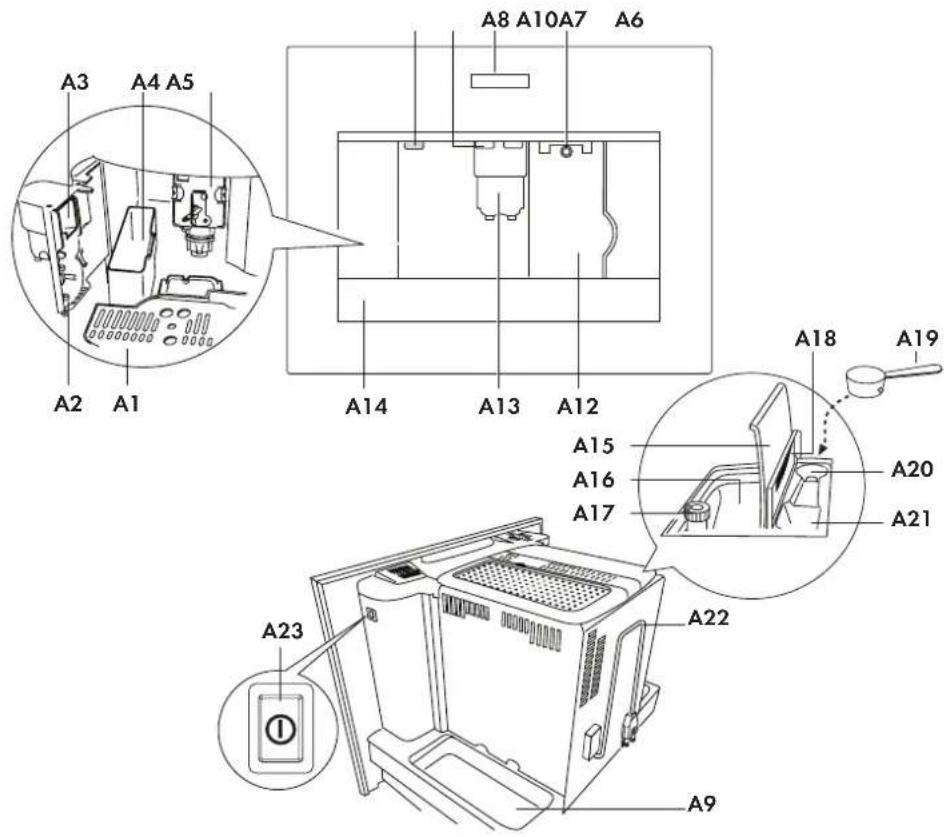
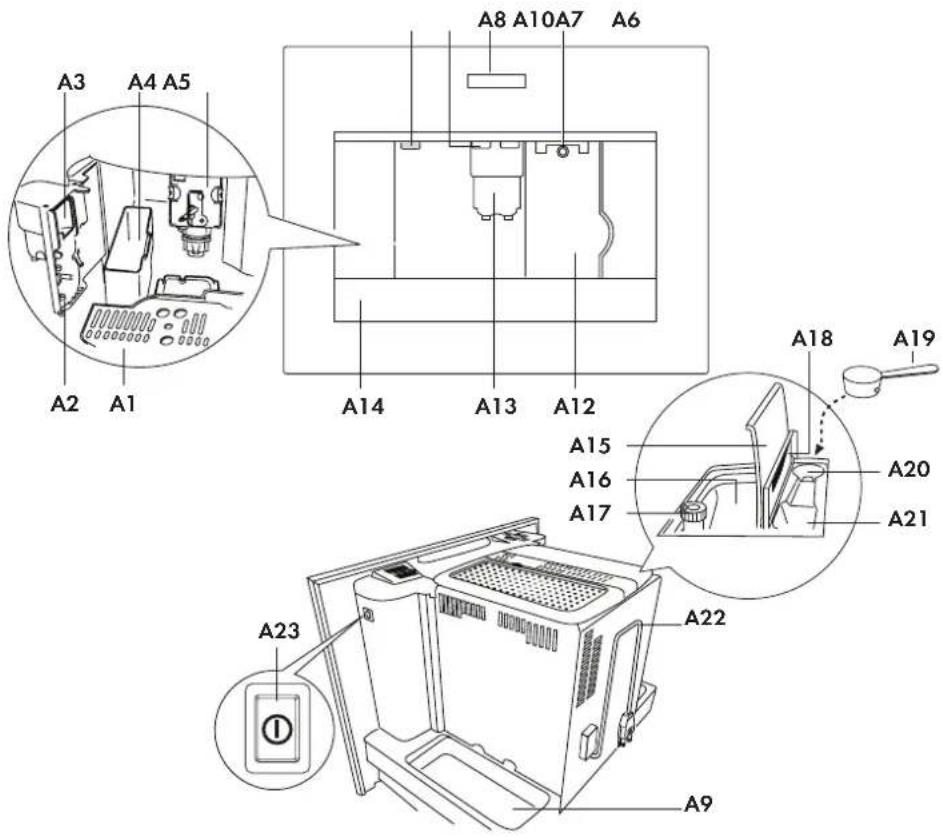
The letters in brackets refer to the legend in the Description of the Appliance.
Troubleshooting and repairs
In the event of problems, follow the information given in the sections "Displayed messages" and "Troubleshooting".
If this does not resolve the problem, you should consult Customer Services. For repairs, contact Customer Services only.
Fundamental safety warnings
The appliance is not intended for use by persons (including children) with reduced physical, sensory or mental capabilities, or lack of experience and knowledge, unless they have been given supervision or instruction concerning use of the appliance by a person responsible for their safety.
Children should be supervised to ensure that they do not play with the appliance.
Designated use: this appliance is designed and made to prepare coffee and milk based beverages and hot water. Any other use is considered improper and thus dangerous. The manufacturer is not liable for damage deriving from improper use of the appliance.
The surface of the heating element remains hot after use and the outside of the appliance may retain the heat for several minutes depending on use.
Clean all the components thoroughly, taking particular care with parts in contact with the coffee and milk.
Cleaning and user maintenance shall not be made by children without supervision.
Never immerse the appliance in water.

CAUTION!
To prevent damage to the appliance do not use alkaline cleaning agents when cleaning, use a soft cloth and a mild detergent.
This is an household appliance only. It is not intended to be used in: staff kitchen areas in shops, offices and other working environments; farm houses; by clients in hotels, motels and other residential type environments; bed and breakfast type environments. If the plug or power cable is damaged, it must be replaced by customer services only to avoid all risk. Appliances with removable cord: avoid splashes of water on the power cord connector or socket at the back of the appliance.

WARNING!
Models with glass surfaces: do not use the appliance if the surface is cracked.
Important safeguards
When using electrical appliances, basic safety precautions should always be followed, including the following. Read all instructions before installation or use of the coffee system.
Please read these instructions carefully to prevent accidents and machine damage.
This appliances is for household use only, to prepare espresso, cappuccino and coffee. Do not use appliance other than for its intended use. Any other use could be dangerous. The manufacturer cannot be held responsible for damage caused by improper use of the appliance.
Electrical safety
- Before connecting the appliance to the electrical supply make sure that the voltage and frequency listed on the data plate correspond with the household electrical supply. If in doubt, consult a qualified technician.
- The appliance must be properly installed before operation to ensure that no electrical components are accessible. Ensure that power is not supplied to the appliance while installation work, repairs or maintenance is performed.
- Be certain your appliance is properly installed and grounded by a qualified technician. To guarantee the electrical safety of this appliance, continuity must exist between the appliance and effective grounding system. It is imperative that this basic safety requirement be met. If there is any doubt, have the electrical system of the house checked by a qualified electrician. The manufacturer cannot be held responsible for damages caused by the lack, or inadequacy, of an effective grounding system.
- Do not use an extension cord to connect the appliance to electricity. Extension cord doesn't guarantee the required safety of the appliance (danger of overheating).
- Before service or maintenance disconnect the power supply by either switching off the main switch and unplugging the unit.
- Install or locate this appliance only in accordance with the provided installation instructions.
- Installation work and repairs must be only performed by a trained technician in accordance with national and local safety regulations. Repairs and other work by unauthorized persons could be dangerous and may void the warranty.
- Only use original spare parts. Only then can the manufacturer guarantee the safety of this machine.
- Never open the outer casing of the appliance. Tampering with electrical connections or components and mechanical parts is dangerous and may cause machine damage.
- If the machine is installed in combination with other appliances, a protective base should be installed between the appliance and the unit.
- Do not install or use outdoors even if installed in the display cabinet.
- To protect against fire, electric shock and injury to persons do not submerge the cord or plugs in water or other liquids.
- To reduce the risk of injury, do not drape cord over the counter top or table top where it can be pulled on by children or tripped over unintentionally.
- Do not let the cord hang over the edge of a table or counter, or touch hot surfaces.
- Do not operate any appliance with a damaged cord or plug, or after the appliance malfunctions or has been damaged in any manner.
- Return appliance to an authorized service facility for examination, repair or adjustment.
- To disconnect turn the machine off, switch off the main switch then remove the plug from the wall outlet.
Use
The coffee system must be maintained daily to prevent the growth of harmful bacteria and mold. Please read the Cleaning section of the booklet.

IMPORTANT!
Do not look directly or with an optical instrument into the lighting.

DANGER OF BURNS!
Risk of burns when dispensing hot beverages, they are extremely hot.
- Persons which lack physical, sensory or mental abilities or experience with the machine should not use it without supervision or instruction by a responsible person.
-
Close supervision is necessary when any appliance is used by or near children.
-
Do not touch hot surfaces. Use handles or knobs.
- To avoid injuries allow the coffee system to cool before cleaning or putting on and taking off parts. Turn the machine off at the main switch when not in use and before cleaning.
- Only fill the water tank with cold, fresh tap water. Warm or hot water, or any other liquids may damage the machine.
- The water should be changed daily to prevent bacteria or mold growth.
- Do not use mineral water. Mineral water leads to heavy calcium buildup in the machine that can damage the unit.
- Do not fill anything but coffee beans into the beans container. Do not fill ground coffee in the beans container, it will damage the grinding unit.
- Sugar can damage the appliance! Caramelized or otherwise pre-treated coffee beans or other sugar containing beverages must not be put in the machine.
- Never place a cup with an alcohol-coffee mixture underneath the coffee dispenser. Plastic parts of the unit could catch fire!
- The hot water and steam dispensed could cause scalding. These functions must be used carefully. Never hold any parts of the body under the steam nozzle or the hot water dispenser. The machine must never be used to clean objects.
- Never use a steam cleaner to clean the appliance. Pressurized steam could damage electrical components and cause a short circuit.
- The appliances must be descaled regularly with the supplied descaling solution. In areas with very hard water the machine may need to be descaled more often. The manufacturer cannot be held responsible for damages resulting from insufficient descaling.
- Only use the descaling solution. Take care to use the correct mixture of water and descaler, otherwise it may cause damage.
- Never make coffee, hot water or steam when the appliance is extracted. Always make sure the appliance is inactive before extracting it. Failure to observe this precaution could lead to damage to the appliance! The only exception is adjusting the coffee mill which must be done with the machine out (see the section "Adjusting the coffee mill").
- Do not place on or near a hot gas or electric burner, or in a heated oven.
Save these instructions
THIS APPLIANCES IS FOR HOUSEHOLD USE ONLY

IMPORTANT!
Do not allow children and animals to stop or linger near the appliance when it is pulled out of the cabinet.
Do not leave the machine pulled out of the cabinet when it is being used.
Do not leave the machine pulled out of the cabinet when it is not needed.
Install the machine according to the instructions in the handbook to guarantee there are no spills when it is pulled out from the cabinet.
The rail fixing panel must have a thickness suited to the fixing screws provided.
The panel material must be suited to the machine weight of approximately 55lb (25kg).

WARNING!
Surfaces marked with this symbol become hot during use (the symbol is present in certain models only).

DANGER!
This is an electrical appliance, it is therefore important to respect the following safety warnings:
- Never touch the appliance with damp hands.
- Never touch the plug with damp hands.
- Make sure the socket used is freely accessible at all times, enabling the appliance to be unplugged when necessary.
- Unplug directly from the plug only.
- Never pull the power cable as you could damage it.
- To disconnect the appliance completely, place the main switch (A23) on the side of the appliance in the 0 position.
- If the appliance is faulty, do not attempt to repair. Turn it off using the main switch (A23), unplug from the mains socket and contact Customer Services.

IMPORTANT!
Keep all packaging (plastic bags, polystyrene foam) away from children.

CHOKING HAZARD
The appliance might contain small parts.
Some of those small parts might be required to get disassembled during cleaning and maintenance operations. Handle with care and keep small parts out of reach of children.

DANGER OF BURNS!
This appliance produces hot water and steam may form while it is in operation.
Avoid contact with splashes of water or hot steam. Use knobs and handles.

IMPORTANT!
Do not grasp the coffee maker when it is out of the cabinet.
Do not rest recipients containing liquids or inflammable or corrosive materials on top of the appliance. Place the accessories required to make the coffee (the measure for example) in the special holder.
Do not rest large objects which could obstruct movement or unstable objects on the appliance.
Do not allow children and animals to stop or linger near the appliance when it is pulled out of the cabinet.
Do not leave the machine pulled out of the cabinet when it is being used.
Do not leave the machine pulled out of the cabinet when it is not needed.
Install the machine according to the instructions in the handbook to guarantee there are no spills when it is pulled out from the cabinet.

IMPORTANT!
Do not use the appliance when extracted. Make sure the appliance is inactive before extracting it. The only exception is adjusting the coffee mill which must be done with the machine out (see the section "Adjusting the coffee mill").

N.B.:
Use original or manufacturer recommended accessories and spare parts only.
Designated use
This appliance is designed and made to prepare coffee and heat drinks.
All other use is considered improper.
This appliance is not suitable for commercial use. The manufacturer is not liable for damage deriving from improper use of the appliance. This appliance can be installed over a built-in oven if the latter is fitted with a cooling fan at the rear (maximum microwave power: 3 kW).
Instructions
Read these instructions carefully before using the appliance.
- Keep these instructions
- Failure to respect these instructions may result in burns or damage to the appliance. The manufacturer is not liable for damage deriving from failure to respect these instructions.

N.B.!
The appliance has a cooling fan.
This comes on whenever coffee, steam or hot water is delivered.
After several minutes, the fan goes off automatically.
Cleaning and maintenance of materials in contact with food
- The first time you use the appliance, or if it is not used for more than 3 or 4 days, rinse all removable accessories which may come into contact with water or milk with hot water.
- If the appliance is not used for more than 3 or 4 days, before making the first beverage, rinse the water circuit as described in this Instruction for Use.
- You should carry out automatic cleaning and guided maintenance scrupulously when proposed by the appliance through the display or the lights described in the manual.
Installing the appliance

IMPORTANT!
- Installation must be performed by a qualified professional in compliance with legislation in force in the country of installation (see section "Built-in installation").
- The packing elements (plastic bags, polystyrene foam, etc.) should be kept out of reach of children.
- Never install the appliance in rooms where the temperature may drop to 0 C or lower.
- Customise the water hardness as soon as possible following the instructions in the "Water hardness" section.
Connecting the appliance

DANGER!
Check that the mains power supply voltage corresponds to the value indicated on the rating plate on the side of the appliance.
Connect the appliance to an efficiently earthed and correctly installed socket with a minimum current rating of 10A only.
If the power socket does not match the plug on the appliance, have the socket replaced with a suitable type by a qualified professional. To comply with safety directives, an omnipolar switch with a minimum contact distance of 3 mm must be installed.
Do not use multiple sockets or extensions.

IMPORTANT!
Safety cutout devices must be included in the mains power supply in compliance with the installation regulations in the country concerned.
Verify the minimum measurements required for correct installation of the appliance. The coffee machine must be installed in a column and the column must be firmly fixed to the wall with commercially available brackets.

IMPORTANT!
- Important: all installation or maintenance operations must be performed with the appliance disconnected from the mains electricity supply.
- Kitchen furniture in direct contact with the appliance must be heat resistant (65 C min).
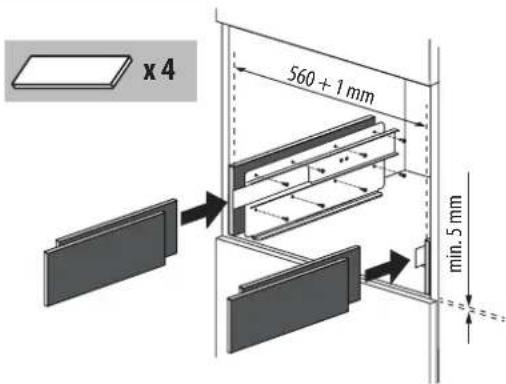
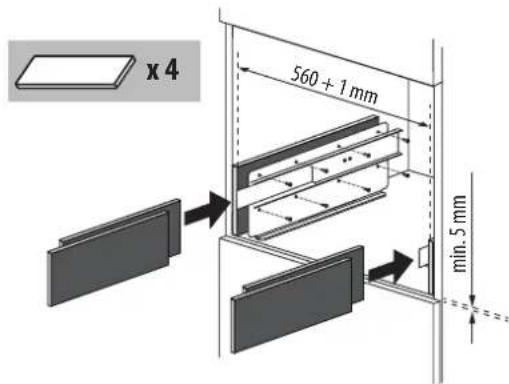
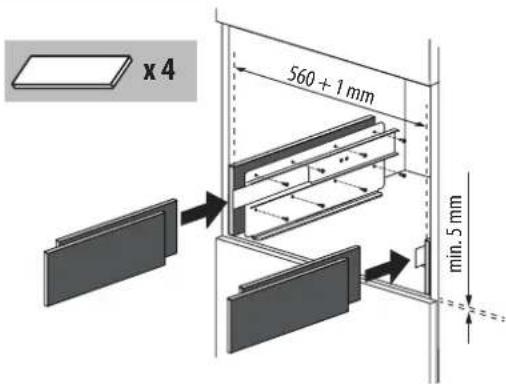
- To guarantee correct ventilation, leave a gap at the bottom of the cabinet (see measurements in figure 1).
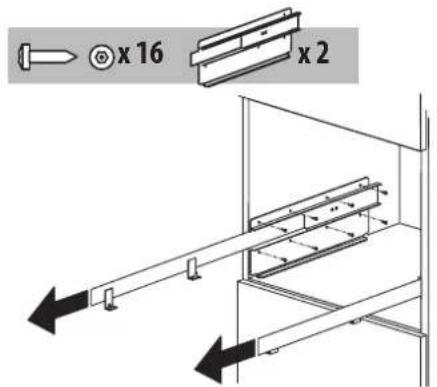
- Position the rails on the sides of the cabinet as shown in the figure 2. Fix with the screws provided, then extract them completely. If the coffee machine is installed over a warmer drawer, use the top surface of this as a reference to position the rails. In this case, there will be no surface to rest the rails on.

IMPORTANT!
- Fix the power cable with the clip (fig. 3). The power cable must be long enough to allow the appliance to be extracted from the cabinet to fill the coffee bean container. The appliance must be earthed in compliance with legislation. Electrical connections must be performed by a qualified electrician following the instructions.
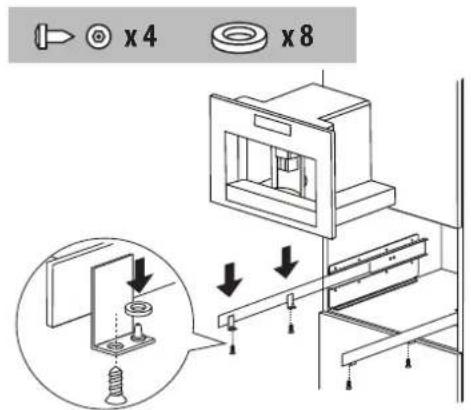
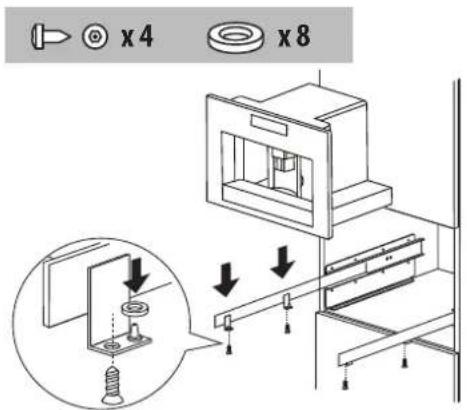
- Position the appliance on the rails, making sure the pins are correctly inserted in the housings, then fix it with the screws supplied (fig. 4). If the height of the appliance requires adjusting, use the spacer disks provided.
- If necessary, correct alignment of the appliance by positioning the spacers supplied under or at the sides of the support (fig. 5).
- The rail fixing panel must have a thickness suited to the fixing screws provided.
- The panel material must be suited to the machine weight of approximately 25kg.
Figure 1
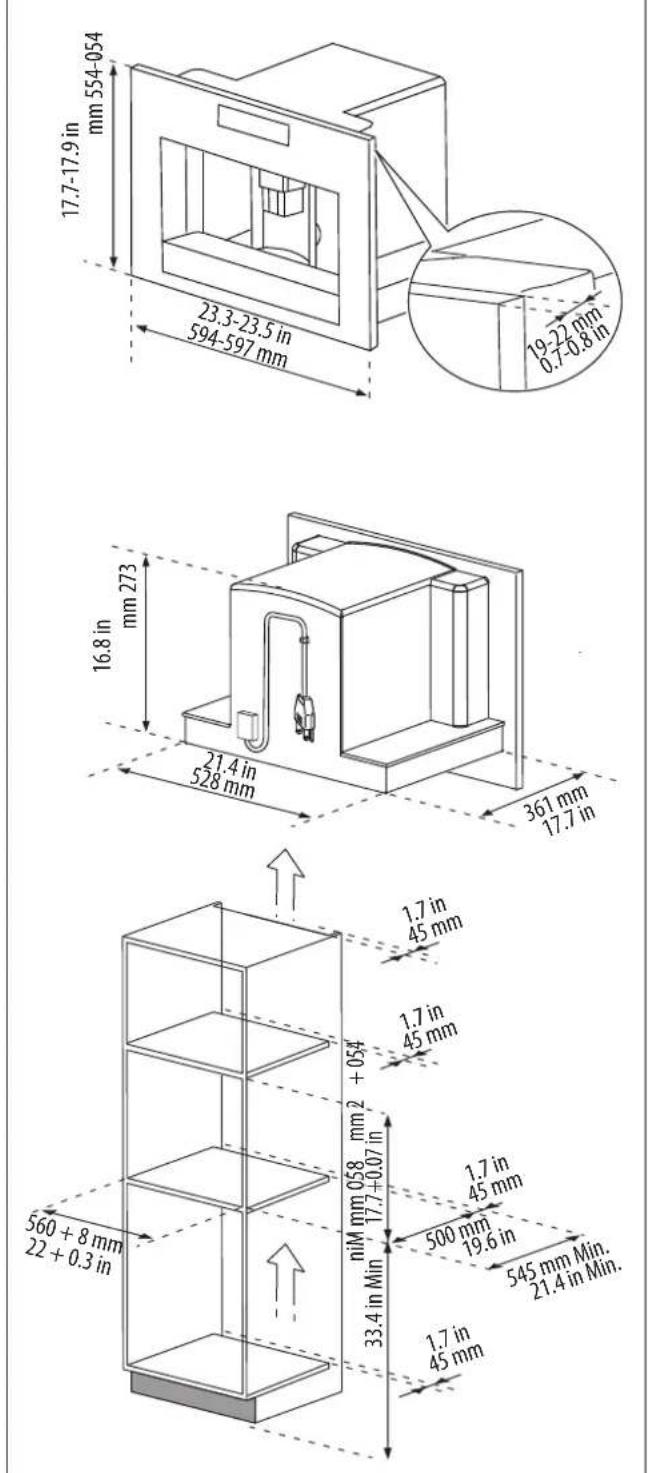
Figure 2
text_image
x 16 x 2Figure 3
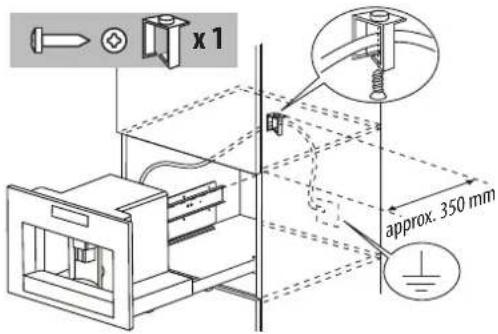
text_image
x 1 approx. 350 mmFigure 4
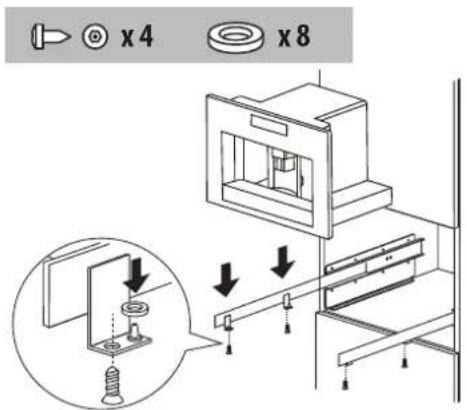
text_image
x4 x8Figure 5
text_image
x 4 560 + 1 mm min. 5 mmA
text_image
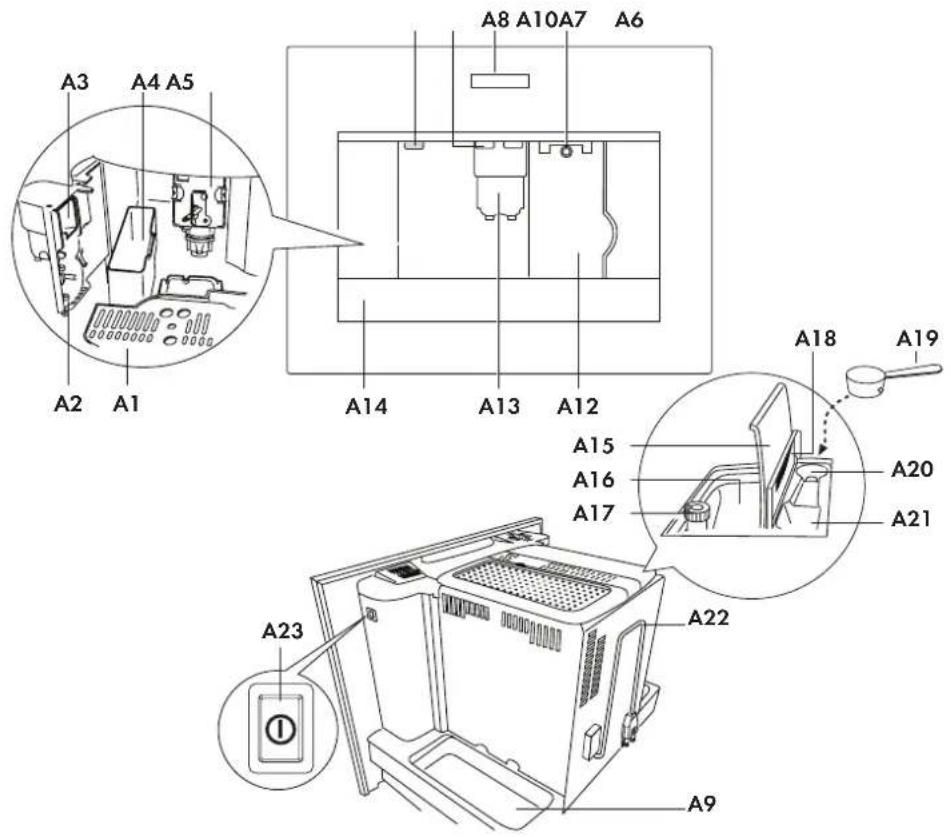
A8 A10 A7 A6 A3 A4 A5 A2 A1 A14 A13 A12 A18 A19 A15 A16 A17 A20 A21 A23 A22 A9B
text_image
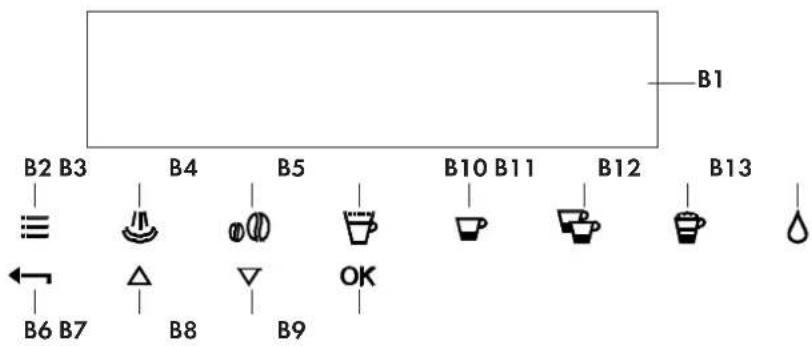
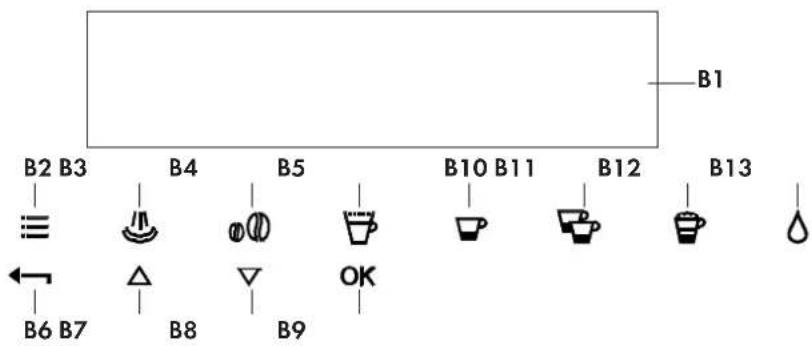
B1 B2 B3 B4 B5 B10 B11 B12 B13 ≡ ← B6 B7 △ B8 ▽ B9 OKC

text_image
C1 C3 C6 C5 C4 C2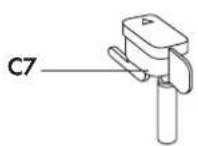
Description of the appliance
(page 9 - A)
A1. Cup tray
A2. Service door
A3. Coffee guide
A4. Waste coffee container
A5. Brewing unit
A6. Cup tray lights
A7. On/OFF/stand-by button
A8. Control panel
A9. Tray
A10. Hot water and steam nozzle
A12. Water tank
A13. Coffee spout (adjustable height)
A14. Drip tray
A15. Bean container lid
A16. Bean container
A17. Grinding adjustment knob
A18. Pre-ground coffee funnel door
A19. Measure
A20. Compartment for measure
A21. Pre-ground coffee funnel
A22. Power cable
A23. Main switch
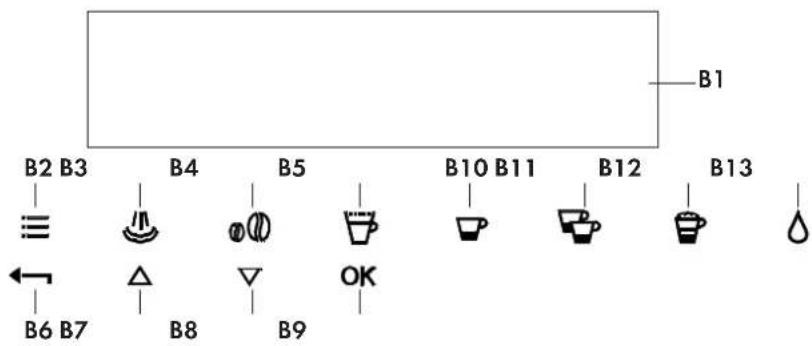
Description of the control panel

N.B.!
A light touch is enough to activate the icon.
B1. Display: guides the user in using the appliance.
B2. ≡ icon to activate or deactivate menu parameter setting mode
B3. "Rinse" function
B4. icon to select the coffee taste
B5. icon to select the type of coffee (espresso, small cup, medium cup, large cup, mug)
B6. icon to exit the selected mode
B7-B8. △ symbols to scroll forwards or backwards through the menu and display the various modes
B9. OK icon to confirm the selected function
B10. icon to deliver a cup of coffee
B11. Bon to deliver two cups of coffee
B12. Icon to deliver cappuccino
B13. icon to deliver hot water
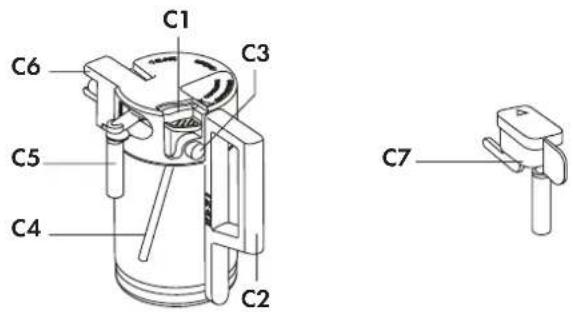
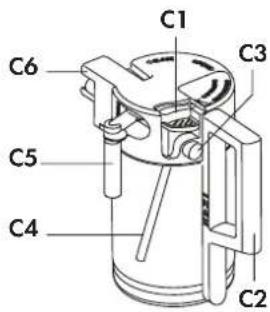
Description of milk container and accessories
(page 9 - C)
C1. Frothed milk regulator
C2. Milk container handle
C3. CLEAN button
C4. Milk intake tube
C5. Frothed milk spout
C6. Milk frother
C7. Hot water spout
Figures
Figures
- Coffee has been used to factory test the appliance and it is therefore completely normal for there to be traces of coffee in the mill.
- Customise water hardness as soon as possible following the instructions in the "Setting water hardness" section.
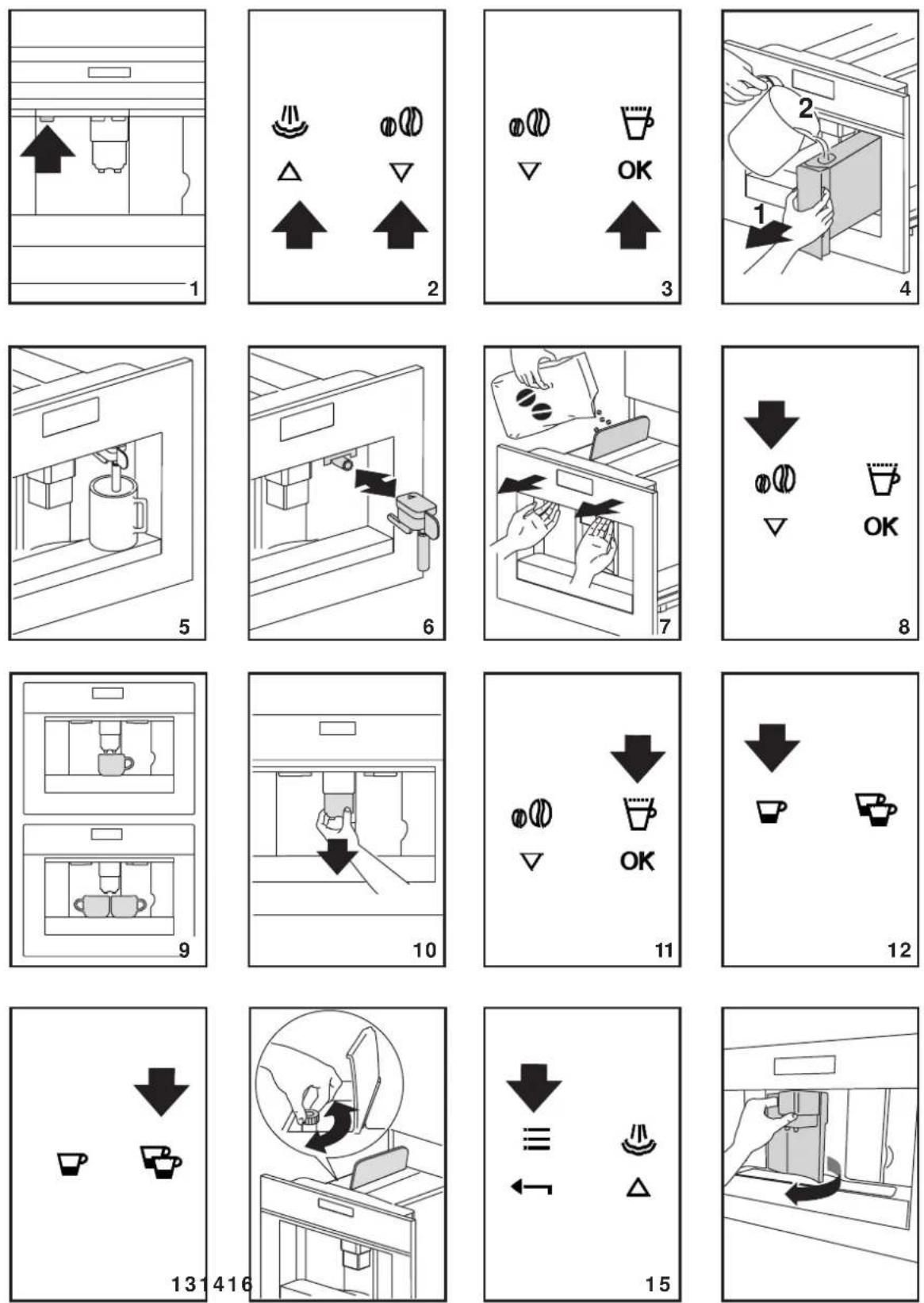
1 Connect the appliance to the mains supply. Set the required language.
2 To set the language, use the △▽ icons (B7 and B8) to choose the required language (fig. 2). When the message "PRESS OK TO CHOOSE ENGLISH" is displayed, press the OK icon (B9) (fig. 3) for 3 seconds until "ENGLISH INSTALLED" is displayed. If you set the wrong language, follow the instructions in the "Setting the language" section.
If your language is not available, select one from those displayed. The instructions refer to the English version. Then follow the instructions displayed:
3 After 5 seconds, the appliance displays "FILL TANK". Extract the water tank (fig. 4), rinse and fill with fresh water without exceeding the MAX line. Replace and push as far as it will go.
4 Place a cup under the hot water spout (fig. 5). (If the hot water spout is not inserted, the appliance displays "INSERT WATER SPOUT". Attach it as shown in figure 6. The appliance displays: "HOT WATER PRESS OK".
Press the OK icon (B9) (fig. 3) and after a few seconds a little water comes out of the spout.
5 The machine now displays "TURNING OFF... PLEASE WAIT" and goes off.
6 Extract the appliance by pulling it out using the handles (fig. 7). Open the lid and fill the container with coffee beans, then close the lid and push the appliance in.
The coffee maker is now ready for normal use.

IMPORTANT!
Never introduce pre-ground coffee, freeze dried coffee, caramelised beans or anything else which could damage the appliance.

N.B.!
When using the appliance for the first time, you need to make 4-5 cups of coffee and 4-5 cappuccinos before the appliance gives satisfactory results.

N.B.!
Each time you turn the coffee maker on by the ON/OFF switch (A23), it performs a SELF-DIAGNOSIS cycle and then goes off. To turn it on again, press the ON/OFF/STAND BY button (A7) (fig. 1)
EN 6 - Turning on and heating up
Each time the appliance is turned on, it performs an automatic preheat and rinse cycle which cannot be interrupted. The appliance is ready for use only after completion of this cycle.

DANGER OF BURNS!
During rinsing, a little hot water flows from the coffee spouts.
To turn the appliance on, press the ON/OFF/stand-by button (A7) (fig. 1). The message "HEATING UP... PLEASE WAIT" is displayed.
When heating is complete, the message changes to "RINSING";
The appliance is at temperature when the message "MEDIUM CUP NORMAL TASTE" is displayed.
If no icon is pressed within about 2 minutes, the time (if set, see the "Setting the clock" section) is displayed.
If the time has not been set, the appliance displays the last functions set.
When any icon is pressed, "MEDIUM CUP NORMAL TASTE" is displayed again. The appliance is ready to make coffee again.
1 The appliance is preset to make coffee with a normal taste. You can also choose coffee with an extra-mild, mild, strong or extra-strong taste. There is also a pre-ground coffee option. To choose the required taste, press the icon (B4) (fig. 8) a number of times. The required coffee taste is displayed.
2 Place 1 cup under the spouts to make 1 coffee (fig. 9) or 2 cups for 2 coffees (fig. 9). Lower the spouts as near as possible to the cup for a creamier coffee (fig. 10).
3 Press the ▼ (B5) icon (B5) (fig. 11) to select the type of coffee: espresso, small cup, medium cup, large cup, mug. Now press the ▼(icon (B10) (fig. 12) if you want to make a coffee and the ▼con (B11) (fig. 13) if you want to make 2 coffees. The appliance now grinds the beans and starts delivering the coffee into the cup.
Once the set amount of coffee has been delivered, the machine stops delivery automatically and expels the exhausted waste coffee into the waste coffee container.
4 After a few seconds, the appliance is ready for use again.
5 To turn the appliance off, press the ON/OFF/stand-by button (A7) (fig. 1). (Before going off, the appliance performs an automatic rinse cycle. Take care to avoid scalds).
NOTE 1: If the coffee is delivered a drop at a time or not at all, see the "Adjusting the coffee mill" section.
NOTE 2: If the coffee is delivered too fast and the cream is not satisfactory, see the "Adjusting the coffee mill" section.
NOTE 3: Tips for a hotter coffee:
- Proceed as described in the section "Changing and setting menu parameters", "Rinse" function.
- Unless preheated, do not use excessively thick cups as they will absorb too much heat.
- Preheat the cups by rinsing them with hot water.
NOTE 4: Coffee delivery can be interrupted at any moment by re-pressing the previously selected icon which remains lit during the operation.
NOTE 5: As soon as delivery is finished, to increase the quantity of coffee in the cup, just keep pressing the previously selected icon within 3 seconds after delivery has finished.
NOTE 6: When the appliance displays "FILL TANK", fill the tank with water or the appliance will not deliver coffee. (It is normal for there to be a little water left in the tank).
NOTE 7: After about 14 single (or 7 double) coffees, the appliance displays "EMPTY WASTE COFFEE CONTAINER".
Even if not full, the empty waste coffee container message is displayed 72 hours after the first coffee has been delivered. For the 72 hours to be calculated correctly, the machine must never be turned off with the main switch in the 0 position.
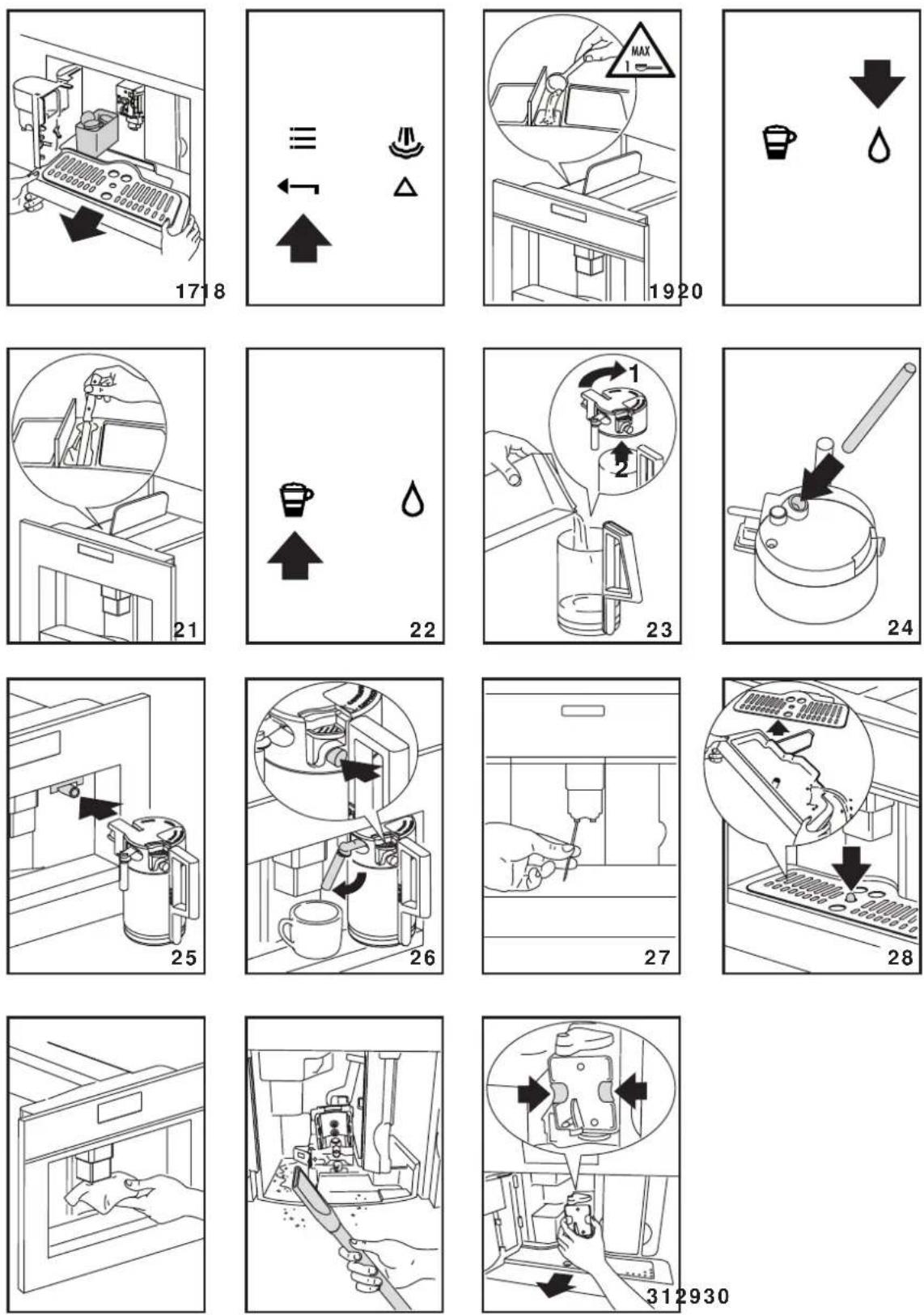
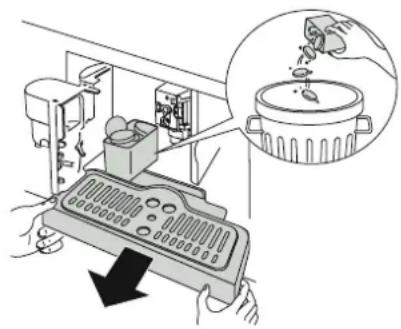
To clean, open the service door on the front of the appliance by pulling the spout (fig. 16), extract the drip tray (fig. 17) and clean.
When cleaning, always extract the drip tray completely.
natural_image
Illustration of a kitchen tool with a pan and a cooking pot, showing hands operating the device (no text or symbols present)
IMPORTANT!
When extracting the drip tray, the waste coffee container MUST always be emptied.
If this is not done, the machine may be clogged.
NOTE 8: Never extract the water tank while the machine is delivering coffee.
If it is removed, it will not be possible to make the coffee and the appliance will display "GROUND TOO FINE ADJUST MILL AND PRESS OK" and then "FILL TANK". Check the level of water in the tank and replace in the appliance.
To turn the appliance back on, insert the water spout if not already in place (fig. 6), then press the OK icon (B9). "HOT WATER PRESS OK" is displayed.
Press the OK icon (B9) within a few seconds and deliver water from the spout for about 30 seconds. When delivery stops, the basic modes are displayed again.

N.B.:
The coffee maker may request the operation to be repeated a number of times until the air is completely eliminated from the hydraulic circuit.

N.B.:
if this operation is not performed correctly or if the machine is turned off, the basic modes may be displayed, although the problem is in fact still present.
EN 8 - Changing the quantity of coffee in the cup
The appliance is set by default to automatically make the following types of coffee:
- espresso
- small cup
- medium cup
- large cup
- mug
To change the quantity, proceed as follows:
- Press the ≡ icon (B2) to enter the menu (fig. 15). Press the △ icons (B7) and (B8) (fig. 2) until "PROGRAM COFFEE" is displayed.
-
Press the OK icon (B9).
-
Select the type of coffee you want to change by pressing the icons (B7) and (B8).
- Press the OK icon (B9) to confirm the type of coffee you want to make.
- Use the icons (B7) and (B8) to change the quantity of coffee. The progress bar shows the quantity of coffee selected.
- Press the OK icon (B9) again to confirm (or the icon (B6) to cancel the operation).
- Press the (B6) icon (B6) (fig. 18) twice to exit the menu.
The appliance is now reprogrammed with the new settings and is ready.
9 - Adjusting the coffee mill
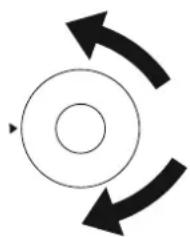
The coffee mill is preset in the factory and should not require adjusting. However, if after making the first few coffees you find that delivery is either too fast or too slow (a drop at a time), this can be corrected by adjusting the grinding adjustment knob (fig. 14).

IMPORTANT!
The grinding adjustment knob must only be turned when the coffee mill is in operation.
natural_image
Simple circular diagram with two curved arrows indicating rotation or cycle (no text or symbols)For slower delivery and creamier coffee, turn one click anticlockwise (finer pre-ground coffee).
For faster delivery (not a drop at a time), turn one click clockwise (coarser pre-ground coffee).
10 - Preparing coffee with pre-ground coffee (instead of beans)
EN
- Press the ●(B4) icon (B4) (fig. 8) and select the pre-ground coffee function.
- Extract the machine by pulling it outwards using the handles (fig. 7).
- Lift the central lid, place one measure of pre-ground coffee in the funnel (fig. 19), push the appliance in then proceed as described in the section "Making coffee using coffee beans".
N.B.: You can make just one coffee at a time by pressing the ▼ icon (B10) (fig. 12).
- After using the machine with pre-ground coffee, to go back to making coffee using beans, deactivate the pre-ground coffee function by pressing the ●① icon (B4) (fig. 8).
NOTE 1: Never introduce pre-ground coffee when the machine is off or it could spread through the inside of the appliance.
NOTE 2: Never add more than 1 measure, otherwise the appliance will not make the coffee.
NOTE 3: Use the measure provided only.
NOTE 4: Introduce only pre-ground coffee for espresso coffee machines into the funnel.
NOTE 5: If more than one measure of pre-ground coffee is used and the funnel clogs, push the coffee down with a knife (fig. 21) then remove and clean the brewing unit and machine as described in the "Cleaning the brewing unit" section.
11 - Delivering hot water
• Always make sure the appliance is ready.
- Place a container under the hot water spout (fig. 5).
- Press the △ icon (B13) (fig. 20). The appliance displays: "HOT WATER PRESS OK". Press the OK icon (B9) again and hot water is delivered from the cappuccino maker
into the container underneath. (You should not deliver hot water for more than 2 minutes at a time). To interrupt, press the △ icon (B13) or the ◀ icon (B6).
The appliance stops delivery once the set quantity is reached.
12 - Rinse function
Press the ⏻ button (B3) to start the "rinse" function. Press the key ←(B6) to cancel the function at any time.
13 - Changing the quantity of hot water
The machine is set by default to automatically delivery 200 ml of hot water.
To change these quantities, proceed as follows:
- Place a container underneath the cappuccino maker (fig. 5).
- Press the ≡(B2) to enter the menu (fig. 15) or press the △ icons (B7) and (B8) (fig. 2) until "PROGRAM HOT WATER" is displayed.
- Press the OK icon (B9) to confirm.
- Select the required quantity of water by pressing the V icons (B7) and (B8). The progress bar shows the quantity of water selected.
- Press the OK icon (B9) to confirm (or the icon (B6) to cancel the operation.
- Press the (B6) icon (B6) (fig. 18) twice to exit the menu.
- The appliance is now reprogrammed with the new settings and is ready.

N.B.:
Set the quantity of coffee you want to use to make the cappuccino in the "Program cappuccino" function in the menu.
- Select the taste of the coffee you want to use to make the cappuccino by pressing the 📄 icon (B4).
- Remove the lid of the milk container.
- Fill the container with about 100 grams of milk for each cappuccino to be prepared (fig. 23). Never exceed the MAX level (corresponding to about 750 ml) marked on the container. You should ideally use skimmed or semi-skimmed milk at refrigerator temperature (about 5 C).
- Make sure the intake tube is correctly inserted in the rubber washer (fig. 24) then replace the milk container lid.
- Position the frothed milk regulator (C1) between the words CAPPUCCINO and CAFFELATTE printed on the milk container lid. The quantity of froth can be adjusted by moving the regulator towards the word CAFFELATTE for a denser froth. Moving it towards the word CAPPUCCINO obtains a less dense froth.
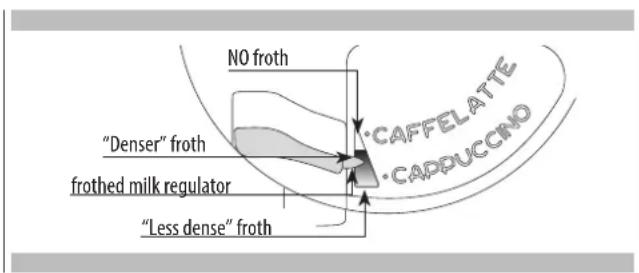
text_image
NO froth "Denser" froth frothed milk regulator "Less dense" froth CAFFELATTE CADPUCCINO- Remove the hot water spout (fig 6) and attach the milk container to the nozzle (fig. 25).
- Position the milk spout as shown in fig. 26 and then place a sufficiently large cup under the coffee and milk spouts.
- Press the 📋 icon (fig. B12). "CAPPUCCINO..." is displayed and after a few seconds, frothed milk flows out of the milk spout into the cup below. (La fuoriuscita del latte si interrompe automaticamente). (Delivery stops automatically).
• The appliance delivers coffee. - The cappuccino is now ready. Sweeten to taste and, if desired, sprinkle the froth with a little cocoa powder.
NOTE 1: While making cappuccino, the flow of frothed milk or coffee can be interrupted by pressing the 📋 icon (B12).
NOTE 2: If the milk in the container finishes while delivering frothed milk, remove the container and add milk. Reattach and press the 📋 (B12) to request a cappuccino again.
NOTE 3: To ensure the complete cleanliness and hygiene of the milk frother, always clean the circuits in the milk container lid after making cappuccino.
"PRESS CLEAN!" flashes on the display.
- Place a recipient under the milk spout (fig. 26).
- Press the CLEAN button on the lid (C3) and hold down for at least 5 seconds (fig. 26) to start the cleaning function. The appliance displays the message "CLEANING!" above a progressive bar. You should not release the CLEAN button until the bar is complete indicating that cleaning is concluded. When the CLEAN button is released, the function stops. After cleaning, remove the milk container and place in the refrigerator. The milk should not be left out of the refrigerator for more than 15 minutes.
NOTE 4: To change the quantity of coffee or frothed milk the appliance delivers automatically into the cup, proceed as described in the section "Changing the quantity of coffee and milk for cappuccino".
The appliance is set by default to automatically deliver a normal cappuccino.
To change these quantities, proceed as follows:
Changing the quantity of milk
- Fill the container with milk up to the maximum level indicated on the container.
- Press the ≡ icon (B2) to enter the menu (fig. 15), then press the △ icons (B7) and (B8) (fig. 2) until "PROGRAM CAPPUCCINO" is displayed.
- Press the OK icon (B9) to confirm. "PROGRAM MILK" is displayed.
- Press the OK icon (B9) again.
- Select the quantity of milk required by pressing the icons (B7) and (B8). The progress bar shows the quantity of milk selected.
- Press the OK icon (B9) to confirm (or the icon (B6) to cancel the operation.
- Press the (B6) icon (B6) (fig. 18) twice to exit the menu.
Changing the quantity of coffee
- Press the 2 icon (B2) to enter the menu (fig. 15), then press the V icons (B7) and (B8) (fig. 2) until "PROGRAM CAPPUCCINO" is displayed.
- Press the OK icon (B9) to confirm then the icons (B7 and (B8) (fig. 2) until "COFFEE FOR CAPPUCC." is displayed.
- Press the OK icon (B9) again.
- Select the quantity of coffee required by pressing the V icons (B7) and (B8). The progress bar shows the quantity of coffee selected.
- Press the OK icon (B9) to confirm (or the icon (B6) to cancel the operation.
- Press the icon (B6) (fig. 18) twice to exit the menu.
Cleaning the coffee maker
Do not use solvents or abrasive detergents to clean the coffee maker. A soft damp cloth will suffice.
Never wash any of the components of the coffee maker in the dishwasher.
The following parts of the machine must be cleaned regularly:
- Waste coffee container (A4).
- Drip tray (A14).
- Water tank (A12).
- Coffee spouts (A13)
• Pre-ground coffee funnel (A21). - Inside of the machine, accessible after opening the service door (A2).
Cleaning the waste coffee container
When "EMPTY WASTE COFFEE CONTAINER" is displayed, the waste coffee container must be emptied and cleaned. To clean:
- open the service door on the front of the appliance (fig. 16), extract the drip tray (fig. 17) and clean.
- Clean the waste coffee container thoroughly.

IMPORTANT!
When extracting the drip tray, the waste coffee container must always be emptied.
Cleaning the drip tray

IMPORTANT!
If the drip tray is not emptied the water might overflow. This could damage the machine.
The drip tray is fitted with a level indicator (red) showing the level of water it contains (fig. 28).
Before the indicator protrudes from the cup tray, the drip tray must be emptied and cleaned.
To remove the tray:
1 Open the service door (fig. 16).
2 Remove the drip tray and the waste coffee container (fig. 17).
3 Clean the drip tray and waste coffee container (A4).
4 Replace the drip tray and waste coffee container (A4).
5 Close the service door.
Cleaning the water tank
- Clean the water tank (A12) regularly (about once a month) with a damp cloth and a little mild washing up liquid.
- Remove all traces of washing up liquid.
Cleaning the spouts
- Clean the nozzles periodically using a sponge.
- Check regularly that the holes in the coffee spout are not blocked. If necessary, remove coffee deposits with a toothpick (fig. 27).
Cleaning the pre-ground coffee funnel
- Check regularly (about once a month) that the pre-ground coffee funnel is not blocked (fig. 21).

DANGER!
Before performing any cleaning operations, the machine must be turned off by pressing the main switch (A23) and unplugged from the mains power supply. Never immerse the coffee maker in water.
Cleaning the inside of the coffee maker
-
Check regularly (about once a week) that the inside of the appliance is not dirty. If necessary, remove coffee deposits with a sponge.
-
Remove the residues with a vacuum cleaner (fig. 30).
Cleaning the brewing unit
The brewing unit must be cleaned at least once a month.

IMPORTANT!
The brewing unit (A5) must not be removed when the appliance is on.
Do not use force to remove the brewing unit.
- Make sure the machine is correctly turned off (see "Turning the appliance off").
- Open the service door (fig. 16).
- Remove the drip tray and waste coffee container (fig. 17);
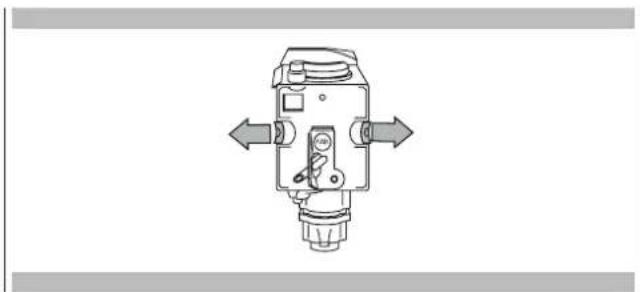
- Press the two red release buttons inwards and at the same time pull the brewing unit outwards (fig. 31).

IMPORTANT!
Do not use washing up liquid to clean the brewing unit. It would remove the lubricant applied to the inside of the piston.
- Soak the brewing unit in water for about 5 minutes, then rinse.
- After cleaning, replace the brewing unit (A5) by sliding it onto the internal support and pin at the bottom, then push the PUSH symbol fully in until it clicks into place.
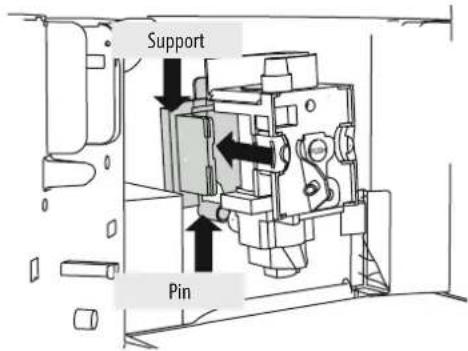
text_image
Support Pin
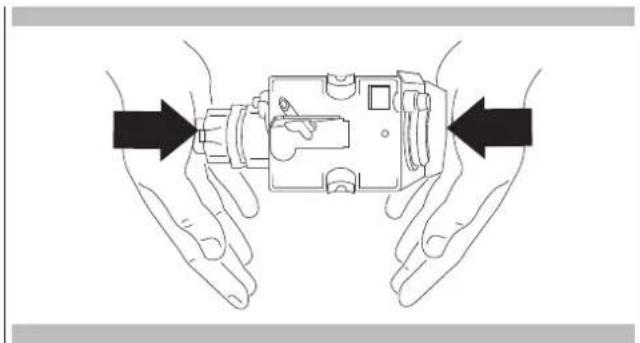
N.B.:
If the brewing unit is difficult to insert, you must first adapt it to the right dimensions by pressing it forcefully from the bottom and top as shown in the figure.
natural_image
Illustration of two hands holding a mechanical device with arrows indicating direction (no text or symbols)- Once inserted, make sure the two red buttons have snapped out.
natural_image
Technical line drawing of a mechanical device with directional arrows indicating movement or force (no text or symbols)-
Replace the drip tray and waste coffee container.
-
Close the service door.
Cleaning the milk container

IMPORTANT!
Always clean the tubes inside the milk container (C) when you prepare milk.
If there is still milk in the container, do not leave it out of the refrigerator for longer than strictly necessary.
Clean the container each time you prepare milk as described in Note 3 in the section "Making cappuccino".
All components can be washed in a dishwasher, placing them in the top basket of the dishwasher.
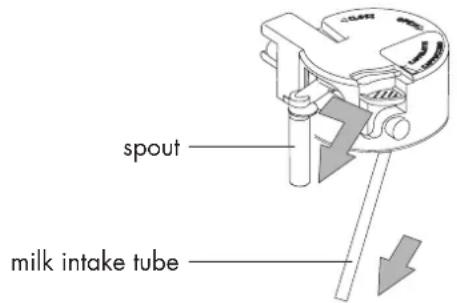
- Turn the lid of the milk container clockwise then remove it.
- Remove the milk spout and intake tube.
text_image
spout milk intake tube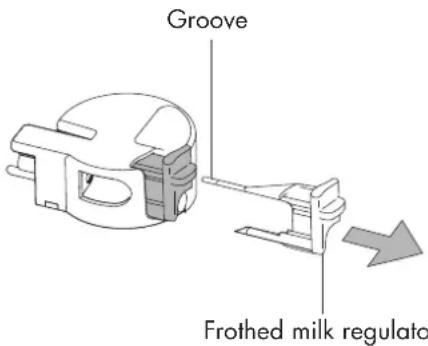
text_image
Groove Frothed milk regulato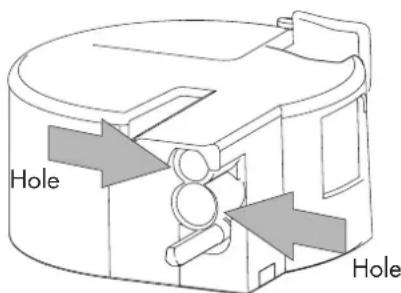
text_image
Hole Hole- Remove the frothed milk regulator by pulling it outwards.
- Wash all the components thoroughly with hot water and mild washing-up liquid.
Make sure there are no milk residues left inside the holes and the groove on the fine end of the frothed milk regulator. - Check that the intake tube and spout are not clogged with milk residues.
- Replace the frothed milk regulator, milk spout and intake tube.
- Replace the milk container lid.
When the appliance is ready, you can use the internal menu to modify the following parameters and functions:
- Choose language
- Shut-Off Time
- Set clock
- Start time
- Auto-start
- Temperature
- Water hardness
- Program coffee
- Program cappuccino
- Program hot water
- Descale
- Reset to default
• Statistics - Buzzer
- Contrast
Setting the language
To change the language on the display, proceed as follows:
- Press the ≡ icon (B2) to enter the menu. "CHOOSE LANGUAGE" is displayed.
- Press the OK icon (B9).
- Press the icons (B7) and (B8) until the required language is displayed.
- Press the OK icon (B9) to confirm.
- Press the (B6) to exit the menu.

N.B.:
If you choose the wrong language, you can access the menu directly to modify the parameter.
- Press the ≡ (B2) for at least 7 seconds until the appliance displays the various languages.
- Choose the required language as described in the section "Using the appliance for the first time".
Changing the length of time the appliance remains on
The appliance is set by default to go off automatically 30 minutes after the last coffee has been made.
To change this interval (max. 120 min), proceed as follows:
- Press the ≡icon (B2) to enter the menu and then the △▽ icons (B7) and (B8) until "SHUT-OFF TIME" is displayed.
- Press the OK icon (B9) to confirm.
- Press the icons (B7) and (B8) to set the time after which the appliance will go off (after 1/2 hour, 1 hour,
2 hours).
- Press the OK icon (B9) to confirm.
- Press the icon (B6) to exit.
Setting the clock
- Press the icon (B2) to enter the menu and then the icons (B7) and (B8) until "SET CLOCK" is displayed.
- Press the OK icon (B9).
- Use the icons (B7) and (B8) to set the hour, then press the OK icon (B9) to confirm.
- Use the icons (B7) and (B8) to set the minutes, then press the OK icon (B9) to confirm.
- Press the (B6) icon (B6) to exit the menu.
Setting auto-start time
This function programmes the time the machine will come on automatically.
- Make sure the clock on the appliance has been set.
- Press the ≡ icon (B2) to enter the menu and then the △V icons (B7) and (B8) until "START TIME" is displayed.
- Press the OK icon (B9).
- Use the icons (B7) and (B8) to set the auto-start time, then press the OK icon (B9) to confirm.
- Use the icons (B7) and (B8) to set the minutes, then press the OK icon (B9) to confirm.
- Press the icons (B7) and (B8) to activate the auto-start function until "AUTO START" is displayed.
- "AUTO START PLEASE CONFIRM" is displayed. Press the OK icon (B9). The 🔊 symbol appears on the display.
- Press the (B6) icon (B6) to exit the menu.
- To disable auto-start, press the icon (B2), then the icons (B7) and (B8) until "AUTO START" is displayed. Press the OK icon (B9). "PLEASE CONFIRM" is displayed Press (B6) to disable, the symbol disappears
Changing coffee temperature
To change coffee temperature, proceed as follows:
- Press the icon (B2) to enter the menu and then the V icons (B7) and (B8) until "TEMPERATURE" is displayed.
- Press the OK icon (B9).
- Press the icons (B7) and (B8) to select the required coffee temperature from low, medium and high.
- Press the OK button (B9) to confirm the temperature selected.
- Press the icon (B6) to exit the menu.
Setting water hardness
The operating period can be extended if required, making descaling less frequent by programming the machine on the basis of the real lime content in the water used.
Proceed as follows:
- remove the "Total Hardness Test" strip (attached to page 2) from its packaging then dip it fully in the water for a few seconds, Then remove and wait about 30 seconds (until it changes colour and forms red squares).
- turn the appliance on by pressing the ON/OFF/stand-by button (A7).
- Press the icon (B2) to enter the menu and then the icons (B7) and (B8) until "WATER HARDNESS" is displayed.
- Press the OK icon (B9).
- Press the icons (B7) and (B8) until the number coincides with the number of red squares on the test strip (for example, if there are 3 red squares on the test strip, select the message "WATER HARDNESS 3"
- Press the OK icon (B9) to confirm. The coffee maker is now programmed to provide the descale warning when actually necessary.
Programming coffee
For instructions on programming coffee, see the "CHANGING THE QUANTITY OF COFFEE IN THE CUP" section.
Programming cappuccino
For instructions on programming cappuccino, see the section "CHANGING THE QUANTITY OF MILK AND COFFEE FOR CAPPUCCINO".
Programming water
For instructions, see the "CHANGING THE QUANTITY OF HOT WATER" section.
Descaling

IMPORTANT!
Descaler contains acids.
Respect the safety warnings provided by the manufacturer and given on the descaler pack.

N.B.:
Use the descaler recommended by the manufacturer only. Use of other descalers invalidates the guarantee.
Failure to descale the appliance as described also invalidates the guarantee.
When "PLEASE DESCALE!" is displayed, the machine requires descaling.
Proceed as follows:
• make sure the machine is ready;
- Press the icon (B2) to enter the menu and then the V icons (B7) and (B8) until "DESCALE" is displayed.
- Press the OK icon (B9).
The message "ADD DESCALER PLEASE CONFIRM" is displayed.
- Empty the tank of water, pour the contents of the descaler solution into the tank respecting the instructions given on the descaler solution, then add water.
NOTE: Use only EcoDecalk descaling solution to descale the FULGOR MILANO Coffee System.

Position a container with a capacity of 2 litres under the hot water spout.
- Insert water spout
- Press the OK icon (B9). Descaler flows out of the hot water spout into the container below.
The appliance displays: "DESCALING". - The descale programme automatically performs a series of deliveries and pauses.
- After about 30 minutes "DESCALE COMPLETE PLEASE CONFIRM" is displayed.
- Press the OK icon (B9). "RINSING FILL TANK" is displayed.
- Empty the water tank, rinse to eliminate descaler residues, then fill with clean water.
- Replace the tank full of clean water. "RINSING PLEASE CONFIRM" is displayed again.
- Press the OK icon (B9) again. Hot water flows out of the spout into the container below and "RINSING" is displayed.
- Wait until "RINSING COMPLETE PLEASE CONFIRM" is displayed.
- Press the OK icon (B9). "DESCALE COMPLETE" is displayed, then "FILL TANK!". Fill the tank again with clean water.
- The descale programme is now terminated and the appliance is ready to make coffee again.
NOTE: If descaling is interrupted before completion, the process must be begun again from the beginning.

IMPORTANT!
FAILURE TO DESCALE THE APPLIANCE REGULARLY INVALIDATES THE GUARANTEE.
Resetting default values (reset)
If you change the original values, the default values can be reset as follows:
- Press the icon ≡ (B2) to enter the menu and then press the icons △(B7) and (B8) until the machine displays the message "DEFAULT VALUES".
- Press the OK icon (B9) and the machine displays the message "CONFIRM DEFAULT VALUES".
- press the OK icon (B9) to return to the default settings;
Statistics
This displays statistics relating to the machine. To display, proceed as follows:
- Press the ≡ icon (B2) to enter the menu and then the △ icons (B7) and (B8) until "STATISTICS" is displayed.
- Press the OK icon (B9).
- Press the icons (B7) and (B8) to verify:
• How many coffees have been made. - How many times the machine has been descaled.
• How many cappuccinos have been made;
• The total number of litres of water delivered. - Press the icon (B6) once to exit the function or twice to exit the menu.
Buzzer
This activates or deactivates the buzzer emitted by the machine each time an icon is pressed or an accessory is inserted/removed.

N.B.:
The buzzer is active by default.
- Press the ≡ icon (B2) to enter the menu and then the △ icons (B7) and (B8) until "BUZZER" is displayed.
- Press the OK icon (B9). "BUZZER PLEASE CONFIRM" is displayed.
- Press the (B6) icon (B6) to disable or the OK icon (B9) to enable the buzzer.
- Press the (B6) icon (B6) to exit the menu.
Adjusting contrast
To increase or reduce the contrast of the display, proceed as follows:
- Press the ≡ icon (B2) to enter the menu and then the △ icons (B7) and (B8) until "CONTRAST" is displayed.
- Press the OK icon (B9).
- Press the icons (B7) and (B8) until the required display contrast is reached. The progressive bar indicates the level of contrast selected.
- Press the OK icon (B9) to confirm.
- Press the (B6) icon (B6) once to exit the function or twice to exit the menu.
EN 18 - Turning the appliance off
Each time the appliance is turned off, it performs an automatic rinse cycle which cannot be interrupted.

DANGER OF BURNS!
During rinsing, a little hot water flows from the coffee spouts.
Avoid contact with splashes of water.
To turn the appliance off, press the ON/OFF button (A7).
The appliance performs the rinse cycle then goes off.

N.B.!
If the appliance is not used for an extended period, place the main switch on the back of the appliance in the 0 position (A23).
19 - Technical specification
Voltage 120 V\~ 60 Hz max
Absorbed
power: 1350W
Pressure: 15 bars
Water tank
capacity: 1,8 litres
Size
LxHxD: 594x 455x411
Weight: 23/24 kg
DISPLAYED MESSAGE POSSIBLE CAUSE REMEDY
| FILL TANK! The water tank is empty or | positioned incorrectly. | Fill the tank with water and/or insert it correctly, pushing it as far as it will go. |
| GROUND TOO FINE ADJUST MILL AND alternating with PRESS OK | The grinding is too fine and the coffee is delivered too slowly. | Turn the grinding adjustment knob one click clockwise towards "7". |
| GROUND TOO FINE ADJUST MILL AND(alternating with) PRESS OK(then)FILL TANK | The tank has been removed during delivery. | Insert the tank and press the OK icon (B9)."HOT WATER PRESS OK" is displayed. Press the OK icon (B9) again.The appliance is once again ready for use. |
| EMPTY WASTE COFFEE CONTAINER | The waste coffee container (A4) is too full or more than 3 days have passed since you last made coffee (this guarantees correct hygiene of the machine). | Empty the waste coffee container and clean, then replace.Important: when removing the drip tray, the waste coffee container MUST be emptied, even if it is not completely full.If this is not done, when you make the next coffees, the waste coffee container may fill up more than expected and clog the machine. |
| INSERT WASTE COFFEE CONTAINER | After cleaning, the waste coffee container has not been replaced. | Open the service door and insert the waste coffee container. |
| INSERT PRE-GROUND COFFEE The "pre-ground coffee" function has been selected without placing any pre-ground coffee in the funnel.The funnel (A21) is blocked. | Extract the appliance and place pre-ground coffee in the funnel.Empty the funnel with the help of a knife as described in the section "Cleaning the pre-ground coffee funnel". | |
| PLEASE DESCALE! The machine must be descaled. The descaling procedure described in the "Descaling" section needs to be performed as soon as possible. | ||
| LESS COFFEE Too much coffee has been used. Select a milder taste or reduce the quantity of pre-ground coffee, then make the coffee again. | ||
| FILL BEAN CONTAINER The coffee beans have run out. Fill bean container | ||
| INSERT BREWING UNIT | The brewing unit has not been replaced after cleaning. | Insert the brewing unit as described in the section "Cleaning the brewing unit". |
| CLOSE DOOR | The service door is open | Close the service door. |
| GENERAL ALARM! | The inside of the appliance is very dirty. | Clean the inside of the appliance thoroughly, as described in the section "Cleaning and maintenance".If the message is still displayed after cleaning, contact a customer services. |
EN 21 - Turning the appliance off
Below is a list of some of the possible malfunctions.
If the problem cannot be resolved as described, contact Customer Services.
| PROBLEM POSSIBLE CAUSE REMEDY | ||
| The coffee is not hot The cups were not preheated. | The brewing unit has cooled down because 2/3 minutes have elapsed since the last coffee was made. | Warm the cups by rinsing them with hot water.Before making coffee, preheat the brewing unit by selecting the RINSING function.Change the set temperature (see paragraph “Changing coffee temperature”). |
| The temperature set is too low. | ||
| The coffee is not creamy enough The coffee is ground too coarsely. | Wrong type of coffee. | Turn the grinding adjustment knob one click anticlockwise towards “1” while the coffee mill is in operation (fig. 14).Use a type of coffee for espresso coffee makers. |
| The coffee is delivered too slowly or a drop at a time. | The coffee is ground too finely. Turn the | grinding adjustment knob one click clockwise towards “7” while the coffee mill is in operation (fig. 14).Continue one click at a time until coffee delivery is satisfactory.The effect is only visible after delivering two coffees. |
| The coffee is delivered too quickly | The coffee is ground too coarsely. | Turn the grinding adjustment knob one click anticlockwise towards “1” while the coffee mill is in operation (fig. 14).Avoid turning the grinding adjustment knob excessively otherwise when you select 2 cups, the coffee may be delivered a drop at a time.The effect is only visible after delivering two coffees. |
| Coffee does not come out of one of the spouts. | The spouts are blocked. Clean the spouts with a toothpick (fig. 27). | |
| The coffee does not come out of the spouts, but from around the service door (A2). | The holes in the spouts are clogged with dry coffee dust.The coffee guide (A3) inside the service door is blocked and cannot swing. | If necessary, remove coffee deposits with a toothpick, sponge or stiff bristled kitchen brush.Thoroughly clean the coffee guide (A3), particularly near the hinges. |
| Water comes out of the spouts instead of coffee. | The pre-ground coffee may be blocked in the funnel (A21). | Clean the funnel (A27) with a wooden or plastic fork, clean the inside of the machine. |
| The milk does not come out of the milk spout (C5). | The intake tube is not inserted or is inserted incorrectly. | Insert the intake tube (C4) in the rubber washer in the milk container lid (fig. 24). |
| The milk is not well frothed. The milk container lid is dirty. | The frothed milk regulator is not positioned correctly. | Clean the milk container lid as described in the section “Cleaning the milk container”.Adjust following the instructions in the section “Making cappuccino”. |
PROBLEM POSSIBLE CAUSE REMEDY
| The milk contains bubbles or squirts out of the milk spout. | The milk is not cold enough or is not semi-skimmed.The frothed milk regulator is incorrectly adjusted.The milk container lid is dirty. | You should ideally use skimmed or semi-skimmed milk at refrigerator temperature (about 5 C). If the result is still disappointing, try another brand of milk.Move the frothed milk regulator slightly towards the word “CAFFELATTE” (see section “Making cappuccino”).Clean the milk container lid as described in the section “Cleaning the milk container”. |
Note
SOMMAIRE PAGE
1 - Introduction 2
text_image
x 1 approx. 350 mmFigure 4
text_image
x 4 x 8Figure 5
text_image
x 4 560 + 1 mm min. 5 mmA
text_image
A3 A4 A5 A2 A1 A8 A10 A7 A6 A14 A13 A12 A18 A19 A15 A16 A17 A20 A21 A23 A22 A9B
text_image
B1 B2 B3 B4 B5 B10 B11 B12 B13 ≡ ← B6 B7 B8 B9 OKC
text_image
C1 C6 C3 C5 C4 C2 C7natural_image
Illustration of a kitchen appliance with a downward arrow indicating a drop, and an inset showing a cooking pot (no text or symbols present)IMPORTANT!
natural_image
Simple circular diagram with two curved arrows indicating rotation or cycle (no text or symbols)text_image
Support Broche
N.B.:
natural_image
Diagram of two hands holding a mechanical device with directional arrows indicating movement (no text or symbols)natural_image
Technical line drawing of a mechanical device with directional arrows indicating movement or force (no text or symbols)text_image
Orifice OrificePROBLÈME CAUSE POSSIBLE REMÈDE
Save these instructions
THIS APPLIANCES IS FOR HOUSEHOLD USE ONLY

¡IMPORTANTE!
text_image
x 1 approx. 350 mmImagen 4
text_image
x4 x8Imagen 5
text_image
x 4 560 + 1 mm min. 5 mmA
text_image
A8 A10 A7 A6 A3 A4 A5 A2 A1 A14 A13 A12 A18 A19 A15 A16 A17 A20 A21 A23 A22 A9B
text_image
B1 B2 B3 B4 B5 B10 B11 B12 B13 ≡ ← B6 B7 B8 B9 OKC
text_image
C1 C3 C6 C5 C4 C2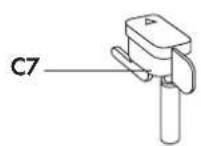
natural_image
Illustration of a kitchen appliance with a pan and kitchenware, showing a hand inserting a tool into the pan (no text or symbols present)