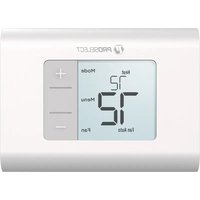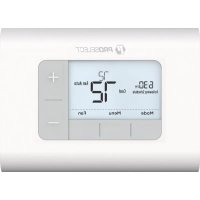
PSTSN21AWH - Thermostat ProSelect - Free user manual and instructions
Find the device manual for free PSTSN21AWH ProSelect in PDF.


User questions about PSTSN21AWH ProSelect
0 question about this device. Answer the ones you know or ask your own.
Ask a new question about this device
Download the instructions for your Thermostat in PDF format for free! Find your manual PSTSN21AWH - ProSelect and take your electronic device back in hand. On this page are published all the documents necessary for the use of your device. PSTSN21AWH by ProSelect.
USER MANUAL PSTSN21AWH ProSelect
Non-programmable Thermostat PSTSN11AWH, PSTSN21AWH
User Guide
Package Includes:
- Base Plate Mounting System
- Screws and Anchors
- 2 AA Batteries
• Thermostat Literature
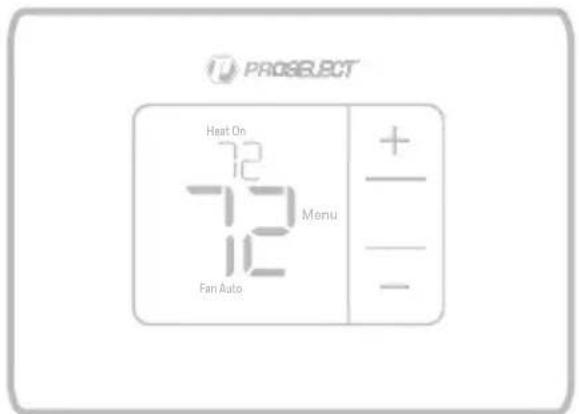
text_image
PROSELECT Heat On 72 72 Fan Auto Menu + - -M39418
Read before installing
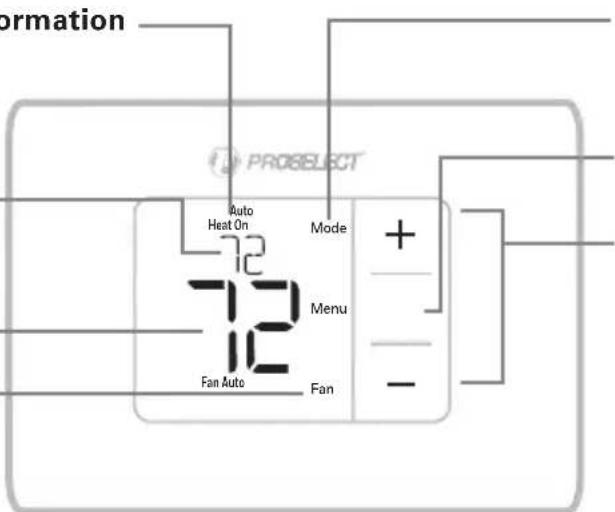
Thermostat controls
• System status information
Cool On Heat On Em Heat On
- Indoor
temperature setpoint
Press + or - to change temperature setting
• Actual indoor temperature
- Fan
Select Fan mode Auto/On
text_image
formation PROSELECT Auto Heat On Mode + - Menu Fan Auto FanM39422
- Mode
Select system mode Heat/Off/Cool/Auto/EM Heat (emergency heat)
- Menu
Press to enter the system mode or fan settings
- Temperature/
Navigation buttons
Press to increase or decrease the temperature setpoint or to cycle through the system mode or fan settings
The screen will wake up by pressing any of the five buttons. If powered by the C wire, the screen stays lit for 45 seconds after you complete changes. If powered by battery only, the screen stays lit for 8 seconds. Depending on how your thermostat was installed, the screen light may always be on.
Customer assistance
For assistance with this product, please contact PROSELECT® via owat@ferguson.com or 1-800-221-3379.
Built-in compressor protection
Damage can occur if the compressor is restarted too soon after shutdown. This feature forces the compressor to wait for a few minutes before restarting.
During the wait time, the display will flash the message Cool On (or Heat On if you have a heat pump). When the safe wait time has elapsed, the message stops flashing and the compressor turns on.
Message flashes until safe restart time has elapsed.

text_image
Auto Cool On Mode 72 Done 70 Fan Auto Fan + - - M39423System operation settings
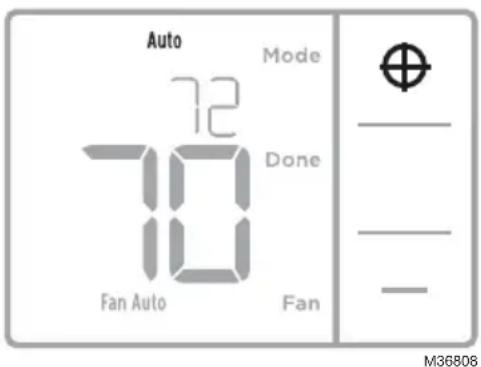
- Press Menu, and then press the Mode (+) button to cycle to the next available System mode.
- Cycle through the modes until the desired System mode is displayed, and then press Done.
NOTE: Available System modes vary by model and system settings.
text_image
Auto 72 Mode Done 10 Fan Auto Fan M36808System modes:
- Auto: Thermostat selects heating or cooling as needed.
- Heat: Thermostat controls only the heating system.
– Cool: Thermostat controls only the cooling system. - Em heat (PSTSN21AWH only): For heat pumps with auxiliary heat. Thermostat controls auxiliary heat. Compressor is not used.
- Off: Heating and cooling system is off. Fan will still operate if fan is set to On.
NOTE: Heat On/Cool On may flash for 5 minutes due to compressor protection.
Fan operation settings
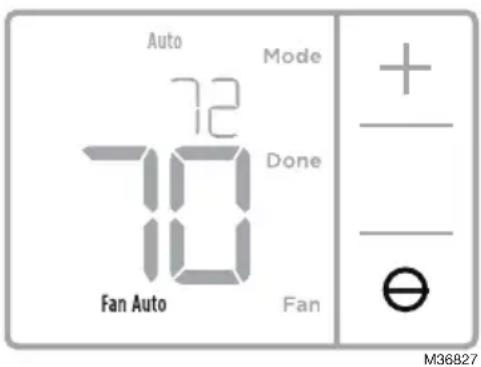
- Press Menu, and then press the Fan (-) button to cycle to the next available Fan mode.
- Cycle through the modes until the desired Fan mode is displayed, then press Done.
NOTE: Available Fan modes vary with system settings.
text_image
Auto 72 Mode Done Fan Auto Fan + - - - - M36827Fan modes:
- Auto: Fan runs only when the heating or cooling system is on.
- On: Fan is always on.
Battery replacement
Batteries are optional (to provide backup power) if your thermostat is wired to run on AC power. If your thermostat is not wired to run on AC power, then batteries are required.
Install fresh batteries immediately when the low battery icon appears. The icon appears about two months before the batteries are depleted.
Even if the low battery icon does not appear, you should replace batteries once a year, or before leaving home for more than a month.
All settings are permanently stored in memory, and do not require battery power.
NOTE: When replacing batteries, alkaline batteries are recommended.
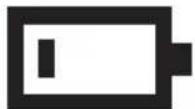
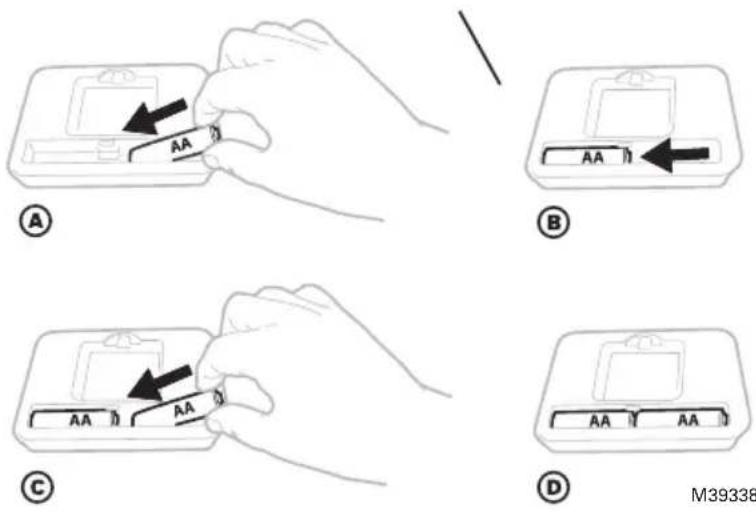
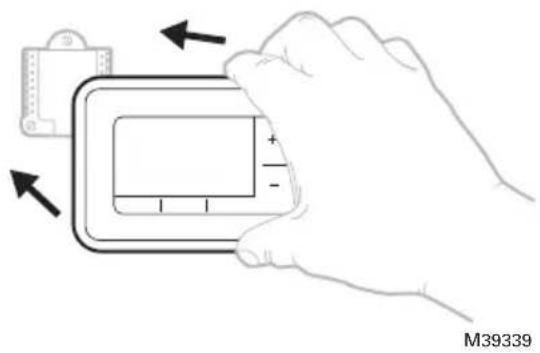
When the low battery warning appears, press gently to loosen the thermostat and then carefully pull it from the base plate.
Insert fresh alkaline AA batteries and reinstall thermostat.
text_image
M39339Alerts screen
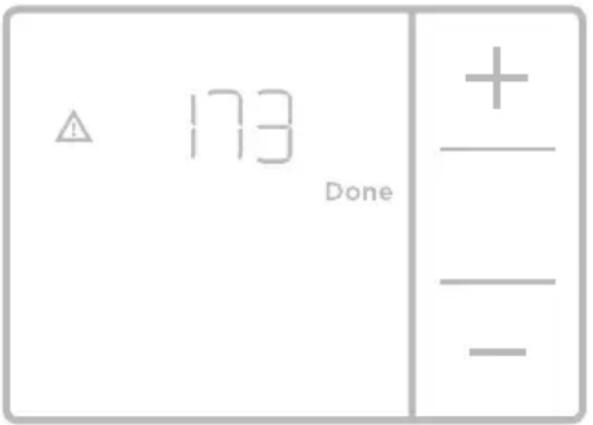
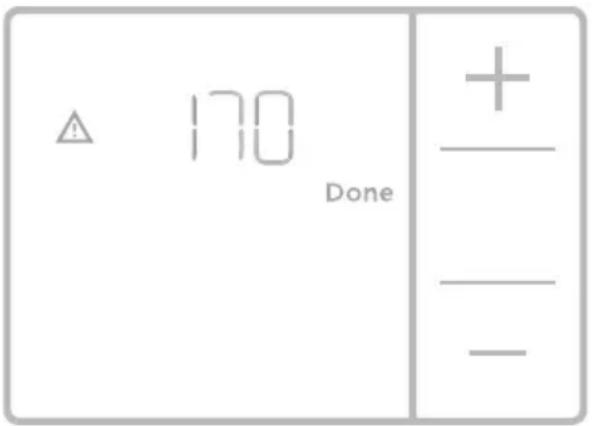
- You will see the alert icon and the alert number on the screen.
text_image
△ 173 Done +_ -- Press Next (+) to see additional alerts, if any. Then press Done to go back to the home screen.
NOTE: If the alert is a critical alert, you may not be able to access the home screen and should call a HVAC professional.
text_image
⚠️ 170 Done +_ — —Alerts codes
| Number | Alert/Reminder Definition | |
| 170 | Internal Memory Error The memory of the thermostat has encountered an error. Please replace the thermostat. | |
| 173 | ThermostatTemperature Sensor Error | The sensor of the thermostat has encountered an error. Please replace the thermostat. |
| 405 | Low Battery Alert | The batteries are getting low. Replace them within two months. |
| 407 | Critical Low Battery The batteries are almost depleted and should be replaced as soon as possible. | |
Troubleshooting
If you have difficulty with your thermostat, please try the following suggestions. Most problems can be corrected quickly and easily.
Display is blank
- Check circuit breaker and reset if necessary.
- Make sure power switch for heating & cooling system is on.
- Make sure furnace door is closed securely.
- Make sure fresh AA alkaline batteries are correctly installed (see page 3).
Heating or cooling system does not respond
- Press Mode button to set system Heat (see page 2). Make sure the desired temperature is set higher than the inside temperature.
- Press Mode button to set system Cool (see page 2). Make sure the desired temperature is set lower than the inside temperature.
- Check circuit breaker and reset if necessary.
- Make sure power switch for heating & cooling system is on.
- Make sure furnace door is closed securely.
- Wait 5 minutes for the system to respond.
Temperature settings do not change
- If you are in the correct mode, but you cannot set the heat from 40 °F to 90 °F (4.5 °C to 32 °C), or set the cool from 50 °F to 99 °F (10 °C to 37 °C), you may have range-stops restricting your setting. Check with the installer to see if they set range-stops.
- Compressor protection feature is engaged. Wait 5 minutes for the system to restart safely, without damage to the compressor (see page 2).
"Cool On" or "Heat On" is flashing
Electrical Ratings
| Terminal Voltage (50 Hz/60 Hz) Running Current | ||
| W Heating | 20 Vac - 30 Vac | 0.02 A - 1.0 A |
| W2 (Aux) Heating (PSTSN21AWH only) | 20 Vac - 30 Vac | 0.02 A - 1.0 A |
| E Emergency Heat (PSTSN21AWH only) | 20 Vac - 30 Vac | 0.02 A - 0.5 A |
| Y Compressor Stage 1 | 20 Vac - 30 Vac | 0.02 A - 1.0 A |
| G Fan | 20 Vac - 30 Vac | 0.02 A - 0.5 A |
| O/B Changeover | 20 Vac - 30 Vac | 0.02 A - 0.5 A |
5-year limited warranty
All parts for PROSELECT products are warranted to the original consumer purchaser to be free from defects in material and workmanship for a period of five (5) years. This warranty is made to the original consumer purchaser and shall be effective from date of purchase as shown on purchaser's receipt. PROSELECT WILL replace, free of charge, during the warranty period, any part which proves defective in material and/or workmanship under normal installation, use and service. It is PROSELECT's obligation under this warranty to the replacement of any part or parts which prove defective upon PROSELECT's local PROSELECT dealer, transportation charges prepaid, with a copy of the purchase receipt. For the PROSELECT dealer nearest you, call 1-800-221-3379.
THIS WARRANTY IS THE ONLY EXPRESS WARRANTY MADE BY PROSELECT AND IS LIMITED TO THE DURATION OF THIS WARRANTY AND ALL OTHER EXPRESSED OR IMPLIED WARRANTIES, WHETHER IMPLIED BY OPERATION OF LAW OR OTHERWISE, INCLUDING, WITHOUT LIMITATION, ALL IMPLIED WARRANTIES OF MERCHANTABILITY AND FITNESS OR FITNESS FOR A PARTICULAR PURPOSE, ARE FOR PERSONAL INJURY OR PROPERTY DAMAGE OR ANY OTHER LOSS, DAMAGE, COST OF REPAIRS OR INCIDENTAL, PUNITIVE, SPECIAL OR CONSEQUENTIAL DAMAGES OF ANY KIND, WHETHER BASED UPON WARRANTY, CONTRACT, STRICT LIABILITY, DESIGN, MANUFACTURE, SALE, TRANSPORTATION, INSTALLATION, USE OR REPAIR OF THE PRODUCTS SOLD BY PROSELECT, BUYER HEREBY ACKNOWLEDGES AND AGREES THAT AUNDER NO CIRCUMSTANCE, AND IN NO EVENT, SHALL PROSELECT'S LIABILITY, IF ANY, EXCEED THE REPLACEMENT OF THE DEFECTIVE PRODUCT(S); NO ADDITIONAL ALLOWANCE SHALL BE MADE FOR THE LABOR OR EXPENSE OF REPAIRING OR REPLACING DEFECTIVE PRODUCTS OR WORKMANSHIP OR DAMAGE RESULTING FROM THE SAME, EXCEPT AS EXPRESSLY SET FORTH IN THIS PARAGRAPH, ALL PRODUCTS AND/OR SERVICES PROVIDED BY PROSELECT AND ITS EMPLOYEES AND AGENTS ARE PROVIDED "AS IS," "WHERE IS," AND "WITH ALL FAULTS." Some states do not allow the exclusion or limitation of incidental or consequential damages, so the above limitation or exclusion may not apply to you. This warranty is void for any damage to the PROSELECT product due to misuse, abuse, neglect, accident, improper installation, any use in violation of instructions furnished by us, or any use of replacement parts other than genuine PROSELECT parts.

CAUTION: ELECTRICAL HAZARD
Can cause electrical shock or equipment damage. Disconnect power before beginning installation.

CAUTION: EQUIPMENT DAMAGE HAZARD
Compressor protection is bypassed during testing. To prevent equipment damage, avoid cycling the compressor quickly.

CAUTION: MERCURY NOTICE
If this product is replacing a control that contains mercury in a sealed tube, do not place the old control in the trash. Contact your local waste management authority for instructions regarding recycling and proper disposal.

CAUTION: ELECTRONIC WASTE NOTICE
The product and batteries should not be disposed of with other household waste. Check for the nearest authorized collection centers or authorized recyclers. The correct disposal of end-of-life equipment will help prevent negative consequences for the environment and human health.
Regulatory Information
FCC Compliance Statement (Part 15.19) (USA only)
This device complies with Part 15 of the FCC Rules. Operation is subject to the following two conditions:
- This device may not cause harmful interference, and
- This device must accept any interference received, including interference that may cause undesired operation.
FCC Warning (Part 15.21) (USA only)
Changes or modifications not expressly approved by the party responsible for compliance could void the user's authority to operate the equipment.
FCC Interference Statement (Part 15.105 (b)) (USA only)
This equipment has been tested and found to comply with the limits for a Class B digital device, pursuant to Part 15 of the FCC Rules. These limits are designed to provide reasonable protection against harmful interference in a residential installation. This equipment generates uses and can radiate radio frequency energy and, if not installed and used in accordance with the instructions, may cause harmful interference to radio communications. However, there is no guarantee that interference will not occur in a particular installation. If this equipment does cause harmful interference to radio or television reception, which can be determined by turning the equipment off and on, the user is encouraged to try to correct the interference by one of the following measures:
- Reorient or relocate the receiving antenna.
- Increase the separation between the equipment and receiver.
- Connect the equipment into an outlet on a circuit different from that to which the receiver is connected.
- Consult the dealer or an experienced radio/TV technician for help.
Thermostats
To comply with FCC and Industry Canada RF exposure limits for general population/ uncontrolled exposure, the antenna(s) used for these transmitters must be installed to provide a separation distance of at least 20 cm from all persons and must not be co-located or operating in conjunction with any other antenna or transmitter.
RSS-GEN
Under Industry Canada regulations, this radio transmitter may only operate using an antenna of type and maximum (or lesser) gain approved for the transmitter by Industry Canada. To reduce potential radio interference to other users, the antenna type and its gain should be so chosen that the equivalent isotropically radiated power (e.i.r.p.) is not more than that necessary for successful communication.
Operation is subject to the following two conditions:
- This device may not cause interference, and
- This device must accept any interference, including interference that may cause undesired operation of the device.

PROSELECT®
© Ferguson Enterprises, LLC
33-00662EFS—01 SA Rev. 01-24
Distributed exclusively by Ferguson Enterprises, LLC
Thermostat non programmable PSTSN11AWH, PSTSN21AWH
natural_image
Illustration of a hand holding a device with arrows indicating left and right motion (no text or symbols)Écran d'alerte
text_image
△ 170 Done +_ -Codes d'alerte
MISE EN GARDE : AVIS RELATIF AU MERCURE
© Ferguson Enterprises, LLC
33-00662EFS—01 SA Rev. 01-24
Distributed exclusively by Ferguson Enterprises, LLC
Termostato no programable PSTSN11AWH, PSTSN21AWH
Guía del usuario
El paquete incluye:
text_image
Auto 72 Mode Done Fan Auto Fan + - ⊖M36827
natural_image
Illustration of a hand holding a medical or electronic device with arrows indicating movement (no text or symbols)Pantalla de alerta
text_image
△ 173 Done +_ -© Ferguson Enterprises, LLC
33-00662EFS—01 SA Rev. 01-24
Distributed exclusively by Ferguson Enterprises, LLC