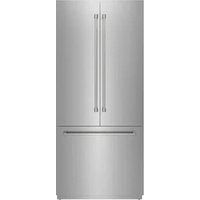
XRF3619BFP - Refrigerator Thor - Free user manual and instructions
Find the device manual for free XRF3619BFP Thor in PDF.


| Product Type | Refrigerator Freezer |
| Brand | Thor |
| Model | XRF3619BFP |
| Refrigeration System | Dual refrigeration system (independent fresh food and freezer compartments) |
| Refrigerator temperature range | 36 °F to 46 °F (2 °C to 8 °C) |
| Special compartment temperature range | 30 °F to 41 °F (-1 °C to 5 °C) |
| Freezer temperature range | -11 °F to 5 °F (-24 °C to -15 °C) |
| Super Freeze function | Yes, can be activated by setting the freezer below -24 °C |
| Holiday mode | Refrigerator at 63 °F (17 °C), freezer at 0 °F (-18 °C) |
| Sabbath mode | Disables all lights and sounds |
| Eco mode | Refrigerator at 46 °F (8 °C), freezer at 5 °F (-15 °C) |
| Child safety lock | Yes, activation via MENU button (3 seconds) |
| Water dispenser | Yes (depending on model) |
| Ice maker | Yes (depending on model) |
| Water filter | Yes, with replacement indicator every 130 days |
| Display | Control panel with digital display |
| Refrigerant gas | R600a (flammable) or R134a according to rating plate |
| Condenser cleaning | Recommended every 6 months |
| Spare parts | Available for 10 years after purchase |
| Interior cleaning | Using a baking soda solution (1 teaspoon for 1/2 liter water) |
Frequently Asked Questions - XRF3619BFP Thor
User questions about XRF3619BFP Thor
0 question about this device. Answer the ones you know or ask your own.
Ask a new question about this device
Download the instructions for your Refrigerator in PDF format for free! Find your manual XRF3619BFP - Thor and take your electronic device back in hand. On this page are published all the documents necessary for the use of your device. XRF3619BFP by Thor.
USER MANUAL XRF3619BFP Thor
Please read this manual before using the product!
Dear Valued Customer,
We want you to get the best results from your product that has been manufactured meticulously at modern plants and tested with detailed quality control checks.
For this reason, we recommend that you read this user manual thoroughly before using the product.
If you hand over the product to someone else, please remember to include the user manual as well.
This manual will help you use your product in a fast and safe way.
- Please read this user manual carefully before installing and using the product.
● Always follow the applicable safety instructions. - Keep the user manual in an easily accessible place for further use.
- Please read all the other documents provided with the product.
Please keep in mind that this manual may apply to several product models. This manual expressly indicates the differences between various models.

Risk of injury and property damage

Risk of electric shock

Important information and useful hints

The packaging materials for this product have been manufactured from recyclable materials in accordance with national environmental regulations.
TABLE OF CONTENTS
1. IMPORTANT SAFETY AND ENVIRONMENTAL INSTRUCTIONS 5
1.1 General safety 5
1.2 Intended use 7
1.3 Child safety 7
1.4 Compliance with the WEEE Directive and disposing of waste equipment: 7
1.5 Compliance with the RoHS Directive: 8
1.6 Packaging information 8
1.7 Hydrocarbon [HC] warning....8
1.8 For products with a water dispenser / ice machine 9
2. REFRIGERATOR COMPONENT LIST 10
3. DISPLAY PANEL SETUP INSTRUCTIONS 11
3.1 On/Off button.... 11
3.2 Select function / child lock button 11
3.3 Refrigerator compartment temperature adjustment button 11
3.4 Special fridge compartment temperature adjustment button 12
3.5 Freezer compartment adjustment button 12
3.6 Holiday mode 12
3.7 Sabbath mode 12
3.8 Eco mode 12
3.9 Water dispenser (if applicable) 12
3.10 Ice maker (if applicable) 13
3.11 Water filter replacement (if applicable) 13
3.12 Celsius and Fahrenheit selection....13
4. BEFORE USING THE REFRIGERATOR 13
4.1 Things to do to save energy 13
4.2 Recommendations for the fresh food compartment 14
4.3 Initial use 14
5. OPERATING THE PRODUCT 15
5.1 Dual cooling system 15
5.2 Freezing fresh food 15
5.3 Recommendations for storing frozen food 16
5.4 Food storage 16
5.5 Operating temperature 16
5.6 Door bin 17
5.7 Glass shelves 17
5.8 Crisper compartment 18
5.9 Special fridge compartment....19
5.10 Freezer crisper 19
6. CARE AND CLEANING 20
6.1 Avoiding bad odors 20
6.2 Protecting the plastic surfaces....21
6.3 Cleaning the interior surfaces 21
6.4 Stainless steel exterior surfaces 21
7. TROUBLESHOOTING 22
IMPORTANT SAFETY AND ENVIRONMENTAL INSTRUCTIONS
This chapter contains safety information that will help you avoid the risk of personal injury or property damage.
Failure to follow these instructions shall render any product warranty void.
1.1 General safety
- This product can be used by children aged 8 and above and people with limited physical, sensory, or mental capabilities and people who lack experience and information if they have been given instructions about the safe use of the product and are supervised and the risks have been eliminated.
● Children should not play with the product.
● Cleaning and care should not be performed by children unless they are supervised by an adult.
● Unplug the product if you experience a failure during use. - If the product malfunctions, it must not be operated until repaired by the authorized service center.
Risk of electric shock!
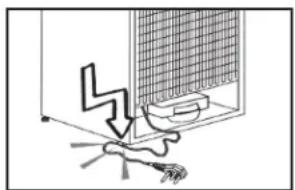
- Plug the product into a grounded socket protected by a fuse that corresponds to the value on its nameplate.
● Have a qualified electrician ground the product.
natural_image
Diagram of a ceiling-mounted device with a lightning bolt and base mount (no text or symbols)Our company cannot be held responsible for damages resulting from a failure to use the product with a grounded socket pursuant to local regulations.
● Unplug the product when not in use.
● Never wash the product by spreading or pouring water onto it!
Risk of electric shock!
● Never touch the plug with wet hands!
● Never unplug the product by pulling the cable.
● Always pull the plug by holding the socket.
- Do not plug in the refrigerator if the wall socket is loose.
● Never connect your refrigerator to energy-saving devices.
● Such systems are harmful to your product.
● Unplug the product during installation, care, cleaning, and repairs.
● Always have the authorized service center install the product and establish its electrical connections.
The manufacturer cannot be held responsible for damages caused by procedures performed by unauthorized persons.
IMPORTANT SAFETY AND ENVIRONMENTAL INSTRUCTIONS
- Do not eat ice cream or ice cubes immediately after you take them out of the freezer compartment!
- This may cause frostbite in your mouth!
- Do not touch frozen food with wet hands! They may stick to your hand!
- Do not put bottled or canned liquid beverages in the freezer compartment.
- They may burst!
- Never use steam or steam cleaners to clean or defrost the refrigerator.
Steam gets into contact with the live parts in your refrigerator, causing a short circuit or electric shock!
- Do not use mechanical devices or other means to accelerate the defrosting process, other than those recommended by the manufacturer.
- Never use the parts in your refrigerator such as the door and drawer as a means of a support or step.
- This may cause the product to tip over or damage its parts.
- Do not damage the parts where the refrigerant circulates with drilling or cutting tools.
- The refrigerant that might blow out if the gas channels of the evaporator, pipe extensions, or surface coatings are punctured causes skin irritations and eye injuries.
- Do not cover or block the ventilation holes in your refrigerator with any object.
- Place high-proof beverages vertically with tightly closed caps.
- Do not use gaseous sprays near the product, as they pose a risk or fire or explosion!
- Flammable items or products that contain flammable gases (e.g. spray) as well as explosive materials should never be kept in the product.
- Do not place vessels filled with liquid on the product. Splashing water on an electrical part may cause electric shock or the risk of fire.
- Do not store items that need precise temperature adjustment (such as vaccines, heat-sensitive medication, science materials etc.) in the refrigerator.
- If you are not going to use the product for a long time, unplug it and remove the food in it.
- If there is a blue light on the refrigerator, do not look at it with optical tools.
● Exposing the product to rain, snow, sun, or wind poses an electrical safety hazard.
- In products with a mechanical control (thermostat), wait for 5 minutes to plug in the product again after unplugging.
- Do not overload the refrigerator. Objects in the refrigerator may fall when the door is opened, causing injury or damage.
- Similar problems may arise if any object is placed on the product.
IMPORTANT SAFETY AND ENVIRONMENTAL INSTRUCTIONS
- If the product has a door handle, do not pull the handle when relocating it.
- The handle might be loose.
- Be careful not to jam your hand or any other body part in the moving parts of the refrigerator.
- Do not put your hand or any other foreign materials into the ice machine while it is operating.
1.2 Intended use
- This product has been designed for domestic use. It is not suitable for commercial use, and it must not be used outside of its intended use.
- It may only be used for storing food.
- The manufacturer will not assume any responsibility for damages resulting from improper use or transport.
● Original spare parts will be available for 10 years after the purchase date of the product.
1.3 Child safety
- If there is a lock on the door of the product, the key should be kept out of the reach of children.
- Do not let children play with the product.
A
DANGER
Before disposing of your old refrigerator or freezer:
● Children may get locked inside.
- Remove the doors.
- Leave the shelves to prevent children from getting inside the product easily.
1.4 Compliance with the WEEE Directive and disposing of waste equipment:
This product conforms to the EU WEEE Directive (2012/19 EU).
This product bears a classification symbol for waste electrical and electronic equipment (WEEE).
This product has been manufactured from high quality parts and materials which can be reused and are suitable for recycling.
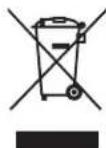
Therefore, do not dispose of the product with normal domestic waste or other waste at the end of its service life.
Take it to a collection center for recycling electrical and electronic equipment.
Please consult local authorities to learn about the locations of such a collection center.
IMPORTANT SAFETY AND ENVIRONMENTAL INSTRUCTIONS
1.5 Compliance with the RoHS Directive:
The product you have purchased conforms to the EU RoHS Directive (2011/65/AB).
It contains no harmful or prohibited materials specified in the directive.
1.6 Packaging information
- The packaging materials for this product have been manufactured from recyclable materials in accordance with national environmental regulations.
- Do not dispose of the packaging materials with normal domestic waste or other types of waste.
● Take these materials to a recycling point designated by local authorities.
A
DANGER
Risk of fire or explosion:
● This product uses flammable refrigerant.
- Do not use mechanical devices to defrost the refrigerator.
- Do not use chemicals for cleaning.
- Do not pierce the refrigerant pipe.
- If the refrigerant pipe is pierced, it must be repaired only by licensed service personnel.
- Please consult the repair/user manual before cleaning the product.
All safety instructions must be followed.
- Dispose of the product according to federal or local regulations.
1.7 Hydrocarbon (HC) warning
- If your product's cooling system contains R600a:
- This gas is flammable.
- Therefore, pay attention not to damage the cooling system or the piping during use and transportation.
- If damaged, keep the product away from potential fire sources that may cause it to catch fire and ventilate the room where the product is placed.
IMPORTANT SAFETY AND ENVIRONMENTAL INSTRUCTIONS
C
If the product is damaged and if you see gas leak, please keep away from the gas. It may cause frostbite when it comes into contact with the skin. (including R600a)
C
Ignore this warning if the cooling system of your product contains R134a.
C
The type of gas used in the product is stated on the nameplate, which is on the left wall inside the refrigerator.
A
WARNING
Never throw the product into fire for disposal.
1.8 For products with a water dispenser / ice machine
● The operating pressure for cold water inlet is between 1–5.5 bar.
- If the water pressure exceeds 80 psi / 5.5 bar, install a pressure limiting valve in your supply system.
- If the supply pressure is lower than 1 bar, you can use an auxiliary pump to compensate the low pressure.
- If you do not know how to check the water pressure, please consult a professional plumber.
- If there is a risk of water hammer in your installation, always use a water hammer protection device in that installation.
- Please consult a professional plumber if you are not sure if there is water hammer in your installation.
- Do not make any installation on the hot water inlet.
● Take the necessary measures to avoid the risk of the hoses freezing.
● The water temperature operating range must be min. 33 °F / 0.6 °C and max. 100 °F / 38 °C .
A
WARNING
Never connect the product to a cold water supply with a pressure of 80 psi / 5.5 bar or higher.
REFRIGERATOR COMPONENT LIST
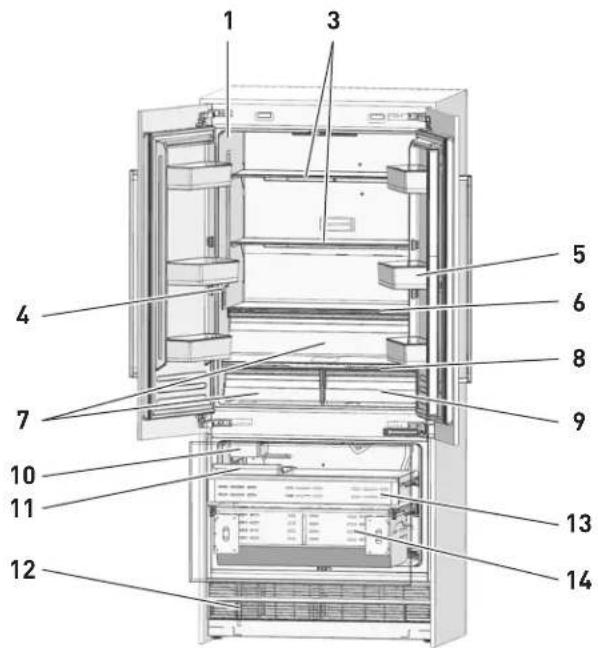
- Water filter (if applicable)
- Door bin
- Body shelf (adjustable height)
- Water dispenser
- Gallon door bin (adjustable height)
- Odor filter
-
Crisper
-
Control display
- Special temperature compartment
- Ice machine (if applicable)
- Ice box (in high-spec models)
- Condenser
- Upper drawer
- Lower drawer
May not be present in all models.
C
The figures in this user manual are schematic and may not match the product exactly. If your product does not have the corresponding parts, the information applies to other models.
DISPLAY PANEL SETUP INSTRUCTIONS
May not be present in all models.
C
The figures in this user manual are schematic and may not match the product exactly. If your product does not have the corresponding parts, the information applies to other models.
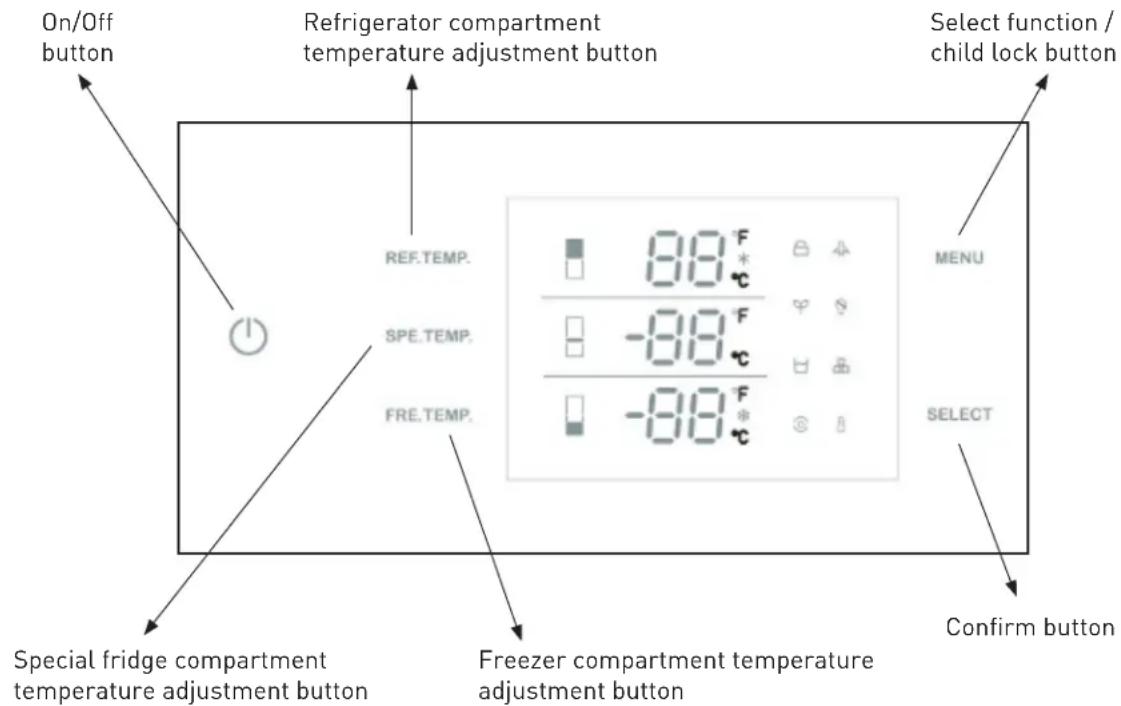
3.1 On/Off button
Serves to switch the whole product on and off. Press the button to switch on the product; the product switches on in 5 seconds. Press the on/off button for 1.5 seconds to switch off the product.
3.2 Select function / child lock button
The child lock is a safety feature to prevent children from changing the product settings. Press the MENU button for 3 seconds to lock/unlock the control panel.
The lock symbol will light up on the display when this function is enabled.
3.3 Refrigerator compartment temperature adjustment button
Press the REF TEMP button to adjust the temperature between 36 °F / 2 °C and 46 °F / 8 °C.
The best temperature for the fresh food compartment is 39 °F / 4 °C .
DISPLAY PANEL SETUP INSTRUCTIONS
3.4 Special fridge compartment temperature adjustment button
Press the SPE TEMP button to adjust the special fridge compartment temperature between 30 °F / -1 °C and 41 °F / 5 °C .
3.5 Freezer compartment adjustment button
Press the FRE TEMP button to adjust the freezer compartment temperature between 5 °F / -15 °C and -11 °F / -24 °C.
* The super freezing function will be enabled if you press the button after -11 °F / -24 °C. When the snow symbol lights up on the display, the super freezer function is enabled.
NOTE: The defaulted temperature setting is 41 °F / 5 °C for the fridge compartment, 36 °F / 2 °C for the special fridge compartment, and 0 °F / -18 °C for the freezer compartment.
3.6 Holiday mode

Press the MENU button until the Holiday symbol lights up, then press the SELECT button to enable the function.
When Holiday mode is enabled, the fridge temperature is automatically set at 63 °F / 17 °C and the freezer temperature at 0 °F / -18 °C .
NOTE: Do not place food in the fresh food compartment when holiday mode is enabled.
3.7 Sabbath mode

Press the MENU button until the Sabbath mode symbol lights up, then press the SELECT button to enable the function.
When Sabbath mode is enabled, all lights, buzzers, and display panels are switched off.
3.8 Eco mode

Press the MENU button until the Eco mode lights up, then press the SELECT button to enable the function.
When Eco mode is enabled, the fridge temperature is automatically set at 46 °F / 8 °C and the freezer temperature at 5 °F / -15 °C .
3.9 Water dispenser (if applicable)

Press the MENU button until the water dispenser symbol lights up, then press the SELECT button to enable the function.
When the water dispenser is enabled, the dispenser fitted on the internal wall provides fresh water.
DISPLAY PANEL SETUP INSTRUCTIONS
3.10 Ice maker (if applicable)

Press the MENU button until the ice maker symbol lights up, then press the SELECT button to enable the function.
When the ice maker is enabled, the ice maker operates automatically and ice cubes accumulate in the ice tray.
NOTE: Prepare the water filter for use before using the ice. After connecting the refrigerator to a water source or replacing the water filter, fill and discard two full containers of ice.
3.11 Water filter replacement (if applicable)

The water filter symbol flashes and beeps to advise you to replace the water filter.
When you are finished, press and hold the SELECT button for 5 seconds to reset.
The preset replacement time is 130 days.
3.12 Celsius and Fahrenheit selection

Press the MENU button until the Celsius and Fahrenheit selection symbol lights up to change between Celsius and Fahrenheit. Press the SELECT button to confirm.
4.1 Things to do to save energy

Connecting your refrigerator to energy-saving systems is dangerous, as they may cause damage to the product.
- Do not leave the doors of your refrigerator open for a long time.
- Do not put hot food or drinks in your refrigerator.
- Do not overload the refrigerator. Refrigeration performance will decrease if air circulation inside the refrigerator is obstructed.
- Do not place the refrigerator in direct sunlight.
- Install the product at least 30 cm away from heat sources such as hobs, ovens, heater units, and stoves and at least 5 cm away from electrical ovens.
- Store your food in closed containers in the refrigerator.
- You can remove the drawer shelf of the freezer compartment to fill the freezer compartment with the maximum amount of food.
- The stated energy consumption value of the refrigerator was determined with the freezer compartment shelf or drawer removed and the refrigerator filled with the maximum amount of food.
● Shelves and drawers can be used according to the shapes and sizes of food to be frozen.
● Thawing frozen food in the freezer compartment saves energy and preserves the quality of the food.
C
The temperature of the room where your refrigerator is located should be at least 50 °F / 10 °C . Operating your refrigerator in cooler conditions is not recommended for efficiency.
C
The inside of your refrigerator must be thoroughly cleaned.
C
If you want to install two refrigerators side by side, there should be at least 4 cm space between them.
4.2 Recommendations for the fresh food compartment
● Make sure the food does not touch the temperature sensor in the fresh food compartment.
- In order for the fresh food compartment to maintain its ideal storage temperature, the sensor must not be obstructed by food.
- Do not place hot foods or beverages inside the product.
4.3 Initial use
- Before using the product, make sure that all preparations have been made according to the instructions in the “Important safety and environmental instructions” and “Installation instructions” sections.
- Clean the interior of the refrigerator as recommended in the "Maintenance and cleaning" section.
● Before you start the refrigerator, make sure that the interior is dry. - Plug the refrigerator in to a grounded socket. The interior illumination lights up when the door of the refrigerator is opened.
- Operate the refrigerator for 6 hours without placing any food in it, and do not open its door unless it is necessary.
You will hear a noise when the compressor starts up. The liquids and gases contained in the cooling system may also make noise even when the compressor is not running, which is normal.
C
The front of the refrigerator may feel warm. This is normal. These areas are designed to be warm to avoid condensation.
OPERATING THE PRODUCT
5.1 Dual cooling system
- Your refrigerator is equipped with two separate refrigeration systems to refrigerate the fresh food compartment and freezer compartment.
- This ensures that the air and odors in the fresh food compartment and the frozen food compartment are not mixed.
● Thanks to this design, the refrigerating speed is much higher than that of other refrigerators. - In addition, energy is saved because defrosting is done separately.
5.2 Freezing fresh food
- Wrap food or place it in a covered container before putting it in the refrigerator.
- Allow hot food and beverages to cool to room temperature before placing them in the refrigerator.
● Food that you want to freeze must be fresh and of good quality. - Divide the food into portions according to your family's daily or meal-based consumption needs.
● Package food airtight to keep it from drying out, even if it is only going to be stored for a short time.
● Materials used for packaging must be resistant to tearing, cold, moisture, odors, oils and acids, and must be airtight. - In addition, they must be well sealed and made of easy-to-handle materials suitable for freezers.
● Frozen food must be used immediately after thawing and should never be refrozen. - Do not freeze too large quantities of food at once.
- The quality of the food is best preserved when it is frozen right through to the core as quickly as possible.
- Placing warm food in the freezer causes the cooling system to work continuously until the food is frozen solid.
OPERATING THE PRODUCT
5.3 Recommendations for storing frozen food
- The frozen food you purchase must be stored under the conditions and at the temperatures specified by the food manufacturer.
-
To ensure that the high quality achieved by the frozen food manufacturer and the food retailer is maintained, follow these guidelines:
-
Place packages in the freezer as soon as possible after purchase.
- Make sure the contents of the package are labeled and dated.
- Check that the "Use by" or "Best before" date on the package has not expired.
5.4 Food storage
| Freezer compartment shelves Various frozen food such as meat, fish, ice cream, vegetables etc. | |
| Egg tray Eggs | |
| Fridge compartment shelves Food in pans, covered plates, and closed containers | |
| Door shelves of fridge compartment Small and packaged food or beverages (such as milk, fruit juice, beer, etc.) | |
| Crisper Vegetables and fruits | |
| Special fridge compartment Deli products | (cheese, butter, salami, etc.) |
5.5 Operating temperature
| Freezer Fridge Notes | ||
| 0 °F / -18 °C 39 | °F / 4 °C This is the | recommended normal setting. |
| -4 °F / -20 °C | 37 °F / 3 °C | These settings are recommended when the ambient temperature is above 86 °F / 30 °C. |
| Quick freeze 39 | °F / 4 °C | Use when you wish to freeze the food in a short time. Your refrigerator will return to the previous mode when the process is over. |
| -11 °F / -24 °C | 35 °F / 2 °C | Use these settings if you think that your fridge compartment is not cold enough because of hot ambient conditions or frequent opening and closing of the door. |
| 0 °F / -18 °C or colder | Quick fridge | Use this function when you have too much food in the fridge compartment or when you need to refrigerate your food quickly. It is recommended that you activate the Quick fridge function 4–8 hours before storing food. |
Recommended operating temperature:
Fridge: 39 °F / 4 °C; Freezer: 0 °F / -18 °C
OPERATING THE PRODUCT
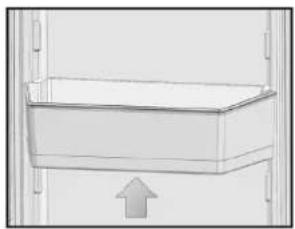
5.6 Door bin
To remove, lift the door bin up and then pull out straight.
5.7 Glass shelves
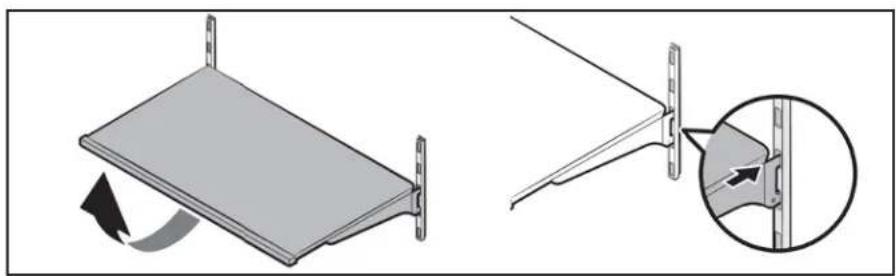
To remove a shelf:
- Fully open the corresponding door.
- Hold the front of the shelf and then gently lift up and slide out.
natural_image
Simple line drawing of a rectangular box with an upward arrow inside, no text or symbols present.To reinsert:
- Hold the shelf at an angle so the front is higher than the back and then insert the top hook into the top shelf notch.
- Put the front down slightly.
IMPORTANT NOTE:
Use care when handling glass shelves to prevent breakage or scratching the interior.
natural_image
Diagram showing a folding panel with rotation and a close-up of the blade structure (no text or symbols)
ATTENTION
Glass shelves must be unloaded.

ATTENTION
You must wait for the glass shelves to reach room temperature before immersing them in water for cleaning.

ATTENTION
The door may not close if the door shelves are positioned at the same level as the glass shelves. Make sure that the door is closed after inserting the shelves.
OPERATING THE PRODUCT
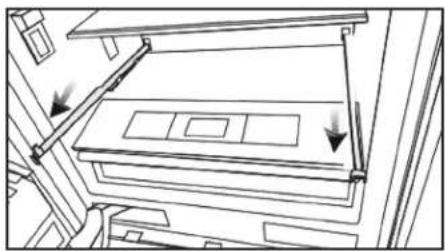
5.8 Crisper compartment
To remove the crisper:
- Pull the crisper until it stops.
- Slightly unclip the front section of the drawer and take it out completely.
To install the crisper:
- Pull the rails out all the way.
- Align the gap at the back corners of the crisper with the detail at the back corners of the rails.
- Push the crisper down slowly until you feel it clip front onto the rails.
natural_image
Diagram of a mechanical assembly with arrows indicating motion or force direction (no text or symbols)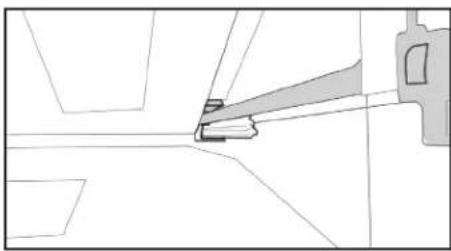
natural_image
Pure technical line drawing of a mechanical component without any text, numbers, or symbols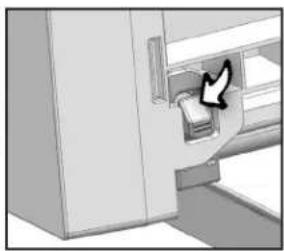
natural_image
Illustration of a hand inserting a card into a cabinet (no text or symbols visible)C
Make sure that the details on the right and left sides are fixed.
C
Never leave vegetables in their plastic bags in the crisper. If vegetables are left in their plastic bags, they will rot in a short period of time.
- The crisper compartment preserves the humidity of your vegetables, allowing you to store them for a long time without having to keep them in their bags. If you do not want the vegetables to come into contact with other vegetables for hygienic reasons, you can use perforated paper, foam, or a similar material instead of plastic bags.
- When changing the vegetables, their specific weights should be taken into account.
● Heavy and hard vegetables should be placed at the bottom of the crisper, and light and soft vegetables on the top. - Pears, kiwis, tomatoes, cucumbers, apricots, peaches, broccoli, lettuce, cabbage, parsley, and spinach are fruits and vegetables that emit ethylene gas.
- Do not put them in the same crisper as other fruits and vegetables.
- The ethylene gas emitted by these foods causes other fruits and vegetables to ripen faster and spoil more quickly.
- Do not remove the crisper body from the refrigerator unless necessary.
OPERATING THE PRODUCT
5.9 Special fridge compartment
You can control the temperature in this compartment to keep food such as fish, meat, vegetables, and deli meats fresh for a long time.

The removal/installation procedure for the special refrigerator compartment is the same as for the crisper.
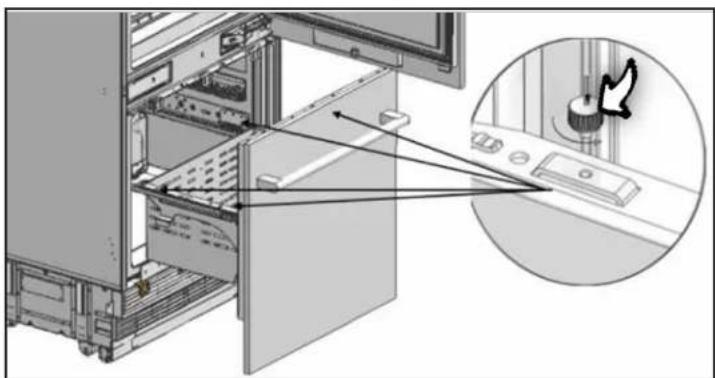
5.10 Freezer crisper
The freezer compartment stores your food at a temperature between -11 °F / -24 °C and 0 °F / -18 °C to keep it fresh for a long time.
To remove the crisper:
- Open the freezer door until it stops.
- Unscrew the drawer fixing screw and take it out carefully.
To install the crisper:
- Open the freezer door until it stops.
- Push the crisper down slowly and screw in the drawer fixing screw.
natural_image
Diagram of a computer tower internal structure with an inset showing a dial and mouse pointer (no text or symbols)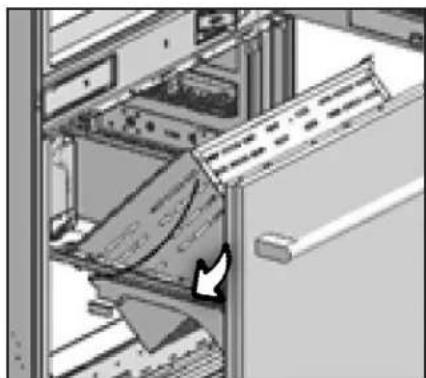
natural_image
Interior view of a server rack with a door handle and internal compartments (no visible text or symbols)CARE AND CLEANING
● Regular cleaning will extend the life of the product and reduce common problems.
● Never use gasoline, benzene, or similar substances for cleaning.
- Never use sharp abrasive tools, soap, household cleaners, detergents, or wax polish to clean the product.
- Dissolve one teaspoon of baking soda in one-half pint of water. Soak a cloth in the solution and wring thoroughly. Wipe the inside of the refrigerator with the cloth and dry thoroughly.
- Be careful not to allow water to enter the lamp housing or other electrical parts.
- For extended periods of disuse, unplug the refrigerator, remove all food inside, clean it, and leave the door ajar.
- Check regularly that the door gaskets are clean. If they are not clean, clean them.
- Remove all items from the product to remove the door and body shelves.
- Remove the door shelves by pulling them up. Slide the shelves down to reinstall them after cleaning.
- Never use chlorine-based cleaners or water to clean the exterior or chrome-plated parts of the product. Chlorine causes abrasion on metal surfaces.
6.1 Avoiding bad odors
- No odor-causing materials are used in the manufacture of our refrigerators. However, odors may be emitted if food is stored improperly or if the interior surface of the product is not cleaned as required. Please consider the following to avoid this problem:
- It is important to keep the refrigerator clean.
● Food residue, stains, etc. can cause odors. - For this reason, clean your refrigerator every 15 days with baking soda dissolved in water.
● Never use detergent or soap. - Keep your foods in closed containers. Microorganisms released from uncovered containers can cause unpleasant odors.
● Never store expired or spoiled food in your refrigerator.
6.2 Protecting the plastic surfaces
- Do not place liquid oils or oil-cooked foods in your refrigerator in unsealed containers as they will damage the plastic surfaces of your refrigerator.
- If oil is spilled or smeared on the plastic surfaces, clean and rinse the area immediately with warm water.
B
⚠ WARNING Switch off the product before cleaning.
B
WARNING It is recommended to clean the condenser with gloves every six months. Do not use a vacuum cleaner.
6.3 Cleaning the interior surfaces
- To clean the interior surfaces and all removable parts, wash them with a mild solution of soap, water, and baking soda.
● Rinse and dry thoroughly. - Do not allow the water to come into contact with the light source or control panel.
6.4 Stainless steel exterior surfaces
- Use a non-abrasive stainless steel cleaner and apply with a lint-free, soft cloth.
● To polish, gently wipe the surface with a damp microfiber cloth and use a dry wash leather.
● Always follow the grain of the stainless steel.
A
⚠️ ATTENTION Do not use vinegar, rubbing alcohol, or other alcohol-based cleaners on the interior surfaces.
TROUBLESHOOTING
Please review this list before calling for service.
This will save you time and money.
This list includes common problems that are not the result of faulty workmanship or materials.
Your product may not have some of the features described here.
The refrigerator is not working.
- It may not be plugged in properly.
Plug in the product properly.
● The fuse for the socket where your refrigerator is plugged in or the main fuse may have blown.
Check the fuse.
There is condensation on the fridge compartment.
● The door may have been opened/closed frequently.
Do not open/close the refrigerator door frequently.
● The environment may be too humid.
Do not install the refrigerator at locations with a very high level of humidity.
● Food containing liquid may have been placed in the refrigerator in uncovered containers.
Do not place food containing liquid in unsealed containers in the refrigerator.
● The door of the refrigerator may have been left ajar.
Do not keep the door of your refrigerator open for a long time.
The compressor is not working.
- Sudden power failure or unplugging may cause the compressor's safety thermostat to blow because the refrigerant pressure in the cooling system has not yet equalized.
- The refrigerator will start running after approximately 6 minutes. Please call the authorized service center if the refrigerator does not start after this period has elapsed.
● The freezer is in a defrosting cycle.
This is normal for a refrigerator with a fully automatic defrost function.
TROUBLESHOOTING
Defrosting cycle is performed periodically.
● The refrigerator may not be plugged in.
Make sure that the plug fits the socket.
● The temperature settings may be incorrect.
Select the correct temperature value.
- Possible power failure.
The refrigerator will start to operate normally when power restores.
The operating noise gets louder when the refrigerator is running.
- The refrigerator's operating performance may vary depending on ambient temperature changes.
This is normal and not a fault.
There is vibration or noise.
● The floor may not be stable or level.
If the refrigerator shakes when moved, slightly adjust the feet to balance it. Make sure the floor is level and can support the refrigerator.
- Objects placed on the refrigerator may cause noise.
Remove any objects from the refrigerator.
There are noises coming from the refrigerator such as liquid spilling or spraying.
● Due to the way the refrigerator works, liquids and gases flow inside it.
This is normal and not a fault.
The refrigerator is emitting a whistling sound.
● There are fans that are used to cool the refrigerator.
This is normal and not a fault.
TROUBLESHOOTING
Moisture accumulates on the inside walls of the refrigerator.
● Hot and humid weather increases icing and condensation.
This is normal and not a fault.
● The door may have been opened frequently or left ajar for a long time.
Do not open the door frequently. Close the door if it is open.
● The door may have been left ajar.
Close the door completely.
Moisture accumulates on the outside of the refrigerator or between the doors.
● The air might be humid. This is normal in humid weather.
Condensation will disappear as the humidity decreases.
- If you use your product infrequently, there may be external condensation in the area between the two refrigerator doors.
This is normal. The condensation will disappear with frequent use.
There is an unpleasant odor inside the refrigerator.
● The refrigerator may not have been cleaned regularly.
Clean the inside of the refrigerator with a sponge and lukewarm water or water with baking soda.
- Some containers or packaging materials may be causing the odor.
Use another container or packaging materials from another brand.
● Food may have been placed in the refrigerator in uncovered containers.
Store food in covered containers.
- Microorganisms released from uncovered containers can cause unpleasant odors.
Take out expired or spoiled food from your refrigerator.
TROUBLESHOOTING
The door does not close.
● Food packaging may be preventing the door from closing.
Relocate any packaging obstructing the door.
● The refrigerator may be unstable on the floor.
Adjust the refrigerator feet as required to balance the refrigerator.
● The floor may not be level or solid.
Make sure the floor is level and can support the refrigerator.
The crispers are stuck.
● Food may be touching the upper wall of the crisper.
Rearrange the food in the crisper.
A
WARNING
If the problem persists after following the instructions in this section, contact your dealer or the authorized service center.
Never attempt to repair a malfunctioning product.
natural_image
Diagram of a window with a lightning bolt and a magnifying glass, no text or symbols presentnatural_image
Simple line drawing of a rectangular box with an upward arrow, no text or symbols presentnatural_image
Diagram showing a folding panel with rotation and a close-up of the cable attachment (no text or symbols)
ATTENTION
natural_image
Diagram of a mechanical assembly with arrows indicating direction (no text or symbols)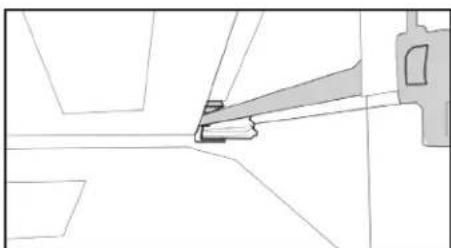
natural_image
Pure technical line drawing of a mechanical component without any text, numbers, or symbols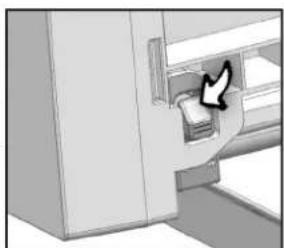
natural_image
Illustration of a hand inserting a card into a refrigerator (no text or symbols visible)UTILISATION DU PRODUIT
C
natural_image
Diagram of a computer tower internal structure with an inset showing a close-up of the door handle (no text or symbols present)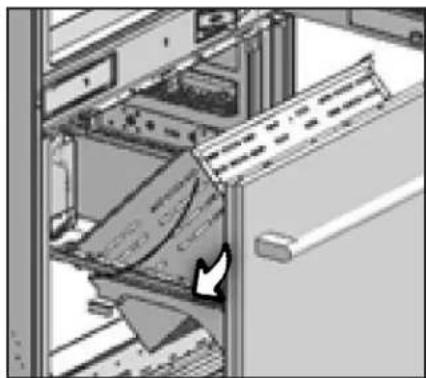
natural_image
Interior view of a server rack with ventilation ducts and a door handle (no visible text or symbols)ENTRETIEN ET NETTOYAGE
natural_image
Diagram of a mechanical or electrical component with a zigzag line and a magnified view of a grid structure (no text or symbols)natural_image
Simple line drawing of a rectangular container with an upward arrow, no text or symbols presentnatural_image
Diagram showing a folding panel with rotation and a close-up of the cable attachment (no text or symbols)
ATENCIÓN
natural_image
Architectural line drawing of a multi-level building with structural elements and directional arrows indicating movement (no text or symbols)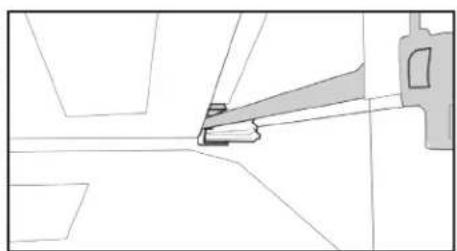
natural_image
Pure technical line drawing of a mechanical component without any text, numbers, or symbols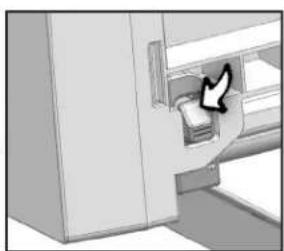
natural_image
Illustration of a hand inserting a card into a door (no text or symbols visible)natural_image
Diagram of a computer tower internal structure with an inset showing a close-up of the door handle (no text or symbols present)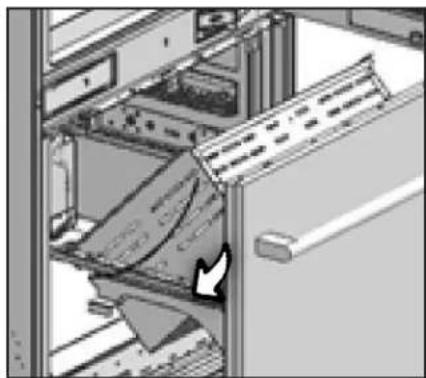
natural_image
Interior view of a server rack with ventilation ducts and a door handle (no visible text or symbols)CUIDADO Y LIMPIEZA
You chose THOR Kitchen to enhance your culinary journey and we're stoked to have you in the club. Think of it as a secret society of really savvy people, such as yourself, choosing professional power and performance at an affordable price.

Register your product by following the steps below.
WARRANTY REGISTRATION
Scan the QR code or visit thorkitchen.com/warranty
Input your product info and select register
You're done. Let's get cookin'.
WARRANTY NEED PARTS?


- Please read this manual before using the product!
- This manual will help you use your product in a fast and safe way.
- TABLE OF CONTENTS
- IMPORTANT SAFETY AND ENVIRONMENTAL INSTRUCTIONS 5
- REFRIGERATOR COMPONENT LIST 10
- DISPLAY PANEL SETUP INSTRUCTIONS 11
- BEFORE USING THE REFRIGERATOR 13
- OPERATING THE PRODUCT 15
- CARE AND CLEANING 20
- TROUBLESHOOTING 22
- IMPORTANT SAFETY AND ENVIRONMENTAL INSTRUCTIONS
- General safety
- Risk of electric shock!
- Intended use
- Child safety
- A
- DANGER
- Compliance with the WEEE Directive and disposing of waste equipment:
- Compliance with the RoHS Directive:
- Packaging information
- Hydrocarbon (HC) warning
- For products with a water dispenser / ice machine
- REFRIGERATOR COMPONENT LIST
- C
- DISPLAY PANEL SETUP INSTRUCTIONS
- On/Off button
- Select function / child lock button
- Refrigerator compartment temperature adjustment button
- Special fridge compartment temperature adjustment button
- Freezer compartment adjustment button
- Holiday mode
- Sabbath mode
- Eco mode
- Water dispenser (if applicable)
- Ice maker (if applicable)
- Water filter replacement (if applicable)
- Celsius and Fahrenheit selection
- Things to do to save energy
- Recommendations for the fresh food compartment
- Initial use
- OPERATING THE PRODUCT
- Dual cooling system
- Freezing fresh food
- Recommendations for storing frozen food
- Food storage
- Operating temperature
- Door bin
- Glass shelves
- To remove a shelf:
- To reinsert:
- IMPORTANT NOTE:
- ATTENTION
- Crisper compartment
- To remove the crisper:
- To install the crisper:
- Special fridge compartment
- Freezer crisper
- CARE AND CLEANING
- Avoiding bad odors
- Protecting the plastic surfaces
- Cleaning the interior surfaces
- Stainless steel exterior surfaces
- TROUBLESHOOTING
- The refrigerator is not working.
- There is condensation on the fridge compartment.
- The compressor is not working.
- Defrosting cycle is performed periodically.
- The operating noise gets louder when the refrigerator is running.
- There is vibration or noise.
- There are noises coming from the refrigerator such as liquid spilling or spraying.
- The refrigerator is emitting a whistling sound.
- Moisture accumulates on the inside walls of the refrigerator.
- Moisture accumulates on the outside of the refrigerator or between the doors.
- There is an unpleasant odor inside the refrigerator.
- The door does not close.
- The crispers are stuck.
- WARNING
- UTILISATION DU PRODUIT
- ENTRETIEN ET NETTOYAGE
- ATENCIÓN
- CUIDADO Y LIMPIEZA
- WARRANTY REGISTRATION
Brand : Thor
Model : XRF3619BFP
Category : Refrigerator