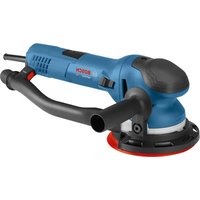
GET75-6 Professional - Sander BOSCH - Free user manual and instructions
Find the device manual for free GET75-6 Professional BOSCH in PDF.


| Product Type | Random Orbital Sander |
| Brand | Bosch |
| Model | GET75-6 Professional |
| Rated Voltage | 120 V ~ 60 Hz |
| Rated Current | 7.5 A |
| Orbital Speed (No Load) | 3,100 – 7,200 rpm |
| Backing Pad Speed | 273 – 635 rpm |
| Disc Diameter | 150 mm (6 in) |
| Abrasive Diameter | 150 mm (6 in) |
| Weight (approx.) | 2.3 kg |
| Power Source | Corded (Mains) |
| Main Functions | Sanding, polishing, buffing |
| Operating Modes | Turbo (aggressive) and random orbital (non-aggressive) |
| Speed Control | 6 positions (1 = slow, 6 = fast) |
| Safety Features | Double insulation, slide switch, soft start (CRE) |
| Included Accessories | Auxiliary handle, medium backing pad, 5 mm hex key, dust extraction tube |
| Dust Extraction | Compatible with a vacuum (antistatic tube) |
| Supplied Backing Pad | Medium (suits general applications) |
| Maintenance | Gear lubrication, brush replacement every 2 to 6 months, bearing replacement after 300-400 h |
| Warranty | 1 year (parts and labor) |
| Standards | UL, CSA, NOM approvals |
Frequently Asked Questions - GET75-6 Professional BOSCH
User questions about GET75-6 Professional BOSCH
0 question about this device. Answer the ones you know or ask your own.
Ask a new question about this device
Download the instructions for your Sander in PDF format for free! Find your manual GET75-6 Professional - BOSCH and take your electronic device back in hand. On this page are published all the documents necessary for the use of your device. GET75-6 Professional by BOSCH.
USER MANUAL GET75-6 Professional BOSCH
IMPORTANT Read Before Using
IMPORTANT Lire avant usage
IMPORTANTE Leer antes de usar

Operating/Safety Instructions Consignes d'utilisation/de sécurité Instrucciones de funcionamiento y seguridad
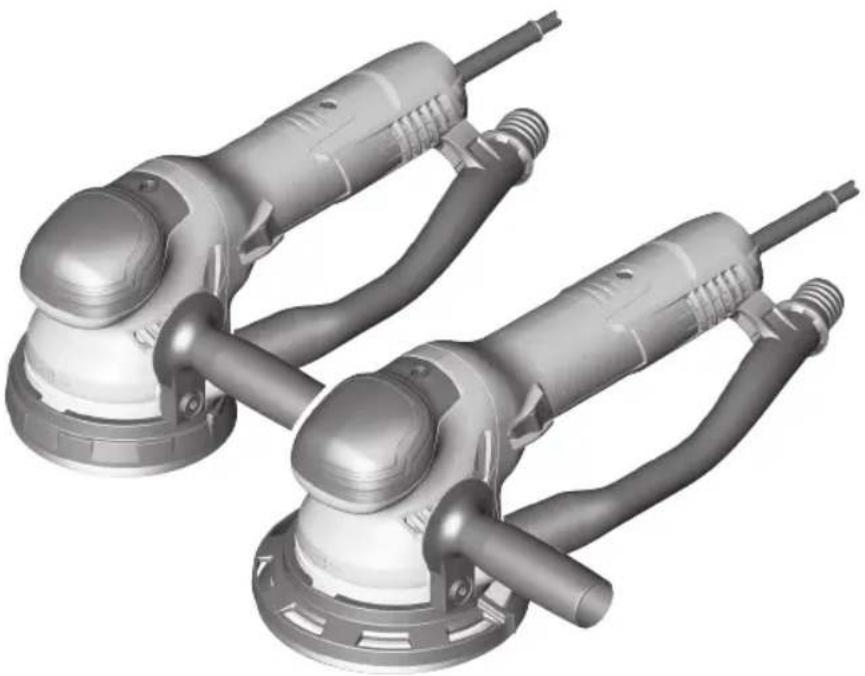
GET65-5 GET75-6

BOSCH
Call Toll Free for Consumer Information and Service Locations Pour obtenir des informations et les adresses de nos centres de service après-vente, appelez ce numéro gratuit Llame gratis para obtener información para el consumidor y ubicaciones de servicio
1-877-BOSCH99 (1-877-267-2499) www.boschtools.com
For English Version See page 2
| Safety SymbolsThe definitions below describe the level of severity for each signal word. Please read the manual and pay attention to these symbols. | |
| This is the safety alert symbol. It is used to alert you to potential personal injury hazards. Obey all safety messages that follow this symbol to avoid possible injury or death. | |
| DANGER indicates a hazardous situation which, if not avoided, will result in death or serious injury. | |
| WARNING indicates a hazardous situation which, if not avoided, could result in death or serious injury. | |
| CAUTION indicates a hazardous situation which, if not avoided, could result in minor or moderate injury. | |
General Power Tool Safety Warnings
WARNING
Read all safety warnings, instructions, illustrations and specifications provided with this power tool. Failure to follow all
instructions listed below may result in electric shock, fire and/or serious injury.
SAVE ALL WARNINGS AND INSTRUCTIONS FOR FUTURE REFERENCE
The term "power tool" in the warnings refers to your mains-operated (corded) power tool or battery-operated (cordless) power tool.
▶ Work area safety
Keep work area clean and well lit.
Cluttered or dark areas invite accidents.
Do not operate power tools in explosive atmospheres, such as in the presence of flammable liquids, gases or dust. Power tools create sparks which may ignite the dust or fumes.
Keep children and bystanders away while operating a power tool. Distractions can cause you to lose control.
▶ Electrical safety
Power tool plugs must match the outlet. Never modify the plug in any way. Do not use any adapter plugs with earthed (grounded) power tools. Unmodified plugs and matching outlets will reduce risk of electric shock.
Avoid body contact with earthed or grounded surfaces, such as pipes, radiators, ranges and refrigerators. There is an increased risk of electric shock if your body is earthed or grounded.
Do not expose power tools to rain or wet conditions. Water entering a power tool will increase the risk of electric shock.
Do not abuse the cord. Never use the cord for carrying, pulling or unplugging the power tool. Keep cord away from heat, oil, sharp edges or moving parts. Damaged or entangled cords increase the risk of electric shock.
When operating a power tool outdoors, use an extension cord suitable for outdoor use. Use of a cord suitable for outdoor use reduces the risk of electric shock.
If operating the power tool in damp locations is unavoidable, use a Ground Fault Circuit Interrupter (GFCI) protected supply. Use of an GFCI reduce the risk of electric shock.
▶ Personal safety
Stay alert, watch what you are doing and use common sense when operating a power tool. Do not use a power tool while you are tired or under the influence of drugs, alcohol or medication. A moment of inattention while operating power tools may result in serious personal injury.
Use personal protective equipment. Always wear eye protection. Protective equipment such as dust mask, non-skid safety shoes, hard hat, or hearing
General Power Tool Safety Warnings
protection used for appropriate conditions will reduce personal injuries.
Prevent unintentional starting. Ensure the switch is in the off-position before connecting to power source and / or battery pack, picking up or carrying the tool. Carrying power tools with your finger on the switch or energizing power tools that have the switch on invites accidents.
Remove any adjusting key or wrench before turning the power tool on. A wrench or a key left attached to a rotating part of the power tool may result in personal injury.
Do not overreach. Keep proper footing and balance at all times. This enables better control of the power tool in unexpected situations.
Dress properly. Do not wear loose clothing or jewelry. Keep your hair, clothing and gloves away from moving parts. Loose clothes, jewelry or long hair can be caught in moving parts.
If devices are provided for the connection of dust extraction and collection facilities, ensure these are connected and properly used. Use of dust collection can reduce dust-related hazards.
Do not let familiarity gained from frequent use of tools allow you to become complacent and ignore tool safety principles. A careless action can cause severe injury within a fraction of a second.
▶ Power tool use and care
Do not force the power tool. Use the correct power tool for your application.
The correct power tool will do the job better and safer at the rate for which it was designed.
Do not use the power tool if the switch does not turn it on and off. Any power tool that cannot be controlled with the switch is dangerous and must be repaired.
Disconnect the plug from the power source and/or remove the battery pack, if detachable, from the power tool before making any adjustments, changing accessories, or storing power tools. Such preventive safety measures reduce the risk of starting the power tool accidentally.
Store idle power tools out of the reach of children and do not allow persons unfamiliar with the power tool or these instructions to operate the power tool.
Power tools are dangerous in the hands of untrained users.
Maintain power tools and accessories. Check for misalignment or binding of moving parts, breakage of parts and any other condition that may affect the power tool's operation. If damaged, have the power tool repaired before use. Many accidents are caused by poorly maintained power tools.
Keep cutting tools sharp and clean.
Properly maintained cutting tools with sharp cutting edges are less likely to bind and are easier to control.
Use the power tool, accessories and tool bits etc. in accordance with these instructions, taking into account the working conditions and the work to be performed. Use of the power tool for operations different from those intended could result in a hazardous situation.
Keep handles and grasping surfaces dry, clean and free from oil and grease.
Slippery handles and grasping surfaces do not allow for safe handling and control of the tool in unexpected situations.
▶ Service
Have your power tool serviced by a qualified repair person using only identical replacement parts. This will ensure that the safety of the power tool is maintained.
Safety Rules for Orbital Sanders
Unplug the sander before changing accessories. Accidental start-ups may occur if sander is plugged in while changing an accessory.
If your tool is equipped with a dust bag, dust canister, or a vacuum hose dust port, empty the dust container frequently and after completion of sanding. Be extremely careful of dust disposal, materials in fine particle form may be explosive. Do not throw sanding dust on an open fire. Spontaneous combustion may, in time, result from mixture of oil or water with dust particles.
Always wear eye protection and a dust mask for dusty applications and when sanding overhead. Sanding particles can be absorbed by your eyes and inhaled easily and may cause health complications.
Use special precautions when sanding chemically pressure treated lumber, paint that may be lead based, or any other materials that may contain carcinogens. A suitable breathing respirator and protective clothing must be worn by all persons entering the work area. Work area should be sealed by plastic sheeting and persons not protected should be kept out until work area is thoroughly cleaned.
Do not wet sand with this sander. Liquids entering the motor housing is an electrical shock hazard.
Do not use PSA pad on random orbit sanders whose speed exceeds 12,000/min. Exceeding the maximum operating speed of pad may cause pad to rupture or fly apart during use striking user or bystanders.
Do not use sandpaper intended for larger sanding pads. Larger sandpaper will extend beyond the sanding pad causing snagging, tearing of the paper or kick-back. Extra paper extending beyond the sanding pad can also cause serious lacerations.
Clamp or secure workpiece when sanding. Clamping the workpiece prevents it from being ejected from under the sander and leaves both hands to control the tool.
Keep the cord away from the spinning pad and sandpaper. The cord can become entangled with the pad.
Additional Safety Warnings
GFCI and personal protection devices like electrician's rubber gloves and footwear will further enhance your personal safety.
Do not use AC only rated tools with a DC power supply. While the tool may appear to work, the electrical components of the AC rated tool are likely to fail and create a hazard to the operator.
Use clamps or other practical way to secure and support the workpiece to a stable platform. Holding the work by hand or against your body is unstable and may lead to loss of control.
Develop a periodic maintenance schedule for your tool. When cleaning a tool be careful not to disassemble any portion of the tool since internal wires may be misplaced or pinched or safety guard return springs may be improperly mounted. Certain cleaning agents such as gasoline, carbon tetrachloride, ammonia, etc. may damage plastic parts.
Risk of injury to user. The power cord must only be serviced by a Bosch Factory Service Center or Autho rized Bosch Service Station.
WARNING Some dust created by power sanding, sawing, grinding, drilling, and other construction activities contains chemicals known to cause cancer, birth defects or other reproductive harm. Some examples of these chemicals are:
- Lead from lead-based paints,
- Crystalline silica from bricks and cement and other masonry products, and
- Arsenic and chromium from chemically-treated lumber.
Your risk from these exposures varies, depending on how often you do this type of work. To reduce your exposure to these chemicals: work in a well ventilated area, and work with approved safety equipment, such as those dust masks that are specially designed to filter out microscopic particles.
Symbols
Important: Some of the following symbols may be used on your tool. Please study them and learn their meaning. Proper interpretation of these symbols will allow you to operate the tool better and safer.
| Symbol Designation / Explanation | |
| V Volts (voltage) | |
| Ah Amp hour (measurement of battery capacity) | |
| A Amperes (current) | |
| Hz Hertz (frequency, cycles per second) | |
| W Watt (power) | |
| kg Kilograms (weight) | |
| min Minutes (time) | |
| s Seconds (time) | |
| ∅ | Diameter (size of drill bits, grinding wheels, etc.) |
| n0 | No load speed (rotational speed at no load) |
| n Rated | speed (maximum attainable speed) |
| .../min | Revolutions or reciprocation per minute (revolutions, strokes, surface speed, orbits etc. per minute) |
| 0 Off position (zero speed, zero torque...) | |
| 1, 2, 3, ... I, II, III, | Selector settings (speed, torque or position settings. Higher number means greater speed) |
| 0 | Infinitely variable selector with off (speed is increasing from 0 setting) |
| → | Arrow (action in the direction of arrow) |
| ~ | Alternating current (type or a characteristic of current) |
| --- | Direct current (type or a characteristic of current) |
| ~ | Alternating or direct current (type or a characteristic of current) |
| ☐ | Class II construction (designates double insulated construction tools) |
| ⊕ | Earthing terminal (grounding terminal) |
Symbols
Important: Some of the following symbols may be used on your tool. Please study them and learn their meaning. Proper interpretation of these symbols will allow you to operate the tool better and safer.
| Symbol Designation / Explanation | |
 | Alerts user to read manual |
 | Alerts user to wear eye protection |
 | This symbol designates that this tool is listed by Underwriters Laboratories. |
 | This symbol designates that this component is recognized by Underwriters Laboratories. |
 | This symbol designates that this tool is listed by Underwriters Laboratories, to United States and Canadian Standards. |
 | This symbol designates that this tool is listed by the Canadian Standards Association. |
 | This symbol designates that this tool is listed by the Canadian Standards Association, to United States and Canadian Standards. |
 | This symbol designates that this tool is listed by the Intertek Testing Services, to United States and Canadian Standards. |
 | This symbol designates that this tool complies to NOM Mexican Standards. |
 | Designates Li-ion battery recycling program |
 | Designates Ni-Cad battery recycling program |
Functional Description and Specifications
WARNING
Disconnect the plug from the power source before making any assembly, adjustments or changing accessories. Such preventive safety
measures reduce the risk of starting the tool accidentally.
Random Orbit Sander/Polisher GET65-5, GET75-6
| Model number | GET65-5 GET75-6 | |
| Voltage rating | 120V~ 60Hz 120V~ 60Hz | |
| Amperage rating | 6.5A 7.5A | |
| Eccentric shaft speed | 3,100–7,200/min 3,100 | –7,200/min |
| Sanding disc speed | 188–436/min 273–635/min | |
| Pad diameter | 5" (125 mm) 6" (150 mm) | |
| Abrasive diameter | 5" (125 mm) 6" (150 mm) |
Assembly
WARNING
Disconnect the plug from the power
source before making any assembly, adjustments or changing accessories. Such preventive safety measures reduce the risk of starting the tool accidentally.
▶ Backing Pad Installation
The random orbit sander is equipped with a backing pad of medium hardness, which is suitable for general service. Harder and softer pads are available for other purposes, and in general are used as follows:
Soft pad – Polishing or sanding large or curved surfaces.
Medium pad - All purpose general sanding and polishing.
Hard pad - Heavy sanding on flat surfaces, especially with coarser abrasives.
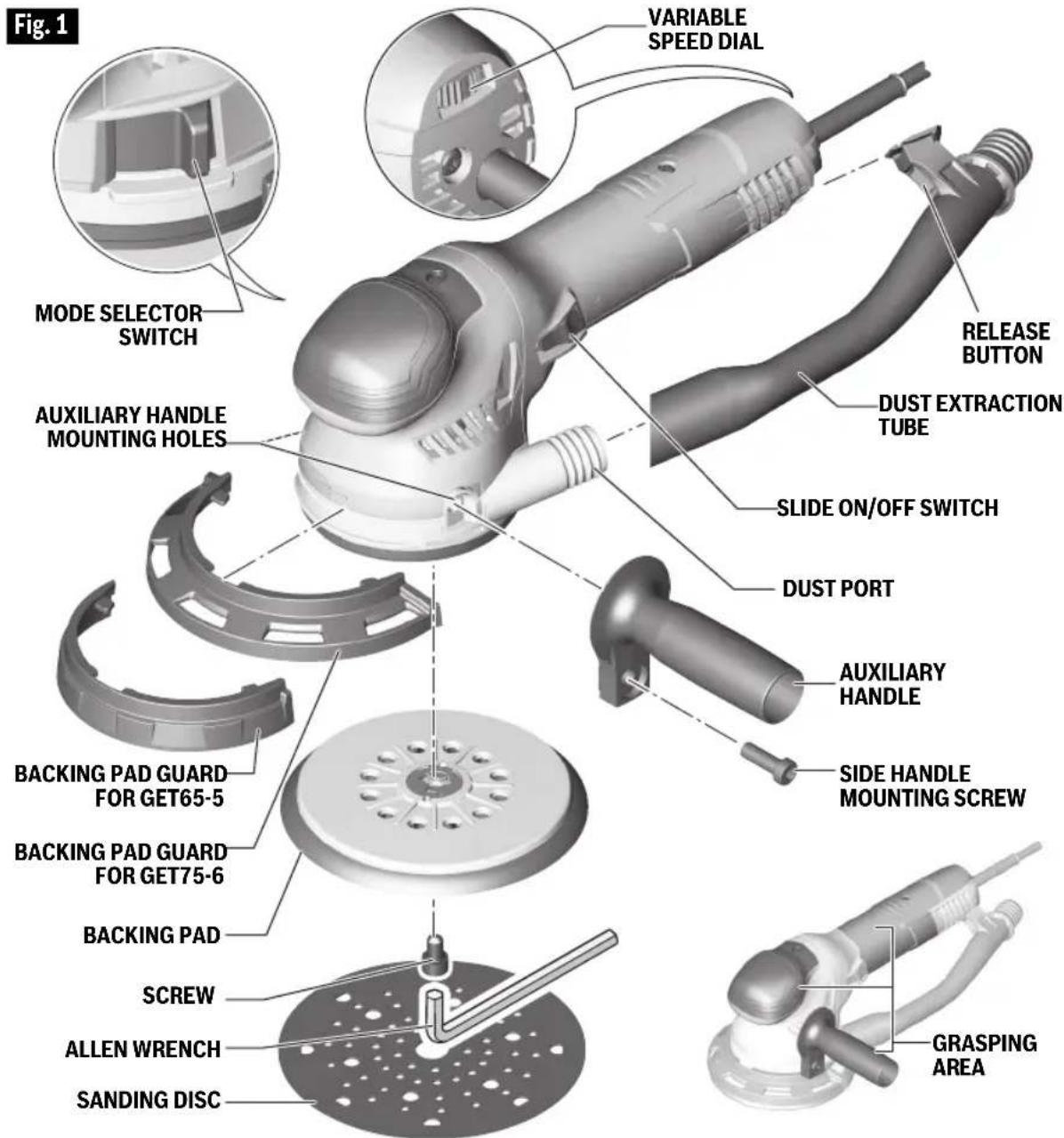
To change backing pad, hold pad firmly and turn screw counterclockwise with 5mm allen wrench provided. Remove old pad, and place new pad over locating pins on drive spindle. Replace screw and securely tighten in a clockwise direction with the allen wrench. Damaged or worn backing pads must be replaced immediately (Fig. 1).
▶ Backing Pad Guard
The guard protects the backing pad when sanding areas close to edges.
To install the guard, push the guard onto the power tool from the front until it audibly snaps in slots on the tool housing. To remove it, pull the guard forward by one end (Fig. 1).
▶ Auxiliary Handle
The auxiliary handle is used to guide and balance the tool. Use the auxiliary handle for safe control and ease of operation.
The auxiliary handle can be installed on either side of the tool, depending on per sonal preference and comfort. Install it as shown in Fig. 1 and secure with the screw using included 5mm allen wrench.
▶ Installing Accessories
The random orbit sander uses hook-and-loop backed accessories, which firmly grip the pad when applied with moderate pressure. To change the accessory, merely peel off the old accessory, remove dust from the pad if necessary, and press the new accessory in place. Be sure to align the sanding disc holes with the holes in the backing pad to allow the dust extraction system to function.
After considerable service the pad surface will become worn, and the pad must be replaced when it no longer offers a firm grip. If you are experiencing premature wearout of the pad facing, decrease the amount of pressure you are applying during operation of the tool.
▶ Dust Extraction
Your sander is equipped with a removable dust extraction tube which serves as the connector to the optional vacuum cleaner / dust extractor.
To attach the dust extraction tube, align the tube with the dust port and the "dove tail" interface with the slot on the tool housing near power cord. Push the tube until it clicks in place (Fig. 1)
To remove the tube, push the red release button and pull the tube away from the tool (Fig. 1).
Note: the dust extraction tube is made of antistatic material. To prevent an electrostatic charge from building on the tool, use an antistatic extraction hose (not included) with this tool.
▼ CONNECTION TO VACUUM CLEANER / DUST EXTRACTOR
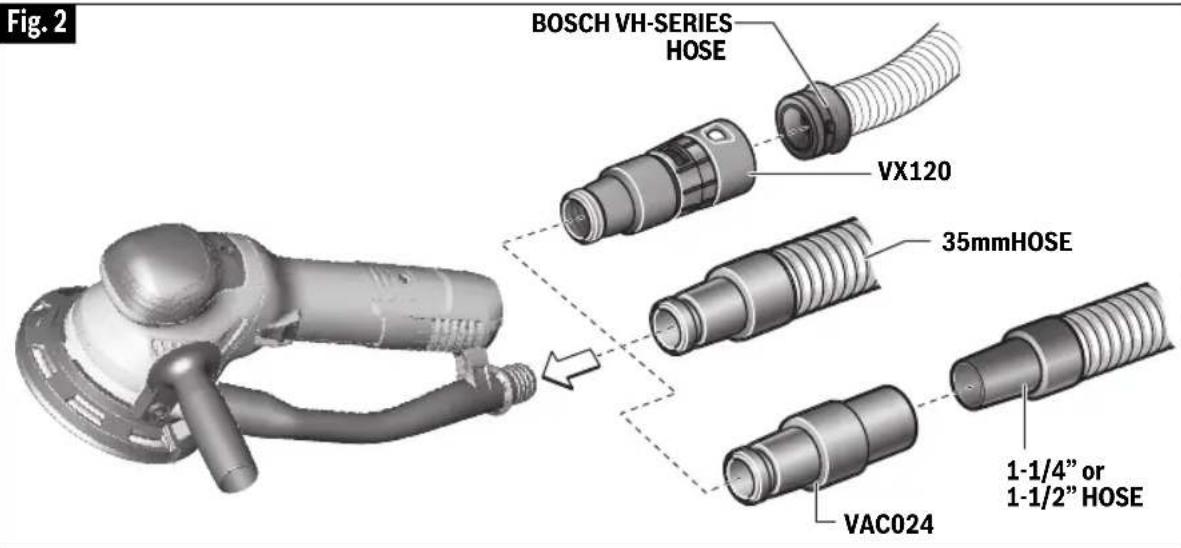
Connect the vacuum cleaner hose to the dust extraction tube (Fig. 2).
- Bosch VH-series hoses - The VX120 hose adapter is required (included with VH-series hoses).
- Other 35mm and 22mm hoses, such as the Bosch VAC-series hoses - Connect hose directly to the tool.
- Common 1/4" or 1½" hoses - The Bosch VAC024 adapter is required (included).
Assembly
Connect the vacuum hose to a vacuum cleaner.
The vacuum cleaner must be suitable for the material being worked on.
When vacuuming dry dust that is especially detrimental to health or carcinogenic, use a special vacuum cleaner / dust extractor.
Operating Instructions
▶ Slide On/Off Switch
WARNING
Hold the tool with both hands while
starting the tool, since torque from the motor can cause the tool to twist.
The tool is switched "ON" by sliding the switch button located at the side of the motor housing (Fig. 1).
To turn the tool "OFF", slide the switch button backward (Fig. 1).
Start the tool before applying to workpiece and let the tool come to full speed before contacting the workpiece. Lift the tool from the workpiece before turning the tool "OFF". DO NOT turn the switch "ON" and "OFF" while the tool is under load; this will greatly decrease the switch life.
▶ Mode Selector Switch
Your tool is equipped with a mode selector switch which allows you change the removal performance of your sander.
To change operating modes, press mode selector release button and turn switch until you hear it latch near desired operating symbol.
WARNING
To prevent personal injury, do not change
the mode selector switch while the sander is in operation.

Operating Mode 1 (Turbo sanding mode for aggressive sanding).
This operating mode is recommended for fast material removal on very rough surfaces as well as
for buffing.
The orbit of the pad is driven by the motor, while the rotation of the pad is driven by gearing.

Operating Mode 2
(Random orbit sanding mode for non-aggressive sanding).
This operating mode is
recommended for less durable surfaces as well as for fine polishing.
The orbit of the pad is driven by the motor, while the rotation of the pad is caused by a combination of forces, including the free-wheeling nature of the pad and the friction of the pad on the workpiece surface.
Operating Instructions
▶ Electronic Feedback Circuitry (EFC)
The internal electronic feedback system provides a "soft start", which will reduce the stresses that occur from a high torque start. The system also helps to keep the no load speed virtually constant between no-load and load conditions.
▶ Variable Speed with Dial Setting
Your sander is also equipped with a variable speed dial. The sander's orbital pad speed can be preset from zero to maximum nameplate OPM by rotating the dial in the housing. The dial may be set on or between any of six positions (1=low through 6=high).
The following table may be used as a general guide for abrasive and backing pad selection, but the best results will
be obtained by sanding a test sample of the workpiece first.
▶ Tool Tips
▼ SANDING:
Open-coat aluminum oxide sanding discs are recommended for most wood or metal sanding applications, as this synthetic material cuts quickly and wears well. Some applications, such as plastics, glass, or stone require silicon carbide discs, which have a very sharp cutting edge. For best results, use Bosch sanding and polishing accessories which are of superior quality and are carefully selected to produce professional quality results with your sander.
With the workpiece firmly secured, depress switch while applying the pad to the work surface. DO NOT apply excessive pressure as this will slow the
| Material | Grit size | Speed setting Backing pad | |||
| Rough sanding Fine sanding | |||||
| Woods | Softwoods 40/60 | 240 | 5-6 soft | /medium | |
| Hardwoods | 40/60 | 180/240 | 5-6 | medium | |
| Veneers | 240 | 320/400 | 5 | soft/medium | |
| Metals | Steel | 80/180 | 400 | 5 | hard |
| Stainless steel | 120 | 240 | 5 | medium | |
| Aluminum | 80 | 240/400 | 4-5 | medium | |
| Rust spots | 40 | 120 | 6 | medium | |
| Synthetic paint | Sanding | 180 | 400 | 4-5 | medium |
| Scratches | 120 | 220 | 3-4 | hard | |
| Stripping | 40/60 | 80/120 | 5-6 | medium | |
| Acrylic paint | Sanding | 180 | 320/400 | 4-5 | medium |
| Scratches | 120 | 240 | 4-5 | hard | |
| Stripping | 40/60 | 80/120 | 2-3 | medium | |
| Plastics | PC/polystyrene | 120 | 240 | 3-5 | soft/medium |
| Thermoplastics | 60 | 180 | 1-3 | medium | |
| Glass fiber reinforced plastics | 80/120 | 240/400 | 1-3 | medium/hard | |
| Solid Surfaces | 120 | 180/400 | 4-6 | medium | |
Operating Instructions
pad action, and DO NOT start the tool and bring it up to speed before applying to the work; swirl marks will result in either case. In general, higher speeds and moderate pressure will give the best results. If faster removal is desired, DO NOT INCREASE PRESSURE ON THE TOOL; use a coarser grade of abrasive. Move the sander in long sweeping strokes, parallel to the grain using some lateral motion to overlap the strokes by as much as 75%. The random orbit action allows cross-grain sanding, but be careful not to tilt the sander near edges, or undesirable rounding may result.
If the surface is rough, begin with coarser grits and then complete the surfacing with medium and fine abrasives. Because the random orbit action is so effective, it is often possible to begin sanding with a medium grit disc and go directly to fine finishing. To avoid uneven results, do not skip more than one grit size when going from coarser to finer, and do not sand in one area for too long. When the job is completed, release switch, and gently lift the tool from the work surface at the same time.
▼ POLISHING:
For most polishing, the extra soft backing pad will give the best results. The random orbit sander may be fitted with a foam buffing pad or sponge applicator pad (optional accessories) to polish or remove scratches from painted or finished surfaces, plastics, and even
glass. The tool is operated in much the same way as when sanding, but the following points should be observed; Apply the compound to the surface, and use the sponge applicator pad with light pressure and a circular motion to remove scratches and restore weathered finishes. Use only as much compound as necessary, and clean the sponge frequently during use.
When initial polishing is completed, wipe away any excess compound with a soft towel, and then polish the surface to its final finish with the buffing pad. Use smooth overlapping strokes for best results.
It is important to note that the orbit speed of the random orbit sander is not the same as the RPM of a standard right-angle polisher. The random orbit action is much like a powerful hand polishing action, and therefore does not have the high speeds at the edge of the pad which can burn the work surface. For this reason, it is possible to select a higher OPM for the random orbit sander than the recommended RPM for a standard polisher. Practice on a hidden area or test surface until you have determined the tool is suitable for your polishing application.
Clean the buffing pad and sponge applicator pad with mild detergents and warm water. DO NOT use solvents.
Maintenance
WARNING
To avoid accidents, always disconnect the tool and/or charger from the power supply before servicing or cleaning.
▶ Service
WARNING
Preventive maintenance
performed by unauthorized person may result in misplacing of internal wires and components which could cause serious hazard. We recommend that all tool service be performed by a Bosch Factory Service Center or Authorized Bosch Service Station.
▶ Tool Lubrication
Your Bosch tool has been properly lubricated and is ready to use. It is recommended that tools with gears be regreased with a special gear lubricant at every brush change.
▶ Carbon Brushes
The brushes and commutator in your
Maintenance
tool have been engineered for many hours of dependable service. To maintain peak efficiency of the motor, we recommend every two to six months the brush es be examined at Bosch Factory Service Center or Authorized Bosch Service Station. Only genuine Bosch replace ment brushes specially designed for your tool should be used.
▶ Bearings
After about 300-400 hours of operation, or at every second brush change, the bearings should be replaced at Bosch Factory Service Center or Authorized Bosch Service Station. Bearings which become noisy (due to heavy load or very
abrasive material cutting) should be replaced at once to avoid overheating or motor failure.
▶ Cleaning
CAUTION
Certain cleaning agents and solvents
damage plastic parts. Some of these are: gasoline, carbon tetrachloride, chlorinated cleaning solvents, ammonia and house hold detergents that contain ammonia.
Ventilation openings and switch levers must be kept clean and free of foreign matter. Do not at tempt to clean by inserting pointed objects through openings.
Extension Cords
WARNING
If an extension cord is necessary, a cord with adequate size conductors that is capable of carrying the current necessary for your tool must be used.
This will prevent excessive voltage drop, loss of power or overheating. Grounded tools must use 3-wire extension cords that have 3-prong plugs and receptacles.
NOTE: The smaller the gauge number, the higher the cord capacity.
RECOMMENDED SIZES OF EXTENSION CORDS 120 VOLT ALTERNATING CURRENT TOOLS
| Tool's Ampere Rating | Cord Size in A.W.G. Wire Sizes in mm 2 | |||||||
| Cord Length in Feet Cord | Length in Meters | |||||||
| 25 50 | 100 | 150 15 | 30 60 | 120 | ||||
| 3-6 | 18 | 16 | 16 | 14 | 0.75 | 0.75 | 1.5 | 2.5 |
| 6-8 | 18 | 16 | 14 | 12 | 0.75 | 1.0 | 2.5 | 4.0 |
| 8-10 | 18 | 16 | 14 | 12 | 0.75 | 1.0 | 2.5 | 4.0 |
| 10-12 | 16 | 16 | 14 | 12 | 1.0 | 2.5 | 4.0 | - |
| 12-16 | 14 | 12 | - | - | - | - | - | - |
Accessories and Attachments
Robert Bosch Tool Corporation ("Seller") warrants to the original purchaser only, that all BOSCH portable and benchtop power tools will be free from defects in material or workmanship for a period of one year from date of purchase. SELLER'S SOLE OBLIGATION AND YOUR EXCLUSIVE REMEDY under this Limited Warranty and, to the extent permitted by law, any warranty or condition implied by law, shall be the repair or replacement of parts, without charge, which are defective in material or workmanship and which have not been misused, carelessly handled, or misrepaired by persons other than Seller or Authorized Service Station. To make a claim under this Limited Warranty, you must return the complete portable or benchtop power tool product, transportation prepaid, to any BOSCH Factory Service Center or Authorized Service Station. For Authorized BOSCH Power Tool Service Stations, please refer to your phone directory.
THIS LIMITED WARRANTY DOES NOT APPLY TO ACCESSORY ITEMS SUCH AS CIRCULAR SAW BLADES, DRILL BITS, ROUTER BITS, JIGSAW BLADES, SANDING BELTS, GRINDING WHEELS AND OTHER RELATED ITEMS.
ANY IMPLIED WARRANTIES SHALL BE LIMITED IN DURATION TO ONE YEAR FROM DATE OF PURCHASE. SOME STATES IN THE U.S., SOME CANADIAN PROVINCES DO NOT ALLOW LIMITATIONS ON HOW LONG AN IMPLIED WARRANTY LASTS, SO THE ABOVE LIMITATION MAY NOT APPLY TO YOU.
IN NO EVENT SHALL SELLER BE LIABLE FOR ANY INCIDENTAL OR CONSEQUENTIAL DAMAGES (INCLUDING BUT NOT LIMITED TO LIABILITY FOR LOSS OF PROFITS) ARISING FROM THE SALE OR USE OF THIS PRODUCT. SOME STATES IN THE U.S. AND SOME CANADIAN PROVINCES DO NOT ALLOW THE EXCLUSION OR LIMITATION OF INCIDENTAL OR CONSEQUENTIAL DAMAGES, SO THE ABOVE LIMITATION OR EXCLUSION MAY NOT APPLY TO YOU.
THIS LIMITED WARRANTY GIVES YOU SPECIFIC LEGAL RIGHTS, AND YOU MAY ALSO HAVE OTHER RIGHTS WHICH VARY FROM STATE TO STATE IN THE U.S., PROVINCE TO PROVINCE IN CANADA AND FROM COUNTRY TO COUNTRY.
THIS LIMITED WARRANTY APPLIES ONLY TO PORTABLE AND BENCHTOP ELECTRIC TOOLS SOLD WITHIN THE UNITED STATES OF AMERICA, CANADA AND THE COMMONWEALTH OF PUERTO RICO. FOR WARRANTY COVERAGE WITHIN OTHER COUNTRIES, CONTACT YOUR LOCAL BOSCH DEALER OR IMPORTER.
GARANTIE LIMITÉE DES OUTILS ÉLECTRIQUES PORTATIFS ET D'ÉTABLI BOSCH
© Robert Bosch Tool Corporation 1800 W. Central Road Mt. Prospect, IL 60056-2230
Exportado por: Robert Bosch Tool Corporation Mt. Prospect, IL 60056-2230, E.U.A.
2610052963


- BOSCH
- GENERAL POWER TOOL SAFETY WARNINGS
- WARNING
- SAVE ALL WARNINGS AND INSTRUCTIONS FOR FUTURE REFERENCE
- WORK AREA SAFETY
- ELECTRICAL SAFETY
- PERSONAL SAFETY
- POWER TOOL USE AND CARE
- SERVICE
- SAFETY RULES FOR ORBITAL SANDERS
- ADDITIONAL SAFETY WARNINGS
- SYMBOLS
- FUNCTIONAL DESCRIPTION AND SPECIFICATIONS
- ASSEMBLY
- BACKING PAD INSTALLATION
- BACKING PAD GUARD
- AUXILIARY HANDLE
- INSTALLING ACCESSORIES
- DUST EXTRACTION
- ▼ CONNECTION TO VACUUM CLEANER / DUST EXTRACTOR
- OPERATING INSTRUCTIONS
- SLIDE ON/OFF SWITCH
- MODE SELECTOR SWITCH
- OPERATING MODE 2
- ELECTRONIC FEEDBACK CIRCUITRY (EFC)
- VARIABLE SPEED WITH DIAL SETTING
- TOOL TIPS
- ▼ SANDING
- ▼ POLISHING
- MAINTENANCE
- TOOL LUBRICATION
- CARBON BRUSHES
- BEARINGS
- CLEANING
- CAUTION
- EXTENSION CORDS
- GARANTIE LIMITÉE DES OUTILS ÉLECTRIQUES PORTATIFS ET D'ÉTABLI BOSCH
Brand : BOSCH
Model : GET75-6 Professional
Category : Sander