DVOM202P 1101 - Vacuum Cleaner Vacmaster - Free user manual and instructions
Find the device manual for free DVOM202P 1101 Vacmaster in PDF.


| Product Type | Cordless wet/dry workshop vacuum |
| Brand | Vacmaster |
| Model | DVOM202P 1101 |
| Power Source | Rechargeable lithium-ion battery, charger GQ20-212047-AU (100-240 V) |
| Charge Indicator | LED: green flashing (charging), solid green (45-100%), solid yellow (10-45%), red flashing (<10%) |
| Tank Capacity | Approximately 7.5 litres (2 gallons) |
| Dry Vacuum Function | Yes, with reusable cloth filter |
| Wet Vacuum Function | Yes, with foam filter for wet waste |
| Blower Function | Yes, blower port at the rear of the motor unit |
| Hose and Accessories Diameter | 32 mm (1-1/4 in) |
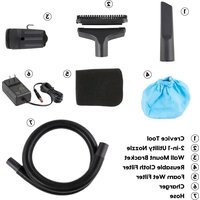
| Included Accessories | Hose, crevice tool, 2-in-1 nozzle, reusable cloth filter, wet foam filter, handle, wall mount, charger |
| Unit Weight (without accessories) | Approximately 2.5 kg |
| Dimensions (L x W x H) | Approximately 35 cm x 25 cm x 30 cm |
| Noise Level | Not specified, but comparable to a standard vacuum cleaner |
| Maintenance | Regular filter cleaning; do not use without filter; empty tank after each wet use |
| Safety | Do not vacuum flammable liquids, do not use outdoors in rain, wear safety glasses in blower mode |
| Warranty | 2 years (domestic use), 90 days (commercial/industrial use) |
| Repairability | Spare parts available via Vacmaster.com; repairs by qualified personnel only |
| Operating Temperature | -5°C to 40°C |
| Storage Temperature | -20°C to 50°C |
Frequently Asked Questions - DVOM202P 1101 Vacmaster
User questions about DVOM202P 1101 Vacmaster
0 question about this device. Answer the ones you know or ask your own.
Ask a new question about this device
Download the instructions for your Vacuum Cleaner in PDF format for free! Find your manual DVOM202P 1101 - Vacmaster and take your electronic device back in hand. On this page are published all the documents necessary for the use of your device. DVOM202P 1101 by Vacmaster.
USER MANUAL DVOM202P 1101 Vacmaster
natural_image
Exterior view of a vacuum cleaner (Vacmaster) with control panel and digital display (no text or symbols on device body)2.5 Gallon / 2.5 Galones / 2.5 Gallon
Read and understand this manual before use. Keep this manual for future reference.
POR SU SEGURIDAD
Important Safety Instructions.... 4
Symbols....7
Unpacking & Checking Carton Contents 8
General Assembly Instructions 10
Dry Vacuum Operation 13
Liquid Vacuum Operation 14
Blower Operation.... 15
Maintenance 16
Installing & Cleaning Reusable Cloth Filter 17
Installing & Cleaning Foam Wet Filter 18
Troubleshooting.... 19
Exploded View 20
Parts List.... 21
Thank you for purchasing this Vacmaster ^® wet/dry vacuum cleaner. Feel confident that with Vacmaster ^® you are obtaining a high-quality product engineered for optimal performance.
This vacuum is capable of picking up liquids and dry materials.

IMPORTANT INFORMATION
GALLONS
"Tank Size" refers to the actual tank volume and does not reflect capacity available during operation.
PEAK HP
"Peak Horsepower" is a term used in the wet-dry vac industry for consumer comparison purposes. It does not denote the operational horsepower output of a wet-dry vac, but rather the horsepower output of a motor, including the motor's inertial contribution, achieved in laboratory testing. In actual use, motors do not operate at the peak horsepower shown.
FOR YOUR SAFETY: CAREFULLY READ AND UNDERSTAND ALL INSTRUCTIONS.
WARRANTY
We take pride in producing a high-quality, durable product. This Vacmaster ^® product carries a limited two (2) year warranty against defects in workmanship and materials from date of purchase (or, for deliveries in the State of California, two years from the date of delivery) under normal household use. If product is to be used for commercial, industrial, or rental use, a 90-day limited warranty will apply. Please keep your receipt as proof of purchase. This warranty gives you specific legal rights, which may vary from state to state. For product service call Customer Service at 1-866-384-8432.
Not Covered by Warranty:
- Any part that has become inoperative due to misuse, negligence, direct/indirect abuse, accidents, improper maintenance, repairs, or alterations;
- Consumables such as filters and accessories;
- Normal wear and tear of parts and attachments, such as hose, nozzles, or casters;
- Normal deterioration of the exterior finish due to use or exposure;
- Any product where serial number/data label is tampered with or removed;
- Any product purchased from an unauthorized retailer.
IMPORTANT SAFETY INSTRUCTIONS
READ AND UNDERSTAND ALL INSTRUCTIONS BEFORE USING THIS VACUUM.
Read and understand this operator's manual and all labels on the vacuum cleaner before operating. Safety is a combination of common sense, staying alert and knowing how your vacuum works. Use this vacuum only as described in this manual. To reduce the risk of personal injury or damage to your vacuum, use only manufacturer recommended accessories.
SAVE THIS MANUAL FOR FUTURE REFERENCE.
When using a vacuum, basic precautions should always be followed including the following. Failure to follow the important safety instructions may result in explosion, fire and/or serious injury.

WARNING: TO REDUCE THE RISK OF FIRE, ELECTRIC SHOCK, OR INJURY:
- Do not run vacuum unattended.
- Do not use without filters in place.
- Do not use to pick up flammable or combustible liquids, such as gasoline, or use in areas where they may be present.
- Do not pick up anything that is burning or smoking, such as cigarettes, matches, or hot ashes. To reduce the risk of health hazards from vapors or dusts, do not vacuum toxic materials.
- Do not use or store near hazardous materials.
- If vacuum is not working as it should, has been dropped, damaged, left outdoors, or dropped into water, return it to a service center.
- Do not allow to be used as a toy. Close attention is necessary when used by or near children.
- Do not put any object into openings. Do not use with any opening blocked; keep free of dust, lint, hair, and anything that may reduce air flow.
- Keep hair, loose clothing, fingers, and all parts of body away from openings and moving parts.
- Use extra care when cleaning on stairs.
- Do not handle vacuum, charger, charger plug, or charger terminals with wet hands.
- Turn off the vacuum before connecting the hose or other accessories.
- Prevent unintentional starting. Ensure the switch is in the off position before picking up or carrying the vacuum. Do not carry the appliance with your finger on the switch. Do not attempt to charge the appliance with the switch in the on position.
- Turn off the vacuum before making any adjustments, changing accessories, or storing vacuum. Such preventive safety measures reduce the risk of starting the vacuum accidentally.
- Recharge only with the charger specified by the manufacturer. A charger that is suitable for one type of battery pack may create a risk of fire when used with another battery pack.
- Use vacuum only with specifically designated battery packs. Use of any other battery packs may create a risk of injury and fire.
- When battery pack is not in use, keep it away from other metal objects, like paper clips, coins, keys, nails, screws or other small metal objects that can make a connection from one terminal to another. Shorting the battery terminals together may cause burns or a fire.
- Under abusive conditions, liquid may be ejected from the battery; avoid contact. If contact accidentally occurs, flush with water. If liquid gets in your eyes, seek medical help. Liquid ejected from the battery may cause irritation or burns.
- Do not use a battery pack or vacuum that is damaged or modified. Damaged or modified batteries may exhibit unpredictable behavior resulting in fire, explosion or risk of injury.
- Do not expose a vacuum to fire or excessive temperature. Exposure to fire or temperature above 265°F (130°C) may cause explosion.
- Follow all charging instructions and do not charge the vacuum outside of the temperature range
specified in the instructions. Charging improperly or at temperatures outside of the specified range may damage the battery and increase the risk of fire.
- Have servicing performed by a qualified repair person using only identical replacement parts. This will ensure that the safety of the product is maintained.
- Do not disassemble, modify or attempt to repair the vacuum except as indicated in the instructions for use and care.
- Use only as described in this manual. Use only manufacturer's recommended attachments.

WARNING: To reduce the risk of injury from moving parts - Unplug before servicing.

WARNING: To reduce the risk of electric shock - Do not expose to rain. Store indoors.

WARNING: To reduce the risk of injury, user must read instruction manual.
- Use the vacuum at a temperature between 23^ (-5°C) and 104^ (40°C).
- Store the vacuum and the charger at a temperature between -4^ (-20°C) and 122^ (50°C).
- Use only with provided GQ20-212047-AU Charger.
When using as blower:
- Direct air discharge only at work area.
- Do not use wet/dry vacuum as a sprayer.
- Do not direct air at bystanders.
- Keep children away when blowing.
- Wear safety goggles.
IMPORTANT SAFETY INSTRUCTIONS FOR VACUUM CHARGER

WARNING: READ AND UNDERSTAND ALL INSTRUCTIONS. FAILURE TO FOLLOW ALL INSTRUCTIONS LISTED BELOW MAY RESULT IN ELECTRIC SHOCK, FIRE AND/OR SERIOUS PERSONAL INJURY:
- Recharge only with the charger specified by the manufacturer and listed in this manual.
- Do not place battery powered tools or their batteries near fire or heat. This will reduce the risk of explosion and possibly injury.
- Do not open or mutilate the batteries. Released electrolyte is corrosive and may cause damage to the eyes or skin. It may be toxic if swallowed.
- Do not dispose of battery packs in fire. They will explode or leak and cause injury. Liquid ejected from the battery may cause irritation or burns.
- Do not crush, drop or damage the battery pack. Do not use a battery pack that has been dropped or received a sharp blow. A damaged battery is subject to explosion. Properly dispose of a dropped or damaged battery immediately.
- Batteries can explode in the presence of a source of ignition, such as a pilot light. To reduce the risk of serious personal injury, never use any cordless product in the presence of open flame. An exploded battery can propel debris and chemicals. If exposed, flush with water immediately.
- Under extreme usage or temperature conditions, battery leakage may occur; liquid may be ejected from the battery: avoid contact. If liquid comes in contact with your skin, wash immediately with soap and water, then neutralize with lemon juice or vinegar. If liquid gets into your eyes, flush them with clean water for at least 10 minutes, then seek immediate medical attention. Following this rule will reduce the risk of serious personal injury.
- Do not charge the battery pack in air temperature below 40^ F ( 4^ C) or above 100^ F ( 40^ C). This is important as it can prevent serious damage to the battery pack. Longer life and better performance can be obtained if the battery pack is charged when the air temperature is between 64^ F ( 18^ C) and 75^ F ( 24^ C).
- Keep the vacuum out of the reach of children.
- Do not charge the vacuum in a damp or wet location. Following this rule will reduce the risk of
electric shock.
- Keep cord and charger from heat to prevent damage to housing or internal parts.
- Do not operate charger with a damaged cord or plug, which could cause shorting and electric shock. If damaged, immediately discontinue use. Replace the charger with the identical model as listed in this manual.
- Do not use a charger that has been dropped or received a sharp blow.
- Do not disassemble charger. Take it to a qualified service center for check or replacement. Incorrect reassembly may result in a risk of electric shock or fire.
- Do not abuse the charger cord. Never use the cord for carrying, pulling or unplugging.
- Keep cord away from heat, oil, sharp edges or moving parts. Damaged or entangled cords increase the risk of electric shock. If the charger cord is damaged, replace the charger with an identical model as listed in this manual.
- A charger that is suitable for one type of battery pack may create a risk of fire when used with another battery pack.
- Charge the vacuum at the normal charging temperature between 40^ (4°C) and 100^ (40°C).
- Avoid mechanical damage to the charger. This can result in internal short circuits.
- Do not operate the charger on easily inflammable surfaces (e.g. paper, textiles, etc.). The heating of the battery charger during the charging process could pose a fire hazard.
- Never touch the mains plug with wet hands.
• Children should be supervised to ensure that they do not play with the charger.
FCC COMPLIANCE
- This device complies with Part 15 of the FCC Rules. Operation is subject to the following two conditions:
• This device may not cause harmful interference, and
- This device must accept any interference received, including interference that may cause undesired operation.
NOTE: This equipment has been tested and found to comply with the limits for a Class B digital device, pursuant to Part 15 of the FCC rules. These limits are designed to provide reasonable protection against harmful interference in a residential installation.
-
This equipment generates, uses, and can radiate radio frequency energy and, if not installed and used in accordance with the instructions, may cause harmful interference to radio communications. However, there is no guarantee that the interference will not occur in a particular installation. If this equipment does cause harmful interference to radio or television reception, which can be determined by turning the equipment off and on, the user is encouraged to try to correct the interference by one or more of the following measures:
-
Reorient or relocate the receiving antenna.
- Increase the separation between the equipment and receiver.
- Connect the equipment into an outlet on a circuit different from that of the receiver.
- Consult the dealer or an experienced radio/TV technician for help.
Refer to the instructions frequently and use them to instruct others who may use this product. If you loan someone this product, loan them these instructions also.
SAVE THESE INSTRUCTIONS
For Household Use Only
SYMBOLS
| The following signal words and meanings are intended to explain the levels of risk associated with this product. | ||
| SYMBOL | SIGNAL | MEANING |
 | DANGER | Indicates an imminently hazardous situation, which, if not avoided, will result in death or serious injury. |
 | WARNING | Indicates a potentially hazardous situation, which, if not avoided, could result in death or serious injury. |
 | CAUTION | Indicates a potentially hazardous situation, which, if not avoided, may result in minor or moderate injury. |
| NOTICE | (Without Safety Alert Symbol) Indicates a situation that may result in property damage. | |
UNPACKING & CHECKING CARTON CONTENTS
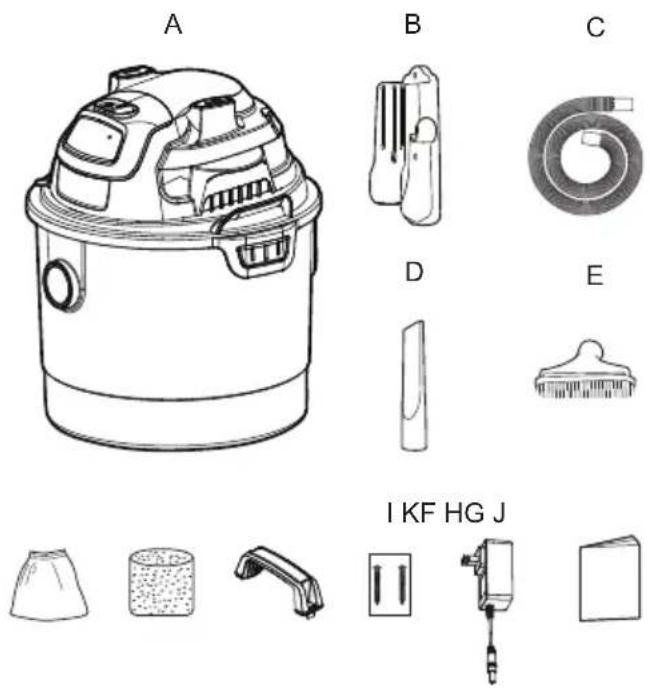
Remove all contents from the box. Remove the powerhead and take out any contents inside the collection tank. Check each item against the carton contents list.
Carton Contents List:
Key Description......Qty.
A Vacuum Assembly .....1
B Wall Mount Bracket....1
C Hose 1
D Crevice Tool....1
E 2-in-1 Utility Nozzle....1
F Reusable Cloth Filter....1
G Foam Wet Filter 1
H Handle 1
I 2 Screws (Bag)....1
J Charger....1
K Operator's Manual....1
NOTE: The hose and accessories for this vacuum are 1.25" (32 mm) diameter.
GENERAL ASSEMBLY INSTRUCTIONS
natural_image
Diagram of a car engine with upward arrows indicating motion or force, no text or symbols present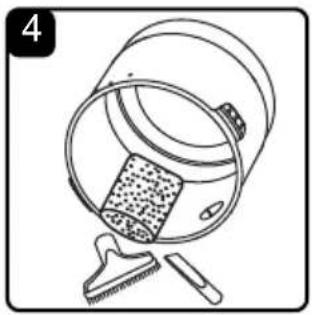
natural_image
Line drawing of a bucket with a textured inner object and a small tool nearby (no text or symbols)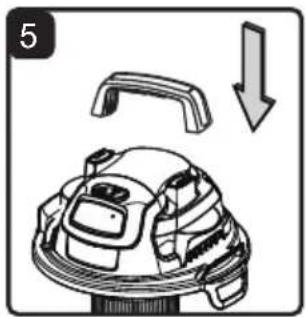
natural_image
Diagram of a robotic device with a handle and arrow indicating downward motion (no text or symbols)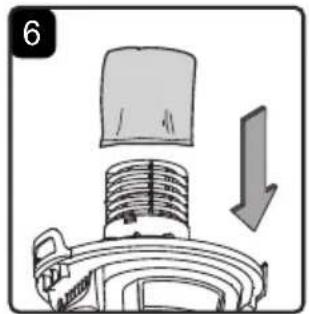
natural_image
Diagram of a mechanical component with a downward arrow indicating motion (no text or symbols)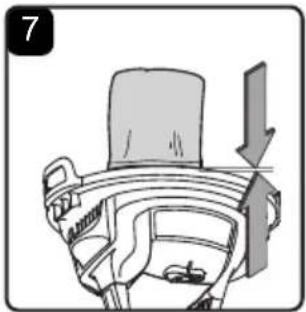
natural_image
Diagram of a mechanical component with an arrow indicating direction (no text or symbols present)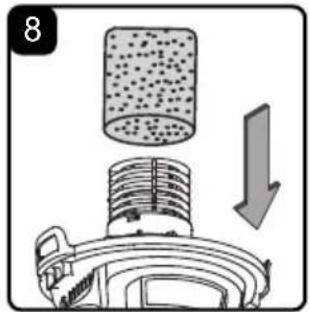
natural_image
Diagram of a mechanical device with a cylindrical component and a downward arrow indicating motion (no text or symbols)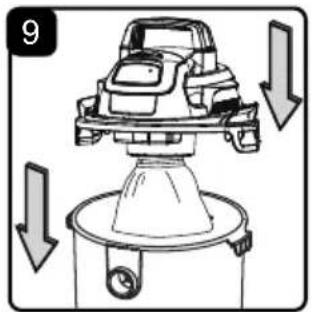
natural_image
Line drawing of a mechanical device with a handle and arrow indicator (no text or symbols)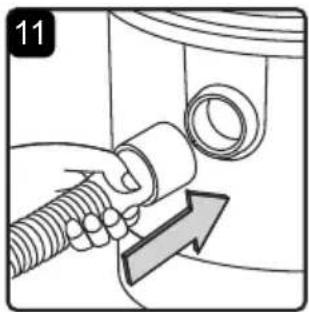
natural_image
Mechanical component diagram showing a lever and base with an arrow indicating direction (no text or symbols)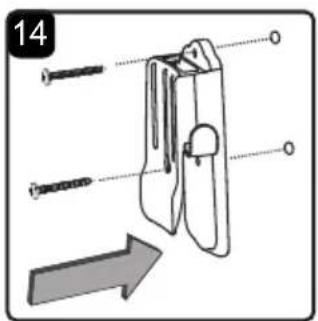
natural_image
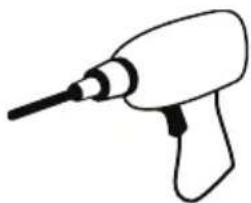
Illustration of a hand holding a container with a lid, accompanied by a separate inset showing a clip and a downward arrow (no text or symbols)Tools Required for Assembly: Drill, Phillips Head Screwdriver
natural_image
Simple line drawing of a handheld electric drill (no text or symbols)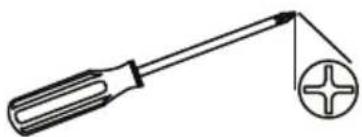
natural_image
Simple line drawing of a screwdriver with a circular screw and plus symbol (no text or labels)
WARNING: DO NOT PLUG THE CHARGER INTO A POWER OUTLET AND INSERT INTO THE CHARGING PORT. MAKE SURE THE VACUUM IS TURNED OFF BEFORE ASSEMBLING THE WET/DRY VACUUM. TO REDUCE THE RISK OF ELECTRIC SHOCK, DO NOT EXPOSE TO RAIN.
UNPACKING YOUR WET/DRY VACUUM & GENERAL ASSEMBLY
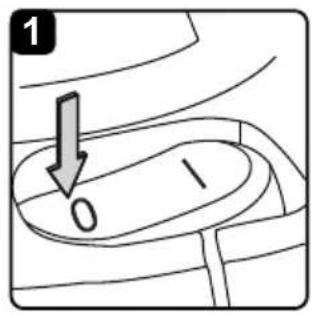
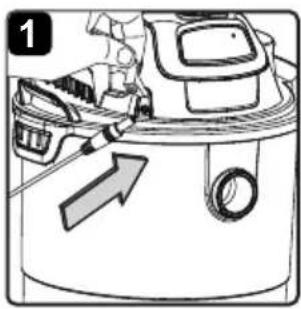
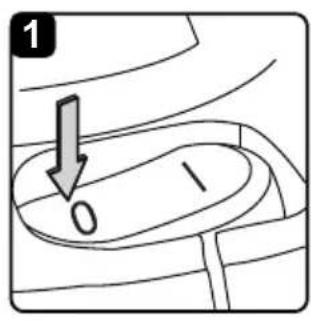
- Verify that the vacuum is turned off. Make sure the charger is disconnected from the power outlet and the charging port (Fig. 1).
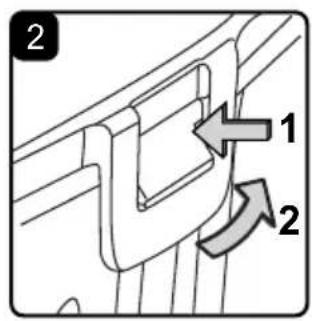
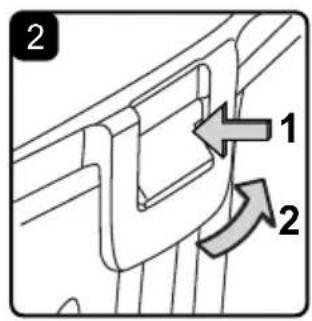
- Undo the latches (Fig. 2).
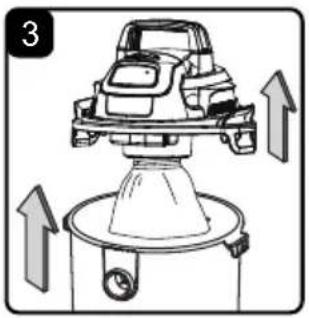
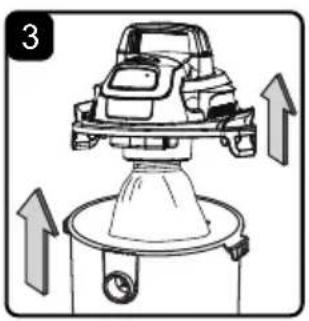
- Lift the powerhead off the collection tank (Fig. 3).
- Remove the contents from inside the collection tank; make sure you have all contents as listed on page 8 (Fig. 4).
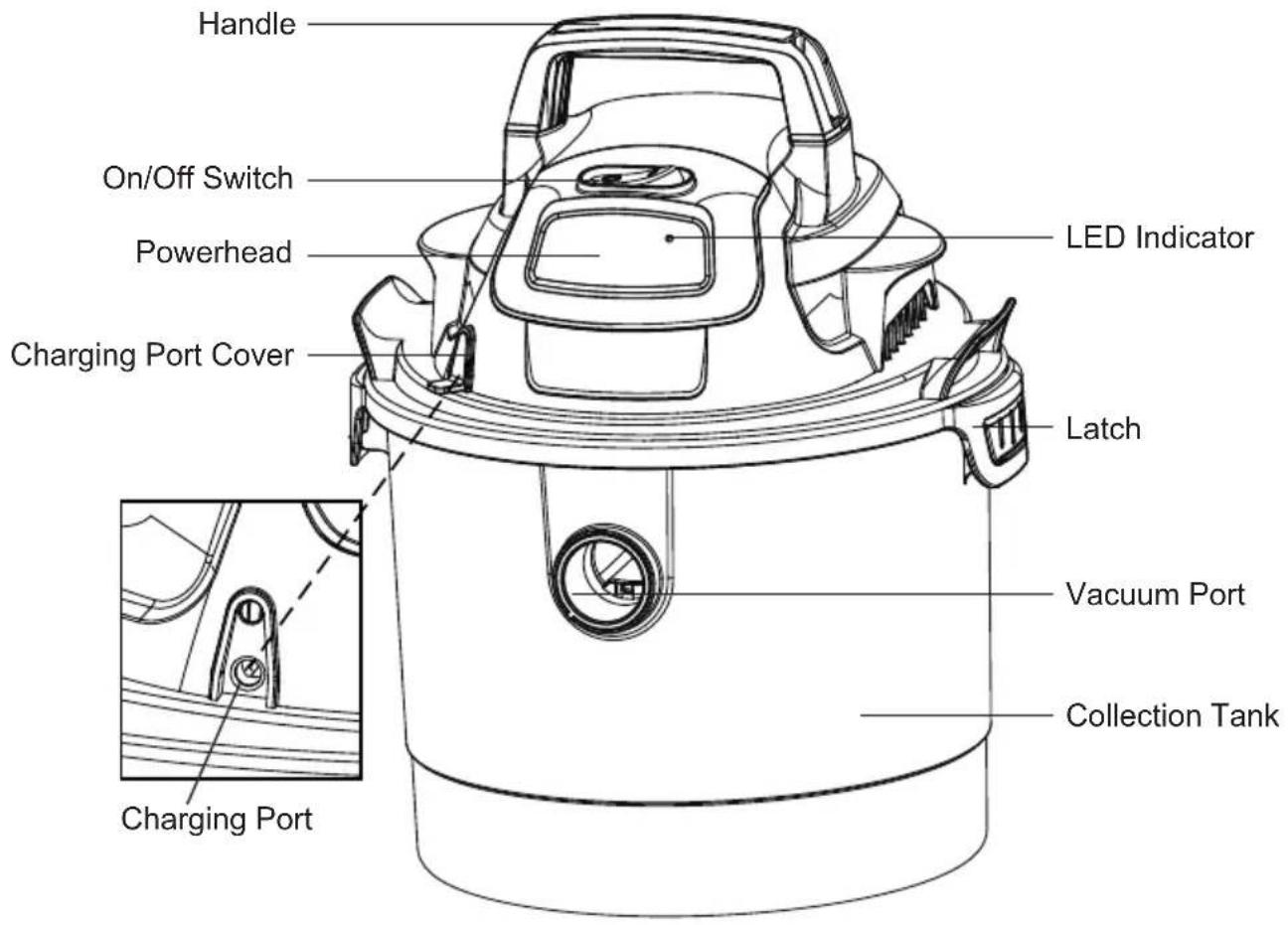
- Insert the handle into the slots located on the top of the powerhead. Apply force to lock the handle into place (Fig. 5).
- Your vacuum comes ready for dry vacuum cleaning. If the reusable cloth filter is not installed, refer to page 17 for installation instructions (Fig. 6 & 7).
- For wet vacuum cleaning, remove the reusable cloth filter, and install the supplied foam wet filter. See page 18 for the foam wet filter installation instructions (Fig. 8).
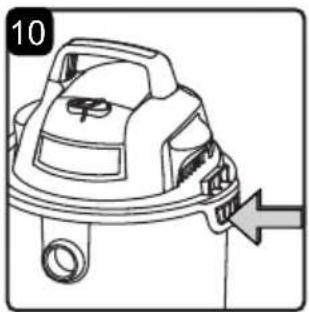
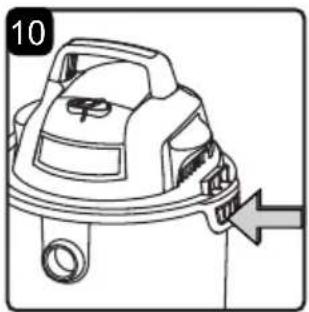
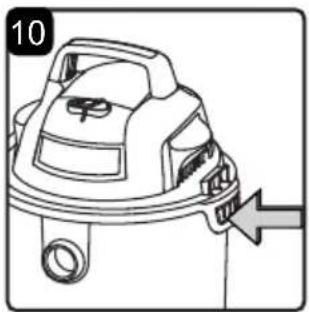
- Place the powerhead back on the collection tank aligning the top section with the latches, and snap into place (Fig. 9 & 10).
- Insert the larger end of the hose into the vacuum port on the collection tank (Fig. 11).
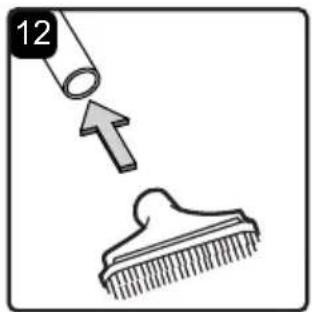
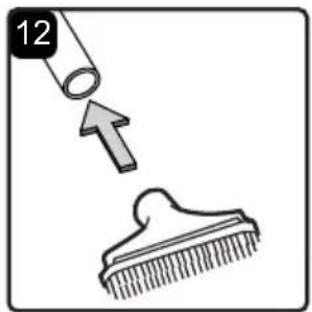
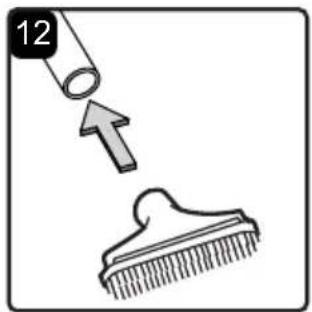
- Choose the desired accessory and insert onto the end of the hose (Fig. 12).
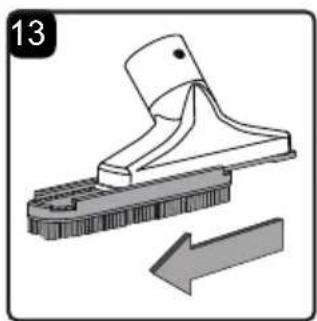
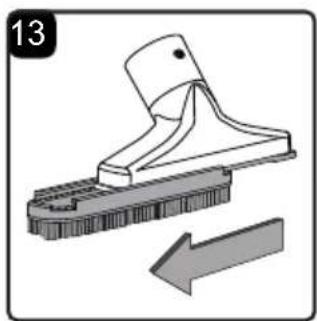
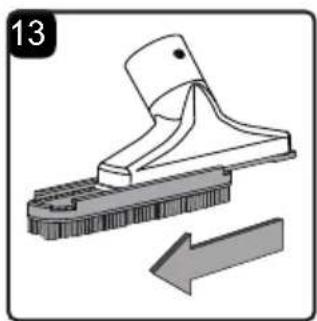
NOTE: This wet/dry vacuum comes with a 2-in-1 utility nozzle. This accessory can be used as a wet nozzle by removing the brush from the utility nozzle (Fig. 13).
WALL MOUNT BRACKET
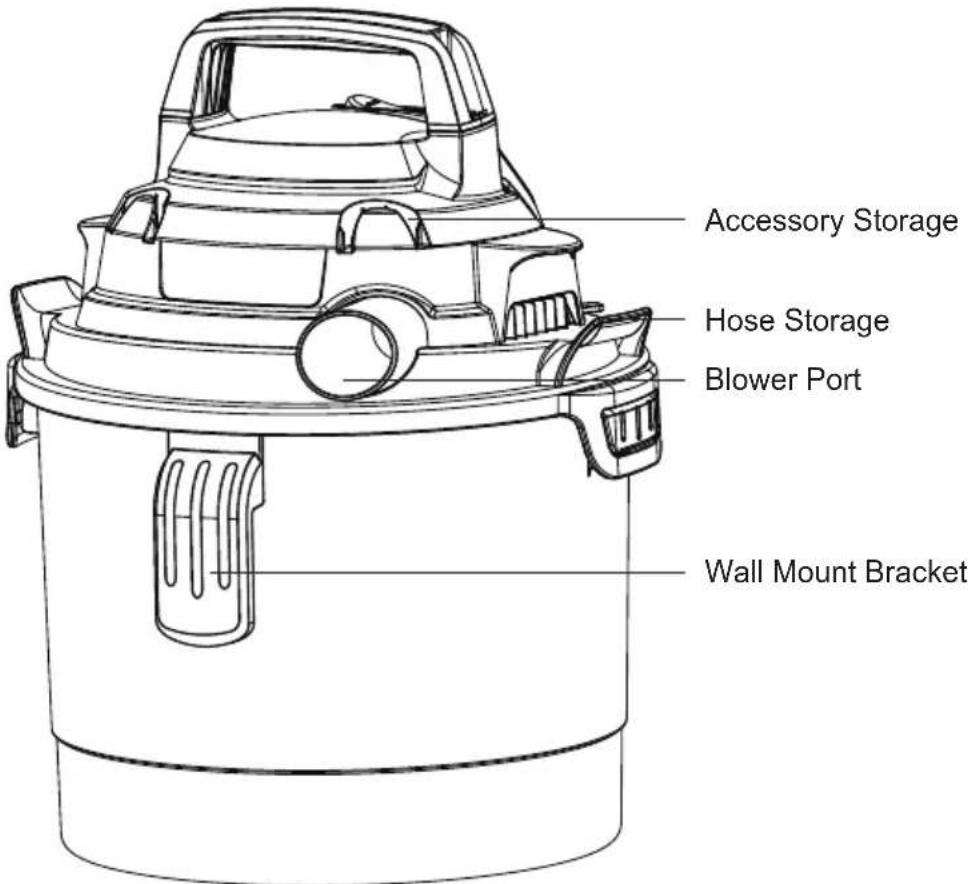
For your convenience this vacuum comes with a wall mount bracket for storage. IMPORTANT!
- Do not mount the bracket over 5 ft (1.5 m) from the floor.
- Do not screw the wall mount bracket to drywall only. Secure the screws to a stud.
- Do not hang from or sit on the vacuum when on wall mount bracket.
- Do not use the vacuum while it is mounted on the wall mount bracket.
- Empty the collection tank before mounting the vacuum on the wall.
-
The vacuum can be charging while it is hanging on the wall mountable bracket. Attach bracket to wall no more than 5.9 ft (1.8 m) from a wall electrical outlet.
-
Make sure the rack is level and mark the hole locations. Make 1/8-inch diameter pilot hole in each marked location. Align the two screw holes so that they are over a stud and secure the wall mount bracket to the wall stud with the two screws provided (Fig. 14).
-
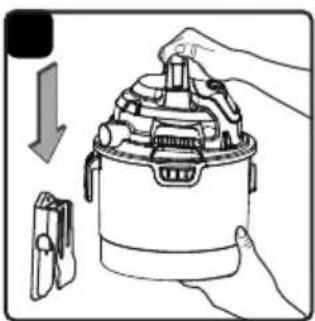
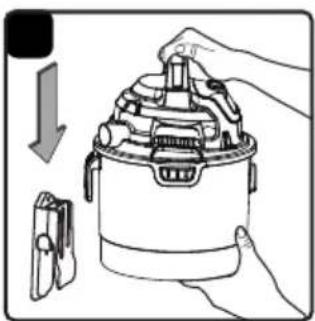
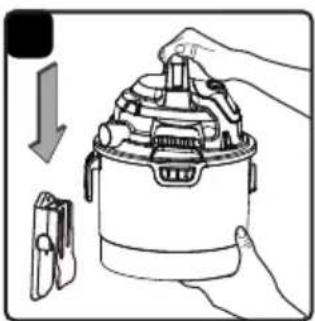
Place the wet and dry vacuum cleaner into the wall mount bracket (Fig. 15).
CHARGING

WARNING: Before charging make sure the vacuum is turned OFF.
- Open the charging port cover on the front side of the powerhead. Insert the barrel plug into the charging port (Fig. 1).
- Plug the charger into a wall outlet.
- The LED indicator on the powerhead flashes green when charging. When the battery is charged, the LED indicator lights up green, and then goes out in 5 seconds.
| Symbol Indicator lights Battery Capacity | ||
 | Green, continuous 45%-100% | |
 | Yellow, continuous 10%-45% | |
 | Red, flashing <10% (Recharge required) | |
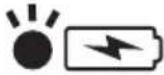 | Green, flashing Charging | |
NOTE: If the LED indicator does not flash green when charging, check to ensure that the barrel plug is fully inserted into the charging port on the vacuum, and the charger is properly plugged into the wall outlet.
- Remove the barrel plug from the vacuum, and fully close the charging port cover. Remove the charger from the outlet.
- Once the vacuum needs re-charged, the LED indicator will start flashing red. The red flashing will continue for 1 minute until the vacuum is completely out of battery power.
natural_image
Diagram of a car interior showing dashboard and seat area with an arrow indicating direction (no text or symbols)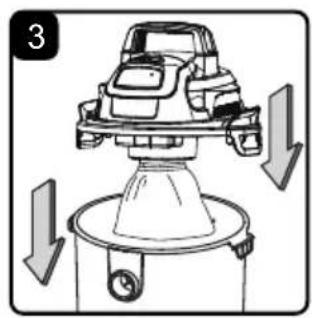
natural_image
Diagram of a car engine with downward arrows indicating motion or force (no text or symbols)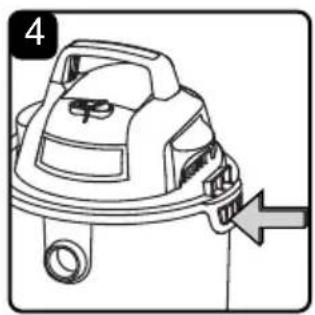
natural_image
Line drawing of a mechanical device with a handle and arrow indicating direction (no text or symbols)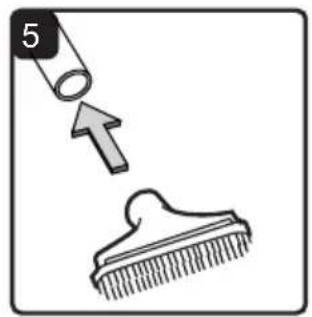
natural_image
Illustration showing a hairpin being inserted into a comb, with an arrow indicating the insertion direction (no text or symbols)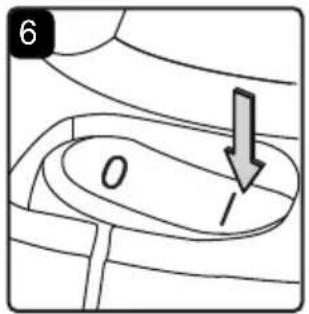
DRY VACUUMING

WARNING: BE SURE TO READ, UNDERSTAND, AND APPLY INFORMATION ENTITLED "IMPORTANT SAFETY INSTRUCTIONS". DO NOT VACUUM IN AREAS WITH FLAMMABLE GASES, VAPORS, OR EXPLOSIVE DUST IN THE AIR. FLAMMABLE GASES OR VAPORS INCLUDE BUT ARE NOT LIMITED TO: LIGHTER FLUID, SOLVENT TYPE CLEANERS, OIL-BASED PAINTS, GASOLINE, ALCOHOL, OR AEROSOL SPRAYS. EXPLOSIVE DUST INCLUDE BUT ARE NOT LIMITED TO: COAL, MAGNESIUM, GRAIN, OR GUN POWDER. TO REDUCE THE RISK OF HEALTH HAZARDS FROM VAPORS OR DUST, DO NOT VACUUM TOXIC MATERIALS.

WARNING: DO NOT PLUG THE CHARGER INTO A POWER OUTLET AND INSERT INTO THE CHARGING PORT. MAKE SURE THE VACUUM IS TURNED OFF BEFORE CHANGING THE FILTERS.

CAUTION: DO NOT VACUUM DRYWALL DUST, FIREPLACE SOOT, OR ASH. THIS IS A VERY FINE DUST WHICH WILL NOT BE CAPTURED BY THE FILTER AND MAY CAUSE DAMAGE TO MOTOR.
- Make sure that the vacuum is fully charged before use.
- In order to prepare your vacuum for dry vacuuming, make sure the reusable cloth filter completely covers the filter cage against the powerhead. Your wet/dry vacuum comes with the reusable cloth filter pre-installed. For installation instructions, see page 17 (Fig. 1 & 2).
- Place the powerhead back on the collection tank aligning the top section with the latches, and snap into place (Fig. 3 & 4).
- Insert the larger end of the hose into the vacuum port on the collection tank.
- Push the required accessory onto the free end of the hose (Fig. 5).
- Turn the vacuum on by flipping the switch to the 'I' ON position and begin vacuuming (Fig. 6).
- Once you have completed vacuuming, flip the switch to the 'O' OFF position.
$$ O = O F F \quad I = O N $$
DO NOT USE THE REUSABLE CLOTH FILTER FOR LIQUID VACUUMING.
natural_image
Mechanical component diagram showing a bolt and shaft assembly with a downward arrow indicating motion (no text or symbols)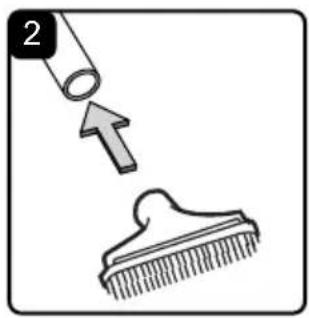
natural_image
Simple line drawing of a bucket pouring liquid into a container (no text or symbols)LIQUID VACUUMING

WARNING: BE SURE TO READ, UNDERSTAND, AND APPLY INFORMATION ENTITLED "IMPORTANT SAFETY INSTRUCTIONS". DO NOT VACUUM IN AREAS WITH FLAMMABLE GASES, VAPORS, OR EXPLOSIVE DUST IN THE AIR. FLAMMABLE GASES OR VAPORS INCLUDE BUT ARE NOT LIMITED TO: LIGHTER FLUID, SOLVENT TYPE CLEANERS, OIL-BASED PAINTS, GASOLINE, ALCOHOL, OR AEROSOL SPRAYS. EXPLOSIVE DUST INCLUDE BUT ARE NOT LIMITED TO: COAL, MAGNESIUM, GRAIN, OR GUN POWDER. TO REDUCE THE RISK OF HEALTH HAZARDS FROM VAPORS OR DUST, DO NOT VACUUM TOXIC MATERIALS.

WARNING: DO NOT PLUG THE CHARGER INTO A POWER OUTLET AND INSERT INTO THE CHARGING PORT. MAKE SURE THE VACUUM IS TURNED OFF BEFORE CHANGING THE FILTERS.
- Make sure that the vacuum is fully charged before use. Make sure that the collection tank is clean and free of dust and dirt.
- Remove the reusable cloth filter, then carefully install the foam wet filter over the filter cage and place the powerhead back on the collection tank. For foam wet filter installation instructions, see page 18 (Fig. 1).
DO NOT USE THE REUSABLE CLOTH FILTER FOR LIQUID VACUUMING.
- Insert the larger end of the hose into the vacuum port on the collection tank.
- Push the required accessory onto the free end of the hose (Fig. 2).
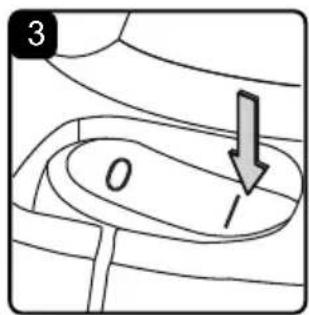
- Turn the vacuum on by flipping the switch to the 'I' ON position (Fig. 3).
- Once you have completed vacuuming, flip the switch to the 'O' OFF position.
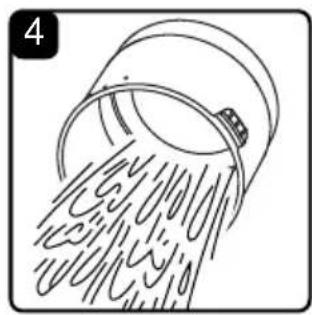
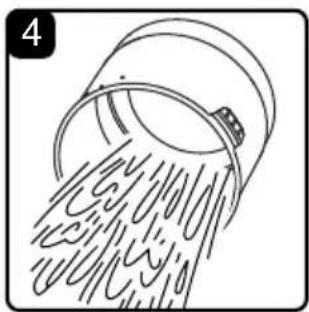
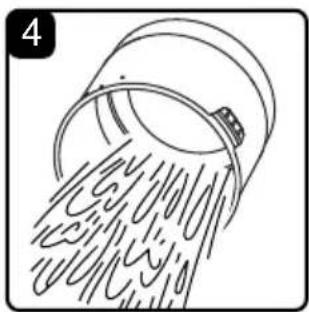
- After use, empty the collection tank, clean and dry the inside and outside before storage (Fig. 4).
IMPORTANT! When vacuuming large quantities of liquids, do not immerse the nozzle completely in the liquid; leave a gap at the tip of the nozzle opening to allow air inflow. The machine is fitted with a float valve that stops the suction action when the collection tank reaches its maximum capacity. You will notice an increase in motor speed. When this happens, turn off the machine and drain the liquid into a suitable receptacle or drain. To continue vacuuming, refit the powerhead to the collection tank. After wet vacuuming, turn the machine off. Empty the collection tank, clean and dry the inside and outside before storage.
REMEMBER! The foam wet filter must be removed after wet vacuuming and the reusable cloth filter must be installed before dry vacuuming again.
BLOWER OPERATION
natural_image
Line drawing of a hand holding a spray gun with hoses (no text or symbols)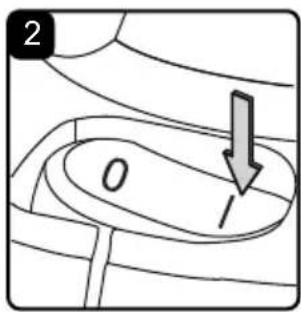
This wet/dry vacuum has blowing capabilities. To use the blower feature follow the instructions listed below.

WARNING: ALWAYS WEAR SAFETY GOGGLES COMPLYING WITH ANSI Z87.1 (OR IN CANADA, CSAZ94.3) BEFORE USING BLOWER.

WARNING: KEEP BYSTANDERS CLEAR FROM BLOWING DEBRIS.

WARNING: WEAR A DUST MASK IF BLOWING CREATES DUST THAT MIGHT BE INHALED.
- Make sure that the vacuum is fully charged before use.
- Make sure the collection tank is empty before using as a blower. Clear all dirt and debris from the hose and collection tank.
- Remove the hose from the vacuum port.
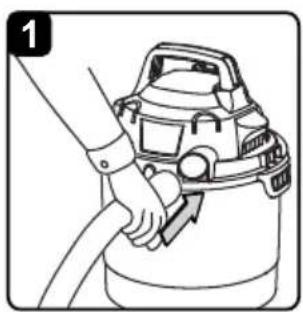
- Insert the larger end of the hose into the blower port on the back side of the powerhead (Fig. 1).
- Before turning on the vacuum, firmly hold onto the loose end of the hose. Turn the vacuum on by flipping the switch to the 'I' ON position (Fig. 2).
- Once you have completed blowing, flip the power switch to the 'O' OFF position.
MAINTENANCE
natural_image
Diagram showing a hand holding a threaded pipe with a valve, with an arrow indicating direction (no text or symbols present)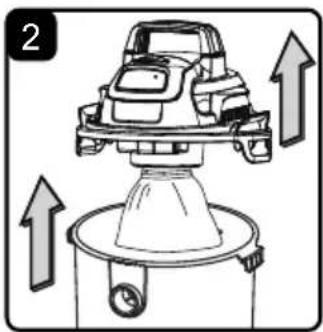
natural_image
Diagram of a car on a lift with upward arrows indicating motion or force (no text or symbols)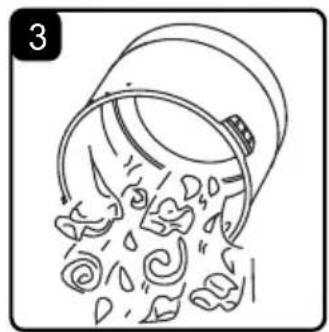
natural_image
Illustration of a bucket pouring water with falling petals (no text or symbols)EMPTYING THE COLLECTION TANK

WARNING: DO NOT PLUG THE CHARGER INTO A POWER OUTLET AND INSERT INTO THE CHARGING PORT. MAKE SURE THE VACUUM IS TURNED OFF BEFORE REMOVING THE POWERHEAD FROM COLLECTION TANK.
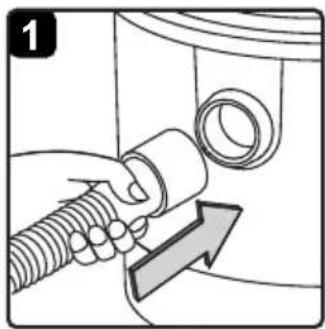
- Disconnect the hose from the vacuum (Fig. 1).
- Undo the latches and remove the powerhead from the collection tank (Fig. 2). Place powerhead on a soft, clean surface upside down.
- Clear all dirt or debris from the collection tank and hose into a proper waste container (Fig. 3).
- Clean or replace the filters.
- Check the hose and accessories to ensure that they have not been damaged.
- Place the powerhead back onto the collection tank and secure latches.
IMPORTANT! Clean or change the filter regularly for best performance. ALWAYS USE THE REUSABLE CLOTH FILTER FOR DRY VACUUMING. If the machine is used without the reusable cloth filter, the motor will burn out and the warranty will be voided. Always keep spare filters on hand.
NOTICE! The filters included are made of high quality materials designed to stop small dust particles. The reusable cloth filter should be used for dry pick-up only. A dry reusable cloth filter is necessary to pick up dust. If the reusable cloth filter is wet, it will clog quickly and be very difficult to clean. Handle the filter carefully when removing it for cleaning and replacing it. Check the filters for tears or small holes. A small hole can let dust pass through and out of the filter. Do not use a filter with holes or tears; replace it immediately.
STORAGE
Before storing your vacuum, the collection tank should be emptied and cleaned. The accessories should be cleaned and stored so they can be readily available when needed. Fully charge the vacuum before storage. Store the wet/dry vacuum indoors.
REPAIRS
Repairs for this wet/dry vacuum should be performed only by qualified service personnel using only identical replacement parts.
INSTALLING & CLEANING REUSABLE CLOTH FILTER
natural_image
Diagram of a mechanical component with a downward arrow indicating motion (no text or symbols)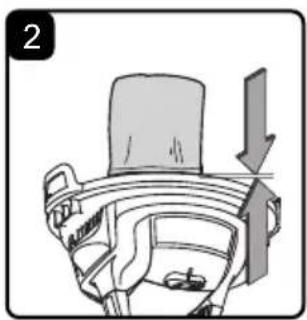
natural_image
Diagram of a car interior showing a seatbelt and dashboard with an arrow indicating direction (no text or symbols)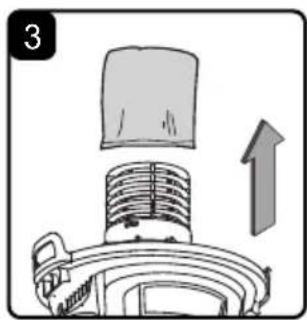
natural_image
Diagram of a vacuum cleaner with a lid and upward arrow indicating motion (no text or symbols)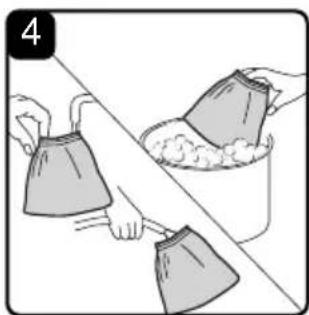
natural_image
Illustration of two hands cleaning a surface with a bucket and cloth (no text or symbols)INSTALLING REUSABLE CLOTH FILTER
- Remove the powerhead and place in an upside-down position.
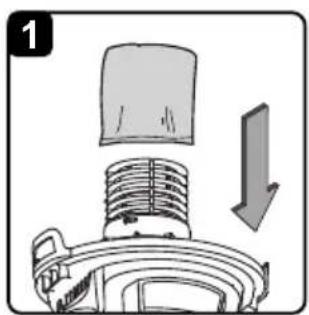
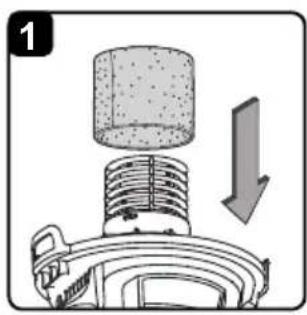
- Install the reusable cloth filter over the filter cage making sure the cage is completely covered (Fig. 1 & 2).
- Place the powerhead back onto the collection tank.
REMOVING & CLEANING REUSABLE CLOTH FILTER
- With the removed powerhead in an upside-down position, carefully remove the reusable cloth filter from the filter cage (Fig. 3).
- Clean the reusable cloth filter by gently tapping or brushing dirt off. Cleaning should not be done indoors in living areas. For optimal performance a new filter is recommended.
- Use a mild soap and water solution to wash reusable cloth filter and rinse with clean water (Fig. 4).
- Allow the wet filter to air dry completely before storing or installing onto the filter cage.
INSTALLING & CLEANING FOAM WET FILTER
natural_image
Mechanical assembly diagram showing a cylindrical component inserted into a housing with an arrow indicating downward motion (no text or symbols)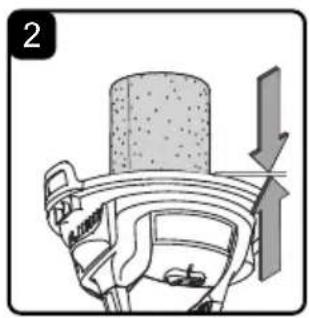
natural_image
Diagram of a mechanical assembly with a cylindrical component and directional arrows indicating motion (no text or symbols)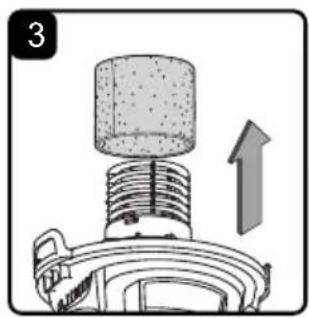
natural_image
Mechanical component diagram showing a cylindrical shaft inserted into a housing with an upward arrow indicating motion (no text or symbols)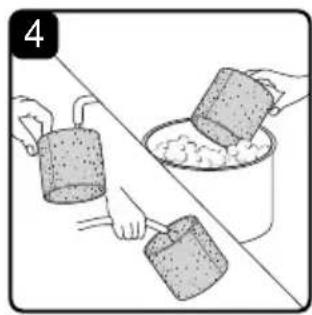
natural_image
Illustration of two hands pouring liquid from a container onto a table (no text or symbols)INSTALLING FOAM WET FILTER
- Remove the powerhead and place in an upside-down position. Follow instructions to remove the reusable cloth filter on page 17.
- Carefully slide the foam wet filter down over the filter cage making sure the cage is completely covered (Fig. 1 & 2).
- Place the powerhead onto the collection tank.
CLEANING FOAM WET FILTER
- With the removed powerhead in an upside-down position, carefully remove the foam wet filter (Fig. 3).
- Use a mild soap and water solution to wash the foam wet filter and rinse with clean water (Fig. 4).
- Allow the wet filter to air dry completely before storing or installing onto the filter cage.
TROUBLESHOOTING

WARNING: TO REDUCE THE RISK OF ELECTRIC SHOCK, UNPLUG BEFORE TROUBLESHOOTING.
| PROBLEM POSSIBLE CAUSE SOLUTION | ||
| The wet/dry vacuum will not operate. | The vacuum is discharged. Charge the vacuum. | |
| Collection tank is full. Empty the collection tank. | ||
| Switch in the wrong position. Press the ON 'I' button on the powerhead. | ||
| The vacuum or battery is damaged. | Call customer service at 1-866-384-8432 for assistance. | |
| The dust comes out from the motor cover. | The reusable cloth filter is missing or damaged. | Attach or replace the reusable cloth filter. |
| Reduced efficiency and motor/speed vibration. | There are blockages in the nozzle, hose, or the collection tank inlets. | Unplug and check nozzle, hose and collection tank inlets for blockages. |
| The reusable cloth filter is clogged by fine dust. | Take off the filter and clean it or install a new reusable cloth filter. | |
| The vacuum will not charge. | The charger is not inserted into the charging port on the vacuum firmly. | Be sure the barrel plug is fully inserted into the charging port on the vacuum, and the charger is properly plugged into the wall outlet. |
| The charger is damaged. Replace the charger. Call customer service at 1-866-384-8432 for assistance. | ||
| Dust accumulated on the charging port of the vacuum. | Clean off any dust accumulated on the charging port of the vacuum. | |
| The LED indicator is damaged. | Call customer service at 1-866-384-8432 for assistance. | |
| No power at electrical outlet. Check circuit breakers. | ||
| The vacuum or battery is damaged. | Call customer service at 1-866-384-8432 for assistance. | |
EXPLODED VIEW
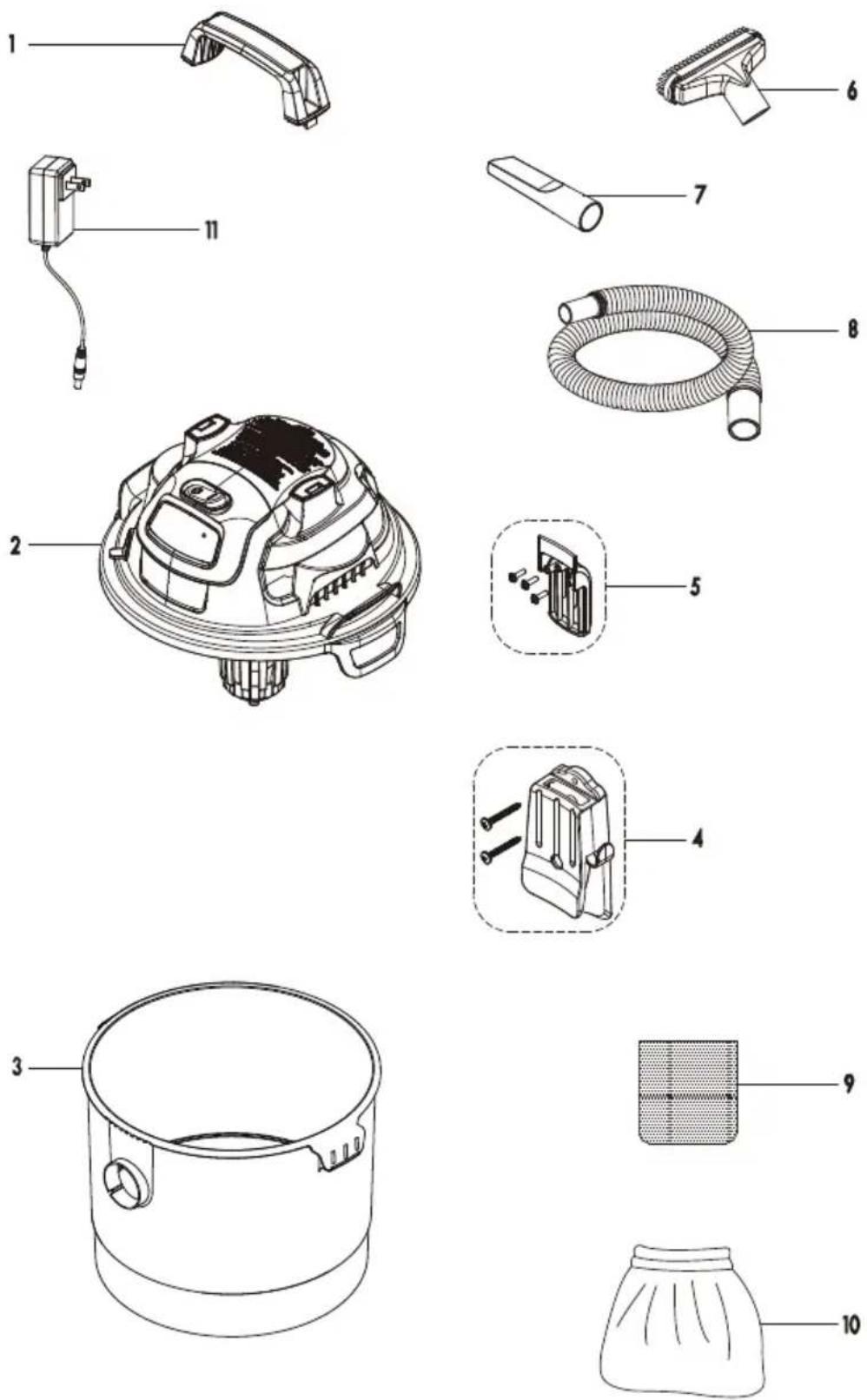
PARTS LIST
| Part Part Number Description Quantity | |||
| 1 55 | 1012101 Handle 1 | ||
| 2 Powerhead Assembly 1 | |||
| 3 Collection Tank Assembly 1 | |||
| 4 55 | 1098111 Wall Mount Bracket Assembly 1 | ||
| 5 55 | 1012107 Mounting Rack Assembly 1 | ||
| 6 | 551004113 | 2-in-1 Utility Nozzle | 1 |
| 7 | 551012109 | Crevice Tool | 1 |
| 8 55 | 1012108 Hose | 1 | |
| 9 55 | 1009111 Foam Wet Filter | 1 | |
| 10 | 551012110 | Reusable Cloth Filter | 1 |
| 11 | 541039101 Charger | 1 | |
TABLA DE CONTENIDOS
SECCIÓN PÁGINA
Garantía.... 3
natural_image
Line drawing of a vacuum cleaner with handle and vent slots (no text or symbols)natural_image
Diagram of a car engine with upward arrows indicating motion or force, no text or symbols present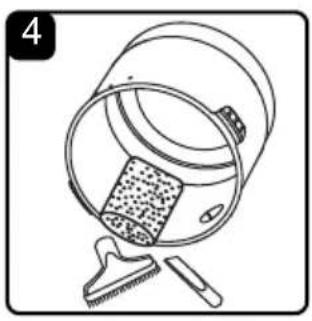
natural_image
Illustration of a bucket with a textured inner object and a tool inserted, no text or symbols present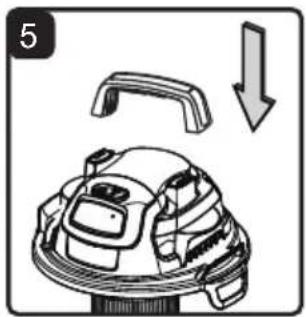
natural_image
Diagram of a robotic device with a handle and arrow indicating downward motion (no text or symbols)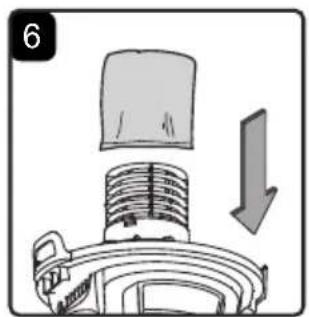
natural_image
Diagram of a mechanical component with a downward arrow indicating motion (no text or symbols)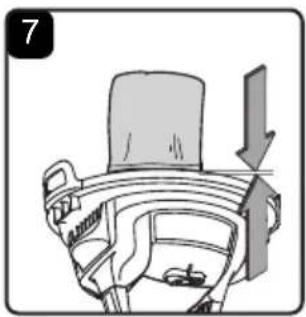
natural_image
Diagram of a car interior showing a seatbelt and dashboard with an arrow indicating direction (no text or symbols)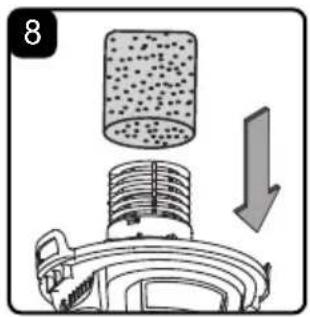
natural_image
Diagram of a mechanical device with a cylindrical component and a downward arrow indicating motion (no text or symbols)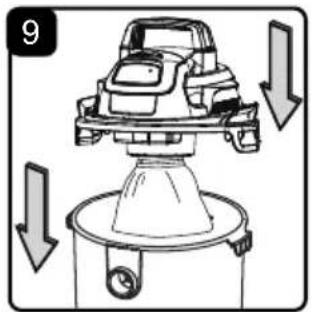
natural_image
Line drawing of a mechanical device with a handle and arrow indicator (no text or symbols)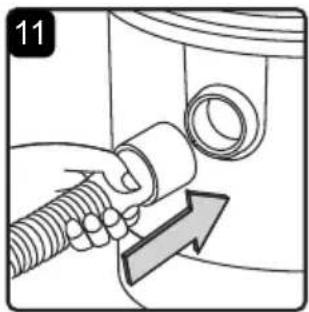
natural_image
Mechanical component diagram showing a lever and base with an arrow indicating direction (no text or symbols)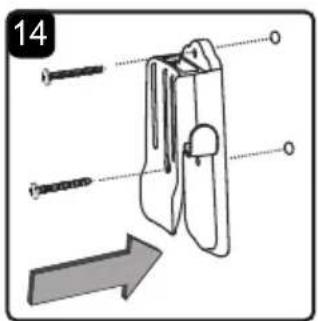
natural_image
Illustration of a hand holding a container with a lid, accompanied by a separate inset showing a clip and a downward arrow (no text or symbols)natural_image
Simple line drawing of a handheld electric drill (no text or symbols)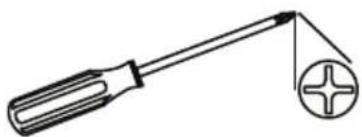
natural_image
Simple line drawing of a screwdriver with a circular screw and plus symbol (no text or labels)natural_image
Diagram of a car interior with a gear and wheel, showing a directional arrow (no text or symbols)CARGA

natural_image
Diagram of a car interior showing dashboard and seat area with an arrow indicating direction (no text or symbols)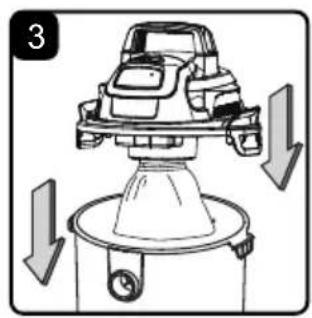
natural_image
Diagram of a car engine with downward arrows indicating motion or force (no text or symbols)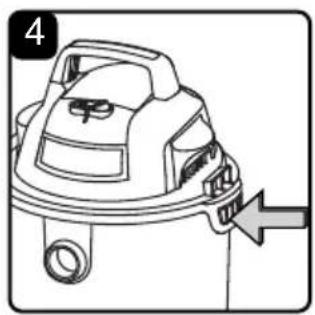
natural_image
Line drawing of a steam hood with a directional arrow indicating motion (no text or symbols)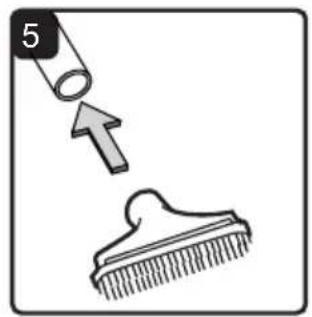
natural_image
Illustration showing a hairpin being inserted into a comb, with an arrow indicating the insertion direction (no text or symbols)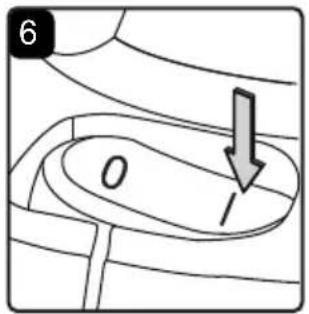
ASPIRADO EN SECO

$$ O = A P A G A D O \quad I = E N C E N D I D O $$
NO USE EL FILTRO DE TELA REUTILIZABLE PARA ASPIRAR LÍQUIDOS.
natural_image
Diagram of a mechanical component with a cylindrical top and arrow indicating downward motion (no text or symbols)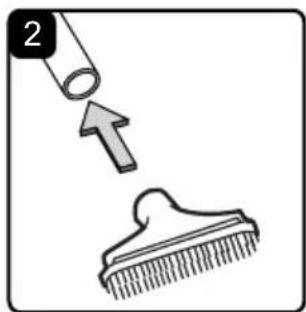
natural_image
Simple line drawing showing a brush applying material to a comb, with an arrow indicating direction (no text or symbols)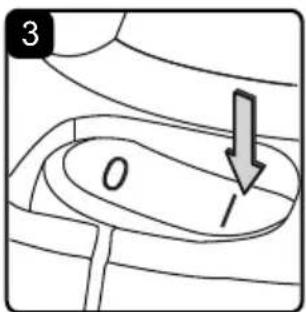
natural_image
Simple line drawing of a bucket pouring liquid into a container (no text or symbols)ASPIRADO EN MOJADO

natural_image
Line drawing of a hand holding a spray gun with hose (no text or symbols)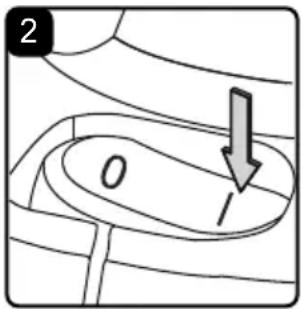
natural_image
Diagram showing a hand holding a threaded pipe with a valve, with an arrow indicating direction (no text or symbols present)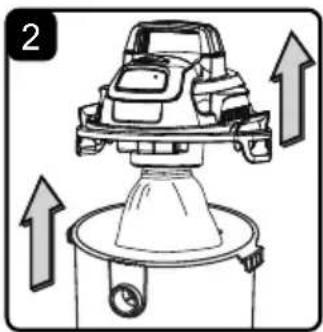
natural_image
Diagram of a car on a lift with upward arrows indicating motion or force (no text or symbols)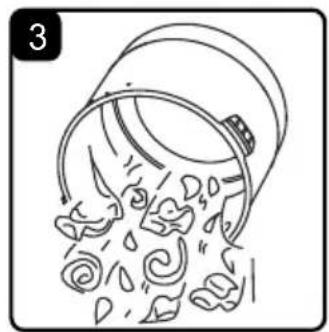
natural_image
Illustration of a bucket pouring water with falling petals (no text or symbols)natural_image
Diagram of a mechanical component with a downward arrow indicating motion (no text or symbols)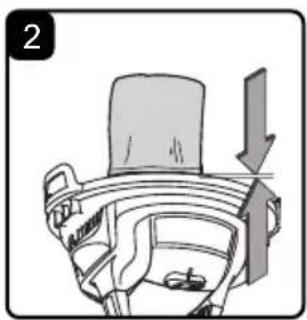
natural_image
Diagram of a car interior showing a seatbelt and dashboard with an arrow indicating direction (no text or symbols)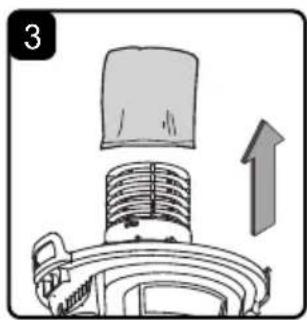
natural_image
Diagram of a vacuum cleaner with a lid and upward arrow indicating motion (no text or symbols)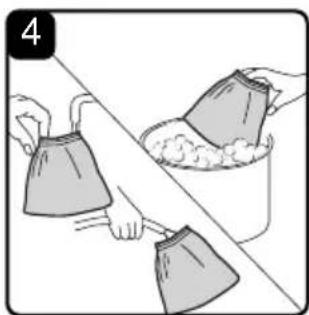
natural_image
Illustration of two hands cleaning a surface with a bucket and cloth (no text or symbols)natural_image
Diagram of a mechanical component with a cylindrical top and downward arrow indicating motion (no text or symbols)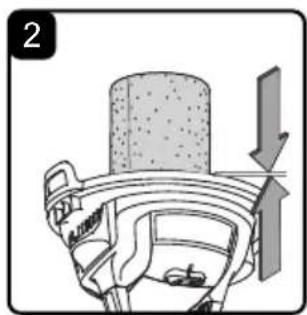
natural_image
Diagram of a mechanical assembly with a cylindrical component and directional arrow (no text or symbols)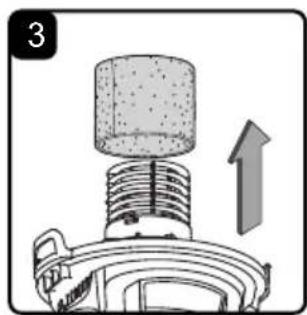
natural_image
Mechanical component diagram showing a cylindrical top with threaded shaft and upward arrow (no text or symbols)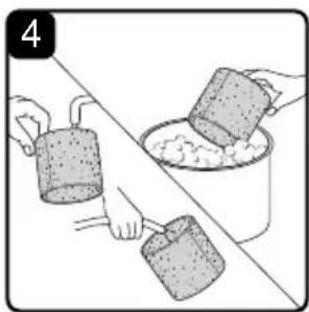
natural_image
Illustration of two hands pouring liquid from a container into a bowl (no text or symbols)natural_image
Line drawing of a vacuum cleaner with lid, vent, and handle (no text or symbols)INSTRUCTIONS RELATIVES AU MONTAGE GÉNÉRAL
natural_image
Diagram of a car engine with upward arrows indicating motion or force, no text or symbols present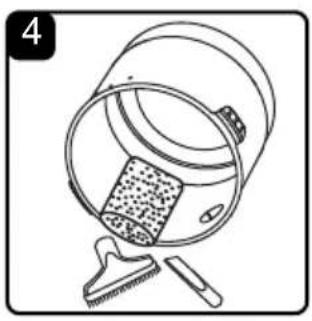
natural_image
Illustration of a bucket with a textured lid and a tool, no text or symbols present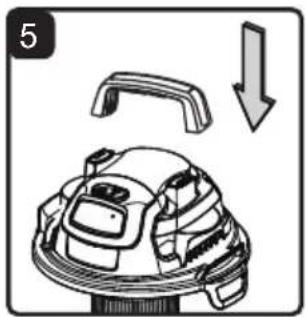
natural_image
Diagram of a mechanical component with an arrow indicating downward motion (no text or symbols)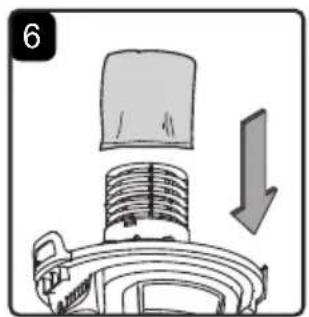
natural_image
Diagram of a mechanical component with a downward arrow indicating motion (no text or symbols)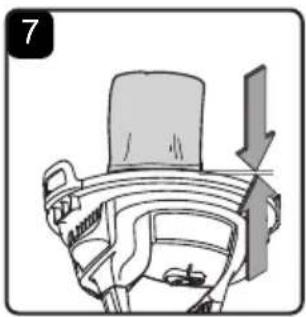
natural_image
Diagram of a car interior showing a seatbelt and dashboard with an arrow indicating direction (no text or symbols)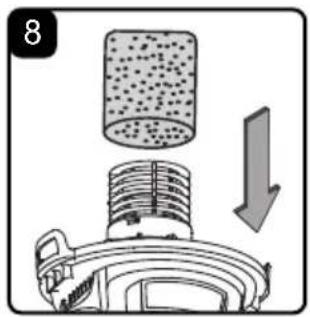
natural_image
Diagram showing a mechanical component with a cylindrical component and an arrow indicating downward motion (no text or symbols)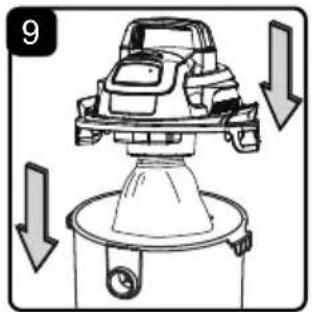
natural_image
Line drawing of a mechanical device with a handle and arrow indicator (no text or symbols)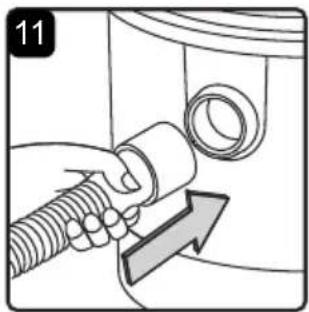
natural_image
Mechanical component diagram showing a lever and base with an arrow indicating direction (no text or symbols)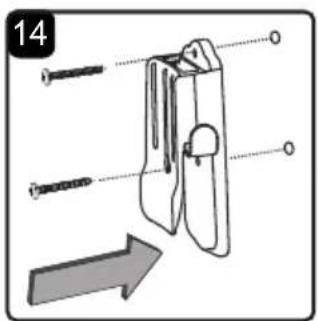
natural_image
Illustration of a hand holding a container with attached items, accompanied by a downward arrow and a separate clip (no text or symbols)natural_image
Simple line drawing of a handheld electric drill (no text or symbols)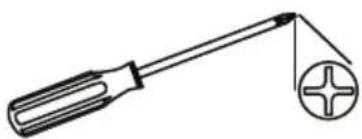
natural_image
Simple line drawing of a screwdriver with a circular component (no text or symbols)
AVERTISSEMENT : NE PAS BRANCHER LE CHARGEUR SUR UNE PRISE DE COURANT ET L'INSÉRER DANS LE PORT DE CHARGE. ASSUREZ-VOUS QUE L'ASPIRATEUR EST ÉTEINT AVANT D'ASSEMBLER L'ASPIRATEUR EAU ET POUSSIÈRE. POUR RÉDUIRE LE RISQUE D'ÉLECTROCUTION, NE PAS EXPOSER L'APPAREIL À LA PLUIE.
DÉBALLAGE DE VOTRE ASPIRATEUR D'ATELIER SEC ET HUMIDE ET MONTAGE GÉNÉRAL
natural_image
Diagram of a car interior with a gear and wheel, showing a directional arrow (no text or symbols)CHARGE

natural_image
Diagram of a car interior showing dashboard and seat area with an arrow indicating direction (no text or symbols)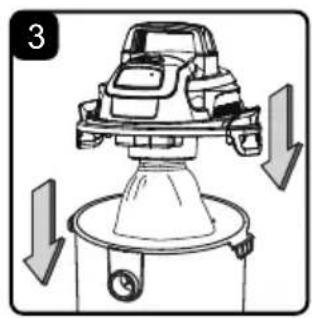
natural_image
Diagram of a car engine with downward arrows indicating motion or force (no text or symbols)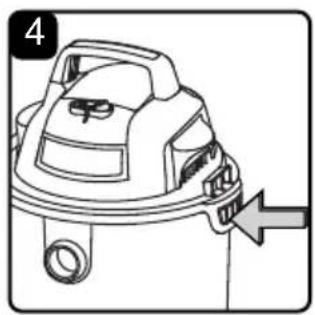
natural_image
Line drawing of a steam hood with a directional arrow indicating motion (no text or symbols)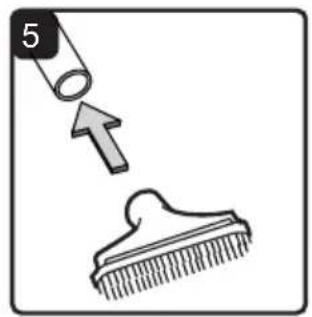
natural_image
Illustration showing a hairpin being inserted into a comb, with an arrow indicating the insertion direction (no text or symbols)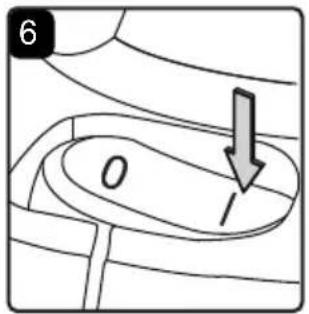
ASPIRATION DE POUSSIÈRES

AVERTISSEMENT : VEILLEZ À LIRE, À ASSIMILER ET À METTRE EN APPLICATION LES CONSIGNES INTITULÉES « CONSIGNES IMPORTANTES DE SÉCURITÉ ». NE PAS UTILISER L'ASPIRATEUR DANS DES ZONES OÙ L'AIR CONTIENT DES GAZ ET VAPEURS INFLAMMABLES OU DES POUSSIÈRES EXPLOSIVES. LES GAZ OU VAPEURS INFLAMMABLES COMPRENNENT, SANS POUR AUTANT S'Y LIMITER : L'ESSENCE POUR BRIQUETS, LES PRODUITS DE NETTOYAGE DE TYPE SOLVANTS, LA PEINTURE À L'HUILE, L'ESSENCE, L'ALCOOL OU LES SPRAYS AÉROSOLS. LES POUSSIÈRES EXPLOSIVES COMPRENNENT, SANS POUR AUTANT S'Y LIMITER : LE CHARBON, LE MAGNÉSIUM, LES GRAINS OU LA POUDRE À CANON. AFIN DE RÉDUIRE LES RISQUES POUR LA SANTÉ PROVENANT DES VAPEURS OU POUSSIÈRES, N'ASPIREZ PAS DE MATIÈRES TOXIQUES.

AVERTISSEMENT : NE PAS BRANCHER LE CHARGEUR SUR UNE PRISE DE COURANT ET L'INSÉRER DANS LE PORT DE CHARGE. ASSUREZ-VOUS QUE L'ASPIRATEUR EST ÉTEINT AVANT DE CHANGER LES FILTRES.

ATTENTION : NE PAS ASPIRER DE LA POUSSIÈRE DE PLACOPLÂTRE, DE LA SUIE OU DES CENDRES DE CHEMINÉE. CES POUSSIÈRES SONT TRÈS FINES ET NE SERONT PAS RETENUES PAR LE FILTRE, CE QUI POURRAIT ENTRAÎNER DES DOMMAGES DU MOTEUR.
natural_image
Diagram of a mechanical component with a cylindrical top and arrow indicating downward motion (no text or symbols)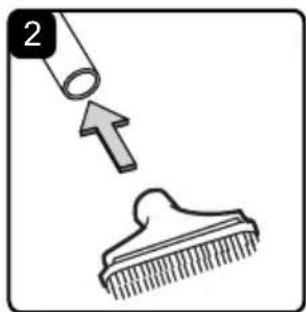
natural_image
Simple line drawing showing a brush applying material to a comb, with an arrow indicating direction (no text or symbols)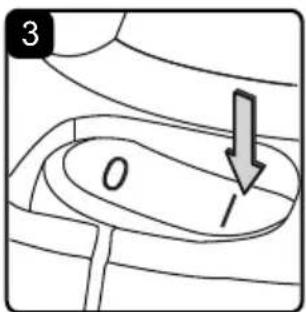
natural_image
Simple line drawing of a bucket pouring liquid into a container (no text or symbols)ASPIRATION DE LIQUIDES

AVERTISSEMENT : VEILLEZ À LIRE, À ASSIMILER ET À METTRE EN APPLICATION LES CONSIGNES INTITULÉES « CONSIGNES IMPORTANTES DE SÉCURITÉ ». NE PAS UTILISER L'ASPIRATEUR DANS DES ZONES OÙ L'AIR CONTIENT DES GAZ ET VAPEURS INFLAMMABLES OU DES POUSSIÈRES EXPLOSIVES. LES GAZ OU VAPEURS INFLAMMABLES COMPRENNENT, SANS POUR AUTANT S'Y LIMITER : L'ESSENCE POUR BRIQUETS, LES PRODUITS DE NETTOYAGE DE TYPE SOLVANTS, LA PEINTURE À L'HUILE, L'ESSENCE, L'ALCOOL OU LES SPRAYS AÉROSOLS. LES POUSSIÈRES EXPLOSIVES COMPRENNENT, SANS POUR AUTANT S'Y LIMITER : LE CHARBON, LE MAGNÉSIUM, LES GRAINS OU LA POUDRE À CANON. AFIN DE RÉDUIRE LES RISQUES POUR LA SANTÉ PROVENANT DES VAPEURS OU POUSSIÈRES, N'ASPIREZ PAS DE MATIÈRES TOXIQUES.

AVERTISSEMENT : NE PAS BRANCHER LE CHARGEUR SUR UNE PRISE DE COURANT ET L'INSÉRER DANS LE PORT DE CHARGE. ASSUREZ-VOUS QUE L'ASPIRATEUR EST ÉTEINT AVANT DE CHANGER LES FILTRES.
natural_image
Line drawing of a hand holding a spray gun with a hose, no text or symbols present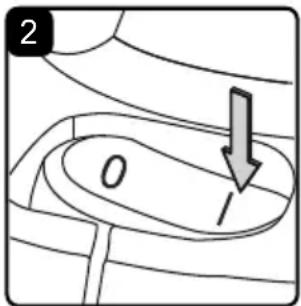
natural_image
Diagram showing a hand holding a threaded pipe connected to a circular component with an arrow indicating direction (no text or symbols)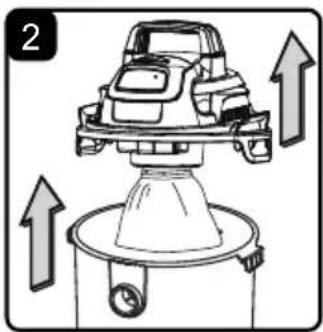
natural_image
Diagram of a car on a lift with upward arrows indicating motion or force (no text or symbols)
natural_image
Illustration of a bucket pouring water with falling petals (no text or symbols)VIDANGE DU RÉSERVOIR COLLECTEUR

AVERTISSEMENT : NE BRANCHEZ PAS LE CHARGEUR SUR UNE PRISE ÉLECTRIQUE ET NE L'INSÉREZ PAS DANS LE PORT DE CHARGE. ASSUREZ-VOUS QUE L'ASPIRATEUR EST ÉTEINT AVANT DE RETIRER LE BLOC-MOTEUR DU RÉSERVOIR COLLECTEUR.
natural_image
Diagram of a mechanical component with a downward arrow indicating motion (no text or symbols)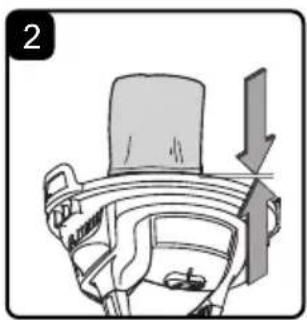
natural_image
Diagram of a car interior showing a seatbelt and dashboard with an arrow indicating direction (no text or symbols)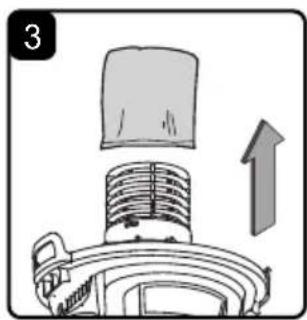
natural_image
Diagram of a vacuum cleaner with a lid and upward arrow indicating motion (no text or symbols)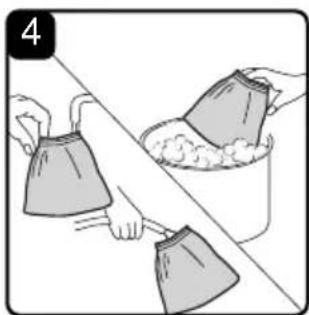
natural_image
Illustration of two hands cleaning a surface with a bucket and cloth (no text or symbols)INSTALLATION DU FILTRE RÉUTILISABLE EN TISSU
natural_image
Mechanical component diagram showing a cylindrical component being lifted by a downward arrow (no text or symbols)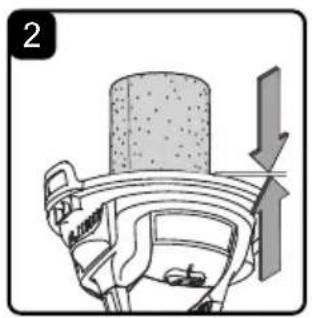
natural_image
Mechanical assembly diagram showing a piston and wheel with directional arrow (no text or labels)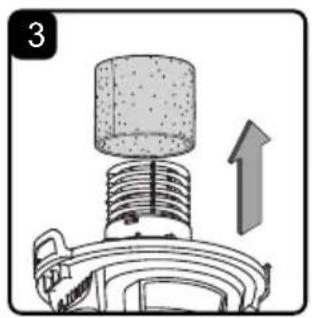
natural_image
Diagram of a mechanical component with a cylindrical top and upward arrow indicating motion (no text or symbols)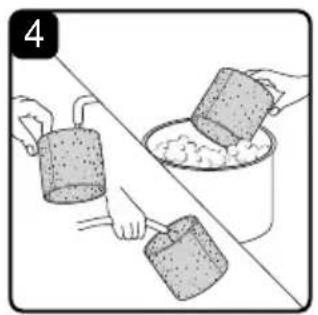
natural_image
Illustration of hands pouring liquid from a container into a bowl (no text or symbols)INSTALLATION DU FILTRE EN MOUSSE POUR MATÉRIAUX HUMIDES
- Gallon / 2.5 Galones / 2.5 Gallon
- IMPORTANT INFORMATION
- GALLONS
- PEAK HP
- WARRANTY
- Not Covered by Warranty:
- IMPORTANT SAFETY INSTRUCTIONS
- READ AND UNDERSTAND ALL INSTRUCTIONS BEFORE USING THIS VACUUM.
- SAVE THIS MANUAL FOR FUTURE REFERENCE.
- WARNING: TO REDUCE THE RISK OF FIRE, ELECTRIC SHOCK, OR INJURY:
- When using as blower:
- IMPORTANT SAFETY INSTRUCTIONS FOR VACUUM CHARGER
- WARNING: READ AND UNDERSTAND ALL INSTRUCTIONS. FAILURE TO FOLLOW ALL INSTRUCTIONS LISTED BELOW MAY RESULT IN ELECTRIC SHOCK, FIRE AND/OR SERIOUS PERSONAL INJURY:
- FCC COMPLIANCE
- SAVE THESE INSTRUCTIONS
- For Household Use Only
- SYMBOLS
- UNPACKING & CHECKING CARTON CONTENTS
- Carton Contents List:
- GENERAL ASSEMBLY INSTRUCTIONS
- UNPACKING YOUR WET/DRY VACUUM & GENERAL ASSEMBLY
- WALL MOUNT BRACKET
- For your convenience this vacuum comes with a wall mount bracket for storage. IMPORTANT!
- CHARGING
- WARNING: Before charging make sure the vacuum is turned OFF.
- DRY VACUUMING
- LIQUID VACUUMING
- DO NOT USE THE REUSABLE CLOTH FILTER FOR LIQUID VACUUMING.
- BLOWER OPERATION
- MAINTENANCE
- EMPTYING THE COLLECTION TANK
- STORAGE
- REPAIRS
- INSTALLING & CLEANING REUSABLE CLOTH FILTER
- INSTALLING REUSABLE CLOTH FILTER
- REMOVING & CLEANING REUSABLE CLOTH FILTER
- INSTALLING & CLEANING FOAM WET FILTER
- INSTALLING FOAM WET FILTER
- CLEANING FOAM WET FILTER
- TROUBLESHOOTING
- EXPLODED VIEW
- PARTS LIST
- TABLA DE CONTENIDOS
- SECCIÓN PÁGINA
- CARGA
- ASPIRADO EN SECO
- ASPIRADO EN MOJADO
- INSTRUCTIONS RELATIVES AU MONTAGE GÉNÉRAL
- DÉBALLAGE DE VOTRE ASPIRATEUR D'ATELIER SEC ET HUMIDE ET MONTAGE GÉNÉRAL
- CHARGE
- ASPIRATION DE POUSSIÈRES
- ASPIRATION DE LIQUIDES
- VIDANGE DU RÉSERVOIR COLLECTEUR
- INSTALLATION DU FILTRE RÉUTILISABLE EN TISSU
- INSTALLATION DU FILTRE EN MOUSSE POUR MATÉRIAUX HUMIDES
Brand : Vacmaster
Model : DVOM202P 1101
Category : Vacuum Cleaner