NASHVILLE-SOUND - Speaker C.Perkins - Free user manual and instructions
Find the device manual for free NASHVILLE-SOUND C.Perkins in PDF.


User questions about NASHVILLE-SOUND C.Perkins
0 question about this device. Answer the ones you know or ask your own.
Ask a new question about this device
Download the instructions for your Speaker in PDF format for free! Find your manual NASHVILLE-SOUND - C.Perkins and take your electronic device back in hand. On this page are published all the documents necessary for the use of your device. NASHVILLE-SOUND by C.Perkins.
USER MANUAL NASHVILLE-SOUND C.Perkins
natural_image
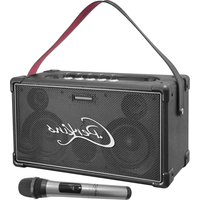
Black portable cassette with 'Perkins' logo and a microphone beside it (no text or symbols on device body)MANUAL
EN- Instruction Manual - p. 3
View the product on our website and download the multilanguage manual
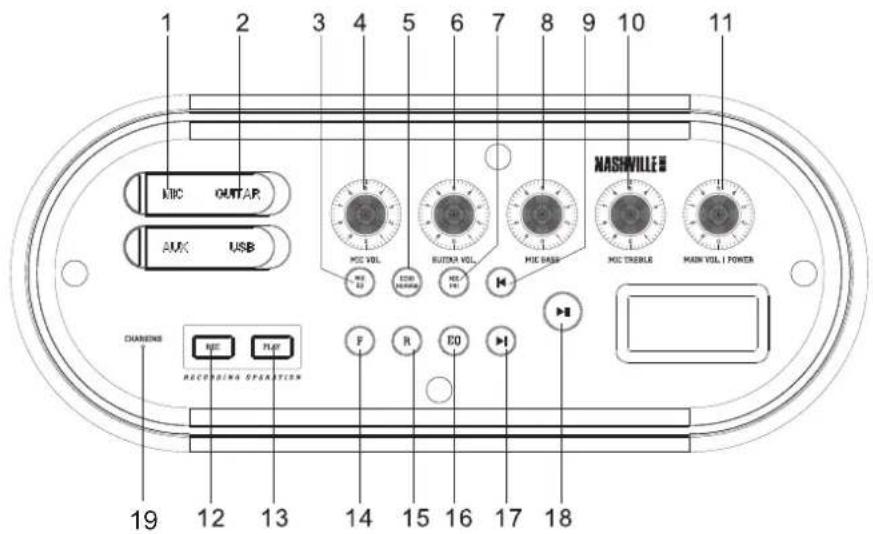
TOP PANEL / VUE DE DESSUS / DRAUFSICHT / BOVENPANEEL
text_image
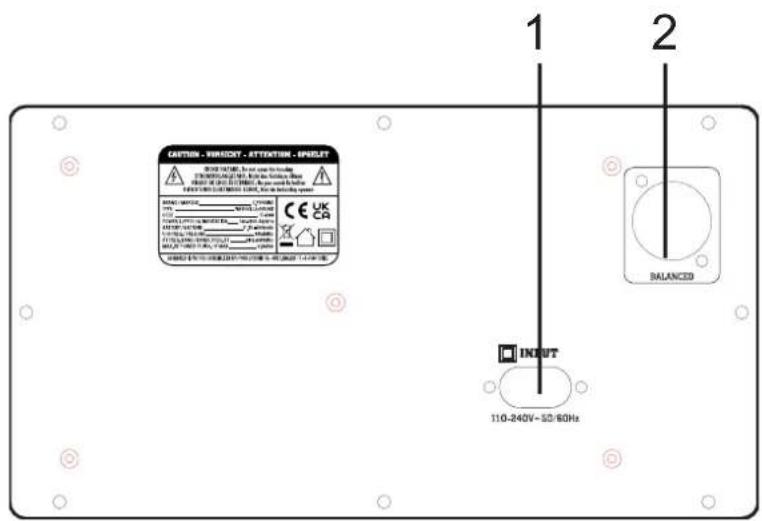
1 2 3 4 5 6 7 8 9 10 11 NUC OINTAR AUX USB MOC VOL MOC VOL MOC VOL MOC BASB MOC CABLE MOS VOL / POWER CHANNELS F R CO RECOING OPERATION 19 12 13 14 15 16 17 18 NASHVILLE BREAR PANEL / ARRIERE / RÜCKSEITE / ACHTERPANEEL
text_image
EASTERN, REMOOT, ATTENTION, APPLICAT 1 2 INPUT 110-240V~50/60HzSTAND-ALONE BLUETOOTH KARAOKE SPEAKER WITH UHF MIC 60W
OPERATING INSTRUCTIONS
Congratulations to the purchase of your new speaker.
EXPLANATION OF SIGNS

The triangle containing a lightning symbol is used to indicate whenever your health is at risk (due to electrocution, for example).

An exclamation mark in a triangle indicates particular risks in handling or operating the appliance.

CAUTION DO NOT OPEN THE HOUSING SHOCK HAZARD

Accordance with the requirements of UK standards

The product is for indoor use only

Class II protection with dual protection without earth connection

To avoid hearing loss, do not expose yourself to high volume levels for long periods of time.

This marking indicates that this product should not be disposed with other household wastes throughout the EU. To prevent possible harm to the environment or human health from uncontrolled waste disposal, recycle it responsibly to promote the sustainable reuse of material resources. To return your used device, please use the return and collection systems or contact the retailer where the product was purchased. They can take this product for environmentally safe recycling.
IMPORTANT SAFETY INSTRUCTIONS AND DANGER WARNINGS
- Please read the manual carefully and keep it for future reference.
- All safety instructions and warnings must be adhered to. They are part of the manual and must be kept with the manual.
- Any warranty claims are rendered invalid if damage occurs due to non-observance of these operating an safety instructions. We assume no liability for any consequent damage.
- Unauthorized conversions and/or modifications of the product are not permitted for safety and licensing reasons (CE). The product shall be connected to a power supply only of the type described.
- To reduce the risk of fire or electrical shock, do not expose this product to rain or moisture.
- The product is approved for operation in dry, closed rooms only. Do not operate the device nearby water, such as in bathrooms or nearby swimming pools.
- Do not expose the product to extreme temperatures (< +5°C / > +35°C), strong vibrations or heavy mechanical strain during operation.
- Unplug the product from the wall socket when it is not to be used for a long time.
- Do not let foreign objects or liquids enter the housing.
- Do not remove the cover or back, as there are no user-serviceable parts inside.
- Do not place naked flame sources, such as lighted candles on the product.
- Do not use the product in a tropical climate. Only for use in moderate climates.
- A minimum distance of 1m around the product must be kept ensuring sufficient ventilation.
- Do not place the product on soft surfaces such as carpets or beds. Do not cover the air vents of the product. Do not obstruct the air circulation with objects such as magazines, table cloths or curtains. This prevents the dissipation of heat from the appliance and can result in overheating.
- Do not expose the internal battery to excessive heat such as sunshine, fire or the like.
- The internal battery is not user-replaceable.
• To avoid injury or falls, only lift the device using the handle provided.
• To avoid injury or falls, do not use the device as a seat.
- The device complies with current European legislation regarding human exposure to electromagnetic fields.
- DISCONNECT DEVICE: The power outlet must be installed near the equipment and be easily accessible.
CHARGE THE BATTERY
Prior to using this speaker for the first time, please insert the supplied mains lead into the AC input socket (1) on the rear panel and plug the other end on a suitable wall outlet. The charge indicator (19) on the top panel lights up in red. When the battery is fully charged, the charge indicator goes off.
NOTE: Please shut down the power switch after you have finished using the system.
IMPORTANT NOTE ON LITHIUM-ION BATTERIES
- PRIOR to using the unit for the first time, please charge fully the battery without any interruption.
- Charge the battery regularly after each use. Don't wait until it is discharged!
- DON'T allow the battery to discharge completely, otherwise it will lose 20% of its capacity or even be totally damaged! If the voltage becomes too low, the internal circuits are not powered anymore and it will become impossible to recharge the battery!
- If you don't use the unit for a longer period of time, it is recommended to charge it at 40% of its capacity and check/charge it once per month
The life time of the battery depends on the observance of these recommendations.
** BATTERIES ARE NOT COVERED BY THE WARRANTY **
WE CANNOT BE HELD RESPONSIBLE FOR DAMAGED BATTERIES FURTHER TO THE NON-OBSERVANCE OF THESE BASIC RULES.
DESCRIPTION OF TOP PANEL CONTROLS
- MIC: Insert a microphone to sing along with the music.
- GUITAR IN: Connect a guitar (not included).
- MIC EQ: Press the MIC EQ knob to select the EQ settings for the microphone: (E0-0) KTV - (E0-1) MEETING - (E0-2) INDOOR - (E0-3) OUTDOOR.
- MIC VOL: Rotate to adjust microphone volume to the desired level.
- MIC ECHO/REVERB: When connecting a microphone, press this button to adjust the microphone echo (display will show "E"), press and to adjust microphone echo to the desired level.
Press again for microphone reverb (display will show "R"), press and to adjust microphone echo to the desired level.
-
GUITAR VOL: Rotate to adjust guitar volume to the desired level.
-
MIC PRI: When the microphone is in use, press to set microphone priority over music, it will reduce the volume of the background music; press again to turn off the function.
-
MIC BASS: Rotate to adjust microphone bass to the desired level.
-
Previous button: Press to move back to previous track stored on your USB drive,
-
MIC TREBLE: Rotate to adjust microphone treble to the desired level.
-
MAIN VOL/POWER: Power on/off and Volume knob.
-
REC: In BT/Aux/USB mode, press the REC button to start recording music and microphone on a connected USB device. Press REC button again to stop recording.
-
PLAY: Press to play the content recorded on USB
-
F: Mode Switching button: Press to switch between BT/USB/AUX modes.
-
R: Repeat button: Press once to repeat a single track or twice to repeat all tracks. Press again to exit the repeat function.
-
EQ: Press to shuffle between ROCK, FLAT, POP, JAZZ, CLASSIC, BASS modes.
-
Next button: Press to skip to next track stored on your USB drive
-
Play/Pause button: Press to pause the music, press again to resume play.
- Battery charge indicator
REAR PANEL
- BALANCED: Connect the Microphone for better effect.
- AC INPUT: Connect the detachable power cord to the speaker and plug in to main wall outlet.
BASIC OPERATION
Press the power ON/OFF button on the back of the speaker to switch on/off the speaker.
If the power button is off, power button on the remote control will not work.
MODE SELECTION
To change mode, press the MODE button on remote or press F button on the unit to between BT / USB / AUX modes.
ADJUSTING THE VOLUME
Rotate the MAIN VOL knob clockwise or counterclockwise on the unit to increase or decrease the music volume level.
MICROPHONE JACK
There is one microphone input on the speaker. Connect a wired microphone to the 6.3mm MIC JACK on the control panel of the unit to sing along while listening to music. Rotate the MIC VOL knob to increase or decrease microphone volume to your desired level. To adjust the microphone Echo, Reverb, bass or treble press the function button and rotate the main volume knob on top control panel to match your preference.
MICROPHONE PRIORITY
When using microphone long press MIC PRI button on the top panel to enable microphone priority over music. Press again to disable the function.
UHF MICROPHONE (SUPPLIED)
Push the switch on the microphone to the ON position. It will connect automatically to the speaker. The display shows the frequency, the signal strength and the charge level of the batteries.
INSTALLING THE BATTERIES IN THE MICROPHONE
Remove the battery cover and insert 2x AA size batteries ensuring correct polarity
RECOMMENDATIONS FOR BATTERIES

This symbol indicates that used batteries should not be disposed of with household waste but deposed correctly in accordance with your local regulations..
Batteries shall not be exposed to excessive heat such as sunshine, fire or the like.
When the internal batteries are not to be used, remove them to avoid damage caused by battery leakage or corrosion.
ATTENTION: Danger of explosion if battery is incorrectly placed. Only replace by the same or equivalent type.
WARNING : Keep new and old batteries out of the reach of children.
If the battery compartment doesn't close properly, stop using the product and keep it out of the reach of children.
If you are in doubt whether the batteries have been swallowed or introduced into any other part of the body, contact immediately a doctor.
AUX INPUT (LINE-IN)
Press F button on unit to select the "AUX" mode. Connect speaker with your Smartphone/MP3 player/PC/Laptop with 3.5mm jack AUX-IN cable and you can play music from external device.
USB PLAYBACK
Press F button on the unit to select "USB" and insert the USB stick, the unit will automatically read and play the music on the USB device.
Press ▶ II to Pause the music, press again to resume play.
Short Press ◀ to play previous song.
Short Press to move to next song.
BLUETOOTH OPERATION
Press F button on the unit to select the "BT" mode. "bE" will be displayed on the display screen. Put the Bluetooth device within 10 meters, turn on the Bluetooth function on your device and search for "NASHVILLE" to connect. Once the pairing is completed unit will start playing the music from your device.
Short press PLAY/PAUSE button to pause the music, press again to resume play.
Short press or key to select previous or next track.
SPECIFICATION
General
BT frequency band....2402-2480MHz
Max. RF emission of BT 0.98dBm
UHF frequency of the microphone 864.8MHz
Max. RF emission of the microphone 7.88dBm
Batteries for the microphone 2 x AA 1.5V
Battery 11.1V 4000mAh Li-ion battery
Power supply....110-240V\~ 50/60Hz
Dimension 398 x 213 x 185 mm
Audio Section
Speaker size: Double 4" Subwoofer
Driver: Double 1.5" Tweeter
Frequency Response 40-20 KHz
Impedance 4Ω
Signal-to-Noise Ratio 77dB
Power 60 Watts RMS
ENCEINTE BLUETOOTH KARAOKE AUTONOME AVEC MICRO UHF 60W
INTRODUCTION
MICROPHONE UHF (FOURNI)
RECOMMANDATIONS POUR LES PILES

SES SEVIYESINI AYARLAMA
EU Declaration of Conformity
Hereby we, LOTRONIC SA
Rue F. Englert 17 Bte2
1480 TUBIZE
Belgique
+32.2.390.91.91
Certify and declare under our sole responsibility that the following product:
Trade name: C.PERKINS
Product name: KARAOKE SPEAKER
Type or model: NASHVILLE-SOUND
Conforms with the essential requirements of RED directive 2014/53/EU, ErP directive 2009/125/EC, Commission Regulation (EC) N°1275/2008 & Regulation (EC) N°801/2013, 2011/65/EU RoHS directive and the Commission Delegated Directive (EU) 2015/863, REACH 1907/2006 and POP Regulation (EU) 2019/1021 Short-chain chlorinated paraffins (SCCP**, Alkanes C10-13)
Based on the following specifications applied:
Place and date of issue: Tubize (Belgium), on 06/01/2024
Manuel De Sousa
Quality manager
LOTRONIC SA
Zoning Tubize II
View the product on our website and download the multilanguage manual
