GHP62X - Phone GRANDSTREAM - Free user manual and instructions
Find the device manual for free GHP62X GRANDSTREAM in PDF.


| Product type | IP desk phone for hotels |
| Models | GHP620, GHP620W, GHP621, GHP621W |
| Dimensions (approx.) | 200 x 180 x 80 mm (estimate) |
| Weight (approx.) | 800 g (estimate) |
| Power supply | PoE (GHP620/621) or 12V power adapter (GHP620W/621W) |
| Number of SIP lines | 2 accounts/lines |
| Speaker | HD with 3-way conference |
| Audio codecs | Full-band Opus, jitter handling (up to 30% packet loss) |
| Programmable keys | 6 softkey buttons and 10 speed dial keys |
| Connectivity | 10/100 Ethernet (wired models) or dual-band 2.4/5 GHz Wi-Fi (W models) |
| Installation | Desktop (stand included) or wall-mountable (wall mount) |
| Display | Not specified (likely basic LCD screen) |
| Centralized management | Compatible with Grandstream Device Management System (GDMS) |
| Message waiting indicator | Flashing green LED |
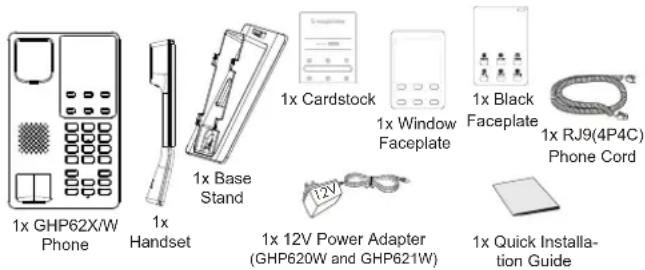
| Package contents | Phone, handset, base stand, RJ9 cable, power adapter (W models), faceplates |
| Maintenance and cleaning | Clean with a soft dry cloth; do not use abrasive products |
| Safety | Use only the provided adapter; do not restart during an update |
| Spare parts | Available from manufacturer (adapter, handset, cables) |
| General information | Do not use for emergency calls without an appropriate SIP subscription |
Frequently Asked Questions - GHP62X GRANDSTREAM
User questions about GHP62X GRANDSTREAM
0 question about this device. Answer the ones you know or ask your own.
Ask a new question about this device
Download the instructions for your Phone in PDF format for free! Find your manual GHP62X - GRANDSTREAM and take your electronic device back in hand. On this page are published all the documents necessary for the use of your device. GHP62X by GRANDSTREAM.
USER MANUAL GHP62X GRANDSTREAM
Grandstream Networks, Inc.
126 Brookline Ave, 3rd Floor
Boston, MA 02215. USA
Tel: +1 (617) 566 - 9300
In the UK and EU member states, operation of 5150-5350 MHz is restricted to indoor use only.


For Certification, Warranty and RMA information, please visit www.grandstream.com
EU Agent:
Picus Advisors Ltd
Taivalmaki 9F1-02200 Espoo, FINLAND https://www.picus.fi
Note: For European Union only

GRANDSTREAM
CONNECTING THE WORLD
natural_image
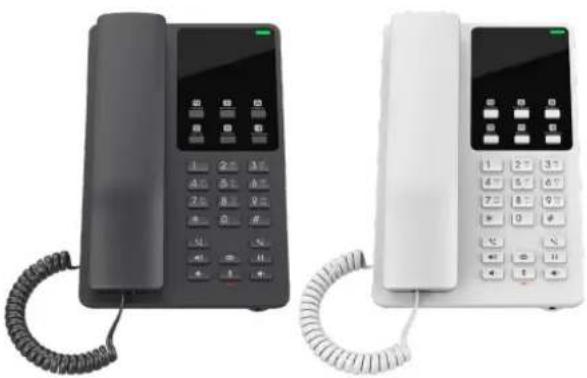
Two modern telephones, one black and one white, displayed side by side with a coiled cord (no visible text or symbols)GHP620/W
GHP621/W
Compact Hotel Phone
Quick Installation Guide
Content
English....1
简体中文....6
Español....11
Français....16
Deutsch....21
Italiano....26
Русский....31
Português....36
Regulatory Information....41
EN
The GHP620/W and GHP621/W are not pre-configured to support or carry emergency calls to any type of hospital, law enforcement agency, medical care unit ("Emergency Service(s)"), or any other kind of Emergency Service. You must make additional arrangements to access Emergency Services. It is your responsibility to purchase SIP-compliant Internet telephone service, properly configure the GHP620/W and GHP621/W to use that service, and periodically test your configuration to confirm that it works as you expect. If you do not do so, it is your responsibility to purchase traditional wireless or landline telephone services to access Emergency Services.
GRANDSTREAM DOES NOT PROVIDE CONNECTIONS TO EMERGENCY SERVICES VIA THE GHP620/W AND GHP621/W. NEITHER GRANDSTREAM NOR ITS OFFICERS, EMPLOYEES OR AFFILIATES MAY BE HELD LIABLE FOR ANY CLAIM, DAMAGE, OR LOSS YOU HEREBY WAIVE ANY AND ALL SUCH CLAIMS OR CAUSES OF ACTION ARISING FROM OR RELATING TO YOUR INABILITY TO USE THE GHP620/W AND GHP621/W TO CONTACT EMERGENCY SERVICES, AND YOUR FAILURE TO MAKE ADDITIONAL ARRANGEMENTS TO ACCESS EMERGENCY SERVICES IN ACCORDANCE WITH THE IMMEDIATELY PRECEDING PARAGRAPH.
The GNU GPL license terms are incorporated into the device firmware and can be accessed via the Web user interface of the device at http(s)://IP/#/gpl_license. To obtain a CD with GPL source code information, please submit a written request to info@grandstream.com
PRECAUTIONS:
WARNING: Please DO NOT power cycle the GHP620/W and GHP621/W during system bootup or firmware upgrade. You may corrupt firmware image files and cause the unit to malfunction.
WARNING: Use only the power adapter included in the GHP620W/GHP621W package. Using an alternative nonqualified power adapter may damage the unit.
OVERVIEW:
The GHP series of hotel phones feature the GHP620(W) and GHP621(W), easy-to-use IP phones for any hotel rooms that can be programmed and customized based on the needs of hotels and their guests. The GHP620W and GHP621W models are equipped with integrated dual-band Wi-Fi. The features of GHP series include HD speaker, 2 SIP accounts/lines, 6 programmable keys, 10 speed dial keys, 3-way voice conferencing, full band Opus voice codec, and advanced jitter-resilience algorithm that tolerates up to 30% packet loss without impacting voice quality. The GHP series is supported by Grandstream Device Management System (GDMS), which provides a centralized interface to configure, provision, manage and monitor the deployment of Grandstream endpoints. The GHP series IP phones can be installed on desktop or wall-mounted, and can be powered by PoE (GHP620/GHP621) and power adapter (GHP620W/GHP621W). Its elegant and compact design makes it perfect for not only hotels, but also hospitals, apartments, dormitories and much more.
PACKAGE CONTENT:
GHP620/W & GHP621/W DESCRIPTION:
Front panel
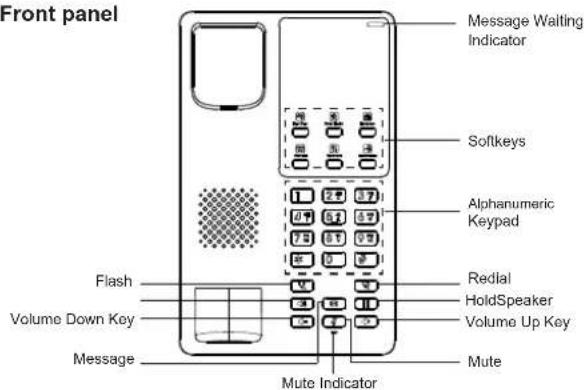
Note: The LED for the message waiting indicator will flash in green when there is a message waiting.
Back panel
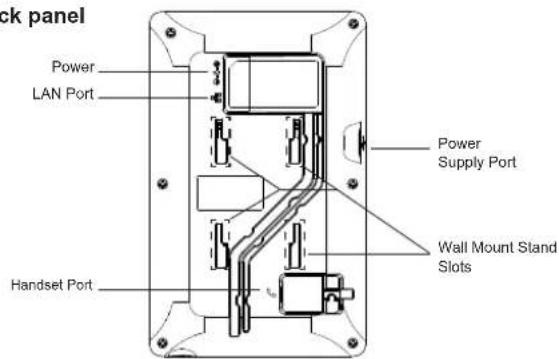
-3--4-
PHONE SETUP:
Wall Mount
- On the wall where the GHP620/W & GHP621/W will be mounted, mark two dots with 100mm distance in between vertically.
- Using a drill, make a hole on each marked dot. Put a plastic expansion bolt and screw (not provided) into each hole. Leave enough space on the screws to mount the GHP620/W & GHP621/W.
-
Attach the wall mount spacers to the slot for wall mount spacers on the back of the phone.
-
Mount the GHP620/W & GHP621/W on the screws using its "Wall Mount Slots".
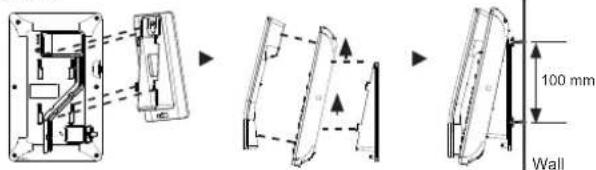
Desktop Installation
For installing the phone on the table with the phone stand, attach the phone stand to the bottom of the phone where there is a slot for the phone stand.
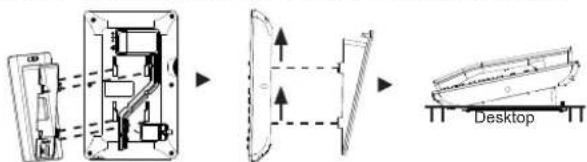
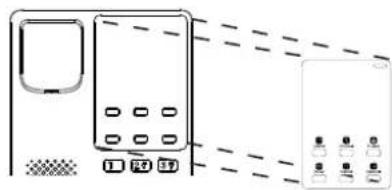
INSTALLING THE FACEPLATE:
- Remove the release paper from the back of the faceplate.
- Stick the faceplate on the indicated area. Please refer to the illustration on the right.
natural_image
Diagram of a microwave oven with control panel and indicator lights (no text or symbols)CONNECTING THE PHONE:
To set up the phone, follow the steps below:
- Plug in the phone cord to the handset RJ9 port and then connect it to the base.
- Connect the LAN port of the phone to the RJ45 socket of a hub/switch or a router (LAN side of the router) using the Ethernet cable. This step can be skipped if using GHP620W & GHP621W with Wi-Fi.
- Power up the phone:
- For GHP620W & GHP621W: Connect the 12V DC output plug to the power jack on the phone; plug the power adapter into an electrical outlet.
- For GHP620 & GHP621: A PoE switch must be used in step 2.
Note: The GHP620W/GHP621W is preconfigured to connect to a default SSID named "wp_master" with password (WPA/WPA2 PSK) "wp!987@dmin". Users can also modify these settings from the phone's web UI.
PHONE CONFIGURATION:
- Ensure your phone is powered up and connected to the Internet.
- Locate the MAC address on the bottom of the device or on the package.
- From a computer connected to the same network as the GHP62X, type in the following address using the GHP62X's MAC address on your browser: https://
.local
Example: https://c074adfffff.local
Note: The user can also dial **47# and the current IP address will be announced by the IVR.
- Enter the admin username and password to access the configuration menu. (The factory default username is "admin" and the default random password can be found on the sticker at the back of the unit).

Refer to online documents and FAQ for more detailed information: https://www.grandstream.com/our-products
ZII
桌面安装:
安装面板:
natural_image
Diagram showing a device with buttons and a separate screen, no text or symbols present电话的连接:
请按照以下步骤设置话机:
更多有关详细信息,请参阅在线文档和常见问题解答 https://www.grandstream.com/our-products
natural_image
Line drawing of a microwave oven with control panel and indicator lights (no text or symbols)CONECTANDO EL TELÉFONO:
Installation Sur Bureau
INSTALLATION DE LA PLAQUE FRONTALE:
natural_image
Diagram of a microwave oven with control panel and indicator lights (no text or symbols)CONNECTER LE TELEPHONE:
Tischmontage
natural_image
Line drawing of a microwave oven with control panel and indicator lights (no text or symbols)natural_image
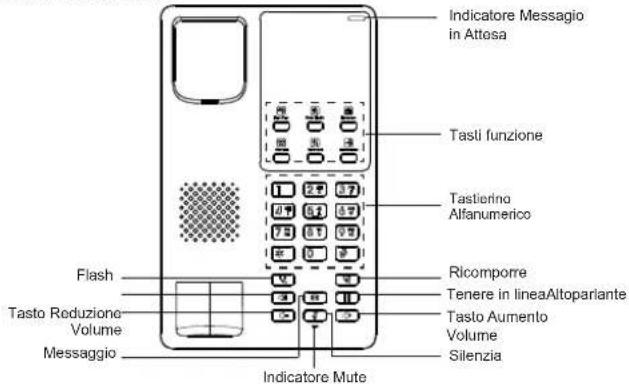
Diagram of a device with labeled buttons and indicators (no readable text or symbols)GHP620/W & GHP621/W DESCRIZIONE:
Pannello anteriore
natural_image
Line drawing of a microwave oven with control panel and indicator lights (no text or symbols)natural_image
Diagram of a microwave oven with control panel and indicator lights (no text or symbols)A CONECTAR O TELEFONE:
Certification Regulatory Information:
For GHP62x
1. U.S. FCC Part 68 Regulatory Information
This equipment complies with Part 68 of the FCC rules. Located on the equipment is a label that contains, among other information, the ACTA registration number and ringer equivalence number (REN.) If requested, this information must be provided to the telephone company.
The REN is used to determine the quantity of devices which may be connected to the telephone line. Excessive REN's on the telephone line may result in the devices not ringing in response to an incoming call. In most, but not all areas, the sum of the REN's should not exceed five (5.0). To be certain of the number of devices that may be connected to the line, as determined by the total REN's contact the telephone company to determine the maximum REN for the calling area.
This equipment cannot be used on the telephone company-provided coin service. Connection to Party Line Service is subject to State Tariffs.
If this equipment causes harm to the telephone network, the telephone company will notify you in advance that temporary discontinuance of service may be required. If advance notice isn't practical, the telephone company will notify the customer as soon as possible. Also, you will be advised of your right the file a complaint with the FCC if you believe it is necessary.
The telephone company may make changes in its facilities, equipment, operations, or procedures that could affect the operation of the equipment. If this happens, the telephone company will provide advance notice in order for you to make the necessary modifications in order to maintain uninterrupted service.
If the trouble is causing harm to the telephone network, the telephone company may request you to remove the equipment from the network until the problem is resolved.
This equipment uses the following USOC jacks: RJ45C
It is recommended that the customer install an AC surge arrester in the AC outlet to which this device is connected. This is to avoid damaging the equipment caused by local lightening strikes and other electrical surges.
If trouble is experienced with this equipment, please contact (Agent in the US):
Company Name: Grandstream Networks, Inc.
Address: 126 Brookline Ave, 3rd Floor Boston, MA 02215, USA
Tel: 1-617-5669300
Fax: 1-617-2491987
2. U.S. FCC Part 15 Regulatory Information
This device complies with part 15 of the FCC Rules. Operation is subject to the following two conditions:(1) this device may not cause harmful interference, and(2) this device must accept any interference received, including interference that may cause undesired operation.
Any Changes or modifications not expressly approved by the party responsible for compliance could void the user's authority to operate the equipment.
Note: This equipment has been tested and found to comply with the limits for a Class B digital device, pursuant to part 15 of the FCC Rules. These limits are designed to provide reasonable protection against harmful interference in a residential installation. This equipment generates, uses and can radiate radio frequency energy and, if not installed and
used in accordance with the instructions, may cause harmful interference to radio communications. However, there is no guarantee that interference will not occur in a particular installation. If this equipment does cause harmful interference to radio or television reception, which can be determined by turning the equipment off and on, the user is encouraged to try to correct the interference by one or more of the following measures:
—Reorient or relocate the receiving antenna.
—Increase the separation between the equipment and receiver.
—Connect the equipment into an outlet on a circuit different from that to which the receiver is connected.
—Consult the dealer or an experienced radio/TV technician for help.
3. Canada Regulatory Information
This product meets the applicable Innovation, Science and Economic Development Canada technical specifications.
The Ringer Equivalence Number (REN) indicates the maximum number of devices allowed to be connected to a telephone interface. The termination of an interface may consist of any combination of devices subject only to the requirement that the sum of the RENs of all the devices not exceed five.
Hereby, [Grandstream Networks, Inc.] declares that the radio equipment type [GHP621/GHP620] is in compliance with Directive 2014/30/EU.
The full text of the EU declaration of conformity is available at the following internet address: www.grandstream.com
5. UK Regulatory Information
Hereby, [Grandstream Networks, Inc.] declares that the radio equipment type [GHP621/GHP620] is in compliance with UK SI 2016 No. 1091 The full text of the UK declaration of conformity is available at the following internet address: www.grandstream.com
For GHP62xW
1. Common part
This equipment complies with radiation exposure limits set forth for an uncontrolled environment. This transmitter must not be co-located or operating in conjunction with any other antenna or transmitter. This equipment should be installed and operated with minimum distance 20cm between the radiator& your body.
The earpiece is easy to absorb small object, please take care to avoid scratching.
2. U.S. FCC Part 68 Regulatory Information
This equipment complies with Part 68 of the FCC rules. Located on the equipment is a label that contains, among other information, the ACTA registration number and ringer equivalence number (REN.) If requested, this information must be provided to the telephone company.
The REN is used to determine the quantity of devices which may be connected to the telephone line. Excessive REN's on the telephone line may result in the devices not ringing in response to an incoming call. In most, but not all areas, the sum of the REN's should not exceed five (5.0). To be certain of the number of devices that may be connected to the line, as determined by the total REN's contact the telephone company to determine the maximum REN for the calling area.
This equipment cannot be used on the telephone company-provided coin service. Connection to Party Line Service is subject to State Tariffs.
If this equipment causes harm to the telephone network, the telephone company will notify you in advance that temporary discontinuance of service may be required. If advance notice isn't practical, the telephone company will notify the customer as soon as possible. Also, you will be advised of your right the file a complaint with the FCC if you believe it is necessary.
The telephone company may make changes in its facilities, equipment, operations, or procedures that could affect the operation of the equipment. If this happens, the telephone company will provide advance notice in order for you to make the necessary modifications in order to maintain uninterrupted service.
If the trouble is causing harm to the telephone network, the telephone company may request you to remove the equipment from the network until the problem is resolved.
This equipment uses the following USOC jacks: RJ45C.
It is recommended that the customer install an AC surge arrester in the AC outlet to which this device is connected. This is to avoid damaging the equipment caused by local lightening strikes and other electrical surges.
If trouble is experienced with this equipment, please contact (Agent in the US):
Company Name: Grandstream Networks, Inc.
Address: 126 Brookline Ave, 3rd Floor Boston, MA 02215, USA
Tel: 1-617-5669300
Fax: 1-617-2491987
3. U.S. FCC Part 15 Regulatory Information
This device complies with part 15 of the FCC Rules. Operation is subject to the following two conditions:(1) this device may not cause harmful interference, and(2) this device must accept any interference received, including interference that may cause undesired operation.
Any Changes or modifications not expressly approved by the party responsible for compliance could void the user's authority to operate the equipment.
Note: This equipment has been tested and found to comply with the limits for a Class B digital device, pursuant to part 15 of the FCC Rules. These limits are designed to provide reasonable protection against harmful interference in a residential installation. This equipment generates, uses and can radiate radio frequency energy and, if not installed and used in accordance with the instructions, may cause harmful interference to radio communications. However, there is no guarantee that interference will not occur in a particular installation. If this equipment does cause harmful interference to radio or television reception,
which can be determined by turning the equipment off and on, the user is encouraged to try to correct the interference by one or more of the following measures:
—Reorient or relocate the receiving antenna.
—Increase the separation between the equipment and receiver.
—Connect the equipment into an outlet on a circuit different from that to which the receiver is connected.
—Consult the dealer or an experienced radio/TV technician for help.
4. Canada Regulatory Information
Radio equipment
Operation of 5150-5250 MHz is restricted to indoor use only.
This device contains licence-exempt transmitter(s)/receiver(s) that comply with Innovation, Science and Economic Development Canada's licence-exempt RSS(s). Operation is subject to the following two conditions:
(1) This device may not cause interference.
(2) This device must accept any interference, including interference that may cause undesired operation of the device.
This product meets the applicable Innovation, Science and Economic Development Canada technical specifications.
This product meets the applicable Innovation, Science and Economic Development Canada technical specifications.
The Ringer Equivalence Number (REN) indicates the maximum number of devices allowed to be connected to a telephone interface. The termination of an interface may consist of any combination of devices subject only to the requirement that the sum of the RENs of all the devices not exceed five.
5. EU Regulatory Information
In all EU member states, operation of 5150-5350 MHz is restricted to indoor use only. Support Frequency Bands and Power:
WLAN 2.4 GHz < 20 dBm;
WLAN 5.2 GHz < 23 dBm;
WLAN 5.3/ 5.6 GHz < 20 dBm;
The simplified EU declaration of conformity referred to in Article 10(9) shall be provided as follows:
Hereby, [Grandstream Networks, Inc.] declares that the radio equipment type [GHP621W/GHP620W] is in compliance with Directive 2014/53/EU.
The full text of the EU declaration of conformity is available at the following internet address: www.grandstream.com
- UK Regulatory Information
Operation of 5150-5350 MHz is restricted to indoor use only.
Support Frequency Bands and Power:
WLAN 2.4 GHz < 20 dBm;
WLAN 5.2 GHz < 23 dBm;
WLAN 5.3/ 5.6 GHz < 20 dBm;
The simplified UK declaration of conformity referred to in Regulation 8&14 shall be provided as follows:
Hereby, [Grandstream Networks, Inc.] declares that the radio equipment type [GHP621W/GHP620W] is in compliance with RER2017(S.I.2017/1206).
The full text of the UK declaration of conformity is available at the following internet address: www.grandstream.com
- Content
- EN
- PRECAUTIONS:
- OVERVIEW:
- GHP620/W & GHP621/W DESCRIPTION:
- PHONE SETUP:
- Wall Mount
- Desktop Installation
- INSTALLING THE FACEPLATE:
- CONNECTING THE PHONE:
- PHONE CONFIGURATION:
- 桌面安装:
- 安装面板:
- 电话的连接:
- 请按照以下步骤设置话机:
- CONECTANDO EL TELÉFONO:
- Installation Sur Bureau
- INSTALLATION DE LA PLAQUE FRONTALE:
- CONNECTER LE TELEPHONE:
- Tischmontage
- GHP620/W & GHP621/W DESCRIZIONE:
- A CONECTAR O TELEFONE:
- Certification Regulatory Information:
- For GHP62x
- U.S. FCC Part 68 Regulatory Information
- U.S. FCC Part 15 Regulatory Information
- Canada Regulatory Information
- UK Regulatory Information
- For GHP62xW
- Common part
- U.S. FCC Part 68 Regulatory Information
- U.S. FCC Part 15 Regulatory Information
- Canada Regulatory Information
- Radio equipment
- EU Regulatory Information
Brand : GRANDSTREAM
Model : GHP62X
Category : Phone