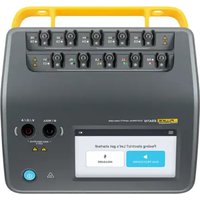
ESA710 - Measuring equipment FLUKE - Free user manual and instructions
Find the device manual for free ESA710 FLUKE in PDF.


| Product type | Electrical safety analyzer |
| Brand | Fluke |
| Model | ESA710 |
| Main functions | Electrical safety tests: leakage current, insulation resistance, grounding, dielectric test, functional test |
| Power supply | Mains 100-240 V AC, 50/60 Hz |
| Dimensions (W × D × H) | Approximately 320 × 260 × 150 mm |
| Weight | Approximately 4.5 kg |
| Display | Color touch screen |
| Connectivity | USB for PC, OneQA compatible |
| Internal memory | Storage of test results and procedures |
| Safety standards | Compliant with IEC 61010-1, IEC 62353 |
| Maintenance and cleaning | Wipe with a soft, dry cloth. Do not use solvents. |
| Spare parts and repairability | See the manual for authorized parts. Repair by Fluke approved center. |
| Operating temperature | 0 °C to 40 °C |
| Operating humidity | 10 % to 90 % non-condensing |
| Warranty | 1 year (extendable) |
Frequently Asked Questions - ESA710 FLUKE
User questions about ESA710 FLUKE
0 question about this device. Answer the ones you know or ask your own.
Ask a new question about this device
Download the instructions for your Measuring equipment in PDF format for free! Find your manual ESA710 - FLUKE and take your electronic device back in hand. On this page are published all the documents necessary for the use of your device. ESA710 by FLUKE.
USER MANUAL ESA710 FLUKE
natural_image
Abstract geometric logo with a white concentric circle and a yellow rectangular block inside a dark hexagon (no text or symbols)OneQA
How to Run Automated Procedures On Your Product
Quick Guide

natural_image
Abstract geometric logo with a black hexagon containing a white circle and a yellow arrow, no text or symbols present.
natural_image
Icon of a download arrow with a blue triangular button, no text or symbols presentRegister for OneQA Download procedures
OneQA was designed to go hand-in-hand with your product to eliminate the need for manual testing. With OneQA, you can automate your testing workflows and conveniently manage procedures and assets from your PC.
To get started:
- Go to oneqa.com/registerdevice to register.
Already have an account? Just sign in and register your new device. - Download OneQA onto your PC. Install it and Run the program.
- Sign in with your email and password.
Start automated testing right away with standard procedures we created based on the most common workflows. Download these onto your device directly to get started. Once you're familiar with automated testing, you can also make custom procedures from within OneQA.
To download the procedures:
- Select Home in OneQA's top menu.
- Select Procedures in the sub menu.
- Click the icon in the top right corner and download the sample procedures.
natural_image
Abstract 3D icon depicting a document with user profile and document, surrounded by arrows indicating flow or interaction (no text or symbols)Sync your product to use automation
Power up your product and connect it to your PC, running OneQA, with the included USB cable. By connecting your device to OneQA, your product will register to your tenant automatically.
Follow the on-screen instructions to synchronize your procedures, users, and assets to the product.
You are now ready to use automated workflows from your device.

natural_image
Blue square play button icon with green checkmarks and red X mark (no text or symbols)Run an automated procedure
To run an automated procedure:
- Tap Run Procedure on the Home Screen of your device.
- Search for the asset you want to test and select it.
- Select the procedure you want to use.
- Tap Run and you are ready to start testing.
When the procedure is complete, you can review the data, adjust test details, add notes, and sign.
To store your results, tap the Complete button. Synchronize the device to your PC to generate sharable PDF reports with OneQA.

natural_image
Abstract geometric logo with a black hexagon containing a white circle and a yellow arrow, no text or symbols present.
natural_image
Icon of a download arrow with a blue triangular button, no text or symbols presentnatural_image
Abstract 3D icon depicting a document with user profile and data transfer symbols, no text or labels presentnatural_image
Blue square play button icon with green checkmarks and red X mark (no text or symbols)natural_image
Abstract geometric logo with a black hexagon containing a white circle and a yellow arrow, no text or symbols present.
natural_image
Icon showing a download arrow with a blue triangular pointer, no text or symbols presentnatural_image
Abstract 3D icon depicting a document with user profile and data transfer symbols, no text or labels presentnatural_image
Blue square play button icon with green checkmarks and red X mark (no text or symbols)natural_image
Abstract geometric logo with a black hexagon containing a white circle and a yellow arrow, no text or symbols present.
natural_image
Icon showing a download arrow with a blue triangular pointer, no text or symbols presentnatural_image
Abstract 3D icon depicting a document with user profile and data transfer symbols, no text or labels presentnatural_image
Blue square play button icon with green checkmarks and red X mark (no text or symbols)natural_image
Abstract geometric logo with a black hexagon containing a white circle and a yellow arrow, no text or symbols present.
natural_image
Icon showing a download arrow with a blue triangular pointer, no text or symbols presentnatural_image
Abstract 3D icon depicting a document with user profile and document, surrounded by arrows indicating flow or interaction (no text or symbols)natural_image
Blue square play button icon with green checkmarks and red X mark (no text or symbols)natural_image
Abstract geometric logo with a black hexagon containing a white circle and a yellow arrow, no text or symbols present.
natural_image
Icon of a download arrow with a blue triangular pointer, no text or symbols presentOneQAに登録する
ダウンロード手 順
natural_image
Abstract icon depicting a document with user profile and data card, surrounded by arrows indicating flow or interaction (no text or symbols)
natural_image
Blue square play button icon with green checkmarks and red X mark (no text or symbols)自動化を利用するために製品を同期させる
natural_image
Abstract geometric logo with a black hexagon containing a white circle and a yellow arrow, no text or symbols present.
natural_image
Icon showing a download arrow with a blue triangular pointer, no text or symbols presentnatural_image
Abstract 3D icon depicting a document with user profile and data transfer symbols, no readable text or labelsnatural_image
Blue square play button icon with green checkmarks and red X mark (no text or symbols)natural_image
Abstract geometric logo with a black hexagon containing a white circle and a yellow arrow, no text or symbols present.
natural_image
Icon showing a download arrow with a blue triangular pointer, no text or symbols presentnatural_image
Abstract 3D icon depicting a document with user profile and document, surrounded by arrows indicating flow or interaction (no text or symbols)
natural_image
Blue square play button icon with green checkmarks and red X mark (no text or symbols)natural_image
Abstract geometric logo with a black hexagon containing a white circle and a yellow arrow, no text or symbols present.
natural_image
Icon of a download arrow with a blue triangular button, no text or symbols present注册 OneQA 下载程序
natural_image
Abstract icon depicting a document with user profile and data card, surrounded by arrows indicating flow or interaction (no text or symbols)
natural_image
Blue square play button icon with green checkmarks and red X mark (no text or symbols)©2023-2025 Fluke Biomedical. 5586873, June 2023, Rev. 2, 03/25
Brand : FLUKE
Model : ESA710
Category : Measuring equipment