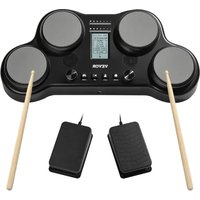
PD405 - Musical instrument Vevor - Free user manual and instructions
Find the device manual for free PD405 Vevor in PDF.


| Product Type | Portable Electronic Drum Kit |
| Model | PD405 |
| Brand | Vevor |
| Power Supply | 12V AC adapter (included) or 6 AA alkaline batteries (not included) |
| Number of Pads | 4 velocity-sensitive drum pads |
| Pedals | 2 x 6.35mm jack inputs for hi-hat and bass drum pedals |
| Display | Backlit LCD showing kit, volume, tempo, and settings |
| Speakers | 2 built-in 1.5" speakers |
| Headphone Output | 3.5mm jack |
| Built-in Metronome | Yes, with adjustable tempo from 20 to 240 BPM, 7 rhythm types |
| Game Mode | 25 built-in songs with difficulty levels |
| Connectivity | Pedal input, headphone output, DC input |
| Additional Functions | Auto power-off (8 min), factory reset, velocity LED indicator |
| Maintenance and Cleaning | Wipe with a soft, dry cloth; use a mild non-abrasive detergent if necessary. Do not use benzene, thinners, or alcohol. |
| Safety | Do not open or modify the device; avoid extreme temperatures, humidity, and shocks; use only the supplied adapter; do not expose to rain; stop use if any abnormality occurs. |
| Batteries | 6 AA alkaline batteries (not included), compartment provided |
| Certifications | FCC Part 15, European Directive 2012/19/EU (WEEE) |
Frequently Asked Questions - PD405 Vevor
User questions about PD405 Vevor
0 question about this device. Answer the ones you know or ask your own.
Ask a new question about this device
Download the instructions for your Musical instrument in PDF format for free! Find your manual PD405 - Vevor and take your electronic device back in hand. On this page are published all the documents necessary for the use of your device. PD405 by Vevor.
USER MANUAL PD405 Vevor
Technical Support and E-Warranty Certificate www.vevor.com/support
ELECTRICALDRUMSET USERMANUAL
MODEL:PD405
We continue to be committed to provide you tools with competitive price. "Save Half", "Half Price" or any other similar expressions used by us only represents an estimate of savings you might benefit from buying certain tools with us compared to the major top brands and does not necessarily mean to cover all categories of tools offered by us. You are kindly reminded to verify carefully when you are placing an order with us if you are actually Saving Half in comparison with the top major brands.
MODEL:PD405
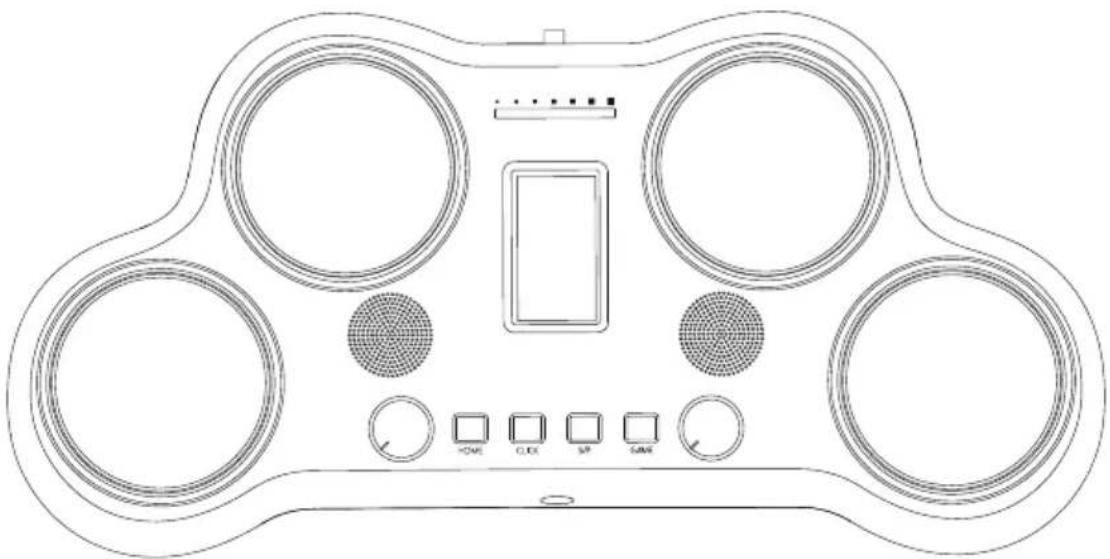
natural_image
Line drawing of a handheld device with four circular buttons and a central screen (no text or symbols)(The picture is for reference only, please refer to the actual object)
NEEDHELP?CONTACTUS!
Have product questions? Need technical support? Please feel free to contact us:
TechnicalSupportandE-WarrantyCertificate www.vevor.com/support
This is the original instruction, please read all manual instructions carefully before operating. VEVOR reserves a clear interpretation of our user manual. The appearance of the product shall be subject to the product you received. Please forgive us that we won't inform you again if there are any technology or software updates on our product.
⚠ WARNING

Do not open (or modify in any way) the unit or its AC adapter.

Do not attempt to repair the unit, or replace parts within it (except when this manual provides specific instructions directing you to do so).

Never use or store the unit in places that are: Subject to temperature extremes (e.g., direct sunlight in an enclosed vehicle, near a heating duct, on top of heat-generating equipment); or are damp (e.g., baths, washrooms, on wet floors); or are humid; or are exposed to rain; or are dusty; or are subject to high levels of vibration.

When using the unit with a rack or stand, the rack or stand must be carefully placed so it is level and sure to remain stable. If not using a rack or stand, you still need to make sure that any location you choose for placing the unit provides a level surface that will properly support the unit, and keep it from wobbling.

Be sure to use only the AC adapter supplied with the unit. Also, make sure the line voltage at the installation matches the input voltage specified on the AC adapter's body. Other AC adapters may use a different polarity, or be designed for a different voltage, so their use could result in damage, malfunction, or electric shock.

Use only the attached power-supply cord. Also, the supplied power cord must not be used with any other device.

Do not excessively twist or bend the power cord, nor place heavy objects on it. It can damage the cord, producing severed elements and short circuits. Damaged cords may cause fire and shock hazards!

This unit, either alone or in combination with an amplifier and headphones or speakers, may be capable of producing sound levels that could cause permanent hearing loss. Do not operate for a long period of time at a level that is uncomfortable. If you experience any hearing loss or ringing in the ears, you should immediately stop using the unit, and consult an audiologist.

Do not allow any objects (e.g., flammable material, coins, pins); or liquids of any kind (water, soft drinks, etc.) to penetrate the unit.

Immediately turn the power off and remove the AC adapter from the outlet when:
a. The AC adapter, the power-supply cord, or the plug has been damaged.
b. Smoke or unusual odor occurs.
c. Objects have fallen into, or liquid has been spilled onto the unit.
d. The unit has been exposed to rain (or otherwise has become wet).
e. The unit does not appear to operate normally or exhibits a marked change in performance.

In Households with small children, an adult should provide supervision until the child is capable of following all the rules essential for the safe operation of the unit.

Protect the unit from strong impact. (Do not drop it!)

Do not force the unit's power-supply cord to share an outlet with an unreasonable number of other devices. Be especially careful when using extension cords—the total power used by all devices you have connected to the extension cord's outlet must never exceed the power rating (watts/amperes) for the extension cord. Excessive loads can cause the insulation on the cord to heat up and eventually melt trough.
CAUTION

The unit and the AC adapter should be located so their location or position does not interfere with their proper ventilation.

Always grasp only the plug on the AC adapter cord when plugging into, or unplugging from, an outlet or this unit.

At regular intervals, you should unplug the AC adapter and clean it by using a dry cloth to wipe all dust and other accumulations away from its prongs. Also, disconnect the power plug from the power outlet whenever the unit is to remain unused for an extended period of time. Any accumulation of dust between the power plug and the power outlet can result in poor insulation and lead to fire.

Try to prevent cords and cables from becoming entangled. Also, all cords and cables should be placed so they are out of reach of children.

Never climb on top of, nor place heavy objects on the unit.

Never handle the AC adapter or its plugs with wet hands when plugging into, or unplugging from, an outlet or this unit.

Before moving the unit, disconnect the AC adapter and all cords coming from external devices.

Before cleaning the unit, turn off the power and unplug the AC adapter from the outlet.

Whenever you suspect the possibility of lightning in your area, disconnect the AC adapter from the outlet.

Keep any caps you may remove and the included wing bolts in a safe place out of children's reach, so there is no chance of them being swallowed accidentally.
IMPORTANT NOTES!
Power supply
- Do not connect this unit to same electrical outlet that is being used by an electrical appliance that is controlled by an inverter (such as a refrigerator, washing machine, microwave oven, or air conditioner), or that contains a motor. Depending on the way in which the electrical appliance is used, power supply noise may cause this unit to malfunction or may produce audible noise. If it is not practical to use a separate electrical outlet, connect a power supply noise filter between this unit and the electrical outlet.
● The AC adapter will begin to generate heat after long hours of consecutive use. This is normal, and is not a cause for concern.
● Before connecting this unit to other devices, turn off the power to all units. This will help prevent malfunctions and/or damage to speakers or other devices.
Maintenance
- For everyday cleaning, wipe the unit with a soft, dry cloth or one that has been slightly dampened with water. To remove stubborn dirt, use a cloth impregnated with a mild, non-abrasive detergent. Afterwards, be sure to wipe the unit thoroughly with a soft, dry cloth.
● Never use benzene, thinners, alcohol or solvents of any kind, to avoid the possibility of discoloration and/or deformation.
Other attentions
- Please be aware that the unit's memory can be irretrievably lost as a result of a malfunction, or the improper operation of the unit.
- Please take care when using the unit's buttons or other controls, and when using its jacks and connectors. Rough handling can lead to malfunctions.
● Never strike or apply strong pressure to the display. - When connecting/disconnecting all cables, grasp the connector itself—never pull on the cable. This way you will avoid causing shorts, or damage to the cable's internal elements.
● Some connection cables contain resistors. Do not use cables that incorporate resistors for connecting to this unit. The use of such cables can cause the sound level to be extremely low, or impossible to hear.
●The product needs to be used in conjunction with amplifiers and speakers in various scenarios.
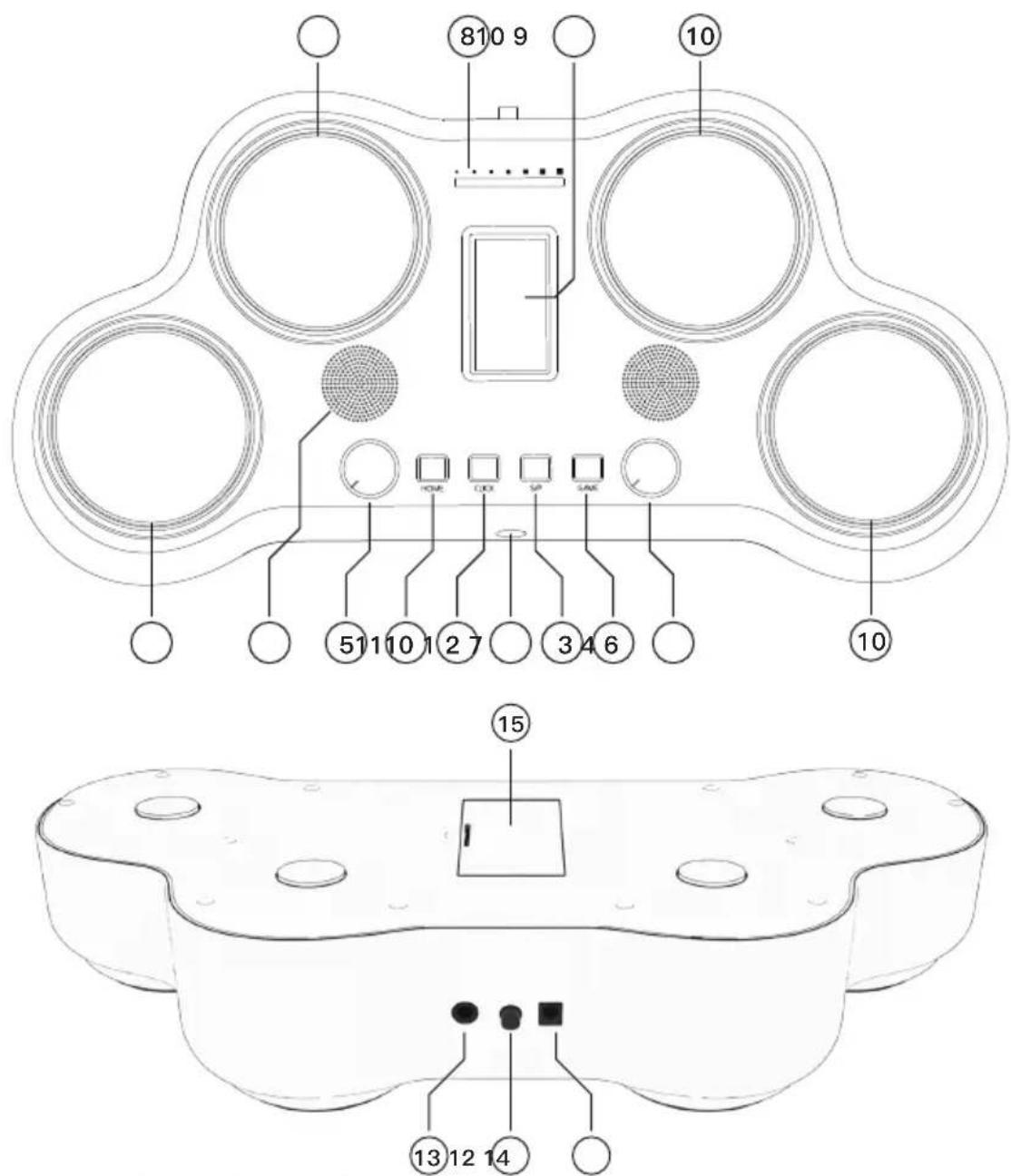
TOP AND REAR PANELS
1. HOME
Short press this button to return to the home page. Long press to enter the drum kit settings.
2. CLICK
Short press this button to activate the metronome. Long press to adjust the setting of the metronome.
3. S/P
Press this button to start/stop the game.
4. GAME
Press this button to activate game mode.
5. SELECT
Use this control wheel to adjust parameter values.
6. VOLUME
Use this control wheel to adjust the volume. This wheel is also used to modify some setting parameters.
7. HEADPHONE OUTPUT
Connect your 3.5mm headphones here. Please note, ensure that the volume is low before hitting the pads. Once your headphones are on hit the pads and gradually increase the volume until comfortable.
- LED
This LED indicator displays the velocity of each hit.
- SCREEN
This screen provides all relevant information and settings.
- PADS
Hit these velocity sensitive pads to trigger drum sounds.
- SPEAKERS
If no headphones are connected then sound will be projected through the 1.5" speakers.
- POWER
Press this button to turn the PD405 on/off.
- PEDAL INPUT
Connect the hi-hat and kick pedals here using the 6.3mm Jack.
- DC INPUT
Connect the PD405 to a power source here.
- BATTERY COMPARTMENT
Insert 6 x AA alkaline batteries (not included) here.
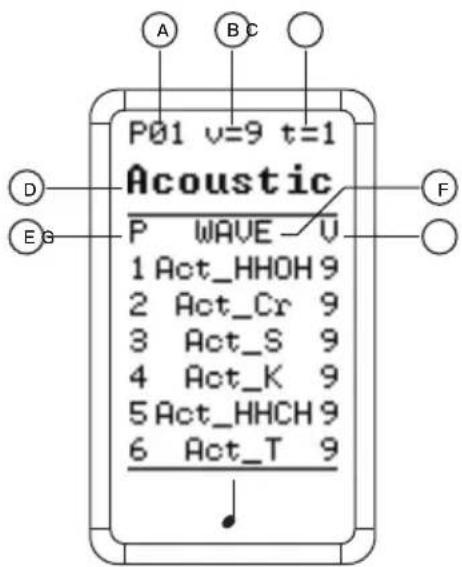
DRUM KIT
MODE
A. This indicates the number of the current drum kit you're on.
B. This indicates the global volume of the unit.
C. This indicates the current type of rhythm.
D. This indicates the title of the current drum kit.
E. This indicates the pad which each sound is assigned to.
F. This indicates the title of the sound assigned to each pad.
G. This indicates the volume of each individual pad.
OPERATION
- Short press HOME to switch to the home screen.
- Rotate the SELECT wheel to alternate between the drum kits available.
- Rotate the VOLUME wheel to adjust the volume of the current drum kit.
SETTING
- Long press HOME, PAD 1 will start flashing, indicating that you are now in "drum kit set mode".
- Hit Pads 1–4 or tap the pedals 5–6 to access the sound you wish to modify. You'll notice that the cursor will switch to the corresponding pad or pedal.
- Rotate the SELECT wheel to adjust between the parameters of the drum kit.
-
Rotate the VOLUME wheel to modify the value of the corresponding setting parameter.
-
When complete short press HOME to exit the drum set mode and instantly save the current set-up.
METRONOME
MODE
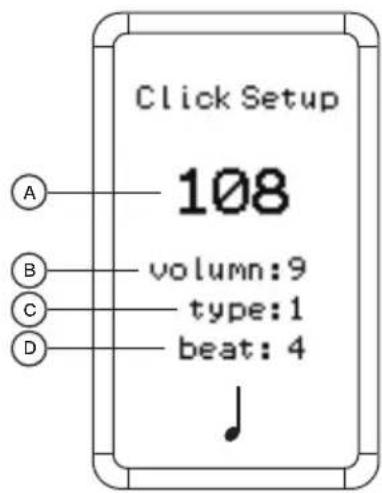
A. This displays the current tempo.
This can be adjusted between 20–240 BPM.
B. This displays the current volume of the metronome. This can be adjusted within a value range of 0–9.
C. This displays the current type of rhythm. There are 7 types in total.
D. This displays the beat of the metronome.
This can be adjusted within a value range of 1–16.
OPERATION
- Press CLICK to start the metronome
- press CLICK again to stop.
- Hold down CLICK to enter the settings page and make changes.
GAME
MODE
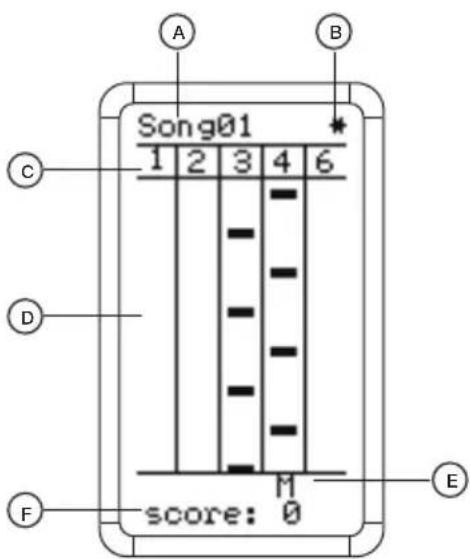
A. This displays the current game song.
B. This displays the difficulty of the song.
The higher the *, the greater the difficulty.
C. These numbers represent the pad which should be hit. 6 indicates the kick pedal. When the hollow block is shown below the pad 4, it indicates the 5/Hi-hat pedal. Step on the Hi-hat pedal and then strike the pad 4 to hit the hollow block.
D. Notes will make their way down the lane. When they reach the bottom hit the corresponding pad.
E. This displays the accuracy of the hit. M = Miss、G = Good、P = Perfect
F. This displays the current score.
OPERATION
The PD405 comes complete with 25 songs that you can use to improve your technique and feel. Before the start of each song you'll be provided with a bar count in, giving you plenty of time to prepare before the game begins.
On the LCD screen you'll see various blocks making their way downwards. When they reach the bottom of the screen you hit the corresponding pad to score points.
- Press GAME to enter game mode.
- Rotate the SELECT wheel to alternate between the different songs.
- Press S/P to begin the game.
- Rotate the VOLUME wheel to adjust the background volume of the game.
- During the game, press S/P to pause the song.
- When the game is over if you have charted then the player's name will appear. If not then only the score will be displayed. If no activity is detected after three seconds then you'll automatically return to the game's home screen.
※ Adjust the tempo of game by pressing click and then rotate the VOLUME wheel to increase/decrease the BPM.
SLEEP
If the electronic drum pad detects no activity after 8 minutes it will automatically enter sleep mode. During this time, the screen will display a sleep icon and the light belt will flash green.
In order to wake up the electronic drum pad hit any pad or press any button. If you no activity is detected after five minutes in sleep mode then the device will power down.
RESET
In order to reset the electronic drum pad press CLICK and GAME at the same time, then press S/P.
After resetting the product, the system will be restored to its initial factory state.
Drum set and timbre list
| Drum SetPad Tone | Acoustic | Bossa | Child | ChaCha | Little | Classic1 |
| Pad1 | Act_T | CajonBas | Bells | BellTree | DjemBass | DW_S |
| Pad2 | Act_S | Tamb3 | Act_S | TSc_S | DjemTone | Act_Rd |
| Pad3 | Act_Cr | Snaps | Cowbell4 | SHT_Cr | Caxixi | DW_SRX |
| Pad4 | Act_HHOH | CabasaM | SAS_HHCH | PDC_HHF | TinyGong | Clave_HF |
| Padel5 | Act_HHCH | TablaTin | Tamb1 | PDC_HHCH | CabasaM | Clave_HC |
| Padel6 | Act_K | CajonSlp | Act_K | TSc_K | TimbaleP | Tama_K |
| Drum SetPad Tone | Classic2 | Dance | Disco | Electric | Funk1 | Funk2 |
| Pad1 | Vint_K | Clap | MNoise | CR78Tamb | Cowbell3 | Pref_K |
| Pad2 | Vint_S | Act_S | Sslam_S | ED9_S | DFk_S | Pref_S |
| Pad3 | MBD_Rd | Act_Cr | Cele_Cr | Bas_SRX | SHG_RdB | Pref_T2 |
| Pad4 | Pay_HHF | Act_HHCH | Hip_HHFR | ED9_HHF | DFk_HHOH | Pref_T3 |
| Padel5 | Pay_HHCH | CR78Tamb | Hip_HHCH | ED9_HHCH | DFk_HHCH | PH_HHCH |
| Padel6 | Cajon | Act_K | Hip_K | ED9_K | DFk_K | Pref_SRX |
| Drum SetPad Tone | Fusion | Jazz | Classic3 | Pop1 | Pop2 | Comic |
| Pad1 | Snaps | Noise_T | SD_T | GuiroL | ED8_Cowb | Marimba |
| Pad2 | DWC_S | Jazz_S | SD_S | Act_S | ED8_S | PR_S |
| Pad3 | SHS_Cr | Jazz_Cr | PSDE_Cr | Act_Rd | 78Bongo | PR_RdB |
| Pad4 | SH_HHF | Jazz_HHF | SAS_HHF | Act_HHOH | ED8_HHOH | PR_T |
| Padel5 | SH_HHCH | Jazz_HHP | SAS_HHCH | Act_HHCH | ED8_HHCH | PH_HHF |
| Padel6 | DWCW_K | Jazz_K | SD_K | Act_K | ED8_K | PR_K |
| Drum SetPad Tone | Handgod | Latin | Cat | Game | Fx1 | Animal |
| Pad1 | Lud_K | TreeChim | Cat1 | Blip4 | Burp | Cricket |
| Pad2 | GHa_S | TimbaleR | Cat2 | Crrect | Cutp | Crow1 |
| Pad3 | ZKD_Cr | TimbaleH | Cat3 | Bychan | Drink | Crow2 |
| Pad4 | ZNB_HHOH | Clave_HF | Cat4 | Coin5 | Eat | Dog |
| Padel5 | ZNB_HHCH | Clave_HC | Fallin1 | Down | Gas | Owl |
| Padel6 | Trig_K | VibraSlp | Fallin2 | Select | Tea | Snoring |
| Drum SetPad Tone | Natural | Fx2 | Fx3 | Fx4 | Fx5 | Fx6 |
| Pad1 | Lightn1 | Coke | Bell | Jump1 | CarSLo | Amiga2 |
| Pad2 | Lightn2 | Cork | Bicycle | Jump2 | CarSMid | Amiga3 |
| Pad3 | Rain | Door | Chime | Jump3 | CarSBig | Amiga5 |
| Pad4 | Rain1 | Plate | Jump | Poyo | Phone | Motor1 |
| Padel5 | Thunder | Soda | DoorB | Steps | Alarm | Nosie |
| Padel6 | Wind | Zipper | Nail | Whistle | Alarm1 | Starwar |
 | Warning-To reduce the risk of injury, user must read instructions manual carefully. |
 | This product is subject to the provision of European Directive 2012/19/EC. The symbol showing a wheelie bin crossed through indicates that the product requires separate refuse collection in the European Union. This applies to the product and all accessories marked with this symbol. Products marked as such may not be discarded with normal domestic waste, but must be taken to a collection point for recycling electrical and electronic devices |

FCC Information:
CAUTION: Changes or modifications not expressly approved by the party responsible for compliance could void the user's authority to operate the equipment!
This device complies with Part 15 of the FCC Rules. Operation is subject to the following two conditions:
1) This product may cause harmful interference.
2) This product must accept any interference received, including interference that may cause undesired operation.
WARNING: Changes or modifications to this product not expressly approved by the party.responsible for compliance could void the user's authority to operate the product.
Note: This product has been tested and found to comply with the limits for a Class B digital device pursuant to Part 15 of the FCC Rules, These limits are designed to provide reasonable protection against harmful interference in a residential installation.
This product generates, uses and can radiate radio frequency energy, and if not installed and used in accordance with the instructions, may cause harmful interference to radio communications. However, there is no guarantee that interference will not occur in a particular installation. If this product does cause harmful interference to radio or television reception, which can be determined by turning the product off and on, the user is encouraged to try to correct the interference by one or more of the following measures.
- Reorient or relocate the receiving antenna.
- Increase the distance between the product and receiver.
- Connect the product to an outlet on a circuit different from that to which the receiver is connected.
- Consult the dealer or an experienced radio/TV technician for assistance.
VEVOR®
TOUGH TOOLS, HALF PRICE
TechnicalSupportandE-WarrantyCertificate www.vevor.com/support
VEVOR®
TOUGH TOOLS, HALF PRICE
natural_image
Line drawing of a handheld device with four circular buttons and a central control panel (no text or symbols)PANNEAUX SUPÉRIEURS ET ARRIÈRE
1. DOMICILE
Drum set and timbre list
| Drum SetPad Tone | Acoustic | Bossa | Child | ChaCha | Little | Classic1 |
| Pad1 | Act_T | CajonBas | Bells | BellTree | DjemBass | DW_S |
| Pad2 | Act_S | Tamb3 | Act_S | TSc_S | DjemTone | Act_Rd |
| Pad3 | Act_Cr | Snaps | Cowbell4 | SHT_Cr | Caxixi | DW_SRX |
| Pad4 | Act_HHOH | CabasaM | SAS_HHCH | PDC_HHF | TinyGong | Clave_HF |
| Padel5 | Act_HHCH | TablaTin | Tamb1 | PDC_HHCH | CabasaM | Clave_HC |
| Padel6 | Act_K | CajonSlp | Act_K | TSc_K | TimbaleP | Tama_K |
| Drum SetPad Tone | Classic2 | Dance | Disco | Electric | Funk1 | Funk2 |
| Pad1 | Vint_K | Clap | MNoise | CR78Tamb | Cowbell3 | Pref_K |
| Pad2 | Vint_S | Act_S | Sslam_S | ED9_S | DFk_S | Pref_S |
| Pad3 | MBD_Rd | Act_Cr | Cele_Cr | Bas_SRX | SHG_RdB | Pref_T2 |
| Pad4 | Pay_HHF | Act_HHCH | Hip_HHFR | ED9_HHF | DFk_HHOH | Pref_T3 |
| Padel5 | Pay_HHCH | CR78Tamb | Hip_HHCH | ED9_HHCH | DFk_HHCH | PH_HHCH |
| Padel6 | Cajon | Act_K | Hip_K | ED9_K | DFk_K | Pref_SRX |
| Drum SetPad Tone | Fusion | Jazz | Classic3 | Pop1 | Pop2 | Comic |
| Pad1 | Snaps | Noise_T | SD_T | GuiroL | ED8_Cowb | Marimba |
| Pad2 | DWC_S | Jazz_S | SD_S | Act_S | ED8_S | PR_S |
| Pad3 | SHS_Cr | Jazz_Cr | PSDE_Cr | Act_Rd | 78Bongo | PR_RdB |
| Pad4 | SH_HHF | Jazz_HHF | SAS_HHF | Act_HHOH | ED8_HHOH | PR_T |
| Padel5 | SH_HHCH | Jazz_HHP | SAS_HHCH | Act_HHCH | ED8_HHCH | PH_HHF |
| Padel6 | DWCW_K | Jazz_K | SD_K | Act_K | ED8_K | PR_K |
| Drum SetPad Tone | Handgod | Latin | Cat | Game | Fx1 | Animal |
| Pad1 | Lud_K | TreeChim | Cat1 | Blip4 | Burp | Cricket |
| Pad2 | GHa_S | TimbaleR | Cat2 | Crrect | Cutp | Crow1 |
| Pad3 | ZKD_Cr | TimbaleH | Cat3 | Bychan | Drink | Crow2 |
| Pad4 | ZNB_HHOH | Clave_HF | Cat4 | Coin5 | Eat | Dog |
| Padel5 | ZNB_HHCH | Clave_HC | Fallin1 | Down | Gas | Owl |
| Padel6 | Trig_K | VibraSlp | Fallin2 | Select | Tea | Snoring |
| Drum SetPad Tone | Natural | Fx2 | Fx3 | Fx4 | Fx5 | Fx6 |
| Pad1 | Lightn1 | Coke | Bell | Jump1 | CarSLo | Amiga2 |
| Pad2 | Lightn2 | Cork | Bicycle | Jump2 | CarSMid | Amiga3 |
| Pad3 | Rain | Door | Chime | Jump3 | CarSBig | Amiga5 |
| Pad4 | Rain1 | Plate | Jump | Poyo | Phone | Motor1 |
| Padel5 | Thunder | Soda | DoorB | Steps | Alarm | Nosie |
| Padel6 | Wind | Zipper | Nail | Whistle | Alarm1 | Starwar |
www.vevor.com/support
natural_image
Line drawing of a handheld device with four circular buttons and a central control panel (no text or symbols)OBER- UND RÜCKWAND
1. STARTSEITE
Drum set and timbre list
| Drum SetPad Tone | Acoustic | Bossa | Child | ChaCha | Little | Classic1 |
| Pad1 | Act_T | CajonBas | Bells | BellTree | DjemBass | DW_S |
| Pad2 | Act_S | Tamb3 | Act_S | TSc_S | DjemTone | Act_Rd |
| Pad3 | Act_Cr | Snaps | Cowbell4 | SHT_Cr | Caxixi | DW_SRX |
| Pad4 | Act_HHOH | CabasaM | SAS_HHCH | PDC_HHF | TinyGong | Clave_HF |
| Padel5 | Act_HHCH | TablaTin | Tamb1 | PDC_HHCH | CabasaM | Clave_HC |
| Padel6 | Act_K | CajonSlp | Act_K | TSc_K | TimbaleP | Tama_K |
| Drum SetPad Tone | Classic2 | Dance | Disco | Electric | Funk1 | Funk2 |
| Pad1 | Vint_K | Clap | MNoise | CR78Tamb | Cowbell3 | Pref_K |
| Pad2 | Vint_S | Act_S | Sslam_S | ED9_S | DFk_S | Pref_S |
| Pad3 | MBD_Rd | Act_Cr | Cele_Cr | Bas_SRX | SHG_RdB | Pref_T2 |
| Pad4 | Pay_HHF | Act_HHCH | Hip_HHFR | ED9_HHF | DFk_HHOH | Pref_T3 |
| Padel5 | Pay_HHCH | CR78Tamb | Hip_HHCH | ED9_HHCH | DFk_HHCH | PH_HHCH |
| Padel6 | Cajon | Act_K | Hip_K | ED9_K | DFk_K | Pref_SRX |
| Drum SetPad Tone | Fusion | Jazz | Classic3 | Pop1 | Pop2 | Comic |
| Pad1 | Snaps | Noise_T | SD_T | GuiroL | ED8_Cowb | Marimba |
| Pad2 | DWC_S | Jazz_S | SD_S | Act_S | ED8_S | PR_S |
| Pad3 | SHS_Cr | Jazz_Cr | PSDE_Cr | Act_Rd | 78Bongo | PR_RdB |
| Pad4 | SH_HHF | Jazz_HHF | SAS_HHF | Act_HHOH | ED8_HHOH | PR_T |
| Padel5 | SH_HHCH | Jazz_HHP | SAS_HHCH | Act_HHCH | ED8_HHCH | PH_HHF |
| Padel6 | DWCW_K | Jazz_K | SD_K | Act_K | ED8_K | PR_K |
| Drum SetPad Tone | Handgod | Latin | Cat | Game | Fx1 | Animal |
| Pad1 | Lud_K | TreeChim | Cat1 | Blip4 | Burp | Cricket |
| Pad2 | GHa_S | TimbaleR | Cat2 | Crrect | Cutp | Crow1 |
| Pad3 | ZKD_Cr | TimbaleH | Cat3 | Bychan | Drink | Crow2 |
| Pad4 | ZNB_HHOH | Clave_HF | Cat4 | Coin5 | Eat | Dog |
| Padel5 | ZNB_HHCH | Clave_HC | Fallin1 | Down | Gas | Owl |
| Padel6 | Trig_K | VibraSlp | Fallin2 | Select | Tea | Snoring |
| Drum SetPad Tone | Natural | Fx2 | Fx3 | Fx4 | Fx5 | Fx6 |
| Pad1 | Lightn1 | Coke | Bell | Jump1 | CarSLo | Amiga2 |
| Pad2 | Lightn2 | Cork | Bicycle | Jump2 | CarSMid | Amiga3 |
| Pad3 | Rain | Door | Chime | Jump3 | CarSBig | Amiga5 |
| Pad4 | Rain1 | Plate | Jump | Poyo | Phone | Motor1 |
| Padel5 | Thunder | Soda | DoorB | Steps | Alarm | Nosie |
| Padel6 | Wind | Zipper | Nail | Whistle | Alarm1 | Starwar |
elettronica www.vevor.com/support
SET DI BATTERIA ELETTRICA MANUALE D'USO
MODELLO: PD405
natural_image
Line drawing of a handheld device with four circular buttons and a central control panel (no text or symbols)PANNELLI SUPERIORI E POSTERIORI
1ÿCASA
Drum set and timbre list
| Drum SetPad Tone | Acoustic | Bossa | Child | ChaCha | Little | Classic1 |
| Pad1 | Act_T | CajonBas | Bells | BellTree | DjemBass | DW_S |
| Pad2 | Act_S | Tamb3 | Act_S | TSc_S | DjemTone | Act_Rd |
| Pad3 | Act_Cr | Snaps | Cowbell4 | SHT_Cr | Caxixi | DW_SRX |
| Pad4 | Act_HHOH | CabasaM | SAS_HHCH | PDC_HHF | TinyGong | Clave_HF |
| Padel5 | Act_HHCH | TablaTin | Tamb1 | PDC_HHCH | CabasaM | Clave_HC |
| Padel6 | Act_K | CajonSlp | Act_K | TSc_K | TimbaleP | Tama_K |
| Drum SetPad Tone | Classic2 | Dance | Disco | Electric | Funk1 | Funk2 |
| Pad1 | Vint_K | Clap | MNoise | CR78Tamb | Cowbell3 | Pref_K |
| Pad2 | Vint_S | Act_S | Sslam_S | ED9_S | DFk_S | Pref_S |
| Pad3 | MBD_Rd | Act_Cr | Cele_Cr | Bas_SRX | SHG_RdB | Pref_T2 |
| Pad4 | Pay_HHF | Act_HHCH | Hip_HHFR | ED9_HHF | DFk_HHOH | Pref_T3 |
| Padel5 | Pay_HHCH | CR78Tamb | Hip_HHCH | ED9_HHCH | DFk_HHCH | PH_HHCH |
| Padel6 | Cajon | Act_K | Hip_K | ED9_K | DFk_K | Pref_SRX |
| Drum SetPad Tone | Fusion | Jazz | Classic3 | Pop1 | Pop2 | Comic |
| Pad1 | Snaps | Noise_T | SD_T | GuiroL | ED8_Cowb | Marimba |
| Pad2 | DWC_S | Jazz_S | SD_S | Act_S | ED8_S | PR_S |
| Pad3 | SHS_Cr | Jazz_Cr | PSDE_Cr | Act_Rd | 78Bongo | PR_RdB |
| Pad4 | SH_HHF | Jazz_HHF | SAS_HHF | Act_HHOH | ED8_HHOH | PR_T |
| Padel5 | SH_HHCH | Jazz_HHP | SAS_HHCH | Act_HHCH | ED8_HHCH | PH_HHF |
| Padel6 | DWCW_K | Jazz_K | SD_K | Act_K | ED8_K | PR_K |
| Drum SetPad Tone | Handgod | Latin | Cat | Game | Fx1 | Animal |
| Pad1 | Lud_K | TreeChim | Cat1 | Blip4 | Burp | Cricket |
| Pad2 | GHa_S | TimbaleR | Cat2 | Crrect | Cutp | Crow1 |
| Pad3 | ZKD_Cr | TimbaleH | Cat3 | Bychan | Drink | Crow2 |
| Pad4 | ZNB_HHOH | Clave_HF | Cat4 | Coin5 | Eat | Dog |
| Padel5 | ZNB_HHCH | Clave_HC | Fallin1 | Down | Gas | Owl |
| Padel6 | Trig_K | VibraSlp | Fallin2 | Select | Tea | Snoring |
| Drum SetPad Tone | Natural | Fx2 | Fx3 | Fx4 | Fx5 | Fx6 |
| Pad1 | Lightn1 | Coke | Bell | Jump1 | CarSLo | Amiga2 |
| Pad2 | Lightn2 | Cork | Bicycle | Jump2 | CarSMid | Amiga3 |
| Pad3 | Rain | Door | Chime | Jump3 | CarSBig | Amiga5 |
| Pad4 | Rain1 | Plate | Jump | Poyo | Phone | Motor1 |
| Padel5 | Thunder | Soda | DoorB | Steps | Alarm | Nosie |
| Padel6 | Wind | Zipper | Nail | Whistle | Alarm1 | Starwar |
natural_image
Line drawing of a handheld device with four circular buttons and a central control panel (no text or symbols)PANELES SUPERIOR Y TRASERO
1. INICIO
Drum set and timbre list
| Drum SetPad Tone | Acoustic | Bossa | Child | ChaCha | Little | Classic1 |
| Pad1 | Act_T | CajonBas | Bells | BellTree | DjemBass | DW_S |
| Pad2 | Act_S | Tamb3 | Act_S | TSc_S | DjemTone | Act_Rd |
| Pad3 | Act_Cr | Snaps | Cowbell4 | SHT_Cr | Caxixi | DW_SRX |
| Pad4 | Act_HHOH | CabasaM | SAS_HHCH | PDC_HHF | TinyGong | Clave_HF |
| Padel5 | Act_HHCH | TablaTin | Tamb1 | PDC_HHCH | CabasaM | Clave_HC |
| Padel6 | Act_K | CajonSlp | Act_K | TSc_K | TimbaleP | Tama_K |
| Drum SetPad Tone | Classic2 | Dance | Disco | Electric | Funk1 | Funk2 |
| Pad1 | Vint_K | Clap | MNoise | CR78Tamb | Cowbell3 | Pref_K |
| Pad2 | Vint_S | Act_S | Sslam_S | ED9_S | DFk_S | Pref_S |
| Pad3 | MBD_Rd | Act_Cr | Cele_Cr | Bas_SRX | SHG_RdB | Pref_T2 |
| Pad4 | Pay_HHF | Act_HHCH | Hip_HHFR | ED9_HHF | DFk_HHOH | Pref_T3 |
| Padel5 | Pay_HHCH | CR78Tamb | Hip_HHCH | ED9_HHCH | DFk_HHCH | PH_HHCH |
| Padel6 | Cajon | Act_K | Hip_K | ED9_K | DFk_K | Pref_SRX |
| Drum SetPad Tone | Fusion | Jazz | Classic3 | Pop1 | Pop2 | Comic |
| Pad1 | Snaps | Noise_T | SD_T | GuiroL | ED8_Cowb | Marimba |
| Pad2 | DWC_S | Jazz_S | SD_S | Act_S | ED8_S | PR_S |
| Pad3 | SHS_Cr | Jazz_Cr | PSDE_Cr | Act_Rd | 78Bongo | PR_RdB |
| Pad4 | SH_HHF | Jazz_HHF | SAS_HHF | Act_HHOH | ED8_HHOH | PR_T |
| Padel5 | SH_HHCH | Jazz_HHP | SAS_HHCH | Act_HHCH | ED8_HHCH | PH_HHF |
| Padel6 | DWCW_K | Jazz_K | SD_K | Act_K | ED8_K | PR_K |
| Drum SetPad Tone | Handgod | Latin | Cat | Game | Fx1 | Animal |
| Pad1 | Lud_K | TreeChim | Cat1 | Blip4 | Burp | Cricket |
| Pad2 | GHa_S | TimbaleR | Cat2 | Crrect | Cutp | Crow1 |
| Pad3 | ZKD_Cr | TimbaleH | Cat3 | Bychan | Drink | Crow2 |
| Pad4 | ZNB_HHOH | Clave_HF | Cat4 | Coin5 | Eat | Dog |
| Padel5 | ZNB_HHCH | Clave_HC | Fallin1 | Down | Gas | Owl |
| Padel6 | Trig_K | VibraSlp | Fallin2 | Select | Tea | Snoring |
| Drum SetPad Tone | Natural | Fx2 | Fx3 | Fx4 | Fx5 | Fx6 |
| Pad1 | Lightn1 | Coke | Bell | Jump1 | CarSLo | Amiga2 |
| Pad2 | Lightn2 | Cork | Bicycle | Jump2 | CarSMid | Amiga3 |
| Pad3 | Rain | Door | Chime | Jump3 | CarSBig | Amiga5 |
| Pad4 | Rain1 | Plate | Jump | Poyo | Phone | Motor1 |
| Padel5 | Thunder | Soda | DoorB | Steps | Alarm | Nosie |
| Padel6 | Wind | Zipper | Nail | Whistle | Alarm1 | Starwar |

natural_image
Line drawing of a handheld device with four circular buttons and a central control panel (no text or symbols)PANELE GÓRNE I TYLNE
1. DOM
Machine Translated by Google
natural_image
Line drawing of a handheld device with four circular buttons and a central control panel (no text or symbols)HULP NODIG? NEEM CONTACT MET ONS OP!
BOVEN- EN ACHTERPANELEN
1ÿTHUIS
Drum set and timbre list
| Drum SetPad Tone | Acoustic | Bossa | Child | ChaCha | Little | Classic1 |
| Pad1 | Act_T | CajonBas | Bells | BellTree | DjemBass | DW_S |
| Pad2 | Act_S | Tamb3 | Act_S | TSc_S | DjemTone | Act_Rd |
| Pad3 | Act_Cr | Snaps | Cowbell4 | SHT_Cr | Caxixi | DW_SRX |
| Pad4 | Act_HHOH | CabasaM | SAS_HHCH | PDC_HHF | TinyGong | Clave_HF |
| Padel5 | Act_HHCH | TablaTin | Tamb1 | PDC_HHCH | CabasaM | Clave_HC |
| Padel6 | Act_K | CajonSlp | Act_K | TSc_K | TimbaleP | Tama_K |
| Drum SetPad Tone | Classic2 | Dance | Disco | Electric | Funk1 | Funk2 |
| Pad1 | Vint_K | Clap | MNoise | CR78Tamb | Cowbell3 | Pref_K |
| Pad2 | Vint_S | Act_S | Sslam_S | ED9_S | DFk_S | Pref_S |
| Pad3 | MBD_Rd | Act_Cr | Cele_Cr | Bas_SRX | SHG_RdB | Pref_T2 |
| Pad4 | Pay_HHF | Act_HHCH | Hip_HHFR | ED9_HHF | DFk_HHOH | Pref_T3 |
| Padel5 | Pay_HHCH | CR78Tamb | Hip_HHCH | ED9_HHCH | DFk_HHCH | PH_HHCH |
| Padel6 | Cajon | Act_K | Hip_K | ED9_K | DFk_K | Pref_SRX |
| Drum SetPad Tone | Fusion | Jazz | Classic3 | Pop1 | Pop2 | Comic |
| Pad1 | Snaps | Noise_T | SD_T | GuiroL | ED8_Cowb | Marimba |
| Pad2 | DWC_S | Jazz_S | SD_S | Act_S | ED8_S | PR_S |
| Pad3 | SHS_Cr | Jazz_Cr | PSDE_Cr | Act_Rd | 78Bongo | PR_RdB |
| Pad4 | SH_HHF | Jazz_HHF | SAS_HHF | Act_HHOH | ED8_HHOH | PR_T |
| Padel5 | SH_HHCH | Jazz_HHP | SAS_HHCH | Act_HHCH | ED8_HHCH | PH_HHF |
| Padel6 | DWCW_K | Jazz_K | SD_K | Act_K | ED8_K | PR_K |
| Drum SetPad Tone | Handgod | Latin | Cat | Game | Fx1 | Animal |
| Pad1 | Lud_K | TreeChim | Cat1 | Blip4 | Burp | Cricket |
| Pad2 | GHa_S | TimbaleR | Cat2 | Crrect | Cutp | Crow1 |
| Pad3 | ZKD_Cr | TimbaleH | Cat3 | Bychan | Drink | Crow2 |
| Pad4 | ZNB_HHOH | Clave_HF | Cat4 | Coin5 | Eat | Dog |
| Padel5 | ZNB_HHCH | Clave_HC | Fallin1 | Down | Gas | Owl |
| Padel6 | Trig_K | VibraSlp | Fallin2 | Select | Tea | Snoring |
| Drum SetPad Tone | Natural | Fx2 | Fx3 | Fx4 | Fx5 | Fx6 |
| Pad1 | Lightn1 | Coke | Bell | Jump1 | CarSLo | Amiga2 |
| Pad2 | Lightn2 | Cork | Bicycle | Jump2 | CarSMid | Amiga3 |
| Pad3 | Rain | Door | Chime | Jump3 | CarSBig | Amiga5 |
| Pad4 | Rain1 | Plate | Jump | Poyo | Phone | Motor1 |
| Padel5 | Thunder | Soda | DoorB | Steps | Alarm | Nosie |
| Padel6 | Wind | Zipper | Nail | Whistle | Alarm1 | Starwar |
www.vevor.com/support
ELEKTRISK TRUMSAT
ANVÄNDARMANUAL
MODELL: PD405
natural_image
Line drawing of a handheld device with four circular buttons and a central control panel (no text or symbols)ÖVER- OCH BAKPANELER
1. HEM
Drum set and timbre list
| Drum SetPad Tone | Acoustic | Bossa | Child | ChaCha | Little | Classic1 |
| Pad1 | Act_T | CajonBas | Bells | BellTree | DjemBass | DW_S |
| Pad2 | Act_S | Tamb3 | Act_S | TSc_S | DjemTone | Act_Rd |
| Pad3 | Act_Cr | Snaps | Cowbell4 | SHT_Cr | Caxixi | DW_SRX |
| Pad4 | Act_HHOH | CabasaM | SAS_HHCH | PDC_HHF | TinyGong | Clave_HF |
| Padel5 | Act_HHCH | TablaTin | Tamb1 | PDC_HHCH | CabasaM | Clave_HC |
| Padel6 | Act_K | CajonSlp | Act_K | TSc_K | TimbaleP | Tama_K |
| Drum SetPad Tone | Classic2 | Dance | Disco | Electric | Funk1 | Funk2 |
| Pad1 | Vint_K | Clap | MNoise | CR78Tamb | Cowbell3 | Pref_K |
| Pad2 | Vint_S | Act_S | Sslam_S | ED9_S | DFk_S | Pref_S |
| Pad3 | MBD_Rd | Act_Cr | Cele_Cr | Bas_SRX | SHG_RdB | Pref_T2 |
| Pad4 | Pay_HHF | Act_HHCH | Hip_HHFR | ED9_HHF | DFk_HHOH | Pref_T3 |
| Padel5 | Pay_HHCH | CR78Tamb | Hip_HHCH | ED9_HHCH | DFk_HHCH | PH_HHCH |
| Padel6 | Cajon | Act_K | Hip_K | ED9_K | DFk_K | Pref_SRX |
| Drum SetPad Tone | Fusion | Jazz | Classic3 | Pop1 | Pop2 | Comic |
| Pad1 | Snaps | Noise_T | SD_T | GuiroL | ED8_Cowb | Marimba |
| Pad2 | DWC_S | Jazz_S | SD_S | Act_S | ED8_S | PR_S |
| Pad3 | SHS_Cr | Jazz_Cr | PSDE_Cr | Act_Rd | 78Bongo | PR_RdB |
| Pad4 | SH_HHF | Jazz_HHF | SAS_HHF | Act_HHOH | ED8_HHOH | PR_T |
| Padel5 | SH_HHCH | Jazz_HHP | SAS_HHCH | Act_HHCH | ED8_HHCH | PH_HHF |
| Padel6 | DWCW_K | Jazz_K | SD_K | Act_K | ED8_K | PR_K |
| Drum SetPad Tone | Handgod | Latin | Cat | Game | Fx1 | Animal |
| Pad1 | Lud_K | TreeChim | Cat1 | Blip4 | Burp | Cricket |
| Pad2 | GHa_S | TimbaleR | Cat2 | Crrect | Cutp | Crow1 |
| Pad3 | ZKD_Cr | TimbaleH | Cat3 | Bychan | Drink | Crow2 |
| Pad4 | ZNB_HHOH | Clave_HF | Cat4 | Coin5 | Eat | Dog |
| Padel5 | ZNB_HHCH | Clave_HC | Fallin1 | Down | Gas | Owl |
| Padel6 | Trig_K | VibraSlp | Fallin2 | Select | Tea | Snoring |
| Drum SetPad Tone | Natural | Fx2 | Fx3 | Fx4 | Fx5 | Fx6 |
| Pad1 | Lightn1 | Coke | Bell | Jump1 | CarSLo | Amiga2 |
| Pad2 | Lightn2 | Cork | Bicycle | Jump2 | CarSMid | Amiga3 |
| Pad3 | Rain | Door | Chime | Jump3 | CarSBig | Amiga5 |
| Pad4 | Rain1 | Plate | Jump | Poyo | Phone | Motor1 |
| Padel5 | Thunder | Soda | DoorB | Steps | Alarm | Nosie |
| Padel6 | Wind | Zipper | Nail | Whistle | Alarm1 | Starwar |
www.vevor.com/support