
JD342 - Metal chicken coop Vevor - Free user manual and instructions
Find the device manual for free JD342 Vevor in PDF.
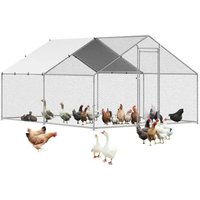


| Product Type | Metal Chicken Coop |
| Brand | Vevor |
| Model | JD342 |
| Main Material | Q235 Steel |
| Color | Galvanized and Gray |
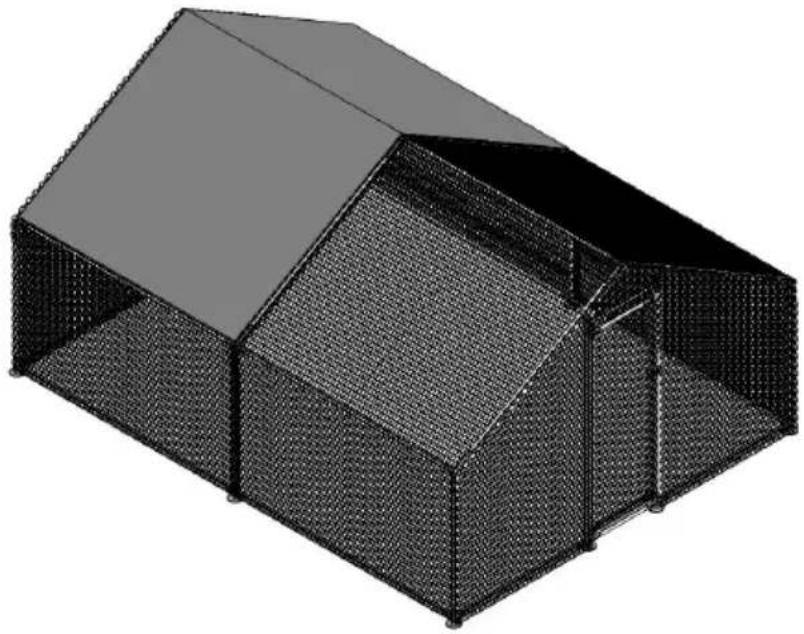
| Dimensions (L x W x H) | 3 x 4 x 2 m |
| Net Weight | 33 kg |
| Maximum Load Capacity | Do not exceed specified capacity (not specified) |
| Floor Area | 12 m² |
| Intended Use | Chicken rearing, outdoor shelter |
| Assembly Required | Yes, tools required (not included) |
| Assembly Precautions | Wear safety glasses and gloves; flat, clean surface |
| Usage Precautions | Do not sit or stand on it; do not let children play nearby |
| Maintenance | Regular cleaning, inspection before each use |
| Spare Parts | Contact manufacturer via www.vevor.com/support |
| Warranty | Electronic warranty certificate available on website |
| User Manual | Available for download at notice-facile.com |
| Manufacturer | Shanghaimuxinmuyeyouxiangongsi, Shanghai, China |
| Importer (Australia) | SIHAO PTY LTD, Eastwood NSW |
| Importer (United States) | Sanven Technology Ltd., Suite 250, 9166 |
Frequently Asked Questions - JD342 Vevor
User questions about JD342 Vevor
0 question about this device. Answer the ones you know or ask your own.
Ask a new question about this device
Download the instructions for your Metal chicken coop in PDF format for free! Find your manual JD342 - Vevor and take your electronic device back in hand. On this page are published all the documents necessary for the use of your device. JD342 by Vevor.
USER MANUAL JD342 Vevor
Technical Support and E-Warranty Certificate www.vevor.com/support
METAL CHICKEN COOP
USER MANUAL
MODEL: JD342
We continue to be committed to providing you with tools at competitive prices. "Save Half", "Half Price", or any other similar expressions used by us only represent an estimate of savings you might benefit from buying certain tools with us compared to the major top brands and do not necessarily mean to cover all categories of tools offered by us. You are kindly reminded to verify carefully when placing an order with us if you are actually saving half in comparison with the top major brands.
VEVOR®
TOUGH TOOLS, HALF PRICE
METAL CHICKEN COOP
MODEL: JD342
NEED HELP? CONTACT US!
Have product questions? Need technical support? Please feel free to contact us:
Technical Support and E-Warranty Certificate www.vevor.com/support
This is the original instruction. Please read all manual instructions carefully before operating. VEVOR reserves a clear interpretation of the user manual. The appearance of the product shall be subject to the product you received. Please forgive us that we won't inform you again if there are any technology or software updates on our product.
WARNING:
Read this material before using this product. Failure to do so can result in serious injury.
Assembly precautions
- Assemble only according to these instructions. Improper assembly can create hazards.
- Wear ANSI-approved safety goggles and heavy-duty work gloves during assembly.
- Keep the assembly area clean and well-lit.
- Keep bystanders out of the area during assembly.
- Do not assemble if tired or when under the influence of alcohol, or medication.
- The product capabilities apply to properly and completely assembled products only.
- Assemble on a flat, level, hard and smooth surface capable of safely supporting the metal chicken coop.
- For additional information regarding the parts listed in the following pages, please refer to the Assembly Diagram of this manual. Unwrap and separate all parts in a clean work area.
Use precautions
- DO NOT SIT OR STAND ON THIS ITEM.
- This product is not a toy. Do not allow children to play with or near this item.
- Do not exceed specified weight capacities.
- Use only on a flat, level, hard, and smooth surface that can safely support a fully loaded metal chicken coop.
- Use as intended only.
- Inspect before every use; do not use if parts are loose or damaged.
SAVE THIS MANUAL
TOOLS
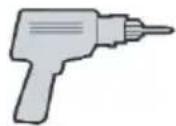
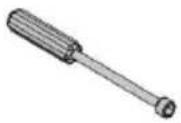
PARTS LIST
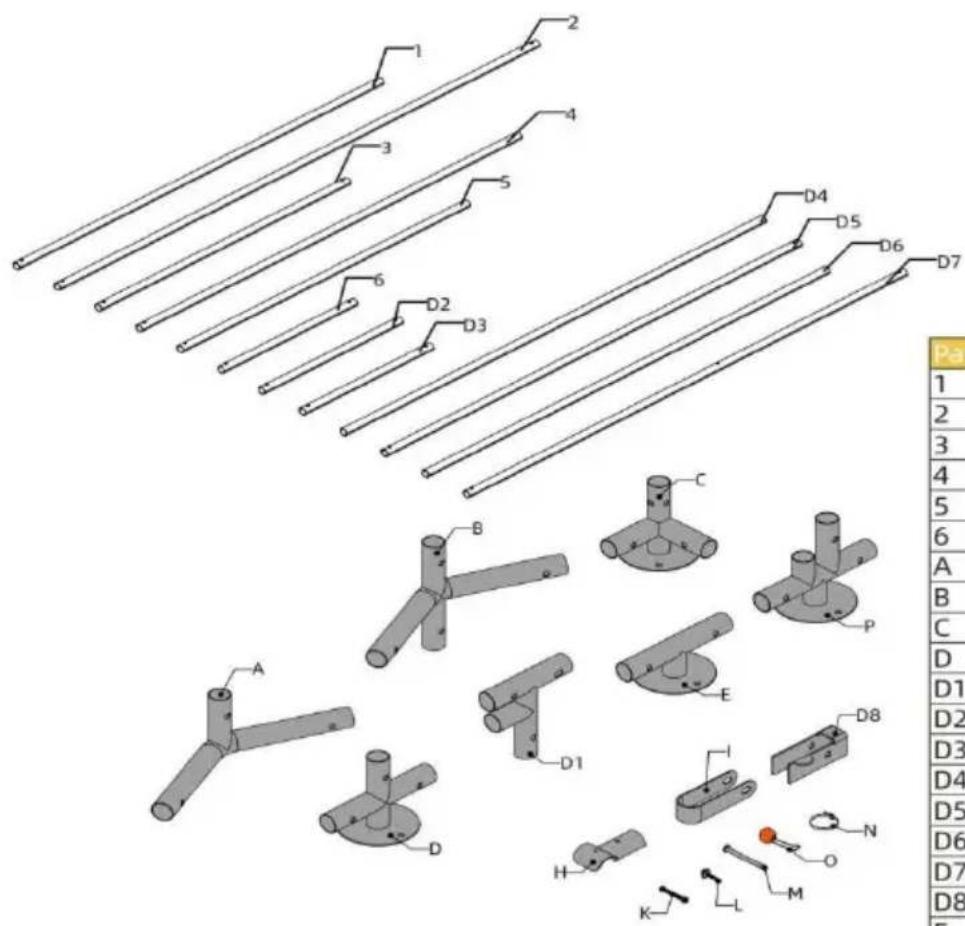
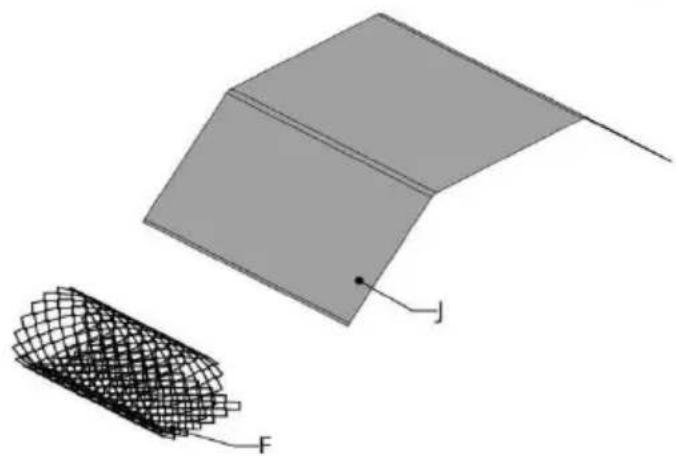
| Part | Qty |
| 1 | 2 |
| 2 | 10 |
| 3 | 6 |
| 4 | 6 |
| 5 | 2 |
| 6 | 1 |
| A | 6 |
| B | 3 |
| C | 4 |
| D | 3 |
| D1 | 1 |
| D2 | 1 |
| D3 | 2 |
| D4 | 1 |
| D5 | 1 |
| D6 | 1 |
| D7 | 1 |
| D8 | 1 |
| E | 1 |
| F | 36m |
| H | 10 |
| I | 2 |
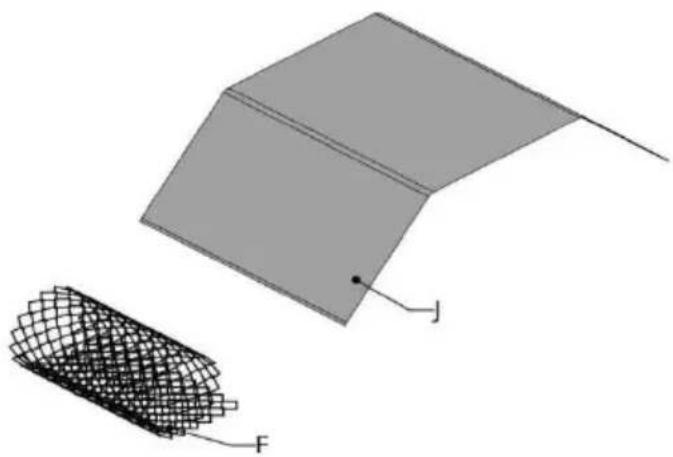
| J | 1 |
| K | 8 |
| L | 5 |
| M | 9 |
| N | 200 |
| O | 22 |
| P | 1 |
1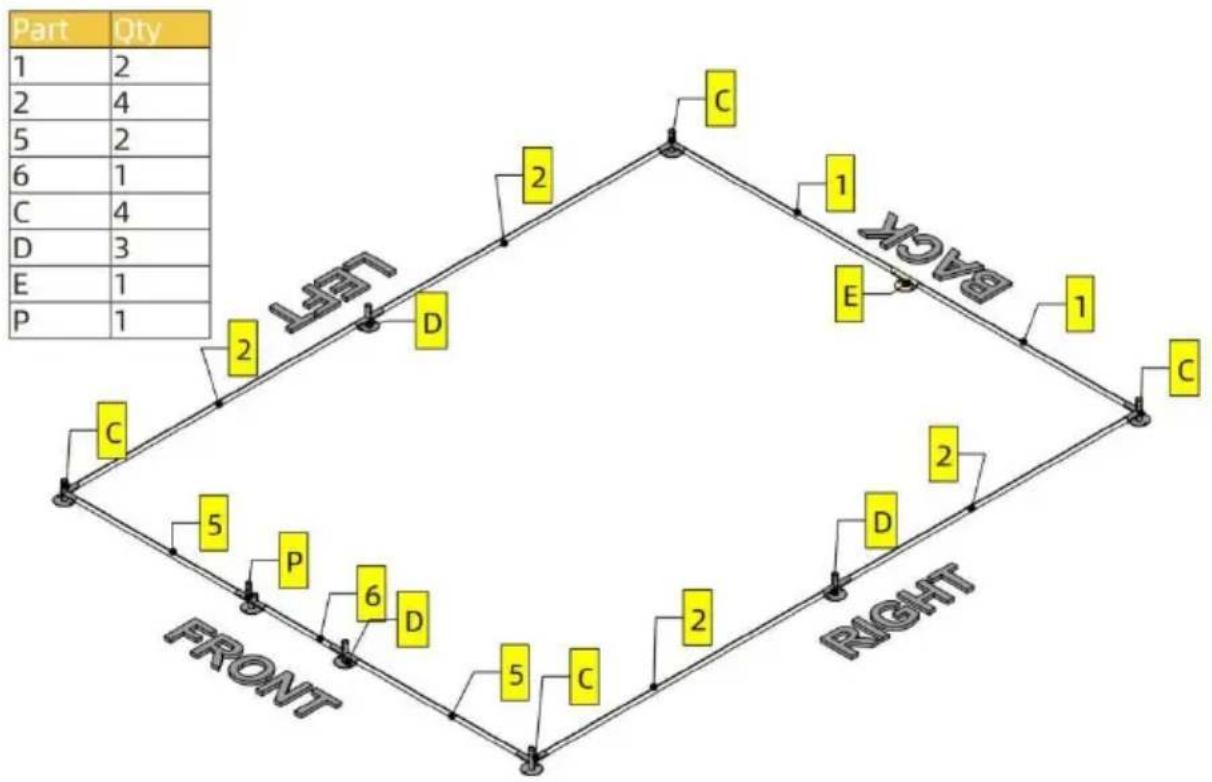
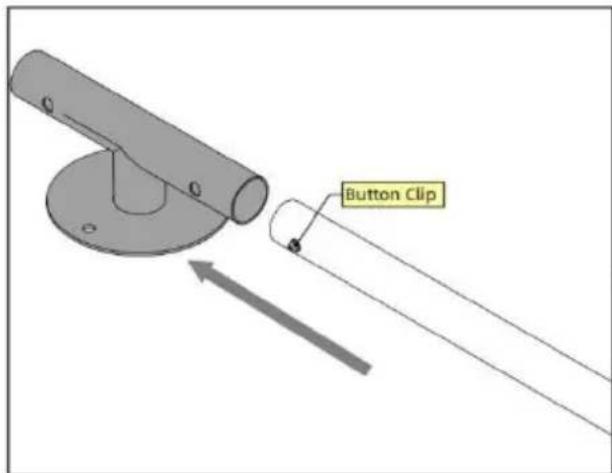
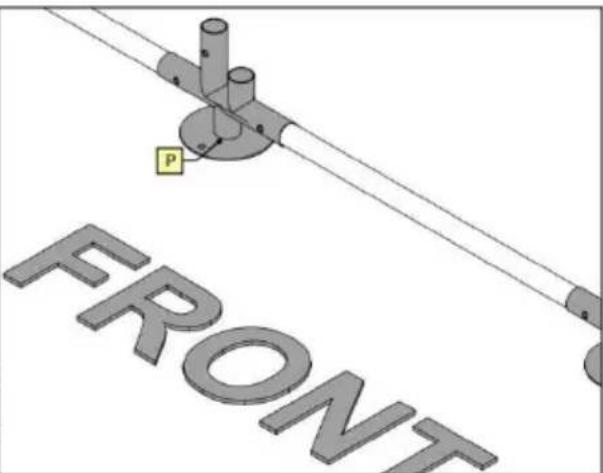
Note
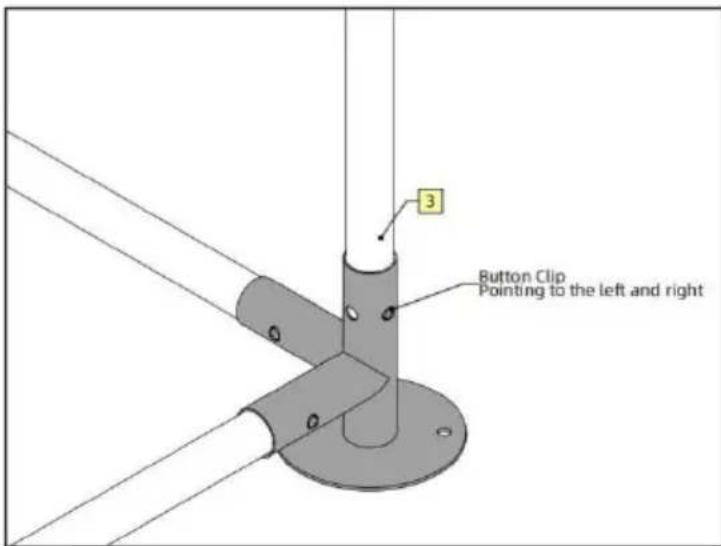
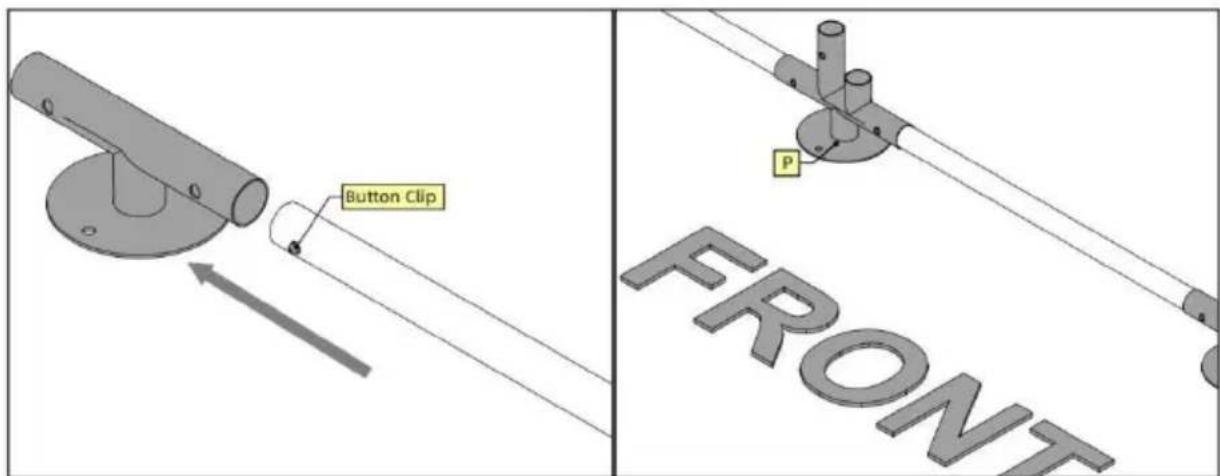
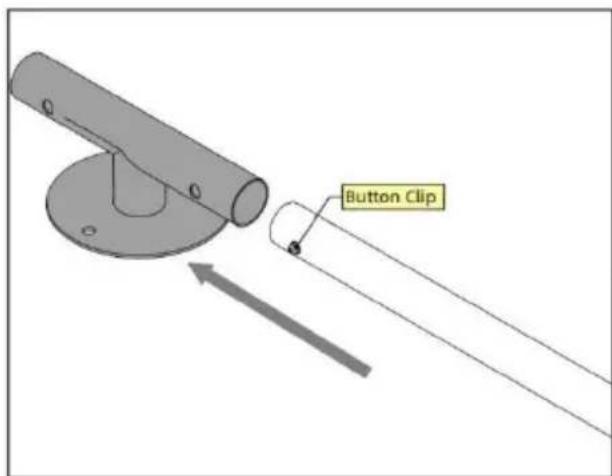
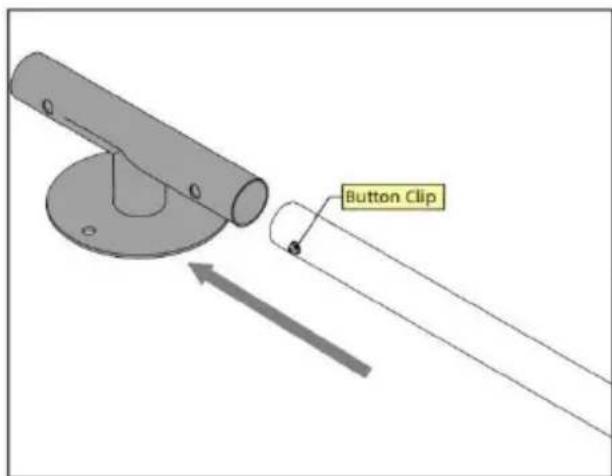
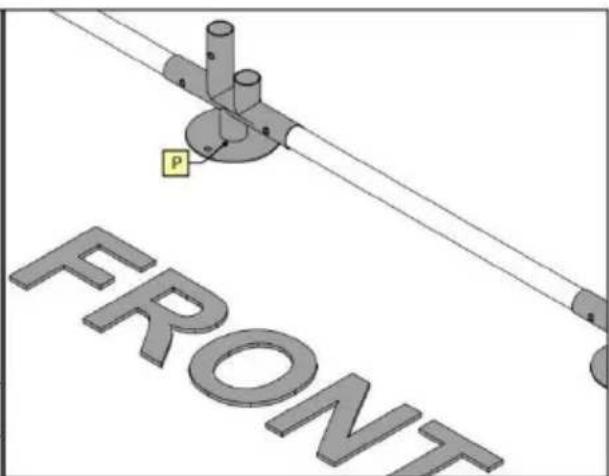
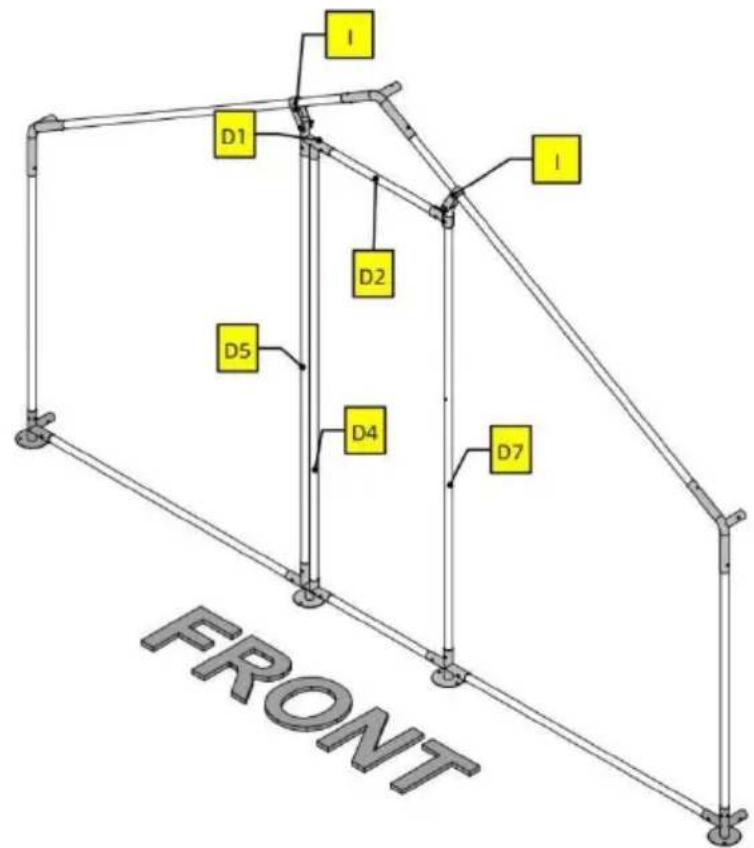
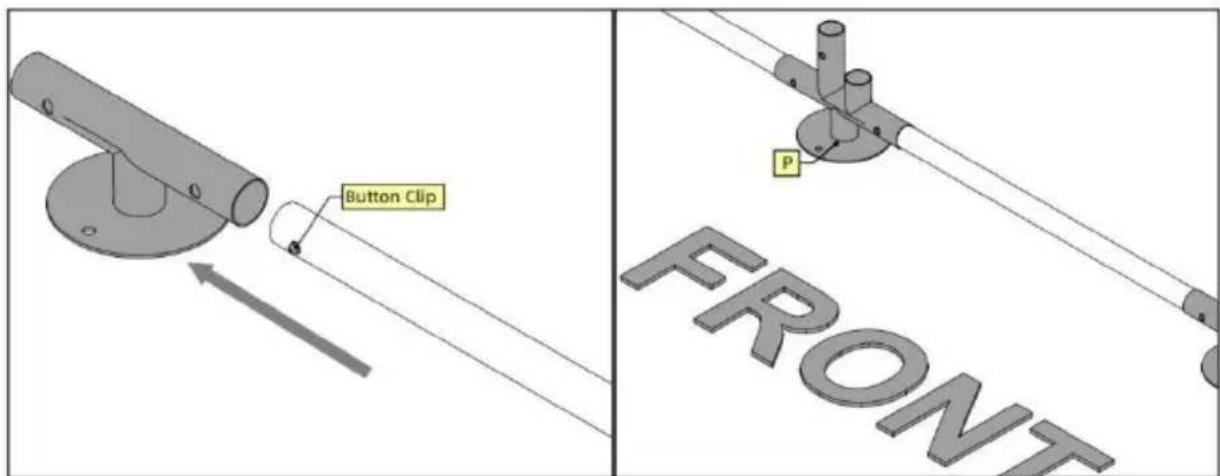
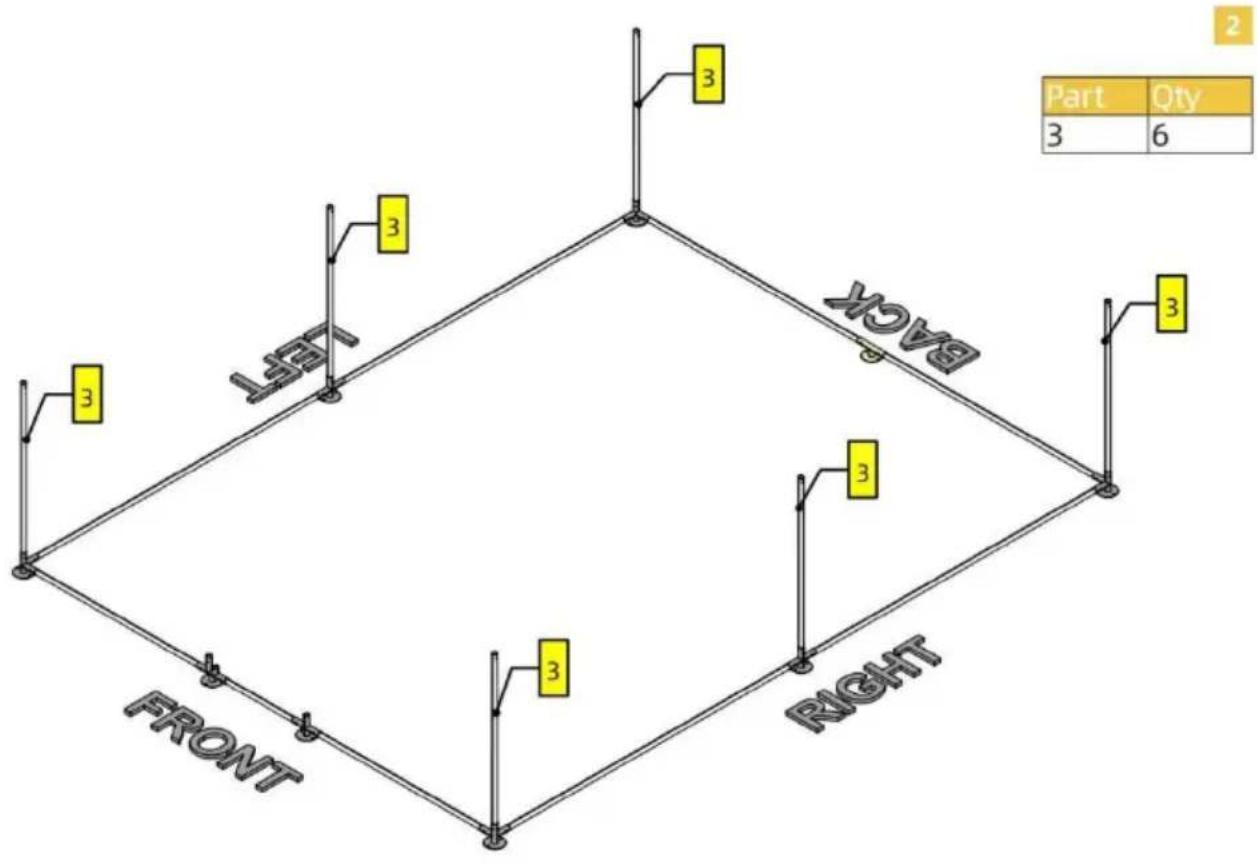
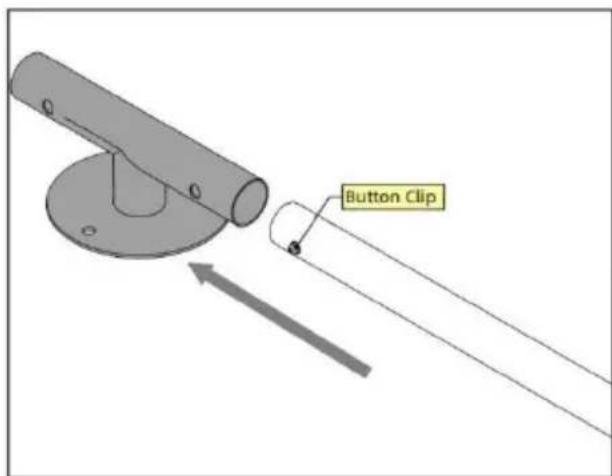
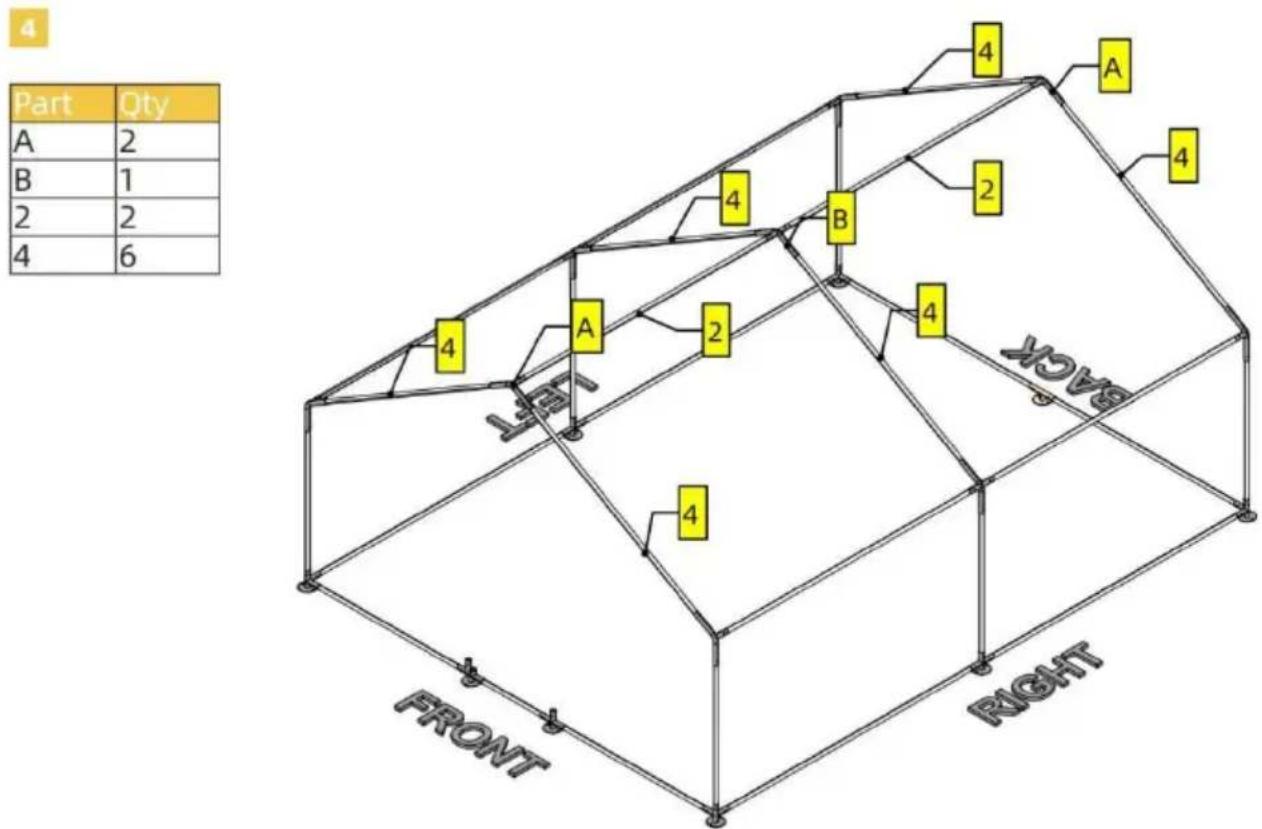
For this product, tubes and joints are connected using button clips. Button clips are already inserted inside tubes. When connecting, press the button clip and insert one tube into the joint. Forcing the tubes in might also work but you are risking damaging the clip. Pay attention to the orientation of Part P.
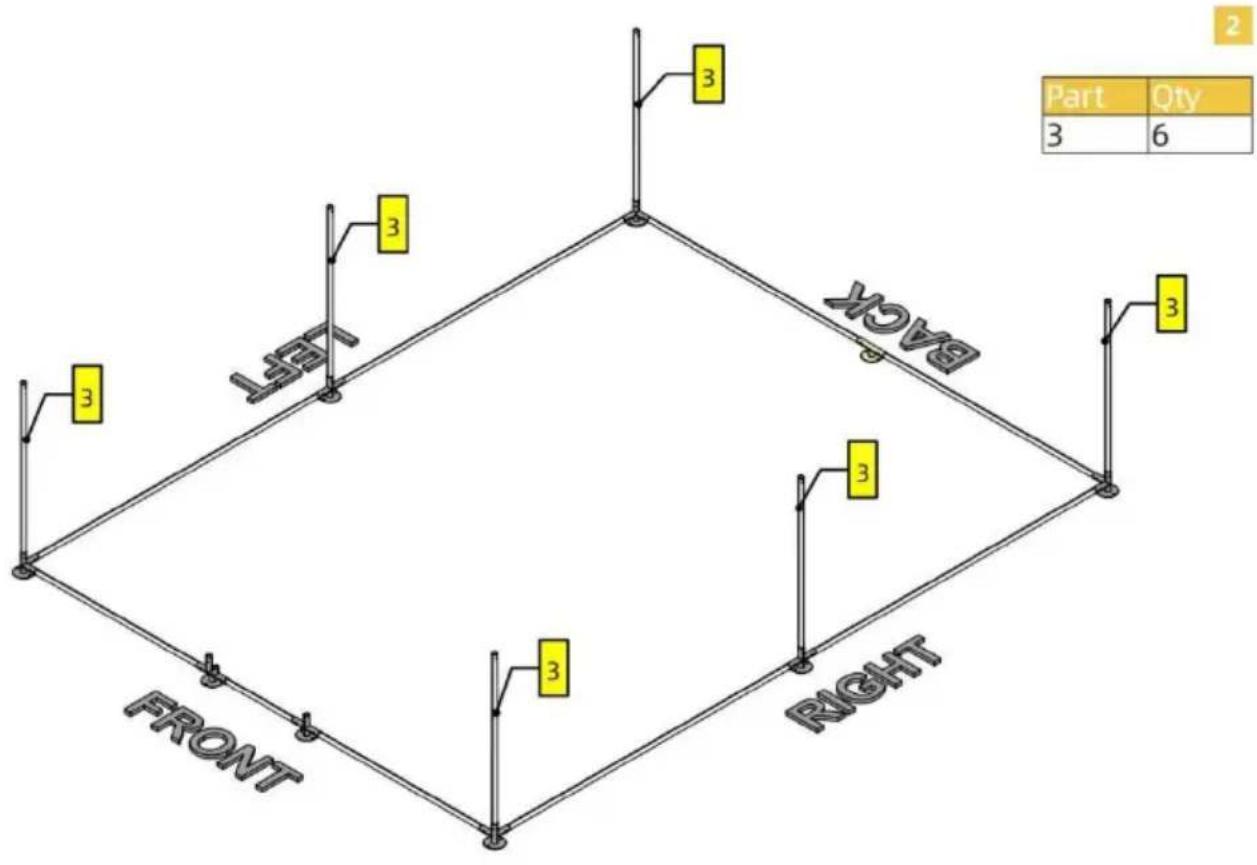
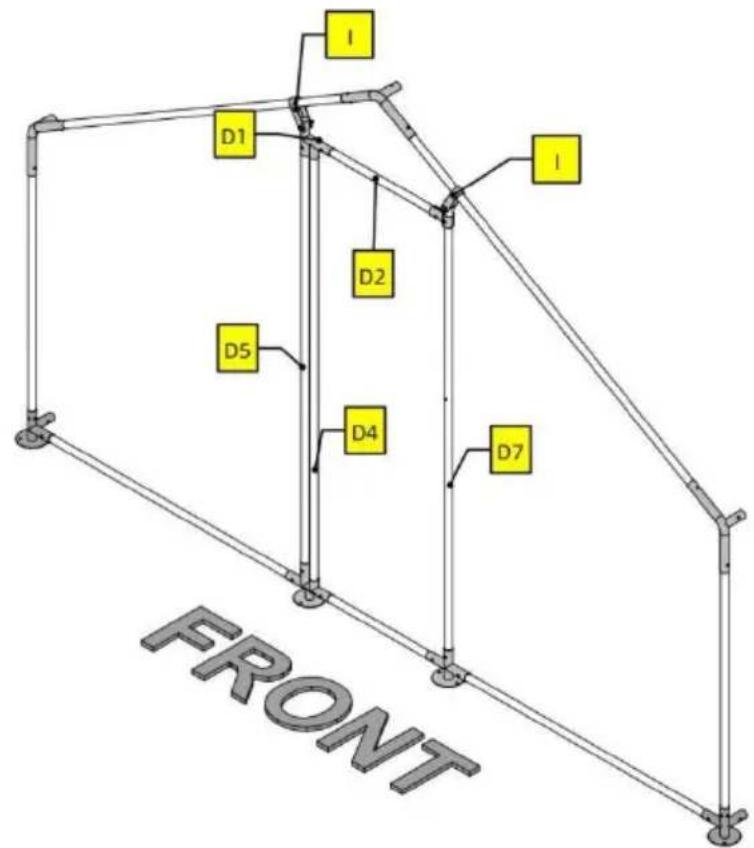
5
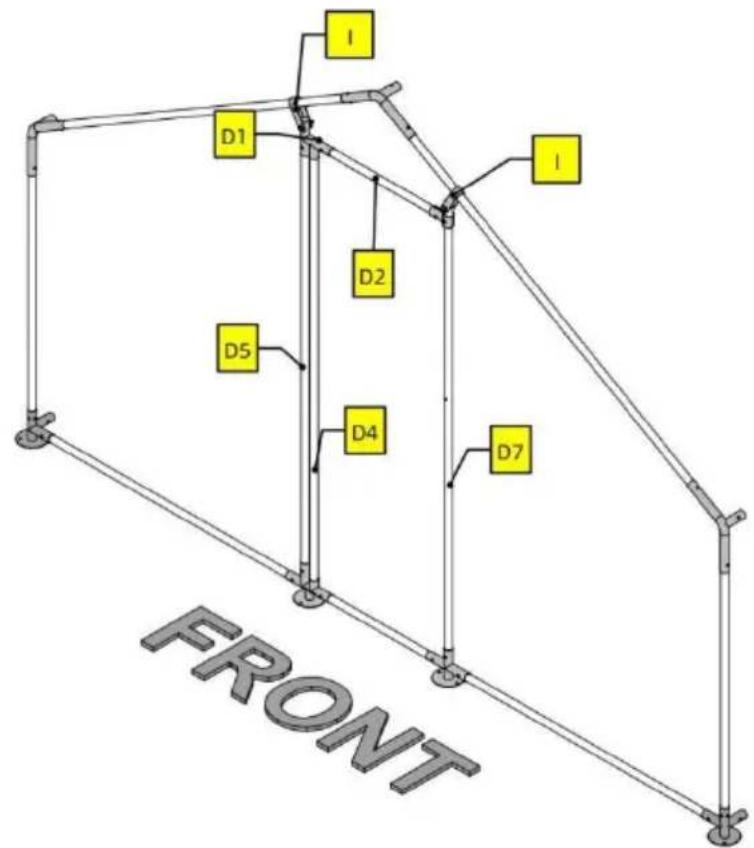
| Part | Qty |
| D1 | 1 |
| D2 | 1 |
| D4 | 1 |
| D5 | 1 |
| D7 | 1 |
| H | 2 |
| I | 2 |
| K | 3 |
| L | 1 |
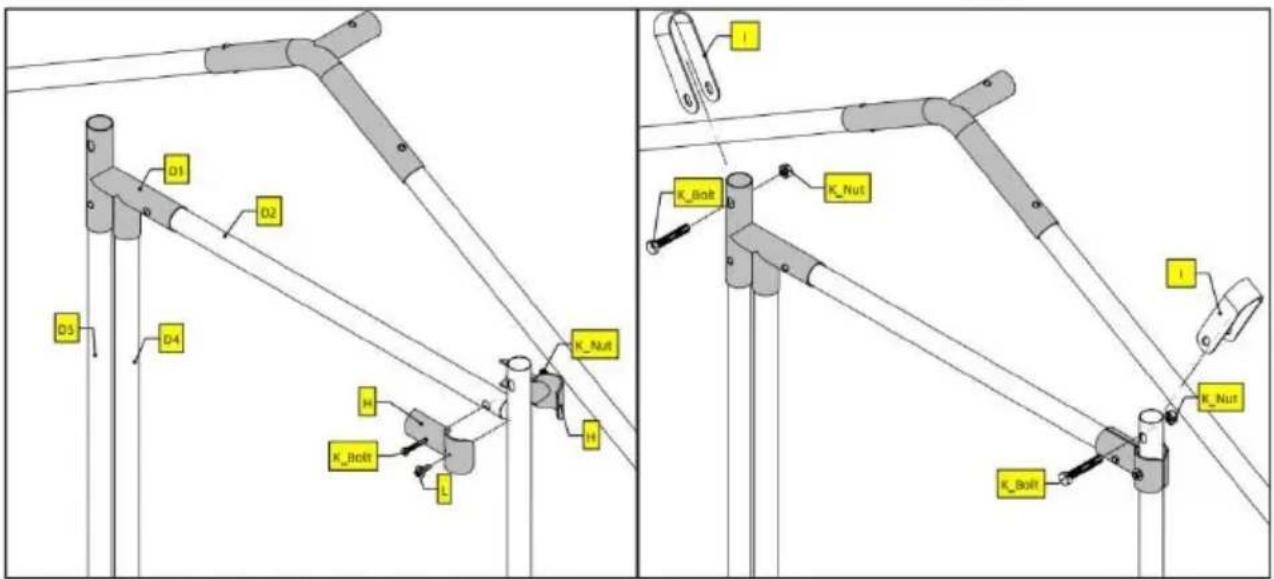
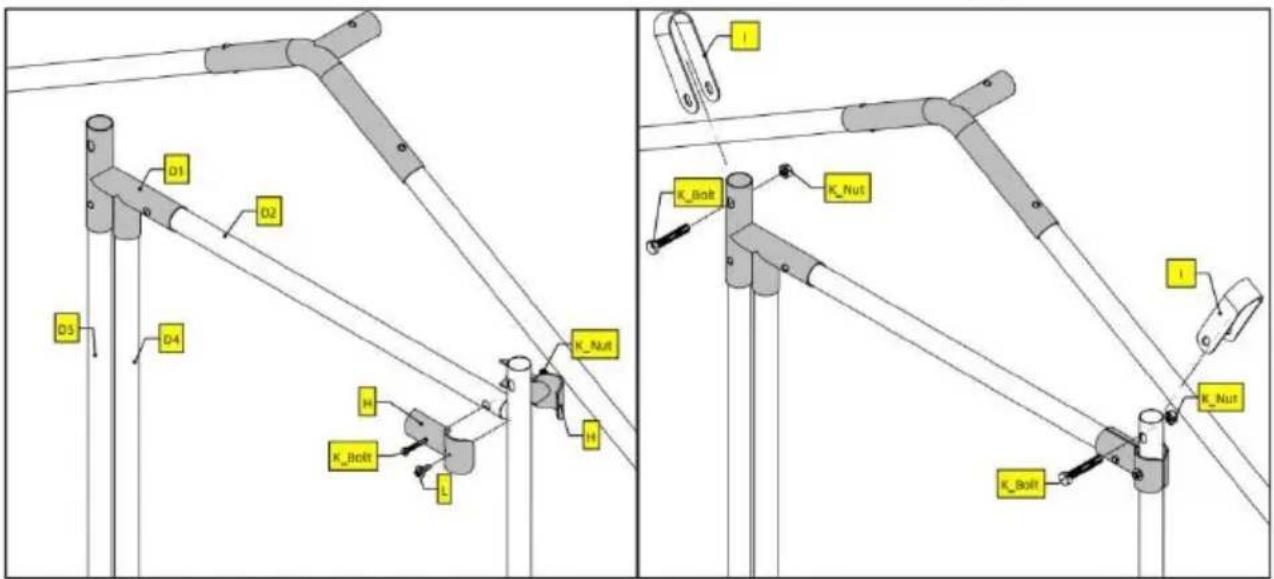
Note
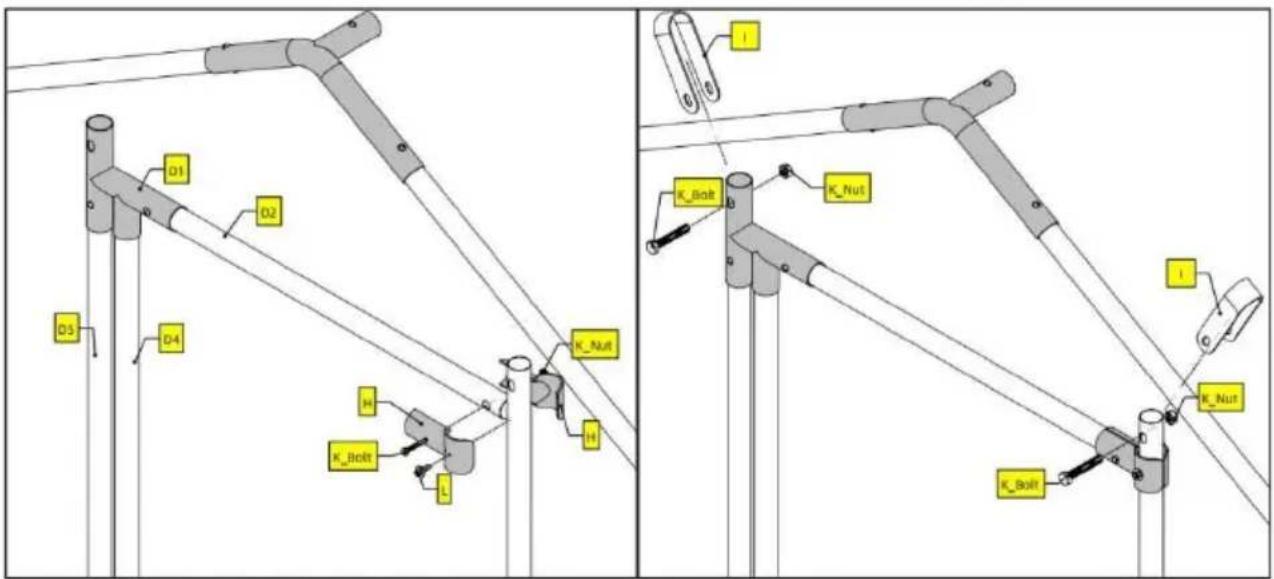
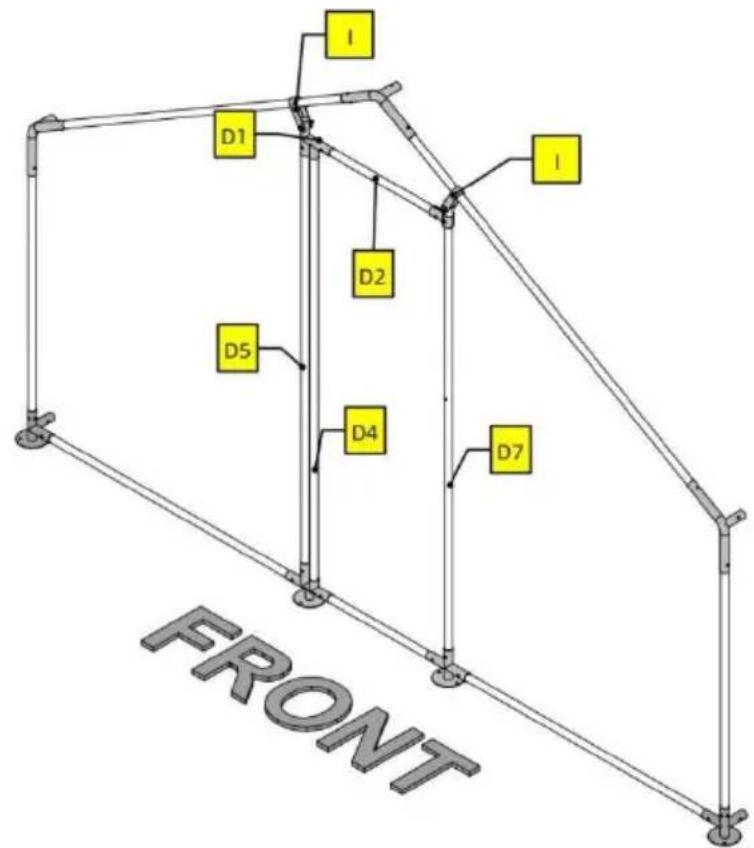
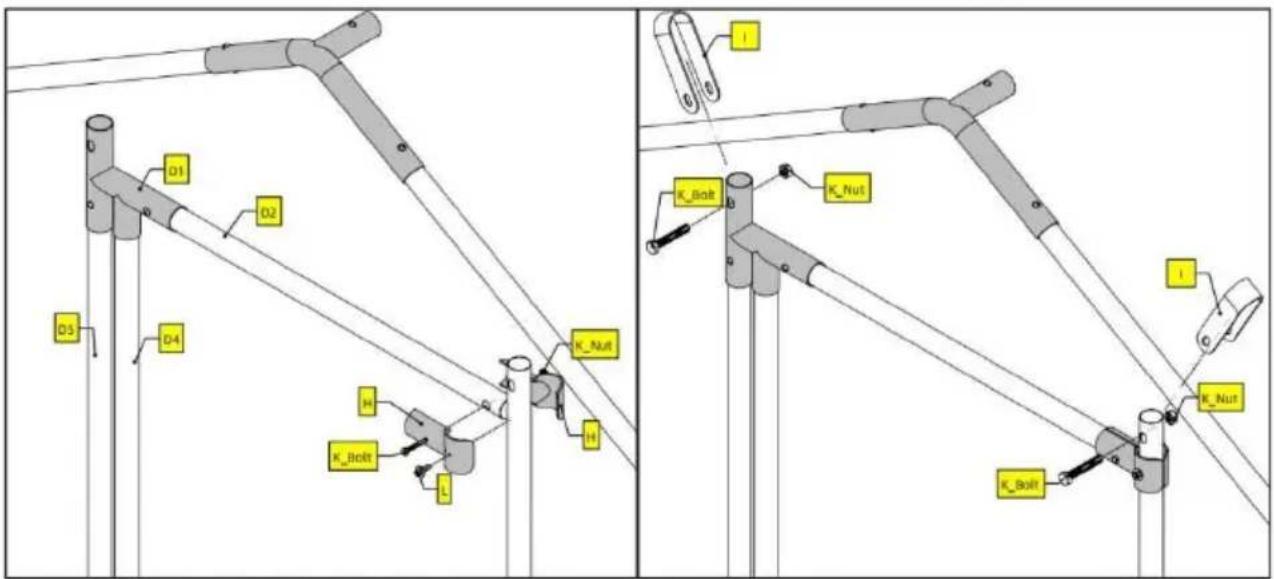
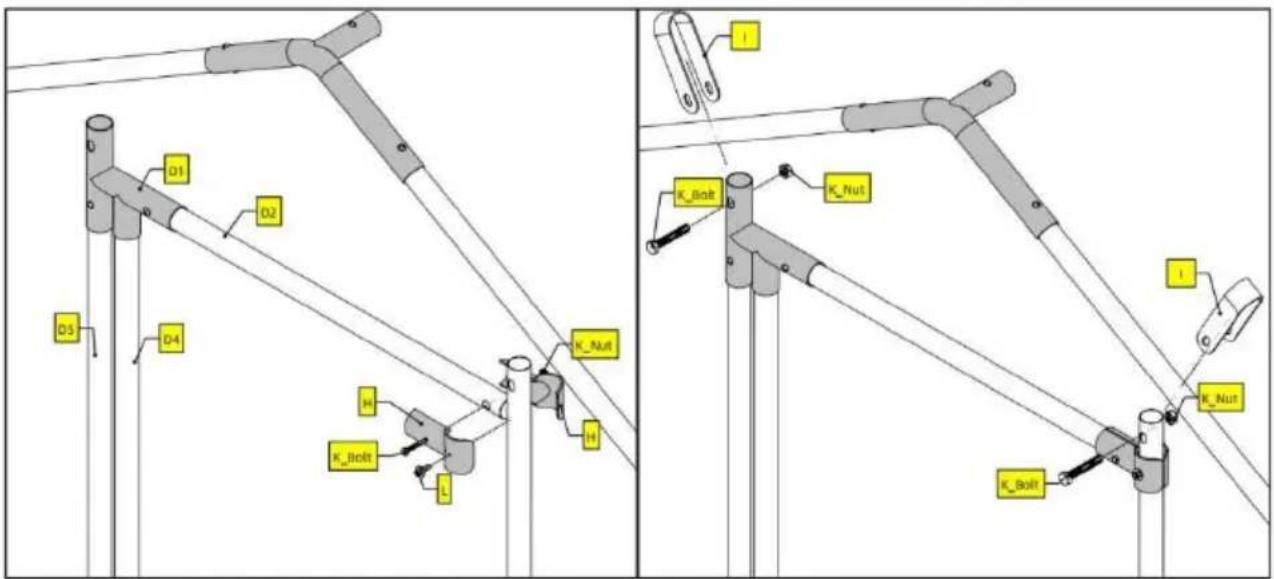
For screw L, you will need a power tool to drive it into tube D7.
6
| Part | Qty |
| D3 | 2 |
| D6 | 1 |
| H | 8 |
| K | 4 |
| L | 4 |
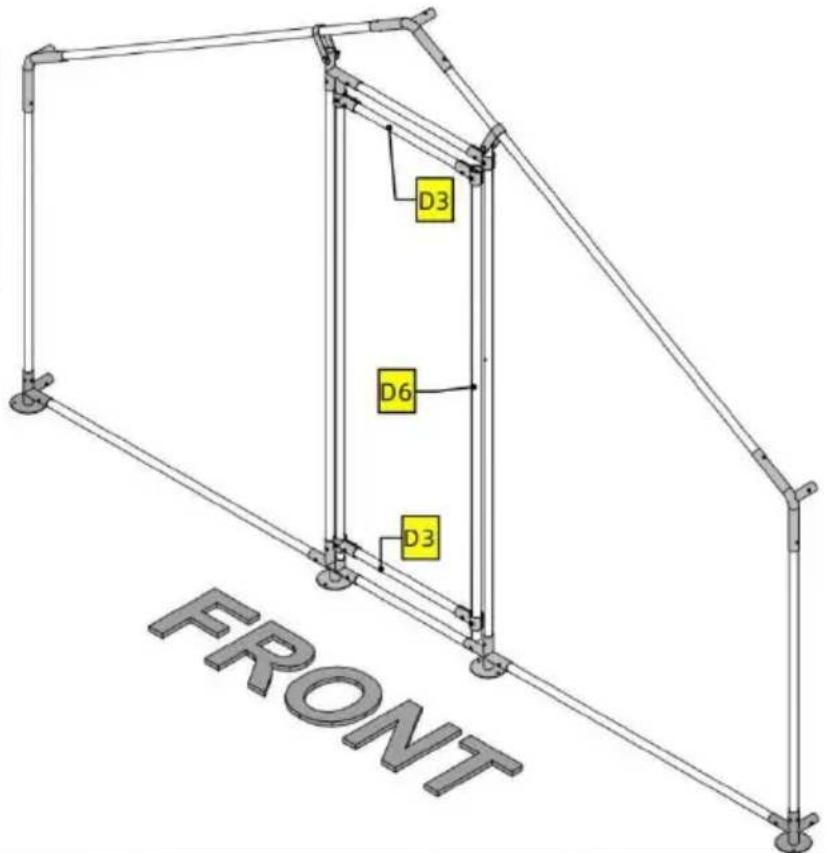
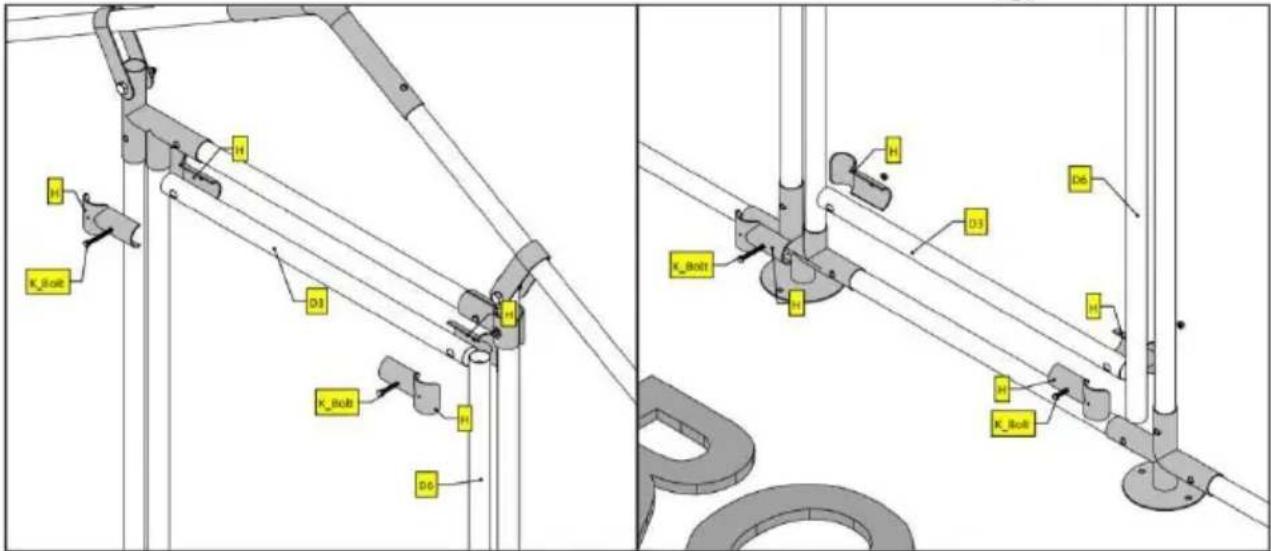
Note
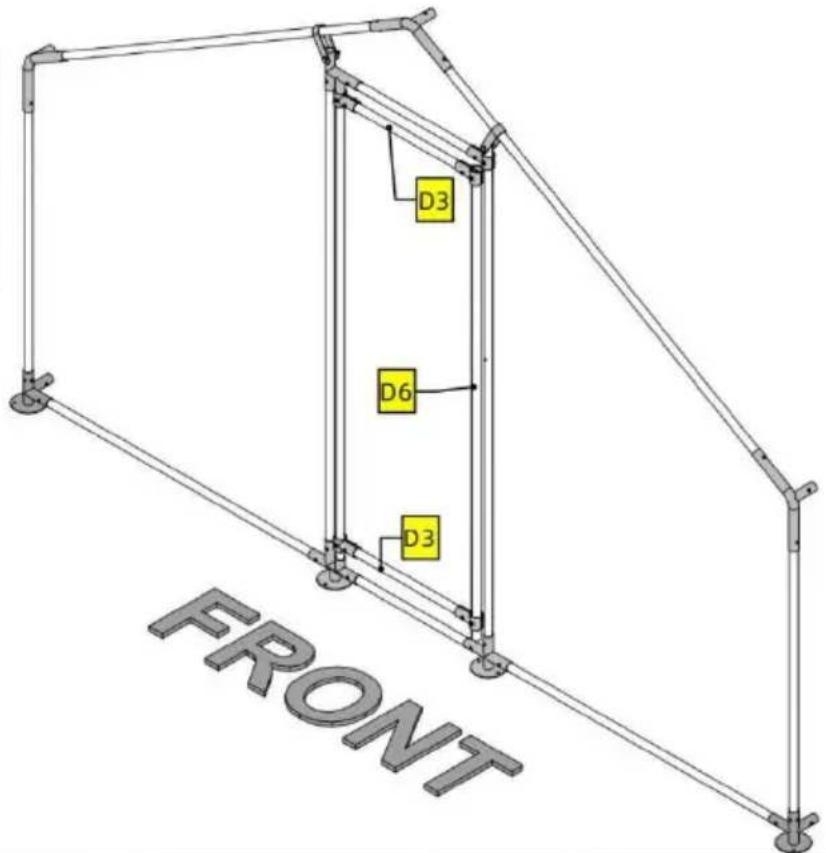
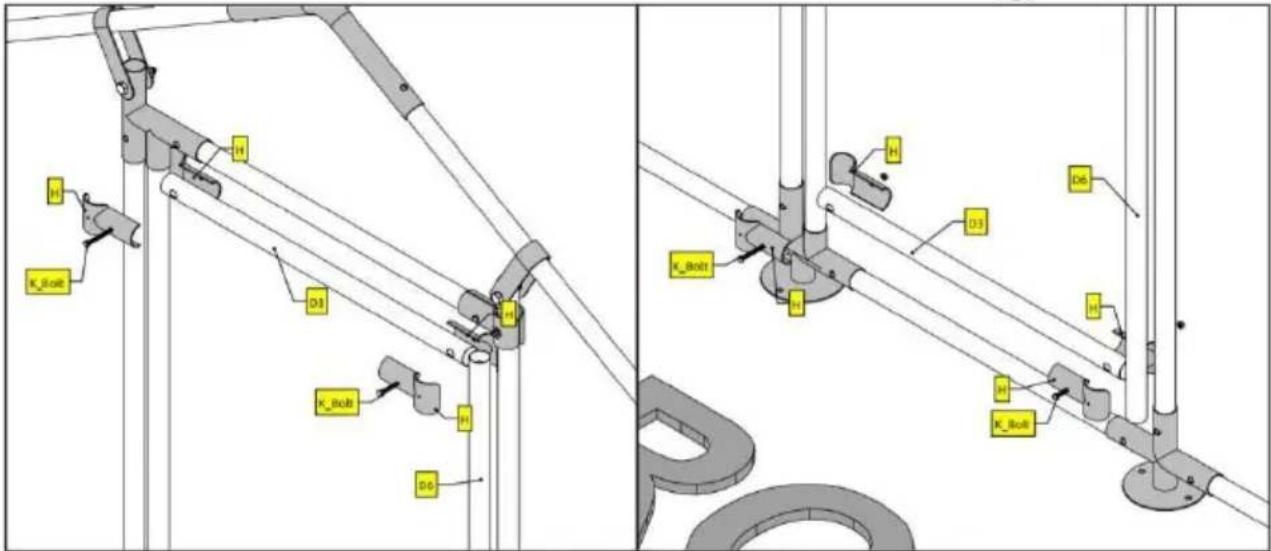
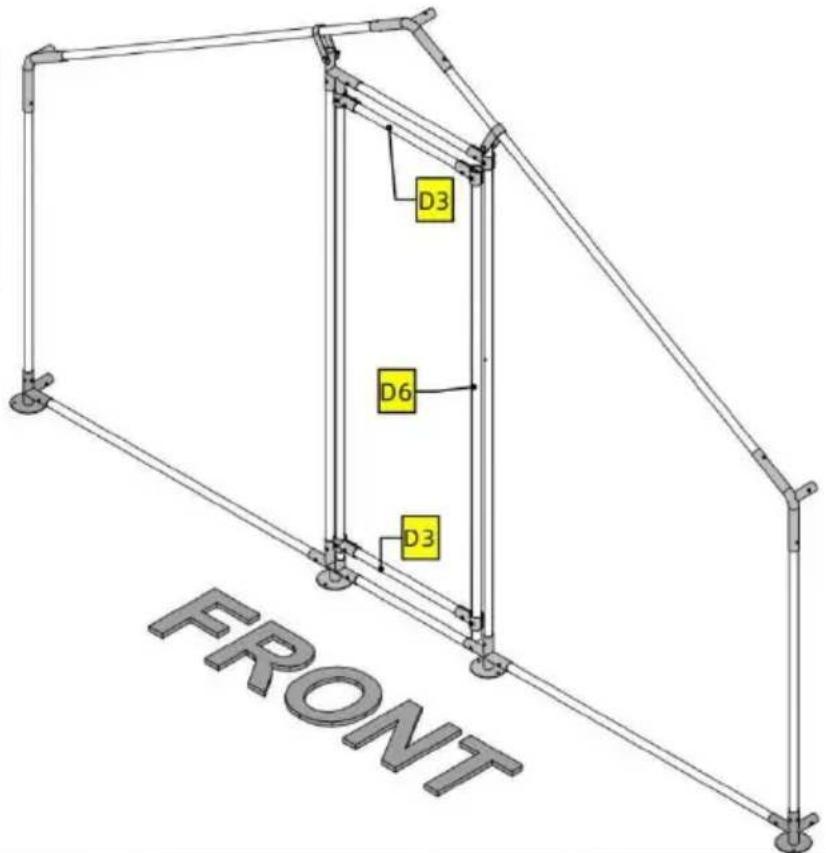
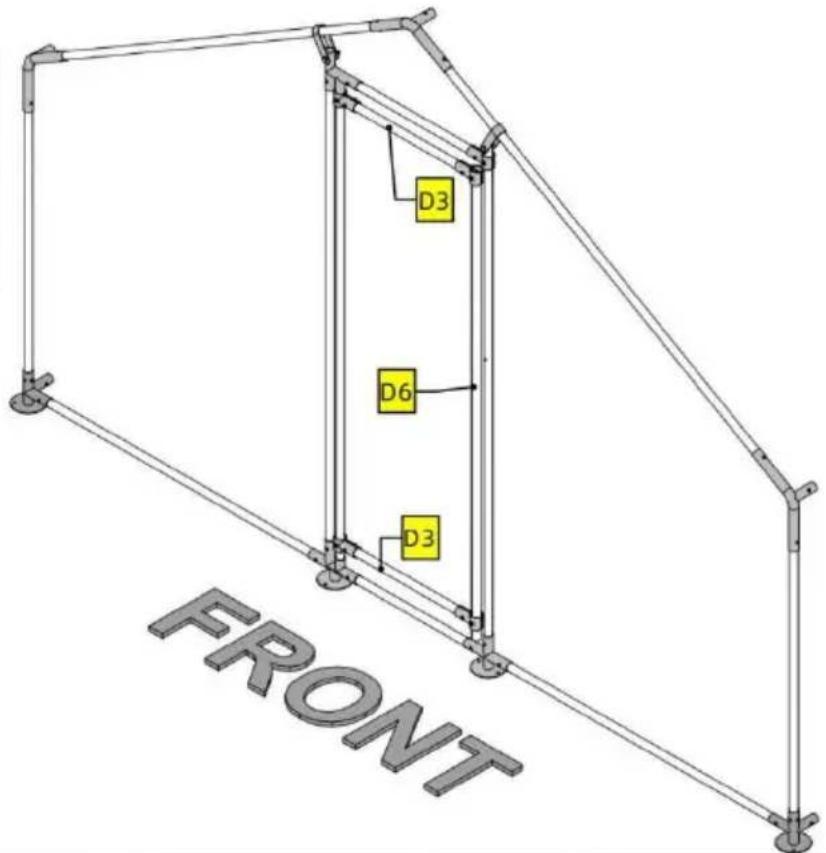
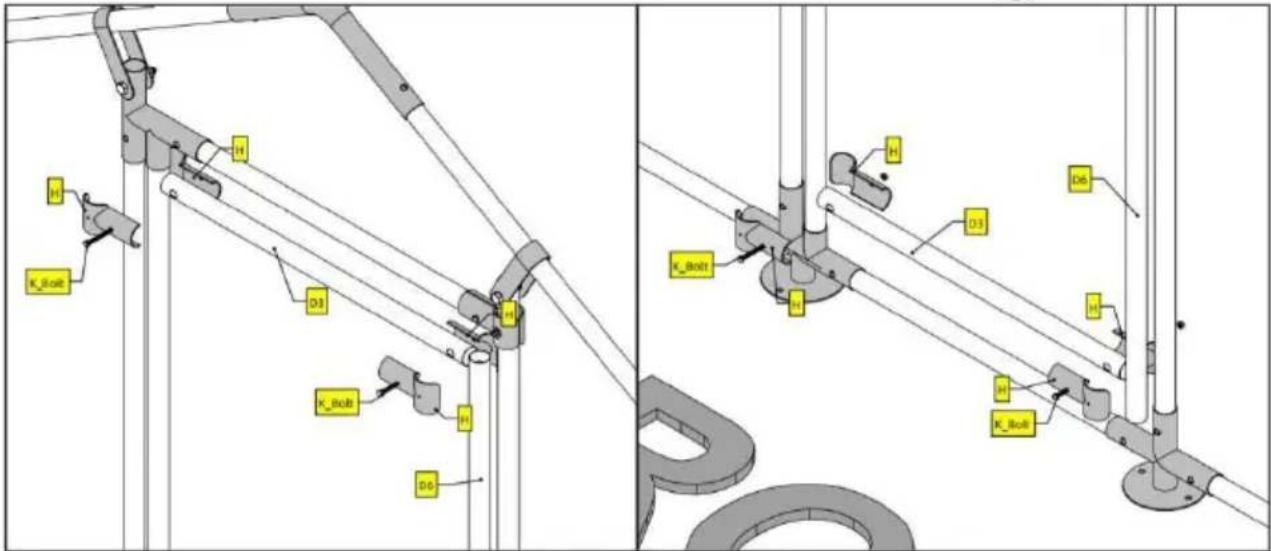
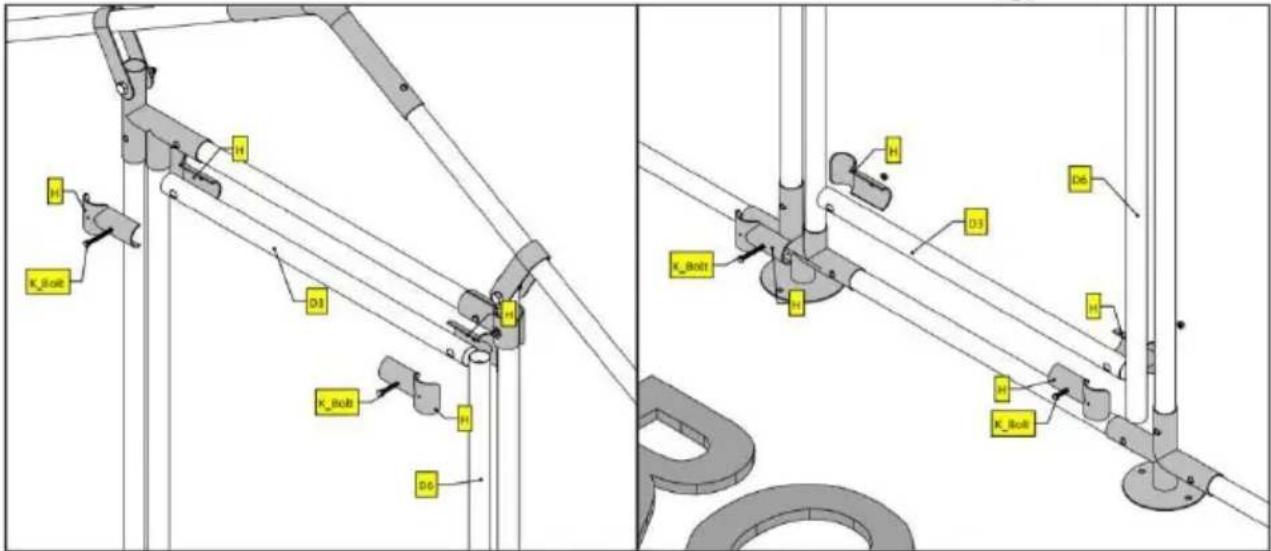
Do not worry too much about the exact location of D3 and D6. Just make sure D6 is completely covered by the two pairs of H.
Notice that on the two detailed illustrations above, screw L is not used. This is so that you have some wiggle room adjusting D3 and D6. Once you are happy with the result, use screw L to secure H.
PRODUCT PARAMETER
| Model | JD342 |
| Main material | Q235 |
| Net weight | 33kg |
| Main Colour | Galvanized color and gray |
| Product Size | 3*4*2m |
Manufacturer: Shanghaimuxinmuyeyouxiangongsi
Address: Shuangchenglu 803nong11hao1602A-1609shi, baoshanqu, shanghai 200000 CN.
Imported to AUS: SIHAO PTY LTD. 1 ROKEVA STREETEASTWOOD NSW 2122 Australia
Imported to USA: Sanven Technology Ltd. Suite 250, 9166 Anaheim Place, Rancho Cucamonga, CA 91730
| EC | REP |
E-CrossStu GmbH
Mainzer Landstr.69, 60329 Frankfurt am Main
| UK | REP |
YH CONSULTING LIMITED.
C/O YH Consulting Limited Office 147, Centurion House, London Road, Staines-upon-Thames, Surrey TW18 4AX
VEVOR®
TOUGH TOOLS, HALF PRICE
Technical Support and E-Warranty Certificate www.vevor.com/support
VEVOR®
TOUGH TOOLS, HALF PRICE
NEED HELP? CONTACT US!
| Part | Qty |
| 1 | 2 |
| 2 | 10 |
| 3 | 6 |
| 4 | 6 |
| 5 | 2 |
| 6 | 1 |
| A | 6 |
| B | 3 |
| C | 4 |
| D | 3 |
| D1 | 1 |
| D2 | 1 |
| D3 | 2 |
| D4 | 1 |
| D5 | 1 |
| D6 | 1 |
| D7 | 1 |
| D8 | 1 |
| E | 1 |
| F | 36m |
| H | 10 |
| I | 2 |
| J | 1 |
| K | 8 |
| L | 5 |
| M | 9 |
| N | 200 |
| O | 22 |
| P | 1 |
ASSEMBLY STEP
![graph TD A["FRONT"] --> B["C"] A --> C["D"] A --> D["E"] A --> E["F"] A --> F["P"] A --> G["C"] A --> H["D"] A --> I["E"] A --> J["F"] A --> K["C"] A --> L["D"] A --> M["E"] A --> N["F"] A --> O["C"] A --> P["D"] A --> Q["E"] A --> R["C"] A --> S["D"] A --> T["E"] A --> U["C"] A --> V["D"] A --> W["…](/content/2026/04/735647/images/c0a972d34fe6b555c7b9726c3d766a4437d6670a4ef6aff145334637b992c200.jpg)

Note
For this product, tubes and joints are connected using button clips. Button clips are already inserted inside tubes. When connecting, press the button clip and insert one tube into the joint. Forcing the tubes in might also work but you are risking damaging the Clip. Pay attention to the orientation of Part P.
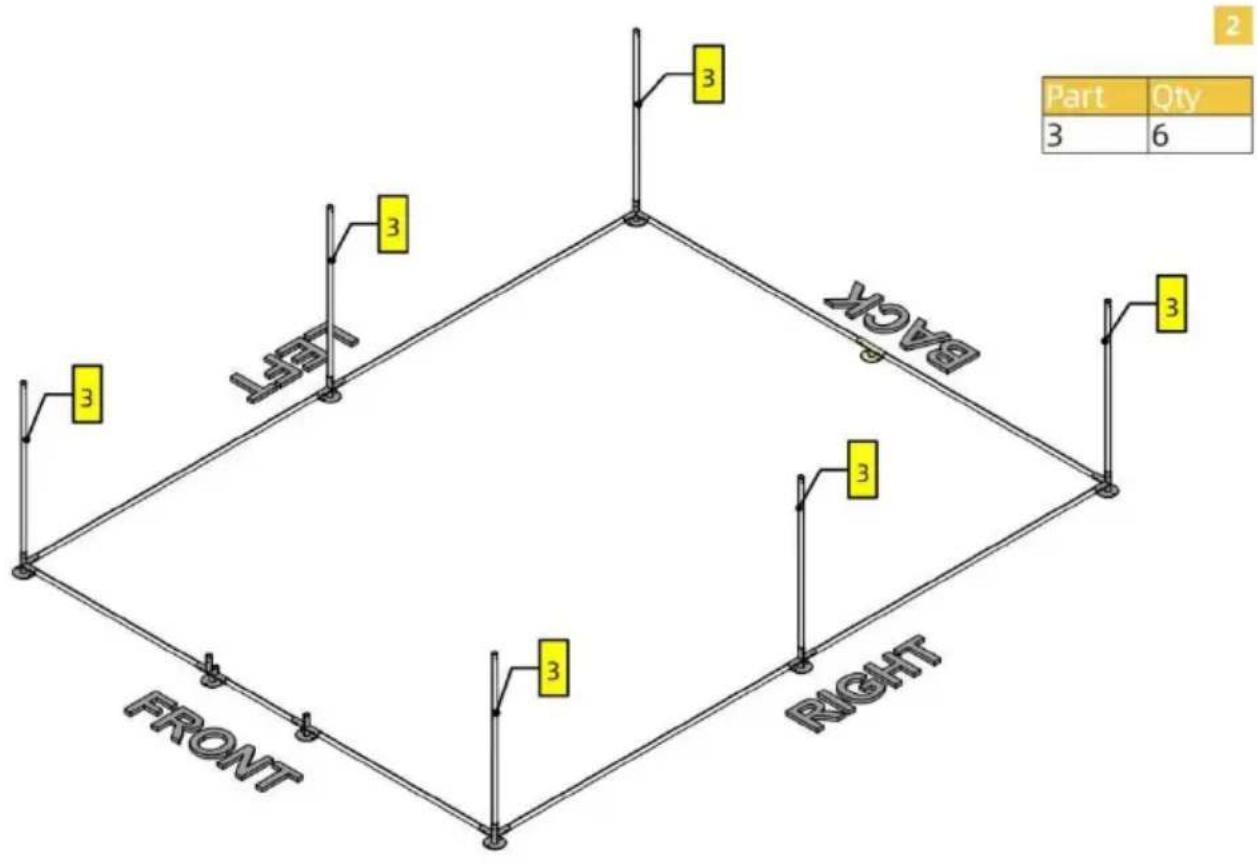
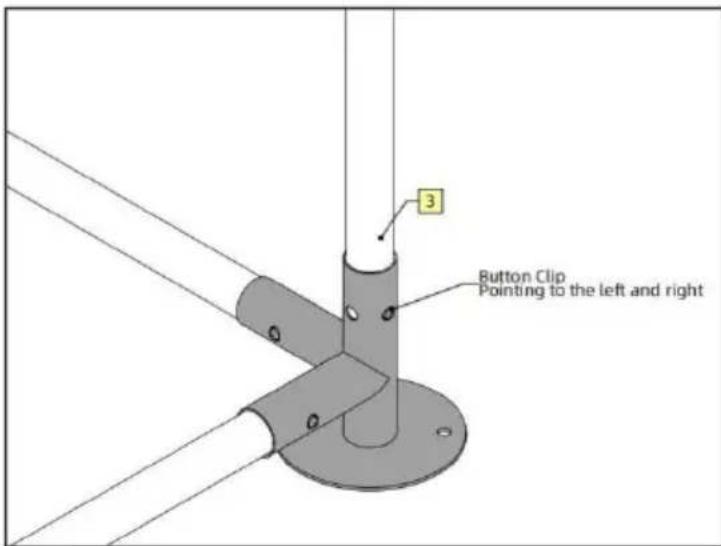
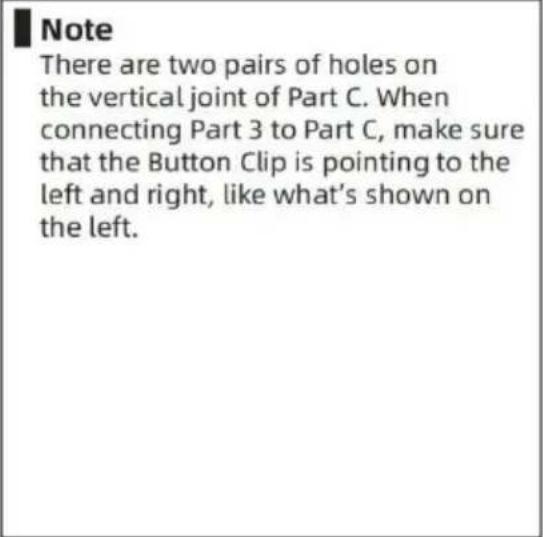
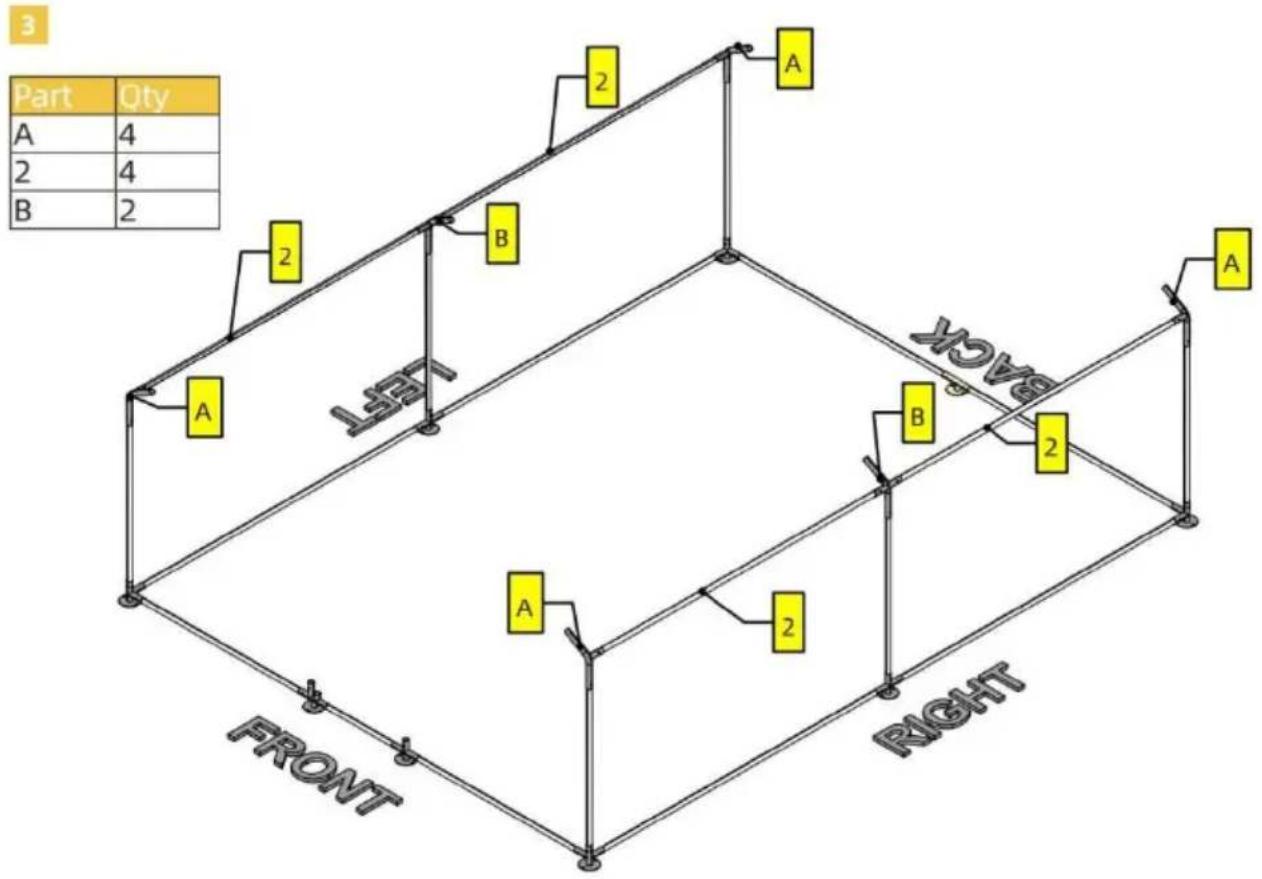
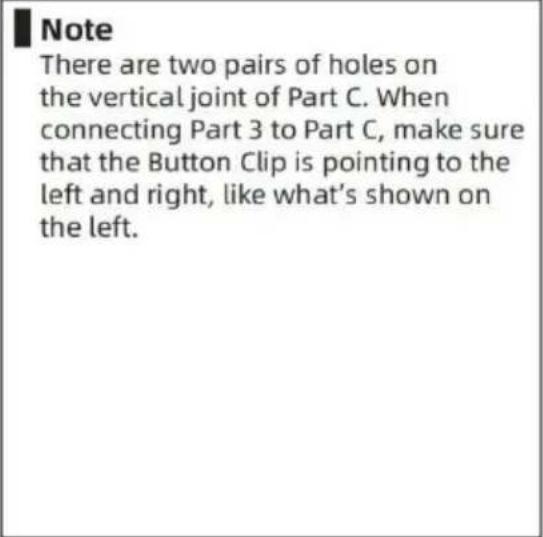
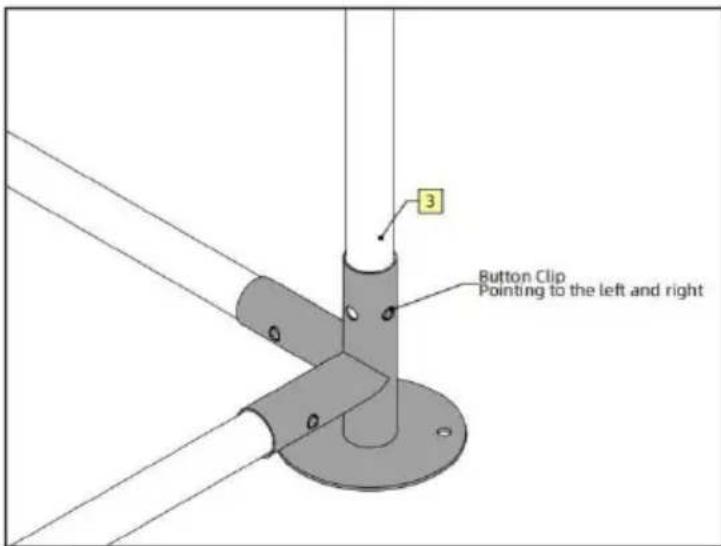
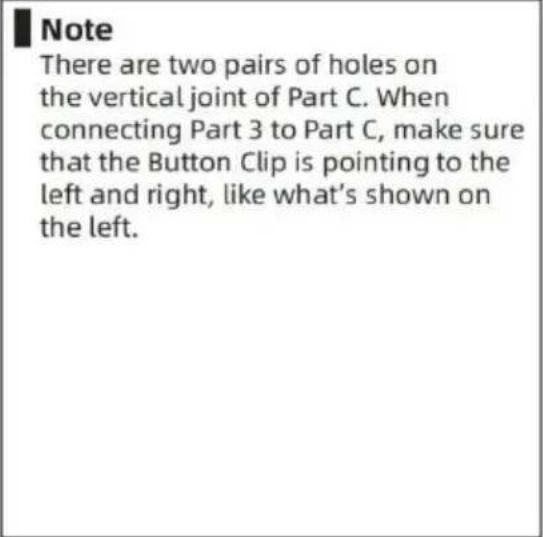
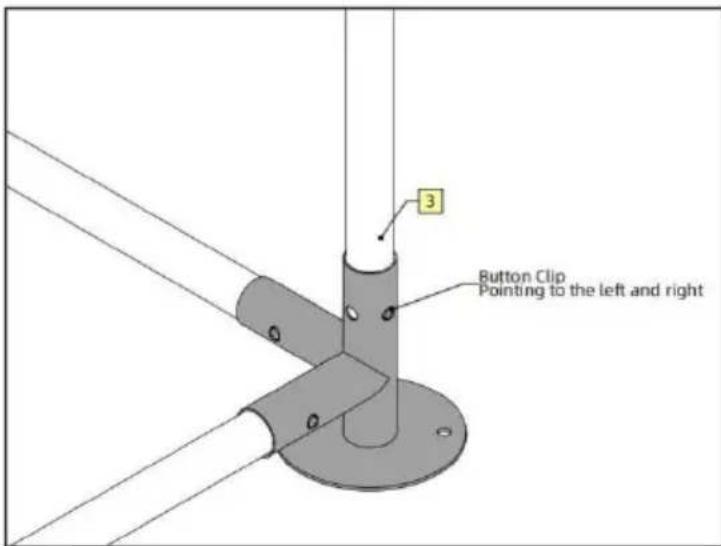
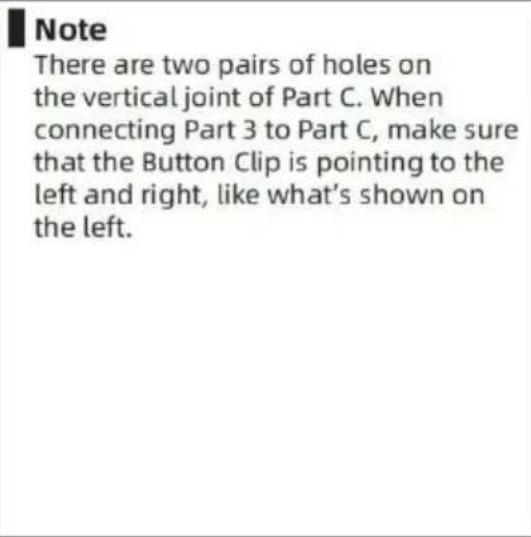
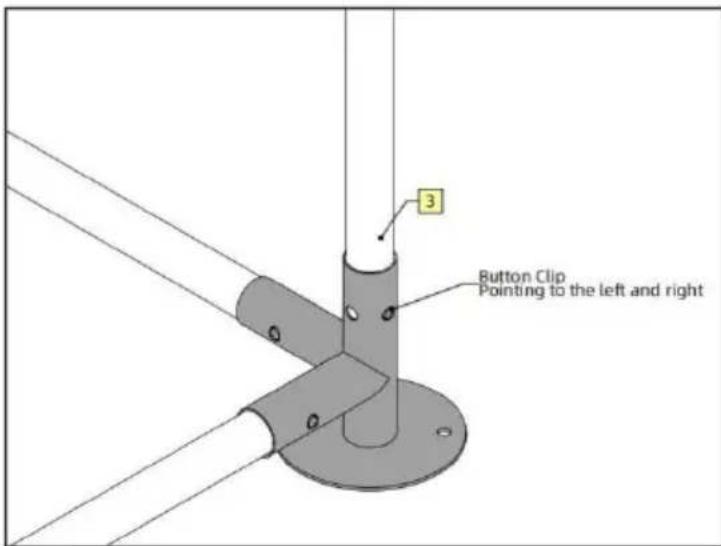
Note There are two pairs of holes on the vertical joint of Part C. When connecting Part 3 to Part C, make sure that the Button Clip is pointing to the left and right, like what's shown on the left.
![graph TD A["Section A"] --> B["Section B"] B --> C["Section Left"] C --> D["Section Right"] style A fill:#fff,stroke:#000 style B fill:#fff,stroke:#000 style C fill:#fff,stroke:#000 style D fill:#fff,stroke:#000 note1["Part: 3"] --> A note2["Qty: 4"] --> A note3["Part: 2"] --> B note4["Part: 2"] -->…](/content/2026/04/735647/images/d624055d2ebaf53a07edd6cab1893500f4eb583e8e9f400f8dddbf0009b568d4.jpg)
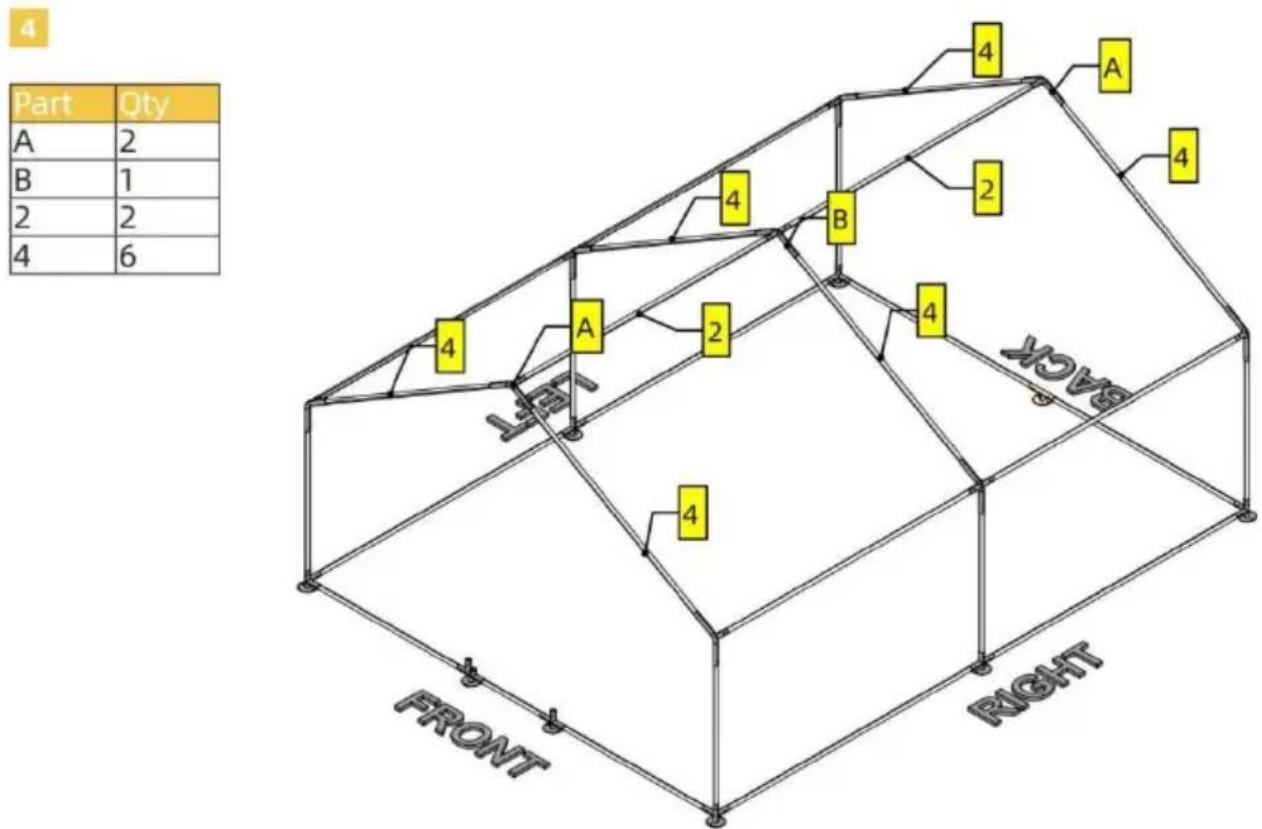
5
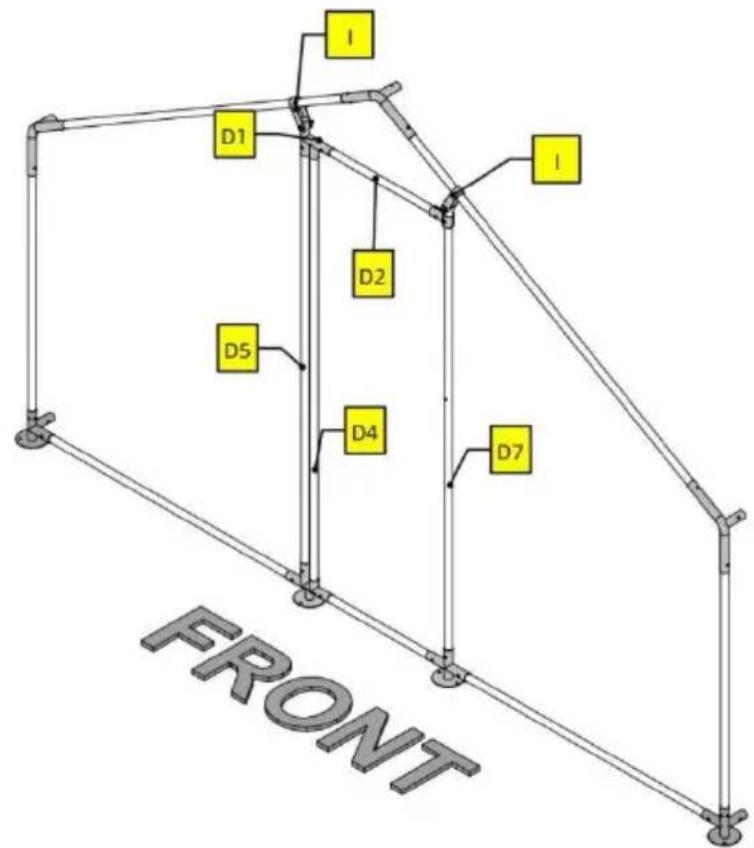
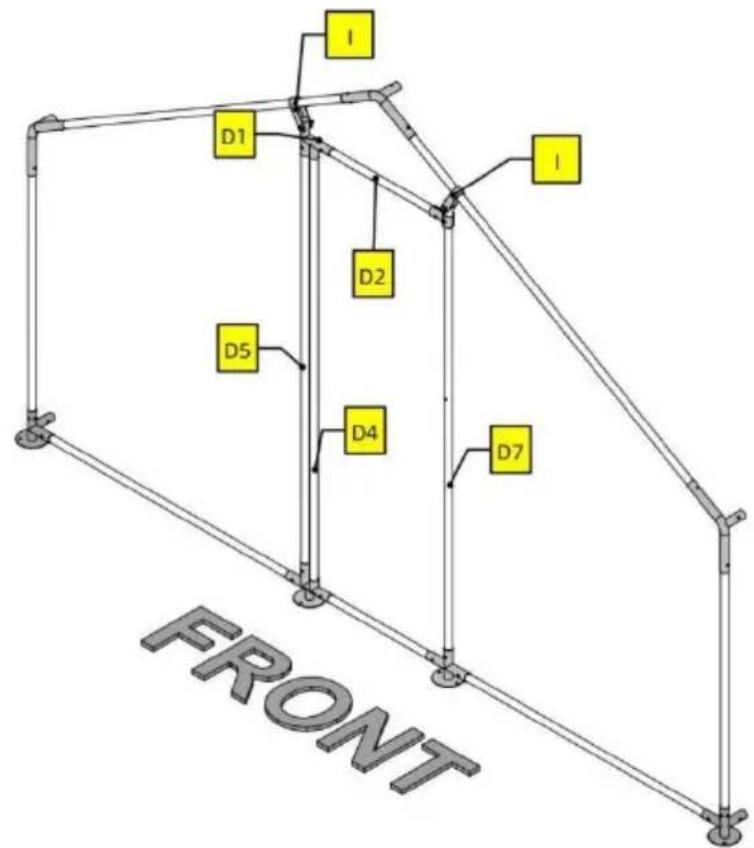
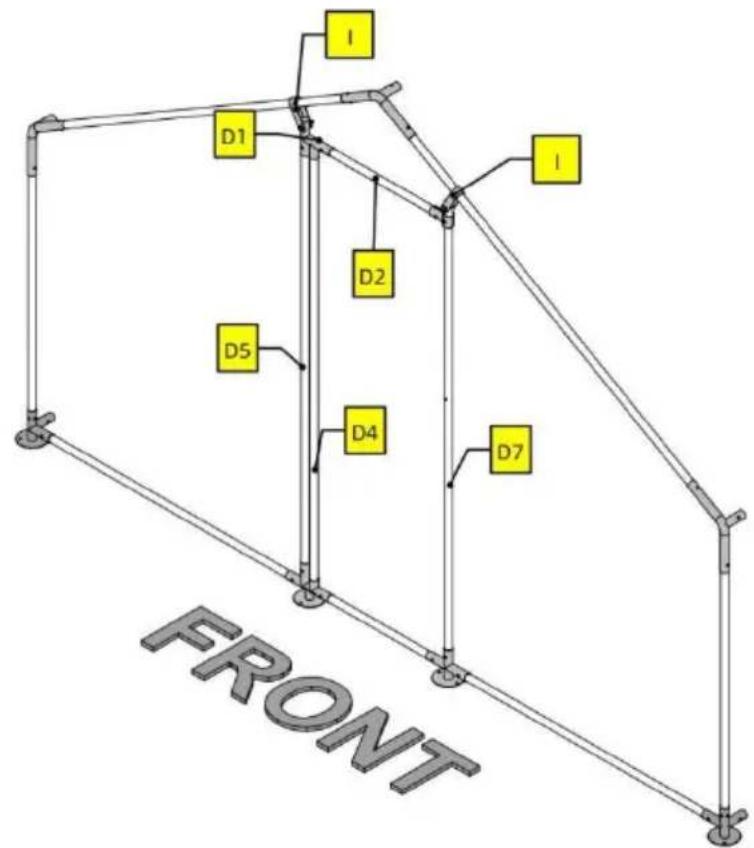
| Part | Qty |
| D1 | 1 |
| D2 | 1 |
| D4 | 1 |
| D5 | 1 |
| D7 | 1 |
| H | 2 |
| I | 2 |
| K | 3 |
| L | 1 |
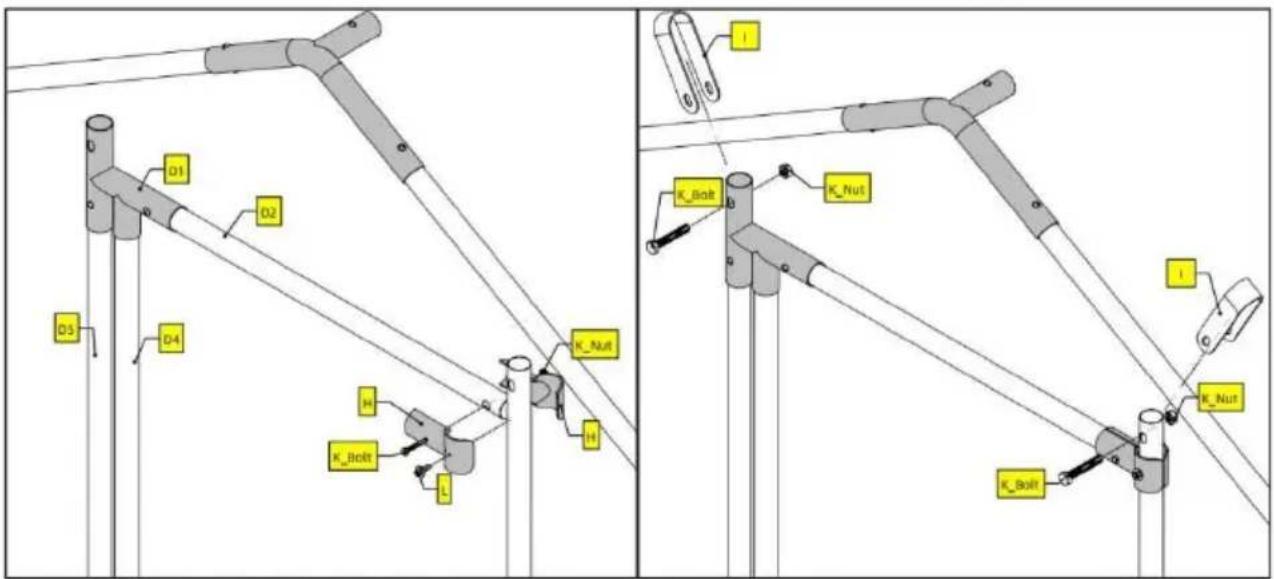
Note
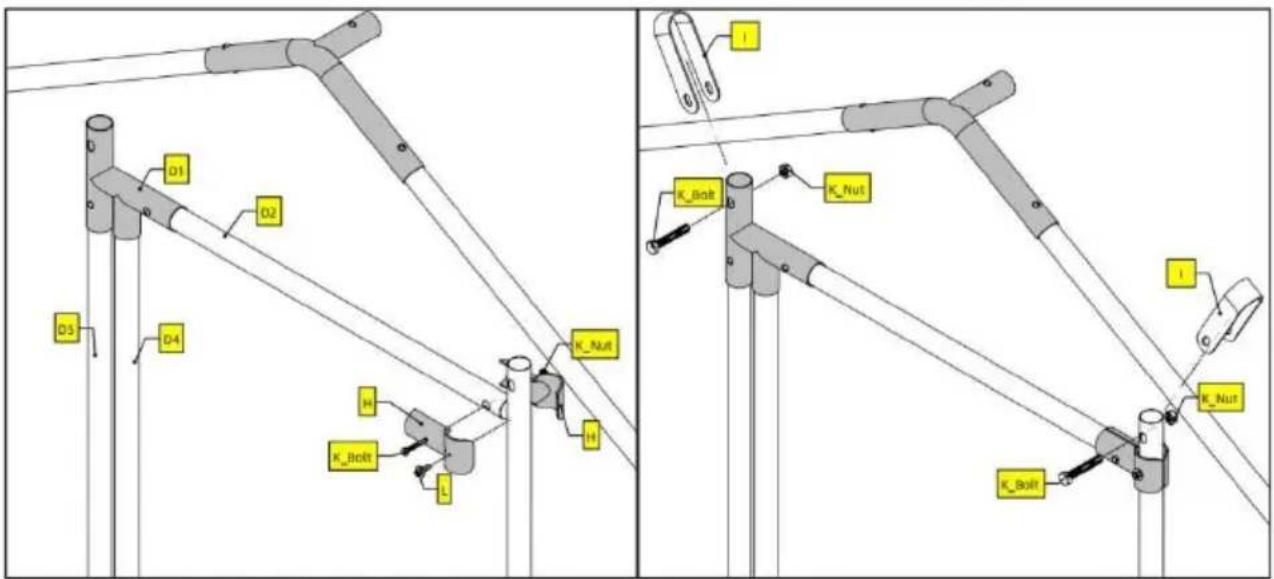
For screw L, you will need a power tool to drive it into tube D7.
6
| Part | Qty |
| D3 | 2 |
| D6 | 1 |
| H | 8 |
| K | 4 |
| L | 4 |
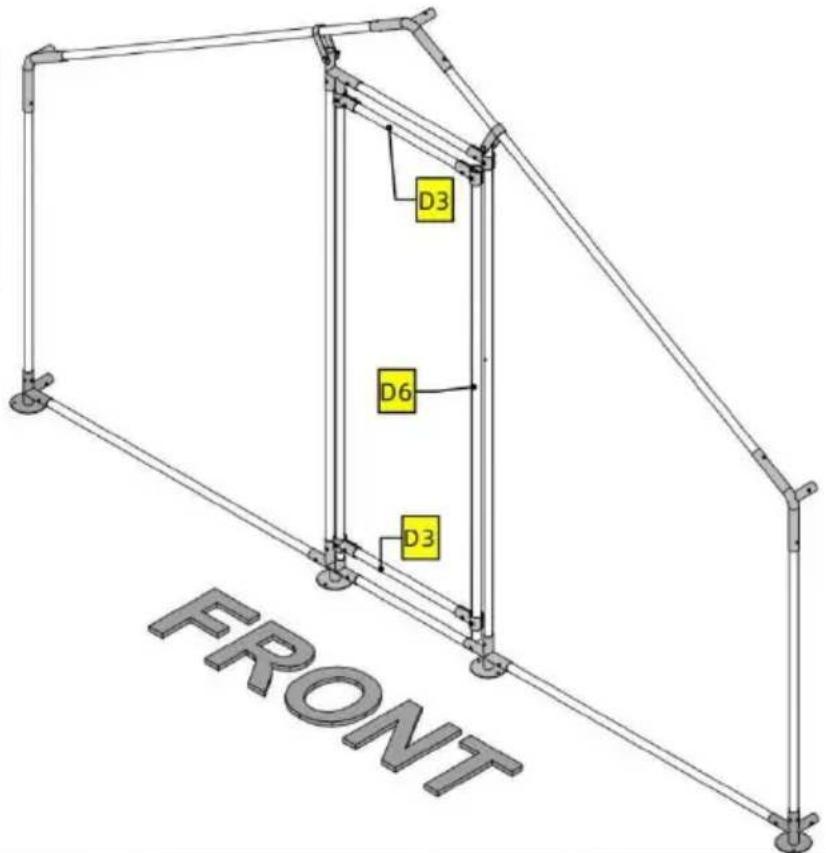
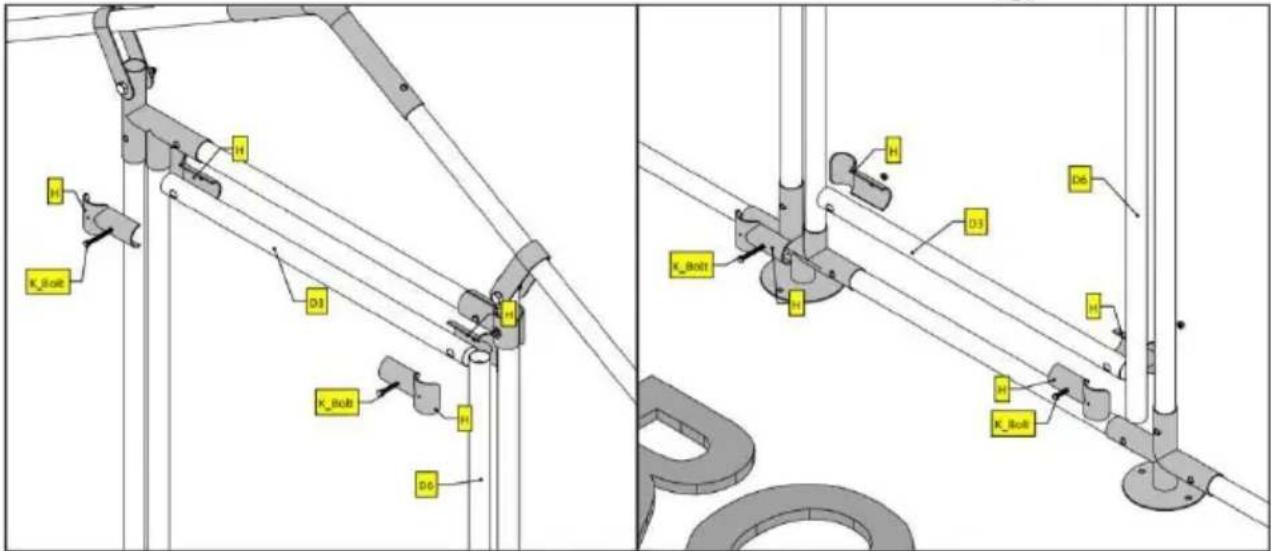
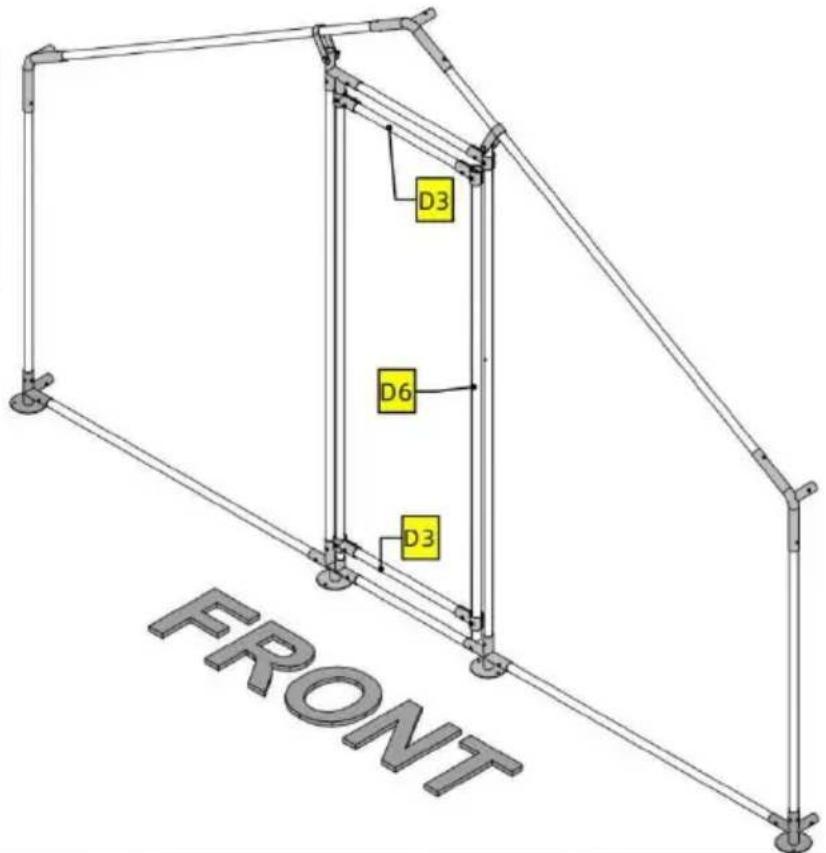
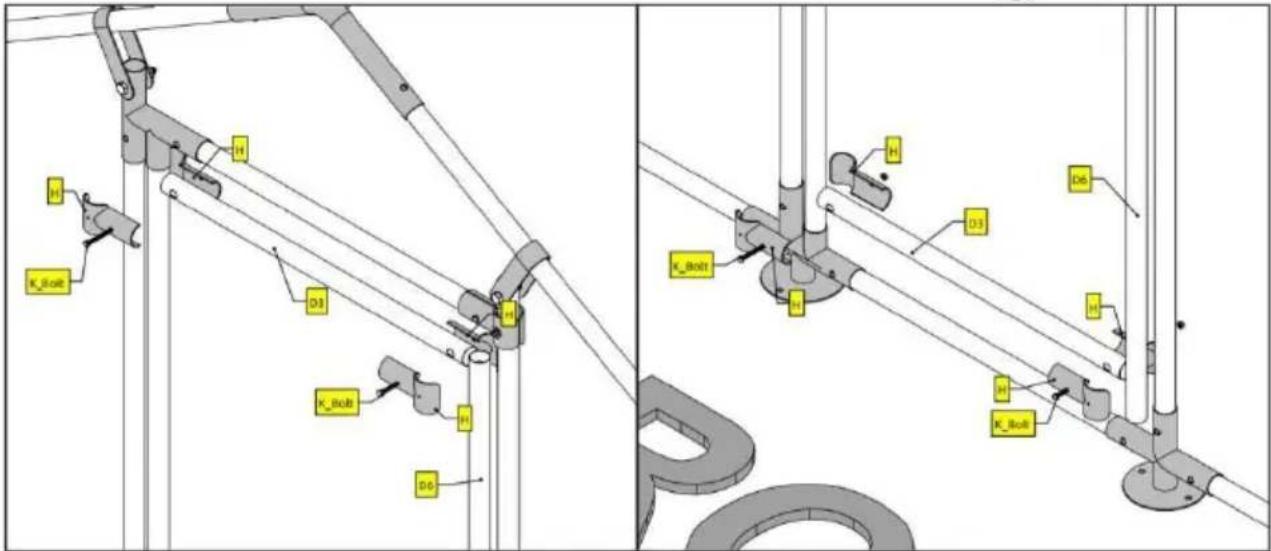
Note
Do not worry too much about the exact location of D3 and D6. Just make sure D6 is completely covered by the two pairs of H.
Notice that on the two detailed illustrations above, screw L is not used. This is so that you have some wiggle room adjusting D3 and D6. Once you are happy with the result, use screw L to secure H.
PRODUCT PARAMETER
STREETEASTWOOD NSW 2122 Australia
Imported to USA: Sanven Technology Ltd. Suite 250, 9166 Anar Place, Rancho Cucamonga, CA 91730
| EC | REP |
E-CrossStu GmbH
Mainzer Landstr.69, 60329 Frankfurt am Main
| UK | REP |
YH CONSULTING LIMITED.
C/O YH Consulting Limited Office 147, Centurion House, London Road, Staines-upon-Thames, Surrey TW18 4AX
VEVOR®
TOUGH TOOLS, HALF PRICE
www.vevor.com/support
VEVOR®
TOUGH TOOLS, HALF PRICE
www.vevor.com/support
| Part | Qty |
| 1 | 2 |
| 2 | 10 |
| 3 | 6 |
| 4 | 6 |
| 5 | 2 |
| 6 | 1 |
| A | 6 |
| B | 3 |
| C | 4 |
| D | 3 |
| D1 | 1 |
| D2 | 1 |
| D3 | 2 |
| D4 | 1 |
| D5 | 1 |
| D6 | 1 |
| D7 | 1 |
| D8 | 1 |
| E | 1 |
| F | 36m |
| H | 10 |
| I | 2 |
| J | 1 |
| K | 8 |
| L | 5 |
| M | 9 |
| N | 200 |
| O | 22 |
| P | 1 |
ASSEMBLY STEP
![graph TD A["FRONT"] --> B["C"] A --> C["D"] A --> D["E"] A --> E["F"] A --> F["P"] A --> G["C"] A --> H["D"] A --> I["E"] A --> J["F"] A --> K["C"] A --> L["D"] A --> M["E"] A --> N["F"] A --> O["C"] A --> P["D"] A --> Q["E"] A --> R["C"] A --> S["D"] A --> T["E"] A --> U["C"] A --> V["D"] A --> W["…](/content/2026/04/735647/images/5a7c78a5f3b92424d8306fd883443b606eaff3a451efc5345d703f2cdade53b3.jpg)
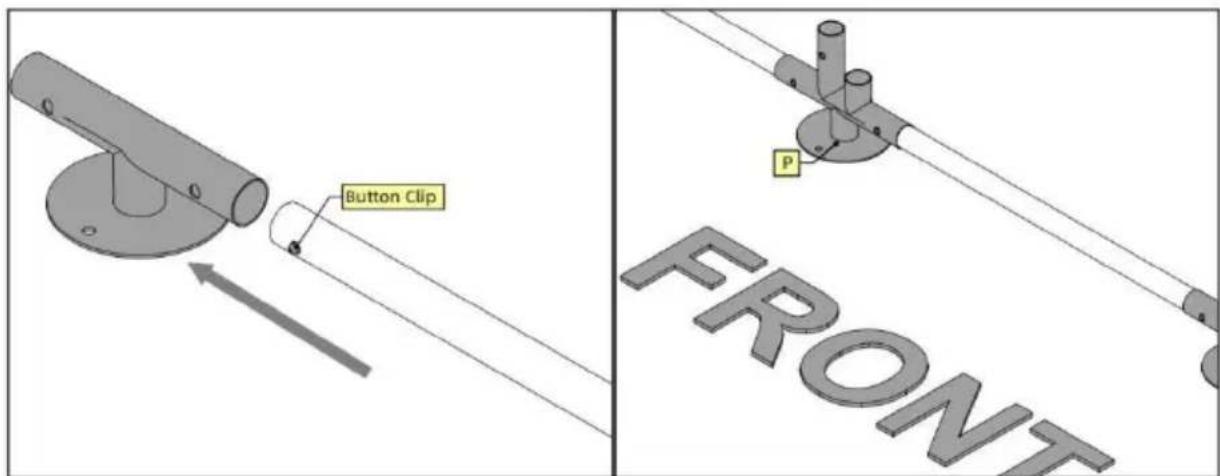
Note
For this product, tubes and joints are connected using button clips. Button clips are already inserted inside tubes. When connecting, press the button clip and insert one tube into the joint. Forcing the tubes in might also work but you are risking damaging the Clip. Pay attention to the orientation of Part P.
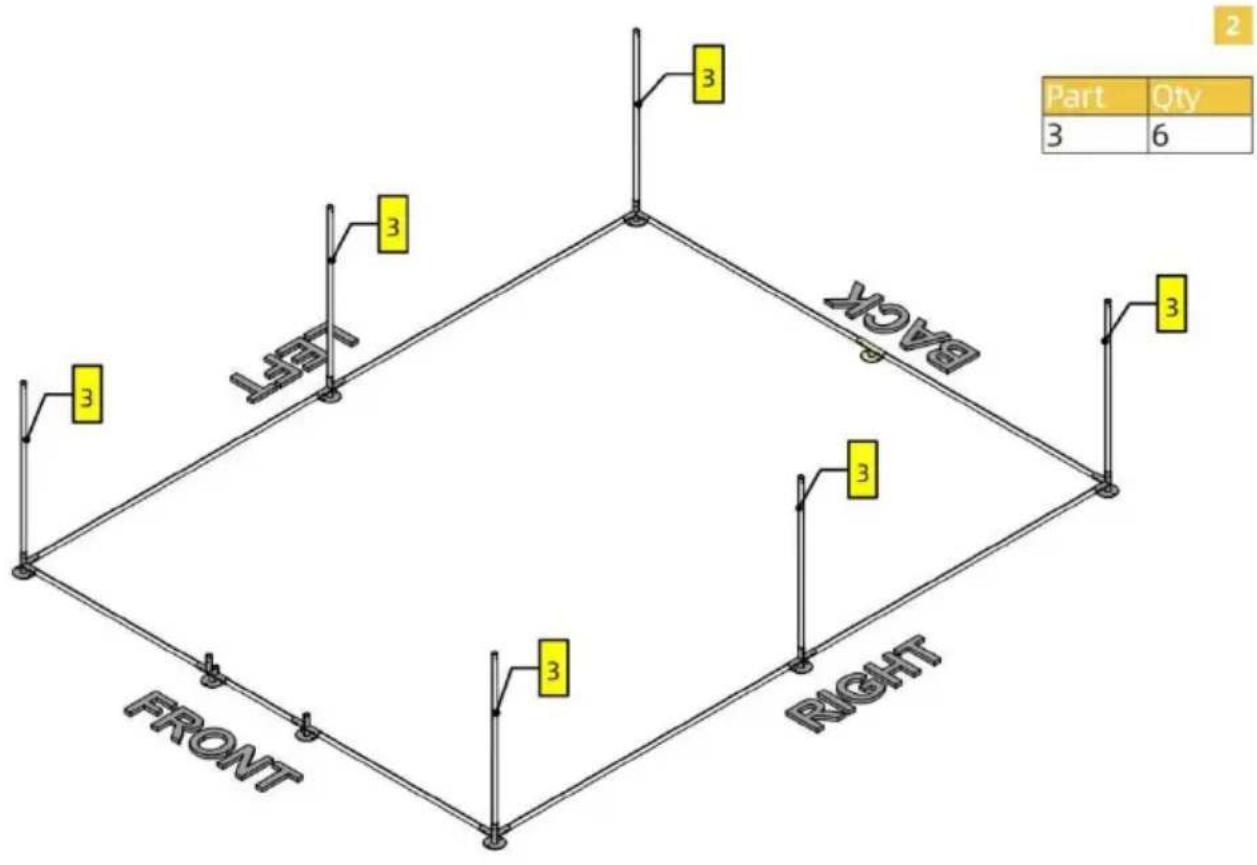

![graph TD A["Section A"] --> B["Section B"] B --> C["Section Left"] C --> D["Section Right"] style A fill:#fff,stroke:#000 style B fill:#fff,stroke:#000 style C fill:#fff,stroke:#000 style D fill:#fff,stroke:#000 note1["Part: 3"] --> A note2["Qty: 4"] --> A note3["Part: 2"] --> B note4["Part: 2"] -->…](/content/2026/04/735647/images/12d546cfc9a8fd9cafe338ce772495c5d60cfce189ff8c0e6db16244b4a74dfc.jpg)
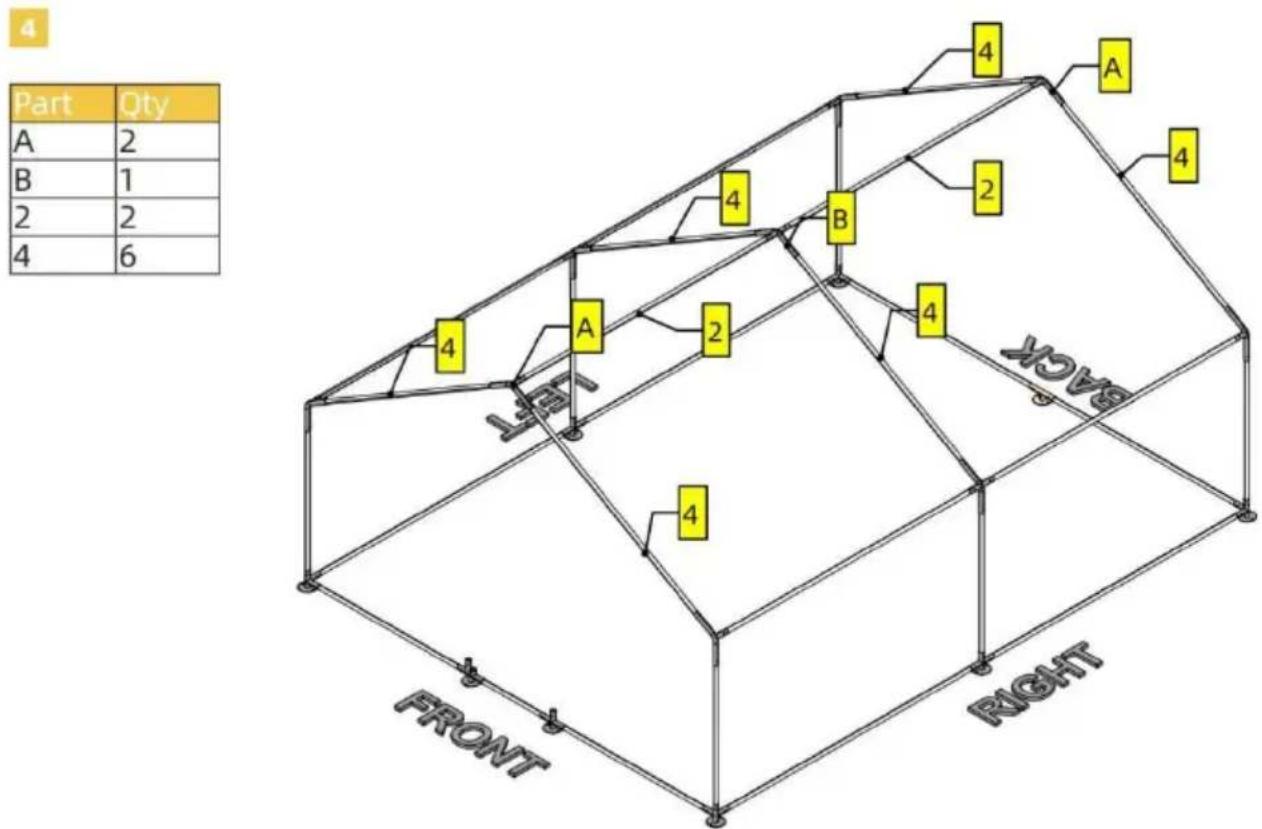
5
| Part | Qty |
| D1 | 1 |
| D2 | 1 |
| D4 | 1 |
| D5 | 1 |
| D7 | 1 |
| H | 2 |
| I | 2 |
| K | 3 |
| L | 1 |
Note
For screw L, you will need a power tool to drive it into tube D7.
6
| Part | Qty |
| D3 | 2 |
| D6 | 1 |
| H | 8 |
| K | 4 |
| L | 4 |
Note
Do not worry too much about the exact location of D3 and D6. Just make sure D6 is completely covered by the two pairs of H.
Notice that on the two detailed illustrations above, screw L is not used. This is so that you have some wiggle room adjusting D3 and D6. Once you are happy with the result, use screw L to secure H.
PRODUCT PARAMETER
C/O YH Consulting Limited Office 147, Centurion House, London Road, Staines-upon-Thames, Surrey TW18 4AX
VEVOR®
TOUGH TOOLS, HALF PRICE
NEED HELP? CONTACT US!
| Part | Qty |
| 1 | 2 |
| 2 | 10 |
| 3 | 6 |
| 4 | 6 |
| 5 | 2 |
| 6 | 1 |
| A | 6 |
| B | 3 |
| C | 4 |
| D | 3 |
| D1 | 1 |
| D2 | 1 |
| D3 | 2 |
| D4 | 1 |
| D5 | 1 |
| D6 | 1 |
| D7 | 1 |
| D8 | 1 |
| E | 1 |
| F | 36m |
| H | 10 |
| I | 2 |
| J | 1 |
| K | 8 |
| L | 5 |
| M | 9 |
| N | 200 |
| O | 22 |
| P | 1 |
ASSEMBLY STEP
![graph TD A["FRONT"] --> B["C"] A --> C["D"] A --> D["E"] A --> E["F"] A --> F["P"] A --> G["C"] A --> H["D"] A --> I["E"] A --> J["F"] A --> K["C"] A --> L["D"] A --> M["E"] A --> N["F"] A --> O["C"] A --> P["D"] A --> Q["E"] A --> R["C"] A --> S["D"] A --> T["E"] A --> U["C"] A --> V["D"] A --> W["…](/content/2026/04/735647/images/47eea13ad943f7ff0de0e2bdc0730308069d732868b727e9916d3d1657001414.jpg)
Note
For this product, tubes and joints are connected using button clips. Button clips are already inserted inside tubes. When connecting, press the button clip and insert one tube into the joint. Forcing the tubes in might also work but you are risking damaging the Clip. Pay attention to the orientation of Part P.
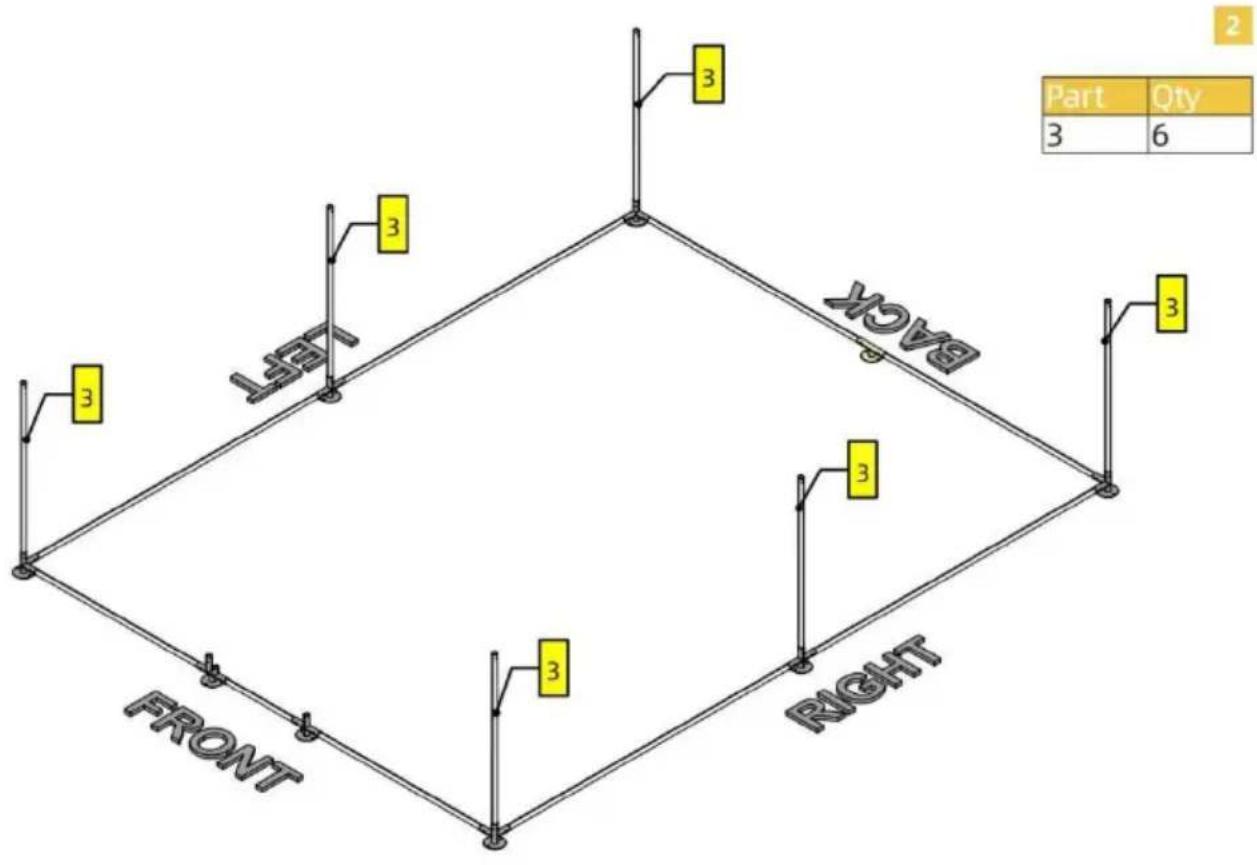
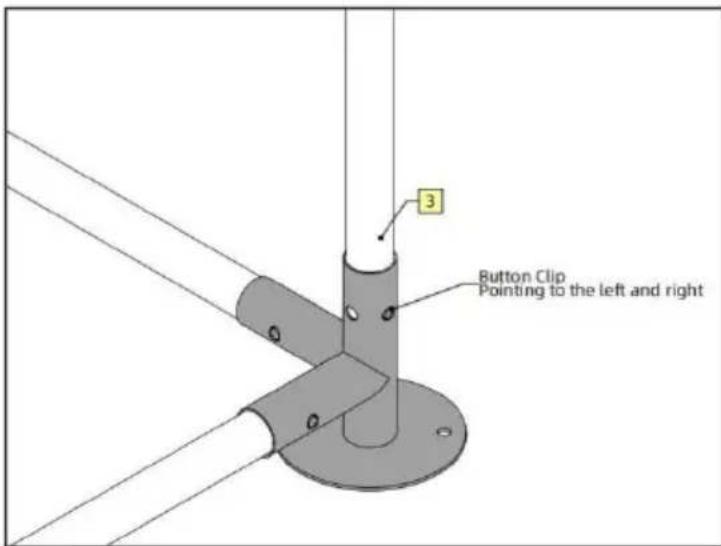
Note There are two pairs of holes on the vertical joint of Part C. When connecting Part 3 to Part C, make sure that the Button Clip is pointing to the left and right, like what's shown on the left.
![graph TD A["Section A"] -->|2| B["Section B"] B -->|2| C["Section Left"] C -->|2| D["Section Right"] D -->|2| E["Section Left"] E --> F["Section Right"] style A fill:#fff,stroke:#000 style B fill:#fff,stroke:#000 style C fill:#fff,stroke:#000 style D fill:#fff,stroke:#000 style E fill:#fff,stroke:#0…](/content/2026/04/735647/images/e2ab336d2a9931818733d35085a11d01513a289064498ccc48100a1579fcf623.jpg)
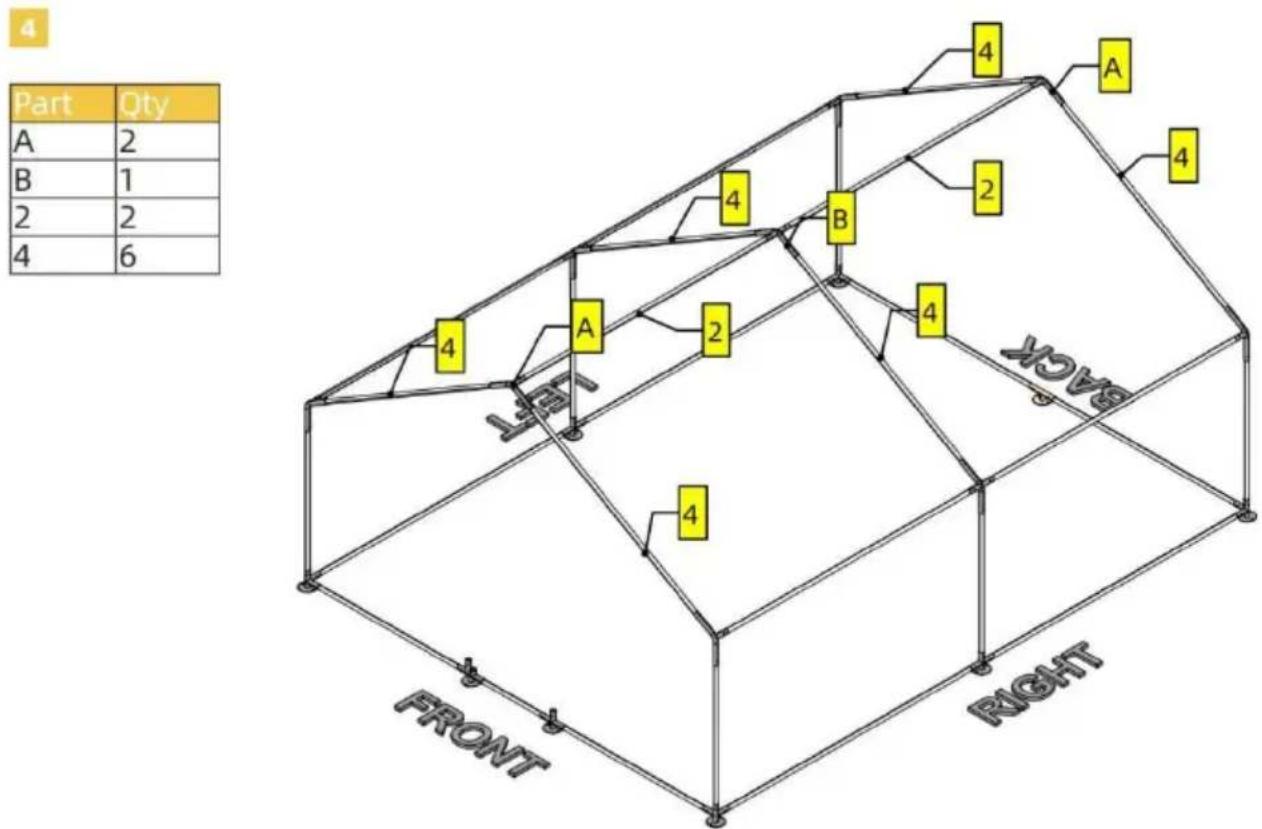
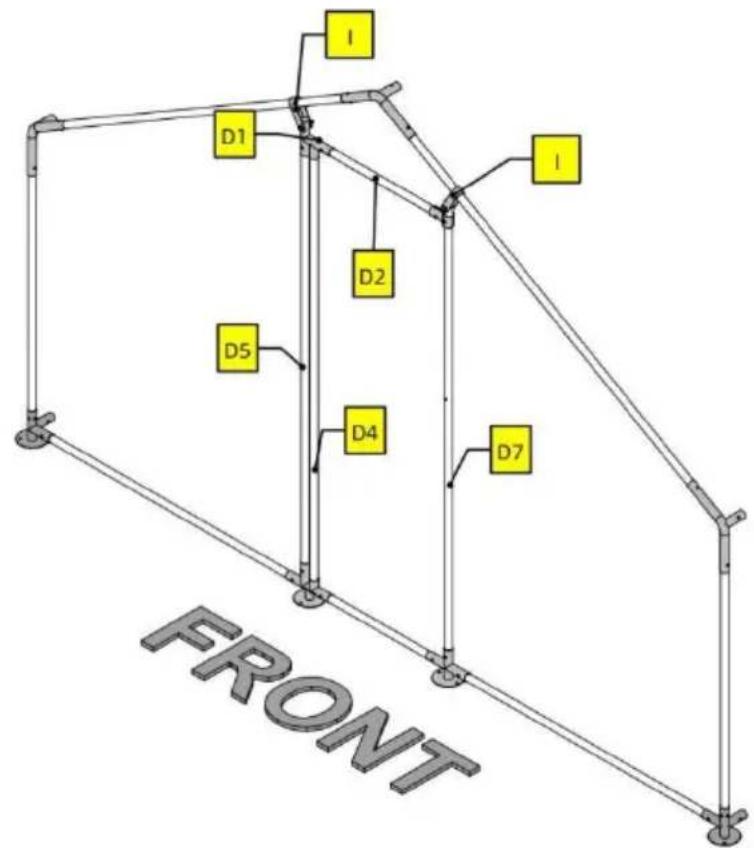
5
| Part | Qty |
| D1 | 1 |
| D2 | 1 |
| D4 | 1 |
| D5 | 1 |
| D7 | 1 |
| H | 2 |
| I | 2 |
| K | 3 |
| L | 1 |
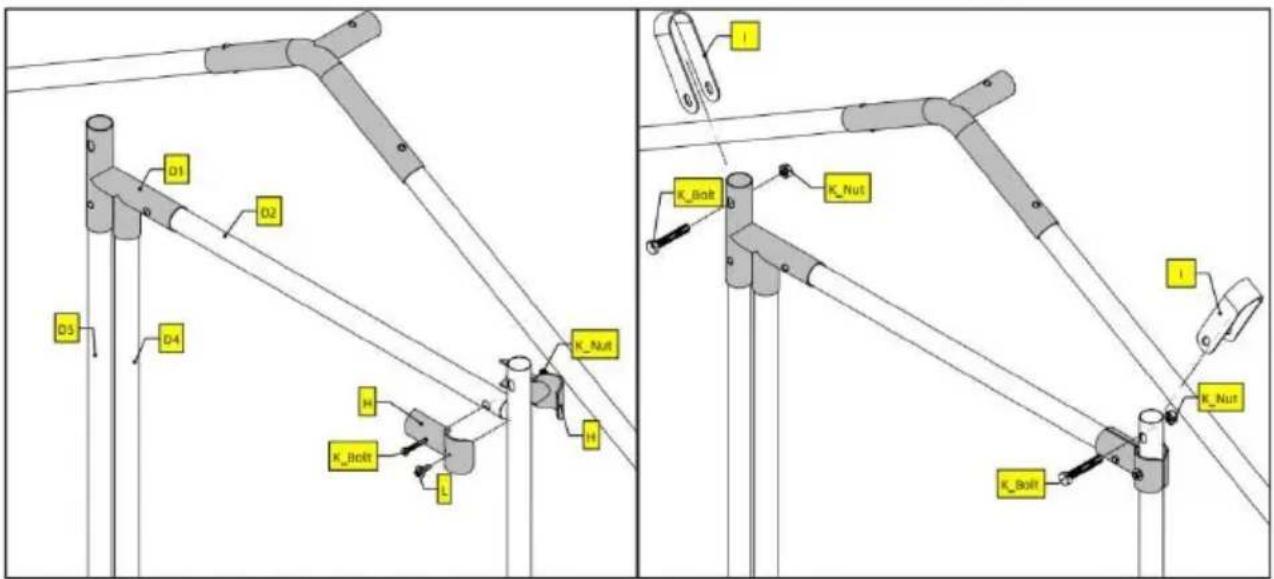
Note
For screw L, you will need a power tool to drive it into tube D7.
6
| Part | Qty |
| D3 | 2 |
| D6 | 1 |
| H | 8 |
| K | 4 |
| L | 4 |
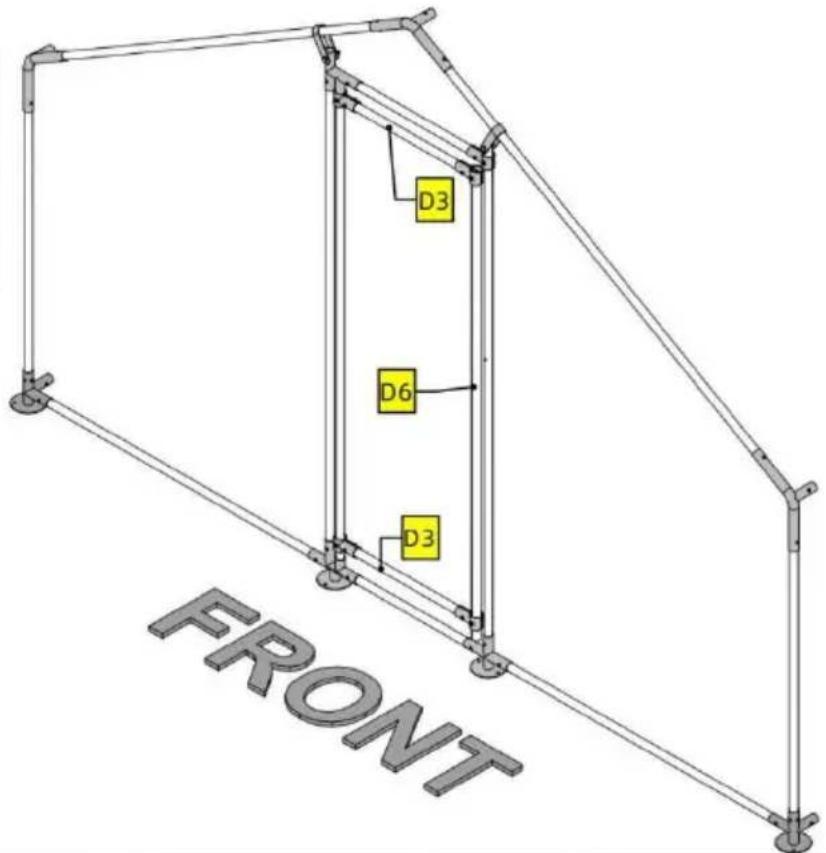
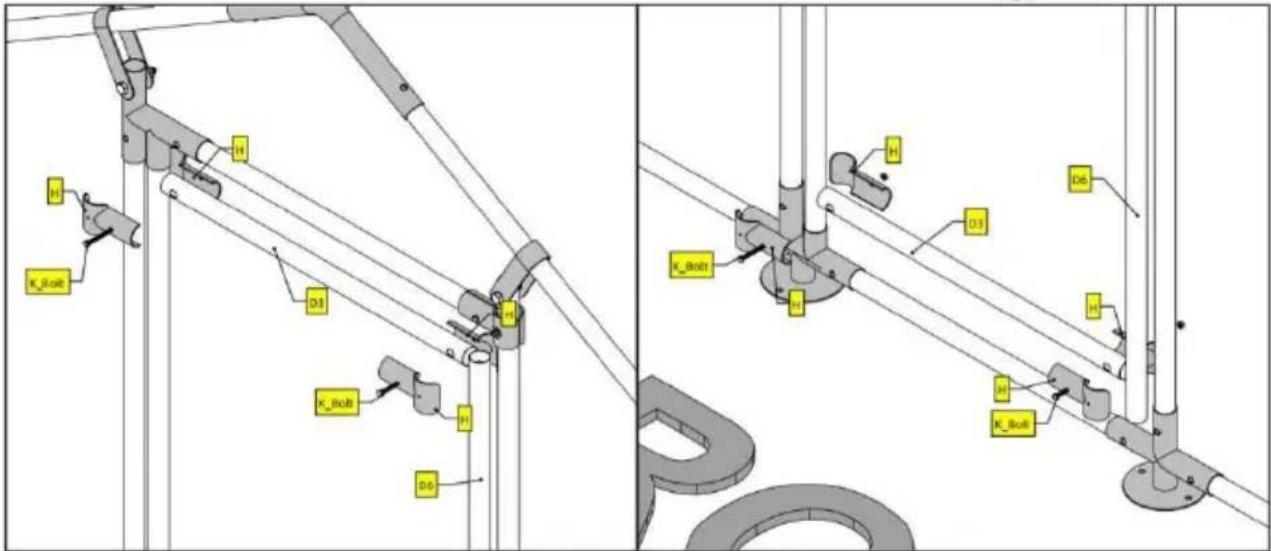
Note
Do not worry too much about the exact location of D3 and D6. Just make sure D6 is completely covered by the two pairs of H.
Notice that on the two detailed illustrations above, screw L is not used. This is so that you have some wiggle room adjusting D3 and D6. Once you are happy with the result, use screw L to secure H.
PRODUCT PARAMETER
Anaheim Place, Rancho Cucamonga, CA 91730
| EC | REP |
| UK | REP |
E-CrossStu GmbH
Mainzer Landstr.69, 60329 Frankfurt am Main
YH CONSULTING LIMITED.
C/O YH Consulting Limited Office 147, Centurion
House, London Road, Staines-upon-Thames, Surrey
TW18 4AX
VEVOR®
TOUGH TOOLS, HALF PRICE
HULP NODIG? NEEM CONTACT MET ONS OP!
www.vevor.com/support
| Part | Qty |
| 1 | 2 |
| 2 | 10 |
| 3 | 6 |
| 4 | 6 |
| 5 | 2 |
| 6 | 1 |
| A | 6 |
| B | 3 |
| C | 4 |
| D | 3 |
| D1 | 1 |
| D2 | 1 |
| D3 | 2 |
| D4 | 1 |
| D5 | 1 |
| D6 | 1 |
| D7 | 1 |
| D8 | 1 |
| E | 1 |
| F | 36m |
| H | 10 |
| I | 2 |
| J | 1 |
| K | 8 |
| L | 5 |
| M | 9 |
| N | 200 |
| O | 22 |
| P | 1 |
ASSEMBLY STEP
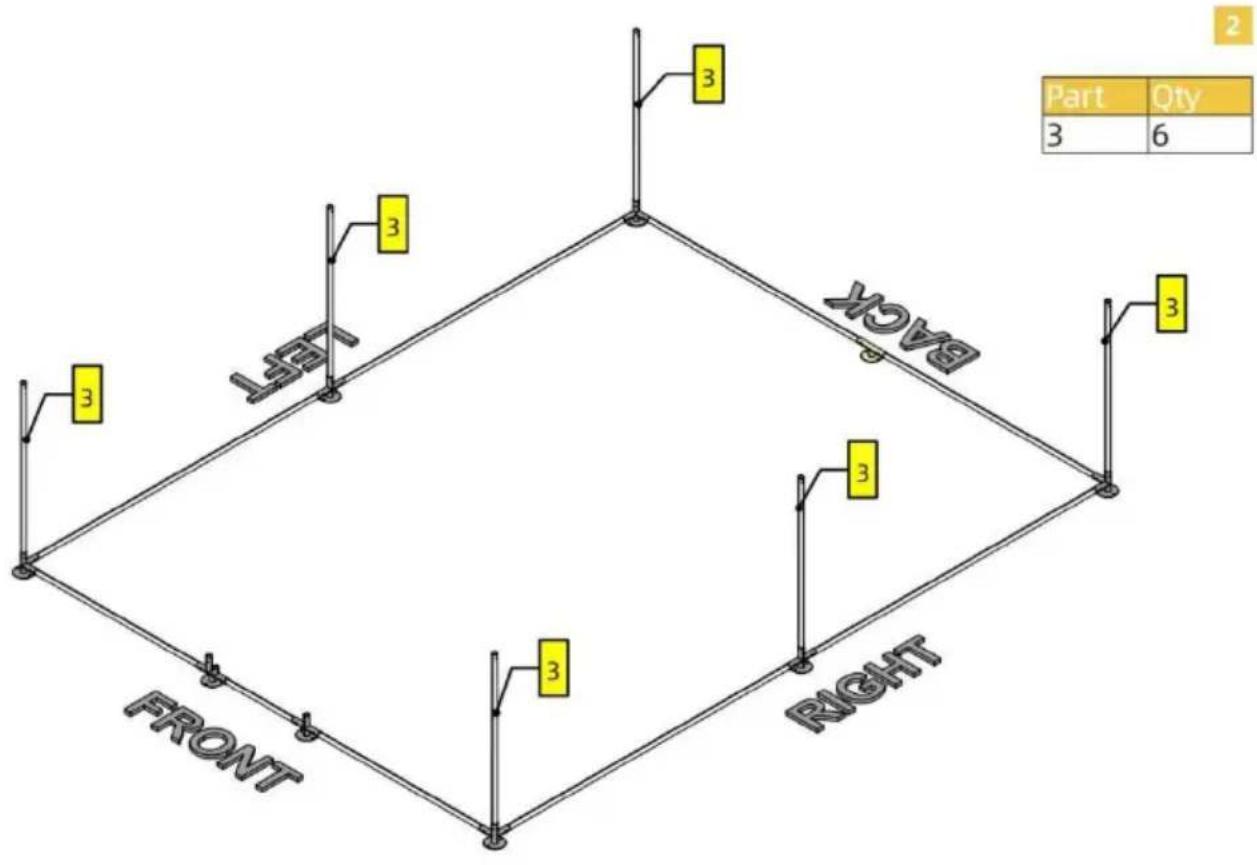
1![graph TD A["FRONT"] --> B["LEFT"] B --> C["RIGHT"] C --> D["LEFT"] D --> E["C"] D --> F["D"] D --> G["E"] D --> H["C"] D --> I["C"] D --> J["D"] D --> K["E"] D --> L["C"] D --> M["C"] D --> N["D"] D --> O["E"] D --> P["P"] D --> Q["P"] D --> R["P"] D --> S["P"] D --> T["P"] D --> U["P"] D --> V["P"]…](/content/2026/04/735647/images/e7a3c4c858f331b3e0a6022535ed376f452a366698b7bff3c2b39eafbf686883.jpg)
Note
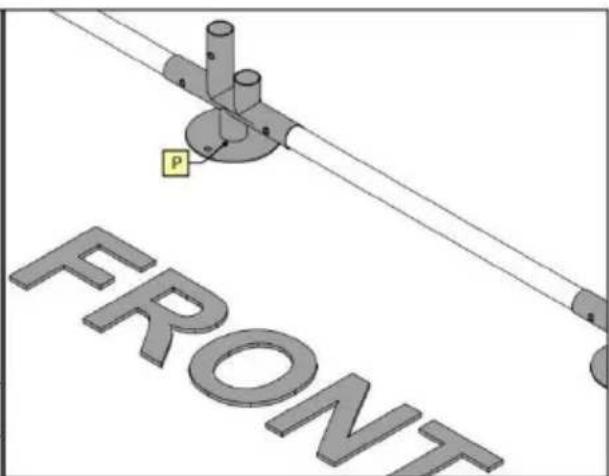
For this product, tubes and joints are connected using button clips. Button clips are already inserted inside tubes. When connecting, press the button clip and insert one tube into the joint. Forcing the tubes in might also work but you are risking damaging the Clip.
Pay attention to the orientation of Part P.
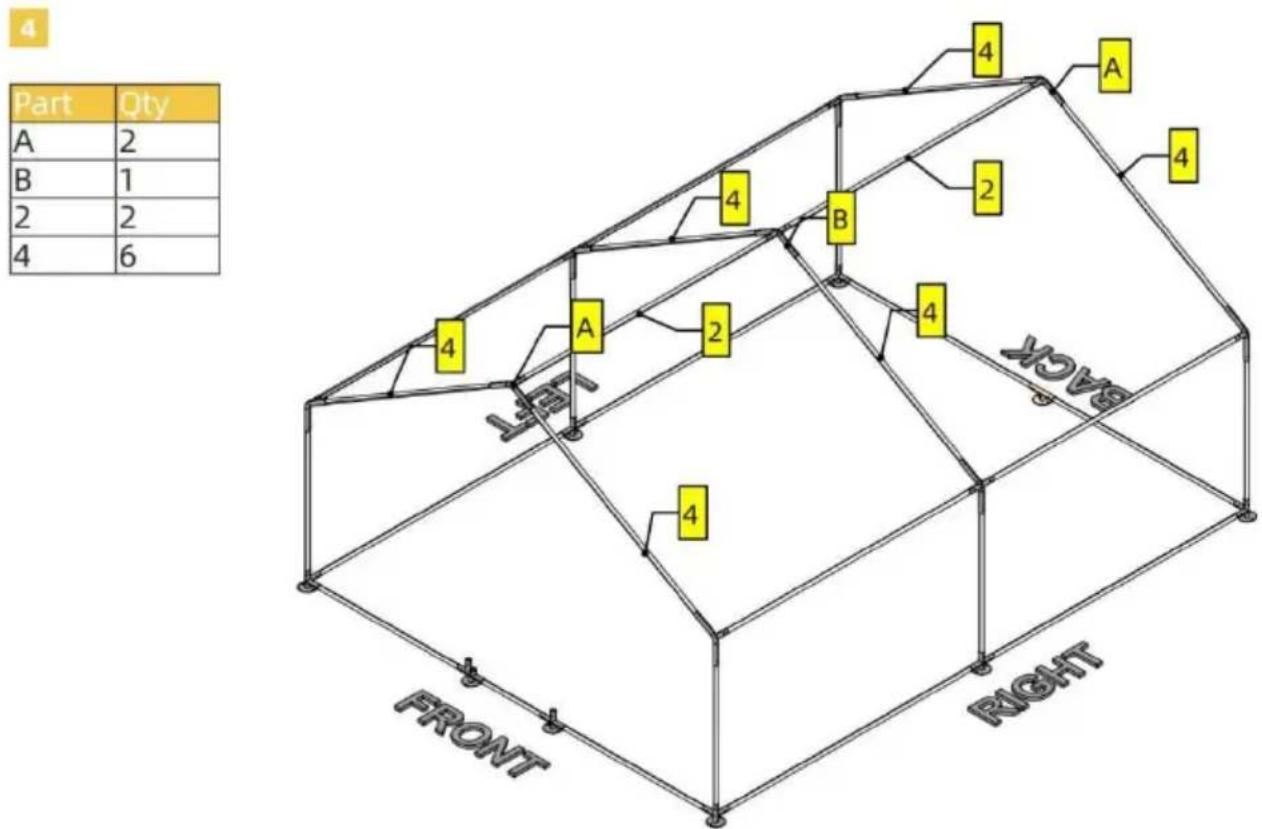
![graph TD A["Section A"] -->|2| B["Section B"] B -->|2| C["Section Left"] C -->|2| D["Section Right"] D -->|2| E["Section Left"] E --> F["Section Right"] style A fill:#fff,stroke:#000 style B fill:#fff,stroke:#000 style C fill:#fff,stroke:#000 style D fill:#fff,stroke:#000 style E fill:#fff,stroke:#0…](/content/2026/04/735647/images/4cfb023f723dbf6490746a8edc9bbe8f3c7e824458bd932d299d553ce6f91b51.jpg)
5
| Part | Qty |
| D1 | 1 |
| D2 | 1 |
| D4 | 1 |
| D5 | 1 |
| D7 | 1 |
| H | 2 |
| I | 2 |
| K | 3 |
| L | 1 |
Note
For screw L, you will need a power tool to drive it into tube D7.
6
| Part | Qty |
| D3 | 2 |
| D6 | 1 |
| H | 8 |
| K | 4 |
| L | 4 |
Note
Do not worry too much about the exact location of D3 and D6. Just make sure D6 is completely covered by the two pairs of H.
Notice that on the two detailed illustrations above, screw L is not used. This is so that you have some wiggle room adjusting D3 and D6. Once you are happy with the result, use screw L to secure H.
PRODUCT PARAMETER
Anaheim Place, Rancho Cucamonga, CA 91730
| EC | REP |
E-CrossStu GmbH
Mainzer Landstr.69, 60329 Frankfurt am Main
| UK | REP |
YH CONSULTING LIMITED.
C/O YH Consulting Limited Office 147, Centurion
House, London Road, Staines-upon-Thames, Surrey
TW18 4AX
VEVOR®
TOUGH TOOLS, HALF PRICE
Technical Support and E-warranty Certificate www.vevor.com/support
VEVOR®
TOUGH TOOLS, HALF PRICE
NEED HELP? CONTACT US!
| Part | Qty |
| 1 | 2 |
| 2 | 10 |
| 3 | 6 |
| 4 | 6 |
| 5 | 2 |
| 6 | 1 |
| A | 6 |
| B | 3 |
| C | 4 |
| D | 3 |
| D1 | 1 |
| D2 | 1 |
| D3 | 2 |
| D4 | 1 |
| D5 | 1 |
| D6 | 1 |
| D7 | 1 |
| D8 | 1 |
| E | 1 |
| F | 36m |
| H | 10 |
| I | 2 |
| J | 1 |
| K | 8 |
| L | 5 |
| M | 9 |
| N | 200 |
| O | 22 |
| P | 1 |
ASSEMBLY STEP
1![graph TD A["FRONT"] --> B["LEFT"] B --> C["RIGHT"] C --> D["LEFT"] D --> E["C"] D --> F["D"] D --> G["E"] D --> H["C"] D --> I["C"] D --> J["D"] D --> K["E"] D --> L["C"] D --> M["C"] D --> N["D"] D --> O["E"] D --> P["P"] D --> Q["P"] D --> R["P"] D --> S["P"] D --> T["P"] D --> U["P"] D --> V["P"]…](/content/2026/04/735647/images/0cb503ae9db4a39515848c9360bf4931974b5b7f657384a335cf699e71ce4fdc.jpg)
Note
For this product, tubes and joints are connected using button clips. Button clips are already inserted inside the tubes. When connecting, press the button clip and insert one tube into the joint. Forcing the tubes in might also work, but you risk damaging the clip.
Pay attention to the orientation of Part P.
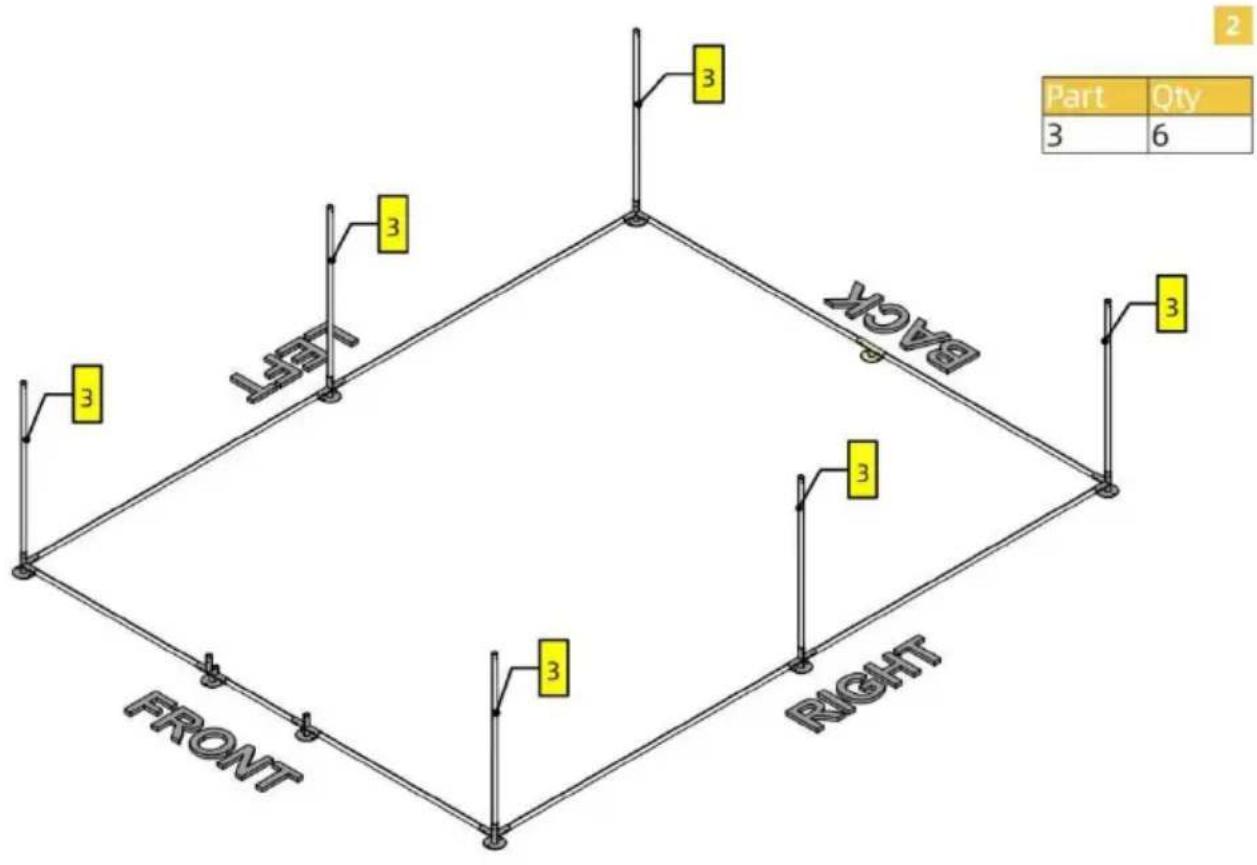
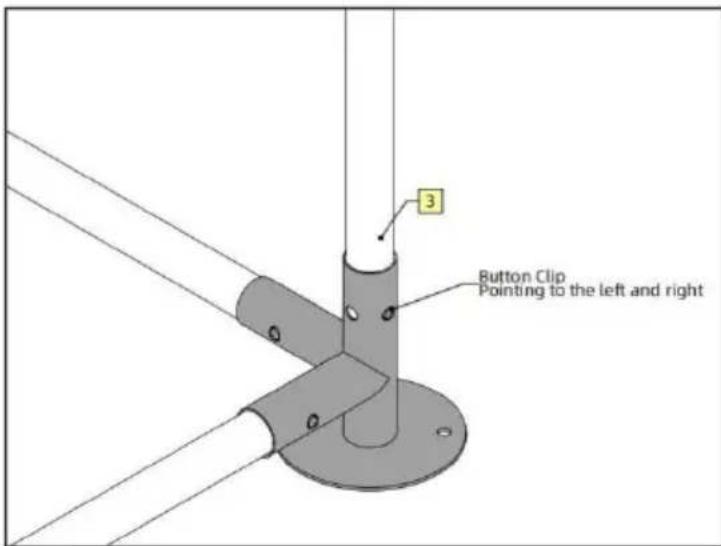
Note: There are two pairs of holes on the vertical joint of Part C. When connecting Part 3 to Part C, make sure that the button clip is pointing to the left and right, as shown on the left.
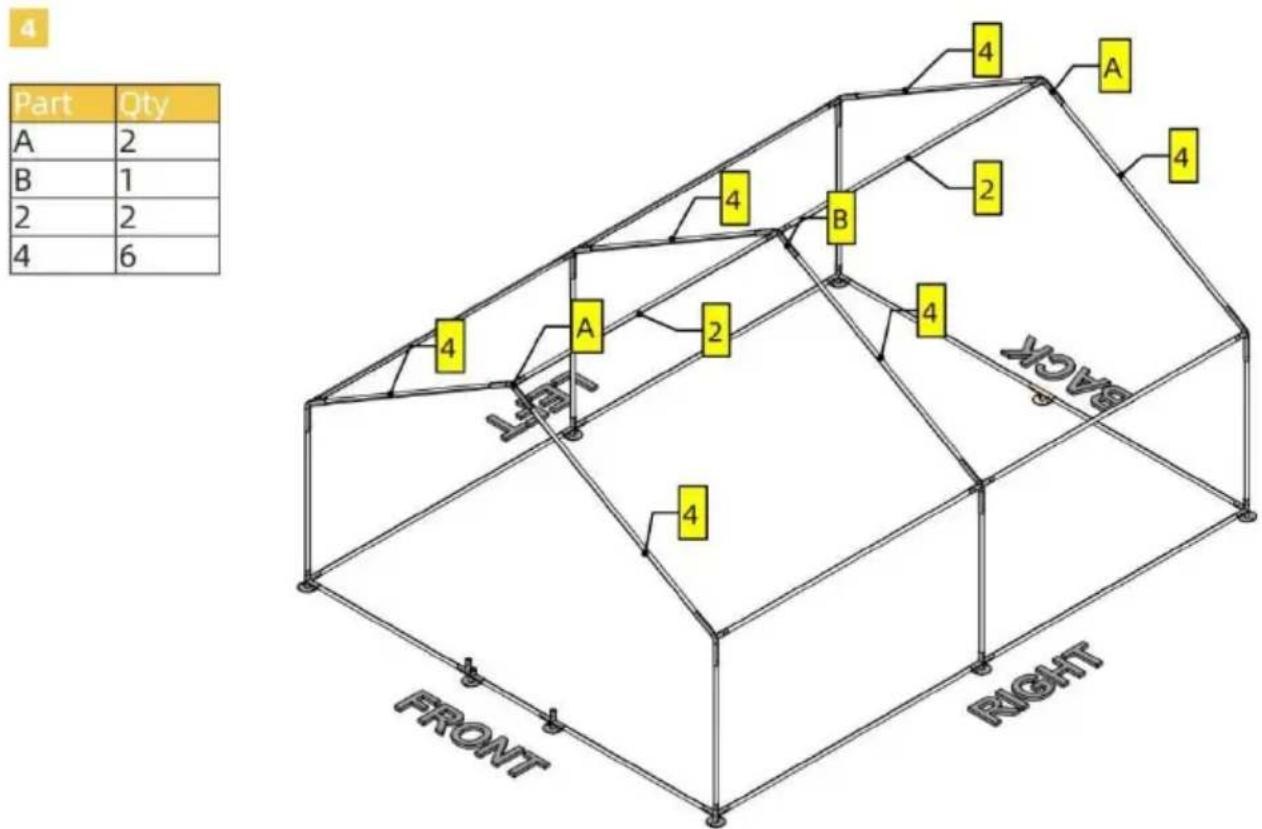
![graph TD A["Section A"] -->|2| B["Section B"] B -->|2| C["Section Left"] C -->|2| D["Section Right"] D -->|2| E["Section Left"] E --> F["Section Right"] F --> G["Section Left"] style A fill:#fff,stroke:#000 style B fill:#fff,stroke:#000 style C fill:#fff,stroke:#000 style D fill:#fff,stroke:#000 sty…](/content/2026/04/735647/images/fc284efae9ce6017f6eaa78e65659544f0c6335ae340fbdf5cbfc5a73d764673.jpg)
5
| Part | Qty |
| D1 | 1 |
| D2 | 1 |
| D4 | 1 |
| D5 | 1 |
| D7 | 1 |
| H | 2 |
| I | 2 |
| K | 3 |
| L | 1 |
Note
For screw L, you will need a power tool to drive it into tube D7.
6
| Part | Qty |
| D3 | 2 |
| D6 | 1 |
| H | 8 |
| K | 4 |
| L | 4 |

Note
Do not worry too much about the exact location of D3 and D6. Just make sure D6 is completely covered by the two pairs of H.
Notice that in the two detailed illustrations above, screw L is not used. This is so that you have some wiggle room adjusting D3 and D6. Once you are happy with the result, use screw L to secure H.
PRODUCT PARAMETER
C/O YH Consulting Limited Office 147, Centurion House, London Road, Staines-upon-Thames, Surrey TW18 4AX
VEVOR®
TOUGH TOOLS, HALF PRICE
| Part | Qty |
| 1 | 2 |
| 2 | 10 |
| 3 | 6 |
| 4 | 6 |
| 5 | 2 |
| 6 | 1 |
| A | 6 |
| B | 3 |
| C | 4 |
| D | 3 |
| D1 | 1 |
| D2 | 1 |
| D3 | 2 |
| D4 | 1 |
| D5 | 1 |
| D6 | 1 |
| D7 | 1 |
| D8 | 1 |
| E | 1 |
| F | 36m |
| H | 10 |
| I | 2 |
| J | 1 |
| K | 8 |
| L | 5 |
| M | 9 |
| N | 200 |
| O | 22 |
| P | 1 |
ASSEMBLY STEP
![graph TD A["FRONT"] --> B["C"] A --> C["D"] A --> D["E"] A --> E["P"] A --> F["C"] A --> G["D"] A --> H["E"] A --> I["C"] A --> J["D"] A --> K["E"] A --> L["C"] A --> M["D"] A --> N["E"] A --> O["C"] A --> P["D"] A --> Q["E"] A --> R["C"] A --> S["D"] A --> T["E"] A --> U["C"] A --> V["D"] A --> W["…](/content/2026/04/735647/images/f154b79f47b7ef63a8d2aa9fcadd45cd8e0163ba98bbf89bfd2fd91e425b424f.jpg)
Note
For this product, tubes and joints are connected using button clips. Button clips are already inserted inside tubes. When connecting, press the button clip and insert one tube into the joint. Forcing the tubes in might also work but you are risking damaging the clip. Pay attention to the orientation of Part P.
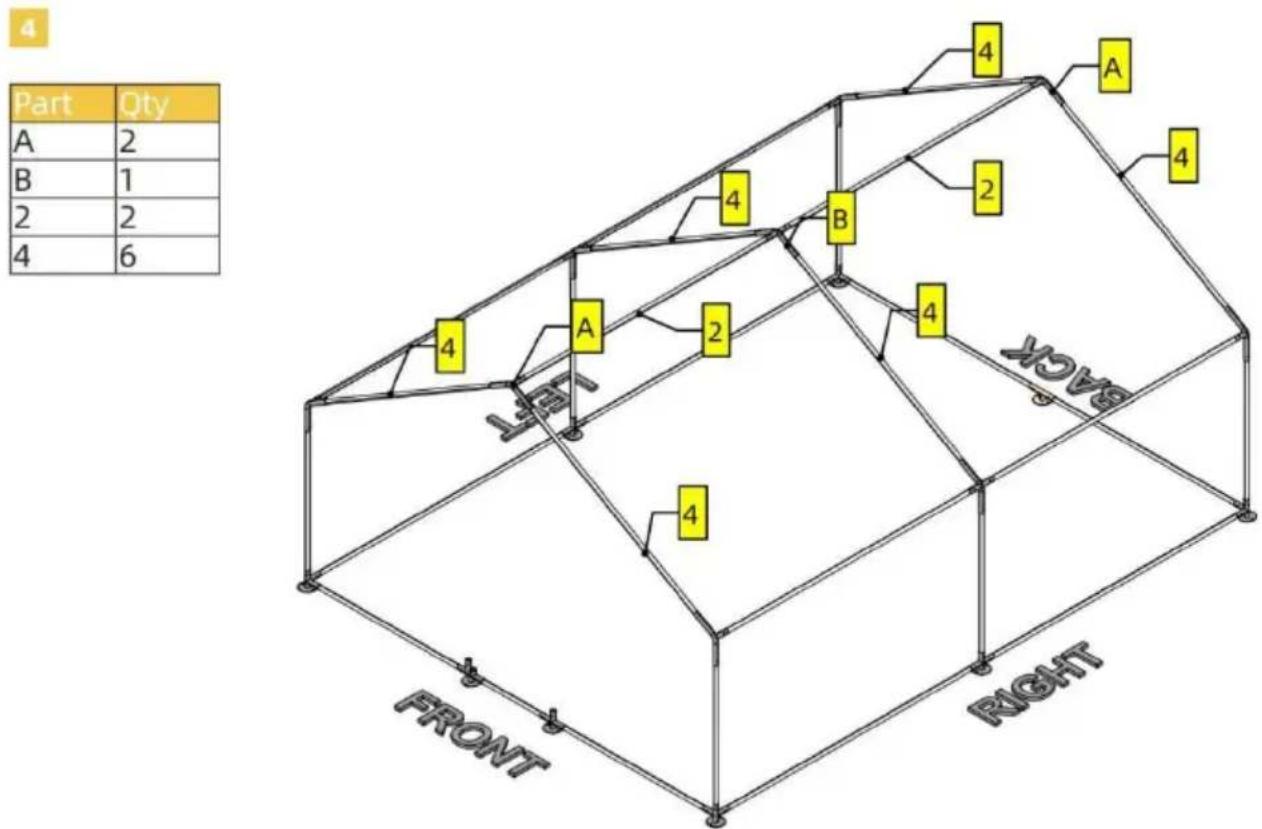
![graph TD A["Section A"] -->|2| B["Section B"] B -->|2| C["Section Left"] C -->|2| D["Section Right"] D -->|2| E["Section Left"] E --> F["Section Right"] F --> G["Section Left"] style A fill:#fff,stroke:#000 style B fill:#fff,stroke:#000 style C fill:#fff,stroke:#000 style D fill:#fff,stroke:#000 sty…](/content/2026/04/735647/images/90b560bdedb4920b3cb19d5b604a37103b9602b68acb568e32165e0909d2cdf3.jpg)
5
| Part | Qty |
| D1 | 1 |
| D2 | 1 |
| D4 | 1 |
| D5 | 1 |
| D7 | 1 |
| H | 2 |
| I | 2 |
| K | 3 |
| L | 1 |
Note
For screw L, you will need a power tool to drive it into tube D7.
6
| Part | Qty |
| D3 | 2 |
| D6 | 1 |
| H | 8 |
| K | 4 |
| L | 4 |
Note
Do not worry too much about the exact location of D3 and D6. Just make sure D6 is completely covered by the two pairs of H.
Notice that on the two detailed illustrations above, screw L is not used. This is so that you have some wiggle room adjusting D3 and D6. Once you are happy with the result, use screw L to secure H.
Manufacturer: Shanghaimuxinmuyeyouxiangongsi
Address: Shuangchenglu 803nong11hao1602A-1609shi, baoshanqu, shanghai 200000 CN.
Imported to AUS: SIHAO PTY LTD. 1 ROKEVA STREETEASTWOOD NSW 2122 Australia
Imported to USA: Sanven Technology Ltd. Suite 250, 9166 Anah Place, Rancho Cucamonga, CA 91730
| EC | REP |
E-CrossStu GmbH
Mainzer Landstr.69, 60329 Frankfurt am Main
| UK | REP |
YH CONSULTING LIMITED.
C/O YH Consulting Limited Office 147, Centurion House, London Road, Staines-upon-Thames, Surrey TW18 4AX
VEVOR®
TOUGH TOOLS, HALF PRICE
www.vevor.com/support
VEVOR®
TOUGH TOOLS, HALF PRICE
| Part | Qty |
| 1 | 2 |
| 2 | 10 |
| 3 | 6 |
| 4 | 6 |
| 5 | 2 |
| 6 | 1 |
| A | 6 |
| B | 3 |
| C | 4 |
| D | 3 |
| D1 | 1 |
| D2 | 1 |
| D3 | 2 |
| D4 | 1 |
| D5 | 1 |
| D6 | 1 |
| D7 | 1 |
| D8 | 1 |
| E | 1 |
| F | 36m |
| H | 10 |
| I | 2 |
| J | 1 |
| K | 8 |
| L | 5 |
| M | 9 |
| N | 200 |
| O | 22 |
| P | 1 |
ASSEMBLY STEP
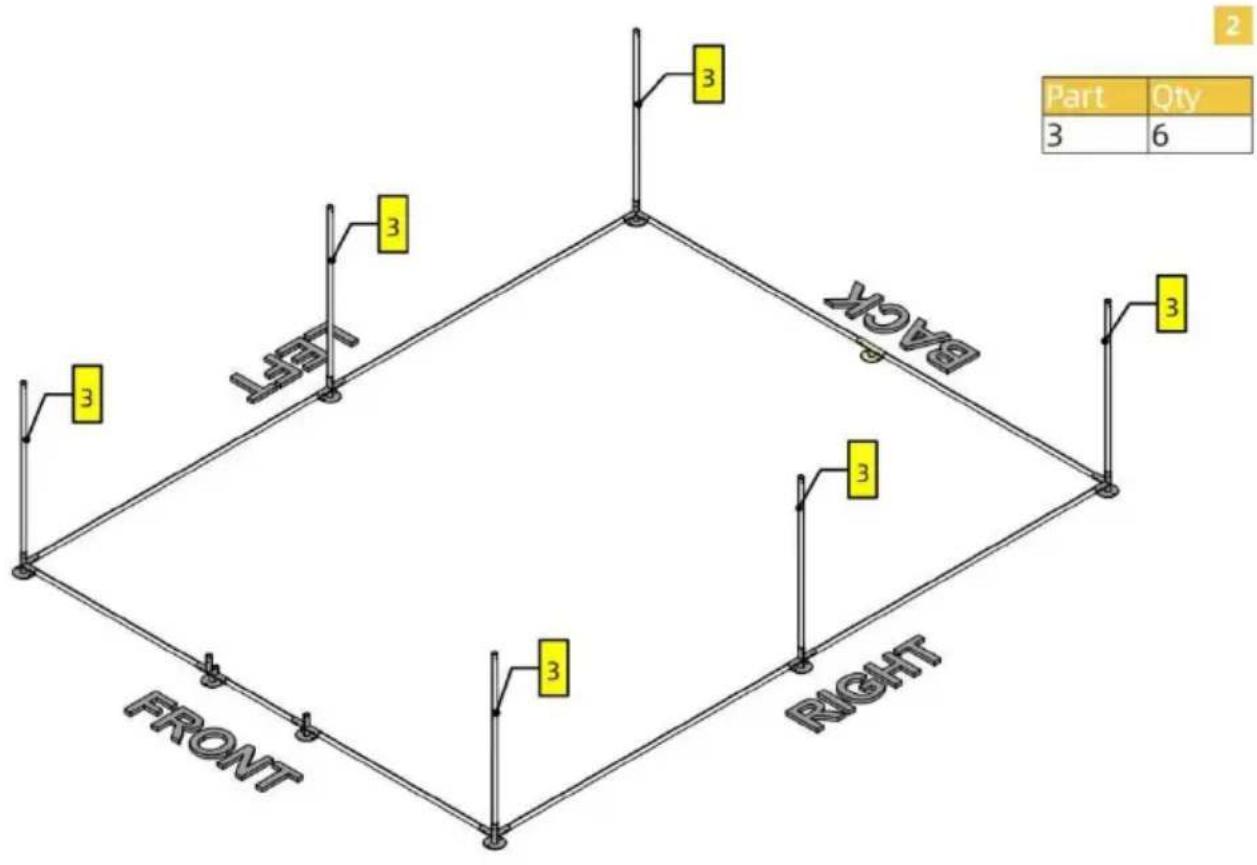
1![graph TD A["FRONT"] --> B["LEFT"] B --> C["RIGHT"] C --> D["LEFT"] D --> E["C"] D --> F["D"] D --> G["E"] D --> H["C"] D --> I["C"] D --> J["D"] D --> K["E"] D --> L["C"] D --> M["D"] D --> N["E"] D --> O["C"] D --> P["P"] D --> Q["C"] D --> R["P"] D --> S["C"] D --> T["P"] D --> U["C"] D --> V["C"]…](/content/2026/04/735647/images/2044ef770d54d04df3b146a3aa5c2a9acd7ca2d96e915349a472565c446a4bbe.jpg)

Note
For this product, tubes and joints are connected using button clips. Button clips are already inserted inside tubes. When connecting, press the button clip and insert one tube into the joint. Forcing the tubes in might also work but you are risking damaging the Clip.
Pay attention to the orientation of Part P.

![graph TD A["Section A"] -->|2| B["Section B"] B -->|2| C["Section Left"] C -->|2| D["Section Right"] D -->|2| E["Section Left"] E --> F["Section Right"] F --> G["Section Left"] style A fill:#fff,stroke:#000 style B fill:#fff,stroke:#000 style C fill:#fff,stroke:#000 style D fill:#fff,stroke:#000 sty…](/content/2026/04/735647/images/fd6ecfedb694a11d670f4a2a97fb4845a8a9ff3679db801afc7f8fd4c7a8de09.jpg)
5
| Part | Qty |
| D1 | 1 |
| D2 | 1 |
| D4 | 1 |
| D5 | 1 |
| D7 | 1 |
| H | 2 |
| I | 2 |
| K | 3 |
| L | 1 |
Note
For screw L, you will need a power tool to drive it into tube D7.
6
| Part | Qty |
| D3 | 2 |
| D6 | 1 |
| H | 8 |
| K | 4 |
| L | 4 |

Note
Do not worry too much about the exact location of D3 and D6. Just make sure D6 is completely covered by the two pairs of H.
Notice that on the two detailed illustrations above, screw L is not used. This is so that you have some wiggle room adjusting D3 and D6. Once you are happy with the result, use screw L to secure H.
PRODUCT PARAMETER
Imported in AUS: SIHAO PTY LTD. 1 ROKEVA STREETEASTWOOD NSW 2122 Australia
Imported in the USA: Sanven Technology Ltd. Suite 250, 9166 Anaheim Place, Rancho Cucamonga, CA 91730
| EC | REP |
E-CrossStu GmbH
Mainzer Landstr.69, 60329 Frankfurt am Main
| UK | REP |
YH CONSULTING LIMITED.
C/O YH Consulting Limited Office 147, Centurion House, London Road, Staines-upon-Thames, Surrey TW18 4AX
VEVOR®
TOUGH TOOLS, HALF PRICE
Brand : Vevor
Model : JD342
Category : Metal chicken coop