
A3-20 - Light tracing table Vevor - Free user manual and instructions
Find the device manual for free A3-20 Vevor in PDF.
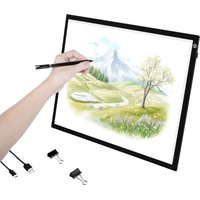


| Product type | Light tracing table |
| Brand | Vevor |
| Model | A3-20 |
| Dimensions (L x W x H) | 459 x 336 x 5.5 mm |
| Active area | 429 x 309 mm |
| Power supply | USB Type-C, 5V / 1.75A |
| Rated power | 8.6 W |
| Light source | LED |
| Brightness adjustment | 3 levels (high, medium, low) by button |
| Material | Acrylic plate with light guide |
| Main use | Tracing, copying drawings, animation |
| Work surface | Flat and non-slip |
| Connectivity | USB Type-C port for power supply |
| Electrical compatibility | Power adapter, power bank, computer (standard USB port) |
| Maintenance | Clean with a soft, dry cloth; avoid liquids |
| Safety | Compliant with FCC Part 15; do not expose to moisture |
| Spare parts | No user-serviceable parts; contact support |
| Warranty | Electronic warranty via www.vevor.com/support |
| Regulatory information | WEEE Directive 2012/19/EU; recycling at end of life |
| Included accessories | USB Type-C cable |
Frequently Asked Questions - A3-20 Vevor
User questions about A3-20 Vevor
0 question about this device. Answer the ones you know or ask your own.
Ask a new question about this device
Download the instructions for your Light tracing table in PDF format for free! Find your manual A3-20 - Vevor and take your electronic device back in hand. On this page are published all the documents necessary for the use of your device. A3-20 by Vevor.
USER MANUAL A3-20 Vevor
Copy Board Instruction
A copy board, also known as a tracing board, is a professional tool used in cartoon and animation production. It is mainly composed of acrylic and LED lights. It is used to copy paper and artwork by overlapping them, allowing the bottom image to be clearly seen through the top paper, making it easy to trace or modify. Animators can use it to draw actions.
【Specification】
Name: A3-20
Size: 459*336*5.5mm
Active area: 429*309mm
Input voltage: Type-C/5V
Working current: 1.75A
Rated power: 8.6W
Product light source: LED component
Product material: light guide plate, LED
Light
【Easy Operation】
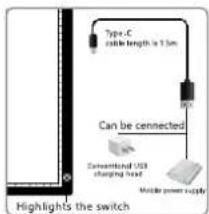
- Place the light pad on a flat desktop, then connect the power supply.
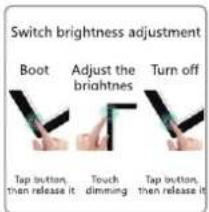
- Press and hold the power button to adjust the brightness to your desired level.

- Place the artwork on a flat surface, add copy paper, secure it, and start sketching.
- After finishing the drawing, turn off the power.
Stepless dimming: press and hold the button to adjust the brightness to your desired level.
Three-level dimming: high, medium, and low levels are available. Press the button to cycle through the brightness levels.
【Attentions】
- Type-C/5V, standard USB to Android interface, charging adapter, portable power source, and laptop can be used.
- Use copy paper of 300g or less for better light transmission. Adjust the copy machine to a suitable brightness to avoid eye discomfort.
- For drawing figures, use a darker lead pencil.

Use copy paper of 300g or less for better light transmission.
Adjust the copy machine to a suitable brightness to avoid eye discomfort.
For drawing figures, use a darker lead pencil.

For drawing figures, use a darker lead pencil.
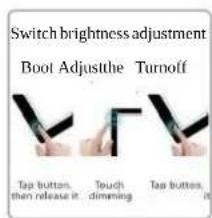
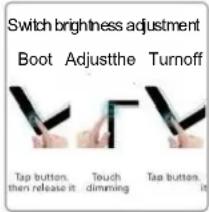
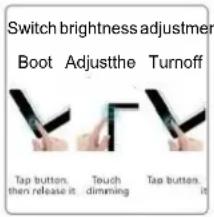
Switch brightness adjustment
Boot, Adjust, Turn off
Use copy paper of 300g or less for better light transmission. Adjust the portable copy machine to a suitable brightness to avoid eye discomfort.


As far as possible, use copy paper below 300g for better light transmission. Adjust the copy machine to a suitable brightness to avoid eye discomfort.
Copy the Board's instructions
【 Product Introduction 】

As far as possible, use copy paper below 300g for better light transmission. Adjust the copy machine to a suitable brightness to avoid eye discomfort.

As far as possible, use copy paper below 300g for better light transmission. Adjust the copy machine to a suitable brightness to avoid eye discomfort.


As far as possible, use copy paper below 300g for better light transmission. Adjust the copy machine to a suitable brightness to avoid eye discomfort.
VEVOR®
TOUGH TOOLS, HALF PRICE
Technical Support and E-Warranty Certificate www.vevor.com/support
We continue to be committed to providing you with tools at competitive prices.
"Save Half", "Half Price" or any other similar expressions used by us only represent an estimate of savings you might benefit from buying certain tools with us compared to the brands and does not necessarily mean to cover all categories of tools offered by us. You are kindly reminded to verify carefully when you are placing an order with us if you are actually saving half in comparison with the top major brands.
NEED HELP? CONTACT US!
Have product questions? Need technical support? Please feel free to contact Technical Support and E-Warranty Certificate www.vevor.com/support
This is the original instruction. Please read all manual instructions carefully before operating. VEVOR reserves a clear interpretation of our user manual. The appearance of the product shall be subject to the product you received. Please forgive us that we won't inform you again if there are any technology or software updates on our product.
FCC Information:
CAUTION: Changes or modifications not expressly approved by the party responsible for compliance could void the user's authority to operate the equipment!
This device complies with Part 15 of the FCC Rules. Operation is subject to the following two conditions:
1) This product may cause harmful interference. 2) This product must accept any interference received, including interference that may cause undesired operation. WARNING: Changes or modifications to this product not expressly approved by the party responsible for compliance could void the user's authority to operate the product.
Note: This product has been tested and found to comply with the limits for a Class B digital device pursuant to Part 15 of the FCC Rules. These limits are designed to provide reasonable protection against harmful interference in a residential installation.
This product generates, uses and can radiate radio frequency energy, and if not installed and used in accordance with the instructions, may cause harmful interference to radio communications. However, there is no guarantee that interference will not occur in a particular installation. If this product does cause harmful interference to radio or television reception, which can be determined by turning the product off and on, the user is encouraged
to try to correct the interference by one or more of the following measures.
- Reorient or relocate the receiving antenna.
- Increase the distance between the product and receiver.
- Connect the product to an outlet on a circuit different from the one to which the receiver is connected.
- Consult the dealer or an experienced radio/TV technician for assistance.
Correct Disposal
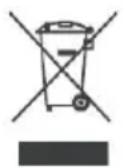
This product is subject to the provisions of European Directive 2012/19/EU. The symbol showing a wheelie bin crossed through indicates that the product requires separate refuse collection in the European Union. This applies to the product and all accessories marked with this symbol. Products marked as such may not be discarded with normal domestic waste, but must be taken to a collection point for recycling electrical and electronic devices.
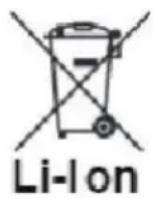
BATTERY DISPOSAL
To minimize hazards to health and the environment at the end of the product's life, laws dealing with Waste Electrical and Electronic Equipment (WEEE) and the Waste Battery Directive require you to dispose of this product at a suitable collection facility where it is sent in order to remove the batteries and for appropriate recycling. Please contact your local authorities for more details on recycling and safe disposal of these in your area.
Manufacturer: Shanghai Muxin Muye Youxian Gongsi
Address: Shuangchenglu 803nong11hao1602A-1609shi, Baoshanqu, Shanghai 200000 CN.
EC REP: E-CrossStu GmbH
Mainzer Landstr.69, 60329 Frankfurt am Main.
UK REP: YH CONSULTING LIMITED.
C/O YH Consulting Limited Office 147, Centurion House, London Road, Staines-upon-Thames, Surrey, TW18 4AX
Imported to AUS: SIHAO PTY LTD.
1 ROKEVA STREETEASTWOOD NSW 2122 Australia
Imported to USA: Sanven Technology Ltd.
Suite 250, 9166 Anaheim Place, Rancho Cucamonga, CA 91730
VEVOR®
TOUGH TOOLS, HALF PRICE
Technical Support and E-Warranty Certificate
www.vevor.com/support
VEVOR®
TOUGH TOOLS, HALF PRICE
UK REP: YH CONSULTING LIMITED.
C/O YH Consulting Limited Office 147, Centurion House, London Road,
Staines-upon-Thames, Surrey, TW18 4AX
Suite 250, 9166 Anaheim Place, Rancho Cucamonga, CA 91730
VEVOR®
TOUGH TOOLS, HALF PRICE
www.vevor.com/support
VEVOR®
TOUGH TOOLS, HALF PRICE
C/O YH Consulting Limited Bureau 147, Centurion House, London Road, Staines-upon-Thames, Surrey, TW18 4AX
Imported into Australia: SIHAO PTY LTD.
1 ROKEVA STREET, ASTWOOD NSW 2122, Australia
Office 250, 9166 Anaheim Place, Rancho Cucamonga, CA 91730
VEVOR®
TOUGH TOOLS, HALF PRICE
C/O YH Consulting Limited Office 147, Centurion House, London Road, Staines-upon-Thames, Surrey, TW18 4AX
Suite 250, 9166 Anaheim Place, Rancho Cucamonga, CA 91730
VEVOR®
TOUGH TOOLS, HALF PRICE
www.vevor.com/support
VEVOR®
TOUGH TOOLS, HALF PRICE
UK REP: YH CONSULTING LIMITED.
C/O YH Consulting Limited Office 147, Centurion House, London Road, Staines-upon-Thames, Surrey, TW18 4AX
Imported into AUS: SIHAO PTY LTD.
1 ROKEVA STREET, EASTWOOD NSW 2122, Australia
Imported to USA: Sanven Technology Ltd.
Suite 250, 9166 Anaheim Place, Rancho Cucamonga, CA 91730
VEVOR®
TOUGH TOOLS, HALF PRICE
www.vevor.com/support
VEVOR®
TOUGH TOOLS, HALF PRICE
C/O YH Consulting Limited, Office 147, Centurion House, London Road,
Staines-upon-Thames, Surrey, TW18 4AX
Imported to AUS: SIHAO PTY LTD.
1 ROKEVA STREET, EASTWOOD NSW 2122, Australia
Suite 250, 9166 Anaheim Place, Rancho Cucamonga, CA 91730
VEVOR®
TOUGH TOOLS, HALF PRICE
www.vevor.com/support
VEVOR®
TOUGH TOOLS, HALF PRICE
C/O YH Consulting Limited Office 147, Centurion House, London Road, Staines-upon-Thames, Surrey, TW18 4AX
Imported into Australia: SIHAO PTY LTD.
1 ROKEVA STREETEASTWOOD NSW 2122 Australia
Suite 250, 9166 Anaheim Place, Rancho Cucamonga, CA 91730
VEVOR®
TOUGH TOOLS, HALF PRICE
www.vevor.com/support
VEVOR®
TOUGH TOOLS, HALF PRICE
C/O YH Consulting Limited Office 147, Centurion House, London Road, Staines-upon-Thames, Surrey, TW18 4AX
Imported into Australia: SIHAO PTY LTD.
1 ROKEVA STREETEASTWOOD NSW 2122 Australia
Imported from USA: Sanven Technology Ltd.
Apartment 250, 9166 Anaheim Place, Rancho Cucamonga, California 91730
VEVOR®
TOUGH TOOLS, HALF PRICE
www.vevor.com/support
Brand : Vevor
Model : A3-20
Category : Light tracing table