
FM-01A - Electric glass washer Vevor - Free user manual and instructions
Find the device manual for free FM-01A Vevor in PDF.
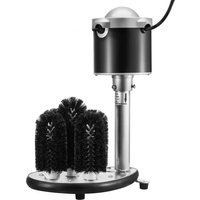


| Product type | Electric glass washer for commercial use |
| Brand | Vevor |
| Model | FM-01A |
| Supply voltage | 120 V ~ 60 Hz |
| Power | Approximately 150 W (estimated) |
| Approximate dimensions (L x W x H) | 30 x 30 x 40 cm (estimated) |
| Net weight | Approximately 3.5 kg (estimated) |
| Number of brushes | 5 rotating brushes (1 long + 4 short) |
| Compatible glass diameter | From 2 to 3.9 inches (approx. 5 to 10 cm) |
| Recommended glass types | Wine glasses, beer glasses, whiskey glasses |
| Water supply | Place in a sink or basin filled with water (max level indicated) |
| Recommended detergent | Low-foaming detergent |
| Thermal protection | Automatic shut-off in case of overheating (5 to 10 minutes) |
| Motor protection rating | Water-resistant but not submersible |
| Plug type | Grounded plug (3 pins) |
| Cable length | Approximately 1.5 m (estimated) |
| Housing material | Plastic and metal (estimated) |
| Usage | Indoor use only, on flat and stable surface |
| Cleaning and maintenance | Wipe with a damp cloth; monthly cleaning with vinegar |
| Spare parts available | Replacement brushes (long and short) |
| Warranty | Manufacturer's warranty (electronic certificate available at www.vevor.com/support) |
| Certifications | Compliant with European Directive 2012/19/EC (WEEE) |
Frequently Asked Questions - FM-01A Vevor
User questions about FM-01A Vevor
0 question about this device. Answer the ones you know or ask your own.
Ask a new question about this device
Download the instructions for your Electric glass washer in PDF format for free! Find your manual FM-01A - Vevor and take your electronic device back in hand. On this page are published all the documents necessary for the use of your device. FM-01A by Vevor.
USER MANUAL FM-01A Vevor
Technical Support and E-Warranty Certificate www.vevor.com/support
ELECTRIC COMMERCIAL GLASS WASHER USER MANUAL
MODEL: FM-01A FM-01B FM-01C
We continue to be committed to providing you with tools at competitive prices. "Save Half", "Half Price", or any other similar expressions used by us only represent an estimate of savings you might benefit from buying certain tools with us compared to the major top brands and do not necessarily mean to cover all categories of tools offered by us. You are kindly reminded to verify carefully when placing an order with us if you are actually saving half in comparison with the top major brands.
VEVOR®
TOUGH TOOLS, HALF PRICE
Electric Commercial Glass Washer
MODEL: FM-01A FM-01B FM-01C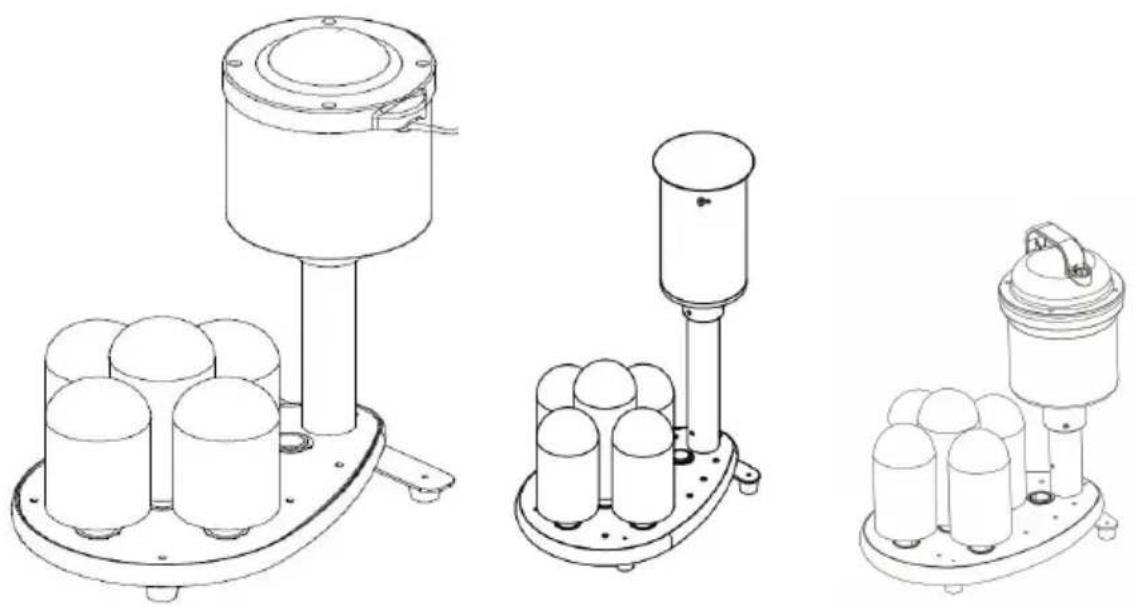
NEED HELP? CONTACT US!
Have product questions? Need technical support? Please feel free to contact us:
Technical Support and E-Warranty Certificate www.vevor.com/support
This is the original instruction. Please read all manual instructions carefully before operating. VEVOR reserves a clear interpretation of the user manual. The appearance of the product shall be subject to the product you received. Please forgive us that we won't inform you if there are any technology or software updates on our product.
 | Warning-To reduce the risk of injury, user must re instructions manual carefully. |
 | CORRECT DISPOSALThis product is subject to the provision of European D 2012/19/EC. The symbol showing a wheelie bin cross through indicates that the product requires separate re collection in the European Union. This applies to the and all accessories marked with this symbol. Products as such may not be discarded with normal domestic w must be taken to a collection point for recycling electr electronic devices |
BEFORE USING YOUR GLASS WASHER
Before using your glass washer, please follow these simple instructions. Failing to do so may cause injury to the user or damage the machine.
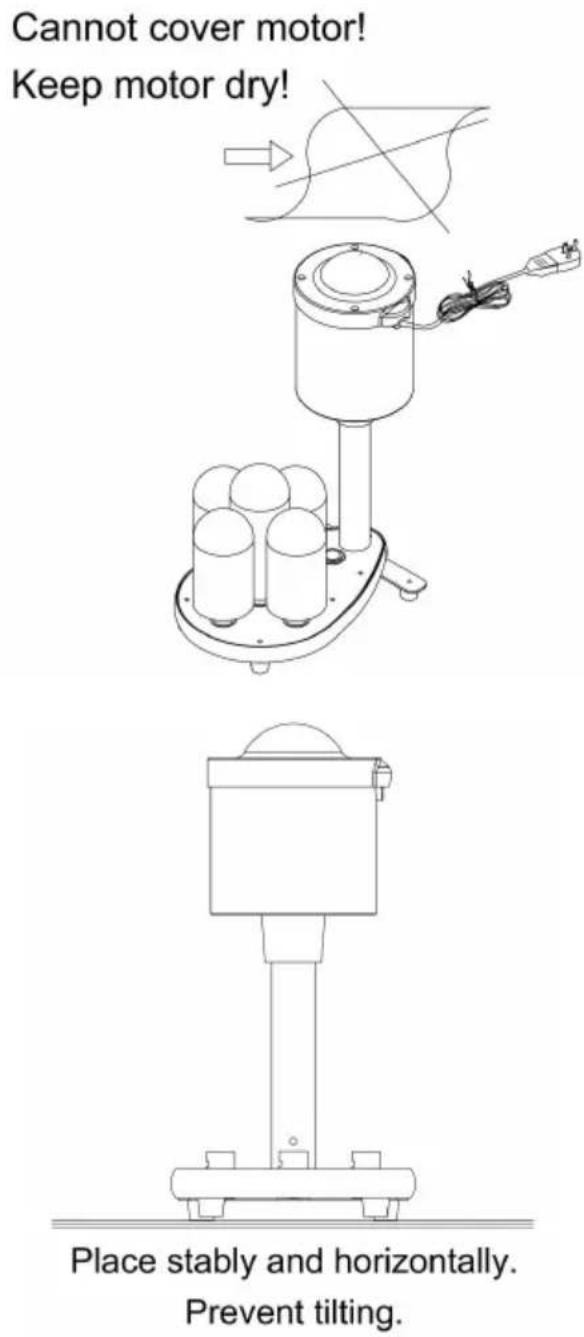
- Install the machine on a flat surface of a sink and make sure it is upright and stable. The bottom foot could be adjusted to make the glass washer stable.
- Assemble the brushes and check that they are securely in place.
- Pour water into the sink and observe that the water level does not
- exceed the water line mark on the exterior tube (FM-01A/B).
- Add some detergent for washing. 6. Plug the power cord in correctly.
- The switch of this machine is in the middle of the power cord, away from water for better water-resistant use (FM-01C).
WARNING: Do not overfill the sinks/tanks or fully submerge the glass washer motor.
WARNING: Plug the unit into grounded outlets only that match the
voltage and frequency listed on the motor.
WARNING: Check the electric cord and plug to make sure it is clean and dry before using. Keep the power cord away from the brushes and wash. Never use the machine if the power cord is cracked or damaged.
WARNING: The SWITCH must NOT contact the water; keep it dry.
CAUTION: Check and make sure the brushes are securely in place before turning on the machine.
CAUTION: Do NOT use the machine for any other purpose than its intended design.
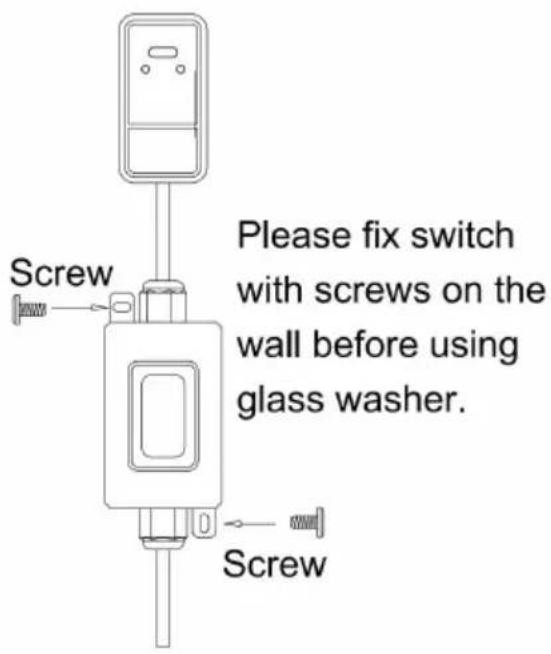
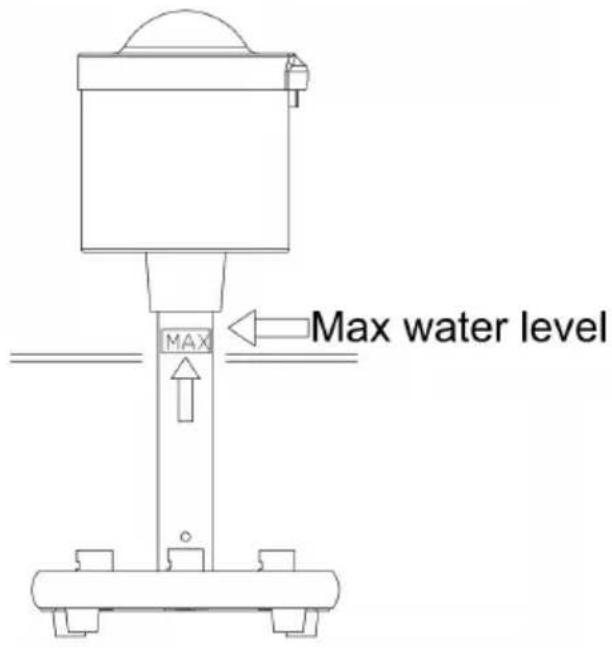
For FM-01C only. FM-01A & FM-01B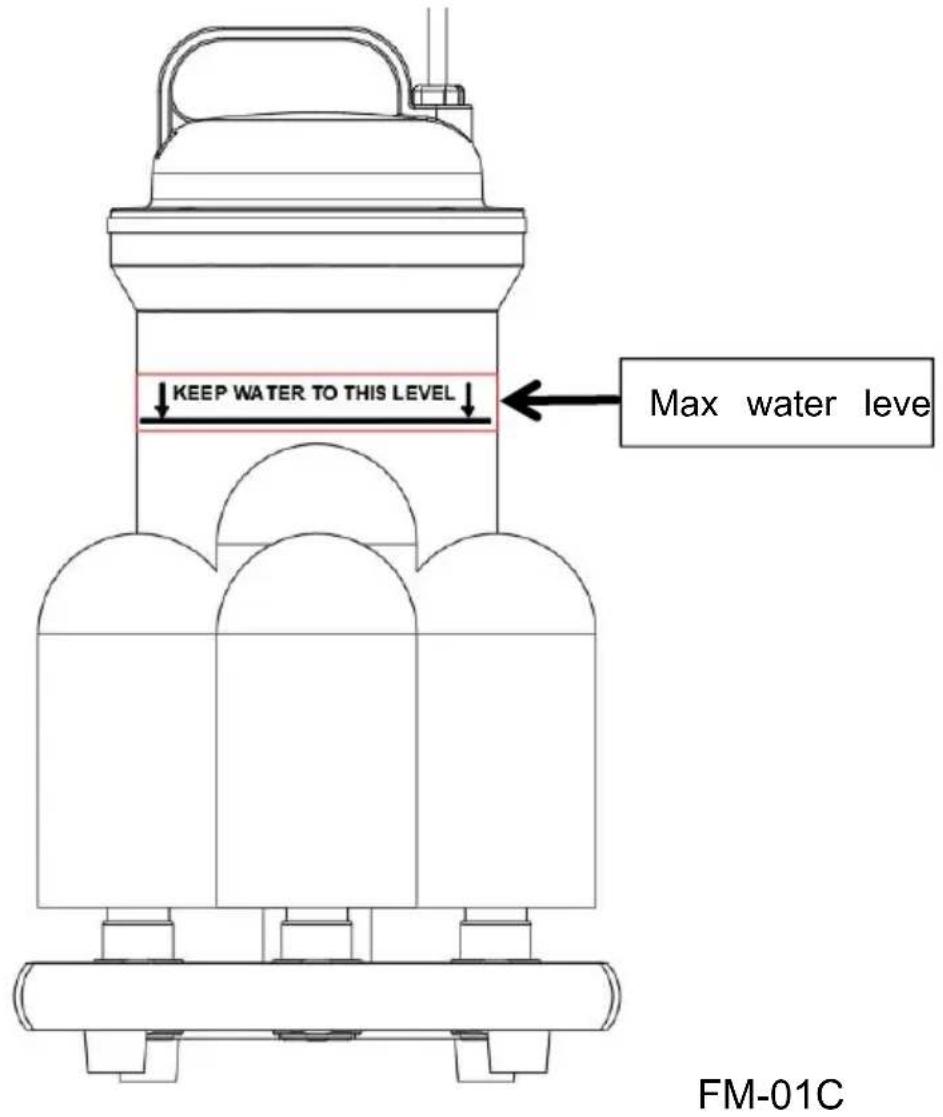

FM-01A
1. ON/OFF button 2. Power cord 3. Motor 4. Supporting tube 5. Base board 6. Foot mat 7. Short brush 8. Long brush
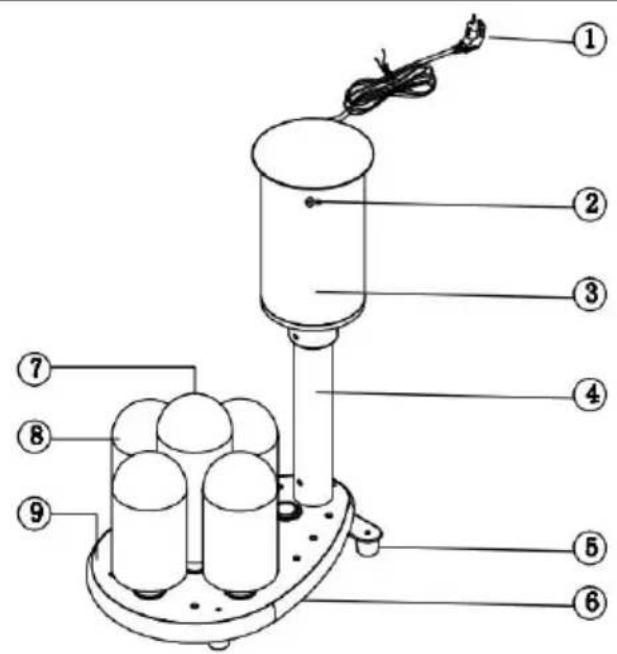
FM-01B
1. Power cord 2. ON/OFF button 3. Motor 4. Supporting tube 5. Foot mat 6. Base board 7. Long brush 8. Short brush
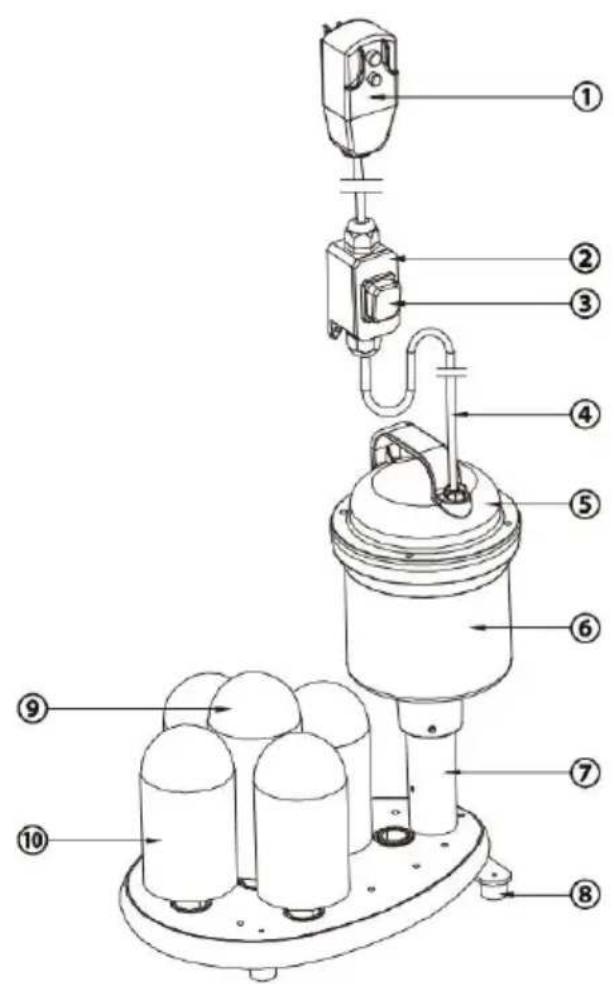
FM-01C
1. Ground fault circuit interrupter (GFCI) 2. Waterproof box 3. Power switch 4. Power cord 5. Motor cover 6. Motor 7. Base board 8. Foot 9. Long brush 10. Short brush
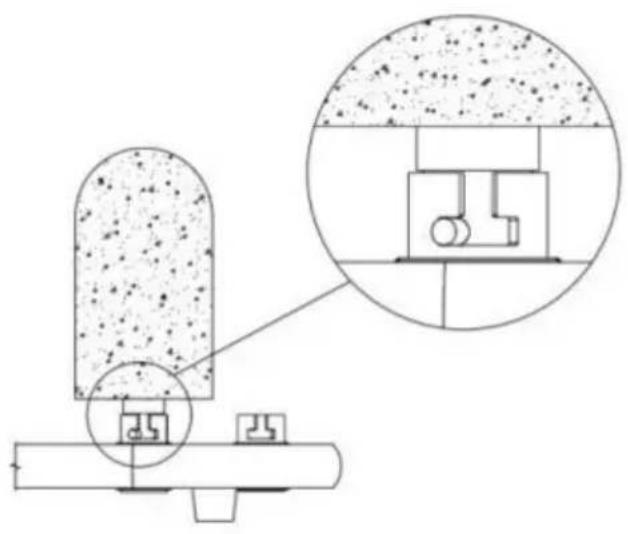
Brush installation guide

- The washer is equipped with one long brush and four short brushes.
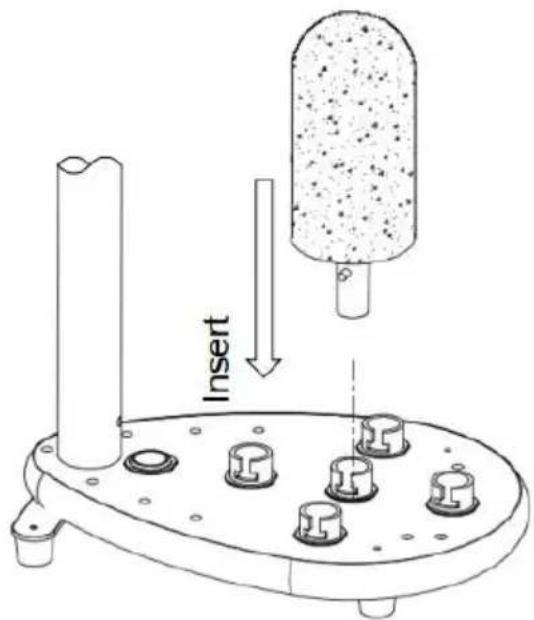
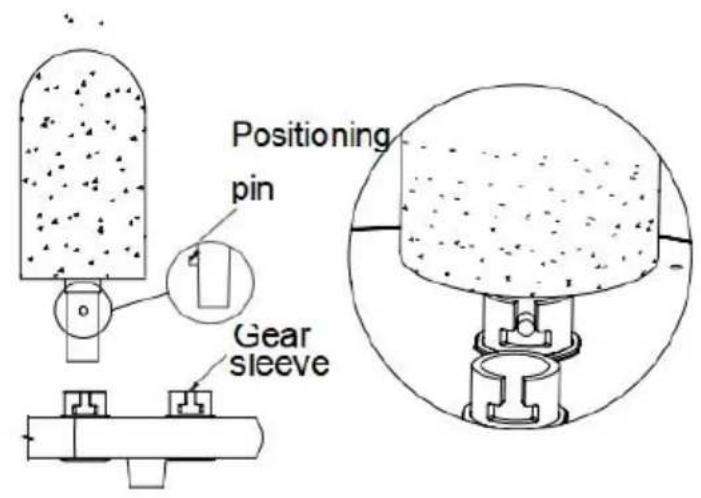
- As shown above, align the brush upward and downward with the sleeve on the base to install it. Note that the positioning pin must be installed in the slot of the gear sleeve.
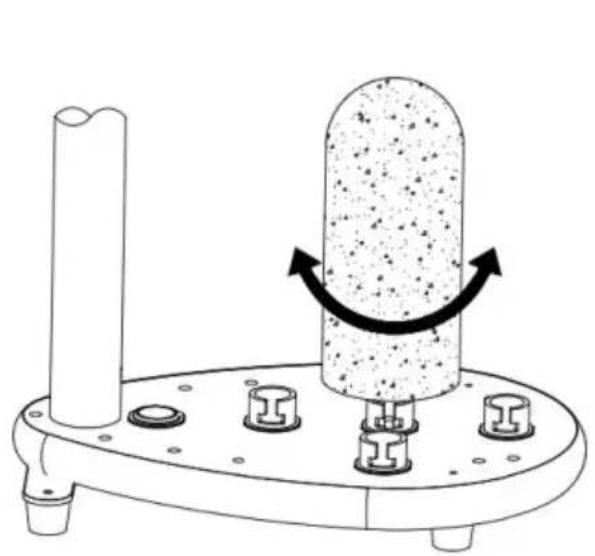
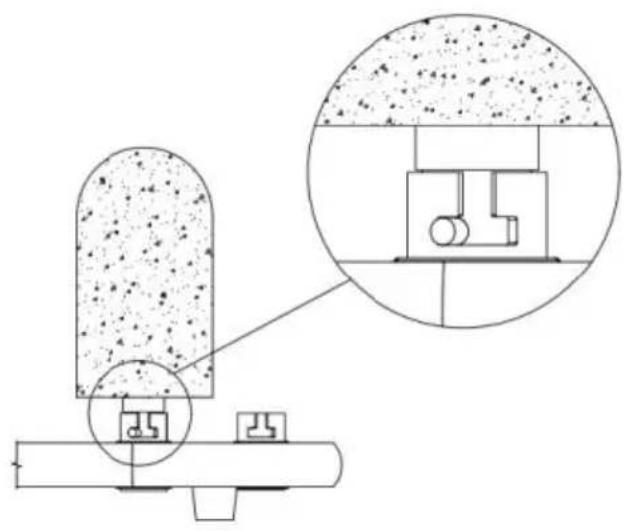
- After the positioning pin of the brush is installed into the slot of the gear sleeve, rotate the brush (clockwise or counterclockwise) to make it stuck.
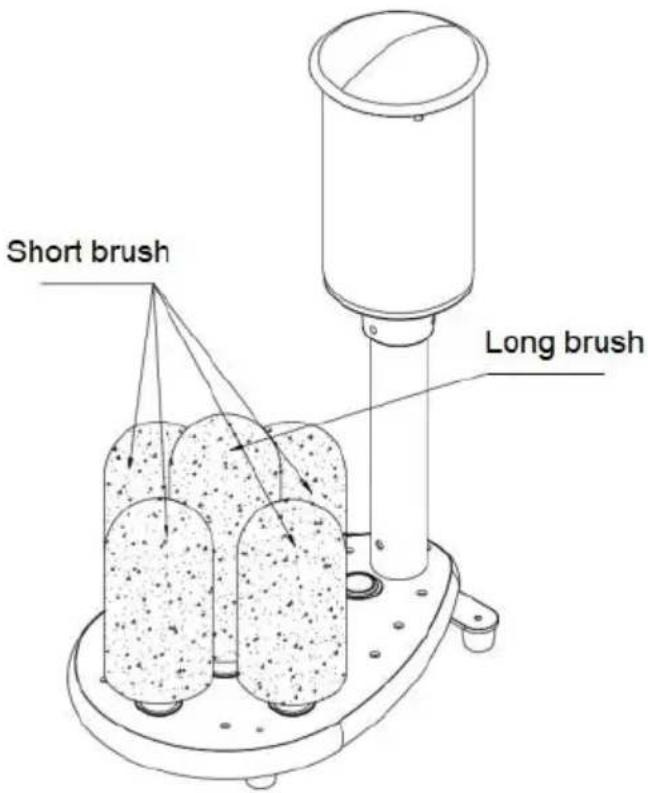
- Install the long brush in the middle and the four short brushes on the surrounding.
USING YOUR GLASS WASHER
Noise is a normal phenomenon when operating.
To start the glass washer, plug in the power cord and switch on the machine. When the brushes start to spin, put the glass on top of it to wash. It is recommended to wash one glass at a time for the best results.
WARNING: Do not operate the machine out of water.
WARNING: Keep the machine upright. Do not use it if it is lying down.
WARNING: The motor may get hot during and after operation; turn it off when it's not in use.
WARNING: NEVER use in hot water.
WARNING: KEEP water away from the switch.
WARNING: ONLY use low-foaming detergent to avoid over foaming during operation.
WARNING: Water level must be lower than the MAX line before operation.
PROTECTION COMPONENT
FM-01A this glass washer includes a capacitor motor. To protect the electronic components inside, the machine will shut off (5-10 mins) automatically if it begins to overheat.
| Glass type | Available | Not Available |
| RED WINE GLASS (Applicable for the middle brush head) |  |  |
| BEER GLASS (Applicable for the surrounding brush head) |  |  |
| WHISKEY GLASS (Applicable for the surrounding brush head) |  |  |
| CUPS DIAMETER: MIN 2 inches - MAX 3.9 inches | ||
CLEANING & MAINTAINING YOUR GLASS WASHER
To clean, first remove the power cord's plug from the wall outlet. Wait for the glass washer to cool down. Use a damp cloth or sponge to wipe down the unit. Avoid soaking the whole unit in water or washing it under running water as this will cause serious damage to the unit.
When closing for the day, drain sink and wipe off machine, let it dry overnight.
After use for a month, remove the base cover that protects the gear. Immerse the machine in water, add 1/2 cup of vinegar. Operate the machine for 10 minutes, rinse thoroughly and replace the base cover.
IMPORTANT SAFETY INFORMATION
When using electrical appliances, basic safety precautions should always be followed, including the following:
- READ ALL INFORMATION BEFORE USE.
- For commercial use only.
- Do not touch hot surfaces.
- The motor is water resistant but NOT SUBMERSIBLE. Do not put the product in sinks or tanks where there is a risk of falling over or submerging the motor.
- Unplug this unit when not in use and before cleaning.
- Allow the unit to cool before putting on or taking off parts.
- Do not operate this or any appliance with a damaged electrical cord or plug.
- Do not operate this or any appliance after it has malfunctioned or been damaged in any way.
- Do not use outdoors.
- Do not place on or near a hot gas or electric burner.
- Disconnect the unit by turning the power switch to "OFF", then removing the electrical plug from the wall outlet.
- Do not use appliance for any application other than intended use.
- Do not cover or wrap the motor of this unit when in operation.
- Do not allow this glass washer to touch or be covered by flammable material, such as curtains, draperies, walls, etc., when in operation.
- Do not clean with metal scouring pads as pieces can break off and touch electrical components, heightening the risk of electrical shock.
- Do not cover the exterior of this unit with metal foil as it may cause the glass washer to overheat.
- Avoid scratching the surface or nicking the edges of this unit. Do not put slim or sharp articles beyond the unit.
- Turn the appliance off by turning the power switch button to the "OFF" position.
- Note that the use of accessories not recommended by the manufacturer may result in injury.
- Children should be supervised to ensure that they do not play with the glass washer.
- This appliance is not intended for use by persons (including children) with reduced physical, sensory, or mental capabilities, or lack of experience and knowledge, unless they have been given supervision or instruction concerning use of the appliance by a person responsible for their safety. When using the appliance in shops, snack bars, hotels, etc., check the voltage and outlet to make sure the appliance is correctly connected to the power supply.
- Install the unit on a sink with a flat surface that is well ventilated.
SAVE THESE INSTRUCTIONS
GROUNDING INSTRUCTIONS
This appliance must be grounded. In the event of malfunction or breakdown, grounding provides a path of least resistance for electric current to reduce the risk of electric shock. This appliance is equipped with a cord having an equipment-grounding conductor and a grounding plug. The plug must be plugged into an appropriate outlet that is properly installed and grounded in accordance with all local codes and ordinances. DANGER - Improper connection of the equipment-grounding conductor can
result in a risk of electric shock. The conductor with insulation having an outer surface that is green with or without yellow stripes is the equipment-grounding conductor. If repair or replacement of the cord or plug is necessary, do not connect the equipment-grounding conductor to a live terminal.
Check with a qualified electrician or serviceman if the grounding instructions are not completely understood, or if in doubt as to whether the appliance is properly grounded. Do not modify the plug provided with the appliance - if it will not fit the outlet, have a proper outlet installed by a qualified electrician.
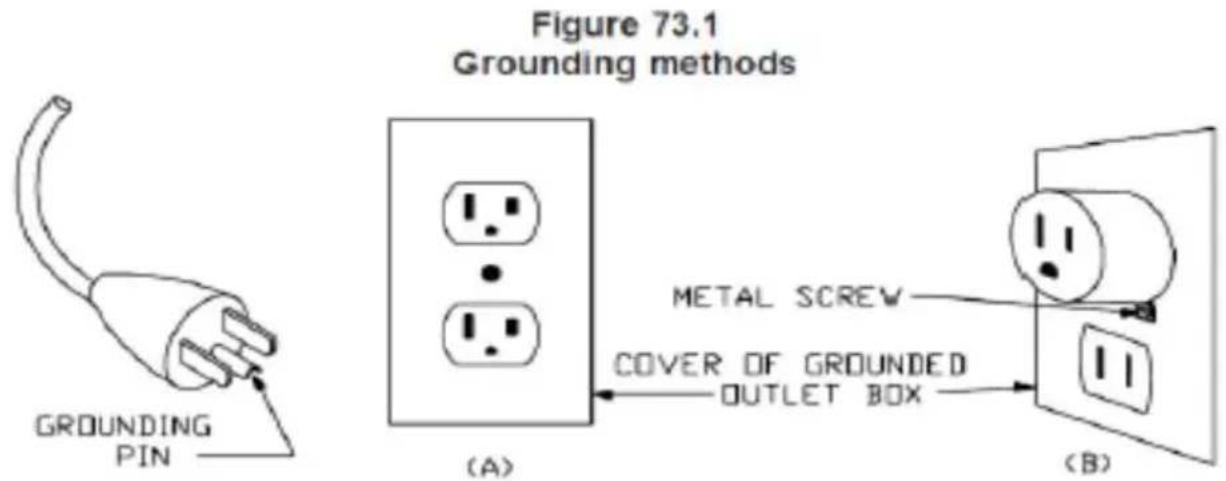
This appliance is for use on a nominal 120 V circuit, and has a grounding plug that looks like the plug illustrated in sketch A in Figure 73.1. A temporary adaptor, which looks like the adaptor illustrated in sketches B and C, may be used to connect this plug to a 2-pole receptacle as shown in sketch B if a properly grounded outlet is not available. The temporary adaptor should be used only until a properly grounded outlet can be installed by a qualified electrician. The green colored rigid ear, lug, and the like, extending from the adaptor must be connected to a permanent ground such as a properly grounded outlet box cover. Whenever the adaptor is used, it must be held in place by the metal screw.
A qualified electrician should be consulted if there is any doubt as to whether an outlet box is properly grounded.
NOTE: Save these instructions for future reference.
| Question | Possible cause | Solution |
| The glass easher does not work after being switched on. | 1.Electric connectors are loose. | Make sure glass washer is plugged in correctly.Be sure it is swito on. |
| There is a very loud noise when the glass washer is in use. | Brush not installed properly | Make sure the brush securely in place. |
| The brush spin cycle slow and the glasses are not wash properly | Check to see if something is jammed inside the brushes. | Clean up foreign matter |
| The brush loose or fracture | Check the brush is securely in place ar holder is in correct position. | Adjust brush positionReplace the old brushes regularly. |
CIRCUIT DIAGRAM

Packing List
| No. | Item | Qty | Remark |
| 1 | Machine | 1 set | |
| 2 | Brush | 5 pcs | |
| 3 | Manual | 1 pcs |
VEVOR®
TOUGH TOOLS, HALF PRICE
Technical Support and E-Warranty Certificate
VEVOR®
TOUGH TOOLS, HALF PRICE
Place stably and horizontally. Prevent tilting.
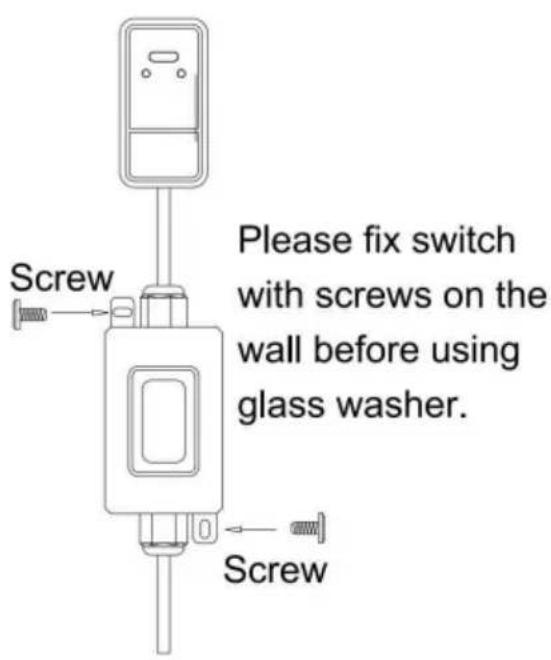
FM-01A and FM-01B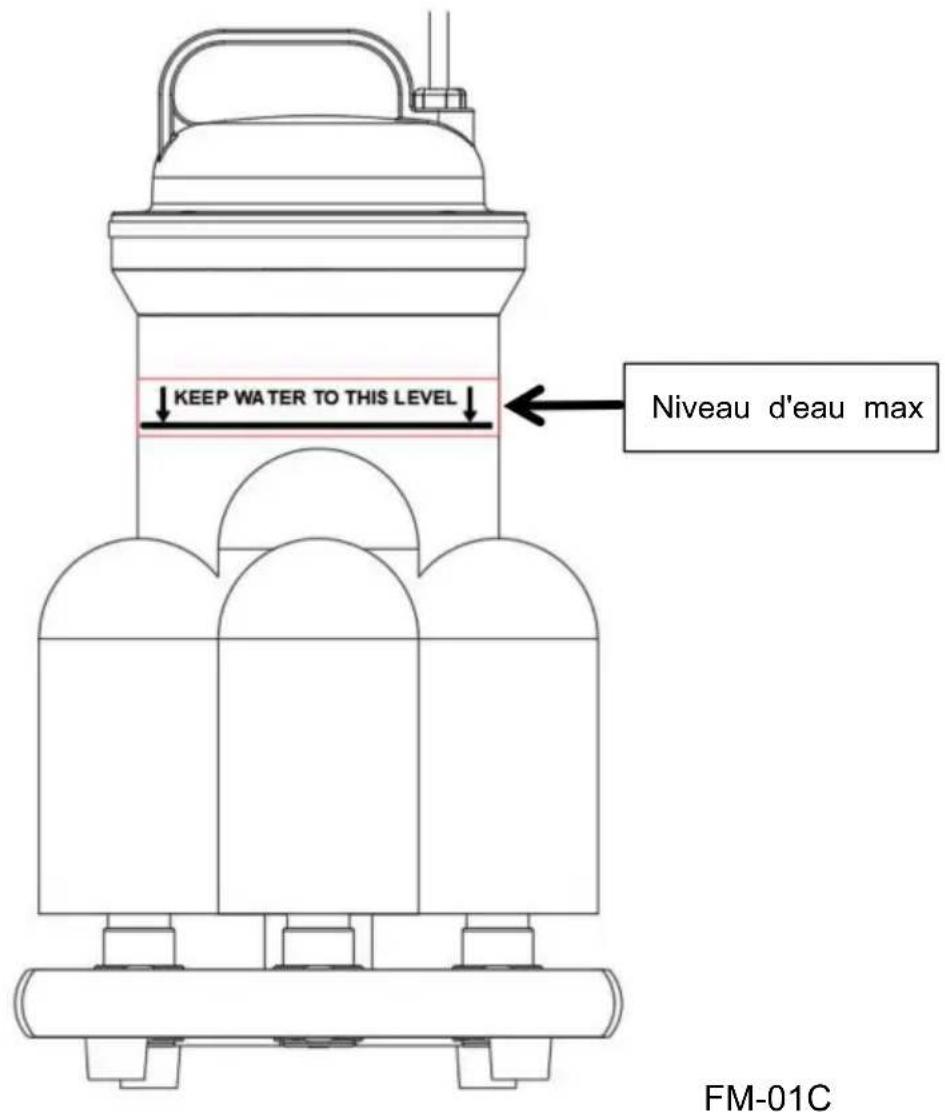
IDENTIFICATION OF KEY COMPONENTS
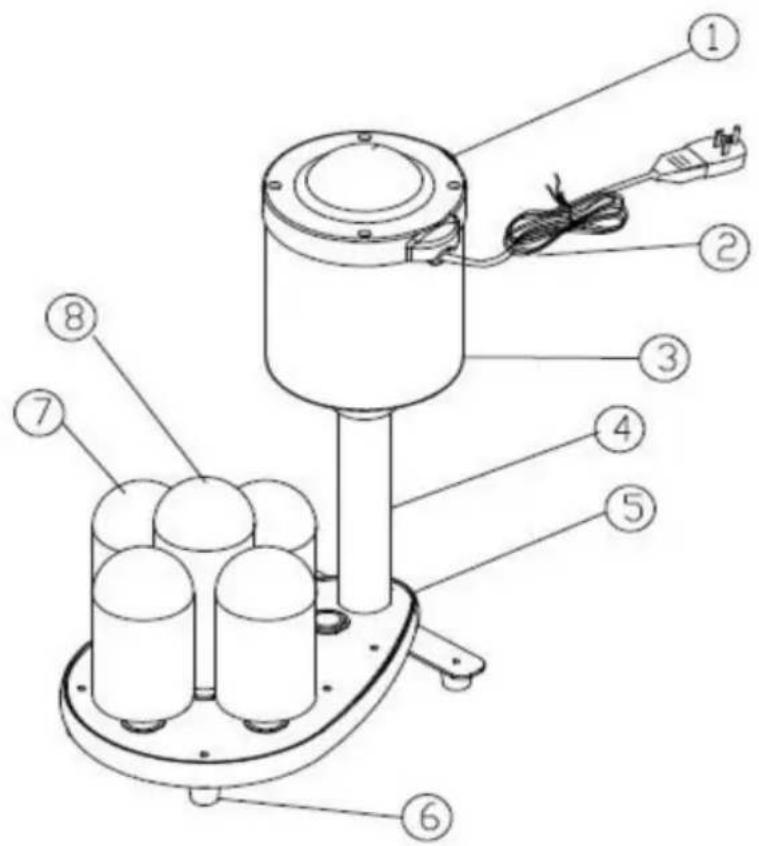
FM-01A
FM-01B
FM-01C
Packing list
Place stably and horizontally. Prevent tilting.
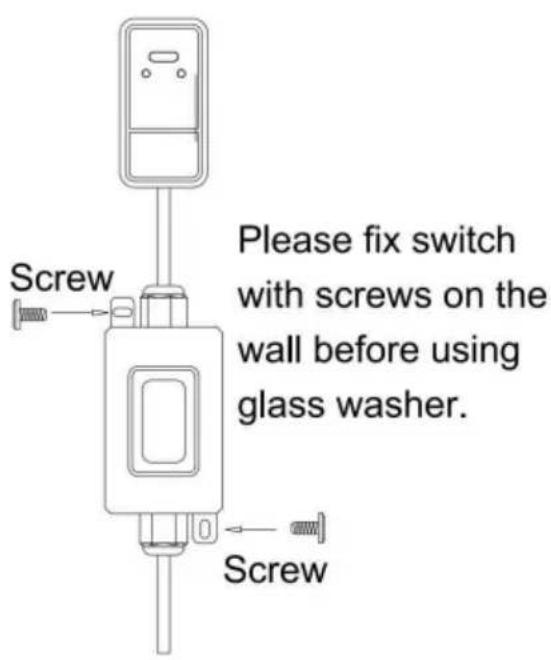
Only for FM-01C
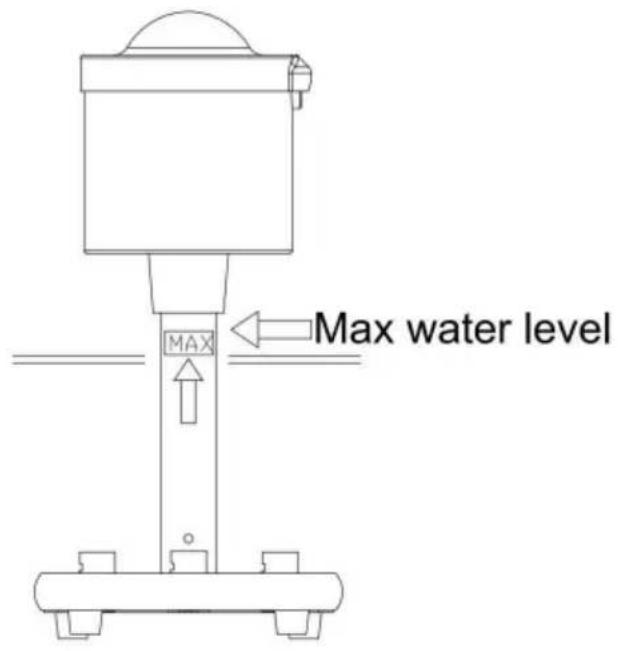
FM-01A and FM-01B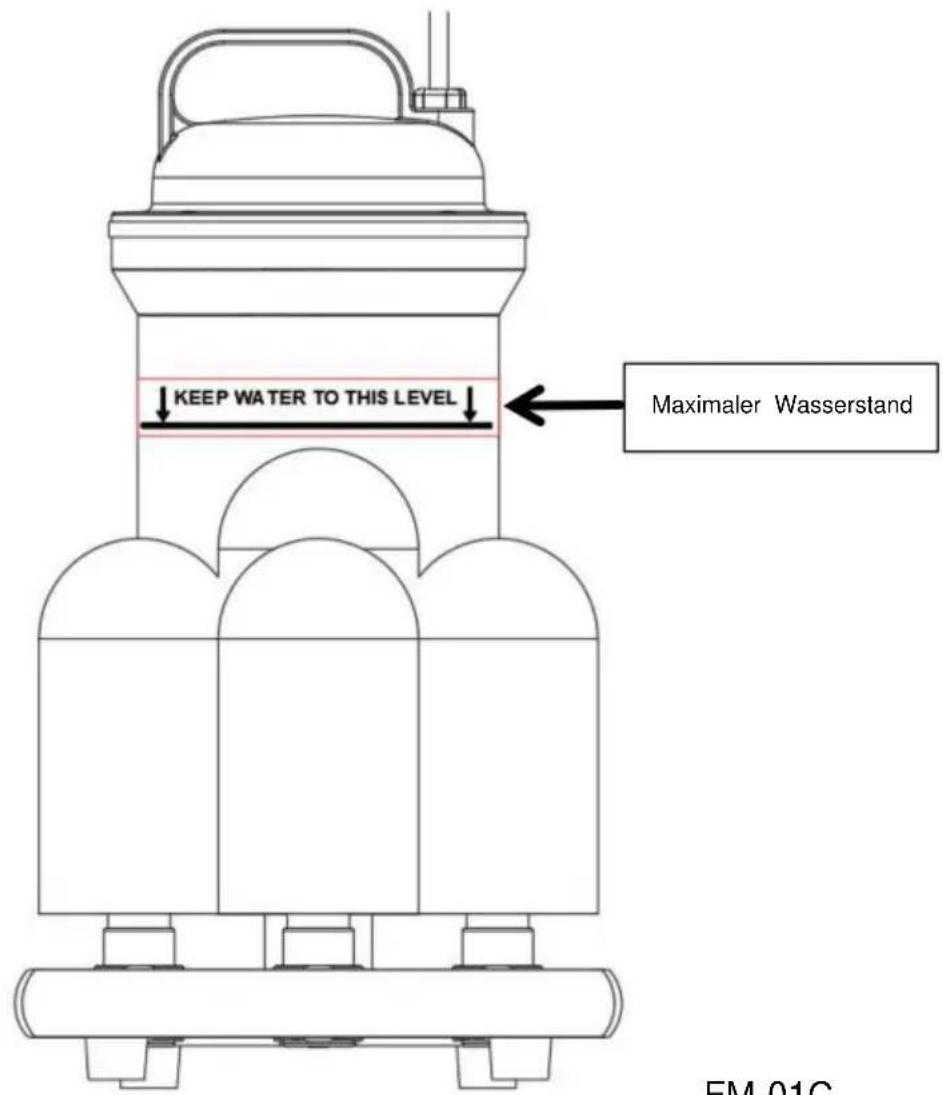
FM-01C
FM-01A
FM-01B
FM-01C
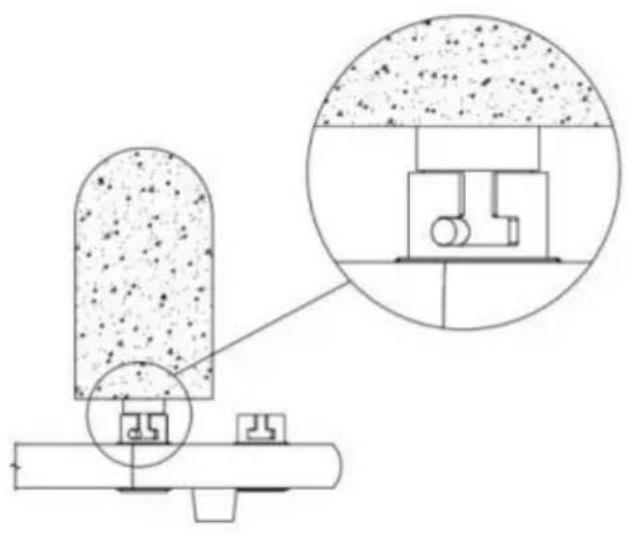
Packing list
https://www.vevor.com/support

- ELECTRIC COMMERCIAL GLASS WASHER USER MANUAL
- VEVOR®
- NEED HELP? CONTACT US
- TECHNICAL SUPPORT AND E-WARRANTY CERTIFICATE WWW.VEVOR.COM/SUPPORT
- BEFORE USING YOUR GLASS WASHER
- BRUSH INSTALLATION GUIDE
- USING YOUR GLASS WASHER
- PROTECTION COMPONENT
- CLEANING & MAINTAINING YOUR GLASS WASHER
- IMPORTANT SAFETY INFORMATION
- SAVE THESE INSTRUCTIONS
- GROUNDING INSTRUCTIONS
- CIRCUIT DIAGRAM
- TOUGH TOOLS, HALF PRICE
- IDENTIFICATION OF KEY COMPONENTS
Brand : Vevor
Model : FM-01A
Category : Electric glass washer