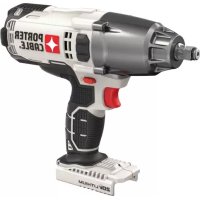
PCCK619L8 - Screwdriver Porter-Cable - Free user manual and instructions
Find the device manual for free PCCK619L8 Porter-Cable in PDF.


User questions about PCCK619L8 Porter-Cable
0 question about this device. Answer the ones you know or ask your own.
Ask a new question about this device
Download the instructions for your Screwdriver in PDF format for free! Find your manual PCCK619L8 - Porter-Cable and take your electronic device back in hand. On this page are published all the documents necessary for the use of your device. PCCK619L8 by Porter-Cable.
USER MANUAL PCCK619L8 Porter-Cable
1 Trigger switch
2 Forward/reverse button
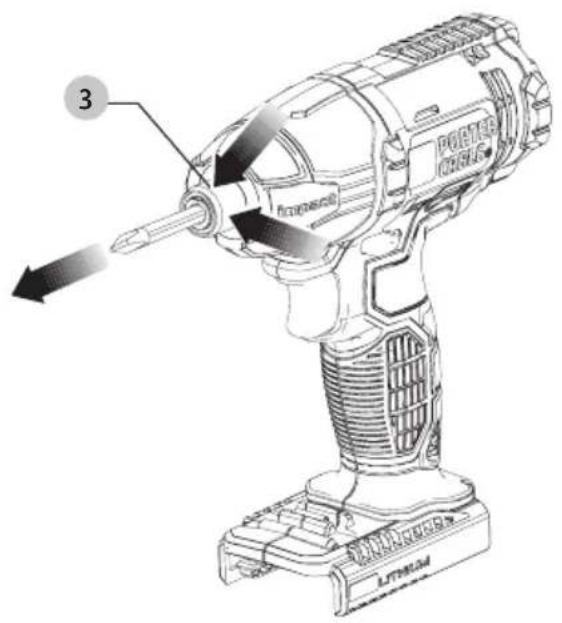
3 Chuck collar
4 Hex quick-release chuck
5 Battery
6 Battery release button
7 LED work light
8 Bit tip holder
WARNING: Read all safety warnings, instructions, illustrations, and specifications in this manual, including the battery and
charger sections provided in an original tool manual or the separate Batteries and Chargers manual.
Manuals can be obtained by contacting Customer Service as described elsewhere in this manual. Failure to follow the warnings and instructions may result in electric shock, fire and/or serious injury.
Definitions: Safety Alert Symbols and Words
This instruction manual uses the following safety alert symbols and words to alert you to hazardous situations and your risk of personal injury or property damage.
RANGER: Indicates an imminently hazardous situation which, if not avoided, will result in death or serious injury.
WARNING: Indicates a potentially hazardous situation which, if not avoided, could result in death or serious injury.
AUTION: Indicates a potentially hazardous situation which, if not avoided, may result in minor or moderate injury.
(Alsed without word) Indicates a safety related message.
NOTICE: Indicates a practice not related to personal injury which, if not avoided, may result in property damage.


English (original instructions) 4
| Français (traduction de la notice d'instructions originale) | 8 |
| Español (traducido de las instrucciones originales) | 12 |
text_image
Fig. B Fig. C 207 LITHUM 5
text_image
LITHIUM SUV LITHIUM 6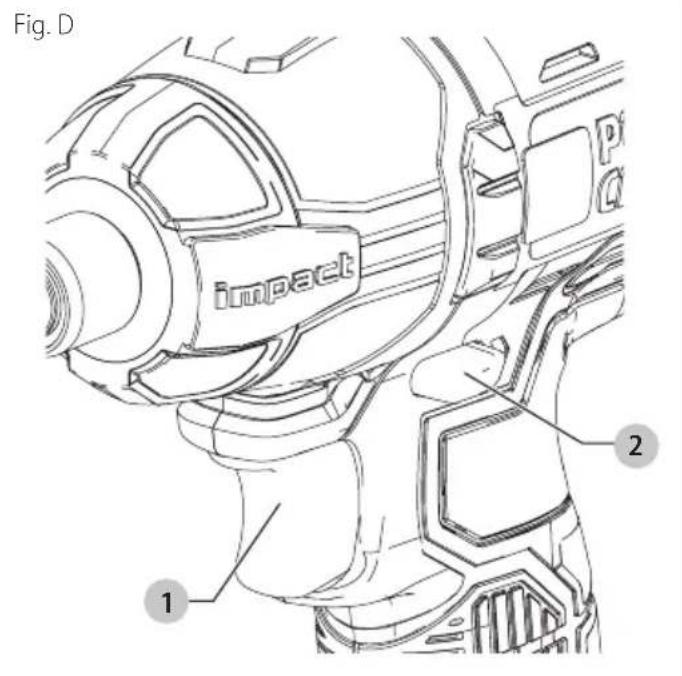
text_image
Fig. D impact 1 2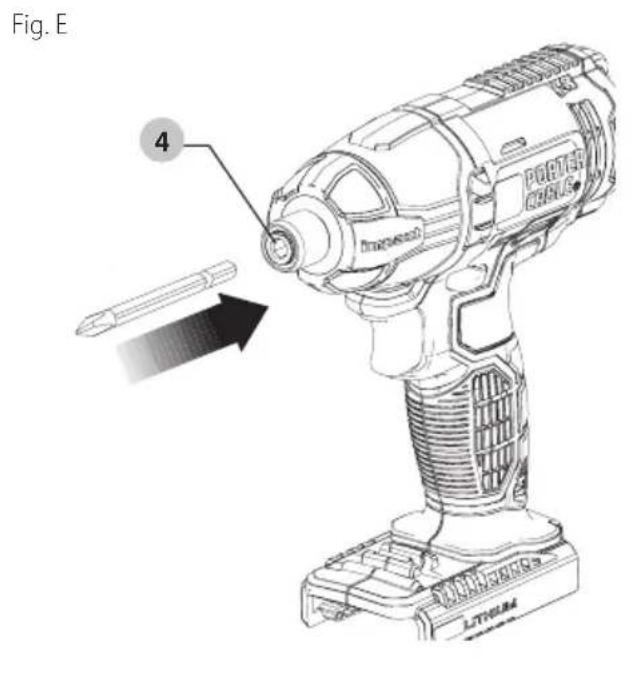
text_image
Fig. E 4 PORTER DRILL LITHIUMFig. F
text_image
3 POWER DRILL LITHAMEnglish
Intended Use
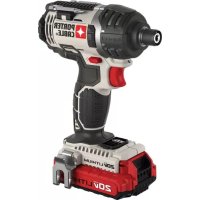
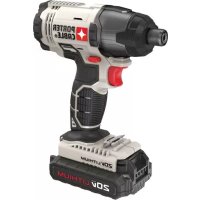
This impact driver is designed for professional impact screwdriving applications. The impact function makes this tool particularly useful for driving fasteners in wood, metal and concrete.
GENERAL POWER TOOL SAFETY WARNINGS
WARNING: Read all safety warnings, instructions, illustrations and specifications provided with this power tool. Failure to follow all instructions listed below may result in electric shock, fire and/or serious injury.
SAVE ALL WARNINGS AND INSTRUCTIONS FOR FUTURE REFERENCE.
The term "power tool" in the warnings refers to your mains-operated (corded) power tool or battery-operated (cordless) power tool.
1) Work Area Safety
a) Keep work area clean and well lit. Cluttered or dark areas invite accidents.
b) Do not operate power tools in explosive atmospheres, such as in the presence of flammable liquids, gases or dust. Power tools create sparks which may ignite the dust or fumes.
c) Keep children and bystanders away while operating a power tool. Distractions can cause you to lose control.
2) Electrical Safety
a) Power tool plugs must match the outlet. Never modify the plug in any way. Do not use any adapter plugs with earthed (grounded) power tools. Unmodified plugs and matching outlets will reduce risk of electric shock.
b) Avoid body contact with earthed or grounded surfaces, such as pipes, radiators, ranges and refrigerators. There is an increased risk of electric shock if your body is earthed or grounded.
c) Do not expose power tools to rain or wet conditions. Water entering a power tool will increase the risk of electric shock.
d) Do not abuse the cord. Never use the cord for carrying, pulling or unplugging the power tool. Keep cord away from heat, oil, sharp edges or moving parts. Damaged or entangled cords increase the risk of electric shock.
e) When operating a power tool outdoors, use an extension cord suitable for outdoor use. Use of a cord suitable for outdoor use reduces the risk of electric shock.
f) If operating a power tool in a damp location is unavoidable, use a ground fault circuit interrupter (GFCI) protected supply. Use of a GFCI reduces the risk of electric shock.
3) Personal Safety
a) Stay alert, watch what you are doing and use common sense when operating a power tool. Do not use a power tool while you are tired or under the influence of drugs, alcohol or medication. A moment of inattention while operating power tools may result in serious personal injury.
b) Use personal protective equipment. Always wear eye protection. Protective equipment such as a dust mask, non-skid safety shoes, hard hat, or hearing protection used for appropriate conditions will reduce personal injuries.
c) Prevent unintentional starting. Ensure the switch is in the off position before connecting to power source and/or battery pack, picking up or carrying the tool. Carrying power tools with your finger on the switch or energizing power tools that have the switch on invites accidents.
d) Remove any adjusting key or wrench before turning the power tool on. A wrench or a key left attached to a rotating part of the power tool may result in personal injury.
e) Do not overreach. Keep proper footing and balance at all times. This enables better control of the power tool in unexpected situations.
f) Dress properly. Do not wear loose clothing or jewelry. Keep your hair, clothing and gloves away from moving parts. Loose clothes, jewelry or long hair can be caught in moving parts.
g) If devices are provided for the connection of dust extraction and collection facilities, ensure these are connected and properly used. Use of dust collection can reduce dust-related hazards.
h) Do not let familiarity gained from frequent use of tools allow you to become complacent and ignore tool safety principles. A careless action can cause severe injury within a fraction of a second.
4) Power Tool Use and Care
a) Do not force the power tool. Use the correct power tool for your application. The correct power tool will do the job better and safer at the rate for which it was designed.
b) Do not use the power tool if the switch does not turn it on and off. Any power tool that cannot be controlled with the switch is dangerous and must be repaired.
c) Disconnect the plug from the power source and/or remove the battery pack, if detachable, from the power tool before making any adjustments, changing accessories, or storing power tools. Such preventive safety measures reduce the risk of starting the power tool accidentally.
d) Store idle power tools out of the reach of children and do not allow persons unfamiliar with the power tool or these instructions to operate the power tool. Power tools are dangerous in the hands of untrained users.
e) Maintain power tools and accessories. Check for misalignment or binding of moving parts, breakage of parts and any other condition that may affect the power tool's operation. If damaged, have the power tool repaired before use. Many accidents are caused by poorly maintained power tools.
f) Keep cutting tools sharp and clean. Properly maintained cutting tools with sharp cutting edges are less likely to bind and are easier to control.
g) Use the power tool, accessories and tool bits, etc. in accordance with these instructions, taking into account the working conditions and the work to be performed.
Use of the power tool for operations different from those intended could result in a hazardous situation.
h) Keep handles and grasping surfaces dry, clean and free from oil and grease. Slippery handles and grasping surfaces do not allow for safe handling and control of the tool in unexpected situations.
5) Battery Tool Use and Care
a) Recharge only with the charger specified by the manufacturer. A charger that is suitable for one type of battery pack may create a risk of fire when used with another battery pack.
b) Use power tools only with specifically designated battery packs. Use of any other battery packs may create a risk of injury and fire.
c) When battery pack is not in use, keep it away from other metal objects, like paper clips, coins, keys, nails, screws or other small metal objects, that can make a connection from one terminal to another. Shorting the battery terminals together may cause burns or a fire.
d) Under abusive conditions, liquid may be ejected from the battery; avoid contact. If contact accidentally occurs, flush with water. If liquid contacts eyes, additionally seek medical help. Liquid ejected from the battery may cause irritation or burns.
e) Do not use a battery pack or tool that is damaged or modified. Damaged or modified batteries may exhibit unpredictable behavior resulting in fire, explosion or risk of injury.
f) Do not expose a battery pack or tool to fire or excessive temperature. Exposure to fire or temperature above 265 °F (130 °C) may cause explosion.
g) Follow all charging instructions and do not charge the battery pack or tool outside the temperature range specified in the instructions. Charging improperly or at temperatures outside the specified range may damage the battery and increase the risk of fire.
6) Service
a) Have your power tool serviced by a qualified repair person using only identical replacement parts. This will ensure that the safety of the power tool is maintained.
b) Never service damaged battery packs. Service of battery packs should only be performed by the manufacturer or authorized service providers.
Specific Safety Rules
- Hold power tool by insulated gripping surfaces, when performing an operation where fastener may contact hidden wiring. Fasteners contacting a "live" wire may make exposed metal parts of the power tool "live" and could give the operator an electric shock.
- Wear ear protectors with impact driver. Exposure to noise can cause hearing loss.
- Use clamps or another practical way to secure and support the work piece to a stable platform. Holding the work by hand or against your body leaves it unstable and may lead to loss of control.
- Keep your hair, clothing, and gloves away from air vents. Air vents often cover moving parts in which these items can be caught.
- Wear safety goggles or other eye protection.
Hammering and drilling operations cause chips to fly. Flying particles can cause permanent eye damage.
- Bits, sockets and tools get hot during operation. Wear gloves when touching them.
- Do not operate this tool for long periods of time.
Vibration caused by tool action may be harmful to your hands and arms. Use gloves to provide extra cushion and limit exposure by taking frequent rest periods.
- Wear appropriate personal hearing protection during use. Under some conditions and duration of use, noise from this product may contribute to hearing loss.
WARNING: Impact wrenches are not torque wrenches. Do not use this tool for tightening fasteners to specified torques. An independent, calibrated torque measurement device such as a torque wrench should be used when under-tightened or overtightened fasteners can lead to the failure of the joint.
WARNING: Never modify the power tool or any part of it. Damage or personal injury could result.
WARNING: ALWAYS use safety glasses. Everyday eyeglasses are NOT safety glasses. Also use face or dust mask if drilling operation is dusty. ALWAYS WEAR CERTIFIED SAFETY EQUIPMENT:
• ANSI Z87.1 eye protection (CAN/CPA Z94.3),
• ANSI S12.6 (S3.19) hearing protection,
• NIOSH/OSHA/MSHA respiratory protection.
WARNING: Some dust created by power sanding, sawing, grinding, drilling, and other construction activities contains chemicals known to the state of California to cause cancer, birth defects or other reproductive harm. Some examples of these chemicals are:
- lead from lead-based paints,
• crystalline silica from bricks and cement and other masonry products, and
• arsenic and chromium from chemically-treated lumber.
Your risk from these exposures varies, depending on how often you do this type of work. To reduce your exposure to these chemicals: work in a well ventilated area, and work with approved safety equipment, such as those dust masks that are specially designed to filter out microscopic particles.
- Avoid prolonged contact with dust from power sanding, sawing, grinding, drilling, and other construction activities. Wear protective clothing and wash exposed areas with soap and water. Allowing dust to get into your mouth, eyes, or lay on the skin may promote absorption of harmful chemicals.
WARNING: Use of this tool can generate and/or disperse dust, which may cause serious and permanent respiratory or other injury. Always use NIOSH/OSHA approved respiratory protection appropriate for the dust exposure. Direct particles away from face and body.
Symbols
The label on your tool may include the following symbols. The symbols and their definitions are as follows:
V....volts
Hz......hertz
min......minutes
or DC.....direct current
Class I Construction (grounded)
.../min.....per minute
ipm .... impacts per minute
BPM.....beats per minute
RPM .... revolutions per minute
A.....amperes
W.....watts
\~ or AC......alternating current
ClassII
Construction (double insulated)
n_0 ......no load speed
earthingterminal
⚠️ ......safety alert symbol
E ....wearrespiratory protection
weareye protection
O....wearhearing protection
readall documentation
OPERATING INSTRUCTIONS
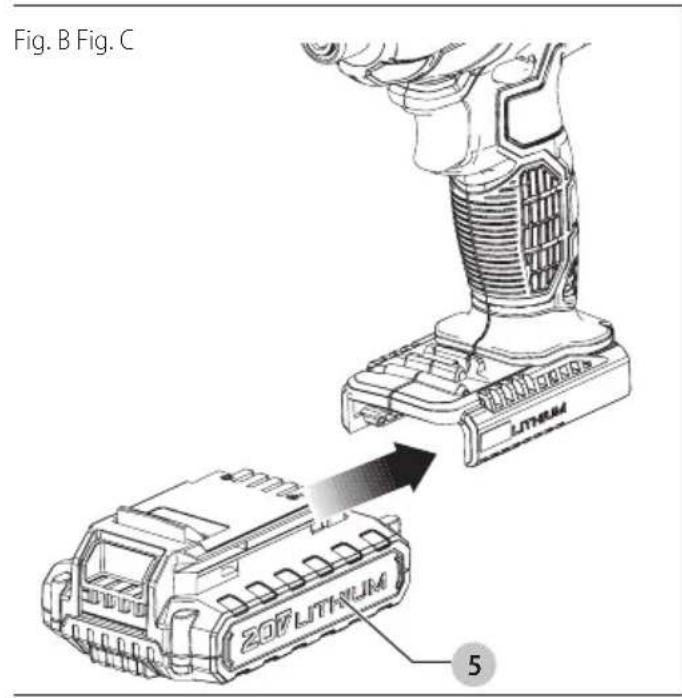
Installing and Removing the Battery Pack From the Tool (Fig. B, C)
AUTION: Make certain the lock-off button is engaged to prevent switch actuation before removing or installing battery.
To install battery pack: Insert battery pack 5 firmly into tool until an audible click is heard as shown in Figure B. Ensure battery pack is fully seated and fully latched into position.
To remove battery pack: Depress the battery release button 6 as shown in Figure C and pull battery pack out of tool.
Variable Speed Trigger Switch (Fig. D)
To turn the tool on, squeeze the trigger switch 1. To turn the tool off, release the trigger switch. Your tool is equipped with a brake. The chuck will stop as soon as the trigger switch is fully released. The variable speed switch enables you to select the best speed for a particular application. The more you squeeze the trigger, the faster the tool will operate. Use lower speeds for starting holes without a center punch, drilling in metals or plastics, or driving screws. For maximum tool life, use variable speed only for starting holes or fasteners.
NOTE: Continuous use in variable speed range is not recommended. It may damage the switch and should be avoided.
Forward/Reverse Control Button (Fig. D)
A forward/reverse control button 2 determines the rotational direction of the tool and also serves as a lock-off button. To select forward rotation, release the trigger switch and depress the forward/reverse control button on the right side of the tool. To select reverse, depress the forward/reverse control button on the left side of the tool. The center position of the control button locks the tool in the OFF position. When changing the position of the control button, be sure the trigger is released.
NOTE: The first time the tool is run after changing the direction of rotation, you may hear a click on start-up. This and the impacting noise that the tool makes are normal and do not indicate a problem.
Quick-Release Chuck (Fig. E, F)
NOTE: The chuck accepts 1/4 inch (6.35 mm) hex accessories only.
Remove battery pack before changing accessories.
To install an accessory: Firmly insert the accessory completely into the quick-release chuck 4 until an audible click is heard and verify the accessory is locked in place by tugging on it.
To remove an accessory: Pull the chuck collar 3 away from the front of the tool, remove the accessory and release the collar.
NOTE: The quick-release chuck is spring-loaded. The accessory will be ejected when the chuck collar is pulled forward.
LED Work Light (Fig. A)
When impact driver is activated by pulling the trigger switch 1, the integrated LED work light 7 will automatically illuminate the work area.
NOTE: The work light is for lighting the immediate work surface and is not intended to be used as a flashlight.
Bit Tip Storage (Fig. A)
A bit tip holder 8 is built into the base of the tool.
MAINTENANCE
WARNING: To reduce the risk of serious personal injury, turn unit off and remove the battery pack before making any adjustments or removing/installing attachments or accessories. An accidental start-up can cause injury.
Your PORTER-CABLE power tool has been designed to operate over a long period of time with a minimum of maintenance. Continuous satisfactory operation depends upon proper tool care and regular cleaning.
Cleaning
With the motor running, blow dirt and dust out of all air vents with dry air. Wear safety glasses when performing this procedure. Exterior plastic parts may be cleaned with a damp cloth and mild detergent. Although these parts are highly solvent resistant, NEVER use solvents.
Use only mild soap and damp cloth to clean the tool. Never let any liquid get inside the tool; never immerse any part of the tool into a liquid.
Replacement parts
Use only identical replacement parts. For a parts list or to order parts, visit our service website at www.portercable.com. You can also order parts from your nearest PORTER-CABLE Factory Service Center or PORTER-CABLE Authorized Warranty Service Center. Or, you can call our Customer Care Center at 1-888-848-5175.
Accessories
WARNING: Since accessories, other than those offered by PORTER-CABLE, have not been tested with this product, use of such accessories with this tool could be hazardous. To reduce the risk of injury, only PORTER-CABLE recommended accessories should be used with this product.
CAUTION: Use only impact sockets. Non-impact sockets may break and cause a hazardous condition. Inspect socks prior to use to ensure that they contain no cracks. A complete line of accessories is available from your PORTER-CABLE Factory Service Center or a PORTER-CABLE Authorized Warranty Service Center. Please visit our website at www.portercable.com for a catalog or for the name of your nearest supplier.
Repairs
The charger and batteries are not serviceable. There are no serviceable parts inside the charger or battery pack.
WARNING: To assure product SAFETY and RELIABILITY, repairs, maintenance and adjustment (including brush inspection and replacement, when applicable) should be performed by a factory service center or an authorized service center. Always use identical replacement parts.
Register Online
Thank you for your purchase. Register your product now for:
- WARRANTY SERVICE: Registering your product will help you obtain more efficient warranty service in case there is a problem with your product.
- CONFIRMATION OF OWNERSHIP: In case of an insurance loss, such as fire, flood or theft, your registration of ownership will serve as your proof of purchase.
• FOR YOUR SAFETY: Registering your product will allow us to contact you in the unlikely event a safety notification is required under the Federal Consumer Safety Act.
Register online at www.portercable.com/account-login.
Three-Year Limited Warranty
For warranty terms, go to www.portercable.com/service-support/warranty-information.
To request a written copy of the warranty terms, contact: Customer Service at PORTER-CABLE, 4825 Highway 45 North, Jackson, Tennessee 38305 or call 1-888-848-5175.
LATIN AMERICA: This warranty does not apply to products sold in Latin America. For products sold in Latin America, see country-specific warranty information contained in the packaging, call the local company, or see website for warranty information.
FREE WARNING LABEL REPLACEMENT: If your warning labels become illegible or are missing, call 1-888-848-5175 for a free replacement.
PORTER-CABLE
4825 Highway 45 North, Jackson, Tennessee 38305
1-888-848-5175 • www.portercable.com
TROUBLESHOOTING
4825 Highway 45 North, Jackson, Tennessee 38305
1-888-848-5175 • www.portercable.com
--- o CD.....corriente directa
Eje Central Lázaro Cárdenas No. 18 - Local (55) 5588 9377 D, Col. Obrera
MERIDA, YUC
Calle 63 #459-A - Col. Centro (999) 928 5038
MONTERREY, N.L.
Av. Francisco I. Madero 831 Poniente - Col. (818) 375 23 13 Centro
PUEBLA, PUE
17 Norte #205 - Col. Centro (222) 246 3714
QUERETARO, QRO
Av. San Roque 274 - Col. San Gregorio (442) 2 17 63 14
SAN LUIS POTOSI, SLP
Col. Santa Fe Alvaro Obregon,
Ciudad de Mexico, Mexico.
C.P 01210
TEL(52) 55 53267100
R.F.C.BDE8106261W7
Registro en Línea
4825 Highway 45 North, Jackson, Tennessee 38305
1-888-848-5175 · www.portercable.com
WARNING: Use of any other battery packs may create a risk of injury and fire.
NOTE: DO NOT charge when the battery pack is below 40^ F ( 4.5^ C) or above 104^ F ( 40^ C). Do not store or use the tool and battery pack in locations where the temperature may reach or exceed 104^ F ( 40^ C).