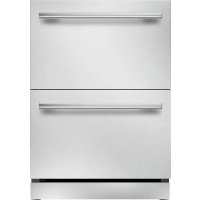
WD30WS - Warming drawers and cabinets THERMADOR - Free user manual and instructions
Find the device manual for free WD30WS THERMADOR in PDF.


User questions about WD30WS THERMADOR
0 question about this device. Answer the ones you know or ask your own.
Ask a new question about this device
Download the instructions for your Warming drawers and cabinets in PDF format for free! Find your manual WD30WS - THERMADOR and take your electronic device back in hand. On this page are published all the documents necessary for the use of your device. WD30WS by THERMADOR.
USER MANUAL WD30WS THERMADOR
Masterpiece® and Professional Series
Warming Drawer and Storage Drawer
natural_image
Top-down view of a pan of stir-fried greens with diced carrots and sunny days, served on a wooden table with chopsticks and a wooden spoon (no text or symbols visible)Table of CONTENTS
Safety Definitions 4
IMPORTANT SAFETY INSTRUCTIONS .... 5
Proper Installation and Maintenance 5
Fire Safety 5
Burn Prevention 5
Child Safety 5
Cookware Safety 6
Food Safety 6
Proposition 65 Warning 6
Getting to Know the Appliance 7
Storage Drawer Overview 7
Warming Drawer Overview 7
Control Panel 7
Operation 8
Food Safety 8
Setting the Warming Drawer 8
Sabbath Mode 8
Preheating the Warming Drawer 8
Warming Food 8
Warming Empty Serving Bowls and Plates 8
Proofing Dough 8
Crisping Stale Items 8
Warming Drawer Charts 9
Cleaning and Maintenance 9
Cleaning Chart 9
Removing the Drawer 9
Replacing the Drawer 10
Service 10
Rating Label-WD30W AND WD30WC 10
Data Plate-SDS30WC and SD30WC 10
Model Number and FD Number 10
STATEMENT OF LIMITED PRODUCT WARRANTY .... 11
What this Warranty Covers & Who it Applies to ..... 11
How Long the Warranty Lasts 11
Repair/Replace as Your Exclusive Remedy 11
Out of Warranty Product 11
Warranty Exclusions 11
Obtaining Warranty Service: 12
THERMADOR® Support 12
Service 12
Parts and Accessories 12
This THERMADOR Appliance is made by
BSH Home Appliances Corporation
1901 Main Street, Suite 600
Irvine, CA 92614
Questions?
1-800-735-4328
www.thermador.com
We look forward to hearing from you!

Safety Definitions

WARNING
This indicates that death or serious injuries may occur as a result of non-observance of this warning.

CAUTION
This indicates that minor or moderate injuries may occur as a result of non-observance of this warning.
NOTICE: This indicates that damage to the appliance or property may occur as a result of non-compliance with this advisory.
Note: This alerts you to important information and/or tips.
IMPORTANT SAFETY INSTRUCTIONS
READ AND SAVE THESE INSTRUCTIONS
WARNING
When properly cared for, your new appliance has been designed to be safe and reliable. Read all instructions carefully before use. These precautions will reduce the risk of burns, electric shock, fire, and injury to persons. When using kitchen appliances, basic safety precautions must be followed, including those in the following pages.
Proper Installation and Maintenance
Have the installer show you the location of the circuit breaker or fuse. Mark it for easy reference.
This appliance must be properly installed and grounded by a qualified technician. Connect only to properly grounded outlet. Refer to Installation Instructions for details.
This appliance is intended for normal family household use only. It is not approved for outdoor use. See the Statement of Limited Product Warranty. If you have any questions, contact the manufacturer.
Do not store or use corrosive chemicals, vapors, flammables or nonfood products in or near this appliance. It is specifically designed for use when heating or cooking food. The use of corrosive chemicals in heating or cleaning will damage the appliance and could result in injury.
Do not operate this appliance if it is not working properly, or if it has been damaged. Contact an authorized servicer.
Do not repair or replace any part of the appliance unless specifically recommended in this manual. Refer all servicing to an authorized servicer.
Fire Safety
If materials inside an oven or warming drawer should ignite, keep door closed. Turn off the appliance and disconnect the circuit at the fuse or circuit breaker panel. To reduce the risk of fire, do not store anything in the warming drawer (such as groceries, bags, etc.) which could cause fire if the drawer is turned on.
WARNING
Use this appliance only for its intended use as described in this manual. NEVER use this appliance as a space heater to heat or warm the room. Doing so may result in overheating the appliance. Never use the appliance for storage.
Always have a working smoke detector near the kitchen. In the event that personal clothing or hair catches fire, drop and roll immediately to extinguish flames.
Have an appropriate fire extinguisher available, nearby, highly visible and easily accessible near the appliance. Smother flames from food fires other than grease fires with baking soda. Never use water on cooking fires.
WARNING
TO REDUCE THE RISK OF INJURY TO PERSONS IN THE EVENT OF A GREASE FIRE, OBSERVE THE FOLLOWING:
a. SMOTHER FLAMES with a close-fitting lid, cookie sheet, or metal tray, then turn off the burner. BE CAREFUL TO PREVENT BURNS. If the flames do not go out immediately, EVACUATE AND CALL THE FIRE DEPARTMENT.
b. NEVER PICK UP A FLAMING PAN – You may be burned.
c. DO NOT USE WATER, including wet dishcloths or towels – a violent steam explosion will result.
d. Use an extinguisher ONLY if:
- You know you have a Class ABC extinguisher, and you already know how to operate it.
- The fire is small and contained in the area where it started.
- The fire department is being called.
- You can fight the fire with your back to an exit.
Burn Prevention
Exercise caution when opening the appliance. Standing to the side, open the door (or drawer) slowly and slightly to let hot air and/or steam escape. Keep your face clear of the opening and make sure there are no children or pets near the unit. After the release of hot air and/or steam, proceed with your cooking. Keep doors shut unless necessary for cooking or cleaning purposes. Do not leave open doors unattended.
Do not touch interior surface of the drawer while it is in use. The interior of the drawer could become hot enough to cause burns. Allow drawer and rack (if equipped) to cool before handling.
Do not heat or warm unopened food containers. Build-up of pressure may cause the container to burst and cause injury.
Always use dry potholders. Moist or damp potholders on hot surfaces may result in burns from steam. Do not let potholder touch hot heating elements. Do not use a towel or other bulky cloth.
Secure all loose garments, etc. before beginning. Tie long hair so that it does not hang loose, and do not wear loose fitting clothing or hanging garments, such as ties, scarves, jewelry, or dangling sleeves.
Child Safety
When children become old enough to use the appliance, it is the responsibility of the parents or legal guardians to ensure that they are instructed in safe practices by qualified persons.
Do not allow anyone to climb, stand, lean, sit, or hang on any part of an appliance, especially a door, warming drawer, or storage drawer. This can damage the appliance, and the unit may tip over, potentially causing severe injury.
IMPORTANT SAFETY INSTRUCTIONS
READ AND SAVE THESE INSTRUCTIONS
Do not allow children to use this appliance unless closely supervised by an adult. Children and pets should not be left alone or unattended in the area where the appliance is in use. They should never be allowed to play in its vicinity, whether or not the appliance is in use.
WARNING
Items of interest to children should not be stored in an appliance, in cabinets above an appliance or on the backsplash. Children climbing on an appliance to reach items could be seriously injured.
Cookware Safety
CAUTION
Plastic containers or plastic wrap can melt if in direct contact with the drawer or a hot utensil. If it melts onto the drawer, it may not be removable.
Food Safety
CAUTION
To maintain food safety, follow these guidelines:
Notes
- DO NOT use the warming drawer to heat cold food (exception: it is safe to use the drawer to crisp crackers, chips or dry cereal and to warm plates.)
- Be sure to maintain proper food temperature. The USDA recommends holding hot food at 140^ F or warmer.
- DO NOT warm food for longer than one hour.
Proposition 65 Warning:
This product may contain a chemical known to the State of California, which can cause cancer or reproductive harm. Therefore, the packaging of your product may bear the following label as required by California:
STATE OF CALIFORNIA PROPOSITION 65 WARNING:
WARNING
Cancer and Reproductive Harm - www.P65Warnings.ca.gov
Getting to Know the Appliance
This section outlines and describes the features, indicators and controls of the appliance. You will also find information on the various functions of your appliance.
Note: Depending on the appliance model, individual details and colors may differ.
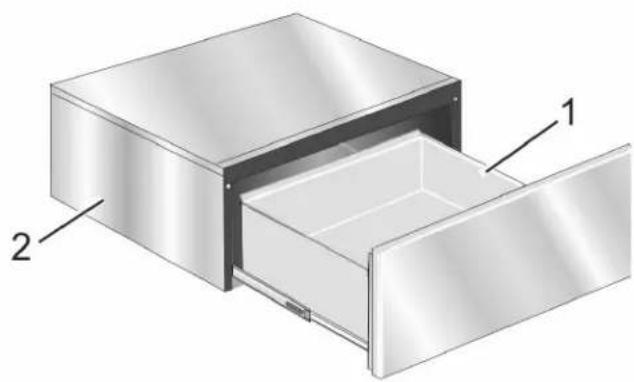
Storage Drawer Overview
natural_image
3D diagram of a stainless steel drawer with labeled components (no text or symbols present)1 Drawer
2 Storage Drawer Housing
Push to Open Feature (PTO)
The storage drawer has a Push to Open (PTO) feature. Open the drawer fully by lightly pushing the drawer front in 4 to 5 mm. The drawer will automatically open about 4 to 5 inches and can then be pulled open.
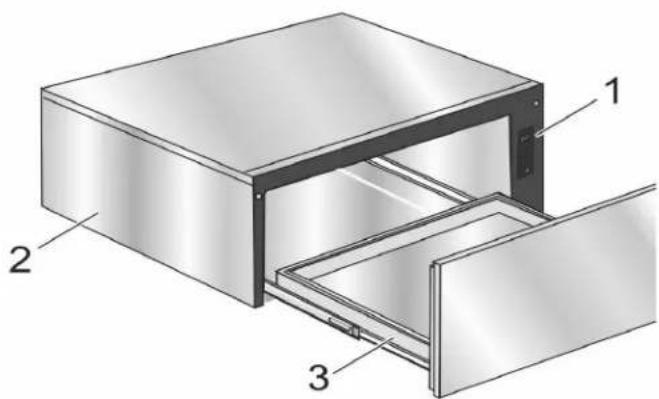
Warming Drawer Overview
text_image
Technical diagram of a multi-compartment storage unit with labeled components 1, 2, and 31 Control Panel
2 Warming Drawer Housing
3 Drawer
Push to Open Feature (PTO)
The warming drawer has a Push to Open (PTO) feature. Open the drawer fully by lightly pushing the drawer front in 4 to 5 mm. The drawer will automatically open about 4 to 5 inches and can then be pulled fully open.
Control Panel
The control panel has several touchpads that respond to light pressure. Touch the center of the touchpad to activate it. The temperature pads control the drawer bottom temperature.
The control panel emits a beep when an entry is made. The warming timer beeps when the specified amount of time has elapsed.
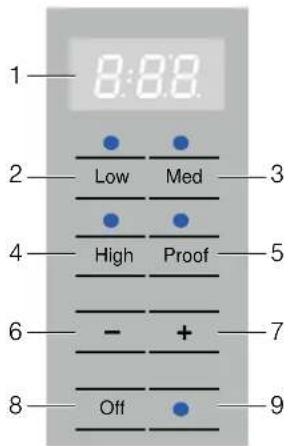
text_image
1—8:88 2—Low Med 3 4—High Proof 5 6—- + 7 8—Off 9Location Touch Button Function
| 1 Display Displays the current drawertemperature. | |
| 2 LOW 140°F | |
| 3 MED 165°F | |
| 4 HIGH 190°F | |
| 5 PROOF 100°F | |
| 6 - Press to decrease time. | |
| 7 + Press to increase time. | |
| 8 ON/OFF Switches the warming | |
| drawer on and off. | |
| 9●Signal light | Indicates which setting is inuse. |
Operation
The warming drawer will keep hot, cooked foods at serving temperature. Always start with hot food. DO NOT use to heat cold food other than proofing yeast dough, crisping crackers, chips, dry cereal, warming breads and biscuits, or warming dishes or plates.
The Warming Drawer has a push-to-open feature. Push in on the front of the drawer to cause the drawer to open.
Food Safety

CAUTION
To maintain food safety, follow these guidelines:
Notes
- DO NOT use the warming drawer to heat cold food (exception: it is safe to use the drawer to crisp crackers, chips or dry cereal and to warm plates.)
- Be sure to maintain proper food temperature. The USDA recommends holding hot food at 140^ F or warmer.
- DO NOT warm food for longer than one hour.
Setting the Warming Drawer
Press ON | OFF to turn the warming drawer on. The warming timer can be set for any increment of 5 minutes. The minimum time is 5 minutes and the maximum time is 5 hours.
Note: The warming timer default is 1 hour.
Changing the Warming Timer
Use the + and - pads to change the warming timer.
Time elapsed
When the time is elapsed, the control panel beeps and the drawer automatically turns off.
Turning the Warming Drawer Off
Press ON | OFF to turn the warming drawer off.
Sabbath Mode
The Sabbath feature enables those of particular faiths to use their warming drawer on the Sabbath.
- The warming drawer is set to run for 74 hours before automatically turning off.
- While operating in Sabbath Mode, the display will show SAb.
- The warming drawer time and temperature cannot be changed once the Sabbath Mode is set.
- Press ON/OFF at any time during Sabbath Mode to end the mode and turn off the appliance.
Setting the Sabbath Mode Feature
Press MED for 5 seconds.
Once the Sabbath Mode is set, all buttons are disabled except the ON|OFF button, used to cancel the mode.
Note: Only the MED temperature can be used while in the Sabbath Mode.
Preheating the Warming Drawer
Preheat the warming drawer when warming food. For best results, preheat for the following times:
Setting Preheat Time
| LOW 10 minutes |
| MED 15 minutes |
| HIGH 20 minutes |
| PROOF No preheating necessary |
Warming Food
- Press ON I OFF to turn on the warming drawer.
- Press the button for the desired temperature.
- Preheat warming drawer.
- Set the timer if desired.
- Place cooked, hot food in the drawer and push to close.
It is okay to leave food in the cookware it was prepared. Alternatively, you can transfer food to a heat-safe serving dish before placing it in the warming drawer.
Aluminum foil or lid may be used to cover food.
Warming Empty Serving Bowls and Plates
- Use only heat-safe dishes.
- Warm on low setting for cooking containers.
- Check dish temperature during warming period.
-
Place empty plates or dishes in a cold warming drawer. Do not preheat drawer prior to placing dishes.
-
Press Low.
- Set the warming timer.
Proofing Dough
Place dough in desired dish in a cold warming drawer and lightly oil top of dough. Loosely cover with cloth.
- Press PROOF.
- Set the warming timer.
- Check dough height. Add time as needed.
Crisping Stale Items
Place food in low sided dishes or pans.
- Press LOW.
- Preheat for 5 minutes, then place dish in drawer.
- Set the warming timer.
- Check crispness after 45 minutes. Add time as needed.
Warming Drawer Charts
| Food Category Control Setting | Cover |
| Bacon High No | |
| Beef: medium rare Low No | |
| Beef: medium - well done Medium No | |
| Bread, quick: hard rolls, soft rolls, coffee cakes, biscuits, and toast | Medium Yes |
| Casserole Medium Yes | |
| Cereal, cooked Medium Yes | |
| Crisping: stale item Low No | |
| Dough (to proof) Proof Yes | |
| Eggs High Yes | |
| Fried Foods High No |
Note: : Preheat all cookware prior to inserting into the warming drawer. If the cookware has previously been used to prepare a dish, then no preheating is necessary.
| Food Category Control | Cover | |
| Setting | ||
| Gravy, cream sauce Medium Yes | ||
| Meats: ham, lamb and pork | Medium Yes | |
| Pies | Medium No | |
| Pizza High No | ||
| Potatoes, baked | High Yes | |
| Potatoes, mashed | Medium Yes | |
| Poultry, roasted | Medium Yes | |
| Seafood | Medium Yes | |
| Vegetables | Medium Yes | |
| Waffle / Pancakes | High No | |
| Plates | Low No | |
| Plate of food | Medium Yes | |
| Note: : Preheat all cookware prior to inserting into the warming drawer. If the cookware has previously been used to prepare a dish, then no preheating is necessary. | ||
Cleaning and Maintenance
With good care and cleaning, your appliance will retain its appearance and remain fully functional for a long time to come. How to correctly care for and clean your warming drawer or storage drawer is detailed below.
Cleaning Chart
| Part | Recommendations |
| Drawer Interior (polished stainless steel) | Use dish detergent. Wash, rinse well and dry. For hard water spots or scale, use white vinegar. Apply with a sponge or cloth, rinse and dry. |
| Painted Surfaces | Use hot soapy water or mild cleaners such as Fantastik® or Formula 409®. Wash, rinse well and dry.Do not use abrasive cleaning agents, steel wool pads and oven cleaners. |
| Drawer Exterior Frame (brushed stainless steel) | Always wipe or rub in the direction of the grain. Clean with a soapy sponge, then rinse and dry, or wipe with Fantastik® or Formula 409® sprayed on a paper towel. Protect and polish with Stainless Steel Magic® and a soft cloth. Remove water spots with a cloth dampened with white vinegar. Use Bar Keeper's Friend® to remove heat discoloration. |
| Control Panel (warming drawer only) | Clean with hot soapy water or apply Fantastik® or Formula 409® to a clean sponge or paper towel and wipe clean.Do not use abrasive cleaners and scrubbing pads. |
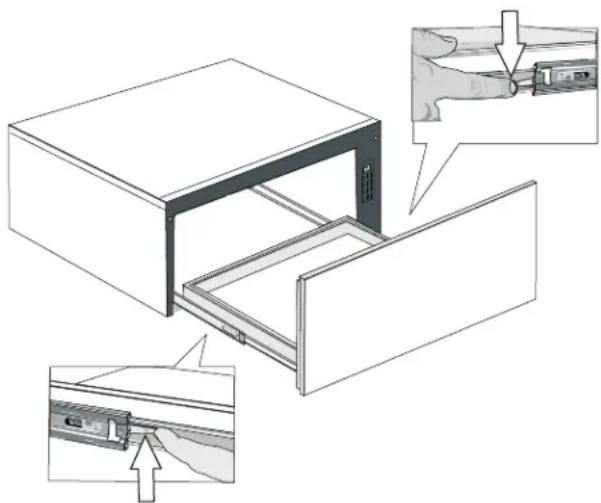
Removing the Drawer
CAUTION
To prevent burns, do not remove the drawer while hot. Be sure the drawer is empty before removing.
natural_image
Technical illustration of a door frame assembly with hand tool and close-up views (no text or symbols)- For WD30W warming drawer, pull drawer to fully open position.
-
For WD30WC warming drawer and SD30WC and SDS30WC storage drawers, slightly push drawer to the fully open position.
-
Press down on right drawer clip.
- Lift up on left drawer clip.
- Firmly pull the drawer straight out. Retract the cabinet rails while the drawer is removed.
If additional issues remain at this point, contact Customer Service.
Replacing the Drawer
- Be sure cabinet rails are pushed inside the cabinet.
- Align the drawer rails with the cabinet rails.
- Firmly push the drawer straight into the cabinet until the drawer clicks in to place.
- Open and close the drawer to test operation.
Note: If the drawer will not close, verify the rail clips are properly positioned.
Service
If the warming drawer elements or signal lights do not turn on, check the power source to see if the circuit breaker is tripped.
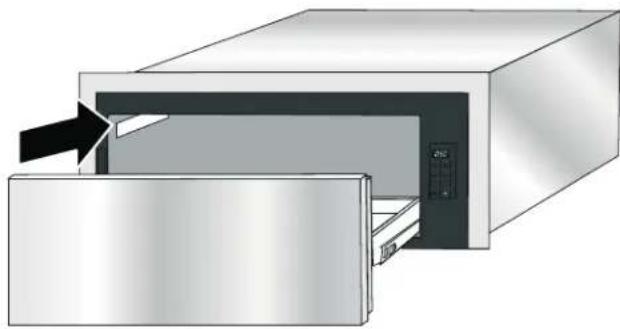
Rating Label-WD30W AND WD30WC
Refer to the rating label on the appliance when requesting service or when contacting Customer Service for assistance. The rating label is visible on the left of the drawer casing.
natural_image
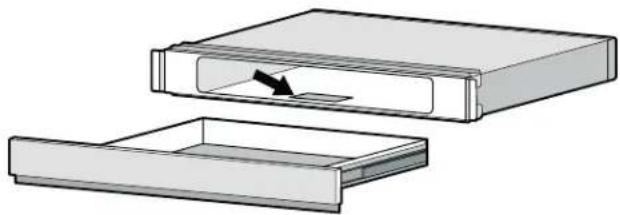
Diagram of a microwave oven with a door and internal panel, showing airflow direction (no text or symbols)Data Plate-SDS30WC and SD30WC
Refer to the data plate on the storage drawer when requesting service or when contacting Customer Service for assistance. The data plate is visible on the bottom of the drawer casing for the SDS30WC storage drawer. It will be necessary to remove the drawer to view it.
natural_image
Diagram showing two views of a device with an arrow indicating direction, no text or symbols presentSDS30WC Data Plate Location
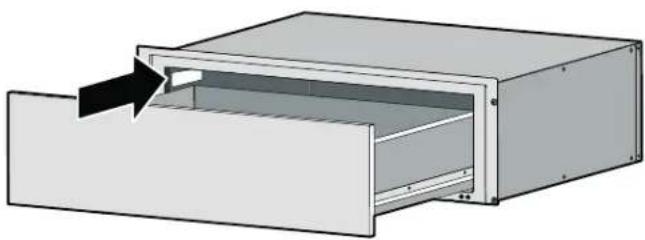
The data plate for the SD30WC storage drawer is located on the left inside of the housing.
natural_image
3D diagram of a rectangular device with an arrow pointing to a slot, showing internal structure without any text or symbols.SD30WC Data Plate Location
Model Number and FD Number
The model number and the FD number of your appliance are found on the data plate or rating label. Make a note of these numbers in the space below to save time in the event your appliance requires service.
Model # FD #
Thermador Customer Support 800-735-4328
Keep your invoice or escrow papers for warranty validation if service is needed.
STATEMENT OF LIMITED PRODUCT WARRANTY
What this Warranty Covers & Who it Applies to
The limited warranty provided by BSH Home Appliances ("Thermador") in this Statement of Limited Product Warranty applies only to the Thermador appliance sold to you ("Product"), provided that the Product was purchased:
- For your normal, household (non-commercial) use, and has in fact at all times only been used for normal household purposes.
- New at retail (not a display, "as is", or previously returned model), and not for resale, or commercial use.
- Within the United States or Canada, and has at all times remained within the country of original purchase.
The warranties stated herein apply to the original purchaser of the product warranted herein and to each succeeding owner of the product purchased for ordinary home use during the term of the warranty.
Please make sure to return your registration card; while not necessary to effectuate warranty coverage, it is the best way for Thermador to notify you in the unlikely event of a safety notice or product recall.
How Long the Warranty Lasts
Thermador warrants that the Product is free from defects in materials and workmanship for a period of seven hundred and thirty (730) days from the date of the original purchase. The foregoing timeline begins to run upon the date of the original purchase, and shall not be stalled, tolled, extended, or suspended, for any reason whatsoever.
This Product is also warranted to be free from cosmetic defects in material and workmanship (such as scratches of stainless steel, paint/porcelain blemishes, chip, dents, or other damage to the finish) of the Product, for a period of sixty (60) days from the date of purchase or closing date for new construction. This cosmetic warranty excludes slight color variations due to inherent differences in painted and porcelain parts, as well as differences caused by kitchen lighting, product location, or other similar factors. This cosmetic warranty specifically excludes any display, floor, "As Is", or "B" stock appliances.
Repair/Replace as Your Exclusive Remedy
During this warranty period, Thermador or one of its authorized service providers will repair your Product without charge to you (subject to certain limitations stated herein) if your Product proves to have been manufactured with a defect in materials or workmanship. If reasonable attempts to repair the Product have been made without success, then Thermador will replace your Product (upgraded models may be available to you, in Thermador's sole discretion, for an additional charge). Nothing in this warranty requires damaged or defective parts to be replaced with parts of a different type or design than the original part. All removed parts and components shall become the property of Thermador at its sole option. All replaced and/or repaired parts shall assume the identity of the original part for purposes of this warranty and this warranty shall not be extended with respect to such parts. Thermador's sole liability and responsibility hereunder is to repair manufacturer-defective Product only, using a Thermador-authorized service provider during normal business hours. For safety and property damage concerns, Thermador highly recommends that you do not attempt to repair the Product yourself, or use a non-authorized service provider; Thermador will have no responsibility or liability for repairs or work performed by a non-authorized service provider. Authorized service providers are those persons or companies that have been specially trained on Thermador products, and who possess, in Thermador's opinion, a superior reputation for customer service and technical ability (note that they are independent entities and are not agents, partners, affiliates or representatives of Thermador).
Notwithstanding the foregoing, Thermador will not incur any liability, or have responsibility, for the Product if it is located in a remote area (more than 100 miles from an authorized service provider) or is reasonably inaccessible, hazardous, threatening, or treacherous locale, surroundings, or environment; in any such event, if you request, Thermador would still pay for labor and parts and ship the parts to the nearest authorized service provider, but you would still be fully liable and responsible for any travel time or other special charges by the service company, assuming they agree to make the service call.
Out of Warranty Product
Thermador is under no obligation, at law or otherwise, to provide you with any concessions, including repairs, prorates, or Product replacement, once this warranty has expired.
Warranty Exclusions
The warranty coverage described herein excludes all defects or damage that are not the direct fault of Thermador, including without limitation, one or more of the following:
- Use of the Product in anything other than its normal, customary and intended manner (including without limitation, any form of commercial use, use or storage of an indoor product outdoors, use of the Product in conjunction with air or water-going vessels).
- Any party's willful misconduct, negligence, misuse, abuse, accidents, neglect, improper operation, failure to maintain, improper or negligent installation, tampering, failure to follow operating instructions, mishandling, unauthorized service (including self performed "fixing" or exploration of the appliance's internal workings).
- Adjustment, alteration or modification of any kind.
- A failure to comply with any applicable state, local, city, or county electrical, plumbing and/or building
codes, regulations, or laws, including failure to install the product in strict conformity with local fire and building codes and regulations.
- Ordinary wear and tear, spills of food, liquid, grease accumulations, or other substances that accumulate on, in, or around the Product.
- Any external, elemental and/or environmental forces and factors, including without limitation, rain, wind, sand, floods, fires, mud slides, freezing temperatures, excessive moisture or extended exposure to humidity, lightning, power surges, structural failures surrounding the appliance, and acts of God.
In no event shall Thermador have any liability or responsibility whatsoever for damage to surrounding property, including cabinetry, floors, ceilings, and other structures or objects around the Product. Also excluded from this warranty are Products, on which the serial numbers have been altered, defaced, or removed; service visits to teach you how to use the Product, or visits where there is nothing wrong with the Product; correction of installation problems (you are solely responsible for any structure and setting for the Product, including all electrical, plumbing or other connecting facilities, for proper foundation/flooring, and for any alterations including without limitation cabinetry, walls, floors, shelving, etc.); and resetting of breakers or fuses. TO THE EXTENT ALLOWED BY LAW, THIS WARRANTY SETS OUT YOUR EXCLUSIVE REMEDIES WITH RESPECT TO PRODUCT, WHETHER THE CLAIM ARISES IN CONTRACT OR TORT (INCLUDING STRICT LIABILITY, OR NEGLIGENCE) OR OTHERWISE. THIS WARRANTY
IS IN LIEU OF ALL OTHER WARRANTIES, WHETHER EXPRESS OR IMPLIED. ANY WARRANTY IMPLIED BY LAW, WHETHER FOR MERCHANTABILITY OR FITNESS FOR A PARTICULAR PURPOSE, OR OTHERWISE, SHALL BE EFFECTIVE ONLY FOR THE PERIOD THAT THIS EXPRESS LIMITED WARRANTY IS EFFECTIVE. IN NO EVENT WILL THE MANUFACTURER BE LIABLE FOR CONSEQUENTIAL, SPECIAL, INCIDENTAL, INDIRECT, "BUSINESS LOSS", AND/OR PUNITIVE DAMAGES, LOSSES, OR EXPENSES, INCLUDING WITHOUT LIMITATION TIME AWAY FROM WORK, HOTELS AND/OR RESTAURANT MEALS, REMODELLING EXPENSES IN EXCESS OF DIRECT DAMAGES WHICH ARE DEFINITIVELY CAUSED EXCLUSIVELY BY Thermador, OR OTHERWISE. SOME STATES DO NOT ALLOW THE EXCLUSION OR LIMITATION OF INCIDENTAL OR CONSEQUENTIAL DAMAGES, AND SOME STATES DO NOT ALLOW LIMITATIONS ON HOW LONG AN IMPLIED WARRANTY LASTS, SO THE ABOVE EXCLUSIONS OR LIMITATIONS MAY NOT APPLY TO YOU. THIS WARRANTY GIVES YOU SPECIFIC LEGAL RIGHTS, AND YOU MAY ALSO HAVE OTHER RIGHTS WHICH VARY FROM STATE TO STATE.
No attempt to alter, modify or amend this warranty shall be effective unless authorized in writing by an officer of BSH.
Obtaining Warranty Service:
To obtain warranty service for your Product, you should contact Thermador Customer Service at 1-800-735-4328 to schedule a repair.
THERMADOR® Support
Service
We realize that you have made a considerable investment in your kitchen. We are dedicated to supporting you and your appliance so that you have many years of creative cooking.
Please do not hesitate to contact our STAR® Customer Support Department if you have any questions or in the unlikely event that your THERMADOR® appliance needs service. Our service team is ready to assist you.
USA
800-735-4328
www.thermador.com/support
Canada
800-735-4328
www.thermador.ca
Parts and Accessories
Parts, filters, descalers, stainless steel cleaners and more can be purchased in the THERMADOR® eShop or by phone.
USA
http://store.thermador.com/us
Canada
- If you live in any of the Atlantic provinces, Ontario, or Québec contact:
Marcone
1.800.287.1627
- If you live in any of the Territories, Manitoba, Saskatchewan, Alberta, or British Columbia contact:
Reliable Parts
1.800.663.6060
Table de MATIÈRES
natural_image
Illustration of a stainless steel drawer with labeled components (no text or symbols present)1 Tiroir