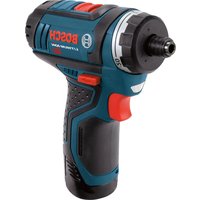
PS21 - Drill BOSCH - Free user manual and instructions
Find the device manual for free PS21 BOSCH in PDF.


User questions about PS21 BOSCH
0 question about this device. Answer the ones you know or ask your own.
Ask a new question about this device
Download the instructions for your Drill in PDF format for free! Find your manual PS21 - BOSCH and take your electronic device back in hand. On this page are published all the documents necessary for the use of your device. PS21 by BOSCH.
USER MANUAL PS21 BOSCH
IMPORTANT: IMPORTANT : IMPORTANTE: Read Before Using Lire avant usage Leer antes de usar

natural_image
Icon of a person reading a book inside a circle (no text or symbols)Operating/Safety Instructions Consignes de fonctionnement/sécurité Instrucciones de funcionamiento y seguridad
PS21
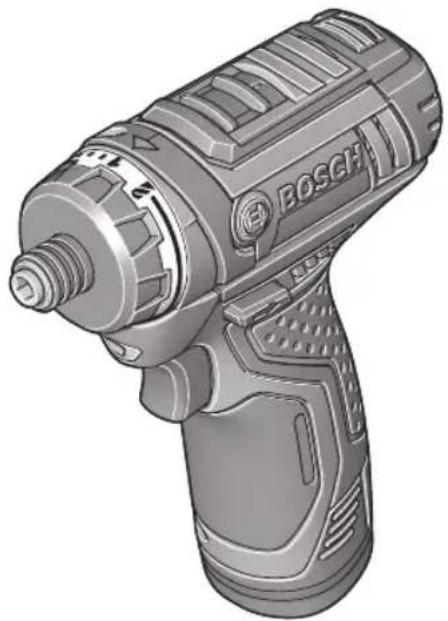
natural_image
Illustration of a Bosch electric drill with visible screw and handle (no text or symbols)
BOSCH
Call Toll Free for Consumer Information & Service Locations
General Power Tool Safety Warnings
WARNING
Read all safety warnings and all instructions. Failure to follow the warnings and instructions may result in electric shock, fire and/or serious injury.
SAVE ALL WARNINGS AND INSTRUCTIONS FOR FUTURE REFERENCE
The term “power tool” in the warnings refers to your mains-operated (corded) power tool or battery-operated (cordless) power tool.
Work area safety
Keep work area clean and well lit. Cluttered or dark areas invite accidents.
Do not operate power tools in explosive atmospheres, such as in the presence of flammable liquids, gases or dust. Power tools create sparks which may ignite the dust or fumes.
Keep children and bystanders away while operating a power tool. Distractions can cause you to lose control.
Electrical safety
Power tool plugs must match the outlet. Never modify the plug in any way. Do not use any adapter plugs with earthed (grounded) power tools. Unmodified plugs and matching outlets will reduce risk of electric shock.
Avoid body contact with earthed or grounded surfaces such as pipes, radiators, ranges and refrigerators. There is an increased risk of electric shock if your body is earthed or grounded.
Do not expose power tools to rain or wet conditions. Water entering a power tool will increase the risk of electric shock.
Do not abuse the cord. Never use the cord for carrying, pulling or unplugging the power tool. Keep cord away from heat, oil, sharp edges or moving parts. Damaged or entangled cords increase the risk of electric shock.
When operating a power tool outdoors, use an extension cord suitable for outdoor use. Use of a cord suitable for outdoor use reduces the risk of electric shock.
If operating a power tool in a damp location is unavoidable, use a Ground Fault Circuit Interrupter (GFCI) protected supply. Use of an GFCI reduces the risk of electric shock.
Personal safety
Stay alert, watch what you are doing and use common sense when operating a
power tool. Do not use a power tool while you are tired or under the influence of drugs, alcohol or medication. A moment of inattention while operating power tools may result in serious personal injury.
Use personal protective equipment. Always wear eye protection. Protective equipment such as dust mask, non-skid safety shoes, hard hat, or hearing protection used for appropriate conditions will reduce personal injuries.
Prevent unintentional starting. Ensure the switch is in the off-position before connecting to power source and / or battery pack, picking up or carrying the tool.
Carrying power tools with your finger on the switch or energizing power tools that have the switch on invites accidents.
Remove any adjusting key or wrench before turning the power tool on. A wrench or a key left attached to a rotating part of the power tool may result in personal injury.
Do not overreach. Keep proper footing and balance at all times. This enables better control of the power tool in unexpected situations.
Dress properly. Do not wear loose clothing or jewelry. Keep your hair, clothing and gloves away from moving parts. Loose clothes, jewelry or long hair can be caught in moving parts.
If devices are provided for the connection of dust extraction and collection facilities, ensure these are connected and properly used. Use of dust collection can reduce dust-related hazards.
Power tool use and care
Do not force the power tool. Use the correct power tool for your application. The correct power tool will do the job better and safer at the rate for which it was designed.
Do not use the power tool if the switch does not turn it on and off. Any power tool that cannot be controlled with the switch is dangerous and must be repaired.
Disconnect the plug from the power source and/or the battery pack from the power tool before making any adjustments, changing accessories, or storing power tools. Such preventive safety measures reduce the risk of starting the power tool accidentally.
Store idle power tools out of the reach of children and do not allow persons unfamiliar with the power tool or these instructions to operate the power tool. Power tools are dangerous in the hands of untrained users.
Maintain power tools. Check for misalignmen or binding of moving parts, breakage of parts and any other condition that may affect the power tool's operation. If damaged, have the power tool repaired before use. Many accidents are caused by poorly maintained power tools.
Keep cutting tools sharp and clean. Properly maintained cutting tools with sharp cutting edges are less likely to bind and are easier to control.
Use the power tool, accessories and tool bits etc. in accordance with these instructions, taking into account the working conditions and the work to be performed. Use of the power tool for operations different from those intended could result in a hazardous situation.
Battery tool use and care
Recharge only with the charger specified by the manufacturer. A charger that is suitable for one type of battery pack may create a risk of fire when used with another battery pack.
Use power tools only with specifically designated battery packs. Use of any other battery packs may create a risk of injury and fire.
When battery pack is not in use, keep it away from other metal objects like paper clips, coins, keys, nails, screws, or other small metal objects that can make a connection from one terminal to another.
Shorting the battery terminals together may cause burns or a fire.
Under abusive conditions, liquid may be ejected from the battery, avoid contact. If contact accidentally occurs, flush with water. If liquid contacts eyes, additionally seek medical help. Liquid ejected from the battery may cause irritation or burns.
Service
Have your power tool serviced by a qualified repair person using only identical replacement parts. This will ensure that the safety of the power tool is maintained.
Safety Rules for Cordless Drill/Drivers
Use auxiliary handle(s) if supplied with the tool. Loss of control can cause personal injury.
Hold power tool by insulated gripping surfaces, when performing an operation where the cutting accessory may contact hidden wiring. Cutting accessory contacting a "live" wire may make exposed metal parts of the power tool "live" and could give the operator an electric shock.
Use clamps or another practical way to secure and support the workpiece to a stable platform. Holding the work by hand or against your body leaves it unstable and may lead to loss of control.
Do not drill, fasten or break into existing walls or other blind areas where electrical wiring may exist. If this situation is unavoidable, disconnect all fuses or circuit breakers feeding this worksite.
Always hold the tool with both hands. If the bit jams two hands will give you
maximum control over torque reaction or kickback.
Always wear safety goggles or eye protection when using this tool. Use a dust mask or respirator for applications which generate dust.
Secure the material being drilled. Never hold it in your hand or across legs.
Unstable support can cause the drill bit to bind causing loss of control and injury.
Disconnect battery pack from tool or place the switch in the locked or off position before making any assembly, adjustments or changing accessories.
Such preventive safety measures reduce the risk of starting the tool accidentally.
Position yourself to avoid being caught between the tool or side handle and walls or posts. Should the bit become bound or jammed in the work, the reaction torque of the tool could crush your hand or leg.
If the bit becomes bound in the workpiece, release the trigger immediately, reverse the direction of rotation and slowly squeeze the trigger to back out the bit. Be ready for a strong reaction torque. The drill body will tend to twist in the opposite direction as the drill bit is rotating.
Do not grasp the tool or place your hands too close to the spinning chuck or drill bit. Your hand may be lacerated.
When installing a bit, insert the shank of the bit well within the chuck. If the bit is not inserted deep enough, the grip of the chuck over the bit is reduced and the loss of control is increased. After bit insertion, pull on bit to ensure it is locked. Do not use dull or damaged bits and accessories. Dull or damaged bits have a greater tendency to bind in the workpiece.
When removing the bit from the tool avoid contact with skin and use proper protective gloves when grasping the bit or accessory. Accessories may be hot after prolonged use.
Check to see that keys and adjusting wrenches are removed from the drill before switching the tool "ON". Keys or wrenches can fly away at high velocity sstriking you or a bystander.
Do not run the drill while carrying it at your side. A spinning drill bit could become entangled with clothing and injury may result.
Additional Safety Warnings
GFCI and personal protection devices like electrician's rubber gloves and footwear will further enhance your personal safety.
Do not use AC only rated tools with a DC power supply. While the tool may appear to work, the electrical components of the AC rated tool are likely to fail and create a hazard to the operator.
Keep handles dry, clean and free from oil and grease. Slippery hands cannot safely control the power tool.
Develop a periodic maintenance schedule for your tool. When cleaning a tool be careful not to disassemble any portion of the tool since internal wires may be misplaced or pinched or safety guard return springs may be improperly mounted. Certain cleaning agents such as gasoline, carbon tetrachloride, ammonia, etc. may damage plastic parts.
Ensure the switch is in the off position before inserting battery pack. Inserting the battery pack into power tools that have the switch on invites accidents.
WARNING
Some dust created by power sanding, sawing,
grinding, drilling, and other construction activities contains chemicals known to cause cancer, birth defects or other reproductive harm. Some examples of these chemicals are:
- Lead from lead-based paints,
- Crystalline silica from bricks and cement and other masonry products, and
- Arsenic and chromium from chemically-treated lumber.
Your risk from these exposures varies, depending on how often you do this type of work. To reduce your exposure to these chemicals: work in a well ventilated area, and work with approved safety equipment, such as those dust masks that are specially designed to filter out microscopic particles.
Battery/Charger
WARNING
Before using battery charger, read all
instructions and cautionary markings on (1) battery charger, (2) battery pack, and (3) product using battery.
Use only the charger which accompanied your product or direct replacement as listed in the catalog or this manual. Do not substitute any other charger. Use only Bosch approved chargers with your product. See Functional Description and Specifications.
Do not disassemble charger or operate the charger if it Nhas Nreceived Na Nsharp Nblow been dropped or otherwise damaged in any way. NReplace Ndamaged Ncord Nor Nplugs immediately. Incorrect reassembly or damage may result in electric shock or fire.
Do Nnot Nrecharge Nbattery Nin damp or Nw environment. Do not expose charger to rain or Nsnow. NIf Nbattery Ncase Nis Ncracked N otherwise Ndamaged, Ndo Nnot Ninsert Nintendo charger.NBattery short or fire may result.
Charge only Bosch approved rechargeable batteries. NSee Functional Description and Specifications. Other types of batteries may burst causing personal injury and damage.
Charge battery pack in temperatures above +32 Ndegrees F N(0 Ndegrees NC) Nand belo +113 degrees F (45 degrees C). Store tool and Nbattery Npack Nin Nlocations Nwhere temperatures will not exceed 120 degrees F (49 degrees NC).NThis is important to prevent serious damage to the battery cells.
Battery leakage Nmay Noccur under extreme usage Nor Ntemperature Nconditions. NAvoid contact Nwith Nskin and Neyes.NThe battery liquid is caustic and could cause chemical burns to tissues. If liquid comes in contact with skin, wash quickly with soap and water. If the liquid contacts your eyes, flush them with water for a minimum of 10 minutes and seek medical attention.
Place Ncharger Non Nflat Nnon-flammable surfaces Nand Naway Nfrom Nflammable materials Nwhen Nre-charging Nbattery Npack.
The charger and battery pack heat during charging. Carpeting and other heat insulating surfaces block proper air circulation which may cause overheating of the charger and battery pack. If smoke or melting of the case are observed unplug the charger immediately and do not use the battery pack or charger.
Use Nof Nan Nattachment Nnot Nrecommended or sold Nby Bosch Nmay result Nin Na risk Nof Nfire, Nelectric Nshock Nor Ninjury Nto persons.
Battery Care

WARNING
When Nbatteries Nare Nnot Ni tool or charger, keep them
away Nfrom Nmetal Nobjects.NFor example, protect terminals from shorting DO NOT place batteries in a tool box or pocket with
inails, screws, keys, etc. Fire or injury may result.
DO NNOT NPUT NBATTERIES NINTO NFIRE NOR EXPOSE NTO NHIGH NHEAT. NThey may explode.
Battery Disposal

WARNING
Do Nnot Nattempt Nto Ndisassemble Nthe Nbattery Nor
remove Nany Ncom ponent Nprojecting Nfrom the Nbattery Nterminals.NFire or injury may result. Prior to disposal, protect exposed terminals with heavy insulating tape to prevent shorting.
LITHIUM-ION BATTERIES
If equipped with a lithium-ion battery, the battery must be collected, recycled or disposed of in an environ mentally sound manner.

"The EPA certified RBRC Battery Recycling Seal on the lithium-ion (Li-ion) battery indicates Robert Bosch Tool Corporation is voluntarily participating in an industry
program to collect and recycle these batteries at the end of their useful life, when taken out of service in the United States or Canada. The RBRC program provides a convenient alternative to placing used Li-ion batteries into the trash or the munici pal waste stream, which may be illegal in your area.
Please call 1-800-8-BATTERY for information on Li-ion battery recycling and disposal bans/restrictions in your area, or return your batteries to a Skil/Bosch/Dremel Service Center for recycling. Robert Bosch Tool Corporation's involvement in this program is part of our commitment to preserving our environment and conserving our natural resources."
Symbols
IMPORTANT: Some of the following symbols may be used on your tool. Please study them and learn their meaning. Proper interpretation of these symbols will allow you to operate the tool better and safer.
| Symbol | Name Designation/Explanation | |
| V Volts | Voltage (potential) | |
| A Amperes Current | ||
| Hz Hertz | Frequency (cycles per second) | |
| W Watt | Power | |
| kg Kilograms Weight | ||
| min Minutes | Time | |
| S | Seconds | Time |
| [06DX] | Diameter | Size of drill bits, grinding wheels, etc. |
| [0284] | No load speed | Rotational speed, at no load |
 | Rated speed | Maximum attainable speed |
.. [4YW7] [4YW7] | Revolutions or reciprocation per minute | Revolutions, strokes, surface speed, orbits etc. per minute |
| - [24Y7] | Off position | Zero speed, zero torque... |
1, 2, 3, ...  | Selector settings | Speed, torque or position settings. Higher number means greater speed |
1, II III  | Infinitely variable selector with off | Speed is increasing from 0 setting |
| [T6V3] | Arrow | Action in the direction of arrow |
 | Alternating current | Type or a characteristic of current |
 | Direct current | Type or a characteristic of current |
 | Alternating or direct current | Type or a characteristic of current |
 | Class II construction | Designates Double Insulated Construction tools. |
 | ||
| [57Y1] | Earthing terminal | Grounding terminal |
 | Warning symbol | Alerts user to warning messages |
 | Li-ion RBRC seal | Designates Li-ion battery recycling program |
 | Ni-Cad RBRC seal | Designates Ni-Cad battery recycling program |
 | Read manual symbol | Alerts user to read manual |
 | Wear eye protection symbol | Alerts user to wear eye protection |
Symbols (continued)
IMPORTANT: Some of the following symbols may be used on your tool. Please study them and learn their meaning. Proper interpretation of these symbols will allow you to operate the tool better and safer.

This symbol designates that this tool is listed by Underwriters Laboratories.

This symbol designates that this tool is recognized by Underwriters Laboratories.

This symbol designates that this tool is listed by Underwriters Laboratories, to United States and Canadian Standards.

This symbol designates that this tool is listed by the Canadian Standards Association.

This symbol designates that this tool is listed by the Canadian Standards Association, to United States and Canadian Standards.

This symbol designates that this tool is listed by the Intertek Testing Services, to United States and Canadian Standards.

This symbol designates that this tool complies to NOM Mexican Standards.
Functional Description and Specifications
WARNING
Disconnect battery pack from tool or place the switch in the locked or off position before making any assembly, adjustments or changing
accessories. Such preventive safety measures reduce the risk of starting the tool accidentally.
Cordless Drill/Driver
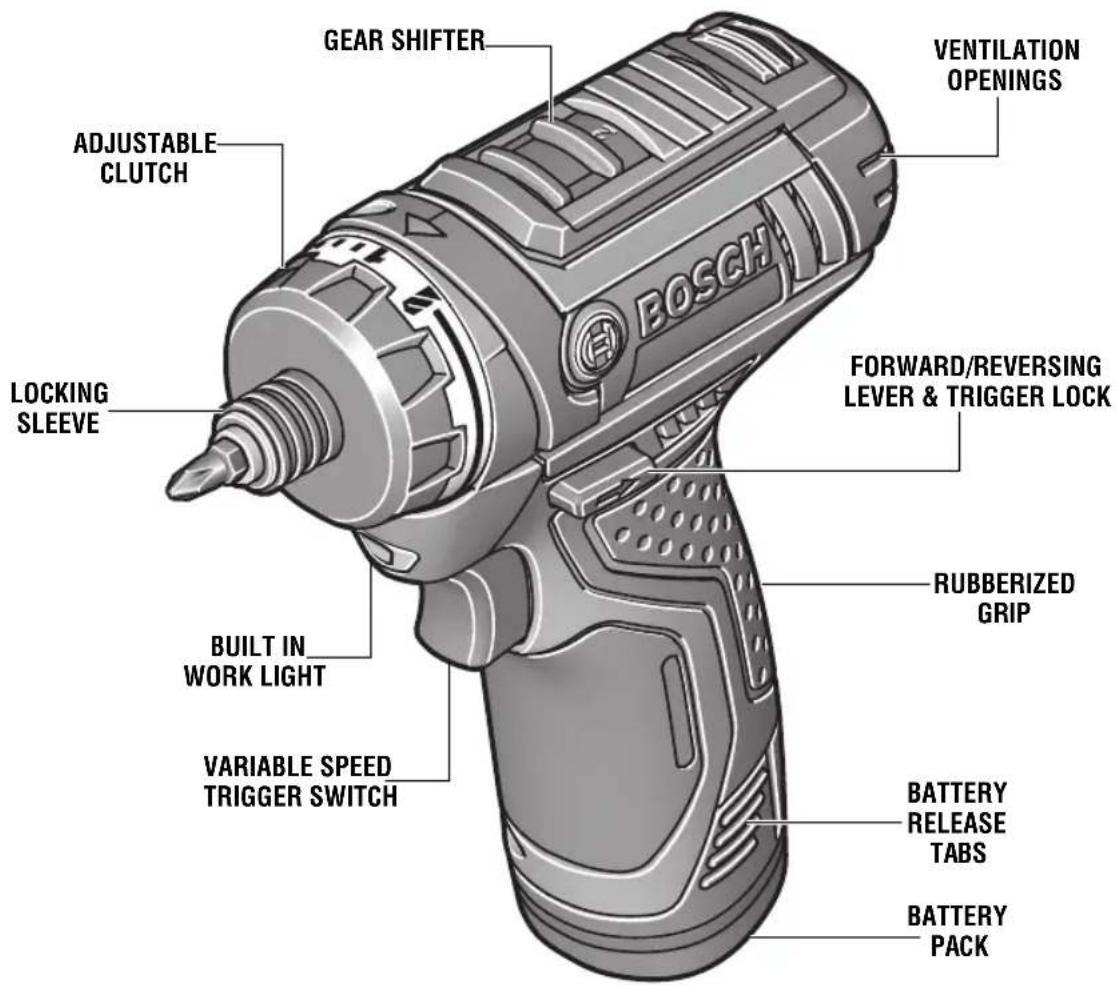
FIG. 1
text_image
GEAR SHIFTER ADJUSTABLE CLUTCH LOCKING SLEEVE BUILT IN WORK LIGHT VARIABLE SPEED TRIGGER SWITCH GEAR SHIFTER VENTILATION OPENINGS FORWARD/REVERSING LEVER & TRIGGER LOCK RUBBERIZED GRIP BATTERY RELEASE TABS BATTERY PACKModel number PS21
Voltage rating 10.8V/12V MAX ==
No load speed 1 n 0-350/min
No load speed 2 n 0-1,300/min
Maximum Capacities
Chuck size 1/4" Hex-shank
Screw sizes 9/32"
Mild metal 3/8"
Wood 3/4"
Charge time BC330 (1 Hour) BC430 (30 minutes)
Battery pack BAT411, BAT412 &
BAT413
Charger BC330 & BC430
Voltage rating 120 V 60 Hz \~
Assembly
The Bosch model PS21 Cordless Drill/Driver has a chuck that accepts any 1/4" hex bit. The low RPM capability of this model is not a deficiency. On the contrary, low speed means high torque and high torque is a definite plus for efficient drilling and driving. The low speed also provides more control to prevent stripout of the screw and damage to the work surface.
INSERTING AND REMOVING ACCESSORIES
WARNING
To avoid loss of control, ensure bit is locked in chuck
by pulling on bit after it has been inserted.
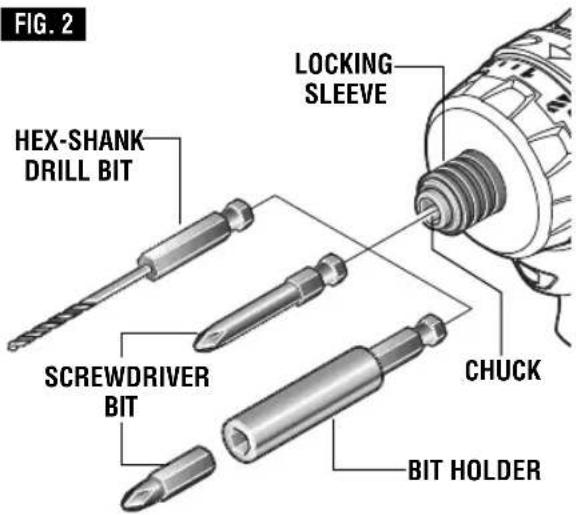
Your tool is equipped with a quick release chuck. To insert an accessory, simply pull locking sleeve forward, insert desired accessory into chuck until the locking sleeve retracts automatically, locking the bit (Fig. 2).
To remove an accessory, pull locking sleeve forward and simply remove it from the chuck.
text_image
FIG. 2 LOCKING SLEEVE HEX-SHANK DRILL BIT SCREWDRIVER BIT CHUCK BIT HOLDEROne inch bits should only be used along with a bit holder as shown in figure 2.
Operating Instructions
PROTECTION AGAINST DEEP DISCHARGING
The lithium ion battery is protected against deep discharging by the “Electronic Cell Protection (ECP)”. When the battery is empty, the tool is switched off by means of a protective circuit.
VARIABLE SPEED CONTROLLED TRIGGER SWITCH
Your tool is equipped with a variable speed trigger switch. The tool can be turned "ON" or "OFF" by squeezing or releasing the trigger. The speed can be adjusted from the minimum to maximum nameplate RPM by the pressure you apply to the trigger. Apply more pressure to increase the speed and release pressure to decrease speed (Fig. 1).
FORWARD/REVERSING LEVER & TRIGGER LOCK
WARNING
After tool use, lock trigger in "OFF" position to help prevent
accidental starts and accidental discharge.
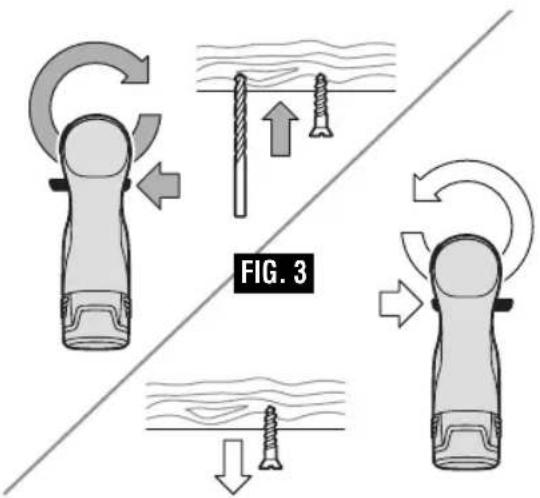
Your tool is equipped with a forward/reversing lever and trigger lock located above the trigger (Fig. 3). This lever was designed for changing rotation of the bit, and for locking the trigger in an "OFF" position.
For forward rotation, (with chuck pointed away from you) move the lever to the far left.
For reverse rotation move the lever to the far right. To activate trigger lock move lever to the center off position.
CAUTION
Do not change direction of rotation until the tool
comes to a complete stop. Shifting during rotation of the chuck can cause damage to the tool.
text_image
FIG. 3GEAR SHIFTING
Your tool is equipped with two separate gear ranges, low gear and high gear. Low gear provides high-torque and slower drilling speeds for heavy duty work or for driving screws. High gear provides faster speeds for drilling lighter work. To change speeds slide switch, to the high or low position (Fig. 1).
ATTENTION: If your tool appears to be running, but the chuck will not turn, check to make sure the gear shifting switch is pushed fully into desired setting.
ADJUSTABLE CLUTCH
Your tool features 20 clutch settings. Output torque will increase as the clutch ring, is rotated from 1 to 19. The drill "■■■" position will lock up the clutch to permit drilling and driving heavy duty work (Fig. 1).
BRAKE
When the trigger switch is released it activates the brake to stop the chuck quickly. This is especially useful in the repetitive driving and removal of screws.
AUTOLOCK™
Your tool is equipped with an automatic locking system. This feature will lock the bit holder in one position when the trigger switch is released. This will allow you to tighten or loosen a nut or screw by rotating the tool by hand with the switch off. This is convenient when higher turning torque is needed.
BUILT IN WORK LIGHT
Your tool is also equipped with a light that turns on automatically when the switch is activated, for better visibility when drilling/driving (Fig. 1).
INSERTING AND RELEASING BATTERY PACK
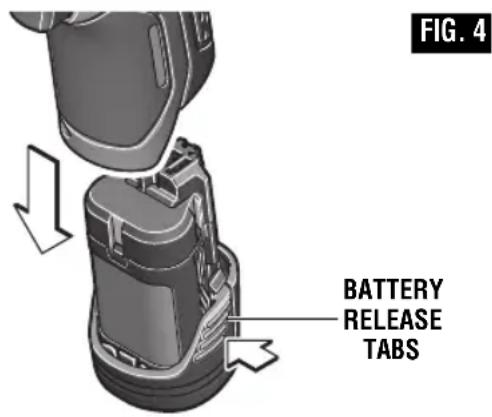
Release battery pack from tool by pressing on both sides of the battery release tabs and pull downward (Fig. 4).
To insert battery, align battery and slide battery pack into tool until it locks into position. Do not force.
WARNING
If battery release tabs are cracked or otherwise
damaged, do not insert into tool. Battery can fall out during operation.
text_image
FIG. 4 BATTERY RELEASE TABSIMPORTANT CHARGING NOTES
- The charger was designed to fast charge the battery only when the battery temperature is between 32^ F ( 0^ C) and 113^ F ( 45^ C). If the battery pack is too hot or too cold, the charger will not fast charge the battery. (This may happen if the battery pack is hot from heavy use). When the battery temperature returns to between 32^ F ( 0^ C) and 113^ F ( 45^ C), the charger will automatically begin charging.
- A substantial drop in operating time per charge may mean that the battery pack is nearing the end of its life and should be replaced.
-
Remember to unplug charger during storage period.
-
If battery does not charge properly:
a. Check for voltage at outlet by plugging in some other electrical device.
b. Check to see if outlet is connected to a light switch which turns power "off" when lights are turned off.
c. Check battery pack terminals for dirt. Clean with cotton swab and alcohol if necessary.
d. If you still do not get proper charging, take or send tool, battery pack and charger to your local Bosch Service Center. See "Tools, Electric" in the Yellow Pages for names and addresses.
Note: Use of chargers or battery packs not sold by Bosch will void the warranty.
CHARGER INDICATORS, SYMBOLS AND MEANING (Model BC430)
If the indicator lights are "OFF", the charger is not receiving power from power supply outlet.
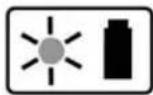
If the green indicator light is "ON", the charger is plugged in but the battery pack is not
inserted, or the battery pack is fully charged and is being trickle charged.
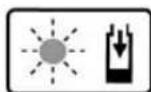
If the green indicator light is "BLINKING", the battery pack is being fast-charged. Fast-
charging will automatically stop when the battery pack is fully charged.
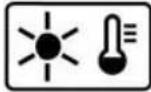
If the red indicator light is "ON", the battery pack is too hot or cold for fast-charging. The
charger will switch to trickle charge, until a suitable temperature is reached, at which time the charger will switch automatically to fast-charging.
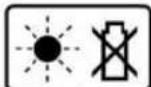
If the red indicator light is "BLINKING", the battery pack cannot accept a charge or the
contacts of the charger or battery pack are contaminated. Clean the contacts of the charger or battery pack only as directed in these operating instructions or those supplied with your tool or battery pack.
CHARGING BATTERY PACK (Model BC430)
The lithium ion battery is protected against deep discharging by the “Electronic Cell Protection (ECP)”. When the battery is empty, the tool is switched off by means of a protective circuit.
The battery is supplied partially charged. Completely charge the battery before using your cordless screwdriver for the first time. The lithium ion battery can be charged at any time, without reducing its service life. Interrupting the charging procedure does not damage the battery.
Plug charger cord into your standard power outlet, then insert battery pack into charger (Fig. 5).
The charger's green indicator light will begin to "BLINK". This indicates that the battery is receiving a fast charge. Fast-charging will automatically stop when the battery pack is fully charged.
When the indicator light stops "BLINKING" (and becomes a steady green light) fast charging is complete.
The battery pack may be used even though the light may still be blinking. The light may require more time to stop blinking depending on temperature. When you begin the charging process of the battery pack, a steady red light could also mean the battery pack is too hot or too cold.
The purpose of the green light is to indicate that the battery pack is fast-charging. It does
not indicate the exact point of full charge. The light will stop blinking in less time if the battery pack was not completely discharged.
When charging several batteries in sequence, the charge time may slightly increase.
When the battery pack is fully charged, unplug the charger (unless you're charging another battery pack) and slip the battery pack back into the tool.
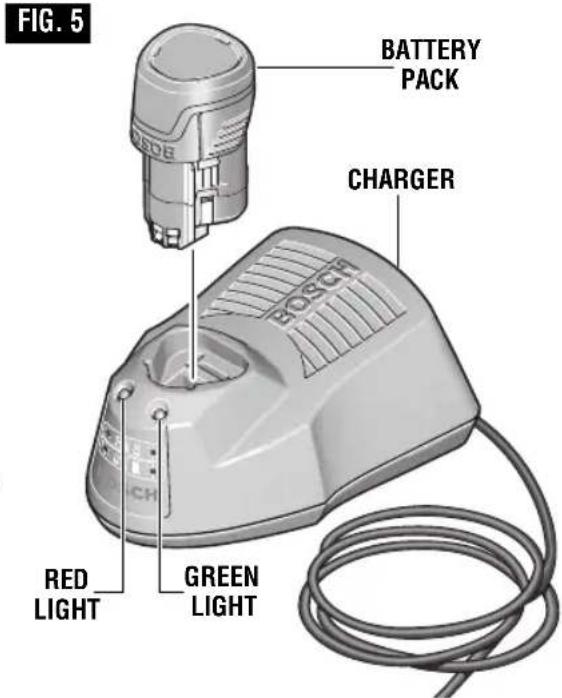
text_image
FIG. 5 BATTERY PACK CHARGER RED LIGHT GREEN LIGHTFCC Caution:
The manufacturer is not responsible for radio interference caused by unauthorized modifications to this equipment. Such modifications could void the user's authority to operate the equipment.
This device complies with Part 15 of the FCC Rules. Operation is subject to the following two conditions:
1) This device may not cause harmful interference, and
2) This device must accept any interference received, including interference that may cause undesired operation.
NOTE! This equipment has been tested and found to comply with the limits for a Class B digital devices, pursuant to Part 15 of the FCC rules. These limits are designed to provide reasonable protection against harmful interference in a residential installation. This
equipment generates uses and can radiate radio frequency energy and, if not installed and used in accordance with the instructions, may cause harmful interference to radio communications. However, there is no guarantee that interference will not occur in a particular installation. If this equipment does cause harmful interference to radio or television reception, which can be determined by turning the equipment off and on, the user is encouraged to try to correct the interference by one or more of the following measures:
- Reorient or relocate the receiving antenna.
- Increase the separation between the equipment and receiver.
- Connect the equipment into an outlet on a circuit different from that to which the receiver is connected.
- Consult the dealer or an experienced radio/TV technician for help.
CHARGER INDICATORS, SYMBOLS AND MEANING (Model BC330)
If the indicator lights are "OFF", the charger is not receiving power from power supply outlet.
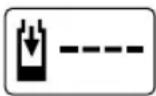
If the green indicator light is "BLINKING", the battery pack is being fast-charged. Fast-
charging will automatically stop when the battery pack is fully charged.
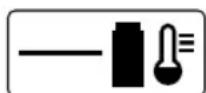
If the green indicator light is "ON", the charger is plugged in but the battery
pack is not inserted, or the battery pack is fully charged, or the battery pack is too hot or cold for fast-charging. The charger will automatically switch to fast-charging once a suitable temperature is reached.
CHARGING BATTERY PACK (Model BC330)
The lithium ion battery is protected against deep discharging by the “Electronic Cell Protection (ECP)”. When the battery is empty, the tool is switched off by means of a protective circuit.
The battery is supplied partially charged. Completely charge the battery before using your cordless screwdriver for the first time. The lithium ion battery can be charged at any time, without reducing its service life. Interrupting the charging procedure does not damage the battery.
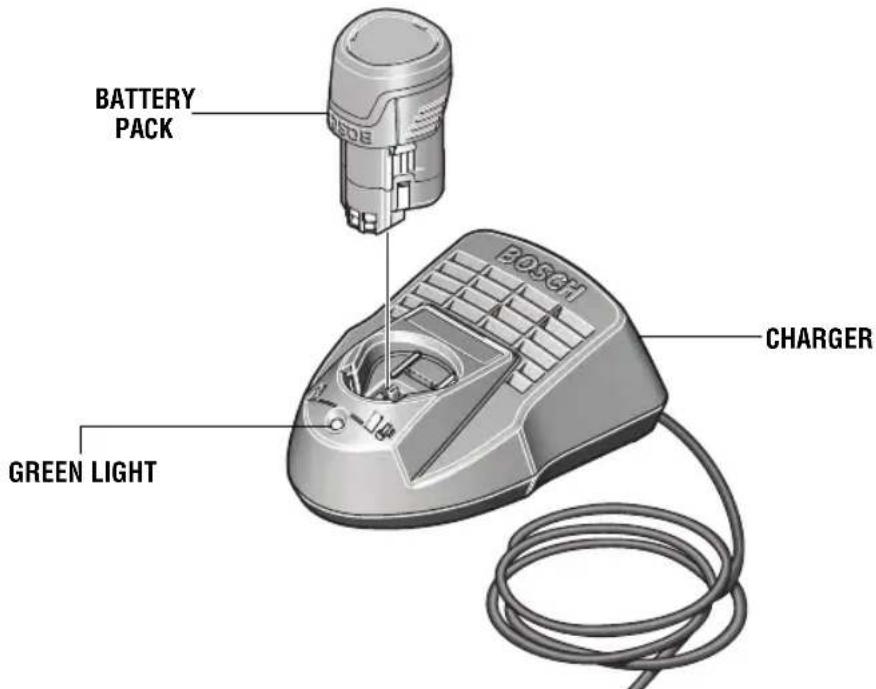
Plug charger cord into your standard power outlet, then insert battery pack into charger (Fig. 6).
The charger's green indicator light will begin to "BLINK". This indicates that the battery is receiving a fast charge. Fast-charging will automatically stop when the battery pack is fully charged.
When the indicator light stops "BLINKING" (and becomes a steady green light) fast charging is complete.
The battery pack may be used even though the light may still be blinking. The light may require more time to stop blinking depending on temperature. When you begin the charging process of the battery pack, a steady green light could also mean the battery pack is too hot or too cold.
The purpose of the green light is to indicate that the battery pack is fast-charging. It does not indicate the exact point of full charge. The light will stop blinking in less time if the battery pack was not completely discharged. When the battery pack is fully charged, unplug the charger (unless you're charging another battery pack) and slip the battery pack back into the tool.
FIG. 6
text_image
BATTERY PACK BOSCH CHARGER GREEN LIGHTOperating Tips
You will extend the life of your bits and do neater work if you always put the bit in contact with the work before pulling the trigger. During the operation, hold the tool firmly and exert light, steady pressure. Too much pressure at low speed will stall the tool. Too little pressure will keep the bit from cutting and cause excess friction by sliding over the surface. This can be damaging to both tool and bit.
DRILLING WITH VARIABLE SPEED
The trigger controlled variable speed feature will eliminate the need for center punches in hard materials. The variable speed trigger allows you to slowly increase RPM. By using a slow starting speed, you are able to keep the bit from "wandering". You can increase the speed as the bit "bites" into the work by squeezing the trigger.
DRIVING WITH VARIABLE SPEED
Variable speed drills will double as a power screwdriver by using a screwdriver bit in the drill mode. The technique is to start slowly, increasing the speed as the screw runs down. Set the screw snugly by slowing to a stop. Prior to driving screws, pilot and clearance holes should be drilled.
FASTENING WITH SCREWS
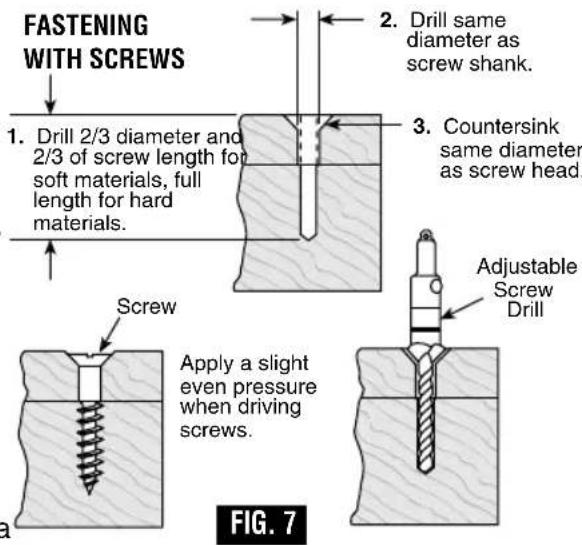
This procedure shown in (Fig. 7) will enable you to fasten materials together with your Cordless Drill/Screwdriver without stripping, splitting or separating the material.
text_image
FASTENING WITH SCREWS 1. Drill 2/3 diameter and 2/3 of screw length for soft materials, full length for hard materials. Screw Apply a slight even pressure when driving screws. 2. Drill same diameter as screw shank. 3. Countersink same diameter as screw head. Adjustable Screw Drill FIG. 7First, clamp the pieces together and drill the first hole 2/3 the diameter of the screw. If the material is soft, drill only 2/3 the proper length. If it is hard, drill the entire length.
Second, unclamp the pieces and drill the second hole the same diameter as the screw shank in the first or top piece of wood.
Third, if flat head screw is used, countersink the hole to make the screw flush with the surface. Then, simply apply even pressure when driving the screw. The screw shank clearance hole in the first piece allows the screw head to pull the pieces tightly together.
The adjustable screw drill accessory will do all of these operations quickly and easily. Screw drills are available for screw sizes No. 6, 8, 10 and 12.
DRILL BITS
Always inspect drill bits for excessive wear. Use only bits that are sharp and in good condition.
TWIST BITS: Available with straight and reduced shanks for wood and light duty metal drilling. High speed bits cut faster and last longer on hard materials.
CARBIDE TIPPED BITS: Used for drilling stone, con crete, plaster, cement and other unusually hard nonmetals. Use continuous heavy feed pres sure when employing carbide tip bits.
DRILLING WOOD
Be certain workpiece is clamped or anchored firmly. Always apply pressure in a straight line with the drill bit. Maintain enough pressure to keep the drill "biting".
When drilling holes in wood, twist bits can be used. Twist bits may overheat unless pulled out frequently to clear chips from flutes.
Use a “back-up” block of wood for work that is likely to splinter, such as thin materials.
You will drill a cleaner hole if you ease up on the pressure just before the bit breaks through the wood. Then complete the hole from the back side.
DRILLING METAL
There are two rules for drilling hard materials. First, the harder the material, the greater the pres sure you need to apply to the tool. Second, the harder the material, the slower the speed. Here are a couple of tips for drilling in metal. Lubri cate the tip of the bit occasionally with cutting oil except when drilling soft metals such as alu minum, cop per or cast iron. If the hole to be drilled is fairly large, drill a smaller hole first, then enlarge to the required size, it's often faster in the long run. Main tain enough pressure to assure that the bit does not just spin in the hole. This will dull the bit and greatly shorten its life.
RUNNING NUTS AND BOLTS
Variable speed control must be used with caution for driving nuts and bolts with socket set attach ments. The technique is to start slowly, increasing speed as the nut or bolt runs down. Set the nut or bolt snugly by slowing the drill to a stop. If this procedure is not followed, the tool will have a tendency to torque or twist in your hands when the nut or bolt seats.
Maintenance
Service
WARNING
NO NUSER NSERVICEABLE PARTS NINSIDE. NPreventiv
D.C. MOTORS
The motor in your tool has been engineered for many hours of dependable service. To maintain peak efficiency of the motor, we recommend it be examined every six months. Only a genuine Bosch replacement motor specially designed for your tool should be used.
maintenance Nperformed Nby Nun au thorize personnel Nmay Nresult Nin Nmisplacing No internal Nwires Nand Ncomponents Nwhich could Ncause Nserious Nhazard.NWe recommend that all tool service be performed by a Bosch Factory Service Center or Authorized Bosch Service Station. SERVICE MEN: Disconnect tool and/or charger from power source before servicing.
BATTERIES
Be alert for battery packs that are nearing their Nend Nof Nlife.NIf you notice decreased tool performance or significantly shorter running time between charges then it is time to replace the battery pack. Failure to do so can cause the tool to operate improperly or damage the charger.
TOOL LUBRICATION
Your Bosch tool has been properly lubricated and is ready for use.
Cleaning
WARNING
To avoid Naccidents, always disconnect the Ntool Nand/or
charger Nfrom Nthe Npower Nsupply Nbefore cleaning.NThe tool may be cleaned most effectively with compressed dry air. Always wear Nsafety Ngoggles when Ncleaning Ntools with compressed air.
Ventilation openings and switch levers must be kept clean and free of foreign matter. Do not attempt to clean by inserting pointed objects through opening.
CAUTION
Certain cleaning agents and solvents Ndamage Nplastic
parts.NSome of these are: gasoline, car bon tetrachloride, chlorinated cleaning solvents, ammonia and household detergents that contain ammonia.
Accessories
WARNING
If Nan Nextension Ncord Nis necessary, Na Ncord Nwith
adequate size conductors Nthat Nis Ncapable of carrying the current necessary for your tool Nmust Nbe Nused.NThis will prevent excessive voltage drop, loss of power or overheating. Grounded tools must use 3-wire extension cords that have 3-prong plugs and receptacles.
NOTE: The smaller the gauge number, the heavier the cord.
RECOMMENDED SIZES OF EXTENSION CORDS 120 VOLT ALTERNATING CURRENT TOOLS
| Tool's Ampere Rating | Cord Size in A.W.G. | Wire Sizes in mm ^2 | |||||||
| Cord Length in FeetNC | Cord Length in Meters | ||||||||
| 25 | 50 | 100 | 150 | 15 | 30 | 60 | 120 | ||
| 3-6 | 18 | 16 | 14 | 0.75 | 0.75 | 1.5 | 2.5 | ||
| 6-8 | 18 | 16 | 14 | 0.75 | 1.0 | 2.5 | 4.0 | ||
| 8-10 | 18 | 16 | 14 | 0.75 | 1.0 | 2.5 | 4.0 | ||
| 10-12 | 16 | 16 | 14 | 12 | 1.0 | 2.5 | 4.0 | — | |
| 12-16 | 14 | 12 | — | — | — | — | — | — | |
Tension nominale 10.8V/12V MAX ---
Robert Bosch Tool Corporation ("Seller") warrants to the original purchaser only, that all BOSCH portable and benchtop power tools will be free from defects in material or workmanship for a period of one year from date of purchase. SELLER'S SOLE OBLIGATION AND YOUR EXCLUSIVE REMEDY under this Limited Warranty and, to the extent permitted by law, any warranty or condition implied by law, shall be the repair or replacement of parts, without charge, which are defective in material or workmanship and which have not been misused, carelessly handled, or misrepaired by persons other than Seller or Authorized Service Station. To make a claim under this Limited Warranty, you must return the complete portable or benchtop power tool product, transportation prepaid, to any BOSCH Factory Service Center or Authorized Service Station. For Authorized BOSCH Power Tool Service Stations, please refer to your phone directory.
THIS LIMITED WARRANTY DOES NOT APPLY TO ACCESSORY ITEMS SUCH AS CIRCULAR SAW BLADES, DRILL BITS, ROUTER BITS, JIGSAW BLADES, SANDING BELTS, GRINDING WHEELS AND OTHER RELATED ITEMS.
ANY IMPLIED WARRANTIES SHALL BE LIMITED IN DURATION TO ONE YEAR FROM DATE OF PURCHASE. SOME STATES IN THE U.S., SOME CANADIAN PROVINCES DO NOT ALLOW LIMITATIONS ON HOW LONG AN IMPLIED WARRANTY LASTS, SO THE ABOVE LIMITATION MAY NOT APPLY TO YOU.
IN NO EVENT SHALL SELLER BE LIABLE FOR ANY INCIDENTAL OR CONSEQUENTIAL DAMAGES (INCLUDING BUT NOT LIMITED TO LIABILITY FOR LOSS OF PROFITS) ARISING FROM THE SALE OR USE OF THIS PRODUCT. SOME STATES IN THE U.S. AND SOME CANADIAN PROVINCES DO NOT ALLOW THE EXCLUSION OR LIMITATION OF INCIDENTAL OR CONSEQUENTIAL DAMAGES, SO THE ABOVE LIMITATION OR EXCLUSION MAY NOT APPLY TO YOU.
THIS LIMITED WARRANTY GIVES YOU SPECIFIC LEGAL RIGHTS, AND YOU MAY ALSO HAVE OTHER RIGHTS WHICH VARY FROM STATE TO STATE IN THE U.S., PROVINCE TO PROVINCE IN CANADA AND FROM COUNTRY TO COUNTRY.
THIS LIMITED WARRANTY APPLIES ONLY TO PORTABLE AND BENCHTOP ELECTRIC TOOLS SOLD WITHIN THE UNITED STATES OF AMERICA, CANADA AND THE COMMONWEALTH OF PUERTO RICO. FOR WARRANTY COVERAGE WITHIN OTHER COUNTRIES, CONTACT YOUR LOCAL BOSCH DEALER OR IMPORTER.
GARANTIE LIMITÉE DES OUTILS ÉLECTRIQUES PORTATIFS ET D'ÉTABLI BOSCH
© Robert Bosch Tool Corporation 1800 W. Central Road Mt. Prospect, IL 60056-2230
Exportado por: Robert Bosch Tool Corporation Mt. Prospect, IL 60056-2230, E.U.A.
Importado a México por: Robert Bosch, S.A. de C.V., Calle Robert Bosch No. 405, Zona Industrial, Toluca, Edo. de México, C.P. 50070, Tel. (722) 2792300
2610022007 04/12

2610022007


