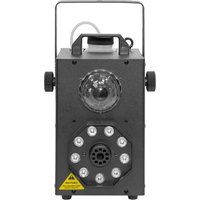
F700 FX - Tripod BoomTone DJ - Free user manual and instructions
Find the device manual for free F700 FX BoomTone DJ in PDF.


| Product Type | Smoke Machine with Light Effects |
| Brand | BoomTone DJ |
| Model | F700 FX |
| Dimensions | 240 x 155 x 285 mm |
| Weight | 3 kg |
| Power Supply | 230 V, 50-60 Hz, 700 W |
| Fuse | 3 A |
| Tank Capacity | 0.30 L |
| Heating Time | Approximately 4 minutes |
| Smoke Volume | 65 m³/min (2500 cu.ft/min) |
| Light Sources | 9 x 3W RGBW + 1 x 10W RGB |
| Control | Music detection, remote control included |
| Main Functions | Smoke production, automatic or music-driven light show, color selection |
| Included Accessories | Remote control, power cable with ground |
| Safety | Do not use in damp environments, max ambient temperature 40°C, installation by qualified person, do not block smoke outlet |
| Maintenance and Cleaning | Clean with demineralized water (not tap water); drain the tank, fill with water, heat and run for 15 minutes, then empty |
| Spare Parts and Repairability | No user-serviceable parts; contact an authorized repairer |
| General Information | User manual available for download; maximum operating temperature 40°C; use only BoomTone DJ smoke fluid |
Frequently Asked Questions - F700 FX BoomTone DJ
User questions about F700 FX BoomTone DJ
0 question about this device. Answer the ones you know or ask your own.
Ask a new question about this device
Download the instructions for your Tripod in PDF format for free! Find your manual F700 FX - BoomTone DJ and take your electronic device back in hand. On this page are published all the documents necessary for the use of your device. F700 FX by BoomTone DJ.
USER MANUAL F700 FX BoomTone DJ
Before using your equipment, we recommend that you read all the instructions in this manual.
- Keep this manual for future reference. If you resell this unit, please pass on this manual to the new owner.
- Completely unpack the unit and all its accessories. Check that there is no damage and that the unit is in perfect condition.
- It is important to use the mains cable supplied (earthed cable).
• Always unplug the unit before servicing or performing any maintenance. - Maximum ambient temperature for optimum unit operation: 40^ C. Do not use the device if the ambient temperature exceeds this value.
- In the event of a malfunction, switch off the unit immediately. Do not attempt to repair it yourself. Contact your dealer or an authorized repairer. There are no user-replaceable parts.
- Do not connect this device to a dimmer pack.
- To reduce the risk of electric shock or fire, do not use this device in damp or rainy conditions.
- This device must be installed with a sturdy hook of adequate size for the weight carried. The unit must be screwed to the hook and tightened properly to prevent it from falling due to vibrations produced by the machine during operation. The hook must be secured with a safety sling. Make sure that the structure (or attachment point) can support at least 10X the weight of the hooked device.
• The device must be installed by a qualified person and kept out of public reach.
WARNING: This device operates at very high temperatures. Do not touch the unit during operation. Never block the smoke outlet with your hands. High risk of burns ( 1^er and 2^nd degrees).
WARNING: Do not operate this unit on a surface sensitive to heat, as this may burn the surface (e.g. wooden floor).
CAUTION: Do not move the machine during operation.
IMPORTANT: Small amounts of smoke may escape from the unit during warm-up and after shutdown.
Instructions for use
1- Fill the tank with smoke fluid (always use BoomtonDJ brand fluids).
2- Plug the smoke machine into the mains.
3- Switch on by pressing the rear switch.
4- Wait about 5 minutes for the machine to warm up for the first time.
5- Once the machine has reached the right temperature, you can use the buttons on the remote control to activate the smoke and manage the light effects.
Technical specifications
Smoke volume: 2500 cu.ft per minute / 65 m3 per minute
Heating time: approx. 4 min
Tank capacity: 0.30L
Light sources: 9x3W RGBW + 1x10W RGB
Control: Music detection, remote control included
Power consumption: 700W
Fuse: 3A
Supply voltage: 230Vac, 50-60Hz
Dimensions: 240 x 155 x 285mm
Weight: 3kg
Remote control
Button 1 = Smoke release
Button 2 = Light control by music detection
Button 3 = Automatic show mode
Button 4 = Light show color selection.
Remarks
The volume of smoke produced may decrease over time. Your machine may be clogged. Before using a specialized cleaning product, we advise you to follow the instructions below:
- If any smoke fluid remains in the tank, empty it completely. Fill the tank with mineral/distilled water.
WARNING: Never use tap water, as this may cause irreversible damage to the pump and heating element.
- Fill the reservoir with approx. 1 liter of demineralized water.
- Switch on the machine and let it warm up.
- When the machine is hot, set the continuous flow rate to maximum.
- You'll notice that the machine will initially produce smoke, which is the remaining smoke liquid in the tubes and heating element. After a few minutes, this smoke should turn into a clear liquid: this is the demineralized water that's starting to come out.
- Leave the machine running for about 15 minutes.
- Switch off the machine. Wait for it to cool down completely, then drain off excess demineralized water.
Knop 1 = Rookvrijgave