USB Hub - Computer accessory ELGATO - Free user manual and instructions
Find the device manual for free USB Hub ELGATO in PDF.


User questions about USB Hub ELGATO
0 question about this device. Answer the ones you know or ask your own.
Ask a new question about this device
Download the instructions for your Computer accessory in PDF format for free! Find your manual USB Hub - ELGATO and take your electronic device back in hand. On this page are published all the documents necessary for the use of your device. USB Hub by ELGATO.
USER MANUAL USB Hub ELGATO
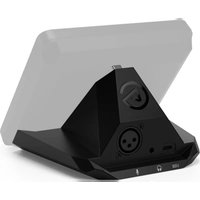
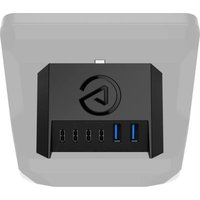
USB Hub for Stream Deck + is not a stand-alone device. It is a USB extension module that works exclusively with the Stream Deck + controller (not included).
EN Quick Start Guide
FR Guide de prise en main rapide
DE Kurzanleitung
natural_image
Technical line drawing of a mechanical component with an inset showing a bracket detail (no text or symbols)Use a Phillips screwdriver (not included) to loosen the two screws and remove the pedestal from Stream Deck+.
natural_image
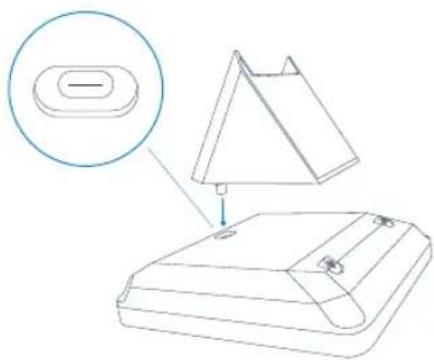
Technical line drawing of a device with a magnified inset showing a component detail (no text or symbols)Align the hub's USB-C plug with the USB-C port on Stream Deck + and carefully insert.
Installation
natural_image
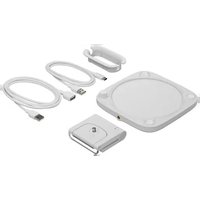
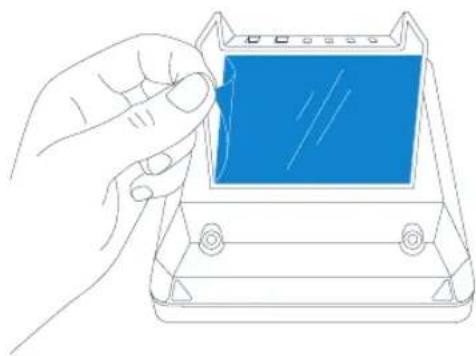
Line drawing of a hand inserting a blue component into a device (no text or symbols)Remove the protective film from the adhesive pad and press the pedestal onto the USB hub. Make sure that the hub is aligned with Stream Deck +
natural_image
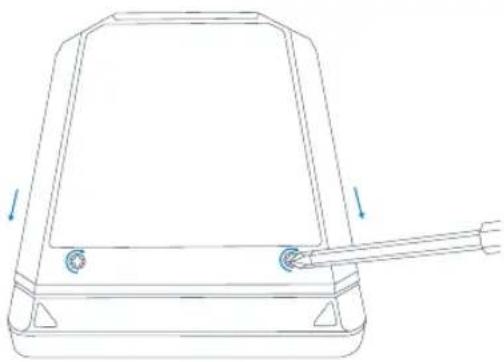
Line drawing of a mechanical device with a handle and two arrows indicating direction (no text or symbols)Reattach the pedestal to Stream Deck +
Installation
natural_image
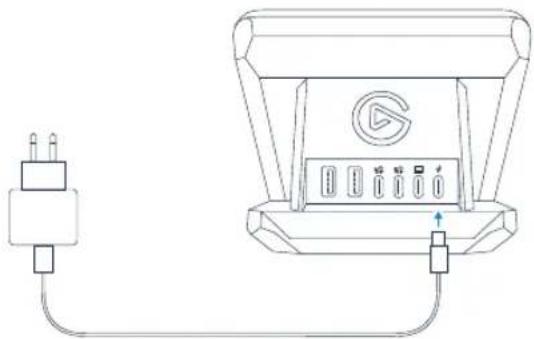
Line drawing of a device with an AC power plug connected to a speaker output (no text or symbols)Connect an external USB-C power supply (not included) to the port on the right. A minimum of 100 watts power output and PD (Power Delivery) 3.0 are required
text_image
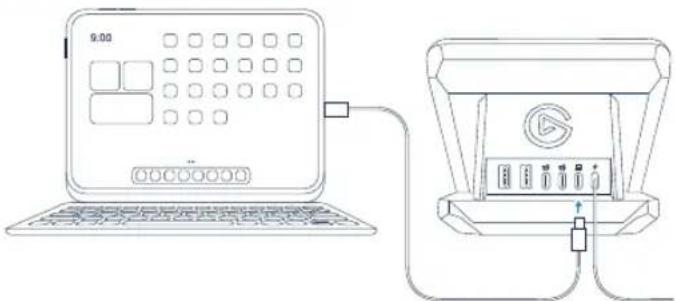
9:00Connect your computer or tablet to the second-right port.
Your device will be charged via Power Delivery while exchanging data with the hub through a single cable.
Only use the supplied cable. A USB 3.2 connection is needed for the hub to work reliably.
Please note that of the 100 watts delivered via the power supply, 65 watts are available for Power Delivery, while the rest is distributed to the USB ports.
Installation
text_image
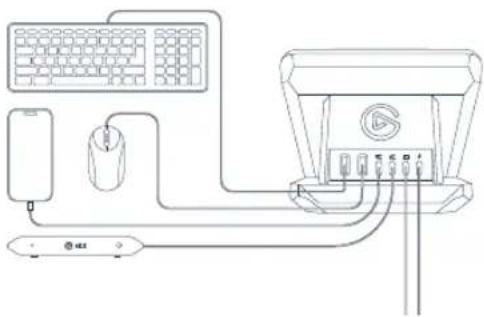
Diagram showing connections between a computer, keyboard, mouse, and audio equipment with labeled ports and cablesConnect up to four devices to the Type-A and Type-C ports.
Please note the combined download speed of the two Type-A ports and the two Type-C ports in total is 5 Gb/s. All ports support USB up to 3.2 GEN 1.
natural_image
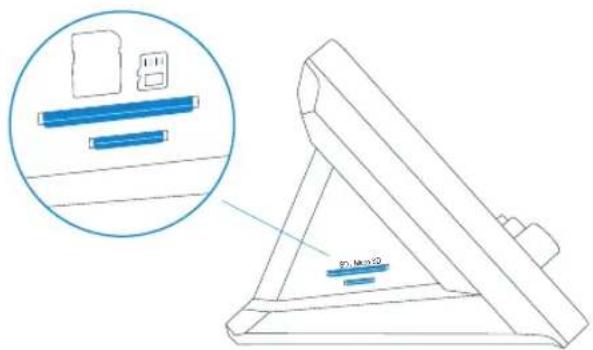
Technical line drawing of a mechanical device with a magnified inset showing internal components (no text or symbols)The card reader/writer supports SD and MicroSD cards as well as CompactFlash. Please refer to Technical Specifications for details.
Technical Specifications
| USB Downlink | 2x USB 3.2 GEN 1, Type A: 0.9 A (4.5 W)2x USB 3.2 GEN 1, Type C: 1.5 A (7.5 W), BC 1.2Combined downlink speed: max. 5 Gb/s | Uplink | 1x USB 3.2 Gen 1,max. 5 Gb/s Type-CUp to 65 W Power Delivery IPD 3.0 (2W, 5A) |
| Card Reader | 1x SD card1x micro SD cardUHS-I (104MB/Soc) interface data readingUp to 2 TB memory cardSupports dual card & dual readingSecure Digital- v1.0/ v1.1/ v2.0/ SDHC/ SDXC-v3.01 UHS-I (Ultra High SpeedSDR12/SDR25/ SDR50/ DDR50/ SDR104- Secure Digital v5.0SD card slot supports:- CompactFlash(including UDMA7 specifications)- SD, SDHC, SDXC, SD, UHS-I memory cardsMicro SD card slot supports:- microSD, microSDHC, microSDXC,UHS-I memory cards | Power Input | 1x USB 3.2, Type-C; up to 100Watt Power Delivery (PD 3.0)An external power supply withmin. 100 Watt and PD 3.0 isrequired (not included) |
| Input Power Power Consumption | PD In: 20V/5A, 15V/3A,12V/3A, 9V/3A, 5V/3AHost In: 20V/3.25A, 15V/1.6A,12V/1.75A, 9V/1.33A, 5V/1.5A | ||
| Cable | USB 3.2 10 Gb/s, C-to-C,PD 100 W, 100 cm |

Attention
Federal Communication Commission Interference Statement
This device complies with Part 15 of the FCC Rules. Operation is subject to the following two conditions: (1) This device may not cause harmful interference, and (2) this device must accept any interference received, including interference that may cause undesired operation.
This equipment has been tested and found to comply with the limits for a Class 9 digital device, pursuant to Part 15 of the FCC Rules. These limits are designed to provide reasonable protection against harmful interference in a residential installation. This equipment generates, uses and can radiate radio frequency energy and, if not installed and used in accordance with the instructions, may cause harmful interference to radio communications. However, there is no guarantee that interference will not occur in a particular installation. If this equipment does cause harmful interference to radio or television reception, which can be determined by turning the equipment off and on, the user is encouraged to try to correct the interference by one of the following measures:
- Reorient or relocate the receiving antenna.
- Increase the separation between the equipment and receiver.
- Connect the equipment into an outlet on a circuit different from that to which the receiver is connected.
- Consult the dealer or an experienced radio/ TV technician for help.
FCC Caution: Any changes or modifications not expressly approved by the party responsible for compliance could void the user's authority to operate this equipment. This equipment complies with FCC radiation exposure limits set forth for an uncontrolled environment. This equipment should be installed and operated with a minimum distance of 20 cm between the radiator and a human body.
For questions about Elgato product compliance with FCC regulations, please contact: Compliance Officer, Corsair Memory Inc., 115 North McCarthy Blvd, Milpitas, CA 95035, USA
This device complies with Industry Canada license-exempt RSS standard(s).
Operation is subject to the following two conditions: (1) this device may not cause interference, and (2) this device must accept any interference, including interference that may cause undesired operation of the device.
The declaration of conformity for Elgato products is available at www.elgato.com/doc
Applicant Name(상호명): Corsair Memory, Inc.
Product Name | 제품명칭: USB Hub for Stream Deck +
Model No.(모델명): 20GBN9901
Manufactured Year & Month (제조연월): Please refer to gift box sticker
Manufacturer & Origin (제조자 및 제조국가: Corsair Memory, Inc./ Please refer to gift box sticker A/S : (주)컴스빌, 1522-1460

R-R-CSI-20GBN9901
CORSAIR MEMORY, Inc. 115 North McCarthy Blvd, Milpitas, CA 95035, USA. CORSAIR MEMORY, BV. Wormerweg 8, 1311 XB, Almere, Netherlands. CORSAIR COMPONENTS, Ltd. 1020 Eskdale Road, Winners Triangle, Wokingham, RG41 5TS, UK. Copyright 2024 Corsair Memory Inc. All rights reserved. Elgato and the Elgato logo are trademarks of Corsair Memory Inc., registered in the U.S. and other countries. All other trademarks belong to their respective owner. Customer Support: help.corsair.com
Part: 51GBN9903