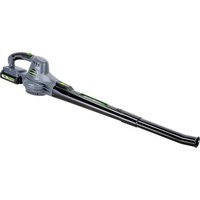
GLGBS20B - Electric air blower Genesis - Free user manual and instructions
Find the device manual for free GLGBS20B Genesis in PDF.


| Product type | Electric air blower (blower/sweeper) |
| Weight | 1.63 kg |
| Power source | Lithium-ion battery 20 V DC, compatible model: GLAB2020B or GLAB2040B; charger 120 V~ / 60 Hz, 1.7 A |
| No-load speed | 112 KPH (low speed) / 209 KPH (high speed) |
| Number of speeds | 2 speeds |
| Runtime | Approximately 80 minutes of charging for a completely discharged 2.0 Ah battery |
| Applications | Cleaning patios, sidewalks, driveways: leaves, debris, pine needles |
| Box contents | Blower/sweeper, battery pack GLAB2020B, charger, rear tube, front tube, user manual |
| Care and cleaning | Clean with a clean cloth; avoid solvents; permanent lubrication at factory, no additional lubrication required |
| Safety | Wear safety glasses, tight clothing, gloves; do not use in rain or damp environment; keep children and pets away |
| Spare parts and repairability | Use only identical replacement parts; contact Genesis technical service at 1-888-552-8665 or visit www.genesispowertools.com |
| Warranty | 2 years against defects in materials and workmanship (non-transferable, non-commercial use) |
| General information | Brand Genesis, model GLGBS20B, manual available in French, English, Spanish |
Frequently Asked Questions - GLGBS20B Genesis
User questions about GLGBS20B Genesis
0 question about this device. Answer the ones you know or ask your own.
Ask a new question about this device
Download the instructions for your Electric air blower in PDF format for free! Find your manual GLGBS20B - Genesis and take your electronic device back in hand. On this page are published all the documents necessary for the use of your device. GLGBS20B by Genesis.
USER MANUAL GLGBS20B Genesis
Look for this symbol to point out important safety precautions. It means attention!!! Your safety is involved.

⚠ WARNING: Read and understand all warnings, cautions and operating instructions before using this equipment. Failure to follow all instructions listed below may result in electric shock, fire and/or serious personal injury.

WARNING: The operation of any tool can result in foreign objects being thrown into your eyes, which can result in severe eye damage. Before beginning tool operation, always wear safety goggles or safety glasses with side shields and a full face shield when needed. We recommend a wide vision safety mask for use over eyeglasses or standard safety glasses with side shields. Always wear eye protection which is marked to comply with ANSI Z87.1.
IMPORTANT SAFETY RULES
WARNING: Some dust created by this product contains chemicals known to the State of California to cause cancer, birth defects or other reproductive harm. Some examples of these chemicals are:
- Compounds in fertilizers.
• Compounds in insecticides, herbicides and pesticides. - Arsenic and chromium from chemically treated lumber.
Your risk from these exposures varies, depending on how often you do this type of work. To reduce your exposure to these chemicals, wear approved safety equipment such as dust masks that are specially designed to filter out microscopic particles.
WARNING: When using electric gardening appliances, basic safety precautions should always be followed to reduce the risk of fire, electric shock, and personal injury. Read all instructions before using this appliance.
FOR ALL APPLIANCES
- Avoid dangerous environments - do not use appliances in damp or wet locations.
- Don't use in rain or in damp conditions.
- Keep children away - all people and pets should be kept at a distance from the work area.
- Dress properly - do not wear loose clothing or jewelry. They can be caught in moving parts. Wear protective clothing; use of work gloves, long pants, a long-sleeved shirt and safety footwear is recommended when working outdoors. Wear protective hair covering to contain long hair.
- Use safety glasses - always use a face or dust mask if the area in which you are working is dusty.
-
Use correct appliance - do not use appliance for any job except that for which it is intended.
-
Do not force appliance - it will do the job better and with less likelihood of a risk of injury at the rate for which it was designed.
- Do not overreach - keep proper footing and balance at all times.
- Stay alert. Use common sense. Do not operate appliance when you are tired or under the influence of drugs, alcohol or medication.
- When not in use, appliances should be stored indoors in dry places out of reach of children.
- Maintain appliance with care. Follow instructions for lubricating and changing accessories. Keep handles dry, clean, and free from oil and grease.
- Check damaged parts. Before using the appliance, make sure the safety guards are intact. Never use an appliance without its safety guard. Check to make sure moving parts are not binding and can operate freely.
- Check for broken or defective parts that can affect the safe operation of your appliance. A guard or other part that is damaged should be properly repaired or replaced by an authorized service center unless indicated elsewhere in this manual.
FOR BATTERY-POWERED GARDENING APPLIANCES
- Prevent unintentional starting. Make sure the switch is in the Off position before connecting the battery pack, picking up, or carrying the appliance. Carrying the appliance with your finger on the switch or energizing the appliance with the switch on invites accidents.
- Disconnect the battery pack before adjusting, changing accessories, or storing the appliance to reduce the risk of accidental starting.
- Recharge only with the charger specified by the manufacturer. A charger that is suitable for one type of battery pack may create the risk of fire when used with another battery pack.
IMPORTANT SAFETY RULES
- Use appliances only with specifically designated battery packs. Use of any other battery packs may create a risk of injury and fire.
- When battery pack is not in use, keep it away from other metal objects, like paper clips, coins, keys, nails, screws or other small metal objects, that can make a connection from one terminal to another. Shorting the battery terminals together may cause burns or a fire.
- Under abusive conditions, liquid may be ejected from the battery; avoid contact. If contact accidentally occurs, flush with water. If liquid contacts eyes, additionally seek medical help. Liquid ejected from the battery may cause irritation or burns.
- Do not use a battery pack or appliance that is damaged or modified. Damaged or modified batteries may exhibit unpredictable behavior resulting in fire, explosion or risk of injury.
- Follow all charging instructions and do not charge the battery pack or appliance outside of the temperature range specified in the instructions. Charging improperly or at temperatures outside of the specified range may damage the battery and increase the risk of fire.
ADDITIONAL SAFETY RULES FOR CORDLESS BLOWERS
- Check the work area before each use. Remove all objects such as rocks, broken glass, nails, wire, or string which can be thrown or become entangled in the product.
- Never place blower on any surface, except a hard, clean surface when motor is running. Gravel, sand, and other debris can be picked up by the air inlet and thrown at the operator or bystanders, causing possible serious injuries.
- Never use blower to spread chemicals, fertilizers, or any other toxic substances. Spreading these substances could result in serious injury to the operator or bystanders.
- Never use blower near fires, fireplaces, hot ashes, barbecue pits, etc. Use near fires or ashes can spread fires and result in serious injury and/or property damage.
- Battery powered blowers are always in operating condition. Be aware of possible hazards when not using your battery powered blower or when changing accessories. Following this rule will reduce the risk of electric shock, fire, or serious personal injury.
- Do not point the blower nozzle in the direction of people or pets.
- Never run the product without the proper equipment attached. Always ensure the blower tubes are installed.
-
Do not operate blower in a gaseous or explosive atmosphere. Motors in these units normally sparks, and the sparks might ignite fumes.
-
Do not put any objects into openings. Do not use with any opening blocked. Keep free of dust, lint, hair and everything that may reduce the air flow.
- Keep hair, loose clothing, fingers and all parts of body away from openings and moving parts.
- Have servicing performed by a qualified repair person using only identical replacement parts. This will ensure that the safety of the product is maintained.
- Do not modify or attempt to repair the blower or the battery pack except as indicated in the instructions for use and care.
- Use designated battery packs (Genesis™ - Model GLAB2020B or GLAB2040B) and charger for this product. Use of any other batteries may result in a risk of fire.
WARNING: This appliance produces an electromagnetic field during operation. This field may under some circumstances interfere with active or passive medical implants. To reduce the risk of serious or fatal injury, we recommend persons with medical implants consult their physician and the medical implant manufacturer before operating this appliance.
SAVE THESE INSTRUCTIONS
EXTENSION CORDS
If an extension cord is necessary, a cord with adequate size conductors that is capable of carrying the current necessary for your product must be used. This will prevent excessive voltage drop, loss of power or overheating. Grounded products must use 3-wire extension cords that have 3-prone plugs and receptacles.
NOTE: The smaller the gauge number, the heavier the cord.
| Recommended Minimum Wire Gauge for Extension Cords (120 Volt) | ||||||
| Nameplate Amperes(At Full Load) | Extension Cord Length (Feet) | |||||
| 25 50 | 75 100 | 150 | 200 | |||
| 0–2 | 18 | 18 | 18 | 18 | 16 | 16 |
| 2–3.5 | 18 | 18 | 18 | 16 | 14 | 14 |
| 3.5–5 | 18 | 18 | 16 | 14 | 12 | 12 |
| 5–7 | 18 | 16 | 14 | 12 | 12 | 10 |
| 7–12 | 18 | 14 | 12 | 10 | 8 | 8 |
| 12–16 | 14 | 12 | 10 | 10 | 8 | 6 |
IMPORTANT SAFETY INSTRUCTIONS FOR CHARGER & BATTERY
- Save these instructions. This manual contains important safety and operating instructions for your battery and charger.
- Before using the battery charger, read all instructions and cautionary markings on (1) Battery Charger, (2) Battery, and (3) Product using battery.
- Use only the charger which accompanied your product or direct replacements as listed in this manual. Do not substitute any other charger.
- Do not recharge the battery in damp or wet environments. Do not expose the battery pack to water or rain.
- Do not operate the charger with damaged cord or plug. Replace immediately.
- Do not operate a charger if it has received a sharp blow, been dropped or otherwise damaged in any way. Take it to a qualified serviceman.
- Do not disassemble a charger or a battery pack. Take it to a qualified service person when service or repair is required. Incorrect reassembly may result in a risk of electric shock or fire.
- Do not charge the battery pack when temperature is below 50 °F (10 °C) or above 104 °F (40°C). Store the product and battery pack in a location where temperature will not exceed 122 °F (50 °C). This is important to prevent serious damage to the battery cells.
- Place the charger on a flat non-flammable surface and away from flammable materials when re-charging the battery pack.
- To reduce risk of electric shock, unplug the charger from outlet before attempting any maintenance or cleaning.
- If operating time has become excessively shorter, stop operating immediately. It may result in a risk of overheating, possible burns and even an explosion.
-
Battery leakage may occur under extreme usage or temperature conditions. Avoid contact with skin and eyes. If liquid comes in contact with your skin, wash immediately with soap and water. If liquid gets into your eyes, wash them out with clear water for at least 10 minutes, and then seek medical attention right away.
-
Do not attempt to use a step-up transformer, an engine generator or DC power receptacle.
- Do not short the battery pack. Do not touch the terminal with any conductive material. Avoid storing battery pack in a container with other metal objects such as nails, coins, etc. Always protect the battery terminals when battery pack is not used.
- Do not charge a battery pack inside a box or container of any kind. The battery must be placed in a well ventilated area during charging.
- Do not allow anything to cover or clog the charger vents.
- Do not incinerate the battery pack even if it is severely damaged or is completely worn out. The battery pack can explode in a fire.
- Disconnect the charger from the power source when not in use. This will reduce the risk to electric shock or damage to the charger if metal pieces should fall into the opening. It also will help prevent damage to the charger during a power surge.
WARNING: A battery short can cause a large current flow, overheating, possible burns and even a breakdown.
IMPORTANT BATTERY INFORMATION: DISPOSING OF THE BATTERY
- Your batteries are LITHIUM-ION rechargeable batteries. Certain Local, State and Federal laws prohibit disposal of these batteries in ordinary trash.
- Consult your local waste authorities for your disposal/recycling options.
- More information regarding battery disposal in U.S. and Canada is available at: http://www.rbrc.org/index.html, or by calling 1-800-822-8837 (1-800-8BATTERY).

SAVE THESE INSTRUCTIONS
SYMBOLS
IMPORTANT: Some of the following symbols may be used on your product and appear throughout the manual. Please study them and learn their meaning for critical information to operate the tool safely.
| SYMBOL | DESCRIPTION | SYMBOL | DESCRIPTION | ||
| V | Volts | RPM | Revolutions per minute |  | Warning symbol. Precautions that involve your safety |
| A | Amperes | SPM | Strokes per minute |  | To reduce the risk of injury, read Operator's Manual before using this product |
| Hz | Hertz | MPH | Miles per hour |  | Wear safety glasses, ear protection and respiratory protection |
| W | Watts | 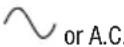 | Alternating current |  | Do not dispose with household waste |
| n_o | No Load Speed | or D.C. | Direct current Do not | [TSTC] | the running blade |
| kg | Kilograms |  | Do not use in wet conditions |  | Class II Double Insulated construction |
| H | Hours |  | Battery cannot exceed 59 °C |  Intertek Intertek | This symbol designates that this product is listed with U.S. and Canada requirements by ETL testing Laboratories, Inc. |
| .../min | Per minute |  | Do not put battery in fire |  | Keep all bystanders at least 50 ft. away. |
UNPACKING & CONTENTS
IMPORTANT: Due to modern mass production techniques, it is unlikely the tool is faulty or that a part is missing. If you find anything wrong, do not operate the tool until the parts have been replaced or the fault has been rectified. Failure to do so could result in serious personal injury.
CONTENT IN PACKAGE
| Description | Quantity |
| Blower/Sweeper | 1 |
| Battery Pack GLAB2020B | 1 |
| Charger | 1 |
| Description | Quantity |
| Back Nozzle 1 | |
| Front Nozzle | 1 |
| Operator’s Manual | 1 |
SPECIFICATIONS
Motor Power .... 20V DC No Load Speed .... 70 MPH/130 MPH Battery .... 20V Lithium-ion, 2.0Ah
Charger 120V\~/60Hz, 1.7A Net Weight 3.6 lb.
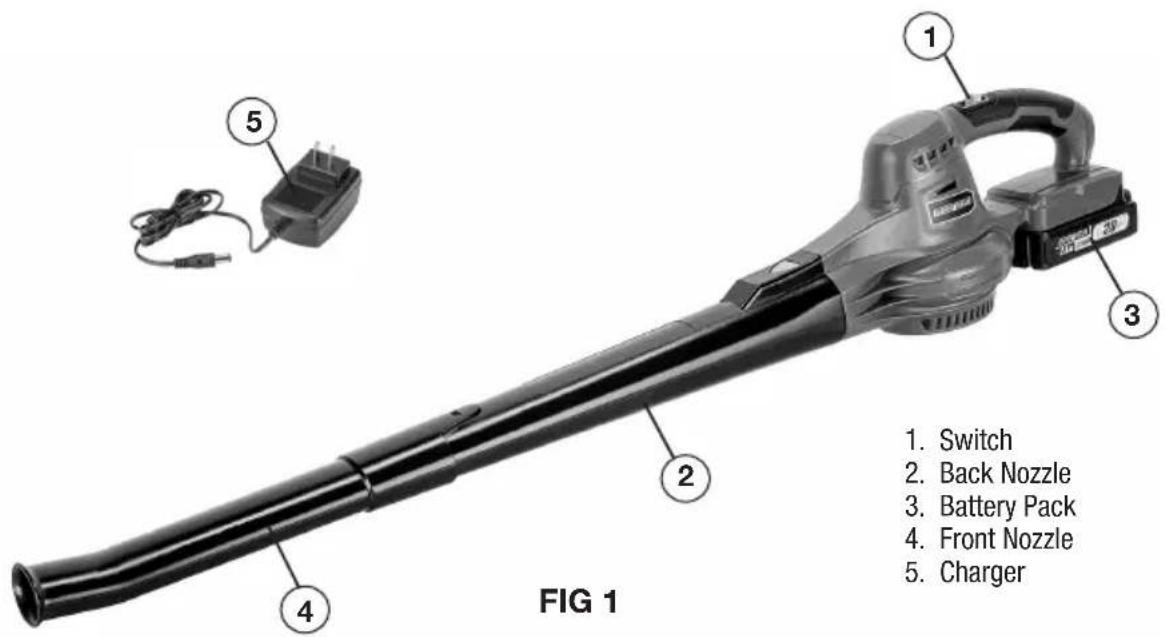
ASSEMBLY AND ADJUSTMENTS
WARNING: Always be sure that the product is switched off and the battery is disconnected before adjusting, adding accessories, or checking a function on the product.
INSTALLING FRONT AND BACK NOZZLES (FIG 2)
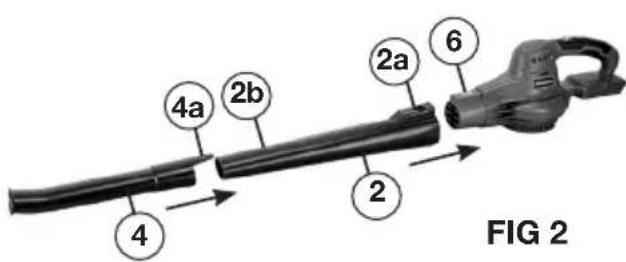
- Align the slot (2a) on the back nozzle with the spring locking button (6) on the motor housing. Slide the back nozzle (2) onto the motor housing until it securely locks in place with a click.
- Slide the front nozzle (4) onto the back nozzle (2) until the slot (4a) on the front nozzle clicks onto the locking indent (2b) on the back nozzle.
INSTALLING AND REMOVING THE BATTERY PACK (FIG 3)
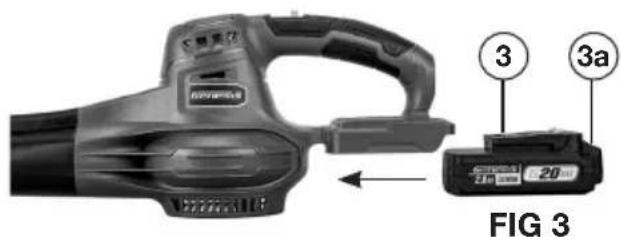
- To install the battery pack, slide the battery pack (3) into the bottom of the handle all the way until it locks in place with a click, as shown in FIG 3. Lightly pull on the battery to ensure it is locked into place and will not accidentally fall out of the tool, causing an injury.
- To remove the battery pack, pull the battery away from the blower while depressing the battery locking tab (3a).
WARNING: To reduce the risk of serious personal injuries, read and follow all important safety warning and instructions before using this product.
⚠ WARNING: Always be sure that the product is switched off before insertion or removal of the battery pack.
CHARGING THE BATTERY (FIG 4)
NOTE: Always check that the power supply corresponds to the voltage on the ratings plate.
- Plug the charger (5) into a 120 Volt AC power source. The green indicator light on the charger will illuminate, confirming it is powered.
- Connect the charger to the battery pack (3) as shown in FIG 4. The red light on the charger will illuminate, indicating that the battery is charging. Meanwhile, the power indicator lights (3b) on the battery pack will flash, indicating the charging status.
- All three indicator lights will turn solid green once charging is complete.
- It is normal for the battery pack to become warm while charging.
- If the battery pack is hot after continuous use in the tool, allow it to cool down to room temperature before charging. This will extend the life of your batteries.
NOTE: It takes approximately 80 minutes to charge up a completely discharged 2.0Ah battery pack.
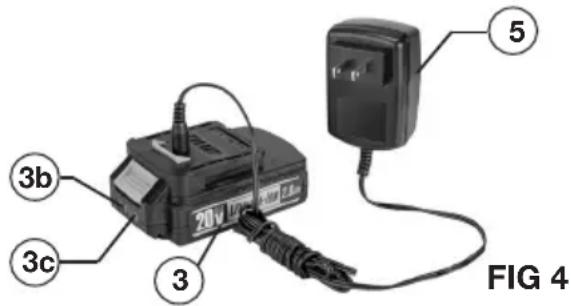
BATTERY POWER INDICATOR (FIG 4)
There is a battery power indicator on the battery pack. It has three green lights (3b). Depress the power indicator button (3c) on the side to check the battery power level. When all three lights illuminate, it indicates the battery is at full power. The battery is at half full power when two lights illuminate. When one light illuminates only, it indicates that the battery is at low power level and requires immediate charging.
WARNING: Always disconnect the battery pack from the product or place the switch in the locked or off position before any assembly, adjustments or changing accessories.
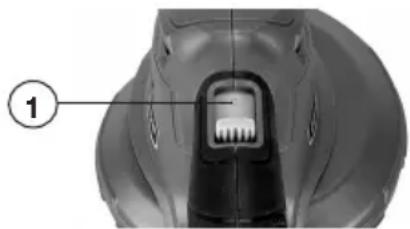
SWITCH ACTION (FIG 5)
The blower/sweeper features a 2-speed switch (1).
natural_image
Close-up of a mechanical component with a labeled section (1), showing internal teeth and a central connector (no text or symbols beyond label)FIG 5
- Push the switch forward to the middle position marked 1 for the blower/sweeper's lower speed mode.
- Push the switch all the way to the far end in the position marked 2 for the high-speed mode.
- To stop the blower/sweeper, pull the switch all the way to the near end in the position marked 0.
APPLICATIONS
You may use this product for the purposes listed below.
- Keeping decks, sidewalks and driveways free from leaves, debris and pine needles.
Before each use, inspect the entire product for damaged, missing, or loose parts such as screws, nuts, bolts, caps, etc. Securely tighten all fasteners and caps and do not operate this product until all missing or damaged parts are replaced.
- To keep from scattering debris, blow around the outer edges of a debris pile. Never blow directly into the center of a pile.
- Hold the blower/sweeper with one hand and sweep from side to side with the nozzle several inches above the ground. Slowly advance keeping the accumulated pile of debris in front of you.
- Use rakes and brooms to loosen debris before blowing.
- Watch out for children, pets, open windows, or freshly washed cars, and blow debris safely away.
TROUBLESHOOTING
| PROBLEM POSSIBLE CAUSE SOLUTION | ||
| Motor fails to start when switched "ON". | Battery is not secure.Battery is not charged. | To secure the battery pack, make sure the latches on the top of the battery pack snap into place.Charge the battery pack according to the instructions included with your model. |
| The air velocity decreases significantly. | Excessive wearing of motor fan.The air inlet is blocked by debris. | Call for Genesis technical service for repair. Do not use the product.Remove the battery pack, clear the debris. |
MAINTENANCE
CLEANING
Avoid using solvents when cleaning plastic parts. Most plastics are susceptible to damage from various types of commercial solvents and may be damaged by their use. Use clean cloths to remove dirt, dust, oil, grease, etc.

WARNING: Do not at any time let brake
fluids, gasoline, petroleum-based products, penetrating oils, etc., come in contact with plastic parts. Chemicals can damage, weaken or destroy plastic which may result in serious personal injury.
Electric products used on fiberglass material, wallboard, spackling compounds, or plaster are subject to accelerated wear and possible premature failure because the fiberglass chips and grindings are highly abrasive to bearings, brushes, commutators, etc. Consequently, we do not recommend using this product for extended work on these types of materials. However, if you do work with any of these materials, it is extremely important to clean the product using compressed air.
LUBRICATION
This product is permanently lubricated at the factory and requires no additional lubrication.
TWO-YEAR WARRANTY
This product is warranted free from defects in material and workmanship for 2 years after date of purchase. This limited warranty does not cover normal wear and tear or damage from neglect or accident. The original purchaser is covered by this warranty and it is not transferable. Prior to returning your tool to store location of purchase, please call our Toll-Free Help Line for possible solutions.
THIS PRODUCT IS NOT WARRANTED IF USED FOR INDUSTRIAL OR COMMERCIAL PURPOSES. ACCESSORIES INCLUDED IN THIS KIT ARE NOT COVERED BY THE 2 YEAR WARRANTY.
TOLL-FREE HELP LINE
For questions about this or any other GENESISTM Product, please call Toll-Free: 888-552-8665.
Or visit our web site: www.genesispowertools.com
©Richpower Industries, Inc. All Rights reserved
Richpower Industries, Inc.
736 Hampton Road
Williamston, SC 29697
Printed in China, on recycled paper

Bloc-batterie 20V Lithium-ion, 2,0 Ah
natural_image
Close-up of a mechanical component with a labeled section (1), showing internal structure without any readable text or symbols.FIG 5
natural_image
Close-up of a mechanical component with a labeled section (1), showing internal structure and no visible text or symbols.FIG 5
Richpower Industries, Inc.
736 Hampton Road
Williamston, SC USA
www.genesispowertools.com

- Look for this symbol to point out important safety precautions. It means attention!!! Your safety is involved.
- IMPORTANT SAFETY RULES
- FOR ALL APPLIANCES
- FOR BATTERY-POWERED GARDENING APPLIANCES
- ADDITIONAL SAFETY RULES FOR CORDLESS BLOWERS
- SAVE THESE INSTRUCTIONS
- EXTENSION CORDS
- IMPORTANT SAFETY INSTRUCTIONS FOR CHARGER & BATTERY
- IMPORTANT BATTERY INFORMATION: DISPOSING OF THE BATTERY
- SYMBOLS
- UNPACKING & CONTENTS
- SPECIFICATIONS
- ASSEMBLY AND ADJUSTMENTS
- CHARGING THE BATTERY (FIG 4)
- BATTERY POWER INDICATOR (FIG 4)
- SWITCH ACTION (FIG 5)
- APPLICATIONS
- TROUBLESHOOTING
- MAINTENANCE
- CLEANING
- LUBRICATION
- TWO-YEAR WARRANTY
- TOLL-FREE HELP LINE
Brand : Genesis
Model : GLGBS20B
Category : Electric air blower