HS-800 - Lamp Dörr - Free user manual and instructions
Find the device manual for free HS-800 Dörr in PDF.


User questions about HS-800 Dörr
0 question about this device. Answer the ones you know or ask your own.
Ask a new question about this device
Download the instructions for your Lamp in PDF format for free! Find your manual HS-800 - Dörr and take your electronic device back in hand. On this page are published all the documents necessary for the use of your device. HS-800 by Dörr.
USER MANUAL HS-800 Dörr
natural_image
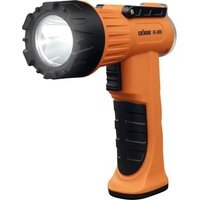
Orange and black Dörr HS-800 flashlight with black handle and orange body (no text or symbols on device body)HS-800
09.3 ROHS KONFORMITÄT
THANK YOU for choosing this DÖRR quality product.
Please read the instruction manual and safety hints carefully before first use.
Keep this instruction manual together with the device for future use. If other people use this device, make this instruction manual available. This instruction manual is part of the device and must be supplied with the device in case of sale.
DÖRR is not liable for damages caused by improper use or the failure to observe the instruction manual and safety hints.
01 | SAFETY HINTS
- Do not look directly into the LED and do not direct the light beam into the eyes of humans or animals!
- CAUTION: Looking into the light for an extended period of time may cause an irreversible damage to the retina!
- The light is not suitable for examinations of the eyes (pupils test)!
- Do not point the light at vehicles or aircrafts!
- Do not light up any magnifying bundled objects (e.g. mirrors) – risk of fire!
- To avoid deep-discharge of the Li-Ion battery when device is not in use for a longer period, please charge Li-Ion battery up to approx. 60%.
- The built-in battery and the LEDs cannot be replaced.
- Never leave the light unattended while charging.
- Turn off the light after use.
- Protect the device from rain, moisture, direct sunlight and extreme temperatures.
- Do not operate or touch the device with wet hands.
- Protect the device against impacts. Do not use the device if it has been dropped. In this case a qualified electrician should inspect the device before you use it again.
- Do not attempt to repair the device by yourself. When service or repair is required, contact qualified service personnel.
• People with physical or cognitive disabilities should use the device with supervision. - People with cardiac pacemakers, defibrillators or any other electrical implants should maintain a minimum distance of 30 cm, as the device generates magnetic fields.
- Do not use the device nearby mobile phones and devices that generate strong electromagnetic fields.
- This device is not a toy. To prevent accidents and suffocation keep the device, the accessories and the packing materials away from children and pets.
- Protect the device against dirt. Never use aggressive cleansing agents or benzine to clean the device. We recommend a soft, slightly damp microfiber cloth to clean the outer parts of the device. Before cleaning make sure to switch off the device and take off from power supply!
- Store the device in a dust-free, dry and cool place.
- If the device is defective or without any further use, dispose of the device according to the Waste Electrical and Electronic Equipment Directive WEEE. For further information, please contact your local authorities.
02 | PRODUCT DESCRIPTION
- Compact LED spotlight with max. 800 Lumen
- Beam distance up to approx. 600 meters
· 2 brightness levels, SOS flashing function - Integrated, rechargeable Li-Ion battery
- Battery capacity indicator
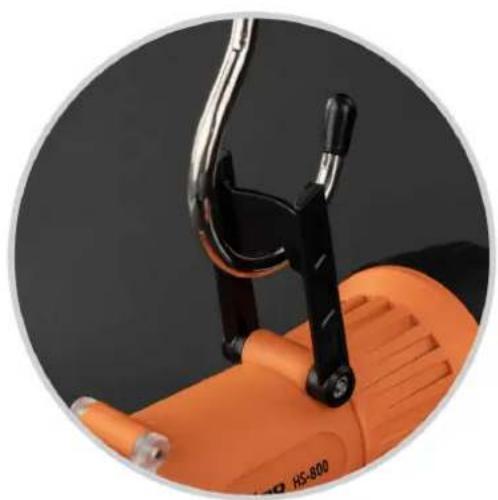
- Shock and weather resistant housing with stand/hanger
- Supplied with USB charging cable
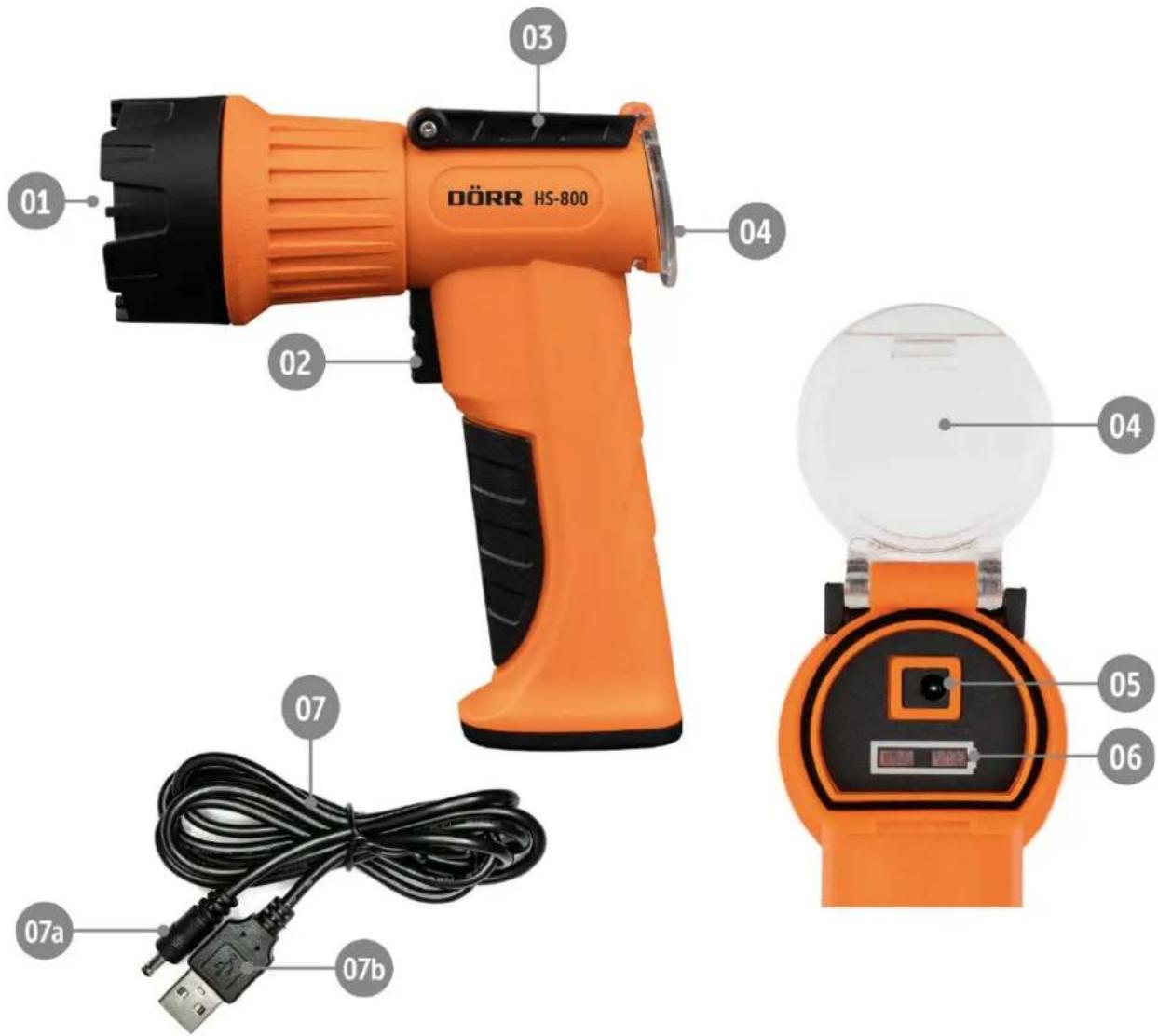
03 | NOMENCLATURE
01 LED spotlight
02 On/Off button
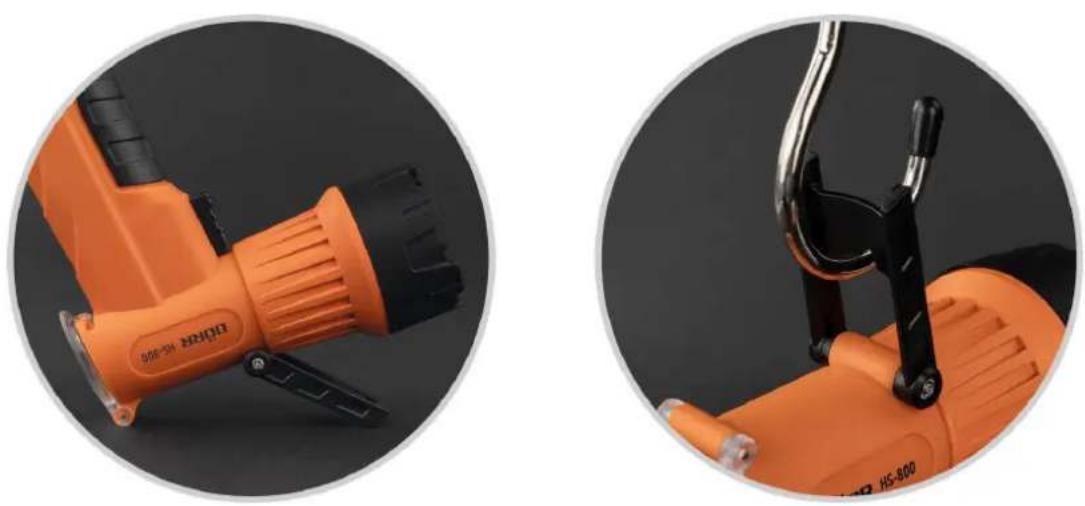
03 Stand/hanger
04 Cover
05 Low-voltage socket for USB charging cable
06 Battery charging and capacity indicator
07 USB charging cable
07 a) Low-voltage plug
07 b) USB-A plug
text_image
DÖRR HS-800 01 02 03 04 04 05 06 07 07a 07b04 | FIRST STEPS
04.1 Charging the built-in Li-Ion battery
- Before first use, please fully charge the built-in Li-Ion battery.
- Only charge with the supplied USB charging cable
- Never leave the light unattended while charging.
Fold the transparent cover (04) upwards. Insert the low-voltage plug (07a) of the USB charging cable (07) into the low-voltage socket (05). Connect the USB-A plug (07b) to a USB socket on your computer. The charging process starts.
While charging, the battery charging and capacity indicator (06) flashes red. After approx. 3-4 hours the Li-Ion battery is fully charged and the battery charge and capacity indicator (06) lights up constantly in red-green
Remove the USB charging cable and close the cover (4) properly to ensure the water resistance.
05 | FUNCTIONS OF THE LIGHT
05.1 Switching On/Off, adjusting the brightness, SOS flashing function
To switch on the light, press the On/Off button (02) once. The lamp shines with 50% brightness.
For 100% brightness, press the On/Off button (02) a second time shortly after switching on (within max. 5 seconds), for the SOS flashing function press a third time and to switch off a fourth time.
Note: If the lamp is in a light mode for more than 5 seconds, the lamp can be switched off directly by pressing the On/Off button (02) once.
05.2 Stand/Hanger
Unfold the stand/hanger (03) as shown below to place or to hang up the light:
06 | CLEANING AND STORAGE
Never use aggressive cleansing agents or benzine to clean the device. We recommend a soft, slightly damp microfiber cloth to clean the outer parts of the device. Make sure to take off the device from USB power before cleaning! Store the device in a dust-free, dry and cool place. This device is not a toy - keep it out of reach of children. Keep away from pets.
07 | TECHNICAL SPECIFICATIONS
| Number of LEDs 1x 10 W LED | |
| Brightness max. approx. | 800 Lumen |
| Range up to approx. [m] | 600 m |
| Functions | 50%, 100%, SOS flashing function |
| Operating time approx. (with fully charged battery) | 3,5 - 4,5 h |
| Charging time approx. | 3 - 4 h |
| Protection class IP66 | |
| Impact resistance up to drop height | 1 m |
| Power supply | Built-in Lithium Ion battery 3,7V 4400 mAh (Type 18650) |
| Length USB cable approx. [cm] | 120 cm |
| Housing Plastic | |
| Colour orange | |
| Dimensions approx. [cm] | 5,7 x 13,7 x 16,1 cm |
| Weight approx. [g] | 305 g |
Dörr GmbH reserves the right to make technical changes without notice.
08 | SCOPE OF DELIVERY
1x Spotlight
1x USB charging cable
1x Safety hints
09 | DISPOSAL, CE MARKING

09.1 DISPOSAL OF BATTERIES/ACCUMULATORS
Batteries are marked with the symbol of a crossed-out bin. This symbol indicates that empty batteries or accumulators which can no longer be charged should not be disposed of with household waste. Waste batteries may contain harmful substances that can cause damage to health and to the environment. Please use the return and collection systems available in your country for the disposal of the waste batteries.

09.2 WEEE INFORMATION
The Waste Electrical and Electronic Equipment Directive (WEEE Directive) is the European community directive on waste electrical and electronic equipment, which became European law in February 2003. The main purpose of this directive is to prevent electronic waste. Recycling and other forms of waste recovery should be encouraged to reduce waste. The symbol (trash can) on the product and on the packing means that used electrical and electronic products should not be disposed of with general household waste. It is your responsibility to dispose of all your electronic or electrical waste at designated collection points. Disposing of this product correctly will help to save valuable resources and it is a significant contribution to protect our environment as well as human health. For more information about the correct disposal of electrical and electronic equipment, recycling and collection points please contact your local authorities, waste management companies, your retailer or the manufacturer of this device.

09.3 ROHS CONFORMITY
This product is compliant with the European RoHS directive for the restriction of use of certain hazardous substances in electrical and electronic equipment and its amendments.

09.4 CE MARKING
The CE marking complies with the European standards and indicates that the product meets the requirements of the applicable EU directives.
natural_image
Close-up of two orange electric shaver tools, one with black handle and orange body, the other with black handle and black body (no visible text or symbols)06 | NETTOYAGE ET RANGEMENT
natural_image
Close-up of an orange and black handheld electric shaver tool against a dark background (no visible text or symbols)