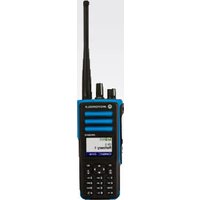
MOTOTRBO XPR7550 - Radio MOTOROLA - Free user manual and instructions
Find the device manual for free MOTOTRBO XPR7550 MOTOROLA in PDF.


| Product Type | Professional Portable Two-Way Radio |
| Brand | Motorola Solutions |
| Model | MOTOTRBO XPR7550 |
| Dimensions (approx.) | 130 x 55 x 35 mm |
| Weight (with battery, approx.) | 260 g |
| Power Supply | Rechargeable Lithium-Ion battery (7.5 V, 2150 mAh) |
| Battery Life (approx.) | Up to 18 hours (economy mode) |
| Antenna Type | Removable helical antenna (50 Ω impedance) |
| Frequencies | VHF (136-174 MHz) or UHF (403-527 MHz) depending on version |
| Transmit Power | 1 W (low) / 4 W (high) (VHF); 1 W (low) / 4 W (high) (UHF) |
| Channels | Up to 256 programmable channels |
| Display | 128 x 128 pixel LCD screen with backlight |
| Main Functions | PTT, channel scanning, emergency call, silent mode, data transmission, alphanumeric keypad, programming via radio link |
| Programmable Buttons | 3 side buttons, 2 front buttons, 1 emergency button |
| LED Indicators | Red, green, yellow (solid, blinking, double blinking) |
| Connectivity | Universal accessory connector (audio, programming) |
| Maintenance and Cleaning | Wipe with a damp cloth and mild detergent; do not immerse |
| Safety | Read RF exposure guide before use; professional use only |
| Spare Parts and Repairability | Battery, antenna, charger available; repair by authorized center |
| General Information | Complies with FCC and Industry Canada standards; copyright Motorola Solutions |
Frequently Asked Questions - MOTOTRBO XPR7550 MOTOROLA
User questions about MOTOTRBO XPR7550 MOTOROLA
0 question about this device. Answer the ones you know or ask your own.
Ask a new question about this device
Download the instructions for your Radio in PDF format for free! Find your manual MOTOTRBO XPR7550 - MOTOROLA and take your electronic device back in hand. On this page are published all the documents necessary for the use of your device. MOTOTRBO XPR7550 by MOTOROLA.
USER MANUAL MOTOTRBO XPR7550 MOTOROLA
© 2023 Motorola Solutions, Inc. All rights reserved.
68009584001-CG
Your Quick Reference Guide
This Quick Reference Guide covers the basic operation of the radio. Check with your dealer or system administrator because your radio may have been customized for your specific needs.
For more operational details and information, refer to the following User Guide:
User Guide MN008333A01
Important Safety Information
RF Energy Exposure and Product Safety Guide for Portable Two-Way Radios
Product Safety and RF Exposure Compliance

Caution: Before using this product, read the operating instructions for safe usage contained in the Product Safety and RF Exposure booklet enclosed with your radio.
ATTENTION!
This radio is restricted to Occupational use only. Before using the radio, read the RF Energy Exposure and Product Safety Guide for Portable Two-Way Radios which contains important operating instructions for safe usage and RF energy awareness and control for Compliance with applicable standards and Regulations.
Any modification to this device, not expressly authorized by Motorola Solutions, may void the user's authority to operate this device. Under Industry Canada regulations, this radio transmitter may only operate using an antenna of a type and maximum (or lesser) gain approved for the transmitter by Industry Canada. To reduce potential radio interference to other users, the antenna type and its gain should be so chosen that the equivalent isotropically radiated power (e.i.r.p.) is not more than that necessary for successful communication. This radio transmitter has been approved by Industry Canada to operate with Motorola Solutions-approved antenna with the maximum permissible gain and required antenna impedance for each antenna type indicated. Antenna types not included in this list, having a gain greater than the maximum gain indicated for that type, are strictly prohibited for use with this device.
Computer Software Copyrights
The Motorola Solutions products described in this manual may include copyrighted Motorola Solutions computer programs stored in semiconductor memories or other media. Laws in the United States and other countries preserve for Motorola Solutions certain exclusive rights for copyrighted computer programs including, but not limited to, the exclusive right to copy or reproduce in any form the copyrighted computer program.
Accordingly, any copyrighted Motorola Solutions computer programs contained in the Motorola Solutions products described in this manual may not be copied, reproduced, modified, reverse-engineered, or distributed in any manner without the express written permission of Motorola Solutions. Furthermore, the purchase of Motorola Solutions products shall not be deemed to grant either directly or by implication, estoppel, or otherwise, any license under the copyrights, patents or patent applications of Motorola Solutions, except for the normal non-exclusive license to use that arises by operation of law in the sale of a product.
English
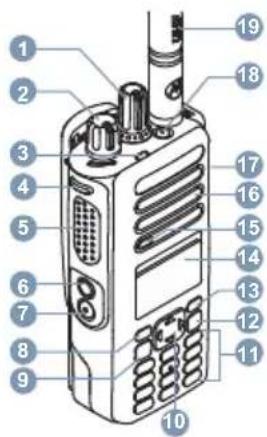
Radio Control
-
Channel Selector Knob
-
On/Off/Volume Control Knob
-
LED Indicator
-
Programmable Side Button 1
-
Push-to-Talk (PTT) Button
-
Programmable Side Button 2
-
Programmable Side Button 3
-
Programmable Front Button P1
-
Menu/OK Button
10.4-Way Navigation Button
11.Keypad
12.Back/Home Button
13.Programmable Front Button P2
14.Display
15.Microphone
16.Speaker
- Universal Connector for Accessories
18.Programmable Emergency Button
19.Antenna
Attaching the Battery

Note:
For optimal performance, charge a new battery 14 to 16 hours before initial use.
- Align the battery with the rails on the back of the radio.
- Slide the battery upwards until the latch snaps into place.
- Lock the battery latch.
Attaching the Antenna
- Turn off the radio.
- Set the antenna in the receptacle and turn clockwise.
Turning the Radio On and Off
Rotate the On/Off/Volume Control Knob clockwise or counterclockwise until a click sounds.
Adjusting the Volume
Rotate the On/Off/Volume Control Knob clockwise or counterclockwise.
LED Indicators
Blinking Red
Radio has failed the self-test upon powering up, has moved out of range if Auto-Range Transponder System is configured, has Mute mode enabled, is receiving an emergency transmission, is transmitting in low battery state, or is indicating a battery mismatch.
Solid Green
Radio is powering up, transmitting, or sending a Call Alert or an emergency transmission.
Blinking Green
Radio is receiving a call or data, detecting activity over the air, or retrieving Over-the-Air Programming transmissions.
Double Blinking Green
Radio is receiving a privacy-enabled call or data.
Solid Yellow
Radio is monitoring a conventional channel.
Blinking Yellow
Radio is scanning for activity, has yet to respond to a Call Alert, or all Capacity Plus-Multi-Site channels are busy.
Double Blinking Yellow
Radio has Auto Roaming enabled, has yet to respond to a Group Call Alert, is actively searching for a new site, is not connected to the repeater while in Capacity Plus, is locked, or all Capacity Plus channels are busy.
English
Display Icons
The following icons appear on the status bar at the top of the radio display. The icons are arranged left most in order of appearance or usage, and are channel-specific.

Emergency

Scan ^1

High Volume Data

Mute Mode

Tones Disabled

Ring Only

Notification

Secure

Unsecure

Site Roaming

Option Board

Power Level


Sign In

Sign Out
NOTES
MOTOROLA, MOTO, MOTOROLA SOLUTIONS and the Stylized M Logo are trademarks or registered trademarks of Motorola Trademark Holdings, LLC and are used under license. All other trademarks are the property of their respective owners. © 2013 and 2023 Motorola Solutions, Inc. All rights reserved.


- Your Quick Reference Guide
- Important Safety Information
- RF Energy Exposure and Product Safety Guide for Portable Two-Way Radios
- Product Safety and RF Exposure Compliance
- ATTENTION!
- Computer Software Copyrights
- English
- Attaching the Battery
- Note:
- Attaching the Antenna
- Turning the Radio On and Off
- Adjusting the Volume
- LED Indicators
- Blinking Red
- Solid Green
- Blinking Green
- Double Blinking Green
- Solid Yellow
- Blinking Yellow
- Double Blinking Yellow
- Display Icons
Brand : MOTOROLA
Model : MOTOTRBO XPR7550
Category : Radio