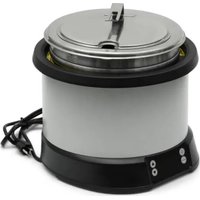
74110110 - Induction heater Mirage - Free user manual and instructions
Find the device manual for free 74110110 Mirage in PDF.


| Product Type | Induction Warmer for Holding Temperature |
| Brand | Mirage |
| Model | 74110110 |
| Capacity | 11 Qt (10.4 L) |
| Color | Natural |
| Electrical Supply | 120 V, 800 W, 60 Hz |
| Plug Type | NEMA 5-15P (standard US plug) |
| Main Functions | Reheating, holding warm, preheating, preset programs (soup, bisque, chili, mac & cheese) |
| Controls | On/Off button, Function button, adjustment arrows, panel lock |
| Display | LED indicators for preheat, reheat, stir, lock and digital display of temperature or error code |
| Set Temperature | Reheat: 165 °F (74 °C), hold warm: 140 °F (60 °C) minimum recommended |
| Compatible Pans | Only Vollrath "induction ready" drop-in pans (ref. 88184 or 88204) |
| Safety | Control panel lock, pan absence detection (flashing display), overheat protection, automatic shutdown on error |
| Maintenance and Cleaning | Daily cleaning with a soft cloth, warm water and mild dish soap. Do not use chlorine products or bleach. The stainless steel pan is dishwasher safe. |
| Minimum Clearances | Do not obstruct air circulation underneath the unit |
| Weight | Approximately 5 kg (estimate) |
| Dimensions (W x D x H) | Approximately 40 x 30 x 20 cm (estimate) |
| Spare Parts and Repairability | Parts available at vollrathfoodservice.com. Repair by service technician only. Do not attempt to repair yourself. |
| Intended Use | Professional use (restaurant, counter) for keeping cooked food warm. Not suitable for cooking raw foods. |
Frequently Asked Questions - 74110110 Mirage
User questions about 74110110 Mirage
0 question about this device. Answer the ones you know or ask your own.
Ask a new question about this device
Download the instructions for your Induction heater in PDF format for free! Find your manual 74110110 - Mirage and take your electronic device back in hand. On this page are published all the documents necessary for the use of your device. 74110110 by Mirage.
USER MANUAL 74110110 Mirage
Thank you for purchasing this Vollrath® equipment. Before operating the equipment, read and familiarize yourself with the following operating and safety instructions. SAVE THESE INSTRUCTIONS FOR FUTURE REFERENCE. Save the original box and packaging. Use this packaging to ship the equipment if repairs are needed.
SAFETY PRECAUTIONS
To ensure safe operation, read the following statements and understand their meaning. This manual contains safety precautions which are explained below. Please read carefully

WARNING
Warning is used to indicate the presence of a hazard that will or can cause severe personal injury or death.

CAUTION
Caution is used to indicate the presence of a hazard that will or can cause minor or major personal injury if the caution is ignored.
NOTICE: Notice is used to note information that is important but not hazard-related.
To reduce risk of injury or damage to the equipment:
- Plug only into grounded electrical outlets matching the nameplate rated voltage.
- Do not use an extension cord with this equipment. Do not plug this equipment into a power strip or multi-outlet power cord.
- As a precaution, persons using a pacemaker should stand back 12 (30 cm) from an operating equipment. Studies have shown that the induction element will not disrupt a pacemaker.
- Keep credit cards, driver licenses and other items with a magnetic strip away from operating equipment. Equipment's magnetic field will damage information on these strips.
- Do not put water in the outer well of the warmer/rethermalizer. It is intended to run dry. Water will damage the equipment and void the warranty.
- Use only Vollrath induction-ready insets with this equipment. Failure to use Vollrath induction-ready insets may damage equipment and void the warranty.
- Do not spray controls or outside of equipment with liquids or cleaning agents.
- Unplug when not in use.
- Keep equipment and power cord away from open flames, electric burners or excessive heat.
- Do not operate unattended.
- Closely supervise equipment operating in public areas and/or around children.
- Do not operate if the equipment is damaged or is malfunctioning.
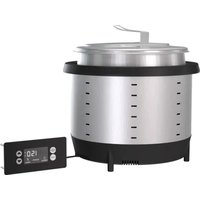
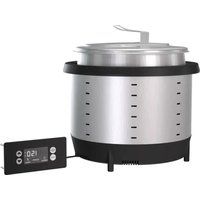
7470110
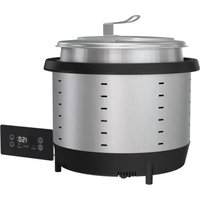
74110140
| Item Model | Description | |
| 7470110 | 7 qt countertop | Countertop Induction Rethermalizer, Natural |
| 7470140 | Induction Rethermalizer, Red | |
| 74110110 | 11 qt countertop | Countertop Induction Rethermalizer, Natural |
| 74110140 | Induction Rethermalizer, Red | |
FCC STATEMENT
This equipment has been tested and found to comply with Part 18 of FCC Rules. These limits are designed to provide reasonable protection against harmful interference in a residential installation. This equipment generates, uses and can radiate radio frequency energy and if not installed and used in accordance with the instructions, may cause harmful interference to radio communications. However, there is no guarantee that interference will not occur in a particular installation. If this equipment does cause harmful interference to radio or television reception, which can be determined by turning the equipment off and on, the user is encouraged to try to correct the interference by one or more of the following measures:
Reorient or relocate the receiving antenna.
- Increase the separation between the equipment and receiver.
- Connect the equipment into an outlet on a circuit different from that to which the receiver is connected.
- Consult the dealer or an experienced radio/TV technician.
- To assure continued compliance, any changes or modifications not expressly approved by the party responsible for compliance could void the user's authority to operate this equipment.
UNPACK THE EQUIPMENT
When no longer needed, dispose of all packaging and materials in an environmentally-responsible manner.
- Remove packing material, tape, and protective plastic.
- Clean glue residue left over from the plastic or tape.
FUNCTION AND PURPOSE
These units are intended to maintain preheated, cooked food at proper serving temperatures. It is not intended to cook raw food or for household, industrial, or laboratory use.
FEATURES AND CONTROLS
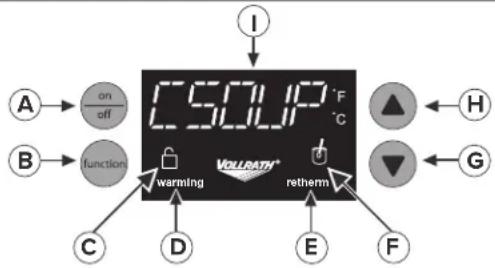
A. ON/OFF button. Press to turn equipment on.
B. Function button. Changes the function or mode of operation.
C. Lock light. Illuminates when Control Panel is locked.
D. Warming Light. Illuminates when the equipment is operating in warming mode. Blinks while the food heats to temperature.
E. Retherm Light Illuminates when the equipment is operating in rethermalizing mode. Blinks while the food heats to temperature.
F. Stir Light—flashes when food should be stirred.
G. Arrow Down button. Lowers the temperature setting.
H. Arrow Up button. Raises the temperature setting.
I. Display panel. Displays the preset program, temperature, or an error code, depending upon the mode selected.
J. Alarm (not shown). Beeps when there is a fault code.
CLEARANCE REQUIREMENTS
Do not block airflow to the bottom of the equipment. Sufficient airflow must be allowed. Blocking the airflow could cause the equipment to overheat.
OPERATION


WARNING
Electrical Shock Hazard.
Keep water and other liquids from entering the inside of the equipment. Liquid inside the equipment could cause an electrical shock. Do not spray water or cleaning products. Liquid could contact the electrical components and cause a short circuit or an electrical shock.


WARNING
Burn Hazard.
Do not touch hot food, liquid, or heating surfaces while equipment is heating or operating.
Hot food and liquids can burn skin. Induction heating surfaces heat rapidly.
NOTICE: Do not put water in the well. It is intended to run dry. Water will damage the equipment and void the warranty.
Rethermalization
- Press the ON/OFF button to turn on the equipment.
- Fill the included Vollrath induction ready inset with cooked, chilled food. Place the inset into the equipment. Close the lid. For best results keep the lid closed while heating and serving.
- Press function button to select Retherm (Rethermalize) mode.
- While food is rethermalizing, the retherm light will illuminate and the display will show the target temperature of 165°F (74°C) .
- Stir light may blink to indicate food should be stirred for even heating. For best results stir approximately every 15 minutes.
- Monitor the food temperature closely for food safety. The United States Public Health Service recommends that hot food be held at a minimum of 140°F (60°C) to help prevent bacteria growth. Note: This equipment monitors the temperature of the inset and automatically cycles on and off to achieve and maintain the selected setting. Temperatures displayed may vary from actual food temperatures depending on the type of food and stirring frequency. For best results adjust the settings as needed to achieve the desired temperature of each menu item. Some foods may require a higher setting to hold at the desired temperature.
- The display will blink if the inset is removed.
- After the inset has reached approximately 165°F (74°C) , the equipment will switch to hot food holding mode. The warm light will illuminate and the display will show the default setting for Hot Food Holding.
- Follow the instructions for Hold Hot Food at Serving Temperature. Do not add cold food to rethermalized hot food.
Hot Food Holding
Select either a temperature at which to hold hot food or one of the preset programs.
Preheat the Warmer
- Press the ON/OFF button to turn on the equipment.
- Place empty Vollrath induction ready inset into the equipment.
- Press up arrow to select a temperature >155°F (68°C) . To switch to °F or °C , press Function until display shows your preference.
- Allow the equipment to heat for 5 minutes.
Hold Hot Food at Serving Temperature
- Fill the included Vollrath induction ready inset with pre-heated food, above 155°F (68°C) . Place inset into equipment. Close the lid. For best results keep lid closed while heating and serving.
- Select a holding temperature or preset program. Press the function button to select Warming or a preset program: Soup, C Soup (Cream Soup), Chili, or Mac (Mac and Cheese).
- The warming light blinks until inset heats to the set temperature.
- Stir light may blink to indicate food should be stirred for even heating. For best results stir approximately every 15 minutes.
- Monitor food temperature closely for food safety. The United States Public Health Service recommends that hot food be held at a minimum of 140°F (60°C) to help prevent bacteria growth. Note: This equipment monitors the temperature of the inset and automatically cycles on and off to achieve and maintain the selected setting. Temperatures displayed may vary from actual food temperatures depending on the type of food and stirring frequency. For best results adjust the settings as needed to achieve the desired temperature of each menu item. Some foods may require a higher setting to hold at the desired temperature.
- The display will blink if the inset is removed.
Lock the Control Panel (optional)
Lock
- At the same time, press and hold the function button and the arrow down button until the lock light appears.
Unlock
- At the same time, press and hold the function button and the arrow down button until the unlock light appears.
CLEANING
| 警告 | WARNING |
| Electrical Shock Hazard. Keep water and other liquids from entering the inside of the equipment. Liquid inside the equipment could cause an electrical shock. Do not spray water or cleaning products. Liquid could contact the electrical components and cause a short circuit or an electrical shock. | |
| Hot food and liquids can burn skin. Induction heating surfaces heat rapidly. |
To maintain the appearance and increase the service life, clean this equipment daily.
What you will need:
- Three soft clean cloths, one each for cleaning, rinsing and drying
- Mild dish washing detergent
Clean warm water
NOTICE: Failure to follow these cleaning instructions may lead to product damage that will not be covered under warranty.
- Unplug the equipment and let it completely cool.
- Use a soft cloth moistened with warm water and a mild dish washing detergent to clean the well and the rim.
NOTICE: Do NOT use cleaning solutions that contain chlorine or bleach ingredients. Use of solutions with these ingredients will damage the well and will void the warranty.
- Use the second clean soft clean soft cloth moistened with clean warm water to wipe all detergent from the well and the rim.
- Use the third soft clean cloth to dry the well and the rim.
NOTICE: Failure to thoroughly remove all detergent or thoroughly dry the equipment may result in damage to the equipment.
- The stainless steel insert is dishwasher safe.
TROUBLESHOOTING
| Problem Might be Caused By Course of Action | ||
| The equipment is on, but not heating and the display is flashing. | The inset is not a Vollrath induction-ready inset. | Replace the inset with the correct size Vollrath induction-ready inset for the equipment. Vollrath induction-ready insets are stamped "Induction Ready." Reset the equipment by turning it OFF and then ON. |
| Trouble with the electrical connection is causing low input voltage. | Make sure the plug is fully inserted into an electrical outlet that matches the rating on the equipment's nameplate. | |
| Make sure the electrical circuit is not overloaded. | ||
| Alarm is sounding. An error occurred. See the Display Messages below. | ||
| The equipment suddenly stopped working. | The equipment may be too close to an external heat source or the air intake may be restricted. | Relocate the equipment away from external heat sources. Clear any obstructions to the air intake. Contact Vollrath Technical Services if the problem persists. |
| The inset may be too hot. | Remove the inset. Allow the inset and equipment to cool before resuming use. Contact Vollrath Technical Services if the problem persists. | |
| Display Message Cause Course of Action | ||
| Bad Pan | Inset is not Vollrath induction-ready or is the wrong size. | Replace the inset with the correct size Vollrath induction-ready inset for the equipment. Vollrath induction-ready insets are stamped "Induction Ready." Reset the equipment by turning it OFF and then ON. |
| HOT | If the equipment is turned off, this is normal. It indicates the equipment is still hot. | Allow the equipment to cool (about 5-10 minutes) before cleaning. |
| If the equipment is in use, the inset may be too hot. | Remove the inset. Allow the inset and equipment to cool before resuming use. Do not place excessively hot food into the inset. Do not an place excessively hot inset into the equipment. Contact Vollrath Technical Service if the problem persists. | |
| F-2 The inset may be too hot. | ||
| F-1 F-8 | The equipment may have overheated. | Relocate the equipment away from external heat sources. Clear any obstructions to the air intake. Contact Vollrath Technical Service if the problem persists. |
| Other codes appear. Internal error occurred. Contact Vollrath Technical Service. | ||
SERVICE AND REPAIR
Serviceable parts are available on vollrathfoodservice.com.
To avoid serious injury or damage, never attempt to repair the unit or replace a damaged power cord yourself. Do not send units directly to The Vollrath Company LLC. Please contact Vollrath Technical Services for instructions.
When contacting Vollrath Technical Services, please be ready with the item number, model number (if applicable), serial number, and proof of purchase showing the date the unit was purchased.
WARRANTY STATEMENT FOR THE VOLLRATH CO. L.L.C.
This warranty does not apply to products purchased for personal, family or household use, and The Vollrath Company LLC does not offer a written warranty to purchasers for such uses.
The Vollrath Company LLC warrants the products it manufactures or distributes against defects in materials and workmanship as specifically described in our full warranty statement. In all cases, the warranty runs from the date of the end user's original purchase date found on the receipt. Any damages from improper use, abuse, modification, or damage resulting from improper packaging during return shipment for warranty repair will not be covered under warranty.
For complete warranty information, product registration, and new product announcements, visit vollrathfoodservice.com.
United States
The Vollrath Company, L.L.C. Headquarters
1236 North 18th Street
Sheboygan, Wisconsin 53081-3201 USA
Main Tel: 800-319-9549 or 920-457-4851
Main Fax: 800-752-5620 or 920-459-6573
Canada Customer Service: 800-695-8560
Tech Services: techservicereps@vollrathco.com
vollrathfoodservice.com
Spain
Vollrath Pujadas Sau
CTRA De Castanyet,
P.O.Box 121
17430 Santa Coloma de Farners
Girona
Spain
Tel. +34 972 843 201
info@pujadas.es
China
Vollrath (Shanghai) Trading Limited
Rm 906, Building A
Hongwell Plaza
1308 Lianhua Road
Minhang District
Shanghai, 201102
Tel. +86-21-50589580
info@pujadas.es
Mexico
Vollrath de Mexico S. de R.L.
de C.V. Periferico Sur No.
7980 Edificio 2-C Col. Santa
Maria Teguepexpan 45601
Tlaquepaque, Jalisco | Mexico
Tel: +52-33-3133-6767
Tel: +52-33-3133-6769
Fax:+52-33-3133-6768
GARANTIEDETHEVOLLRATHCO.
The Vollrath Company, L.L.C. Headquarters
1236 North 18th Street
Sheboygan, Wisconsin 53081-3201 USA
Main Tel: 800-319-9549 or 920-457-4851
Main Fax: 800-752-5620 or 920-459-6573
Canada Customer Service: 800-695-8560
Tech Services: techservicereps@vollrathco.com
vollrathfoodservice.com
Spain
Vollrath Pujadas Sau
CTRA De Castanyet, 132
P.O.Box 121
17430 Santa Coloma de Farners
Girona
Spain
Tel. -34 972 843 201
info@pujadas.es
China
Vollrath (Shanghai) Trading Limited
Rm 906, Building A
Hongwell Plaza
1308 Lianhua Road
Minhang District
Shanghai, 201102
Tel. +86-21-50589580
info@pujadas.es
Mexico
Vollrath de Mexico S. de R.L.
de C.V. Periferico Sur No.
7980 Edificio 2-C Col. Santa
Maria Tequepexpan 45601
Tlaquepaque, Jalisco | Mexico
Tel: +52-33-3133-6767
Tel: +52-33-3133-6769
Fax:+52-33-3133-6768
- SAFETY PRECAUTIONS
- WARNING
- CAUTION
- NOTICE: NOTICE IS USED TO NOTE INFORMATION THAT IS IMPORTANT BUT NOT HAZARD-RELATED
- TO REDUCE RISK OF INJURY OR DAMAGE TO THE EQUIPMENT
- FCC STATEMENT
- UNPACK THE EQUIPMENT
- FUNCTION AND PURPOSE
- FEATURES AND CONTROLS
- CLEARANCE REQUIREMENTS
- OPERATION
- ELECTRICAL SHOCK HAZARD
- BURN HAZARD
- RETHERMALIZATION
- HOT FOOD HOLDING
- PREHEAT THE WARMER
- HOLD HOT FOOD AT SERVING TEMPERATURE
- LOCK THE CONTROL PANEL (OPTIONAL)
- LOCK
- UNLOCK
- CLEANING
- WHAT YOU WILL NEED
- SERVICE AND REPAIR
- WARRANTY STATEMENT FOR THE VOLLRATH CO. L.L.C
- GARANTIEDETHEVOLLRATHCO
Brand : Mirage
Model : 74110110
Category : Induction heater