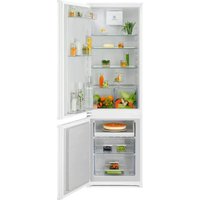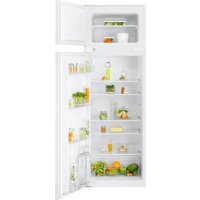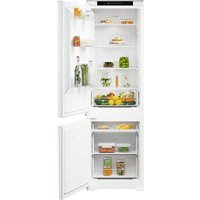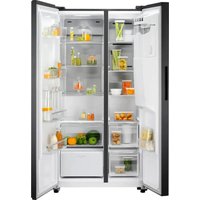
EAL575NWMS - Fridge ELECTROLUX - Free user manual and instructions
Find the device manual for free EAL575NWMS ELECTROLUX in PDF.


User questions about EAL575NWMS ELECTROLUX
0 question about this device. Answer the ones you know or ask your own.
Ask a new question about this device
Download the instructions for your Fridge in PDF format for free! Find your manual EAL575NWMS - ELECTROLUX and take your electronic device back in hand. On this page are published all the documents necessary for the use of your device. EAL575NWMS by ELECTROLUX.
USER MANUAL EAL575NWMS ELECTROLUX
natural_image
Simple line drawing of two vertical bars inside a rectangular frame (no text or symbols)EAL575NWCN EAL575NWMS
DE Benutzerinformation | Kühl - Gefrierschrank 2 FR Notice d'utilisation | Réfrigérateur/congélateur 28 IT Istruzioni per l'uso | Frigo-Congelatore 54 EN User Manual | Fridge Freezer 80
text_image
QR code image containing a document icon in the centertext_image
-80°C -80°C OFF ECO K J I H G F
natural_image
Diagram of a mechanical assembly with two parallel plates and upward arrows indicating motion (no text or symbols)natural_image
Line drawing of a box with an arrow indicating direction (no text or symbols)
text_image
Diagram showing hand positioning of a device with labeled parts 1 and 2, indicating directional movement or assembly.natural_image
Line drawing of a cabinet or storage unit with two compartments, one open and one closed, against a plain background (no text or symbols)natural_image
Diagram of a cylindrical device with directional arrows indicating movement or force, mounted on a stand (no text or symbols present)natural_image
Diagram of a cylindrical mechanical device with directional arrows indicating movement or force, no text or symbols present.text_image
Technical diagram of a mechanical component with labeled parts 1 and 2, showing rotational direction indicators.natural_image
Simple line drawing of a laboratory apparatus with a beaker, tubing, and a faucet (no text or symbols)natural_image
Diagram of a cylindrical mechanical device with directional arrows indicating force or movement (no text or symbols)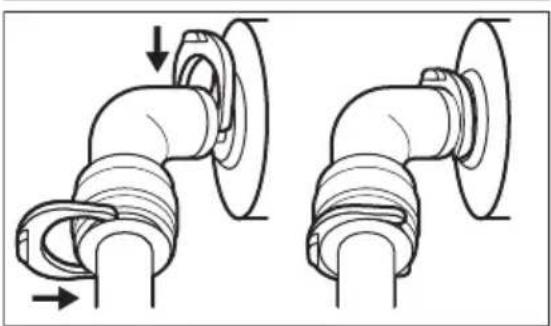
natural_image
Technical line drawing of two pipe fittings with directional arrows indicating movement (no text or symbols)text_image
-88°C -88°C ECO K J I H G Fi
natural_image
Diagram of a mechanical assembly with three parallel plates and upward arrows indicating motion (no text or symbols)natural_image
Line drawing of a drawer with an arrow indicating direction (no text or symbols)
text_image
Diagram showing two hands inserting a device into a container with labeled parts 1 and 2natural_image
Line drawing of a cabinet or storage unit with two compartments, one open and one closed, against a plain background (no text or symbols)natural_image
Diagram of a cylindrical mechanical device with directional arrows indicating movement or force (no text or symbols)natural_image
Diagram of a cylindrical mechanical device with directional arrows indicating movement or force (no text or symbols)natural_image
Simple line drawing of a laboratory apparatus with a beaker, tubing, and a faucet (no text or symbols)natural_image
Diagram of a cylindrical mechanical device with directional arrows indicating force or movement (no text or symbols)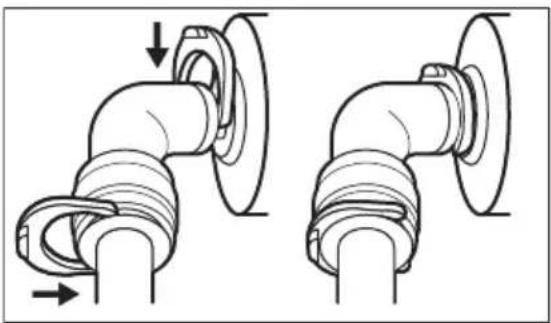
natural_image
Technical line drawing of two pipe fittings with directional arrows indicating movement (no text or symbols)text_image
A B C D E -88°C -88°C OFF ECO K J I H G Fi
natural_image
Diagram of a mechanical assembly with three parallel plates and upward arrows indicating motion (no text or symbols)text_image
Technical diagram showing a circular component with dimension annotation and directional arrows, likely illustrating a measurement or assembly process.natural_image
Line drawing of a drawer with an arrow indicating direction (no text or symbols)
text_image
Diagram showing hand positioning of a refrigerator with labeled parts and directional arrows indicating movement or movement.natural_image
Line drawing of a cabinet or storage unit with two compartments, one open and one closed, against a plain background (no text or symbols)natural_image
Diagram of a cylindrical mechanical device with directional arrows indicating movement or force (no text or symbols)natural_image
Diagram of a cylindrical device with directional arrows indicating flow or movement, no text or symbols presentnatural_image
Simple line drawing of a laboratory apparatus with a beaker, tubing, and a faucet (no text or symbols)natural_image
Diagram of a cylindrical mechanical device with directional arrows indicating force or movement (no text or symbols)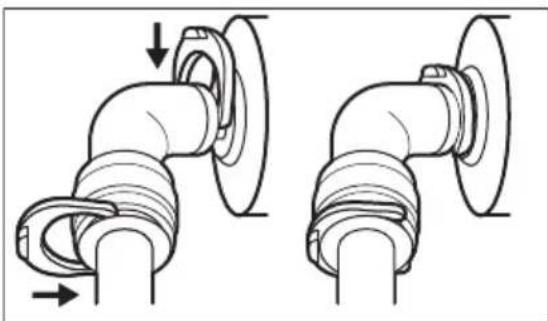
natural_image
Technical illustration of two pipe fittings with directional arrows indicating movement (no text or symbols)Welcome to Electrolux! Thank you for choosing our appliance.

Get usage advice, brochures, troubleshooting, service and repair information:
www.electrolux.com/support
Subject to change without notice.
CONTENTS
- SAFETY INFORMATION......80
- SAFETY INSTRUCTIONS.... 82
- INSTALLATION....84
- OPERATION....87
- DAILY USE....91
- CARE AND CLEANING....93
- HINTS AND TIPS....96
- TROUBLESHOOTING 98
- NOISES....101
- TECHNICAL DATA.... 101
- INFORMATION FOR TEST INSTITUTES.... 102
- GUARANTEE 102
- ENVIRONMENTAL CONCERNS....102
1. ⚠ SAFETY INFORMATION
Before the installation and use of the appliance, carefully read the supplied instructions. The manufacturer is not responsible for any injuries or damage that are the result of incorrect installation or usage. Always keep the instructions in a safe and accessible location for future reference.
1.1 Children and vulnerable people safety
- This appliance can be used by children aged from 8 years and above and persons with reduced physical, sensory or mental capabilities or lack of experience and knowledge if they have been given supervision or instruction concerning the use of the appliance in a safe way and understand the hazards involved. Children aged from 3 to 8 years and persons with very extensive and complex disabilities are allowed to load and unload the appliance provided that they have been properly instructed. Children of less than 3 years
of age should be kept away from the appliance unless continuously supervised.
- Children should be supervised to ensure that they do not play with the appliance.
- Children shall not carry out cleaning and user maintenance of the appliance without supervision.
- Keep all packaging away from children and dispose of it appropriately.
1.2 General Safety
- This appliance is for storing food and beverages only.
- This appliance is designed for single household domestic use in an indoor environment.
- This appliance may be used in, offices, hotel guest rooms, bed & breakfast guest rooms, farm guest houses and other similar accommodation where such use does not exceed (average) domestic usage levels.
-
To avoid contamination of food respect the following instructions:
-
do not open the door for long periods;
– clean regularly surfaces that can come in contact with food and accessible drainage systems; -
store raw meat and fish in suitable containers in the refrigerator, so that it is not in contact with or drip onto other food.
-
WARNING: Keep ventilation openings, in the appliance enclosure or in the built-in structure, clear of obstruction.
- WARNING: Do not use mechanical devices or other means to accelerate the defrosting process, other than those recommended by the manufacturer.
- WARNING: Do not damage the refrigerant circuit.
- WARNING: Do not use electrical appliances inside the food storage compartments of the appliance, unless they are of the type recommended by the manufacturer.
-
Do not use water spray and steam to clean the appliance.
-
Clean the appliance with a moist soft cloth. Only use neutral detergents. Do not use abrasive products, abrasive cleaning pads, solvents or metal objects.
- When the appliance is empty for long period, switch it off, defrost, clean, dry and leave the door open to prevent mould from developing within the appliance.
- Do not store explosive substances such as aerosol cans with a flammable propellant in this appliance.
- If the supply cord is damaged, it must be replaced by the manufacturer, its Authorised Service Centre or similarly qualified persons in order to avoid a hazard.
2. SAFETY INSTRUCTIONS
2.1 Installation

WARNING!
Only a qualified person must install this appliance.
- Remove all the packaging.
- Do not install or use a damaged appliance.
- Follow the separate instructions for the appliance installation and door reversing available on our website.
• Always take care when moving the appliance as it is heavy. Always use safety gloves and enclosed footwear. - Make sure the air can circulate around the appliance.
- At first installation or after reversing the door, wait at least 4 hours before connecting the appliance to the power supply. This is to allow the oil to flow back in the compressor.
- Before carrying out any operations on the appliance (e.g. reversing the door), remove the plug from the power socket.
- Do not install the appliance close to radiators or cookers, ovens, or hobs, unless otherwise specified in the installation instructions.
- Do not expose the appliance to the rain.
-
Do not install the appliance where there is direct sunlight.
-
Do not install this appliance in areas that are too humid or too cold.
- When you move the appliance, lift it by the front edge to avoid scratching the floor.
- Protect the floor from scratches when reversing the appliance door.
2.2 Electrical connection

WARNING!
Risk of fire and electric shock.

WARNING!
When positioning the appliance, ensure the supply cord is not trapped or damaged.

WARNING!
Do not use multi-plug adapters and extension cables.
- Make sure that the parameters on the rating plate are compatible with the electrical ratings of the mains power supply.
• The appliance must be earthed.
• Always use a correctly installed shockproof socket. - If the domestic power supply socket is not earthed, connect the appliance to a separate earth in compliance with current
regulations, consulting a qualified electrician.
- Make sure not to cause damage to the electrical components (e.g. mains plug, mains cable, compressor). Contact the Authorised Service Centre or an electrician to change the electrical components.
- The mains cable must stay below the level of the mains plug.
- Connect the mains plug to the mains socket only at the end of the installation. Make sure that there is access to the mains plug after the installation.
- Do not pull the mains cable to disconnect the appliance. Always pull the mains plug.
2.3 Use

WARNING!
Risk of injury, burns, electric shock or fire.

The appliance contains flammable gas, isobutane (R600a), a natural gas with a high level of environmental compatibility. Be careful not to cause damage to the refrigerant circuit containing isobutane.
- Do not change the specification of this appliance.
- This appliance is intended to be used at ambient temperature ranging from 10°C to 43°C. The specified temperature range guarantees the correct operations of the appliance.
- Do not put electrical appliances (e.g. ice cream makers) in the appliance unless they are stated applicable by the manufacturer.
- If damage occurs to the refrigerant circuit, make sure that there are no flames and sources of ignition in the room. Ventilate the room.
- Do not let hot items to touch the plastic parts of the appliance.
- Do not put soft drinks in the freezer compartment. This will create pressure on the drink container.
-
Do not store flammable gas and liquid in the appliance.
-
Do not put flammable products or items that are wet with flammable products in, near or on the appliance.
- Do not touch the compressor or the condenser. They are hot.
- Do not remove or touch items from the freezer compartment if your hands are wet or damp.
- Do not freeze again food that has been thawed.
- Follow the storage instructions on the packaging of frozen food.
- Wrap the food in any food contact material before putting it in the freezer compartment.
- Do not allow food to come in contact with the inner walls of the appliance compartments.
- Do not put highly salty or acidic foods in contact with the aluminum parts of the appliance (e.g. fan cover).
- Do not touch metal blades inside the ice maker when it operates.
2.4 Internal lighting

WARNING!
Risk of electric shock.
- This product contains one or more light sources of energy efficiency class F.
- Concerning the lamp(s) inside this product and spare part lamps sold separately: These lamps are intended to withstand extreme physical conditions in household appliances, such as temperature, vibration, humidity, or are intended to signal information about the operational status of the appliance. They are not intended to be used in other applications and are not suitable for household room illumination.
2.5 Care and cleaning

WARNING!
Risk of injury or damage to the appliance.
- Before maintenance, deactivate the appliance and disconnect the mains plug from the mains socket.
- This appliance contains hydrocarbons in the cooling unit. Only a qualified person
must do the maintenance and the recharging of the unit.
2.6 Service
• To repair the appliance contact the Authorised Service Centre. Use only original spare parts.
- Please note that self-repair or non-professional repair can have safety consequences and might void the guarantee.
- The following spare parts are available for at least 7 years after the model has been discontinued: thermostats, temperature sensors, printed circuit boards, light sources, door handles, door hinges, trays and baskets. Door gaskets are available for at least 10 years after the model has been discontinued. The duration may be longer in your country. For further information, please visit our website.
- Please note that some of these spare parts are only available to professional
repairers, and that not all spare parts are relevant for all models.
2.7 Disposal

WARNING!
Risk of injury or suffocation.
- Disconnect the appliance from the mains supply.
- Cut off the mains cable and discard it.
- Remove the door to prevent children and pets to be closed inside of the appliance.
- The refrigerant circuit and the insulation materials of this appliance are ozone-friendly.
- The insulation foam contains flammable gas. Contact your municipal authority for information on how to discard the appliance correctly.
- Do not cause damage to the part of the cooling unit that is near the heat exchanger.
3. INSTALLATION

WARNING!
Refer to Safety chapters.
3.1 Dimensions
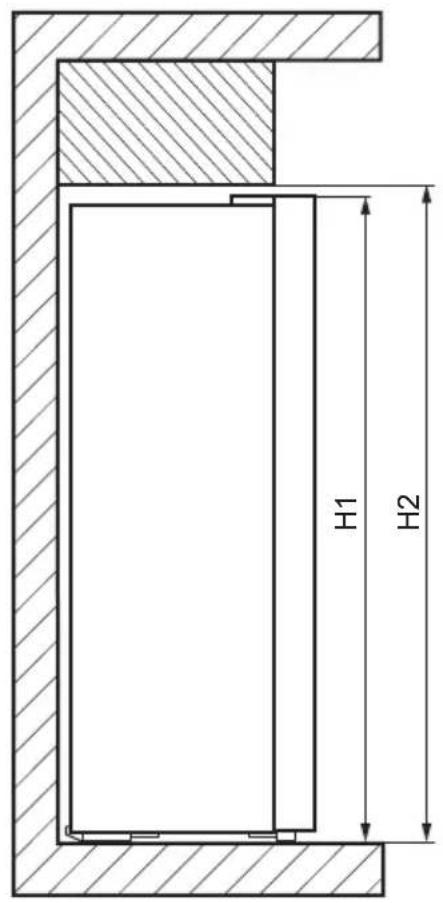
text_image
H1 H2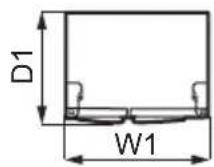
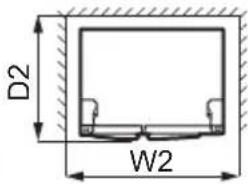
text_image
D2 W2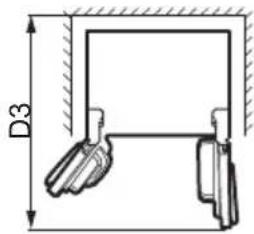
text_image
D3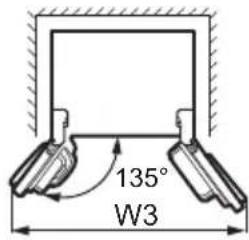
text_image
135° W3Overall dimensions ^1
| H1 mm 1770 |
| W1 mm 900 |
| D1 mm 730 |
^1 the height, width and depth of the appliance without the handle
Space required in use ^2
| H2 mm 1820 |
| W2 mm 1000 |
| D2 mm 780 |
^2 the height, width and depth of the appliance including the handle, plus the space necessary for free circulation of the cooling air
Overall space required in use ^3
| H2 mm 1820 |
| W3 mm 1540 |
| D3 mm 1230 |
^3 the height, width and depth of the appliance including the handle, plus the space necessary for free circulation of the cooling air, plus the space necessary to allow door opening to the minimum angle permitting removal of all internal equipment
3.2 Location
This appliance is not intended to be used as a built-in appliance.
In case of different installation from freestanding respecting space required in use dimensions, the appliance will function
correctly but energy consumption might increase slightly.
To ensure appliance's best functionality, you should not install the appliance in the nearby of the heat source (oven, stoves, radiators, cookers, hoods, hobs or extractor hobs) or in a place with direct sunlight. Make sure that air can circulate freely around the back of the cabinet.
This appliance should be installed in a dry, well ventilated indoor position.
To ensure best performance, if the appliance is positioned below an overhanging wall unit, the minimum distance between the top of the cabinet shall be maintained. Ideally, however, the appliance should not be positioned below overhanging wall units. One or more adjustable feet at the base of the cabinet ensure that the appliance stands level.

CAUTION!
If you position the appliance against the wall, use back spacers provided or keep the minimum distance indicated in the installation instructions.

CAUTION!
If you install the appliance next to a wall, refer to the installation instructions to understand the minimum distance between the wall and the side of the appliance where door hinges are to provide enough space to open the door when the internal equipment is removed (e.g. when cleaning).
This appliance is intended to be used at ambient temperature ranging from 10^ C to 43^ C.

The correct operation of the appliance can only be guaranteed within the specified temperature range.

If you have any doubts regarding where to install the appliance, please turn to the vendor, to our customer service or to the nearest Authorised Service Centre.

It must be possible to disconnect the appliance from the mains power supply. The plug must therefore be easily accessible after installation.
3.3 Electrical connection
- Before plugging in, ensure that the voltage and frequency shown on the rating plate correspond to your domestic power supply.
- The appliance must be earthed. The power supply cable plug is provided with a contact for this purpose. If the domestic power supply socket is not earthed, connect the appliance to a separate earth in compliance with current regulations, consulting a qualified electrician.
• The manufacturer declines all responsibility if the above safety precautions are not observed.
3.4 Water supply connection
This appliance includes a water and ice dispenser that requires a connection to a water supply. For instructions on connecting the water supply, refer to the separate Installation Instructions.

WARNING!
Install the water filter provided with the appliance. Using the dispenser without a water filter may cause water to flow into the appliance, as the tubing cap may detach.
3.5 Door reversibility
Door reversibility is not possible for this appliance.
3.6 Levelling
When placing the appliance make sure that it stands level. This can be achieved by two adjustable feet at the bottom in front.
4. OPERATION
4.1 Control panel
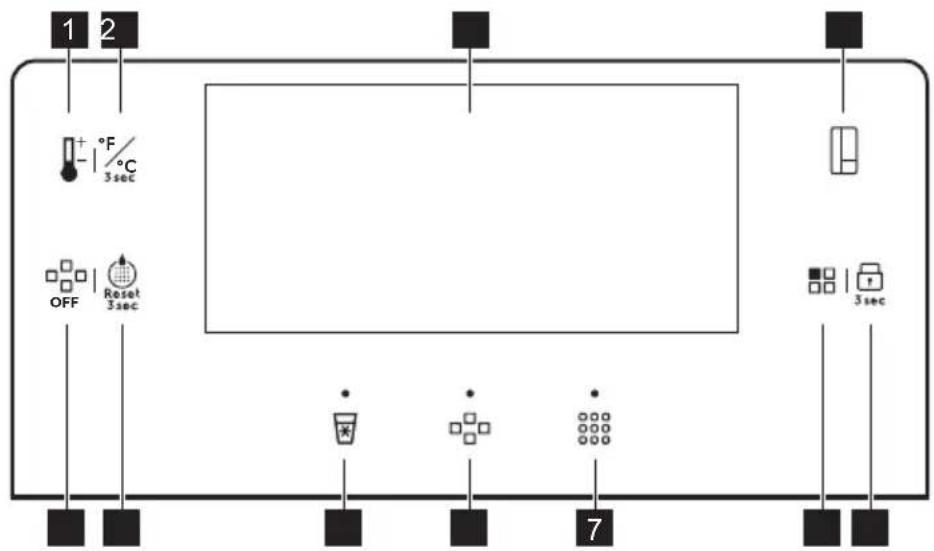
flowchart
graph TD
    A["1"] --> B["2"]
    B --> C["+ °F / °C 3 sec"]
    C --> D["3 sec"]
    D --> E["Reset"]
    E --> F["0FF"]
    F --> G["7"]
    G --> H["3 sec"]
1 Temperature regulation button
2 Unit change button
3 Display
4 Compartment switch button
5 Child Lock button
6 Mode button
7 Crushed ice button/indicator
8 Ice cube button/indicator
9 Cool water button/indicator
10 Water filter reset button
11 Ice OFF button
4.2 Display
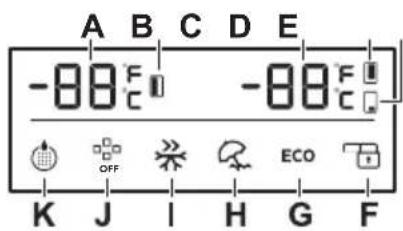
text_image
-80°C OFF ECOA. Freezer temperature indicator
B. Freezer compartment indicator
C. Fridge/Multichill 0° temperature indicator
D. Fridge compartment indicator
E. Multichill 0° compartment indicator
F. Child Lock indicator
G. ECO indicator
H. Holiday indicator
I. Fast Freeze indicator
J. Ice OFF indicator
K. Water filter indicator

The display dims automatically after 2 minutes of non-operation. Pressing the control panel buttons or opening either of the door brightens the display again. The Crushed ice, Ice cube and Cool Water indicators do not dim when active.
4.3 Switching on and off
To switch on the appliance, connect the mains plug to the power socket.
To switch off the appliance, disconnect the mains plug from the power socket.

CAUTION!
During a power outage, remove ice from the ice bin to prevent water leakage. Before switching on the appliance again, clean the bin thoroughly. Refer to the "Cleaning the ice maker" section in the "Care and cleaning" chapter.
4.4 Demo mode
Activate the Demo mode to demonstrate the appliance features.
You can activate the Demo mode within 1 minute after switching on the appliance. While either door is open, tap and hold the Temperature regulation and Compartment switch buttons simultaneously for 5 seconds. The appliance confirms the setting with a long sound.
To deactivate the Demo mode switch the appliance off and on again.
In the Demo mode:
- Ice maker, water dispenser, compressors, heaters and fans are inactive.
- Control panel and display are active and can be used.
- Lamps are active.
4.5 Temperature regulation
Press the Compartment switch button to select the compartment. Press the Temperature regulation button repeatedly until you reach the desired temperature.
The temperature range may vary between:
- 2^ and 8^ for fridge (recommended +4°C)
- -14°C and -22°C for freezer (recommended -18°C)
- 5^ and -3^ for the Multichill 0^ compartment
Set the recommended temperatures by switching on the ECO function.
The temperature indicators show the set temperature.
The set temperature is reached within 24 hours. After a power failure it remains stored.
4.6 Multichill 0°
The appliance comes with the Multichill 0° compartment marked with 📋 / 0 Star that may be used either as a chilling or refrigerating compartment.
To set a temperature between 5°C and -3°C, press repeatedly the Compartment switch button to choose the Multichill 0° compartment. Press the Temperature regulation button until you reach the desired temperature. The temperature indicator flashes for 5 seconds after the selection.
To turn off the Multichill 0° compartment, press repeatedly the Compartment switch button to choose the Multichill 0° compartment. Press the Temperature regulation button until you reach "- -". The temperature indicator flashes for 5 seconds after the selection. This indicates the Multichill 0° stops refrigerating.

After switching off, the Multichill 0° compartment obtains the ambient temperature.
4.7 Changing temperature units
To switch the temperature units between ^ C and ^ F, press and hold Unit change button for 3 seconds.
4.8 Child Lock
The Child Lock function locks the buttons from unintentional operation. Press and hold the Child Lock button for 3 seconds to lock or
unlock the control panel. The Child Lock indicator is on.

The Child Lock function disables ice and water dispensing.
4.9 Fast Freeze function
The Fast Freeze function is used to perform pre-freezing and fast freezing in sequence of freezer compartment. It accelerates the freezing of fresh food and, at the same time, protects foodstuffs already stored from undesirable warming.

To freeze fresh food activate the Fast Freeze function at least 24 hours before placing the food to complete pre-freezing.
To activate this function, press the Mode key repeatedly until you reach the Fast Freeze setting. The Fast Freeze indicator flashes for 5 seconds and stays illuminated after the selection.
When the function is active:
- The set temperature of the freezer compartment is -25^ .
- The temperatures of fridge compartment and Multichill 0^ compartment may be adjusted with the corresponding keys.
This function stops automatically after 50 hours.
To deactivate the Fast Freeze function before its automatic end, press the Mode key and select a different mode.
4.10 ECO mode
The ECO mode sets the optimal fridge and freezer temperature to minimize energy consumption.
To activate the ECO mode, press repeatedly the Mode button until the ECO indicator flashes on the display. After 5 seconds the indicator lights up and the function is on.
The fridge and freezer temperatures are set automatically according to the ambient temperature.

These values cannot be changed in the ECO mode.
| Ambient temperature | Fridge temperature | Freezer temperature |
| < 13°C 3°C -18°C | ||
| 14 - 20°C 4°C -18°C | ||
| 21 - 27°C 5°C -18°C | ||
| 28 - 34°C 6°C -16°C | ||
| >35°C 8°C -15°C |
To deactivate the ECO mode, press repeatedly the Mode button until the ECO indicator turns off.
4.11 Holiday mode
The Holiday mode is intended for periods of long absence from home. The fridge compartment temperature is set to 17 °C to save energy and prevent odour. The temperature cannot be changed when the mode is active.
To activate the Holiday mode repeatedly press the Mode button. The Holiday indicator starts blinking for 5 seconds and becomes lit.
To deactivate the Holiday mode repeatedly press the Mode button until the Holiday indicator turns off.
4.12 Reset water filter
After replacing water filter press and hold the Water filter reset button for 3 seconds until the Water Filter indicator turns off. Refer to the "Replacing water filter" section in the "Care and cleaning" chapter.
4.13 Replace water filter
Replace water filter when the Water filter indicator lights up.
To replace water filter, refer to the "Replacing water filter" section in the "Care and cleaning" chapter.
After replacing the water filter, use the Water filter reset button to reset settings and
deactivate flashing indicator. Refer to the "Reset water filter" section.

The Water filter indicator flashes every 6 months.
4.14 Enabling ice production
Press the Ice OFF button to enable or disable ice production. When the ice production is disabled, the Ice OFF indicator lights up on the display.
4.15 Ice cubes
Before dispensing ice, make sure that the ice production is enabled. Refer to the "Enabling ice production" section in the "Operation" chapter.
To get ice cubes:
- Press the Ice cube button. The Ice cube indicator lights up.
- Place a cup as close to the dispenser as possible and press it against the paddle in the middle to dispense ice.
Wait 2 seconds before taking the cup away to avoid the ice falling out of the cup. - Stop pressing the paddle to stop the ice from dispensing.
4.16 Crushed ice
Before dispensing ice, make sure that the ice production is enabled. Refer to the "Enabling ice production" section in the "Operation" chapter.
To get crushed ice:
- Press the Crushed ice button. The Crushed ice indicator lights up.
- Place the cup as close to the dispenser as possible and press it against the paddle in the middle to dispense ice.
Wait 2 seconds before taking the cup away to avoid the ice falling out of the cup. - Stop pressing the paddle to stop the ice from dispensing.
4.17 Cool water
To get cooled water:
-
Press the Cool water button. The Cool water indicator lights up.
-
Use the cup to press the paddle in the middle to dispense water.
Wait 2 seconds before taking the cup away to avoid the water splashing out.
- Stop pressing the paddle to stop the flow of water.

If you take more than 800ml of water at one time, warmer water may begin pouring out. Wait 30 minutes for water to cool down.

When dispensing water for the first time, or after a long period of non-operation, do not use the first 1-2 litres of dispensed water.
4.18 Door open alarm
If the door is left open for more than 60 seconds, the alarm beeps 5 times every 30 seconds. The alarm stops after closing the door.
If the door is left open for more than 10 minutes, the internal fridge light turns off.
Refer to the "Closing the door" section.
4.19 High temperature alarm

The alarm activates when you plug the appliance for the first time.
Freezer compartment
The alarm activates when the temperature in the appliance is too high.
During the alarm:
• the display shows blinking ht,
• the alarm indicator flashes,
• the acoustic alarm beeps.
Turning off the alarm
- Press any key on the control panel to turn off the alarm. The maximum temperature reached by the compartment appears on the display and then it is replaced by the set temperature. The alarm indicator flashes until the temperature is restored.
- Alarm beeping turns off automatically after 1 hour. Alarm indicator blinks and error code remains on the display.
- If the appliance is back to the set temperature, the alarm turns off and the normal display restores. Check if the food inside is not spoiled or thawed. If yes, refer to the "Thawing" section.

Refer to the "Temperature regulation" section to set each compartment temperature.
5. DAILY USE

WARNING!
Refer to Safety chapters.
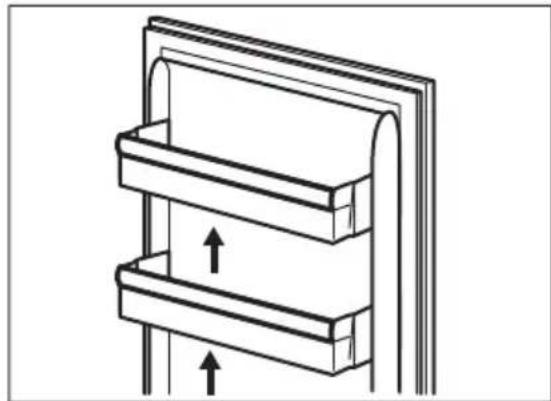
5.1 Removing and installing door shelves
- Hold the left side of the shelf.
- Lift the right side of the shelf until it comes free from the fastener.
natural_image
Diagram of a mechanical or architectural component with three horizontal panels and upward arrows indicating motion (no text or symbols)- Lift the left side of the shelf and remove it.
To put the shelf back in:
- Place the shelf flat on the door.
- Push two sides of the shelf downwards at the same time so that the shelf fits both fasteners.
5.2 Movable shelves
The walls of the appliance are equipped with a series of runners so that you can easily remove the shelves.
5.3 Fresh Zone
The Fresh Zone drawer protects the nutrients, taste, texture, colour and weight of
fruits and vegetables so you can enjoy quality food for longer and throw away less. The Fresh Zone is located in the bottom part of the refrigerator, directly above the MultiChill 0° drawer.
5.4 Humidity control
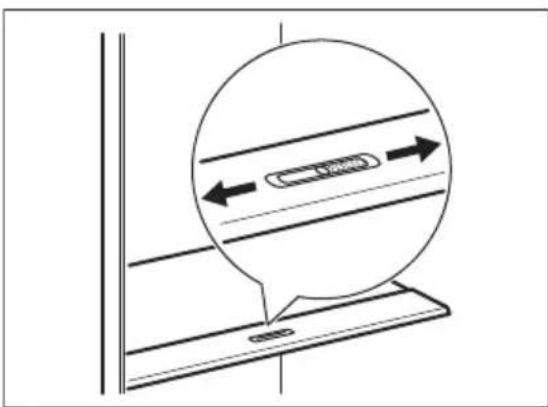
The glass shelf incorporates a device with slits, adjustable by means of a sliding lever, which makes it possible to regulate the humidity in the vegetable drawer.

Do not place any food products on the humidity control device.
text_image
Technical diagram showing a circular component with dimension arrows and a labeled component 'L1300' inside, likely illustrating a mechanical or electrical assembly.The position of the humidity control depends on the type and amounts of fruit and vegetables:
- Slits on MIN: recommended for small amounts of fruit and vegetables. In this setting, the natural moisture content in fruit and vegetables is preserved longer.
- Slits on MAX: recommended for large amounts of fruit and vegetables. In this setting, more air circulation results in a lower humidity.
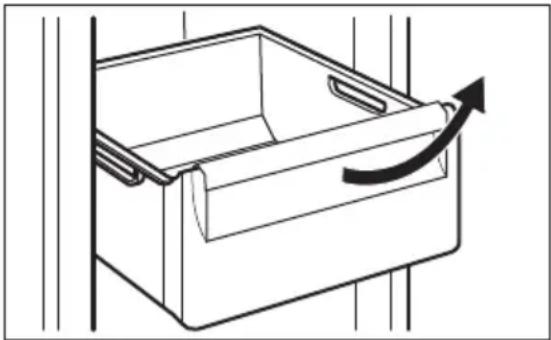
5.5 Removing and installing drawers
To remove a drawer from the compartment:
- Open the door completely.
- Pull the drawer out until it stops.
- Lift slightly the front of the drawer and detach it from the appliance.
natural_image
Line drawing of a drawer with an arrow indicating direction (no text or symbols)
To put the drawer back into its initial position, follow the above steps in reverse order.
5.6 MULTIFLOW
The appliance is equipped with the MULTIFLOW system that allows for rapid and more effective cooling of food and maintaining a more uniform temperature in each part of the appliance.
The MULTIFLOW activates automatically and operates only when the door is closed.

Do not block the air vents.
5.7 Freezing fresh food
The freezer compartment is suitable for freezing fresh food and storing frozen and deep-frozen food for a long time.
To freeze fresh food activate the Fast Freeze function at least 24 hours before placing the food to be frozen in the freezer compartment.
The maximum amount of food that can be frozen without adding other fresh food during 24 hours is specified on the rating plate (a label located inside the appliance).
When the freezing process is complete, the appliance returns to the previously set temperature. Refer to "Fast Freeze function".
For more information refer to the "Hints for freezing" section.
5.8 Storage of frozen food
When activating an appliance for the first time or after a period out of use, before putting the products in the compartment let the appliance run at least 3 hours with the Fast Freeze function switched on.
Keep the food on the shelves no closer than 15 mm from the door.

CAUTION!
In the event of accidental defrosting, for example due to a power failure, if the power has been off for longer than the value shown on rating plate under "rising time", the defrosted food must be consumed quickly or cooked immediately then cooled and then re-frozen. Refer to "High temperature alarm".
5.9 Thawing
Deep-frozen or frozen food, prior to being used, can be thawed in the refrigerator compartment or at room temperature, depending on the time available for this operation.
Small pieces may even be cooked still frozen, directly from the freezer: in this case, cooking will take longer.
5.10 Priming the water supply system
Before using the water/ice dispenser for the first time, or after a long period of non-operation, prime the water supply system:
- Press and hold a large cup against the dispenser paddle until water starts flowing.
- Continue dispensing water for the next 5 minutes to flush the system and plumb connection of any impurities. Stop to empty the glass if necessary.
- The water dispenser stops the water flow after 3 minutes of continuous use. Release the dispenser paddle and press it again to continue dispensing water.

After dispensing 800 ml of water, the water may be warmer. Wait 30 minutes for the water to chill.
5.11 Ice Maker
Before first use, make sure that the water supply is connected. To activate the ice maker refer to the "Enabling ice production" section in the "Operation" chapter. The ice maker starts producing ice after around 10 hours.
The ice maker automatically makes ice without manual operation. When the ice bin is full (about 1.6 kg), the ice maker stops making ice.

When dispensing ice for the first time, or after a long period of non-operation do not use the first batch of produced ice cubes.

Do not pull the paddle with too much force.

WARNING!
Do not put your hands or tools into the ice dispenser chute, as to avoid injury and failure of the internal mechanism.
Turn off the ice maker if you are not planning on using ice cubes for a long time. Refer to the "Enabling ice production" section in the "Operation" chapter. Remove the ice cubes from the ice bin to avoid ice clumps blocking the ice maker outlet.
5.12 Water Filter
The appliance is equipped with a water filter located in the fridge compartment behind the drawers. This filter purifies water from the water source, allowing you to get clean water and ice directly from dispenser.
Replace water filter regularly to ensure the high quality of water. Refer to the "Replacing water filter" section in the "Care and cleaning" chapter.
6. CARE AND CLEANING

WARNING!
Refer to Safety chapters.
6.1 Cleaning the interior
Before using the appliance for the first time, the interior and all internal accessories should be washed with lukewarm water and some neutral detergent to remove the typical smell of a brand-new product, then dried thoroughly.

CAUTION!
Do not use detergents, abrasive powders, chlorine or oil-based cleaners as they will damage the finish.

CAUTION!
The accessories and parts of the appliance are not suitable for washing in a dishwasher.

CAUTION!
Clean the control panel with a moist cloth. Do not use any detergents. After cleaning, wipe the control panel dry with a soft cloth.
6.2 Periodic cleaning
Clean the equipment regularly:
-
Clean the inside and accessories with lukewarm water and some neutral detergent.
-
Regularly check the door seals and wipe them clean to ensure they are clean and free from debris.
- Clean the condenser with a brush at least twice a year.
- Clean the evaporator tray periodically to remove accumulated water.
- Rinse and dry thoroughly.
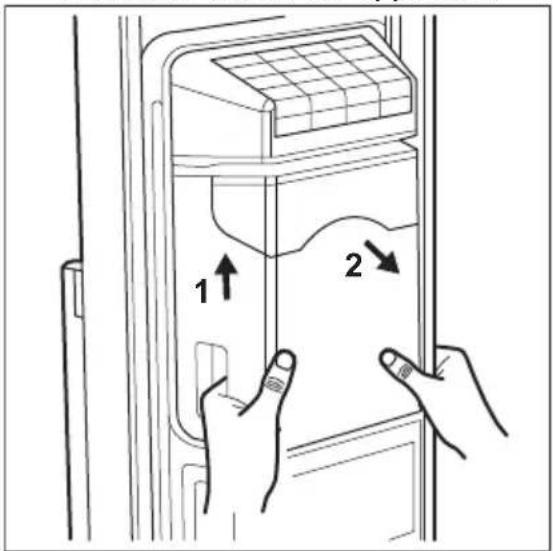
6.3 Cleaning the ice maker
Clean the ice maker and the ice bin regularly.

CAUTION!
The ice bin contains blades. Be careful when cleaning them.
To clean the ice maker:
- Disable ice production. Refer to the "Operation" chapter.
- Lift the ice bin up about 10 mm and pull it to remove it from the appliance.
text_image
Diagram showing hand positioning of a refrigerator with labeled parts and directional arrows indicating movement or movement.- Wait for the ice clumps inside the ice bin to melt. Empty the ice bin.
- Use a plastic or wooden stick to carefully remove the remaining ice.
- Rinse the ice bin with lukewarm water and clean it with a soft cloth.
- Dry the ice bin thoroughly and put it in place.
- Clean the ice outlet with a soft cloth.

CAUTION!
Do not use excessive force as it may damage the internal mechanism of the ice maker.

CAUTION!
Do not use harsh or abrasive cleaners, or any sharp tools to remove the ice. Do not wash the ice bin in a dishwasher.

Power failure, infrequent use of the ice maker or opening the freezer door frequently may lead to ice clumps blocking the dispenser mechanism.
6.4 Cleaning the ice/water dispenser

CAUTION!
Do not use detergents, abrasive powders, chlorine or oil-based cleaners as they damage the finish.

CAUTION!
Do not spray detergents directly on the display.
Clean the dispenser regularly:
- Disconnect the appliance from the mains.
- Clean the ice/water dispenser with a soft cloth and lukewarm water.
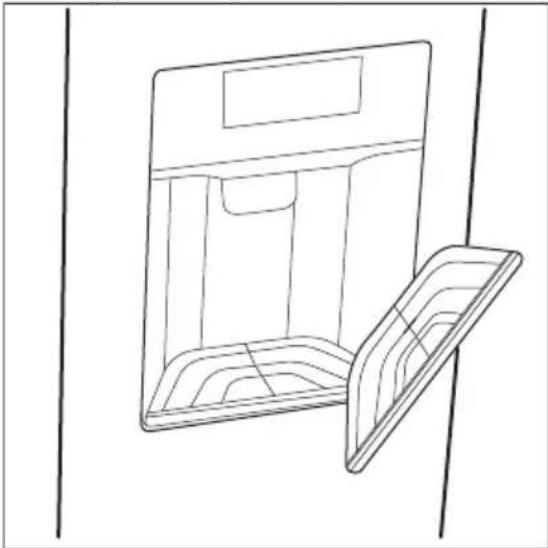
- Remove the water tray of the dispenser.
- Empty the tray and wipe it clean.
natural_image
Line drawing of a cabinet or storage unit with an open lid, no text or symbols present6.5 Replacing water filter
Replace the water filter every 6 months or after a period of prolonged non-operation. Use only original replacement water filters to ensure proper function of the appliance.
i
Before carrying out any operation, switch off the ice maker. Refer to the "Enabling ice production" section in the "Operation" chapter.
Removing the water filter
- Turn off the water supply.
- Open the fridge compartment door and remove the drawers to reach the water filter.
- Drain the water system by dispensing the water for approximately 3 minutes, or until the water flow stops.
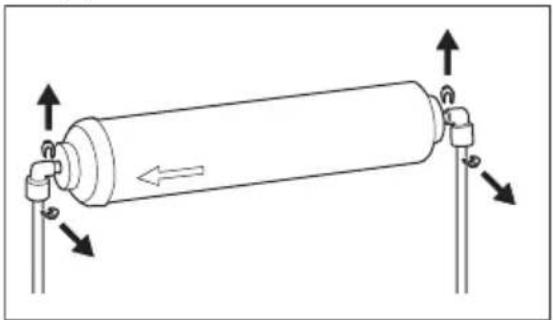
- Remove the anti-slip clips from the water pipes and the water filter connectors.
natural_image
Diagram of a cylindrical mechanical device with directional arrows indicating movement or force (no text or symbols)-
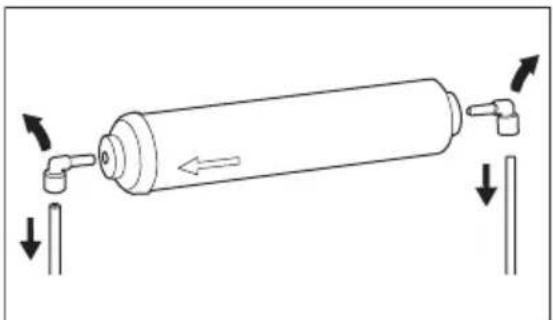
Detach the water pipe from both sides of the water filter. Press the outer part of the water filter connector with your thumb while simultaneously pulling the pipe out of the connector.
-
Detach the water filter connectors from the filter.
natural_image
Diagram of a cylindrical mechanical device with directional arrows indicating movement or force (no text or symbols)Collect the detached parts in one place.
Installing the water filter
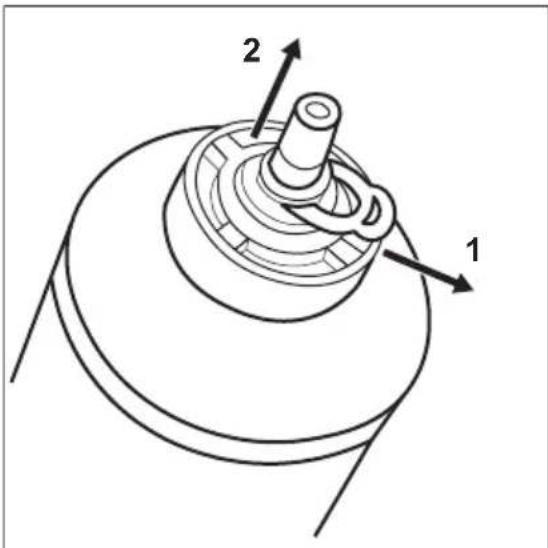
- Unpack the water filter and remove the caps and clips on both sides.
text_image
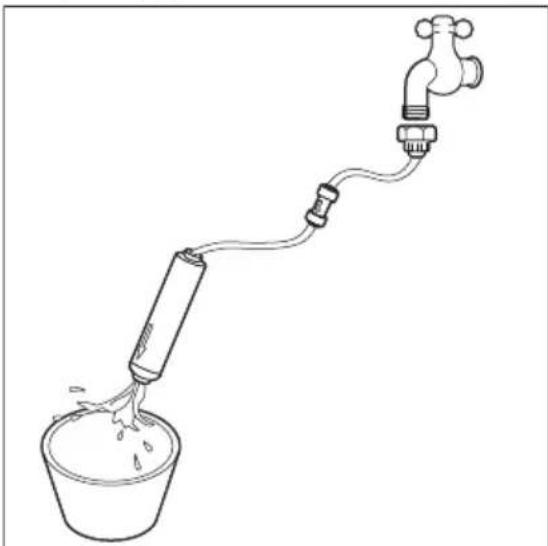
2 1- Connect the water filter to the water supply using a connector tube. Rinse for 5 minutes.
natural_image
Simple line drawing of a water spray bottle connected to a tap via tubing (no text or symbols)- Open the fridge compartment door and remove the upper drawer to reach the filter holder.
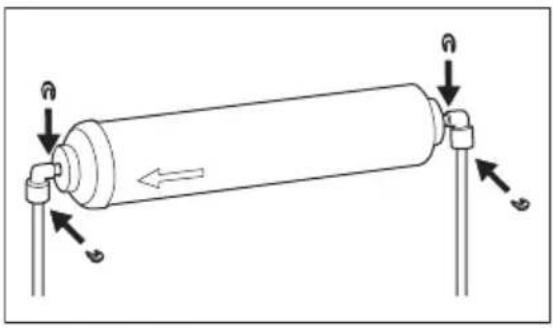
- Connect the water pipes to the water filter connectors. Insert each water pipe into the corresponding connector until it stops. Ensure the arrow on the water filter points towards the freezer compartment.
- Insert the water filter connectors on both sides of the filter.
- Secure the water filter connectors and pipes with the anti-slip clips.
text_image
Diagram of a cylindrical device with labeled directional arrows and components, likely illustrating fluid or mechanical motion.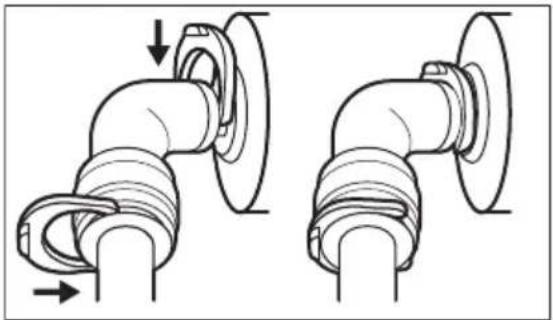
natural_image
Technical line drawing of two pipe fittings with directional arrows indicating movement (no text or symbols)- Insert the water filter into the holder above the water tank.
- Turn on the water supply.
6.6 Periods of non-operation
When the appliance is not in use for long periods, take the following precautions:
- Disconnect the appliance from electricity supply and turn off the water supply.
- Remove all food and ice from the ice bin.
- Clean the appliance and all accessories.
- Leave the doors open to prevent unpleasant smells.
7. HINTS AND TIPS
7.1 Hints for energy saving
- Fridge: Most efficient use of energy is ensured in the configuration with the drawers in the bottom part of the appliance and shelves evenly distributed. Position of the door bins does not affect energy consumption.
- Do not open the door frequently or leave it open longer than necessary.
- Fridge: Do not set too high temperature to save energy unless it is required by the characteristics of the food.
- Ensure a good ventilation. Do not cover the ventilation grilles or holes.
- Make sure that food products inside the appliance allow air circulation through dedicated holes in the rear interior of the appliance.
7.2 Hints for freezing
- Activate Fast Freeze function at least 24 hours before placing the food inside the freezer compartment.
- Before freezing wrap and seal fresh food in: aluminium foil, plastic film or bags, airtight containers with lid.
-
For more efficient freezing and thawing divide food into small portions.
-
It is recommended to put labels and dates on all your frozen food. This will help to identify foods and to know when they should be used before their deterioration.
- The food should be fresh when being frozen to preserve good quality. Especially fruits and vegetables should be frozen after the harvest to preserve all of their nutrients.
- Do not freeze bottles or cans with liquids, in particular drinks containing carbon dioxide - they may explode during freezing.
- Do not put hot food in the freezer compartment. Cool it down at room temperature before placing it inside the compartment.
• To avoid increase in temperature of already frozen food, do not place fresh unfrozen food directly next to it. Place food at room temperature in the part of the freezer compartment where there is no frozen food. - Do not eat ice cubes, water ices or ice lollies immediately after taking them out of the freezer. Risk of frostbites.
- Do not re-freeze defrosted food. If the food has defrosted, cook it, cool it down and then freeze it.
7.3 Hints for storage of frozen food
- Freezer compartment is the one marked with ✕ ***
• Higher temperature setting inside the appliance may lead to shorter shelf life. - The whole freezer compartment is suitable for storage of frozen food products.
- Leave enough space around the food to allow air to circulate freely.
- For adequate storage refer to food packaging label to see the shelf life of food.
- It is important to wrap the food in such a way that prevents water, humidity or condensation from getting inside.
7.4 Shelf life
Recommended food placement
| Appliance Compartment Type of food | |
| Fridge: | |
| Door shelves Preserved food | as jams, beverages, condiments |
| Top shelf Convenience | food, charcuterie, leftovers |
| Middle shelves Dairy foods, | eggs |
| Crisper drawers Fruits, herbs, | vegetables |
| Freezer: | |
| Top part Fruit, ice cream, | pastry |
| Middle part Vegetables | |
| Bottom part Dairy food, sea- | food, meat, leftovers |
Shelf life for freezer compartment
| Type of food Shelf life | (months) |
| Fruits (except citrus) 6 - 12 | |
| Vegetables 8 - 10 | |
| Leftovers without meat 1 - 2 | |
| Dairy food: |
| Type of food Shelf life (months) | |
| Butter 6 - 9 | |
| Soft cheese (e.g. mozzarella) 3 - 4 | |
| Hard cheese (e.g. parmesan, cheddar) | 6 |
| Seafood: | |
| Fatty fish (e.g. salmon, mackerel) | 2 - 3 |
| Lean fish (e.g. cod, flounder) | 4 - 6 |
| Shrimps | 12 |
| Shucked clams and mussels | 3 - 4 |
| Cooked fish | 1 - 2 |
| Meat: | |
| Poultry | 9 - 12 |
| Beef | 6 - 12 |
| Pork | 4 - 6 |
| Lamb | 6 - 9 |
| Sausage | 1 - 2 |
| Ham | 1 - 2 |
| Leftovers with meat | 2 - 3 |
7.5 Hints for fresh food refrigeration
- Good temperature setting that ensures preservation of fresh food is a temperature less than or equal to +4°C.
Higher temperature setting inside the appliance may lead to shorter shelf life of food.
• Cover the food with packaging to preserve its freshness and aroma.
• Always use closed containers for liquids and for food, to avoid flavours or odours in the compartment.
• To avoid the cross-contamination between cooked and raw food, cover the cooked food and separate it from the raw one. - It is recommended to defrost the food inside the fridge.
- Do not insert hot food inside the appliance. Make sure it has cooled down at room temperature before inserting it.
- To prevent food waste the new stock of food should always be placed behind the old one.
7.6 Hints for food refrigeration
- Fresh food compartment is the one marked (on the rating plate) with

- Fruit and vegetables: clean thoroughly (eliminate the soil) and place in a special drawer (vegetable drawer).
- It is advisable not to keep the exotic fruits like bananas, mangos, papayas etc. in the refrigerator.
• Vegetables like tomatoes, potatoes, onions, and garlic should not be kept in the refrigerator.
- Butter and cheese: place in an airtight container or wrap in an aluminium foil or a polythene bag to exclude as much air as possible.
- Bottles: close them with a cap and place them on the door bottle shelf, or (if available) on the bottle rack.
• Always refer to the expiry date of the products to know how long to keep them.
8. TROUBLESHOOTING

WARNING!
Refer to Safety chapters.
8.1 What to do if...
Problem Possible cause Solution
| The appliance does not operate. The appliance is switched off. Switch on the appliance. | ||
| The mains plug is not connected to the mains socket correctly. | Connect the mains plug to the mains socket correctly. | |
| There is no voltage in the mains socket. | Connect a different electrical appli-ance to the mains socket. Contact a qualified electrician. | |
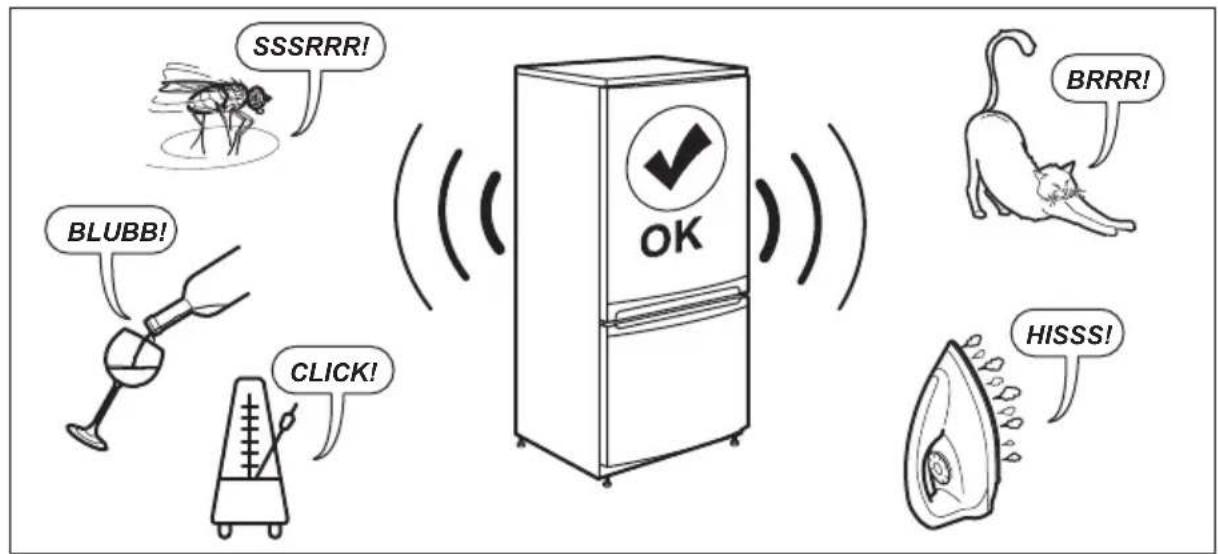
| The appliance is noisy. The appliance is not supported properly. | Check if the appliance stands sta-ble. | |
| Ice cubes or crushed ice dispensing. This is normal. The noise of break-ing or churning the ice is a part of the ice-making process. | ||
| The compressor operates continually. Temperature is set incorrectly. Refer to the "Operation" chapter. | ||
| Too much food put into the appli-ance at the same time. | Wait a few hours and then check the temperature again. | |
| The room temperature is too high. Refer to the "Installation" chapter. | ||
| Food products placed in the appli-ance are too warm. | Cool down the food products before storing. | |
| The doors are closed incorrectly. Refer to the "Closing the door" sec-tion. | ||
| The Fast Freeze function is switch-ed on. | Refer to the "Fast Freeze function" section. | |
| Problem Possible cause Solution | ||
| The compressor does not start immediately after pressing the "Fast Freeze", or after changing the temperature. | The compressor starts after a period of time. | This is normal, no error occurs. |
| Door is misaligned or interferes with ventilation grill. | The appliance is not levelled. Refer to the Installation Instructions. | |
| Door does not open easily. You attempt to re-open the door immediately after closing. | Wait a few seconds between closing and re-opening the door. | |
| The lamp does not work. The lamp is in stand-by mode. Close and open the door. | ||
| The lamp is defective. Contact the nearest Authorized Service Centre. | ||
| There is too much frost and ice. The door is not closed correctly. Refer to the "Closing the door" section. | ||
| The gasket is deformed or dirty. Refer to the "Closing the door" section. | ||
| Food products are not wrapped properly. | Wrap the food products better. | |
| Temperature is set incorrectly. Refer to the "Operation" chapter. | ||
| Appliance is fully loaded and is set to the lowest temperature. | Set a higher temperature. Refer to the "Operation" chapter. | |
| Temperature set in the appliance is too low and the ambient temperature is too high. | Set a higher temperature. Refer to the "Operation" chapter. | |
| Water flows on the rear plate of the refrigerator. | During the automatic defrosting process, frost melts on the rear plate. | This is correct. Dry the water with a soft cloth. |
| There is too much condensed water on the rear wall of the refrigerator. | Door was opened too frequently. Open the door only when necessary. | |
| Door was not closed completely. Make sure the door is closed completely. | ||
| Stored food was not wrapped. Wrap food in suitable packaging before storing it in the appliance. | ||
| Water flows on the floor. The melting water outlet is not connected to the evaporative tray above the compressor. | Attach the melting water outlet to the evaporative tray. | |
| Temperature cannot be set. | The Fast Freeze function is switched on. | Switch off the Fast Freeze function, or wait until the function deactivates automatically to set the temperature. Refer to the "Fast Freeze function" section. |
| The ECO mode is switched on. | Switch off the ECO mode. Refer to the "Operation" chapter. | |
| The temperature in the appliance is too low or too high. | The temperature is not set correctly. | Set a higher/lower temperature. |
| The door is not closed correctly. Refer to the "Closing the door" section. | ||
| The food products temperature is too high. | Cool down the food products before storing. | |
| Many food products are stored at the same time. | Store less food products at the same time. | |
| The door has been opened often. Open the door only if necessary. | ||
| The Fast Freeze function is switched on. | Refer to the "Fast Freeze function" section. | |
| There is no cold air circulation in the appliance. | Make sure that there is cold air circulation in the appliance. Refer to the "Hints and tips" chapter. | |
| Side walls of the appliance are hot. The appliance generates heat as it produces cold air. | This is normal. Use heat-resistant gloves if you need to touch the side panels. | |
| The dispenser does not provide water after pressing the paddle. | There is no water in the system. Check if the water valve is open and the filter is correctly installed. Refer to Installation Instructions. | |
| The water filter is incorrectly installed. | Refer to the "Replacing water filter" section in the "Care and cleaning chapter. | |
| The dispensed water is not cool enough. | The fridge temperature is too high. Set a lower temperature. Refer to the "Operation" chapter. | |
| More than 1l of water dispensed at once. | Wait about 30minutes for water to cool down. | |
| Water is dispensed too frequently. Wait about 30minutes for water to cool down. | ||
| The dispenser does not provide ice after pressing the paddle. | There is no ice in the ice bin. Enable the ice production. Refer to the "Ice Maker" section in the "Operation chapter. | |
| There is no water in the system. Check if the water valve is open and the filter is correctly installed. Refer to Installation Instructions. | ||
| The water pressure is too low. Ensure the water pressure is 1,5 - 7 bar. | ||
| The water filter is incorrectly installed. | Refer to the "Replacing water filter" section in the "Care and cleaning chapter. | |
| The ice cubes are clumped. Remove the clumped ice from the ice bin. | ||
| The ice outlet is blocked. Remove the blockage. Refer to the "Cleaning the ice maker" section. | ||
| The doors are closed incorrectly. Refer to the "Closing the door" section. | ||
Problem Possible cause Solution
| The dispensed ice cubes are small or the water flow is poor. | The water pressure is too low. Ensure the water pressure is 1,5 - 7 bar. | |
| The water filter is clogged. Replace the water filter. Refer to the "Replacing water filter" section in the "Care and cleaning chapter. | ||
| The water flow meter is malfunctioning. | Contact the nearest Authorized Service Centre. | |

If the problem still occurs, call the nearest Authorized Service Centre.
8.2 Replacing the lamp
The appliance is equipped with a longlife LED interior light.
Only service is allowed to replace the lighting device. Contact your Authorised Service Centre.
8.3 Closing the door
- Clean the door gaskets.
- If necessary, adjust the door. Refer to the "Installation" chapter.
- If necessary, replace the defective door gaskets. Contact the Authorised Service Centre.
9. NOISES
text_image
SSSRRR! BLUBB! CLICK! OK BRRR! HISSS!10. TECHNICAL DATA
The technical information is situated in the rating plate on the internal side of the appliance and on the energy label.
Voltage 230-240 V
Frequency 50 Hz
11. INFORMATION FOR TEST INSTITUTES
Installation and preparation of the appliance for any EcoDesign verification shall be compliant with EN 62552 (EU). Ventilation requirements, recess dimensions and minimum rear clearances shall be as stated
in this User Manual in "Installation". Please contact the manufacturer for any other further information, including loading plans.
12. CH GUARANTEE
Customer Service Centres
| Point of Service | ||
| Industriestrasse 105506 Mägenwil | Le Trési 61028 Préverenges | Via Violino 116928 Manno |
| Morgenstrasse 1313018 Bern | ||
| Langgasse 109008 St. Gallen | ||
| Am Mattenhof 4a/b6010 Kriens |  | |
| Schlossstrasse 14133 Pratteln | ||
| Comercialstrasse 197000 Chur | ||
Spare parts service Industriestrasse 10, 5506 Mägenwil, Tel. 0848 848 111
Specialist advice/Sale Buckhauserstrasse 40, 8048 Zürich, Tel. 044 405 82 44
Warranty For each product we provide a two-year guarantee from the date of purchase or delivery to the consumer (with a guarantee certificate, invoice or sales receipt serving as
proof). The guarantee covers the costs of materials, labour and travel. The guarantee will lapse if the operating instructions and conditions of use are not adhered to, if the product is incorrectly installed, or in the event of damage caused by external influences, force majeure, intervention by third parties or the use of non-genuine components.
13. ENVIRONMENTAL CONCERNS
Recycle materials with the symbol .Put the packaging in relevant containers to recycle it. Help protect the environment and human health by recycling waste of electrical and electronic appliances. Do not dispose of appliances marked with the symbol with the household waste. Return the product to your local recycling facility or contact your municipal office.

For Switzerland:
Where should you take your old equipment?
Anywhere that sells new equipment or hand it in to official SENS collection points or official SENS recycling firms. The list of official SENS collection points can be found at www.erecycling.ch
......
[Non-Text]
[EMPTY]
[EMPTY]
[Non-Text]
......
......
[Non-Text]
[Non-Text]
[Non-Text]
[Non-Text]
......
......
......
[Non-Text]
[EMPTY]