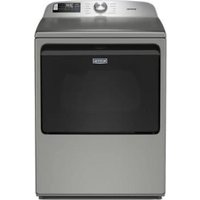
MED6205RR - Dryer MAYTAG - Free user manual and instructions
Find the device manual for free MED6205RR MAYTAG in PDF.


| Product Type | Dryer |
| Brand | Maytag |
| Model | MED6205RR |
| Dimensions (approx.) | 27 in (width) x 39 in (height) x 30 in (depth) |
| Weight (approx.) | 130 lb |
| Power Supply | 240 V, 30 A, 60 Hz |
| Drum Capacity | Large capacity (approx. 10 cu. ft) |
| Drying Programs | Heavy Duty, Normal, Delicates, Bulky Items, Mixed Load, Whites, Towels, Timed Dry, Quick Dry, Air Only, Steam Refresh, Custom Program (via app) |
| Moisture Sensors | Yes - automatic moisture detection |
| Main Options | Wrinkle Prevent, Steam, Reduce Static, Heavy, Damp Dry, Remote Start, End-of-Cycle Signal |
| Temperature Levels | Ultra Low, Low, Medium, High |
| Dryness Levels | More, Normal, Less |
| Steam Function | Yes - Steam option and Steam Refresh |
| Connectivity | Built-in Wi-Fi - compatible with Maytag™ app |
| Display | LCD screen with cycle status indicators |
| End-of-Cycle Signal | Yes, adjustable volume (Low, Medium, High, Off) |
| Care and Cleaning | Clean lint filter after each load; check exhaust duct |
| Safety | Blocked vent detection (Check Vent indicator); automatic shut-off at cycle end |
| Spare Parts and Repairability | Parts available via Maytag; user manual included; customer support |
| General Information | Made in North America; energy certification based on Timed Dry program at maximum temperature |
Frequently Asked Questions - MED6205RR MAYTAG
User questions about MED6205RR MAYTAG
0 question about this device. Answer the ones you know or ask your own.
Ask a new question about this device
Download the instructions for your Dryer in PDF format for free! Find your manual MED6205RR - MAYTAG and take your electronic device back in hand. On this page are published all the documents necessary for the use of your device. MED6205RR by MAYTAG.
USER MANUAL MED6205RR MAYTAG
Not all features, cycles, and options are available on all models. Appearance may vary.
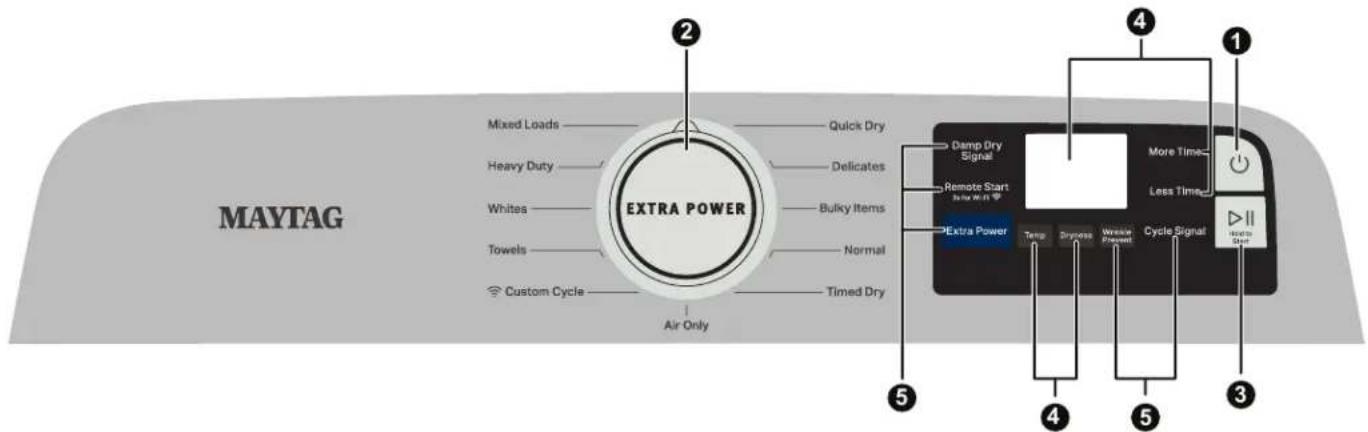
NOTE: The control panel features a sensitive surface that responds to a light touch of your finger. To ensure your selections are registered, touch the control panel with your finger tip, not your fingernail. When selecting a setting or option, simply touch its name.
Button Descriptions
1. POWER/CANCEL
Touch to turn the dryer on/off or to stop/cancel a cycle.
2. CYCLE CONTROL KNOB
Turn the knob to select a cycle for your laundry load. See the "Cycle Guide" section for details.
3. START/PAUSE
Touch and hold until LED counts down and the dryer starts; or touch once while a cycle is in process to pause it, touch again to resume.
4. LED DISPLAY AND SETTINGS
Display LCD will show the cycle settings and estimated time remaining. Adding or changing default options will also affect time shown in the display.
See the "Cycle Guide" section for details.
Not all settings are available with all cycles.
More Time/Less Time
Touch to increase or decrease the length of a Timed Dry or Quick Dry cycle.
Temp
When using any cycle except Sanitize, you may select a dry temperature based on the type of load you are drying. Use the warmest setting acceptable for the garments in the load. Follow garment label instructions.
Dryness
When using Sensor Cycles, you may select a Dryness level based on the type of load you are drying (except for the Sanitize cycle).
Cycle Status
The Cycle Status indicators show the progress of a cycle. Touch a button for the desired drying cycle. Not all indicators are available on all models. See the "Cycle Guide" section for cycle details.
Sensing
The Sensing indicator will light during Sensor Cycles to indicate that the moisture sensor on the dryer is operating. This indicator will not light during Timed Cycles or options such as Wrinkle Prevent.
Wet
The load is still wet and/or the cycle just started.
Damp
The load still has moisture remaining, a good point in the cycle to remove a garment to air dry or iron.
Cool Down
The dryer has finished drying with heat and is now tumbling without heat to cool it down and reduce wrinkling.
End
This indicates that the selected cycle has ended and the load may be removed from the dryer. If Wrinkle Prevent has been selected, the dryer may continue to tumble the load, even if "End" is displayed.
Check Vent
The Check Vent indicator is a feature available for Sensor Cycles only. This alert will show the status of airflow through the dryer and the dryer vent system for the dryer's life. During the sensing phase at the beginning of the cycle if it detects a blocked vent or low pressure it will display "Check Vent". Clean lint screen or vent for better performance. This light will stay on for the entire cycle. Refer to the "Troubleshooting" section for potential solutions to the issue. The light will be cleared upon ecompletion of the cycle, touching Power, or opening the door. It will continue to illuminate during the cycle until the vent is cleared.
NOTE: The dryer will continue to operate even while the indicator is lit, but poor airflow can impact dry times and overall performance.
5. OPTIONS
Use to select available options for your dryer. See the Options and Icons section for more information. Not all cycles and options are available on all models.
NOTE: For better performance when using Wrinkle Prevent, use with mid to larger load sizes.
Wrinkle Prevent
Touch to turn on/off and on with steam (select models). Wrinkle Prevent adds up to 150 minutes of periodic tumbling and heat to help reduce wrinkling. Wrinkle Prevent with Steam will add a short steam cycle after 60 minutes to help smooth wrinkles.
GET THE MAYTAG™ APP to stay in control and efficiently manage laundry from anywhere.*

Stay on top of laundry with end of cycle notifications on your smart device to ensure finished loads aren't left behind. Get step-by-step pretreating instructions in the Stain Guide to take on everyday tough stains and maximize the power of your Maytag appliances.
*Appliance must be set to remote start. WiFi & App Required. Features subject to change. Once installed, launch the app and you will be guided through the steps to create your user account to connect to your appliance. You can get connectivity instructions, terms of use, and privacy policy information at www.maytag.com/connect or in Canada at www.maytag.ca/connect. If you have any problems or questions, call MaytagConnected Appliances at 1-866-333-4591.
OPTIONS AND ICONS
| Image Description | Status | |
 | Remote Start and move by the WiFi ButtonsTouch each time you want to remotely control via the MaytagFollow the instructions in the “GET THE MAYTAGAPP AND GET CONNECTED” section for more details.NOTE: Once Remote Enable has been selected, certain interactions will cause it to Remote Enable. Example: Opening the door. | On |
 | cancel Off | |
 | SteamTouch to add steam to the end of certain Sensor Cycles to help smooth wrinkles. It is not available on Sanitize, Delicates, Steam Refresh, or Timed Cycles (Timed Dry, Quick Steam can be used with High or Medium heat settings. This option adds approximately 15 minutes to the total cycle time. | On |
 | Reduce StaticTouch to add this option to selected Sensor Cycles. The dryer will automatically tumble, pause, and introduce a small amount of moisture into the load to help reduce static option adds approximately 3 minutes to the total cycle time. | This On |
 | Steam & Reduce Static On | |
 | Steam & Reduce Static Off Off | |
 | Extra PowerThe Extra Power option can be used with both Sensor and Timed Dry Cycles. Press the knob to activate the Extra Power option, for an additional 10 minutes of cycle time (including additional heat and tumbling, where applicable). When activated, the Cycle Control knob will illuminate and the estimated time remaining on the display will show an additional 10 minutes. | On |
 | Off | |
 | Smartgrid, Peak rates in effect | On |
 | Smart Delay | |
 | Smartgrid, Peak rates in effect | Smart Pause |
 | WiFi Status Indicator*NOTE: When the WiFi is disconnected,the priority goes to the first, then as other options added, it goes to the least again. | Connected Wi-Fi Excellent |
 Animated Animated | Connecting | |
 | Disconnected | |
 | Wi-Fi Good | |
 | Wi-Fi Fair | |
 | Wi-Fi Weak | |
 | Software Loading or Factory Reseting | On |
 | Cycle Signal | Low |
 | Medium | |
 | High | |
 | Off | |
 | Damp Dry Signal | On |
 | Off | |
CYCLE GUIDE - SENSOR CYCLES
The dryer senses moisture in the load or air temperature and shuts off when the load reaches the selected dryness level. The exact cycle times will vary, depending on load size and type.
Settings shown are default settings for that cycle. Once you select a cycle, the default modifiers or the previous set modifiers for that cycle will be shown in the Display LCD. For best fabric care, choose the cycle that best fits the load being dried. Not all cycles and options are available on all models. Please refer to garment label instructions for best care.
| Items to dry: | Cycle: | Drying Temperature: | Dryness Level: | Available Options: | Cycle Details: |
| Heavyweight items such as towels or heavy work clothes | Heavy Duty | Ex LowLowMediumHigh | MoreNormalLess | Damp DryRemote StartCycle SignalWrinkle PreventExtra Power | Uses Medium High heat and longer cycle time to dry large loads of heavy weight, hard to dry items. |
| Work clothes, casual wear, mixed cottons, sheets, corduroy | Normal | Ex LowLowMediumHigh | MoreNormalLess | Damp DryRemote StartCycle SignalWrinkle PreventExtra Power | Uses Medium High heat to dry large loads of mixed fabrics and items. |
| Undergarments, blouses, lingerie, performance wear | Delicates | Ex LowLowMediumHigh | MoreNormalLess | Damp DryRemote StartCycle SignalWrinkle PreventExtra Power | Uses lower heat to gently dry delicate items. |
| Jackets, comforters, pillows, jeans | Bulky Items | Ex LowLowMediumHigh | MoreNormalLess | Damp DryRemote StartCycle SignalWrinkle PreventExtra Power | Use for drying large, bulky items; do not overfill dryer drum. Partway through the cycle, the signal will sound to indicate when it is time to rearrange items for optimal drying |
| Shirts, blouses, permanent press, synthetics, lightweight items | Mixed Loads | Ex LowLowMediumHigh | MoreNormalLess | Damp DryRemote StartCycle SignalWrinkle PreventExtra Power | Uses Medium High heat to dry large loads of mixed fabrics and items. |
| White, sturdy fabrics | Whites | Ex LowLowMediumHigh | MoreNormalLess | Damp DryRemote StartCycle SignalWrinkle PreventExtra Power | Uses High heat to dry large loads of white, sturdy fabrics and items. |
| Large loads of cotton towels, heavyweight items | Towels | Ex LowLowMediumHigh | MoreNormalLess | Damp DryRemote StartCycle SignalWrinkle PreventExtra Power | This is a long cycle with High heat. This cycle is not recommended for all fabrics.Use for large loads of heavyweight fabrics. |
| Selection Dependent - See App for cycle details | Custom Cycle | Selection Dependent - See App for cycle details | Selection Dependent - See App for cycle details | Selection Dependent - See App for cycle details | Create your own unique cycle from scratch or select one of our pre-made included speciality cycles in the MaytagTM App.Then, start the load right from your app easily save to the custom cycle selection your appliance for use next time.**WiFi & App Required. Features subject to change. Details & privacy info at maytag.com/connect. Appliance must be set to remote enable/start.Not used in cycle guide: Specialty cycle available in the MaytagTM App are made master your laundry challenges include Rinse & Spin, Cold Water Wash, Hand Wash, Jeans and Activewear cycles. |
CYCLE GUIDE - TIMED CYCLES
(Use sensor cycles for better fabric care and energy savings.)
TIMED DRY - It will run the dryer for the specified time on the control. Not all cycles and options are available on all models.
| Items to dry: | Cycle: | Drying Temperature: | Available Options: | Cycle Details: |
| Any loadNOTE: Select Air Dry to dry foam, rubber, plastic, or heat-sensitive fabrics | Timed Dry | Ex LowLowMediumHigh | Damp DryRemote StartCycle SignalWrinkle PreventExtra Power | Use to dry items to a damp level for items that do not require an entire drying cycle. Select a drying temperature based on the type of fabrics in your load. If you are unsure of the temperature to select for a load, select the lower setting rather than the higher setting. |
| Small loads and sportswear | Quick Dry | Ex LowLowMediumHigh | Damp DryRemote StartCycle SignalWrinkle PreventExtra Power | For small loads of 3–4 items. |
| Any Load | Air Only | - | Damp DryRemote StartCycle SignalWrinkle PreventExtra Power | Use to dry items to a damp level for items that do not require an entire drying cycle. Use this cycle for items that might shrink when using heat. |
Load Size Recommendations
For best results, follow the load size recommendations noted for each cycle.

Small load: Fill the dryer drum with 3–4 items not more than 1/4 full.

Large load: Fill the dryer drum up to about 3/4 full. Do not pack tightly. Items need to tumble freely.

Medium load: Fill the dryer drum up to about 1/2 full.
NOTE: These clothes dryer's Government energy certifications were based on the Timed Dry Cycle, Highest Temperature and Maximum Time.
TABLEAU DE COMMANDE ET CARACTÉRISTIQUES


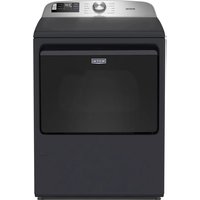
Brand : MAYTAG
Model : MED6205RR
Category : Dryer