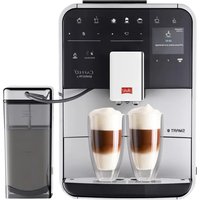
Barista TS Smart - Coffee machine MELITTA - Free user manual and instructions
Find the device manual for free Barista TS Smart MELITTA in PDF.


Pick your language and provide your email: we'll send you a specifically translated version.
| Product type | Automatic coffee machine with grinder |
| Brand | Melitta |
| Model | Barista TS Smart |
| Dimensions (W x D x H) | 240 x 445 x 350 mm |
| Weight | 9.5 kg |
| Power supply | 220-240 V, 50/60 Hz |
| Power | 1450 W |
| Pump pressure | 15 bars |
| Water tank capacity | 1.8 L |
| Bean hopper capacity | 200 g |
| Coffee types | Espresso, long coffee, cappuccino, latte macchiato |
| Milk frothing system | Integrated with steam wand and milk carafe |
| Grinder | Conical stainless steel burrs, adjustable in 5 positions |
| Display | Color TFT touch screen |
| Programmable functions | Grind adjustment, water quantity, temperature |
| Descaling system | Optional integrated water filter, descaling alert |
| Maintenance and cleaning | Automatic cleaning program, removable parts dishwasher safe |
| Safety | Automatic shut-off, child safety, locking system |
| Spare parts and repairability | Available through Melitta after-sales service |
| General information | Color: stainless steel black; 2-year warranty |
Frequently Asked Questions - Barista TS Smart MELITTA
How to make a cappuccino with the Barista TS Smart?
Fill the milk carafe with cold milk, attach it to the steam wand and select the Cappuccino program on the touch screen. The machine automatically prepares the espresso and froths the milk.
How to adjust the grind fineness?
Turn the adjustment knob located in the bean hopper. Use a finer setting for a strong espresso, coarser for a long coffee. Test and adjust to your taste.
What to do if the machine displays a descaling message?
Use the recommended Melitta descaling product. Follow the procedure in the maintenance menu: pour the solution into the water tank, start the cycle and rinse thoroughly.
How to clean the brewing unit?
Remove the brewing unit by pressing the release button. Rinse it with clean water without detergent. Let it dry before reinstalling.
Can I use ground coffee in this machine?
Yes, the Barista TS Smart has a compartment for ground coffee. Use a measuring spoon and select the Ground coffee mode in the settings.
The machine does not turn on, what to do?
Check that the power cord is plugged in and the outlet works. Ensure the water tank is in place and the bean hopper is closed. If the problem persists, contact Melitta customer service.
How to customize the espresso length?
During preparation, hold down the drink button until the desired amount, then release. The machine will memorize this setting for future uses.
How often should I change the water filter?
Replace the filter every 2 to 3 months or after 50 liters of water. The machine will alert you with a message. Only use original Melitta filters.
The coffee is too cold, how to increase the temperature?
Go to the Settings menu then Temperature. You can choose between low, medium and high. Select high for a hotter coffee.
How to activate child lock?
Press and hold the child lock button (represented by a padlock) for 3 seconds. The screen displays an icon. To deactivate, repeat the operation.
User questions about Barista TS Smart MELITTA
0 question about this device. Answer the ones you know or ask your own.
Ask a new question about this device
No questions yet. Be the first to ask one.
Download the instructions for your Coffee machine in PDF format for free! Find your manual Barista TS Smart - MELITTA and take your electronic device back in hand. On this page are published all the documents necessary for the use of your device. Barista TS Smart by MELITTA.
USER MANUAL Barista TS Smart MELITTA

Manual assistant
Powered by Anthropic
Waiting for your message
Product information
Brand : MELITTA
Model : Barista TS Smart
Category : Coffee machine