
Caffè Corso ESAM2502 - Coffee machine DELONGHI - Free user manual and instructions
Find the device manual for free Caffè Corso ESAM2502 DELONGHI in PDF.
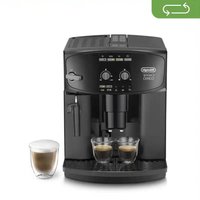


| Product type | Automatic coffee machine with grinder |
| Brand | De'Longhi |
| Model | Caffè Corso ESAM2502 |
| Dimensions (WxHxD) | 280 x 364 x 400 mm |
| Weight | 10.8 kg |
| Power supply | 220-240 V ~ 50/60 Hz, max 10 A |
| Power consumption | 1450 W |
| Pump pressure | 15 bar |
| Water tank capacity | 1.7 L |
| Bean container capacity | Approx. 250 g |
| Main functions | Whole coffee beans, pre-ground coffee, cappuccino, hot water |
| Grinder adjustment | Manual, 7 settings |
| Coffee strength adjustment | Mild, normal, strong |
| Coffee quantity adjustment | Short, normal, long |
| Control panel | Keypad with buttons and indicator lights |
| Automatic shut-off programming | 15 min, 30 min, 1 h, 2 h, 3 h |
| Energy saving mode | Yes, can be enabled/disabled |
| Adjustable water hardness | 4 levels (1-4) |
| Water softener filter | Not included but compatible |
| Anti-drip system | Yes, height-adjustable spout |
| Cappuccino frother | Removable, cleanable |
| Cleaning and descaling | Automatic descaling program, removable brewing unit cleaning |
| Water level indicator | Indicator light |
| Visual alarms | Grounds container full, water tank empty, general alarm |
| Power cord length | 1.5 m |
| Housing material | Plastic and stainless steel |
| Included accessories | Cleaning brush, water hardness test strip, brush |
| Repairability | Spare parts available through De'Longhi technical support |
| Warranty | 2 years (according to local regulations) |
Frequently Asked Questions - Caffè Corso ESAM2502 DELONGHI
User questions about Caffè Corso ESAM2502 DELONGHI
0 question about this device. Answer the ones you know or ask your own.
Ask a new question about this device
Download the instructions for your Coffee machine in PDF format for free! Find your manual Caffè Corso ESAM2502 - DELONGHI and take your electronic device back in hand. On this page are published all the documents necessary for the use of your device. Caffè Corso ESAM2502 by DELONGHI.
USER MANUAL Caffè Corso ESAM2502 DELONGHI
BEAN TO CUP ESPRESSO AND
CAPPUCCINO MACHINE
Instructions for Use
MACHINE À CAFÉ
Mode d'emploi
KAFFEEMASCHINE
Bedienungsanleitung
KOFFIEAUTOMAAT
Gebruiksaanwijzing
MÁQUINA DE CAFÉ
DeLonghi

pag. 4 page 22 pag. 38 Seite 56 pag. 75 pág. 93 pág. 111 σελ. 129
SOMMARIO
- AVVERTENZE FONDAMENTALI PER LA SICUREZZA ....5
- SAFETY WARNINGS ......6
8. SETTING THE AUTO-OFF (STAND BY)

Attention!
RINSE ONLY WITH WATER
NO DETERGENTS - NO DISHWASHER
2.1 Symbols used in these instructions .....24 2.2 Designated use....24 2.3 Instruction for Use....24
3. INTRODUCTION......24
3.1 Letters in brackets....24 3.2 Troubleshooting and repairs....24
4. DESCRIPTION......25
4.1 Description of the appliance....25 4.2 Description of control panel 25
5. PRELIMINARY CHECKS...... 25
5.1 Checking the appliance ....25 5.2 Installing the appliance....25 5.3 Connecting the appliance....25
6. TURNING THE APPLIANCE ON...... 26
7. TURNING THE APPLIANCE OFF ......26
8. SETTING AUTO-OFF (STAND BY)......27
9. ENERGY SAVING......27
10. MAKING COFFEE......27
10.1 Selecting the coffee taste....27 10.2 Selecting the quantity of coffee in the cup .. 27 10.3 Adjusting the coffee mill 27 10.4 Tips for a hotter coffee:....28 10.5 Making coffee using coffee beans .....28 10.6 Making coffee using pre-ground coffee.....29
11. MAKING CAPPUCCINO ....29
11.1 Cleaning the cappuccino maker after use....30
12. HOT WATER 30
13. CLEANING.... 30
13.1 Cleaning the coffee maker....31 13.2 Cleaning the coffee grounds container......31 13.3 Cleaning the drip tray....31 13.4 Cleaning the inside of the machine .....31 13.5 Cleaning the water tank....31 13.6 Cleaning the coffee spouts 31 13.7 Cleaning the pre-ground coffee funnel .....32 13.8 Cleaning the infuser 32
14. DESCALING....32
15. SETTING WATER HARDNESS 33
15.1 Measuring water hardness....33 15.2 Set water hardness....33
- SETTING THE TEMPERATURE......33
- MEANING OF LIGHTS DURING NORMAL OPERATION ....34
- TECHNICAL SPECIFICATION....34
- DISPOSING OF THE APPLIANCE ....34
- MEANING OF THE ALARM LIGHTS ......35
- TROUBLESHOOTING 37
1. FUNDAMENTAL SAFETY WARNINGS
- The appliance is not intended for use by persons (including children) with reduced physical, sensory or mental capabilities, or lack of experience and knowledge, unless they have been given supervision or instruction concerning use of the appliance by a person responsible for their safety. • Children should be supervised to ensure that they do not play with the appliance.
- Designated use: this appliance is designed and made to prepare coffee and milk based beverages and hot water. Any other use is considered improper and thus dangerous. The manufacturer is not liable for damage deriving from improper use of the appliance.
- The surface of the heating element remains hot after use and the outside of the appliance may retain the heat for several minutes depending on use.
- To clean, follow the instructions in the section "11. CLEANING".
- Cleaning and user maintenance shall not be made by children without supervision.
- Never clean by immersing the appliance in water.
- CAUTION: To prevent damage to the appliance do not use alkaline cleaning agents when cleaning, use a soft cloth and a mild detergent
- This is a household appliance only. It is not intended to be used in: staff kitchen areas in shops, offices and other working environments; farm houses; by clients in hotels, motels and other residential type environments; bed and breakfast type environments.
- If the plug or cord is damaged, it must be replaced by Customer Services only to avoid all risk.
- Appliances with removable cord: avoid splashes of water on the power cord connector or socket at the back of the appliance.
FOR EUROPEAN MARKETS ONLY:
- This appliance can be used by children aged from 8 years and above if they have been given supervision or instruction concerning use of the appliance in a safe way and if they understand the hazard involved. Cleaning and user maintenance shall not be made by children unless they are older than 8 and supervised.
Keep the appliance and its cord out of the reach of children aged less than 8 years.
• Appliances can be used by persons with reduced physical, sensory or mental capabilities or lack of experience and knowledge if they have been given supervision or instruction concerning use of the appliance in a safe way and if they understand the hazards involved.
• Children shall not play with the appliance.
- When not in use and before putting on or taking off parts or cleaning, always unplug the appliance.

Surfaces marked with this symbol become hot during use (the symbol is present in certain models only).
2. IMPORTANT SAFEGUARDS
2.1 Symbols used in these instructions
Important warnings are identified by these symbols. It is vital to respect these warnings.

Danger!
Failure to observe the warning may result in life threatening injury by electric shock.

Important!
Failure to observe the warning could result in injury or damage to the appliance.

Danger of burns!
Failure to observe the warning could result in scalds or burns.

Please note:
This symbol identifies important advice or information for the user.

Danger!
This is an electrical appliance and may cause electric shock.
You should therefore follow these safety warnings:
- Never touch the appliance with damp hands or feet.
- Never touch the plug with damp hands.
- Make sure the socket used is freely accessible at all times, enabling the appliance to be unplugged when necessary.
- Unplug directly from the plug only. Never pull the cord as you could damage it.
- To disconnect the appliance completely you must unplug it from the mains socket.
- If the appliance is faulty, do not attempt to repair. Turn it off, unplug from the mains socket and contact Customer Services.
- Before cleaning the appliance, turn it off, unplug from the mains socket and allow to cool.

Important:
Keep all packaging (plastic bags, polystyrene foam) away from children.

Danger of burns!
This appliance produces hot water and steam may form while it is in operation.
Avoid contact with splashes of water or hot steam.
When the appliance is in operation, the cup shelf could become very hot.
2.2 Designated use
This appliance is designed and made to prepare coffee and heat drinks.
Any other use is considered improper and thus dangerous. The manufacturer is not liable for damage deriving from improper use of the appliance.
2.3 Instruction for Use
Read this Instruction for Use carefully before using the appliance. Failure to follow this Instruction for Use may result in burns or damage to the appliance.
The manufacturer is not liable for damage deriving from failure to respect this Instruction for Use.

Please note:
Keep this Instruction for Use. If the appliance is passed to other persons, they must also be provided with this Instruction for Use.
3. INTRODUCTION
Thank you for choosing this bean to cup espresso and cappuccino machine.
We hope you enjoy using your new appliance. Take a few minutes to read this Instruction for Use. This will avoid all risks and damage to the appliance.
3.1 Letters in brackets
The letters in brackets refer to the legend in the description of the appliance on page 2.
3.2 Troubleshooting and repairs
In the event of problems, first try and resolve them following the information given in the sections “20. MEANING OF THE ALARM LIGHTS” and “21. TROUBLESHOOTING”.
If this does not resolve the problem or you require further information, you should consult Customer Services by calling the number given on the annexed "Customer Service" sheet.
If your country is not among those listed on the sheet, call the number given in the guarantee. If repairs are required, contact De'Longhi Customer Services only. The addresses are given in the guarantee certificate provided with the machine.
4. DESCRIPTION
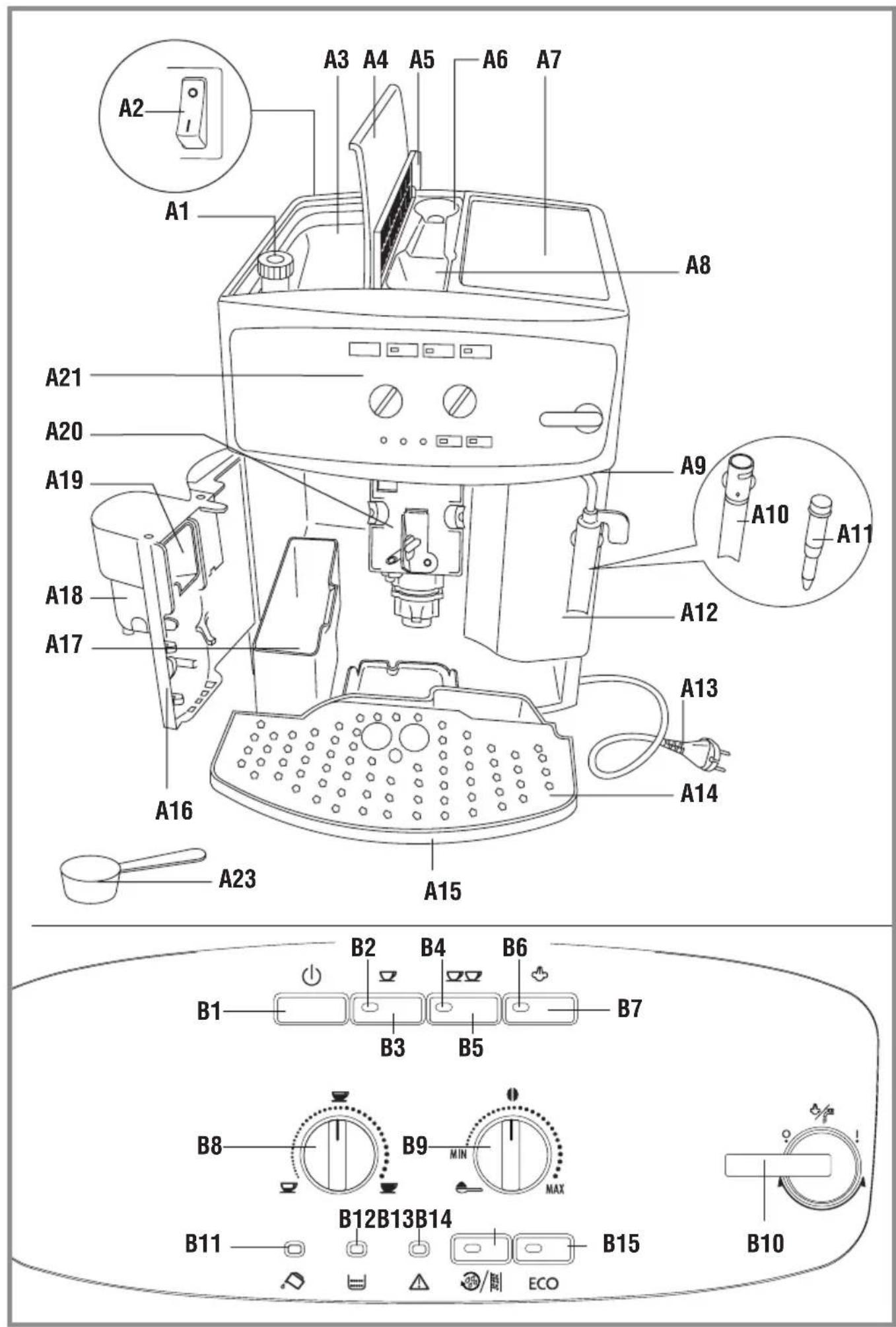
4.1 Description of the appliance
(page 2 - A )
A1. Grinding adjustment knob
A2. Main switch
A3. Beans container
A4. Beans container lid
A5. Pre-ground coffee funnel lid
A6. Compartment for measure
A7. Cup shelf
A8. Pre-ground coffee funnel
A9. Steam spout
A10. Cappuccino maker (removable)
A11. Steam nozzle (removable)
A12. Water tank
A13. Power cable
A14. Cup tray
A15. Drip tray
A16. Infuser door
A17. Coffee grounds container
A18. Coffee spout (adjustable height)
A19. Coffee guide
A20. Infuser
A21. Control panel
4.2 Description of control panel
A number of buttons on the panel have a double function. This is indicated in brackets in the description.
B1. Button turns the appliance on and off (stand by).
B2. Temperature OK or 1 cup coffee light (If the light flashes, the appliance is preheating; when on steadily, the appliance has reached the ideal temperature to make coffee).
B3. Button: to make 1 cup of coffee
B4. Temperature OK or 2 cup coffee light (If the light flashes, the appliance is preheating; when on steadily, the appliance has reached the ideal temperature to make coffee).
B5. Button: to make 2 cups of coffee
B6. Temperature OK for steam light
B7. Buttons to select the steam function
B8. Coffee quantity selection knob (short, standard or long)
B9. Selection knob to choose the coffee taste (for a mild, standard or strong coffee) or to use pre-ground coffee

B10. Steam knob
B11. Light: no water
B12. Light: grounds container full
B13. Light: general alarm
B14. Rinsing or descaling button with light
B15. ECO energy saving mode button with light
5. PRELIMINARY CHECKS
5.1 Checking the appliance
After removing the packaging, make sure the product is complete and undamaged and that all accessories are present.
Do not use the appliance if it is visibly damaged.
Contact Customer Service (see enclosed guarantee leaflet).
5.2 Installing the appliance
! Important!
When you install the appliance, you should follow the following safety warnings:
• The appliance gives off heat.
After positioning the appliance on the worktop, leave a space of at least 3 cm between the surfaces of the appliance and the side and rear walls and at least 15 cm above the coffee maker.
• Water penetrating the appliance could cause damage. Do not place the appliance near taps or sinks.
- The appliance could be damaged if the water it contains freezes.
Do not install the appliance in a room where the temperature could drop below freezing point.
- Arrange the power cable in such a way that it cannot be damaged by sharp edges or contact with hot surfaces (e.g. electric hot plates).
5.3 Connecting the appliance
⚠️ Important!
Check that the mains power supply voltage corresponds to the value indicated on the rating plate on the bottom of the appliance.
Connect the appliance to an efficiently earthed and correctly installed socket with a minimum current rating of 10A only.
If the power socket does not match the plug on the appliance, have the socket replaced with a suitable type by a qualified professional.
Using the coffee maker for the first time
i Please note:
- Coffee has been used to factory test the appliance and it is therefore completely normal for there to be traces of coffee in the mill. The machine is, however, guaranteed to be new.
- You should customise water hardness as soon as possible following the instructions in the section "15. SETTING WATER HARDNESS".
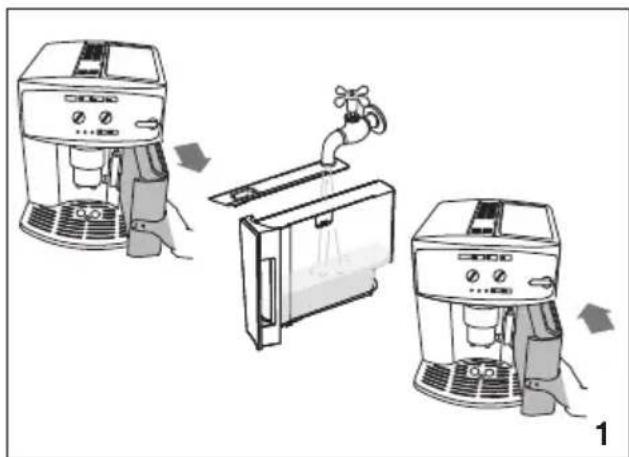
- Remove the water tank, fill to the MAX line with fresh water then replace in the appliance (fig. 1).
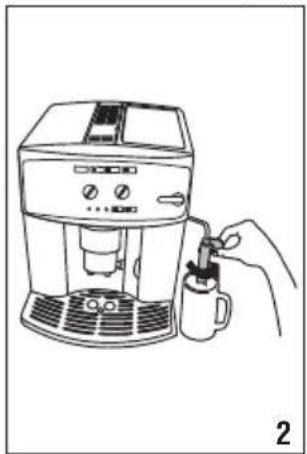
- Turn the cappuccino maker outwards and place a container with a minimum capacity of 100 ml underneath (fig. 2).
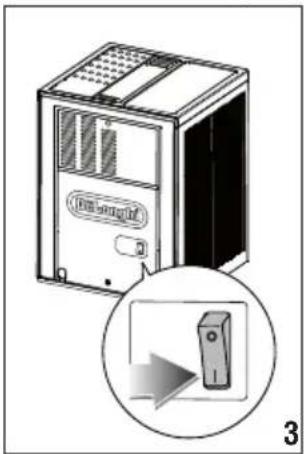
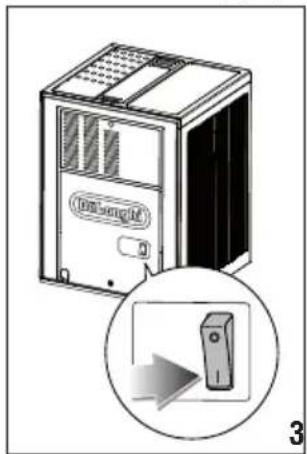
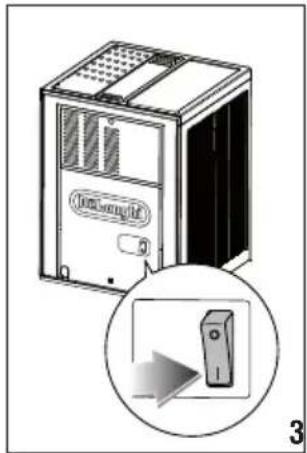
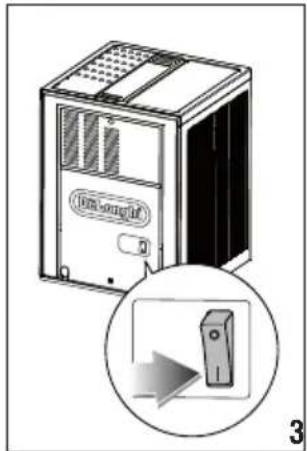
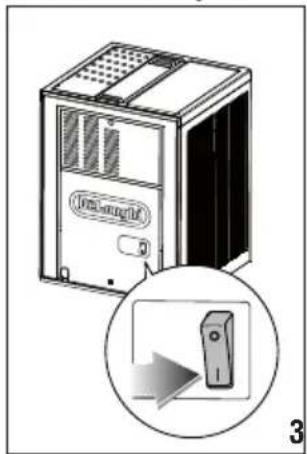
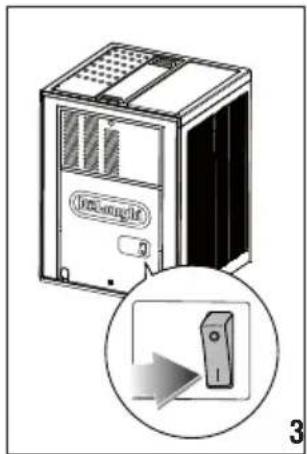
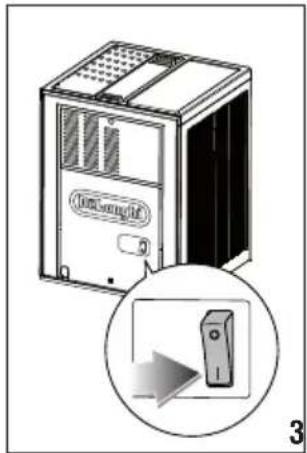
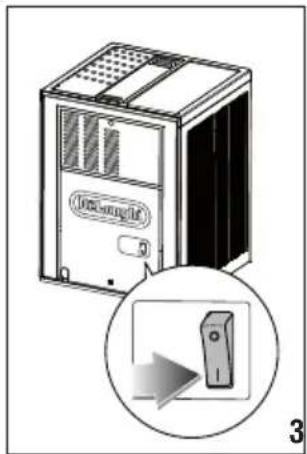
- Plug the appliance into the mains socket and place the main switch on the back of the appliance in the I position (fig. 3).
- IMMEDIATELY AFTERWARDS (WITHIN A MAXIMUM OF 30 SECONDS), turn the steam knob anticlockwise as far as it will go (fig. 4). This is priming the water system. (It is normal for the machine to make some noise).
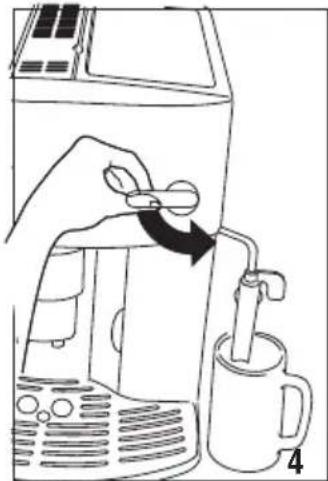
- Wait for delivery of hot water to stop automatically. The lights flash to indicate that you must close the steam tap by turning the steam knob to the 0 position.
- Turn the steam knob to the 0 position. The appliance goes off automatically.
To use the appliance, turn it on.
i Please note:
- When using the appliance for the first time, you need to make 4-5 cups of coffee or 4-5 cappuccinos before the appliance starts to give satisfactory results.
6. TURNING THE APPLIANCE ON
i Please note:
Before turning the appliance on, make sure the main switch on the back of the appliance is in the I position (fig. 3).
Make sure the steam knob is in "0" position.
Each time the appliance is turned on, it performs an automatic preheat and rinse cycle which cannot be interrupted.
The appliance is ready for use only after completion of this cycle.
Danger of burns!
During rinsing, a little hot water comes out of the coffee spouts and is collected in the drip tray underneath.
Avoid contact with splashes of water.
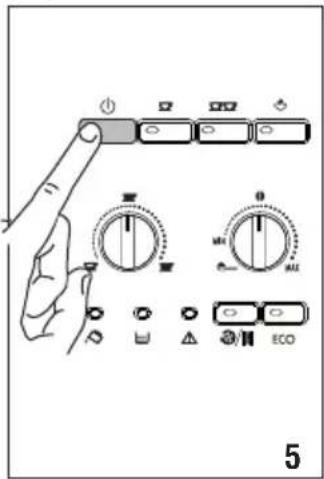
- To turn the appliance on, press the button (fig. 5). The □ and □ lights flash while the appliance is heating up and performing an automatic rinse cycle. By circulating the hot water, the appliance heats both the boiler and the internal circuits. During this phase, the light flashes.
When the and light remain on steadily, the appliance is at temperature.
7. TURNING THE APPLIANCE OFF
Each time the appliance is turned off, it performs an automatic rinse cycle which cannot be interrupted.
Danger of burns!
During rinsing, a little hot water flows from the coffee spouts. Avoid contact with splashes of water.
To turn the appliance off, press the button (fig. 5). The appliance performs a rinse cycle.

Please note:
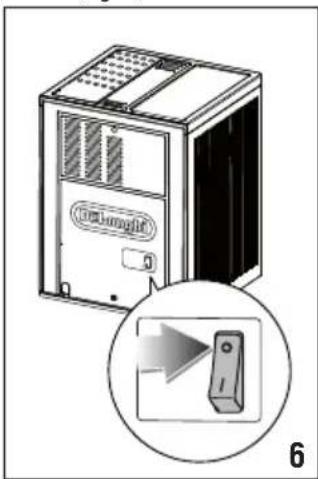
If the appliance is not used for an extended period, place the main switch in the 0 position (fig. 6).

Important!
To avoid damaging the appliance, never place the main switch (fig. 6) in the 0 position while the appliance is on.
8. SETTING AUTO-OFF (STAND BY)
Auto-off can be changed so that the appliance goes off after 15 or 30 minutes, or after 1, 2 or 3 hours.
- When the appliance is in standby mode, press and hold the ECO button until the five lights at the back of the control panel turn on.
- Select the desired time period (15 or 30 minutes, or 1, 2, or 3 hours) by pressing the button (see the light/time table).
15 min, 30 min, 1 h, 2 h, 3 h


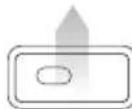
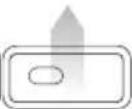


- Press the ECO button to confirm the selection and return to normal use of the appliance.
Auto-off is programmed.

Please note:
To completely disconnect the appliance, set the main switch at the back of the appliance to the 0 position (fig. 6).
9. ENERGY SAVING
Energy saving mode reduces energy consumption in compliance with current European regulations.
To activate or deactivate this mode, press the ECO button. After a period of inactivity, if ECO mode is active, the ECO button light turns on.
This mode is active by default.

Please note:
A few seconds may elapse between energy saving mode and the delivery of the first coffee.
10. MAKING COFFEE
10.1 Selecting the coffee taste
Turn the knob to select the required taste. Turning it clockwise increases the quantity of coffee beans the appliance will grind and therefore the strength of the coffee obtained.
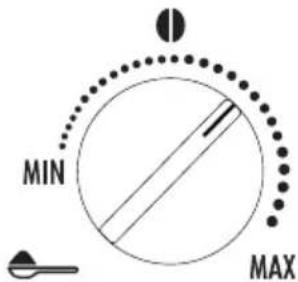
The first time you use the appliance, you will need to make a number of coffees to identify the correct knob position through trial and error.
Make sure not to turn the knob too far clockwise, otherwise the coffee may be delivered too slowly (a drop at a time), particularly when making two cups of coffee.
10.2 Selecting the quantity of coffee in the cup
Select the required quantity of coffee by turning the knob.
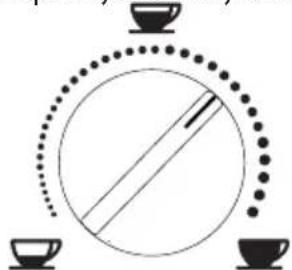
Turning it clockwise increases the amount of coffee obtained.
The first time you use the appliance, you will need to make a number of coffees to identify the correct knob position through trial and error.
10.3 Adjusting the coffee mill
The coffee mill is set by default to prepare coffee correctly and should not require regulating initially.
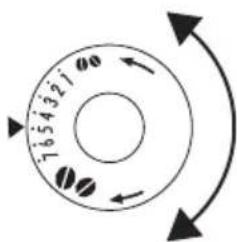
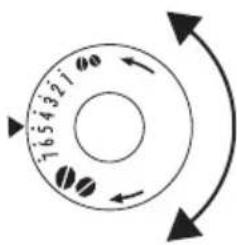
However, if after making the first few coffees you find that the coffee is either too weak and not creamy enough or delivery is too slow (a drop at a time), this can be corrected by adjusting the grinding adjustment knob (fig. 7).
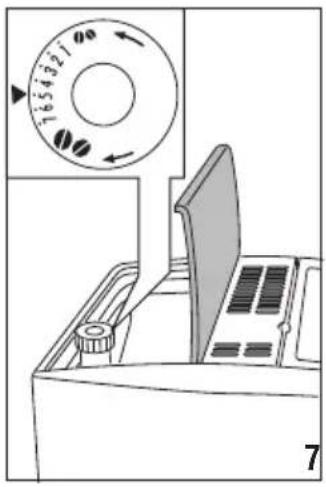

Please note:
The grinding adjustment knob must only be turned when the coffee mill is in operation.
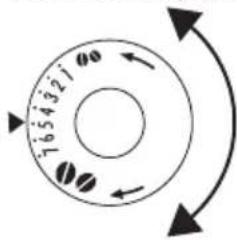
If the coffee is delivered too slowly or not at all, turn one click clockwise towards "7".
For fuller bodied creamier coffee, turn one click anticlockwise towards "1" (do not turn more than one click at a time otherwise the coffee could be delivered a drop at a time).
These adjustments will only be evident after at least 2 cups of coffee have been made.
If this adjustment does not obtain the desired result, turn the knob another click.
10.4 Tips for a hotter coffee:
For hotter coffee, you should:
- Before delivering the coffee, perform a rinse cycle by pressing the button. Hot water is delivered from the spout, heating the internal circuits of the appliance and thus raising the coffee temperature.
- Warm the cups by rinsing them with hot water (using the hot water function).
10.5 Making coffee using coffee beans

Important!
Do not use caramelised or candied coffee beans as they could stick to the coffee mill and make it unusable.
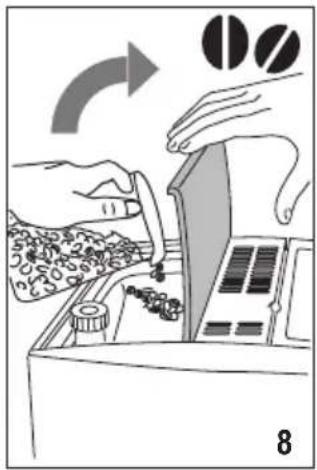
- Fill the container with coffee beans (fig. 8).
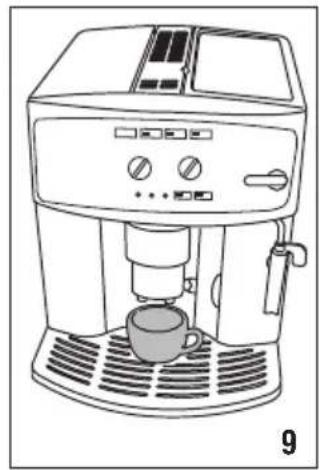
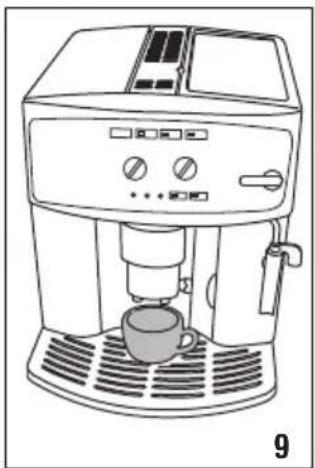
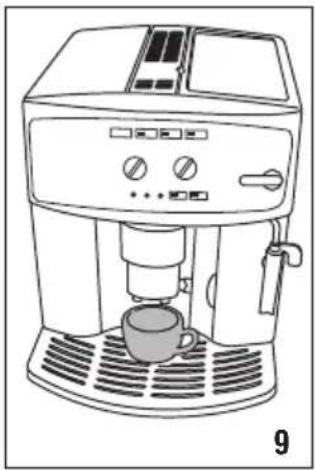
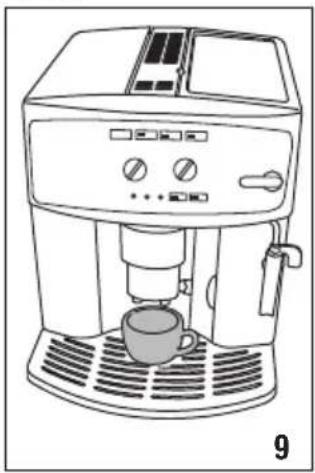
- Place under the coffee spouts:
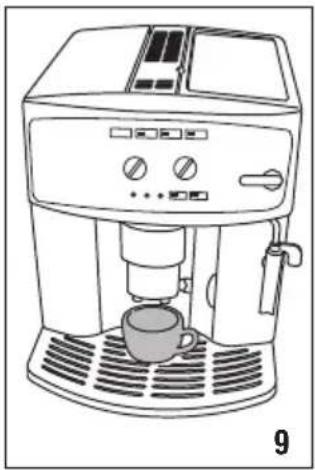
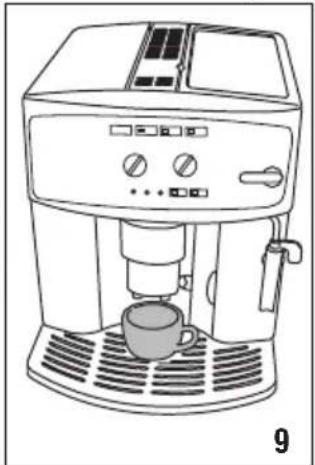
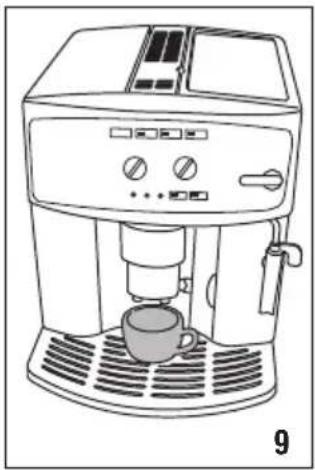
- 1 cup, if you want 1 coffee (fig. 9);
- 2 cups, if you want 2 coffees.
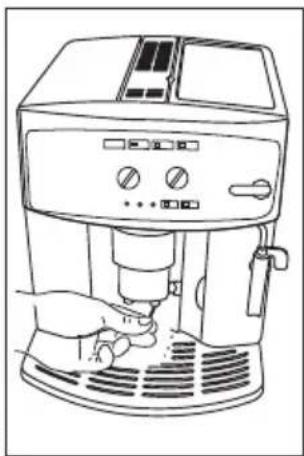
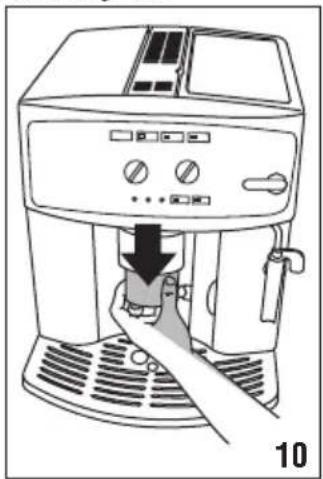
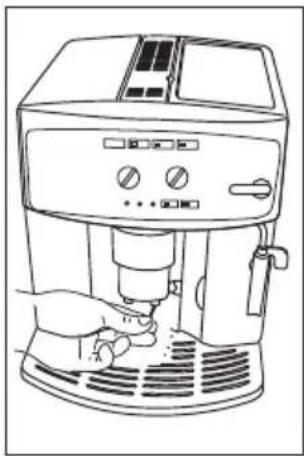
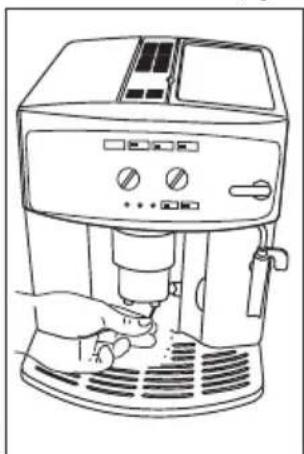
- Lower the spouts as near as possible to the cup. This makes a creamier coffee (fig. 10).
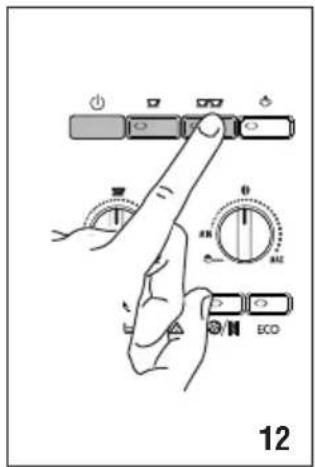
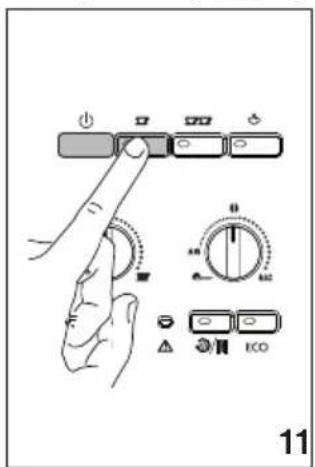
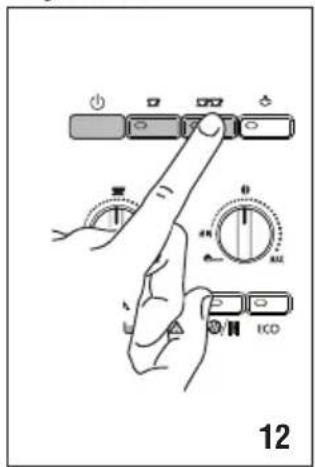
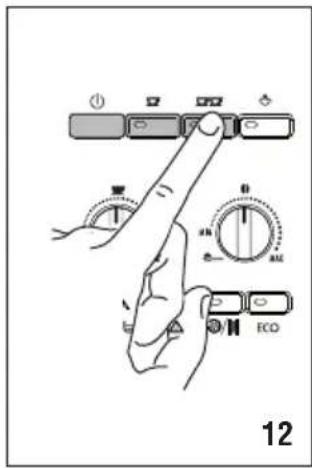
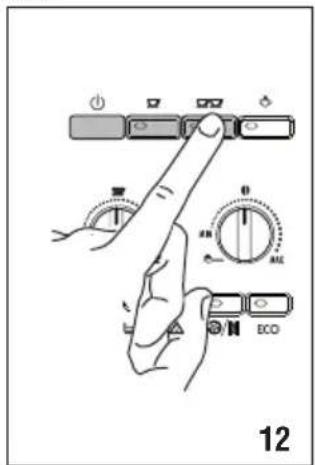
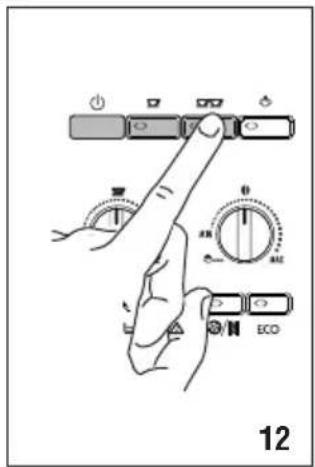
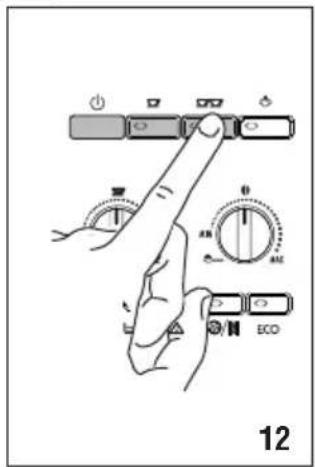
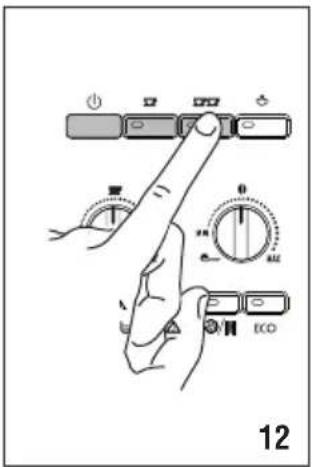
- Press the button corresponding to the number of coffees required (1 cup or 2 cups, fig. 21 and 12).
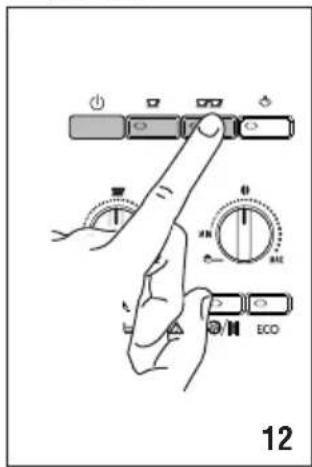
- Preparation begins and the flash.


Please note:
- While the machine is making coffee, delivery can be interrupted at any moment by pressing one of the two coffee buttons (or).
- At the end of delivery, to increase the quantity of coffee in the cup, just press (within 3 seconds) one of the coffee buttons (or).
Once the coffee has been made, the appliance is ready to use again.

Please note:
For hotter coffee, see the section "10.4 Tips for a hotter coffee:".

Important!
- If the coffee is delivered a drop at a time, too weak and not creamy enough or too cold, read the tips in the "21. TROUBLESHOOTING".
- Various alarm messages could be displayed while using the machine (FILL TANK, EMPTY GROUNDS CONTAINER, etc.). Their meaning is explained in the section "19. MEANING OF LIGHTS DURING NORMAL OPERATION".
10.6 Making coffee using pre-ground coffee

Important!
- Never add pre-ground coffee when the machine is off or it could spread through the inside of the machine and dirty it. This could damage the appliance.
- Never use more than one level measure or it could dirty the inside of the machine or block the funnel.


Please note:
If you use pre-ground coffee, you can only make one cup of coffee at a time.
- Turn the coffee taste selection knob to the position.
- Make sure the funnel is not blocked, then add one level measure of pre-ground coffee (fig. 13).
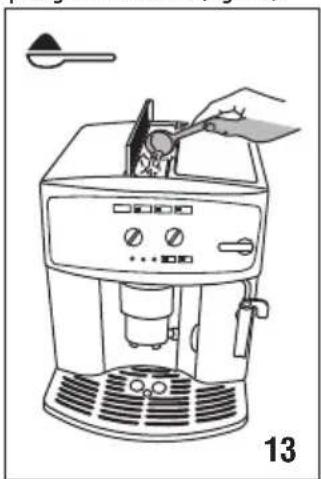
- Place a cup under the coffee spouts.
- Press the 1 cup coffee button (fig. 11).
To deactivate the pre-ground coffee function, turn the knob to one of the other positions.

Please note:
A few seconds may elapse between energy saving mode and delivery of the first coffee.
11. MAKING CAPPUCCINO

Important! Danger of burns
During preparation, steam is given off. Take care to avoid scalds.
- When preparing cappuccino, make the coffee in a large cup;
- Fill a container with about 100 grams of milk for each cappuccino to be made. In choosing the size of the container, bear in mind that the milk doubles or triples in volume;

Please note:
For a richer, denser froth, use skimmed or partially skimmed milk at refrigerator temperature (about 5°C).
To avoid milk with poor froth or large bubbles, always clean the cappuccino maker as described in the section "11.1 Cleaning the cappuccino maker after use."
- Press the button. The corresponding light flashes, indicating that the appliance is heating up;
- Turn the cappuccino maker outwards and immerse it in the milk container (fig. 14);
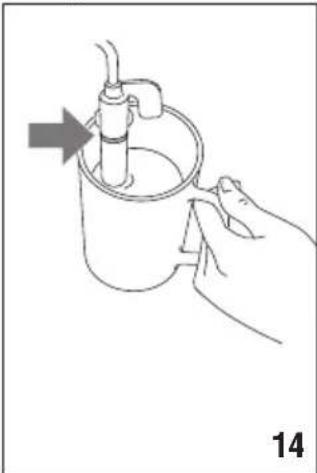
- Turn the steam knob to the I position. Steam is delivered from the cappuccino maker, giving the milk a creamy, frothy appearance and making it more voluminous;
- For a creamier froth, rotate the container with slow movements in an upward direction. (You should not discharge steam for more than 3 minutes at a time);
- When you have obtained the required froth, stop steam delivery by turning the steam knob back to the 0 position.

Important! Danger of burns
Stop steam delivery before removing the container with the frothed milk to avoid burns caused by splashes of boiling milk.
- Add the milk froth to the cup of coffee prepared previously. The cappuccino is ready. Sweeten to taste and, if desired, sprinkle the froth with a little cocoa powder.
Please note:
- If immediately after making cappuccino and deactivating the steam function by pressing the steam button you press the or button because you want to make another coffee, the coffee maker will be too hot (the and lights flash to indicate an unsuitable temperature). You must wait about ten minutes for the appliance to cool down sufficiently.
To cool it down more quickly, after deactivating the steam function, open the steam knob and let the water flow out of the cappuccino maker into a container until the lights and stop flashing.
11.1 Cleaning the cappuccino maker after use.
Clean the cappuccino maker each time you use it to avoid the build-up of milk residues or blockages.
Important! Danger of burns
When cleaning the cappuccino maker, a little hot water is delivered.
Avoid contact with splashes of water.
- Deliver a little water for a few seconds by rotating the steam knob to the I position. Then turn the steam knob to the 0 position to stop the flow of hot water.
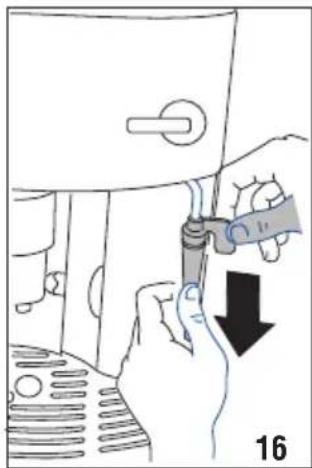
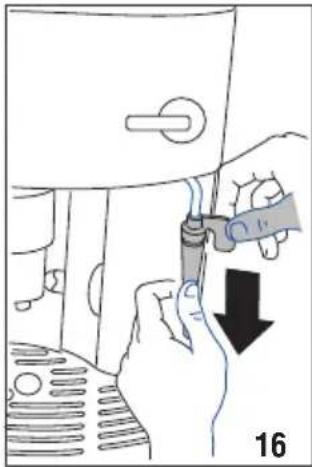
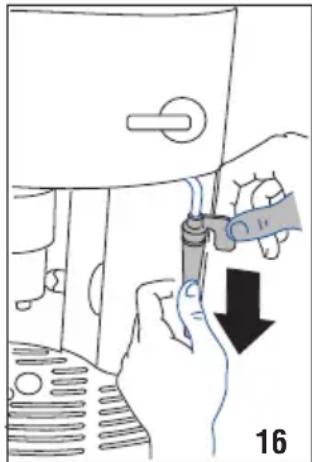
- Wait for a few minutes for the cappuccino maker to cool down. Grip the handle of the cappuccino maker tube firmly in one hand and with the other rotate the cappuccino maker anticlockwise (fig. 15) and remove by pulling downwards (fig. 16).
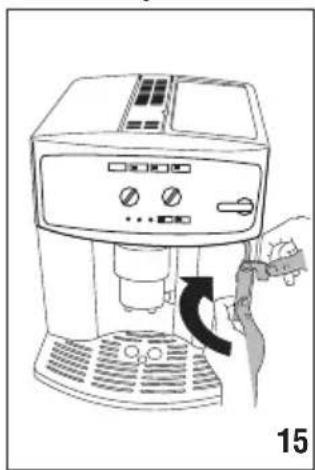
- Wash all parts of the cappuccino maker thoroughly with a sponge and warm water.
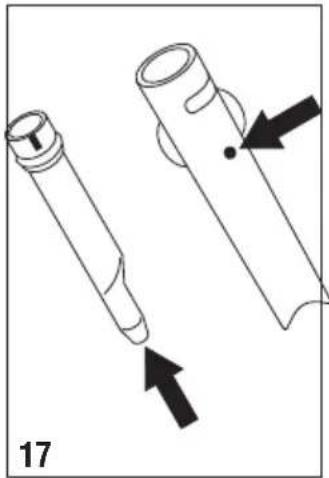
- Make sure the holes shown by the arrows in fig. 17 are not blocked. If necessary, clean with a pin.
- Replace the inner section by inserting it carefully onto the adjustable tube, then insert the steam nozzle and turn anticlockwise to lock it in place.
12. HOT WATER
Important! Danger of burns.
Never leave the machine unsupervised while delivering hot water.
As shown below, stop delivery of hot water when the cup is full. The cappuccino maker becomes hot while water is being delivered and must be held by the handle only.
- Place a container under the cappuccino maker (as close as possible to avoid splashes).
- Check that the and lights are on steadily.
- Turn the steam knob a half turn anticlockwise as far as it will go. Delivery begins.
- Stop by turning the steam knob to the 0 position
i Please note:
- If "Energy Saving" mode is active, you may have to wait a few seconds before the hot water is delivered.
- If you want to make steam after preparing hot water, it is recommended to empty the water circuits opening the steam knob for a few seconds
13. CLEANING
! Important!
- Do not use solvents, abrasive detergents or alcohol to clean the coffee maker. With De'Longhi superautomatic coffee makers, you need not use chemical products to clean the machine. • None of the components can be washed in a dishwasher.
- Do not use metal objects to remove encrustations or coffee deposits as they could scratch metal or plastic surfaces.
13.1 Cleaning the coffee maker
The following parts of the machine must be cleaned regularly:
- coffee grounds container (A17),
- drip tray (A15),
- water tank (A12),
- coffee spouts (A18),
- pre-ground coffee funnel (A8),
- inside of the machine, accessible after opening the infuser door (A16),
- infuser (A20).
13.2 Cleaning the coffee grounds container
When the light flashes, the coffee grounds container needs emptying. Unless you clean the grounds container, the light will continue to flash and the appliance cannot be used to make coffee.
To clean (with the machine on):
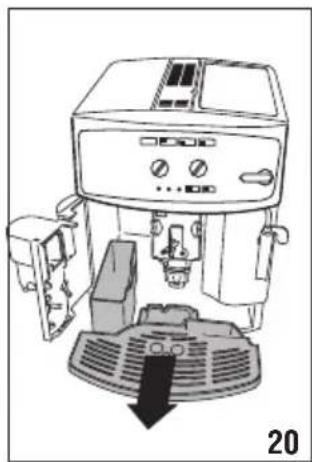
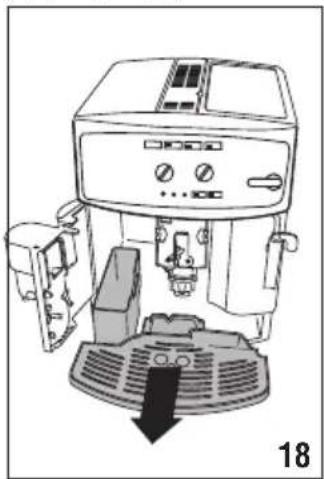
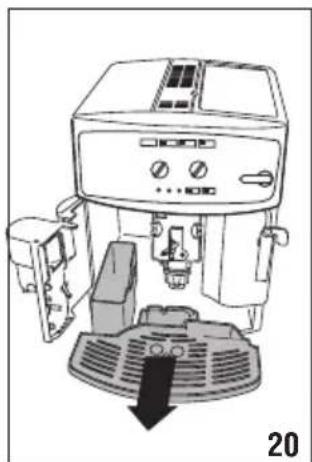
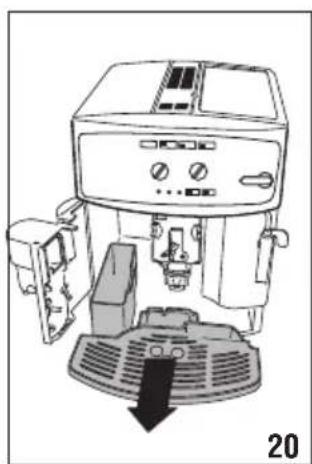
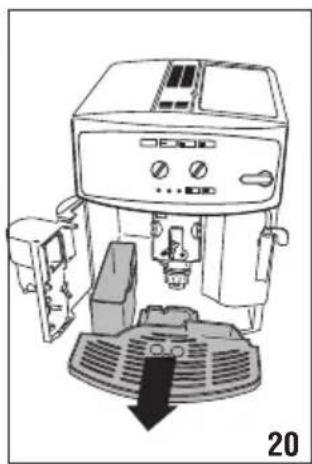
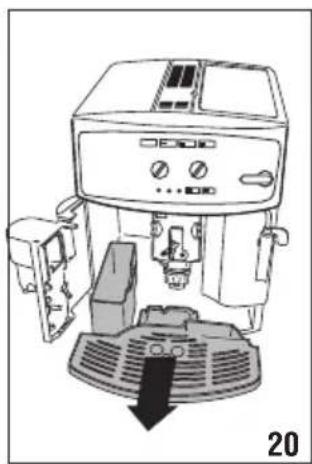
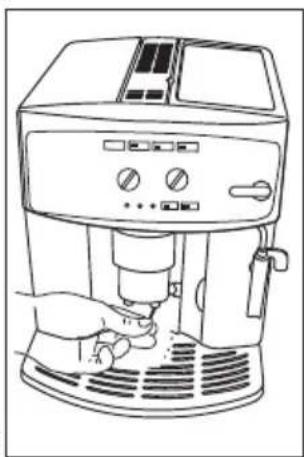
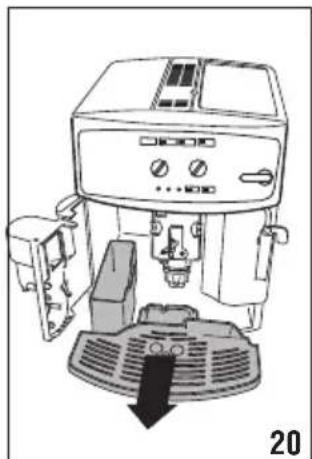
- Open the service door on the front of the appliance, extract the drip tray (fig. 18), empty and clean.
- Empty the grounds container and clean thoroughly to remove all residues left on the bottom.
! Important!
When removing the drip tray, the grounds container must be emptied, even if it contains few grounds.
If this is not done, when you make the next coffees, the grounds container may fill up more than expected and clog the machine.
13.3 Cleaning the drip tray
! Important!
If the drip tray is not emptied regularly, the water could overflow from the edge and seep inside or around the machine.
This could damage the machine, the surface it rests on or the surrounding area.
The drip tray is fitted with a level indicator (red) showing the level of water it contains (fig. 18). Before the indicator protrudes from the cup tray, the drip tray must be emptied and cleaned.
To remove the drip tray:
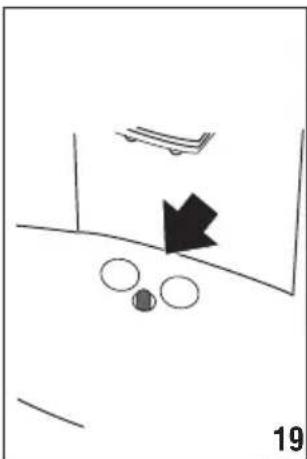
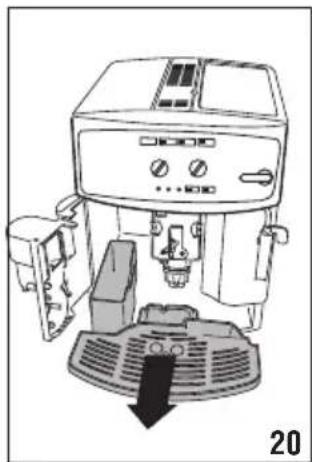
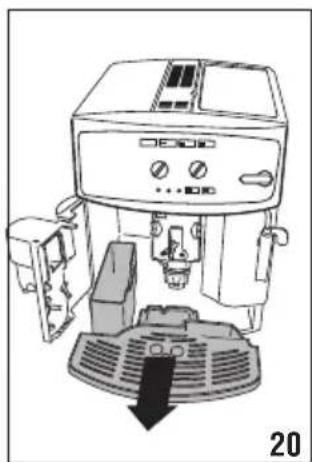
- Remove the drip tray and the grounds container (fig. 19);
- Empty the drip tray and grounds container and wash them;
- Replace the drip tray and grounds container.
13.4 Cleaning the inside of the machine
Danger of electric shock!
Before cleaning internal parts, the machine must be turned off (see "7. TURNING THE APPLIANCE OFF") and unplugged from the mains power supply. Never immerse the coffee maker in water.
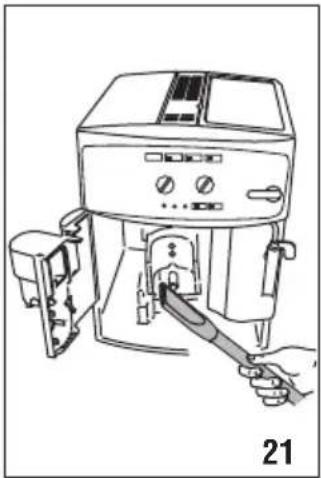
- Check regularly (about once a month) that the inside of the appliance (accessible after removing the drip tray) is not dirty.
If necessary, remove coffee deposits with the brush supplied and a sponge.
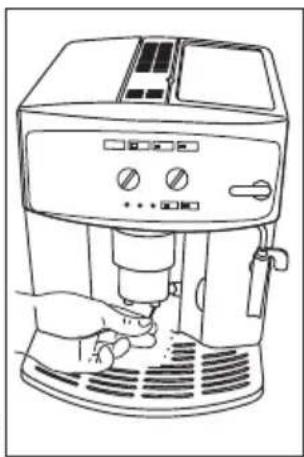
- Remove the residues with a vacuum cleaner (fig. 21).
13.5 Cleaning the water tank
- Clean the water tank (A12) regularly using mild soapy water.
- Rinse the water tank thoroughly, fill it with fresh water, and put it back in the appliance.
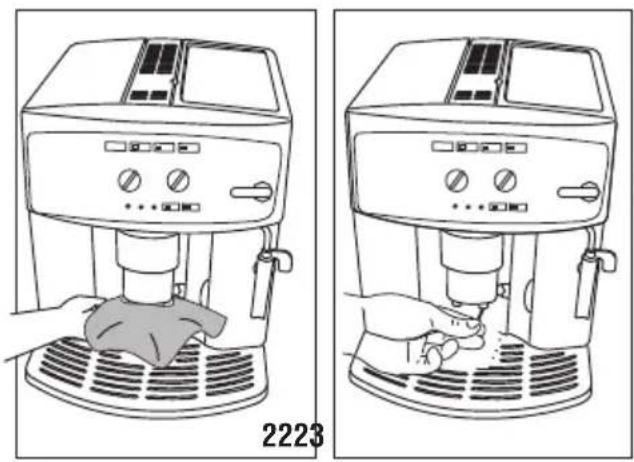
13.6 Cleaning the coffee spouts
- Clean the coffee spouts with a sponge or cloth (fig. 22).
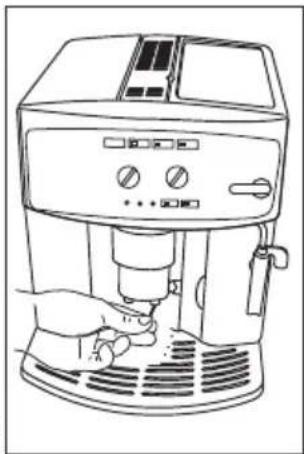
- Check that the holes in the coffee spout are not blocked. If necessary, remove coffee deposits with a toothpick (fig. 23).
13.7 Cleaning the pre-ground coffee funnel
Check regularly (about once a month) that the pre-ground coffee funnel (A6) is not blocked. If necessary, remove coffee deposits with a brush.
13.8 Cleaning the infuser
The infuser (A11) must be cleaned at least once a month.

Important!
The infuser must not be extracted when the machine is on.
- Make sure the machine is correctly turned off (see "7. TURNING THE APPLIANCE OFF").
- Open the service door.
- Extract the drip tray and the grounds container (fig. 18).
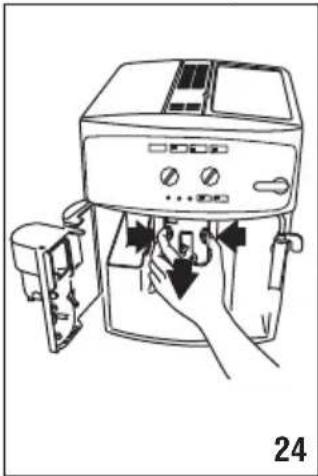
- Press the two red release buttons inwards and at the same time pull the infuser outwards (fig. 24).

Important!
RINSE WITH WATER ONLY
NO WASHING UP LIQUID - NO DISH WASHER
Do not use washing up liquid to clean the infuser as it could cause damage.
- Soak the infuser in water for about 5 minutes, then rinse under the tap.
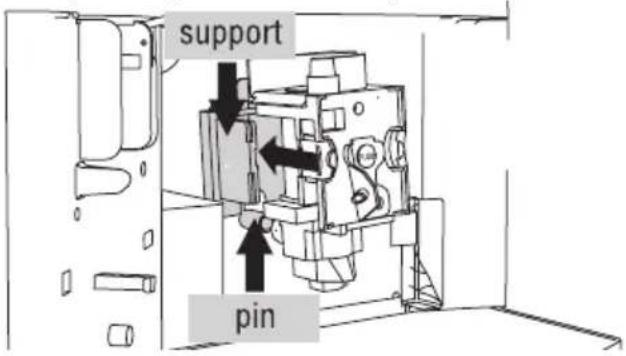
- After cleaning, replace the infuser by sliding it onto the internal support and pin at the bottom, then push the PUSH symbol fully in until it clicks into place.
ternal support and pin at the bottom, then push the PUSH symbol fully in until it clicks into place.

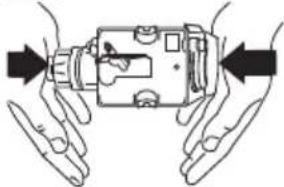
If the infuser is difficult to insert, before insertion, adapt it to the right size by pressing the two levers shown in the figure.
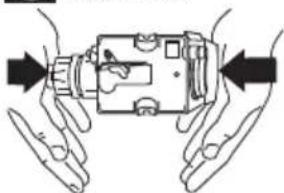
If the infuser is difficult to insert, before insertion, adapt it to the right size by pressing the two levers shown in the figure.
- Once inserted, make sure the two red buttons have snapped out.
- Replace the water tank.
- 14. DESCALING
14. DESCALING
Descale the appliance when the dark on the panel flashes.

Important!
- Descaler contains acids which may irritate the skin and eyes. It is vital to respect the manufacturer's safety warnings given on the descaler pack and the warnings relating to the procedure to follow in the event of contact with the skin and eyes.
- You should use De'Longhi descaler only. Using unsuitable descaler and/or performing descaling incorrectly may result in faults not covered by the manufacturer's guarantee.
- Turn the machine on.
- Empty the water tank (A12).
- Pour the descaler diluted with water (respecting the proportions indicated on the descaler pack) into the water tank.
Place an empty container with a minimum capacity of 1.5 litres under the hot water spout.
- Wait for the □ and □□ lights to come on steadily.

Important! Danger of burns
Hot water containing acid flows from the cappuccino maker. Avoid contact with splashes of water.
- Press the button and hold it down for at least 5 seconds to confirm that you have added the solution and
begin the descaling procedure. The light in the button remains on steadily to indicate that the descaling programme has begun (the and light and the steam light flash).
- Turn the steam knob a half turn anticlockwise. The descaler solution flows out of the cappuccino maker into the underlying container.
The descale programme automatically performs a series of rinses and pauses to remove limescale deposits from inside the machine.
After about 30 minutes, the water tank is empty and the light comes on. Turn the steam knob a half turn clockwise as far as it will go.
The appliance is now ready for rinsing through with clean water.
- Empty the container used to collect the descaler solution and replace it empty under the cappuccino maker.
- Remove the water tank, empty, rinse under running water, fill with clean water and replace.
- Turn the steam knob a half turn anticlockwise. Hot water comes out of the spout.
- When the water tank is completely empty, the light goes out and the light comes on.
- Turn the knob to the 0 position, fill the water tank again and the appliance goes off automatically. To use the appliance, turn it on by pressing the button.
15. SETTING WATER HARDNESS
The message comes on after a period of time established according to water hardness.
The machine is set by default for a hardness value of 4 (very hard water).
The machine can also be programmed according to the hardness of the mains water in the various regions so that the machine needs to be descaled less often.
15.1 Measuring water hardness
- Remove the "TOTAL HARDNESS TEST" indicator paper attached to this manual from its pack.
- Immerse the paper completely in a glass of water for one second.
- Remove the paper from the water and shake lightly. After about a minute, 1, 2, 3, or 4 red squares form, depending on the hardness of the water. Each square corresponds to one level.
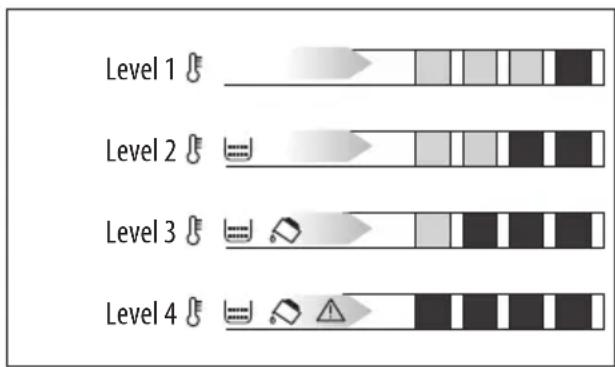
15.2 Set water hardness
- Make sure the appliance is off (but connected to the mains electricity supply and with the main switch in the I position);
- Press and hold the button for at least 6 seconds. The

- Press ECO to set the water hardness (the level shown by the total hardness test).
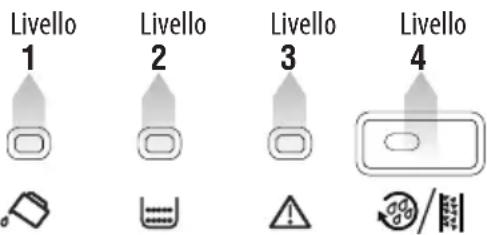
- Press the button to exit the menu.
The machine is now reprogrammed with the new water hardness setting.
16. SETTING THE TEMPERATURE
To modify the temperature of the water used to make the coffee, proceed as follows:
- With the appliance off and the main switch in the l position (fig. 3), press the ▽ button and hold it down until the lights on the control panel come on.
- Press the 📋 📋 button to select the required temperature:
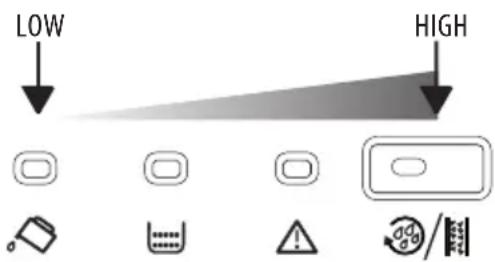
- Press the ☐ button to confirm the selection. The lights go off.
17. TECHNICAL SPECIFICATION
Voltage: 220-240 V\~50/60 Hz max. 10 A
Absorbed power: 1450 W
Pressure: 15 bar
Water tank capacity: 1.7 L
Size: LxHxD: 280x364x400 mm
Cable length: 1.5 m
Weight: 10.8 kg

This product complies with European regulation no. 1935/2004 on materials and articles intended to come into contact with food.
18. DISPOSING OF THE APPLIANCE
The appliance must not be disposed of with household waste, but taken to an authorised waste separation and recycling centre.
19. MEANING OF LIGHTS DURING NORMAL OPERATION
| LIGHTS DESCRIPTION MEANING | ||
 | The lights flash The water is not yet at the ideal temperature. Wait for the lights to come on steadily before making coffee | |
 | The lights are on steadily The appliance is ready to make coffee | |
 | The light is on steadily The appliance is delivering one cup of coffee | |
 | The light is on steadily The appliance is delivering two cups of coffee | |
 | The steam light is flashing he water is not yet at the ideal temperature. Wait for the lights to come on steadily before turning the steam knob | |
 | The steam light is on steadily | The appliance is ready to deliver steam |
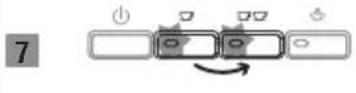 | The lights flash alternatively | The appliance is switching off “7. TURNING THE AP-PLIANCE OFF”) |
 | The lights flash The appliance indicates that the steam knob must be rotated on I position | |
 | The lights flash alternatively | The appliance indicates that the steam knob must be rotated on0 position |
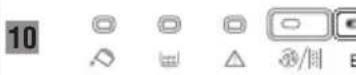 | The light is on steadily The appliance is in energy saving mode | |
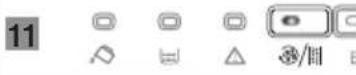 | The light is on steadily The automatic descaling programme is underway | |
- MEANING OF THE ALARM LIGHTS
| LIGHTS | DESCRIPTION | MEANING | WHAT TO DO | ||||
| [0847] | [17A3] | [8E7B] | [602W] | [58X4] | The light is on steadily | Insufficient water in the tank | Fill the tank with water and/or insert it correctly, pushing it as far as it will go until it clicks into place. |
| [IMAGE] | [IMAGE] | [IMAGE] | [IMAGE] | The tank is dirty or clogged with limescale | Rinse or descale the tank | ||
| [2047B] | [3ATS] | [ADNA] | [794D] | [784A] | The light flashes The grinding is too fineand the coffee is deliveredtoo slowly | Repeat coffee delivery and turn the grinding adjustment knob (fig. 10) one click clockwise towards "7" while the coffee mill is in operation. If after making at least 2 coffees delivery is still too slow, repeat the correction procedure, turning the grinding adjustment knob another click until delivery is correct (see the section: “10.3 Adjusting the coffee mill”). | |
| [88T2] | [XXX] | [CK7B] | [ADTR] | [BCIS] | The light is on steadily | The grounds container is full or missing | If the problem persists, turn the steam knob to the I position and deliver water from the cappuccino maker |
| [7YCH8] | [BEZH] | [SO7M] | [10WTZ] | [SAET] | The light flashes The “pre-ground coffee” function has been selected without placing any pre-ground coffee in the funnel | Empty the grounds container and drip tray, clean and replace (fig. 18). Important: when removing the drip tray, the grounds container MUST be emptied, even if it contains few grounds.If this is not done, when you make the next coffees, the grounds container may fill up more than expected and clog the machine | |
| [182H] | |||||||
| LIGHTS | DESCRIPTION | MEANING | WHAT TO DO | |
| 5 |  | The light flashes The machine must be de-scaled | The descaling procedure described in the section “14. DESCALING” needs to be performed as soon as possible. | |
| 6 | 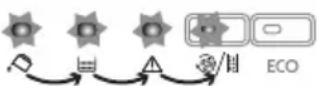 | There is an unusual noise and the lights flash alternately | The infuser has not been replaced after cleaning | Leave the service door closed and the infuser out of the coffee maker. Press the 0 but 2 tons together until the four lights go off. Only when all four lights are off can the door be opened and the infuser inserted. |
| 7 | 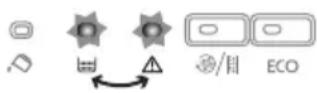 | The lights flash alter-nately | The coffee maker has just been turned on, the infuser is not inserted cor-rectly and the service door is not correctly closed. | Press the word PUSH on the infuser until it clicks into place.Make sure the two red buttons have snapped out.Close the service door and turn the appliance on again |
| 8 | 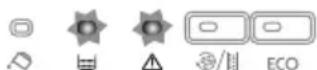 | The lights flash The pre-ground coffee funnel is clogged | Empty the funnel with the help of a brush as described in the section “13.7 Cleaning the pre-ground co-fee funnel” | |
| 9 | 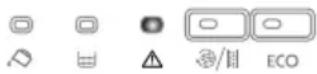 | The light is on steadily The infuser has not been replaced after cleaning. | Insert the infuser as described in the paragraph “13.8 Cleaning the infuser” | |
| Clean the appliance thoroughly | ||||
| 10 |  | The light flashes The service door is open If you cannot | close the door, make sure the infuser is correctly inser-ted | |
| 11 | 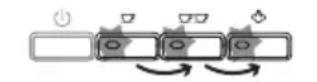 | The lights flash | The coffee maker has been switched on with the steam knob in the open position | Turn the steam knob clockwise un-til delivery stops |
21. TROUBLESHOOTING
Below is a list of some of the possible malfunctions.
If the problem cannot be resolved as described, contact Customer Services.
| PROBLEM POSSIBLE CAUSE | SOLUTION | |
| The coffee is not hot | The cups were not preheated. | Warm the cups by rinsing them with hot water (N.B. you can use the hot water function). |
| The infuser has cooled down because 2/3 minutes have elapsed since the last coffee was made. | Before making coffee, heat the infuser by pressing the don. | |
| The coffee is weak or not creamy enough. | The coffee is ground too coarsely. Turn the grinding adjustment knob one click anticlockwise towards "1" while the coffee mill is in operation (fig. 7). The effect is only visible after delivering 2 coffees (see the section: "10.3 Adjusting the coffee mill"). | |
| The coffee is unsuitable. Use coffee beans suitable for espresso coffee makers. | ||
| The coffee is delivered too slowly or a drop at a time. | The coffee is ground too finely. Turn the grinding adjustment knob one click clockwise towards "7" while the coffee mill is in operation (fig. 7). Continue one click at a time until coffee delivery is satisfactory. The effect is only visible after delivering 2 coffees (see the section: "10.3 Adjusting the coffee mill"). | |
| Coffee does not come out of one of the spouts. | The spouts are blocked. Clean the spouts with a toothpick. | |
| The frothed milk has large bubbles | The milk is not cold enough or is not semi-skimmed. | You should ideally use skimmed or semi-skimmed milk at refrigerator temperature (about 5°C). If the result is not as you wished, try changing brand of milk. |
| The milk is not frothed | Cappuccino maker dirty. | Clean as described in the section "11.1 Cleaning the cappuccino maker after use." |
| Steam delivery stops A safety device stops steam delivery after 3 minutes. | Wait, then activate the steam function again. | |
| The appliance does not come on. | It is not plugged into the mains socket. | Plug into the mains socket. |
| The main switch is not turned on. | Place the main switch in the I position (fig. 3). | |
| When the steam/hot water knob is turned to the I position, steam/hot water is not delivered from the cappuccino maker | The holes in the cappuccino maker and/or ste-am nozzle are blocked | Clean the cappuccino maker as described in the section "11.1 Cleaning the cappuccino maker after use." |
| The infuser assembly cannot be removed for cleaning. | The appliance is on or has not completed the turning off cycle. | The infuser can only be removed when the appliance has been turned off correctly (see the section "7. TURNING THE APPLIANCE OFF"). |
- FUNDAMENTAL SAFETY INSTRUCTIONS ....39
- SAFETY INSTRUCTIONS....40
- INTRODUCTION......41
8. PROGRAMMING THE AUTOMATIC SHUT-OFF (STANDBY)

Note:


Warning!
RINSE WITH WATER ONLY
NO CLEANERS - NO DISHWASHER

Note!

Note:
4. DESCRIPTION....78
6. SWITCHING ON THE DEVICE....80
7. SWITCHING OFF THE DEVICE 80
8. SETTING AUTOMATIC SHUTDOWN (STAND-BY) 80
9. ENERGY SAVING ....81
10. PREPARING THE COFFEE 81
6. SWITCHING ON THE APPLIANCE

Note:

Note!

Note!
RINSE WITH WATER ONLY.
NO CLEANING AGENTS - NOT DISHWASHER SAFE
ONLY FOR EUROPEAN MARKETS:
8. SET THE AUTOMATIC SHUTDOWN (STAND BY)

Attention!

Attention!
RINSE WITH WATER ONLY
DO NOT USE DETERGENTS - DO NOT WASH IN DISHWASHER

Attention!
To remove the drip tray:

Attention!
RINSE WITH WATER ONLY
DO NOT USE DETERGENTS - DO NOT PUT IN THE DISHWASHER

Caution!
i Note:

Note:
⚠️ Caution!

- SOMMARIO
- SETTING THE AUTO-OFF (STAND BY)
- ATTENTION
- INTRODUCTION
- DESCRIPTION
- PRELIMINARY CHECKS
- TURNING THE APPLIANCE ON
- TURNING THE APPLIANCE OFF
- SETTING AUTO-OFF (STAND BY)
- ENERGY SAVING
- MAKING COFFEE
- MAKING CAPPUCCINO
- HOT WATER
- CLEANING
- DESCALING
- SETTING WATER HARDNESS
- FUNDAMENTAL SAFETY WARNINGS
- FOR EUROPEAN MARKETS ONLY
- IMPORTANT SAFEGUARDS
- SYMBOLS USED IN THESE INSTRUCTIONS
- DESIGNATED USE
- INSTRUCTION FOR USE
- LETTERS IN BRACKETS
- TROUBLESHOOTING AND REPAIRS
- DESCRIPTION OF THE APPLIANCE
- DESCRIPTION OF CONTROL PANEL
- CHECKING THE APPLIANCE
- INSTALLING THE APPLIANCE
- IMPORTANT
- CONNECTING THE APPLIANCE
- ⚠️ IMPORTANT
- USING THE COFFEE MAKER FOR THE FIRST TIME
- I PLEASE NOTE
- DANGER OF BURNS
- PLEASE NOTE
- SELECTING THE COFFEE TASTE
- SELECTING THE QUANTITY OF COFFEE IN THE CUP
- ADJUSTING THE COFFEE MILL
- TIPS FOR A HOTTER COFFEE
- MAKING COFFEE USING COFFEE BEANS
- MAKING COFFEE USING PRE-GROUND COFFEE
- IMPORTANT! DANGER OF BURNS
- CLEANING THE CAPPUCCINO MAKER AFTER USE
- CLEANING THE COFFEE MAKER
- CLEANING THE COFFEE GROUNDS CONTAINER
- CLEANING THE DRIP TRAY
- CLEANING THE INSIDE OF THE MACHINE
- DANGER OF ELECTRIC SHOCK
- CLEANING THE WATER TANK
- CLEANING THE COFFEE SPOUTS
- CLEANING THE PRE-GROUND COFFEE FUNNEL
- CLEANING THE INFUSER
- IF THE INFUSER IS DIFFICULT TO INSERT, BEFORE INSERTION, ADAPT IT TO THE RIGHT SIZE BY PRESSING THE TWO LEVERS SHOWN IN THE FIGURE
- MEASURING WATER HARDNESS
- SET WATER HARDNESS
- SETTING THE TEMPERATURE
- TECHNICAL SPECIFICATION
- DISPOSING OF THE APPLIANCE
- MEANING OF LIGHTS DURING NORMAL OPERATION
- TROUBLESHOOTING
- PROGRAMMING THE AUTOMATIC SHUT-OFF (STANDBY)
- NOTE
- WARNING
- RINSE WITH WATER ONLY
- SWITCHING ON THE DEVICE
- SWITCHING OFF THE DEVICE
- SETTING AUTOMATIC SHUTDOWN (STAND-BY)
- PREPARING THE COFFEE
- SWITCHING ON THE APPLIANCE
- ONLY FOR EUROPEAN MARKETS
- SET THE AUTOMATIC SHUTDOWN (STAND BY)
- CAUTION
- ⚠️ CAUTION
Brand : DELONGHI
Model : Caffè Corso ESAM2502
Category : Coffee machine