QA85QN900FU - TV SAMSUNG - Free user manual and instructions
Find the device manual for free QA85QN900FU SAMSUNG in PDF.


User questions about QA85QN900FU SAMSUNG
0 question about this device. Answer the ones you know or ask your own.
Ask a new question about this device
Download the instructions for your TV in PDF format for free! Find your manual QA85QN900FU - SAMSUNG and take your electronic device back in hand. On this page are published all the documents necessary for the use of your device. QA85QN900FU by SAMSUNG.
USER MANUAL QA85QN900FU SAMSUNG
Thank you for purchasing this Samsung product.
To receive more complete service, please register your product at www.samsung.com
Model Serial No.
Before Reading This Simple User Guide
This TV comes with this Simple User Guide and an embedded User guide.
(F6F/H5F: > left directional button > settings >
Support > Open User guide
(Other models: 值 >left directional button> settings>
Support > Tips and User Guides > Open User guide)
On the website (www.samsung.com), you can download the manuals and see its contents on your PC or mobile device.
Warning! Important Safety Instructions
Please read the Safety Instructions before using your TV. Refer to the table below for an explanation of symbols which may be on your Samsung product.
| CAUTION | |
| RISK OF ELECTRIC SHOCK. DO NOT OPEN. | |
| CAUTION: TO REDUCE THE RISK OF ELECTRIC SHOCK,DO NOT REMOVE COVER (OR BACK). THERE ARENO USER SERVICEABLE PARTS INSIDE. REFER ALLSERVICING TO QUALIFIED PERSONNEL. | |
| 4 | This symbol indicates that high voltage ispresent inside. It is dangerous to make anykind of contact with any internal part ofthis product. |
| ! | This symbol indicates that this producthas included important literatureconcerning operation and maintenance. |
| Class II product: This symbol indicatesthat a safety connection to electrical earth(ground) is not required. If this symbolis not present on a product with a mainslead, the product MUST have a reliableconnection to protective earth (ground). | |
| ~ | AC voltage: Rated voltage marked withthis symbol is AC voltage. |
| = | DC voltage: Rated voltage marked withthis symbol is DC voltage. |
| Ai | Caution. Consult instructions for use:This symbol instructs the user to consultthe Simple User Guide for further safetyrelated information. |
Power
- Do not overload wall outlets, extension cords, or adapters beyond their voltage and capacity. It may cause fire or electric shock.
Refer to the power specifications section of the manual or the power supply label on the product for voltage and amperage information. - Power-supply cords should be placed so that they are not likely to be walked on or pinched by items placed upon or against them. Pay particular attention to cords at the plug end, at wall outlets, and at the point where they exit from the appliance.
- Never insert anything metallic into the open parts of this apparatus. This may cause electric shock.
- To avoid electric shock, never touch the inside of this apparatus. Only a qualified technician should open this apparatus.
- Be sure to plug in the power cord until it is firmly seated. When unplugging the power cord from a wall outlet, always pull on the power cord's plug. Never unplug it by pulling on the power cord. Do not touch the power cord with wet hands.
- If this apparatus does not operate normally - in particular, if there are any unusual sounds or smells coming from it - unplug it immediately and contact an authorised dealer or Samsung service centre.
-
To protect this apparatus from a lightning storm, or to leave it unattended and unused for a long time, be sure to unplug it from the wall outlet and disconnect the antenna or cable system.
-
Accumulated dust can cause an electric shock, an electric leakage, or a fire by causing the power cord to generate sparks and heat or by causing the insulation to deteriorate.
-
Use only a properly grounded plug and wall outlet.
- An improper ground may cause electric shock or equipment damage. (Class I Equipment only.)
- To turn off this apparatus completely, disconnect it from the wall outlet. To ensure you can unplug this apparatus quickly if necessary, make sure that the wall outlet and power plug are readily accessible.
Installation
- Do not place this apparatus near or over a radiator or heat register, or where it is exposed to direct sunlight.
- Do not place vessels (vases etc.) containing water on this apparatus, as this can result in a fire or electric shock.
- Do not expose this apparatus to rain or moisture.
- Be sure to contact an authorised Samsung service centre for information if you intend to install your TV in a location with heavy dust, high or low temperatures, high humidity, chemical substances, or where it will operate 24 hours a day such as in an airport, a train station, etc. Failure to do so may lead to serious damage to your TV.
- Do not expose this apparatus to dripping or splashing.
Mounting the TV on a wall

If you mount this TV on a wall, follow the instructions exactly as set out by the manufacturer. If it is not correctly mounted, the TV may slide or fall and cause serious injury to a child or adult and serious damage to the TV.
- To order the Samsung wall mount kit, contact Samsung service centre.
Samsung Electronics is not responsible for any damage to the product or injury to yourself or others if you choose to install the wall mount on your own.
Samsung is not liable for product damage or personal injury when a non-VESA or non-specified wall mount is used or when the consumer fails to follow the product installation instructions. - You can install your wall mount on a solid wall perpendicular to the floor. Before attaching the wall mount to surfaces other than plaster board, contact your nearest dealer for additional information. If you install the TV on a ceiling or slanted wall, it may fall and result in severe personal injury.
-
When installing a wall mount kit, we recommend you fasten all four VESA screws.
-
If you want to install a wall mount kit that attaches to the wall using two top screws only, be sure to use a Samsung wall mount kit that supports this type of installation. (You may not be able to purchase this type of wall mount kit, depending on the geographical area.)
- Do not mount the TV at more than a 15 degree tilt.
- Standard dimensions for wall mount kits are shown in the table on the Unpacking and Installation Guide.

Do not install your wall mount kit while your TV is turned on. This may result in personal injury from electric shock.
- Do not use screws that are longer than the standard dimension or do not comply with the VESA standard screw specifications. Screws that are too long may cause damage to the inside of the TV set.
- For wall mounts that do not comply with the VESA standard screw specifications, the length of the screws may differ depending on the wall mount specifications.
- Do not fasten the screws too firmly. This may damage the product or cause the product to fall, leading to personal injury. Samsung is not liable for these kinds of accidents.
- Always have two people mount the TV onto a wall.
- For 82 inch or larger models, have four people mount the TV onto a wall.
Providing proper ventilation for your TV
When you install your TV and One Connect Box, maintain a distance of at least 10 cm between the TV and One Connect Box with other objects (walls, cabinet sides, etc.) to ensure proper ventilation. Failing to maintain proper ventilation may result in a fire or a problem with the product caused by an increase in its internal temperature.
*: One Connect Box Supported Model Only
- When you install your TV with a stand or a wall mount, we strongly recommend you use parts provided by Samsung Electronics only. Using parts provided by another manufacturer may cause difficulties with the product or result in injury caused by the product falling.
Safety Precaution
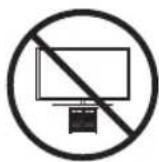
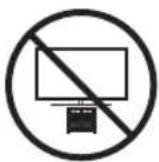
Caution: Pulling, pushing, or climbing on the TV may cause the TV to fall. In particular, do not hang on or destabilise the TV. This action may cause the TV to tip over, causing serious injuries or death. Follow all safety precautions provided in the Safety Flyer included with your TV. For added stability and safety, you can purchase and install the anti-fall device, referring to "Preventing the TV from falling".

WARNING: Never place a television set in an unstable location. The television set may fall, causing serious personal injury or death. Many injuries can be avoided by taking simple precautions such as:
Always use cabinets or stands or mounting methods recommended by Samsung.
Always use furniture that can safely support the television set.
Always ensure the television set is not overhanging the edge of the supporting furniture.
Always educate about the dangers of climbing on furniture to reach the television set or its controls.
Always route cords and cables connected to your television so they cannot be tripped over, pulled or grabbed.
- Never place a television set in an unstable location.
- Never place the television set on tall furniture (for example, cupboards or bookcases) without anchoring both the furniture and the television set to a suitable support.
- Never place the television set on cloth or other materials that may be located between the television set and supporting furniture.
- Never place items that might tempt to climb, such as toys and remote controls, on the top of the television or furniture on which the television is placed.
If the existing television set is going to be retained and relocated, the same considerations as above should be applied.
- When you have to relocate or lift the TV for replacement or cleaning, be sure not to pull out the stand.
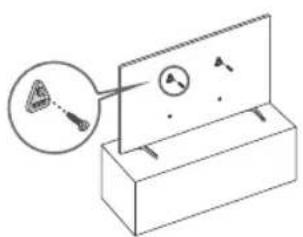
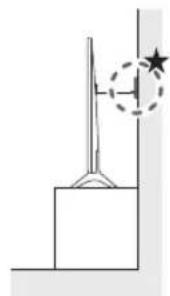
Preventing the TV from falling
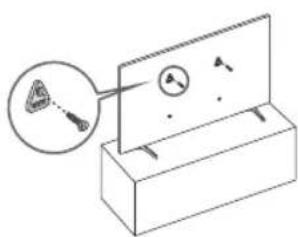
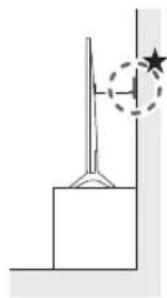
★: Wall-anchor (not supplied)
-
Using the appropriate screws, firmly fasten a set of brackets to the wall. Confirm that the screws are firmly attached to the wall.
-
You may need additional material such as wall anchors depending on the type of wall.
-
Using the appropriately sized screws, firmly fasten a set of brackets to the TV.
-
For the screw specifications, refer to the standard screw part in the table on the Unpacking and Installation Guide.
-
Connect the brackets fixed to the TV and the brackets fixed to the wall with a durable, heavy-duty string, and then tie the string tightly.
-
Install the TV near the wall so that it does not fall backwards.
-
Connect the string so that the brackets fixed to the wall are at the same height as or lower than the brackets fixed to the TV.
Precautions when installing the TV with a stand
(The Frame only)
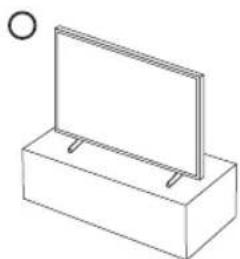
When you install the TV with a stand, avoid placing the stand on the back part of the table surface. Failure to do so may cause the motion sensor at the bottom of the TV not to work properly.

Operation
- This apparatus uses batteries. In your community, there might be environmental regulations that require you to dispose of these batteries properly. Please contact your local authorities for disposal or recycling information.
- Store the accessories (remote control, batteries, or etc.) in a location safely out of the reach.
- Do not drop or strike the product. If the product is damaged, disconnect the power cord and contact a Samsung service centre.
- Do not dispose of remote control or batteries in a fire.
-
Do not short-circuit, disassemble, or overheat the batteries.
After removing the screen protective film, never remove the Polarising film. -
If the protective film removal label is not found, the protective film has already been removed.
-
CAUTION: There is danger of an explosion if you replace the batteries used in the remote with the wrong type of battery. Replace only with the same or equivalent type.
-
WARNING - Do not use liquid fumigators containing chemicals, such as mosquito repellent or air freshener, around the product.
-
If steam comes in contact with the product surface or enters the product, it may cause stains or malfunction.
-
WARNING - TO PREVENT THE SPREAD OF FIRE, KEEP CANDLES AND OTHER ITEMS WITH OPEN FLAMES AWAY FROM THIS PRODUCT AT ALL TIMES.

Caring for the TV
- To clean this apparatus, unplug the power cord from the wall outlet and wipe the product with a soft, dry cloth. Do not use any chemicals such as wax, benzene, alcohol, thinners, insecticide, aerial fresheners, lubricants, or detergents. These chemicals can damage the appearance of the TV or erase the printing on the product.
- The exterior and screen of the TV can get scratched during cleaning. Be sure to wipe the exterior and screen carefully using a soft cloth to prevent scratches.
- Do not spray water or any liquid directly onto the TV. Any liquid that goes into the product may cause a failure, fire, or electric shock.
01 What's in the Box?
Make sure the following items are included with your TV. If any items are missing, contact your dealer.
Simple User Guide
Warranty Card / Regulatory Guide (Not available in some locations)
*Samsung Smart Remote
*Remote Control & Batteries
*Standard Remote Control & Batteries
*TV Power Cord
*Wall Mount Adapter x 2
*Slim Power Cord
Power Box
Power Box Cable x 2
C -type Power Adapter
C to C Cable
- Wireless One Connect Box
- One Connect Box
- One Connect Box Power Cord
- One Connect Cable x 2
- **One Connect cable holder (for wall mount)
: Some of the items specified above may not be included in the package, depending on the model or geographical area.
: Some components may not be provided, depending on the One Connect connection method (wired or wireless connection).
*: The number of One Connect cables provided may differ depending on the model.
- The type of battery may vary depending on the model.
- The items' colours and shapes may vary depending on the models.
- Cables not included can be purchased separately.
- Check for any accessories hidden behind or in the packing materials when opening the box.

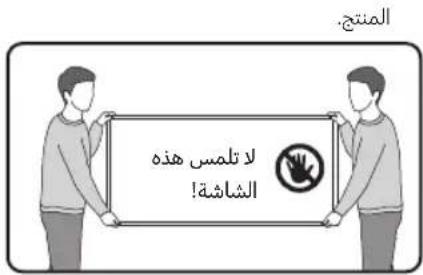
Warning: Screens can be damaged from direct pressure when handled incorrectly. We recommend lifting the TV at the edges, as shown. For more information about handling, refer to the Unpacking and Installation Guide came with this product.

02 Connecting the TV to the One Connect Box
(One Connect Box Supported Model only)
For more information about how to connect via the One Connect Box, refer to Unpacking and Installation Guide.

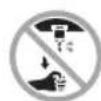
- Do not use the One Connect Box in the upside-down or upright position.
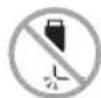
- Take care not to subject the cable to any of the actions below. The One Connect Cable contains a power circuit.
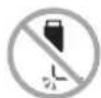


Bending Twisting Pulling
Pressing on
Electric shock
CLASS 1 LASER PRODUCT (The Frame (LS03FA) only)
-
Caution - Invisible laser radiation when open. Do not stare into beam.
-
Do not bend the One Connect Cable excessively. Do not cut the cable.
- Do not place heavy objects on the cable.
-
Do not disassemble either of the cable connectors.
-
Caution - Use of controls, adjustments, or the performance of procedures other than those specified herein may result in hazardous radiation exposure.
Using the One Connect cable holder
(S95F, The Frame (LS03FA) only)
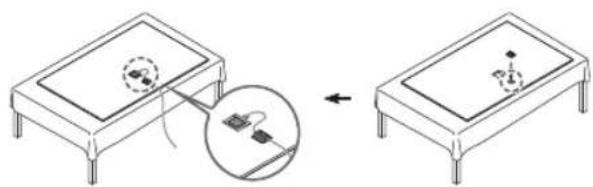
You can use the One Connect cable holder to tidy up the cables while installing the wall mount.
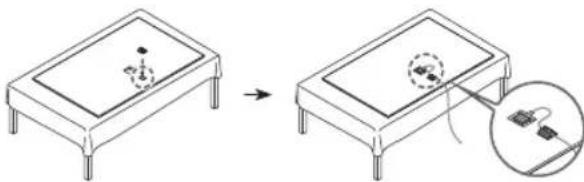
The image may differ depending on the model.
03 Initial Setup
When you turn on your TV for the first time, it immediately starts the Initial Setup. Follow the instructions displayed on the screen and configure the TV's basic settings to suit your viewing environment.
- You will need a Samsung Account to access our network-based smart services. If you choose not to log in, you will only get a connection to terrestrial TV (applicable to devices with tuners only) and external devices, e.g. via HDMI.
-
When installing the 43LS03F model as a wall mount, it can be installed vertically and used.
-
Some features may not support portrait mode or full screen.
- The initial setup is optimised for landscape mode.
Using the TV Controller
You can turn on the TV with the TV Controller button at the bottom of the TV, and then use the Control menu. The Control menu appears when the TV Controller button is pressed while the TV is On.
- The position and shape of the buttons at the bottom of the TV may differ depending on the model.
- The screen may dim if the protective film on the Samsung logo or the bottom of the TV is not detached. If protective film is attached, remove the film.
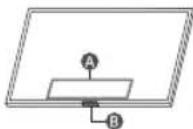
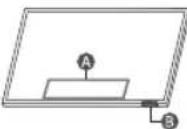
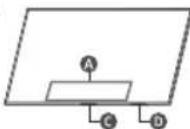
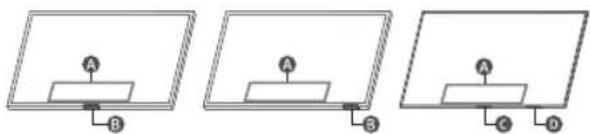
A Control menu
TV Controller button / Remote control sensor / Microphone switch / *Motion Sensor
TV Controller button / Remote control sensor Microphone switch
*: The Frame only
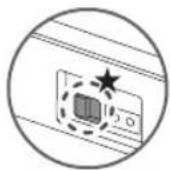
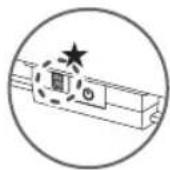
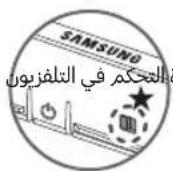
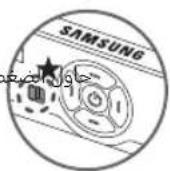
How to turn on and off the Microphone
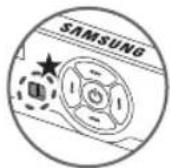
Type A Type B
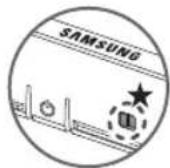
Type C Type D
:On/Off Switch
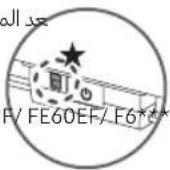
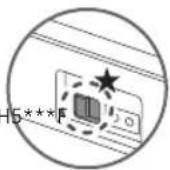
You can turn on or off the microphone by using the switch at the bottom or rear bottom of the TV. If microphone is turned off, All voice and sound features using microphone are not available.
- This function is supported only in Q8F (except for 32Q8F)/QN7F/QNEF/QN8F/QN9F/QN9F/S8F/S9F/The Frame.
- The position and shape of the microphone switch may differ depending on the model.
- During analysis using data from the microphone, the data is not saved.
04 Troubleshooting and Maintenance
Troubleshooting
For more information, refer to "Troubleshooting" in the User guide.
(F6F/H5F: >left directional button >settings > Support>Open User guide Troubleshooting)
Other models: left directional button > settings
Support > Tips and User Guides > Open User guide > Troubleshooting)
If none of the troubleshooting tips apply, please visit "www.samsung.com" and click Support or contact the Samsung service centre.
- This panel is made up of sub pixels which require sophisticated technology to produce. There may be, however, a few bright or dark pixels on the screen. These pixels will have no impact on the performance of the product.
- To keep your TV in optimum condition, upgrade to the latest software. Use the Update Now or Auto update functions on the TV's menu (m > left directional button > Settings > Support > Software Update > Update Now or Auto update).
The TV won't turn on.
Make sure that the power cord is securely plugged into the product and the wall outlet.
- Make sure that the wall outlet is working and the remote control sensor at the bottom of the TV is lit and glowing a solid red.
Try pressing the TV Controller button at the bottom of the TV to make sure that the problem is not with the remote control. If the TV turns on, refer to "The remote control does not work".
The remote control does not work.
-
Check if the remote control sensor at the bottom of the TV blinks when you press the button on the remote control.
-
H5F/HE50EF/F6F/FE60EF/U7F/U8F/UE8**F/QEF1/QE1F: If it does not blink, replace the remote control's batteries. Make sure that the batteries are installed with their poles (+/-) in the correct direction. Alkaline batteries are recommended for longer battery life.
- Other models: When the remote's battery is discharged, charge the battery using the USB charging port (C-type), or turn over the remote to expose the solar cell to light.
Try pointing the remote directly at the TV from 1.5-1.8 m away.
- If your TV came with a Samsung Smart Remote (Bluetooth Remote), make sure to pair the remote to the TV. To pair a Samsung Smart Remote, press the 5 and 6 buttons together for 3 seconds.
Eco Sensor and screen brightness
(except for H5***F, F6***F)
Eco Sensor adjusts the brightness of the TV automatically. This feature measures the light in your room and optimises the brightness of the TV automatically to reduce power consumption. If you want to turn this off, go to > left directional button > Settings > All Settings > General & Privacy > Power and Energy Saving > Brightness Optimisation.
- The eco sensor is located at the bottom of the TV. Do not block the sensor with any object. This can decrease picture brightness.
05 Specifications and Other Information
Specifications
Display Resolution
QN9**F:7680x4320
F6***F:1920x1080
H5**F:1366x768
Other models: 3840 × 2160
Sound (Output)
HE50EF/H5**F:10W
F6**F(32"):10W,FE60EF/F6**F(43"):20W
U8*F/UE8F/QEF1/Q7F/Q8F/Q80F/QN70F/QN1EF/
S85F/S90F (42^ ) : 20 W
QN80F/QN82F/QN83F:30W
QN85F/S90F(48"-83"):40 W
QN90F(43"):20W,QN90F(50"):40W
QN3EF/QN90F(55"-115"):60W
S95F/QN900F:70W
QN950F: 90 W
QN990F (65"-85"): 90 W, QN990F (98"): 120 W
LS03FW:40W
LS03FA (43^ - 50^ ) :20W,LS03FA (55^ - 85^ ) :40W
Operating Temperature
50^ to 104^ (10^ to 40^)
Operating Humidity
10% to 80%, non-condensing
Storage Temperature
-4°F to 113°F (-20°C to 45°C)
Storage Humidity
5% to 95%, non-condensing
Notes
- This device is a Class B digital apparatus.
-
For information about the power supply, and more information about power consumption, refer to the information on the label attached to the product.
-
On most models, the label is attached to the back of the TV. (On some models, the label is inside the cover terminal.)
-
On One Connect Box models, the label is attached to the bottom of the One Connect Box.
-
To connect a LAN cable, use a CAT 7 (*STP type) cable for the connection. (100/10 Mbps)
-
Shielded Twisted Pair
-
The images and specifications of the Unpacking and Installation Guide may differ from the actual product.
Operation of this product shall be limited to indoor use only.
(QN900F,QN950F,QN990F,The Frame (LS03FW)only)
Decreasing power consumption
When you shut the TV off, it enters Standby mode. In Standby mode, it continues to draw a small amount of power. To decrease power consumption, unplug the power cord when you don't intend to use the TV for a long time.
Recommendation - Jordan Only

Hereby, Samsung Electronics, declares that this TV is in compliance with the essential requirements and other relevant provisions of Directive 1999/5/EC.
The official Declaration of Conformity may be found at http:// www.samsung.com, go to Support > Search Product Support and enter the model name.
This equipment may only be used indoors.
This equipment may be operated in Jordan.
This page is intentionally left blank.
(Solo S95F, The Frame (LS03FA))
If you have any questions or comments relating to Samsung products, please contact the Samsung service centre.
| Country/Region | Samsung Service Centre® | Website |
| NIGERIA 0800-726-7864 | www.samsung.com/africa_en/support | |
| GHANA 0800-100-077 | ||
| COTE D'IVOIRE 8000 0077 | www.samsung.com/africa_fr/supportSENEGAL 200 077 | |
| CAMEROON 67095-0077 | ||
| KENYA 0800 545 545 | www.samsung.com/africa_en/supportUGANDA 0800 300 300 | |
| TANZANIA 0800 780 089 | ||
| SUDAN 1969 www.samsung.com/eg/support | ||
| SOUTH AFRICA 0860 SAMSUNG (726 7864) www.samsung.com/za/support | ||
| NAMIBIA 08 197 267 | 864 www.samsung.com/africa_en/support | |
| MOZAMBIQUE | 84 726 7864 | www.samsung.com/africa_ct/support |
| ALGERIA | 0800 100 001 | www.samsung.com/n_africa/support |
| TUNISIA | 80 100 012 | |
| MAURITIUS | 800 5050 | www.samsung.com/africa_en/support |
| REUNION 0262 50 88 | 880 www.samsung.com/africa_fr/support | |
| MOROCCO 080 100 | 22 55 www.samsung.com/n_africa/support | |
| EGYPT | 08000-726786416580WhatsApp 010 000 16580 | www.samsung.com/eg/support |
SAMSUNG
aalalolol
Samsung aos jy JwS Samsung aay aol s alg g altwl kls
| مigrate ↗ | Samsung ↗ | الإستعمال/الترجمة |
| www.samsung.com/africa_en/support | 0800-726-7864 | NIGERIA |
| 0800-100-077 | GHANA | |
| www.samsung.com/africa_fr/support | 8000 0077 | COTE D'IVOIRE |
| 200 077 | SENEGAL | |
| 67095-0077 | CAMEROON | |
| www.samsung.com/africa_en/support | 0800 545 545 | KENYA |
| 0800 300 300 | UGANDA | |
| 0800 780 089 | TANZANIA | |
| www.samsung.com/eg/support | 1969 SUDAN | |
| www.samsung.com/za/support | 0860 SAMSUNG (726 7864) | SOUTH AFRICA |
| www.samsung.com/africa_en/support | 08 197 267 864 NAMIBIA | |
| www.samsung.com/africa.pt/support | 84 726 7864 MOZAMBIQUE | |
| www.samsung.com/n_africa/support | 0800 100 001 | ALGERIA |
| www.samsung.com/n_africa/support | 80 100 012 | TUNISIA |
| www.samsung.com/africa_en/support | 800 5050 | MAURITIUS |
| www.samsung.com/africa_fr/support | 0262 50 88 80 | REUNION |
| www.samsung.com/n_africa/support | 080 100 22 55 | MOROCCO |
| www.samsung.com/eg/support | 08000-726786416580WhatsApp 010 000 16580 | EGYPT |
.Samsung Electronics Co., Ltd a2025 pcl 2
jccjgl aoloo jj p
| 1 + b| > | 1 - b|
aill 0 aagll ojg>ll jao jglll
logzall jyjolg aelll jda Jgs logzao 1c JgaaU
Jolgall
gallalglgalsloglaalg
aally
Bll alaoa 0j jalol no aol s jll qalall
B 日 JJJJJJJJJJJJJ
680 x 4320 :QN9**F
1920x1080:F6**F
1366×768:H5***F
3840x2160:Sjllj
法一:
***F/HE50EF
1b920:(43")F6FFE60EF,1b910:(32")F6FF
Unpacking aONNTFADTOFQ80F/Q85/Q2E/QEEFAE8F/U8**F
lg20:(42^) S90F/S85F
10000000000000000000000000000000000000000000000000000000000
(LS03FW) The Frame,QN990F,QN950F,QN900F)
aollalgewlJ
"slsswll"gog gngkaiagjalll jgsaolic
jai, aall no lsswllgagjalll ellqsi,"slsswll"gog g
clsswllpnc all g yjglll jlll lloal, ailll al
algbjol jabll
10000
CE
Samsung Electronics
gaiyaiallcysjyilpksyilgaaallllglao gaiy
EC/1999/5
gjyglgagallgcawllabllcagvllbllsay gallccncll jal,http://www.samsung.com
jblawl j3
Jjoll Jol 1 jolal l 1 jolw jg
j jjll liu jia jgj
1a 1
(a204010)cagjgds10450
juswll sic aagb jaaa
a080%10
jzjzjjz
. allo laloll is toeoggll jolll ooggA
j 1 j 1 j 1 j 1 j 1 j 1 j 1 j 1 j 1 j 1 j 1 j 1 j 1 j 1 j 1 j 1 j 1 j 1 j 1 j 1 j 1 j 1 j 1 j 1 j 1 j 1 j 1 j 1 j 1 j 1 j 1 j 1 j 1 j 1 j
JlsIg 0c aol jag cai kall jf bll jyjall "Jao y 0c aoll jag" akall g, Jaaill g jajell
DgJl
J_1 = 2( 3 - x) ( x + 4)
20000000000000000000000000000000000000000000000000000
cj = 12( aj - 1)
CgJl
jg jyblbJyblqoQe1F/QEF1/UE8**F 1111111111111111111111111111111
aJbll Joc
12c a#ll jge aJbIeJg s:ssll jkbll
gCgall jglg(Cgll) USB
cGALIy
δμw0gucαxillglg
jal1.8g1.5
jocdall oog jggo 159jo yjyjai lla
aall jgejol 00 Sf,(gglu uoc aol jge)Smart
Samsung Smart J 2020
jg3 8aol lao g jlc b
aLlIgBwG Eco jaii
(F6F,H5F|Lc|lo)
aS jll aai aai tali ngjolggbw aEco 100
lali ngi jolll ggbw aJn Jaoi las adjell Jds egall
aljll j < Jiaiaiaiaiaiaiaiaiaiaiaiaiaiaiaiaiaiaiaiaiaiaiaiaiaiaiaiaiaiaiaiaiaiaiaiaiaiaiaiaiaiaiaiaiaiaiaiaiaiaiaiaiaiaiaiaiaiaiaiaiaiaiaiaiaiaiaiaiaiaiaiaiaiaiaiaiaiaiaiaiaiaiaiaiaiaiaiaiaiaiaiaiaiaia
Egabllnss<clgeKllg
aJ5 JlAs 6 UIs uuys 2 1sgo s plsswly ssuaall .8gall Egbaw
1000000000000000000000000000000000000000000000000000000000000000000000000000000000000
a aaoa aai baaagj kblabn aaggl oia goo
aai ll acslll gl aiall kblbl aagbblg gog
gall lgl oia kblbl aag yk
alol |d jyddy, aaltall ula gnyjalllgc bala
galalld aagbg jdl dacg pssw. jyjll no
alalys <yjololjll jj<0gjolalaojglncjngjogall
(galalld gnl jll cayll <goljll
One Connect Jolpss
(La (LS03FA) The Frame, S95F)
LwI y 121 One Connect Jol Ls
jIJIbIgJgJall
#
"ssall sll 1jI JyJgJyJyJyJyJyJyJyJyJyJyJyJyJyJyJyJyJyJyJyJyJyJyJyJyJyJyJyJyJyJyJyJyJyJyJyJyJy
L aalall al lal wolld Jlgssll Samsung 11 11
Samsung Jgds Jgss Pae Cz |d.
sals 13 8 jll 11 11
HDMI Jtall Jss Jc, yjll 0jg 14
Jagac a s jn Jols 43LS03F jIbll sic .
.100g1 ggsaal gagll jall aocv 19 - 100g1 gagll 1cysll
jg jolll pksll 0g plss
gagall gajalil gajalil 0jll plaiybi yjgalil jaii kaiy
kaii sic gajll aaij gbi .gaii aaij glaii jaij jaii jaii
. jaii d gij jaii gij jaii gai i gaii d gij jil
lao giaig gajjalil no jaii cjjll gj jjll gao alisi - jjbl
Jg Jgll gJgJgJgJgJgJgJgJgJgJgJgJgJgJgJgJgJgJgJgJgJgJgJgJgJgJgJgJgJgJgJgJgJgJgJgJgJgJgJgJgJgJgJgJgJgJgJgJgJgJgJ
aasla A
1 / 2022/3/29 05:00 PM 10:00 PM 10:00 PM 10:00 PM 10:00 PM 10:00 PM 10:00 PM 10:00 PM 10:00 PM 10:00 PM 10:00 PM 10:00 PM 10:00 PM 10:00 PM 10:00 PM 10:
23 100000000000000000000000000000000000000000000000000000000000
One Connect
(baa gcaaI One Connect gga jb)
One Connect 已 _ 已 Jgogill 日 _ 日 Jg>logall JUnpacking and Installation Guide g>J
- 100g 1one Connect aggsa pl
One Connect JSSJSSaJdAagall


a. 0.0000
(b08 (LS03FA) The Frame alw) 1 aoll jj j j j j j j j j j j j j j j j j j j j j j j j j j j j j j j j j j j j j j j j j j j j j j j j j j j j j j j j j j j j j j j j
Jglg 1000 One C Jglc alaoe
pall glll lglal all ojagl plaaol n c y - aas .
aall jnll llll 0g ogsiaal ll 1s
gall
01
g>g pcc aIb g. jjjolll 20 aull oalll ggeo sall y 400 Jolei Sill E jgally Iaol, lio
psssssssssssssss
Samsung Smart J 289
aocssolljglg&cJbLb
jlllgl jgwlall kglg
JgJgJgJgJgJgJgJgJgJgJgJgJgJgJgJgJgJgJgJgJgJgJgJgJgJgJgJgJgJgJgJgJgJgJgJgJgJgJgJgJgJgJgJgJgJgJgJgJgJgJ
2x jall jccull jgxx
aJyLgSjLJ5
aallgns
aallgssuS2s
CgilljaoaIbJgoo
CJCC
Wireless One Connect**
One Connect 已 _ 3 ^ 已
One Connect 已
2xOneConnectS*
(bilal) One Connect Jab
jlll gall oolll poell
aal aaiiaolgl
JUaI aBb Ilaicl clogal aagg ayd:
(,) One Connect
jIbU bag gaggAll One Connect sLSSs cAe a:
jIbbl aJbllggi alu
jalllaggllksgolllglalss
Jao 1saa aagjall jie cuiell clss
gall 26 sic calleill slgo gla caxo clao s joo
aal
aasallgll
aaii daaiaaiy
a aalallogalglgublaaballj
aagddgdsla ggljlblaia aao jalall
()
Samsung aS Jd jol oJy jy jll lJl Jd
aill jao aolll 100
a|jllagssuullgs
a aabaaaballj y aagll aallaa b alj
a1j1c0a1a0a0a1gllaa
JdJIaIgaiIaIbI
JbJIaIaIaI
gai aocj wolab aob plswly ayie aullg jlll b
gds
aJyjzall Jilu golao jg
g>g>g>g>g>g>g>g>g>g>g>g>g>g>g>g>g>g>g>g>g>g>g>g>g>g>g>g>g>g>g>g>g>g>g>g>g>g>g>g>g>g>g>g>g>g>g>g>g>g>g
dysds
jolalbgaew
()culls-bil:★ Sb.billly caleal acgaoc pKy aaslll yjllpssw .1 1
Jolil
aagaaalgl aegglg joljolll sgsy: aag
gall gacg lgl kayw yrgg. abgaw ll
abgaw ll qagc gdsg adg .doy g njoll
gbs claol ggsy gssy lao agg
aoxlull cblbgl ggl alglll gdsg gl
gogjolll go aagall "aoxlull gss" g aagall
clkay, gajalll jollg tlll go ja ggtg
llg jolll go dsgbgaw gilall jgalll
. Unpacking and Installation Guide
a 1 a 1 1 1 1 1 1 1 1 1 1 1 1 1 1 1 1 1 1 1 1 1 1 1 1 1 1 1 1 1 1

g a 2000000000000000000000000000000000000000000000000000000000000000000000000000000000000
j5jL.1g4aJyJgJglgwlUj
bila jujjull
VESA aabio laaai yll aasll bggldll oolmoalgo go 0
nogjolll jagl pjl l oJgblbggldll oolmoow
bggll Jgbl 1VESA aabla aalll bggll
Samsung 2s w 1. d s s 10 1 1 s 10 a b g
y 82j
aJbJbJbJbJb