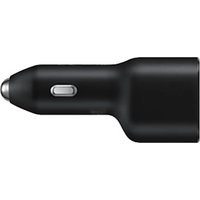
EP-L4020 - Car charger SAMSUNG - Free user manual and instructions
Find the device manual for free EP-L4020 SAMSUNG in PDF.


| Brand | Samsung |
| Model | EP-L4020 |
| Product type | Car charger (cigarette lighter) |
| Power supply (input) | 12 V / 24 V (cigarette lighter socket) |
| USB output | 1 USB-A port |
| Charging power | Up to 2.4 A (quick charge compatible with some devices) |
| Quick charge function | Yes, depending on the cable and connected device |
| Compatibility | Smartphones, tablets, and other USB devices (check cable compatibility) |
| Dimensions (approx.) | 3.5 x 3.5 x 6 cm (L x W x H) |
| Weight (approx.) | 20 g |
| Operating temperature | From -10 °C to 60 °C |
| Material | ABS plastic |
| Color | Black |
| LED indicator | Yes (charging indicator) |
| Overcharge protection | Yes |
| Short-circuit protection | Yes |
| Overheat protection | Yes |
| Certifications | CE, RoHS |
| Warranty | 2 years (according to local legislation) |
| Country of manufacture | China |
| Package contents | Car charger, user manual |
| Care and cleaning | Wipe with a dry cloth; do not use chemicals |
| Safety | Unplug before starting the vehicle; avoid power surges |
| Spare parts and repairability | Not repairable; replace the device at end of life |
| General information | Use with a compatible charging cable (sold separately) |
Frequently Asked Questions - EP-L4020 SAMSUNG
User questions about EP-L4020 SAMSUNG
0 question about this device. Answer the ones you know or ask your own.
Ask a new question about this device
Download the instructions for your Car charger in PDF format for free! Find your manual EP-L4020 - SAMSUNG and take your electronic device back in hand. On this page are published all the documents necessary for the use of your device. EP-L4020 by SAMSUNG.
USER MANUAL EP-L4020 SAMSUNG
natural_image
Diagram of a plug connecting two cables with a prohibition symbol (no text or labels)Copyright © 2021 Samsung Electronics Co., Ltd.
- Plug the car charger into your vehicle's accessory outlet (1). Connect one end of a charging cable (sold separately) to the car charger's USB charger port (2). Then, plug the other end of the charging cable into your mobile device's multipurpose jack (3). When the mobile device is fully charged, remove the mobile device from the car charger.
- Visit www.samsung.com to view device information and safety information.
- Your consumer rights are governed by the law of the country in which the product purchase took place. Please contact your service provider for more information.

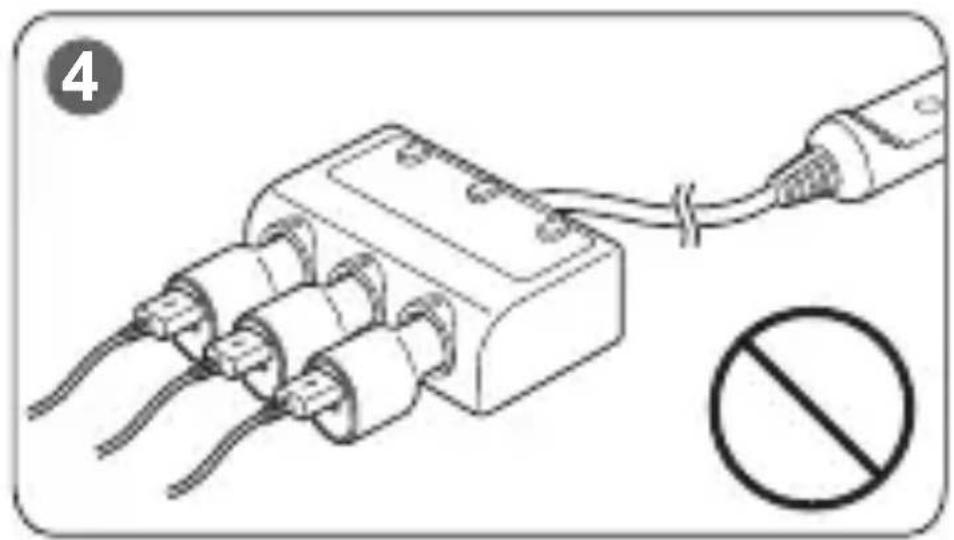
- Using the car charger in the multi socket or charging multiple devices simultaneously can lead to temporary current and voltage surges, which can cause a situation, such as overheating or vehicle short circuit. It may cause a fire or burn symptoms (4).

- Start your vehicle before connecting the car charger to the mobile device. Temporary voltage surges during ignition may damage the attached mobile device.
- While charging, the car charger may heat up. Carefully unplug the car charger from your vehicle's accessory outlet while or right after charging the device.
- Connect the car charger directly to the vehicle's cigar jack. Use caution to avoid temporary current and voltage surges.
• Operation of this equipment in a residential environment could cause radio interference.

- The charging time may take longer or the fast charging feature may not work depending on the cable.
- The actual charging power and speed may vary depending on the type and charging condition of the device, usage environment, and others.
Correct disposal
natural_image
Symbol of a trash bin crossed with diagonal lines, no text or numbers presentThis marking on the product, accessories or literature and without the bar on batteries indicates that the product, battery and its electronic accessories (e.g. charger, headset, USB cable) should not be disposed of with other household waste.
Samsung, PO Box 12987, Dublin. IE or Yateley, GU46 6GG. UK
Correct disposal (India Only)
natural_image
Symbol of a trash bin crossed with diagonal lines, no text or numbers presentThis marking on the product, accessories or literature indicates that the product and its electronic accessories (e.g. charger, headset, and USB cable) should not be disposed of with other household waste at the end of their working life. To prevent possible harm to the environment or the human health from uncontrolled waste disposal, please separate these items from other types of waste and recycle them responsibly to promote the sustainable reuse of material resources.
For more information on safe disposal and recycling visit our website. www.samsung.com/in/support or contact our Helpline numbers-1800 40 SAMSUNG (1800 40 7267864) 1800 5 SAMSUNG (1800 5 7267864) This product is India RoHS compliant.
For information on Samsung's environmental commitments and product regulatory obligations, e.g. REACH, visit our sustainability page available via www.samsung.com.
CE UK CA
natural_image
Symbol of a trash bin crossed with a diagonal line, no text or numbers presentnatural_image
Symbol of a trash bin crossed with diagonal lines, no text or numbers presentnatural_image
Symbol of a trash bin crossed with diagonal lines, no text or numbers presentnatural_image
Symbol of a trash bin crossed with diagonal lines, no text or numbers presentwww.samsung.com/it/support/
natural_image
Symbol of a trash bin crossed with diagonal lines, no text or numbers presentnatural_image
Symbol of a trash bin crossed with diagonal lines, no text or numbers presentnatural_image
Symbol of a trash bin crossed with diagonal lines, no text or numbers presentnatural_image
Symbol of a trash bin crossed with diagonal lines, no text or numbers presentnatural_image
Symbol of a trash bin crossed with diagonal lines, no text or numbers presentnatural_image
Symbol of a trash bin crossed with diagonal lines, no text or numbers presentOva oznaka na proizvodu, dodatnoj opremi ili u literaturi i kada nema trake o baterijama, ukazuje da se proizvod, baterija i njegov elektronički pribor (npr. punjač, slušalice, USB kabel) ne smiju odlagati s ostalim kućanskim otpadom.
Za informacije o ekološkim obvezama Samsunga i zakonskim obvezama koje se odnose na proizvod kao što su uredba REACH, posjetite našu stranicu održivosti na www.samsung.com
- Priključite auto punjač u dodatnu utičnicu vašeg vozila (1). Povežite jedan kraj kabla za punjenje (prodaje se odvojeno) na USB priključak auto punjača (2). Zatim priključite drugi kraj kabla za punjenje u višenamenski priključak vašeg mobilnog uređaja (3). Kada se mobilni uređaj potpuno napuni, skinite mobilni uređaj sa auto punjača.
natural_image
Symbol of a trash bin crossed with no text or numbers, representing waste sorting or disposal (no text present)Ova oznaka na proizvodu, dodatnoj opremi ili u literaturi i kada nema trake o baterijama, ukazuje da proizvod, bateriju i njegovu elektronsku dodatnu opremu (npr. punjač, slušalice, USB kabl) ne treba odlagati sa ostalim kućnim otpadom.
Za informacije o obavezama prema zaštiti životne sredine i regulatornim obavezama specifičnim za proizvode kompanije Samsung, npr. direktiva REACH, posetite našu stranicu o održivosti www.samsung.com.
natural_image
Symbol of a trash bin crossed with diagonal lines, no text or numbers presentnatural_image
Symbol of a trash bin crossed with a diagonal line, no text or numbers presentnatural_image
Symbol of a trash bin crossed with two crossed lines, no text or numbers presentnatural_image
Symbol of a trash bin crossed with diagonal lines, no text or numbers presentnatural_image
Symbol of a trash bin crossed with diagonal lines, no text or numbers presentnatural_image
Symbol of a trash bin crossed with no text or numbers, representing waste sorting or disposal (no text present)natural_image
Symbol of a trash bin crossed with diagonal lines, no text or numbers presentnatural_image
Symbol of a trash bin crossed with no text or numbers, representing waste sorting or disposal (no text present)natural_image
Symbol of a trash bin crossed with diagonal lines, no text or numbers presentnatural_image
Symbol of a trash bin crossed with diagonal lines, no text or numbers presentnatural_image
Symbol of a trash bin crossed with diagonal lines, no text or numbers presentTa oznaka na izdelku, dodatni opremi ali dokumentaciji in brez črtice na baterijah pomeni, da izdelka, baterije in njegove elektronske dodatne opreme (npr. napajalnika, slušalk in kabla USB) ni dovoljeno odvreči med gospodinjske odpadke.
natural_image
Symbol of a trash bin crossed with a diagonal line, no text or numbers presentnatural_image
Symbol of a trash bin crossed with diagonal lines, no text or numbers presentnatural_image
Symbol of a trash bin crossed with a diagonal line, no text or numbers presentSinpaş Flatofis Apt. No: 78/46
Eyüpsultan/İSTANBUL TÜRKİYE
Tel:+90 212 467 0600
Güvenlik bilgisi
natural_image
Symbol of a trash bin crossed with a diagonal line, no text or numbers presentnatural_image
Symbol of a trash bin with crossed lines indicating no waste or discharge (no text or labels)SAMSUNG
Printed in Korea
A01010 Rev.1.0
EU/ASIA Type 12/2021