
G PRO X Superlight 2 SE - Mouse LOGITECH - Free user manual and instructions
Find the device manual for free G PRO X Superlight 2 SE LOGITECH in PDF.
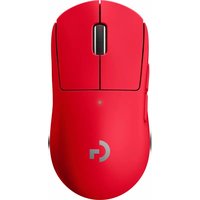


Pick your language and provide your email: we'll send you a specifically translated version.
| Product Type | Wireless gaming mouse |
| Brand | Logitech |
| Model | G PRO X Superlight 2 SE |
| Dimensions (L x W x H) | 125 x 63.5 x 40 mm |
| Weight | 60 g |
| Power Source | Rechargeable Li-ion battery, USB-C port |
| Battery Life | Up to 70 hours |
| Wireless Technology | LIGHTSPEED 2.4 GHz |
| Sensor | HERO 2 optical |
| Maximum Resolution | 32,000 DPI |
| Number of Buttons | 5 programmable |
| Scroll Wheel | Scroll wheel |
| Lighting | RGB Logitech G (customizable) |
| Housing Material | ABS plastic with textured coating |
| Compatibility | Windows, macOS, Chrome OS, Linux |
| Box Contents | Mouse, USB-C cable, wireless adapter, documentation |
| Care and Cleaning | Clean with a soft, dry cloth. Do not use abrasive products |
| Safety | Do not expose to moisture or extreme temperatures |
| Spare Parts and Repairability | Consult Logitech website for spare parts. Professional repair recommended |
| General Information | Ultra-light gaming mouse designed for competition |
Frequently Asked Questions - G PRO X Superlight 2 SE LOGITECH
How to pair the G PRO X Superlight 2 SE mouse with my computer?
Use the included LIGHTSPEED wireless receiver. Plug it into a USB port, turn on the mouse via the switch underneath, and it will connect automatically. For a Bluetooth connection, check if your model supports it.
How to charge the mouse battery?
Use the included USB-C cable. Connect one end to the mouse and the other to a USB port. The mouse can be used while charging. Full charge takes about 1 hour.
What is the battery life?
Battery life can reach up to 70 hours on a single charge, depending on use and lighting settings.
How to adjust the mouse DPI settings?
DPI settings can be configured via the Logitech G HUB software. You can also use the dedicated button underneath the mouse to switch between preset levels.
Is the mouse compatible with macOS?
Yes, the G PRO X Superlight 2 SE mouse is compatible with Windows, macOS, Chrome OS, and Linux. Download the Logitech G HUB software for advanced configuration on Windows and macOS.
How to clean my mouse?
Use a soft, dry cloth to wipe the surface. Avoid liquids and abrasive products. For hard-to-reach areas, use a slightly damp cotton swab.
What to do if the mouse stops responding?
Try resetting the mouse by turning it off and on again. Check the receiver connection and replace batteries if your model uses batteries. Refer to the manual for a hardware reset.
Can I replace the USB-C cable?
Yes, the USB-C cable is removable and can be replaced with a standard USB-C cable. Preferably use a quality cable for optimal charging.
Does the mouse come with replacement mouse feet?
The original mouse feet are designed to last. If necessary, replacement feet are available on the Logitech website. Replacement requires careful disassembly.
How to contact Logitech support?
You can contact Logitech support via their website (support.logitech.com) or by phone. Have your mouse serial number ready for faster service.
User questions about G PRO X Superlight 2 SE LOGITECH
0 question about this device. Answer the ones you know or ask your own.
Ask a new question about this device
No questions yet. Be the first to ask one.
Download the instructions for your Mouse in PDF format for free! Find your manual G PRO X Superlight 2 SE - LOGITECH and take your electronic device back in hand. On this page are published all the documents necessary for the use of your device. G PRO X Superlight 2 SE by LOGITECH.
USER MANUAL G PRO X Superlight 2 SE LOGITECH


Manual assistant
Powered by Anthropic
Waiting for your message
Product information
Brand : LOGITECH
Model : G PRO X Superlight 2 SE
Category : Mouse