
Dualio MS5525 - Vacuum Cleaner MOULINEX - Free user manual and instructions
Find the device manual for free Dualio MS5525 MOULINEX in PDF.
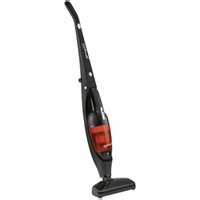


| Product type | Cordless stick and handheld vacuum |
| Brand | Moulinex |
| Model | Dualio MS5525 |
| Battery | 12V, Nickel Metal Hydride (NiMH) |
| Suction time | 15 minutes maximum |
| Charging time | 16 hours maximum |
| Charger | 12V, ref. RS-RH5377 |
| Filter | Foam filter, ref. RS-RH5378 |
| Replacement battery | ref. RS-RH5379 |
| Dust bin | With battery level indicator |
| Brush | Removable parquet brush |
| Handle | Foldable for compact storage |
| Charging indicator | Red LED (charging) / green (charged) |
| Handheld suction function | Removable handheld vacuum |
| Maintenance | Clean filter and empty bin after each use |
| Safety instructions | Do not vacuum liquids or hot or ultrafine substances |
| Use | Household use only |
| Warranty | Void if used improperly |
Frequently Asked Questions - Dualio MS5525 MOULINEX
User questions about Dualio MS5525 MOULINEX
0 question about this device. Answer the ones you know or ask your own.
Ask a new question about this device
Download the instructions for your Vacuum Cleaner in PDF format for free! Find your manual Dualio MS5525 - MOULINEX and take your electronic device back in hand. On this page are published all the documents necessary for the use of your device. Dualio MS5525 by MOULINEX.
USER MANUAL Dualio MS5525 MOULINEX
SPECIFICATIONS
SAFETY ADVICE
CHARGING
FOLDING HANDLE
STORAGE
USAGE TIPS
WARNING
INSTRUCTIONS FOR USE
CHARGING
PARTS AND FEATURES
SPECIFICATIONS
| ITEM | SPEC |
| Battery | 12 V |
| Vacuuming runtime 15 minutes Max | |
| Charging time 16 hours Max |
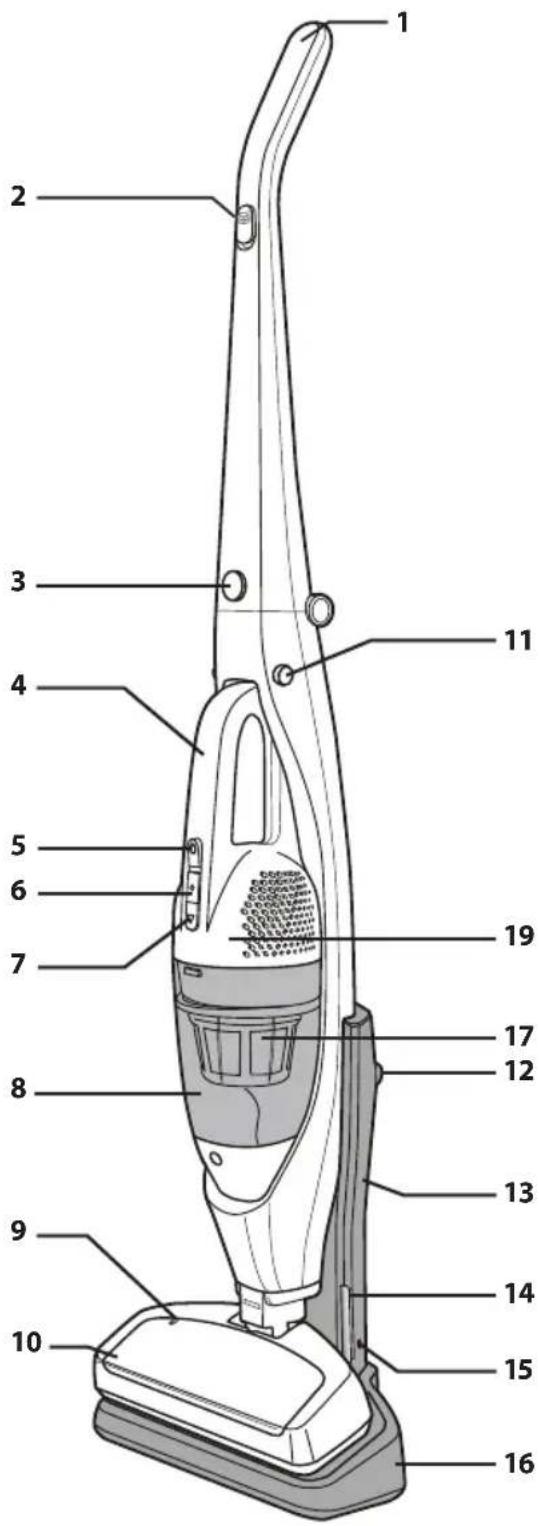
CORDLESS HAND VAC
1 Handy Vac's On/Off Button 2 Battery Indicator 3 Dust Bin Release Button 4 Nozzle 5 Batteries: 12V: ref. RS-RH5379 (not visible)
It is important to know your vacuum cleaner's parts and features to ensure its proper and safe use. Review these before using your vacuum cleaner.
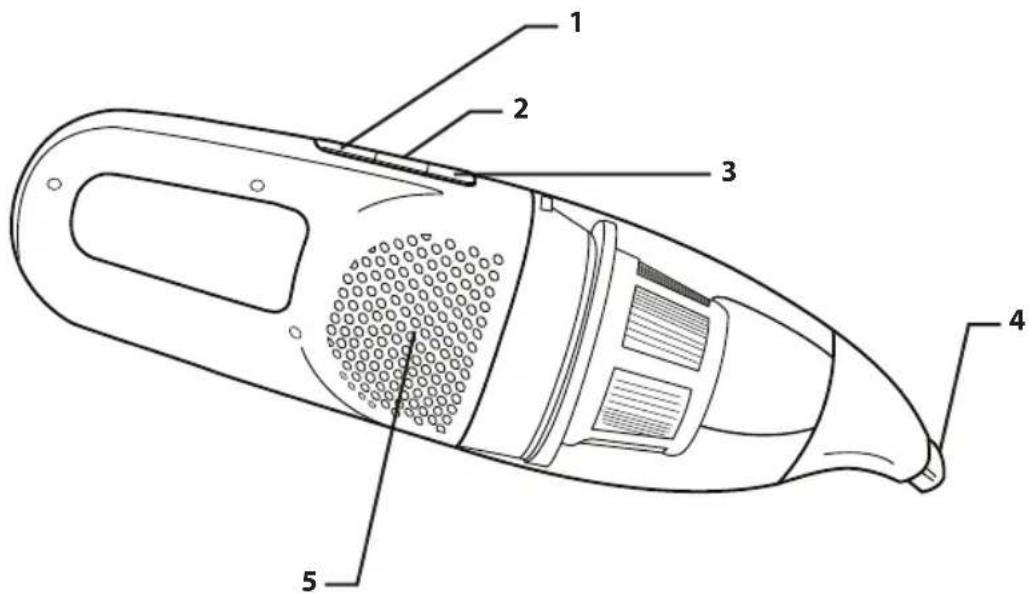
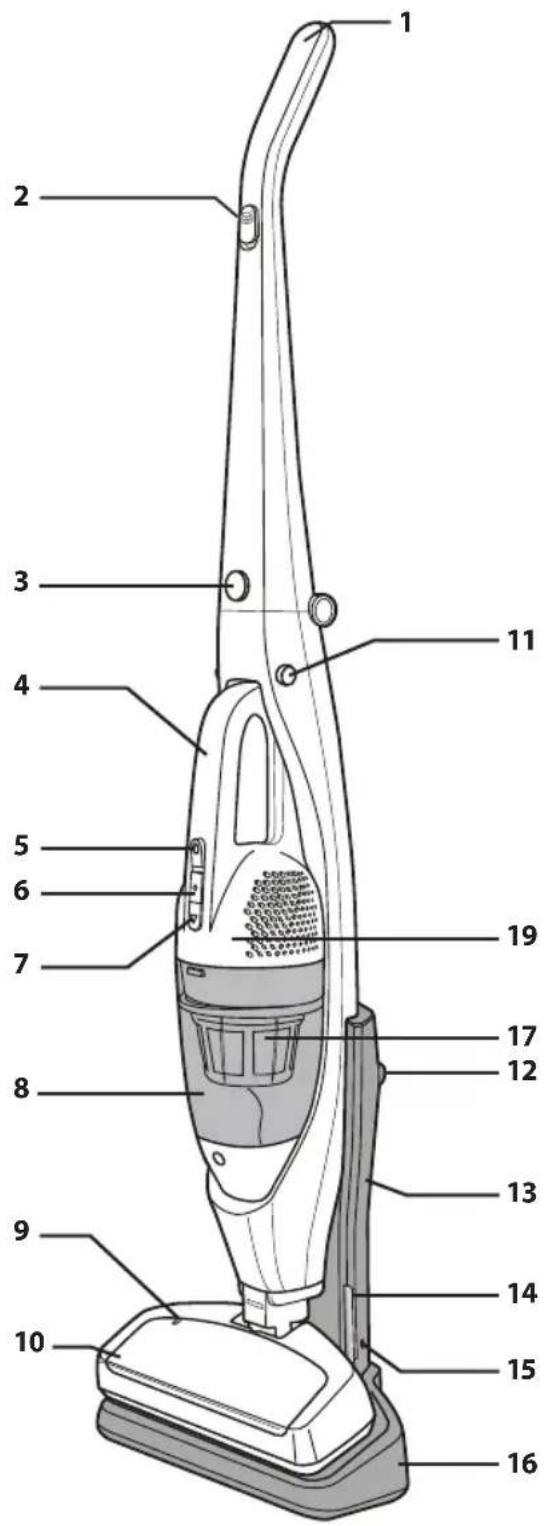
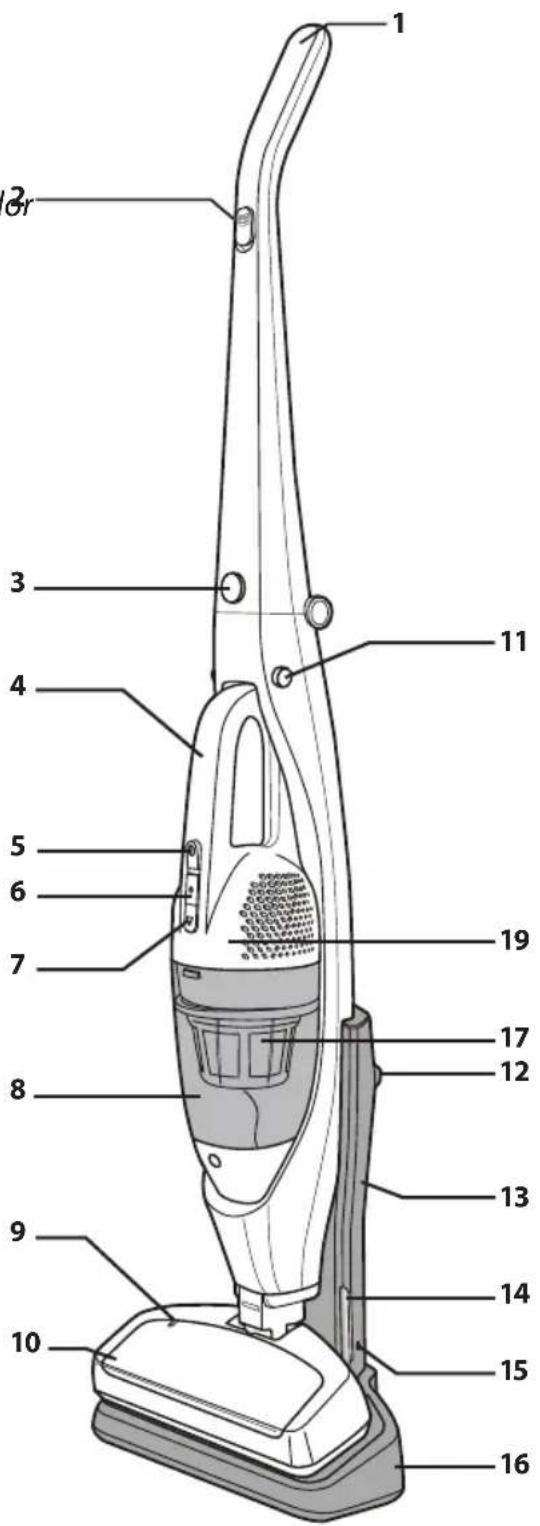
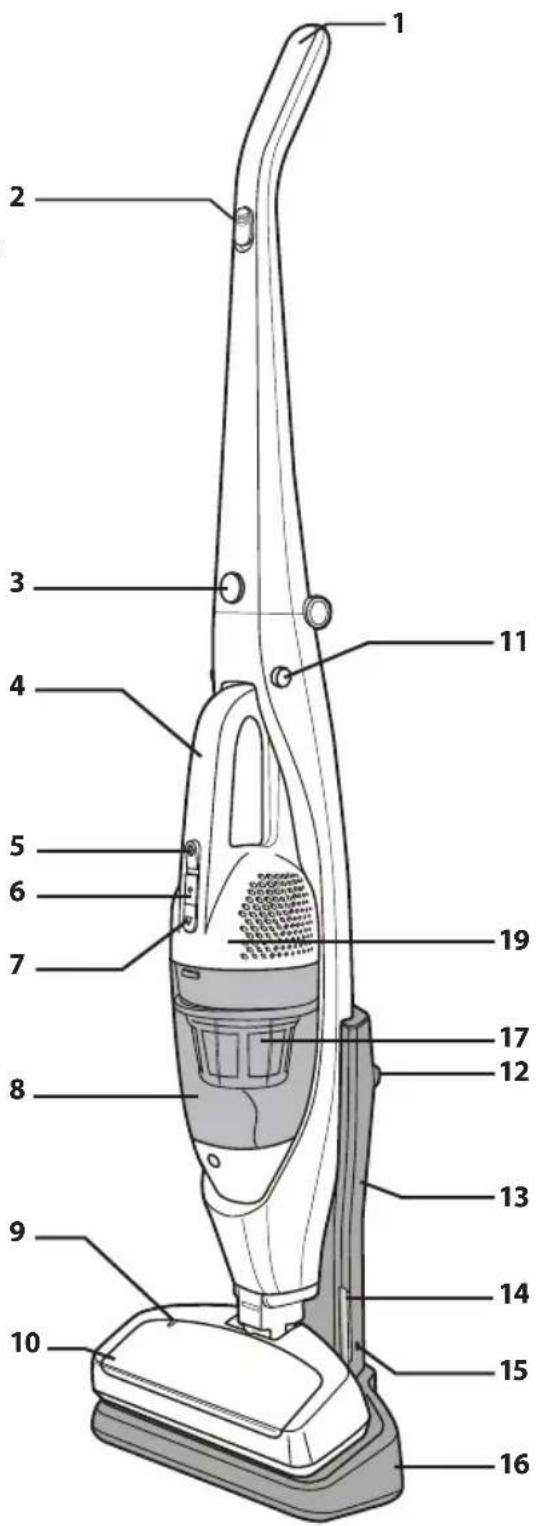
CORDLESS STICK VACUUM FULLY ASSEMBLED
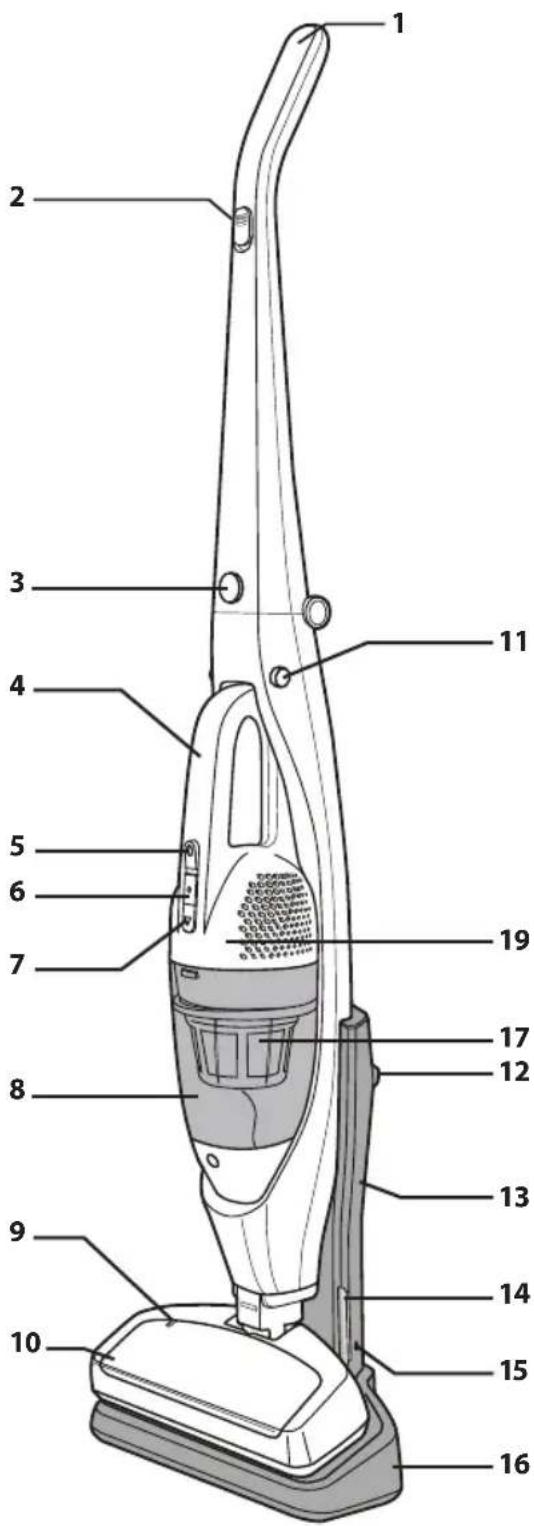
1 Handle 2 Stick vac On/Off slider 3 Folding handle button 4 Hand vac 5 Hand vac On/Off slider 6 Battery Indicator 7 Dust bin release button 8 Dust bin 9 Electro-brush lock indicator 10 Floor brush 11 Hand vac release button 12 Mounting hole 13 Support frame 14 Charging indicator 15 Power supply input 16 Charging stand 17 Filter: ref. RS-RH5378 18 Charger: 12V: ref. RS-RH5377 19 Batteries: 12V: ref. RS-RH5379 (not visible)

SECURITY ADVICE
For your safety, this appliance complies with applicable rules and regulations (Low Tension Guidelines, Electromagnetic Compatibility, Environmental Regulations...).
This appliance is not designed to be used by individuals (including children) with reduced physical, sensory or mental capacities, nor by individuals lacking experience or knowledge in the use of the appliance, unless they have the benefit of being under the surveillance of a responsible person, or of having received proper instruction. It is advisable to keep an eye on children in order to make sure that they do not use the appliance as a toy.
This appliance may be used by children over eight (8) years old and by individuals with reduced physical, sensory or mental capacities, or lacking experience or knowledge, as long as they are properly supervised by a responsible person, as long as they have received instruction concerning the safe use of the appliance, and as long as all possible risks have been addressed.
Children should not play with the appliance. User cleaning and care should not be carried out by children unless they are aged 8 years and over and supervised.
Keep the appliance and its lead out of reach of children under 8 years of age.
This appliance can be used by children aged from 8 years and above and persons with reduced physical, sensory or mental capabilities or lack of experience and knowledge if they have been given supervision or instruction concerning use of the appliance in a safe way and understand the hazards involved. Children shall not play with the appliance. Cleaning and user maintenance shall not be made by children without supervision.
1 • Precautions before use
Read the instructions carefully and then store them safely.
- Your vacuum cleaner is an electric appliance: it must always be used under normal conditions.
Use and store the appliance away from children's reach. Never leave the appliance on and unattended. Never hold the end of the vacuum tube near your eyes or ears.
- Never vacuum wet surfaces or liquids, no matter what their nature; hot substances; ultra-fine substances such as plaster, cement or ashes; large cutting waste materials such as glass; toxic products such as solvents or paint strippers; aggressive products such as acids or strong cleaners; or gasoline or alcohol-based flammable or explosive materials.
- Never submerge the product or charge it under water or under any other liquid. Never spray water on the appliance or on the charger.
- Do not store the appliance outdoors and keep it in a cool, dry place at all times.
- Do not place the appliance near a heat source (ovens, electric heaters or hot radiators).
- Do not expose the batteries to a room temperature above 104°F (40°C).
- Do not take the vacuum cleaner apart while it is on.
- Never use your vacuum cleaner without the dust tray and the foam rubber motor protection filter.
- Do not use the appliance:
- If it fell and shows visible signs of deterioration or functional anomalies.
- If the charger or the charger cable are damaged.
In any of these cases, do not try to take the appliance apart. Rather, take it to the authorized Moulinex Service Center nearest to your home, because special tools will be needed in order to safely carry out any repairs.
- Repairs must only be carried out by specialists using original replacement parts. • To attempt the repair of an electronic appliance at home may be hazardous to the user.
- Only use original, guaranteed Moulinex replacement parts (filters, batteries...).
This appliance is intended for domestic use only. In case it is used inappropriately, not following the given instructions, Moulinex will not be subject to any liabilities whatsoever.
2 • Electric power source
- Make sure that the voltage indicated on the rating plate of the charger corresponds to that of your power source.
- Never unplug the charger by pulling the electric cord.
- If the charger cord is damaged or if the charger itself does not function properly, do not use any other charger, different from the model provided by the manufacturer, and contact the Moulinex Consumer Service or go to the authorized Service Center nearest to your home.
3 · Repairs
Repairs must only be carried out by specialists using original replacement parts. To attempt the repair of an electronic appliance at home may be hazardous to the user, and will invalidate the guarantee.
BEFORE FIRST USE
Unpack your appliance and throw away any tags attached. Make sure to keep your guarantee and read the instructions carefully before using the appliance for the first time.
Charging the battery
IMPORTANT :
Use only the original charger provided with the appliance. Do not charge the appliance at temperatures lower than 32°F (0°C) or higher than 104°F (40°C). Using a universal charger will automatically invalidate the guarantee.
ASSEMBLY INSTRUCTIONS
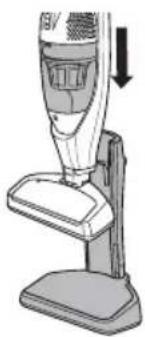
CHARGING STAND
Align the slots on the charging base and the Stick Vacuum and slide the Vacuum down until it stops.
CHARGING
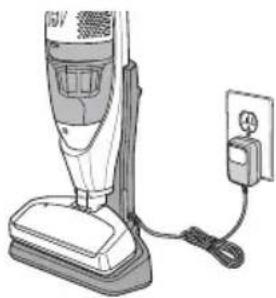
Store the Cordless Stick Vacuum on the charging base when not in use.
Light charge signal :
. Red LED: Product on charge (16 hours max)
. Green LED: Product is charged and changes to battery charge maintenance mode.
FOLDING HANDLE
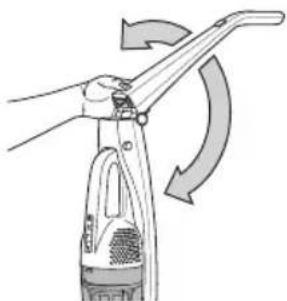
Pull the handle up until it locks in place.
To fold down the handle, press the Folding Handle Button and push the handle back until it stops.
STORAGE
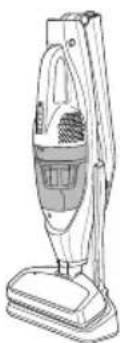
Keep the Stick Vac on the charging base with the handle folded down for compact storage.
VACUUMING TIPS
WARNING
Personal Injury and Product Damage Hazard
- DO NOT pull plug from wall by the power cord. If there is damage to the cord or plug, personal injury or property damage could result.
SUGGESTED SWEEPING PATTERN
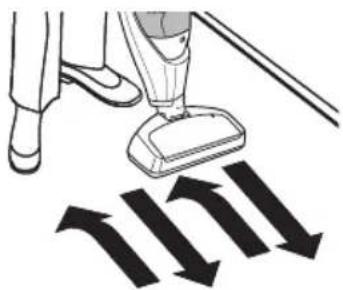
For best cleaning action, the floor brush should be pushed straight away from you and pulled straight back. At the end of each pull stroke, the direction of the nozzle should be changed to point into the next section to be cleaned. This pattern should be continued across the carpet with slow, gliding motions.
NOTE:
Fast, jerky strokes do not provide complete cleaning.
For best cleaning results, keep the airflow passage open.
Check each assembly area occasionally for clogs.
Check that there is no object obstructing the air inlet.
USING THE HAND VAC
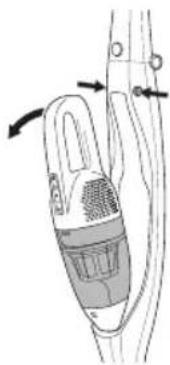
To remove the Handy Vac from the Stick Vacuum, press the release buttons on each side as shown.
OPERATING INSTRUCTIONS
CHARGING
Always be sure that the vacuum is off before placing it on the charging stand.
Allow the Stick Vacuum to charge until the Charging Progress Indicator shows green.
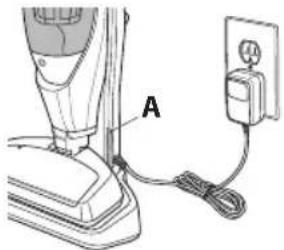
A Charging Progress Indicator
When using the Hand Vac, use the Hand Vac On/Off button to turn the Hand Vac on and off.
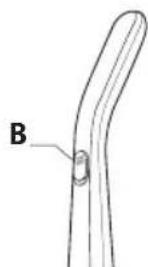
B On/Off Slider
USING THE HAND VAC
When using the Stick Vacuum in the upright position, use the On/Off slider to turn the Stick Vacuum on and off.
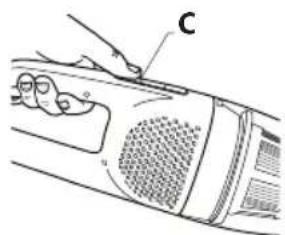
C Hand Vac On/Off Button
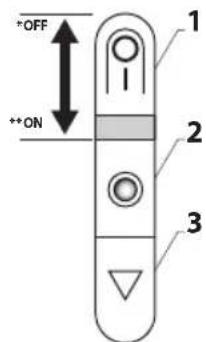
HAND VAC CONTROLS
* OFF
** ON
1 Hand Vac On/Off Button
2 Battery Indicator
3 Dust Bin Release Button
IMPORTANT:
. Always turn off the appliance and unplug it before storing or cleaning.
. Never use your vacuum cleaner without its filter.
. Do not use detergents, or aggressive or abrasive products. The transparent color of the dust bin may change with time; however, this will not modify the performance of the appliance.
EMPTYING DUST BIN
WARNING
Turn off vacuum cleaner before performing maintenance to the vacuum cleaner.
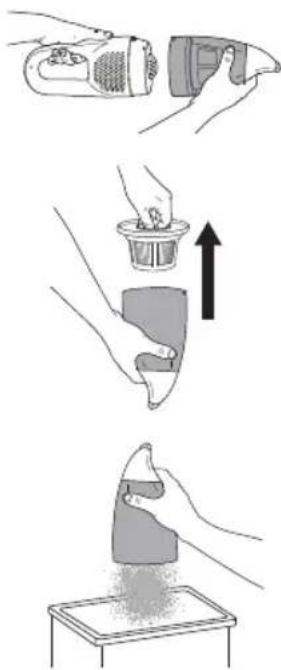
1 • Push the dust bin release button and remove the dust bin.
2 • Pull the dust bin filter up and out as shown.
3 • Empty the dust bin into a trash receptacle as shown.
CLEANING THE DUST BIN FILTER
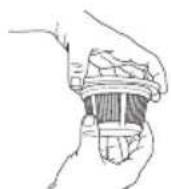
1 • Remove the filter from the filter holder by twisting the lid and filter counterclockwise. To lock the filter back in place, turn clockwise.
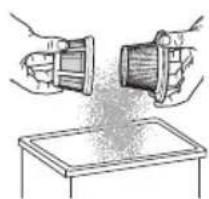
2 • Remove and clean the filter over a trash receptacle.
DO NOT operate without filter installed.
DO NOT wash dust bin in the dishwasher.
DO NOT water-wash the filter.
Brush the filter to clean it.
In order to assure optimal performance, wash the dust bin or filter after each vacuum use.
CAUTION
Do not attempt to dry filter with a hair dryer or by placing in clothes dryer. Hot air may cause the filters to warp.
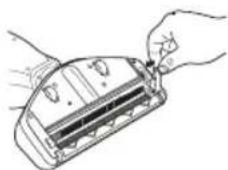
CLEANING THE ROLLER
WARNING
Turn off and unplug vacuum cleaner before performing maintenance to the vacuum cleaner.
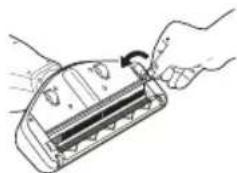
1 • Using a penny or small coin, turn the roller release screw counterclockwise.
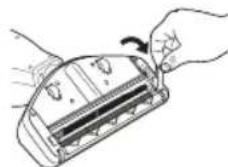
2 • Lift and remove the roller release latch.
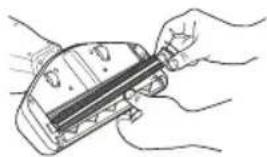
3 • Pull the roller out by pulling up on the right side – Clean the roller.
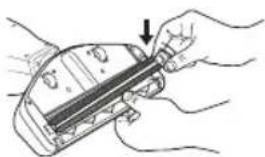
4. Place the roller back into the slots.
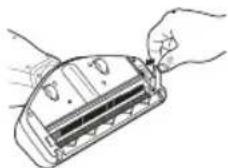
5. Place the roller release latch back into the proper position.
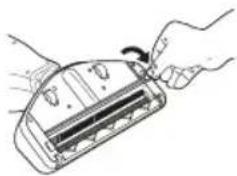
6. Lock by turning the roller release screw clockwise with a penny or small coin.
TROUBLESHOOTING
Review this table to find do-it-yourself solutions for minor performance problems. Any other service needed should be performed by a qualified service dealer.
WARNING
Always turn off and unplug the vacuum cleaner before performing maintenance. Failure to do so could result in electrical shock or personal injury.
| PROBLEM POSSIBLE CAUSE POSSIBLE SOLUTION | ||
| Vacuum cleaner won’t start | 1. Battery needs charging2. Tripped circuit breaker/blown fuse at household service panel. | 1. Plug in firmly, allow vacuum to charge2. Contact After Sale Service. |
| If the brush does not start | The brush is blocked | Clean the brush and wait for about 10 minutes before restarting. |
| Poor job of dirt pick up | 1. Full or clogged dust bin.2. Clogged airflow passages.3. Dirty filters | 1. Empty dust bin. (page 19)2. Clear airflow passages. (page 19 & 20)3. Change/Clean filters. (page 19) |
BATTERIES
- Battery replacement
This appliance contains nickel-metal hydride (NiMh) accumulators which are, for safety reasons, only accessible to professional engineers. When the battery is no longer capable of retaining its charge, the NiMh block must be removed. In order to replace the accumulators, please visit the authorized Service Center nearest to your home.
- Throwing away the appliance
It is important that you remove the batteries before throwing away your appliance. In order to do this, visit an authorized Service Center or proceed as follows:
- Remove the hand vac from the electro-brush by pressing the unlocking buttons.
- Remove the dust bin.
- Remove the 5 screws located on the body of the appliance and separate the 2 parts that make up the body.
- Remove the assembly made up of the battery unit, motor, and turbine.
- Then disconnect the 2 cables connected to the battery.
- Remove the screw located on the battery unit, then remove the batteries from the battery unit.
Do not throw the battery unit into the waste bin; take it to the authorized Moulinex Service Center nearest to your home or to a place specially designated to process such type of waste.
ENVIRONMENT
- According to current regulation, any appliance that is out of service must be taken to an authorized Service Center, where it will be safely disposed of. • Environment: Regulation 2002/95/CE
Warning
Do not place a block of rechargeable batteries with non-rechargeable batteries.
If you wish to change the batteries, visit an authorized Service Center.
The batteries are designed to be used indoors only. Do not immerse them in water. Handle the batteries with care. Do not place the batteries in your mouth. Do not let the batteries come in contact with other metal objects such as rings, nails, or screws. Be careful not to provoke internal short-circuits in the batteries by inserting metal objects through their extremities. If a short-circuit does occur, the temperature of the batteries could rise dangerously, causing serious burns or even catching fire. If the batteries start leaking, do not rub your eyes or mucous membranes. Wash your hands and rinse your eyes with clean water. If irritation persists, consult your physician.
Let's help protect the environment!

① Your appliance contains numerous useful or recyclable materials. Take the appliance to a collection spot so that it can be disposed of properly.
REPAIRS
IMPORTANT:
If you notice that your vacuum cleaner is not functioning properly, before any revision, turn it off by placing the Stop/Start buttons in the Stop position.
Repairs should only be carried out by specialists using original replacement parts. Attempting to repair an electronic appliance at home may be hazardous to the user.
GUARANTEE
This appliance is intended for domestic use only. If it is used inappropriately or not in accordance with the given instructions, Moulinex will not be subject to any liabilities whatsoever and the guarantee will be invalidated.
Read the instructions before using the appliance for the first time: using the appliance in any way different from the one indicated here would free Moulinex of all liabilities.
PARTS AND FEATURES
SPECIFICATIONS
LOADING
FOLDING HANDLE
STORAGE
SAFETY ADVICE
LOADING
FOLDING HANDLE
STORAGE
4 • Place the roller back into the grooves
SAFETY WARNINGS
CHARGING
FOLDING HANDLE
STORAGE
TIPS FOR USE
WARNING
OPERATION
CHARGING

- SPECIFICATIONS
- SAFETY ADVICE
- CHARGING
- FOLDING HANDLE
- STORAGE
- USAGE TIPS
- WARNING
- INSTRUCTIONS FOR USE
- PARTS AND FEATURES
- CORDLESS HAND VAC
- CORDLESS STICK VACUUM FULLY ASSEMBLED
- SECURITY ADVICE
- PRECAUTIONS BEFORE USE
- ELECTRIC POWER SOURCE
- REPAIRS
- BEFORE FIRST USE
- CHARGING THE BATTERY
- IMPORTANT
- ASSEMBLY INSTRUCTIONS
- CHARGING STAND
- VACUUMING TIPS
- SUGGESTED SWEEPING PATTERN
- NOTE
- USING THE HAND VAC
- OPERATING INSTRUCTIONS
- HAND VAC CONTROLS
- EMPTYING DUST BIN
- CLEANING THE DUST BIN FILTER
- CAUTION
- CLEANING THE ROLLER
- TROUBLESHOOTING
- BATTERIES
- BATTERY REPLACEMENT
- THROWING AWAY THE APPLIANCE
- ENVIRONMENT
- LET'S HELP PROTECT THE ENVIRONMENT
- GUARANTEE
- LOADING
- SAFETY WARNINGS
- TIPS FOR USE
- OPERATION
Brand : MOULINEX
Model : Dualio MS5525
Category : Vacuum Cleaner