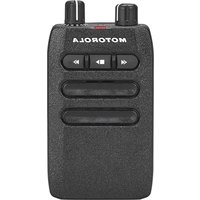
Minitor 7 - Charger MOTOROLA - Free user manual and instructions
Find the device manual for free Minitor 7 MOTOROLA in PDF.


| Product Type | Amplifier charger for Motorola MINITOR 7 receiver |
| Dimensions (approx.) | 200 x 150 x 80 mm |
| Weight (approx.) | 0.6 kg |
| Power supply | AC power adapter 100-240 V AC, 50/60 Hz; DC output |
| Main features | Simultaneous charging of MINITOR 7 device (front slot) and a spare battery (rear slot); 2.5 W audio amplification with built-in speaker; external speaker jack (4 Ω min.); external antenna connector (BNC); alert relay with dry contacts and adjustable timeout |
| Maintenance and cleaning | Unplug before cleaning; use a soft dry cloth; do not use abrasive products or solvents |
| Safety | Use only Motorola Solutions approved batteries and accessories; do not expose to moisture; ambient temperature max. 40 °C; do not disassemble the charger |
| Spare parts and repairability | External antennas: RLN6507 (VHF), RLN6508 (UHF); Li-ion battery: PMNN4438; power adapter: EPNN9288A (North/Latin America); the charger is not user-serviceable |
| General information | Manufacturer's warranty: 1 year; FCC class B compliance; regulatory markings included |
Frequently Asked Questions - Minitor 7 MOTOROLA
User questions about Minitor 7 MOTOROLA
0 question about this device. Answer the ones you know or ask your own.
Ask a new question about this device
Download the instructions for your Charger in PDF format for free! Find your manual Minitor 7 - MOTOROLA and take your electronic device back in hand. On this page are published all the documents necessary for the use of your device. Minitor 7 by MOTOROLA.
USER MANUAL Minitor 7 MOTOROLA
MINITOR 7 Amplifier Charger Base PMLN8593 User Guide
Safety and Legal
This section provides the safety and legal information for this product.
Intellectual Property and Regulatory Notices
Copyrights
The Motorola Solutions products described in this document may include copyrighted Motorola Solutions computer programs. Laws in the United States and other countries preserve for Motorola Solutions certain exclusive rights for copyrighted computer programs. Accordingly, any copyrighted Motorola Solutions computer programs contained in the Motorola Solutions products described in this document may not be copied or reproduced in any manner without the express written permission of Motorola Solutions.
No part of this document may be reproduced, transmitted, stored in a retrieval system, or translated into any language or computer language, in any form or by any means, without the prior written permission of Motorola Solutions, Inc.
Trademarks
MOTOROLA, MOTO, MOTOROLA SOLUTIONS, and the Stylized M Logo are trademarks or registered trademarks of Motorola Trademark Holdings, LLC and are used under license. All other trademarks are the property of their respective owners.
License Rights
The purchase of Motorola Solutions products shall not be deemed to grant either directly or by implication, estoppel or otherwise, any license under the copyrights, patents or patent applications of Motorola Solutions, except for the normal non-exclusive, royalty-free license to use that arises by operation of law in the sale of a product.
Open Source Content
This product may contain Open Source software used under license. Refer to the product installation media for full Open Source Legal Notices and Attribution content.
European Union (EU) and United Kingdom (UK) Waste of Electrical and Electronic Equipment (WEEE) Directive

The European Union's WEEE directive and the UK's WEEE regulation require that products sold into EU countries and the UK must have the crossed-out wheelie bin label on the product (or the package in some cases). As defined by the WEEE directive, this crossed-out wheelie bin label means that customers and end-users in EU and UK countries should not dispose of electronic and electrical equipment or accessories in household waste.
Customers or end-users in EU and UK countries should contact their local equipment supplier representative or service centre for information about the waste collection system in their country.
Disclaimer
Please note that certain features, facilities, and capabilities described in this document may not be applicable to or licensed for use on a specific system, or may be dependent upon the characteristics of a specific mobile
subscriber unit or configuration of certain parameters. Please refer to your Motorola Solutions contact for further information.
© 2024 Motorola Solutions, Inc. All Rights Reserved
Supplier's Declaration of Conformity
Supplier's Declaration of Conformity
Per FCC CFR 47 Part 2 Section 2.1077(a)

Responsible Party
Name: Motorola Solutions, Inc.
Address: 2000 Progress Pkwy, Schaumburg, IL. 60196
Phone Number: 1-800-927-2744
Hereby declares that the product:
Model Name: Amplifier Charger
conforms to the following regulations:
FCC Part 15, subpart B, section 15.107(a), and section 15.109(a)
Class B Digital Device
This device complies with Part 15 of the FCC Rules. Operation is subject to the following two conditions:
-
This device may not cause harmful interference, and
-
This device must accept any interference received, including interference that may cause undesired operation.

NOTE:
This equipment has been tested and found to comply with the limits for a Class B digital device, pursuant to part 15 of the FCC Rules. These limits are designed to provide reasonable protection against harmful interference in a residential installation. This equipment generates, uses and can radiate radio frequency energy and, if not installed and used in accordance with the instructions, may cause harmful interference to radio communications. However, there is no guarantee that interference will not occur in a particular installation.
If this equipment does cause harmful interference to radio or television reception, which can be determined by turning the equipment off and on, the user is encouraged to try to correct the interference by one or more of the following measures:
- Reorient or relocate the receiving antenna.
- Increase the separation between the equipment and receiver.
- Connect the equipment into an outlet on a circuit different from that to which the receiver is connected.
- Consult the dealer or an experienced radio or TV technician for help.
Important Safety Instructions
This document contains important safety and operating instructions. Please read these instructions carefully and save them for future reference.
Before using the battery charger, read all the instructions and cautionary markings on (1) the charger and (2) the battery.

CAUTION:
- To reduce risk of damage to the power cords, pull the plug rather than the cord when disconnecting from the AC outlet or the charger.
- An extension cord should not be used unless absolutely necessary. Use of an improper extension cord could result in risk of fire and electric shock. If an extension cord must be used, make sure that the cord size is 18 AWG for lengths of up to 6.5 feet (2.0 m), and 16 AWG for lengths up to 9.8 feet (3.0 m).
- To reduce risk of fire, electric shock, or injury, do not operate the charger if it has been broken or damaged in any way. Take it to a qualified Motorola Solutions service representative.
- Do not disassemble the charger. It is not repairable and replacement parts are not available. Disassembly of the charger may result in risk of electric shock or fire.
- To reduce risk of electric shock, unplug the charger power supply from the AC outlet before attempting any maintenance or cleaning.
- To reduce risk of injury, charge only the rechargeable Motorola Solutions Authorized Batteries. Other batteries may explode, causing personal injury and damage.
- Use of accessories not recommended by Motorola Solutions may result in risk of fire, electric shock, or injury.
- Changes or modifications made to this device, not expressly approved by Motorola Solutions, could void the authority of the user to operate this equipment.
Operational Safety Guidelines
- This equipment is not suitable for outdoor use. Use only in dry locations and conditions.
- The room temperature must not exceed 40^ (104°F).
- The MINITOR 7 device can be turned on only when it is transmitting data wirelessly. Otherwise, turn off the device.
- Connect the charger only to appropriate power supplies and power cords as listed.
- The AC outlet to which the power supply is connected must be nearby and easily accessible.
- Ensure that the power supply cord connected to the charger is not easily stepped on, tripped over, or subjected to water, damage, or stress.
- Connect the power supply only to an appropriately fused and wired AC outlet with the correct voltage, as specified on the product.
- Disconnect from the line voltage by removing the power supply from the AC outlet.
- Connect not more than the appropriate number of charger power supplies to a 15 A or 20 A circuit, as limited by any certified power strip being used.

NOTE: Daisy chaining power strips are not recommended. Circuit loading must be limited to less than 80 % of the circuit rating.
Service
Do not disassemble the Amplifier Charger; it is not repairable. Order replacement antennas or power supplies as necessary from your local Motorola Solutions Sales Representative.
Chargers Warranty
The workmanship warranty guarantees against defects in workmanship under normal use and service.
Table 1: The Workmanship Warranty
| Products Covered Length of Coverage |
| Chargers One (1) Year |
Limited Warranty
MOTOROLA SOLUTIONS COMMUNICATION PRODUCTS
I. WHAT THIS WARRANTY COVERS AND FOR HOW LONG:
MOTOROLA SOLUTIONS, INC. ("MOTOROLA") at its option, will at no charge either repair the Product (with new or reconditioned parts), replace it (with a new or reconditioned Product), or refund the purchase price of the Product during the warranty period provided it is returned in accordance with the terms of this warranty. Replaced parts or boards are warranted for the balance of the original applicable warranty period. All replaced parts of Product shall become the property of MOTOROLA.
This express limited warranty is extended by MOTOROLA to the original end user purchaser only and is not assignable or transferable to any other party. This is the complete warranty for the Product manufactured by MOTOROLA. MOTOROLA assumes no obligations or liability for additions or modifications to this warranty unless made in writing and signed by an officer of MOTOROLA.
Unless made in a separate agreement between MOTOROLA and the original end user purchaser, MOTOROLA does not warrant the installation, maintenance or service of the Product.
MOTOROLA cannot be responsible in any way for any ancillary equipment not furnished by MOTOROLA which is attached to or used in connection with the Product, or for operation of the Product with any ancillary equipment, and all such equipment is expressly excluded from this warranty. Because each system which may use the Product is unique, MOTOROLA disclaims liability for range, coverage, or operation of the system as a whole under this warranty.
II. GENERAL PROVISIONS:
This warranty sets forth the full extent of MOTOROLA'S responsibilities regarding the Product. Repair, replacement or refund of the purchase price, at MOTOROLA's option, is the exclusive remedy. THIS WARRANTY IS GIVEN IN LIEU OF ALL OTHER EXPRESS WARRANTIES. IMPLIED WARRANTIES, INCLUDING WITHOUT LIMITATION, IMPLIED WARRANTIES OF MERCHANTABILITY AND FITNESS FOR A PARTICULAR PURPOSE, ARE LIMITED TO THE DURATION OF THIS LIMITED WARRANTY. IN NO EVENT SHALL MOTOROLA BE LIABLE FOR DAMAGES IN EXCESS OF THE PURCHASE PRICE OF THE PRODUCT, FOR ANY LOSS OF USE, LOSS OF TIME, INCONVENIENCE, COMMERCIAL LOSS, LOST PROFITS OR SAVINGS OR OTHER INCIDENTAL, SPECIAL OR CONSEQUENTIAL DAMAGES ARISING OUT OF THE USE OR INABILITY TO USE SUCH PRODUCT, TO THE FULL EXTENT SUCH MAY BE DISCLAIMED BY LAW.
III. STATE LAW RIGHTS:
SOME STATES DO NOT ALLOW THE EXCLUSION OR LIMITATION OF INCIDENTAL OR CONSEQUENTIAL DAMAGES OR LIMITATION ON HOW LONG AN IMPLIED WARRANTY LASTS, SO THE ABOVE LIMITATION OR EXCLUSIONS MAY NOT APPLY.
This warranty gives specific legal rights, and there may be other rights which may vary from state to state.
IV. HOW TO GET WARRANTY SERVICE:
You must provide proof of purchase (bearing the date of purchase and Product item serial number) in order to receive warranty service and, also, deliver or send the Product item, transportation and insurance prepaid, to an authorized warranty service location. Warranty service will be provided by MOTOROLA through one of its authorized warranty service locations. If you first contact the company which sold you the Product (e.g., dealer or communication service provider), it can facilitate your obtaining warranty service. You can also call MOTOROLA at 1-800-927-2744 US/Canada.
V. WHAT THIS WARRANTY DOES NOT COVER:
- Defects or damage resulting from use of the Product in other than its normal and customary manner.
- Defects or damage from misuse, accident, water, or neglect.
- Defects or damage from improper testing, operation, maintenance, installation, alteration, modification, or adjustment.
- A Product subjected to unauthorized Product modifications, disassembles or repairs (including, without limitation, the addition to the Product of non-MOTOROLA supplied equipment) which adversely affect performance of the Product or interfere with MOTOROLA's normal warranty inspection and testing of the Product to verify any warranty claim.
- Product which has had the serial number removed or made illegible.
- Freight costs to the repair depot.
- A Product which, due to illegal or unauthorized alteration of the software/firmware in the Product, does not function in accordance with MOTOROLA's published specifications or the FCC certification labeling in effect for the Product at the time the Product was initially distributed from MOTOROLA.
- Scratches or other cosmetic damage to Product surfaces that does not affect the operation of the Product.
- Normal and customary wear and tear.
VI. PATENT AND SOFTWARE PROVISIONS:
MOTOROLA will defend, at its own expense, any suit brought against the end user purchaser to the extent that it is based on a claim that the Product or parts infringe a United States patent, and MOTOROLA will pay those costs and damages finally awarded against the end user purchaser in any such suit which are attributable to any such claim, but such defense and payments are conditioned on the following:
- that MOTOROLA will be notified promptly in writing by such purchaser of any notice of such claim;
- that MOTOROLA will have sole control of the defense of such suit and all negotiations for its settlement or compromise; and
- should the Product or parts become, or in MOTOROLA's opinion be likely to become, the subject of a claim of infringement of a United States patent, that such purchaser will permit MOTOROLA, at its option and expense, either to procure for such purchaser the right to continue using the Product or parts or to replace or modify the same so that it becomes non-infringing or to grant such purchaser a credit for the Product or parts as depreciated and accept its return. The depreciation will be an equal amount per year over the lifetime of the Product or parts as established by MOTOROLA.
MOTOROLA will have no liability with respect to any claim of patent infringement which is based upon the combination of the Product or parts furnished hereunder with software, apparatus or devices not furnished by MOTOROLA, nor will MOTOROLA have any liability for the use of ancillary equipment or software not furnished by MOTOROLA which is attached to or used in connection with the Product. The foregoing states the entire liability of MOTOROLA with respect to infringement of patents by the Product or any parts thereof.
Laws in the United States and other countries preserve for MOTOROLA certain exclusive rights for copyrighted MOTOROLA software such as the exclusive rights to reproduce in copies and distribute
copies of such MOTOROLA software. MOTOROLA software may be used in only the Product in which the software was originally embodied and such software in such Product may not be replaced, copied, distributed, modified in any way, or used to produce any derivative thereof. No other use including, without limitation, alteration, modification, reproduction, distribution, or reverse engineering of such MOTOROLA software or exercise of rights in such MOTOROLA software is permitted. No license is granted by implication, estoppel or otherwise under MOTOROLA patent rights or copyrights.
VII. GOVERNING LAW:
This Warranty is governed by the laws of the State of Illinois, U.S.A.
Contact Us
The Centralized Managed Support Operations (CMSO) is the primary contact for technical support included in your organization's service agreement with Motorola Solutions.
Service agreement customers should be sure to call the CMSO in all situations listed under Customer Responsibilities in their agreement, such as:
- To confirm troubleshooting results and analysis before taking action
Your organization received support phone numbers and other contact information appropriate for your geographic region and service agreement. Use that contact information for the most efficient response.
However, if needed, you can also find general support contact information on the Motorola Solutions website, by following these steps:
- Enter motorolasolutions.com in your browser.
- Ensure that your organization's country or region is displayed on the page. Clicking or tapping the name of the region provides a way to change it.
- Select "Support" on the motorolasolutions.com page.
Comments
Send questions and comments regarding user documentation to documentation@motorolasolutions.com.
Provide the following information when reporting a documentation error:
• The document title and part number
- The page number or title of the section with the error
• A description of the error
Motorola Solutions offers various courses designed to assist in learning about the system. For information, go to https://learning.motorolasolutions.com to view the current course offerings and technology paths.
Icon Conventions
The documentation set is designed to give the reader more visual clues. The following graphic icons are used throughout the documentation set.

DANGER: The signal word DANGER with the associated safety icon implies information that, if disregarded, will result in death or serious injury.

WARNING: The signal word WARNING with the associated safety icon implies information that, if disregarded, could result in death or serious injury, or serious product damage.

CAUTION: The signal word CAUTION with the associated safety icon implies information that, if disregarded, may result in minor or moderate injury, or serious product damage.
CAUTION: The signal word CAUTION may be used without the safety icon to state potential damage or injury that is not related to the product.

IMPORTANT: IMPORTANT statements contain information that is crucial to the discussion at hand, but is not a CAUTION or WARNING. There is no warning level associated with the IMPORTANT statement.

NOTE: NOTICE contains information more important than the surrounding text, such as exceptions or preconditions. They also refer the reader elsewhere for additional information, remind the reader how to complete an action (when it is not part of the current procedure, for instance), or tell the reader where something is on the screen. There is no warning level associated with a notice.
Style Conventions
The following style conventions are used:
| Convention Description | |
| Bold This typeface is used for names of, for instance, windows, buttons, and labels when these names appear on the screen (example: theAlarms Browser window). When it is clear that we are referring to, for instance, a button, the name is used alone (example: ClickOK). | |
| Monospacing font in bold | This typeface is used for words to be typed in exactly as they are shown in the text (example: In theAddressfield,type http:// ucs01.ucs:9080/). |
| Monospacing font | This typeface is used for messages, prompts, and other text displayed on the computer screen (example: A new trap destination has been added). |
| This typeface is used with angle brackets as placeholders for a specific member of the group that the words represent (example:.NOTE: In sequences to be typed in, the angle brackets are omitted to avoid confusion whether to include the angle brackets in the text to be typed. | |
| CAPITAL LETTERS This typeface is used for keyboard keys (example: Press Y, and then press ENTER). | |
| Italic This typeface is used for citations. A citation usually is the name of a document or a phrase from another document (example: Dimetra IP System Overview). | |
| → An → (arrow pointing right) is used for indicating the menu or tab structure in instructions on how to select a certain menu item (example: File →Save) or a certain subtab. | |
Contents
Safety and Legal....2
Contact Us....8
Icon Conventions....9
Style Conventions.... 10
Chapter 1: Charger Overview....12
1.1 Standard Features.... 13
Chapter 2: Authorized Accessories....15
2.1 Motorola Solutions-Authorized Antennas....15
2.2 Motorola Solutions-Authorized Battery.... 15
2.3 Motorola Solutions-Authorized Charger....15
2.4 Motorola Solutions-Authorized Power Supplies....15
Chapter 3: Operating Instructions....17
3.1 Operational Guidelines.... 17
3.2 Charging Indication....18
3.3 Troubleshooting.... 19
Chapter 1
Charger Overview
The Amplifier Charger is intended for use with the Motorola Solutions-authorized Lithium-ion rechargeable batteries. The front pocket of the charger is capable of handling a MINITOR 7 device with an attached battery. The rear pocket is designed only to charge the above mentioned batteries (alone).
An illuminated LED indicates the state of charge for the front and rear pocket.
Figure 1: Amplifier Charger
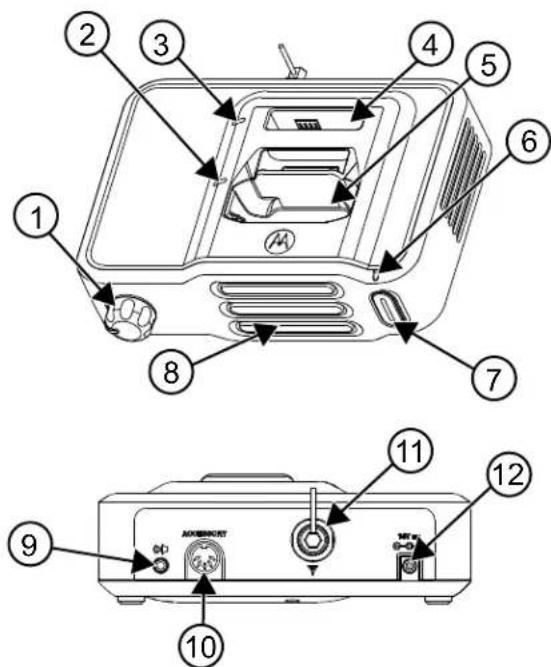
Table 2: MINITOR 7 Amplifier Charger Overview
| Item Description |
| 1 Volume Knob |
| 2 Device Battery LED |
| 3 Spare Battery LED |
| 4 Rear Pocket |
| 5 Front Pocket |
| 6 Alert LED |
| 7 Reset Button |
| 8 Speaker |
| 9 External Speaker Jack |
| 10 Accessory Connector |
| 11 Antenna Connector |
| 12 DC Connector |
1.1
Standard Features
External Antenna
The external antenna input jack (BNC connector) is located on the rear of the Amplifier Charger housing. An external antenna must be attached to the Amplifier Charger for maximal reception.
Audio Amplifier
The Amplifier Charger contains a 2.5 watt audio amplifier and speaker. When a MINITOR 7 device is placed in the Amplifier Charger, the audio is routed to the Amplifier Charger speaker rather than to the device speaker.
External Speaker Jack
An external speaker jack, located on the rear of the Amplifier Charger housing, allows the user to attach an external speaker. When an external speaker is connected, audio will be routed to that speaker rather than to the Amplifier Charger internal speaker. The minimum speaker impedance is 4 ohms.
Relay
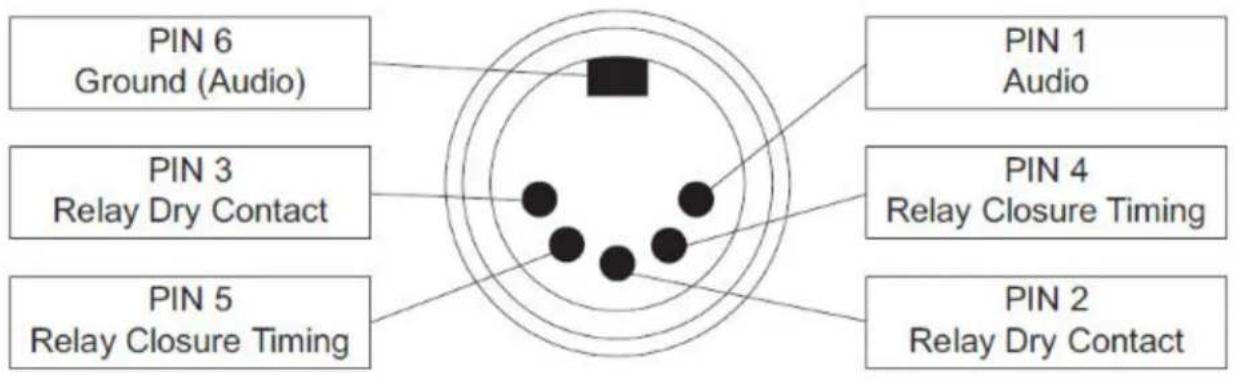
The Amplifier Charger includes a relay that is energized whenever an alert is received, and a 6-pin DIN accessory connector is located on the rear of the unit. The 6-pin mating plug for these models may be wired to provide the following functions:
- Remote Speaker Audio (Pins 1 and 6)
An external 4-ohm speaker may be connected to the Amplifier Charger via pin 1 (audio) and pin 6 (ground return) of the plug, to provide both remote speaker audio and internal speaker audio at the same time.
- Relay Dry Contact Closure (Pins 2 and 3)
When the accessory relay is energized, its contacts close and present a short across pins 2 and 3 of the connector. The relay contacts are rated for 10 watts maximum at 28 VDC/AC _RMS . Within the limits of the 10-watt rating the closed contacts can handle up to 750 mA continuously and switch up to 400 mA of current. Relay contact rating: 750 mA maximum @ 28 VDC.
- Relay Closure Timing Control (Pins 4 and 5)
Accessory connector, pins 4 and 5, are used to select the time duration of the relay contact closure. If these two pins are not used (open circuit), the relay remains energized for approximately 10 seconds after an alert is received or until the reset button is pressed, whichever comes first. If pins 4 and 5 are shorted, the relay remains energized until the reset button on the front of the Amplifier Charger is pressed. Pressing the reset button causes the contacts to open to turn off the ALERT indicator.
Figure 2: Overview of the 6-Pin Accessory Connector
ACCESSORY
Chapter 2
Authorized Accessories
This section lists out authorized accessories that you can use with your charger.
2.1
Motorola Solutions-Authorized Antennas
The antennas listed in the following table are approved for use with the Amplifier Charger.
Table 3: Motorola Solutions-Authorized Antennas
| Kit (Part) Number Description |
| RLN6507_Antenna, Charger AMP, MIN VI VHF |
| RLN6508_Antenna, Charger AMP, MIN VI UHF |
2.2
Motorola Solutions-Authorized Battery
The battery listed in the following table are approved for use with the Amplifier Charger.
Table 4: Motorola Solutions-Authorized Battery
| Kit (Part) Number Platform/Description |
| PMNN4438_Battery, Li-Ion (UL Battery) |

NOTE: The Amplifier Charger cannot accommodate the alkaline battery tray.
2.3
Motorola Solutions-Authorized Charger
The charger listed in the following table is approved for use with the Amplifier Charger.
Table 5: Motorola Solutions-Authorized Charger
| Charger Kit Number Description |
| PMLN8593A Amplifier Charger Base |
2.4
Motorola Solutions-Authorized Power Supplies
The power supply listed in the following table is approved for use with the Amplifier Charger.
Table 6: Motorola Solutions-Authorized Power Supply
| Power Supply Kit Number Description |
| EPNN9288A Switch Mode Power Supply (North America and Latin America) |
Chapter 3
Operating Instructions
Amplifier Chargers are intended for use only with the authorized Motorola Solutions batteries and power supplies; usage with unauthorized products can prevent proper operation and can damage the device.
The battery charger will accommodate a MINITOR 7 device with an attached battery in the front pocket, and a battery alone in the rear pocket. To charge a battery, use the following procedure:
- Plug the round end of the power supply cord into the DC Connector on the back of the charger.
- Plug the power supply into the appropriate AC outlet. The spare battery LED and device battery LED will flash single green once and the alert LED will flash single red once to indicate a successful power-up.
- Insert a MINITOR 7 device with battery into the charger's front pocket by:
a. aligning the groove on each side of the device with the corresponding raised rail on each side of the charger pocket.
b. sliding the device into the charger pocket, ensuring complete contact between the charger and device contacts.
- When the device is properly seated in the pocket, the charger LED will light in accordance with Table 7: Charging Indication on page 18

NOTE:
- Charge new batteries overnight to ensure full charge. To minimize charge time, it is recommended to turn the device OFF.
- The Amplifier Charger cannot accommodate the alkaline battery tray.
-
During receipt of a page, the LED may flash amber, indicating charging has temporarily been suspended.
-
Insert a battery into the charger's rear pocket by:
a. aligning the groove on each side of the battery with the corresponding raised rail on each side of the charger pocket.
b. sliding the battery into the charger pocket, ensuring complete contact between the charger and battery contacts.
- When the battery is properly seated in the pocket, the charger LED will light in accordance with Table 7: Charging Indication on page 18

NOTE:
- Charge new batteries overnight to ensure full charge.
- The Amplifier Charger cannot accommodate the alkaline battery tray.
3.1
Operational Guidelines
- Always power the Amplifier Charger first before inserting the MINITOR 7 device with the attached battery into the front pocket or the auxiliary battery into the charger's rear pocket.
- The front pocket has charging priority over the rear pocket. Therefore, the rear pocket cannot charge at its full rate until the front pocket charging is complete.
3.2
Charging Indication
The following table describes the charging indications when the charger is in use.
Table 7: Charging Indication
| LED Indication Charger Status | |
 Single Flash Green Single Flash Green | Charger successfully powered up and ready for use. |
 Slow Flash Amber Slow Flash Amber | Pre-Charge: Battery under-voltage recovery.Temperature < Approximately 5 °C (or Value Programmed in Battery): Wait to charge—battery too cold.Temperature ≥ Approximately 45 °C (or Value Programmed in Battery): Wait to charge—battery too hot. |
 Fast Flash Red Fast Flash Red | Under-Voltage Recovery Timeout (15 Minutes)Loss of Charge Current Control (Difference between Command and Feedback > Electrical Tolerance Analysis)Excessive Power Supply VoltageBattery+ OpenThermistor Short to GroundBattery+ and Battery- ShortFaults |
 Steady Red Steady Red | Fast Charge or Charge Ramp DownNormal operation |
 Slow Flash Green Slow Flash Green | Nearly ChargedNormal operationThe battery is charged to at least 90% of the threshold programmed into the battery. Or, if the battery lacks an internal memory device, the charging current has ramped down to a value less than a charger default threshold. |
 Steady Green Steady Green | Charged or Nearly ChargedNormal operationThe battery is charged to at least 95% threshold programmed into the battery. Or, if the battery lacks an internal memory device, the charging current has ramped down to a value less than a charger default threshold. |
 Off Off | Thermistor OpenNo battery in pocket |
LED Indication Charger Status
 Fast Flash Red Fast Flash Red | or | [5ZD3]Off | Battery- OpenAppears like Battery+ Open or Thermistor Open |
| [4CZS]Off | or |  Slow Flash Amber Slow Flash Amber | Thermistor Short to Battery+Appears like Thermistor Open for most battery voltages, orAppears like Cold Battery for discharged or near-discharge batteries |
 Steady Amber Steady Amber | The pocket is waiting for charging current to be available.Wait to charge—charging begins when current is made available by the higher-priority pocket or device.NOTE: Applicable to battery pocket only if the pocket prioritization feature is used. |
3.3
Troubleshooting
When troubleshooting, always observe the color of the LED.
If There Is No LED Indication
- Check that the MINITOR 7 device with battery is inserted correctly in the front pocket or the battery in the rear pocket.
- Make sure that the transformer is plugged into an appropriate AC outlet.
- Ensure that the transformer cable is plugged securely into the charger socket.
- Confirm that the battery being used with the device is listed in Authorized Accessories on page 15.
MOTOROLA, MOTO, MOTOROLA SOLUTIONS, and the Stylized M Logo are trademarks or registered trademarks of Motorola Trademark Holdings, LLC and are used under license. All other trademarks are the property of their respective owners.
Droits de licence
© 2024 Motorola Solutions, Inc. All Rights Reserved
1.1 Fonctions standards....13
Chapitre 2
Accessoires approuvés
- MINITOR 7 Amplifier Charger Base PMLN8593 User Guide
- Safety and Legal
- Intellectual Property and Regulatory Notices
- Copyrights
- Trademarks
- License Rights
- Open Source Content
- European Union (EU) and United Kingdom (UK) Waste of Electrical and Electronic Equipment (WEEE) Directive
- Disclaimer
- Supplier's Declaration of Conformity
- Class B Digital Device
- NOTE:
- Important Safety Instructions
- CAUTION:
- Operational Safety Guidelines
- Service
- Chargers Warranty
- Limited Warranty
- MOTOROLA SOLUTIONS COMMUNICATION PRODUCTS
- WHAT THIS WARRANTY COVERS AND FOR HOW LONG:
- GENERAL PROVISIONS:
- STATE LAW RIGHTS:
- HOW TO GET WARRANTY SERVICE:
- WHAT THIS WARRANTY DOES NOT COVER:
- PATENT AND SOFTWARE PROVISIONS:
- GOVERNING LAW:
- Contact Us
- Comments
- Icon Conventions
- Style Conventions
- Contents
- Chapter 1
- Charger Overview
- Standard Features
- External Antenna
- Audio Amplifier
- External Speaker Jack
- Relay
- - Remote Speaker Audio (Pins 1 and 6)
- - Relay Dry Contact Closure (Pins 2 and 3)
- - Relay Closure Timing Control (Pins 4 and 5)
- Chapter 2
- Authorized Accessories
- 2.1
- Motorola Solutions-Authorized Antennas
- 2.2
- Motorola Solutions-Authorized Battery
- 2.3
- Motorola Solutions-Authorized Charger
- 2.4
- Motorola Solutions-Authorized Power Supplies
- Chapter 3
- Operating Instructions
- 3.1
- Operational Guidelines
- 3.2
- Charging Indication
- 3.3
- Troubleshooting
- If There Is No LED Indication
- Droits de licence
- Chapitre 2
- Accessoires approuvés
Brand : MOTOROLA
Model : Minitor 7
Category : Charger