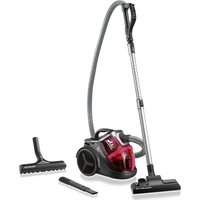
Ergo Force Cyclonic Parquet RO6743 - Vacuum Cleaner ROWENTA - Free user manual and instructions
Find the device manual for free Ergo Force Cyclonic Parquet RO6743 ROWENTA in PDF.


| Brand | Rowenta |
| Model | Ergo Force Cyclonic Parquet RO6743 |
| Product type | Canister vacuum cleaner with cyclonic technology |
| Power supply | 220-240 V ~ 50/60 Hz |
| Power | 750 W (estimated) |
| Dust tank capacity | 2 L (estimation) |
| Filtration | Washable HEPA filter (ref. ZR9026.01) + microfilter + foam filter |
| Noise level | ~75 dB (estimated) |
| Cord length | 8 m (estimation) |
| Operating range | 10 m (estimation) |
| Weight | 5 kg (estimated) |
| Dimensions (L x W x H) | 45 x 30 x 30 cm (estimated) |
| Power control | Mechanical on handle (POWERCONTROL) |
| Included nozzles | All-floor nozzle 2 positions, parquet nozzle, telescopic crevice tool, upholstery nozzle, mini turbo brush (depending on version) |
| Telescopic tube | Metal with LOCK SYSTEM |
| Cord rewinder | Pedal winder |
| Parking function | Yes, tube storage at back |
| Maintenance | Empty tank after each use; wash washable filter at each emptying; replace filters every 12 months |
| Safety | Motor overheating protection |
| Spare parts available | Filters (ref. RS-RT4041, RS-RT4042, ZR9026.01), accessories |
| Warranty | 2 years (standard) |
Frequently Asked Questions - Ergo Force Cyclonic Parquet RO6743 ROWENTA
User questions about Ergo Force Cyclonic Parquet RO6743 ROWENTA
0 question about this device. Answer the ones you know or ask your own.
Ask a new question about this device
Download the instructions for your Vacuum Cleaner in PDF format for free! Find your manual Ergo Force Cyclonic Parquet RO6743 - ROWENTA and take your electronic device back in hand. On this page are published all the documents necessary for the use of your device. Ergo Force Cyclonic Parquet RO6743 by ROWENTA.
USER MANUAL Ergo Force Cyclonic Parquet RO6743 ROWENTA
I. ERGO COMFORT*
II. ERGO COMFORT (LOCK SYSTEM)*
natural_image
Line drawing of a mechanical device with no visible text or symbols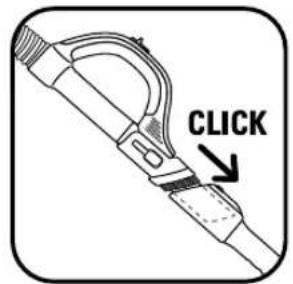
natural_image
Illustration of hands using a vacuum cleaner to adjust or install a component, showing two different states (no text or symbols present)fig. 2 fig. 3 fig. 1 fig. 4a
natural_image
Illustration of hands using a tool to measure a ruler or measurement device (no text or symbols present)fig. 4b
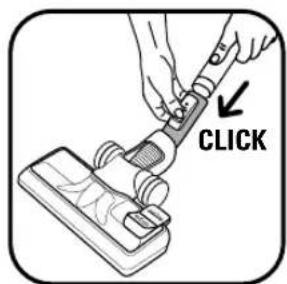
fig. 5a fig. 5b
natural_image
Illustration of a person using a handheld device with a directional arrow indicating motion (no text or symbols)fig. 6
natural_image
Illustration of hands holding a mechanical device (no text or symbols visible)fig. 7
natural_image
Illustration of a car interior with hand holding a device and cable, no text or symbols presentfig. 8 fig. 9
natural_image
Line drawing of a hand holding a mechanical device (no text or symbols)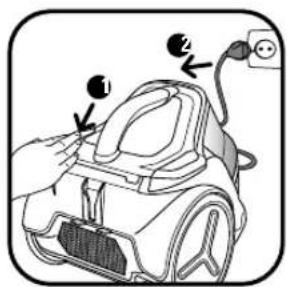
natural_image
Illustration of a hand adjusting a device with a power outlet and cable (no text or symbols)fig. 10
natural_image
Illustration of a hand adjusting a component with a dashed arrow indicating motion (no text or symbols)fig. 11 fig. 12 fig. 13 fig. 14
natural_image
Illustration of a person wearing a backpack and holding a device, separated by a crossed-out X symbol (no text or symbols present)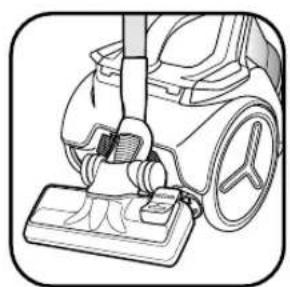
natural_image
Line drawing of a vacuum cleaner with handle and base (no text or symbols)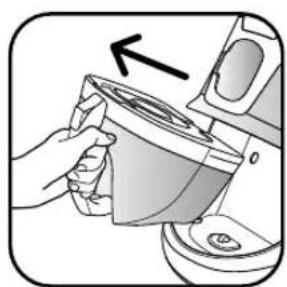
natural_image
Illustration of a hand pouring liquid from a container into a kitchen appliance (no text or symbols)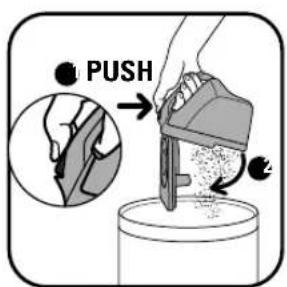
natural_image
Illustration of a hand pouring liquid into a kitchen appliance (no text or symbols visible)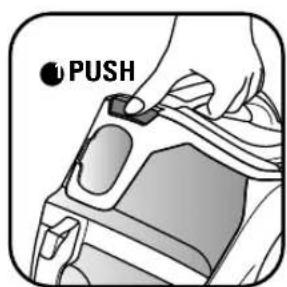
fig. 17fig. 15 fig. 16
fig. 18a
natural_image
Diagram of a car seat with an upward arrow indicating loading or movement (no text or symbols present)fig. 19fig. 18b
natural_image
Illustration of hands pouring granular material into a container (no text or symbols)fig. 20
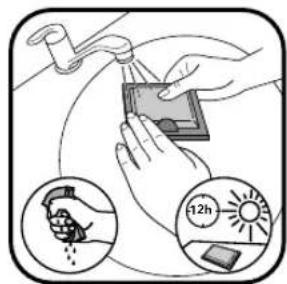
fig. 21
natural_image
Illustration of a hand holding a small tray with a box, showing a device with a downward arrow (no text or symbols)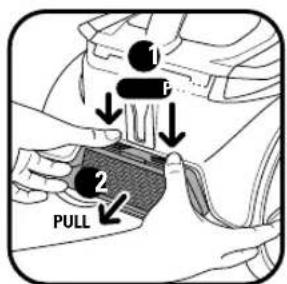
fig. 22 fig. 24 fig. 23 fig. 25
natural_image
Diagram showing three components with an arrow indicating direction, no text or symbols present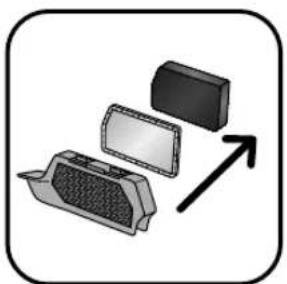
natural_image
Diagram showing three components with an arrow indicating direction, no text or symbols present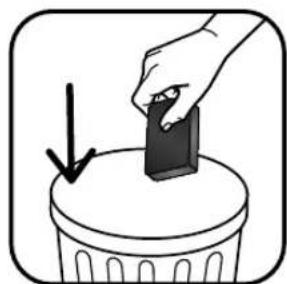
natural_image
Illustration of a hand placing a small object into a trash bin with an arrow indicating downward motion (no text or symbols)
natural_image
Illustration of a hand placing a small object into a trash bin with an arrow indicating downward motion (no text or symbols)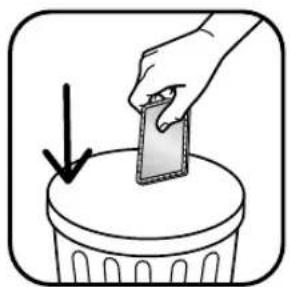
natural_image
Illustration of a hand placing a smartphone into a trash bin with a downward arrow (no text or symbols)fig. 26
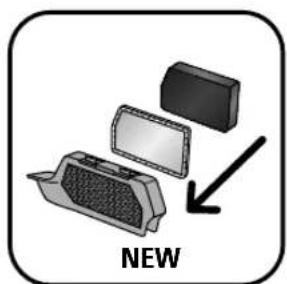
fig. 27 fig. 28 fig. 29
natural_image
Illustration of a hand holding a mechanical component with a curved arrow indicating rotation (no text or symbols)fig. 30 fig. 31 fig. 32 fig. 33
natural_image
Illustration of a hand using a tool to press or install a cylindrical component, with an upward arrow indicating motion (no text or symbols present)
natural_image
Illustration of a hand using a tool to press or install a cylindrical component, with an upward arrow indicating motion (no text or symbols present)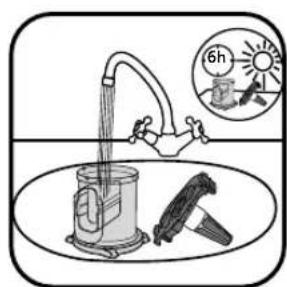
natural_image
Illustration of a hand holding a cylindrical mechanical component with directional arrows indicating motion (no text or symbols)fig. 34 fig. 35 fig. 36a fig. 36b
natural_image
Close-up of a hand adjusting a mechanical component with an arrow indicating motion (no text or symbols visible)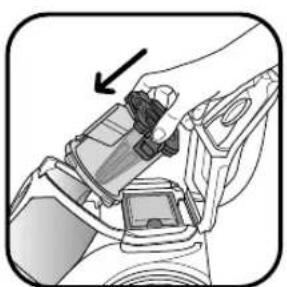
natural_image
Close-up of a hand adjusting a car seatbelt device (no text or symbols visible)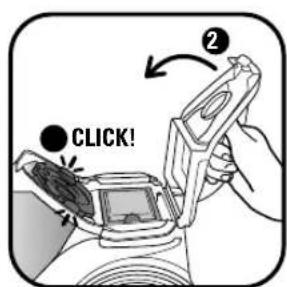
©
GARANTIE
I.26 Support accessoires*
- This appliance is for domestic use only; any misuse or use - Read the instructions for use carefully before using your that does not conform to the instructions will release the appliance for the first time: Rowenta shall accept no liability in brand from all liability and the guarantee will be cancelled. the event of any use that does not comply with the instructions.
SAFETY INSTRUCTIONS
For your safety, this appliance complies with all applicable standards and regulations (Low Voltage 2006/95/EC, Electromagnetic Compatibility 2004/108/EC, Environmental directives, etc.).
- This appliance is not designed to be used by persons (including children) with reduced physical, sensory or mental capabilities, or by people with no prior knowledge or experience, except where they have benefited from supervision or previous instructions relating to the use of the appliance, from a person responsible for their safety.
Children must be supervised to ensure that they do not play with the appliance.
• This appliance can be used by children aged from 8 years and above and persons with reduced physical, sensory or mental capabilities or who lack experience and knowledge if they have been given supervision or instruction concerning safe use and understand the hazards involved. Children should not be allowed to play with the appliance. Children should not clean or perform maintenance procedures on the appliance unless they are supervised by a responsible adult. Keep the appliance and its cord out of the reach of children.
- Do not use the appliance if the power cord is damaged. The cord winder and cord for your vacuum cleaner must be replaced by an Approved Service Centre as special tools are required for repairs to avoid any risks.
Never leave the vacuum on unsupervised.
Do not place the nozzle or the end of the tube near the eyes or ears.
Do not vacuum wet surfaces, any type of liquids, hot substances, super fine substances (plaster, cement, ashes, etc.), large sharp waste (glass), harmful products (solvents, abrasives, etc.), corrosive products (acids, cleaning products, etc.), or flammable or explosive products (oil or alcohol based).
Never immerse the appliance in water; do not spill water on the appliance and do not store it outside.
Do not use the appliance if it has been dropped and there is visible damage to it, or if it fails to function normally.
For cleaning and maintenance operations, refer to page 10.
DESCRIPTION
1 Lid
2 Lid release button
3 Transport handle
4 Bumper
5 Power cord rewind pedal
6 ON/OFF pedal
7 Parking position
8 Wheels
9 Multi-directional wheel
10 Suction inlet
11 Dust compartment
12 Maximum fill level for dust compartment
13 Dust compartment housing
14 Air/dust separation system
a - Separator with air/dust divider
b - Separation compartment
15 Air outlet grill
16 Air outlet filters :
a - Microfilter (ref. RS-RT4041)
b - Filtration foam (ref. RS-RT4042)
17 HEPA filter cassette (ref. ZR9026.01):
a - HEPA filter
b - Washable filter
Accessories
Your appliance will come equipped with a series of ERGO COMFORT accessories either with or without a tube/nozzle locking system.
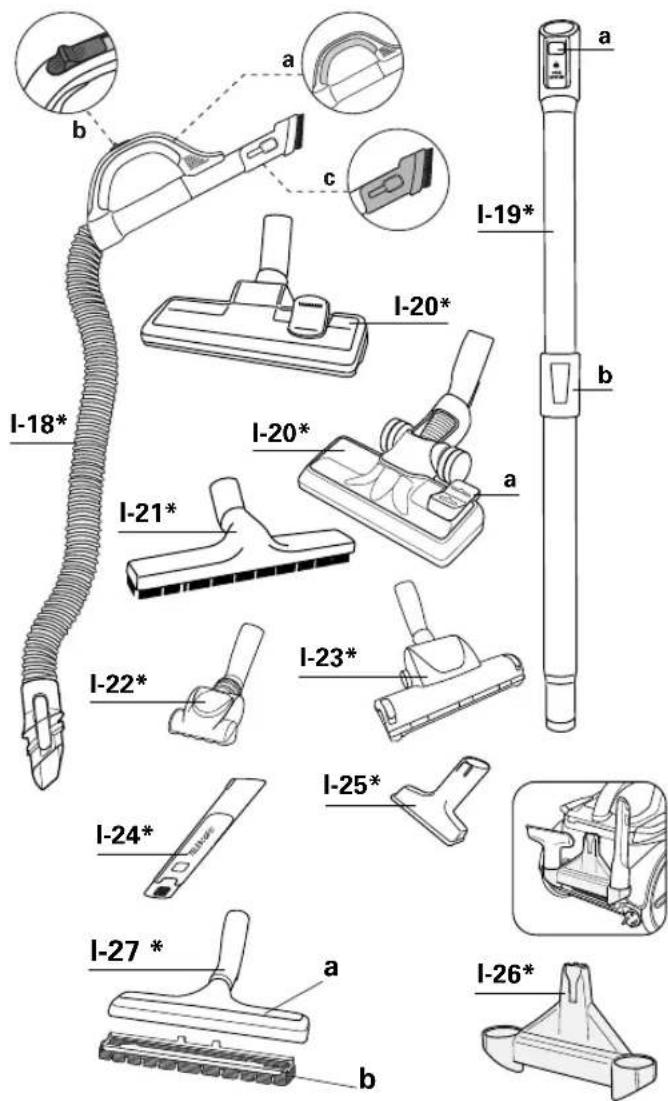
I. Chain of ERGO COMFORT accessories without tube/nozzle locking system\*
I.18 Flexible hose with power nozzle ERGO COMFORT
a - ERGO COMFORT ergonomic nozzle
b - Manual power switch (POWERCONTROL)
c - Integrated furniture brush (EASY BRUSH)
I.19 Telescopic metal tube ERGO COMFORT*
a - Nozzle/tube locking system (LOCK SYSTEM)
b - Tube adjustment button (TELESCOPIC SYSTEM)
I.20 Nozzle for all floor types, 2 positions*
a - 2 position button: brush retracted for rugs and carpets - brushed extended for parquets and smooth floors.
I.21 Parquet nozzle*
I.22 Mini turbo-brush*
I.23 Maxi turbo-brush*
I.24 Telescopic crevice nozzle*
I.25 Upholstery nozzle*
I.26 Accessory holder*
I.27 Smooth floors nozzle with removable brush*
a - use on smooth floors with crevices
b - use on fragile smooth floors
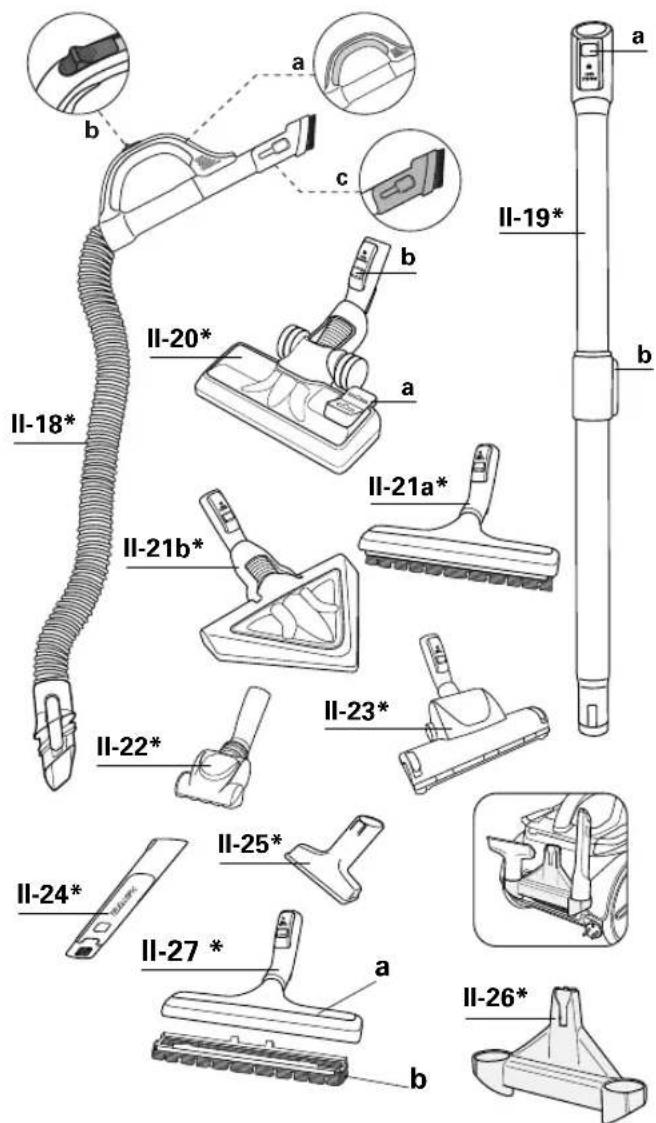
II. Chain of ERGO COMFORT accessories with tube/nozzle locking system\*
II.18 Flexible hose with power nozzle ERGO COMFORT
a - ERGO COMFORT ergonomic nozzle
b - Manual power switch (POWERCONTROL)
c - Integrated furniture brush (EASY BRUSH)
II.19 Telescopic metal tube ERGO COMFORT*
a - Nozzle/tube locking system (LOCK SYSTEM)
b - Tube adjustment button (TELESCOPIC SYSTEM)
II.20 Nozzle for all floor types, 2 positions*
a - 2 position button: brush retracted for rugs and carpets - brushed extended for parquets and smooth floors.
b - Nozzle/tube locking system (LOCK SYSTEM)
II.21 a - Parquet nozzle*
b - Delta parquet nozzle*
II.22 Mini turbo-brush*
II.23 Maxi turbo-brush*
II.24 Telescopic crevice nozzle*
II.25 Upholstery nozzle*
II.26 Accessory holder*
II.27 Smooth floors nozzle with removable brush*
a - use on smooth floors with crevices
b - use on fragile smooth floors
USING FOR THE FIRST TIME
1 • Unpacking
Unpack your appliance and remove any labels, keep your guarantee form and read the instructions carefully before using your appliance for the first time.
Your vacuum cleaner is an electrical appliance: it should be used in normal operating conditions.
Check that your vacuum cleaner voltage corresponds to that of your domestic power supply. Switch off and disconnect the appliance by unplugging without pulling the cord: immediately after use, before changing accessories, before cleaning, maintenance or changing the filter.
Important: the mains plug should be protected with a 16 A fuse at least. If the circuit breaker is triggered while the appliance is in operation, this may be due to the fact that other appliances with high connected power are connected at the same time to the same electrical circuit. This can be avoided by setting the appliance to a low power before turning on and then adjusting to a higher power.
2 • Recommendations and precautions
Unwind the power cord completely before each use. Do not jam it and do not allow it to rub against sharp edges.
If you are using an electrical extension, check that it works properly and that it is suited to the power of your vacuum cleaner. Do not unplug the appliance by pulling on the
USING FOR THE FIRST TIME
power cord.
Do not move the vacuum cleaner by pulling on the power cord, the appliance must be moved using its carrying handle.
Do not use the power cord or the hose to lift the appliance. Switch off and unplug your vacuum cleaner after each use. Always switch off and unplug your vacuum cleaner before maintenance or cleaning.
Your vacuum cleaner is fitted with a safety appliance which prevents the motor from overheating. In certain cases (when used on chairs, sofas, etc.) the safety appliance may be tripped and the appliance may make an unusual noise that is not serious. Only use original Rowenta accessories and filters.
Check that all the filters are in place.
Do not operate your vacuum cleaner without the filtration system fitted (foam, microfilter and filter).
Never place the foam and microfilter in the appliance unless they are completely dry.
If you have any difficulties in finding accessories or filters for this vacuum cleaner, contact the Rowenta Customer Service.
USE
1• Fitting the elements onto the appliance
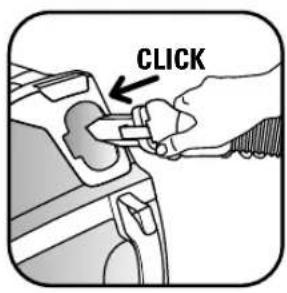
Clip the end of the hose to the suction inlet located at the front of the appliance (fig.1) To remove, unclip the end using the clip and remove.
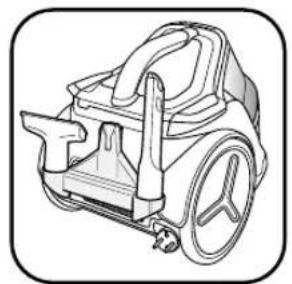
Fix the accessory holder* (I-II.26) to the notch in the self-standing position (7) located at the back of the vacuum cleaner and store the accessories on top (fig.2).
IMPORTANT! If the accessory holder* is positioned behind the appliance, it is essential to remove the accessories in order to open the vacuum cover.
If you have the ERGO COMFORT chain of accessories without the tube/nozzle Locking system (I)\*
- Fit the telescopic metal tube to the end of the nozzle until you hear a 'click' (Fig 3) (To remove, press the tube lock button and pull).
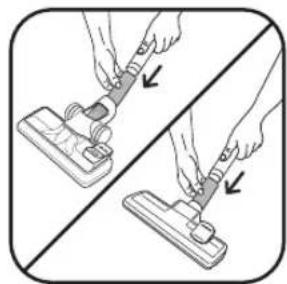
- Fit the nozzle for all floor types* (I.20) to the end of the telescopic metal tube (Fig.4a).
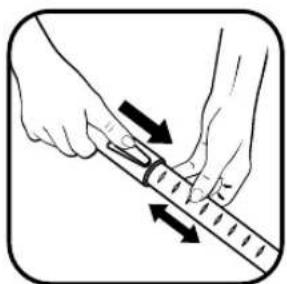
- Adjust the telescopic metal tube to the desired length using the telescopic system (Fig 4b).
If you have the ERGO COMFORT chain of accessories with the tube/nozzle Locking system (II)\*
- Fit the telescopic metal tube to the end of the nozzle until you hear a 'click' (Fig 3) (To remove, press the tube lock button and pull).
- Fit the nozzle for all floor types* (II.20) to the end of the telescopic metal tube until you hear a 'click' (Fig.5a) (To remove, press the tube lock button and pull).
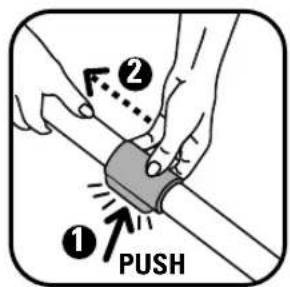
- Adjust the telescopic metal tube to the desired length using the telescopic system (Fig 5b).
ERGONOMIC RECOMMENDATIONS
Ergonomic, the ERGO COMFORT range has been designed to facilitate and improve user comfort when vacuuming.
To prevent bending over and to ensure upright posture, make sure to:
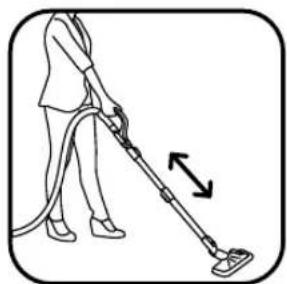
- Adjust the length of the ERGO COMFORT telescopic metal tube to your body size (fig.6).
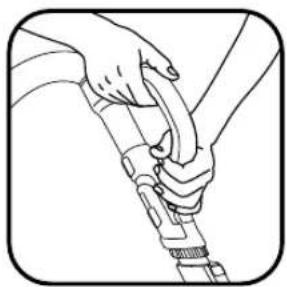
- Place your second hand in front of the ERGO COMFORT nozzle handle (fig.7).
Fit the corresponding accessory to the end of the metal telescopic tube or the nozzle:
IMPORTANT: Always switch off and unplug your vacuum cleaner before changing the accessories.
- For rugs and carpets: use the multi-surface nozzle in the retracted brush position or the Turbobrush* (fibres and animal hairs).
- For smooth floors with joins (tiled floors): use the 2-position nozzle (I-20* II-20*, depending on the model) on the smooth floor setting (extended brush position), or, for a better result, use the nozzle for smooth floors with joins without the removable brush (I-27a* II-27a*, depending on the model).
- For smooth floors, including delicate smooth floors (parquet flooring), use the 2-position nozzle setting (I-20* II-20*, depending on the model) on the smooth floor setting (extended brush position), or, for a better result, use the nozzle for smooth floors with the removable brush (I-27b* II-27b* depending on the model).
IMPORTANT : The nozzle for smooth floors with jo (I-27a\* II-27a\*) is used to measure the performance related to the energy label.
The nozzle allows your appliance to achieve optim dust removal performance on smooth floors with join
- For corners and hard-to-reach areas: use the telescopic crevice nozzle*.
- For furniture and fragile surfaces: use the integrated nozzle brush (EASY BRUSH) or the upholstery nozzle*.
2 • Plugging in the power cord and switching on the appliance
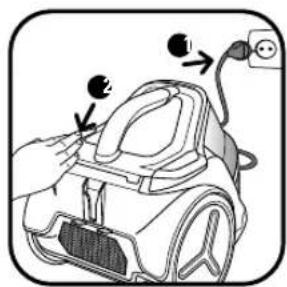
Unwind the power cord completely, plug in your vacuum cleaner and press the ON/OFF button (fig. 8).
IMPORTANT: do not operate your vacuum cleaner without the filtration system fitted (foam, microfilter a filter).
USE
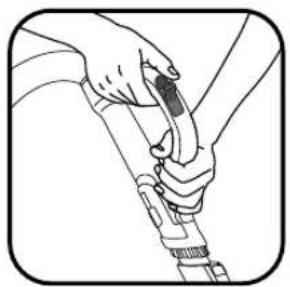
Set the suction power using the manual power switch* on the power nozzle (fig.9):
- Position

(MIN) for vacuuming delicate fabrics (curtains, textiles)
- Position

(Medium) for daily vacuuming of all types of surfaces that are not very dirty.
- Position

(Max) for vacuuming hard floors (tiled floor, parquet, etc.) and rugs and carpets, if particularly dirty.
3 • Storing and transporting the appliance
After use, switch off your vacuum cleaner by pressing the ON/OFF pedal and unplug it (fig. 10).
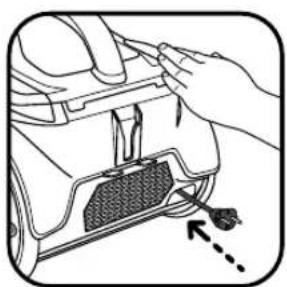
Rewind the power cord by pressing the power cord rewind pedal (fig. 11).
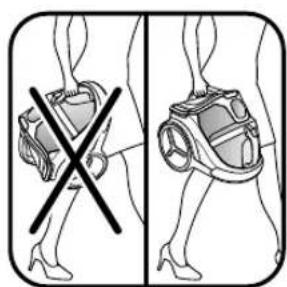
It is easy to carry your vacuum cleaner using the handle (3).
Do not carry your appliance using the dust compartment handle (fig.12).
When storing your vacuum cleaner, place the tube in its storage compartment at the back of the appliance (fig.13).
You do not need to remove the accessory holder* (I- II.26) to store the accessory range.
CLEANING AND MAINTENANCE
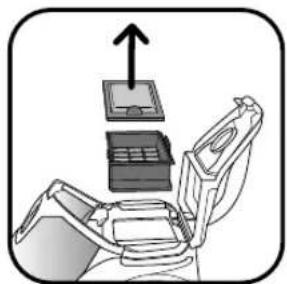
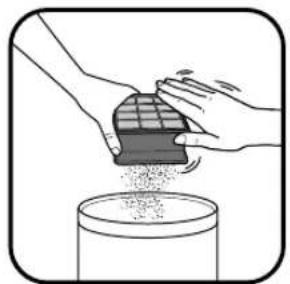
The air that we breathe contains particles which may be - remove the HEPA filter cassette from its housing and then allergenic: mite larva and excreta, mould, pollen, fumes and separate the washable filter (17b) from the HEPA filter (17a) animal residues (hair, skin, saliva, urine). The finest of these (fig.19).
particles penetrate deeply into the respiratory system, where clean the HEPA filter (17a) by gently patting it over a they can cause inflammation and alter the respiratory function as dustbin (fig. 20).
a whole.
(H)EPA ([High] Efficiency Particulate Air Filter) filters retain the and leave it to dry for at least 12 hours (fig.21).
finest particles. Thanks to the (H)EPA filter, the air that is expelled once dry, refit the washable filter (17b) with the HEPA filter back into the room is cleaner than the air vacuumed.
IMPORTANT: always switch off and unplug your vacuum cleaner before cleaning or servicing. Check and clean your vacuum cleaner and the different filters regularly.
1 • Emptying the dust compartment (11)
After each use, empty the dust compartment as follows:
- take the dust compartment by the handle (without pressing on the button) and remove it (fig.14).
- place the dust compartment upright above a dustbin and press on the lid release button (fig.15).
- wash the dust compartment if needed in clean or soapy water, and then leave to dry.
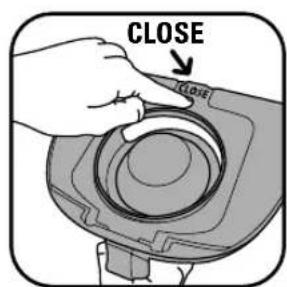
- Press CLOSE to close the lid (Fig.16).
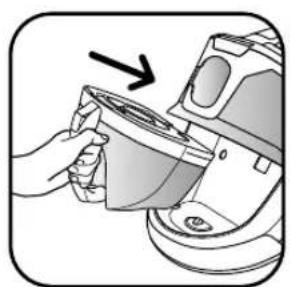
- Refit the dust compartment (Fig.17).
IMPORTANT: do not use the vacuum cleaner once the maximum level (12) is reached on the dust compartment.
2 • Clean the HEPA filter cassette (17a + 17b) (ref ZR9026.01)
IMPORTANT Clean the HEPA filter (17A) every month and the washable filter (17b) each time the dust compartment is emptied.
- remove the accessory holder as required* (I-II.26)
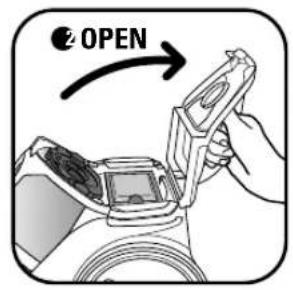
- press on the vacuum's lid release button (fig.18a) and then open the lid (fig.18b)
- move the washable filter (17b) under clean water, shake it and leave it to dry for at least 12 hours (fig.21).
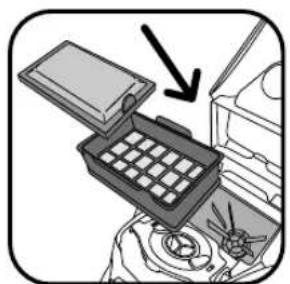
d once dry, refit the washable filter (17b) with the HEPA filter
(17a) and reposition the filter cassette (17) in its housing in the direction of the arrows (fig.22).
IMPORTANT: the vacuum lid will not close if the HEPA filter cassette is not repositioned correctly in the direction of the arrows.
- close the lid of your vacuum cleaner.
IMPORTANT Replace the HEPA filter (17a) and the washable filter (17b) each year (depending on the frequency of use). These two filters are available under reference ZR0026.01 from your dealer or Approved Service Centre.
3 • Change the microfilter (16a) and the filtration foam (16b)
IMPORTANT Change the microfilter and the filtration foam each year.
- unclip and remove the air outlet grill (15) containing the microfilter (16a) and filtration foam (16b) (fig.23).
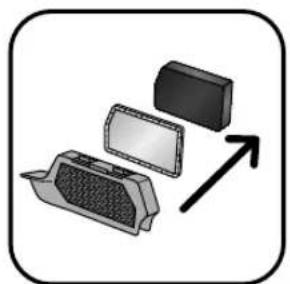
- remove the filtration foam (16b) and the microfilter (16a) (fig.24) and then throw them in the dustbin (fig.25-26).
- fit the new microfilter (16a) and then the new filtration foam (16b) respectively in the air outlet grill (fig.27).
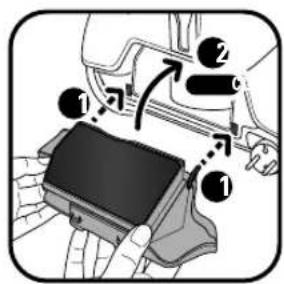
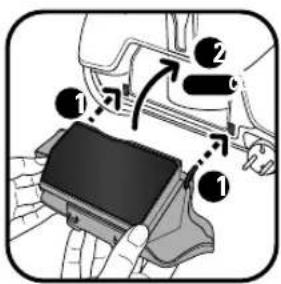
- reposition the grill (15) in its housing by placing the grooves on the appropriate notches and then pull it down until you hear a 'click' (Fig.28).
CLEANING AND MAINTENANCE
4 • Cleaning the air/dust separation system (14)
- remove the hose from the vacuum cleaner.
- open the lid of the vacuum cleaner (fig. 18a+18b).
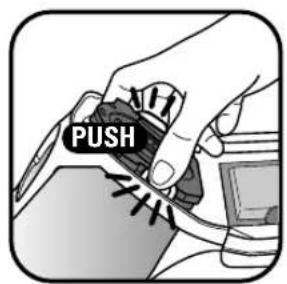
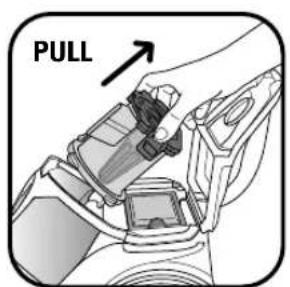
- press the separator release buttons (fig.29) then remove the air/dust separation system (14) (fig.30).
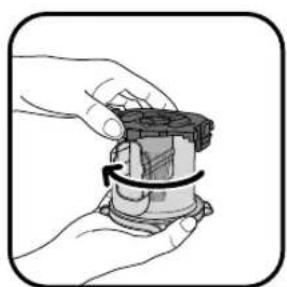
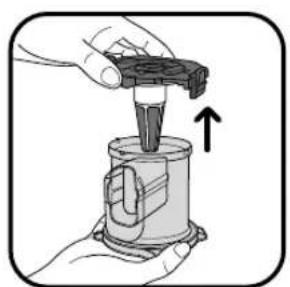
- remove the separation compartment (14b) in the direction of the arrow (fig.31) then separate the two components (fig.32).
-
wash the components in clean water (fig.33) and leave them to dry for 6 hours.
-
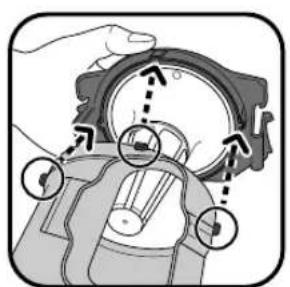
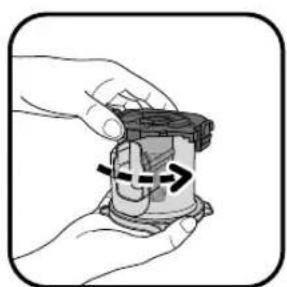
refit the separation compartment (14b) on the separator (14a) using the notches (fig.34) and then turn slightly towards the right (fig.35).
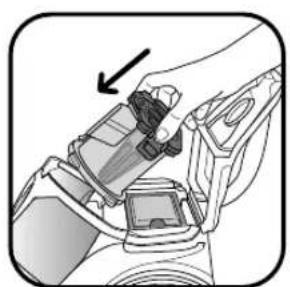
- reposition the entire separation system (14) in the appliance and close the lid (fig.36a+b).
5 • Cleaning your vacuum cleaner
Wipe the body of the vacuum cleaner and accessories with a soft damp cloth, then dry with a dry cloth. Do not use detergents or any corrosive or abrasive products.
REPAIR SERVICE
IMPORTANT If you notice that your vacuum cleaner is not operating as well, before carrying out any checks, switch it off using the ON/OFF pedal.
Repairs should only be performed by specialists using original spare parts.
Repairs carried out by the user can pose a risk and cancel the guarantee.
If your vacuum cleaner does not function
- The appliance is not plugged in. Check that the appliance is plugged in correctly.
If your vacuum cleaner has no suction
- An accessory, the tube, hose, air/dust separator (14a) or the separation compartment (14b) is blocked: unblock it.
- The filtration system is saturated: clean the HEPA filter cassette (17a+17b) according to the procedure and replace it in its housing. If the HEPA filter is damaged, change it.
If your vacuum cleaner suction is not working properly or is making a whistling noise
- An accessory, the tube, hose, air/dust separator (14a) or the separation compartment (14b) is partially blocked: unblock it.
- The dust compartment is full: empty and wash it.
- The vacuum lid is not positioned correctly: close the lid correctly.
- The dust compartment is not correctly fitted: fit it correctly.
- The manual power switch* on the nozzle is open: close it.
-
The air outlet grill (15) is fitted incorrectly: reposition the air outlet grill correctly.
-
There is no microfilter (16a) or filtration foam (16b): replace them in the air outlet grill.
- There is no HEPA filter (17a) or washable filter (17b): replace them in the vacuum cleaner.
If the separation compartment (14b) fills up
- The dust is accumulating in the separation compartment (14b): check that there is nothing obstructing the dust compartment inlet.
- The dust compartment inlet is obstructed: remove the dust compartment and empty it.
If the lid does not close
- Check that the HEPA filter cassette (17) and the separator (14) are correctly repositioned.
If the suction attachment is difficult to move
- Open the manual power switch* on the nozzle.
- Ensure that the position (brush retracted / brush out) of the multi-surface nozzle corresponds to the surface being cleaned.
If the power cord does not wind up completely
- The power cord is slow to wind up: pull the cord out again and press on the power cord rewind pedal.
If a problem persists, take your vacuum cleaner to your local Rowenta Approved Service Centre or contact Rowenta Customer Services.
ENVIRONMENT
- In accordance with current regulations, any appliance that is no longer used must be made permanently inoperable: disconnect and cut the power cord before throwing the appliance away.
• Environment: Directive 2002/95/EC.
Think of the environment!
Your appliance contains valuable materials which can be recovered or recycled.
Leave it at a local waste collection point.
GARANTIE
I.22 Miniturbocepillo*
I.23 Maxiturbocepillo*
I.24 Boquilla con ranura telescópica*