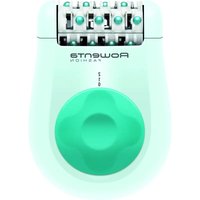
Fashion EP1025 - Scale ROWENTA - Free user manual and instructions
Find the device manual for free Fashion EP1025 ROWENTA in PDF.


| Product type | Electric epilator |
| Brand | Rowenta |
| Model | Fashion EP1025 |
| Power supply | Mains via power adapter (ref. EM.2A2) |
| Speeds | 2 speeds (position 1 and 2) |
| Functions | Epilation, soothing massage (integrated beads), sensitive area accessory |
| Pain relief | Integrated massage bead system |
| Included accessories | Epilation head, power adapter, cleaning brush, sensitive area accessory |
| Cleaning | Using the included brush; do not immerse |
| Maintenance | Clean the head after each use; avoid alcohol on the body |
| Safety | Unplug before handling; do not use on injured skin or face; check voltage |
| Use | Domestic and personal use only |
| Warranty | Void if used incorrectly |
| Environment | Recyclable device, dispose of at collection point |
| Repairability | Repair by special tools; contact an authorized center |
| Origin | Groupe SEB, France |
Frequently Asked Questions - Fashion EP1025 ROWENTA
User questions about Fashion EP1025 ROWENTA
0 question about this device. Answer the ones you know or ask your own.
Ask a new question about this device
Download the instructions for your Scale in PDF format for free! Find your manual Fashion EP1025 - ROWENTA and take your electronic device back in hand. On this page are published all the documents necessary for the use of your device. Fashion EP1025 by ROWENTA.
USER MANUAL Fashion EP1025 ROWENTA
natural_image
Line drawing of a mechanical component with concentric circles and rectangular patterns (no text or symbols)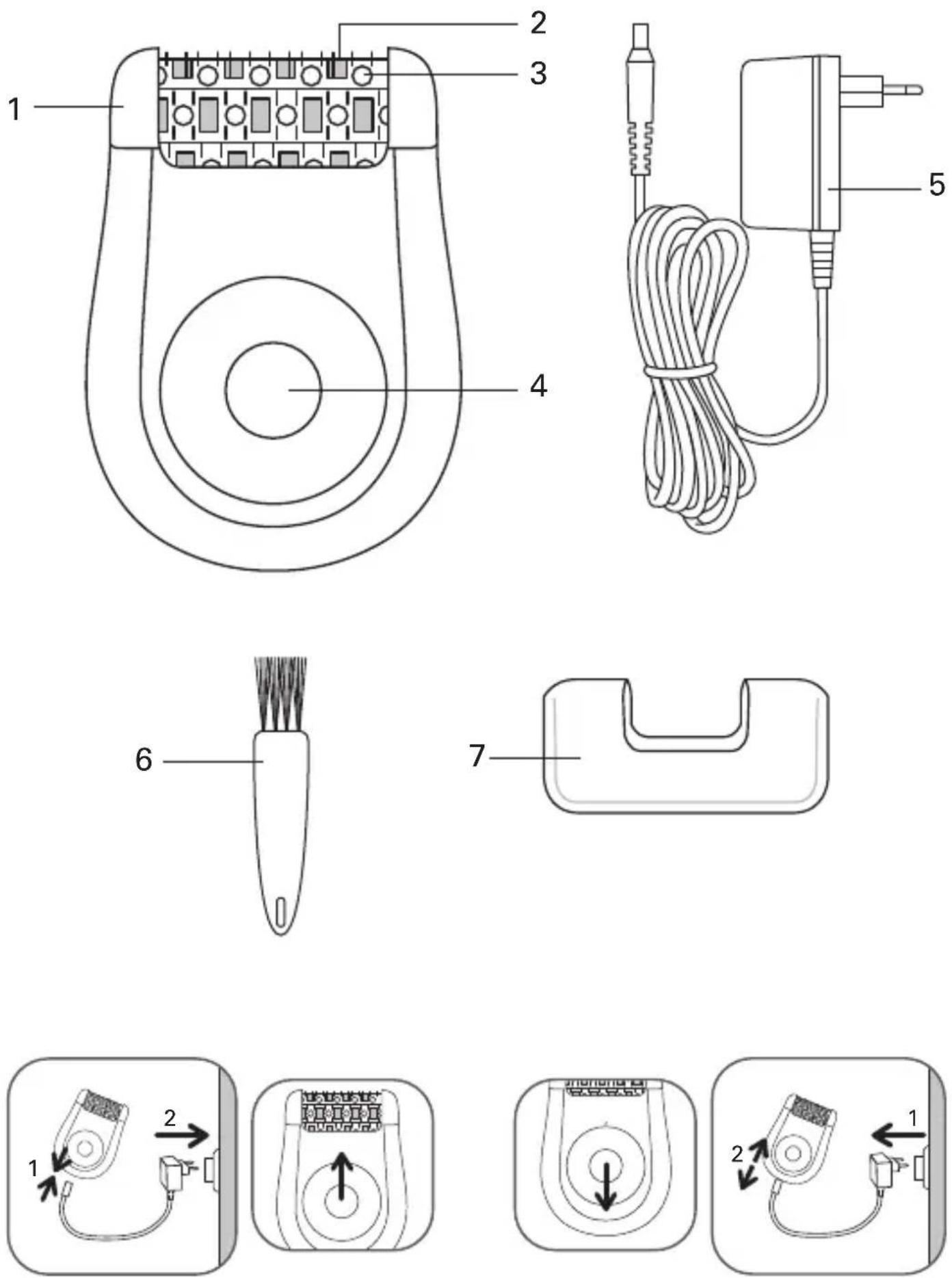
fig.1 fig.2
natural_image
Simple line drawing of a mechanical component with an arrow indicating left motion and motion, no text or symbols present.fig.3 fig.4
natural_image
Diagram showing a device with a button and an attached foot, no text or symbols present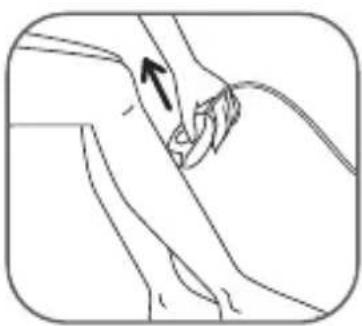
natural_image
Line drawing of a hand holding a cable with an arrow indicating motion (no text or symbols)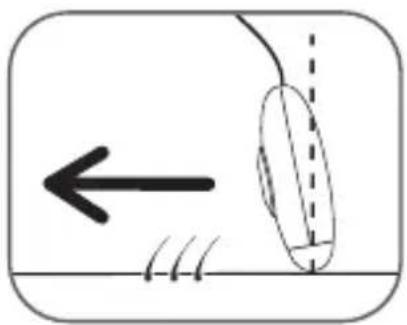
natural_image
Diagram showing a curved object with motion lines and an arrow, no text or symbols presentfig.5 fig.6
natural_image
Illustration of a person performing breast surgery with an arrow indicating direction (no text or symbols)fig.7
natural_image
Illustration of a person adjusting a cable or tube, with an arrow indicating the cable (no text or symbols present)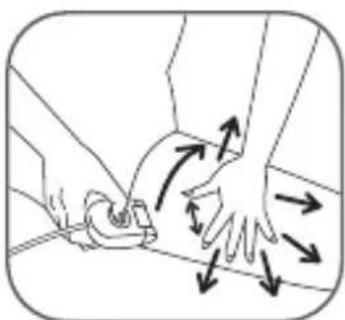
natural_image
Illustration of hands performing a massage or physical therapy technique on a surface, with directional arrows indicating motion (no text or symbols)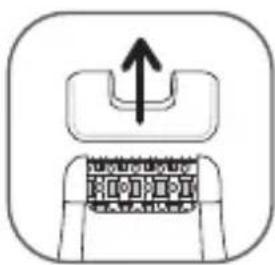
natural_image
Diagram of a mechanical component with an upward arrow indicating force or direction (no text or symbols)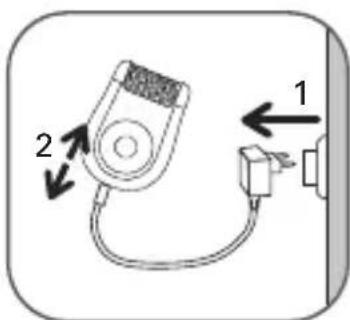
fig.8 fig.9 fig.10fig.7
natural_image
Illustration of hands holding a small electronic component with arrows indicating direction (no text or symbols)fig.11 fig.12
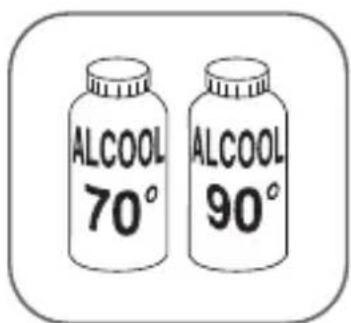
fig.13
natural_image
Illustration of a hand using a spray gun to spray liquid onto a pipe (no text or symbols)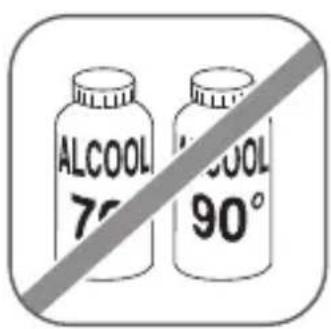
natural_image
Diagram showing a tool interacting with a circular object, no text or symbols present
natural_image
Illustration of stacked coins and a jar with scattered fruits, separated by a diagonal line (no text or symbols)
Please read carefully before use...
1 - Description of your appliance
1 - Epilation head
5 - Power pack
2 - Massage rollers
6 - Cleaning brush
3 - Tweezer
7 - Sensitive Areas accessory (depends on model)
4 - Two speed switch and on/off button
- Massage soothing function:
Your epilator comes with a system of soothing massage rollers built into the epilation head. These rollers massage the skin, reducing the sensation of pain that you get when epilating.
2 - Safety
- This appliance complies to current technical regulations and safety standards (Electromagnetic compatibility, Low voltage, Environment).
- Voltage: Please check that the voltage shown on your appliance is the same as that of the mains supply where the appliance is to be used. If you plug the appliance into the wrong supply you may cause irreversible damage to the appliance which will not be covered by the guarantee.
- The epilator must only be used with the power pack N°EM.2A2 supplied.
- Do not use the power pack for anything other than the epilator.
- Never use the appliance (the epilator or the power pack) if it has been damaged, if it is not functioning properly or if it has been dropped (damage to the appliance which cannot be seen can put your safety at risk).
- Unplug the appliance before removing any parts to the epilator and each time you finish using it.
- Never use the appliance if it has been damaged, of if it is not functioning properly or if it has been dropped (damage to the appliance which cannot be seen can put your safety at risk).
- When the appliance is in operation, you must not let it come into contact with your eyelashes or your hair, clothes, or any other object, so as to avoid any risk of injury to yourself or blockage to the appliance.
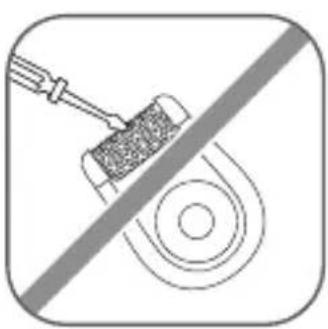
- This appliance may only be repaired using special tools.
- If you experience any problems after purchasing your epilator you should contact your local sales outlet or an approved Service Centre.
- We will not accept any responsibility for damage that may occur as a result of incorrect use of the appliance or from any use not in accordance with the directions for use given in this instruction leaflet.
- Do not use the appliance:
- on your face
- on any damaged skin
- on vulnerable areas (varicose veins, beauty spots, birth marks)
- if you suffer from skin problems (eczema, inflammations, acne).
- For hygiene reasons, we recommend that you do not share your appliance even with people you know very well.
• This appliance is not designed for use by people (including children)
with impaired physical, sensory or mental capacities, or by persons without the necessary experience or knowledge, unless they are assisted by a person who is responsible for their safety, are supervised or have been first given instructions concerning the use of the device. Make sure that children do not play with the appliance.
- Do not leave the appliance with unaccompanied children.
- Do not use extension leads.
- Never use the appliance if your hands are wet.
- Do not expose the appliance to direct sunlight.
- Do not use the appliance in very low temperatures.
- Do not let into contact with or immerse the appliance in water.
- Do not use corrosive products or solvents for cleaning the appliance.
Guarantee
Your appliance is intended for home and personal use only. It may not be used for professional purposes. In the event of improper use the guarantee will become null and void.
3 - Preparing your skin
Your skin must be clean and dry.
- Do not use any cream or moisturiser before your start the epilation.
- If you used to remove hair growth using a razor:
- Your epilator will be more effective and easier to use if you use it regularly.
- On the first few times that you remove hair growth, you may feel that your skin is more sensitive, because the hair growth will have become thicker and tougher as a result of using a razor. This feeling will diminish as you start using your epilator: the hairs will grow back less vigorously and will become finer.
We recommend that you start epilating as soon as the hairs start coming through again.
4 - Plugging in the appliance (fig.1)
5 - Disconnecting the appliance (fig.2)
6 - Epilating
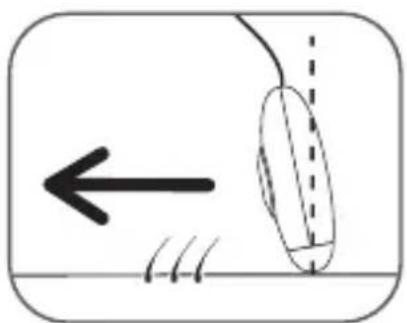
- To get the best out of your epilator we recommend that you tilt it slightly towards your skin, in the direction you're going to epilate, as shown in the diagram (fig. 3).
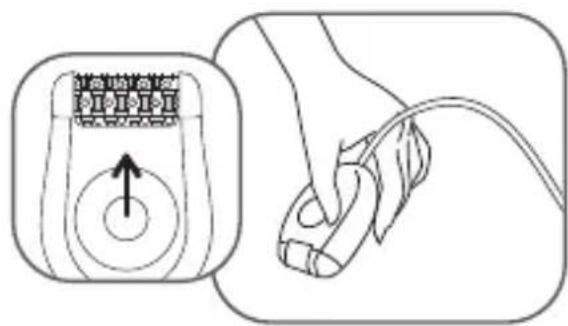
- Push the switch to "2". The switch should always be facing you during use (fig. 4).
- Epilate against the direction of hair growth, slowly and without applying pressure.
7 - Epilation in sensitive areas
- For the best possible epilation we recommend that you place your epilator lightly up against the skin, in the direction you're going to epilate, as shown in the diagram (fig. 3).
• Preparing the area to be epilated: -
Pre-cut the hairs which are too long, more than 1 cm in length.
-
Make sure the area to be epilated is completely dry and that there are no traces of deodorant or perspiration.
- If you're not used to epilating under your arms or around the bikini line with an epilator then we recommend you use the Sensitive Areas accessory.
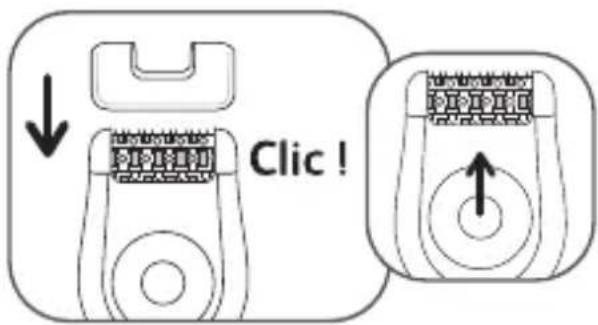
- Fit the Sensitive Areas accessory on the epilating head pushing it until it clicks (fig. 6).
- Push the switch to "1" (fig. 6).
Epilate against the direction of hair growth, slowly without applying pressure.
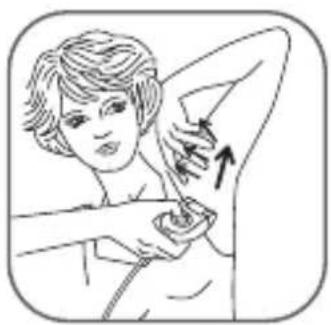
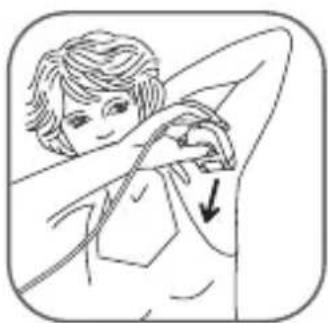
- For the under arms: First of all from bottom to top...then from top to bottom (fig. 7).
You must:
a) Keep your arm held upright and straight all the time you are epilating.
b) Stretch your skin to make it easier to epilate.
- For the bikini line:
You must: tightly stretch your skin (fig. 8).
Once you've finished using it, remove the Sensitive Areas accessory and unplug your epilator.
8 - Keeping the appliance in good working order
- Cleaning the epilation head:
- Unplug the appliance (fig. 10).
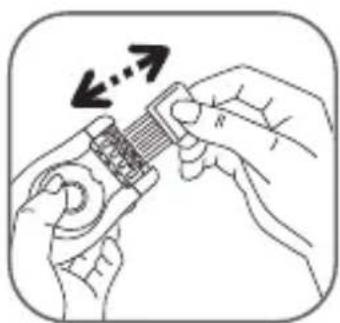
- Clean the epilation head (1) using the little brush supplied(6) (fig. 11)
Important, make sure that neither the epilation head nor the epilator itself come into contact with water!
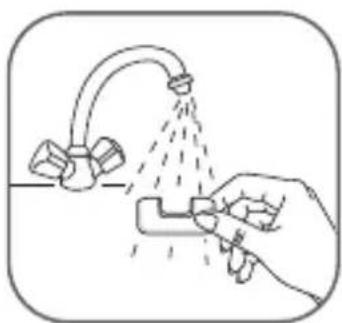
- Cleaning the Sensitive Areas accessory (fig.12, 13):
Avoid using alcohol on the appliance body so as not to cause discolouration.
9 - Skin care
The little red spots which appear after epilating prove that your hair growth has been removed properly; they'll quickly disappear. For this reason it's better to epilate in the evening. If necessary apply soothing cream after epilating.
10 - Help protect the environment!
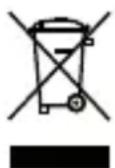
Your epilator contains many materials that are recyclable or reusable. Make sure you dispose of it at a collection point or failing this at an approved service centre so that it can be processed.