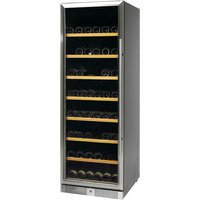
VS176165 GES - Wine cellar Fors - Free user manual and instructions
Find the device manual for free VS176165 GES Fors in PDF.


| Product type | Wine cellar |
| Brand | Fors |
| Model | VS176165 GES |
| Power supply | 220–240 V / 50 Hz |
| Temperature range | from 5 °C to 18 °C (adjustable in 1 °C increments) |
| Number of temperature zones | 1 zone (single compartment) |
| Interior lighting | LED, automatic shut-off after 10 minutes or permanent mode (LP) |
| Charcoal filter | Yes, located at the back of the cabinet |
| Water cup | Yes, to be placed on the highest shelf for humidity |
| Adjustable feet | Yes, for leveling |
| Door reversal | Yes, possible (instructions provided) |
| Climate | Recommended ambient temperature: 18 °C to 35 °C |
| Defrosting | Manual (not specified, but typical) |
| Maintenance | Clean with unscented dish soap, do not use chlorine or abrasives |
| Safety | Unplug before cleaning; do not use flammable products inside |
| Disposal | Do not dispose of with household waste, follow recycling regulations |
Frequently Asked Questions - VS176165 GES Fors
User questions about VS176165 GES Fors
0 question about this device. Answer the ones you know or ask your own.
Ask a new question about this device
Download the instructions for your Wine cellar in PDF format for free! Find your manual VS176165 GES - Fors and take your electronic device back in hand. On this page are published all the documents necessary for the use of your device. VS176165 GES by Fors.
USER MANUAL VS176165 GES Fors
natural_image
Black double-wire refrigerator with horizontal glass panels and red-lit interior (no visible text or symbols)Instruction manual
UK 4
Bedienungsanleitung
D 11
Mode d'emploi
F 18
UK Contents
Important safety instructions 4
Unpacking and installation 4
Electrical connections 5
Start-up of the cabinet 5
Lock 5
Operation VC139119 NG / VC176163 NG/GES 6
Operation VS176165 NG/GES 7
Internal light 7
Water tray 8
Carbon filter 8
Changing position of shelves 8
Door reversal 9
Maintenance and cleaning 10
Service 10
Disposal 10
D Inhalt
Important safety instructions
- To obtain full use of the cabinet, we recommend reading this instruction manual.
- It is the user's responsibility to operate the appliance in accordance with the instructions given.
- Contact your dealer immediately in case of any malfunctions.
- Place the cabinet in a dry and ventilated place.
- Keep the cabinet away from strongly heat-emitting sources and do not expose it to direct sunlight.
- Always keep in mind that all electrical devices are sources of potential danger.
- Do not store inflammable material such as thinner, gasoline etc. in the cabinet.
- We declare that no asbestos nor any CFC are used in the construction.
- The oil in the compressor does not contain PCB.
Unpacking and installation
Remove the wooden pallet and the packing.
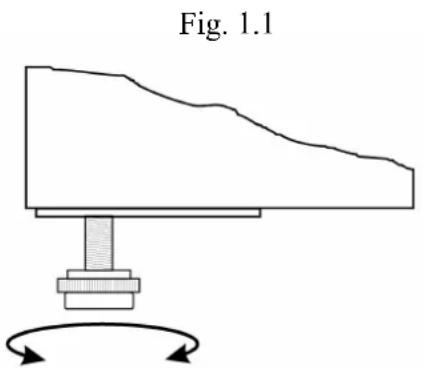
To ensure correct function it is important that the cabinet is level. The cabinet is supplied with legs, which can be adjusted. See fig. 1.1.
If you want to build in your cabinet please note the following:
- There must be at least 10 cm free space above the cabinet in order for the cooling system to work satisfactorily.
- There must be sufficient space at the hinge side to clean and replace the shelves and clean around the hinge.
Electrical connecting
The cabinet operates on 230 V/50 Hz.
The wall socket should be easily accessible.
All earthing requirements stipulated by the local electricity authorities must be observed. The cabinet plug and wall socket should then give correct earthing. If in doubt, contact your local supplier or authorized electrician.
The flexible cord fitted to this appliance has three cores for use with a 3-pin 13-Amp or 3-pin 15-Amp plug. If a B.S. 1363 (13-Amp) fused plug is used, it should be fitted with a 13-Amp fuse.
The wires in this mains lead are coloured in accordance with the following code:
Green/Yellow: Earth, Blue: Neutral, Brown: Live.
The main electrical connections must be done by skilled electricians.
Start-up of the cabinet
Before use, we recommend that the cabinet is cleaned, see the section on maintenance and cleaning.
Important!
If the cabinet has been horizontally placed during transport, please wait 2 hours before starting up the cabinet.
In order to ensure optimum function of the cabinet the ambient temperature must be between 18 and 35 °C.
Operation model VC139119 NG / VC176163 NG/GES
Connect the cabinet to a socket and turn on the switch on the control panel (POWER), see fig. 1.9.
Fig. 1.9
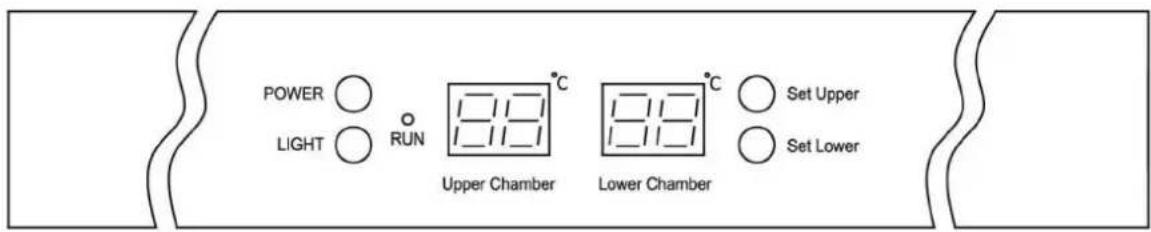
When the cabinet is turned on, the display will show the current temperatures in the cabinet's two chambers.
Control lamp "Run" will turn on.
Display set temperature:

Set Upper
Press this key and the display will flash the set temperature for the upper chamber. After 5 seconds the thermostat will return to normal reading.

Set Lower
Press this key and the display will flash the set temperature for the lower chamber. After 5 seconds the thermostat will return to normal reading.
Set new temperature:

Set Upper
Press this key and the display will flash the set temperature.
Every subsequent press on this key will lower the setting by 1 ^ , from 10 ^ to 5 ^ and will start over again after that.
When the required temperature is reached, wait for 5 seconds and the thermostat will return to normal reading.

Set Lower
Press this key and the display will flash the set temperature.
Every subsequent press on this key will lower the setting by 1 °C, from 18 °C to 10 °C and will start over again after that.
When the required temperature is reached, wait for 5 seconds and the thermostat will return to normal reading.
Display temperature in ^ / ^ :

Set Upper
+

Set Lower
Press these keys simultaneously for 5 seconds and display of temperature will change between Fahrenheit and Celsius.
Operation model VS176165 NG/GES
Connect the cabinet to a socket and turn on the switch on the control panel (POWER), see fig. 2.0.
Fig. 2.0
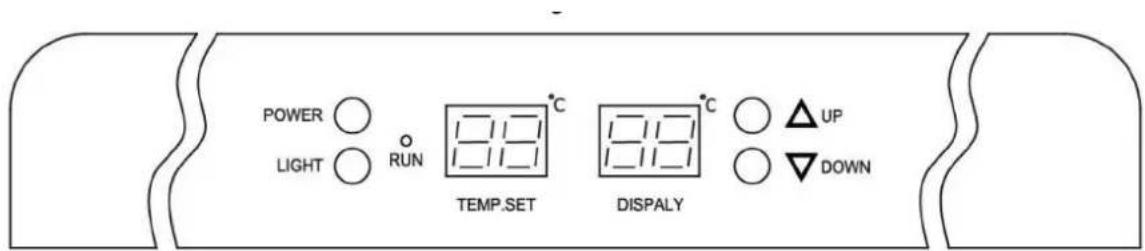
When the cabinet is turned on, the display will show the current temperature in the cabinet.
Set new temperature:

Press this key and the set temperature will increase by 1^ C for each pressure.
Press this key and the set temperature will decrease by 1^ C for each pressure.
Display temperature in ^ C/ ^ F:

Press these keys simultaneously for 5 seconds and display of temperature will change between Fahrenheit and Celsius.
Internal light:
Press this key to turn on/off the internal light.
In order to reduce energy consumption, this cabinet will automatically switch off the internal light after 10 minutes.
If you want the internal light to remain on continuously, press and hold this key for 5 seconds until display show 'LP'.
To revert to normal mode, press and hold this key for 5 seconds until display show 'LF'
Water tray
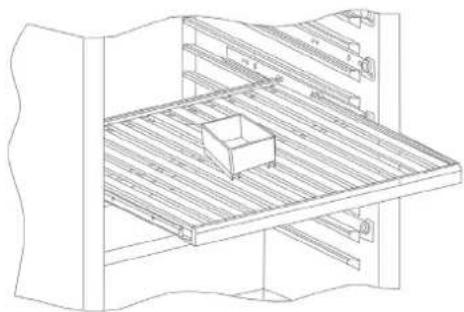
In order to prevent drying up of the wine corks due to low humidity the cabinet is supplied with a water tray, which should be placed at the top shelf, see fig. 1.3.
Fig. 1.3
natural_image
Technical line drawing of a mechanical assembly with wooden supports and a small box (no text or symbols)Carbon filter
The cabinet is supplied with a carbon filter to prevent bad smell. This is placed at the rear wall inside the cabinet, see fig. 1.4.
Fig. 1.4
natural_image
Line drawing of a refrigerator interior showing shelves and storage racks (no text or symbols)Changing position of shelves
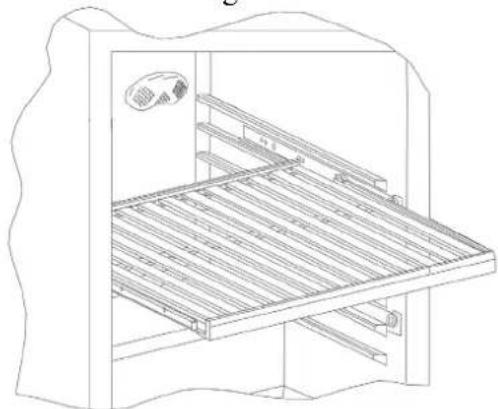
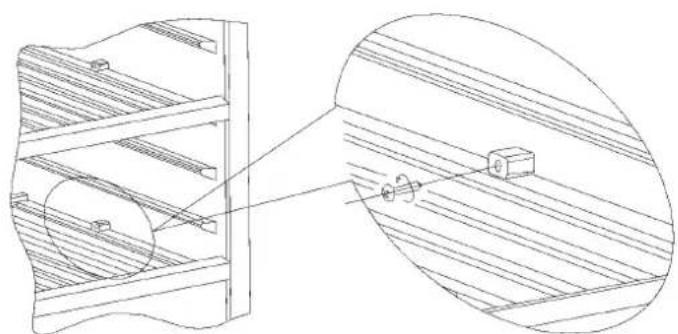
Remove both stop blocks which are mounted with a cross-point screw. Then pull out the shelf, see fig. 2.2.
Fig. 2.2
natural_image
Technical line drawing of a wooden structure with two views: front view and side view (no text or symbols)Door reversal
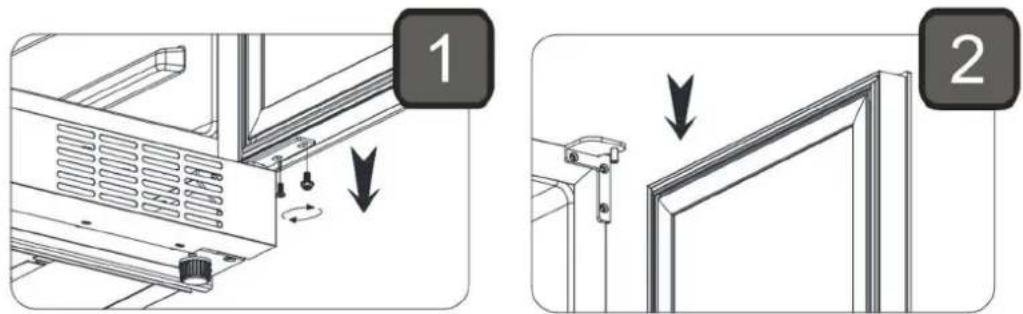
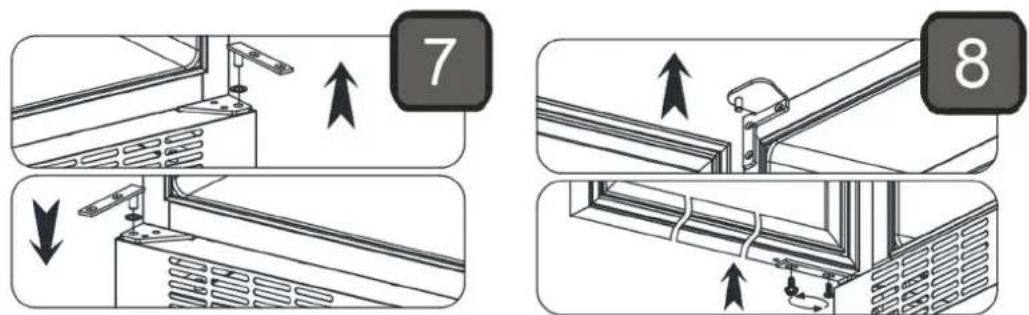
Open the door, remove the two screws in the bottom hinge and lift out the door.
Move the two plastic pads from top to bottom and rotate the door 180 degrees.
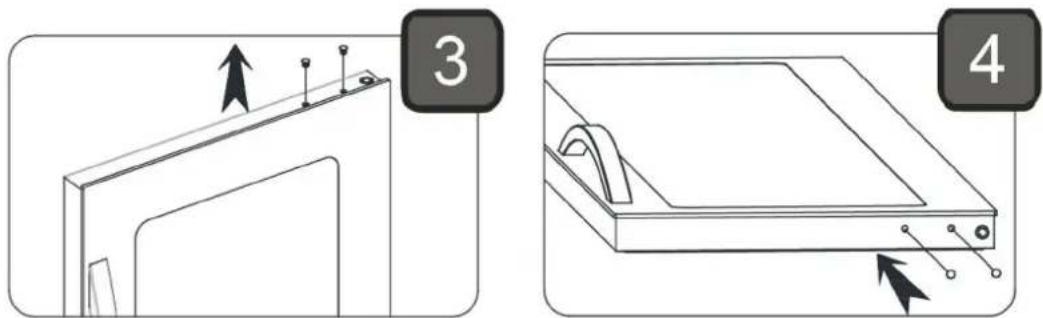
The enclosed top hinge should be fitted at the opposite side. Move the plastic support to the opposite side.
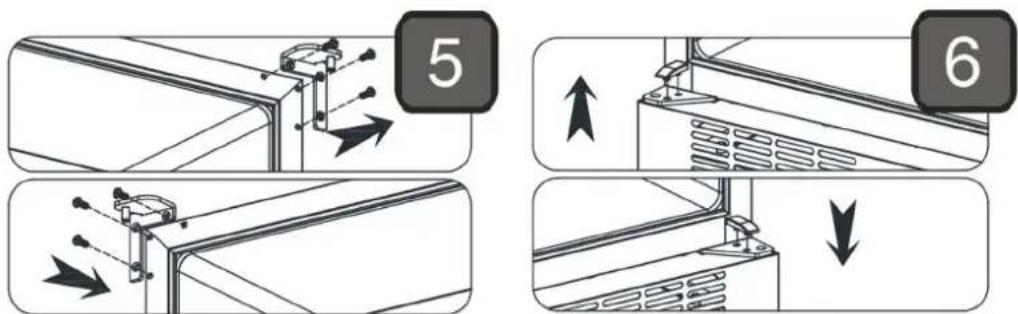
Move the hinge pin & washer to the opposite side. Mount the door and screws again.
Maintenance and cleaning
Switch the cooler off at the socket.
The cabinet must be periodically cleaned. Clean the external and internal surfaces of the cabinet with a light soap solution and subsequently wipe dry. External surfaces can be maintained using steel oil.
Keep the fan cover clean by using a vacuum cleaner and a stiff brush.
Do NOT use cleansers containing chlorine or other harsh cleansers, as these can damage the stainless steel surfaces and the internal cooling system.
Do NOT hose the compressor compartment with water as this can cause short circuits and damage on the electrical parts.
Service
The cooling system is a hermetically sealed system and does not require supervision, only cleaning.
If the cabinet fails to cool, check if the reason is a power cut.
If you cannot locate the reason to the failure of the cabinet, please contact your supplier. Please inform model and serial number of the cabinet. You can find this information on the rating label which is placed on the back side of the cabinet on the left hand side.
Disposal
Disposal of the cabinet must take place in an environmentally correct way. Please note existing regulation on disposal. There may be special requirements and conditions which must be observed.