
CECDF6060IBD - Cooker CONTINENTAL EDISON - Free user manual and instructions
Find the device manual for free CECDF6060IBD CONTINENTAL EDISON in PDF.


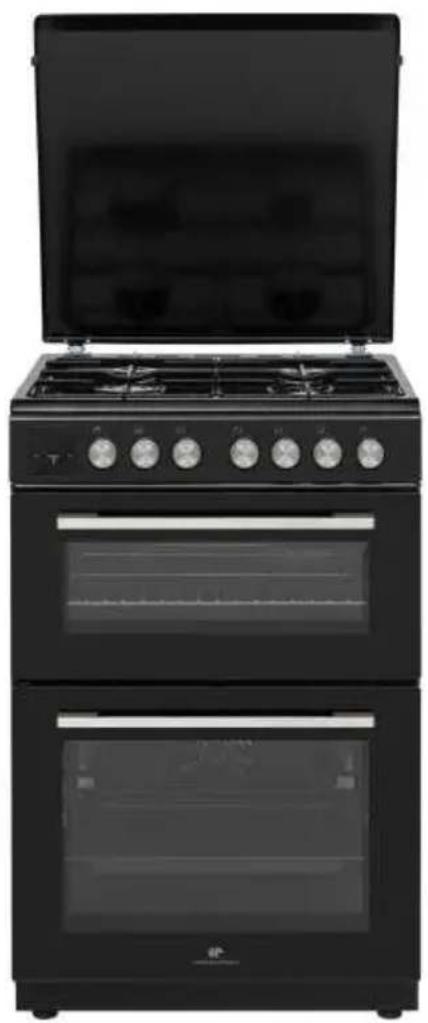
| Product type | Gas double oven range |
| Brand | Continental Edison |
| Model | CECDF6060IBD |
| Dimensions (W x D x H) | 60 x 60 x 90 cm |
| Weight | 47.4 kg |
| Power supply | 220-240 V, 50/60 Hz |
| Gas type | Natural gas G20 (20 mbar) / Butane/Propane G30/G31 (28-30/37 mbar) |
| Number of burners | 4 (1 rapid, 2 semi-rapid, 1 auxiliary) |
| Total gas power | 7.5 kW |
| Oven type | Electric, double cavity |
| Upper oven volume | 39 L |
| Main oven volume | 69 L |
| Energy class (oven) | A (both cavities) |
| Main oven consumption (conventional) | 0.87 kWh/cycle |
| Main oven consumption (fan) | 0.79 kWh/cycle |
| Main oven functions | Natural convection, Fan, Grill, Fan grill, Defrost |
| Upper oven functions | Natural convection, Top heat, Grill, Express grill |
| Safety | Anti-tip device, thermocouple, touch lock, flame safety |
| Cleaning | Catalytic liners, removable inner glass |
| Oven lighting | 25 W bulb, 230 V, E14, heat resistant 300°C |
| Supplied accessories | EasyFix metal grid, baking tray, anti-tip kit |
Frequently Asked Questions - CECDF6060IBD CONTINENTAL EDISON
User questions about CECDF6060IBD CONTINENTAL EDISON
0 question about this device. Answer the ones you know or ask your own.
Ask a new question about this device
Download the instructions for your Cooker in PDF format for free! Find your manual CECDF6060IBD - CONTINENTAL EDISON and take your electronic device back in hand. On this page are published all the documents necessary for the use of your device. CECDF6060IBD by CONTINENTAL EDISON.
USER MANUAL CECDF6060IBD CONTINENTAL EDISON
natural_image
Abstract geometric shapes resembling partial crescent and angular segments (no text or symbols)Continental Edison
natural_image
Exterior view of a black double boiler with open lid and multiple side outlets (no visible text or symbols)CECDF6060IBD
natural_image
Warning sign depicting a person pulling a large block inside a triangle (no text or symbols)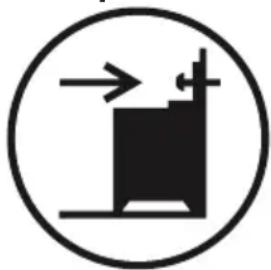
natural_image
Simple black-and-white icon of a building with arrows indicating airflow or movement (no text or symbols)natural_image
No sign depicting a crossed-out saw cutting through a flatbed machine (no text or symbols)flowchart
graph TD
    subgraph Left_Circuit
        N1["N"] --> L3["L3"]
        N2["PE"] --> L2["L2"]
        N3["PE"] --> L1["L1"]
        L3 --> L2
        L2 --> L1
        L1 --> L3
    end
    subgraph Right_Circuit
        N3["N"] --> L4["L4"]
        N4["PE"] --> L5["L5"]
        N5["PE"] --> L6["L6"]
        L4 --> L3
        L5 --> L2
        L6 --> L1
    end
2.6. KIT ANTIBASCULEMENT
natural_image
Diagram of a mechanical assembly with a spring and rotating arrow (no text or symbols)3. CARACTÉRISTIQUES DU PRODUIT

natural_image
Simple line drawing of a cooking pot on a stove with a checkmark below (no text or symbols)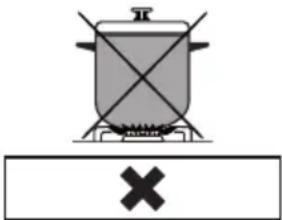
natural_image
Simple line drawing of a cooking pot on a stove with a cross symbol below (no text or labels)natural_image
Simple line drawing of a cooking pot with crossed panes and a cross symbol below (no text or labels)natural_image
Solid dark square with two thin white horizontal lines on top and bottom (no text or symbols)natural_image
Abstract geometric symbol with a four-blade propeller inside a dark square frame (no text or symbols)natural_image
Simple line drawing of a zigzag line inside a dark square frame (no text or symbols)Fonction Gril :
natural_image
Abstract icon with a stylized propeller inside a wavy line above a dark square (no text or symbols)natural_image
Solid dark square with two horizontal white lines on top and bottom (no text or symbols)natural_image
Solid dark square with a horizontal white line above it, no text or symbols present.natural_image
Simple line drawing of a zigzag line on a dark background (no text or symbols)natural_image
Simple icon with a wavy line above a dark square, no text or symbols present.natural_image
Technical line drawing of a square frame with bolt holes and a central circular hole (no text or symbols)Grillage métallique
natural_image
Technical line drawing of a metal rack with an arrow indicating force or direction (no text or symbols)AVERTISSEMENT Placez correctemer
natural_image
Technical line drawing of a rectangular metal grate or rack structure with evenly spaced slots (no text or symbols)5. NETTOYAGE ET ENTRETIEN
5.1. NETTOYAGE
natural_image
Line drawing of a hand cleaning a car window with a tire (no text or symbols)natural_image
Technical line drawing of two views of an oven or rack unit with internal components and mounting base (no text or symbols)natural_image
Technical line drawing of a mechanical assembly with no visible text or symbolsnatural_image
Diagram of a door opening with an arrow indicating direction (no text or symbols)natural_image
Illustration of a hand pressing down on a screen with horizontal lines and arrows indicating motion (no text or symbols)5.2. ENTRETIEN
natural_image
Warning sign depicting a person pulling a large object inside a triangle (no text or symbols)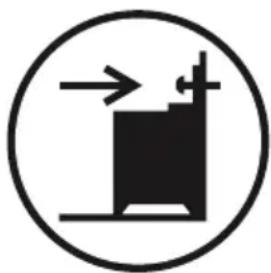
natural_image
Simple black-and-white icon of a building with arrows indicating direction, enclosed in a circle (no text or symbols)natural_image
Prohibition sign showing a crossed-out hammer and fulcrum over a pile of wood, enclosed in a circle (no text or symbols)natural_image
Diagram of a screw fastening mechanism with an arrow indicating rotational motion (no text or symbols)3. CARACTERÍSTICAS DEL PRODUCTO

natural_image
Abstract white line drawing of a stylized flower or droplet on a dark background (no text or symbols)natural_image
Solid dark square with two horizontal white lines on top and bottom (no text or symbols)natural_image
Abstract geometric symbol with a four-blade propeller inside a dark square frame (no text or symbols)natural_image
Simple geometric shape with a wavy line inside a square frame (no text or symbols)natural_image
Simple icon of a propeller inside a wavy line on a dark background (no text or symbols)natural_image
Solid dark square with two horizontal white lines on top and bottom (no text or symbols)natural_image
Solid dark square with a horizontal white line above it, no text or symbols present.natural_image
Simple line drawing of a zigzag line on a dark background (no text or symbols)natural_image
Simple icon of a container with a wavy line above it, no text or symbols present.natural_image
Technical line drawing of a square frame with bolt holes and mounting holes (no text or symbols)Parrilla
natural_image
Technical line drawing of a metal grate plate with slats and mounting brackets (no text or symbols)ADVERTENCIA
natural_image
Technical line drawing of a metal rack with a curved cover and an arrow indicating rotation (no text or symbols)5. LIMPIEZA Y MANTENIMIENTO
5.1. LIMPIEZA
natural_image
Line drawing of a hand cleaning a car window with a circular object on the wall (no text or symbols)Limpieza catalítica
natural_image
Technical line drawing of an oven with internal compartments and mounting base (no text or symbols)natural_image
Technical line drawing of a mechanical assembly with no visible text or symbolsnatural_image
Diagram of a door opening with a bag inside, showing an upward arrow (no text or symbols)natural_image
Diagram of a hand holding a grid-like object with arrows indicating direction (no text or symbols)5.2. MANTENIMIENTO
natural_image
Warning symbol depicting a person pulling a large block inside a triangle (no text or numbers)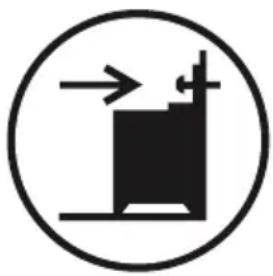
natural_image
Simple black-and-white diagram of a mechanical device inside a circle, with no text or symbols present.natural_image
Prohibition sign showing a crossed-out hammer over a pile of wood (no text or symbols)natural_image
Diagram of a mechanical assembly with a bolt and curved arrow indicating rotation (no text or symbols)3. CARACTERÍSTICAS DO PRODUTO

natural_image
Abstract white line drawing on dark background, resembling a stylized flower or droplet (no text or symbols)natural_image
Solid dark square with two horizontal white lines on top and bottom (no text or symbols)Função de Cozinhar
natural_image
Abstract geometric symbol with a four-blade propeller inside a dark square frame (no text or symbols)natural_image
Simple geometric shape with a wavy line above a square (no text or symbols)natural_image
Abstract icon with a stylized propeller inside a wavy line above a dark square (no text or symbols)natural_image
Solid dark rectangle with two horizontal white lines on top and bottom (no text or symbols)Função de Cozinhar
natural_image
Solid dark square with a horizontal white line above it, no text or symbols present.natural_image
Simple line drawing of a zigzag line on a dark background (no text or symbols)Função de Grelhar:
natural_image
Simple icon of a container with a wavy line above it, no text or symbols present.Função de Grelhar
natural_image
Technical line drawing of a square frame with bolt holes and internal grid lines (no text or symbols)Rede de Arame
natural_image
Technical line drawing of a metal grate or rack structure with no text or symbolsAVISO Colagu
natural_image
Technical line drawing of a metal rack with a curved top panel and an arrow indicating direction (no text or symbols)natural_image
Line drawing of a hand cleaning a car window with a cloth (no text or symbols)Limpeza catalítica
natural_image
Technical line drawing of an oven with internal compartments and mounting base (no text or symbols)Limpeza da Placa de Gás
Limpar as Partes de Vidro
Limpar as Partes Esmaltadas
natural_image
Technical line drawing of a mechanical assembly with no visible text or symbolsnatural_image
Diagram of a door opening with a wall-mounted device, showing internal components and an upward arrow (no text or symbols)Thank you for choosing this product.
This User Manual contains important safety information and instructions on the operation and maintenance of your appliance.
Please take the time to read this User Manual before using your appliance and keep this book for future reference.
| Icon Type Meaning | |
| WARNING Serious injury or death risk | |
| RISK OF ELECTRIC SHOCK Dangerous voltage risk | |
| FIRE Warning; Risk of fire / flammable materials | |
| CAUTION Injury or property damage risk | |
| IMPORTANT / NOTE Operating the system correctly |
CONTENTS
1.SAFETY INSTRUCTIONS....4
1.1 General Safety Warnings .... 4
1.2 Installation Warnings .... 7
1.3 During Use....8
1.4 During Cleaning and Maintenance 10
2.INSTALLATION AND PREPARATION FOR USE....12
2.1 Instructions for the Installer 12
2.2 Installation of the Cooker.... 13
2.3 Gas Connection.... 13
2.4 Gas Conversion (if available) 14
2.5 Electrical Connection and Safety (if available) 15
2.6 Anti-tilting kit 16
2.7 Adjusting the feet 17
3.PRODUCT FEATURES 18
4.USE OF PRODUCT 19
4.1 Use of gas burners 19
4.2 Use of Gas Burners 19
4.3 Hob Controls.... 19
5.CLEANING AND MAINTENANCE 25
5.1 Cleaning 25
5.2 Maintenance 27
5.3 Maintenance 28
6.TROUBLESHOOTING&TRANSPORT 29
6.1 Troubleshooting 29
6.2 Transport 30
7.TECHNICAL SPECIFICATIONS 31
7.1 Injector Table 31
1. SAFETY INSTRUCTIONS
- Carefully read all instructions before using your appliance and keep them in a convenient place for reference when necessary.
- This manual has been prepared for more than one model therefore your appliance may not have some of the features described within. For this reason, it is important to pay particular attention to any figures whilst reading the operating manual.
1.1 GENERAL SAFETY WARNINGS
- This appliance can be used by children aged from 8 years and above and by persons with reduced physical, sensory or mental capabilities or lack of experience and knowledge if they have been given supervision or instruction concerning use of the appliance in a safe way and understand the hazards involved. Children should not play with the appliance. Cleaning and user maintenance should not be made by children without supervision.
WARNING: The appliance and its accessible parts become hot during use. Care should be taken to avoid touching heating elements. Keep children less than 8 years of age away unless they are continually supervised.
WARNING: Unattended cooking on a hob with fat or oil can be dangerous and may result in fire. NEVER try to extinguish such a fire with water, but switch off the appliance and cover the flame with a lid or a fire blanket.
⚠️ CAUTION: The cooking process has to be supervised. A short term cooking process has to be supervised continuously
WARNING: Danger of fire: Do not store items on the cooking surfaces.
⚠️ WARNING: If the surface is cracked, switch off the appliance to avoid the possibility of electric shock.
- For models which incorporate a hob lid, clean any spillages off the lid before use and allow the cooker to cool before closing the lid.
- Do not operate the appliance with an external timer or separate remote-control system.
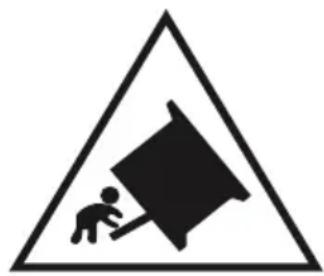
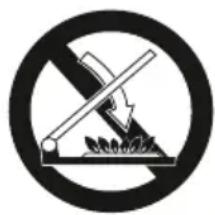
WARNING: To prevent the appliance tipping, the stabilising brackets must be installed. (For detailed information refer to the anti-tilting kit set guide.)
natural_image
Warning sign depicting a person pulling a large object inside a triangle (no text or symbols)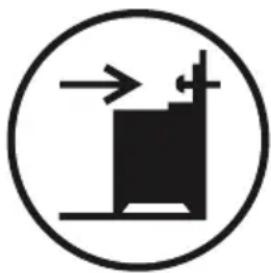
natural_image
Simple black-and-white diagram of a building inside a circle with arrows indicating direction (no text or symbols)- During use the appliance will get hot. Care should be taken to avoid touching heating elements inside the oven.
- Handles may become hot after a short period during use.
- Do not use harsh abrasive cleaners or scourers to clean oven surfaces. They can scratch the surfaces which may result in shattering of the door glass or damage to surfaces.
- Do not use steam cleaners to clean the appliance.
⚠️ WARNING: To avoid the possibility of electric shock, make sure that the appliance is switched off before replacing the lamp.
⚠️ CAUTION: Accessible parts may be hot when cooking or grilling. Keep young children away from the appliance when it is in use.
- Your appliance is produced in accordance with all
applicable local and international standards and regulations.
- Maintenance and repair work should only be carried out by authorised service technicians. Installation and repair work that is carried out by unauthorised technicians may be dangerous. Do not alter or modify the specifications of the appliance in any way. Inappropriate hob guards can cause accidents.
- Before connecting your appliance, make sure that the local distribution conditions (nature of the gas and gas pressure or electricity voltage and frequency) and the specifications of the appliance are compatible. The specifications for this appliance are stated on the label.
⚠️ CAUTION: This appliance is designed only for cooking food and is intended for indoor domestic household use only. It should not be used for any other purpose or in any other application, such as for non-domestic use, in a commercial environment or for heating a room.
- Do not use the oven door handles to lift or move the appliance.
- This appliance is not connected to a ventilation device. It should be installed and connected in accordance with current installation regulations. Particular attention shall be given to the relevant requirements regarding ventilation.
- If the burner has not lit after 15 seconds, stop operating the device and open the compartment door. Wait at least 1 minute before attempting to ignite the burner again.
• These instructions are only valid if the correct country symbol appears on the appliance. If the symbol does not appear on the appliance, refer to
the technical instructions which describe how to modify the appliance to match the conditions of use of the country.
- All possible measures have been taken to ensure your safety. Since the glass may break, care should be taken while cleaning to avoid scratching. Avoid hitting or knocking the glass with accessories.
- Make sure that the supply cord is not trapped or damaged during installation. If the supply cord is damaged, it must be replaced by the manufacturer, its service agent or similarly qualified persons in order to prevent a hazard.
- Do not let children climb on the oven door or sit on it while it is open.
- If your appliance is provided with a cooking hotplate made of glass or glass ceramic:
CAUTION: "In case of hotplate glass breakage":
- immediately shut off all burners and any electrical heating element and isolate the appliance from the power supply
- do not touch the appliance surface
- do not use the appliance.
- Please keep children and animals away from this appliance.
1.2 INSTALLATION WARNINGS
- Do not operate the appliance before it is fully installed.
- The appliance must be installed by an authorised technician. The manufacturer is not responsible for any damage that might be caused by incorrect placement and installation by unauthorised people.
- When the appliance is unpacked, make sure that it is has not been damaged during transportation.
In the case of a defect do not use the appliance and contact a qualified service agent immediately. The materials used for packaging (nylon, staplers, styrofoam, etc.) may be harmful to children and they should be collected and removed immediately.
- Protect your appliance from the atmosphere. Do not expose it to sun, rain, snow, dust or excessive humidity.
- Materials around the appliance (i.e. cabinets) must be able to withstand a minimum temperature of 100°C.
- The appliance must not be installed behind a decorative door, in order to avoid overheating.
1.3 DURING USE
- When you first use your oven you may notice a slight smell. This is perfectly normal and is caused by the insulation materials on the heater elements. We suggest that, before using your oven for the first time, you leave it empty and set it at maximum temperature for 45 minutes. Make sure that the environment in which the product is installed is well ventilated.
• Take care when opening the oven door during or after cooking. The hot steam from the oven may cause burns. - Do not put flammable or combustible materials in or near the appliance when it is operating.
- Do not spray aerosols in the vicinity of this appliance while it is in operation.
- Always use oven gloves to remove and replace food in the oven.
- Under no circumstances should the oven be lined with aluminium foil as overheating may occur.
- Do not place dishes or baking trays directly onto the base of the oven whilst cooking. The base becomes very hot and damage may be caused to the product.
Do not leave the cooker unattended when cooking with solid or liquid oils. They may catch fire under extreme heating conditions. Never pour water on to flames that are caused by oil, instead switch the cooker off and cover the pan with its lid or a fire blanket.
- Always position pans over the centre of the cooking zone, and turn the handles to a safe position so they cannot be knocked.
- If the product will not be used for a long period of time, turn the main control switch off. Turn the gas valve off when gas appliances are not in use.
- Make sure the appliance control knobs are always in the “0” (stop) position when the appliance is not in use.
- The trays incline when pulled out. Take care not to spill or drop hot food when removing it from the oven.
⚠️ CAUTION: The use of a gas cooking appliance results in the production of heat, moisture and products of combustion in the room in which it is installed. Ensure that the kitchen is well ventilated especially when the appliance is in use, keep natural ventilation holes open or install a mechanical ventilation device (mechanical extractor hood).
- Prolonged intensive use of the appliance may call for additional ventilation, such as opening a window, or for more effective ventilation, for example by increasing the level of mechanical ventilation where present.
- While using the grill burner, keep the oven door
open and always use the grill deflector shield supplied with the product. Never use the grill burner with the oven door closed.
⚠️ CAUTION: Glass lids may shatter when heated. Turn off all the burners and allow the hob surface to cool before closing the lid.
natural_image
Prohibition sign showing a diagonal line crossing a blade with a hammer, indicating no movement or force (no text present)- Do not place anything on the oven door when it is open. This could unbalance the oven or damage the door.
- Do not place heavy or flammable items (e.g. nylon, plastic bags, paper, cloth, etc.) into the drawer. This includes cookware with plastic accessories (e.g. handles).
⚠️ CAUTION: The inside surface of the storage compartment may get hot when the appliance is in use. Avoid touching the inside surface.
- Do not hang towels, dishcloths or clothes from the appliance or its handles.
1.4 DURING CLEANING AND MAINTENANCE
- Make sure that your appliance is turned off at the mains before carrying out any cleaning or maintenance operations.
- Do not remove the control knobs to clean the control panel.
- To maintain the efficiency and safety of your appliance, we recommend you always use original spare parts and to call our authorised service agents when needed.
CE Declaration of conformity
CE We declare that our products meet the applicable European Directives, Decisions and Regulations and the requirements listed in the standards referenced.
This appliance has been designed to be used only for home cooking. Any other use (such as heating a room) is improper and dangerous.
The operating instructions apply to several models. You may notice differences between these instructions and your model.
Disposal of your old machine
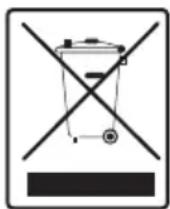
This symbol on the product or on its packaging indicates that this product should not be treated as household waste. Instead it should be handed over to the applicable collection point for the recycling of electrical and
electronic equipment. By ensuring this product is disposed of correctly, you will help prevent potential negative consequences for the environment and human health, which could otherwise be caused by inappropriate waste handling of this product. For more detailed information about recycling of this product, please contact your local city office, your household waste disposal service or the retailer who you purchased this product from.
2. INSTALLATION AND PREPARATION FOR USE

WARNING : This appliance must be installed by an authorised service person or qualified technician, according to the instructions in this guide and in compliance with the current local regulations.
- Incorrect installation may cause harm and damage, for which the manufacturer accepts no responsibility and the warranty will not be valid.
- Prior to installation, ensure that the local distribution conditions (electricity voltage and frequency and/or nature of the gas and gas pressure) and the adjustments of the appliance are compatible. The adjustment conditions for this appliance are stated on the label.
- The laws, ordinances, directives and standards in force in the country of use are to be followed (safety regulations, proper recycling in accordance with the regulations, etc.).
- If the product contains removable shelf guides (wire racks) and the user manual includes recipes like yoghurt, the wire racks shall be removed and the oven operated in the defined cooking mode. Removal of the Wire Shelf information is included in the CLEANING AND MAINTENANCE section.
2.1 INSTRUCTIONS FOR THE INSTALLER Ventilation requirements
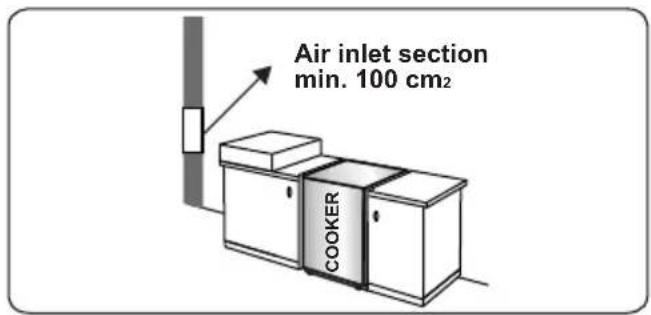
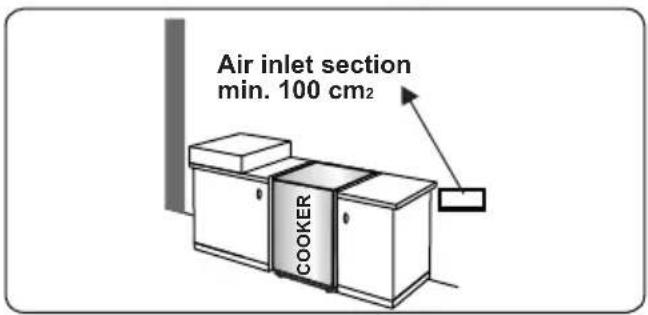
- For rooms with a volume of less than 5 m ^3 , permanent ventilation of 100 cm ^2 free area is required.
- For rooms with a volume of between 5 m 3 and 10 m 3 , permanent ventilation of 50 cm _2 free area will be required, unless the room has a door which opens directly to outside air in which case no permanent ventilation is required.
- For rooms with a volume greater than 10 m ^3 , no permanent ventilation is required.

Important: Regardless of room size, all ms containing the appliance must have ct access to outside air via an openable dow or equivalent.
Emptying of burned gases from the environment
Gas appliances expel burned gas waste to the outside air, either directly or via a cooker hood with a chimney. If it is not possible to install a cooker hood, install a fan on the window or wall that has access to fresh air. The fan must have the capacity to change the volume of air in the kitchen a minimum of 4-5 times per hour.
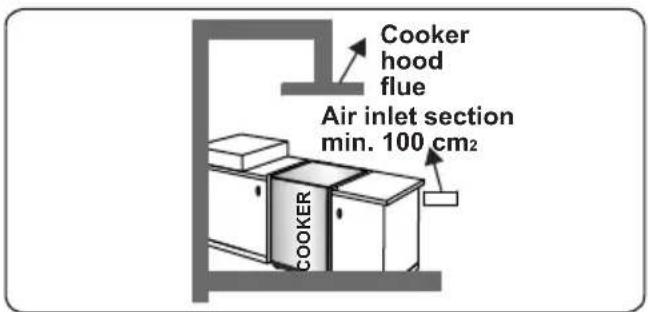
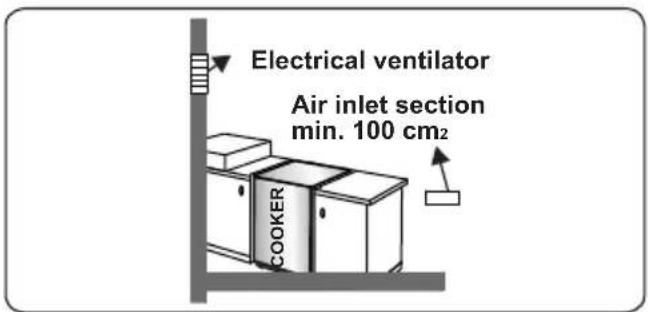
General instructions
• After removing the packaging material from the appliance and its accessories, ensure that the appliance is not damaged. If you suspect any damage, do not use it and contact an authorised service person or qualified technician immediately.
• Make sure that there are no flammable or combustible materials in the close vicinity, such as curtains, oil, cloth etc. which may catch fire.
- The worktop and furniture surrounding the appliance must be made of materials resistant to temperatures above 100°C.
- The appliance should not be installed directly above a dishwasher, fridge, freezer, washing machine or clothes dryer.
- The appliance can be placed close to other furniture on condition that, in the area where the appliance is set up, the furniture's height does not exceed the height of the cooktop.
2.2 INSTALLATION OF THE COOKER
• If the kitchen furniture is higher than the cooktop, the kitchen furniture must be
at least 10 cm away from the sides of appliance for air circulation.
- There should be a minimum 2cm blank space around the appliance for air circulation.
- If a cooker hood or cupboard is to be installed above the appliance, the safety distance between cooktop and any cupboard/cooker hood should be as shown below.
| A (mm) Cupboard 420 | |
| B (mm) Cooker Hood 650/700 | |
| C (mm) 20 | |
| D (mm) Product Width | |
| E (mm) 100 |
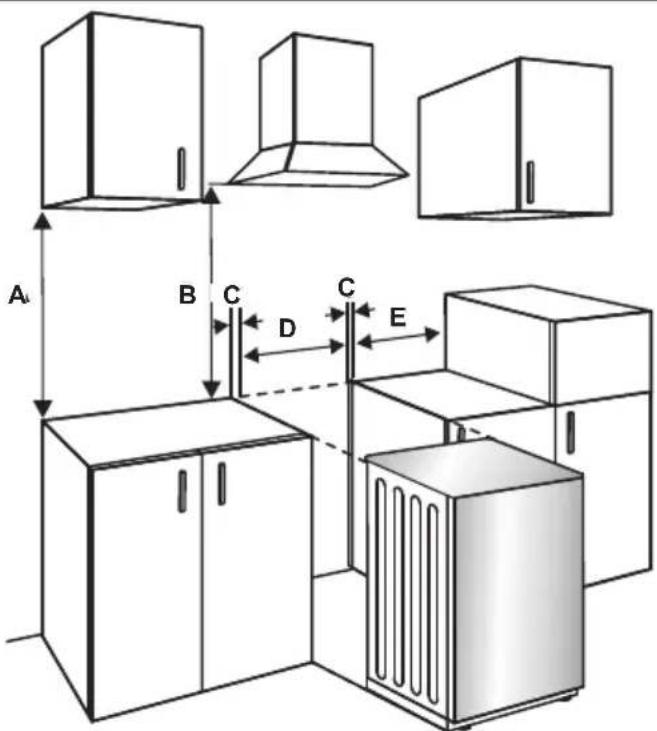
2.3 GAS CONNECTION
Assembly of gas supply and leakage check
Connect the appliance in accordance with applicable local and international standards and regulations. First, check what type of gas is installed on the cooker. This information is available on a sticker on the back of the cooker. You can find the information related to appropriate gas types and appropriate gas injectors in the technical data table. Check that the
feeding gas pressure matches the values on the technical data table, to be able to get the most efficient use and to ensure the minimum gas consumption. If the pressure of used gas is different than the values stated or is not stable in your area, it may be necessary to assemble an available pressure regulator on the gas inlet. You should contact an authorised service centre to make these adjustments.
Points that must be checked during flexible hose assembly:
- If the gas connection is made by a flexible hose fixed onto the gas inlet of the hob, it must be fixed on by a pipe collar.
- Connect your appliance with a short and durable hose that is as close as possible to the gas source.
- The permitted maximum length of the hose is 1.5 m.
- The device should be connected in line with the relevant local gas standards.
- The hose must be kept clear of areas that may heat up to temperatures of more than 90°C.
- The hose must not be cracked, torn, bent or folded.
- Keep the hose clear of sharp corners and objects that could move.
- Before you assemble the connection, you must make sure the hose is not damaged. Use bubbly water or leakage fluids to perform the check. Do not use a naked flame to check for gas leakage.
- All metal items that are used during gas connection must be free from rust. Check the expiry date of any components used for connection.
Points that must be checked during fixed gas connection assembly
The method used to assemble a fixed gas connection (gas connection made by threads, e.g. a nut) varies according to the country you are in. The most common parts for your country will be supplied with your appliance. Any other parts required can be supplied as spare parts.
During connection, always keep the nut on the gas manifold fixed while rotating the counter-part. Use appropriately-sized spanners for a safe connection. For surfaces between different components always use the seals provided in the gas conversion kit.
The seals used during connection should also be approved to be used in gas connections. Do not use plumbing seals for gas connections.
Remember that this appliance is ready to be connected to the gas supply in the country for which it has been produced. The main country of destination is marked on the rear cover of the appliance. If you need to use it in another country, any of the connections in the figure below may be required. In such a case, contact local authorities to learn the correct gas connection.
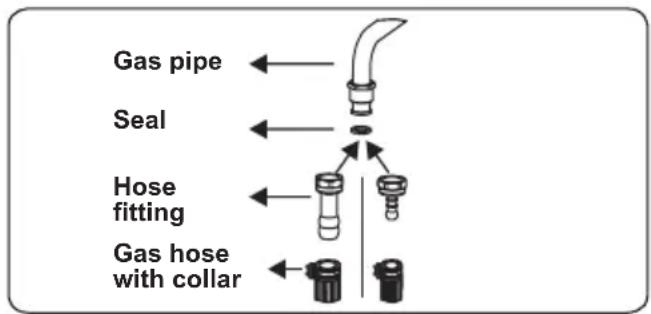
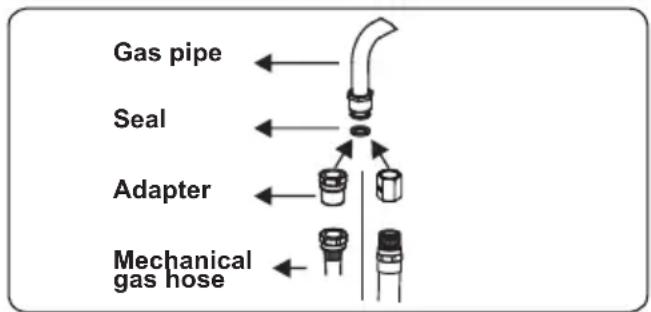
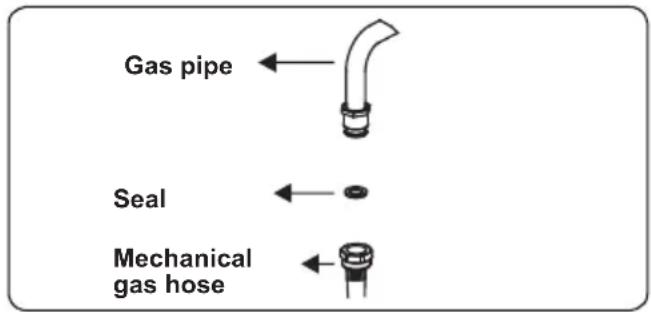
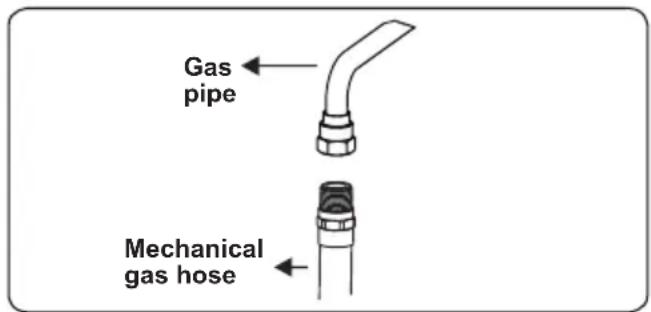
The Cooker must be installed and maintained by a suitably qualified gas registered technician in accordance with current safety legislation.

WARNING: Do not use a naked flame to check for gas leaks.
2.4 GAS CONVERSION (IF AVAILABLE)
Your appliance is designed to be operated with LPG/NG gas. The gas burners can be adapted to different types of gas, by replacing the corresponding injectors and adjusting the minimum flame length suitable
to the gas in use. For this purpose, the following steps should be performed.
Changing injectors
Hob burners
- Cut off the main gas supply and unplug the appliance from the mains electrical supply.
- Remove the burner caps and the adapters.
- Use a 7 mm spanner to unscrew the injectors.
- Replace the injector with the ones from the gas conversion kit, with the correct diameters for the type of gas that is going to be used, according to the gas injector table.
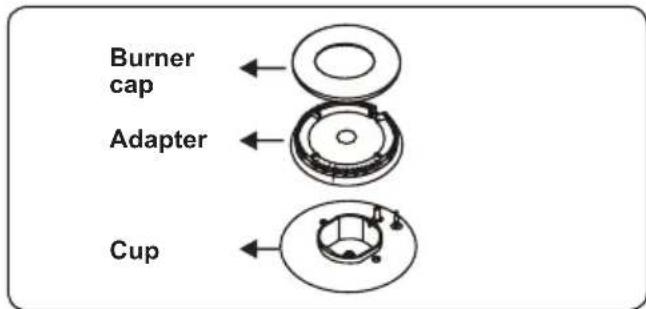
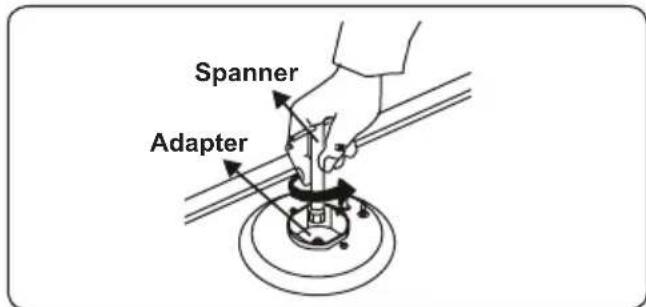
Adjusting the minimum flame position:
First of all, make sure that the appliance is unplugged from the mains electrical supply and that the gas feed is open. The minimum flame position is adjusted with a flat screw located on the valve. For valves with a flame failure safety device, the screw is located on the side of the valve spindle as shown in the figures. For valves without a flame failure safety device, the screw is located inside the valve spindle as shown in the figure. To make adjusting the flame position easier, we recommend that you remove the control panel (and the micro switch if your model has one) during the alteration. The bypass screw must be loosened for conversion from LPG to NG. For conversion from NG to LPG, the bypass screw must be tightened.
Valve with flame failure device
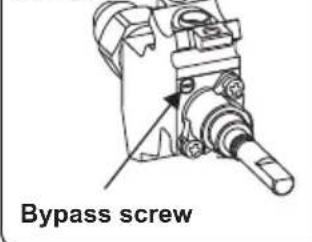
Valve with flame failure device
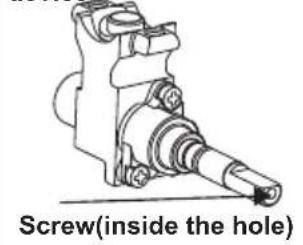
Determining the minimum flame position
To determine the minimum position, ignite the burners and leave them on in the minimum position. Remove the knobs because the screws are accessible only when the knobs are removed. With the help of a small screwdriver, fasten or loosen the bypass screw by around 90 degrees. When the flame has a length of at least 4mm, the gas is well distributed. Make sure that the flame does not die out when passing from the maximum position to the minimum position. Create an artificial wind with your hand towards the flame to see if the flames are stable.
Changing the gas inlet
For some countries, the gas inlet type can be different for NG/LPG gases. In this case, remove the current connection components and nuts (if any) and connect the new gas supply accordingly. In all conditions, all components used in gas connections should be approved by local and/or international authorities. In all gas connections, refer to the “Assembly of gas supply and leakage check” clause explained above.
2.5 ELECTRICAL CONNECTION AND SAFETY (IF AVAILABLE)
WARNING: The electrical connection of this appliance should be carried out by an authorised service person or qualified electrician, according to the instructions in this guide and in compliance with the current local regulations.
WARNING: THE APPLIANCE MUST BE EARTHED.
- Before connecting the appliance to the power supply, the voltage rating of the appliance (stamped on the appliance identification plate) must be checked for correspondence to the available mains supply voltage, and the mains electric wiring should be capable of handling the appliance's power rating (also indicated on the identification plate).
- During installation, please ensure that isolated cables are used. An incorrect connection could damage your appliance. If the mains cable is damaged and needs to be replaced this should be done by a qualified personnel.
- Do not use adaptors, multiple sockets and/or extension leads.
- The supply cord should be kept away from hot parts of the appliance and must not be bent or compressed. Otherwise the cord may be damaged, causing a short circuit.
- If the appliance is not connected to the mains with a plug, a all-pole disconnector (with at least 3 mm contact spacing) must be used in order to meet the safety regulations.
- The appliance is designed for a power supply of 220-240 V\~. If your supply is different, contact the authorized service personnel or qualified electrician.
- The power cable (H05VV-F) must be of sufficient length to be connected to the appliance.
- The fused switch must be easily accessible once the appliance has been installed.
- Ensure all connections are adequately tightened.
- Fix the supply cable in the cable clamp and then close the cover.
- The terminal box connection is placed on the terminal box.
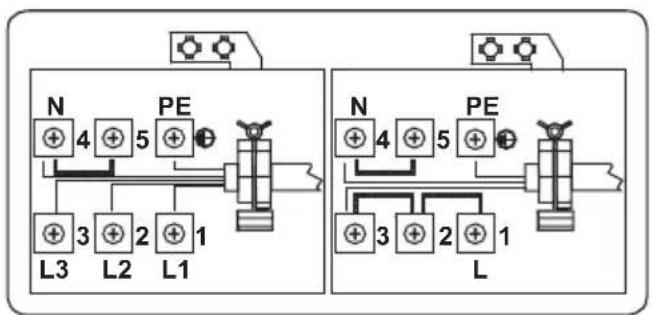
flowchart
graph TD
    subgraph Left_Circuit
        N1["N"] -->|4| PE1["PE"]
        PE1 -->|5| L1["L1"]
        L1 -->|3| L2["L2"]
        L2 -->|2| L3["L3"]
        L3 -->|1| PE2["PE"]
    end
    subgraph Right_Circuit
        N2["N"] -->|4| PE2["PE"]
        PE2 -->|5| L2["L2"]
        L2 -->|3| PE3["PE"]
        PE3 -->|2| L3["L3"]
        L3 -->|1| PE4["PE"]
    end
    style Left_Circuit fill:#f9f,stroke:#333
    style Right_Circuit fill:#f9f,stroke:#333
2.6 ANTI-TILTING KIT
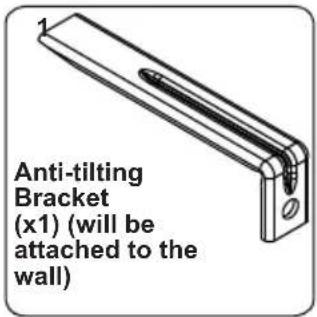
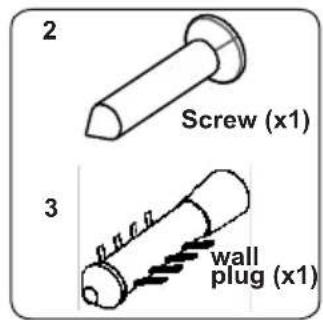
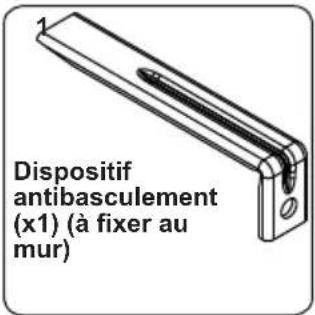
The document bag contains an anti-tilting kit. Loosely attach the anti-tilting bracket (1) to the wall using the screw (2) and wall plug (3), following the measurements shown in the figure and table below. Adjust the height of the anti-tilting bracket so that it lines up with the slot on the cooker and tighten the screw. Push the appliance towards the wall making sure that the anti-tilting bracket is inserted into the slot on the rear of the appliance.
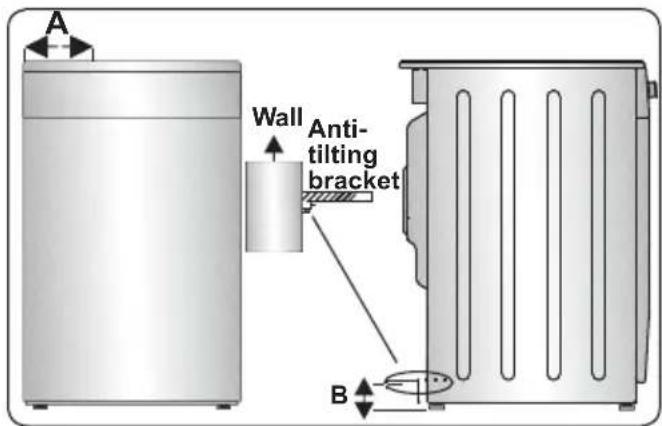
| Product Dimensions(Width X Depth X Height) (Cm) | A (mm) | B (mm) |
| 60x60x90 (Double Oven) 297 | 5 52 | |
| 50x60x90 (Double Oven) 247 | 5 52 | |
| 90x60x85 430 107 | ||
| 60x60x90 309.5 112 | ||
| 60x60x85 309.5 64 | ||
| 50x60x90 247.5 112 | ||
| 50x60x85 247.5 64 | ||
| 50x50x90 247.5 112 | ||
| 50x50x85 247.5 64 |
2.7 ADJUSTING THE FEET
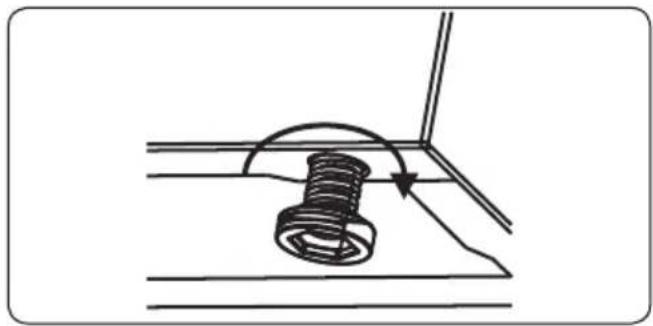
Your product stands on four adjustable feet. For safe operation, it is important that your appliance is correctly balanced. Make sure the appliance is level prior to cooking. To increase the height of the appliance, turn the feet anti-clockwise. To decrease the height of the appliance, turn the feet clockwise.
It is possible to raise the height of the appliance up to 30 mm by adjusting the feet. The appliance is heavy and we recommend that a minimum of 2 people lift it. Never drag the appliance.
natural_image
Diagram of a mechanical assembly with a spring-loaded component and directional arrow (no text or symbols)3. PRODUCT FEATURES

Important: Specifications for the product vary and the appearance of your appliance may differ from that shown in the figures below.
List of Components
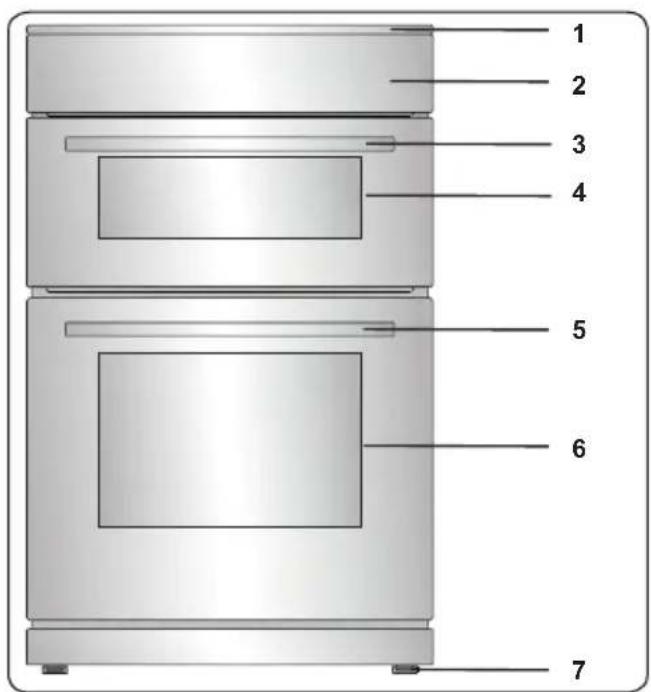
- Cooktop
- Control Panel
- Top Oven Door Handle
- Top Oven Door
- Main Oven Door Handle
- Main Oven Door
- Adjustable Feet
Control Panel
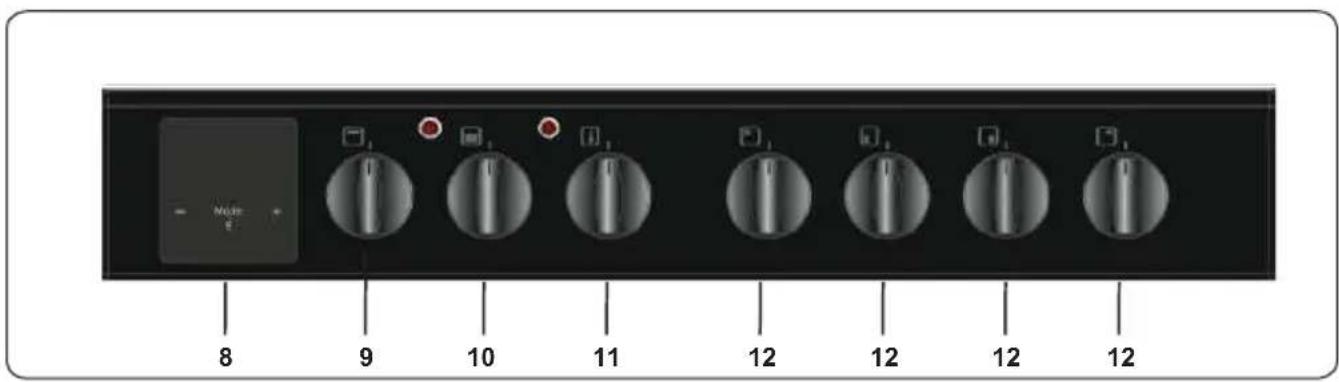
- Timer
- Top Oven Control Knob
10.Main Oven Control Knob
11.Main Oven Thermostat Knob
12.Hob Control Knob
4. USE OF PRODUCT
Ignition of the burners
The position symbol above each control knob indicates the burner that the knob controls.
Manual Ignition of the Gas Burners
If your appliance is not equipped with an ignition aid, or in case there is a failure in the electric network, follow the procedures listed below.
For Hob Burners: Push in the knob of the burner you wish to ignite and keep it pressed while turning it anti-clockwise until the knob is in the 'maximum' position. Continue pressing the knob and hold a lit match, taper or other manual aid to the upper circumference of the burner. Move the ignition source away from the burner as soon as you see a stable flame.
Electrical ignition by control knob
Push in the knob of the burner you wish to ignite and keep it pressed while turning it anticlockwise until the knob is in the 90 degrees position. The microswitch under the knob will create sparks through the spark plug for as long as the control knob is pressed. Press the knob until you see a stable flame on the burner
Ignition of the Burners
The position symbol above each control knob indicates the burner that the knob controls.
Manual ignition of the gas burners
If your appliance is not equipped with an ignition aid, or in case there is a failure in the electric network, follow the procedures listed below.
For hob burners: Push in the knob of the burner you wish to ignite and keep it pressed while turning it anti-clockwise until the knob is in the ‘maximum’ position. Continue pressing the knob and hold a lit match, taper or other manual aid to the upper circumference of the burner. Move the ignition source away from the burner as soon as you see a stable flame.
For oven burner: Push in and turn the oven control knob anti-clockwise until the knob is in the 'maximum' position. Hold a lit match, taper or other manual aid to the ignition hole that is located on the front left corner of the burner. Move the ignition source away as soon as you see a stable flame.
For grill burner: Push in and turn the grill control knob clockwise until the marker on the knob points at the grill sign. Continue pressing the knob and hold a lit match, taper or other manual aid to the holes on the burner. Move the ignition source away from the burner as soon as you see a stable flame.
Electrical ignition by control knob
Push in the knob of the burner you wish to ignite and keep it pressed while turning it anti-clockwise until the knob is in the 90 degrees position. The microswitch under the knob will create sparks through the spark plug for as long as the control knob is pressed. Press the knob until you see a stable flame on the burner.
Flame safety device
Hob burners
Hobs equipped with a flame failure device provide security in case of an accidentally extinguished flame. For this reason, during ignition, keep the knob pressed until you see stable flames.
Hold down the control for approximately 10 to 15 seconds after the burner has lit. Releasing the control too soon will extinguish the flame.
If such a case occurs, the device will block the burners gas lines and will avoid any accumulation of unburned gas. Wait 90 seconds before re-igniting an extinguished gas burner.
4.3 HOB CONTROLS
Hob burner
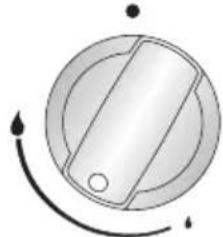
The knob has 3 positions: off (0), maximum (big flame symbol) and minimum (small flame symbol). Ignite the burner with the knob in the 'maximum' position; you can then adjust the flame length between the 'maximum' and 'minimum' positions. Do not operate the burners when the knob is between the 'maximum' and 'off' positions.
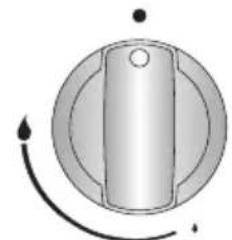
natural_image
Simple diagram of a knob with a central knob and surrounding circular components (no text or symbols)OFF position
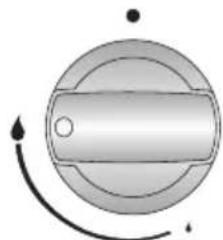
natural_image
Pure mechanical component diagram without any text, numbers, or symbolsMAX position
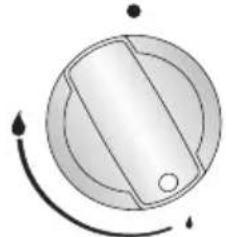
natural_image
Simple diagram of a circular object with internal lines and arrows, no text or symbols present.MIN. position MODULATE
natural_image
Simple circular diagram with a shaded central region and curved arrows, no text or symbols present.After ignition, visually check the flames. If you see a yellow tip, lifted or unstable flame, switch the gas flow off, then check the assembly of burner caps and crowns once they have cooled. Make sure there is no liquid in the burner caps. If the burner flames go out accidentally, switch the burners off, ventilate the kitchen with fresh air and wait at least 90 seconds before attempting re-ignition.
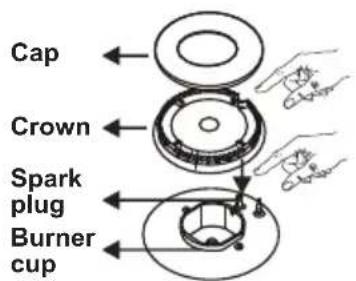
To switch the hob burners off, turn the hob burner knob clockwise to the '0' position or so that the marker on the hob burner knob points upwards.
Your hob has burners of different diameters. You will find that the most economical way of using gas is to choose the correct size gas burner for your cooking pan size and to bring the flame to the 'minimum' position once boiling point is reached. We recommend that you always cover your cooking pan to avoid heat loss.
To obtain maximum performance from the main burners, we suggest you use pots with the following flat bottom diameters. Using pots smaller than the minimum dimensions shown below will cause energy loss.
| Rapid / Wok Burner 22-26 cm | |
| Semi-rapid Burner 14-22 cm | |
| Auxiliary Burner 12-18 cm |
Make sure that the tips of the flames do not spread out from the outer circumference of the pan, as this may harm plastic accessories, such as handles.
Switch the main gas control valve off when the burners are not in use for prolonged periods of time.

WARNING:
- Only use flat-bottomed pans with thick bases.
• Make sure the bottom of the pan is dry before placing it on the burner. - The temperature of accessible parts may become high while the appliance is operating. It is imperative that children and animals are kept well away from the burners during and after cooking.
• After use, the hob remains very hot for a prolonged period of time. Do not touch it and do not place any object on top of it. - Never place knives, forks, spoons and lids on the hob as they will get hot and could cause serious burns.
- Do not allow pan handles or any other cooking utensils to project over the edge of the cooker top.
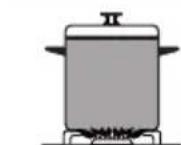

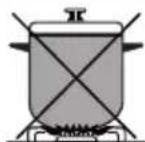

Circular Saucepan Base
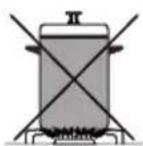

Small Saucepan Diameter
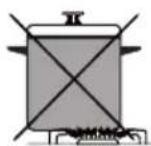

Saucepan base that has not settled
Main Oven Functions
* The functions available on your oven may differ from those listed below depending on the model purchased.
natural_image
Abstract white line drawing on dark background, resembling a stylized flower or droplet (no text or symbols)Defrost Function:
Switch on the DEFROST function using the main oven function control knob. The oven's warning lights will switch on, and the fan will start operating. To use the defrost function, place your frozen food on a shelf in the middle of the oven. It is recommended that you put an oven tray under the defrosting food to catch accumulated water due to melting ice. This function will not cook or bake your food, it will only help to defrost it.
natural_image
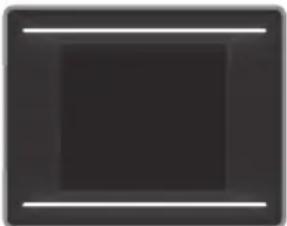
Solid dark square with two thin white horizontal lines on top and bottom (no text or symbols)Static Cooking
Function: Switch on the STATIC function using the main oven function control knob. The oven's thermostat and warning lights will switch on, and the
lower and upper heating elements will start operating. The temperature can be adjusted using the main oven function control knob. The static cooking function emits heat, ensuring even cooking of food. This is ideal for making pastries, cakes, baked pasta, lasagne and pizza. Preheating the oven for 10 minutes is recommended and it is best to cook on only one shelf at a time in this function.
natural_image
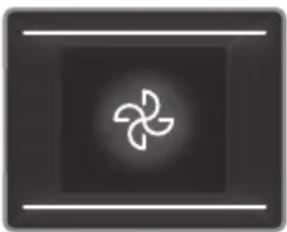
Abstract geometric symbol resembling a stylized flower or impeller inside a dark square frame (no text or symbols)Fan Function: Switch on the FAN function using the main oven control knob. The oven's thermostat and warning lights will switch on, and the upper and lower
heating elements and fan will start operating. The temperature can be adjusted using the main oven thermostat knob. Cooking is carried out by the lower and upper heating elements within the oven while the fan provides air circulation, dispersing the heat and giving the food a slightly grilled effect. It is recommended you preheat the oven for 10 minutes.
natural_image
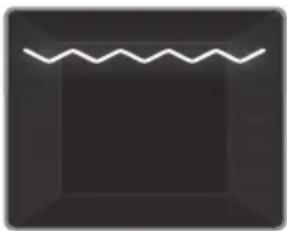
Abstract dark square with a white zigzag line at the top (no text or symbols)Grilling Function:
Switch on the GRILLING function using the main oven control knob. The oven's thermostat and warning lights will switch on, and the grill heating element will start operating. The temperature can be adjusted using the main oven thermostat knob. This function is used for grilling and toasting food. Use the upper shelves of the oven. Lightly brush the wire grid with oil to stop food sticking and place food in the centre of the grid. Always place a tray beneath the food to catch any drips of oil or fat. It is recommended that you leave the grill to preheat for 10 minutes.

Warning: When grilling, the oven door must be closed and the oven temperature should be adjusted to 190°C.
natural_image
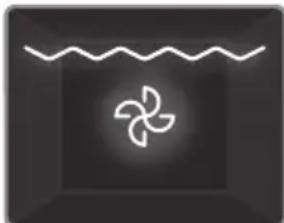
Simple icon of a propeller inside a wavy line above a dark square (no text or symbols)Grill and Fan
Function: Switch on the GRILL AND FAN function using the main oven control knob. The oven's thermostat and warning lights will switch on, and the grill
heating element and fan will start operating. The temperature can be adjusted using the main oven thermostat knob. This function is ideal for thicker foods. When grilling, use the upper shelves of the oven. Lightly brush the wire grid with oil to stop food sticking and place food in the centre of the grid. Always place a tray beneath the food to catch any drips of oil or fat.

Warning: When grilling, the oven door must be closed and the oven temperature should be adjusted to C.
Top Oven Functions
* The functions available on your oven may differ from those listed below depending on the model purchased.
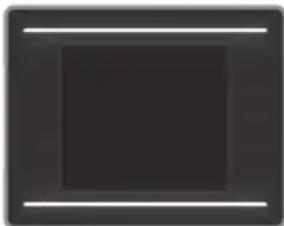
natural_image
Solid dark square with two thin white horizontal lines on top and bottom (no text or symbols)Static Cooking
Function: Switch on the STATIC function using the top oven function control knob. The oven thermostat and warning lights will illuminate, and the
upper and lower heating elements will switch on. The temperature can be adjusted using the top oven function control knob. The heat generated by the upper and lower
heating elements ensures that food is cooked evenly. You will find this setting ideal for cooking cakes, baked pasta, lasagne, and pizza. We recommend that the oven is preheated for 10 minutes before use and that you cook on one rack at a time.
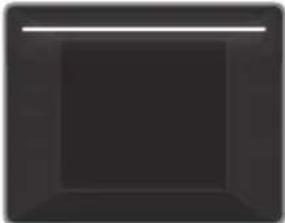
natural_image
Solid dark square with a horizontal white line above it, no text or symbols present.Upper Heating
Function: Switch on the UPPER function using the top oven function control knob. The oven thermostat and warning lights will illuminate, and the
upper heating element will switch on. The temperature setting will set to the highest level for this function. The UPPER heating function is ideal for heating food or for frying the top of food that has already been cooked, as the heat radiates from the upper heating element closest to the top of the food.
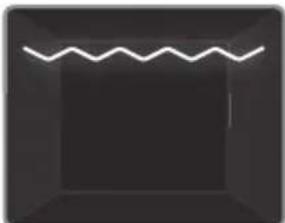
natural_image
Simple line drawing of a zigzag line inside a dark square frame (no text or symbols)Grilling Function:
Switch on the GRILL function using the top oven function control knob. The oven thermostat and warning lights will
illuminate, and the grill heating element will switch on. Use this function for grilling. When you have finished grilling, switch the top oven off. Keep children away from the oven during grilling and until it has fully cooled after use.

Warning: The top oven door must be fully open when this function is selected.
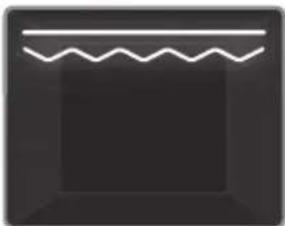
natural_image
Simple icon with a wavy line above a rectangular frame (no text or symbols)Faster Grilling
Function: Switch on the FASTER GRILL function using the function selector knob. The oven thermostat and warning lights will
illuminate, and the grill and upper heating elements will switch on. Use this function for wide area grilling. When you have finished grilling, switch the top oven off. Keep children away from the oven during grilling and until the oven has fully cooled after use.

Warning: The top oven door must be fully open when this function is selected.
Use of the Digital Touch Timer
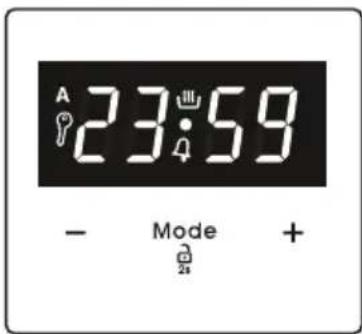
| Function Description | |
| A | Auto cooking |
| Manual cooking | |
| Key Lock | |
| Minute minder | |
| Mode | Mode function |
| - | Decrease timer |
| + | Increase timer |
| 23 59 | Timer display |
Time adjustment
The time must be set before you start using the oven. Following the power connection, the symbol "A" and "00:00" or "12:00" will flash on the display.
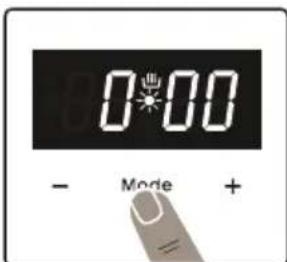
- Press the "MODE" for 2 sec to deactive keylock and the dot in the middle of the screen will start to flash.
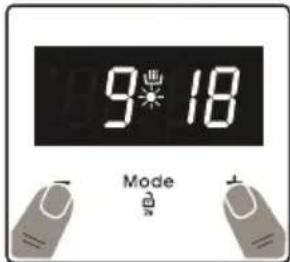
- Adjust the time while the dot is flashing using the "+" and "-" keys.
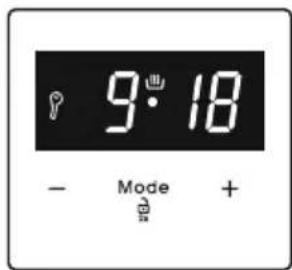
- After a few seconds, the dot will stop flashing and will remain illuminated.

After time adjustment, both control knobs must be in the off position for the product to reach standby mode.

Key Lock
The key lock automatically activates after the timer has not been used for 5 seconds. "P" symbol will appear and remain illuminated. To unlock the timer buttons, press and hold the "MODE" button for 2 seconds. The desired operation can then be carried out.
Audible warning time adjustment
The audible warning time can be set to any time between "00:00" and "23:59" hours. The audible warning time is for warning purposes only. The oven will not be activated with this function.
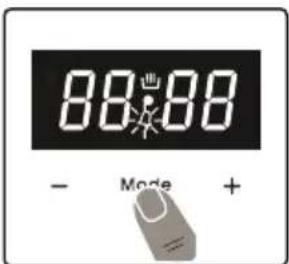
- Press "MODE". The symbol "4" will begin to flash and "000" will be displayed.
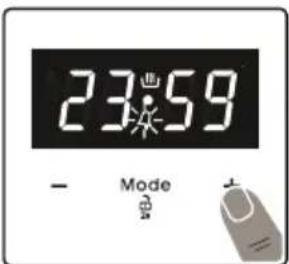
- Select the desired time period using the "+" and "-" keys while "4" is flashing.
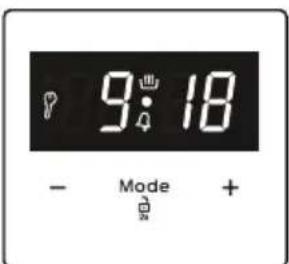
- The symbol “ ^9 ” will remain illuminated, the time will be saved and the warning will be set.
When the timer reaches zero, an audible warning will sound and the symbol "will flash on the display. Press any key to stop the audible warning. Press "MODE" for 2 seconds the "symbol will disappear and the clock will be displayed.
Semi-automatic time adjustment (cooking period)
This function helps you to cook for a fixed period of time. A time range between 0 and 10 hours can be set. Prepare the food for cooking and put it in the oven.
- Select the desired cooking function and the temperature using the control knobs.
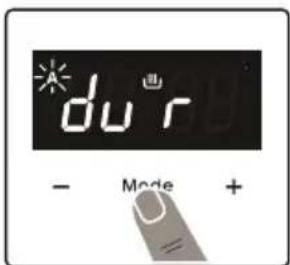
- Press "MODE" until you see "dur" symbol on the display screen. The symbol "A" will flash.
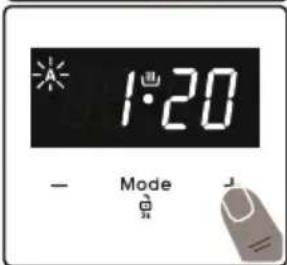
- Select the desired cooking time period using the "+" and "-" keys.
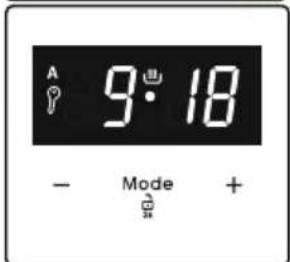
- The current time will reappear on the screen, and the symbols "A", and "Will will remain illuminated.
When the timer reaches zero, the oven will switch off and an audible warning will sound. The symbols "A" will flash. Turn both control knobs to the "0" position and press any key on the timer to stop the warning sound. Press "MODE" for 2 seconds the "A" symbol will disappear and the timer will switch back to manual function.
Sound Adjustment
Press and hold the “-” sensor button until you hear an audible 'beep' sound. After this, each time the “-” button is pressed, a different "beep" tone will sound. There are four different types of signal sounds. If "off" is selected, all sounds will be turned off except alarm and error sounds press any buttons. After a short time the selected beep will be recorded. Accessories
The EasyFix Wire Rack
Clean the accessories thoroughly with warm water, detergent and a soft clean cloth on first use.
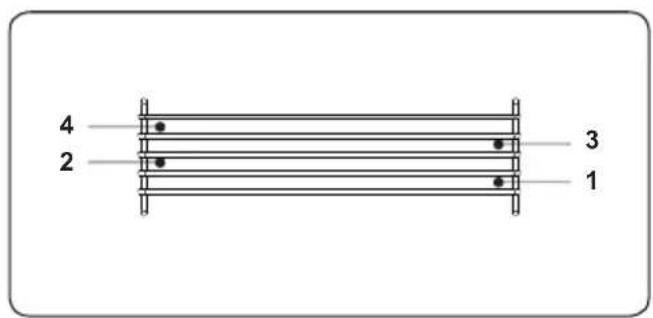
- Insert the accessory to the correct position inside the oven.
• Take care removing cookware and/or accessories out of the oven. Hot meals or accessories can cause burns. - The accessories may deform with heat. Once they have cooled down, they will recover their original appearance and performance.
- Trays and wire grids can be positioned on any level from 1 to 4.
- Telescopic rails can be positioned on levels 1, 2, 3 and 4.
- Level 2,3 and 4 is recommended for single level cooking with the telescopic rails.
****Accessories may vary depending on the model purchased.
**** Level is 4 recommended for grill cooking.
The EasyFix Wire Rack
Clean the accessories thoroughly with warm water, detergent and a soft clean cloth on first use.

- Insert the accessory to the correct position inside the oven.
- Allow at least a 1 cm space between the fan cover and accessories.
• Take care removing cookware and/or accessories out of the oven. Hot meals or accessories can cause burns. - The accessories may deform with heat. Once they have cooled down, they will
recover their original appearance and performance.
- Trays and wire grids can be positioned on any level from 1 to 5.
- Telescopic rails can be positioned on levels T1, T2, 3, 4, 5.
- Level 3 is recommended for single level cooking.
- Level T2 is recommended for single level cooking with the telescopic rails.
- The turnspit wire grid must be positioned on Level 3.
- Level T2 is used for the turnspit wire grid positioning with telescopic rails.
****Accessories may vary depending on the model purchased.
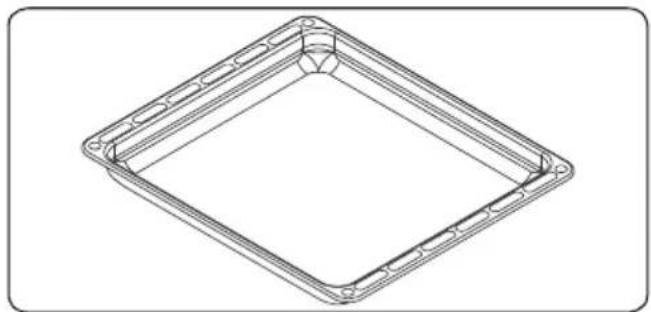
The Deep Tray
The deep tray is best used for cooking stews.
Put the tray into any rack and push it to the end to make sure it is placed correctly.
natural_image
Technical line drawing of a square frame with bolt holes and a central circular hole (no text or symbols)The Wire Grid
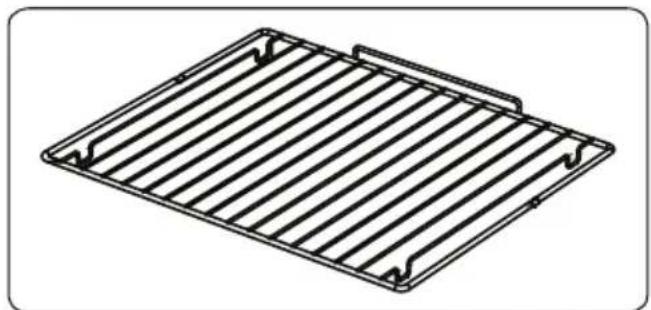
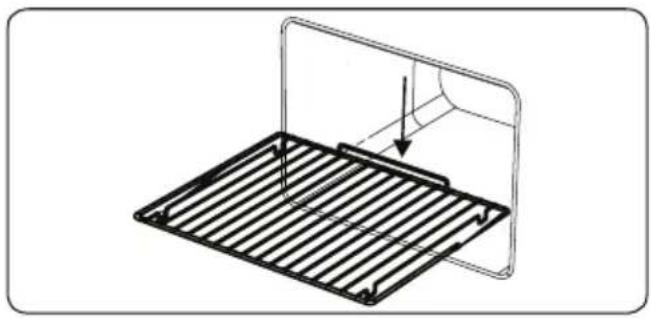
The wire grid is best used for grilling or for processing food in oven-friendly containers.
natural_image
Technical line drawing of a metal grate plate with slats and mounting brackets (no text or symbols)WARNING Place the o
Place the grid to any corresponding rack in the oven cavity correctly and push it to the end.
natural_image
Technical line drawing of a metal grate with a curved panel and an arrow indicating force or direction (no text or symbols)5. CLEANING AND MAINTENANCE
5.1 CLEANING

WARNING: Switch off the appliance and allow it to cool before cleaning is to be carried out.
General Instructions
- Check whether the cleaning materials are appropriate and recommended by the manufacturer before use on your appliance.
- Use cream cleaners or liquid cleaners which do not contain particles. Do not use caustic (corrosive) creams, abrasive cleaning powders, rough wire wool or hard tools as they may damage the cooker surfaces.
Do not use cleaners that contain particles, as they may scratch the glass, enamelled and/or painted parts of your appliance.
- Should any liquids overflow, clean them immediately to avoid parts becoming damaged.
Do not use steam cleaners for cleaning any part of the appliance.
Cleaning the Inside of the Oven
- The inside of enamelled ovens are best cleaned while the oven is warm.
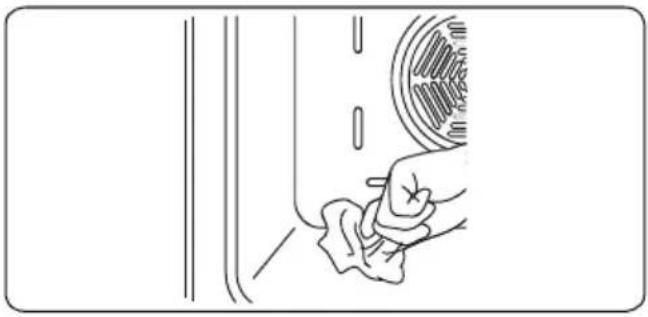
- Wipe the oven with a soft cloth soaked in soapy water after each use. Then, wipe the oven over again with a wet cloth and dry it.
- You may need to use a liquid cleaning material occasionally to completely clean the oven.
natural_image
Line drawing of a hand cleaning a car window with a circular object on the wall (no text or symbols)Catalytic Cleaning
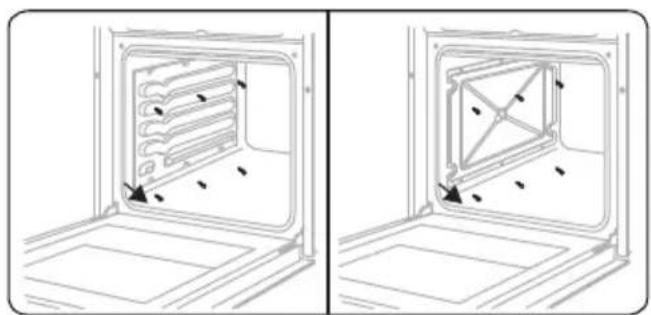
Catalytic liners are installed within the oven cavity. These are the matte-finished, light-coloured panels on the sides and/or the matte-finished panel at the rear of the oven. They work by collecting any grease and oil residue during cooking.
The liner self-cleans by absorbing fats and oils and burning them to ash, which can then be easily removed from the floor of the oven with a damp cloth. The lining must be porous to be effective. The liner may discolour with age.
If a large amount of fat is spilled onto the liner it may reduce its efficiency. To overcome this problem, set the oven to maximum temperature for about 20 - 30 minutes. After the oven has cooled, wipe out the floor of the oven.
Manual cleaning of the catalytic liners is not recommended. Damage will occur if a soap-impregnated steel wool pad or any other abrasives are used. In addition, we do not recommend the use of aerosol cleaners on the liners. The walls of a catalytic liner may become ineffective due to excess grease. The excess grease can be removed with a soft cloth or sponge soaked in hot water and the cleaning cycle can be carried out as described above.
Removal of Catalytic Liner
To remove the catalytic liner, remove the screws holding each catalytic panel to the oven.
natural_image
Technical line drawing of a two-part interior view of an oven or enclosure, showing internal structure and mounting points (no text or symbols)Cleaning the Gas Hob
- Clean the gas hob on a regular basis.
• Take off the pan supports, caps and crowns of the hob burners. - Wipe the hob surface with a soft cloth soaked in soapy water. Then, wipe the hob surface over again with a wet cloth and dry it.
- Wash and rinse the hob-burner caps. Do not leave them wet. Dry them immediately with a dry cloth.
- Make sure you re-assemble all parts correctly after cleaning.
- The surfaces of the pan supports may become scratched over time due to use. This is not a production fault.
Do not use a metal sponge for cleaning any part of the hob.
Make sure no water gets into the burners as this may block the injectors.
Cleaning the Hotplate Heater (if available)
- Clean the hotplate heater on a regular basis.
- Wipe the hotplate with a soft cloth soaked in only water. Then, run the hotplate for a short time to dry it completely.
Cleaning the Glass Parts
- Clean the glass parts of your appliance on a regular basis.
- Use a glass cleaner to clean the inside and outside of the glass parts. Then, rinse and dry them thoroughly with a dry cloth.
Cleaning the Enamelled Parts
- Clean the enamelled parts of your appliance on a regular basis.
- Wipe the enamelled parts with a soft cloth soaked in soapy water. Then, wipe them over again with a wet cloth and dry them.
Do not clean the enamelled parts while they are still hot from cooking.
Do not leave vinegar, coffee, milk, salt, water, lemon or tomato juice on the enamel for a long time.
Cleaning the Stainless Steel Parts (if available)
- Clean the stainless steel parts of your appliance on a regular basis.
- Wipe the stainless steel parts with a soft cloth soaked in only water. Then, dry them thoroughly with a dry cloth.
Do not clean the stainless steel parts while they are still hot from cooking.
Do not leave vinegar, coffee, milk, salt, water, lemon or tomato juice on the stainless steel for a long time.
Cleaning Painted Surfaces (if available)
- Spots of tomato, tomato paste, ketchup, lemon, oil derivatives, milk, sugary foods, sugary drinks and coffee should be cleaned with a cloth dipped in warm water immediately. If these stains are not cleaned and allowed to dry on the surfaces they are on, they should NOT be rubbed with hard objects (pointed objects, steel and plastic scouring wires, surface-damaging dish sponge) or cleaning agents containing high levels of alcohol, stain removers, degreasers, surface abrasive chemicals. Otherwise, corrosion may occur on the powder painted surfaces, and stains may occur. The manufacturer will not be held responsible for any damage caused by the use of inappropriate cleaning products or methods.
Removal of the Inner Glass
You must remove the oven door glass before cleaning, as shown below.
- Push the glass in the direction of B and release from the location bracket (x). Pull the glass out in the direction of A.
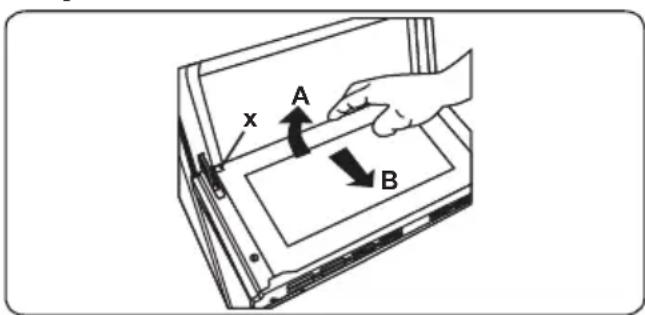
To replace the inner glass:
- Push the glass towards and under the location bracket (y), in the direction of B.
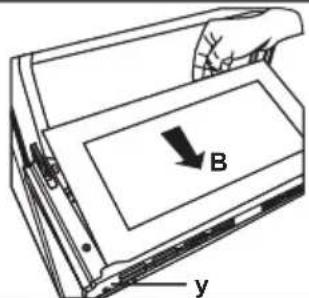
- Place the glass under the location bracket (x) in the direction of C.
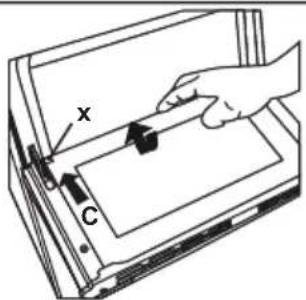

If the oven door is a triple glass oven door, the third glass layer can be removed the same way as the second's layer.
Removal of the Oven Door
Before cleaning the oven door glass, you must remove the oven door, as shown below.
- Open the oven door.
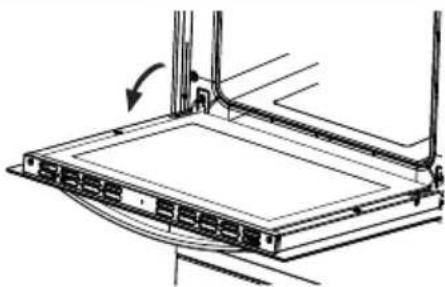
natural_image
Technical line drawing of a mechanical assembly with no visible text or symbols- Open the locking catch (a) (with the aid of a screwdriver) up to the end position.
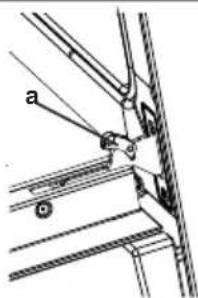
- Close the door until it almost reaches the fully closed position and remove the door by pulling it towards you.
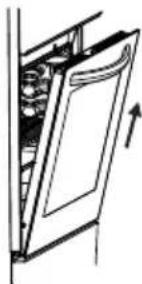
natural_image
Diagram of a door with internal compartments and an arrow indicating direction (no text or symbols)Removal of the Wire Shelf
To remove the wire rack, pull the wire rack as shown in the figure. After releasing it from the clips (a), lift it up.
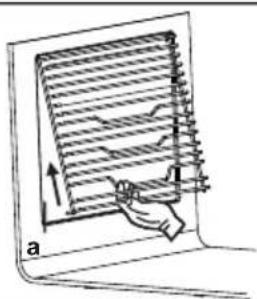
natural_image
Diagram of a laptop with a hand interacting with the screen, showing a grid layout and directional arrows (no text or symbols)5.2 MAINTENANCE
WARNING: The maintenance of this appliance should be carried out by an authorised service person or qualified technician only.
Changing the Oven Lamp
WARNING: Switch off the appliance and allow it to cool before cleaning your appliance.
- Remove the glass lens, then remove the bulb.
- Insert the new bulb (resistant to 300 °C) to replace the bulb that you removed (230 V, 15-25 Watt, Type E14).
- Replace the glass lens, and your oven is ready for use.
- The product contains a light source of energy efficiency class G.
• Light source can not be replaced by end user. After sales service is needed.
- The included light source is not intended for use in other applications.
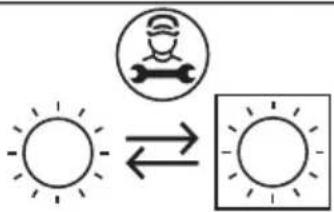
Replaceable light source by a professional

The lamp is designed specifically for use in household cooking appliances. It is not suitable for household room ination.
5.3 MAINTENANCE

WARNING: The maintenance of this appliance should be carried out by an authorised service person or qualified physician only.
Other Controls
• Periodically check expiration date of the gas connection pipe.
• Periodically check the gas connection pipe. If a defect is found, contact an authorised service provider to have it changed.
- If a defect is found while operating the control knobs of the appliance, contact an authorised service provider.
6. TROUBLESHOOTING&TRANSPORT
6.1 TROUBLESHOOTING

If you still have a problem with your appliance after checking these basic troubleshooting steps, please contact an authorised service person or qualified technician.
| Problem Possible Cause Solution | ||
| Hob burners do not work. | The burners may be in the 'off position. Supply gas pressure may not be correct. Power (if the appliance has an electric connection) is switched off. | Check the position of the control knob. Check the gas supply and gas pressure. Check whether there is power supplied. Also check that other kitchen appliances are working. |
| Hob burners do not light. | Burner cap and crown are not assembled correctly. Supply gas pressure may not be correct. LPG cylinder (if applicable) may be depleted. Power (if the appliance has an electric connection) is switched off. | Ensure the burner parts have been placed correctly. Check the gas supply and gas pressure. LPG cylinder may need replacing. Check whether there is power supplied. Also check that other kitchen appliances are working. |
| Flame colour is orange/yellow. | Burner cap and crown are not assembled correctly. Different gas compositions. | Ensure the burner parts have been placed correctly. Due to the design of the burner, the flame can appear to be orange/yellow in certain areas of the burner. If you operate the appliance with natural gas, city natural gas may have different compositions. Do not operate the appliance for a couple of hours. |
| Burner is not igniting or only partially lighting. | Burner parts may not be clean or dry. | Ensure that parts of the appliance are dry and clean. |
| Burner sounds noisy. | - | This is normal. The noise may reduce as they heat up. |
| Noise - | It is normal for some metal parts on the cooker to produce noise when in use. | |
| The hob or cooking zones cannot be switched on. | There is no power supply. | Check the household fuse for the appliance. Check whether there is a power cut by trying other electronic appliances. |
| The hob produces an odour during the first cooking sessions. | New appliance. | Heat a saucepan full of water on each cooking zone for 30 minutes. |
| Oven does not turn on. | Power is turned off. | Check whether there is power supplied. Also check that other kitchen appliances are working. |
| No heat or oven does not warm up. | Oven temperature control is incorrectly set. Oven door has been left open. | Check the oven temperature control knob is set correctly. |
| Cooking is uneven within the oven. | Oven shelves are incorrectly positioned. | Check that the recommended temperatures and shelf positions are being used.Do not frequently open the door unless you are cooking things that need to be turned. If you open the door often, the interior temperature will be lower and this may affect the results of your cooking. |
| Oven light (if available) does not operate. | Lamp has failed.Electrical supply is disconnected or switched off. | Replace lamp according to the instructions.Make sure the electrical supply is switched on at the wall socket outlet. |
| The timer buttons cannot be pressed properly. | There is foreign matter caught between the timer buttons.Touch model: there is moisture on the control panel.The key lock function is set. | Remove the foreign matter and try again.Remove the moisture and try again.Check whether the key lock function is set. |
| The oven fan (if available) is noisy. | Oven shelves are vibrating. | Check that the oven is level.Check that the shelves and any bake ware are not vibrating or in contact with the oven back panel. |
6.2 TRANSPORT
If you need to transport the product, use the original product packaging and carry it using its original case. Follow the transport signs on the packaging. Tape all independent parts to the product to prevent damaging the product during transport.
If you do not have the original packaging, prepare a carriage box so that the appliance, especially the external surfaces of the product, is protected against external threats.
7. TECHNICAL SPECIFICATIONS
7.1 INJECTOR TABLE
| G30 28-30 mbar 7,5 kW 545,3 g/hII2E+3+ FR Class:1 | NGG2020 mbar | LPGG30/G3128-30/37mbar |
| LARGE BURNER | ||
| DIA. of INJECTOR (1/100mm) 115 85 | ||
| NOMINAL RATING (kW) 2,9 3 | ||
| CONSUMPTION 276,2 l/h 218,1 g/h | ||
| MEDIUM BURNER | ||
| DIA. of INJECTOR (1/100mm) 97 65 | ||
| NOMINAL RATING (kW) 1,75 1,75 | ||
| CONSUMPTION | 166,6 l/h 127,2 | g/h |
| MEDIUM BURNER | ||
| DIA. of INJECTOR (1/100mm) 97 65 | ||
| NOMINAL RATING (kW) 1,75 1,75 | ||
| CONSUMPTION | 166., l/h 127,2 | g/h |
| SMALL BURNER | ||
| DIA. of INJECTOR (1/100mm) 72 50 | ||
| NOMINAL RATING (kW) | 1 | 1 |
| CONSUMPTION | 95,2 l/h | 72,7 g/h |
natural_image
Warning sign depicting a person pushing a large object inside a triangle (no text or symbols)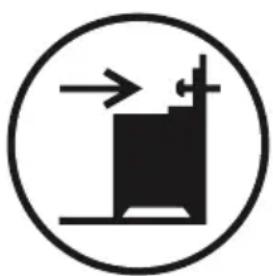
natural_image
Simple black-and-white icon of a building with directional arrows, enclosed in a circle (no text or symbols)natural_image
No sign depicting a crossed-out hammer or lever mechanism (no text or symbols)natural_image
Technical line drawing of a bolt fastening assembly (no text or symbols)3. CARATTERISTICHE DEL PRODOTTO

natural_image
Simple diagram of a knob with a central knob and surrounding circular housing, no text or symbols present.natural_image
Pure diagram of a mechanical component with no text, numbers, or symbolsPosizione MAX.
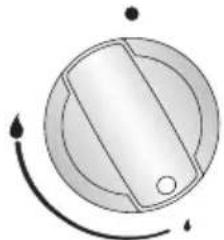
natural_image
Simple circular diagram with radial lines and arrows, no text or symbols presentPosizione MIN.
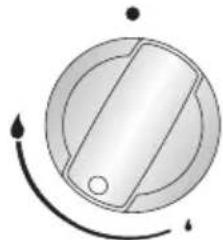
natural_image
Simple circular diagram with radial lines and arrows, no text or symbols presentnatural_image
Simple white line drawing of a stylized flower or droplet on a dark background (no text or symbols)natural_image
Solid dark square with two horizontal white lines on top and bottom (no text or symbols)natural_image
Abstract geometric symbol with three curved white lines on a dark gray background, no text or symbols present.natural_image
Abstract geometric design with a wavy white line above a dark square (no text or symbols)natural_image
Abstract icon with a wavy line above a stylized propeller or fan symbol on a dark background (no text or symbols)natural_image
Solid dark square with two horizontal white lines on top and bottom (no text or symbols)natural_image
Solid dark square with a thin white horizontal line above it, no text or symbols present.natural_image
Simple black square with a white zigzag line at the top (no text or symbols)natural_image
Simple icon of a storage unit with a wavy top line and a dark base (no text or symbols)natural_image
Technical line drawing of a square frame with bolt holes and a central circular hole (no text or symbols)Griglia metallica
natural_image
Technical line drawing of a metal grate plate with slats and rivets (no text or symbols)
AVVERTENZA
natural_image
Technical line drawing of a metal rack with a curved cover and an arrow indicating direction (no text or symbols)natural_image
Line drawing of a hand cleaning a car window with a tire, no text or symbols presentPulizia catalitica
natural_image
Technical line drawing of a door frame with internal compartments and mounting base (no text or symbols)natural_image
Technical line drawing of a mechanical component with an arrow indicating direction (no text or symbols)natural_image
Diagram of a door with a spring inside, showing an upward arrow (no text or symbols)natural_image
Two overlapping light gray semicircles on white background (no text or symbols)Continental Edison

- Continental Edison
- KIT ANTIBASCULEMENT
- CARACTÉRISTIQUES DU PRODUIT
- Fonction Gril :
- Grillage métallique
- AVERTISSEMENT Placez correctemer
- NETTOYAGE ET ENTRETIEN
- NETTOYAGE
- ENTRETIEN
- CARACTERÍSTICAS DEL PRODUCTO
- Parrilla
- ADVERTENCIA
- LIMPIEZA Y MANTENIMIENTO
- LIMPIEZA
- Limpieza catalítica
- MANTENIMIENTO
- CARACTERÍSTICAS DO PRODUTO
- Função de Cozinhar
- Função de Grelhar:
- Função de Grelhar
- Rede de Arame
- Limpeza catalítica
- Limpeza da Placa de Gás
- Limpar as Partes de Vidro
- Limpar as Partes Esmaltadas
- Thank you for choosing this product.
- CONTENTS
- SAFETY INSTRUCTIONS
- GENERAL SAFETY WARNINGS
- INSTALLATION WARNINGS
- DURING USE
- DURING CLEANING AND MAINTENANCE
- CE Declaration of conformity
- Disposal of your old machine
- INSTALLATION AND PREPARATION FOR USE
- INSTRUCTIONS FOR THE INSTALLER Ventilation requirements
- General instructions
- INSTALLATION OF THE COOKER
- GAS CONNECTION
- Assembly of gas supply and leakage check
- Points that must be checked during fixed gas connection assembly
- GAS CONVERSION (IF AVAILABLE)
- Changing injectors
- Hob burners
- Adjusting the minimum flame position:
- Determining the minimum flame position
- Changing the gas inlet
- ELECTRICAL CONNECTION AND SAFETY (IF AVAILABLE)
- WARNING: THE APPLIANCE MUST BE EARTHED.
- ANTI-TILTING KIT
- ADJUSTING THE FEET
- PRODUCT FEATURES
- USE OF PRODUCT
- Ignition of the burners
- Manual Ignition of the Gas Burners
- Electrical ignition by control knob
- Flame safety device
- HOB CONTROLS
- Hob burner
- WARNING:
- Main Oven Functions
- Defrost Function:
- Static Cooking
- Grilling Function:
- Grill and Fan
- Top Oven Functions
- Upper Heating
- Faster Grilling
- Time adjustment
- Key Lock
- Audible warning time adjustment
- Semi-automatic time adjustment (cooking period)
- Sound Adjustment
- The EasyFix Wire Rack
- The Deep Tray
- The Wire Grid
- WARNING Place the o
- CLEANING AND MAINTENANCE
- CLEANING
- Cleaning the Inside of the Oven
- Catalytic Cleaning
- Removal of Catalytic Liner
- Cleaning the Hotplate Heater (if available)
- Cleaning the Glass Parts
- Cleaning the Enamelled Parts
- Cleaning the Stainless Steel Parts (if available)
- Cleaning Painted Surfaces (if available)
- Removal of the Inner Glass
- Removal of the Oven Door
- Removal of the Wire Shelf
- MAINTENANCE
- Changing the Oven Lamp
- MAINTENANCE
- Other Controls
- TROUBLESHOOTING&TRANSPORT
- TROUBLESHOOTING
- TRANSPORT
- TECHNICAL SPECIFICATIONS
- INJECTOR TABLE
- CARATTERISTICHE DEL PRODOTTO
- Griglia metallica
- AVVERTENZA
- Pulizia catalitica
Brand : CONTINENTAL EDISON
Model : CECDF6060IBD
Category : Cooker