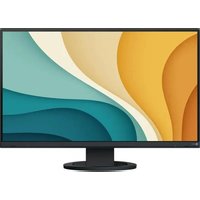
FlexScan EV2720S - Monitor EIZO - Free user manual and instructions
Find the device manual for free FlexScan EV2720S EIZO in PDF.


| Product Type | LCD Color Monitor |
| Brand | EIZO |
| Model | FlexScan EV2720S |
| Screen Size | 27 inches |
| Mounting | VESA 100 x 100 mm (plate thickness 2.6 mm) |
| Tilt Angle | From 5° to 45° downward |
| Connectivity | USB-C, Thunderbolt 3 |
| Power Consumption | ENERGY STAR compliant (details on EIZO website) |
| Warranty | 5 years or 30,000 hours (whichever first) |
| Care and Cleaning | Wipe with a soft, dry cloth; do not use abrasive products |
| Safety | Two persons required for lifting; lock button to remove stand; do not touch the interlocking part |
| Spare Parts and Repairability | Front bezel attachment available; parts kept for 5 years after production stop; repair or replacement under warranty |
| General Information | Manual available in multiple languages; compliant with EU 2019/2013; recycling via Swico (Switzerland) |
Frequently Asked Questions - FlexScan EV2720S EIZO
User questions about FlexScan EV2720S EIZO
0 question about this device. Answer the ones you know or ask your own.
Ask a new question about this device
Download the instructions for your Monitor in PDF format for free! Find your manual FlexScan EV2720S - EIZO and take your electronic device back in hand. On this page are published all the documents necessary for the use of your device. FlexScan EV2720S by EIZO.
USER MANUAL FlexScan EV2720S EIZO
User's Manual - Setup Guide
FlexScan® EV2720S
Color LCD Monitor
Setup Procedure 2
Attaching a Monitor Arm....6
LIMITED WARRANTY 10
Regulatory Compliance Notice......i
Information for Radio Interference ....ii
ENERGY STAR ^® ....ii
TCO Certified ....iii
Commission Regulation (EU) 2019 / 2021 ....iii
Product Information......iv
Recycling Information...... v
Contact Addresses......viii
Important
Please read PRECAUTIONS, this Setup Guide and the User's Manual carefully to familiarize yourself with safe and effective usage. Please retain this guide for future reference.
1

flowchart
graph TD
    A["File Handling"] --> B{Disassembly}
    B --> C["Computer Monitor Usage"]
    C --> D["Computer Display"]
    style A fill:#f9f,stroke:#333
    style B fill:#ccf,stroke:#333
    style C fill:#cfc,stroke:#333
    style D fill:#fcc,stroke:#333
*1 The lock button is only used to remove the stand from the monitor.
2
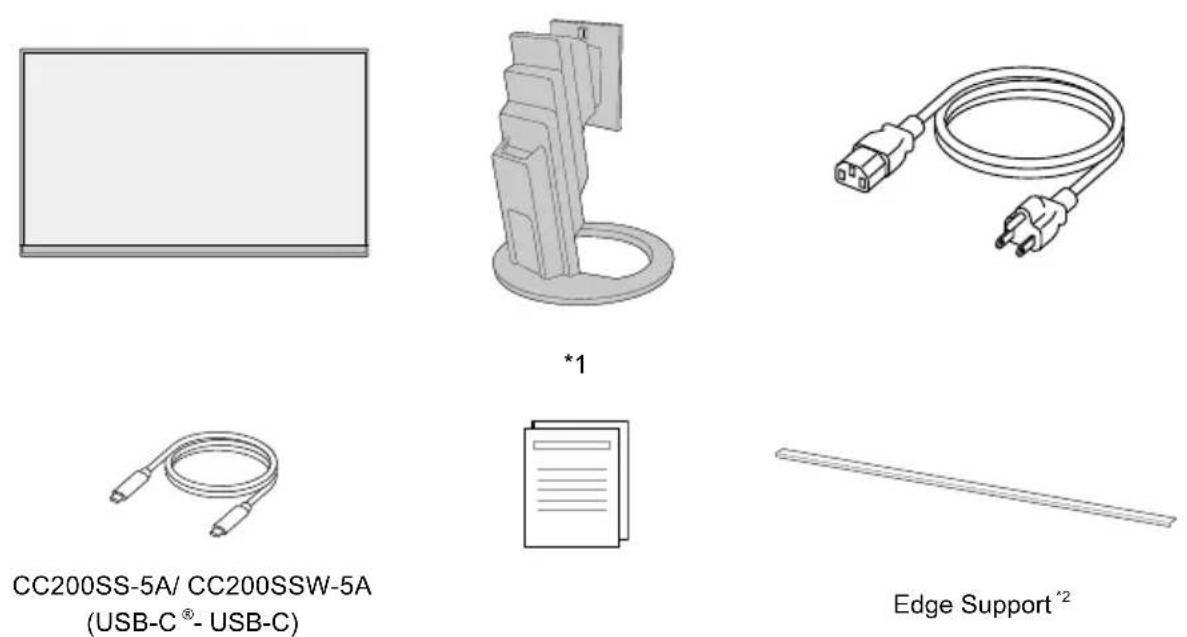
*1 Not included if you purchased the free mount type monitor.
*2 Included only with the free mount type monitor.
3
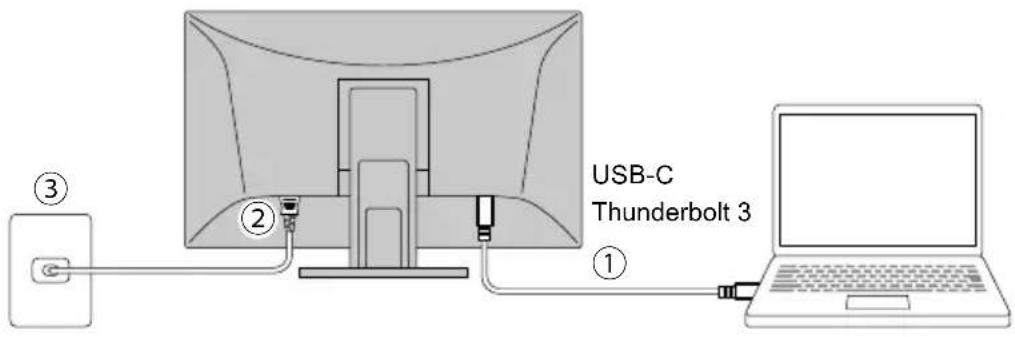
4
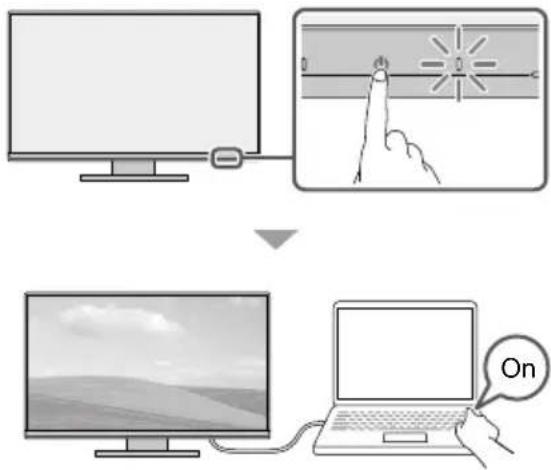
5
6
natural_image
Illustration of a computer monitor with a circular base and an upward arrow indicating motion (no text or symbols)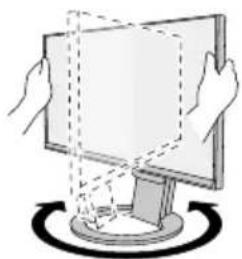
natural_image
Illustration of hands interacting with a computer monitor and a circular base (no text or symbols)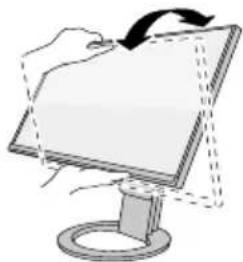
natural_image
Illustration of a hand holding a computer monitor with a curved arrow indicating rotation (no text or symbols)7
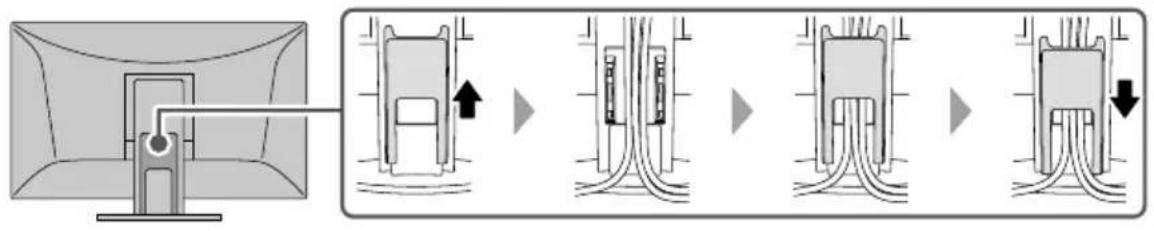
flowchart
graph LR
    A["Computer monitor"] --> B["Device with cable routing"]
    B --> C["Switching to cable routing unit"]
    C --> D["Switching to cable routing unit"]
    D --> E["Switching to cable routing unit"]
    E --> F["Switching to cable routing unit"]
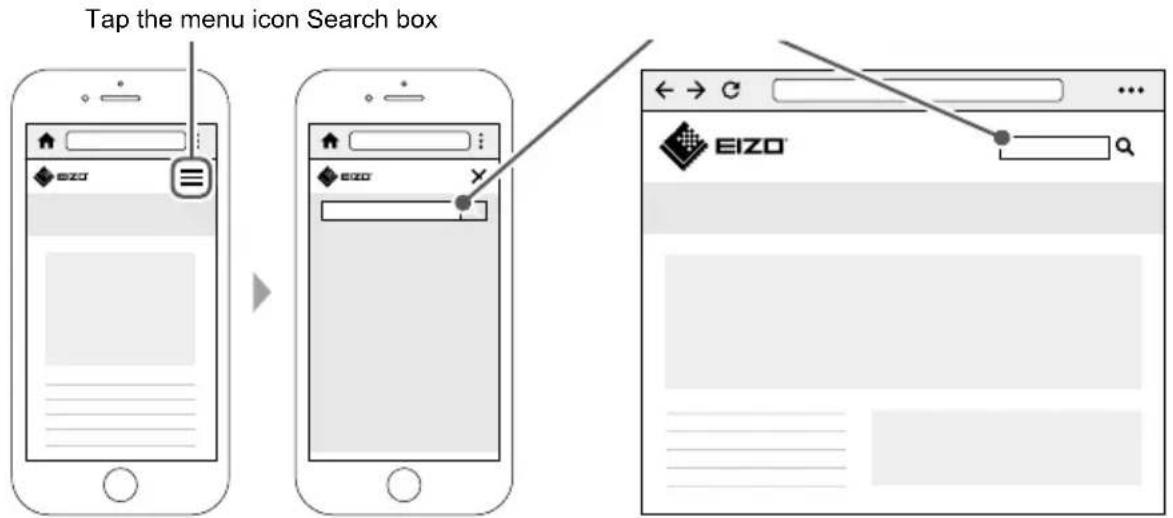
8 For the latest product information including the "User's Manual", refer to our web site: www.eizoglobal.com
Attaching a Monitor Arm
This product can be replaced with another arm or stand by removing the stand part ^*1 .
Attachable Arms and Stands
The attachable arms and stands are as follows.
| EIZO products Refer to | the EIZO Web site (www.eizoglobal.com). |
| Other manufacturer's products | VESA standard compliant arms or stands that meet the following conditions- Clearance between mounting part screw holes: 100 mm × 100 mm- Mounting part external dimensions: 122 mm × 122 mm or smaller- Plate thickness: 2.6 mm- Weight tolerance: Strong enough to support the weight of the monitor unit and attachments such as cables. |
Installation Conditions
The possible installation directions and tilt angle ranges are as follows.
| Orientation Tilt angle | ||||
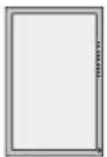 | 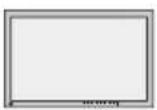 | 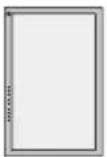 | 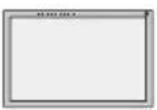 | 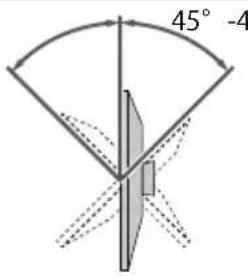 Between 45° upward to 45° downward Between 45° upward to 45° downward |
When used between 5° to 45° downward
When installing the monitor on a wall or suspended from the ceiling facing downward from 5° to 45°, be sure to install the “edge support” to the monitor unit. If you use the monitor without installing the edge support, the front panel surface of the monitor may come off. Also, it will not be covered by the product warranty. For how to install the edge support, refer to page 8. Some models don’t come with an edge support. When you need it, please contact the EIZO group company or distributor in your country or territory.
www.eizoglobal.com/contact/
| Installation method Tilt angle | |||
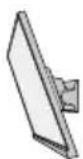 | 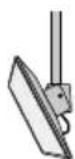 | 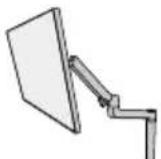 | 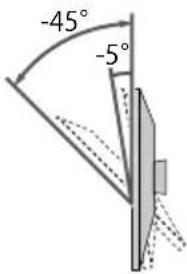 |
| Wall-mounted | Ceiling-mounted | Arm-mounted | Between 5° to 45° downward |
*1 If you purchased the free mount type monitor, the stand is not included.
Installing an Arm or Stand
If you purchased the free mount type monitor, skip steps 1 through 3.
- Raise the height of the monitor to the maximum height.
Attention
- If the monitor is not raised to the maximum height, there may be cases when the height of the monitor accidentally changes while removing the stand. This may be the cause of injury or damage.
- Lay a soft cloth on a stable surface, and place the monitor on top with the screen face down.
Attention
- When lifting a 27-inch or larger monitor, perform the work with two people.
-
Be careful not to press down on the screen with your hands or pinch your fingers.
-
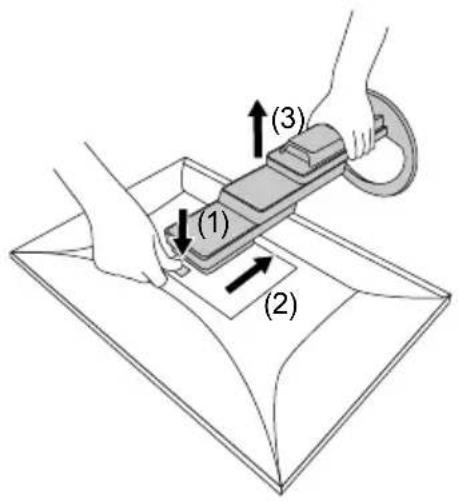
While pressing the lock button (1), firmly hold the stand brace, and slide the stand in the direction of the pedestal on the bottom (2). Then, lift up the stand (3).
Attention
- There is a protrusion on the fitting part of the removed stand. Be careful not to touch the fitting part.
-
Do not move the removed stand up and down. Doing so may result in injury or device damage.
-
Install the arm or stand on the monitor.
For the installation method, refer to the User's Manual for the arm or stand.
For installation, use commercially available screws that meet the following conditions:
- Nominal diameter: M4
- Length: between 8.6 mm and 11.6 mm (when using a washer, add the thickness of the washer)
Attention
- Regularly check the tightness of the screws. If they are insufficiently tightened, the monitor may come off, which may cause injury or device damage.
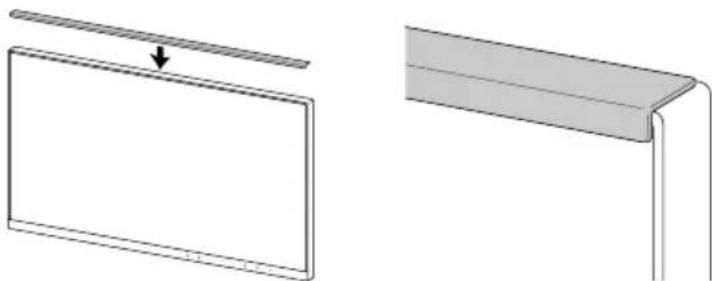
Edge Support Installation Method
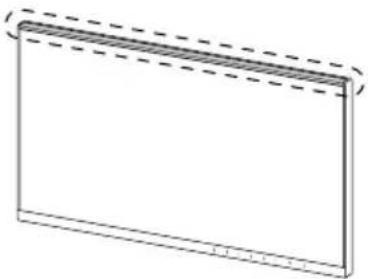
When installing the monitor facing downward between 5^ to 45^ , install the “edge support” on the monitor unit.
Location of installation
natural_image
Simple line drawing of a rectangular frame with dashed lines indicating top and bottom edges (no text or symbols)Installation procedure
Attention
- When installing an edge support, be careful not to press down on the screen with your hands. Pressing down on the LCD screen may cause it to become scratched or otherwise damaged.
-
Do not reuse an edge support that has previously been removed from a monitor. Also, do not use an edge support if its adhesive side is dirty or otherwise contaminated. Contamination causes decreases in adhesive ability.
-
Firmly wipe down the top portion of the monitor using a cleaning cloth or other such item.
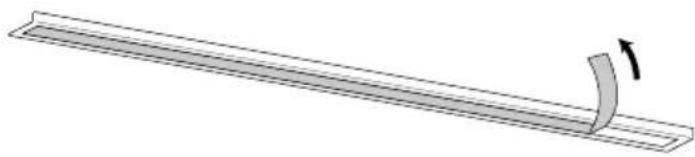
- Remove the release liner of the edge support's double-sided tape.
natural_image
Diagram of a curved strip with an arrow indicating upward motion (no text or symbols)- Have one corner of the edge support aligned with the inside of the frame. Do this while taking care to ensure that the double-sided tape of the edge support does not stick to the monitor.
natural_image
Diagram showing two views of a rectangular panel with an arrow pointing to it, one with a curved line extending downward (no text or symbols present)-
Install the edge support at the aligned position while ensuring that there are no gaps between the LCD panel surface and the edge support.
-
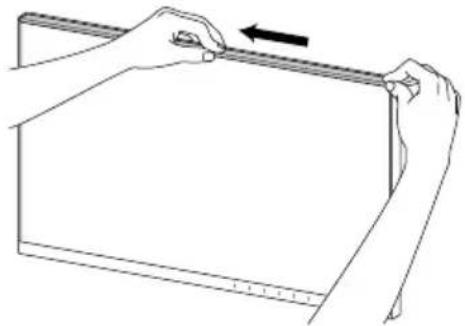
Using your finger, firmly rub down on the top surface of the edge support to ensure adhesion.
natural_image
Line drawing of two hands adjusting a rectangular object with a ruler, no text or symbols presentConfirm that the edge support is firmly adhered.
LIMITED WARRANTY
EIZO Corporation (hereinafter referred to as "EIZO") and distributors authorized by EIZO (hereinafter referred to as the "Distributors") warrant, subject to and in accordance with the terms of this limited warranty (hereinafter referred to as the "Warranty"), to the original purchaser (hereinafter referred to as the "Original Purchaser") who purchased the product specified in this document (hereinafter referred to as the "Product") from EIZO or Distributors, that EIZO and Distributors shall, at their sole discretion, either repair or replace the Product at no charge if the Original Purchaser becomes aware within the Warranty Period (defined below) that the Product malfunctions or is damaged in the course of normal use of the Product in accordance with the description in the instruction manual of the Product (hereinafter referred to as the "User's Manual").
The period of this Warranty is five (5) years from the date of purchase of the Product or 30,000 hours of usage time, whichever comes earlier (hereinafter referred to as the "Warranty Period"). EIZO and Distributors shall bear no liability or obligation with regard to the Product in relation to the Original Purchaser or any third parties other than as provided under this Warranty.
EIZO and Distributors will cease to hold or store any parts (excluding design parts) of the Product upon expiration of five (5) years after the production of the Product is discontinued. In repairing the Product, EIZO and Distributors will use renewal parts which comply with our QC standards. If the unit cannot be repaired due to its condition or the stockout of a relevant part, EIZO and Distributors may offer the replacement by a product with equivalent performance instead of repairing it.
The Warranty is valid only in the countries or territories where the Distributors are located. The Warranty does not restrict any legal rights of the Original Purchaser.
Notwithstanding any other provision of this Warranty, EIZO and Distributors shall have no obligation under this Warranty whatsoever in any of the cases as set forth below:
(a) Any defect of the Product caused by freight damage, modification, alteration, abuse, misuse, accident, incorrect installation, disaster, adherent dust, faulty maintenance and/or improper repair by third party other than EIZO and Distributors;
(b) Any incompatibility of the Product due to possible technical innovations and/or regulations;
(c) Any deterioration of the sensor, including measurement value of the sensor;
(d) Any defect of the Product caused by external equipments;
(e) Any defect of the Product caused by the use under environmental conditions not anticipated by EIZO;
(f) Any deterioration of the attachments of the Product (e.g. cables, User's Manual, CD-ROM, etc.);
(g) Any deterioration of the consumables, and/or accessories of the Product (e.g. batteries, remote controller, touch pen, etc.);
(h) Any exterior deterioration or discoloration of the Product, including that of the surface of the LCD panel, the touch panel and the protect panel;
(i) Any defect of the Product caused by placement in a location where it may be affected by strong vibrations or shocks;
(j) Any defect of the Product caused by leaking battery liquid;
(k) Any deterioration of display performance caused by the deterioration of expendable parts such as the LCD panel and/or backlight, etc. (e.g. changes in brightness, changes in brightness uniformity, changes in color, changes in color uniformity, defects in pixels including burnt pixels, etc.);
(I) Any deterioration or malfunction of the cooling fan caused by adherent dust.
To obtain service under the Warranty, the Original Purchaser must deliver the Product, freight prepaid, in its original package or other adequate package affording an equal degree of protection, assuming the risk of damage and/or loss in transit, to the local Distributor. The Original Purchaser must present proof of purchase of the Product and the date of such purchase when requesting services under the Warranty.
The Warranty Period for any replaced and/or repaired product under this Warranty shall expire at the end of the original Warranty Period.
EIZO OR DISTRIBUTORS ARE NOT RESPONSIBLE FOR ANY DAMAGE TO, OR LOSS OF, DATA OR OTHER INFORMATION STORED IN ANY MEDIA OR ANY PART OF ANY PRODUCT RETURNED TO EIZO OR DISTRIBUTORS FOR REPAIR.
EIZO AND DISTRIBUTORS MAKE NO FURTHER WARRANTIES, EXPRESSED OR IMPLIED, WITH RESPECT TO, INCLUDING, WITHOUT LIMITATION, THE PRODUCT AND ITS QUALITY, PERFORMANCE, MERCHANTABILITY OR FITNESS FOR ANY PARTICULAR USE.
IN NO EVENT SHALL EIZO OR DISTRIBUTORS BE LIABLE FOR ANY INCIDENTAL, INDIRECT, SPECIAL, CONSEQUENTIAL OR OTHER DAMAGE WHATSOEVER (INCLUDING, WITHOUT LIMITATION, DAMAGES FOR LOSS OF PROFIT, BUSINESS INTERRUPTION, LOSS OF BUSINESS INFORMATION, OR ANY OTHER PECUNIARY LOSS) ARISING OUT OF THE USE OR INABILITY TO USE THE PRODUCT OR IN ANY CONNECTION WITH THE PRODUCT, WHETHER BASED ON CONTRACT, TORT, NEGLIGENCE, STRICT LIABILITY OR OTHERWISE, EVEN IF EIZO OR DISTRIBUTORS HAVE BEEN ADVISED OF THE POSSIBILITY OF SUCH DAMAGES.
THIS EXCLUSION ALSO INCLUDES ANY LIABILITY WHICH MAY ARISE OUT OF THIRD PARTY CLAIMS AGAINST THE ORIGINAL PURCHASER. THE ESSENCE OF THIS PROVISION IS TO LIMIT THE POTENTIAL LIABILITY OF EIZO AND DISTRIBUTORS ARISING OUT OF THIS LIMITED WARRANTY AND/OR SALES.
Regulatory Compliance Notice...... i
Information for Radio Interference ....ii
ENERGY STAR ^® ....ii
TCO Certified ....iii
Commission Regulation (EU) 2019 / 2021 ....iii
Product Information......iv
Recycling Information...... v
Contact Addresses......viii
Wichtig
5
6
natural_image
Illustration of a computer monitor with hands holding its lid and a magnified view showing the front portion (no text or symbols)
natural_image
Illustration of hands interacting with a computer monitor and a circular base, no text or symbols present
natural_image
Illustration of a computer monitor with a hand holding a scroll, showing no text or symbols7
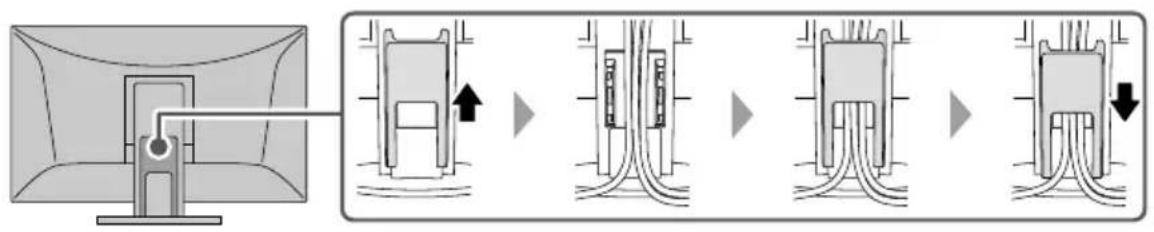
flowchart
graph LR
    A["Screen with cable"] --> B["Device with internal components"]
    B --> C["Electrical plug assembly"]
    C --> D["Final electrode or plug assembly"]
    style A fill:#f9f,stroke:#333
    style B fill:#ccf,stroke:#333
    style C fill:#cfc,stroke:#333
    style D fill:#fcc,stroke:#333
- Nenndurchmesser: M4
natural_image
Simple line drawing of a rectangular frame with dashed lines indicating top and bottom edges (no text or symbols)Installation
Achtung
natural_image
Pure diagram of a curved strip with an arrow indicating upward motion (no text or symbols)natural_image
Diagram showing two views of a rectangular panel with an arrow pointing to it, one with a curved edge and the other with a flat edge (no text or symbols)natural_image
Line drawing of hands holding a ruler or tab, with an arrow indicating measurement direction (no text or symbols present)Regulatory Compliance Notice......i
Information for Radio Interference ....ii
ENERGY STAR ^® ...... ii
TCO Certified ....iii
Commission Regulation (EU) 2019 / 2021 ....iii
Product Information....iv
Recycling Information...... v
Contact Addresses......viii
Important
5
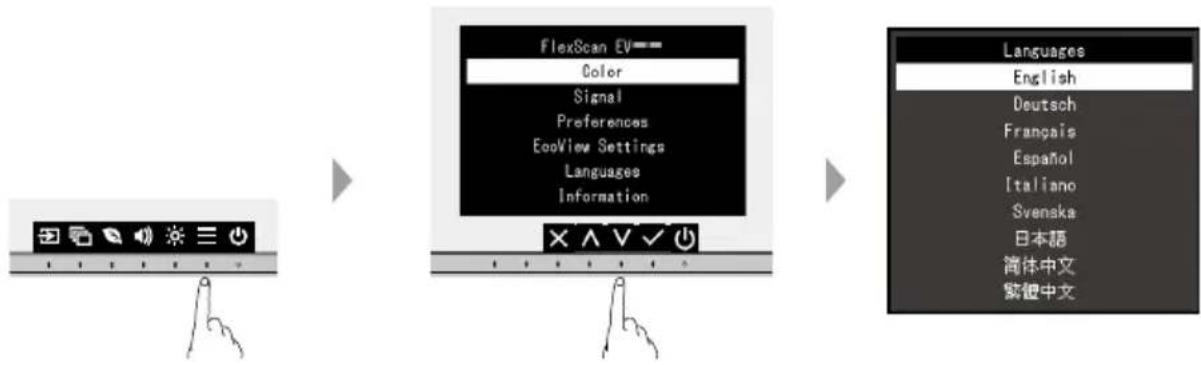
flowchart
graph LR
    A["Input Image"] --> B["FlexScan EV"]
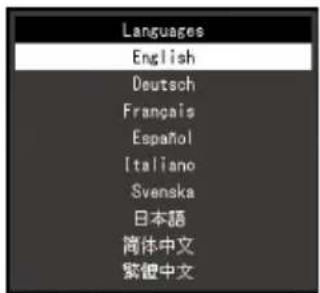
    B --> C["Language Selection"]
    C --> D["English Language Options"]
6
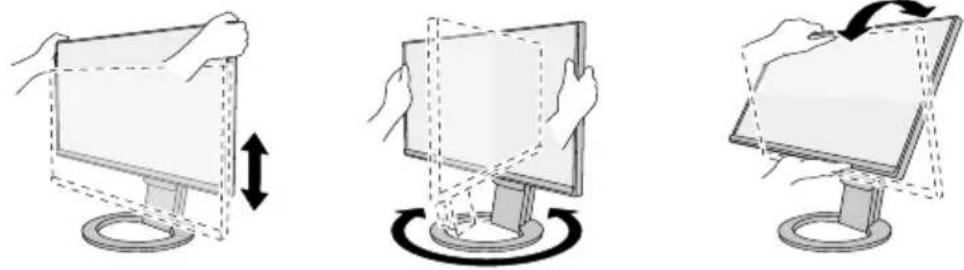
natural_image
Three-step diagram showing hand positioning of a computer monitor with a circular base, no text or symbols present7
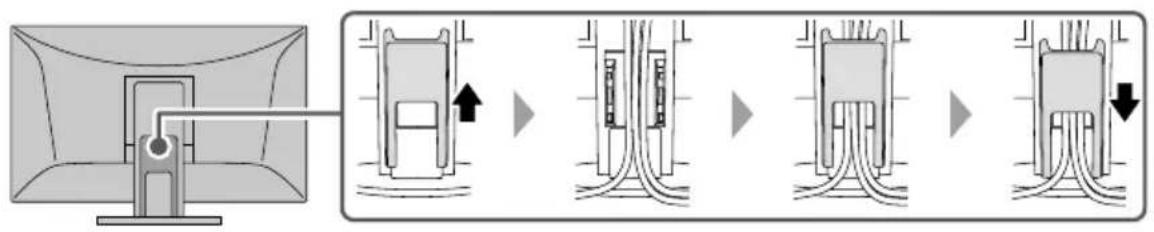
flowchart
graph LR
    A["Computer monitor"] --> B["Internal component with arrow indicating direction"]
    B --> C["Internal cable or plug assembly"]
    C --> D["Internal cable or plug assembly with arrow indicating direction"]
natural_image
Simple line drawing of a rectangular frame with dashed lines indicating top and bottom edges (no text or symbols)natural_image
Pure diagram of a curved pipe or channel with an arrow indicating direction (no text or symbols)natural_image
Diagram showing two views of a rectangular panel with an arrow pointing to it, one with a curved edge and the other with a straight line (no text or symbols)natural_image
Line drawing of hands holding a ruler on a rectangular object (no text or symbols)Regulatory Compliance Notice......i
Information for Radio Interference ....ii
ENERGY STAR ^® ....ii
TCO Certified ....iii
Commission Regulation (EU) 2019 / 2021 ....iii
Product Information......iv
Recycling Information...... v
Contact Addresses......viii
Важно!
5
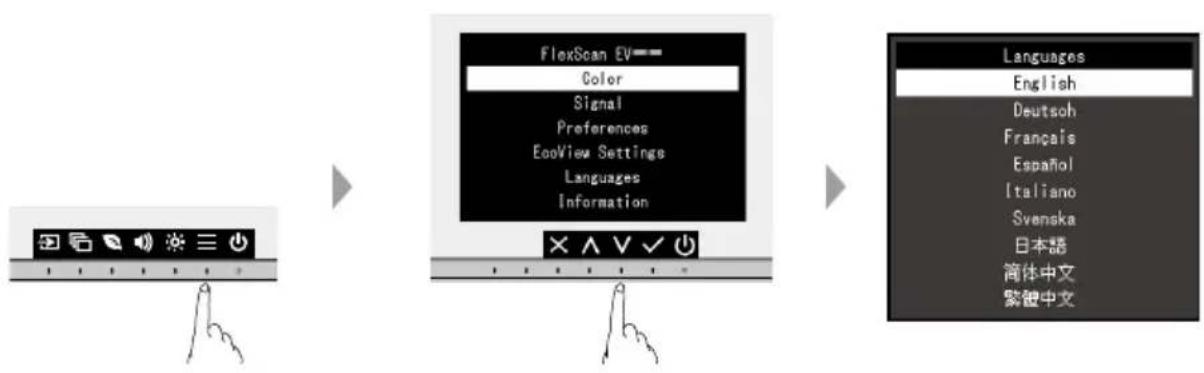
flowchart
graph LR
    A["Image Icon"] --> B["FlexScan EV"]
    B --> C["Language Table"]
    C --> D["English"]
    C --> E["Deutsch"]
    C --> F["Français"]
    C --> G["Espanol"]
    C --> H["Italiano"]
    C --> I["Svenska"]
    C --> J["日本語"]
    C --> K["简体中文"]
    C --> L["紫鍍中文"]
6
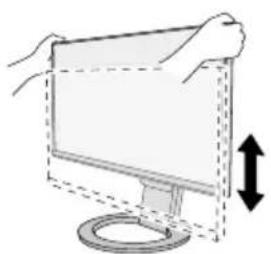
natural_image
Illustration of a computer monitor with a circular base and an upward arrow indicating motion (no text or symbols)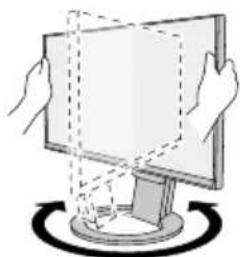
natural_image
Illustration of hands holding a computer monitor with a circular base and dashed lines indicating rotation (no text or symbols)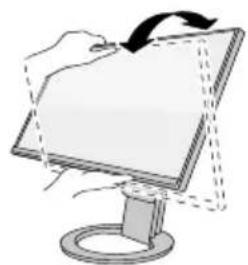
natural_image
Illustration of a hand holding a computer monitor with an arrow indicating rotation (no text or symbols present)7
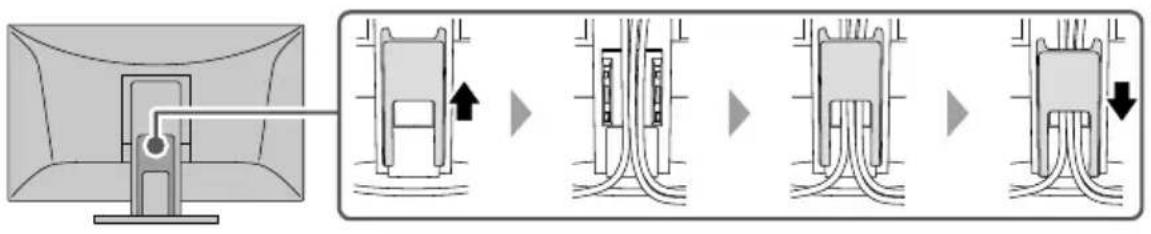
flowchart
graph LR
    A["Monitor"] --> B["Device"]
    B --> C["Switch"]
    C --> D["Switch"]
    D --> E["Switch"]
    E --> F["Switch"]
natural_image
Simple line drawing of a rectangular frame with dashed lines indicating rotation or alignment (no text or symbols)Процедура установки
Внимание
natural_image
Diagram of a curved strip with an arrow indicating upward motion (no text or symbols)natural_image
Diagram showing two views of a flat panel with a downward arrow, one with a curved edge and the other with a straight line (no text or symbols)natural_image
Line drawing of two hands holding a rectangular object with a horizontal bar, no text or symbols presentRegulatory Compliance Notice
Information for Radio Interference
| For U.S.A., Canada Only | |
| FCC Supplier's Declaration of Conformity | |
| We, the Responsible Party EIZO Inc. | |
| 5710 Warland Drive, Cypress, CA 90630 | |
| Phone: (562) 431-5011 | |
| declare that the product Trade name: EIZO | |
| Model: FlexScan EV2720S | |
| is in conformity with Part 15 of the FCC Rules. Operation of this product is subject to the following two conditions:(1) this device may not cause harmful interference, and (2) this device must accept any interference received,including interference that may cause undesired operation.This equipment has been tested and found to comply with the limits for a Class B digital device, pursuant to Part15 of the FCC Rules. These limits are designed to provide reasonable protection against harmful interference ina residential installation. This equipment generates, uses, and can radiate radio frequency energy and, if notinstalled and used in accordance with the instructions, may cause harmful interference to radio communications.However, there is no guarantee that interference will not occur in a particular installation. If this equipment doescause harmful interference to radio or television reception, which can be determined by turning the equipment offand on, the user is encouraged to try to correct the interference by one or more of the following measures.* Reorient or relocate the receiving antenna.* Increase the separation between the equipment and receiver.* Connect the equipment into an outlet on a circuit different from that to which the receiver is connected.* Consult the dealer or an experienced radio/TV technician for help.Changes or modifications not expressly approved by the party responsible for compliance could void the user'sauthority to operate the equipment.NoteUse the attached specified cable below or EIZO signal cable with this monitor so as to keep interference withinthe limits of a Class B digital device.- AC Cord- Shielded Signal Cable (enclosed) | |
| Canadian NoticeThis Class B information technology equipment complies with Canadian ICES-003.Cet équipement informatique de classe B est conforme à la norme NMB-003 du Canada. | |
Compliance labeling on the product itself can be found in the "Information" menu of the product. For details, refer to the User's Manual.
ENERGY STAR®
As an ENERGY STAR Partner, EIZO Corporation has determined that this product meets the ENERGY STAR guidelines for energy efficiency.
Power consumption may increase depending on product settings and connection conditions.
This product carries the TCO Certified designation (EcoView Optimizer 2: Off). TCO Certified is the leading independent sustainability certification for IT products.
A third-party certification according to ISO 14024

natural_image
Illustration of various electronic devices including desktops, laptops, headphones, and a projector (no text or symbols)
Toward sustainable IT products
Say hello to a more sustainable product
IT products are associated with a wide range of sustainability risks throughout their life cycle. Human rights violations are common in the factories. Harmful substances are used both in products and their manufacture. Products can often have a short lifespan because of poor ergonomics, low quality and when they are not able to be repaired or upgraded.
This product is a better choice. It meets all the criteria in TCO Certified, the world's most comprehensive sustainability certification for IT products. Thank you for making a responsible product choice, that help drive progress towards a more sustainable future!
Criteria in TCO Certified have a life-cycle perspective and balance environmental and social responsibility. Conformity is verified by independent and approved verifiers that specialize in IT products, social responsibility or other sustainability issues. Verification is done both before and after the certificate is issued, covering the entire validity period. The process also includes ensuring that corrective actions are implemented in all cases of factory non-conformities. And last but not least, to make sure that the certification and independent verification is accurate, both TCO Certified and the verifiers are reviewed regularly.
Want to know more?
Read information about TCO Certified, full criteria documents, news and updates at tcocertified.com. On the website you'll also find our Product Finder, which presents a complete, searchable listing of certified products.
Commission Regulation (EU) 2019 / 2021
This product complies with this regulation (input signal : DisplayPort).
Power consumption may increase depending on the product settings and connection status.
| Parameter | Parameter or value and precision Unit | |||
| 1. | EIZOplier's name or trademark | |||
| Supplier's address | EIZO Europe GmbH, Belgrader Straße 2, 41069 Mönchengladbach, Germany | |||
| 2. | Flue&Sealden 1720S | |||
| 3. | Energy efficiency class for Standard Dynamic Range (SDR) | D | ||
| 4. | 10.8 Mode power demand in SDR | |||
| 5. | n Energy efficiency class for High Dynamic Range (HDR) | |||
| 6. | n Can Mode power demand in HDR, if implemented | |||
| 7. | 0 Off Mode, power demand, if applicable | |||
| 8. | 0 Standby mode power demand, if applicable | |||
| 9. | n Networked standby mode power demand, if applicable | |||
| 10. | Electronic display category | |||
| 11. | Size ratio | |||
| 12. | 2500en1440 solution pixels | |||
| 13. | Screen diagonal | 68.5 | cm | |
| 14. | 2 Screen diagonal inches | |||
| 15. | Visible screen area | 20.0 | dm^2 | |
| 16. | Panel technology used | LCD | ||
| 17. | Automatic Brightness Control (ABC) available | No | ||
| 18. | Voice recognition sensor available | No | ||
| 19. | Room presence sensor available | No | ||
| 20. | 60age refresh frequency rate (default) | |||
| 21. | Minimum guaranteed availability of software and firmware updates (from the date of end of the placement on the market) | 5 | Years | |
| 22. | Minimum guaranteed availability of spare parts (from the date of end of the placement on the market) | 5 | Years | |
| 23. | Minimum guaranteed product support | 5 | Years | |
| Minimum duration of the general guarantee offered by the supplier | 5 | Years | ||
| 24. | ITrealsupply type | |||
| 25. | External power supply (non standardized and included in the product box) | |||
| i | - | |||
| ii | Input voltage | - | V | |
| iii | Output voltage | - | V | |
| 26. | External standardised suitable power supply (if not included in the product box) | |||
| i | - | |||
| ii | Required output voltage | - | V | |
| iii | Required delivered current (minimum) | - | A | |
| iv | Required current frequency | - | Hz | |
Recycling Information
English
The symbol of the crossed-out wheeled bin indicates that the product should not be disposed of as unsorted waste but must be sent to separate collection facilities for recovery and recycling. Please contact a distributor or an affiliate in your country for appropriate disposal and available collection systems of the product including cables. The contact addressees are listed on the EIZO website below. www.eizoglobal.com
For recycling information for customers in Switzerland, please refer to the following website. www.swico.ch
For customers in the United States, a free take-back program for the product and packaging materials is available. Please refer to the following website for details. www.eizo.com/warranty/recycling/
Deutsch
Please contact the EIZO group company or distributor in your country with any inquiries about purchasing or technical support. Visit the EIZO website for further contact information: www.eizoglobal.com
Manufacturer's Contact Addresses in Europe
| Company Address | |
| EIZO AG Moosacherstrasse 6, Au CH - 8820 Wädenswil, Switzerland | |
| EIZO Austria GmbH Pfarrgasse | 87 1230, Vienna, Austria |
| EIZO Europe GmbH Belgrader Straße 2, 41069 Mönchengladbach, Germany | |
| EIZO Europe GmbH Belgian Branch | Antwerpsesteenweg 22, 2860 Mechelen (Sint-Katelijne-Waver), Belgium |
| EIZO Europe GmbH Czech Branch | Meteor Centre Office Park “B”, Sokolovska 100/94, CZ-186 00 Praha-8, Karlin, Czech Republic |
| EIZO Europe GmbH Netherlands Branch | Dr. Holtroplaan 38, 5652 XR Eindhoven, The Netherlands |
| EIZO Europe GmbH Succursale per l'Italia | Via Torino 3/5 20814 Varedo (MB), Italy |
| EIZO Limited | 1 Queens Square, Ascot Business Park, Lyndhurst Road, Ascot, Berkshire SL5 9FE, UK |
| EIZO Nordic AB Lövängsvägen | 14 SE-194 45 Upplands Väsby, Sweden |
| ALSTOR ZOO ul. Wenecka 12, | 03-244 Warszawa, Poland |
| Aryan Comunicaciones, s.a. Avda. De La Industria 4 Natea Bussines Park 2B (Planta 3) ES-28108 Alcobendas, Spain | |
| Feeder S.A.S 564 Avenue des Rosiers, Le Parc des restanques II, Bat 3A, 13600 La Ciotat, France | |
| K&D Computer Systems Ltd 82 | Ayias, Phylaxeos Street, P.O. Box 55024 3820 Limassol, Cyprus |
| Odak Kimya Endüstri Ürünleri San.Tic.Ltd Şti. | Esentepe Mah. Cevizli D-100 Güney Yanyol Cad. Kartal Vizyon Sitesi D Blok No:13 İç Kapı No: 26 KARTAL -İSTANBUL |
| i-Micro Corporation Ltd 6, Militou street, 146 71, Nea Erythrea, Athens, Greece | |
Importer Addresses in Europe
| Company Address | |
| EIZO AG Moosacherstrasse 6, Au CH - 8820 Wädenswil, Switzerland | |
| EIZO Europe GmbH Belgrader Straße 2, 41069 Mönchengladbach, Germany | |
| EIZO Limited | 1 Queens Square, Ascot Business Park, Lyndhurst Road, Ascot, Berkshire SL5 9FE, UK |
| EIZO Nordic AB Lövängsvägen | 14 SE-194 45 Upplands Väsby, Sweden |
| ALSTOR ZOO ul. Wenecka 12, | 03-244 Warszawa, Poland |
| Aryan Comunicaciones, s.a. Avda. De La Industria 4 Natea Bussines Park 2B (Planta 3) ES-28108 Alcobendas, Spain | |
| Feeder S.A.S 564 Avenue des Rosiers, Le Parc des restanques II, Bat 3A, 13600 La Ciotat, France | |
| K&D Computer Systems Ltd 82 | Ayias, Phylaxeos Str., P.O. Box 55024 3820 Limassol, Cyprus |
| Odak Kimya Endüstri Ürünleri San.Tic.Ltd Şti. | Cevizli Mah. Zuhal Cad. Dumankaya Ritim İstanbul 60 Parsel Kat:13 Daire: 131-132 Maltepe-İstanbul Turkey |
| i-Micro Corporation Ltd 6, Militou street, 146 71, Nea Erythrea, Athens, Greece | |