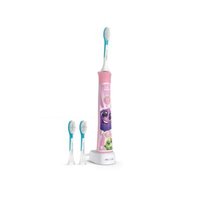
Sonicare For Kids HX6313 - Toothbrush PHILIPS - Free user manual and instructions
Find the device manual for free Sonicare For Kids HX6313 PHILIPS in PDF.


| Product Type | Electric toothbrush for children |
| Brand | Philips |
| Model | Sonicare For Kids HX6313 |
| Power | Rechargeable built-in lithium-ion battery |
| Charger | Detachable power supply HX6100 |
| Battery life | At least 28 2-minute brushings (14 days of use twice a day) |
| Charging time | Up to 24 hours for first full charge |
| Brushing modes | Low intensity mode (for younger children) and high intensity mode (for older children) |
| KidPacer feature | Interval timer dividing the mouth into 4 sections with melody to change area |
| KidTimer feature | Auto shut-off after 2 minutes (high mode) or 1 minute (low mode) with congratulatory melody |
| EasyStart feature | Gradual power increase over the first 14 brushings to get used to it |
| Connectivity | Bluetooth for connection to the Sonicare For Kids app (iOS and Android) |
| Mobile app | Sonicare For Kids with brushing tracking, parental dashboard, and rewards |
| Brush head | Philips Sonicare for Kids, replace every 3 months |
| Handle cleaning | Damp cloth; do not use sharp objects on the sealing joint |
| Brush head cleaning | Rinse after each use; clean the base with warm water once a week |
| Charger cleaning | Unplug and wipe with a damp cloth |
| Safety | Use under adult supervision; do not use if damaged; keep away from water |
| Warranty | 2 years from date of purchase |
| Spare parts | Sonicare for Kids brush heads, charger HX6100 |
| Repairability | No user-serviceable parts; contact Philips customer service |
| Intended use | Children aged 3 years and older (under adult supervision) |
| Bristle type | Soft, suitable for sensitive teeth and gums |
Frequently Asked Questions - Sonicare For Kids HX6313 PHILIPS
User questions about Sonicare For Kids HX6313 PHILIPS
0 question about this device. Answer the ones you know or ask your own.
Ask a new question about this device
Download the instructions for your Toothbrush in PDF format for free! Find your manual Sonicare For Kids HX6313 - PHILIPS and take your electronic device back in hand. On this page are published all the documents necessary for the use of your device. Sonicare For Kids HX6313 by PHILIPS.
USER MANUAL Sonicare For Kids HX6313 PHILIPS
natural_image
Illustration of a Philips sonicaure toothbrush with decorative swirls (no text or symbols on the device itself)
natural_image
Simple line drawing of an open book with a grid pattern on the left and a closed page on the right (no text or symbols)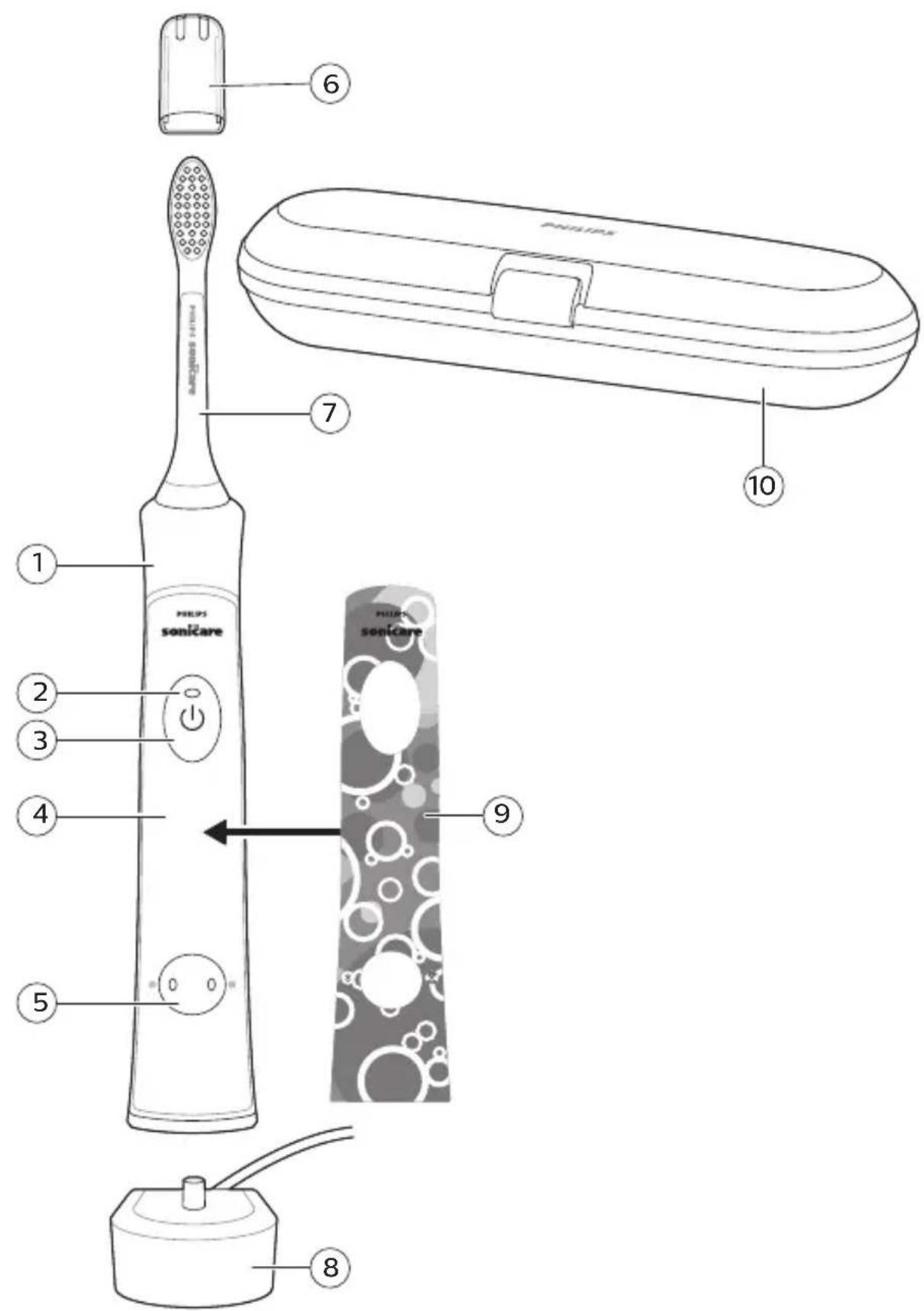
text_image
1 2 3 4 5 6 7 8 9 10 PHILIPS SONICARE PHILIPS SONICAREEnglish 6
Español 28
Français (Canada) 52
Introduction
Congratulations on your purchase and welcome to Philips! To fully benefit from the support that Philips offers, register your product at www.philips.com/welcome.
IMPORTANT SAFEGUARDS DANGERS WARNINGS
- Keep the chargers away from water.
- After cleaning, make sure the charger is completely dry before you connect it to the wall socket.
- This appliance can be used by children and persons with reduced physical, sensory or mental capabilities or lack of experience and knowledge if they have been given supervision or instruction concerning use of the appliance in a safe way and understand the hazards involved. Cleaning and user maintenance shall not be made by children without supervision.
- Children shall not play with the appliance.
- Only use original Philips accessories or consumables. Only use charger provided with the product. If supplied, only use the original USB cable and USB power supply unit.
- This appliance contains no user-serviceable parts. If the appliance is damaged, stop using it and contact the Consumer Care Center in your country. If the cord is damaged, replace the charger with a new one.
- Do not use the chargers outdoors or near heated surfaces.
-
Do not clean any part of the product in the dishwasher.
-
This appliance has only been designed for cleaning teeth, gums and tongue.
- Stop using a brush head with crushed or bent bristles. Replace the brush head every 3 months or sooner if signs of wear appear.
- Avoid direct contact with products that contain essential oils or coconut oil. Contact may result in bristles dislodging.
MEDICAL WARNINGS
- Stop using the appliance and consult your dentist/doctor if excessive bleeding occurs after use, if bleeding continues to occur after 1 week of use or if you experience discomfort or pain.
- If you have had oral or gum surgery in the previous 2 months, consult your dentist before you use this appliance.
- If you have a pacemaker or other implanted device, contact your doctor or the manufacturer of the implanted device prior to use.
- If you have medical concerns, consult your doctor before you use this appliance.
- This appliance is a personal care device and is not intended for use on multiple patients in a dental practice or institution.
Battery safety instructions
- This appliance contains batteries that are only removable by skilled persons.
- Only use the product for its intended purpose. Read this information carefully before you use the product and its batteries and accessories, and save it for future reference. Misuse can lead to hazards or serious injuries. Accessories supplied may vary for different products.
- Only use original Philips accessories and consumables. Only use detachable supply unit HX6100.
- Keep product and batteries away from fire and do not expose them to direct sunlight or high temperatures.
English
- If the product becomes abnormally hot or smelly, changes color or if charging takes longer than usual, stop using and charging the product and contact Philips.
- Do not place products and their batteries in microwave ovens or on induction cookers.
- Do not open, modify, pierce, damage or dismantle the product or battery to prevent batteries from heating up or releasing toxic or hazardous substances. Do not short-circuit, overcharge or reverse charge batteries.
- This appliance contains batteries that are non-replaceable. When the battery is at end of life, the appliance shall be properly disposed of, see section on Recycling.
- Charge, use and store the product at a temperature between 0 °C and 40 °C (41 °F and 104 °F).
FCC Compliance
Changes or modifications not expressly approved by Philips could void the user's FCC authorization to operate the toothbrush.
This device complies with Part 15 of FCC Rules. Operation is subject to the following two conditions: (1) this device may not cause harmful interference, and (2) this device must accept any interference received, including interference that may cause undesired operation.
This equipment has been tested and found to comply with the limits for a Class B digital device, pursuant to part 15 of the FCC Rules. These limits are designed to provide reasonable protection against harmful interference in a residential installation. This equipment generates, uses and can radiate radio frequency energy and, if not installed and used in accordance with the instructions, may cause harmful interference to radio communications. However, there is no guarantee that interference will not occur in a particular installation. If this equipment does cause harmful interference to
radio or television reception, which can be determined by turning the equipment (handle) off and on, the user is encouraged to try to correct the interference by one or more of the following measures:
- Reorient or relocate the receiving antenna (of the radio or television).
- Increase the separation between the equipment (handle) and receiver.
- Connect the equipment (charger) into an outlet on a circuit different from that to which the receiver is connected.
- Consult the dealer or an experienced radio/TV technician for help.
This device contains licence-exempt transmitter(s)/receiver(s) that comply with Innovation, Science and Economic Development Canada's licence-exempt RSS(s). Operation is subject to the following two conditions:
1 This device may not cause interference.
2 This device must accept any interference, including interference that may cause undesired operation of the device.
SAVE THESE INSTRUCTIONS
Storage and transportation conditions
Temperature -10°C to 60°C (14 °F to 140 °F).
The following symbols may appear on the product:
Read Operator's Manual.

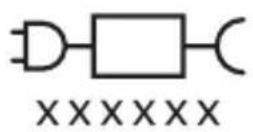
Detachable Power Supply Part: The "xxxxxx" indicates the model number of the approved chargers to be used. (TCBxxx, HX61xx)
Intended Use
Sonicare for Kids toothbrushes are intended to remove adherent plaque and food debris from the teeth to reduce tooth decay and improve and maintain oral health. Sonicare for Kids power toothbrushes are intended for personal use. Use by children should be with adult supervision.
Your Philips Sonicare (Fig 1.)
1 Handle
2 Battery indicator
3 Power On/off button
4 Panel for sticker
5 Brushing mode button with mode lights
Accessories:
6 Brush head cap
7 Brush head(s)
8 Charging base
9 Sticker
10 Travel case
Note: The accessories and features of different models vary. For example some models come with a travel case or are equipped with Bluetooth.
Sonicare app - Getting started
Download the Sonicare For Kids App to support healthy habit building. The App is compatible with wide range of iOS and Android (TM) smart devices.
Note: If your device is not Bluetooth capable you can still use the Sonicare For Kids app on iOS and Android (TM) smart devices to enhance your brushing experience.
To start using the Sonicare app:
1 Download the Sonicare For Kids app to your mobile device.
2 Ensure that Bluetooth for your device is turned on.
3 Open the app and follow the steps.
4 To connect your toothbrush with the app, turn on the toothbrush by pressing either the power on/off button or the brushing mode button.
Note: Make sure the toothbrush is not on the charger when you turn it on.
5 Create a Philips account for the parent dashboard via the app. Complete firmware update, if prompted, to access the latest improvements and features.
6 The app automatically connects with the toothbrush. If the toothbrush does not connect, follow the troubleshooting steps provided in the app.
Note: Keep your mobile device close to your toothbrush when you use your toothbrush. Make sure your mobile device is safe in a dry place.
App features
The Sonicare For Kids App provides the following features:
- Ability to track brushing patterns of child
- Parent Dashboard
- Used to view brushing patterns of child.
- Used to provide rewards when child has brushed without the App.
- Used to provide credit to continue brushing streak or fix a brushing streak.
Getting started
Applying your favorite sticker
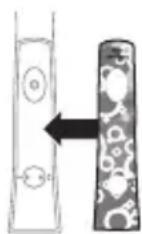
The Sonicare For Kids comes with replaceable stickers.
1 Apply your favorite sticker on the handle.
Note: Make sure you line up the cut-out areas on the sticker with the buttons on the front of the handle. Make sure the handle is clean and stickers are fully pressed onto the handle with no air gaps to ensure full adhesion.
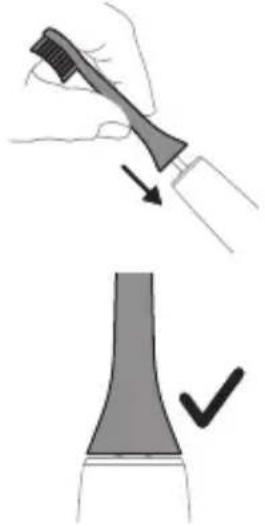
Attaching the brush head
natural_image
Illustration showing a hand holding a toothbrush and a close-up of a tooth with a checkmark indicating a detail (no text or symbols present)1 Align the brush head so the bristles point in the same direction as the front of the handle.
2 Firmly press the brush head down onto the metal shaft until it will not go any further.
Note: It is normal to see a slight gap between the brush head and the handle.
Using your Philips Sonicare for Kids toothbrush
If you are using your Sonicare for Kids toothbrush for the first time, it is normal to feel more vibration than when using a non-electric toothbrush. It is common for first-time users to apply too much pressure. Only apply gentle pressure and let the toothbrush do the brushing for you. Please follow the brushing instructions below for the best experience. To help you transition to your new Sonicare for Kids power toothbrush, it comes with the EasyStart feature activated. This feature gently increases the power over the first 14 brushings to help you adapt to brushing with a Philips Sonicare for Kids toothbrush.
Note: For children under age 8, it is recommended that a parent or adult caregiver perform toothbrushing.
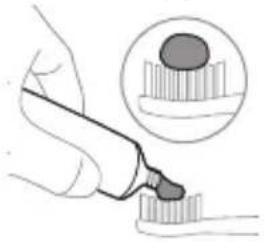
Brushing instructions
natural_image
Illustration of a hand using a pipette to apply liquid onto a tooth, with an inset showing a magnified view of the tooth (no text or symbols present)1 Wet the bristles and apply a small amount of toothpaste.
text_image
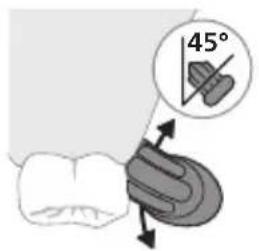
45°2 Place the toothbrush bristles against the teeth at a slight angle (45 degrees). Pressing firmly to make the bristles reach the gumline or slightly beneath the gumline.
Note: Keep the center of the brush in contact with the teeth at all times.
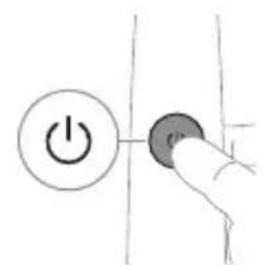
text_image
Hand-drawn diagram showing a power button with an 'Power' icon and a circular button, likely indicating a control or operation step.3 Press the power on/off button to switch on the Philips Sonicare.
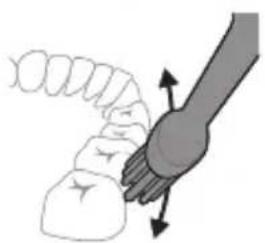
natural_image
Illustration of a hand holding a tool with directional arrows indicating movement or force (no text or symbols)4 Gently keep the bristles placed on the teeth and in the gumline. Brush your teeth with small back and forth motion so the bristles reach between the teeth. Continue this motion throughout your brushing cycle.
Note: The bristles should slightly flare. It is not recommended to scrub as you would with a manual toothbrush.
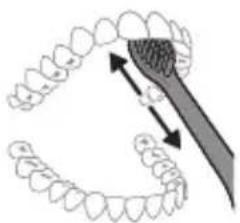
natural_image
Diagram showing dental tool interacting with teeth and jawbone structure (no text or labels)5 To clean the inside surfaces of the front teeth, tilt the brush handle semi-upright and make several vertical overlapping brushing strokes on each tooth.
6 After you have completed the brushing cycle, you can spend additional time brushing the chewing surfaces of your teeth and areas where extra attention is needed. You can also brush your tongue, with the toothbrush switched on or off, as you prefer.
Note: Your Philips Sonicare toothbrush is safe to use on braces (brush heads wear out sooner when used on braces) and dental restorations (fillings, crowns, veneers) if they are properly adhered and not compromised.
KidPacer
flowchart
graph TD
    A["①"] --> B["②"]
    B --> C["③"]
    C --> D["④"]
    D --> E["④"]
    style A fill:#f9f,stroke:#333
    style B fill:#ccf,stroke:#333
    style C fill:#cfc,stroke:#333
    style D fill:#fcc,stroke:#333
    style E fill:#ffc,stroke:#333
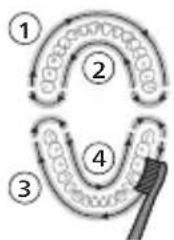
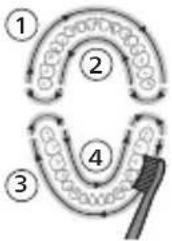
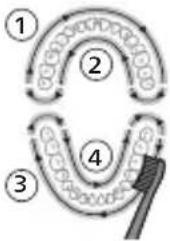
To make sure you brush evenly throughout the mouth, divide your mouth into 4 sections using the KidPacer feature. The KidPacer divides the brushing time into 4 equal segments and indicates when you should move to the next area. The segments are indicated with a short tune. The toothbrush automatically stops at the end of a brushing session with a congratulatory tune.
Note: Instruct your child to brush until they hear the congratulatory tune and the toothbrush switches off.
Modes
Low mode High mode
| Benefit Reduced power | Full-strength mode designed for older/independent brushes. | |
| mode used for training and introducing younger children to the sonic experience. | ||
| Recommended brush head | Sonicare for Kids Sonic Toothbrush Head | Sonicare for Kids Sonic Toothbrush Head |
| Total brushing time | 2 minutes (see KidTimer) | 2 minutes |
| How to brush | ||
 |  | |
Features
- KidPacer
- KidTimer
- EasyStart
KidPacer
The KidPacer is an interval timer that helps your child to brush evenly through the mouth by dividing your mouth into 4 sections.
KidTimer
- The KidTimer plays a congratulatory tune at the end of the pre-determined brushing time. Additionally, the KidTimer automatically switches off the handle when the brushing cycle is complete.
- When in high mode, the KidTimer is set at 2 minutes.
- When in low mode, the KidTimer is set at 1 minute and slowly increases over time. This slow increase in brushing time helps young children reach the dentist-recommended 2 minutes of brushing.
Note: Instruct your child to brush until they hear the congratulatory tune and the toothbrush switches off.
EasyStart
This Philips Sonicare model comes with the EasyStart feature activated. The EasyStart feature gently increases the power over the first 14 brushings to help you get used to brushing with the Philips Sonicare.
Note: Each of the first 14 brushings must be at least 1 minute in length to properly advance through the EasyStart ramp-up cycle.
To deactivate EasyStart (see 'Activating or deactivating features').
Activating or deactivating features
You can activate or deactivate the EasyStart feature:
Step 1: Place the handle on the charging stand.

Step 2: Press and hold power button for 2 seconds.
If you hear 1 beep, then the EasyStart feature has been deactivated.
OR
If you hear 2 beeps, then the EasyStart feature has been activated.
Step 3: Let go of the power button when you hear beep.
Note: Using the Easy-start feature beyond the initial ramp-up period is not recommended and reduces Sonicare's effectiveness in removing plaque.
Charging and battery status
This Philips Sonicare for Kids toothbrush is designed to provide at least 28 brushing sessions, each session lasting 2 minutes (14 days if used twice per day) on a fully charged battery. The battery indicator shows the battery status when you complete the 2-minute brushing session,
when you pause the toothbrush, or while it is charging.
Note: It can take up to 24 hours to fully charge the battery before first use, but you can use the Philips Sonicare toothbrush before it is fully charged.
Charging on charger
1 Plug the charger into an electrical outlet.
2 Place the handle on the charger.
- The handle emits 2 short beeps to confirm that the handle is placed properly.
- The flashing light of the battery indicator shows that the toothbrush is charging.
- When the handle is fully charged on the charger, the battery indicator lights up green for 10 seconds and then switches off.
Battery status
Battery status (handle on plugged-in charger)
When the handle is placed on the charger, the battery indicator shows the battery level.
Battery status Battery indicator
Charging Flashes green.
Full Lights up in solid green for 10
seconds and then switches off.
Battery status (when handle is not placed on charger)
When the toothbrush is awake, the battery indicator light on the power buttons shows the battery level.
Battery status Battery indicator Sound
| Full Lights up in green - | |
| Low Flashes green The handle emits 3 | beeps after brushing |
| Empty Flashes green The handle emits 2 | sets of beeps after brushing |
Note: To save energy, the battery indicator will switch off when not in use.
Note: When the battery is completely empty, the toothbrush switches off. Place the toothbrush on the charger to charge it.
Note: To keep the battery fully charged at all times, you may keep your toothbrush on the charger when not in use.
Cleaning
Toothbrush handle
natural_image
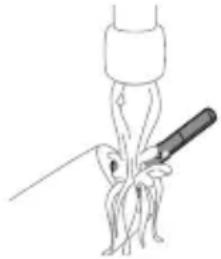
Simple line drawing of a fork being inserted into a bulb (no text or symbols)1 Remove the brush head and rinse the metal shaft area with warm water. Make sure you remove any residual toothpaste.
Caution: Do not push on the rubber seal on the metal shaft with sharp objects, as this may cause damage.
2 Wipe the entire surface of the handle with a damp cloth.
Note: Do not tap the handle on the sink to remove excess water.
Brush head
natural_image
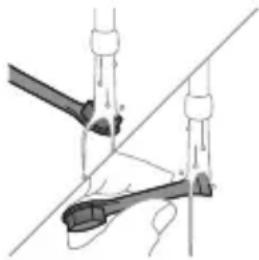
Diagram of a mechanical or electrical component with two arms and a central shaft, intersected by a diagonal line (no text or symbols)1 Rinse the brush head and bristles after each use. 2 Remove the brush head from the handle and rinse the brush head connection with warm water at least once a week. Rinse the travel cap as often as needed.
Charger
1 Unplug the charger before you clean it. 2 Wipe the surface of the charger with a damp cloth.
Travel case
Rinse with warm water and use a damp cloth to clean inside of travel case.
Storage
If you are not going to use the product for an extended period of time, unplug it from the electrical outlet, clean it and store it in a cool and dry place away from direct sunlight.
Replacement
Replace Philips Sonicare brush heads every 3 months to achieve optimal results. Only use Sonicare for Kids replacement brush heads.
Locating the model number
Look on the bottom of the Philips Sonicare toothbrush handle for the model number (HX63XX).
Warranty and support
Philips warrants its products for two years after the date of purchase. Defects due to faulty materials and workmanship will be repaired or replaced at Philips' expense provided that convincing proof of purchase in the qualifying period is provided. Philips recommends use of genuine Sonicare brush heads for optimal performance. Use of other brush heads may damage your Sonicare toothbrush and limit your warranty protection. Contact our Consumer Care Center at 1-800-682-7664 (North America), outside North America contact your local Philips Consumer Care Center. Internet information: www.sonicare.com (North America) or
www.philips.com/support (outside North America).
WARRANTY EXCLUSIONS
What is not covered under warranty:
- Brush heads.
- Damage caused by use of unauthorized replacement parts or unauthorized brush heads.
- Damage caused by misuse, abuse, neglect, alterations or unauthorized repair.
- Normal wear and tear, including chips, scratches, abrasions, discoloration or fading.
IMPLIED WARRANTIES
ANY IMPLIED WARRANTIES, INCLUDING IMPLIED WARRANTIES OF MERCHANTABILITY AND FITNESS FOR A PARTICULAR PURPOSE, SHALL BE LIMITED TO THE DURATION OF THE EXPRESS WARRANTIES SET FORTH ABOVE. IN SOME STATES LIMITATIONS ON DURATION OF IMPLIED WARRANTIES DO NOT APPLY.
LIMITATION OF REMEDIES
IN NO EVENT SHALL PHILIPS OR ANY OF ITS AFFILIATED OR SUBSIDIARY COMPANIES BE LIABLE FOR ANY SPECIAL, INCIDENTAL OR CONSEQUENTIAL DAMAGES BASED UPON BREACH OF WARRANTY, BREACH OF CONTRACT, NEGLIGENCE, TORT, OR ANY OTHER LEGAL THEORY. SUCH DAMAGES INCLUDE, WITHOUT LIMITATION, LOSS OF SAVINGS OR REVENUE; LOSS OF PROFIT; LOSS OF USE; THE CLAIMS OF THIRD PARTIES INCLUDING, WITHOUT
LIMITATION, DENTISTS AND DENTAL HYGIENISTS; AND COST OF ANY SUBSTITUTE EQUIPMENT OR SERVICES. SOME STATES DO NOT ALLOW THE EXCLUSION OR LIMITATION OF INCIDENTAL OR CONSEQUENTIAL DAMAGES.
Disposal
text_image
RECYCLE RBRC 7800.822.8837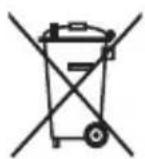
- This product contains a rechargeable lithium-ion battery which must be disposed of properly.
- Contact your local town or city officials for battery disposal information. You can also call 1-800-822-8837 or visit www.call2recycle.org for battery drop-off locations.
- For assistance, visit our website www.philips.com/support or call 1-800-682-7664 toll free.
- Your product is designed and manufactured with high quality materials and components, which can be recycled and reused. For recycling information, please contact your local waste management facilities or visit www.recycle.philips.com.
- This symbol means that electrical products and batteries shall not be disposed of with normal household waste.
The built-in rechargeable battery must only be removed by a qualified professional when the appliance is discarded. Before removing the
battery, make sure that the battery is completely empty.
Note: In this product, perchlorate material is present in lithium coin cells and/or batteries. Special handling may apply for these materials, for more information, go to:
www.dtsc.ca.
gov/hazardouswaste/perchlorate
Removing the rechargeable battery
CONTAINS LITIHIUM-ION RECHARGEBALE CELL. MUST BE RECYCLED OR DISPOSED OF PROPERLY.
The built-in rechargeable battery must only be removed by a qualified professional when the appliance is discarded. Before removing the battery, make sure that the battery is completely empty.
Take any necessary safety precautions when you handle tools to open the appliance and when you dispose of the rechargeable battery. Be sure to protect your eyes, hands, fingers, and the surface on which you work.
When you handle batteries, make sure that your hands, the product and the batteries are dry.
To avoid accidental short-circuiting of batteries after removal, do not let battery
terminals come into contact with metal objects (e.g. coins, hairpins, rings). Do not wrap batteries in aluminum foil. Tape battery terminals or put batteries in a plastic bag before you discard them.
To remove the rechargeable battery, you need a flat-head (standard) screwdriver. Observe basic safety precautions when you follow the procedure outlined below.
1 To deplete the rechargeable battery of any charge, remove the handle from the charger, turn on the Philips Sonicare for Kids and let it run until it stops. Repeat this step until you can no longer turn on the Philips Sonicare for Kids.
2 Remove and discard the brush head.
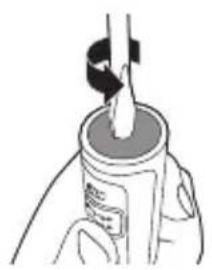
3 Insert a screwdriver into the slot located in the bottom of the handle and turn counterclockwise until you see a gap between the bottom cap and the handle.
4 Insert the screwdriver into the gap and pry the bottom cap out of the handle.
5 Hold the handle upside down and push down on the shaft to release the internal components of the handle.
natural_image
Illustration of a bottle being dispensed into a container with a tool (no text or symbols visible)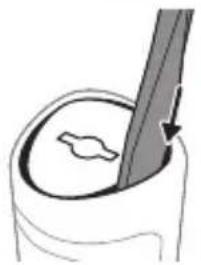
natural_image
Illustration of a hand holding a pen with a circular object inside, no text or symbols present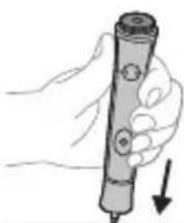
natural_image
Hand holding a pen with a downward arrow, no text or symbols visible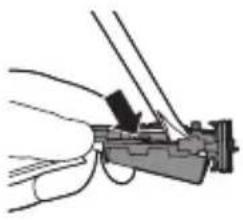
natural_image
Illustration of a hand holding a mechanical device with wires and a clip (no text or symbols)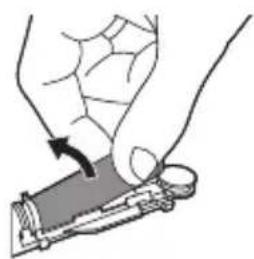
natural_image
Illustration of a hand holding a small object with an arrow indicating motion (no text or symbols)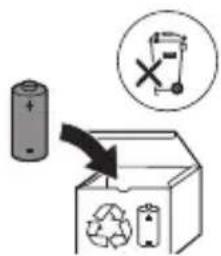
text_image
Diagram illustrating a recycling process with a battery, recycling symbol, and labeled components including a recycling bin and a trash can.6 Insert the screwdriver under the circuit board, next to the battery connections, and twist to break the connections. Remove the circuit board and pry the battery from the plastic carrier.
7 Grab the battery and pull it away from the internal components to break the second metal battery tab.
Caution: Be aware of the sharp edges of the battery tabs so as to avoid injury to your fingers.
8 Cover the battery contacts with tape to prevent any electrical short from residual battery charge.
The rechargeable battery can now be recycled and the rest of the product discarded appropriately.
Note: Do not throw away the appliance with the normal household waste at the end of its life, but hand it in at an official collection point for recycling. By doing this, you help to preserve the environment.
Introducción
natural_image
Illustration of a hand holding a toothbrush with an arrow indicating force or movement (no text or symbols)natural_image
Simple line drawing of a curved object with a checkmark indicating a detail (no text or symbols)natural_image
Illustration of a hand applying a toothbrush to a tooth, with an inset showing a magnified view of the tooth (no text or symbols present)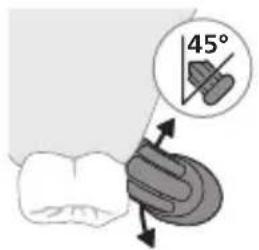
text_image
45°text_image
Hand-drawn diagram showing a power button with an 'Power' icon and a button labeled 'OK' pointing to it.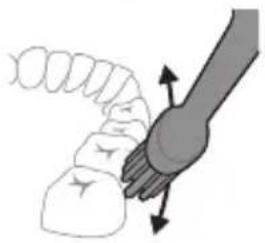
natural_image
Diagram of a mechanical joint or connector with directional arrows indicating movement (no text or symbols)natural_image
Diagram showing dental tool interacting with teeth and jawbone structure (no text or labels)natural_image
Line drawing of a medical procedure with a needle inserted into a tube (no text or symbols)natural_image
Diagram of a mechanical or electrical component with two vertical rods and a central rod, intersected by a diagonal line (no text or symbols)GARANTÍAS IMPLÍCITAS
text_image
RECYCLE RBRC 7800.822.8837gov/hazardouswaste/perchlorate
text_image
Diagram illustrating a recycling process with a battery, recycling symbol, and labeled components including a recycling bin and a trash can.natural_image
Simple line drawing of an open book with no text or symbols visible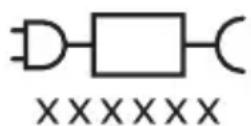
natural_image
Illustration showing a hand holding a toothbrush and a close-up of a tooth with a checkmark indicating a detail (no text or symbols present)natural_image
Illustration of a hand using a pipette to apply liquid onto a surface, with an inset showing a droplet on a surface (no text or symbols present)text_image
Hand-drawn diagram showing a power button with an 'OK' icon and a circular button, likely indicating a control or operation step.natural_image
Illustration of a hand holding a segmented object with directional arrows indicating movement (no text or symbols)natural_image
Illustration of dental tool interacting with teeth (no text or symbols)natural_image
Illustration of a medical procedure showing a needle inserted into a surgical instrument (no text or symbols present)natural_image
Diagram of a mechanical or electrical component with two arms and a diagonal line, no visible text or symbolsEXCLUSIONS DE GARANTIE
text_image
RECYCLE RBRC 1800.822.8837gov/hazardouswaste/perchlorate
Retrait de la pile rechargeable
CONTIENT UNE PILE RECHARGEABLE AU LITHIUM-ION. DOIT ÊTRE RECYCLÉ OU ÉLIMINÉ DE MANIÈRE APPROPRIÉE.
text_image
Diagram illustrating a recycling process with a battery, recycling symbol, and labeled components including a recycling bin and a trash can.www.philips.com/Sonicare
www.philips.ca/sonicare
©2023 Koninklijke Philips N.V. (KPNV). All rights reserved.
Philips and the Philips shield are trademarks of KPNV.
Sonicare and the Sonicare logo are trademarks
of Philips Oral Healthcare, LLC and/or KPNV.
©2023 Koninklijke Philips N.V. (KPNV). Tous droits réservés.
Philips Oral Healthcare, LLC.
22100 Bothell Everett Highway
Bothell, WA 98021
300011511471 (05/01/2023)

text_image
PHILIPS
75 % recycled paper
75 % papier recyclé