HA4ID11CS80 - Dishwasher HOTPOINT - Free user manual and instructions
Find the device manual for free HA4ID11CS80 HOTPOINT in PDF.


| Product Type | Built-in dishwasher |
| Brand | Hotpoint |
| Model | HA4ID11CS80 |
| Programs | Eco 50°, Intensive 65°, Mixed 55°, Quick 40', Half Load 55° |
| Energy consumption (Eco cycle) | 0.72 kWh |
| Water consumption (Eco cycle) | 8.7 L |
| Eco program duration | 3 h 35 min |
| Capacity | 12 place settings (estimate) |
| Drying system | ActiveDry with automatic door opening |
| Baskets | Height-adjustable upper basket, lower basket, cutlery compartment (3rd basket) |
| Fold-down flaps | Yes, on upper basket |
| Water softener | Yes, with salt reservoir and hardness adjustment |
| Rinse aid dispenser | Yes, adjustable dose (1-5) |
| Detergent dispenser | Yes, with pre-wash compartment |
| Filters | 3-piece filter set, cleanable |
| Spray arms | Upper and lower, removable for cleaning |
| Additional functions | Half load, delayed start (not specified) |
| Noise level | Not specified |
| Dimensions (W x D x H) | Not specified (standard 60 x 60 x 85 cm approx.) |
| Net weight | Not specified |
| Power supply | 230 V / 50 Hz (standard estimate) |
Frequently Asked Questions - HA4ID11CS80 HOTPOINT
User questions about HA4ID11CS80 HOTPOINT
0 question about this device. Answer the ones you know or ask your own.
Ask a new question about this device
Download the instructions for your Dishwasher in PDF format for free! Find your manual HA4ID11CS80 - HOTPOINT and take your electronic device back in hand. On this page are published all the documents necessary for the use of your device. HA4ID11CS80 by HOTPOINT.
USER MANUAL HA4ID11CS80 HOTPOINT
THANK YOU FOR BUYING A HOTPOINT ARISTON PRODUCT.
In order to receive a more complete assistance, please register your appliance on: www.hotpoint.eu/register

Before using the appliance carefully read Safety and Installation Instructions.
After installation, please remember to remove all transport protection parts from the dishwasher.
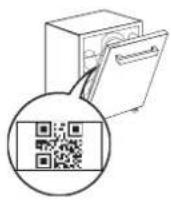
PLEASE SCAN THE QR CODE ON YOUR APPLIANCE IN ORDER TO HAVE MORE DETAILED INFORMATION
PRODUCT DESCRIPTION
APPLIANCE
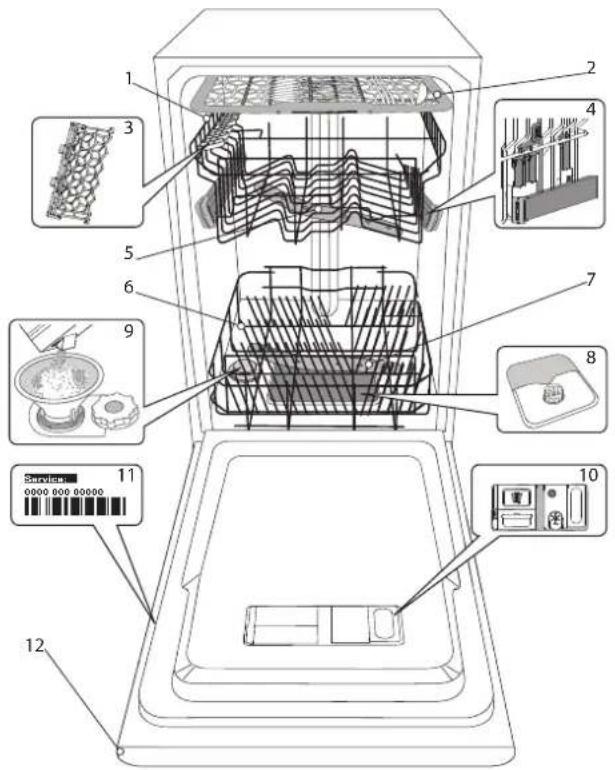
- Upper rack
- Cutlery rack
- Foldable flaps
- Upper rack height adjuster
- Upper spray arm
- Lower rack
- Lower spray arm
- Filter Assembly
- Salt reservoir
- Detergent and Rinse Aid dispensers
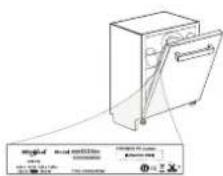
- Rating plate
- Control panel
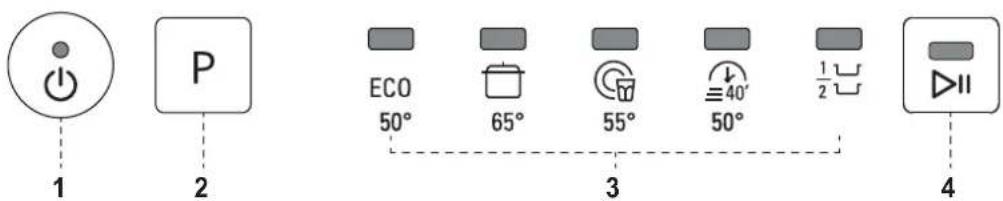
CONTROL PANEL

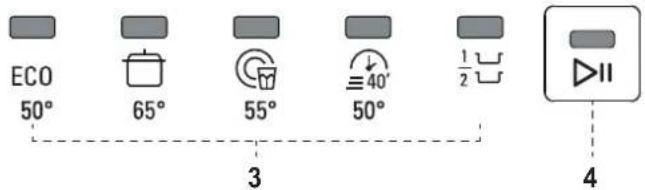
- ON-OFF / Reset button with indicator light
- Program selection button
- Program indicator lights
- START/Pause button with indicator light
FIRST TIME USE
SALT, RINSE AID AND DETERGENT
ADVICE REGARDING THE FIRST TIME USE
After installation, remove the stoppers from the racks and the retaining elastic elements from the upper rack.
FILLING THE SALT RESERVOIR
The use of salt prevents the formation of LIMESCALE on the dishes and on the machine's functional components.
- It is mandatory that THE SALT RESERVOIR NEVER BE EMPTY.
- It is important to set the water hardness.
The salt reservoir is located in the lower part of the dishwasher (see Product Description) and must be filled when the green float on the cap of the salt reservoir is no longer visible..
natural_image
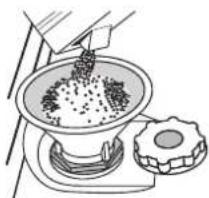
Illustration of a hand pouring granular material into a bowl on a stand next to a sliced dragon fruit (no text or symbols)- Remove the lower rack and unscrew the reservoir cap (anticlockwise).
- Only the first time you do this: fill the salt reservoir with water.
- Position the funnel (see figure) and fill the salt reservoir right up to its edge (approximately 1 kg); it is not unusual for a little water to leak out.
- Remove the funnel and wipe any salt residue away from the opening.
Make sure the cap is screwed on tightly, so that no detergent can get into the container during the wash program (this could damage the water softener beyond repair).
Whenever you need to add salt, it is mandatory to complete the procedure before the beginning of the washing cycle to avoid corrosion.
SETTING THE WATER HARDNESS
To allow the water softener to work in a perfect way, it is essential that the water hardness setting is based on the actual water hardness in your house. This information can be obtained from your local water supplier. The factory sets the default value for the water hardness
- Switch on the appliance by pressing the ON/OFF button.
- Switch off the appliance by pressing the ON/OFF button.
- Hold down button P for 5 seconds, until you hear a beep.
- Switch on the appliance by pressing the ON/OFF button.
• The program indicator light of the current set level flashes. - Press button P to select the desired hardness level (see WATER HARDNESS TABLE).
| Water Hardness Table | |||||
| Level | °dHGerman degrees | °fHFrench degrees | °ClarkEnglish degrees | ||
| 1 | 500-60-100-7 | ||||
| 2 | Medium 7-11 | 11-20 | 8-14 | ||
| 3 | Average | 12-16 | 21-29 | 15-20 | |
| 4 | Hard | 17-34 | 30-60 | 21-42 | |
| 5 | Very hard | 35-50 | 61-90 | 43-62 | |
- Switch off the appliance by pressing the ON/OFF button.
Setting is complete!
As soon as this procedure is complete, run a program without loading. Only use salt that has been specifically designed for dishwashers.
After the salt has been poured into the machine, the SALT REFILL indicator light switches off.
If the salt container is not filled, the water softener and the heating element may be damaged as a result of limescale accumulation. Using of Salt is recommended with any type of dishwasher detergent.
FILLING THE RINSE AID DISPENSER
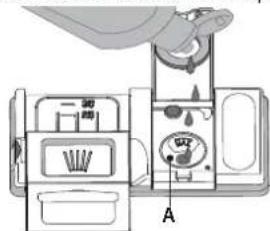
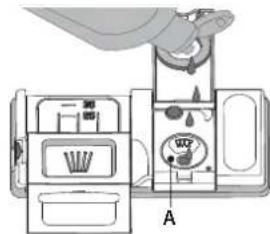
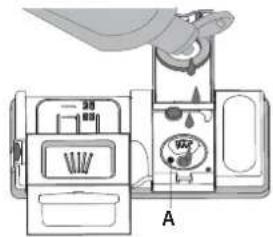
Rinse aid makes dish DRYING easier. The rinse aid dispenser A should be filled when when the dark optical indicator on the dispenser door C becomes transparent.
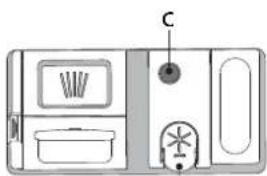
B
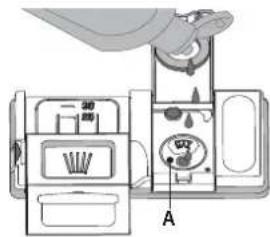
- Open the dispenser B by pressing and pulling up the tab on the lid.
- Pour in the rinse aid (max.110 ml), making sure it does not overflow from the dispenser. If this happens, clean the spill immediately with a dry cloth.
- Press the lid down until you hear a click to close it. NEVER pour the rinse aid directly into the appliance tub.
ADJUSTING THE DOSAGE OF RINSE AID
If you are not completely satisfied with the drying results, you can adjust the quantity of rinse aid used.
- Switch the dishwasher on using the ON/OFF button.
- Switch it off using the ON/OFF button.
- Press button P three times - a beep will be heard.
- Switch it on using the ON/OFF button.
• The program indicator light of the current set level flashes. - Switch it off using the ON/OFF button
Setting is complete!
- Press button P to select the level of rinse aid quantity to be supplied.
If the rinse aid level is set to 1 (ECO), no rinse aid will be supplied.
A maximum of 5 levels can be set according to the dishwasher model. The factory setting is specific to the model, please follow instruction above to check this for your machine.
- If you see bluish streaks on the dishes, set a low number (2-3).
- If there are drops of water or limescale marks on the dishes, set a mid-range number (4-5).
FILLING THE DETERGENT DISPENSER
To open the detergent dispenser use the opening device D. Introduce the detergent into the dry dispenser E only. Place the amount of detergent for pre-washing directly inside the tub.
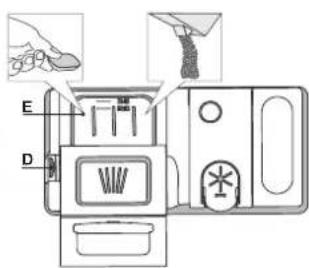
- When measuring out the detergent refer to the mentioned earlier information to add the proper quantity. Inside the dispenser E there are indications to help the detergent dosing.
- Remove detergent residues from the edges of the dispenser and close the cover until it clicks.
- Close the lid of the detergent dispenser by pulling it up until the closing device is secured in place.
The detergent dispenser automatically opens up at the right time according to the program.
Usage of detergent not designed for dishwashers may cause malfunction or damage to the appliance.
PROGRAMS TABLE
| Program | Drying phase | ActiveDry ^* | Duration of wash program (h:min) ^(*) | Water consumption (litres/cycle) | Energy consumption (kWh/cycle) | |
| 1. Eco 50° | ECO | √ | √ | 3:35 8.7 0.72 | ||
| 2. Intensive 65° |  | √ | √ | 2:45 17.5 1.60 | ||
| 3. Mixed 55° |  | √ | √ | 2:30 15.0 1.30 | ||
| 4. Rapid 40' |  50° 50° | - | √ | 0:40 9.0 0.70 | ||
| 5. Half Load 55° |  | √ | √ | 1:20 11.0 1.00 | ||
ECO program data is measured under laboratory conditions according to European Standard EN 60436:2020.
Note for Test Laboratories:
For information on comparative EN testing conditions, please send an email to the following address: dw_test_support@europeanappliances.com
Pre-treatment of the dishes is not needed before any of the programs.
*) The door opens before the program ends. This improves drying efficiency. Wait until the cycle is complete and you hear a sound signal before unloading the dishwasher.
**) Values given for programs other than the program Eco are indicative only. The actual time may vary depending on many factors such as temperature and pressure of the incoming water, room temperature, amount of detergent, quantity and type of load, load balancing, additional selected options and sensor calibration. The sensor calibration can increase program duration by up to 20 min.
PROGRAMS DESCRIPTION
Instructions on wash cycle selection.
1 ECO
Eco program is suitable to clean normally soiled tableware, that for this use, it is the most efficient program in terms of its combined energy and water consumption, and that it is used to assess compliance with the EU Ecodesign legislation.
2 INTENSIVE
Program recommended for heavily soiled crockery, especially suitable for pans and saucepans (not to be used for delicate items).
3 MIXED
Mixed soil. For normally soiled dishes with dried food residues.
4 RAPID 40'
Program to be used for half load of lightly-soiled dishes with no dried food residues. Does not have drying phase.
5 HALF LOAD
Ideal for washing a half load of lightly or normally soiled crockery.
Notes:
Please note that cycle Rapid 40' is dedicated for lightly soiled dishes.
OPTIONS AND FUNCTIONS
ActiveDry is a convection drying system which automatically opens the door during/after drying phase to ensure exceptional drying performance every day. Door opens at the temperature that is safe to your kitchen furniture.
As additional steam protection, special designed protection foil is added together with the dishwasher. To see how to mount protection foil please refer to (INSTALLATION GUIDE).
LOADING THE RACKS
CUTLERY RACK
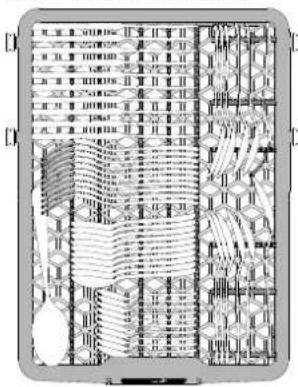
The third rack was designed to house the cutlery. Arrange the cutlery as shown in the figure.
A separate arrangement of the cutlery makes collection easier after washing and improves washing and drying performance.
Knives and other utensils with sharp edges must be positioned with the blades facing downwards.
UPPER RACK
natural_image
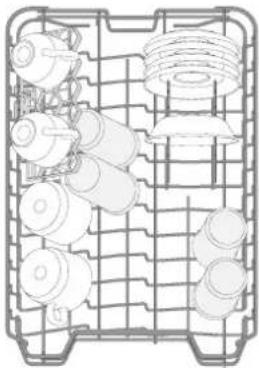
Technical line drawing of a mechanical component grid with multiple cylindrical and threaded parts (no text or symbols)Load delicate and light dishes: glasses, cups, saucers, low salad bowls.
(loading example for the upper rack)
ADJUSTING THE HEIGHT OF THE UPPER RACK
The height of the upper basket can be adjusted: high position to place bulky crockery in the lower basket and low position to make the most of the tip-up compartments by creating more space upwards.
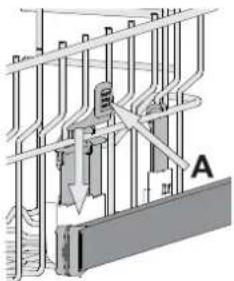
The upper rack is equipped with a Upper Rack height adjuster (see figure), without pressing the levers, lift it up by simply holding the rack sides, as soon as the rack is stable in its upper position. To restore to the lower position, press the levers (A) at the sides of the rack and move the basket downwards.
We strongly recommend that you do not adjust the height of the rack when it is loaded.
NEVER raise or lower the basket on one side only.
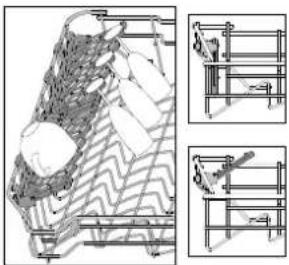
FOLDABLE FLAPS WITH ADJUSTABLE POSITION
The side foldable flaps can be fold or unfold to optimize the arrangement of crockery inside the rack.
Wine glasses can be placed safely in the foldable flaps by inserting the stem of each glass into the corresponding slots.
In the case of the high position of the upper rack, flaps cannot remain in the vertical position.
Depending on the model:
natural_image
Architectural or engineering diagram showing structural elements and cross-sections (no text or symbols)- to unfold the flaps there is needed to slide it up and rotate or release it from the snaps and pull it down.
- to fold the flaps there is needed to rotate it and slide flaps down or pull it up and attach flaps to the snaps.
LOWER RACK
natural_image
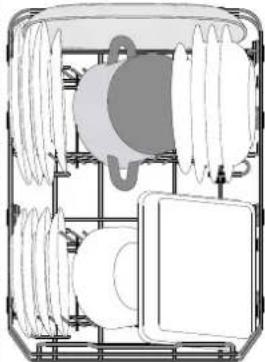
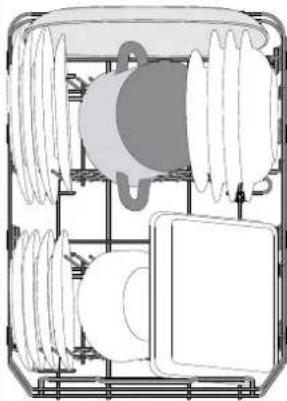
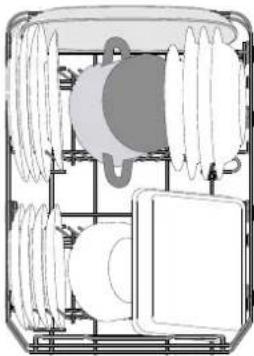
Diagram of a mechanical or electrical component with layered structure and no visible text or symbolsFor pots, lids, plates, salad bowls, cutlery etc... Large plates and lids should ideally be placed at the sides to avoid interferences with the spray arm.
(loading example for the lower rack)
DAILY USE
1. CHECK WATER CONNECTION
Check that the dishwasher is connected to the water supply and that the tap is open.
2. SWITCH ON THE DISHWASHER
Open the door and press the ON/OFF button.
3. LOAD THE RACKS (see LOADING THE RACKS)
4. FILLING THE DETERGENT DISPENSER
5. CHOOSE THE PROGRAM AND CUSTOMISE THE CYCLE
Select the most appropriate program in accordance with the type of crockery and its soiling level (see PROGRAMS DESCRIPTION) by pressing the P button.
6. START
Start the wash cycle by pressing START/Pause button (led is lit) and closing the door within 4 sec. When the program starts you hear a single beep. If the door was not closed within 4sec., the alarm sound will be played. In this case, open the door, press START/Pause button and close the door again within 4 sec.
7. END OF WASH CYCLE
The end of the wash cycle is indicated by beeps and by the flashing of the indicator light of the selected program. Open the door and switch off the appliance by pressing the ON/OFF button.
Wait for a few minutes before removing the crockery - to avoid burns. Unload the racks, beginning with the lower one.
The machine will switch off automatically during certain extended periods of inactivity, in order to minimise electricity consumption. If the crockery is only lightly soiled or if it has been rinsed with water before being placed in the dishwasher, reduce the amount of detergent used accordingly.
MODIFYING A RUNNING PROGRAM
If a wrong program was selected, it is possible to change it, provided that it has only just begun: open the door, press and hold the ON/OFF button, the machine will switch off.
Switch the machine back on using the ON/OFF button and select the new wash cycle and any desired options; Start the wash cycle by pressing START/Pause button and closing the door within 4 sec.
ADDING EXTRA CROCKERY
Without switching off the machine, open the door (START/Pause led starts blinking) (be ware of HOT steam!) and place the crockery inside the dishwasher. Press the START/Pause button and close the door within 4 sec., the cycle will resume from the point at which it was interrupted.
ACCIDENTAL INTERRUPTIONS
If the door is opened during the wash cycle, or if there is a power cut, the cycle stops. Press the START/Pause button and close the door within 4 sec., the cycle will resume from the point at which it was interrupted.
ADVICE AND TIPS
TIPS
Before loading the baskets, remove all food residues from the crockery and empty the glasses. You do not need to rinse beforehand under running water.
Arrange the crockery so that it is held in place firmly and does not tip over; and arrange the containers with the openings facing downwards and the concave/convex parts placed obliquely, thus allowing the water to reach every surface and flow freely.
Warning: lids, handles, trays and frying pans do not prevent the sprayer arms from rotating.
Place any small items in the cutlery basket.
Very soiled dishes and pans should be placed in the lower basket because in this sector the water sprays are stronger and allow a higher washing performance.
After loading the appliance, make sure that the sprayer arms can rotate freely.
UNSUITABLE CROCKERY
- Wooden crockery and cutlery.
- Delicate decorated glasses, artistic handicraft and antique crockery. Their decorations are not resistant.
- Parts in synthetic material which do not withstand high temperatures.
• Copper and tin crockery.
- Crockery soiled with ash, wax, lubricating grease or ink.
The colours of glass decorations and aluminium/silver pieces can change and fade during the washing process. Some types of glass (e.g. crystal objects) can become opaque after a number of wash cycles too.
DAMAGE TO GLASS AND CROCKERY
- Only use glasses and porcelain guaranteed by the manufacturer as dishwasher safe.
- Use a delicate detergent suitable for crockery
- Collect glasses and cutlery from the dishwasher as soon as the wash cycle is over.
TIPS ON ENERGY SAVING
- When the household dishwasher is used according to the manufacturer's instructions, washing tableware in a dishwasher usually consumes less energy and water than hand dishwashing.
- In order to maximize dishwasher efficiency it is recommended to initiate the wash cycle once dishwasher is fully loaded. Loading the household dishwasher up to the capacity indicated by the manufacturer will contribute to energy and water savings. Information on correct loading of tableware can be found in LOADING THE RACKS chapter.
- In case of partial loading it is recommended to use dedicated wash options if available (Half load/ Zone Wash, Multizone), filling up only selected racks. Incorrect loading or overloading the dishwasher may increase resources usage (such as water, energy and time, as well as increase noise level), reducing cleaning and drying performance.
- Manual pre-rinsing of tableware items leads to increased water and energy consumption and is not recommended.
HYGIENE
To avoid odour and sediment which can be accumulated in the dishwasher please run a high temperature program at least one a month. Use a tea spoon of detergent and run it without the loading to clean your appliance.
CARE AND MAINTENANCE
CLEANING THE FILTER ASSEMBLY
Regularly clean the filter assembly so that the filters do not clog and that the waste water flows away correctly.
Using dishwasher with clogged filters or foreign objects inside filtration system or sprayarms may cause unit malfunction resulting in lose of performance, noisy work or higher resources usage.
The filter assembly consists of three filters which remove food residues from the washing water and then recirculate the water.
The dishwasher must not be used without filters or if the filter is loose.
At least once per month or after each 30 cycles, check the filter assembly and if necessary clean it thoroughly under running water, using a non-metallic brush and following the instructions below:
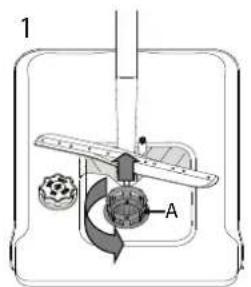
- Turn the cylindrical filter A in an anti-clockwise direction and pull it out (Fig 1).
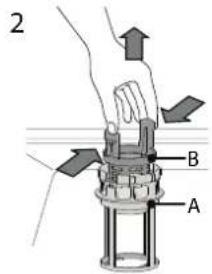
- Remove the cup filter B by exerting a slight pressure on the side flaps (Fig 2).
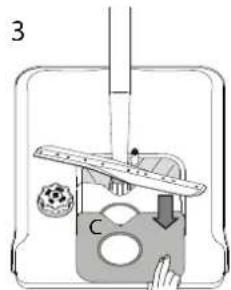
- Slide out the stainless-steel plate filter C (Fig 3).
- In case you find foreign objects (such as broken glass, porcelain, bones, fruit seeds etc.) please remove them carefully.
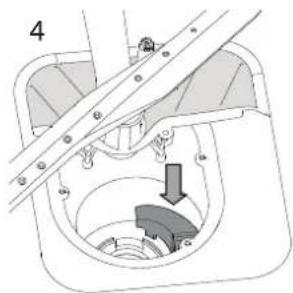
- Inspect the trap and remove any food residues. NEVER REMOVE the wash-cycle pump protection (black detail) (Fig 4).
natural_image
Technical diagram of a mechanical assembly with a lever and gear mechanism (no text or labels)After cleaning the filters, re-place the filter assembly and fix it in position correctly; this is essential for maintaining the efficient operation of the dishwasher.
CLEANING THE WATER INLET HOSE
If the water hoses are new or have not been used for an extended period of time, let the water run to make sure it is clear and free of impurities before performing the necessary connections. If this precaution is not taken, the water inlet could become blocked and damage the dishwasher.
CLEANING THE SPRAY ARMS
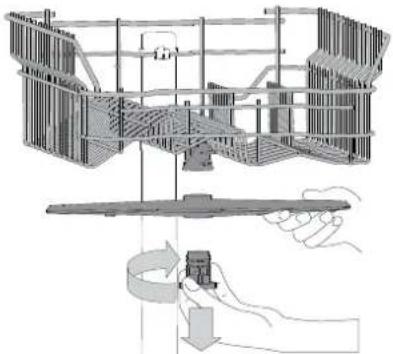
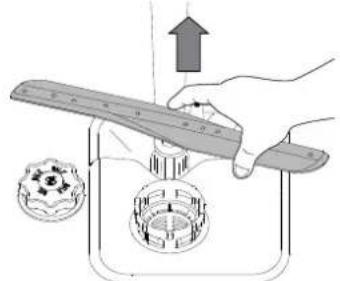
On occasions, food residue may become encrusted onto the spray arms and block the holes used to spray the water. It is therefore recommended that you check the arms from time to time and clean them with a small non-metallic brush.
natural_image
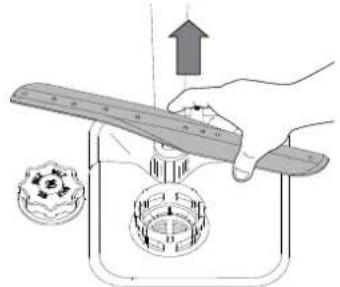
Technical diagram of a mechanical assembly with hand and rotating component (no text or labels)To remove the upper spray arm, turn the plastic locking ring in a clockwise direction. The upper spray arm should be replaced so that the side with the greater number of holes is facing upwards.
natural_image
Illustration of a hand using a tool to lift a mechanical component, with no visible text or symbols.The lower spray arm may be removed by pulling it upwards.
WATER SOFTENING SYSTEM
Water softener automatically reduces water hardness, consequently preventing scale buildup on heater, contributing also to better cleaning efficiency.
This system regenerates itself with salt, therefore it is required to refill salt container when empty.
Frequency of regeneration depends on water hardness level setting - regeneration takes place once per 6 Eco cycles with water hardness level set to 3.
Regeneration process starts in final rinse and finishes in drying phase, before cycle ends.
- Single regeneration consumes: 3.5L of water;
• Takes up to 5 additional minutes for the cycle;
• Consumes below 0.005kWh of energy.
TROUBLESHOOTING
In case your dishwasher doesn't work properly, check if the problem can be solved by going through the following list. For other errors or issues please contact authorized After-sales Service whose contact details can be found in the warranty booklet. Spare parts will be available for a period of either up to 7 or up to 10 years, according to the specific Regulation requirements.
| PROBLEMS POSSIBLE CAUSES SOLUTIONS | ||
| The dishwasher won't start or does not respond to commands. | The appliance has not been plugged in properly. | Insert the plug into the socket. |
| Power outage. | For safety reasons, dishwasher will not re-start automatically when power returns. Open dishwasher door, press START/Pause button and close the door within 4 seconds. | |
| The dishwasher door is not closed. ActiveDry pin is not pulled in. | Vigorously push the door until you hear the "click". | |
| Cycle is interrupted by door opening for more than 4 seconds. | Press START/Pause and close the door within 4 seconds. | |
| It does not respond to commands. | Switch off the appliance by pressing the ON/OFF button, switch it back on after approximately one minute and restart the program. If problem persists, unplug the appliance for 1 minute, then plug it back in. | |
| The dishwasher won't drain. | The wash cycle has not finished yet. Wait until the wash cycle finishes. | |
| The drain hose is bent. Check that the drain hose is not bent (see INSTALLATION INSTRUCTION). | ||
| The sink drain pipe is blocked. Clean the sink drain pipe. | ||
| The filter is clogged up with food residues. Clean the filter (see CLEANING THE FILTER ASSEMBLY). | ||
| The dishwasher makes excessive noise. | The dishes are rattling against each other. | Position the crockery correctly (see LOADING THE RACKS). |
| An excessive amount of foam has been produced. | The detergent has not been measured out correctly or it is not suitable for use in dishwashers (see FILLING THE DETERGENT DISPENSER). Restart the current cycle by switching OFF the dishwasher, then switch it on again, select a new program, press START/Pause and close the door within 4 seconds. Please do not add any detergent. | |
| The dishes are not clean. | The crockery has not been arranged properly. | Arrange the crockery correctly (see LOADING THE RACKS). |
| The spray arms cannot rotate freely, being hindered by the dishes. | Arrange the crockery correctly (see LOADING THE RACKS). | |
| The wash cycle is too gentle. Select an appropriate wash cycle (see PROGRAMS TABLE). | ||
| An excessive amount of foam has been produced. | The detergent has not been measured out correctly or it is not suitable for use in dishwashers (see FILLING THE DETERGENT DISPENSER). | |
| The cap on the rinse aid compartment has not been shut correctly. | Make sure the cap of the rinse aid dispenser is closed. | |
| The filter is soiled or clogged. Clean the filter assembly (see CARE AND MAINTENANCE). | ||
| There is no salt. Fill the salt reservoir (see FILLING THE SALT RESERVOIR). | ||
| The dishwasher does not fill the water. All LEDs are blinking rapidly | No water in the water supply or the tap is closed. | Make sure there is water in the water supply or the tap running. |
| The inlet hose is bent. | Make sure the inlet hose is not bent (see INSTALLATION) reprogram the dishwasher and reboot. | |
| The sieve in the water inlet hose is clogged; it is necessary to clean it | After having carried out the verification and cleaning, turn off and turn on the dishwasher and restart a new program. | |
| Dishwasher finishes the cycle prematurely. | Drain hose positioned too low or siphoning into home sewage system. | Check if end of drain hose is placed at correct height (see INSTALLATION). Check for siphoning into home sewage system, install air admittance valve if necessary. |
| Air in water supply. Check water supply for leaks or other issues letting air inside. | ||
| Detergent leaks. | Depends on the liquid detergent used and can be emphasized in case of delay option is activated. | Small leaks will not cause machine malfunction and can be avoided by changing liquid detergent type or using tablets. |
Policies, standard documentation, ordering of spare parts and additional product information can be found by:
• Using QR code on your product.
- Visiting our website docs.hotpoint.eu and parts-selfservice.europeanappliances.com
• Alternatively, contact our After-sales Service (See phone number in the warranty booklet).
When contacting our After-sales Service, please state the codes provided on your product's identification plate.
The model information can be retrieved using the QR-Code reported in the energy label.
The label also includes the model identifier that can be used to consult the portal of the registry at https://eprel.ec.europa.eu.
GUIDE D'UTILISATION QUOTIDIENNE
D'UTILISATION QUOTIDIENNE

MERCI D'AVOIR CHOISI UN PRODUIT HOTPOINT ARISTON.
natural_image
Illustration of a hand pouring granular material into a bowl on a stand next to a sliced onion (no text or symbols)B
OPTIONS ET FONCTIONS
natural_image
Technical line drawing of a mechanical component grid with multiple cylindrical and threaded parts (no text or symbols)natural_image
Architectural line drawing of a building facade with internal wall patterns and two side-view diagrams (no text or symbols)natural_image
Diagram of a mechanical or electrical component with layered structure and no visible text or symbolsINTERRUPTIONS IMPRÉVUES
natural_image
Technical diagram of a mechanical assembly with hand and base components, no visible text or symbols- Gornja košara
- Stalak za pribor za jelo
- Pomični preklopi
- Mehanizam za podešavanje gornje košare po visini
- Gornji nosač prskalica
- Donja košara
- Donji nosač prskalica
- Sklop filtra
- Spremnik za sol
- Spremnici za deterdžent i sredstvo za ispiranje
- Natpisna pločica
- Upravljačka ploča
UPRAVLJAČKA PLOČA

natural_image
Illustration of a hand pouring granular material into a bowl on a stand next to a sash (no text or symbols)- Otvorite dozator B tako da pritisnete i povučete jezičac na poklopcu.
- Pažljivo uvedite sredstvo za ispiranje do referente oznake maksimalne količine (110 ml) prostora za punjenje, pazite da ne dođe do prolijevanja. Ako se to dogodi, suhom krpom odmah očistite proliveno.
- Pritisnite poklopac dok se ne zatvori uz klik.
- Prilikom doziranja deterdženta pogledajte ranije navedene informacije kako biste stavili odgovarajuću količinu. Unutar dozatora E nalaze se oznake koje vam pomažu prilikom doziranja.
- Uklonite ostatke deterdženta s rubova spremnika prije no što poklopac zatvorite tako da sjedne.
- Poklopac spremnika za deterdžent zatvorite tako da ga povučete dok se mehanizam za zatvaranje ne učvrsti.
natural_image
Technical line drawing of a mechanical assembly with gears and housing (no text or symbols)POMIČNI PREKLOPI S PODESIVIM POLOŽAJEM
natural_image
Technical diagram of a mechanical or electrical component with internal components and no visible text or symbolsnatural_image
Architectural line drawing of a building interior with structural details and cross-sections (no text or symbols)SVAKODNEVNA UPORABA
1. PROVJERA PRIKLJUČKA ZA VODU
natural_image
Mechanical assembly diagram showing a lever mechanism interacting with a component (no text or symbols visible)natural_image
Technical diagram of a mechanical assembly with a hand operating a rotating component (no text or symbols present)natural_image
Illustration of a hand using a tool to lift a mechanical component, with no visible text or symbols.Donji krak mlaznice može se skinuti tako da se povuče prema gore.
SUSTAV OMEKŠAVANJA VODE
natural_image
Illustration of a hand pouring granular material into a bowl on a stand next to a sash (no text or symbols)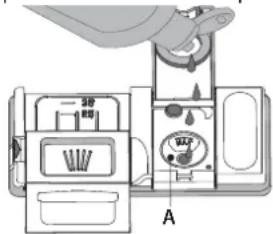
natural_image
Technical line drawing of a mechanical assembly with multiple components arranged in a grid layout (no text or symbols)SPONDE RIBALTABILI CON POSIZIONE REGOLABILE
natural_image
Architectural line drawing of a building facade with internal structural elements and two side-view diagrams (no text or symbols)natural_image
Technical diagram of a mechanical or electrical component with no visible text, numbers, or symbols.natural_image
Mechanical assembly diagram showing a valve inserted into a housing with a downward arrow indicating force or motion (no text or symbols present)natural_image
Technical diagram of a mechanical assembly with hand operating a tool, showing internal components and motion direction (no text or labels)natural_image
Illustration of a hand using a tool to press a mechanical component with a gear and a bracket (no text or symbols)ДНЕВЕН РЕФЕРЕНТЕН
ВОДИЧ

ВИ БЛАГОДАРИМЕ ШТО КУПИВТЕ ПРОИЗВОД НА HOTPOINT ARISTON.
natural_image
Illustration of a hand pouring granular material into a bowl on a stand next to a sliced food item (no text or symbols)natural_image
Technical line drawing of a mechanical assembly with multiple components arranged in a grid (no text or symbols)Ставете деликатни и лесни садови: чаши, шољи, чинии, ниски чинии за салата.
natural_image
Architectural line drawing of a building interior with structural details and cross-sections (no text or symbols)ДОЛНА РЕШЕТКА
natural_image
Technical diagram of a mechanical or electrical component with multiple circular components and internal structure (no text or symbols)natural_image
Technical diagram of a mechanical assembly with hand operating a tool, showing internal components and motion arrows (no text or labels)natural_image
Illustration of a hand pouring granular material into a bowl on a stand, with a slice of food nearby (no text or symbols)Ko to storite, zaženite program brez posode.
- Posodo Bodprete tako, da pritisnite na jeziček na pokrovčku in ga povlečete.
- Tekočino za lesk previdno nalijte do oznake za maksimum (110 ml), pri čemer pazite, da tekočine ne polivate. Če se to vseeno zgodi, razlito tekočino nemudoma pobrišite s suho krpo.
- Pritisnite na pokrovček, da se slišno zaskoči.
Tekočine za lesk NE nalivajte neposredno v kad.
NASTAVITEV ODMERJANJA TEKOČINE ZA LESK
natural_image
Technical line drawing of a mechanical component grid with multiple cylindrical parts (no text or symbols)ZLOŽLJIVA POLIČKA Z NASTAVLJIVIM POLOŽAJEM
natural_image
Architectural line drawing of a building facade with internal structural elements and two inset diagrams showing different views (no text or symbols present)- će želite razklopiti poličko, jo povlecite navzgor in jo obrnite ali sprostite iz zapahov ter jo povlecite navzdol.
- će želite sklopiti poličko, jo obrnite, povlecite navzdol ali jo povlecite navzgor in namestite v zapahe.
SPODNJA KOŠARA
natural_image
Technical diagram of a mechanical or electrical component with layered structure (no visible text or symbols)natural_image
Mechanical assembly diagram showing a lever mechanism with a downward arrow indicating motion (no text or symbols present)natural_image
Technical line drawing of a mechanical assembly with hand and base components (no text or symbols)natural_image
Illustration of a hand using a ruler to measure a circular object with a gear-like structure, next to a small bowl (no text or symbols)natural_image
Illustration of a hand pouring granular material into a pan on a stand next to a sliced onion (no text or symbols)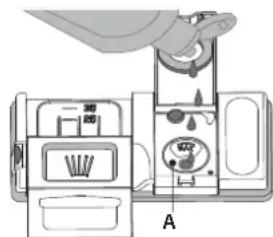
natural_image
Technical line drawing of a mechanical component grid with multiple cylindrical parts (no text or symbols)KRAHËT E PALOSSHËM ME POZITËN E RREGULLU-ESHME
natural_image
Architectural or engineering diagram showing layered structure with no visible text, numbers, or symbols.natural_image
Technical diagram of a mechanical or electrical component with layered structure (no visible text or symbols)(shihni NGARKIMIN I RAFTEVE)
4. MBUSHJA E KUTISË SË DETERGJENTIT
5. ZGJIDHNI PROGRAMIN DHE KONFIGURONI CIKLIN
natural_image
Mechanical assembly diagram showing a rotating component with a curved arrow indicating motion (no text or symbols)natural_image
Technical line drawing of a mechanical assembly with a hand holding a component, no visible text or symbols- Gornja korpa
- Polica za pribor za jelo
- Sklopiva krilca
- Podešivač visine gornje korpe
- Gornja prskalica
- Donja korpa
- Donja prskalica
- Sklop filtera
- Rezervoar za so
- Posude za deterdžent i sredstvo za ispiranje
- Natpisna pločica
- Kontrolna tabla
KONTROLNA TABLA
natural_image
Illustration of a hand pouring granular material into a bowl on a stand, with a slice of food nearby (no text or symbols)- Uklonite donju korpu i odvrnite poklopac rezervoara (u smeru suprotnom od smera kretanja kazaljki na satu).
- Samo prvi put kada ovo radite: napunite rezervoar za so vodom.
- Postavite levak (vidite sliku) i napunite rezervoar za so do ivice (oko 1 kg); nije neuobičajeno da malo vode iscuri.
- Uklonite levak i obrišite ostatke soli sa otvora.
Vodite računa da poklopac bude čvrsto zavijen, tako da deterdžent ne može da uđe u posudu tokom programa pranja (to može da ošteti omekšivač za vodu tako da se ne može popraviti).
Kad god je potrebno da dodate so, obavezno je da obavite proceduru pre početka ciklusa pranja da bi se izbegla korozija.
PODEŠAVANJE TVRDOĆE VODE
Da bi omekšivač za vodu radio kako treba, neophodno je da tvrdoća vode bude podešena na osnovu stvarne tvrdoće vode u vašoj kući. Ove informacije možete dobiti od lokalnog snabdevača vodom.
- Otvorite posudu B tako što ćete pritisnuti i povući na gore jezičak na poklopcu.
- Pažljivo sipajte sredstvo za ispiranje do oznake za maksimum (110 ml) na prostoru za punjenje - izbegavajte prosipanje. Ako se to dogodi, odmah obrišite prosuto suvom krpom.
- Pritisnite poklopac dok se ne začuje zvuk škljocanja.
- Za odmeravanje deterdženta pogledajte prethodno pomenute informacije kako biste sipali odgovarajuću količinu. U posudi E nalaze se oznake koje vam mogu pomoći u doziranju deterdženta.
- Uklonite ostatke deterdženta sa ivica posuda pre nego što i zatvorite poklopac dok se ne začuje zvuk škljocanja.
- Zatvorite poklopac posude za deterdžent povlačenjem na gore dok uređaj za zatvaranje ne bude čvrsto na mestu.
Treća korpa je namenjena za postavljanje pribora. Pribor postavite kao što je prikazano na slici. Odvajanje pribora prilikom postavljanja čini sakupljanje nakon pranja lakšim i poboljšava performanse pranja i sušenja.
natural_image
Technical line drawing of a mechanical component grid with multiple cylindrical parts (no text or symbols)SKLOPIVA KRILCA SA PODESIVIM POLOŽAJEM
natural_image
Technical diagram of a mechanical or electrical component with layered structure (no visible text or symbols)natural_image
Architectural site plan showing building layouts and structural details (no text or labels)SVAKODNEVNA UPOTREBA
1. PROVERITE PRIKLJUČAK NA VODOVODNU MREŽU
Proverite da li je mašina za pranje sudova povezana na dovod vode i da li je slavina otvorena.
2. UKLJUČITE MAŠINU ZA PRANJE SUDOVA
Otvorite vrata i pritisnite dugme UKLJUČI/ISKLJUČI.
3. NAPUNITE KORPE
(videti PUNJENJE KORPI)
4. PUNJENJE POSUDE ZA DETERDŽENT
5. IZABERITE PROGRAM | PRILAGODITE CIKLUS
Izaberite najprikladniji program u skladu sa vrstom posuđa i nivoom zaprljanosti (videti OPIS PROGRAMA) pritiskom na dugme P. Izaberite željene opcije (videti OPCIJE I FUNKCIJE).
6. POČETAK
NEODGOVARAJUĆE POSUĐE
- Drveno posuđe i pribor.
- Osetljive ukrašene čaše, umetničke rukotvorine i antičko posuđe. Dekoracija na njima nije otporna.
- Delovi od sintetičkog materijala ne podnose visoke temperature.
- Posuđe od bakra i kalaja.
- Posuđe zaprljano pepelom, voskom, mašću za podmazivanje ili mastilom.
natural_image
Technical diagram of a mechanical assembly with hand operating a tool, showing internal components and motion arrows (no text or labels)Da biste uklonili gornju prskalicu, okrenite plastični prsten za zaključavanje u smeru kretanja kazaljki na satu. Gornja prskalica se ponovo postavlja tako da strana sa više otvora bude okrenuta na gore.