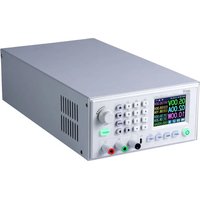
JT-PS1440-C-PRO - Programmable power supply Joy-It - Free user manual and instructions
Find the device manual for free JT-PS1440-C-PRO Joy-It in PDF.


| Product Type | Programmable Laboratory Power Supply |
| Brand | Joy-It |
| Model | JT-PS1440-C-PRO |
| Power Supply | 230 V AC |
| Output Voltage | 0 - 60 V DC |
| Output Current | 0 - 24 A |
| Output Power | 0 - 1440 W |
| Display | 2.4-inch Color LCD Screen |
| Output Voltage Accuracy | ± 0.3% + 3 digits |
| Output Current Accuracy | ± 0.5% + 5 digits |
| Voltage Measurement Resolution | 0.01 V |
| Current Measurement Resolution | 0.01 A |
| Output Ripple | 100 mV VPP |
| Interfaces | USB, RS-485 (PRO model), WiFi (optional) |
| Main Functions | CC/CV modes, battery charging, storage of 9 data groups, keyboard lock, system settings |
| Maintenance and Cleaning | Do not cover ventilation openings. Clean with a dry cloth. Do not open the device. |
| Safety | Risk of electric shock. Use only in dry indoor environments. Do not expose to moisture. Do not open. |
| Spare Parts and Repairability | Input and output fast-acting 30 A fuses (SMD package 6.1x2.7 mm). Repair reserved for qualified electricians. |
| General Information | Use in dry indoor environments. Operating temperature range: -10 to 40 °C. PC software available. |
Frequently Asked Questions - JT-PS1440-C-PRO Joy-It
User questions about JT-PS1440-C-PRO Joy-It
0 question about this device. Answer the ones you know or ask your own.
Ask a new question about this device
Download the instructions for your Programmable power supply in PDF format for free! Find your manual JT-PS1440-C-PRO - Joy-It and take your electronic device back in hand. On this page are published all the documents necessary for the use of your device. JT-PS1440-C-PRO by Joy-It.
USER MANUAL JT-PS1440-C-PRO Joy-It
PS1440 SERIES POWER SUPPLY
READY-TO-USE PROGRAMMABLE POWER SUPPLY
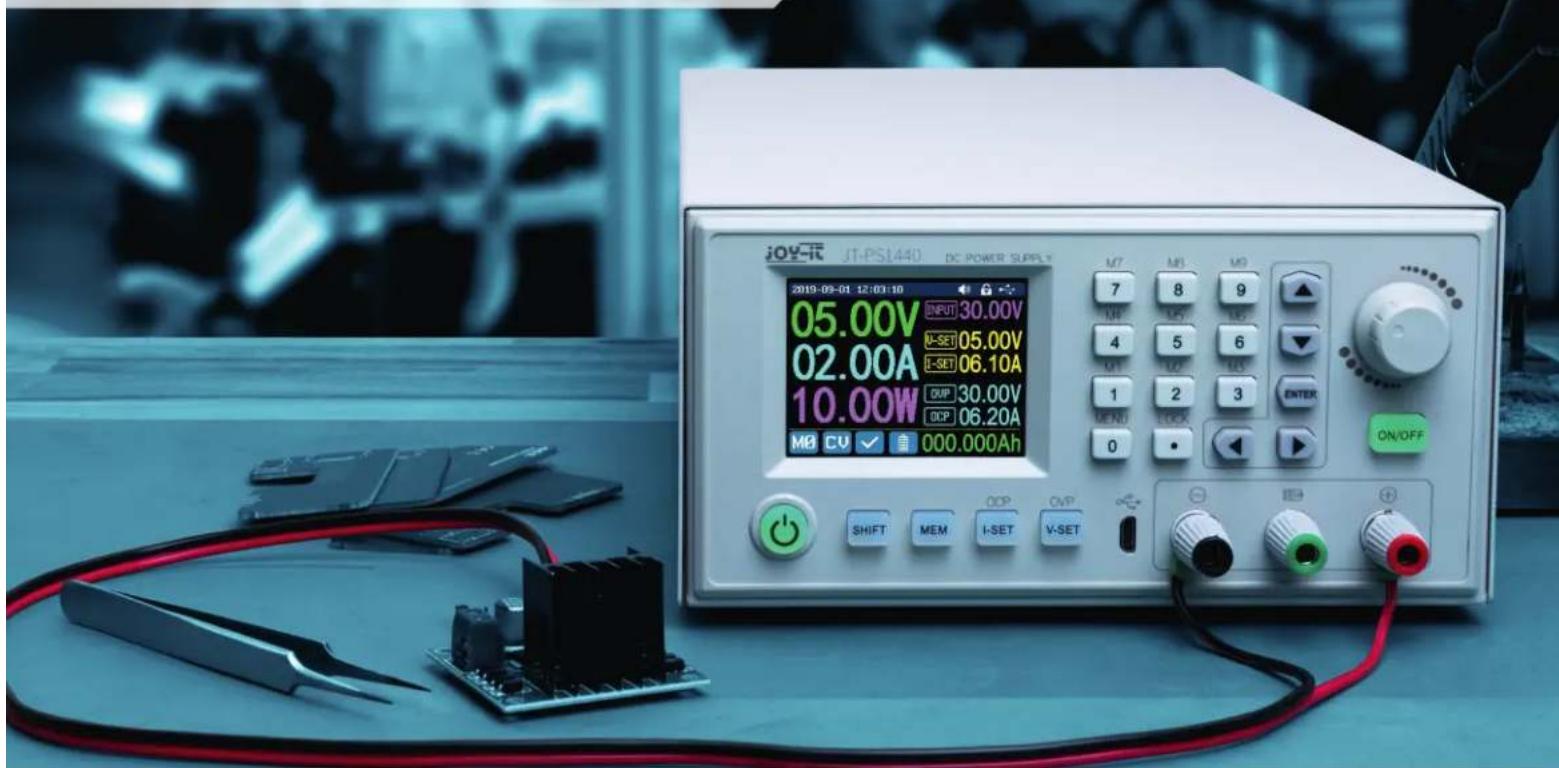
INHALTSVERZEICHNIS
DE
4.1 Operation 24
4.2 Battery charging mode 24
4.3 Adjusting the output voltage / output current 25
4.4 Data group fast storage 25
4.5 Locking the keypad 25
4.6 System settings 26
4.7 Adjusting the main page 27
4.8 Data storage settings 27
4.9 System information 28
6.RS-485 Interface 28
6. PC-Software 29
6.1 Overview 29
7.Declaration of conformity 31
8. Additional information 32
9. Support 32
1. GENERAL INFORMATION
Dear customer,
Thank you for choosing our product. In the following, we have listed what should be observed during commissioning. Should you encounter any unexpected problems during use, please do not hesitate to contact us.
The PS1440-C is a laboratory power supply which can be used in different operating modes (e.g. constant current or constant voltage mode). The keypad, as well as the pressure and rotary encoder, make the operation of the power supply particularly convenient. In addition, up to nine settings can be stored and loaded using the keypad. The high-resolution 2.4" color display clearly presents all important information. The USB interface allows the device to be operated via the PC.

ATTENTION! Do not connect any inductive loads to the device. If you nevertheless wish to connect inductive loads, you must protect the laboratory power supply unit against reverse currents. Otherwise, damage to the device cannot be ruled out.

The device may only be used in dry indoor areas, it must not get wet or damp. The device must not be opened as there is a risk of electric shock, which can lead to serious injury or death.
2. TECHNICAL SPECIFICATIONS
| SPECIFICATION PS1440 | |
| Display | 2.4" LCD color display |
| Input voltage range | 230 V AC |
| Output voltage range | 0 - 60 V DC |
| Output current range | 0 -24 A |
| Output power range | 0 - 1440 W |
| Input voltage accuracy | ±1 % + 5 digits |
| Output voltage accuracy | ±0,3 % + 3 digits |
| Output current accuracy | ±0,5 % + 5 digits |
| Battery voltage measurement accuracy | ±0,5 % + 3 digits |
| Input voltage measurement resolution | 0,01 V |
| Output voltage measurement resolution | 0.01 V |
| Output current measurement resolution | 0.01 A |
| Battery voltage measurement resolution | 0,01 V |
| Constant voltage mode response time | 2ms @ 0,1 - 5 A |
| Constant voltage mode load regulation | ±0,1 % + 2 digits |
| Constant current mode load regulation | ±0,1 % + 3 digits |
| Capacity measurement range | 0 - 9999,99 Ah |
| Energy measurement range | 0 - 9999,99 Wh |
| Capacity and energy statistical error | ±2 % |
| Output ripple | 100 mV VPP |
| Sensor temperature detection range | -10 - 100 °C / 0 - 200 °F |
| Sensor temperature detection accuracy | ±3 °C / ±6 °F |
| Working mode | Step-Down mode |
| Screen brightness setting | Level 0 - 5, 6 levels total |
| Working temperature range | -10 - 40 °C |
3. DEVICE OVERVIEW
In this chapter, we will explain the various operating elements of the device so that you can familiarize yourself with the operation of the laboratory power supply and ensure safe operation.
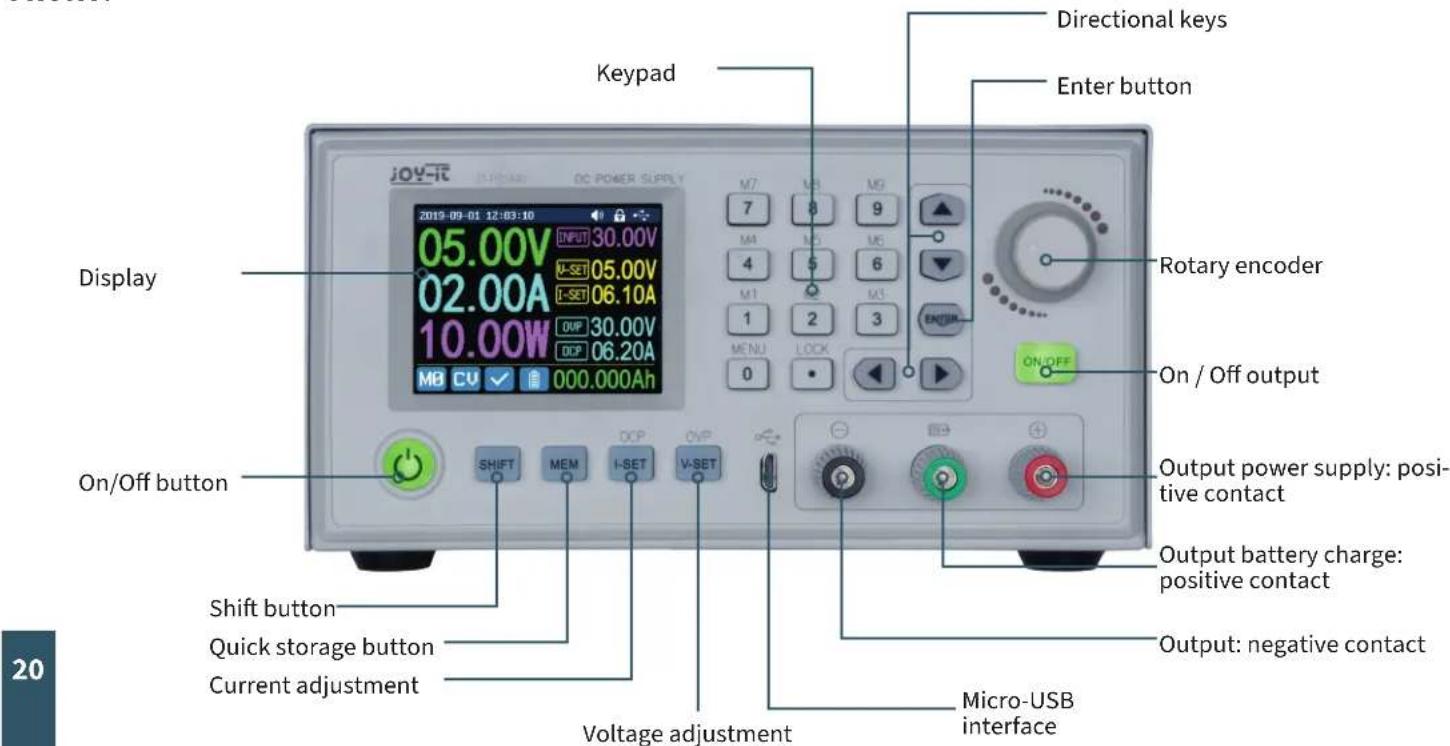
FRONT:
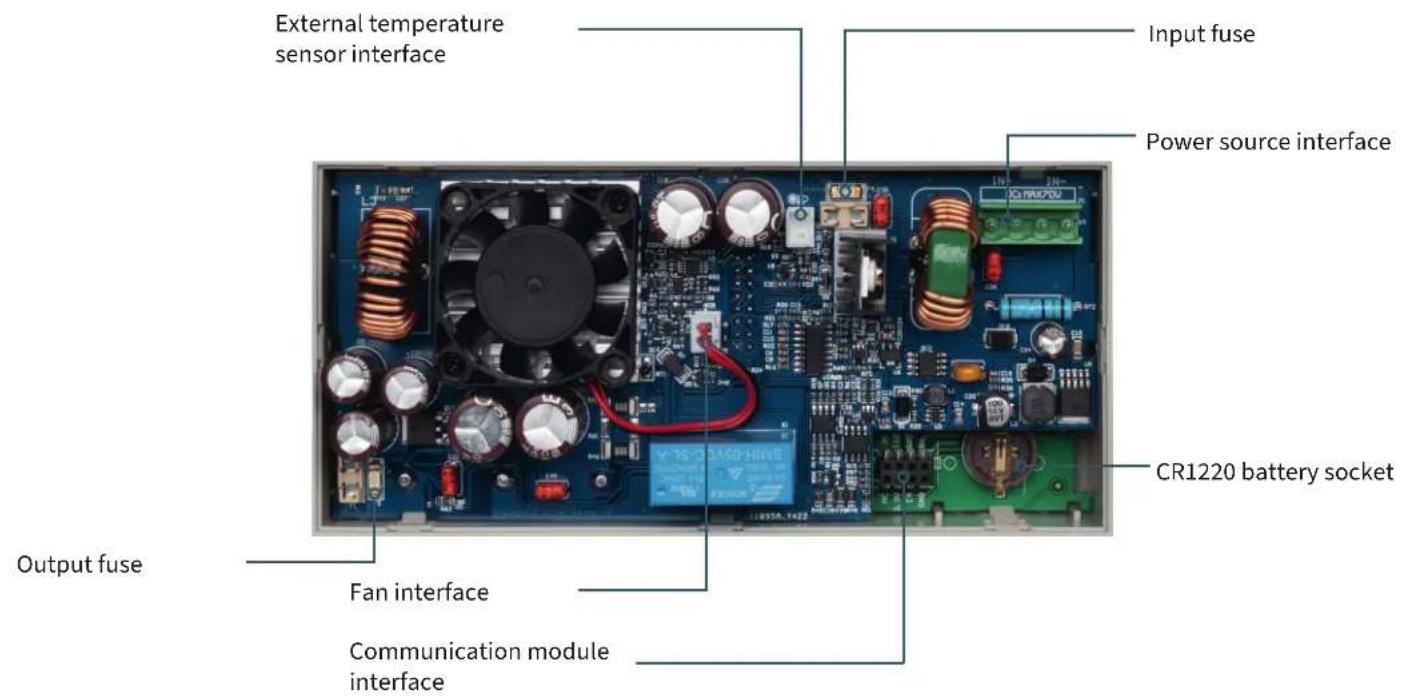
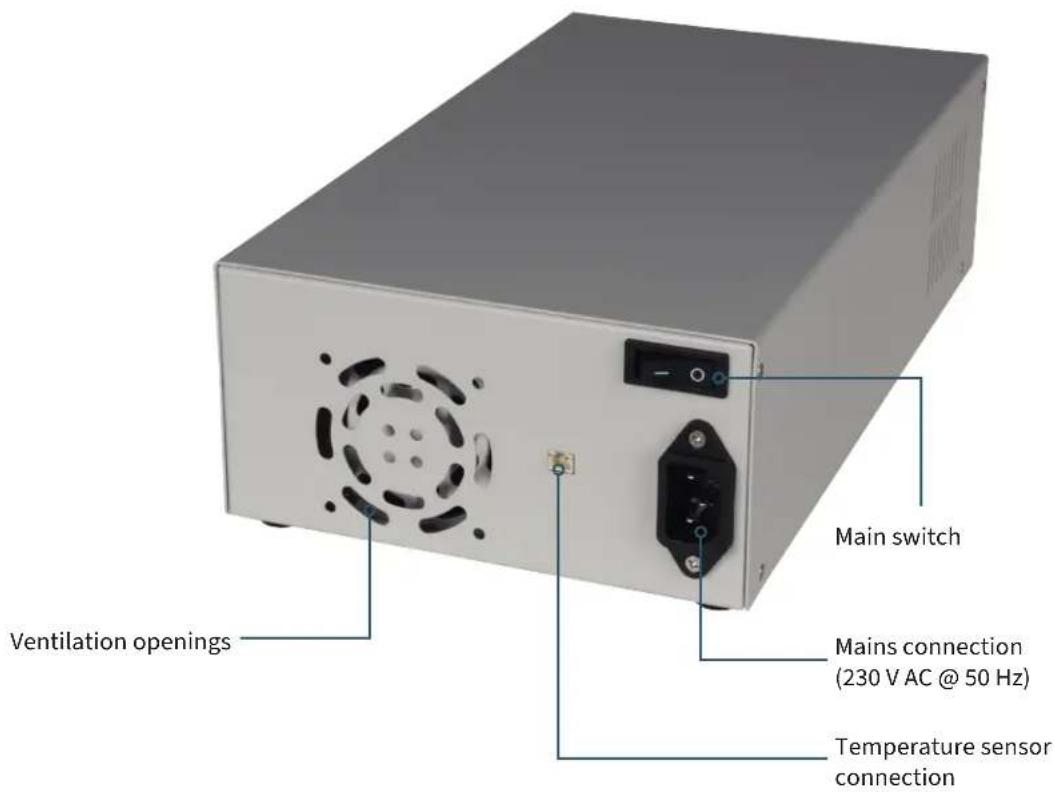
BACK:

ATTENTION! This device may only be opened by a qualified electrician who takes the necessary protective measures himself. Internal components are live, there is a risk of electric shock, which can lead to serious injury or death. Components inside store energy, the danger exists even when the mains plug is pulled out! We do not accept any liability for damage caused by opening the device. Please contact us or an authorized service partner if maintenance work is required.
The input and output fuses are fast-blow 30 A fuses in the SMD, 6.1x2.7mm package. The sockets next to the fuses are only approved for 10 A. When replacing the fuse, you must desolder the old fuse and re-solder the new one in the same position.

REAR SIDE OF CASE:
ATTENTION! Please note that the ventilation openings of the housing should not be covered under any circumstances.
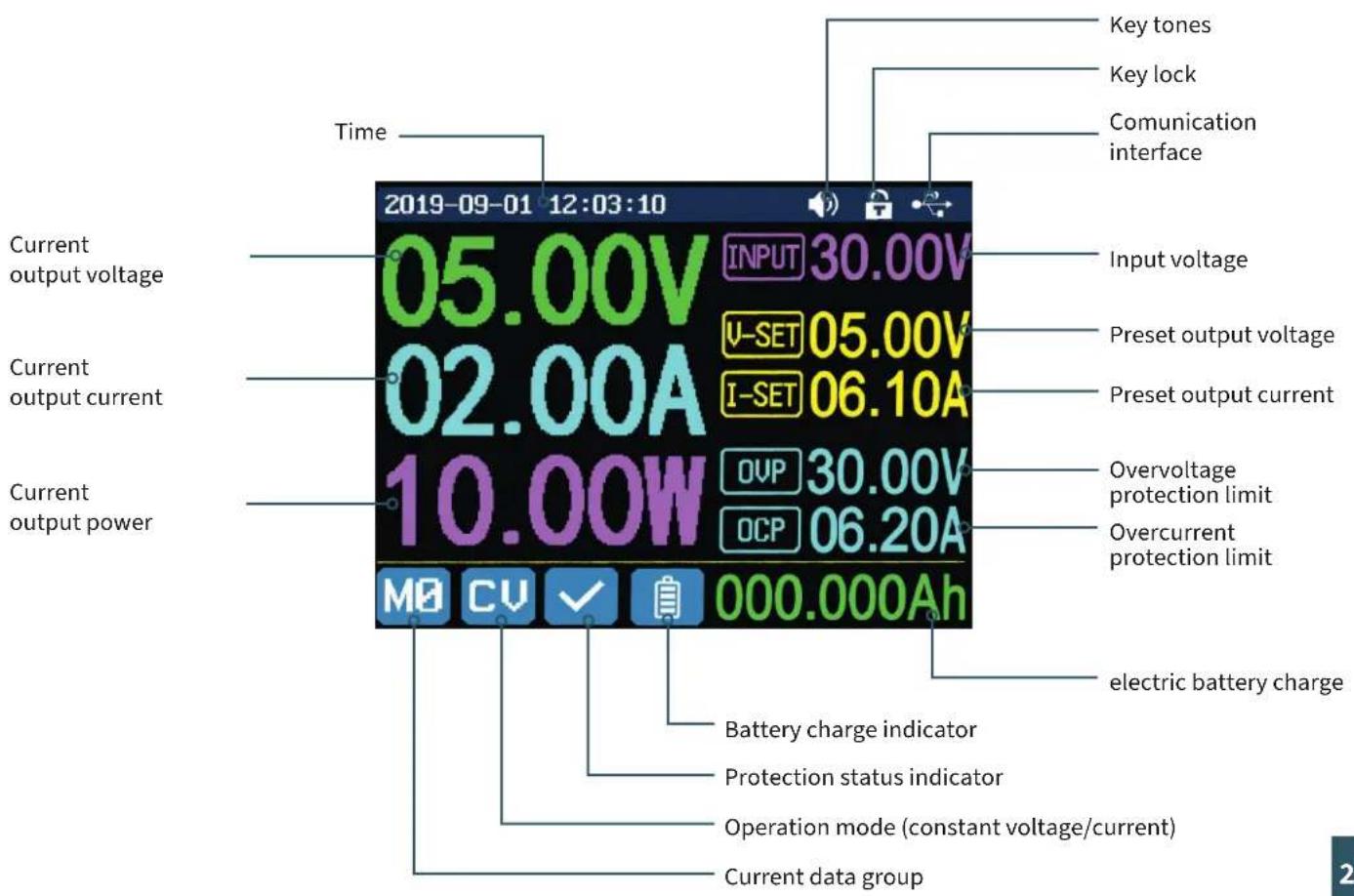
DISPLAY:
4. SETTINGS MENU
4.1 OPERATION
Press SHIFT + 0 to enter the system settings menu. In menu mode, the icon in red or the cursor is the currently selected menu. The icon in blue represents the menu that is not selected. Press ENTER to confirm. Press the encoder to cancel or to return. Press the direction keys to move the cursor or change the menu. The settings can be edited with the help of the rotary encoder. The changes are automatically saved and applied as soon as you leave the menu page.
RESETTING TO FACTORY SETTINGS: Press and hold the 0 key and switch on the instrument.
RESTORATION OF THE FACTORY CALIBRATION VALUE: Press and hold the 1 key and switch on the device.
BOOT-MODE: Press and hold ENTER and switch on the device.
4.2 BATTERY CHARGING MODE
After switching on, the external temperature, capacity and energy are displayed in the display area for battery-related information. In so far as there is an output current, the electrical charge and energy are automatically accumulated and automatically deleted after the device is switched off.
The green pole is connected to the positive pole of the battery. The black pole is connected to the negative pole of the battery. After the battery has been connected correctly, the battery charge indicator lights up red. Press ON/OFF to start the charging process. The battery charge indicator now lights up green. If the output current is less than 10mA , the output is automatically switched off. A battery with a protection board may not be charged. The charging voltage and charging current should be set yourself.
ATTENTION! Incorrect settings during charging, as well as defective / incorrect batteries can lead to serious damage, there is a risk of fire / explosion. This function is therefore reserved for electricians who can ensure that the correct settings and safety precautions are used. Batteries must not be charged unattended!
4.3 SETTING THE OUTPUT VOLTAGE / OUTPUT CURRENT
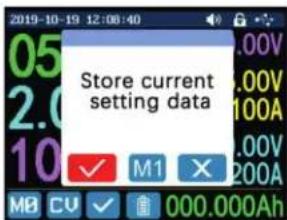
Press the I-SET key to set the output current value. You can use the encoder potentiometer to set the output value directly. Press the direction key to move the cursor. Of course, you can also set the value using the keypad and confirm your entry with ENTER. If you have entered an incorrect value, you can press the encoder to cancel your entry.
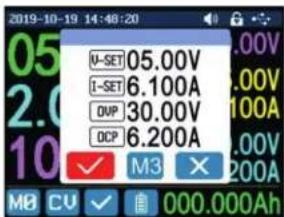
Press the V-SET key to set the output voltage. The procedure here is identical to that for setting the output current.
Press SHIFT + I-SET or SHIFT+ V-SET keys to set the overcurrent protection/overvoltage protection limit. The operation is identical to the setting of the output current.
The data group M0 represents the default data group and is loaded automatically every time the device is started. Change and save the settings for M0 manually and your desired settings will be loaded at each startup.
4.4 DATA GROUP FAST STORAGE
Press the MEM + keys 1-9, you can save the output voltage, output current, overvoltage protection limit and overcurrent protection limit in the corresponding data group. Confirm your entry with ENTER or cancel your entry by pressing the encoder. Press SHIFT + key 1-9 to quickly recall the stored data. Press ENTER to confirm or press the encoder to cancel.
4.5 LOCKING THE KEYPAD
Press SHIFT + . to lock or unlock the keypad. The status of the keypad lock is automatically shown in the status bar on the display:

Keypad locked

Keypad unlocked
4.6 SYSTEM- SETTINGS
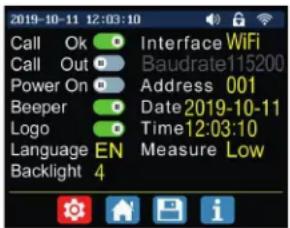
Press SHIFT + 0 to enter the system settings menu. The desired setting can be selected using the direction keys. The current selection is highlighted in red. The setting can be changed by pressing the encoder.
CALL OK: Deactivation of the data group quick access. When activated, the selection of a data group must be additionally confirmed via a confirmation window.
CALL OUT: Automatic output switch-on. When activated, the output is switched on automatically as soon as a data group is selected.
POwER ON: Output switch-on at startup. When activated, the output is automatically switched on as soon as the device is switched on.
BEEPER: Activation/deactivation of the key tones.
LOGO: Activation/deactivation of the boot logo during the startup process of the device.
LANGUAGE: Setting the system language. German, English, French and Simplified Chinese languages are supported.
BACKLIGHT: Adjustment of the screen brightness in 6 levels (0 - 5).
INTERFACE: Setting the communication interface. The USB and WiFi options are available. For WiFi, a separate module is required which is not provided in our devices.
BAUDRATE: If the device is operated via the USB communication interface, the following baud rates can be selected: 9600, 19200, 38400, 57600, 115200. In WiFi mode, the baud rate is fixed at 115200.
ADDRESS: The device address can be freely selected between 001 and 255.
TIME: Set the current system time here.
MEASURE: Update rate of the measured voltage. You can choose between low, medium and high.
4.7 ADJUSTING THE MAIN PAGE
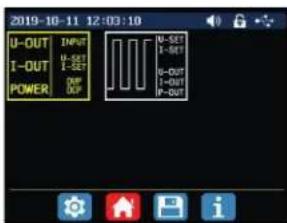
Press SHIFT + 0 to enter the system settings menu. Now press the right arrow key to enter the home page settings menu. Press ENTER and then use the direction key to set the classic style or the curve style.
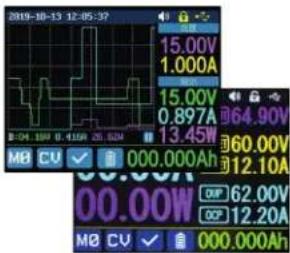
CLASSIC STYLE: The classic style is the default style of the system and displays voltage, current and power in large font.
CURVE STYLE: The curve style displays the output voltage, current and power in a color-coded curve. Here, D defines the scale of the ordinate. ENTER can be used to stop or continue the automatic curve progression. The encoder can be used to scale the ordinates of the curves.
4.8 DATA STORAGE SETTINGS
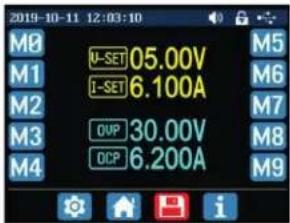
Press SHIFT + 0 to enter the system settings menu. Now press the right arrow key twice to call up the settings menu for data storage. Use the direction keys to select the desired data group.
I-SET: Setting the memory output current
V-SET: Setting the memory output voltage
SHIFT + I-SET: Setting the memory overcurrent protection limit
SHIFT + V-SET: Setting the memory overvoltage protection limit
4.9 SYSTEM INFORMATION
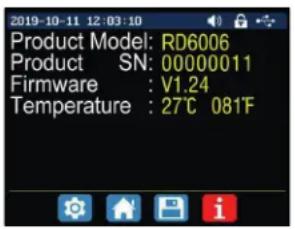
Open the system settings menu (SHIFT + 0) and press the right arrow key three times to enter the system information menu. Here you will see the model number, the serial number, the current firmware version, and the current system temperature.
5. RS485 INTERFACE (PRO MODEL ONLY)
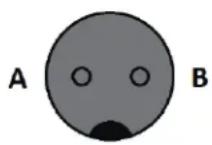
The JT-PS1440-C-Pro has an RS-485 interface that provides particularly robust communication options. The integration of this industry-standard interface expands the areas of application of your power supply unit to include reliable, interference-resistant data transmission and ensures that a consistently high signal quality is guaranteed even under adverse conditions.
The RS-485 interface allows reliable communication over long distances - data integrity and signal strength are largely maintained even over transmission distances of several hundred meters. This makes the system ideal for complex configurations in which numerous measurement and control components have to work closely together. Interference immunity plays a decisive role in extensive automation and monitoring setups in particular, in order to prevent malfunctions and data loss.
The supplied plug ensures a secure and permanent connection. It is manufactured to fit precisely and guarantees a secure fit without loose contacts, even in the event of vibrations or changing ambient conditions. This significantly increases the general operational reliability of your laboratory equipment and you benefit from optimized performance and smooth operation in all demanding test and automation scenarios.
6. PC-SOFTWARE
6.1 OVERVIEW
To be able to control the laboratory power supply unit via software, you must first download and install the drivers and the software. These can be found in the download area of the product page of your power supply unit under: https://iov-it.net/products.
After you have completed the installations, you can connect your device to your computer via USB.
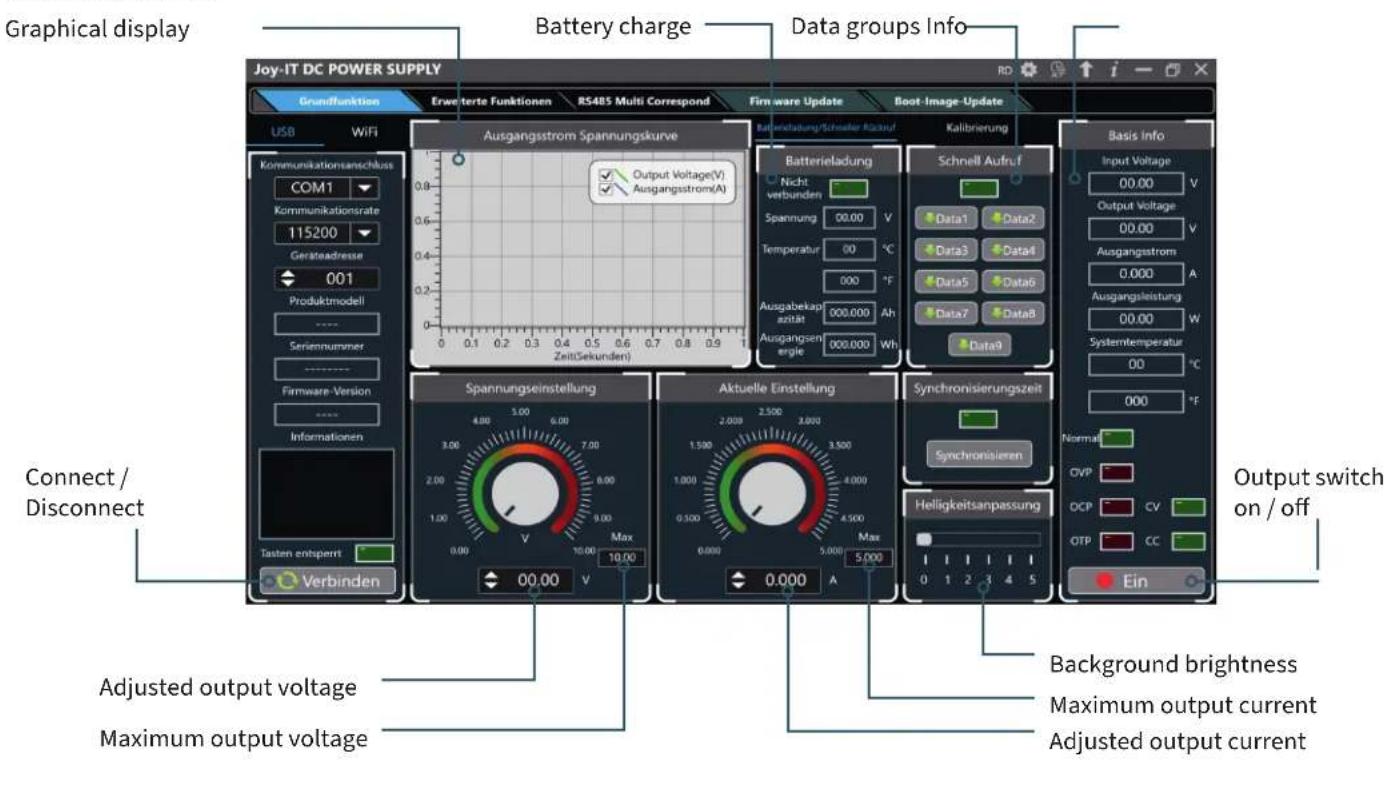
BASIC FUNCTIONS:
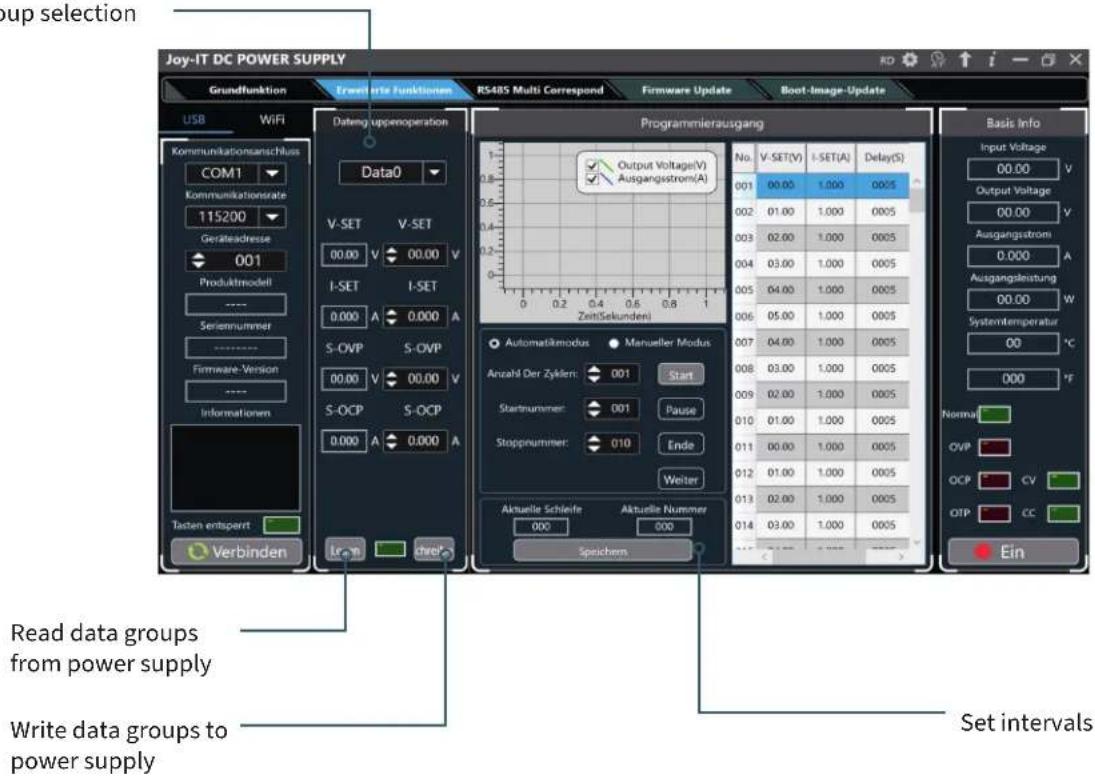
ADVANCED FUNCTIONS:
Data group selection
7. DECLARATION OF CONFORMITY
MANUFACTURER / DISTRIBUTOR: SIMAC Electronics GmbH
Pascalstr. 8
47506 Neukirchen-Vluyn
ARTICLE: JT-PS1440-C
DESCRIPTION: Laboratory power supply
INTENDED USE: Office use / Private households
Declarst that the product, when used as intended, is in conformity with the essential requirements of the following directives:
GUIDELINES: 2014/53/EU (RED), 2014/35/EU (LVD) &2011/65/EU (Rohs)
STANDARDS:
EN55032:2015
EN55035:2017
EN61000-3-2:2019
EN61000-3-3:2013
EN62368-1:2014+A11:2017
EN300 328 V.2.1.1:2016 EN301 489-1 V2.2.0:2017
EN301489-17 V3.2.0:2017 EN62479:2010
EN60950-1: 2006+A11: 2009+A1: 2010+A12: 2011+A2:2013
FREQUENCY RANGE:
2412-2472
Mhz
TRANSMISSION TYPE / CATEGORY: IEEE802.11 b/g/n
MAX. TRANSMIT POWER (EIRP): 12.86 dBm
DATE NAME OF THE PERSON RESPONSIBLE
SIGNATURE
POSITION IN THE COMPANY
10.08.2020
Xu Lu
Executive Director
8. ADDITIONAL INFORMATION
Our information and take-back obligations under the Electrical and Electronic Equipment Act (ElektroG)
Symbol on electrical and electronic equipment:
This crossed-out trash can means that electrical and electronic equipment does not belong in the household trash. You must hand in the old equipment at a collection point. Before dropping off, you must separate used batteries and accumulators that are not enclosed in the old device from the old device.
Return options:
As an end user, when you purchase a new appliance, you can return your old appliance (which performs essentially the same function as the new one purchased from us) for disposal free of charge. Small appliances with no external dimensions larger than 25cm can be returned in normal household quantities, regardless of the purchase of a new appliance.
Possibility to return to our company location during opening hours:
SIMAC Electronics GmbH, Pascalstr. 8, D-47506 Neukirchen-Vluyn
Possibility to return in your area:
We will send you a parcel stamp with which you can return the device to us free of charge. To do this, please contact us by e-mail at service@joy-it.net or by phone.
Packaging information:
Please pack your old device securely for transport. If you do not have suitable packaging material or do not wish to use your own, please contact us and we will send you suitable packaging.
9. SUPPORT
We are also there for you after the purchase. If you have any questions or problems, we are also available by e-mail, phone and ticket support system.
E-MAIL: service@joy-it.net
TICKET-SYSTEM: https://support.joy-it.net
PHONE: +49 (0)2845 9360 - 50
32 more information visit our website: www.joy-it.net
TABLE DES MATIÈRES
Chere cliente, cher client,
7. DÉCLARATION DE CONFORMITÉ
FABRICANT / DISTRIBUTEUR: SIMAC Electronics GmbH
Pascalstr.
8
47506
Neukirchen-Vluyn
ARTICLE: JT-PS1440-C
- PS1440 SERIES POWER SUPPLY
- INHALTSVERZEICHNIS
- DE
- GENERAL INFORMATION
- TECHNICAL SPECIFICATIONS
- DEVICE OVERVIEW
- REAR SIDE OF CASE:
- DISPLAY:
- SETTINGS MENU
- OPERATION
- BATTERY CHARGING MODE
- SETTING THE OUTPUT VOLTAGE / OUTPUT CURRENT
- DATA GROUP FAST STORAGE
- LOCKING THE KEYPAD
- SYSTEM- SETTINGS
- ADJUSTING THE MAIN PAGE
- DATA STORAGE SETTINGS
- SYSTEM INFORMATION
- RS485 INTERFACE (PRO MODEL ONLY)
- PC-SOFTWARE
- OVERVIEW
- ADVANCED FUNCTIONS:
- DECLARATION OF CONFORMITY
- ADDITIONAL INFORMATION
- Symbol on electrical and electronic equipment:
- Return options:
- Possibility to return to our company location during opening hours:
- Possibility to return in your area:
- Packaging information:
- SUPPORT
- TABLE DES MATIÈRES
- DÉCLARATION DE CONFORMITÉ
Brand : Joy-It
Model : JT-PS1440-C-PRO
Category : Programmable power supply